


A Three.js assets loading wrapper.
Include in your project :
npm install loadscreen
Or in your page :
<scripttype="text/javascript" src="LoadScreen.min.js"/>A full demo is proposed on codepen here.
//First create and append a webgl renderer, then :constls=newLoadScreen(renderer).onComplete(init).start(ASSETS);functioninit(){//Init scene, then :ls.remove(animate);}By default LoadScreen.js automatically generates the 'linear-horizontal' load screen. It displays and follows those steps : 'Loading' > 'Processing' > 'Compiling' > 'Creating scene'.
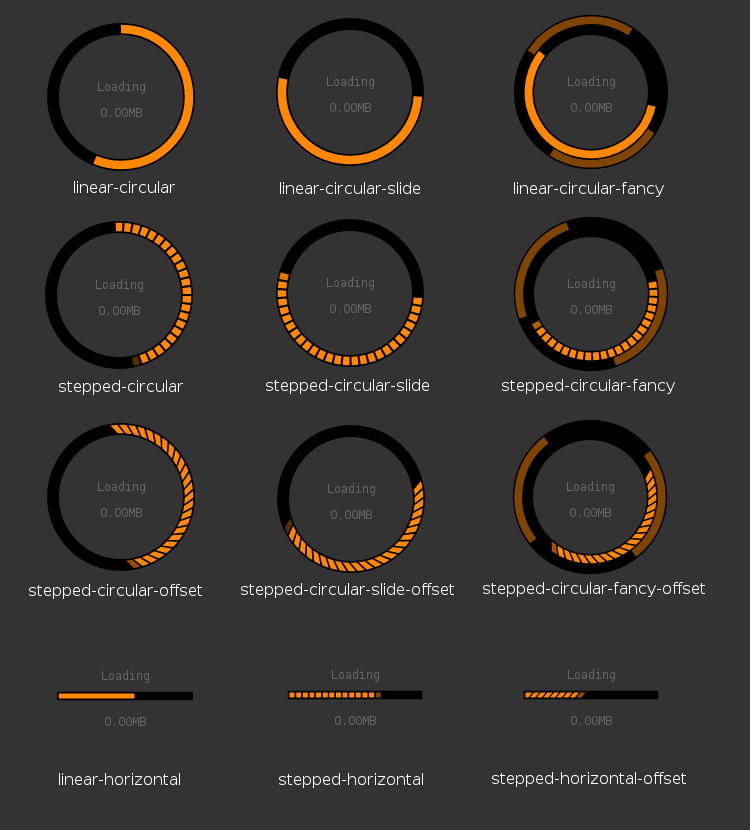
Passed assets style is declarative, no callback hell.
constASSETS={textures: {foliageMap: {path: "path/to/pic1.png",fileSize: 1467,minFilter: THREE.LinearFilter},foliageAO: {path: "path/to/pic2.png",fileSize: 1275}},geometries: {shape: {path: "path/to/model.json",fileSize: 3876,flatNormals: true,toBufferGeometry: true,onComplete(geometry){geometry.addAttribute("uv2",geometry.attributes.uv);}}},objects: {tree: {geometry: "shape",map: "foliageMap",aoMap: "foliageAO",material: newTHREE.MeshStandardMaterial(),castShadow: true,transparent: true,onComplete(object){object.scale.set(1,3,1);}}}};Methods are chainable, except remove and setProgress. Values are default.
conststyle={type: 'linear-horizontal',//Main look. 'custom' empties the info container.size: '170px',//Width of the central info container, in px or in %.background: '#333',progressContainerColor: '#000',progressColor: '#333',infoStyle: {//Text style : default values.fontFamily: 'monospace',color: '#666',fontSize: '12px',padding: '10px'},weight: '10',//Weight of the progress element (svg units).sizeInfo: true,//Display size progress in MB.progressInfo: true,//Display the progress element.textInfo: ['Loading','Processing','Compiling','Creating scene']//Or false to remove.};constoptions={forcedStart: false,//Start loading even if the canvas is out of sight (usually bad practice).verbose: false,//Logs progress, process and compile duration + total load screen duration.tweenDuration: .5//Progress and removal tweens durations.};constls=newLoadScreen(renderer,style);//Style is optional.window.addEventListener('resize',()=>{renderer.setSize(width,height);ls.setSize(width,height);});ls.setOptions(options).onProgress(progress=>{ ... })//Can be used to update a custom UI..onComplete(init)//After processing and compiling..start(ASSETS);//Load assets > process assets > compile materials > scene creation.//or.start();//Just add the info UI.//Then for big script progress or just testing.ls.setProgress(0.5);//Finally at the end of the onComplete callbackls.remove(animate);//Removal is tweened so next action is a callback.Note : the fileSize parameter is necessary for every files, explication here.
By order of processing :
- THREE.FileLoader
ASSETS.files={myFile1: {path: "path/to/file.txt",fileSize: 2789,//in KoonComplete(file){//do something}}};- THREE.TTFLoader
ASSETS.fonts.myFont1={path: "path/to/font.ttf",fileSize: 321};//After loading :ASSETS.fonts.myFont1;//THREE.Font- THREE.CubeTextureLoader
- THREE.HDRCubeTextureLoader
- THREE.KTXLoader
- THREE.PVRLoader
- THREE.TextureLoader
- THREE.TGALoader
ASSETS.textures={myTexture1: {//Regular textures.path: 'path/to/pic.jpg',fileSize: 2789,//in Ko//Other threejs textures properties can be specified.minFilter: THREE.LinearFilter,onComplete(texture){//Do something.}},myTexture2: {//Cubemaps.path: ['1.hdr','2.hdr','3.hdr','4.hdr','5.hdr','6.hdr'],fileSize: 5321,//Optional : if files are HDR, a PMREM can get output.toPMREM: true}};//GPU compression formats can be used, script will check device support.ASSETS.textures.myTexture1.GPUCompression: {PVR: {path: 'path/to/PVR/pic.pvr',fileSize: 3298},//Apple format.KTX: {path: 'path/to/KTX/pic.ktx',fileSize: 2983}//Khronos format.};//After loading :ASSETS.textures.myTexture1;//THREE.Texture//Also simply :ASSETS.textures.myTexture3=newTHREE.Texture(...);//Won't be processed.- THREE.MaterialLoader
- THREE.MTLLoader
ASSETS.materials={myMaterial1: {path: 'path/to/material.mtl',fileSize: 188,//Optionally :map: 'myTexture1'//Asset assigned after loading.//To use the MTLLoader with the OBJLoader and its 'setMaterials' method,//just add a 'setMaterials' property to the object, of value 'myMaterial1'.//If used alone, the output of the MTLLoader is a THREE.MTLLoader.MaterialCreator :onComplete(matCreator){//matCreator.preload() or matCreator.getAsArray()}}};//After loading :ASSETS.materials.myMaterial1;//THREE.MTLLoader.MaterialCreator,//or object with materials ( matCreator.preload() )//or array with materials ( matCreator.getAsArray() ).//Also in most other use cases :ASSETS.materials.myMaterial2=newTHREE.Material();//Won't be processed.- THREE.BufferGeometryLoader (format conflict with JSONLoader)
- THREE.CTMLoader (
loadmethod) - THREE.JSONLoader (threejs blender exporter)
- THREE.PLYLoader
- THREE.STLLoader
- THREE.VTKLoader
ASSETS.geometries={myGeometry1: {path: "path/to/geometry.ply",fileSize: 9498,//Ko//Next two are optional :flatNormals: true,//Call geometry.computeFlatVertexNormals() on THREE.Geometry instances.toBufferGeometry: false,//Force creation of a BufferGeometry.onComplete(geometry){//geometry.translate / center / merge / addAttribute...}}};//After loading :ASSETS.geometries.myGeometry1;//THREE.Geometry//Also simply :ASSETS.geometries.myGeometry2=newTHREE.BoxGeometry(3,2,1);//Won't be processed.- THREE.BVHLoader
ASSETS.animations={myAnimation1: {path: "path/to/anim.bvh",fileSize: 4827,onComplete(bvh){//Catch bvh.skeleton and bvh.clip.}}};- THREE.ThreeMFLoader
- THREE.AMFLoader
- THREE.AssimpLoader
- THREE.AssimpJSONLoader
- THREE.AWDLoader
- THREE.BabylonLoader
- THREE.BinaryLoader
- THREE.ColladaLoader
- THREE.ColladaLoader (2)
- THREE.CTMLoader (
loadPartsmethod for multiple geometries) - THREE.FBXLoader
- THREE.FBXLoader (2)
- THREE.GLTFLoader
- THREE.GLTFLoader (2)
- THREE.MMDLoader (needs the additional parameter
VMDPaths) - THREE.PCDLoader
- THREE.ObjectLoader
- THREE.OBJLoader
- THREE.PlayCanvasLoader (format conflict with ObjectLoader)
- THREE.UTF8Loader
- THREE.VRMLLoader
ASSETS.objects={myObject1: {//Load from file :path: 'path/to/object.obj',setMaterials: 'myMaterial1',//OBJLoader option for use with MTLLoader.fileSize: 3846//Ko},myObject2: {//Or create from asset :geometry: 'myGeometry1',//Use geometry asset 'myGeometry1'material: newTHREE.MeshPhongMaterial()},myObject3: {//Or create from scratch :geometry: newTHREE.PlaneBufferGeometry(5,3,9),material: newTHREE.MeshBasicMaterial()},myObject4: {//The object may have a hierarchy and / or animation(s):path: 'path/to/object.dae',fileSize: 1111,convertUpAxis: true,//Collada loader option.onComplete(collada){//Catch collada.scene, collada.animation etc.//Same with GLTF etc.}}};//Other parameters.ASSETS.objects.myObject5={geometry: 'myGeometry1',material: newTHREE.MeshPhongMaterial(),type: 'mesh',//Or 'points' or 'line', defaults to 'mesh'.//Specify any mesh or material property ://(if the object is a hierarchy, they will only get assigned to the root mesh).map: 'myTexture1',//Asset assigned to material.color: 0x33ff89,//Converted to a THREE.Color and assigned to material.castShadow: true,//Assigned to mesh.info: 'This is my object',//Unknown key 'info' in mesh and material > assigned to mesh.userData.};//After loading :ASSETS.objects.myObject5;//THREE.Mesh//Also simply :ASSETS.objects.myObject6=newTHREE.Mesh(...);//Won't be processed.Why is it mandatory to indicate fileSize ?
- XHR issue handling : sometimes the progress events can have
e.totalequaling zero, resulting in an infinite progress value when doinge.loaded/e.total. WithfileSizein Ko, the library has a fallback.- UX quality : with this information the loader has a linear progress. Contrarily, if two files of different sizes were to be loaded without the
fileSizeinformation, one big and one small, and if the small one is immediately received before even having a progress event of the other one, the progress bar can jump to 50%, then take more time to reach 100%, giving a mistaken information.
Why isn't the indicator progression perfectly smooth ?
For one file it should be, but for more, though the progress should be linear, it relies on the three.js loaders which automatically process the received data to output a geometry, a cubemap etc, while other files are still loading. Thus the processing time inside the native loaders can still freeze the rest of the loading sometimes. The HDRCubeTextureLoader is particularly concerned. Of course for performance reasons it should be more visible on mobile than pc.