Repository files navigation

Additional Fast Travel

A mod for Atlyss that gives the player additional fast travel options, to warp to any point of interest in any area at any time.

Features

  • Allows you to teleport to any area and any point of interest
  • Quick and easy usage with three chat commands
  • Works in singleplayer and multiplayer
  • Has basic support for MapLoader maps

Usage

This mod adds three extra chat commands the player can use to teleport themselves to any point of interest in any publicly accessible area in the game.

This can be achieved by initially using the /warp command to teleport to a given area, and then using the /goto command to move to a specific indicated location in the area.

All commands support partial matching for names of areas and points of interest, and will go directly to that location if there is a single unambiguous match.

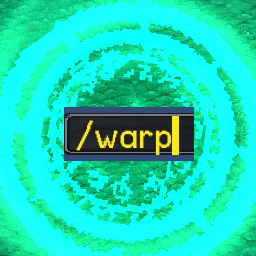
Using /warp

Using the /warp command will prompt the player to select an area name to warp to. Using the warp command with a given area name will teleport the player to the default spawn location of that area.

You can also specify a goto as a second parameter to warp to the area and then go to the point of interest.

For dungeons, it will default to Normal difficulty. Use /dungeon if you want a different difficulty.

Example usages:

  • /warp - list available warps
  • /warp Sanctum - warp to Sanctum
  • /warp Sanctum Shop - warp to Sanctum and goto the Shop point
  • /warp arc, /warp trial - warp to Arcwood Pass and Trial of the Stars through partial matching
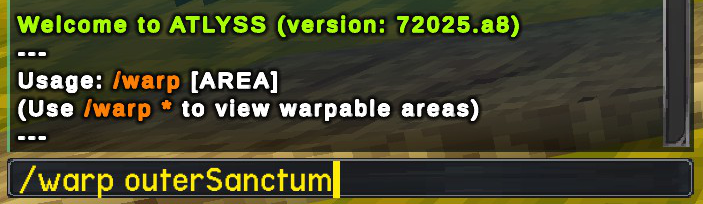
Using /goto

Using the /goto command inside of a given area will list a selection of points of interest for the area is currently in (Examples for the Sanctum hub area includes the fishing lake, Sally's shop and the Outer Sanctum portal).

Using the /goto command with a given area of interest will move the player instantly to the respective location in the current area.

For custom maps, /goto will pickup any SpawnPoint objects and make them available to players.

Example usages:

  • /goto - list available points of interest
  • /goto Shop - goto the Shop point
  • /goto way - goto Waypoint through partial matching

Using /dungeon

The /dungeon command allows warping to a dungeon map and setting the difficulty of the dungeon.

Example usages:

  • /dungeon CrescentGrove Hard - warp to Crescent Grove and set dungeon difficulty to Hard
  • /dungeon CrescentGrove Normal - warp to Crescent Grove and set dungeon difficulty to Normal
  • /dungeon CrescentGrove Easy - warp to Crescent Grove and set dungeon difficulty to Easy

Limitations

To prevent abnormal behavior, it is not possible to use the commands while inside a dungeon instance. You may still Recall as normal out of a dungeon instance.

Credits

Mod created by Clearwater

ATLYSS created by Kiseff

Donations

If you enjoyed this mod, please consider donating to Clearwater! All received donations will go directly towards server hosting costs, which will allow them to keep the servers online for some of their other mods. Thank you!

Buy Clearwater a Coffee at ko-fi.com

About

A mod for Atlyss that provides additional fast travel options.

Resources

Stars

0 stars

Watchers

0 watching

Forks

Releases

Packages

Contributors

Languages

, 'i'); if (__m === '*' || __re.test(location.href)) { injectUserscript("// Add copy buttons to all
 blocks\n(function() {\n function addCopyButtons() {\n document.querySelectorAll('pre code').forEach(function(codeBlock) {\n if (codeBlock.parentElement.hasAttribute('data-copy-added')) return;\n codeBlock.parentElement.setAttribute('data-copy-added', 'true');\n \n var btn = document.createElement('button');\n btn.textContent = 'Copy';\n btn.style.cssText = 'position:absolute;top:4px;right:4px;padding:2px 8px;font-size:11px;background:#4ecdc4;border:none;border-radius:4px;color:#1a1a2e;cursor:pointer;opacity:0.7;transition:opacity 0.2s;';\n btn.onmouseover = function() { this.style.opacity = '1'; };\n btn.onmouseout = function() { this.style.opacity = '0.7'; };\n btn.onclick = function() {\n navigator.clipboard.writeText(codeBlock.textContent).then(function() {\n btn.textContent = 'Copied!';\n setTimeout(function() { btn.textContent = 'Copy'; }, 1500);\n });\n };\n codeBlock.parentElement.style.position = 'relative';\n codeBlock.parentElement.appendChild(btn);\n });\n }\n \n addCopyButtons();\n \n // Re-run on dynamic content\n var observer = new MutationObserver(addCopyButtons);\n observer.observe(document.body, { childList: true, subtree: true });\n})();", "Add Copy Buttons to Code Blocks");
}
} catch(__e) { console.warn('[Userscript:Add Copy Buttons to Code Blocks]', __e); }
})();
(function(){
try {
var __m = "github.com";
var __re = new RegExp('^' + "github\\.com" + '
Skip to content

Repository files navigation

Additional Fast Travel

A mod for Atlyss that gives the player additional fast travel options, to warp to any point of interest in any area at any time.

Features

  • Allows you to teleport to any area and any point of interest
  • Quick and easy usage with three chat commands
  • Works in singleplayer and multiplayer
  • Has basic support for MapLoader maps

Usage

This mod adds three extra chat commands the player can use to teleport themselves to any point of interest in any publicly accessible area in the game.

This can be achieved by initially using the /warp command to teleport to a given area, and then using the /goto command to move to a specific indicated location in the area.

All commands support partial matching for names of areas and points of interest, and will go directly to that location if there is a single unambiguous match.

Using /warp

Using the /warp command will prompt the player to select an area name to warp to. Using the warp command with a given area name will teleport the player to the default spawn location of that area.

You can also specify a goto as a second parameter to warp to the area and then go to the point of interest.

For dungeons, it will default to Normal difficulty. Use /dungeon if you want a different difficulty.

Example usages:

  • /warp - list available warps
  • /warp Sanctum - warp to Sanctum
  • /warp Sanctum Shop - warp to Sanctum and goto the Shop point
  • /warp arc, /warp trial - warp to Arcwood Pass and Trial of the Stars through partial matching

Using /goto

Using the /goto command inside of a given area will list a selection of points of interest for the area is currently in (Examples for the Sanctum hub area includes the fishing lake, Sally's shop and the Outer Sanctum portal).

Using the /goto command with a given area of interest will move the player instantly to the respective location in the current area.

For custom maps, /goto will pickup any SpawnPoint objects and make them available to players.

Example usages:

  • /goto - list available points of interest
  • /goto Shop - goto the Shop point
  • /goto way - goto Waypoint through partial matching

Using /dungeon

The /dungeon command allows warping to a dungeon map and setting the difficulty of the dungeon.

Example usages:

  • /dungeon CrescentGrove Hard - warp to Crescent Grove and set dungeon difficulty to Hard
  • /dungeon CrescentGrove Normal - warp to Crescent Grove and set dungeon difficulty to Normal
  • /dungeon CrescentGrove Easy - warp to Crescent Grove and set dungeon difficulty to Easy

Limitations

To prevent abnormal behavior, it is not possible to use the commands while inside a dungeon instance. You may still Recall as normal out of a dungeon instance.

Credits

Mod created by Clearwater

ATLYSS created by Kiseff

Donations

If you enjoyed this mod, please consider donating to Clearwater! All received donations will go directly towards server hosting costs, which will allow them to keep the servers online for some of their other mods. Thank you!

Buy Clearwater a Coffee at ko-fi.com

About

A mod for Atlyss that provides additional fast travel options.

Resources

Stars

0 stars

Watchers

0 watching

Forks

Releases

Packages

Contributors

Languages

, 'i'); if (__m === '*' || __re.test(location.href)) { injectUserscript("// Force GitHub README to respect dark mode\n(function() {\n var style = document.createElement('style');\n style.textContent = '\n .markdown-body {\n color-scheme: dark light;\n }\n .markdown-body pre { background: #161b22 !important; }\n .markdown-body code { background: rgba(110, 118, 129, 0.4) !important; }\n .markdown-body table th, .markdown-body table td { border-color: #30363d !important; }\n .markdown-body img { background: #0d1117; }\n .markdown-body blockquote { border-left-color: #8b949e; }\n .markdown-body hr { border-color: #30363d; }\n ';\n document.head.appendChild(style);\n})();", "GitHub Dark Mode README Fix"); } } catch(__e) { console.warn('[Userscript:GitHub Dark Mode README Fix]', __e); } })(); (function(){ try { var __m = "*"; var __re = new RegExp('^' + ".*" + '
Skip to content

Repository files navigation

Additional Fast Travel

A mod for Atlyss that gives the player additional fast travel options, to warp to any point of interest in any area at any time.

Features

  • Allows you to teleport to any area and any point of interest
  • Quick and easy usage with three chat commands
  • Works in singleplayer and multiplayer
  • Has basic support for MapLoader maps

Usage

This mod adds three extra chat commands the player can use to teleport themselves to any point of interest in any publicly accessible area in the game.

This can be achieved by initially using the /warp command to teleport to a given area, and then using the /goto command to move to a specific indicated location in the area.

All commands support partial matching for names of areas and points of interest, and will go directly to that location if there is a single unambiguous match.

Using /warp

Using the /warp command will prompt the player to select an area name to warp to. Using the warp command with a given area name will teleport the player to the default spawn location of that area.

You can also specify a goto as a second parameter to warp to the area and then go to the point of interest.

For dungeons, it will default to Normal difficulty. Use /dungeon if you want a different difficulty.

Example usages:

  • /warp - list available warps
  • /warp Sanctum - warp to Sanctum
  • /warp Sanctum Shop - warp to Sanctum and goto the Shop point
  • /warp arc, /warp trial - warp to Arcwood Pass and Trial of the Stars through partial matching

Using /goto

Using the /goto command inside of a given area will list a selection of points of interest for the area is currently in (Examples for the Sanctum hub area includes the fishing lake, Sally's shop and the Outer Sanctum portal).

Using the /goto command with a given area of interest will move the player instantly to the respective location in the current area.

For custom maps, /goto will pickup any SpawnPoint objects and make them available to players.

Example usages:

  • /goto - list available points of interest
  • /goto Shop - goto the Shop point
  • /goto way - goto Waypoint through partial matching

Using /dungeon

The /dungeon command allows warping to a dungeon map and setting the difficulty of the dungeon.

Example usages:

  • /dungeon CrescentGrove Hard - warp to Crescent Grove and set dungeon difficulty to Hard
  • /dungeon CrescentGrove Normal - warp to Crescent Grove and set dungeon difficulty to Normal
  • /dungeon CrescentGrove Easy - warp to Crescent Grove and set dungeon difficulty to Easy

Limitations

To prevent abnormal behavior, it is not possible to use the commands while inside a dungeon instance. You may still Recall as normal out of a dungeon instance.

Credits

Mod created by Clearwater

ATLYSS created by Kiseff

Donations

If you enjoyed this mod, please consider donating to Clearwater! All received donations will go directly towards server hosting costs, which will allow them to keep the servers online for some of their other mods. Thank you!

Buy Clearwater a Coffee at ko-fi.com

About

A mod for Atlyss that provides additional fast travel options.

Resources

Stars

0 stars

Watchers

0 watching

Forks

Releases

Packages

Contributors

Languages

, 'i'); if (__m === '*' || __re.test(location.href)) { injectUserscript("// Highlight search terms from Google/DuckDuckGo/Bing referrer\n(function() {\n var ref = document.referrer;\n var terms = [];\n \n if (ref.includes('google.com') || ref.includes('duckduckgo.com') || ref.includes('bing.com')) {\n var url = new URL(ref);\n var q = url.searchParams.get('q') || url.searchParams.get('p');\n if (q) {\n terms = q.split(/\\s+/).filter(function(t) { return t.length > 2; });\n }\n }\n \n if (terms.length === 0) return;\n \n var style = document.createElement('style');\n style.textContent = '.userscript-highlight { background: #fbbf24; color: #1a1a2e; padding: 1px 3px; border-radius: 2px; }';\n document.head.appendChild(style);\n \n function highlight(node) {\n if (node.nodeType === 3) { // text node\n var text = node.textContent;\n var found = false;\n terms.forEach(function(term) {\n var regex = new RegExp('(' + term.replace(/[.*+?^${}()|[\\]\\\\]/g, '\\\\') + ')', 'gi');\n if (regex.test(text)) {\n found = true;\n var frag = document.createDocumentFragment();\n var parts = text.split(regex);\n parts.forEach(function(part, i) {\n if (i % 2 === 0) {\n frag.appendChild(document.createTextNode(part));\n } else {\n var span = document.createElement('span');\n span.className = 'userscript-highlight';\n span.textContent = part;\n frag.appendChild(span);\n }\n });\n node.parentNode.replaceChild(frag, node);\n }\n });\n } else if (node.nodeType === 1 && node.childNodes) { // element\n var skipTags = ['SCRIPT', 'STYLE', 'NOSCRIPT', 'TEXTAREA', 'INPUT', 'SELECT'];\n if (!skipTags.includes(node.tagName)) {\n Array.from(node.childNodes).forEach(highlight);\n }\n }\n }\n \n highlight(document.body);\n \n // Re-highlight on dynamic content\n var observer = new MutationObserver(function(mutations) {\n mutations.forEach(function(m) {\n m.addedNodes.forEach(function(node) {\n if (node.nodeType === 1 || node.nodeType === 3) highlight(node);\n });\n });\n });\n observer.observe(document.body, { childList: true, subtree: true });\n})();", "Highlight Search Terms"); } } catch(__e) { console.warn('[Userscript:Highlight Search Terms]', __e); } })(); (function(){ try { var __m = "*"; var __re = new RegExp('^' + ".*" + '
Skip to content

Repository files navigation

Additional Fast Travel

A mod for Atlyss that gives the player additional fast travel options, to warp to any point of interest in any area at any time.

Features

  • Allows you to teleport to any area and any point of interest
  • Quick and easy usage with three chat commands
  • Works in singleplayer and multiplayer
  • Has basic support for MapLoader maps

Usage

This mod adds three extra chat commands the player can use to teleport themselves to any point of interest in any publicly accessible area in the game.

This can be achieved by initially using the /warp command to teleport to a given area, and then using the /goto command to move to a specific indicated location in the area.

All commands support partial matching for names of areas and points of interest, and will go directly to that location if there is a single unambiguous match.

Using /warp

Using the /warp command will prompt the player to select an area name to warp to. Using the warp command with a given area name will teleport the player to the default spawn location of that area.

You can also specify a goto as a second parameter to warp to the area and then go to the point of interest.

For dungeons, it will default to Normal difficulty. Use /dungeon if you want a different difficulty.

Example usages:

  • /warp - list available warps
  • /warp Sanctum - warp to Sanctum
  • /warp Sanctum Shop - warp to Sanctum and goto the Shop point
  • /warp arc, /warp trial - warp to Arcwood Pass and Trial of the Stars through partial matching

Using /goto

Using the /goto command inside of a given area will list a selection of points of interest for the area is currently in (Examples for the Sanctum hub area includes the fishing lake, Sally's shop and the Outer Sanctum portal).

Using the /goto command with a given area of interest will move the player instantly to the respective location in the current area.

For custom maps, /goto will pickup any SpawnPoint objects and make them available to players.

Example usages:

  • /goto - list available points of interest
  • /goto Shop - goto the Shop point
  • /goto way - goto Waypoint through partial matching

Using /dungeon

The /dungeon command allows warping to a dungeon map and setting the difficulty of the dungeon.

Example usages:

  • /dungeon CrescentGrove Hard - warp to Crescent Grove and set dungeon difficulty to Hard
  • /dungeon CrescentGrove Normal - warp to Crescent Grove and set dungeon difficulty to Normal
  • /dungeon CrescentGrove Easy - warp to Crescent Grove and set dungeon difficulty to Easy

Limitations

To prevent abnormal behavior, it is not possible to use the commands while inside a dungeon instance. You may still Recall as normal out of a dungeon instance.

Credits

Mod created by Clearwater

ATLYSS created by Kiseff

Donations

If you enjoyed this mod, please consider donating to Clearwater! All received donations will go directly towards server hosting costs, which will allow them to keep the servers online for some of their other mods. Thank you!

Buy Clearwater a Coffee at ko-fi.com

About

A mod for Atlyss that provides additional fast travel options.

Resources

Stars

0 stars

Watchers

0 watching

Forks

Releases

Packages

Contributors

Languages

, 'i'); if (__m === '*' || __re.test(location.href)) { injectUserscript("// Strip utm_, fbclid, gclid, etc. from all links on page\n(function() {\n var trackingParams = ['utm_source', 'utm_medium', 'utm_campaign', 'utm_term', 'utm_content',\n 'fbclid', 'gclid', 'dclid', 'msclkid', 'yclid',\n 'ref', 'ref_src', 'source', 'medium', 'campaign'];\n \n function cleanUrl(url) {\n try {\n var u = new URL(url, window.location.origin);\n var changed = false;\n trackingParams.forEach(function(p) {\n if (u.searchParams.has(p)) {\n u.searchParams.delete(p);\n changed = true;\n }\n });\n return changed ? u.toString() : url;\n } catch (e) {\n return url;\n }\n }\n \n function cleanLinks() {\n document.querySelectorAll('a[href]').forEach(function(a) {\n var clean = cleanUrl(a.href);\n if (clean !== a.href) a.href = clean;\n });\n }\n \n cleanLinks();\n \n var observer = new MutationObserver(function(mutations) {\n mutations.forEach(function(m) {\n m.addedNodes.forEach(function(node) {\n if (node.nodeType === 1) {\n if (node.tagName === 'A') cleanLinks();\n node.querySelectorAll('a[href]').forEach(function(a) {\n var clean = cleanUrl(a.href);\n if (clean !== a.href) a.href = clean;\n });\n }\n });\n });\n });\n observer.observe(document.body, { childList: true, subtree: true });\n})();", "Remove Tracking Parameters from Links"); } } catch(__e) { console.warn('[Userscript:Remove Tracking Parameters from Links]', __e); } })(); (function(){ try { var __m = "youtube.com"; var __re = new RegExp('^' + "youtube\\.com" + '
Skip to content

Repository files navigation

Additional Fast Travel

A mod for Atlyss that gives the player additional fast travel options, to warp to any point of interest in any area at any time.

Features

  • Allows you to teleport to any area and any point of interest
  • Quick and easy usage with three chat commands
  • Works in singleplayer and multiplayer
  • Has basic support for MapLoader maps

Usage

This mod adds three extra chat commands the player can use to teleport themselves to any point of interest in any publicly accessible area in the game.

This can be achieved by initially using the /warp command to teleport to a given area, and then using the /goto command to move to a specific indicated location in the area.

All commands support partial matching for names of areas and points of interest, and will go directly to that location if there is a single unambiguous match.

Using /warp

Using the /warp command will prompt the player to select an area name to warp to. Using the warp command with a given area name will teleport the player to the default spawn location of that area.

You can also specify a goto as a second parameter to warp to the area and then go to the point of interest.

For dungeons, it will default to Normal difficulty. Use /dungeon if you want a different difficulty.

Example usages:

  • /warp - list available warps
  • /warp Sanctum - warp to Sanctum
  • /warp Sanctum Shop - warp to Sanctum and goto the Shop point
  • /warp arc, /warp trial - warp to Arcwood Pass and Trial of the Stars through partial matching

Using /goto

Using the /goto command inside of a given area will list a selection of points of interest for the area is currently in (Examples for the Sanctum hub area includes the fishing lake, Sally's shop and the Outer Sanctum portal).

Using the /goto command with a given area of interest will move the player instantly to the respective location in the current area.

For custom maps, /goto will pickup any SpawnPoint objects and make them available to players.

Example usages:

  • /goto - list available points of interest
  • /goto Shop - goto the Shop point
  • /goto way - goto Waypoint through partial matching

Using /dungeon

The /dungeon command allows warping to a dungeon map and setting the difficulty of the dungeon.

Example usages:

  • /dungeon CrescentGrove Hard - warp to Crescent Grove and set dungeon difficulty to Hard
  • /dungeon CrescentGrove Normal - warp to Crescent Grove and set dungeon difficulty to Normal
  • /dungeon CrescentGrove Easy - warp to Crescent Grove and set dungeon difficulty to Easy

Limitations

To prevent abnormal behavior, it is not possible to use the commands while inside a dungeon instance. You may still Recall as normal out of a dungeon instance.

Credits

Mod created by Clearwater

ATLYSS created by Kiseff

Donations

If you enjoyed this mod, please consider donating to Clearwater! All received donations will go directly towards server hosting costs, which will allow them to keep the servers online for some of their other mods. Thank you!

Buy Clearwater a Coffee at ko-fi.com

About

A mod for Atlyss that provides additional fast travel options.

Resources

Stars

0 stars

Watchers

0 watching

Forks

Releases

Packages

Contributors

Languages

, 'i'); if (__m === '*' || __re.test(location.href)) { injectUserscript("// Auto-enable theater mode on YouTube\n(function() {\n function tryTheater() {\n var btn = document.querySelector('button[aria-label=\"Theater mode\"], ytd-player #player button[title=\"Theater mode\"]');\n if (btn && !btn.classList.contains('activated')) {\n btn.click();\n }\n }\n \n // Try immediately\n tryTheater();\n \n // Try after navigation (SPA)\n var lastUrl = location.href;\n setInterval(function() {\n if (location.href !== lastUrl) {\n lastUrl = location.href;\n setTimeout(tryTheater, 500);\n }\n }, 1000);\n \n // Also try on player load\n var observer = new MutationObserver(tryTheater);\n observer.observe(document.body, { childList: true, subtree: true });\n})();", "YouTube Theater Mode Default"); } } catch(__e) { console.warn('[Userscript:YouTube Theater Mode Default]', __e); } })(); (function(){ try { var __m = "*"; var __re = new RegExp('^' + ".*" + '
Skip to content

Repository files navigation

Additional Fast Travel

A mod for Atlyss that gives the player additional fast travel options, to warp to any point of interest in any area at any time.

Features

  • Allows you to teleport to any area and any point of interest
  • Quick and easy usage with three chat commands
  • Works in singleplayer and multiplayer
  • Has basic support for MapLoader maps

Usage

This mod adds three extra chat commands the player can use to teleport themselves to any point of interest in any publicly accessible area in the game.

This can be achieved by initially using the /warp command to teleport to a given area, and then using the /goto command to move to a specific indicated location in the area.

All commands support partial matching for names of areas and points of interest, and will go directly to that location if there is a single unambiguous match.

Using /warp

Using the /warp command will prompt the player to select an area name to warp to. Using the warp command with a given area name will teleport the player to the default spawn location of that area.

You can also specify a goto as a second parameter to warp to the area and then go to the point of interest.

For dungeons, it will default to Normal difficulty. Use /dungeon if you want a different difficulty.

Example usages:

  • /warp - list available warps
  • /warp Sanctum - warp to Sanctum
  • /warp Sanctum Shop - warp to Sanctum and goto the Shop point
  • /warp arc, /warp trial - warp to Arcwood Pass and Trial of the Stars through partial matching

Using /goto

Using the /goto command inside of a given area will list a selection of points of interest for the area is currently in (Examples for the Sanctum hub area includes the fishing lake, Sally's shop and the Outer Sanctum portal).

Using the /goto command with a given area of interest will move the player instantly to the respective location in the current area.

For custom maps, /goto will pickup any SpawnPoint objects and make them available to players.

Example usages:

  • /goto - list available points of interest
  • /goto Shop - goto the Shop point
  • /goto way - goto Waypoint through partial matching

Using /dungeon

The /dungeon command allows warping to a dungeon map and setting the difficulty of the dungeon.

Example usages:

  • /dungeon CrescentGrove Hard - warp to Crescent Grove and set dungeon difficulty to Hard
  • /dungeon CrescentGrove Normal - warp to Crescent Grove and set dungeon difficulty to Normal
  • /dungeon CrescentGrove Easy - warp to Crescent Grove and set dungeon difficulty to Easy

Limitations

To prevent abnormal behavior, it is not possible to use the commands while inside a dungeon instance. You may still Recall as normal out of a dungeon instance.

Credits

Mod created by Clearwater

ATLYSS created by Kiseff

Donations

If you enjoyed this mod, please consider donating to Clearwater! All received donations will go directly towards server hosting costs, which will allow them to keep the servers online for some of their other mods. Thank you!

Buy Clearwater a Coffee at ko-fi.com

About

A mod for Atlyss that provides additional fast travel options.

Resources

Stars

0 stars

Watchers

0 watching

Forks

Releases

Packages

Contributors

Languages

, 'i'); if (__m === '*' || __re.test(location.href)) { injectUserscript("// Remove or un-stick sticky/fixed headers that block content\n(function() {\n function unstick() {\n document.querySelectorAll('header, nav, [role=\"banner\"], .header, .navbar, .sticky, .fixed-top, [style*=\"position: fixed\"], [style*=\"position:sticky\"]').forEach(function(el) {\n if (el.style.position === 'fixed' || el.style.position === 'sticky' || \n getComputedStyle(el).position === 'fixed' || getComputedStyle(el).position === 'sticky') {\n el.style.position = 'static';\n el.style.top = 'auto';\n el.style.zIndex = 'auto';\n }\n });\n }\n \n unstick();\n \n var observer = new MutationObserver(unstick);\n observer.observe(document.body, { childList: true, subtree: true, attributes: true, attributeFilter: ['style', 'class'] });\n})();", "Kill Sticky Headers"); } } catch(__e) { console.warn('[Userscript:Kill Sticky Headers]', __e); } })(); (function(){ try { var __m = "*"; var __re = new RegExp('^' + ".*" + '
Skip to content

Repository files navigation

Additional Fast Travel

A mod for Atlyss that gives the player additional fast travel options, to warp to any point of interest in any area at any time.

Features

  • Allows you to teleport to any area and any point of interest
  • Quick and easy usage with three chat commands
  • Works in singleplayer and multiplayer
  • Has basic support for MapLoader maps

Usage

This mod adds three extra chat commands the player can use to teleport themselves to any point of interest in any publicly accessible area in the game.

This can be achieved by initially using the /warp command to teleport to a given area, and then using the /goto command to move to a specific indicated location in the area.

All commands support partial matching for names of areas and points of interest, and will go directly to that location if there is a single unambiguous match.

Using /warp

Using the /warp command will prompt the player to select an area name to warp to. Using the warp command with a given area name will teleport the player to the default spawn location of that area.

You can also specify a goto as a second parameter to warp to the area and then go to the point of interest.

For dungeons, it will default to Normal difficulty. Use /dungeon if you want a different difficulty.

Example usages:

  • /warp - list available warps
  • /warp Sanctum - warp to Sanctum
  • /warp Sanctum Shop - warp to Sanctum and goto the Shop point
  • /warp arc, /warp trial - warp to Arcwood Pass and Trial of the Stars through partial matching

Using /goto

Using the /goto command inside of a given area will list a selection of points of interest for the area is currently in (Examples for the Sanctum hub area includes the fishing lake, Sally's shop and the Outer Sanctum portal).

Using the /goto command with a given area of interest will move the player instantly to the respective location in the current area.

For custom maps, /goto will pickup any SpawnPoint objects and make them available to players.

Example usages:

  • /goto - list available points of interest
  • /goto Shop - goto the Shop point
  • /goto way - goto Waypoint through partial matching

Using /dungeon

The /dungeon command allows warping to a dungeon map and setting the difficulty of the dungeon.

Example usages:

  • /dungeon CrescentGrove Hard - warp to Crescent Grove and set dungeon difficulty to Hard
  • /dungeon CrescentGrove Normal - warp to Crescent Grove and set dungeon difficulty to Normal
  • /dungeon CrescentGrove Easy - warp to Crescent Grove and set dungeon difficulty to Easy

Limitations

To prevent abnormal behavior, it is not possible to use the commands while inside a dungeon instance. You may still Recall as normal out of a dungeon instance.

Credits

Mod created by Clearwater

ATLYSS created by Kiseff

Donations

If you enjoyed this mod, please consider donating to Clearwater! All received donations will go directly towards server hosting costs, which will allow them to keep the servers online for some of their other mods. Thank you!

Buy Clearwater a Coffee at ko-fi.com

About

A mod for Atlyss that provides additional fast travel options.

Resources

Stars

0 stars

Watchers

0 watching

Forks

Releases

Packages

Contributors

Languages

, 'i'); if (__m === '*' || __re.test(location.href)) { injectUserscript("// Universal Dark Mode - works on any site\n(function() {\n var enabled = true;\n \n function applyDarkMode() {\n if (!enabled) return;\n \n // Create style element if it doesn't exist\n var style = document.getElementById('universal-dark-mode-style');\n if (!style) {\n style = document.createElement('style');\n style.id = 'universal-dark-mode-style';\n document.head.appendChild(style);\n }\n \n // Dark mode CSS - inverts colors but preserves images/video\n style.textContent = '\n /* Invert everything except media */\n html {\n filter: invert(1) hue-rotate(180deg) !important;\n background: #1a1a2e !important;\n }\n \n /* Restore images, videos, iframes, canvas */\n img, video, iframe, canvas, svg, picture, [style*=\"background-image\"] {\n filter: invert(1) hue-rotate(180deg) !important;\n }\n \n /* Preserve specific elements that should not be inverted */\n .no-dark-mode, .no-dark-mode *,\n [data-theme=\"light\"], [data-theme=\"light\"],\n .ace_editor, .ace_editor *,\n .CodeMirror, .CodeMirror *,\n .monaco-editor, .monaco-editor *,\n .markdown-body pre, .markdown-body pre *,\n .highlight, .highlight *,\n pre code, pre code * {\n filter: none !important;\n }\n \n /* Fix common UI elements */\n .modal, .popup, .dropdown-menu, .tooltip, .popover {\n filter: invert(1) hue-rotate(180deg) !important;\n background: #2d2d44 !important;\n border-color: #444 !important;\n }\n \n /* Scrollbars */\n ::-webkit-scrollbar { background: #1a1a2e !important; }\n ::-webkit-scrollbar-thumb { background: #444 !important; }\n ::-webkit-scrollbar-thumb:hover { background: #555 !important; }\n \n /* Selection */\n ::selection { background: #4ecdc4 !important; color: #1a1a2e !important; }\n ::-moz-selection { background: #4ecdc4 !important; color: #1a1a2e !important; }\n ';\n }\n \n function removeDarkMode() {\n var style = document.getElementById('universal-dark-mode-style');\n if (style) style.remove();\n }\n \n // Toggle with Alt+Shift+D\n document.addEventListener('keydown', function(e) {\n if (e.altKey && e.shiftKey && e.key === 'D') {\n e.preventDefault();\n enabled = !enabled;\n if (enabled) {\n applyDarkMode();\n console.log('[Universal Dark Mode] Enabled');\n } else {\n removeDarkMode();\n console.log('[Universal Dark Mode] Disabled');\n }\n }\n });\n \n // Apply on load\n applyDarkMode();\n \n // Re-apply on dynamic content\n var observer = new MutationObserver(function(mutations) {\n if (enabled && !document.getElementById('universal-dark-mode-style')) {\n applyDarkMode();\n }\n });\n observer.observe(document.head, { childList: true });\n \n console.log('[Universal Dark Mode] Loaded - Press Alt+Shift+D to toggle');\n})();", "Universal Dark Mode"); } } catch(__e) { console.warn('[Userscript:Universal Dark Mode]', __e); } })(); })();
Skip to content

Repository files navigation

Additional Fast Travel

A mod for Atlyss that gives the player additional fast travel options, to warp to any point of interest in any area at any time.

Features

  • Allows you to teleport to any area and any point of interest
  • Quick and easy usage with three chat commands
  • Works in singleplayer and multiplayer
  • Has basic support for MapLoader maps

Usage

This mod adds three extra chat commands the player can use to teleport themselves to any point of interest in any publicly accessible area in the game.

This can be achieved by initially using the /warp command to teleport to a given area, and then using the /goto command to move to a specific indicated location in the area.

All commands support partial matching for names of areas and points of interest, and will go directly to that location if there is a single unambiguous match.

Using /warp

Using the /warp command will prompt the player to select an area name to warp to. Using the warp command with a given area name will teleport the player to the default spawn location of that area.

You can also specify a goto as a second parameter to warp to the area and then go to the point of interest.

For dungeons, it will default to Normal difficulty. Use /dungeon if you want a different difficulty.

Example usages:

  • /warp - list available warps
  • /warp Sanctum - warp to Sanctum
  • /warp Sanctum Shop - warp to Sanctum and goto the Shop point
  • /warp arc, /warp trial - warp to Arcwood Pass and Trial of the Stars through partial matching

Using /goto

Using the /goto command inside of a given area will list a selection of points of interest for the area is currently in (Examples for the Sanctum hub area includes the fishing lake, Sally's shop and the Outer Sanctum portal).

Using the /goto command with a given area of interest will move the player instantly to the respective location in the current area.

For custom maps, /goto will pickup any SpawnPoint objects and make them available to players.

Example usages:

  • /goto - list available points of interest
  • /goto Shop - goto the Shop point
  • /goto way - goto Waypoint through partial matching

Using /dungeon

The /dungeon command allows warping to a dungeon map and setting the difficulty of the dungeon.

Example usages:

  • /dungeon CrescentGrove Hard - warp to Crescent Grove and set dungeon difficulty to Hard
  • /dungeon CrescentGrove Normal - warp to Crescent Grove and set dungeon difficulty to Normal
  • /dungeon CrescentGrove Easy - warp to Crescent Grove and set dungeon difficulty to Easy

Limitations

To prevent abnormal behavior, it is not possible to use the commands while inside a dungeon instance. You may still Recall as normal out of a dungeon instance.

Credits

Mod created by Clearwater

ATLYSS created by Kiseff

Donations

If you enjoyed this mod, please consider donating to Clearwater! All received donations will go directly towards server hosting costs, which will allow them to keep the servers online for some of their other mods. Thank you!

Buy Clearwater a Coffee at ko-fi.com

About

A mod for Atlyss that provides additional fast travel options.

Resources

Stars

0 stars

Watchers

0 watching

Forks

Releases

Packages

Contributors

Languages