






This is a pytest plugin that enables you to test code relying on a running PostgreSQL database. It provides fixtures for managing both the PostgreSQL process and the client connections.
Install the plugin:
pip install pytest-postgresql
You will also need to install
psycopg(version 3). See its installation instructions.For async tests with
psycopg.AsyncConnection, install the optional async extra:pip install pytest-postgresql[async]
This installs:
pytest-asyncio(>= 1.4) — required for@pytest.mark.asyncioandpostgresql_asyncfixtures.aiofiles(>= 23.0) — required only when loading SQL files via the async loader (sql_async).
On Windows, the plugin configures a
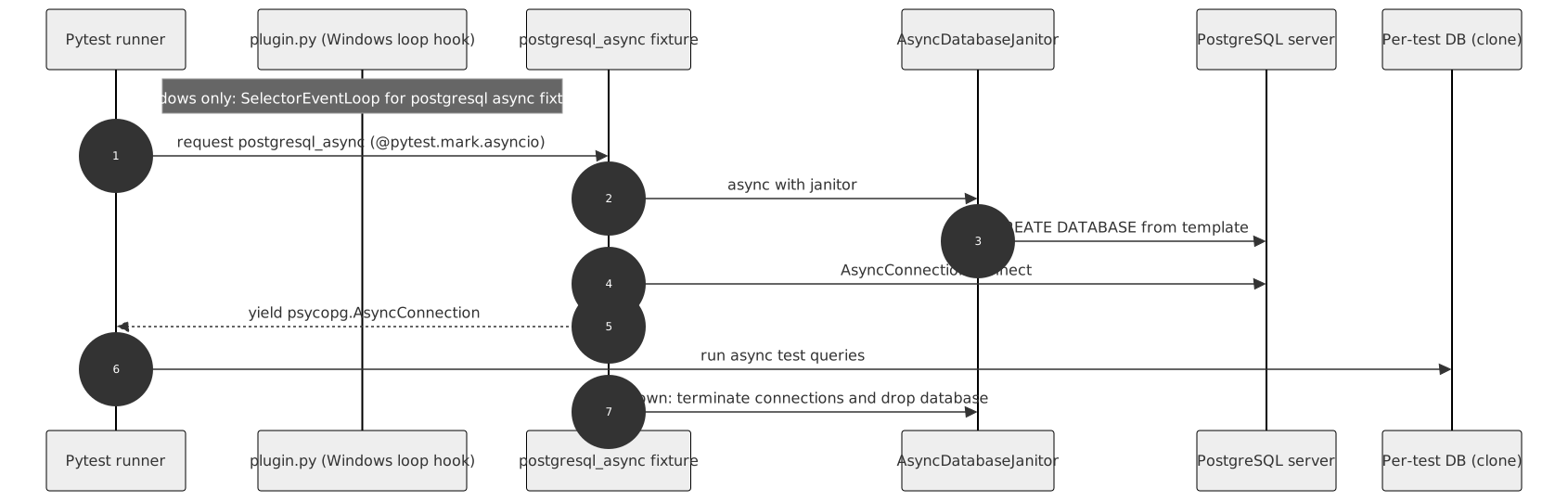
SelectorEventLoopautomatically for asyncio tests when no earlier pytest-asyncio loop factory is registered. This is required becausepsycopgasync is incompatible with the defaultProactorEventLoopon Windows (documented by psycopg). Without it,postgresql_asynctests fail withPsycopg cannot use the 'ProactorEventLoop' to run in async mode. No extra configuration is needed when you installpytest-postgresql[async].With
pytest-asyncio>= 1.4 on Windows, the plugin registers a selector loop factory via pytest-asyncio's loop-factory hook for all asyncio tests when no prior factory is provided. On Python 3.14+, the legacyasynciopolicy fallback is not used because that API is deprecated.When an earlier hook implementation already supplies loop factories, those are preserved unchanged. Tests that use a prior factory may show different loop names in pytest IDs (for example
test_example[custom]instead oftest_example[selector]).If you use an older
pytest-asyncio(< 1.4) on Windows with Python < 3.14, the plugin falls back to setting a globalWindowsSelectorEventLoopPolicyfor the entire test session — not only for postgresql async tests. That can change event-loop behaviour for unrelated asyncio tests in the same run. Installpytest-postgresql[async](which pullspytest-asyncio>= 1.4) to avoid that legacy path.pytest-asyncio configuration
pytest-asyncio 1.x defaults to
asyncio_mode = strict, so each async test must be marked with@pytest.mark.asyncio. If you setasyncio_mode = autoinpytest.iniorpyproject.toml, unmarked async test functions are detected automatically —postgresql_asyncstill requires the[async]extra.[pytest]asyncio_mode = strict
Note
While this plugin requires
psycopg3 to manage the database, your application code can still usepsycopg2.Run a test:
Simply include the
postgresqlfixture in your test. It provides a connectedpsycopg.Connectionobject.deftest_example(postgresql): """Check main postgresql fixture."""withpostgresql.cursor() ascur: cur.execute("CREATE TABLE test (id serial PRIMARY KEY, num integer, data varchar);") postgresql.commit()
For async code, use
postgresql_asyncwithpytest.mark.asyncio:importpytest@pytest.mark.asyncioasyncdeftest_example_async(postgresql_async): """Check main async postgresql fixture."""asyncwithpostgresql_async.cursor() ascur: awaitcur.execute( "CREATE TABLE test (id serial PRIMARY KEY, num integer, data varchar);" ) awaitpostgresql_async.commit()
Warning
Tested on PostgreSQL versions >= 14. See tests for more details.
The plugin provides two main types of fixtures:
- 1. Client Fixtures
These provide a connection to a database for your tests.
- postgresql - A function-scoped fixture. It returns a connected
psycopg.Connection. After each test, it terminates leftover connections and drops the test database to ensure isolation. - postgresql_async - The async counterpart. It returns a connected
psycopg.AsyncConnection. Requirespytest-postgresql[async](pytest-asyncio>= 1.4), and each test must be marked with@pytest.mark.asyncio.
- postgresql - A function-scoped fixture. It returns a connected
- Async fixtures
postgresql_asyncand custom factories created withfactories.postgresql_asyncare async generator fixtures usingpytest_asyncio.fixture.Minimum versions when installing manually instead of via
[async]:pytest-asyncio >= 1.4 aiofiles >= 23.0 # only for async SQL file loading
If
pytest-asynciois missing, fixture setup raisesImportError.Async SQL file loading
Process and noproc fixtures always populate their template database synchronously during session setup (via
DatabaseJanitor.load()), even when you usepostgresql_asyncas the client fixture. SQLPathentries in a process fixtureloadlist are executed with the syncsql()loader.Use
sql_async(requiresaiofilesfrom the[async]extra) when you callAsyncDatabaseJanitor.load()directly with aPath. Callable loaders passed toAsyncDatabaseJanitor.load()may be sync or async; return values that are awaitable are awaited automatically.frompathlibimportPathfrompytest_postgresqlimportfactoriespostgresql_my_proc=factories.postgresql_proc(load=[Path("schema.sql")]) postgresql_my_async=factories.postgresql_async("postgresql_my_proc")
- 2. Process Fixtures
These manage the PostgreSQL server lifecycle.
- postgresql_proc - A session-scoped fixture that starts a PostgreSQL instance on its first use and stops it when all tests are finished.
- postgresql_noproc - A fixture for connecting to an already running PostgreSQL instance (e.g., in Docker or CI).
You can create additional fixtures using factories:
frompytest_postgresqlimportfactories# Create a custom process fixturepostgresql_my_proc=factories.postgresql_proc(
port=None, unixsocketdir='/var/run')
# Create a client fixture that uses the custom processpostgresql_my=factories.postgresql('postgresql_my_proc')
# Async client fixture (requires pytest-postgresql[async], pytest-asyncio >= 1.4)postgresql_my_async=factories.postgresql_async('postgresql_my_proc')
Note
Each process fixture can be configured independently through factory arguments.
If you want the database to be automatically pre-populated with your schema and data, there are two levels you can achieve it:
- Per test: In a client fixture, by using an intermediary fixture.
- Per session: In a process fixture.
The process fixture accepts a load parameter, which supports:
- SQL file paths: Loads and executes the SQL files.
- Loading functions: A callable or an import string (e.g.,
"path.to.module:function"). These functions receive host, port, user, dbname, and password and must perform the connection themselves (or use an ORM).
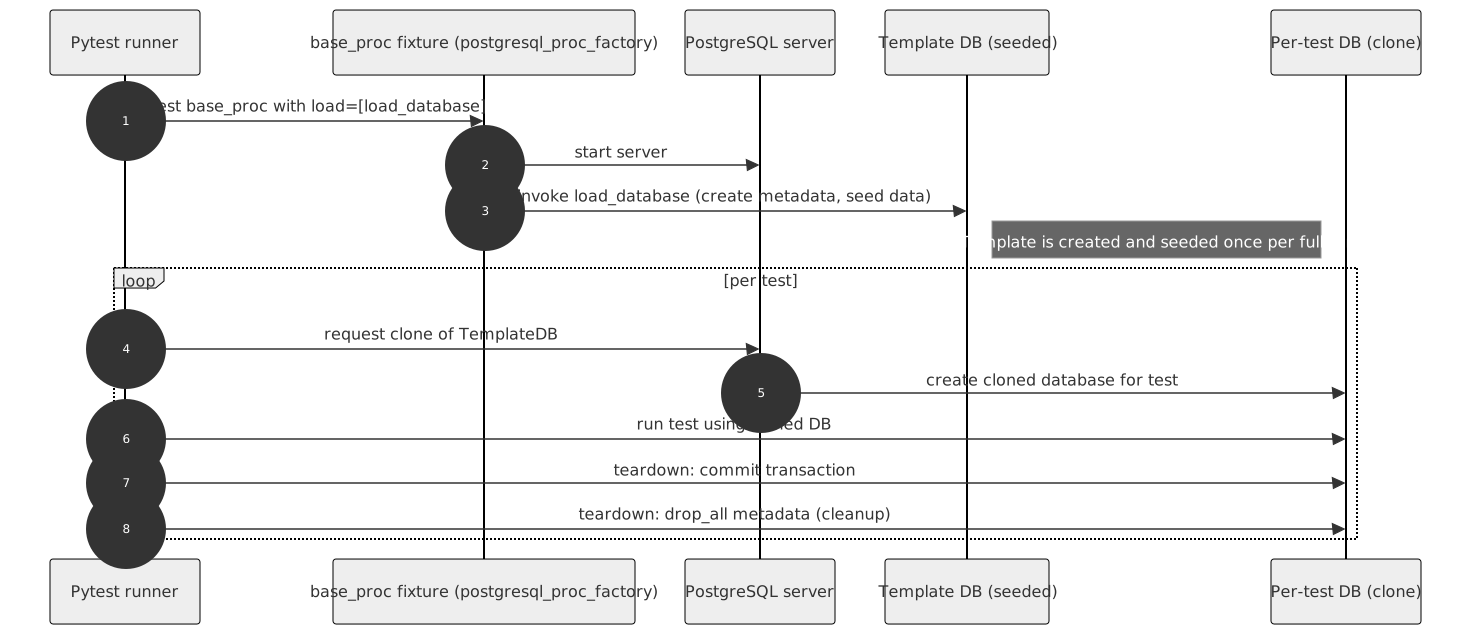
The process fixture pre-populates the database once per session into a template database. The client fixture then clones this template for each test, which significantly speeds up your tests.
frompathlibimportPathpostgresql_my_proc=factories.postgresql_proc(
load=[
Path("schemafile.sql"),
"import.path.to.function",
load_this_callable
]
)
Defining pre-population on the command line:
pytest --postgresql-load=path/to/file.sql --postgresql-load=path.to.functionIf a loaded .sql file contains statements that cannot run inside a transaction
block (for example CREATE DATABASE), enable autocommit on the loader connection.
This can be set without writing a custom loader, via the factory argument, the command
line, or pytest.ini:
postgresql_my_proc=factories.postgresql_proc(load=[Path("with_create_db.sql")], load_autocommit=True)pytest --postgresql-load-autocommitTo connect to an external server (e.g., running in Docker), use the postgresql_noproc fixture.
For async tests against an external server, create a client fixture with
factories.postgresql_async("postgresql_noproc") (see
tests/examples/test_drop_test_database_async.py).
postgresql_external=factories.postgresql('postgresql_noproc')By default, it connects to 127.0.0.1:5432.
Creating and dropping the test databases requires a connection to a database that already
exists - by default postgres. If the test role merely lacks the privilege,
GRANT CONNECT ON DATABASE postgres TO myuser is the simpler fix. When postgres is
not reachable at all - behind a connection pooler with a fixed database list, or on a
managed server that does not expose it - point the noproc fixture at another database:
pytest --postgresql-maintenance-dbname=my_existing_dbpostgresql_external=factories.postgresql_noproc(maintenance_dbname="my_existing_db")The database is only connected to, never created, modified or dropped. Avoid template1:
CREATE DATABASE clones it when no template is given, and PostgreSQL does not expect the
source database to be in use while it is being copied.
You can chain multiple postgresql_noproc fixtures to layer your data pre-population. Each fixture in the chain will create its own template database based on the previous one.
frompytest_postgresqlimportfactories# 1. Start with a process or a no-process basebase_proc=factories.postgresql_proc(load=[load_schema])
# 2. Add a layer with some dataseeded_noproc=factories.postgresql_noproc(depends_on="base_proc", load=[load_data])
# 3. Add another layer with more datamore_seeded_noproc=factories.postgresql_noproc(depends_on="seeded_noproc", load=[load_more_data])
# 4. Use the final layer in your testclient=factories.postgresql("more_seeded_noproc")
You can define settings via fixture factory arguments, command line options, or pytest.ini. They are resolved in this order:
Fixture factory argumentCommand line optionpytest.ini configuration option
| Setting | postgresql_proc argument | postgresql_noproc argument | Command line option | pytest.ini option | Default |
|---|---|---|---|---|---|
| Path to executable | executable | n/a | --postgresql-exec | postgresql_exec | pg_config --bindir + pg_ctl |
| host | host | host | --postgresql-host | postgresql_host | 127.0.0.1 |
| port | port | port | --postgresql-port | postgresql_port | random (proc), 5432 (noproc) |
| Port search count | — | n/a | --postgresql-port-search-count | postgresql_port_search_count | 5 |
| postgresql user | user | user | --postgresql-user | postgresql_user | postgres |
| password | password | password | --postgresql-password | postgresql_password | |
| Starting parameters (extra pg_ctl arguments) | startparams | n/a | --postgresql-startparams | postgresql_startparams | -w |
| Postgres exe extra arguments (passed via pg_ctl's -o argument) | postgres_options | n/a | --postgresql-postgres-options | postgresql_postgres_options | |
| Location for unixsockets | unixsocket | n/a | --postgresql-unixsocketdir | postgresql_unixsocketdir | $TMPDIR |
| Database name | dbname | dbname (handles xdist) | --postgresql-dbname | postgresql_dbname | tests |
| Maintenance database name | n/a | maintenance_dbname | --postgresql-maintenance-dbname | postgresql_maintenance_dbname | postgres |
| Default Schema (load list) | load | load | --postgresql-load | postgresql_load | |
| Autocommit for the SQL loader connection | load_autocommit | load_autocommit | --postgresql-load-autocommit | postgresql_load_autocommit | False |
| PostgreSQL connection options | options | options | --postgresql-options | postgresql_options | |
| Drop test database on start | — | — | --postgresql-drop-test-database | false | |
| Fixture to layer the template database on | n/a | depends_on |
— means the setting applies to that fixture but has no factory argument;
n/a means the setting does not apply to that fixture at all.
Note
If the executable factory argument is not provided, the plugin looks for pg_ctl first at
the configured path (--postgresql-exec / the postgresql_exec ini option,
/usr/lib/postgresql/14/bin/pg_ctl by default), then in the directory reported by
pg_config --bindir.
Only the executable factory argument is taken at face value; the other two are
verified to exist before being used. If neither is there, an ExecutableMissingException
is raised listing the locations that were checked.
Note
postgresql_proc starts and manages a PostgreSQL server for you, so it needs the
PostgreSQL server installed locally. Installing only the client libraries
(libpq-dev on Debian/Ubuntu) provides pg_config but no pg_ctl, and the plugin
will refuse to start. To test against a server you run yourself — a dockerised one, for
instance — use the postgresql_noproc fixture instead.
This example shows how to create an SQLAlchemy session fixture:
fromtypingimportIteratorimportpytestfrompsycopgimportConnectionfromsqlalchemyimportcreate_enginefromsqlalchemy.ormimportSession, sessionmaker, scoped_sessionfromsqlalchemy.poolimportNullPool@pytest.fixturedefdb_session(postgresql: Connection) ->Iterator[Session]:
"""Session for SQLAlchemy."""user=postgresql.info.userhost=postgresql.info.hostport=postgresql.info.portdbname=postgresql.info.dbnameconnection_str=f'postgresql+psycopg://{user}:@{host}:{port}/{dbname}'engine=create_engine(connection_str, echo=False, poolclass=NullPool)
# Assuming you use a Base modelfrommy_app.modelsimportBaseBase.metadata.create_all(engine)
SessionLocal=scoped_session(sessionmaker(bind=engine))
yieldSessionLocal()
SessionLocal.close()
Base.metadata.drop_all(engine)DatabaseJanitor is an advanced API for managing database state outside of standard fixtures. It is used by projects like Warehouse (pypi.org).
importpsycopgfrompytest_postgresql.janitorimportDatabaseJanitordeftest_manual_janitor(postgresql_proc):
withDatabaseJanitor(
user=postgresql_proc.user,
host=postgresql_proc.host,
port=postgresql_proc.port,
dbname="my_custom_db",
version=postgresql_proc.version,
password="secret_password",
):
withpsycopg.connect(
dbname="my_custom_db",
user=postgresql_proc.user,
host=postgresql_proc.host,
port=postgresql_proc.port,
password="secret_password",
) asconn:
# use connectionpassAsyncDatabaseJanitor is the async counterpart to DatabaseJanitor. Use it
when managing database state with psycopg.AsyncConnection outside of standard
fixtures. It requires psycopg (a core dependency). Install
pytest-postgresql[async] when you need aiofiles for SQL file loading via
sql_async, or pytest-asyncio for pytest async tests.
importpytestimportpsycopgfrompytest_postgresql.janitorimportAsyncDatabaseJanitor@pytest.mark.asyncioasyncdeftest_manual_async_janitor(postgresql_proc):
asyncwithAsyncDatabaseJanitor(
user=postgresql_proc.user,
host=postgresql_proc.host,
port=postgresql_proc.port,
dbname="my_custom_db",
version=postgresql_proc.version,
password="secret_password",
):
asyncwithawaitpsycopg.AsyncConnection.connect(
dbname="my_custom_db",
user=postgresql_proc.user,
host=postgresql_proc.host,
port=postgresql_proc.port,
password="secret_password",
) asconn:
# use async connectionpassTo connect to a Docker-run PostgreSQL, use the noproc fixture.
docker run --name some-postgres -e POSTGRES_PASSWORD=mysecret -d postgresIn your tests:
frompytest_postgresqlimportfactoriespostgresql_in_docker=factories.postgresql_noproc()
postgresql=factories.postgresql("postgresql_in_docker", dbname="test")
deftest_docker(postgresql):
withpostgresql.cursor() ascur:
cur.execute("SELECT 1")
Run with:
pytest --postgresql-host=172.17.0.2 --postgresql-password=mysecretYou can define a load function and pass it to your process fixture factory:
importpsycopgfrompytest_postgresqlimportfactoriesdefload_database(**kwargs):
withpsycopg.connect(**kwargs) asconn:
withconn.cursor() ascur:
cur.execute("CREATE TABLE stories (id serial PRIMARY KEY, name varchar);")
cur.execute("INSERT INTO stories (name) VALUES ('Silmarillion'), ('The Expanse');")
postgresql_proc=factories.postgresql_proc(load=[load_database])
postgresql=factories.postgresql("postgresql_proc")
deftest_stories(postgresql):
withpostgresql.cursor() ascur:
cur.execute("SELECT count(*) FROM stories")
assertcur.fetchone()[0] ==2
The process fixture populates the template database once, and the client fixture clones it for every test. This is fast, clean, and ensures no dangling transactions. This approach works with both postgresql_proc and postgresql_noproc.