

stream-rails is a Ruby on Rails client for Stream.
You can sign up for a Stream account at https://getstream.io/get_started.
Note there is also a lower level Ruby - Stream integration library which is suitable for all Ruby applications.
💡 This is a library for the Feeds product. The Chat SDKs can be found here.
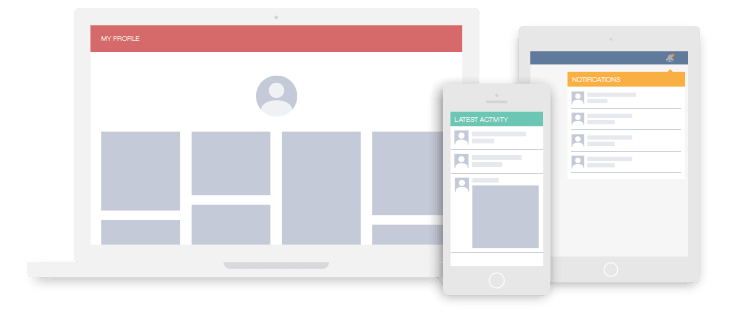
What you can build:
- Activity streams such as seen on Github
- A twitter style newsfeed
- A feed like instagram/ pinterest
- Facebook style newsfeeds
- A notification system
You can check out our example app built using this library on Github https://github.com/GetStream/Stream-Example-Rails
- Activity Streams & Newsfeeds
- Demo
- Table of Contents
- Gem installation
- Setup
- Supported ORMs
- Model configuration
- Feed manager
- Showing the newsfeed
- Disable model tracking
- Running specs
- Full documentation and Low level APIs access
- Copyright and License Information
You can install stream_rails as you would any other gem:
gem install stream_rails
or in your Gemfile:
gem 'stream_rails'
This library is tested against and fully supports the following Rails versions:
- 5.0
- 5.2
- 6.0
- 6.1
Login with Github on getstream.io and get your api_key and api_secret from your app configuration (Dashboard screen).
Then you can add the StreamRails configuration in config/initializers/stream_rails.rb
require'stream_rails'StreamRails.configuredo |config|
config.api_key="YOUR API KEY"config.api_secret="YOUR API SECRET"config.timeout=30# Optional, defaults to 3config.location='us-east'# Optional, defaults to 'us-east'config.api_hostname='stream-io-api.com'# Optional, defaults to 'stream-io-api.com'# If you use custom feed names, e.g.: timeline_flat, timeline_aggregated,# use this, otherwise omit:config.news_feeds={flat: "timeline_flat",aggregated: "timeline_aggregated"}# Point to the notifications feed group providing the name, omit if you don't# have a notifications feedconfig.notification_feed="notification"endThe integration will look as follows:
classPin < ActiveRecord::BaseincludeStreamRails::Activityas_activitydefactivity_objectself.itemendendPlease, use Sequel ~5.
The integration will look as follows:
classPin < Sequel::ModelincludeStreamRails::Activityas_activitydefactivity_objectself.itemendendInclude StreamRails::Activity and add as_activity to the model you want to integrate with your feeds.
classPin < ActiveRecord::Basebelongs_to:userbelongs_to:itemvalidates:item,presence: truevalidates:user,presence: trueincludeStreamRails::Activityas_activitydefactivity_objectself.itemendendEverytime a Pin is created it will be stored in the feed of the user that created it. When a Pin instance is deleted, the feed will be removed as well.
ActiveRecord models are stored in your feeds as activities; Activities are objects that tell the story of a person performing an action on or with an object, in its simplest form, an activity consists of an actor, a verb, and an object. In order for this to happen your models need to implement these methods:
#activity_object the object of the activity (eg. an AR model instance)
#activity_actor the actor performing the activity -- this value also provides the feed name and feed ID to which the activity will be added.
For example, let's say a Pin was a polymorphic class that could belong to either a user (e.g. User ID: 1) or a company (e.g. Company ID: 1). In that instance, the below code would post the pin either to the user:1 feed or the company:1 feed based on its owner.
classPin < ActiveRecord::Basebelongs_to:owner,:polymorphic=>truebelongs_to:itemincludeStreamRails::Activityas_activitydefactivity_actorself.ownerenddefactivity_objectself.itemendendThe activity_actor defaults to self.user
#activity_verb the string representation of the verb (defaults to model class name)
Here's a more complete example of the Pin class:
classPin < ActiveRecord::Basebelongs_to:authorbelongs_to:itemincludeStreamRails::Activityas_activitydefactivity_actorself.authorenddefactivity_objectself.itemendendOften you'll want to store more data than just the basic fields. You achieve this by implementing #activity_extra_data in your model.
classPin < ActiveRecord::Basebelongs_to:authorbelongs_to:itemincludeStreamRails::Activityas_activitydefactivity_extra_data{'is_retweet'=>self.is_retweet}enddefactivity_objectself.itemendendIf you want to control when to create an activity you should implement
the #activity_should_sync? method in your model.
classPin < ActiveRecord::Basebelongs_to:authorbelongs_to:itemincludeStreamRails::Activityas_activitydefactivity_should_sync?self.publishedenddefactivity_objectself.itemendendThis will create an activity only when self.published is true.
stream_rails comes with a Feed Manager class that helps with all common feed operations. You can get an instance of the manager with StreamRails.feed_manager.
feed=StreamRails.feed_manager.get_user_feed(current_user.id)To get you started the manager has 4 feeds pre-configured. You can add more feeds if your application requires it. Feeds are divided into three categories.
The user feed stores all activities for a user. Think of it as your personal Facebook page. You can easily get this feed from the manager.
feed=StreamRails.feed_manager.get_user_feed(current_user.id)News feeds store activities from the people you follow. There is both a flat newsfeed (similar to twitter) and an aggregated newsfeed (like facebook).
feed = StreamRails.feed_manager.get_news_feeds(current_user.id)[:flat]
aggregated_feed = StreamRails.feed_manager.get_news_feeds(current_user.id)[:aggregated]The notification feed can be used to build notification functionality.
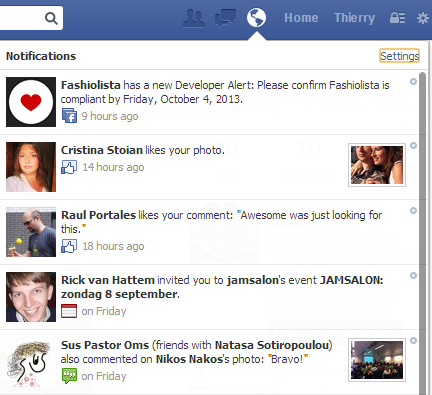
Below we show an example of how you can read the notification feed.
notification_feed=StreamRails.feed_manager.get_notification_feed(current_user.id)By default the notification feed will be empty. You can specify which users to notify when your model gets created. In the case of a retweet you probably want to notify the user of the parent tweet.
classPin < ActiveRecord::Basebelongs_to:authorbelongs_to:itemincludeStreamRails::Activityas_activitydefactivity_notifyifself.is_retweet[StreamRails.feed_manager.get_notification_feed(self.parent.user_id)]endenddefactivity_objectself.itemendendAnother example would be following a user. You would commonly want to notify the user which is being followed.
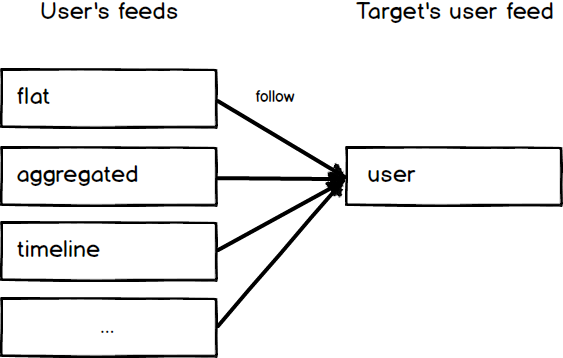
classFollow < ActiveRecord::Basebelongs_to:userbelongs_to:targetvalidates:target_id,presence: truevalidates:user,presence: trueincludeStreamRails::Activityas_activitydefactivity_notify[StreamRails.feed_manager.get_notification_feed(self.target_id)]enddefactivity_objectself.targetendendIn order to populate newsfeeds, you need to notify the system about follow relationships.
The current user's flat and aggregated feeds will follow the target_user's user feed, with the following code:
StreamRails.feed_manager.follow_user(user_id, target_id)
When you read data from feeds, a pin activity will look like this:
{ "actor": "User:1", "verb": "like", "object": "Item:42" }This is far from ready for usage in your template. We call the process of loading the references from the database "enrichment." An example is shown below:
enricher=StreamRails::Enrich.newfeed=StreamRails.feed_manager.get_news_feeds(current_user.id)[:flat]results=feed.get()['results']activities=enricher.enrich_activities(results)A similar method called enrich_aggregated_activities is available for aggregated feeds.
enricher=StreamRails::Enrich.newfeed=StreamRails.feed_manager.get_news_feeds(current_user.id)[:aggregated]results=feed.get()['results']activities=enricher.enrich_aggregated_activities(results)If you have additional metadata in your activity (by overriding activity_extra_data in the class where you add the
Stream Activity mixin), you can also enrich that field's data by doing the following:
Step One: override the activity_extra_data method from our mixin:
classPin < ActiveRecord::BaseincludeStreamRails::Activityas_activityattr_accessor:extra_datadefactivity_objectself.itemend# override this method to add metadata to your activitydefactivity_extra_data@extra_dataendendNow we'll create a 'pin' object which has a location metadata field. In this example, we will also have a
location table and model, and we set up our metadata in the extra_data field. It is important that the
symbol of the metadata as well as the value of the meta data match this pattern. The left half of the
string:string metadata value when split on : must also match the name of the model.
We must also tell the enricher to also fetch locations when looking through our activities
boulder=Location.newboulder.name="Boulder, CO"boulder.save!# tell the enricher to also do a lookup on the `location` modelenricher.add_fields([:location])pin=Pin.newpin.user=@tompin.extra_data={:location=>"location:#{boulder.id}"}When we retrieve the activity later, the enrichment process will include our location model as well, giving us
access to attributes and methods of the location model:
place=activity[:location].name# Boulder, CONow that you've enriched the activities you can render them in a view. For convenience we include a basic view:
<div class="container">
<div class="container-pins">
<% for activity in @activities %>
<%= render_activity activity %>
<% end %>
</div>
</div>
The render_activity view helper will render the activity by picking the partial activity/_pin for a pin activity, aggregated_activity/_follow for an aggregated activity with verb follow.
The helper will automatically send activity to the local scope of the partial; additional parameters can be sent as well as use different layouts, and prefix the name
e.g. renders the activity partial using the small_activity layout:
<%= render_activity activity, :layout => "small_activity" %>
e.g. prefixes the name of the template with "notification_":
<%= render_activity activity, :prefix => "notification_" %>
e.g. adds the extra_var to the partial scope:
<%= render_activity activity, :locals => {:extra_var => 42} %>
e.g. renders the activity partial using the notifications partial root, which will render the partial with the path notifications/#{ACTIVITY_VERB}
<%= render_activity activity, :partial_root => "notifications" %>
For simple pagination you can use the stream-ruby API, as follows in your controller:
StreamRails.feed_manager.get_news_feeds(current_user.id)[:flat]# Returns a Stream::Feed objectresults=feed.get(limit: 5,offset: 5)['results']You can disable model tracking (eg. when you run tests) via StreamRails.configure
require 'stream_rails'
StreamRails.enabled = false
From the project root directory:
./bin/run_tests.sh
When needed you can also use the low level Ruby API directly. Documentation is available at the Stream website.
Copyright (c) 2014-2021 Stream.io Inc, and individual contributors. All rights reserved.
See the file "LICENSE" for information on the history of this software, terms & conditions for usage, and a DISCLAIMER OF ALL WARRANTIES.