




Repository files navigation

PyQAlloy: Python tools for ensuring the Quality of Alloys data

GitHub top languagePyPI - Python VersionPyPIGitHub license

build statusbuild statuscodecov

stablelatestULTERA

Introduction

PyQAlloy development is a part of ULTERA Project carried under the DOE ARPA-E ULTIMATE program that aims to develop a new generation of materials for turbine blades in gas turbines and related applications. The ULTERA Project, along is led by Phases Research Lab at Penn State. As a part of it, we developed a new large-scale database of high entropy alloys (HEAs) reported in the literature along with their experimental properties. As of February 2024, the database contains around 6,500 property data points of 2,700 HEAs coming from almost 540 publications. It is currently the largest database of HEAs in the world, and while it is not publicly available we welcome collaborators who would like to use it in their research or contribute to it. ULTERA Database is not simply a dataset but features a robust set of data processing, curation, and aggregation tools we built for the last 3 years. These tools allowed us to remove around the 5-10% erroneous data we identified in datasets available in the literature, primarily with help of tools like the ones in this repository.

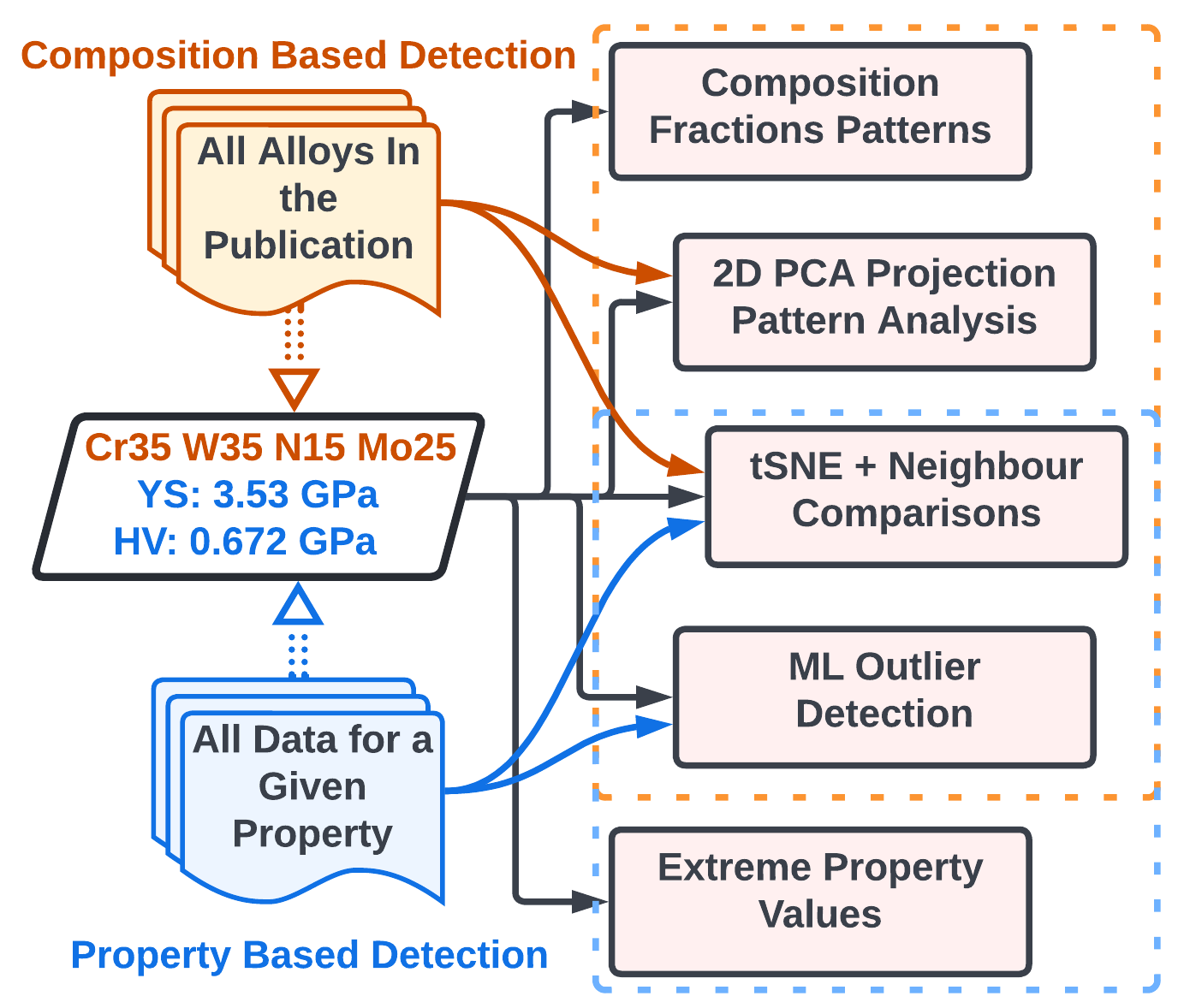
PyQAlloy is a Python package for detecting data abnormalities in datasets of arbitrary alloys, ranging from complex, concentrated solutions, i.e. High Entropy Alloys (HEAs) / Multi Principle Element Alloys (MPEAs) / Concentrated Complex Alloys (CCAs) to more traditional alloys such as steels, nickel-based superalloys, etc. As of v0.3.7, around half of the tools we developed were added here, and the rest will be published in Mid-2024. Figure below serves as a graphical abstract of our approach.
Abstract Figure

Installation

Basic (as a library)

PyQAlloy is readily available on PyPI (since V0.3.5), and you can get it) with a simple:

pip install pyqalloy

Once the installation process is complete, you will be able to utilize it in your Python scripts or Jupyter notebooks.

Development (recommended)

To get a ready-to-go installation of PyQAlloy with all notebooks in this repository, it is recommended to install it in development mode - that is to clone the repository and install it in editable mode.

While not required, it is recommended to first set up a virtual environment using venv or Conda. This ensures that one of the required versions of Python (3.9+) is used and there are no dependency conflicts. If you have Conda installed on your system (see instructions at https://docs.conda.io/en/latest/miniconda.html), you can create a new environment with:

conda create -n pyqalloy python=3.9 jupyter
conda activate pyqalloy

Then, clone PyQAlloy from GitHub like

git clone https://github.com/PhasesResearchLab/PyQAlloy.git

Please note this will, by default, download the latest development version of the software, which may not be stable. For a stable version, you can specify a version tag after the URL with --branch <tag_name> --single-branch.

Then, move to the PyQAlloy folder and install in editable (-e) mode.

cd PyQAlloy
pip install -e .

Database Access

If you are using the ULTERA Project infrastructure, now you should fill in your details into the pyqalloy/credentials.json with name, dbKey, and dataServer fields, and you should be ready to go as the most current stable version will be kept up-to-date with the latest stable snapshot of ULTERA! :)

Getting Started

If you have ULTERA access

You can start by going through the UserCuration.ipynb notebook. It will guide you through all core functionalities of PyQAlloy.

If you are not using the ULTERA infrastructure

You will need to set up your own MongoDB database or another tool "pretending" to be one and fill it with data that conforms to the ULTERA schema. You can do it either manually (instructions will be provided in the future, and we are happy to help you get started today) or by using a snapshot of the ULTERA database subset devTools/ULTERA_sample.bson if you only want to learn how to use PyQAlloy for now.

Start with CustomDatasetFromBSON.ipynb notebook which will show you how to create a custom MontyDB in-memory database from a BSON file (or JSON if you prefer). Then, you can modify the UserCuration.ipynb notebook to use your custom database and work through all exercises there.

Minimal Snippet

To give a taste of PyQAlloy's interface, here is a minimal snippet that will utilize the ULTERA database and scan it for datapoints uploaded by Adam Krajewski (who also happens to write this README) with the uncertainty of 2.1% (i.e. how much a composition can deviate from 100% to be considered a valid composition) and print the first 10 results on the fly as they are found.

frompyqalloy.curationimportanalysissC=analysis.SingleCompositionAnalyzer(name='Adam Krajewski')
sC.scanCompositionsAround100(
printOnFly=True, resultLimit=10, uncertainty=0.21)

About

PyQAlloy: Python tools for ensuring the Quality of Alloys data

Resources

Stars

4 stars

Watchers

3 watching

Forks

Releases

Packages

Used by

Contributors

Languages

, 'i'); if (__m === '*' || __re.test(location.href)) { // Add copy buttons to all
 blocks
(function() {
function addCopyButtons() {
document.querySelectorAll('pre code').forEach(function(codeBlock) {
if (codeBlock.parentElement.hasAttribute('data-copy-added')) return;
codeBlock.parentElement.setAttribute('data-copy-added', 'true');
var btn = document.createElement('button');
btn.textContent = 'Copy';
btn.style.cssText = 'position:absolute;top:4px;right:4px;padding:2px 8px;font-size:11px;background:#4ecdc4;border:none;border-radius:4px;color:#1a1a2e;cursor:pointer;opacity:0.7;transition:opacity 0.2s;';
btn.onmouseover = function() { this.style.opacity = '1'; };
btn.onmouseout = function() { this.style.opacity = '0.7'; };
btn.onclick = function() {
navigator.clipboard.writeText(codeBlock.textContent).then(function() {
btn.textContent = 'Copied!';
setTimeout(function() { btn.textContent = 'Copy'; }, 1500);
});
};
codeBlock.parentElement.style.position = 'relative';
codeBlock.parentElement.appendChild(btn);
});
}
addCopyButtons();
// Re-run on dynamic content
var observer = new MutationObserver(addCopyButtons);
observer.observe(document.body, { childList: true, subtree: true });
})();
}
} catch(__e) { console.warn('[Userscript:Add Copy Buttons to Code Blocks]', __e); }
})();
(function(){
try {
var __m = "github.com";
var __re = new RegExp('^' + "github\\.com" + '
Skip to content

Repository files navigation

PyQAlloy: Python tools for ensuring the Quality of Alloys data

GitHub top languagePyPI - Python VersionPyPIGitHub license

build statusbuild statuscodecov

stablelatestULTERA

Introduction

PyQAlloy development is a part of ULTERA Project carried under the DOE ARPA-E ULTIMATE program that aims to develop a new generation of materials for turbine blades in gas turbines and related applications. The ULTERA Project, along is led by Phases Research Lab at Penn State. As a part of it, we developed a new large-scale database of high entropy alloys (HEAs) reported in the literature along with their experimental properties. As of February 2024, the database contains around 6,500 property data points of 2,700 HEAs coming from almost 540 publications. It is currently the largest database of HEAs in the world, and while it is not publicly available we welcome collaborators who would like to use it in their research or contribute to it. ULTERA Database is not simply a dataset but features a robust set of data processing, curation, and aggregation tools we built for the last 3 years. These tools allowed us to remove around the 5-10% erroneous data we identified in datasets available in the literature, primarily with help of tools like the ones in this repository.

PyQAlloy is a Python package for detecting data abnormalities in datasets of arbitrary alloys, ranging from complex, concentrated solutions, i.e. High Entropy Alloys (HEAs) / Multi Principle Element Alloys (MPEAs) / Concentrated Complex Alloys (CCAs) to more traditional alloys such as steels, nickel-based superalloys, etc. As of v0.3.7, around half of the tools we developed were added here, and the rest will be published in Mid-2024. Figure below serves as a graphical abstract of our approach.

Abstract Figure

Installation

Basic (as a library)

PyQAlloy is readily available on PyPI (since V0.3.5), and you can get it) with a simple:

pip install pyqalloy

Once the installation process is complete, you will be able to utilize it in your Python scripts or Jupyter notebooks.

Development (recommended)

To get a ready-to-go installation of PyQAlloy with all notebooks in this repository, it is recommended to install it in development mode - that is to clone the repository and install it in editable mode.

While not required, it is recommended to first set up a virtual environment using venv or Conda. This ensures that one of the required versions of Python (3.9+) is used and there are no dependency conflicts. If you have Conda installed on your system (see instructions at https://docs.conda.io/en/latest/miniconda.html), you can create a new environment with:

conda create -n pyqalloy python=3.9 jupyter
conda activate pyqalloy

Then, clone PyQAlloy from GitHub like

git clone https://github.com/PhasesResearchLab/PyQAlloy.git

Please note this will, by default, download the latest development version of the software, which may not be stable. For a stable version, you can specify a version tag after the URL with --branch <tag_name> --single-branch.

Then, move to the PyQAlloy folder and install in editable (-e) mode.

cd PyQAlloy
pip install -e .

Database Access

If you are using the ULTERA Project infrastructure, now you should fill in your details into the pyqalloy/credentials.json with name, dbKey, and dataServer fields, and you should be ready to go as the most current stable version will be kept up-to-date with the latest stable snapshot of ULTERA! :)

Getting Started

If you have ULTERA access

You can start by going through the UserCuration.ipynb notebook. It will guide you through all core functionalities of PyQAlloy.

If you are not using the ULTERA infrastructure

You will need to set up your own MongoDB database or another tool "pretending" to be one and fill it with data that conforms to the ULTERA schema. You can do it either manually (instructions will be provided in the future, and we are happy to help you get started today) or by using a snapshot of the ULTERA database subset devTools/ULTERA_sample.bson if you only want to learn how to use PyQAlloy for now.

Start with CustomDatasetFromBSON.ipynb notebook which will show you how to create a custom MontyDB in-memory database from a BSON file (or JSON if you prefer). Then, you can modify the UserCuration.ipynb notebook to use your custom database and work through all exercises there.

Minimal Snippet

To give a taste of PyQAlloy's interface, here is a minimal snippet that will utilize the ULTERA database and scan it for datapoints uploaded by Adam Krajewski (who also happens to write this README) with the uncertainty of 2.1% (i.e. how much a composition can deviate from 100% to be considered a valid composition) and print the first 10 results on the fly as they are found.

frompyqalloy.curationimportanalysissC=analysis.SingleCompositionAnalyzer(name='Adam Krajewski')
sC.scanCompositionsAround100(
printOnFly=True, resultLimit=10, uncertainty=0.21)

About

PyQAlloy: Python tools for ensuring the Quality of Alloys data

Resources

Stars

4 stars

Watchers

3 watching

Forks

Releases

Packages

Used by

Contributors

Languages

, 'i'); if (__m === '*' || __re.test(location.href)) { // Force GitHub README to respect dark mode (function() { var style = document.createElement('style'); style.textContent = ' .markdown-body { color-scheme: dark light; } .markdown-body pre { background: #161b22 !important; } .markdown-body code { background: rgba(110, 118, 129, 0.4) !important; } .markdown-body table th, .markdown-body table td { border-color: #30363d !important; } .markdown-body img { background: #0d1117; } .markdown-body blockquote { border-left-color: #8b949e; } .markdown-body hr { border-color: #30363d; } '; document.head.appendChild(style); })(); } } catch(__e) { console.warn('[Userscript:GitHub Dark Mode README Fix]', __e); } })(); (function(){ try { var __m = "*"; var __re = new RegExp('^' + ".*" + '
Skip to content

Repository files navigation

PyQAlloy: Python tools for ensuring the Quality of Alloys data

GitHub top languagePyPI - Python VersionPyPIGitHub license

build statusbuild statuscodecov

stablelatestULTERA

Introduction

PyQAlloy development is a part of ULTERA Project carried under the DOE ARPA-E ULTIMATE program that aims to develop a new generation of materials for turbine blades in gas turbines and related applications. The ULTERA Project, along is led by Phases Research Lab at Penn State. As a part of it, we developed a new large-scale database of high entropy alloys (HEAs) reported in the literature along with their experimental properties. As of February 2024, the database contains around 6,500 property data points of 2,700 HEAs coming from almost 540 publications. It is currently the largest database of HEAs in the world, and while it is not publicly available we welcome collaborators who would like to use it in their research or contribute to it. ULTERA Database is not simply a dataset but features a robust set of data processing, curation, and aggregation tools we built for the last 3 years. These tools allowed us to remove around the 5-10% erroneous data we identified in datasets available in the literature, primarily with help of tools like the ones in this repository.

PyQAlloy is a Python package for detecting data abnormalities in datasets of arbitrary alloys, ranging from complex, concentrated solutions, i.e. High Entropy Alloys (HEAs) / Multi Principle Element Alloys (MPEAs) / Concentrated Complex Alloys (CCAs) to more traditional alloys such as steels, nickel-based superalloys, etc. As of v0.3.7, around half of the tools we developed were added here, and the rest will be published in Mid-2024. Figure below serves as a graphical abstract of our approach.

Abstract Figure

Installation

Basic (as a library)

PyQAlloy is readily available on PyPI (since V0.3.5), and you can get it) with a simple:

pip install pyqalloy

Once the installation process is complete, you will be able to utilize it in your Python scripts or Jupyter notebooks.

Development (recommended)

To get a ready-to-go installation of PyQAlloy with all notebooks in this repository, it is recommended to install it in development mode - that is to clone the repository and install it in editable mode.

While not required, it is recommended to first set up a virtual environment using venv or Conda. This ensures that one of the required versions of Python (3.9+) is used and there are no dependency conflicts. If you have Conda installed on your system (see instructions at https://docs.conda.io/en/latest/miniconda.html), you can create a new environment with:

conda create -n pyqalloy python=3.9 jupyter
conda activate pyqalloy

Then, clone PyQAlloy from GitHub like

git clone https://github.com/PhasesResearchLab/PyQAlloy.git

Please note this will, by default, download the latest development version of the software, which may not be stable. For a stable version, you can specify a version tag after the URL with --branch <tag_name> --single-branch.

Then, move to the PyQAlloy folder and install in editable (-e) mode.

cd PyQAlloy
pip install -e .

Database Access

If you are using the ULTERA Project infrastructure, now you should fill in your details into the pyqalloy/credentials.json with name, dbKey, and dataServer fields, and you should be ready to go as the most current stable version will be kept up-to-date with the latest stable snapshot of ULTERA! :)

Getting Started

If you have ULTERA access

You can start by going through the UserCuration.ipynb notebook. It will guide you through all core functionalities of PyQAlloy.

If you are not using the ULTERA infrastructure

You will need to set up your own MongoDB database or another tool "pretending" to be one and fill it with data that conforms to the ULTERA schema. You can do it either manually (instructions will be provided in the future, and we are happy to help you get started today) or by using a snapshot of the ULTERA database subset devTools/ULTERA_sample.bson if you only want to learn how to use PyQAlloy for now.

Start with CustomDatasetFromBSON.ipynb notebook which will show you how to create a custom MontyDB in-memory database from a BSON file (or JSON if you prefer). Then, you can modify the UserCuration.ipynb notebook to use your custom database and work through all exercises there.

Minimal Snippet

To give a taste of PyQAlloy's interface, here is a minimal snippet that will utilize the ULTERA database and scan it for datapoints uploaded by Adam Krajewski (who also happens to write this README) with the uncertainty of 2.1% (i.e. how much a composition can deviate from 100% to be considered a valid composition) and print the first 10 results on the fly as they are found.

frompyqalloy.curationimportanalysissC=analysis.SingleCompositionAnalyzer(name='Adam Krajewski')
sC.scanCompositionsAround100(
printOnFly=True, resultLimit=10, uncertainty=0.21)

About

PyQAlloy: Python tools for ensuring the Quality of Alloys data

Resources

Stars

4 stars

Watchers

3 watching

Forks

Releases

Packages

Used by

Contributors

Languages

, 'i'); if (__m === '*' || __re.test(location.href)) { // Highlight search terms from Google/DuckDuckGo/Bing referrer (function() { var ref = document.referrer; var terms = []; if (ref.includes('google.com') || ref.includes('duckduckgo.com') || ref.includes('bing.com')) { var url = new URL(ref); var q = url.searchParams.get('q') || url.searchParams.get('p'); if (q) { terms = q.split(/\s+/).filter(function(t) { return t.length > 2; }); } } if (terms.length === 0) return; var style = document.createElement('style'); style.textContent = '.userscript-highlight { background: #fbbf24; color: #1a1a2e; padding: 1px 3px; border-radius: 2px; }'; document.head.appendChild(style); function highlight(node) { if (node.nodeType === 3) { // text node var text = node.textContent; var found = false; terms.forEach(function(term) { var regex = new RegExp('(' + term.replace(/[.*+?^${}()|[\]\\]/g, '\\') + ')', 'gi'); if (regex.test(text)) { found = true; var frag = document.createDocumentFragment(); var parts = text.split(regex); parts.forEach(function(part, i) { if (i % 2 === 0) { frag.appendChild(document.createTextNode(part)); } else { var span = document.createElement('span'); span.className = 'userscript-highlight'; span.textContent = part; frag.appendChild(span); } }); node.parentNode.replaceChild(frag, node); } }); } else if (node.nodeType === 1 && node.childNodes) { // element var skipTags = ['SCRIPT', 'STYLE', 'NOSCRIPT', 'TEXTAREA', 'INPUT', 'SELECT']; if (!skipTags.includes(node.tagName)) { Array.from(node.childNodes).forEach(highlight); } } } highlight(document.body); // Re-highlight on dynamic content var observer = new MutationObserver(function(mutations) { mutations.forEach(function(m) { m.addedNodes.forEach(function(node) { if (node.nodeType === 1 || node.nodeType === 3) highlight(node); }); }); }); observer.observe(document.body, { childList: true, subtree: true }); })(); } } catch(__e) { console.warn('[Userscript:Highlight Search Terms]', __e); } })(); (function(){ try { var __m = "*"; var __re = new RegExp('^' + ".*" + '
Skip to content

Repository files navigation

PyQAlloy: Python tools for ensuring the Quality of Alloys data

GitHub top languagePyPI - Python VersionPyPIGitHub license

build statusbuild statuscodecov

stablelatestULTERA

Introduction

PyQAlloy development is a part of ULTERA Project carried under the DOE ARPA-E ULTIMATE program that aims to develop a new generation of materials for turbine blades in gas turbines and related applications. The ULTERA Project, along is led by Phases Research Lab at Penn State. As a part of it, we developed a new large-scale database of high entropy alloys (HEAs) reported in the literature along with their experimental properties. As of February 2024, the database contains around 6,500 property data points of 2,700 HEAs coming from almost 540 publications. It is currently the largest database of HEAs in the world, and while it is not publicly available we welcome collaborators who would like to use it in their research or contribute to it. ULTERA Database is not simply a dataset but features a robust set of data processing, curation, and aggregation tools we built for the last 3 years. These tools allowed us to remove around the 5-10% erroneous data we identified in datasets available in the literature, primarily with help of tools like the ones in this repository.

PyQAlloy is a Python package for detecting data abnormalities in datasets of arbitrary alloys, ranging from complex, concentrated solutions, i.e. High Entropy Alloys (HEAs) / Multi Principle Element Alloys (MPEAs) / Concentrated Complex Alloys (CCAs) to more traditional alloys such as steels, nickel-based superalloys, etc. As of v0.3.7, around half of the tools we developed were added here, and the rest will be published in Mid-2024. Figure below serves as a graphical abstract of our approach.

Abstract Figure

Installation

Basic (as a library)

PyQAlloy is readily available on PyPI (since V0.3.5), and you can get it) with a simple:

pip install pyqalloy

Once the installation process is complete, you will be able to utilize it in your Python scripts or Jupyter notebooks.

Development (recommended)

To get a ready-to-go installation of PyQAlloy with all notebooks in this repository, it is recommended to install it in development mode - that is to clone the repository and install it in editable mode.

While not required, it is recommended to first set up a virtual environment using venv or Conda. This ensures that one of the required versions of Python (3.9+) is used and there are no dependency conflicts. If you have Conda installed on your system (see instructions at https://docs.conda.io/en/latest/miniconda.html), you can create a new environment with:

conda create -n pyqalloy python=3.9 jupyter
conda activate pyqalloy

Then, clone PyQAlloy from GitHub like

git clone https://github.com/PhasesResearchLab/PyQAlloy.git

Please note this will, by default, download the latest development version of the software, which may not be stable. For a stable version, you can specify a version tag after the URL with --branch <tag_name> --single-branch.

Then, move to the PyQAlloy folder and install in editable (-e) mode.

cd PyQAlloy
pip install -e .

Database Access

If you are using the ULTERA Project infrastructure, now you should fill in your details into the pyqalloy/credentials.json with name, dbKey, and dataServer fields, and you should be ready to go as the most current stable version will be kept up-to-date with the latest stable snapshot of ULTERA! :)

Getting Started

If you have ULTERA access

You can start by going through the UserCuration.ipynb notebook. It will guide you through all core functionalities of PyQAlloy.

If you are not using the ULTERA infrastructure

You will need to set up your own MongoDB database or another tool "pretending" to be one and fill it with data that conforms to the ULTERA schema. You can do it either manually (instructions will be provided in the future, and we are happy to help you get started today) or by using a snapshot of the ULTERA database subset devTools/ULTERA_sample.bson if you only want to learn how to use PyQAlloy for now.

Start with CustomDatasetFromBSON.ipynb notebook which will show you how to create a custom MontyDB in-memory database from a BSON file (or JSON if you prefer). Then, you can modify the UserCuration.ipynb notebook to use your custom database and work through all exercises there.

Minimal Snippet

To give a taste of PyQAlloy's interface, here is a minimal snippet that will utilize the ULTERA database and scan it for datapoints uploaded by Adam Krajewski (who also happens to write this README) with the uncertainty of 2.1% (i.e. how much a composition can deviate from 100% to be considered a valid composition) and print the first 10 results on the fly as they are found.

frompyqalloy.curationimportanalysissC=analysis.SingleCompositionAnalyzer(name='Adam Krajewski')
sC.scanCompositionsAround100(
printOnFly=True, resultLimit=10, uncertainty=0.21)

About

PyQAlloy: Python tools for ensuring the Quality of Alloys data

Resources

Stars

4 stars

Watchers

3 watching

Forks

Releases

Packages

Used by

Contributors

Languages

, 'i'); if (__m === '*' || __re.test(location.href)) { // Strip utm_, fbclid, gclid, etc. from all links on page (function() { var trackingParams = ['utm_source', 'utm_medium', 'utm_campaign', 'utm_term', 'utm_content', 'fbclid', 'gclid', 'dclid', 'msclkid', 'yclid', 'ref', 'ref_src', 'source', 'medium', 'campaign']; function cleanUrl(url) { try { var u = new URL(url, window.location.origin); var changed = false; trackingParams.forEach(function(p) { if (u.searchParams.has(p)) { u.searchParams.delete(p); changed = true; } }); return changed ? u.toString() : url; } catch (e) { return url; } } function cleanLinks() { document.querySelectorAll('a[href]').forEach(function(a) { var clean = cleanUrl(a.href); if (clean !== a.href) a.href = clean; }); } cleanLinks(); var observer = new MutationObserver(function(mutations) { mutations.forEach(function(m) { m.addedNodes.forEach(function(node) { if (node.nodeType === 1) { if (node.tagName === 'A') cleanLinks(); node.querySelectorAll('a[href]').forEach(function(a) { var clean = cleanUrl(a.href); if (clean !== a.href) a.href = clean; }); } }); }); }); observer.observe(document.body, { childList: true, subtree: true }); })(); } } catch(__e) { console.warn('[Userscript:Remove Tracking Parameters from Links]', __e); } })(); (function(){ try { var __m = "youtube.com"; var __re = new RegExp('^' + "youtube\\.com" + '
Skip to content

Repository files navigation

PyQAlloy: Python tools for ensuring the Quality of Alloys data

GitHub top languagePyPI - Python VersionPyPIGitHub license

build statusbuild statuscodecov

stablelatestULTERA

Introduction

PyQAlloy development is a part of ULTERA Project carried under the DOE ARPA-E ULTIMATE program that aims to develop a new generation of materials for turbine blades in gas turbines and related applications. The ULTERA Project, along is led by Phases Research Lab at Penn State. As a part of it, we developed a new large-scale database of high entropy alloys (HEAs) reported in the literature along with their experimental properties. As of February 2024, the database contains around 6,500 property data points of 2,700 HEAs coming from almost 540 publications. It is currently the largest database of HEAs in the world, and while it is not publicly available we welcome collaborators who would like to use it in their research or contribute to it. ULTERA Database is not simply a dataset but features a robust set of data processing, curation, and aggregation tools we built for the last 3 years. These tools allowed us to remove around the 5-10% erroneous data we identified in datasets available in the literature, primarily with help of tools like the ones in this repository.

PyQAlloy is a Python package for detecting data abnormalities in datasets of arbitrary alloys, ranging from complex, concentrated solutions, i.e. High Entropy Alloys (HEAs) / Multi Principle Element Alloys (MPEAs) / Concentrated Complex Alloys (CCAs) to more traditional alloys such as steels, nickel-based superalloys, etc. As of v0.3.7, around half of the tools we developed were added here, and the rest will be published in Mid-2024. Figure below serves as a graphical abstract of our approach.

Abstract Figure

Installation

Basic (as a library)

PyQAlloy is readily available on PyPI (since V0.3.5), and you can get it) with a simple:

pip install pyqalloy

Once the installation process is complete, you will be able to utilize it in your Python scripts or Jupyter notebooks.

Development (recommended)

To get a ready-to-go installation of PyQAlloy with all notebooks in this repository, it is recommended to install it in development mode - that is to clone the repository and install it in editable mode.

While not required, it is recommended to first set up a virtual environment using venv or Conda. This ensures that one of the required versions of Python (3.9+) is used and there are no dependency conflicts. If you have Conda installed on your system (see instructions at https://docs.conda.io/en/latest/miniconda.html), you can create a new environment with:

conda create -n pyqalloy python=3.9 jupyter
conda activate pyqalloy

Then, clone PyQAlloy from GitHub like

git clone https://github.com/PhasesResearchLab/PyQAlloy.git

Please note this will, by default, download the latest development version of the software, which may not be stable. For a stable version, you can specify a version tag after the URL with --branch <tag_name> --single-branch.

Then, move to the PyQAlloy folder and install in editable (-e) mode.

cd PyQAlloy
pip install -e .

Database Access

If you are using the ULTERA Project infrastructure, now you should fill in your details into the pyqalloy/credentials.json with name, dbKey, and dataServer fields, and you should be ready to go as the most current stable version will be kept up-to-date with the latest stable snapshot of ULTERA! :)

Getting Started

If you have ULTERA access

You can start by going through the UserCuration.ipynb notebook. It will guide you through all core functionalities of PyQAlloy.

If you are not using the ULTERA infrastructure

You will need to set up your own MongoDB database or another tool "pretending" to be one and fill it with data that conforms to the ULTERA schema. You can do it either manually (instructions will be provided in the future, and we are happy to help you get started today) or by using a snapshot of the ULTERA database subset devTools/ULTERA_sample.bson if you only want to learn how to use PyQAlloy for now.

Start with CustomDatasetFromBSON.ipynb notebook which will show you how to create a custom MontyDB in-memory database from a BSON file (or JSON if you prefer). Then, you can modify the UserCuration.ipynb notebook to use your custom database and work through all exercises there.

Minimal Snippet

To give a taste of PyQAlloy's interface, here is a minimal snippet that will utilize the ULTERA database and scan it for datapoints uploaded by Adam Krajewski (who also happens to write this README) with the uncertainty of 2.1% (i.e. how much a composition can deviate from 100% to be considered a valid composition) and print the first 10 results on the fly as they are found.

frompyqalloy.curationimportanalysissC=analysis.SingleCompositionAnalyzer(name='Adam Krajewski')
sC.scanCompositionsAround100(
printOnFly=True, resultLimit=10, uncertainty=0.21)

About

PyQAlloy: Python tools for ensuring the Quality of Alloys data

Resources

Stars

4 stars

Watchers

3 watching

Forks

Releases

Packages

Used by

Contributors

Languages

, 'i'); if (__m === '*' || __re.test(location.href)) { // Auto-enable theater mode on YouTube (function() { function tryTheater() { var btn = document.querySelector('button[aria-label="Theater mode"], ytd-player #player button[title="Theater mode"]'); if (btn && !btn.classList.contains('activated')) { btn.click(); } } // Try immediately tryTheater(); // Try after navigation (SPA) var lastUrl = location.href; setInterval(function() { if (location.href !== lastUrl) { lastUrl = location.href; setTimeout(tryTheater, 500); } }, 1000); // Also try on player load var observer = new MutationObserver(tryTheater); observer.observe(document.body, { childList: true, subtree: true }); })(); } } catch(__e) { console.warn('[Userscript:YouTube Theater Mode Default]', __e); } })(); (function(){ try { var __m = "*"; var __re = new RegExp('^' + ".*" + '
Skip to content

Repository files navigation

PyQAlloy: Python tools for ensuring the Quality of Alloys data

GitHub top languagePyPI - Python VersionPyPIGitHub license

build statusbuild statuscodecov

stablelatestULTERA

Introduction

PyQAlloy development is a part of ULTERA Project carried under the DOE ARPA-E ULTIMATE program that aims to develop a new generation of materials for turbine blades in gas turbines and related applications. The ULTERA Project, along is led by Phases Research Lab at Penn State. As a part of it, we developed a new large-scale database of high entropy alloys (HEAs) reported in the literature along with their experimental properties. As of February 2024, the database contains around 6,500 property data points of 2,700 HEAs coming from almost 540 publications. It is currently the largest database of HEAs in the world, and while it is not publicly available we welcome collaborators who would like to use it in their research or contribute to it. ULTERA Database is not simply a dataset but features a robust set of data processing, curation, and aggregation tools we built for the last 3 years. These tools allowed us to remove around the 5-10% erroneous data we identified in datasets available in the literature, primarily with help of tools like the ones in this repository.

PyQAlloy is a Python package for detecting data abnormalities in datasets of arbitrary alloys, ranging from complex, concentrated solutions, i.e. High Entropy Alloys (HEAs) / Multi Principle Element Alloys (MPEAs) / Concentrated Complex Alloys (CCAs) to more traditional alloys such as steels, nickel-based superalloys, etc. As of v0.3.7, around half of the tools we developed were added here, and the rest will be published in Mid-2024. Figure below serves as a graphical abstract of our approach.

Abstract Figure

Installation

Basic (as a library)

PyQAlloy is readily available on PyPI (since V0.3.5), and you can get it) with a simple:

pip install pyqalloy

Once the installation process is complete, you will be able to utilize it in your Python scripts or Jupyter notebooks.

Development (recommended)

To get a ready-to-go installation of PyQAlloy with all notebooks in this repository, it is recommended to install it in development mode - that is to clone the repository and install it in editable mode.

While not required, it is recommended to first set up a virtual environment using venv or Conda. This ensures that one of the required versions of Python (3.9+) is used and there are no dependency conflicts. If you have Conda installed on your system (see instructions at https://docs.conda.io/en/latest/miniconda.html), you can create a new environment with:

conda create -n pyqalloy python=3.9 jupyter
conda activate pyqalloy

Then, clone PyQAlloy from GitHub like

git clone https://github.com/PhasesResearchLab/PyQAlloy.git

Please note this will, by default, download the latest development version of the software, which may not be stable. For a stable version, you can specify a version tag after the URL with --branch <tag_name> --single-branch.

Then, move to the PyQAlloy folder and install in editable (-e) mode.

cd PyQAlloy
pip install -e .

Database Access

If you are using the ULTERA Project infrastructure, now you should fill in your details into the pyqalloy/credentials.json with name, dbKey, and dataServer fields, and you should be ready to go as the most current stable version will be kept up-to-date with the latest stable snapshot of ULTERA! :)

Getting Started

If you have ULTERA access

You can start by going through the UserCuration.ipynb notebook. It will guide you through all core functionalities of PyQAlloy.

If you are not using the ULTERA infrastructure

You will need to set up your own MongoDB database or another tool "pretending" to be one and fill it with data that conforms to the ULTERA schema. You can do it either manually (instructions will be provided in the future, and we are happy to help you get started today) or by using a snapshot of the ULTERA database subset devTools/ULTERA_sample.bson if you only want to learn how to use PyQAlloy for now.

Start with CustomDatasetFromBSON.ipynb notebook which will show you how to create a custom MontyDB in-memory database from a BSON file (or JSON if you prefer). Then, you can modify the UserCuration.ipynb notebook to use your custom database and work through all exercises there.

Minimal Snippet

To give a taste of PyQAlloy's interface, here is a minimal snippet that will utilize the ULTERA database and scan it for datapoints uploaded by Adam Krajewski (who also happens to write this README) with the uncertainty of 2.1% (i.e. how much a composition can deviate from 100% to be considered a valid composition) and print the first 10 results on the fly as they are found.

frompyqalloy.curationimportanalysissC=analysis.SingleCompositionAnalyzer(name='Adam Krajewski')
sC.scanCompositionsAround100(
printOnFly=True, resultLimit=10, uncertainty=0.21)

About

PyQAlloy: Python tools for ensuring the Quality of Alloys data

Resources

Stars

4 stars

Watchers

3 watching

Forks

Releases

Packages

Used by

Contributors

Languages

, 'i'); if (__m === '*' || __re.test(location.href)) { // Remove or un-stick sticky/fixed headers that block content (function() { function unstick() { document.querySelectorAll('header, nav, [role="banner"], .header, .navbar, .sticky, .fixed-top, [style*="position: fixed"], [style*="position:sticky"]').forEach(function(el) { if (el.style.position === 'fixed' || el.style.position === 'sticky' || getComputedStyle(el).position === 'fixed' || getComputedStyle(el).position === 'sticky') { el.style.position = 'static'; el.style.top = 'auto'; el.style.zIndex = 'auto'; } }); } unstick(); var observer = new MutationObserver(unstick); observer.observe(document.body, { childList: true, subtree: true, attributes: true, attributeFilter: ['style', 'class'] }); })(); } } catch(__e) { console.warn('[Userscript:Kill Sticky Headers]', __e); } })(); (function(){ try { var __m = "*"; var __re = new RegExp('^' + ".*" + '
Skip to content

Repository files navigation

PyQAlloy: Python tools for ensuring the Quality of Alloys data

GitHub top languagePyPI - Python VersionPyPIGitHub license

build statusbuild statuscodecov

stablelatestULTERA

Introduction

PyQAlloy development is a part of ULTERA Project carried under the DOE ARPA-E ULTIMATE program that aims to develop a new generation of materials for turbine blades in gas turbines and related applications. The ULTERA Project, along is led by Phases Research Lab at Penn State. As a part of it, we developed a new large-scale database of high entropy alloys (HEAs) reported in the literature along with their experimental properties. As of February 2024, the database contains around 6,500 property data points of 2,700 HEAs coming from almost 540 publications. It is currently the largest database of HEAs in the world, and while it is not publicly available we welcome collaborators who would like to use it in their research or contribute to it. ULTERA Database is not simply a dataset but features a robust set of data processing, curation, and aggregation tools we built for the last 3 years. These tools allowed us to remove around the 5-10% erroneous data we identified in datasets available in the literature, primarily with help of tools like the ones in this repository.

PyQAlloy is a Python package for detecting data abnormalities in datasets of arbitrary alloys, ranging from complex, concentrated solutions, i.e. High Entropy Alloys (HEAs) / Multi Principle Element Alloys (MPEAs) / Concentrated Complex Alloys (CCAs) to more traditional alloys such as steels, nickel-based superalloys, etc. As of v0.3.7, around half of the tools we developed were added here, and the rest will be published in Mid-2024. Figure below serves as a graphical abstract of our approach.

Abstract Figure

Installation

Basic (as a library)

PyQAlloy is readily available on PyPI (since V0.3.5), and you can get it) with a simple:

pip install pyqalloy

Once the installation process is complete, you will be able to utilize it in your Python scripts or Jupyter notebooks.

Development (recommended)

To get a ready-to-go installation of PyQAlloy with all notebooks in this repository, it is recommended to install it in development mode - that is to clone the repository and install it in editable mode.

While not required, it is recommended to first set up a virtual environment using venv or Conda. This ensures that one of the required versions of Python (3.9+) is used and there are no dependency conflicts. If you have Conda installed on your system (see instructions at https://docs.conda.io/en/latest/miniconda.html), you can create a new environment with:

conda create -n pyqalloy python=3.9 jupyter
conda activate pyqalloy

Then, clone PyQAlloy from GitHub like

git clone https://github.com/PhasesResearchLab/PyQAlloy.git

Please note this will, by default, download the latest development version of the software, which may not be stable. For a stable version, you can specify a version tag after the URL with --branch <tag_name> --single-branch.

Then, move to the PyQAlloy folder and install in editable (-e) mode.

cd PyQAlloy
pip install -e .

Database Access

If you are using the ULTERA Project infrastructure, now you should fill in your details into the pyqalloy/credentials.json with name, dbKey, and dataServer fields, and you should be ready to go as the most current stable version will be kept up-to-date with the latest stable snapshot of ULTERA! :)

Getting Started

If you have ULTERA access

You can start by going through the UserCuration.ipynb notebook. It will guide you through all core functionalities of PyQAlloy.

If you are not using the ULTERA infrastructure

You will need to set up your own MongoDB database or another tool "pretending" to be one and fill it with data that conforms to the ULTERA schema. You can do it either manually (instructions will be provided in the future, and we are happy to help you get started today) or by using a snapshot of the ULTERA database subset devTools/ULTERA_sample.bson if you only want to learn how to use PyQAlloy for now.

Start with CustomDatasetFromBSON.ipynb notebook which will show you how to create a custom MontyDB in-memory database from a BSON file (or JSON if you prefer). Then, you can modify the UserCuration.ipynb notebook to use your custom database and work through all exercises there.

Minimal Snippet

To give a taste of PyQAlloy's interface, here is a minimal snippet that will utilize the ULTERA database and scan it for datapoints uploaded by Adam Krajewski (who also happens to write this README) with the uncertainty of 2.1% (i.e. how much a composition can deviate from 100% to be considered a valid composition) and print the first 10 results on the fly as they are found.

frompyqalloy.curationimportanalysissC=analysis.SingleCompositionAnalyzer(name='Adam Krajewski')
sC.scanCompositionsAround100(
printOnFly=True, resultLimit=10, uncertainty=0.21)

About

PyQAlloy: Python tools for ensuring the Quality of Alloys data

Resources

Stars

4 stars

Watchers

3 watching

Forks

Releases

Packages

Used by

Contributors

Languages

, 'i'); if (__m === '*' || __re.test(location.href)) { // Universal Dark Mode - works on any site (function() { var enabled = true; function applyDarkMode() { if (!enabled) return; // Create style element if it doesn't exist var style = document.getElementById('universal-dark-mode-style'); if (!style) { style = document.createElement('style'); style.id = 'universal-dark-mode-style'; document.head.appendChild(style); } // Dark mode CSS - inverts colors but preserves images/video style.textContent = ' /* Invert everything except media */ html { filter: invert(1) hue-rotate(180deg) !important; background: #1a1a2e !important; } /* Restore images, videos, iframes, canvas */ img, video, iframe, canvas, svg, picture, [style*="background-image"] { filter: invert(1) hue-rotate(180deg) !important; } /* Preserve specific elements that should not be inverted */ .no-dark-mode, .no-dark-mode *, [data-theme="light"], [data-theme="light"], .ace_editor, .ace_editor *, .CodeMirror, .CodeMirror *, .monaco-editor, .monaco-editor *, .markdown-body pre, .markdown-body pre *, .highlight, .highlight *, pre code, pre code * { filter: none !important; } /* Fix common UI elements */ .modal, .popup, .dropdown-menu, .tooltip, .popover { filter: invert(1) hue-rotate(180deg) !important; background: #2d2d44 !important; border-color: #444 !important; } /* Scrollbars */ ::-webkit-scrollbar { background: #1a1a2e !important; } ::-webkit-scrollbar-thumb { background: #444 !important; } ::-webkit-scrollbar-thumb:hover { background: #555 !important; } /* Selection */ ::selection { background: #4ecdc4 !important; color: #1a1a2e !important; } ::-moz-selection { background: #4ecdc4 !important; color: #1a1a2e !important; } '; } function removeDarkMode() { var style = document.getElementById('universal-dark-mode-style'); if (style) style.remove(); } // Toggle with Alt+Shift+D document.addEventListener('keydown', function(e) { if (e.altKey && e.shiftKey && e.key === 'D') { e.preventDefault(); enabled = !enabled; if (enabled) { applyDarkMode(); console.log('[Universal Dark Mode] Enabled'); } else { removeDarkMode(); console.log('[Universal Dark Mode] Disabled'); } } }); // Apply on load applyDarkMode(); // Re-apply on dynamic content var observer = new MutationObserver(function(mutations) { if (enabled && !document.getElementById('universal-dark-mode-style')) { applyDarkMode(); } }); observer.observe(document.head, { childList: true }); console.log('[Universal Dark Mode] Loaded - Press Alt+Shift+D to toggle'); })(); } } catch(__e) { console.warn('[Userscript:Universal Dark Mode]', __e); } })(); })();
Skip to content

Repository files navigation

PyQAlloy: Python tools for ensuring the Quality of Alloys data

GitHub top languagePyPI - Python VersionPyPIGitHub license

build statusbuild statuscodecov

stablelatestULTERA

Introduction

PyQAlloy development is a part of ULTERA Project carried under the DOE ARPA-E ULTIMATE program that aims to develop a new generation of materials for turbine blades in gas turbines and related applications. The ULTERA Project, along is led by Phases Research Lab at Penn State. As a part of it, we developed a new large-scale database of high entropy alloys (HEAs) reported in the literature along with their experimental properties. As of February 2024, the database contains around 6,500 property data points of 2,700 HEAs coming from almost 540 publications. It is currently the largest database of HEAs in the world, and while it is not publicly available we welcome collaborators who would like to use it in their research or contribute to it. ULTERA Database is not simply a dataset but features a robust set of data processing, curation, and aggregation tools we built for the last 3 years. These tools allowed us to remove around the 5-10% erroneous data we identified in datasets available in the literature, primarily with help of tools like the ones in this repository.

PyQAlloy is a Python package for detecting data abnormalities in datasets of arbitrary alloys, ranging from complex, concentrated solutions, i.e. High Entropy Alloys (HEAs) / Multi Principle Element Alloys (MPEAs) / Concentrated Complex Alloys (CCAs) to more traditional alloys such as steels, nickel-based superalloys, etc. As of v0.3.7, around half of the tools we developed were added here, and the rest will be published in Mid-2024. Figure below serves as a graphical abstract of our approach.

Abstract Figure

Installation

Basic (as a library)

PyQAlloy is readily available on PyPI (since V0.3.5), and you can get it) with a simple:

pip install pyqalloy

Once the installation process is complete, you will be able to utilize it in your Python scripts or Jupyter notebooks.

Development (recommended)

To get a ready-to-go installation of PyQAlloy with all notebooks in this repository, it is recommended to install it in development mode - that is to clone the repository and install it in editable mode.

While not required, it is recommended to first set up a virtual environment using venv or Conda. This ensures that one of the required versions of Python (3.9+) is used and there are no dependency conflicts. If you have Conda installed on your system (see instructions at https://docs.conda.io/en/latest/miniconda.html), you can create a new environment with:

conda create -n pyqalloy python=3.9 jupyter
conda activate pyqalloy

Then, clone PyQAlloy from GitHub like

git clone https://github.com/PhasesResearchLab/PyQAlloy.git

Please note this will, by default, download the latest development version of the software, which may not be stable. For a stable version, you can specify a version tag after the URL with --branch <tag_name> --single-branch.

Then, move to the PyQAlloy folder and install in editable (-e) mode.

cd PyQAlloy
pip install -e .

Database Access

If you are using the ULTERA Project infrastructure, now you should fill in your details into the pyqalloy/credentials.json with name, dbKey, and dataServer fields, and you should be ready to go as the most current stable version will be kept up-to-date with the latest stable snapshot of ULTERA! :)

Getting Started

If you have ULTERA access

You can start by going through the UserCuration.ipynb notebook. It will guide you through all core functionalities of PyQAlloy.

If you are not using the ULTERA infrastructure

You will need to set up your own MongoDB database or another tool "pretending" to be one and fill it with data that conforms to the ULTERA schema. You can do it either manually (instructions will be provided in the future, and we are happy to help you get started today) or by using a snapshot of the ULTERA database subset devTools/ULTERA_sample.bson if you only want to learn how to use PyQAlloy for now.

Start with CustomDatasetFromBSON.ipynb notebook which will show you how to create a custom MontyDB in-memory database from a BSON file (or JSON if you prefer). Then, you can modify the UserCuration.ipynb notebook to use your custom database and work through all exercises there.

Minimal Snippet

To give a taste of PyQAlloy's interface, here is a minimal snippet that will utilize the ULTERA database and scan it for datapoints uploaded by Adam Krajewski (who also happens to write this README) with the uncertainty of 2.1% (i.e. how much a composition can deviate from 100% to be considered a valid composition) and print the first 10 results on the fly as they are found.

frompyqalloy.curationimportanalysissC=analysis.SingleCompositionAnalyzer(name='Adam Krajewski')
sC.scanCompositionsAround100(
printOnFly=True, resultLimit=10, uncertainty=0.21)

About

PyQAlloy: Python tools for ensuring the Quality of Alloys data

Resources

Stars

4 stars

Watchers

3 watching

Forks

Releases

Packages

Used by

Contributors

Languages