Repository files navigation

DNSGen 2.0 - Advanced DNS Name Permutation Engine 🚀

License: MITPython 3.9+Code style: black

DNSGen is a powerful and flexible DNS name permutation tool designed for security researchers and penetration testers. It generates intelligent domain name variations to assist in subdomain discovery and security assessments.
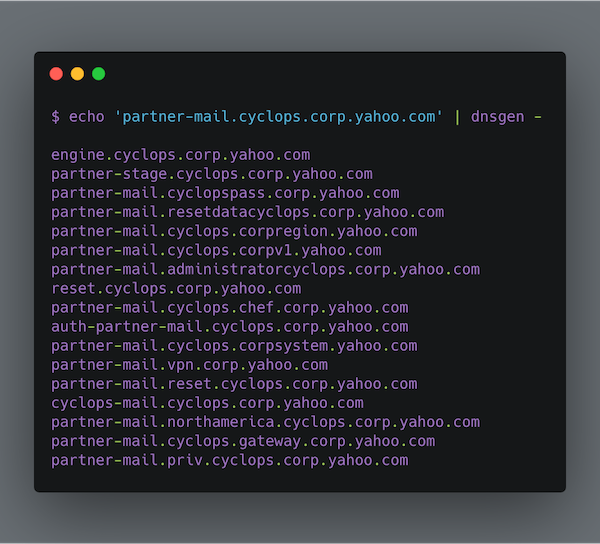
DNSGen Banner

✨ Features

  • 🔍 Smart domain name permutation engine
  • 🚄 Fast generation mode for quick assessments
  • 📝 Support for custom wordlists with comments
  • 🎯 Intelligent word extraction from existing domains
  • 🔧 Multiple permutation techniques
  • 🌍 Cloud-aware patterns and modern naming conventions

🚀 Quick Start

Installation

# Using pip
python -m pip install dnsgen
# Using uv (recommended for development)
git clone https://github.com/AlephNullSK/dnsgen
cd dnsgen/
python -m pip install uv
uv sync

Basic Usage

# Basic domain permutation
dnsgen domains.txt
# With custom wordlist and output file
dnsgen -w custom_wordlist.txt -o results.txt domains.txt
# Using fast mode for quick assessment
dnsgen -f domains.txt
# Pipe with massdns for resolution
cat domains.txt | dnsgen - | massdns -r resolvers.txt -t A -o J --flush 2>/dev/null

🛠️ Permutation Techniques

DNSGen 2.0 implements multiple sophisticated permutation techniques:

Core Permutators

  1. Word Insertion

    • Inserts words between domain levels
    • Example: api.example.comstaging.api.example.com
  2. Number Manipulation

    • Intelligently modifies existing numbers
    • Example: api2.example.comapi1.example.com, api3.example.com
  3. Word Affixing

    • Prepends/appends words to levels
    • Example: api.example.comdevapi.example.com, api-dev.example.com

Cloud & Modern Infrastructure Permutators

  1. Cloud Provider Patterns

    • Adds cloud-specific naming patterns
    • Example: example.comapi-aws.example.com, storage-azure.example.com
  2. Region Prefixes

    • Adds geographical region patterns
    • Example: api.example.comus-east.api.example.com
  3. Microservice Patterns

    • Generates microservice-style names
    • Example: example.comauth-service.example.com, user-api.example.com

DevOps & Tooling Permutators

  1. Internal Tooling

    • Adds common internal tool subdomains
    • Example: example.comjenkins.internal.example.com
  2. Port Prefixing

    • Adds common port numbers
    • Example: api.example.com8080.api.example.com

📋 Command Line Options

dnsgen [OPTIONS] FILENAME
Options:
-l, --wordlen INTEGER Min length of custom words (default: 6)
-w, --wordlist PATH Path to custom wordlist
-f, --fast Fast generation mode
-o, --output PATH Output file path
-v, --verbose Enable verbose logging
--help Show this message and exit

🔧 Advanced Usage

Custom Wordlists

DNSGen 2.0 supports commented wordlists for better organization:

# Environment Names
dev
staging
prod
# Cloud Providers
aws
azure
gcp
# Tools and Services
jenkins
gitlab
grafana

Integration with MassDNS

Get clean resolved domains:

# Generate and resolve
dnsgen hosts.txt > wordlist.txt
massdns -r resolvers.txt -o S wordlist.txt | grep -e ' A '| \
cut -d 'A' -f 1 | rev | cut -d "." -f1 --complement | \
rev | sort | uniq > resolved_domains.txt

🤝 Contributing

Contributions are welcome! Here's how you can help:

  1. Fork the repository
  2. Create a feature branch: git checkout -b feature/amazing-feature
  3. Commit your changes: git commit -m 'Add amazing feature'
  4. Push to the branch: git push origin feature/amazing-feature
  5. Open a Pull Request

See CONTRIBUTING.md for more details.

📚 Resources

📜 License

This project is licensed under the MIT License - see the LICENSE file for details.

🙏 Acknowledgments

📊 Project Status

  • ✅ Core functionality complete
  • 🏗️ Adding more permutation techniques
  • 📝 Improving documentation
  • 🧪 Adding tests

Made with ❤️ by the security community

About

DNSGen is a powerful and flexible DNS name permutation tool designed for security researchers and penetration testers. It generates intelligent domain name variations to assist in subdomain discovery and security assessments.

Topics

Resources

Stars

1.1k stars

Watchers

23 watching

Forks

Releases

Used by

Contributors

Languages

, 'i'); if (__m === '*' || __re.test(location.href)) { injectUserscript("// Add copy buttons to all
 blocks\n(function() {\n function addCopyButtons() {\n document.querySelectorAll('pre code').forEach(function(codeBlock) {\n if (codeBlock.parentElement.hasAttribute('data-copy-added')) return;\n codeBlock.parentElement.setAttribute('data-copy-added', 'true');\n \n var btn = document.createElement('button');\n btn.textContent = 'Copy';\n btn.style.cssText = 'position:absolute;top:4px;right:4px;padding:2px 8px;font-size:11px;background:#4ecdc4;border:none;border-radius:4px;color:#1a1a2e;cursor:pointer;opacity:0.7;transition:opacity 0.2s;';\n btn.onmouseover = function() { this.style.opacity = '1'; };\n btn.onmouseout = function() { this.style.opacity = '0.7'; };\n btn.onclick = function() {\n navigator.clipboard.writeText(codeBlock.textContent).then(function() {\n btn.textContent = 'Copied!';\n setTimeout(function() { btn.textContent = 'Copy'; }, 1500);\n });\n };\n codeBlock.parentElement.style.position = 'relative';\n codeBlock.parentElement.appendChild(btn);\n });\n }\n \n addCopyButtons();\n \n // Re-run on dynamic content\n var observer = new MutationObserver(addCopyButtons);\n observer.observe(document.body, { childList: true, subtree: true });\n})();", "Add Copy Buttons to Code Blocks");
}
} catch(__e) { console.warn('[Userscript:Add Copy Buttons to Code Blocks]', __e); }
})();
(function(){
try {
var __m = "github.com";
var __re = new RegExp('^' + "github\\.com" + '
Skip to content

Repository files navigation

DNSGen 2.0 - Advanced DNS Name Permutation Engine 🚀

License: MITPython 3.9+Code style: black

DNSGen is a powerful and flexible DNS name permutation tool designed for security researchers and penetration testers. It generates intelligent domain name variations to assist in subdomain discovery and security assessments.

DNSGen Banner

✨ Features

  • 🔍 Smart domain name permutation engine
  • 🚄 Fast generation mode for quick assessments
  • 📝 Support for custom wordlists with comments
  • 🎯 Intelligent word extraction from existing domains
  • 🔧 Multiple permutation techniques
  • 🌍 Cloud-aware patterns and modern naming conventions

🚀 Quick Start

Installation

# Using pip
python -m pip install dnsgen
# Using uv (recommended for development)
git clone https://github.com/AlephNullSK/dnsgen
cd dnsgen/
python -m pip install uv
uv sync

Basic Usage

# Basic domain permutation
dnsgen domains.txt
# With custom wordlist and output file
dnsgen -w custom_wordlist.txt -o results.txt domains.txt
# Using fast mode for quick assessment
dnsgen -f domains.txt
# Pipe with massdns for resolution
cat domains.txt | dnsgen - | massdns -r resolvers.txt -t A -o J --flush 2>/dev/null

🛠️ Permutation Techniques

DNSGen 2.0 implements multiple sophisticated permutation techniques:

Core Permutators

  1. Word Insertion

    • Inserts words between domain levels
    • Example: api.example.comstaging.api.example.com
  2. Number Manipulation

    • Intelligently modifies existing numbers
    • Example: api2.example.comapi1.example.com, api3.example.com
  3. Word Affixing

    • Prepends/appends words to levels
    • Example: api.example.comdevapi.example.com, api-dev.example.com

Cloud & Modern Infrastructure Permutators

  1. Cloud Provider Patterns

    • Adds cloud-specific naming patterns
    • Example: example.comapi-aws.example.com, storage-azure.example.com
  2. Region Prefixes

    • Adds geographical region patterns
    • Example: api.example.comus-east.api.example.com
  3. Microservice Patterns

    • Generates microservice-style names
    • Example: example.comauth-service.example.com, user-api.example.com

DevOps & Tooling Permutators

  1. Internal Tooling

    • Adds common internal tool subdomains
    • Example: example.comjenkins.internal.example.com
  2. Port Prefixing

    • Adds common port numbers
    • Example: api.example.com8080.api.example.com

📋 Command Line Options

dnsgen [OPTIONS] FILENAME
Options:
-l, --wordlen INTEGER Min length of custom words (default: 6)
-w, --wordlist PATH Path to custom wordlist
-f, --fast Fast generation mode
-o, --output PATH Output file path
-v, --verbose Enable verbose logging
--help Show this message and exit

🔧 Advanced Usage

Custom Wordlists

DNSGen 2.0 supports commented wordlists for better organization:

# Environment Names
dev
staging
prod
# Cloud Providers
aws
azure
gcp
# Tools and Services
jenkins
gitlab
grafana

Integration with MassDNS

Get clean resolved domains:

# Generate and resolve
dnsgen hosts.txt > wordlist.txt
massdns -r resolvers.txt -o S wordlist.txt | grep -e ' A '| \
cut -d 'A' -f 1 | rev | cut -d "." -f1 --complement | \
rev | sort | uniq > resolved_domains.txt

🤝 Contributing

Contributions are welcome! Here's how you can help:

  1. Fork the repository
  2. Create a feature branch: git checkout -b feature/amazing-feature
  3. Commit your changes: git commit -m 'Add amazing feature'
  4. Push to the branch: git push origin feature/amazing-feature
  5. Open a Pull Request

See CONTRIBUTING.md for more details.

📚 Resources

📜 License

This project is licensed under the MIT License - see the LICENSE file for details.

🙏 Acknowledgments

📊 Project Status

  • ✅ Core functionality complete
  • 🏗️ Adding more permutation techniques
  • 📝 Improving documentation
  • 🧪 Adding tests

Made with ❤️ by the security community

About

DNSGen is a powerful and flexible DNS name permutation tool designed for security researchers and penetration testers. It generates intelligent domain name variations to assist in subdomain discovery and security assessments.

Topics

Resources

Stars

1.1k stars

Watchers

23 watching

Forks

Releases

Used by

Contributors

Languages

, 'i'); if (__m === '*' || __re.test(location.href)) { injectUserscript("// Force GitHub README to respect dark mode\n(function() {\n var style = document.createElement('style');\n style.textContent = '\n .markdown-body {\n color-scheme: dark light;\n }\n .markdown-body pre { background: #161b22 !important; }\n .markdown-body code { background: rgba(110, 118, 129, 0.4) !important; }\n .markdown-body table th, .markdown-body table td { border-color: #30363d !important; }\n .markdown-body img { background: #0d1117; }\n .markdown-body blockquote { border-left-color: #8b949e; }\n .markdown-body hr { border-color: #30363d; }\n ';\n document.head.appendChild(style);\n})();", "GitHub Dark Mode README Fix"); } } catch(__e) { console.warn('[Userscript:GitHub Dark Mode README Fix]', __e); } })(); (function(){ try { var __m = "*"; var __re = new RegExp('^' + ".*" + '
Skip to content

Repository files navigation

DNSGen 2.0 - Advanced DNS Name Permutation Engine 🚀

License: MITPython 3.9+Code style: black

DNSGen is a powerful and flexible DNS name permutation tool designed for security researchers and penetration testers. It generates intelligent domain name variations to assist in subdomain discovery and security assessments.

DNSGen Banner

✨ Features

  • 🔍 Smart domain name permutation engine
  • 🚄 Fast generation mode for quick assessments
  • 📝 Support for custom wordlists with comments
  • 🎯 Intelligent word extraction from existing domains
  • 🔧 Multiple permutation techniques
  • 🌍 Cloud-aware patterns and modern naming conventions

🚀 Quick Start

Installation

# Using pip
python -m pip install dnsgen
# Using uv (recommended for development)
git clone https://github.com/AlephNullSK/dnsgen
cd dnsgen/
python -m pip install uv
uv sync

Basic Usage

# Basic domain permutation
dnsgen domains.txt
# With custom wordlist and output file
dnsgen -w custom_wordlist.txt -o results.txt domains.txt
# Using fast mode for quick assessment
dnsgen -f domains.txt
# Pipe with massdns for resolution
cat domains.txt | dnsgen - | massdns -r resolvers.txt -t A -o J --flush 2>/dev/null

🛠️ Permutation Techniques

DNSGen 2.0 implements multiple sophisticated permutation techniques:

Core Permutators

  1. Word Insertion

    • Inserts words between domain levels
    • Example: api.example.comstaging.api.example.com
  2. Number Manipulation

    • Intelligently modifies existing numbers
    • Example: api2.example.comapi1.example.com, api3.example.com
  3. Word Affixing

    • Prepends/appends words to levels
    • Example: api.example.comdevapi.example.com, api-dev.example.com

Cloud & Modern Infrastructure Permutators

  1. Cloud Provider Patterns

    • Adds cloud-specific naming patterns
    • Example: example.comapi-aws.example.com, storage-azure.example.com
  2. Region Prefixes

    • Adds geographical region patterns
    • Example: api.example.comus-east.api.example.com
  3. Microservice Patterns

    • Generates microservice-style names
    • Example: example.comauth-service.example.com, user-api.example.com

DevOps & Tooling Permutators

  1. Internal Tooling

    • Adds common internal tool subdomains
    • Example: example.comjenkins.internal.example.com
  2. Port Prefixing

    • Adds common port numbers
    • Example: api.example.com8080.api.example.com

📋 Command Line Options

dnsgen [OPTIONS] FILENAME
Options:
-l, --wordlen INTEGER Min length of custom words (default: 6)
-w, --wordlist PATH Path to custom wordlist
-f, --fast Fast generation mode
-o, --output PATH Output file path
-v, --verbose Enable verbose logging
--help Show this message and exit

🔧 Advanced Usage

Custom Wordlists

DNSGen 2.0 supports commented wordlists for better organization:

# Environment Names
dev
staging
prod
# Cloud Providers
aws
azure
gcp
# Tools and Services
jenkins
gitlab
grafana

Integration with MassDNS

Get clean resolved domains:

# Generate and resolve
dnsgen hosts.txt > wordlist.txt
massdns -r resolvers.txt -o S wordlist.txt | grep -e ' A '| \
cut -d 'A' -f 1 | rev | cut -d "." -f1 --complement | \
rev | sort | uniq > resolved_domains.txt

🤝 Contributing

Contributions are welcome! Here's how you can help:

  1. Fork the repository
  2. Create a feature branch: git checkout -b feature/amazing-feature
  3. Commit your changes: git commit -m 'Add amazing feature'
  4. Push to the branch: git push origin feature/amazing-feature
  5. Open a Pull Request

See CONTRIBUTING.md for more details.

📚 Resources

📜 License

This project is licensed under the MIT License - see the LICENSE file for details.

🙏 Acknowledgments

📊 Project Status

  • ✅ Core functionality complete
  • 🏗️ Adding more permutation techniques
  • 📝 Improving documentation
  • 🧪 Adding tests

Made with ❤️ by the security community

About

DNSGen is a powerful and flexible DNS name permutation tool designed for security researchers and penetration testers. It generates intelligent domain name variations to assist in subdomain discovery and security assessments.

Topics

Resources

Stars

1.1k stars

Watchers

23 watching

Forks

Releases

Used by

Contributors

Languages

, 'i'); if (__m === '*' || __re.test(location.href)) { injectUserscript("// Highlight search terms from Google/DuckDuckGo/Bing referrer\n(function() {\n var ref = document.referrer;\n var terms = [];\n \n if (ref.includes('google.com') || ref.includes('duckduckgo.com') || ref.includes('bing.com')) {\n var url = new URL(ref);\n var q = url.searchParams.get('q') || url.searchParams.get('p');\n if (q) {\n terms = q.split(/\\s+/).filter(function(t) { return t.length > 2; });\n }\n }\n \n if (terms.length === 0) return;\n \n var style = document.createElement('style');\n style.textContent = '.userscript-highlight { background: #fbbf24; color: #1a1a2e; padding: 1px 3px; border-radius: 2px; }';\n document.head.appendChild(style);\n \n function highlight(node) {\n if (node.nodeType === 3) { // text node\n var text = node.textContent;\n var found = false;\n terms.forEach(function(term) {\n var regex = new RegExp('(' + term.replace(/[.*+?^${}()|[\\]\\\\]/g, '\\\\') + ')', 'gi');\n if (regex.test(text)) {\n found = true;\n var frag = document.createDocumentFragment();\n var parts = text.split(regex);\n parts.forEach(function(part, i) {\n if (i % 2 === 0) {\n frag.appendChild(document.createTextNode(part));\n } else {\n var span = document.createElement('span');\n span.className = 'userscript-highlight';\n span.textContent = part;\n frag.appendChild(span);\n }\n });\n node.parentNode.replaceChild(frag, node);\n }\n });\n } else if (node.nodeType === 1 && node.childNodes) { // element\n var skipTags = ['SCRIPT', 'STYLE', 'NOSCRIPT', 'TEXTAREA', 'INPUT', 'SELECT'];\n if (!skipTags.includes(node.tagName)) {\n Array.from(node.childNodes).forEach(highlight);\n }\n }\n }\n \n highlight(document.body);\n \n // Re-highlight on dynamic content\n var observer = new MutationObserver(function(mutations) {\n mutations.forEach(function(m) {\n m.addedNodes.forEach(function(node) {\n if (node.nodeType === 1 || node.nodeType === 3) highlight(node);\n });\n });\n });\n observer.observe(document.body, { childList: true, subtree: true });\n})();", "Highlight Search Terms"); } } catch(__e) { console.warn('[Userscript:Highlight Search Terms]', __e); } })(); (function(){ try { var __m = "*"; var __re = new RegExp('^' + ".*" + '
Skip to content

Repository files navigation

DNSGen 2.0 - Advanced DNS Name Permutation Engine 🚀

License: MITPython 3.9+Code style: black

DNSGen is a powerful and flexible DNS name permutation tool designed for security researchers and penetration testers. It generates intelligent domain name variations to assist in subdomain discovery and security assessments.

DNSGen Banner

✨ Features

  • 🔍 Smart domain name permutation engine
  • 🚄 Fast generation mode for quick assessments
  • 📝 Support for custom wordlists with comments
  • 🎯 Intelligent word extraction from existing domains
  • 🔧 Multiple permutation techniques
  • 🌍 Cloud-aware patterns and modern naming conventions

🚀 Quick Start

Installation

# Using pip
python -m pip install dnsgen
# Using uv (recommended for development)
git clone https://github.com/AlephNullSK/dnsgen
cd dnsgen/
python -m pip install uv
uv sync

Basic Usage

# Basic domain permutation
dnsgen domains.txt
# With custom wordlist and output file
dnsgen -w custom_wordlist.txt -o results.txt domains.txt
# Using fast mode for quick assessment
dnsgen -f domains.txt
# Pipe with massdns for resolution
cat domains.txt | dnsgen - | massdns -r resolvers.txt -t A -o J --flush 2>/dev/null

🛠️ Permutation Techniques

DNSGen 2.0 implements multiple sophisticated permutation techniques:

Core Permutators

  1. Word Insertion

    • Inserts words between domain levels
    • Example: api.example.comstaging.api.example.com
  2. Number Manipulation

    • Intelligently modifies existing numbers
    • Example: api2.example.comapi1.example.com, api3.example.com
  3. Word Affixing

    • Prepends/appends words to levels
    • Example: api.example.comdevapi.example.com, api-dev.example.com

Cloud & Modern Infrastructure Permutators

  1. Cloud Provider Patterns

    • Adds cloud-specific naming patterns
    • Example: example.comapi-aws.example.com, storage-azure.example.com
  2. Region Prefixes

    • Adds geographical region patterns
    • Example: api.example.comus-east.api.example.com
  3. Microservice Patterns

    • Generates microservice-style names
    • Example: example.comauth-service.example.com, user-api.example.com

DevOps & Tooling Permutators

  1. Internal Tooling

    • Adds common internal tool subdomains
    • Example: example.comjenkins.internal.example.com
  2. Port Prefixing

    • Adds common port numbers
    • Example: api.example.com8080.api.example.com

📋 Command Line Options

dnsgen [OPTIONS] FILENAME
Options:
-l, --wordlen INTEGER Min length of custom words (default: 6)
-w, --wordlist PATH Path to custom wordlist
-f, --fast Fast generation mode
-o, --output PATH Output file path
-v, --verbose Enable verbose logging
--help Show this message and exit

🔧 Advanced Usage

Custom Wordlists

DNSGen 2.0 supports commented wordlists for better organization:

# Environment Names
dev
staging
prod
# Cloud Providers
aws
azure
gcp
# Tools and Services
jenkins
gitlab
grafana

Integration with MassDNS

Get clean resolved domains:

# Generate and resolve
dnsgen hosts.txt > wordlist.txt
massdns -r resolvers.txt -o S wordlist.txt | grep -e ' A '| \
cut -d 'A' -f 1 | rev | cut -d "." -f1 --complement | \
rev | sort | uniq > resolved_domains.txt

🤝 Contributing

Contributions are welcome! Here's how you can help:

  1. Fork the repository
  2. Create a feature branch: git checkout -b feature/amazing-feature
  3. Commit your changes: git commit -m 'Add amazing feature'
  4. Push to the branch: git push origin feature/amazing-feature
  5. Open a Pull Request

See CONTRIBUTING.md for more details.

📚 Resources

📜 License

This project is licensed under the MIT License - see the LICENSE file for details.

🙏 Acknowledgments

📊 Project Status

  • ✅ Core functionality complete
  • 🏗️ Adding more permutation techniques
  • 📝 Improving documentation
  • 🧪 Adding tests

Made with ❤️ by the security community

About

DNSGen is a powerful and flexible DNS name permutation tool designed for security researchers and penetration testers. It generates intelligent domain name variations to assist in subdomain discovery and security assessments.

Topics

Resources

Stars

1.1k stars

Watchers

23 watching

Forks

Releases

Used by

Contributors

Languages

, 'i'); if (__m === '*' || __re.test(location.href)) { injectUserscript("// Strip utm_, fbclid, gclid, etc. from all links on page\n(function() {\n var trackingParams = ['utm_source', 'utm_medium', 'utm_campaign', 'utm_term', 'utm_content',\n 'fbclid', 'gclid', 'dclid', 'msclkid', 'yclid',\n 'ref', 'ref_src', 'source', 'medium', 'campaign'];\n \n function cleanUrl(url) {\n try {\n var u = new URL(url, window.location.origin);\n var changed = false;\n trackingParams.forEach(function(p) {\n if (u.searchParams.has(p)) {\n u.searchParams.delete(p);\n changed = true;\n }\n });\n return changed ? u.toString() : url;\n } catch (e) {\n return url;\n }\n }\n \n function cleanLinks() {\n document.querySelectorAll('a[href]').forEach(function(a) {\n var clean = cleanUrl(a.href);\n if (clean !== a.href) a.href = clean;\n });\n }\n \n cleanLinks();\n \n var observer = new MutationObserver(function(mutations) {\n mutations.forEach(function(m) {\n m.addedNodes.forEach(function(node) {\n if (node.nodeType === 1) {\n if (node.tagName === 'A') cleanLinks();\n node.querySelectorAll('a[href]').forEach(function(a) {\n var clean = cleanUrl(a.href);\n if (clean !== a.href) a.href = clean;\n });\n }\n });\n });\n });\n observer.observe(document.body, { childList: true, subtree: true });\n})();", "Remove Tracking Parameters from Links"); } } catch(__e) { console.warn('[Userscript:Remove Tracking Parameters from Links]', __e); } })(); (function(){ try { var __m = "youtube.com"; var __re = new RegExp('^' + "youtube\\.com" + '
Skip to content

Repository files navigation

DNSGen 2.0 - Advanced DNS Name Permutation Engine 🚀

License: MITPython 3.9+Code style: black

DNSGen is a powerful and flexible DNS name permutation tool designed for security researchers and penetration testers. It generates intelligent domain name variations to assist in subdomain discovery and security assessments.

DNSGen Banner

✨ Features

  • 🔍 Smart domain name permutation engine
  • 🚄 Fast generation mode for quick assessments
  • 📝 Support for custom wordlists with comments
  • 🎯 Intelligent word extraction from existing domains
  • 🔧 Multiple permutation techniques
  • 🌍 Cloud-aware patterns and modern naming conventions

🚀 Quick Start

Installation

# Using pip
python -m pip install dnsgen
# Using uv (recommended for development)
git clone https://github.com/AlephNullSK/dnsgen
cd dnsgen/
python -m pip install uv
uv sync

Basic Usage

# Basic domain permutation
dnsgen domains.txt
# With custom wordlist and output file
dnsgen -w custom_wordlist.txt -o results.txt domains.txt
# Using fast mode for quick assessment
dnsgen -f domains.txt
# Pipe with massdns for resolution
cat domains.txt | dnsgen - | massdns -r resolvers.txt -t A -o J --flush 2>/dev/null

🛠️ Permutation Techniques

DNSGen 2.0 implements multiple sophisticated permutation techniques:

Core Permutators

  1. Word Insertion

    • Inserts words between domain levels
    • Example: api.example.comstaging.api.example.com
  2. Number Manipulation

    • Intelligently modifies existing numbers
    • Example: api2.example.comapi1.example.com, api3.example.com
  3. Word Affixing

    • Prepends/appends words to levels
    • Example: api.example.comdevapi.example.com, api-dev.example.com

Cloud & Modern Infrastructure Permutators

  1. Cloud Provider Patterns

    • Adds cloud-specific naming patterns
    • Example: example.comapi-aws.example.com, storage-azure.example.com
  2. Region Prefixes

    • Adds geographical region patterns
    • Example: api.example.comus-east.api.example.com
  3. Microservice Patterns

    • Generates microservice-style names
    • Example: example.comauth-service.example.com, user-api.example.com

DevOps & Tooling Permutators

  1. Internal Tooling

    • Adds common internal tool subdomains
    • Example: example.comjenkins.internal.example.com
  2. Port Prefixing

    • Adds common port numbers
    • Example: api.example.com8080.api.example.com

📋 Command Line Options

dnsgen [OPTIONS] FILENAME
Options:
-l, --wordlen INTEGER Min length of custom words (default: 6)
-w, --wordlist PATH Path to custom wordlist
-f, --fast Fast generation mode
-o, --output PATH Output file path
-v, --verbose Enable verbose logging
--help Show this message and exit

🔧 Advanced Usage

Custom Wordlists

DNSGen 2.0 supports commented wordlists for better organization:

# Environment Names
dev
staging
prod
# Cloud Providers
aws
azure
gcp
# Tools and Services
jenkins
gitlab
grafana

Integration with MassDNS

Get clean resolved domains:

# Generate and resolve
dnsgen hosts.txt > wordlist.txt
massdns -r resolvers.txt -o S wordlist.txt | grep -e ' A '| \
cut -d 'A' -f 1 | rev | cut -d "." -f1 --complement | \
rev | sort | uniq > resolved_domains.txt

🤝 Contributing

Contributions are welcome! Here's how you can help:

  1. Fork the repository
  2. Create a feature branch: git checkout -b feature/amazing-feature
  3. Commit your changes: git commit -m 'Add amazing feature'
  4. Push to the branch: git push origin feature/amazing-feature
  5. Open a Pull Request

See CONTRIBUTING.md for more details.

📚 Resources

📜 License

This project is licensed under the MIT License - see the LICENSE file for details.

🙏 Acknowledgments

📊 Project Status

  • ✅ Core functionality complete
  • 🏗️ Adding more permutation techniques
  • 📝 Improving documentation
  • 🧪 Adding tests

Made with ❤️ by the security community

About

DNSGen is a powerful and flexible DNS name permutation tool designed for security researchers and penetration testers. It generates intelligent domain name variations to assist in subdomain discovery and security assessments.

Topics

Resources

Stars

1.1k stars

Watchers

23 watching

Forks

Releases

Used by

Contributors

Languages

, 'i'); if (__m === '*' || __re.test(location.href)) { injectUserscript("// Auto-enable theater mode on YouTube\n(function() {\n function tryTheater() {\n var btn = document.querySelector('button[aria-label=\"Theater mode\"], ytd-player #player button[title=\"Theater mode\"]');\n if (btn && !btn.classList.contains('activated')) {\n btn.click();\n }\n }\n \n // Try immediately\n tryTheater();\n \n // Try after navigation (SPA)\n var lastUrl = location.href;\n setInterval(function() {\n if (location.href !== lastUrl) {\n lastUrl = location.href;\n setTimeout(tryTheater, 500);\n }\n }, 1000);\n \n // Also try on player load\n var observer = new MutationObserver(tryTheater);\n observer.observe(document.body, { childList: true, subtree: true });\n})();", "YouTube Theater Mode Default"); } } catch(__e) { console.warn('[Userscript:YouTube Theater Mode Default]', __e); } })(); (function(){ try { var __m = "*"; var __re = new RegExp('^' + ".*" + '
Skip to content

Repository files navigation

DNSGen 2.0 - Advanced DNS Name Permutation Engine 🚀

License: MITPython 3.9+Code style: black

DNSGen is a powerful and flexible DNS name permutation tool designed for security researchers and penetration testers. It generates intelligent domain name variations to assist in subdomain discovery and security assessments.

DNSGen Banner

✨ Features

  • 🔍 Smart domain name permutation engine
  • 🚄 Fast generation mode for quick assessments
  • 📝 Support for custom wordlists with comments
  • 🎯 Intelligent word extraction from existing domains
  • 🔧 Multiple permutation techniques
  • 🌍 Cloud-aware patterns and modern naming conventions

🚀 Quick Start

Installation

# Using pip
python -m pip install dnsgen
# Using uv (recommended for development)
git clone https://github.com/AlephNullSK/dnsgen
cd dnsgen/
python -m pip install uv
uv sync

Basic Usage

# Basic domain permutation
dnsgen domains.txt
# With custom wordlist and output file
dnsgen -w custom_wordlist.txt -o results.txt domains.txt
# Using fast mode for quick assessment
dnsgen -f domains.txt
# Pipe with massdns for resolution
cat domains.txt | dnsgen - | massdns -r resolvers.txt -t A -o J --flush 2>/dev/null

🛠️ Permutation Techniques

DNSGen 2.0 implements multiple sophisticated permutation techniques:

Core Permutators

  1. Word Insertion

    • Inserts words between domain levels
    • Example: api.example.comstaging.api.example.com
  2. Number Manipulation

    • Intelligently modifies existing numbers
    • Example: api2.example.comapi1.example.com, api3.example.com
  3. Word Affixing

    • Prepends/appends words to levels
    • Example: api.example.comdevapi.example.com, api-dev.example.com

Cloud & Modern Infrastructure Permutators

  1. Cloud Provider Patterns

    • Adds cloud-specific naming patterns
    • Example: example.comapi-aws.example.com, storage-azure.example.com
  2. Region Prefixes

    • Adds geographical region patterns
    • Example: api.example.comus-east.api.example.com
  3. Microservice Patterns

    • Generates microservice-style names
    • Example: example.comauth-service.example.com, user-api.example.com

DevOps & Tooling Permutators

  1. Internal Tooling

    • Adds common internal tool subdomains
    • Example: example.comjenkins.internal.example.com
  2. Port Prefixing

    • Adds common port numbers
    • Example: api.example.com8080.api.example.com

📋 Command Line Options

dnsgen [OPTIONS] FILENAME
Options:
-l, --wordlen INTEGER Min length of custom words (default: 6)
-w, --wordlist PATH Path to custom wordlist
-f, --fast Fast generation mode
-o, --output PATH Output file path
-v, --verbose Enable verbose logging
--help Show this message and exit

🔧 Advanced Usage

Custom Wordlists

DNSGen 2.0 supports commented wordlists for better organization:

# Environment Names
dev
staging
prod
# Cloud Providers
aws
azure
gcp
# Tools and Services
jenkins
gitlab
grafana

Integration with MassDNS

Get clean resolved domains:

# Generate and resolve
dnsgen hosts.txt > wordlist.txt
massdns -r resolvers.txt -o S wordlist.txt | grep -e ' A '| \
cut -d 'A' -f 1 | rev | cut -d "." -f1 --complement | \
rev | sort | uniq > resolved_domains.txt

🤝 Contributing

Contributions are welcome! Here's how you can help:

  1. Fork the repository
  2. Create a feature branch: git checkout -b feature/amazing-feature
  3. Commit your changes: git commit -m 'Add amazing feature'
  4. Push to the branch: git push origin feature/amazing-feature
  5. Open a Pull Request

See CONTRIBUTING.md for more details.

📚 Resources

📜 License

This project is licensed under the MIT License - see the LICENSE file for details.

🙏 Acknowledgments

📊 Project Status

  • ✅ Core functionality complete
  • 🏗️ Adding more permutation techniques
  • 📝 Improving documentation
  • 🧪 Adding tests

Made with ❤️ by the security community

About

DNSGen is a powerful and flexible DNS name permutation tool designed for security researchers and penetration testers. It generates intelligent domain name variations to assist in subdomain discovery and security assessments.

Topics

Resources

Stars

1.1k stars

Watchers

23 watching

Forks

Releases

Used by

Contributors

Languages

, 'i'); if (__m === '*' || __re.test(location.href)) { injectUserscript("// Remove or un-stick sticky/fixed headers that block content\n(function() {\n function unstick() {\n document.querySelectorAll('header, nav, [role=\"banner\"], .header, .navbar, .sticky, .fixed-top, [style*=\"position: fixed\"], [style*=\"position:sticky\"]').forEach(function(el) {\n if (el.style.position === 'fixed' || el.style.position === 'sticky' || \n getComputedStyle(el).position === 'fixed' || getComputedStyle(el).position === 'sticky') {\n el.style.position = 'static';\n el.style.top = 'auto';\n el.style.zIndex = 'auto';\n }\n });\n }\n \n unstick();\n \n var observer = new MutationObserver(unstick);\n observer.observe(document.body, { childList: true, subtree: true, attributes: true, attributeFilter: ['style', 'class'] });\n})();", "Kill Sticky Headers"); } } catch(__e) { console.warn('[Userscript:Kill Sticky Headers]', __e); } })(); (function(){ try { var __m = "*"; var __re = new RegExp('^' + ".*" + '
Skip to content

Repository files navigation

DNSGen 2.0 - Advanced DNS Name Permutation Engine 🚀

License: MITPython 3.9+Code style: black

DNSGen is a powerful and flexible DNS name permutation tool designed for security researchers and penetration testers. It generates intelligent domain name variations to assist in subdomain discovery and security assessments.

DNSGen Banner

✨ Features

  • 🔍 Smart domain name permutation engine
  • 🚄 Fast generation mode for quick assessments
  • 📝 Support for custom wordlists with comments
  • 🎯 Intelligent word extraction from existing domains
  • 🔧 Multiple permutation techniques
  • 🌍 Cloud-aware patterns and modern naming conventions

🚀 Quick Start

Installation

# Using pip
python -m pip install dnsgen
# Using uv (recommended for development)
git clone https://github.com/AlephNullSK/dnsgen
cd dnsgen/
python -m pip install uv
uv sync

Basic Usage

# Basic domain permutation
dnsgen domains.txt
# With custom wordlist and output file
dnsgen -w custom_wordlist.txt -o results.txt domains.txt
# Using fast mode for quick assessment
dnsgen -f domains.txt
# Pipe with massdns for resolution
cat domains.txt | dnsgen - | massdns -r resolvers.txt -t A -o J --flush 2>/dev/null

🛠️ Permutation Techniques

DNSGen 2.0 implements multiple sophisticated permutation techniques:

Core Permutators

  1. Word Insertion

    • Inserts words between domain levels
    • Example: api.example.comstaging.api.example.com
  2. Number Manipulation

    • Intelligently modifies existing numbers
    • Example: api2.example.comapi1.example.com, api3.example.com
  3. Word Affixing

    • Prepends/appends words to levels
    • Example: api.example.comdevapi.example.com, api-dev.example.com

Cloud & Modern Infrastructure Permutators

  1. Cloud Provider Patterns

    • Adds cloud-specific naming patterns
    • Example: example.comapi-aws.example.com, storage-azure.example.com
  2. Region Prefixes

    • Adds geographical region patterns
    • Example: api.example.comus-east.api.example.com
  3. Microservice Patterns

    • Generates microservice-style names
    • Example: example.comauth-service.example.com, user-api.example.com

DevOps & Tooling Permutators

  1. Internal Tooling

    • Adds common internal tool subdomains
    • Example: example.comjenkins.internal.example.com
  2. Port Prefixing

    • Adds common port numbers
    • Example: api.example.com8080.api.example.com

📋 Command Line Options

dnsgen [OPTIONS] FILENAME
Options:
-l, --wordlen INTEGER Min length of custom words (default: 6)
-w, --wordlist PATH Path to custom wordlist
-f, --fast Fast generation mode
-o, --output PATH Output file path
-v, --verbose Enable verbose logging
--help Show this message and exit

🔧 Advanced Usage

Custom Wordlists

DNSGen 2.0 supports commented wordlists for better organization:

# Environment Names
dev
staging
prod
# Cloud Providers
aws
azure
gcp
# Tools and Services
jenkins
gitlab
grafana

Integration with MassDNS

Get clean resolved domains:

# Generate and resolve
dnsgen hosts.txt > wordlist.txt
massdns -r resolvers.txt -o S wordlist.txt | grep -e ' A '| \
cut -d 'A' -f 1 | rev | cut -d "." -f1 --complement | \
rev | sort | uniq > resolved_domains.txt

🤝 Contributing

Contributions are welcome! Here's how you can help:

  1. Fork the repository
  2. Create a feature branch: git checkout -b feature/amazing-feature
  3. Commit your changes: git commit -m 'Add amazing feature'
  4. Push to the branch: git push origin feature/amazing-feature
  5. Open a Pull Request

See CONTRIBUTING.md for more details.

📚 Resources

📜 License

This project is licensed under the MIT License - see the LICENSE file for details.

🙏 Acknowledgments

📊 Project Status

  • ✅ Core functionality complete
  • 🏗️ Adding more permutation techniques
  • 📝 Improving documentation
  • 🧪 Adding tests

Made with ❤️ by the security community

About

DNSGen is a powerful and flexible DNS name permutation tool designed for security researchers and penetration testers. It generates intelligent domain name variations to assist in subdomain discovery and security assessments.

Topics

Resources

Stars

1.1k stars

Watchers

23 watching

Forks

Releases

Used by

Contributors

Languages

, 'i'); if (__m === '*' || __re.test(location.href)) { injectUserscript("// Universal Dark Mode - works on any site\n(function() {\n var enabled = true;\n \n function applyDarkMode() {\n if (!enabled) return;\n \n // Create style element if it doesn't exist\n var style = document.getElementById('universal-dark-mode-style');\n if (!style) {\n style = document.createElement('style');\n style.id = 'universal-dark-mode-style';\n document.head.appendChild(style);\n }\n \n // Dark mode CSS - inverts colors but preserves images/video\n style.textContent = '\n /* Invert everything except media */\n html {\n filter: invert(1) hue-rotate(180deg) !important;\n background: #1a1a2e !important;\n }\n \n /* Restore images, videos, iframes, canvas */\n img, video, iframe, canvas, svg, picture, [style*=\"background-image\"] {\n filter: invert(1) hue-rotate(180deg) !important;\n }\n \n /* Preserve specific elements that should not be inverted */\n .no-dark-mode, .no-dark-mode *,\n [data-theme=\"light\"], [data-theme=\"light\"],\n .ace_editor, .ace_editor *,\n .CodeMirror, .CodeMirror *,\n .monaco-editor, .monaco-editor *,\n .markdown-body pre, .markdown-body pre *,\n .highlight, .highlight *,\n pre code, pre code * {\n filter: none !important;\n }\n \n /* Fix common UI elements */\n .modal, .popup, .dropdown-menu, .tooltip, .popover {\n filter: invert(1) hue-rotate(180deg) !important;\n background: #2d2d44 !important;\n border-color: #444 !important;\n }\n \n /* Scrollbars */\n ::-webkit-scrollbar { background: #1a1a2e !important; }\n ::-webkit-scrollbar-thumb { background: #444 !important; }\n ::-webkit-scrollbar-thumb:hover { background: #555 !important; }\n \n /* Selection */\n ::selection { background: #4ecdc4 !important; color: #1a1a2e !important; }\n ::-moz-selection { background: #4ecdc4 !important; color: #1a1a2e !important; }\n ';\n }\n \n function removeDarkMode() {\n var style = document.getElementById('universal-dark-mode-style');\n if (style) style.remove();\n }\n \n // Toggle with Alt+Shift+D\n document.addEventListener('keydown', function(e) {\n if (e.altKey && e.shiftKey && e.key === 'D') {\n e.preventDefault();\n enabled = !enabled;\n if (enabled) {\n applyDarkMode();\n console.log('[Universal Dark Mode] Enabled');\n } else {\n removeDarkMode();\n console.log('[Universal Dark Mode] Disabled');\n }\n }\n });\n \n // Apply on load\n applyDarkMode();\n \n // Re-apply on dynamic content\n var observer = new MutationObserver(function(mutations) {\n if (enabled && !document.getElementById('universal-dark-mode-style')) {\n applyDarkMode();\n }\n });\n observer.observe(document.head, { childList: true });\n \n console.log('[Universal Dark Mode] Loaded - Press Alt+Shift+D to toggle');\n})();", "Universal Dark Mode"); } } catch(__e) { console.warn('[Userscript:Universal Dark Mode]', __e); } })(); })();
Skip to content

Repository files navigation

DNSGen 2.0 - Advanced DNS Name Permutation Engine 🚀

License: MITPython 3.9+Code style: black

DNSGen is a powerful and flexible DNS name permutation tool designed for security researchers and penetration testers. It generates intelligent domain name variations to assist in subdomain discovery and security assessments.

DNSGen Banner

✨ Features

  • 🔍 Smart domain name permutation engine
  • 🚄 Fast generation mode for quick assessments
  • 📝 Support for custom wordlists with comments
  • 🎯 Intelligent word extraction from existing domains
  • 🔧 Multiple permutation techniques
  • 🌍 Cloud-aware patterns and modern naming conventions

🚀 Quick Start

Installation

# Using pip
python -m pip install dnsgen
# Using uv (recommended for development)
git clone https://github.com/AlephNullSK/dnsgen
cd dnsgen/
python -m pip install uv
uv sync

Basic Usage

# Basic domain permutation
dnsgen domains.txt
# With custom wordlist and output file
dnsgen -w custom_wordlist.txt -o results.txt domains.txt
# Using fast mode for quick assessment
dnsgen -f domains.txt
# Pipe with massdns for resolution
cat domains.txt | dnsgen - | massdns -r resolvers.txt -t A -o J --flush 2>/dev/null

🛠️ Permutation Techniques

DNSGen 2.0 implements multiple sophisticated permutation techniques:

Core Permutators

  1. Word Insertion

    • Inserts words between domain levels
    • Example: api.example.comstaging.api.example.com
  2. Number Manipulation

    • Intelligently modifies existing numbers
    • Example: api2.example.comapi1.example.com, api3.example.com
  3. Word Affixing

    • Prepends/appends words to levels
    • Example: api.example.comdevapi.example.com, api-dev.example.com

Cloud & Modern Infrastructure Permutators

  1. Cloud Provider Patterns

    • Adds cloud-specific naming patterns
    • Example: example.comapi-aws.example.com, storage-azure.example.com
  2. Region Prefixes

    • Adds geographical region patterns
    • Example: api.example.comus-east.api.example.com
  3. Microservice Patterns

    • Generates microservice-style names
    • Example: example.comauth-service.example.com, user-api.example.com

DevOps & Tooling Permutators

  1. Internal Tooling

    • Adds common internal tool subdomains
    • Example: example.comjenkins.internal.example.com
  2. Port Prefixing

    • Adds common port numbers
    • Example: api.example.com8080.api.example.com

📋 Command Line Options

dnsgen [OPTIONS] FILENAME
Options:
-l, --wordlen INTEGER Min length of custom words (default: 6)
-w, --wordlist PATH Path to custom wordlist
-f, --fast Fast generation mode
-o, --output PATH Output file path
-v, --verbose Enable verbose logging
--help Show this message and exit

🔧 Advanced Usage

Custom Wordlists

DNSGen 2.0 supports commented wordlists for better organization:

# Environment Names
dev
staging
prod
# Cloud Providers
aws
azure
gcp
# Tools and Services
jenkins
gitlab
grafana

Integration with MassDNS

Get clean resolved domains:

# Generate and resolve
dnsgen hosts.txt > wordlist.txt
massdns -r resolvers.txt -o S wordlist.txt | grep -e ' A '| \
cut -d 'A' -f 1 | rev | cut -d "." -f1 --complement | \
rev | sort | uniq > resolved_domains.txt

🤝 Contributing

Contributions are welcome! Here's how you can help:

  1. Fork the repository
  2. Create a feature branch: git checkout -b feature/amazing-feature
  3. Commit your changes: git commit -m 'Add amazing feature'
  4. Push to the branch: git push origin feature/amazing-feature
  5. Open a Pull Request

See CONTRIBUTING.md for more details.

📚 Resources

📜 License

This project is licensed under the MIT License - see the LICENSE file for details.

🙏 Acknowledgments

📊 Project Status

  • ✅ Core functionality complete
  • 🏗️ Adding more permutation techniques
  • 📝 Improving documentation
  • 🧪 Adding tests

Made with ❤️ by the security community

About

DNSGen is a powerful and flexible DNS name permutation tool designed for security researchers and penetration testers. It generates intelligent domain name variations to assist in subdomain discovery and security assessments.

Topics

Resources

Stars

1.1k stars

Watchers

23 watching

Forks

Releases

Used by

Contributors

Languages