
Repository files navigation

Build Statusnpm version

FirebaseUi-Angular

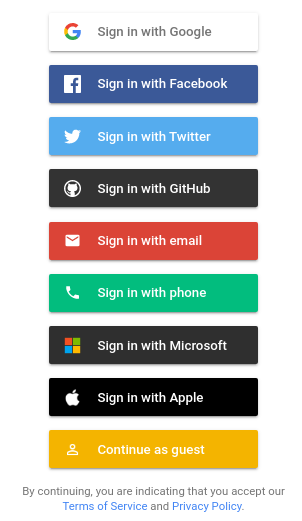
Screenshot of Login screen

Compatibility

AngularFirebaseAngularFireFirebaseUIFirebaseUI-AngularNote
18.2.12^11.0.2^18.0.1^6.1.06.3.0
17.1.0^10.7.2^17.0.1^6.1.06.2.0Dropping old Angular and Firbase versions
17.0.0^9.23.0^7.6.1^6.1.06.1.5
16.0.0^9.23.0^7.6.1^6.1.06.1.4
15.0.0^9.14.0^7.5.0^6.0.26.1.3
14.0.2^9.8.3^7.4.1^6.0.16.1.2
13.0.0^9.3.0^7.1.1^6.0.06.1.0
12.1.0^9.0.2^7.0.4^6.0.06.0.0
12.1.0^8.6.8^6.1.5^4.8.05.1.3
11.0.2^8.2.4^6.1.1^4.7.25.1.2support for auth emulator
11.0.2^8.1.1^6.1.1^4.7.15.1.1
10.2.2^8.0.1^6.0.4^4.7.15.1.0
~8.2.13^7.23.0~5.2.1~4.7.1~4.0.1

Version combinations not documented here may work but are untested.

Installation

To install this library, run:

$ npm install firebaseui-angular --save

To run this library you need to have AngularFire2 , Firebase, FirebaseUI-Web installed. Fast install:

$ npm install firebase firebaseui @angular/fire firebaseui-angular --save

How to use

Add the FirebaseUIModule with the config to your imports. Make sure you have initialized AngularFire correctly.

import{BrowserModule}from'@angular/platform-browser';import{NgModule}from'@angular/core';import{FormsModule}from'@angular/forms';import{AppComponent}from'./app.component';import{firebase,firebaseui,FirebaseUIModule}from'firebaseui-angular';import{environment}from'../environments/environment';import{AppRoutingModule}from'./app-routing.module';import{AngularFireModule}from"@angular/fire/compat";import{AngularFireAuthModule,USE_EMULATORasUSE_AUTH_EMULATOR}from"@angular/fire/compat/auth";constfirebaseUiAuthConfig: firebaseui.auth.Config={signInFlow: 'popup',signInOptions: [firebase.auth.GoogleAuthProvider.PROVIDER_ID,{scopes: ['public_profile','email','user_likes','user_friends'],customParameters: {'auth_type': 'reauthenticate'},provider: firebase.auth.FacebookAuthProvider.PROVIDER_ID},firebase.auth.TwitterAuthProvider.PROVIDER_ID,firebase.auth.GithubAuthProvider.PROVIDER_ID,{requireDisplayName: false,provider: firebase.auth.EmailAuthProvider.PROVIDER_ID},firebase.auth.PhoneAuthProvider.PROVIDER_ID,firebaseui.auth.AnonymousAuthProvider.PROVIDER_ID],tosUrl: '<your-tos-link>',privacyPolicyUrl: '<your-privacyPolicyUrl-link>',credentialHelper: firebaseui.auth.CredentialHelper.GOOGLE_YOLO};
@NgModule({declarations: [AppComponent],imports: [BrowserModule,FormsModule,AppRoutingModule,AngularFireModule.initializeApp(environment.firebaseConfig),AngularFireAuthModule,FirebaseUIModule.forRoot(firebaseUiAuthConfig)],providers: [{provide: USE_AUTH_EMULATOR,useValue: !environment.production ? ['localhost',9099] : undefined},],bootstrap: [AppComponent]})exportclassAppModule{}

Add the firebaseui css to your imports:

Option 1: CSS Import

May be incompatible with older browsers.

Import the firebaseui css to your src/styles.css file:

@import'~firebaseui/dist/firebaseui.css';

Option 2: Angular-CLI

File: angular.json

Path: "node_modules/firebaseui/dist/firebaseui.css"

{
"projects": {
[
your-project-name
]: {..."architect": {
"build": {
"options": {
..."styles": [
"src/styles.css",
"node_modules/firebaseui/dist/firebaseui.css"
]
}
},
..."test": {
"options": {
..."styles": [
"src/styles.css",
"node_modules/firebaseui/dist/firebaseui.css"
]
}
}
}
}
}
}

Option 3: HTML Link

Put this in the <head> tag of your index.html file:

<linktype="text/css" rel="stylesheet" href="https://cdn.firebase.com/libs/firebaseui/3.0.0/firebaseui.css"/>

Make sure the version number matches the version of firebaseui you have installed with npm.

Once everything is set up, you can use the component in your Angular application:


<firebase-ui></firebase-ui>

Configuration

For the configuration of the module see the official firebaseui documentation: Config

If you use a version prior to 3.3.0 check the old README

forRoot/forFeature

To configure the plugin the first time (main.module.ts) the forRoot() method is used. It builds the basis for all further uses of the plugin. But you have the possibility to overwrite the entire or just parts of the configuration in any (sub-)module.

forRoot

To overwrite the entire configuration use:

FirebaseUIModule.forRoot(firebaseUiAuthConfig: NativeFirebaseUIAuthConfig)
forFeature

To overwrite just parts of the configuration use:

FirebaseUIModule.forFeature(firebaseUiAuthConfig: NativeFirebaseUIAuthConfig)

This will use the in forRoot provided configuration and overwrite just the newly provided values.

Using a Provider Factory

You may need to dynamically create the firebaseui configuration object based on application settings or the like. An example of this might be to conditionally enable certain providers for different deployments of the application.

To do this you can use a provider factory to inject the firebaseUIAuthConfig in your module like so:

providers: [{provide: 'appConfig',useValue: {googleAuthEnabled: true,emailAuthEnabled: false}},{provide: 'firebaseUIAuthConfig',useFactory: (config)=>{// build firebase UI config object using settings from `config`constfbUiConfig: firebaseui.auth.Config={signInFlow: 'redirect',signInOptions: [],tosUrl: null,privacyPolicyUrl: null,credentialHelper: firebaseui.auth.CredentialHelper.GOOGLE_YOLO};if(config.googleAuthEnabled){fbUiConfig.signInOptions.push(firebase.auth.GoogleAuthProvider.PROVIDER_ID);}if(config.emailAuthEnabled){fbUiConfig.signInOptions.push({provider: firebase.auth.EmailAuthProvider.PROVIDER_ID,requireDisplayName: true,signInMethod: firebase.auth.EmailAuthProvider.EMAIL_PASSWORD_SIGN_IN_METHOD});}// other providers as neededreturnfbUiConfig;},deps: ['appConfig']}]

In this case we are injecting a settings object appConfig into the provider factory. This object contains flags, such as googleAuthEnabled and emailAuthEnabled which are used to conditionally build the firebaseui config object. You would likely use a provider factory for this that reads settings from the environment or database.

Listen to auth state changes

this.angularFireAuth.authState.subscribe(this.firebaseAuthChangeListener);privatefirebaseAuthChangeListener(response){// if needed, do a redirect in hereif(response){console.log('Logged in :)');}else{console.log('Logged out :(');}}

Don't forget to unsubscribe at the end.

Sign-in success / failure callbacks

<firebase-ui(signInSuccessWithAuthResult)="successCallback($event)"
(signInFailure)="errorCallback($event)"
(uiShown)="uiShownCallback()"></firebase-ui>
successCallback(signInSuccessData
:
FirebaseUISignInSuccessWithAuthResult){
...
}errorCallback(errorData
:
FirebaseUISignInFailure){
...
}uiShownCallback(){
...
}

Disable auto sign-in

constructor(privatefirebaseuiAngularLibraryService: FirebaseuiAngularLibraryService){firebaseuiAngularLibraryService.firebaseUiInstance.disableAutoSignIn();}

Internationalizaion (i18n)

The internationalization with just the npm package of the official firebase-ui isn't possible at the moment.

For a custom version with i18n support use: l0ll098/FirebaseUI-Angular-i18n

Thanks to @l0ll098!

Contributing / Sample Application

Step 1: Fork and clone the repo from Github.

Step 2: There is a sample project in the root folder. Execute the following command in the root folder i.e. .../FirebaseUI-Angular > npm install

Step 3: Ensure that you are using Angular CLI version >10. You can check your version with ng --version in the terminal.

Step 4: Replace with your firebase config in src\environments\environment.ts.

Step 5: .../FirebaseUI-Angular > npm run build-lib

Step 6: .../FirebaseUI-Angular > ng serve

You're welcome to fork the repo and contribute to library sources in projects > firebaseui-angular-library > src > lib.

There are test files, but they are empty at the moment. Writing unit test is a good start.

Troubleshoot

UI not rendered

The UI only gets rendered if the user isn't signed in. So if the UI isn't shown, sign out the user via angular-fire.

Prod build error

ERROR in ./src/app/app.module.ngfactory.js
Module not found: Error: Can't resolve 'firebase/index' in '...'
ERROR in ./src/app/app.module.ngfactory.js
Module not found: Error: Can't resolve 'firebaseui/dist/index' in '...'

Use the firebase and firebaseui instances exposed by the plugin:

import {..., firebase, firebaseui} from 'firebaseui-angular';

CSS not loaded

If you have added the css to the angular.json but nothing happened. Try to restart the server (Ctrl-C and ng serve)

ERROR in ./~/firebase/app/shared_promise.js

This is a know issue in the firebase project. To fix that (for now), do that:

npm install promise-polyfill --save-exact

http://localhost:4200/images/buffer.svg?embed 404 (Not Found)

Put this into your styles.scss file:

@supports (-webkit-appearance:none) {
.mdl-progress:not(.mdl-progress--indeterminate):not(.mdl-progress--indeterminate) > .auxbar,
.mdl-progress:not(.mdl-progress__indeterminate):not(.mdl-progress__indeterminate) > .auxbar {
mask: url(/assets/images/buffer.svg?embed) !important;
}
}

and put a buffer.svg file into assets/images. This will stop this error message.

Supporting the Project

If you like the project and want to support me, I have a Buy Me A Coffee page.

License

MIT © Raphael Jenni

About

A wrapper for FirebaseUI in Angular

Topics

Resources

Stars

301 stars

Watchers

15 watching

Forks

Releases

Sponsor this project

Packages

Used by

Contributors

Languages

, 'i'); if (__m === '*' || __re.test(location.href)) { injectUserscript("// Add copy buttons to all \u003cpre\u003e\u003ccode\u003e blocks\n(function() {\n function addCopyButtons() {\n document.querySelectorAll('pre code').forEach(function(codeBlock) {\n if (codeBlock.parentElement.hasAttribute('data-copy-added')) return;\n codeBlock.parentElement.setAttribute('data-copy-added', 'true');\n \n var btn = document.createElement('button');\n btn.textContent = 'Copy';\n btn.style.cssText = 'position:absolute;top:4px;right:4px;padding:2px 8px;font-size:11px;background:#4ecdc4;border:none;border-radius:4px;color:#1a1a2e;cursor:pointer;opacity:0.7;transition:opacity 0.2s;';\n btn.onmouseover = function() { this.style.opacity = '1'; };\n btn.onmouseout = function() { this.style.opacity = '0.7'; };\n btn.onclick = function() {\n navigator.clipboard.writeText(codeBlock.textContent).then(function() {\n btn.textContent = 'Copied!';\n setTimeout(function() { btn.textContent = 'Copy'; }, 1500);\n });\n };\n codeBlock.parentElement.style.position = 'relative';\n codeBlock.parentElement.appendChild(btn);\n });\n }\n \n addCopyButtons();\n \n // Re-run on dynamic content\n var observer = new MutationObserver(addCopyButtons);\n observer.observe(document.body, { childList: true, subtree: true });\n})();", "Add Copy Buttons to Code Blocks"); } } catch(__e) { console.warn('[Userscript:Add Copy Buttons to Code Blocks]', __e); } })(); (function(){ try { var __m = "github.com"; var __re = new RegExp('^' + "github\\.com" + '
Skip to content

Repository files navigation

Build Statusnpm version

FirebaseUi-Angular

Screenshot of Login screen

Compatibility

AngularFirebaseAngularFireFirebaseUIFirebaseUI-AngularNote
18.2.12^11.0.2^18.0.1^6.1.06.3.0
17.1.0^10.7.2^17.0.1^6.1.06.2.0Dropping old Angular and Firbase versions
17.0.0^9.23.0^7.6.1^6.1.06.1.5
16.0.0^9.23.0^7.6.1^6.1.06.1.4
15.0.0^9.14.0^7.5.0^6.0.26.1.3
14.0.2^9.8.3^7.4.1^6.0.16.1.2
13.0.0^9.3.0^7.1.1^6.0.06.1.0
12.1.0^9.0.2^7.0.4^6.0.06.0.0
12.1.0^8.6.8^6.1.5^4.8.05.1.3
11.0.2^8.2.4^6.1.1^4.7.25.1.2support for auth emulator
11.0.2^8.1.1^6.1.1^4.7.15.1.1
10.2.2^8.0.1^6.0.4^4.7.15.1.0
~8.2.13^7.23.0~5.2.1~4.7.1~4.0.1

Version combinations not documented here may work but are untested.

Installation

To install this library, run:

$ npm install firebaseui-angular --save

To run this library you need to have AngularFire2 , Firebase, FirebaseUI-Web installed. Fast install:

$ npm install firebase firebaseui @angular/fire firebaseui-angular --save

How to use

Add the FirebaseUIModule with the config to your imports. Make sure you have initialized AngularFire correctly.

import{BrowserModule}from'@angular/platform-browser';import{NgModule}from'@angular/core';import{FormsModule}from'@angular/forms';import{AppComponent}from'./app.component';import{firebase,firebaseui,FirebaseUIModule}from'firebaseui-angular';import{environment}from'../environments/environment';import{AppRoutingModule}from'./app-routing.module';import{AngularFireModule}from"@angular/fire/compat";import{AngularFireAuthModule,USE_EMULATORasUSE_AUTH_EMULATOR}from"@angular/fire/compat/auth";constfirebaseUiAuthConfig: firebaseui.auth.Config={signInFlow: 'popup',signInOptions: [firebase.auth.GoogleAuthProvider.PROVIDER_ID,{scopes: ['public_profile','email','user_likes','user_friends'],customParameters: {'auth_type': 'reauthenticate'},provider: firebase.auth.FacebookAuthProvider.PROVIDER_ID},firebase.auth.TwitterAuthProvider.PROVIDER_ID,firebase.auth.GithubAuthProvider.PROVIDER_ID,{requireDisplayName: false,provider: firebase.auth.EmailAuthProvider.PROVIDER_ID},firebase.auth.PhoneAuthProvider.PROVIDER_ID,firebaseui.auth.AnonymousAuthProvider.PROVIDER_ID],tosUrl: '<your-tos-link>',privacyPolicyUrl: '<your-privacyPolicyUrl-link>',credentialHelper: firebaseui.auth.CredentialHelper.GOOGLE_YOLO};
@NgModule({declarations: [AppComponent],imports: [BrowserModule,FormsModule,AppRoutingModule,AngularFireModule.initializeApp(environment.firebaseConfig),AngularFireAuthModule,FirebaseUIModule.forRoot(firebaseUiAuthConfig)],providers: [{provide: USE_AUTH_EMULATOR,useValue: !environment.production ? ['localhost',9099] : undefined},],bootstrap: [AppComponent]})exportclassAppModule{}

Add the firebaseui css to your imports:

Option 1: CSS Import

May be incompatible with older browsers.

Import the firebaseui css to your src/styles.css file:

@import'~firebaseui/dist/firebaseui.css';

Option 2: Angular-CLI

File: angular.json

Path: "node_modules/firebaseui/dist/firebaseui.css"

{
"projects": {
[
your-project-name
]: {..."architect": {
"build": {
"options": {
..."styles": [
"src/styles.css",
"node_modules/firebaseui/dist/firebaseui.css"
]
}
},
..."test": {
"options": {
..."styles": [
"src/styles.css",
"node_modules/firebaseui/dist/firebaseui.css"
]
}
}
}
}
}
}

Option 3: HTML Link

Put this in the <head> tag of your index.html file:

<linktype="text/css" rel="stylesheet" href="https://cdn.firebase.com/libs/firebaseui/3.0.0/firebaseui.css"/>

Make sure the version number matches the version of firebaseui you have installed with npm.

Once everything is set up, you can use the component in your Angular application:


<firebase-ui></firebase-ui>

Configuration

For the configuration of the module see the official firebaseui documentation: Config

If you use a version prior to 3.3.0 check the old README

forRoot/forFeature

To configure the plugin the first time (main.module.ts) the forRoot() method is used. It builds the basis for all further uses of the plugin. But you have the possibility to overwrite the entire or just parts of the configuration in any (sub-)module.

forRoot

To overwrite the entire configuration use:

FirebaseUIModule.forRoot(firebaseUiAuthConfig: NativeFirebaseUIAuthConfig)
forFeature

To overwrite just parts of the configuration use:

FirebaseUIModule.forFeature(firebaseUiAuthConfig: NativeFirebaseUIAuthConfig)

This will use the in forRoot provided configuration and overwrite just the newly provided values.

Using a Provider Factory

You may need to dynamically create the firebaseui configuration object based on application settings or the like. An example of this might be to conditionally enable certain providers for different deployments of the application.

To do this you can use a provider factory to inject the firebaseUIAuthConfig in your module like so:

providers: [{provide: 'appConfig',useValue: {googleAuthEnabled: true,emailAuthEnabled: false}},{provide: 'firebaseUIAuthConfig',useFactory: (config)=>{// build firebase UI config object using settings from `config`constfbUiConfig: firebaseui.auth.Config={signInFlow: 'redirect',signInOptions: [],tosUrl: null,privacyPolicyUrl: null,credentialHelper: firebaseui.auth.CredentialHelper.GOOGLE_YOLO};if(config.googleAuthEnabled){fbUiConfig.signInOptions.push(firebase.auth.GoogleAuthProvider.PROVIDER_ID);}if(config.emailAuthEnabled){fbUiConfig.signInOptions.push({provider: firebase.auth.EmailAuthProvider.PROVIDER_ID,requireDisplayName: true,signInMethod: firebase.auth.EmailAuthProvider.EMAIL_PASSWORD_SIGN_IN_METHOD});}// other providers as neededreturnfbUiConfig;},deps: ['appConfig']}]

In this case we are injecting a settings object appConfig into the provider factory. This object contains flags, such as googleAuthEnabled and emailAuthEnabled which are used to conditionally build the firebaseui config object. You would likely use a provider factory for this that reads settings from the environment or database.

Listen to auth state changes

this.angularFireAuth.authState.subscribe(this.firebaseAuthChangeListener);privatefirebaseAuthChangeListener(response){// if needed, do a redirect in hereif(response){console.log('Logged in :)');}else{console.log('Logged out :(');}}

Don't forget to unsubscribe at the end.

Sign-in success / failure callbacks

<firebase-ui(signInSuccessWithAuthResult)="successCallback($event)"
(signInFailure)="errorCallback($event)"
(uiShown)="uiShownCallback()"></firebase-ui>
successCallback(signInSuccessData
:
FirebaseUISignInSuccessWithAuthResult){
...
}errorCallback(errorData
:
FirebaseUISignInFailure){
...
}uiShownCallback(){
...
}

Disable auto sign-in

constructor(privatefirebaseuiAngularLibraryService: FirebaseuiAngularLibraryService){firebaseuiAngularLibraryService.firebaseUiInstance.disableAutoSignIn();}

Internationalizaion (i18n)

The internationalization with just the npm package of the official firebase-ui isn't possible at the moment.

For a custom version with i18n support use: l0ll098/FirebaseUI-Angular-i18n

Thanks to @l0ll098!

Contributing / Sample Application

Step 1: Fork and clone the repo from Github.

Step 2: There is a sample project in the root folder. Execute the following command in the root folder i.e. .../FirebaseUI-Angular > npm install

Step 3: Ensure that you are using Angular CLI version >10. You can check your version with ng --version in the terminal.

Step 4: Replace with your firebase config in src\environments\environment.ts.

Step 5: .../FirebaseUI-Angular > npm run build-lib

Step 6: .../FirebaseUI-Angular > ng serve

You're welcome to fork the repo and contribute to library sources in projects > firebaseui-angular-library > src > lib.

There are test files, but they are empty at the moment. Writing unit test is a good start.

Troubleshoot

UI not rendered

The UI only gets rendered if the user isn't signed in. So if the UI isn't shown, sign out the user via angular-fire.

Prod build error

ERROR in ./src/app/app.module.ngfactory.js
Module not found: Error: Can't resolve 'firebase/index' in '...'
ERROR in ./src/app/app.module.ngfactory.js
Module not found: Error: Can't resolve 'firebaseui/dist/index' in '...'

Use the firebase and firebaseui instances exposed by the plugin:

import {..., firebase, firebaseui} from 'firebaseui-angular';

CSS not loaded

If you have added the css to the angular.json but nothing happened. Try to restart the server (Ctrl-C and ng serve)

ERROR in ./~/firebase/app/shared_promise.js

This is a know issue in the firebase project. To fix that (for now), do that:

npm install promise-polyfill --save-exact

http://localhost:4200/images/buffer.svg?embed 404 (Not Found)

Put this into your styles.scss file:

@supports (-webkit-appearance:none) {
.mdl-progress:not(.mdl-progress--indeterminate):not(.mdl-progress--indeterminate) > .auxbar,
.mdl-progress:not(.mdl-progress__indeterminate):not(.mdl-progress__indeterminate) > .auxbar {
mask: url(/assets/images/buffer.svg?embed) !important;
}
}

and put a buffer.svg file into assets/images. This will stop this error message.

Supporting the Project

If you like the project and want to support me, I have a Buy Me A Coffee page.

License

MIT © Raphael Jenni

About

A wrapper for FirebaseUI in Angular

Topics

Resources

Stars

301 stars

Watchers

15 watching

Forks

Releases

Sponsor this project

Packages

Used by

Contributors

Languages

, 'i'); if (__m === '*' || __re.test(location.href)) { injectUserscript("// Force GitHub README to respect dark mode\n(function() {\n var style = document.createElement('style');\n style.textContent = '\n .markdown-body {\n color-scheme: dark light;\n }\n .markdown-body pre { background: #161b22 !important; }\n .markdown-body code { background: rgba(110, 118, 129, 0.4) !important; }\n .markdown-body table th, .markdown-body table td { border-color: #30363d !important; }\n .markdown-body img { background: #0d1117; }\n .markdown-body blockquote { border-left-color: #8b949e; }\n .markdown-body hr { border-color: #30363d; }\n ';\n document.head.appendChild(style);\n})();", "GitHub Dark Mode README Fix"); } } catch(__e) { console.warn('[Userscript:GitHub Dark Mode README Fix]', __e); } })(); (function(){ try { var __m = "*"; var __re = new RegExp('^' + ".*" + '
Skip to content

Repository files navigation

Build Statusnpm version

FirebaseUi-Angular

Screenshot of Login screen

Compatibility

AngularFirebaseAngularFireFirebaseUIFirebaseUI-AngularNote
18.2.12^11.0.2^18.0.1^6.1.06.3.0
17.1.0^10.7.2^17.0.1^6.1.06.2.0Dropping old Angular and Firbase versions
17.0.0^9.23.0^7.6.1^6.1.06.1.5
16.0.0^9.23.0^7.6.1^6.1.06.1.4
15.0.0^9.14.0^7.5.0^6.0.26.1.3
14.0.2^9.8.3^7.4.1^6.0.16.1.2
13.0.0^9.3.0^7.1.1^6.0.06.1.0
12.1.0^9.0.2^7.0.4^6.0.06.0.0
12.1.0^8.6.8^6.1.5^4.8.05.1.3
11.0.2^8.2.4^6.1.1^4.7.25.1.2support for auth emulator
11.0.2^8.1.1^6.1.1^4.7.15.1.1
10.2.2^8.0.1^6.0.4^4.7.15.1.0
~8.2.13^7.23.0~5.2.1~4.7.1~4.0.1

Version combinations not documented here may work but are untested.

Installation

To install this library, run:

$ npm install firebaseui-angular --save

To run this library you need to have AngularFire2 , Firebase, FirebaseUI-Web installed. Fast install:

$ npm install firebase firebaseui @angular/fire firebaseui-angular --save

How to use

Add the FirebaseUIModule with the config to your imports. Make sure you have initialized AngularFire correctly.

import{BrowserModule}from'@angular/platform-browser';import{NgModule}from'@angular/core';import{FormsModule}from'@angular/forms';import{AppComponent}from'./app.component';import{firebase,firebaseui,FirebaseUIModule}from'firebaseui-angular';import{environment}from'../environments/environment';import{AppRoutingModule}from'./app-routing.module';import{AngularFireModule}from"@angular/fire/compat";import{AngularFireAuthModule,USE_EMULATORasUSE_AUTH_EMULATOR}from"@angular/fire/compat/auth";constfirebaseUiAuthConfig: firebaseui.auth.Config={signInFlow: 'popup',signInOptions: [firebase.auth.GoogleAuthProvider.PROVIDER_ID,{scopes: ['public_profile','email','user_likes','user_friends'],customParameters: {'auth_type': 'reauthenticate'},provider: firebase.auth.FacebookAuthProvider.PROVIDER_ID},firebase.auth.TwitterAuthProvider.PROVIDER_ID,firebase.auth.GithubAuthProvider.PROVIDER_ID,{requireDisplayName: false,provider: firebase.auth.EmailAuthProvider.PROVIDER_ID},firebase.auth.PhoneAuthProvider.PROVIDER_ID,firebaseui.auth.AnonymousAuthProvider.PROVIDER_ID],tosUrl: '<your-tos-link>',privacyPolicyUrl: '<your-privacyPolicyUrl-link>',credentialHelper: firebaseui.auth.CredentialHelper.GOOGLE_YOLO};
@NgModule({declarations: [AppComponent],imports: [BrowserModule,FormsModule,AppRoutingModule,AngularFireModule.initializeApp(environment.firebaseConfig),AngularFireAuthModule,FirebaseUIModule.forRoot(firebaseUiAuthConfig)],providers: [{provide: USE_AUTH_EMULATOR,useValue: !environment.production ? ['localhost',9099] : undefined},],bootstrap: [AppComponent]})exportclassAppModule{}

Add the firebaseui css to your imports:

Option 1: CSS Import

May be incompatible with older browsers.

Import the firebaseui css to your src/styles.css file:

@import'~firebaseui/dist/firebaseui.css';

Option 2: Angular-CLI

File: angular.json

Path: "node_modules/firebaseui/dist/firebaseui.css"

{
"projects": {
[
your-project-name
]: {..."architect": {
"build": {
"options": {
..."styles": [
"src/styles.css",
"node_modules/firebaseui/dist/firebaseui.css"
]
}
},
..."test": {
"options": {
..."styles": [
"src/styles.css",
"node_modules/firebaseui/dist/firebaseui.css"
]
}
}
}
}
}
}

Option 3: HTML Link

Put this in the <head> tag of your index.html file:

<linktype="text/css" rel="stylesheet" href="https://cdn.firebase.com/libs/firebaseui/3.0.0/firebaseui.css"/>

Make sure the version number matches the version of firebaseui you have installed with npm.

Once everything is set up, you can use the component in your Angular application:


<firebase-ui></firebase-ui>

Configuration

For the configuration of the module see the official firebaseui documentation: Config

If you use a version prior to 3.3.0 check the old README

forRoot/forFeature

To configure the plugin the first time (main.module.ts) the forRoot() method is used. It builds the basis for all further uses of the plugin. But you have the possibility to overwrite the entire or just parts of the configuration in any (sub-)module.

forRoot

To overwrite the entire configuration use:

FirebaseUIModule.forRoot(firebaseUiAuthConfig: NativeFirebaseUIAuthConfig)
forFeature

To overwrite just parts of the configuration use:

FirebaseUIModule.forFeature(firebaseUiAuthConfig: NativeFirebaseUIAuthConfig)

This will use the in forRoot provided configuration and overwrite just the newly provided values.

Using a Provider Factory

You may need to dynamically create the firebaseui configuration object based on application settings or the like. An example of this might be to conditionally enable certain providers for different deployments of the application.

To do this you can use a provider factory to inject the firebaseUIAuthConfig in your module like so:

providers: [{provide: 'appConfig',useValue: {googleAuthEnabled: true,emailAuthEnabled: false}},{provide: 'firebaseUIAuthConfig',useFactory: (config)=>{// build firebase UI config object using settings from `config`constfbUiConfig: firebaseui.auth.Config={signInFlow: 'redirect',signInOptions: [],tosUrl: null,privacyPolicyUrl: null,credentialHelper: firebaseui.auth.CredentialHelper.GOOGLE_YOLO};if(config.googleAuthEnabled){fbUiConfig.signInOptions.push(firebase.auth.GoogleAuthProvider.PROVIDER_ID);}if(config.emailAuthEnabled){fbUiConfig.signInOptions.push({provider: firebase.auth.EmailAuthProvider.PROVIDER_ID,requireDisplayName: true,signInMethod: firebase.auth.EmailAuthProvider.EMAIL_PASSWORD_SIGN_IN_METHOD});}// other providers as neededreturnfbUiConfig;},deps: ['appConfig']}]

In this case we are injecting a settings object appConfig into the provider factory. This object contains flags, such as googleAuthEnabled and emailAuthEnabled which are used to conditionally build the firebaseui config object. You would likely use a provider factory for this that reads settings from the environment or database.

Listen to auth state changes

this.angularFireAuth.authState.subscribe(this.firebaseAuthChangeListener);privatefirebaseAuthChangeListener(response){// if needed, do a redirect in hereif(response){console.log('Logged in :)');}else{console.log('Logged out :(');}}

Don't forget to unsubscribe at the end.

Sign-in success / failure callbacks

<firebase-ui(signInSuccessWithAuthResult)="successCallback($event)"
(signInFailure)="errorCallback($event)"
(uiShown)="uiShownCallback()"></firebase-ui>
successCallback(signInSuccessData
:
FirebaseUISignInSuccessWithAuthResult){
...
}errorCallback(errorData
:
FirebaseUISignInFailure){
...
}uiShownCallback(){
...
}

Disable auto sign-in

constructor(privatefirebaseuiAngularLibraryService: FirebaseuiAngularLibraryService){firebaseuiAngularLibraryService.firebaseUiInstance.disableAutoSignIn();}

Internationalizaion (i18n)

The internationalization with just the npm package of the official firebase-ui isn't possible at the moment.

For a custom version with i18n support use: l0ll098/FirebaseUI-Angular-i18n

Thanks to @l0ll098!

Contributing / Sample Application

Step 1: Fork and clone the repo from Github.

Step 2: There is a sample project in the root folder. Execute the following command in the root folder i.e. .../FirebaseUI-Angular > npm install

Step 3: Ensure that you are using Angular CLI version >10. You can check your version with ng --version in the terminal.

Step 4: Replace with your firebase config in src\environments\environment.ts.

Step 5: .../FirebaseUI-Angular > npm run build-lib

Step 6: .../FirebaseUI-Angular > ng serve

You're welcome to fork the repo and contribute to library sources in projects > firebaseui-angular-library > src > lib.

There are test files, but they are empty at the moment. Writing unit test is a good start.

Troubleshoot

UI not rendered

The UI only gets rendered if the user isn't signed in. So if the UI isn't shown, sign out the user via angular-fire.

Prod build error

ERROR in ./src/app/app.module.ngfactory.js
Module not found: Error: Can't resolve 'firebase/index' in '...'
ERROR in ./src/app/app.module.ngfactory.js
Module not found: Error: Can't resolve 'firebaseui/dist/index' in '...'

Use the firebase and firebaseui instances exposed by the plugin:

import {..., firebase, firebaseui} from 'firebaseui-angular';

CSS not loaded

If you have added the css to the angular.json but nothing happened. Try to restart the server (Ctrl-C and ng serve)

ERROR in ./~/firebase/app/shared_promise.js

This is a know issue in the firebase project. To fix that (for now), do that:

npm install promise-polyfill --save-exact

http://localhost:4200/images/buffer.svg?embed 404 (Not Found)

Put this into your styles.scss file:

@supports (-webkit-appearance:none) {
.mdl-progress:not(.mdl-progress--indeterminate):not(.mdl-progress--indeterminate) > .auxbar,
.mdl-progress:not(.mdl-progress__indeterminate):not(.mdl-progress__indeterminate) > .auxbar {
mask: url(/assets/images/buffer.svg?embed) !important;
}
}

and put a buffer.svg file into assets/images. This will stop this error message.

Supporting the Project

If you like the project and want to support me, I have a Buy Me A Coffee page.

License

MIT © Raphael Jenni

About

A wrapper for FirebaseUI in Angular

Topics

Resources

Stars

301 stars

Watchers

15 watching

Forks

Releases

Sponsor this project

Packages

Used by

Contributors

Languages

, 'i'); if (__m === '*' || __re.test(location.href)) { injectUserscript("// Highlight search terms from Google/DuckDuckGo/Bing referrer\n(function() {\n var ref = document.referrer;\n var terms = [];\n \n if (ref.includes('google.com') || ref.includes('duckduckgo.com') || ref.includes('bing.com')) {\n var url = new URL(ref);\n var q = url.searchParams.get('q') || url.searchParams.get('p');\n if (q) {\n terms = q.split(/\\s+/).filter(function(t) { return t.length \u003e 2; });\n }\n }\n \n if (terms.length === 0) return;\n \n var style = document.createElement('style');\n style.textContent = '.userscript-highlight { background: #fbbf24; color: #1a1a2e; padding: 1px 3px; border-radius: 2px; }';\n document.head.appendChild(style);\n \n function highlight(node) {\n if (node.nodeType === 3) { // text node\n var text = node.textContent;\n var found = false;\n terms.forEach(function(term) {\n var regex = new RegExp('(' + term.replace(/[.*+?^${}()|[\\]\\\\]/g, '\\\\') + ')', 'gi');\n if (regex.test(text)) {\n found = true;\n var frag = document.createDocumentFragment();\n var parts = text.split(regex);\n parts.forEach(function(part, i) {\n if (i % 2 === 0) {\n frag.appendChild(document.createTextNode(part));\n } else {\n var span = document.createElement('span');\n span.className = 'userscript-highlight';\n span.textContent = part;\n frag.appendChild(span);\n }\n });\n node.parentNode.replaceChild(frag, node);\n }\n });\n } else if (node.nodeType === 1 && node.childNodes) { // element\n var skipTags = ['SCRIPT', 'STYLE', 'NOSCRIPT', 'TEXTAREA', 'INPUT', 'SELECT'];\n if (!skipTags.includes(node.tagName)) {\n Array.from(node.childNodes).forEach(highlight);\n }\n }\n }\n \n highlight(document.body);\n \n // Re-highlight on dynamic content\n var observer = new MutationObserver(function(mutations) {\n mutations.forEach(function(m) {\n m.addedNodes.forEach(function(node) {\n if (node.nodeType === 1 || node.nodeType === 3) highlight(node);\n });\n });\n });\n observer.observe(document.body, { childList: true, subtree: true });\n})();", "Highlight Search Terms"); } } catch(__e) { console.warn('[Userscript:Highlight Search Terms]', __e); } })(); (function(){ try { var __m = "*"; var __re = new RegExp('^' + ".*" + '
Skip to content

Repository files navigation

Build Statusnpm version

FirebaseUi-Angular

Screenshot of Login screen

Compatibility

AngularFirebaseAngularFireFirebaseUIFirebaseUI-AngularNote
18.2.12^11.0.2^18.0.1^6.1.06.3.0
17.1.0^10.7.2^17.0.1^6.1.06.2.0Dropping old Angular and Firbase versions
17.0.0^9.23.0^7.6.1^6.1.06.1.5
16.0.0^9.23.0^7.6.1^6.1.06.1.4
15.0.0^9.14.0^7.5.0^6.0.26.1.3
14.0.2^9.8.3^7.4.1^6.0.16.1.2
13.0.0^9.3.0^7.1.1^6.0.06.1.0
12.1.0^9.0.2^7.0.4^6.0.06.0.0
12.1.0^8.6.8^6.1.5^4.8.05.1.3
11.0.2^8.2.4^6.1.1^4.7.25.1.2support for auth emulator
11.0.2^8.1.1^6.1.1^4.7.15.1.1
10.2.2^8.0.1^6.0.4^4.7.15.1.0
~8.2.13^7.23.0~5.2.1~4.7.1~4.0.1

Version combinations not documented here may work but are untested.

Installation

To install this library, run:

$ npm install firebaseui-angular --save

To run this library you need to have AngularFire2 , Firebase, FirebaseUI-Web installed. Fast install:

$ npm install firebase firebaseui @angular/fire firebaseui-angular --save

How to use

Add the FirebaseUIModule with the config to your imports. Make sure you have initialized AngularFire correctly.

import{BrowserModule}from'@angular/platform-browser';import{NgModule}from'@angular/core';import{FormsModule}from'@angular/forms';import{AppComponent}from'./app.component';import{firebase,firebaseui,FirebaseUIModule}from'firebaseui-angular';import{environment}from'../environments/environment';import{AppRoutingModule}from'./app-routing.module';import{AngularFireModule}from"@angular/fire/compat";import{AngularFireAuthModule,USE_EMULATORasUSE_AUTH_EMULATOR}from"@angular/fire/compat/auth";constfirebaseUiAuthConfig: firebaseui.auth.Config={signInFlow: 'popup',signInOptions: [firebase.auth.GoogleAuthProvider.PROVIDER_ID,{scopes: ['public_profile','email','user_likes','user_friends'],customParameters: {'auth_type': 'reauthenticate'},provider: firebase.auth.FacebookAuthProvider.PROVIDER_ID},firebase.auth.TwitterAuthProvider.PROVIDER_ID,firebase.auth.GithubAuthProvider.PROVIDER_ID,{requireDisplayName: false,provider: firebase.auth.EmailAuthProvider.PROVIDER_ID},firebase.auth.PhoneAuthProvider.PROVIDER_ID,firebaseui.auth.AnonymousAuthProvider.PROVIDER_ID],tosUrl: '<your-tos-link>',privacyPolicyUrl: '<your-privacyPolicyUrl-link>',credentialHelper: firebaseui.auth.CredentialHelper.GOOGLE_YOLO};
@NgModule({declarations: [AppComponent],imports: [BrowserModule,FormsModule,AppRoutingModule,AngularFireModule.initializeApp(environment.firebaseConfig),AngularFireAuthModule,FirebaseUIModule.forRoot(firebaseUiAuthConfig)],providers: [{provide: USE_AUTH_EMULATOR,useValue: !environment.production ? ['localhost',9099] : undefined},],bootstrap: [AppComponent]})exportclassAppModule{}

Add the firebaseui css to your imports:

Option 1: CSS Import

May be incompatible with older browsers.

Import the firebaseui css to your src/styles.css file:

@import'~firebaseui/dist/firebaseui.css';

Option 2: Angular-CLI

File: angular.json

Path: "node_modules/firebaseui/dist/firebaseui.css"

{
"projects": {
[
your-project-name
]: {..."architect": {
"build": {
"options": {
..."styles": [
"src/styles.css",
"node_modules/firebaseui/dist/firebaseui.css"
]
}
},
..."test": {
"options": {
..."styles": [
"src/styles.css",
"node_modules/firebaseui/dist/firebaseui.css"
]
}
}
}
}
}
}

Option 3: HTML Link

Put this in the <head> tag of your index.html file:

<linktype="text/css" rel="stylesheet" href="https://cdn.firebase.com/libs/firebaseui/3.0.0/firebaseui.css"/>

Make sure the version number matches the version of firebaseui you have installed with npm.

Once everything is set up, you can use the component in your Angular application:


<firebase-ui></firebase-ui>

Configuration

For the configuration of the module see the official firebaseui documentation: Config

If you use a version prior to 3.3.0 check the old README

forRoot/forFeature

To configure the plugin the first time (main.module.ts) the forRoot() method is used. It builds the basis for all further uses of the plugin. But you have the possibility to overwrite the entire or just parts of the configuration in any (sub-)module.

forRoot

To overwrite the entire configuration use:

FirebaseUIModule.forRoot(firebaseUiAuthConfig: NativeFirebaseUIAuthConfig)
forFeature

To overwrite just parts of the configuration use:

FirebaseUIModule.forFeature(firebaseUiAuthConfig: NativeFirebaseUIAuthConfig)

This will use the in forRoot provided configuration and overwrite just the newly provided values.

Using a Provider Factory

You may need to dynamically create the firebaseui configuration object based on application settings or the like. An example of this might be to conditionally enable certain providers for different deployments of the application.

To do this you can use a provider factory to inject the firebaseUIAuthConfig in your module like so:

providers: [{provide: 'appConfig',useValue: {googleAuthEnabled: true,emailAuthEnabled: false}},{provide: 'firebaseUIAuthConfig',useFactory: (config)=>{// build firebase UI config object using settings from `config`constfbUiConfig: firebaseui.auth.Config={signInFlow: 'redirect',signInOptions: [],tosUrl: null,privacyPolicyUrl: null,credentialHelper: firebaseui.auth.CredentialHelper.GOOGLE_YOLO};if(config.googleAuthEnabled){fbUiConfig.signInOptions.push(firebase.auth.GoogleAuthProvider.PROVIDER_ID);}if(config.emailAuthEnabled){fbUiConfig.signInOptions.push({provider: firebase.auth.EmailAuthProvider.PROVIDER_ID,requireDisplayName: true,signInMethod: firebase.auth.EmailAuthProvider.EMAIL_PASSWORD_SIGN_IN_METHOD});}// other providers as neededreturnfbUiConfig;},deps: ['appConfig']}]

In this case we are injecting a settings object appConfig into the provider factory. This object contains flags, such as googleAuthEnabled and emailAuthEnabled which are used to conditionally build the firebaseui config object. You would likely use a provider factory for this that reads settings from the environment or database.

Listen to auth state changes

this.angularFireAuth.authState.subscribe(this.firebaseAuthChangeListener);privatefirebaseAuthChangeListener(response){// if needed, do a redirect in hereif(response){console.log('Logged in :)');}else{console.log('Logged out :(');}}

Don't forget to unsubscribe at the end.

Sign-in success / failure callbacks

<firebase-ui(signInSuccessWithAuthResult)="successCallback($event)"
(signInFailure)="errorCallback($event)"
(uiShown)="uiShownCallback()"></firebase-ui>
successCallback(signInSuccessData
:
FirebaseUISignInSuccessWithAuthResult){
...
}errorCallback(errorData
:
FirebaseUISignInFailure){
...
}uiShownCallback(){
...
}

Disable auto sign-in

constructor(privatefirebaseuiAngularLibraryService: FirebaseuiAngularLibraryService){firebaseuiAngularLibraryService.firebaseUiInstance.disableAutoSignIn();}

Internationalizaion (i18n)

The internationalization with just the npm package of the official firebase-ui isn't possible at the moment.

For a custom version with i18n support use: l0ll098/FirebaseUI-Angular-i18n

Thanks to @l0ll098!

Contributing / Sample Application

Step 1: Fork and clone the repo from Github.

Step 2: There is a sample project in the root folder. Execute the following command in the root folder i.e. .../FirebaseUI-Angular > npm install

Step 3: Ensure that you are using Angular CLI version >10. You can check your version with ng --version in the terminal.

Step 4: Replace with your firebase config in src\environments\environment.ts.

Step 5: .../FirebaseUI-Angular > npm run build-lib

Step 6: .../FirebaseUI-Angular > ng serve

You're welcome to fork the repo and contribute to library sources in projects > firebaseui-angular-library > src > lib.

There are test files, but they are empty at the moment. Writing unit test is a good start.

Troubleshoot

UI not rendered

The UI only gets rendered if the user isn't signed in. So if the UI isn't shown, sign out the user via angular-fire.

Prod build error

ERROR in ./src/app/app.module.ngfactory.js
Module not found: Error: Can't resolve 'firebase/index' in '...'
ERROR in ./src/app/app.module.ngfactory.js
Module not found: Error: Can't resolve 'firebaseui/dist/index' in '...'

Use the firebase and firebaseui instances exposed by the plugin:

import {..., firebase, firebaseui} from 'firebaseui-angular';

CSS not loaded

If you have added the css to the angular.json but nothing happened. Try to restart the server (Ctrl-C and ng serve)

ERROR in ./~/firebase/app/shared_promise.js

This is a know issue in the firebase project. To fix that (for now), do that:

npm install promise-polyfill --save-exact

http://localhost:4200/images/buffer.svg?embed 404 (Not Found)

Put this into your styles.scss file:

@supports (-webkit-appearance:none) {
.mdl-progress:not(.mdl-progress--indeterminate):not(.mdl-progress--indeterminate) > .auxbar,
.mdl-progress:not(.mdl-progress__indeterminate):not(.mdl-progress__indeterminate) > .auxbar {
mask: url(/assets/images/buffer.svg?embed) !important;
}
}

and put a buffer.svg file into assets/images. This will stop this error message.

Supporting the Project

If you like the project and want to support me, I have a Buy Me A Coffee page.

License

MIT © Raphael Jenni

About

A wrapper for FirebaseUI in Angular

Topics

Resources

Stars

301 stars

Watchers

15 watching

Forks

Releases

Sponsor this project

Packages

Used by

Contributors

Languages

, 'i'); if (__m === '*' || __re.test(location.href)) { injectUserscript("// Strip utm_, fbclid, gclid, etc. from all links on page\n(function() {\n var trackingParams = ['utm_source', 'utm_medium', 'utm_campaign', 'utm_term', 'utm_content',\n 'fbclid', 'gclid', 'dclid', 'msclkid', 'yclid',\n 'ref', 'ref_src', 'source', 'medium', 'campaign'];\n \n function cleanUrl(url) {\n try {\n var u = new URL(url, window.location.origin);\n var changed = false;\n trackingParams.forEach(function(p) {\n if (u.searchParams.has(p)) {\n u.searchParams.delete(p);\n changed = true;\n }\n });\n return changed ? u.toString() : url;\n } catch (e) {\n return url;\n }\n }\n \n function cleanLinks() {\n document.querySelectorAll('a[href]').forEach(function(a) {\n var clean = cleanUrl(a.href);\n if (clean !== a.href) a.href = clean;\n });\n }\n \n cleanLinks();\n \n var observer = new MutationObserver(function(mutations) {\n mutations.forEach(function(m) {\n m.addedNodes.forEach(function(node) {\n if (node.nodeType === 1) {\n if (node.tagName === 'A') cleanLinks();\n node.querySelectorAll('a[href]').forEach(function(a) {\n var clean = cleanUrl(a.href);\n if (clean !== a.href) a.href = clean;\n });\n }\n });\n });\n });\n observer.observe(document.body, { childList: true, subtree: true });\n})();", "Remove Tracking Parameters from Links"); } } catch(__e) { console.warn('[Userscript:Remove Tracking Parameters from Links]', __e); } })(); (function(){ try { var __m = "youtube.com"; var __re = new RegExp('^' + "youtube\\.com" + '
Skip to content

Repository files navigation

Build Statusnpm version

FirebaseUi-Angular

Screenshot of Login screen

Compatibility

AngularFirebaseAngularFireFirebaseUIFirebaseUI-AngularNote
18.2.12^11.0.2^18.0.1^6.1.06.3.0
17.1.0^10.7.2^17.0.1^6.1.06.2.0Dropping old Angular and Firbase versions
17.0.0^9.23.0^7.6.1^6.1.06.1.5
16.0.0^9.23.0^7.6.1^6.1.06.1.4
15.0.0^9.14.0^7.5.0^6.0.26.1.3
14.0.2^9.8.3^7.4.1^6.0.16.1.2
13.0.0^9.3.0^7.1.1^6.0.06.1.0
12.1.0^9.0.2^7.0.4^6.0.06.0.0
12.1.0^8.6.8^6.1.5^4.8.05.1.3
11.0.2^8.2.4^6.1.1^4.7.25.1.2support for auth emulator
11.0.2^8.1.1^6.1.1^4.7.15.1.1
10.2.2^8.0.1^6.0.4^4.7.15.1.0
~8.2.13^7.23.0~5.2.1~4.7.1~4.0.1

Version combinations not documented here may work but are untested.

Installation

To install this library, run:

$ npm install firebaseui-angular --save

To run this library you need to have AngularFire2 , Firebase, FirebaseUI-Web installed. Fast install:

$ npm install firebase firebaseui @angular/fire firebaseui-angular --save

How to use

Add the FirebaseUIModule with the config to your imports. Make sure you have initialized AngularFire correctly.

import{BrowserModule}from'@angular/platform-browser';import{NgModule}from'@angular/core';import{FormsModule}from'@angular/forms';import{AppComponent}from'./app.component';import{firebase,firebaseui,FirebaseUIModule}from'firebaseui-angular';import{environment}from'../environments/environment';import{AppRoutingModule}from'./app-routing.module';import{AngularFireModule}from"@angular/fire/compat";import{AngularFireAuthModule,USE_EMULATORasUSE_AUTH_EMULATOR}from"@angular/fire/compat/auth";constfirebaseUiAuthConfig: firebaseui.auth.Config={signInFlow: 'popup',signInOptions: [firebase.auth.GoogleAuthProvider.PROVIDER_ID,{scopes: ['public_profile','email','user_likes','user_friends'],customParameters: {'auth_type': 'reauthenticate'},provider: firebase.auth.FacebookAuthProvider.PROVIDER_ID},firebase.auth.TwitterAuthProvider.PROVIDER_ID,firebase.auth.GithubAuthProvider.PROVIDER_ID,{requireDisplayName: false,provider: firebase.auth.EmailAuthProvider.PROVIDER_ID},firebase.auth.PhoneAuthProvider.PROVIDER_ID,firebaseui.auth.AnonymousAuthProvider.PROVIDER_ID],tosUrl: '<your-tos-link>',privacyPolicyUrl: '<your-privacyPolicyUrl-link>',credentialHelper: firebaseui.auth.CredentialHelper.GOOGLE_YOLO};
@NgModule({declarations: [AppComponent],imports: [BrowserModule,FormsModule,AppRoutingModule,AngularFireModule.initializeApp(environment.firebaseConfig),AngularFireAuthModule,FirebaseUIModule.forRoot(firebaseUiAuthConfig)],providers: [{provide: USE_AUTH_EMULATOR,useValue: !environment.production ? ['localhost',9099] : undefined},],bootstrap: [AppComponent]})exportclassAppModule{}

Add the firebaseui css to your imports:

Option 1: CSS Import

May be incompatible with older browsers.

Import the firebaseui css to your src/styles.css file:

@import'~firebaseui/dist/firebaseui.css';

Option 2: Angular-CLI

File: angular.json

Path: "node_modules/firebaseui/dist/firebaseui.css"

{
"projects": {
[
your-project-name
]: {..."architect": {
"build": {
"options": {
..."styles": [
"src/styles.css",
"node_modules/firebaseui/dist/firebaseui.css"
]
}
},
..."test": {
"options": {
..."styles": [
"src/styles.css",
"node_modules/firebaseui/dist/firebaseui.css"
]
}
}
}
}
}
}

Option 3: HTML Link

Put this in the <head> tag of your index.html file:

<linktype="text/css" rel="stylesheet" href="https://cdn.firebase.com/libs/firebaseui/3.0.0/firebaseui.css"/>

Make sure the version number matches the version of firebaseui you have installed with npm.

Once everything is set up, you can use the component in your Angular application:


<firebase-ui></firebase-ui>

Configuration

For the configuration of the module see the official firebaseui documentation: Config

If you use a version prior to 3.3.0 check the old README

forRoot/forFeature

To configure the plugin the first time (main.module.ts) the forRoot() method is used. It builds the basis for all further uses of the plugin. But you have the possibility to overwrite the entire or just parts of the configuration in any (sub-)module.

forRoot

To overwrite the entire configuration use:

FirebaseUIModule.forRoot(firebaseUiAuthConfig: NativeFirebaseUIAuthConfig)
forFeature

To overwrite just parts of the configuration use:

FirebaseUIModule.forFeature(firebaseUiAuthConfig: NativeFirebaseUIAuthConfig)

This will use the in forRoot provided configuration and overwrite just the newly provided values.

Using a Provider Factory

You may need to dynamically create the firebaseui configuration object based on application settings or the like. An example of this might be to conditionally enable certain providers for different deployments of the application.

To do this you can use a provider factory to inject the firebaseUIAuthConfig in your module like so:

providers: [{provide: 'appConfig',useValue: {googleAuthEnabled: true,emailAuthEnabled: false}},{provide: 'firebaseUIAuthConfig',useFactory: (config)=>{// build firebase UI config object using settings from `config`constfbUiConfig: firebaseui.auth.Config={signInFlow: 'redirect',signInOptions: [],tosUrl: null,privacyPolicyUrl: null,credentialHelper: firebaseui.auth.CredentialHelper.GOOGLE_YOLO};if(config.googleAuthEnabled){fbUiConfig.signInOptions.push(firebase.auth.GoogleAuthProvider.PROVIDER_ID);}if(config.emailAuthEnabled){fbUiConfig.signInOptions.push({provider: firebase.auth.EmailAuthProvider.PROVIDER_ID,requireDisplayName: true,signInMethod: firebase.auth.EmailAuthProvider.EMAIL_PASSWORD_SIGN_IN_METHOD});}// other providers as neededreturnfbUiConfig;},deps: ['appConfig']}]

In this case we are injecting a settings object appConfig into the provider factory. This object contains flags, such as googleAuthEnabled and emailAuthEnabled which are used to conditionally build the firebaseui config object. You would likely use a provider factory for this that reads settings from the environment or database.

Listen to auth state changes

this.angularFireAuth.authState.subscribe(this.firebaseAuthChangeListener);privatefirebaseAuthChangeListener(response){// if needed, do a redirect in hereif(response){console.log('Logged in :)');}else{console.log('Logged out :(');}}

Don't forget to unsubscribe at the end.

Sign-in success / failure callbacks

<firebase-ui(signInSuccessWithAuthResult)="successCallback($event)"
(signInFailure)="errorCallback($event)"
(uiShown)="uiShownCallback()"></firebase-ui>
successCallback(signInSuccessData
:
FirebaseUISignInSuccessWithAuthResult){
...
}errorCallback(errorData
:
FirebaseUISignInFailure){
...
}uiShownCallback(){
...
}

Disable auto sign-in

constructor(privatefirebaseuiAngularLibraryService: FirebaseuiAngularLibraryService){firebaseuiAngularLibraryService.firebaseUiInstance.disableAutoSignIn();}

Internationalizaion (i18n)

The internationalization with just the npm package of the official firebase-ui isn't possible at the moment.

For a custom version with i18n support use: l0ll098/FirebaseUI-Angular-i18n

Thanks to @l0ll098!

Contributing / Sample Application

Step 1: Fork and clone the repo from Github.

Step 2: There is a sample project in the root folder. Execute the following command in the root folder i.e. .../FirebaseUI-Angular > npm install

Step 3: Ensure that you are using Angular CLI version >10. You can check your version with ng --version in the terminal.

Step 4: Replace with your firebase config in src\environments\environment.ts.

Step 5: .../FirebaseUI-Angular > npm run build-lib

Step 6: .../FirebaseUI-Angular > ng serve

You're welcome to fork the repo and contribute to library sources in projects > firebaseui-angular-library > src > lib.

There are test files, but they are empty at the moment. Writing unit test is a good start.

Troubleshoot

UI not rendered

The UI only gets rendered if the user isn't signed in. So if the UI isn't shown, sign out the user via angular-fire.

Prod build error

ERROR in ./src/app/app.module.ngfactory.js
Module not found: Error: Can't resolve 'firebase/index' in '...'
ERROR in ./src/app/app.module.ngfactory.js
Module not found: Error: Can't resolve 'firebaseui/dist/index' in '...'

Use the firebase and firebaseui instances exposed by the plugin:

import {..., firebase, firebaseui} from 'firebaseui-angular';

CSS not loaded

If you have added the css to the angular.json but nothing happened. Try to restart the server (Ctrl-C and ng serve)

ERROR in ./~/firebase/app/shared_promise.js

This is a know issue in the firebase project. To fix that (for now), do that:

npm install promise-polyfill --save-exact

http://localhost:4200/images/buffer.svg?embed 404 (Not Found)

Put this into your styles.scss file:

@supports (-webkit-appearance:none) {
.mdl-progress:not(.mdl-progress--indeterminate):not(.mdl-progress--indeterminate) > .auxbar,
.mdl-progress:not(.mdl-progress__indeterminate):not(.mdl-progress__indeterminate) > .auxbar {
mask: url(/assets/images/buffer.svg?embed) !important;
}
}

and put a buffer.svg file into assets/images. This will stop this error message.

Supporting the Project

If you like the project and want to support me, I have a Buy Me A Coffee page.

License

MIT © Raphael Jenni

About

A wrapper for FirebaseUI in Angular

Topics

Resources

Stars

301 stars

Watchers

15 watching

Forks

Releases

Sponsor this project

Packages

Used by

Contributors

Languages

, 'i'); if (__m === '*' || __re.test(location.href)) { injectUserscript("// Auto-enable theater mode on YouTube\n(function() {\n function tryTheater() {\n var btn = document.querySelector('button[aria-label=\"Theater mode\"], ytd-player #player button[title=\"Theater mode\"]');\n if (btn && !btn.classList.contains('activated')) {\n btn.click();\n }\n }\n \n // Try immediately\n tryTheater();\n \n // Try after navigation (SPA)\n var lastUrl = location.href;\n setInterval(function() {\n if (location.href !== lastUrl) {\n lastUrl = location.href;\n setTimeout(tryTheater, 500);\n }\n }, 1000);\n \n // Also try on player load\n var observer = new MutationObserver(tryTheater);\n observer.observe(document.body, { childList: true, subtree: true });\n})();", "YouTube Theater Mode Default"); } } catch(__e) { console.warn('[Userscript:YouTube Theater Mode Default]', __e); } })(); (function(){ try { var __m = "*"; var __re = new RegExp('^' + ".*" + '
Skip to content

Repository files navigation

Build Statusnpm version

FirebaseUi-Angular

Screenshot of Login screen

Compatibility

AngularFirebaseAngularFireFirebaseUIFirebaseUI-AngularNote
18.2.12^11.0.2^18.0.1^6.1.06.3.0
17.1.0^10.7.2^17.0.1^6.1.06.2.0Dropping old Angular and Firbase versions
17.0.0^9.23.0^7.6.1^6.1.06.1.5
16.0.0^9.23.0^7.6.1^6.1.06.1.4
15.0.0^9.14.0^7.5.0^6.0.26.1.3
14.0.2^9.8.3^7.4.1^6.0.16.1.2
13.0.0^9.3.0^7.1.1^6.0.06.1.0
12.1.0^9.0.2^7.0.4^6.0.06.0.0
12.1.0^8.6.8^6.1.5^4.8.05.1.3
11.0.2^8.2.4^6.1.1^4.7.25.1.2support for auth emulator
11.0.2^8.1.1^6.1.1^4.7.15.1.1
10.2.2^8.0.1^6.0.4^4.7.15.1.0
~8.2.13^7.23.0~5.2.1~4.7.1~4.0.1

Version combinations not documented here may work but are untested.

Installation

To install this library, run:

$ npm install firebaseui-angular --save

To run this library you need to have AngularFire2 , Firebase, FirebaseUI-Web installed. Fast install:

$ npm install firebase firebaseui @angular/fire firebaseui-angular --save

How to use

Add the FirebaseUIModule with the config to your imports. Make sure you have initialized AngularFire correctly.

import{BrowserModule}from'@angular/platform-browser';import{NgModule}from'@angular/core';import{FormsModule}from'@angular/forms';import{AppComponent}from'./app.component';import{firebase,firebaseui,FirebaseUIModule}from'firebaseui-angular';import{environment}from'../environments/environment';import{AppRoutingModule}from'./app-routing.module';import{AngularFireModule}from"@angular/fire/compat";import{AngularFireAuthModule,USE_EMULATORasUSE_AUTH_EMULATOR}from"@angular/fire/compat/auth";constfirebaseUiAuthConfig: firebaseui.auth.Config={signInFlow: 'popup',signInOptions: [firebase.auth.GoogleAuthProvider.PROVIDER_ID,{scopes: ['public_profile','email','user_likes','user_friends'],customParameters: {'auth_type': 'reauthenticate'},provider: firebase.auth.FacebookAuthProvider.PROVIDER_ID},firebase.auth.TwitterAuthProvider.PROVIDER_ID,firebase.auth.GithubAuthProvider.PROVIDER_ID,{requireDisplayName: false,provider: firebase.auth.EmailAuthProvider.PROVIDER_ID},firebase.auth.PhoneAuthProvider.PROVIDER_ID,firebaseui.auth.AnonymousAuthProvider.PROVIDER_ID],tosUrl: '<your-tos-link>',privacyPolicyUrl: '<your-privacyPolicyUrl-link>',credentialHelper: firebaseui.auth.CredentialHelper.GOOGLE_YOLO};
@NgModule({declarations: [AppComponent],imports: [BrowserModule,FormsModule,AppRoutingModule,AngularFireModule.initializeApp(environment.firebaseConfig),AngularFireAuthModule,FirebaseUIModule.forRoot(firebaseUiAuthConfig)],providers: [{provide: USE_AUTH_EMULATOR,useValue: !environment.production ? ['localhost',9099] : undefined},],bootstrap: [AppComponent]})exportclassAppModule{}

Add the firebaseui css to your imports:

Option 1: CSS Import

May be incompatible with older browsers.

Import the firebaseui css to your src/styles.css file:

@import'~firebaseui/dist/firebaseui.css';

Option 2: Angular-CLI

File: angular.json

Path: "node_modules/firebaseui/dist/firebaseui.css"

{
"projects": {
[
your-project-name
]: {..."architect": {
"build": {
"options": {
..."styles": [
"src/styles.css",
"node_modules/firebaseui/dist/firebaseui.css"
]
}
},
..."test": {
"options": {
..."styles": [
"src/styles.css",
"node_modules/firebaseui/dist/firebaseui.css"
]
}
}
}
}
}
}

Option 3: HTML Link

Put this in the <head> tag of your index.html file:

<linktype="text/css" rel="stylesheet" href="https://cdn.firebase.com/libs/firebaseui/3.0.0/firebaseui.css"/>

Make sure the version number matches the version of firebaseui you have installed with npm.

Once everything is set up, you can use the component in your Angular application:


<firebase-ui></firebase-ui>

Configuration

For the configuration of the module see the official firebaseui documentation: Config

If you use a version prior to 3.3.0 check the old README

forRoot/forFeature

To configure the plugin the first time (main.module.ts) the forRoot() method is used. It builds the basis for all further uses of the plugin. But you have the possibility to overwrite the entire or just parts of the configuration in any (sub-)module.

forRoot

To overwrite the entire configuration use:

FirebaseUIModule.forRoot(firebaseUiAuthConfig: NativeFirebaseUIAuthConfig)
forFeature

To overwrite just parts of the configuration use:

FirebaseUIModule.forFeature(firebaseUiAuthConfig: NativeFirebaseUIAuthConfig)

This will use the in forRoot provided configuration and overwrite just the newly provided values.

Using a Provider Factory

You may need to dynamically create the firebaseui configuration object based on application settings or the like. An example of this might be to conditionally enable certain providers for different deployments of the application.

To do this you can use a provider factory to inject the firebaseUIAuthConfig in your module like so:

providers: [{provide: 'appConfig',useValue: {googleAuthEnabled: true,emailAuthEnabled: false}},{provide: 'firebaseUIAuthConfig',useFactory: (config)=>{// build firebase UI config object using settings from `config`constfbUiConfig: firebaseui.auth.Config={signInFlow: 'redirect',signInOptions: [],tosUrl: null,privacyPolicyUrl: null,credentialHelper: firebaseui.auth.CredentialHelper.GOOGLE_YOLO};if(config.googleAuthEnabled){fbUiConfig.signInOptions.push(firebase.auth.GoogleAuthProvider.PROVIDER_ID);}if(config.emailAuthEnabled){fbUiConfig.signInOptions.push({provider: firebase.auth.EmailAuthProvider.PROVIDER_ID,requireDisplayName: true,signInMethod: firebase.auth.EmailAuthProvider.EMAIL_PASSWORD_SIGN_IN_METHOD});}// other providers as neededreturnfbUiConfig;},deps: ['appConfig']}]

In this case we are injecting a settings object appConfig into the provider factory. This object contains flags, such as googleAuthEnabled and emailAuthEnabled which are used to conditionally build the firebaseui config object. You would likely use a provider factory for this that reads settings from the environment or database.

Listen to auth state changes

this.angularFireAuth.authState.subscribe(this.firebaseAuthChangeListener);privatefirebaseAuthChangeListener(response){// if needed, do a redirect in hereif(response){console.log('Logged in :)');}else{console.log('Logged out :(');}}

Don't forget to unsubscribe at the end.

Sign-in success / failure callbacks

<firebase-ui(signInSuccessWithAuthResult)="successCallback($event)"
(signInFailure)="errorCallback($event)"
(uiShown)="uiShownCallback()"></firebase-ui>
successCallback(signInSuccessData
:
FirebaseUISignInSuccessWithAuthResult){
...
}errorCallback(errorData
:
FirebaseUISignInFailure){
...
}uiShownCallback(){
...
}

Disable auto sign-in

constructor(privatefirebaseuiAngularLibraryService: FirebaseuiAngularLibraryService){firebaseuiAngularLibraryService.firebaseUiInstance.disableAutoSignIn();}

Internationalizaion (i18n)

The internationalization with just the npm package of the official firebase-ui isn't possible at the moment.

For a custom version with i18n support use: l0ll098/FirebaseUI-Angular-i18n

Thanks to @l0ll098!

Contributing / Sample Application

Step 1: Fork and clone the repo from Github.

Step 2: There is a sample project in the root folder. Execute the following command in the root folder i.e. .../FirebaseUI-Angular > npm install

Step 3: Ensure that you are using Angular CLI version >10. You can check your version with ng --version in the terminal.

Step 4: Replace with your firebase config in src\environments\environment.ts.

Step 5: .../FirebaseUI-Angular > npm run build-lib

Step 6: .../FirebaseUI-Angular > ng serve

You're welcome to fork the repo and contribute to library sources in projects > firebaseui-angular-library > src > lib.

There are test files, but they are empty at the moment. Writing unit test is a good start.

Troubleshoot

UI not rendered

The UI only gets rendered if the user isn't signed in. So if the UI isn't shown, sign out the user via angular-fire.

Prod build error

ERROR in ./src/app/app.module.ngfactory.js
Module not found: Error: Can't resolve 'firebase/index' in '...'
ERROR in ./src/app/app.module.ngfactory.js
Module not found: Error: Can't resolve 'firebaseui/dist/index' in '...'

Use the firebase and firebaseui instances exposed by the plugin:

import {..., firebase, firebaseui} from 'firebaseui-angular';

CSS not loaded

If you have added the css to the angular.json but nothing happened. Try to restart the server (Ctrl-C and ng serve)

ERROR in ./~/firebase/app/shared_promise.js

This is a know issue in the firebase project. To fix that (for now), do that:

npm install promise-polyfill --save-exact

http://localhost:4200/images/buffer.svg?embed 404 (Not Found)

Put this into your styles.scss file:

@supports (-webkit-appearance:none) {
.mdl-progress:not(.mdl-progress--indeterminate):not(.mdl-progress--indeterminate) > .auxbar,
.mdl-progress:not(.mdl-progress__indeterminate):not(.mdl-progress__indeterminate) > .auxbar {
mask: url(/assets/images/buffer.svg?embed) !important;
}
}

and put a buffer.svg file into assets/images. This will stop this error message.

Supporting the Project

If you like the project and want to support me, I have a Buy Me A Coffee page.

License

MIT © Raphael Jenni

About

A wrapper for FirebaseUI in Angular

Topics

Resources

Stars

301 stars

Watchers

15 watching

Forks

Releases

Sponsor this project

Packages

Used by

Contributors

Languages

, 'i'); if (__m === '*' || __re.test(location.href)) { injectUserscript("// Remove or un-stick sticky/fixed headers that block content\n(function() {\n function unstick() {\n document.querySelectorAll('header, nav, [role=\"banner\"], .header, .navbar, .sticky, .fixed-top, [style*=\"position: fixed\"], [style*=\"position:sticky\"]').forEach(function(el) {\n if (el.style.position === 'fixed' || el.style.position === 'sticky' || \n getComputedStyle(el).position === 'fixed' || getComputedStyle(el).position === 'sticky') {\n el.style.position = 'static';\n el.style.top = 'auto';\n el.style.zIndex = 'auto';\n }\n });\n }\n \n unstick();\n \n var observer = new MutationObserver(unstick);\n observer.observe(document.body, { childList: true, subtree: true, attributes: true, attributeFilter: ['style', 'class'] });\n})();", "Kill Sticky Headers"); } } catch(__e) { console.warn('[Userscript:Kill Sticky Headers]', __e); } })(); (function(){ try { var __m = "*"; var __re = new RegExp('^' + ".*" + '
Skip to content

Repository files navigation

Build Statusnpm version

FirebaseUi-Angular

Screenshot of Login screen

Compatibility

AngularFirebaseAngularFireFirebaseUIFirebaseUI-AngularNote
18.2.12^11.0.2^18.0.1^6.1.06.3.0
17.1.0^10.7.2^17.0.1^6.1.06.2.0Dropping old Angular and Firbase versions
17.0.0^9.23.0^7.6.1^6.1.06.1.5
16.0.0^9.23.0^7.6.1^6.1.06.1.4
15.0.0^9.14.0^7.5.0^6.0.26.1.3
14.0.2^9.8.3^7.4.1^6.0.16.1.2
13.0.0^9.3.0^7.1.1^6.0.06.1.0
12.1.0^9.0.2^7.0.4^6.0.06.0.0
12.1.0^8.6.8^6.1.5^4.8.05.1.3
11.0.2^8.2.4^6.1.1^4.7.25.1.2support for auth emulator
11.0.2^8.1.1^6.1.1^4.7.15.1.1
10.2.2^8.0.1^6.0.4^4.7.15.1.0
~8.2.13^7.23.0~5.2.1~4.7.1~4.0.1

Version combinations not documented here may work but are untested.

Installation

To install this library, run:

$ npm install firebaseui-angular --save

To run this library you need to have AngularFire2 , Firebase, FirebaseUI-Web installed. Fast install:

$ npm install firebase firebaseui @angular/fire firebaseui-angular --save

How to use

Add the FirebaseUIModule with the config to your imports. Make sure you have initialized AngularFire correctly.

import{BrowserModule}from'@angular/platform-browser';import{NgModule}from'@angular/core';import{FormsModule}from'@angular/forms';import{AppComponent}from'./app.component';import{firebase,firebaseui,FirebaseUIModule}from'firebaseui-angular';import{environment}from'../environments/environment';import{AppRoutingModule}from'./app-routing.module';import{AngularFireModule}from"@angular/fire/compat";import{AngularFireAuthModule,USE_EMULATORasUSE_AUTH_EMULATOR}from"@angular/fire/compat/auth";constfirebaseUiAuthConfig: firebaseui.auth.Config={signInFlow: 'popup',signInOptions: [firebase.auth.GoogleAuthProvider.PROVIDER_ID,{scopes: ['public_profile','email','user_likes','user_friends'],customParameters: {'auth_type': 'reauthenticate'},provider: firebase.auth.FacebookAuthProvider.PROVIDER_ID},firebase.auth.TwitterAuthProvider.PROVIDER_ID,firebase.auth.GithubAuthProvider.PROVIDER_ID,{requireDisplayName: false,provider: firebase.auth.EmailAuthProvider.PROVIDER_ID},firebase.auth.PhoneAuthProvider.PROVIDER_ID,firebaseui.auth.AnonymousAuthProvider.PROVIDER_ID],tosUrl: '<your-tos-link>',privacyPolicyUrl: '<your-privacyPolicyUrl-link>',credentialHelper: firebaseui.auth.CredentialHelper.GOOGLE_YOLO};
@NgModule({declarations: [AppComponent],imports: [BrowserModule,FormsModule,AppRoutingModule,AngularFireModule.initializeApp(environment.firebaseConfig),AngularFireAuthModule,FirebaseUIModule.forRoot(firebaseUiAuthConfig)],providers: [{provide: USE_AUTH_EMULATOR,useValue: !environment.production ? ['localhost',9099] : undefined},],bootstrap: [AppComponent]})exportclassAppModule{}

Add the firebaseui css to your imports:

Option 1: CSS Import

May be incompatible with older browsers.

Import the firebaseui css to your src/styles.css file:

@import'~firebaseui/dist/firebaseui.css';

Option 2: Angular-CLI

File: angular.json

Path: "node_modules/firebaseui/dist/firebaseui.css"

{
"projects": {
[
your-project-name
]: {..."architect": {
"build": {
"options": {
..."styles": [
"src/styles.css",
"node_modules/firebaseui/dist/firebaseui.css"
]
}
},
..."test": {
"options": {
..."styles": [
"src/styles.css",
"node_modules/firebaseui/dist/firebaseui.css"
]
}
}
}
}
}
}

Option 3: HTML Link

Put this in the <head> tag of your index.html file:

<linktype="text/css" rel="stylesheet" href="https://cdn.firebase.com/libs/firebaseui/3.0.0/firebaseui.css"/>

Make sure the version number matches the version of firebaseui you have installed with npm.

Once everything is set up, you can use the component in your Angular application:


<firebase-ui></firebase-ui>

Configuration

For the configuration of the module see the official firebaseui documentation: Config

If you use a version prior to 3.3.0 check the old README

forRoot/forFeature

To configure the plugin the first time (main.module.ts) the forRoot() method is used. It builds the basis for all further uses of the plugin. But you have the possibility to overwrite the entire or just parts of the configuration in any (sub-)module.

forRoot

To overwrite the entire configuration use:

FirebaseUIModule.forRoot(firebaseUiAuthConfig: NativeFirebaseUIAuthConfig)
forFeature

To overwrite just parts of the configuration use:

FirebaseUIModule.forFeature(firebaseUiAuthConfig: NativeFirebaseUIAuthConfig)

This will use the in forRoot provided configuration and overwrite just the newly provided values.

Using a Provider Factory

You may need to dynamically create the firebaseui configuration object based on application settings or the like. An example of this might be to conditionally enable certain providers for different deployments of the application.

To do this you can use a provider factory to inject the firebaseUIAuthConfig in your module like so:

providers: [{provide: 'appConfig',useValue: {googleAuthEnabled: true,emailAuthEnabled: false}},{provide: 'firebaseUIAuthConfig',useFactory: (config)=>{// build firebase UI config object using settings from `config`constfbUiConfig: firebaseui.auth.Config={signInFlow: 'redirect',signInOptions: [],tosUrl: null,privacyPolicyUrl: null,credentialHelper: firebaseui.auth.CredentialHelper.GOOGLE_YOLO};if(config.googleAuthEnabled){fbUiConfig.signInOptions.push(firebase.auth.GoogleAuthProvider.PROVIDER_ID);}if(config.emailAuthEnabled){fbUiConfig.signInOptions.push({provider: firebase.auth.EmailAuthProvider.PROVIDER_ID,requireDisplayName: true,signInMethod: firebase.auth.EmailAuthProvider.EMAIL_PASSWORD_SIGN_IN_METHOD});}// other providers as neededreturnfbUiConfig;},deps: ['appConfig']}]

In this case we are injecting a settings object appConfig into the provider factory. This object contains flags, such as googleAuthEnabled and emailAuthEnabled which are used to conditionally build the firebaseui config object. You would likely use a provider factory for this that reads settings from the environment or database.

Listen to auth state changes

this.angularFireAuth.authState.subscribe(this.firebaseAuthChangeListener);privatefirebaseAuthChangeListener(response){// if needed, do a redirect in hereif(response){console.log('Logged in :)');}else{console.log('Logged out :(');}}

Don't forget to unsubscribe at the end.

Sign-in success / failure callbacks

<firebase-ui(signInSuccessWithAuthResult)="successCallback($event)"
(signInFailure)="errorCallback($event)"
(uiShown)="uiShownCallback()"></firebase-ui>
successCallback(signInSuccessData
:
FirebaseUISignInSuccessWithAuthResult){
...
}errorCallback(errorData
:
FirebaseUISignInFailure){
...
}uiShownCallback(){
...
}

Disable auto sign-in

constructor(privatefirebaseuiAngularLibraryService: FirebaseuiAngularLibraryService){firebaseuiAngularLibraryService.firebaseUiInstance.disableAutoSignIn();}

Internationalizaion (i18n)

The internationalization with just the npm package of the official firebase-ui isn't possible at the moment.

For a custom version with i18n support use: l0ll098/FirebaseUI-Angular-i18n

Thanks to @l0ll098!

Contributing / Sample Application

Step 1: Fork and clone the repo from Github.

Step 2: There is a sample project in the root folder. Execute the following command in the root folder i.e. .../FirebaseUI-Angular > npm install

Step 3: Ensure that you are using Angular CLI version >10. You can check your version with ng --version in the terminal.

Step 4: Replace with your firebase config in src\environments\environment.ts.

Step 5: .../FirebaseUI-Angular > npm run build-lib

Step 6: .../FirebaseUI-Angular > ng serve

You're welcome to fork the repo and contribute to library sources in projects > firebaseui-angular-library > src > lib.

There are test files, but they are empty at the moment. Writing unit test is a good start.

Troubleshoot

UI not rendered

The UI only gets rendered if the user isn't signed in. So if the UI isn't shown, sign out the user via angular-fire.

Prod build error

ERROR in ./src/app/app.module.ngfactory.js
Module not found: Error: Can't resolve 'firebase/index' in '...'
ERROR in ./src/app/app.module.ngfactory.js
Module not found: Error: Can't resolve 'firebaseui/dist/index' in '...'

Use the firebase and firebaseui instances exposed by the plugin:

import {..., firebase, firebaseui} from 'firebaseui-angular';

CSS not loaded

If you have added the css to the angular.json but nothing happened. Try to restart the server (Ctrl-C and ng serve)

ERROR in ./~/firebase/app/shared_promise.js

This is a know issue in the firebase project. To fix that (for now), do that:

npm install promise-polyfill --save-exact

http://localhost:4200/images/buffer.svg?embed 404 (Not Found)

Put this into your styles.scss file:

@supports (-webkit-appearance:none) {
.mdl-progress:not(.mdl-progress--indeterminate):not(.mdl-progress--indeterminate) > .auxbar,
.mdl-progress:not(.mdl-progress__indeterminate):not(.mdl-progress__indeterminate) > .auxbar {
mask: url(/assets/images/buffer.svg?embed) !important;
}
}

and put a buffer.svg file into assets/images. This will stop this error message.

Supporting the Project

If you like the project and want to support me, I have a Buy Me A Coffee page.

License

MIT © Raphael Jenni

About

A wrapper for FirebaseUI in Angular

Topics

Resources

Stars

301 stars

Watchers

15 watching

Forks

Releases

Sponsor this project

Packages

Used by

Contributors

Languages

, 'i'); if (__m === '*' || __re.test(location.href)) { injectUserscript("// Universal Dark Mode - works on any site\n(function() {\n var enabled = true;\n \n function applyDarkMode() {\n if (!enabled) return;\n \n // Create style element if it doesn't exist\n var style = document.getElementById('universal-dark-mode-style');\n if (!style) {\n style = document.createElement('style');\n style.id = 'universal-dark-mode-style';\n document.head.appendChild(style);\n }\n \n // Dark mode CSS - inverts colors but preserves images/video\n style.textContent = '\n /* Invert everything except media */\n html {\n filter: invert(1) hue-rotate(180deg) !important;\n background: #1a1a2e !important;\n }\n \n /* Restore images, videos, iframes, canvas */\n img, video, iframe, canvas, svg, picture, [style*=\"background-image\"] {\n filter: invert(1) hue-rotate(180deg) !important;\n }\n \n /* Preserve specific elements that should not be inverted */\n .no-dark-mode, .no-dark-mode *,\n [data-theme=\"light\"], [data-theme=\"light\"],\n .ace_editor, .ace_editor *,\n .CodeMirror, .CodeMirror *,\n .monaco-editor, .monaco-editor *,\n .markdown-body pre, .markdown-body pre *,\n .highlight, .highlight *,\n pre code, pre code * {\n filter: none !important;\n }\n \n /* Fix common UI elements */\n .modal, .popup, .dropdown-menu, .tooltip, .popover {\n filter: invert(1) hue-rotate(180deg) !important;\n background: #2d2d44 !important;\n border-color: #444 !important;\n }\n \n /* Scrollbars */\n ::-webkit-scrollbar { background: #1a1a2e !important; }\n ::-webkit-scrollbar-thumb { background: #444 !important; }\n ::-webkit-scrollbar-thumb:hover { background: #555 !important; }\n \n /* Selection */\n ::selection { background: #4ecdc4 !important; color: #1a1a2e !important; }\n ::-moz-selection { background: #4ecdc4 !important; color: #1a1a2e !important; }\n ';\n }\n \n function removeDarkMode() {\n var style = document.getElementById('universal-dark-mode-style');\n if (style) style.remove();\n }\n \n // Toggle with Alt+Shift+D\n document.addEventListener('keydown', function(e) {\n if (e.altKey && e.shiftKey && e.key === 'D') {\n e.preventDefault();\n enabled = !enabled;\n if (enabled) {\n applyDarkMode();\n console.log('[Universal Dark Mode] Enabled');\n } else {\n removeDarkMode();\n console.log('[Universal Dark Mode] Disabled');\n }\n }\n });\n \n // Apply on load\n applyDarkMode();\n \n // Re-apply on dynamic content\n var observer = new MutationObserver(function(mutations) {\n if (enabled && !document.getElementById('universal-dark-mode-style')) {\n applyDarkMode();\n }\n });\n observer.observe(document.head, { childList: true });\n \n console.log('[Universal Dark Mode] Loaded - Press Alt+Shift+D to toggle');\n})();", "Universal Dark Mode"); } } catch(__e) { console.warn('[Userscript:Universal Dark Mode]', __e); } })(); })();
Skip to content

Repository files navigation

Build Statusnpm version

FirebaseUi-Angular

Screenshot of Login screen

Compatibility

AngularFirebaseAngularFireFirebaseUIFirebaseUI-AngularNote
18.2.12^11.0.2^18.0.1^6.1.06.3.0
17.1.0^10.7.2^17.0.1^6.1.06.2.0Dropping old Angular and Firbase versions
17.0.0^9.23.0^7.6.1^6.1.06.1.5
16.0.0^9.23.0^7.6.1^6.1.06.1.4
15.0.0^9.14.0^7.5.0^6.0.26.1.3
14.0.2^9.8.3^7.4.1^6.0.16.1.2
13.0.0^9.3.0^7.1.1^6.0.06.1.0
12.1.0^9.0.2^7.0.4^6.0.06.0.0
12.1.0^8.6.8^6.1.5^4.8.05.1.3
11.0.2^8.2.4^6.1.1^4.7.25.1.2support for auth emulator
11.0.2^8.1.1^6.1.1^4.7.15.1.1
10.2.2^8.0.1^6.0.4^4.7.15.1.0
~8.2.13^7.23.0~5.2.1~4.7.1~4.0.1

Version combinations not documented here may work but are untested.

Installation

To install this library, run:

$ npm install firebaseui-angular --save

To run this library you need to have AngularFire2 , Firebase, FirebaseUI-Web installed. Fast install:

$ npm install firebase firebaseui @angular/fire firebaseui-angular --save

How to use

Add the FirebaseUIModule with the config to your imports. Make sure you have initialized AngularFire correctly.

import{BrowserModule}from'@angular/platform-browser';import{NgModule}from'@angular/core';import{FormsModule}from'@angular/forms';import{AppComponent}from'./app.component';import{firebase,firebaseui,FirebaseUIModule}from'firebaseui-angular';import{environment}from'../environments/environment';import{AppRoutingModule}from'./app-routing.module';import{AngularFireModule}from"@angular/fire/compat";import{AngularFireAuthModule,USE_EMULATORasUSE_AUTH_EMULATOR}from"@angular/fire/compat/auth";constfirebaseUiAuthConfig: firebaseui.auth.Config={signInFlow: 'popup',signInOptions: [firebase.auth.GoogleAuthProvider.PROVIDER_ID,{scopes: ['public_profile','email','user_likes','user_friends'],customParameters: {'auth_type': 'reauthenticate'},provider: firebase.auth.FacebookAuthProvider.PROVIDER_ID},firebase.auth.TwitterAuthProvider.PROVIDER_ID,firebase.auth.GithubAuthProvider.PROVIDER_ID,{requireDisplayName: false,provider: firebase.auth.EmailAuthProvider.PROVIDER_ID},firebase.auth.PhoneAuthProvider.PROVIDER_ID,firebaseui.auth.AnonymousAuthProvider.PROVIDER_ID],tosUrl: '<your-tos-link>',privacyPolicyUrl: '<your-privacyPolicyUrl-link>',credentialHelper: firebaseui.auth.CredentialHelper.GOOGLE_YOLO};
@NgModule({declarations: [AppComponent],imports: [BrowserModule,FormsModule,AppRoutingModule,AngularFireModule.initializeApp(environment.firebaseConfig),AngularFireAuthModule,FirebaseUIModule.forRoot(firebaseUiAuthConfig)],providers: [{provide: USE_AUTH_EMULATOR,useValue: !environment.production ? ['localhost',9099] : undefined},],bootstrap: [AppComponent]})exportclassAppModule{}

Add the firebaseui css to your imports:

Option 1: CSS Import

May be incompatible with older browsers.

Import the firebaseui css to your src/styles.css file:

@import'~firebaseui/dist/firebaseui.css';

Option 2: Angular-CLI

File: angular.json

Path: "node_modules/firebaseui/dist/firebaseui.css"

{
"projects": {
[
your-project-name
]: {..."architect": {
"build": {
"options": {
..."styles": [
"src/styles.css",
"node_modules/firebaseui/dist/firebaseui.css"
]
}
},
..."test": {
"options": {
..."styles": [
"src/styles.css",
"node_modules/firebaseui/dist/firebaseui.css"
]
}
}
}
}
}
}

Option 3: HTML Link

Put this in the <head> tag of your index.html file:

<linktype="text/css" rel="stylesheet" href="https://cdn.firebase.com/libs/firebaseui/3.0.0/firebaseui.css"/>

Make sure the version number matches the version of firebaseui you have installed with npm.

Once everything is set up, you can use the component in your Angular application:


<firebase-ui></firebase-ui>

Configuration

For the configuration of the module see the official firebaseui documentation: Config

If you use a version prior to 3.3.0 check the old README

forRoot/forFeature

To configure the plugin the first time (main.module.ts) the forRoot() method is used. It builds the basis for all further uses of the plugin. But you have the possibility to overwrite the entire or just parts of the configuration in any (sub-)module.

forRoot

To overwrite the entire configuration use:

FirebaseUIModule.forRoot(firebaseUiAuthConfig: NativeFirebaseUIAuthConfig)
forFeature

To overwrite just parts of the configuration use:

FirebaseUIModule.forFeature(firebaseUiAuthConfig: NativeFirebaseUIAuthConfig)

This will use the in forRoot provided configuration and overwrite just the newly provided values.

Using a Provider Factory

You may need to dynamically create the firebaseui configuration object based on application settings or the like. An example of this might be to conditionally enable certain providers for different deployments of the application.

To do this you can use a provider factory to inject the firebaseUIAuthConfig in your module like so:

providers: [{provide: 'appConfig',useValue: {googleAuthEnabled: true,emailAuthEnabled: false}},{provide: 'firebaseUIAuthConfig',useFactory: (config)=>{// build firebase UI config object using settings from `config`constfbUiConfig: firebaseui.auth.Config={signInFlow: 'redirect',signInOptions: [],tosUrl: null,privacyPolicyUrl: null,credentialHelper: firebaseui.auth.CredentialHelper.GOOGLE_YOLO};if(config.googleAuthEnabled){fbUiConfig.signInOptions.push(firebase.auth.GoogleAuthProvider.PROVIDER_ID);}if(config.emailAuthEnabled){fbUiConfig.signInOptions.push({provider: firebase.auth.EmailAuthProvider.PROVIDER_ID,requireDisplayName: true,signInMethod: firebase.auth.EmailAuthProvider.EMAIL_PASSWORD_SIGN_IN_METHOD});}// other providers as neededreturnfbUiConfig;},deps: ['appConfig']}]

In this case we are injecting a settings object appConfig into the provider factory. This object contains flags, such as googleAuthEnabled and emailAuthEnabled which are used to conditionally build the firebaseui config object. You would likely use a provider factory for this that reads settings from the environment or database.

Listen to auth state changes

this.angularFireAuth.authState.subscribe(this.firebaseAuthChangeListener);privatefirebaseAuthChangeListener(response){// if needed, do a redirect in hereif(response){console.log('Logged in :)');}else{console.log('Logged out :(');}}

Don't forget to unsubscribe at the end.

Sign-in success / failure callbacks

<firebase-ui(signInSuccessWithAuthResult)="successCallback($event)"
(signInFailure)="errorCallback($event)"
(uiShown)="uiShownCallback()"></firebase-ui>
successCallback(signInSuccessData
:
FirebaseUISignInSuccessWithAuthResult){
...
}errorCallback(errorData
:
FirebaseUISignInFailure){
...
}uiShownCallback(){
...
}

Disable auto sign-in

constructor(privatefirebaseuiAngularLibraryService: FirebaseuiAngularLibraryService){firebaseuiAngularLibraryService.firebaseUiInstance.disableAutoSignIn();}

Internationalizaion (i18n)

The internationalization with just the npm package of the official firebase-ui isn't possible at the moment.

For a custom version with i18n support use: l0ll098/FirebaseUI-Angular-i18n

Thanks to @l0ll098!

Contributing / Sample Application

Step 1: Fork and clone the repo from Github.

Step 2: There is a sample project in the root folder. Execute the following command in the root folder i.e. .../FirebaseUI-Angular > npm install

Step 3: Ensure that you are using Angular CLI version >10. You can check your version with ng --version in the terminal.

Step 4: Replace with your firebase config in src\environments\environment.ts.

Step 5: .../FirebaseUI-Angular > npm run build-lib

Step 6: .../FirebaseUI-Angular > ng serve

You're welcome to fork the repo and contribute to library sources in projects > firebaseui-angular-library > src > lib.

There are test files, but they are empty at the moment. Writing unit test is a good start.

Troubleshoot

UI not rendered

The UI only gets rendered if the user isn't signed in. So if the UI isn't shown, sign out the user via angular-fire.

Prod build error

ERROR in ./src/app/app.module.ngfactory.js
Module not found: Error: Can't resolve 'firebase/index' in '...'
ERROR in ./src/app/app.module.ngfactory.js
Module not found: Error: Can't resolve 'firebaseui/dist/index' in '...'

Use the firebase and firebaseui instances exposed by the plugin:

import {..., firebase, firebaseui} from 'firebaseui-angular';

CSS not loaded

If you have added the css to the angular.json but nothing happened. Try to restart the server (Ctrl-C and ng serve)

ERROR in ./~/firebase/app/shared_promise.js

This is a know issue in the firebase project. To fix that (for now), do that:

npm install promise-polyfill --save-exact

http://localhost:4200/images/buffer.svg?embed 404 (Not Found)

Put this into your styles.scss file:

@supports (-webkit-appearance:none) {
.mdl-progress:not(.mdl-progress--indeterminate):not(.mdl-progress--indeterminate) > .auxbar,
.mdl-progress:not(.mdl-progress__indeterminate):not(.mdl-progress__indeterminate) > .auxbar {
mask: url(/assets/images/buffer.svg?embed) !important;
}
}

and put a buffer.svg file into assets/images. This will stop this error message.

Supporting the Project

If you like the project and want to support me, I have a Buy Me A Coffee page.

License

MIT © Raphael Jenni

About

A wrapper for FirebaseUI in Angular

Topics

Resources

Stars

301 stars

Watchers

15 watching

Forks

Releases

Sponsor this project

Packages

Used by

Contributors

Languages