AndHUD is a Progress / HUD library for Android which allows you to easily add amazing HUDs to your app!
- Spinner (with and without Text)
- Progress (with and without Text)
- Image (with and without Text)
- Success / Error (with and without Text)
- Toasts
- Xamarin.Android Support
- Xamarin Component store
- Similar API and functionality to BTProgressHUD for iOS
- XHUD API to help be compatible with BTProgressHUD's API (also has XHUD API)
//Show a simple status message with an indeterminate spinnerAndHUD.Shared.Show(myActivity,"Status Message",-1,MaskType.Clear);//Show a progress with a filling circle representing the progress amountAndHUD.Shared.Show(myActivity,"Loading… 60%",60);//Show a success image with a messageAndHUD.Shared.ShowSuccess(myActivity,"It Worked!",MaskType.Clear,TimeSpan.FromSeconds(2));//Show an error image with a messageAndHUD.Shared.ShowError(myActivity,"It no worked :()",MaskType.Black,TimeSpan.FromSeconds(2));//Show a toast, similar to Android native toasts, but styled as AndHUDAndHUD.Shared.ShowToast(myActivity,"This is a non-centered Toast…",MaskType.Clear,TimeSpan.FromSeconds(2));//Show a custom image with textAndHUD.Shared.ShowImage(myActivity,Resource.Drawable.MyCustomImage,"Custom");//Dismiss a HUD that will or will not be automatically timed outAndHUD.Shared.Dismiss(myActivity);//Show a HUD and only close it when it's clickedAndHUD.Shared.ShowToast(this,"Click this toast to close it!",MaskType.Clear,null,true,()=>AndHUD.Shared.Dismiss(this));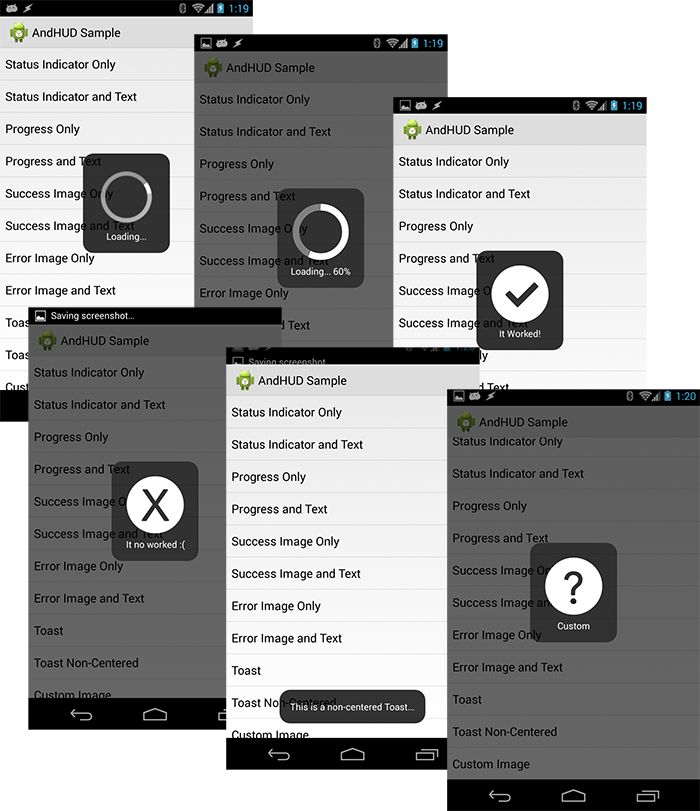

v1.4.3
- Fixed crashes when hud is dismissing itself while Activity or Window is tearing down
v1.4.2
- Fixed text not being centered correctly
v1.4.1
- Fixed
NullReferenceExceptionwhen showing non-centered toast #38 - Added new sample App
v1.4
- Added
prepareDialogCallbackwhich is called right after the Dialog has been created. This can be used to customize the Dialog further. - Added
dialogShownCallbackto get notified when the Dialog has appeared on the screen. - Updated Target Framework to Android Oreo 8.1
- A plethora of bug fixes
- Fixed Null Ref when trying to update progress wheel
- Fixed Null Ref when trying to set an image on the HUD
- Removed duplicate Dismiss call from
showStatus - Prevent exceptions when trying to show/close hud, when Activity is dead or in background
- Remove obsolete call to GetDrawable
- Fixed MaskType conversion from XHUD to AndHUD
v1.3
- Added cancelCallback parameter to allow dialogs to be cancellable
- Added XHUD API to be compatible with BTProgressHUD
- Renamed custom attributes to try and avoid collisions with other projects
v1.2
- Made all resources lowercase to work around a Xamarin.Android bug
- Changed all method signatures to request a Context now instead of Activity
v1.1
- Target version now set to 3.1 (API Level 12), but can be used on 2.3 (API Level 9) and newer (anything below API Level 12 will lose the smooth animation for the progress indicator).
- MaskType: By default, MaskType.Black dims the background behind the HUD. Use MaskType.Clear to prevent the dimming. Use MaskType.None to allow interaction with views behind the HUD.
- Timeout: If you provide a timeout, the HUD will automatically be dismissed after the timeout elapses, if you have not already dismissed it manually.
- Click Callback: If you provide a clickCallback parameter, when the HUD is tapped by the user, the action supplied will be executed.
- Cancel Callback: If you provide a cancelCallback parameter, the HUD can be cancelled by the user pressing the back button, which will cause the cancelCallback action to be executed.
Thanks to Nic Wise (@fastchicken) who inspired the creation of this with his component BTProgressHUD (https://components.xamarin.com/view/btprogresshud/). It was so awesome for iOS that I needed to have it on Android as well :)