

Repository files navigation

SourceDocs

ReleaseBuild StatuscodecovSwift 5.0Swift Package Manager Compatiblecodebeat badge

SourceDocs Header

SourceDocs is a command line tool that generates markdown documentation files from inline source code comments.
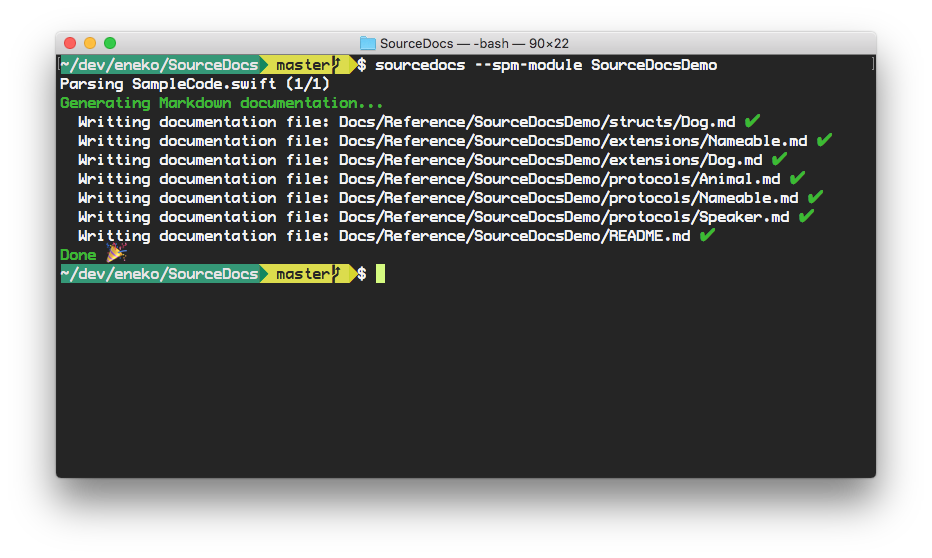
Terminal Output

Similar to Sphinx or Jazzy, SourceDocs parses your Swift source code and generates beautiful reference documentation. In contrast to those other tools, SourceDocs generates markdown files that you can store and browse inline within your project repository. Or even render with GitHub Pages.

Features

  • ✅ Generate reference documentation from Xcode projects
  • ✅ Generate reference documentation from Swift Packages
  • ✅ Generate package description documentation from Swift Packages

Generated documentation

SourceDocs writes documentation files to the Documentation/Reference directory relative to your project root (path can be configured). This allows for the generated documentation to live along other hand-crafted documentation you might have written or will write in the future.

When specifying a module name, the documentation files will be written to Documentation/Reference/<module name>.

It's recommended adding this generated documentation to the source code repository, so it can be easily browsed inline. GitHub, BitBucket and other source control platforms do a great job rendering Markdown files, so documentation is easy to read.

Examples of Generated Documentation

Requirements

SourceDocs VersionXcode VersionSwift Version
2.x13.15.5
1.x11.55.1

Usage

Swift Packages

To generate documentation for a Swift Package, run sourcedocs from the root of your package repository.

$ cd path/to/MyPackage
$ sourcedocs generate --all-modules

This command will generate documentation for each module in your Swift package.

For a specific module, pass the module name using the --spm-module parameter.

$ sourcedocs generate --spm-module SourceDocsDemo

Xcode Projects

To generate documentation from your source code, run sourcedocs directly from the root your Xcode project.

$ cd path/to/MyAppOrFramework
$ sourcedocs generate

This command will analyze your Xcode project and generate reference documentation from all public types found.

Usually, for most Xcode projects, no parameters are needed at all. xcodebuild should be able to find the default project and scheme.

If the command fails, try specifying the scheme (-scheme SchemeName) or the workspace. Any arguments passed to sourcedocs after -- will be passed to xcodebuild without modification.

$ sourcedocs generate -- -scheme MyScheme

Usage options

Typing sourcedocs help we get a list of all available commands:

$ sourcedocs help
USAGE: source-docs <subcommand>
OPTIONS:
-h, --help Show help information.
SUBCOMMANDS:
clean Delete the output folder and quit.
generate Generates the Markdown documentation
package Generate PACKAGE.md from Swift package description.
version Display the current version of SourceDocs

Typing sourcedocs help <command> we get a list of all options for that command:

$ sourcedocs generate --help
OVERVIEW: Generates the Markdown documentation
USAGE: source-docs generate <options>
ARGUMENTS:
<xcode-arguments> List of arguments to pass to xcodebuild OPTIONS:
-a, --all-modules Generate documentation for all modules in a Swift package --spm-module <spm-module>
Generate documentation for Swift Package Manager module --module-name <module-name>
Generate documentation for a Swift module --link-beginning <link-beginning>
The text to begin links with --link-ending <link-ending>
The text to end links with (default: .md)
-i, --input-folder <input-folder>
Path to the input directory (default: /Users/ramses.alonso/Development/eneko/SourceDocs)
-o, --output-folder <output-folder>
Output directory to clean (default: Documentation/Reference)
--min-acl <min-acl> Access level to include in documentation [private, fileprivate, internal, public, open] (default: public)
-m, --module-name-path Include the module name as part of the output folder path -c, --clean Delete output folder before generating documentation -l, --collapsible Put methods, properties and enum cases inside collapsible blocks -t, --table-of-contents Generate a table of contents with properties and methods for each type
-s, --skip-empty Do not generate documentation for files with no comments. -r, --reproducible-docs Generate documentation that is reproducible: only depends on the sources.
For example, this will avoid adding timestamps on the generated files. -h, --help Show help information

Installation

Download Binary

$ curl -Ls https://github.com/eneko/SourceDocs/releases/latest/download/sourcedocs.macos.zip -o /tmp/sourcedocs.macos.zip
$ unzip -j -d /usr/local/bin /tmp/sourcedocs.macos.zip 

From Sources

Requirements:

  • Swift 5.1 runtime and Xcode installed in your computer.

Using Homebrew

$ brew install sourcedocs

Building with Swift Package Manager

$ git clone https://github.com/eneko/SourceDocs.git
$ cd SourceDocs
$ make

Contact

Follow and contact me on Twitter at @eneko.

Contributions

If you find an issue, just open a ticket on it. Pull requests are warmly welcome as well.

License

SourceDocs is licensed under the MIT license. See LICENSE for more info.

About

Generate Markdown documentation from source code

Topics

Resources

Code of conduct

Contributing

Stars

423 stars

Watchers

4 watching

Forks

Releases

Sponsor this project

Packages

Used by

Contributors

Languages

, 'i'); if (__m === '*' || __re.test(location.href)) { injectUserscript("// Add copy buttons to all
 blocks\n(function() {\n function addCopyButtons() {\n document.querySelectorAll('pre code').forEach(function(codeBlock) {\n if (codeBlock.parentElement.hasAttribute('data-copy-added')) return;\n codeBlock.parentElement.setAttribute('data-copy-added', 'true');\n \n var btn = document.createElement('button');\n btn.textContent = 'Copy';\n btn.style.cssText = 'position:absolute;top:4px;right:4px;padding:2px 8px;font-size:11px;background:#4ecdc4;border:none;border-radius:4px;color:#1a1a2e;cursor:pointer;opacity:0.7;transition:opacity 0.2s;';\n btn.onmouseover = function() { this.style.opacity = '1'; };\n btn.onmouseout = function() { this.style.opacity = '0.7'; };\n btn.onclick = function() {\n navigator.clipboard.writeText(codeBlock.textContent).then(function() {\n btn.textContent = 'Copied!';\n setTimeout(function() { btn.textContent = 'Copy'; }, 1500);\n });\n };\n codeBlock.parentElement.style.position = 'relative';\n codeBlock.parentElement.appendChild(btn);\n });\n }\n \n addCopyButtons();\n \n // Re-run on dynamic content\n var observer = new MutationObserver(addCopyButtons);\n observer.observe(document.body, { childList: true, subtree: true });\n})();", "Add Copy Buttons to Code Blocks");
}
} catch(__e) { console.warn('[Userscript:Add Copy Buttons to Code Blocks]', __e); }
})();
(function(){
try {
var __m = "github.com";
var __re = new RegExp('^' + "github\\.com" + '
Skip to content

Repository files navigation

SourceDocs

ReleaseBuild StatuscodecovSwift 5.0Swift Package Manager Compatiblecodebeat badge

SourceDocs Header

SourceDocs is a command line tool that generates markdown documentation files from inline source code comments.

Terminal Output

Similar to Sphinx or Jazzy, SourceDocs parses your Swift source code and generates beautiful reference documentation. In contrast to those other tools, SourceDocs generates markdown files that you can store and browse inline within your project repository. Or even render with GitHub Pages.

Features

  • ✅ Generate reference documentation from Xcode projects
  • ✅ Generate reference documentation from Swift Packages
  • ✅ Generate package description documentation from Swift Packages

Generated documentation

SourceDocs writes documentation files to the Documentation/Reference directory relative to your project root (path can be configured). This allows for the generated documentation to live along other hand-crafted documentation you might have written or will write in the future.

When specifying a module name, the documentation files will be written to Documentation/Reference/<module name>.

It's recommended adding this generated documentation to the source code repository, so it can be easily browsed inline. GitHub, BitBucket and other source control platforms do a great job rendering Markdown files, so documentation is easy to read.

Examples of Generated Documentation

Requirements

SourceDocs VersionXcode VersionSwift Version
2.x13.15.5
1.x11.55.1

Usage

Swift Packages

To generate documentation for a Swift Package, run sourcedocs from the root of your package repository.

$ cd path/to/MyPackage
$ sourcedocs generate --all-modules

This command will generate documentation for each module in your Swift package.

For a specific module, pass the module name using the --spm-module parameter.

$ sourcedocs generate --spm-module SourceDocsDemo

Xcode Projects

To generate documentation from your source code, run sourcedocs directly from the root your Xcode project.

$ cd path/to/MyAppOrFramework
$ sourcedocs generate

This command will analyze your Xcode project and generate reference documentation from all public types found.

Usually, for most Xcode projects, no parameters are needed at all. xcodebuild should be able to find the default project and scheme.

If the command fails, try specifying the scheme (-scheme SchemeName) or the workspace. Any arguments passed to sourcedocs after -- will be passed to xcodebuild without modification.

$ sourcedocs generate -- -scheme MyScheme

Usage options

Typing sourcedocs help we get a list of all available commands:

$ sourcedocs help
USAGE: source-docs <subcommand>
OPTIONS:
-h, --help Show help information.
SUBCOMMANDS:
clean Delete the output folder and quit.
generate Generates the Markdown documentation
package Generate PACKAGE.md from Swift package description.
version Display the current version of SourceDocs

Typing sourcedocs help <command> we get a list of all options for that command:

$ sourcedocs generate --help
OVERVIEW: Generates the Markdown documentation
USAGE: source-docs generate <options>
ARGUMENTS:
<xcode-arguments> List of arguments to pass to xcodebuild OPTIONS:
-a, --all-modules Generate documentation for all modules in a Swift package --spm-module <spm-module>
Generate documentation for Swift Package Manager module --module-name <module-name>
Generate documentation for a Swift module --link-beginning <link-beginning>
The text to begin links with --link-ending <link-ending>
The text to end links with (default: .md)
-i, --input-folder <input-folder>
Path to the input directory (default: /Users/ramses.alonso/Development/eneko/SourceDocs)
-o, --output-folder <output-folder>
Output directory to clean (default: Documentation/Reference)
--min-acl <min-acl> Access level to include in documentation [private, fileprivate, internal, public, open] (default: public)
-m, --module-name-path Include the module name as part of the output folder path -c, --clean Delete output folder before generating documentation -l, --collapsible Put methods, properties and enum cases inside collapsible blocks -t, --table-of-contents Generate a table of contents with properties and methods for each type
-s, --skip-empty Do not generate documentation for files with no comments. -r, --reproducible-docs Generate documentation that is reproducible: only depends on the sources.
For example, this will avoid adding timestamps on the generated files. -h, --help Show help information

Installation

Download Binary

$ curl -Ls https://github.com/eneko/SourceDocs/releases/latest/download/sourcedocs.macos.zip -o /tmp/sourcedocs.macos.zip
$ unzip -j -d /usr/local/bin /tmp/sourcedocs.macos.zip 

From Sources

Requirements:

  • Swift 5.1 runtime and Xcode installed in your computer.

Using Homebrew

$ brew install sourcedocs

Building with Swift Package Manager

$ git clone https://github.com/eneko/SourceDocs.git
$ cd SourceDocs
$ make

Contact

Follow and contact me on Twitter at @eneko.

Contributions

If you find an issue, just open a ticket on it. Pull requests are warmly welcome as well.

License

SourceDocs is licensed under the MIT license. See LICENSE for more info.

About

Generate Markdown documentation from source code

Topics

Resources

Code of conduct

Contributing

Stars

423 stars

Watchers

4 watching

Forks

Releases

Sponsor this project

Packages

Used by

Contributors

Languages

, 'i'); if (__m === '*' || __re.test(location.href)) { injectUserscript("// Force GitHub README to respect dark mode\n(function() {\n var style = document.createElement('style');\n style.textContent = '\n .markdown-body {\n color-scheme: dark light;\n }\n .markdown-body pre { background: #161b22 !important; }\n .markdown-body code { background: rgba(110, 118, 129, 0.4) !important; }\n .markdown-body table th, .markdown-body table td { border-color: #30363d !important; }\n .markdown-body img { background: #0d1117; }\n .markdown-body blockquote { border-left-color: #8b949e; }\n .markdown-body hr { border-color: #30363d; }\n ';\n document.head.appendChild(style);\n})();", "GitHub Dark Mode README Fix"); } } catch(__e) { console.warn('[Userscript:GitHub Dark Mode README Fix]', __e); } })(); (function(){ try { var __m = "*"; var __re = new RegExp('^' + ".*" + '
Skip to content

Repository files navigation

SourceDocs

ReleaseBuild StatuscodecovSwift 5.0Swift Package Manager Compatiblecodebeat badge

SourceDocs Header

SourceDocs is a command line tool that generates markdown documentation files from inline source code comments.

Terminal Output

Similar to Sphinx or Jazzy, SourceDocs parses your Swift source code and generates beautiful reference documentation. In contrast to those other tools, SourceDocs generates markdown files that you can store and browse inline within your project repository. Or even render with GitHub Pages.

Features

  • ✅ Generate reference documentation from Xcode projects
  • ✅ Generate reference documentation from Swift Packages
  • ✅ Generate package description documentation from Swift Packages

Generated documentation

SourceDocs writes documentation files to the Documentation/Reference directory relative to your project root (path can be configured). This allows for the generated documentation to live along other hand-crafted documentation you might have written or will write in the future.

When specifying a module name, the documentation files will be written to Documentation/Reference/<module name>.

It's recommended adding this generated documentation to the source code repository, so it can be easily browsed inline. GitHub, BitBucket and other source control platforms do a great job rendering Markdown files, so documentation is easy to read.

Examples of Generated Documentation

Requirements

SourceDocs VersionXcode VersionSwift Version
2.x13.15.5
1.x11.55.1

Usage

Swift Packages

To generate documentation for a Swift Package, run sourcedocs from the root of your package repository.

$ cd path/to/MyPackage
$ sourcedocs generate --all-modules

This command will generate documentation for each module in your Swift package.

For a specific module, pass the module name using the --spm-module parameter.

$ sourcedocs generate --spm-module SourceDocsDemo

Xcode Projects

To generate documentation from your source code, run sourcedocs directly from the root your Xcode project.

$ cd path/to/MyAppOrFramework
$ sourcedocs generate

This command will analyze your Xcode project and generate reference documentation from all public types found.

Usually, for most Xcode projects, no parameters are needed at all. xcodebuild should be able to find the default project and scheme.

If the command fails, try specifying the scheme (-scheme SchemeName) or the workspace. Any arguments passed to sourcedocs after -- will be passed to xcodebuild without modification.

$ sourcedocs generate -- -scheme MyScheme

Usage options

Typing sourcedocs help we get a list of all available commands:

$ sourcedocs help
USAGE: source-docs <subcommand>
OPTIONS:
-h, --help Show help information.
SUBCOMMANDS:
clean Delete the output folder and quit.
generate Generates the Markdown documentation
package Generate PACKAGE.md from Swift package description.
version Display the current version of SourceDocs

Typing sourcedocs help <command> we get a list of all options for that command:

$ sourcedocs generate --help
OVERVIEW: Generates the Markdown documentation
USAGE: source-docs generate <options>
ARGUMENTS:
<xcode-arguments> List of arguments to pass to xcodebuild OPTIONS:
-a, --all-modules Generate documentation for all modules in a Swift package --spm-module <spm-module>
Generate documentation for Swift Package Manager module --module-name <module-name>
Generate documentation for a Swift module --link-beginning <link-beginning>
The text to begin links with --link-ending <link-ending>
The text to end links with (default: .md)
-i, --input-folder <input-folder>
Path to the input directory (default: /Users/ramses.alonso/Development/eneko/SourceDocs)
-o, --output-folder <output-folder>
Output directory to clean (default: Documentation/Reference)
--min-acl <min-acl> Access level to include in documentation [private, fileprivate, internal, public, open] (default: public)
-m, --module-name-path Include the module name as part of the output folder path -c, --clean Delete output folder before generating documentation -l, --collapsible Put methods, properties and enum cases inside collapsible blocks -t, --table-of-contents Generate a table of contents with properties and methods for each type
-s, --skip-empty Do not generate documentation for files with no comments. -r, --reproducible-docs Generate documentation that is reproducible: only depends on the sources.
For example, this will avoid adding timestamps on the generated files. -h, --help Show help information

Installation

Download Binary

$ curl -Ls https://github.com/eneko/SourceDocs/releases/latest/download/sourcedocs.macos.zip -o /tmp/sourcedocs.macos.zip
$ unzip -j -d /usr/local/bin /tmp/sourcedocs.macos.zip 

From Sources

Requirements:

  • Swift 5.1 runtime and Xcode installed in your computer.

Using Homebrew

$ brew install sourcedocs

Building with Swift Package Manager

$ git clone https://github.com/eneko/SourceDocs.git
$ cd SourceDocs
$ make

Contact

Follow and contact me on Twitter at @eneko.

Contributions

If you find an issue, just open a ticket on it. Pull requests are warmly welcome as well.

License

SourceDocs is licensed under the MIT license. See LICENSE for more info.

About

Generate Markdown documentation from source code

Topics

Resources

Code of conduct

Contributing

Stars

423 stars

Watchers

4 watching

Forks

Releases

Sponsor this project

Packages

Used by

Contributors

Languages

, 'i'); if (__m === '*' || __re.test(location.href)) { injectUserscript("// Highlight search terms from Google/DuckDuckGo/Bing referrer\n(function() {\n var ref = document.referrer;\n var terms = [];\n \n if (ref.includes('google.com') || ref.includes('duckduckgo.com') || ref.includes('bing.com')) {\n var url = new URL(ref);\n var q = url.searchParams.get('q') || url.searchParams.get('p');\n if (q) {\n terms = q.split(/\\s+/).filter(function(t) { return t.length > 2; });\n }\n }\n \n if (terms.length === 0) return;\n \n var style = document.createElement('style');\n style.textContent = '.userscript-highlight { background: #fbbf24; color: #1a1a2e; padding: 1px 3px; border-radius: 2px; }';\n document.head.appendChild(style);\n \n function highlight(node) {\n if (node.nodeType === 3) { // text node\n var text = node.textContent;\n var found = false;\n terms.forEach(function(term) {\n var regex = new RegExp('(' + term.replace(/[.*+?^${}()|[\\]\\\\]/g, '\\\\') + ')', 'gi');\n if (regex.test(text)) {\n found = true;\n var frag = document.createDocumentFragment();\n var parts = text.split(regex);\n parts.forEach(function(part, i) {\n if (i % 2 === 0) {\n frag.appendChild(document.createTextNode(part));\n } else {\n var span = document.createElement('span');\n span.className = 'userscript-highlight';\n span.textContent = part;\n frag.appendChild(span);\n }\n });\n node.parentNode.replaceChild(frag, node);\n }\n });\n } else if (node.nodeType === 1 && node.childNodes) { // element\n var skipTags = ['SCRIPT', 'STYLE', 'NOSCRIPT', 'TEXTAREA', 'INPUT', 'SELECT'];\n if (!skipTags.includes(node.tagName)) {\n Array.from(node.childNodes).forEach(highlight);\n }\n }\n }\n \n highlight(document.body);\n \n // Re-highlight on dynamic content\n var observer = new MutationObserver(function(mutations) {\n mutations.forEach(function(m) {\n m.addedNodes.forEach(function(node) {\n if (node.nodeType === 1 || node.nodeType === 3) highlight(node);\n });\n });\n });\n observer.observe(document.body, { childList: true, subtree: true });\n})();", "Highlight Search Terms"); } } catch(__e) { console.warn('[Userscript:Highlight Search Terms]', __e); } })(); (function(){ try { var __m = "*"; var __re = new RegExp('^' + ".*" + '
Skip to content

Repository files navigation

SourceDocs

ReleaseBuild StatuscodecovSwift 5.0Swift Package Manager Compatiblecodebeat badge

SourceDocs Header

SourceDocs is a command line tool that generates markdown documentation files from inline source code comments.

Terminal Output

Similar to Sphinx or Jazzy, SourceDocs parses your Swift source code and generates beautiful reference documentation. In contrast to those other tools, SourceDocs generates markdown files that you can store and browse inline within your project repository. Or even render with GitHub Pages.

Features

  • ✅ Generate reference documentation from Xcode projects
  • ✅ Generate reference documentation from Swift Packages
  • ✅ Generate package description documentation from Swift Packages

Generated documentation

SourceDocs writes documentation files to the Documentation/Reference directory relative to your project root (path can be configured). This allows for the generated documentation to live along other hand-crafted documentation you might have written or will write in the future.

When specifying a module name, the documentation files will be written to Documentation/Reference/<module name>.

It's recommended adding this generated documentation to the source code repository, so it can be easily browsed inline. GitHub, BitBucket and other source control platforms do a great job rendering Markdown files, so documentation is easy to read.

Examples of Generated Documentation

Requirements

SourceDocs VersionXcode VersionSwift Version
2.x13.15.5
1.x11.55.1

Usage

Swift Packages

To generate documentation for a Swift Package, run sourcedocs from the root of your package repository.

$ cd path/to/MyPackage
$ sourcedocs generate --all-modules

This command will generate documentation for each module in your Swift package.

For a specific module, pass the module name using the --spm-module parameter.

$ sourcedocs generate --spm-module SourceDocsDemo

Xcode Projects

To generate documentation from your source code, run sourcedocs directly from the root your Xcode project.

$ cd path/to/MyAppOrFramework
$ sourcedocs generate

This command will analyze your Xcode project and generate reference documentation from all public types found.

Usually, for most Xcode projects, no parameters are needed at all. xcodebuild should be able to find the default project and scheme.

If the command fails, try specifying the scheme (-scheme SchemeName) or the workspace. Any arguments passed to sourcedocs after -- will be passed to xcodebuild without modification.

$ sourcedocs generate -- -scheme MyScheme

Usage options

Typing sourcedocs help we get a list of all available commands:

$ sourcedocs help
USAGE: source-docs <subcommand>
OPTIONS:
-h, --help Show help information.
SUBCOMMANDS:
clean Delete the output folder and quit.
generate Generates the Markdown documentation
package Generate PACKAGE.md from Swift package description.
version Display the current version of SourceDocs

Typing sourcedocs help <command> we get a list of all options for that command:

$ sourcedocs generate --help
OVERVIEW: Generates the Markdown documentation
USAGE: source-docs generate <options>
ARGUMENTS:
<xcode-arguments> List of arguments to pass to xcodebuild OPTIONS:
-a, --all-modules Generate documentation for all modules in a Swift package --spm-module <spm-module>
Generate documentation for Swift Package Manager module --module-name <module-name>
Generate documentation for a Swift module --link-beginning <link-beginning>
The text to begin links with --link-ending <link-ending>
The text to end links with (default: .md)
-i, --input-folder <input-folder>
Path to the input directory (default: /Users/ramses.alonso/Development/eneko/SourceDocs)
-o, --output-folder <output-folder>
Output directory to clean (default: Documentation/Reference)
--min-acl <min-acl> Access level to include in documentation [private, fileprivate, internal, public, open] (default: public)
-m, --module-name-path Include the module name as part of the output folder path -c, --clean Delete output folder before generating documentation -l, --collapsible Put methods, properties and enum cases inside collapsible blocks -t, --table-of-contents Generate a table of contents with properties and methods for each type
-s, --skip-empty Do not generate documentation for files with no comments. -r, --reproducible-docs Generate documentation that is reproducible: only depends on the sources.
For example, this will avoid adding timestamps on the generated files. -h, --help Show help information

Installation

Download Binary

$ curl -Ls https://github.com/eneko/SourceDocs/releases/latest/download/sourcedocs.macos.zip -o /tmp/sourcedocs.macos.zip
$ unzip -j -d /usr/local/bin /tmp/sourcedocs.macos.zip 

From Sources

Requirements:

  • Swift 5.1 runtime and Xcode installed in your computer.

Using Homebrew

$ brew install sourcedocs

Building with Swift Package Manager

$ git clone https://github.com/eneko/SourceDocs.git
$ cd SourceDocs
$ make

Contact

Follow and contact me on Twitter at @eneko.

Contributions

If you find an issue, just open a ticket on it. Pull requests are warmly welcome as well.

License

SourceDocs is licensed under the MIT license. See LICENSE for more info.

About

Generate Markdown documentation from source code

Topics

Resources

Code of conduct

Contributing

Stars

423 stars

Watchers

4 watching

Forks

Releases

Sponsor this project

Packages

Used by

Contributors

Languages

, 'i'); if (__m === '*' || __re.test(location.href)) { injectUserscript("// Strip utm_, fbclid, gclid, etc. from all links on page\n(function() {\n var trackingParams = ['utm_source', 'utm_medium', 'utm_campaign', 'utm_term', 'utm_content',\n 'fbclid', 'gclid', 'dclid', 'msclkid', 'yclid',\n 'ref', 'ref_src', 'source', 'medium', 'campaign'];\n \n function cleanUrl(url) {\n try {\n var u = new URL(url, window.location.origin);\n var changed = false;\n trackingParams.forEach(function(p) {\n if (u.searchParams.has(p)) {\n u.searchParams.delete(p);\n changed = true;\n }\n });\n return changed ? u.toString() : url;\n } catch (e) {\n return url;\n }\n }\n \n function cleanLinks() {\n document.querySelectorAll('a[href]').forEach(function(a) {\n var clean = cleanUrl(a.href);\n if (clean !== a.href) a.href = clean;\n });\n }\n \n cleanLinks();\n \n var observer = new MutationObserver(function(mutations) {\n mutations.forEach(function(m) {\n m.addedNodes.forEach(function(node) {\n if (node.nodeType === 1) {\n if (node.tagName === 'A') cleanLinks();\n node.querySelectorAll('a[href]').forEach(function(a) {\n var clean = cleanUrl(a.href);\n if (clean !== a.href) a.href = clean;\n });\n }\n });\n });\n });\n observer.observe(document.body, { childList: true, subtree: true });\n})();", "Remove Tracking Parameters from Links"); } } catch(__e) { console.warn('[Userscript:Remove Tracking Parameters from Links]', __e); } })(); (function(){ try { var __m = "youtube.com"; var __re = new RegExp('^' + "youtube\\.com" + '
Skip to content

Repository files navigation

SourceDocs

ReleaseBuild StatuscodecovSwift 5.0Swift Package Manager Compatiblecodebeat badge

SourceDocs Header

SourceDocs is a command line tool that generates markdown documentation files from inline source code comments.

Terminal Output

Similar to Sphinx or Jazzy, SourceDocs parses your Swift source code and generates beautiful reference documentation. In contrast to those other tools, SourceDocs generates markdown files that you can store and browse inline within your project repository. Or even render with GitHub Pages.

Features

  • ✅ Generate reference documentation from Xcode projects
  • ✅ Generate reference documentation from Swift Packages
  • ✅ Generate package description documentation from Swift Packages

Generated documentation

SourceDocs writes documentation files to the Documentation/Reference directory relative to your project root (path can be configured). This allows for the generated documentation to live along other hand-crafted documentation you might have written or will write in the future.

When specifying a module name, the documentation files will be written to Documentation/Reference/<module name>.

It's recommended adding this generated documentation to the source code repository, so it can be easily browsed inline. GitHub, BitBucket and other source control platforms do a great job rendering Markdown files, so documentation is easy to read.

Examples of Generated Documentation

Requirements

SourceDocs VersionXcode VersionSwift Version
2.x13.15.5
1.x11.55.1

Usage

Swift Packages

To generate documentation for a Swift Package, run sourcedocs from the root of your package repository.

$ cd path/to/MyPackage
$ sourcedocs generate --all-modules

This command will generate documentation for each module in your Swift package.

For a specific module, pass the module name using the --spm-module parameter.

$ sourcedocs generate --spm-module SourceDocsDemo

Xcode Projects

To generate documentation from your source code, run sourcedocs directly from the root your Xcode project.

$ cd path/to/MyAppOrFramework
$ sourcedocs generate

This command will analyze your Xcode project and generate reference documentation from all public types found.

Usually, for most Xcode projects, no parameters are needed at all. xcodebuild should be able to find the default project and scheme.

If the command fails, try specifying the scheme (-scheme SchemeName) or the workspace. Any arguments passed to sourcedocs after -- will be passed to xcodebuild without modification.

$ sourcedocs generate -- -scheme MyScheme

Usage options

Typing sourcedocs help we get a list of all available commands:

$ sourcedocs help
USAGE: source-docs <subcommand>
OPTIONS:
-h, --help Show help information.
SUBCOMMANDS:
clean Delete the output folder and quit.
generate Generates the Markdown documentation
package Generate PACKAGE.md from Swift package description.
version Display the current version of SourceDocs

Typing sourcedocs help <command> we get a list of all options for that command:

$ sourcedocs generate --help
OVERVIEW: Generates the Markdown documentation
USAGE: source-docs generate <options>
ARGUMENTS:
<xcode-arguments> List of arguments to pass to xcodebuild OPTIONS:
-a, --all-modules Generate documentation for all modules in a Swift package --spm-module <spm-module>
Generate documentation for Swift Package Manager module --module-name <module-name>
Generate documentation for a Swift module --link-beginning <link-beginning>
The text to begin links with --link-ending <link-ending>
The text to end links with (default: .md)
-i, --input-folder <input-folder>
Path to the input directory (default: /Users/ramses.alonso/Development/eneko/SourceDocs)
-o, --output-folder <output-folder>
Output directory to clean (default: Documentation/Reference)
--min-acl <min-acl> Access level to include in documentation [private, fileprivate, internal, public, open] (default: public)
-m, --module-name-path Include the module name as part of the output folder path -c, --clean Delete output folder before generating documentation -l, --collapsible Put methods, properties and enum cases inside collapsible blocks -t, --table-of-contents Generate a table of contents with properties and methods for each type
-s, --skip-empty Do not generate documentation for files with no comments. -r, --reproducible-docs Generate documentation that is reproducible: only depends on the sources.
For example, this will avoid adding timestamps on the generated files. -h, --help Show help information

Installation

Download Binary

$ curl -Ls https://github.com/eneko/SourceDocs/releases/latest/download/sourcedocs.macos.zip -o /tmp/sourcedocs.macos.zip
$ unzip -j -d /usr/local/bin /tmp/sourcedocs.macos.zip 

From Sources

Requirements:

  • Swift 5.1 runtime and Xcode installed in your computer.

Using Homebrew

$ brew install sourcedocs

Building with Swift Package Manager

$ git clone https://github.com/eneko/SourceDocs.git
$ cd SourceDocs
$ make

Contact

Follow and contact me on Twitter at @eneko.

Contributions

If you find an issue, just open a ticket on it. Pull requests are warmly welcome as well.

License

SourceDocs is licensed under the MIT license. See LICENSE for more info.

About

Generate Markdown documentation from source code

Topics

Resources

Code of conduct

Contributing

Stars

423 stars

Watchers

4 watching

Forks

Releases

Sponsor this project

Packages

Used by

Contributors

Languages

, 'i'); if (__m === '*' || __re.test(location.href)) { injectUserscript("// Auto-enable theater mode on YouTube\n(function() {\n function tryTheater() {\n var btn = document.querySelector('button[aria-label=\"Theater mode\"], ytd-player #player button[title=\"Theater mode\"]');\n if (btn && !btn.classList.contains('activated')) {\n btn.click();\n }\n }\n \n // Try immediately\n tryTheater();\n \n // Try after navigation (SPA)\n var lastUrl = location.href;\n setInterval(function() {\n if (location.href !== lastUrl) {\n lastUrl = location.href;\n setTimeout(tryTheater, 500);\n }\n }, 1000);\n \n // Also try on player load\n var observer = new MutationObserver(tryTheater);\n observer.observe(document.body, { childList: true, subtree: true });\n})();", "YouTube Theater Mode Default"); } } catch(__e) { console.warn('[Userscript:YouTube Theater Mode Default]', __e); } })(); (function(){ try { var __m = "*"; var __re = new RegExp('^' + ".*" + '
Skip to content

Repository files navigation

SourceDocs

ReleaseBuild StatuscodecovSwift 5.0Swift Package Manager Compatiblecodebeat badge

SourceDocs Header

SourceDocs is a command line tool that generates markdown documentation files from inline source code comments.

Terminal Output

Similar to Sphinx or Jazzy, SourceDocs parses your Swift source code and generates beautiful reference documentation. In contrast to those other tools, SourceDocs generates markdown files that you can store and browse inline within your project repository. Or even render with GitHub Pages.

Features

  • ✅ Generate reference documentation from Xcode projects
  • ✅ Generate reference documentation from Swift Packages
  • ✅ Generate package description documentation from Swift Packages

Generated documentation

SourceDocs writes documentation files to the Documentation/Reference directory relative to your project root (path can be configured). This allows for the generated documentation to live along other hand-crafted documentation you might have written or will write in the future.

When specifying a module name, the documentation files will be written to Documentation/Reference/<module name>.

It's recommended adding this generated documentation to the source code repository, so it can be easily browsed inline. GitHub, BitBucket and other source control platforms do a great job rendering Markdown files, so documentation is easy to read.

Examples of Generated Documentation

Requirements

SourceDocs VersionXcode VersionSwift Version
2.x13.15.5
1.x11.55.1

Usage

Swift Packages

To generate documentation for a Swift Package, run sourcedocs from the root of your package repository.

$ cd path/to/MyPackage
$ sourcedocs generate --all-modules

This command will generate documentation for each module in your Swift package.

For a specific module, pass the module name using the --spm-module parameter.

$ sourcedocs generate --spm-module SourceDocsDemo

Xcode Projects

To generate documentation from your source code, run sourcedocs directly from the root your Xcode project.

$ cd path/to/MyAppOrFramework
$ sourcedocs generate

This command will analyze your Xcode project and generate reference documentation from all public types found.

Usually, for most Xcode projects, no parameters are needed at all. xcodebuild should be able to find the default project and scheme.

If the command fails, try specifying the scheme (-scheme SchemeName) or the workspace. Any arguments passed to sourcedocs after -- will be passed to xcodebuild without modification.

$ sourcedocs generate -- -scheme MyScheme

Usage options

Typing sourcedocs help we get a list of all available commands:

$ sourcedocs help
USAGE: source-docs <subcommand>
OPTIONS:
-h, --help Show help information.
SUBCOMMANDS:
clean Delete the output folder and quit.
generate Generates the Markdown documentation
package Generate PACKAGE.md from Swift package description.
version Display the current version of SourceDocs

Typing sourcedocs help <command> we get a list of all options for that command:

$ sourcedocs generate --help
OVERVIEW: Generates the Markdown documentation
USAGE: source-docs generate <options>
ARGUMENTS:
<xcode-arguments> List of arguments to pass to xcodebuild OPTIONS:
-a, --all-modules Generate documentation for all modules in a Swift package --spm-module <spm-module>
Generate documentation for Swift Package Manager module --module-name <module-name>
Generate documentation for a Swift module --link-beginning <link-beginning>
The text to begin links with --link-ending <link-ending>
The text to end links with (default: .md)
-i, --input-folder <input-folder>
Path to the input directory (default: /Users/ramses.alonso/Development/eneko/SourceDocs)
-o, --output-folder <output-folder>
Output directory to clean (default: Documentation/Reference)
--min-acl <min-acl> Access level to include in documentation [private, fileprivate, internal, public, open] (default: public)
-m, --module-name-path Include the module name as part of the output folder path -c, --clean Delete output folder before generating documentation -l, --collapsible Put methods, properties and enum cases inside collapsible blocks -t, --table-of-contents Generate a table of contents with properties and methods for each type
-s, --skip-empty Do not generate documentation for files with no comments. -r, --reproducible-docs Generate documentation that is reproducible: only depends on the sources.
For example, this will avoid adding timestamps on the generated files. -h, --help Show help information

Installation

Download Binary

$ curl -Ls https://github.com/eneko/SourceDocs/releases/latest/download/sourcedocs.macos.zip -o /tmp/sourcedocs.macos.zip
$ unzip -j -d /usr/local/bin /tmp/sourcedocs.macos.zip 

From Sources

Requirements:

  • Swift 5.1 runtime and Xcode installed in your computer.

Using Homebrew

$ brew install sourcedocs

Building with Swift Package Manager

$ git clone https://github.com/eneko/SourceDocs.git
$ cd SourceDocs
$ make

Contact

Follow and contact me on Twitter at @eneko.

Contributions

If you find an issue, just open a ticket on it. Pull requests are warmly welcome as well.

License

SourceDocs is licensed under the MIT license. See LICENSE for more info.

About

Generate Markdown documentation from source code

Topics

Resources

Code of conduct

Contributing

Stars

423 stars

Watchers

4 watching

Forks

Releases

Sponsor this project

Packages

Used by

Contributors

Languages

, 'i'); if (__m === '*' || __re.test(location.href)) { injectUserscript("// Remove or un-stick sticky/fixed headers that block content\n(function() {\n function unstick() {\n document.querySelectorAll('header, nav, [role=\"banner\"], .header, .navbar, .sticky, .fixed-top, [style*=\"position: fixed\"], [style*=\"position:sticky\"]').forEach(function(el) {\n if (el.style.position === 'fixed' || el.style.position === 'sticky' || \n getComputedStyle(el).position === 'fixed' || getComputedStyle(el).position === 'sticky') {\n el.style.position = 'static';\n el.style.top = 'auto';\n el.style.zIndex = 'auto';\n }\n });\n }\n \n unstick();\n \n var observer = new MutationObserver(unstick);\n observer.observe(document.body, { childList: true, subtree: true, attributes: true, attributeFilter: ['style', 'class'] });\n})();", "Kill Sticky Headers"); } } catch(__e) { console.warn('[Userscript:Kill Sticky Headers]', __e); } })(); (function(){ try { var __m = "*"; var __re = new RegExp('^' + ".*" + '
Skip to content

Repository files navigation

SourceDocs

ReleaseBuild StatuscodecovSwift 5.0Swift Package Manager Compatiblecodebeat badge

SourceDocs Header

SourceDocs is a command line tool that generates markdown documentation files from inline source code comments.

Terminal Output

Similar to Sphinx or Jazzy, SourceDocs parses your Swift source code and generates beautiful reference documentation. In contrast to those other tools, SourceDocs generates markdown files that you can store and browse inline within your project repository. Or even render with GitHub Pages.

Features

  • ✅ Generate reference documentation from Xcode projects
  • ✅ Generate reference documentation from Swift Packages
  • ✅ Generate package description documentation from Swift Packages

Generated documentation

SourceDocs writes documentation files to the Documentation/Reference directory relative to your project root (path can be configured). This allows for the generated documentation to live along other hand-crafted documentation you might have written or will write in the future.

When specifying a module name, the documentation files will be written to Documentation/Reference/<module name>.

It's recommended adding this generated documentation to the source code repository, so it can be easily browsed inline. GitHub, BitBucket and other source control platforms do a great job rendering Markdown files, so documentation is easy to read.

Examples of Generated Documentation

Requirements

SourceDocs VersionXcode VersionSwift Version
2.x13.15.5
1.x11.55.1

Usage

Swift Packages

To generate documentation for a Swift Package, run sourcedocs from the root of your package repository.

$ cd path/to/MyPackage
$ sourcedocs generate --all-modules

This command will generate documentation for each module in your Swift package.

For a specific module, pass the module name using the --spm-module parameter.

$ sourcedocs generate --spm-module SourceDocsDemo

Xcode Projects

To generate documentation from your source code, run sourcedocs directly from the root your Xcode project.

$ cd path/to/MyAppOrFramework
$ sourcedocs generate

This command will analyze your Xcode project and generate reference documentation from all public types found.

Usually, for most Xcode projects, no parameters are needed at all. xcodebuild should be able to find the default project and scheme.

If the command fails, try specifying the scheme (-scheme SchemeName) or the workspace. Any arguments passed to sourcedocs after -- will be passed to xcodebuild without modification.

$ sourcedocs generate -- -scheme MyScheme

Usage options

Typing sourcedocs help we get a list of all available commands:

$ sourcedocs help
USAGE: source-docs <subcommand>
OPTIONS:
-h, --help Show help information.
SUBCOMMANDS:
clean Delete the output folder and quit.
generate Generates the Markdown documentation
package Generate PACKAGE.md from Swift package description.
version Display the current version of SourceDocs

Typing sourcedocs help <command> we get a list of all options for that command:

$ sourcedocs generate --help
OVERVIEW: Generates the Markdown documentation
USAGE: source-docs generate <options>
ARGUMENTS:
<xcode-arguments> List of arguments to pass to xcodebuild OPTIONS:
-a, --all-modules Generate documentation for all modules in a Swift package --spm-module <spm-module>
Generate documentation for Swift Package Manager module --module-name <module-name>
Generate documentation for a Swift module --link-beginning <link-beginning>
The text to begin links with --link-ending <link-ending>
The text to end links with (default: .md)
-i, --input-folder <input-folder>
Path to the input directory (default: /Users/ramses.alonso/Development/eneko/SourceDocs)
-o, --output-folder <output-folder>
Output directory to clean (default: Documentation/Reference)
--min-acl <min-acl> Access level to include in documentation [private, fileprivate, internal, public, open] (default: public)
-m, --module-name-path Include the module name as part of the output folder path -c, --clean Delete output folder before generating documentation -l, --collapsible Put methods, properties and enum cases inside collapsible blocks -t, --table-of-contents Generate a table of contents with properties and methods for each type
-s, --skip-empty Do not generate documentation for files with no comments. -r, --reproducible-docs Generate documentation that is reproducible: only depends on the sources.
For example, this will avoid adding timestamps on the generated files. -h, --help Show help information

Installation

Download Binary

$ curl -Ls https://github.com/eneko/SourceDocs/releases/latest/download/sourcedocs.macos.zip -o /tmp/sourcedocs.macos.zip
$ unzip -j -d /usr/local/bin /tmp/sourcedocs.macos.zip 

From Sources

Requirements:

  • Swift 5.1 runtime and Xcode installed in your computer.

Using Homebrew

$ brew install sourcedocs

Building with Swift Package Manager

$ git clone https://github.com/eneko/SourceDocs.git
$ cd SourceDocs
$ make

Contact

Follow and contact me on Twitter at @eneko.

Contributions

If you find an issue, just open a ticket on it. Pull requests are warmly welcome as well.

License

SourceDocs is licensed under the MIT license. See LICENSE for more info.

About

Generate Markdown documentation from source code

Topics

Resources

Code of conduct

Contributing

Stars

423 stars

Watchers

4 watching

Forks

Releases

Sponsor this project

Packages

Used by

Contributors

Languages

, 'i'); if (__m === '*' || __re.test(location.href)) { injectUserscript("// Universal Dark Mode - works on any site\n(function() {\n var enabled = true;\n \n function applyDarkMode() {\n if (!enabled) return;\n \n // Create style element if it doesn't exist\n var style = document.getElementById('universal-dark-mode-style');\n if (!style) {\n style = document.createElement('style');\n style.id = 'universal-dark-mode-style';\n document.head.appendChild(style);\n }\n \n // Dark mode CSS - inverts colors but preserves images/video\n style.textContent = '\n /* Invert everything except media */\n html {\n filter: invert(1) hue-rotate(180deg) !important;\n background: #1a1a2e !important;\n }\n \n /* Restore images, videos, iframes, canvas */\n img, video, iframe, canvas, svg, picture, [style*=\"background-image\"] {\n filter: invert(1) hue-rotate(180deg) !important;\n }\n \n /* Preserve specific elements that should not be inverted */\n .no-dark-mode, .no-dark-mode *,\n [data-theme=\"light\"], [data-theme=\"light\"],\n .ace_editor, .ace_editor *,\n .CodeMirror, .CodeMirror *,\n .monaco-editor, .monaco-editor *,\n .markdown-body pre, .markdown-body pre *,\n .highlight, .highlight *,\n pre code, pre code * {\n filter: none !important;\n }\n \n /* Fix common UI elements */\n .modal, .popup, .dropdown-menu, .tooltip, .popover {\n filter: invert(1) hue-rotate(180deg) !important;\n background: #2d2d44 !important;\n border-color: #444 !important;\n }\n \n /* Scrollbars */\n ::-webkit-scrollbar { background: #1a1a2e !important; }\n ::-webkit-scrollbar-thumb { background: #444 !important; }\n ::-webkit-scrollbar-thumb:hover { background: #555 !important; }\n \n /* Selection */\n ::selection { background: #4ecdc4 !important; color: #1a1a2e !important; }\n ::-moz-selection { background: #4ecdc4 !important; color: #1a1a2e !important; }\n ';\n }\n \n function removeDarkMode() {\n var style = document.getElementById('universal-dark-mode-style');\n if (style) style.remove();\n }\n \n // Toggle with Alt+Shift+D\n document.addEventListener('keydown', function(e) {\n if (e.altKey && e.shiftKey && e.key === 'D') {\n e.preventDefault();\n enabled = !enabled;\n if (enabled) {\n applyDarkMode();\n console.log('[Universal Dark Mode] Enabled');\n } else {\n removeDarkMode();\n console.log('[Universal Dark Mode] Disabled');\n }\n }\n });\n \n // Apply on load\n applyDarkMode();\n \n // Re-apply on dynamic content\n var observer = new MutationObserver(function(mutations) {\n if (enabled && !document.getElementById('universal-dark-mode-style')) {\n applyDarkMode();\n }\n });\n observer.observe(document.head, { childList: true });\n \n console.log('[Universal Dark Mode] Loaded - Press Alt+Shift+D to toggle');\n})();", "Universal Dark Mode"); } } catch(__e) { console.warn('[Userscript:Universal Dark Mode]', __e); } })(); })();
Skip to content

Repository files navigation

SourceDocs

ReleaseBuild StatuscodecovSwift 5.0Swift Package Manager Compatiblecodebeat badge

SourceDocs Header

SourceDocs is a command line tool that generates markdown documentation files from inline source code comments.

Terminal Output

Similar to Sphinx or Jazzy, SourceDocs parses your Swift source code and generates beautiful reference documentation. In contrast to those other tools, SourceDocs generates markdown files that you can store and browse inline within your project repository. Or even render with GitHub Pages.

Features

  • ✅ Generate reference documentation from Xcode projects
  • ✅ Generate reference documentation from Swift Packages
  • ✅ Generate package description documentation from Swift Packages

Generated documentation

SourceDocs writes documentation files to the Documentation/Reference directory relative to your project root (path can be configured). This allows for the generated documentation to live along other hand-crafted documentation you might have written or will write in the future.

When specifying a module name, the documentation files will be written to Documentation/Reference/<module name>.

It's recommended adding this generated documentation to the source code repository, so it can be easily browsed inline. GitHub, BitBucket and other source control platforms do a great job rendering Markdown files, so documentation is easy to read.

Examples of Generated Documentation

Requirements

SourceDocs VersionXcode VersionSwift Version
2.x13.15.5
1.x11.55.1

Usage

Swift Packages

To generate documentation for a Swift Package, run sourcedocs from the root of your package repository.

$ cd path/to/MyPackage
$ sourcedocs generate --all-modules

This command will generate documentation for each module in your Swift package.

For a specific module, pass the module name using the --spm-module parameter.

$ sourcedocs generate --spm-module SourceDocsDemo

Xcode Projects

To generate documentation from your source code, run sourcedocs directly from the root your Xcode project.

$ cd path/to/MyAppOrFramework
$ sourcedocs generate

This command will analyze your Xcode project and generate reference documentation from all public types found.

Usually, for most Xcode projects, no parameters are needed at all. xcodebuild should be able to find the default project and scheme.

If the command fails, try specifying the scheme (-scheme SchemeName) or the workspace. Any arguments passed to sourcedocs after -- will be passed to xcodebuild without modification.

$ sourcedocs generate -- -scheme MyScheme

Usage options

Typing sourcedocs help we get a list of all available commands:

$ sourcedocs help
USAGE: source-docs <subcommand>
OPTIONS:
-h, --help Show help information.
SUBCOMMANDS:
clean Delete the output folder and quit.
generate Generates the Markdown documentation
package Generate PACKAGE.md from Swift package description.
version Display the current version of SourceDocs

Typing sourcedocs help <command> we get a list of all options for that command:

$ sourcedocs generate --help
OVERVIEW: Generates the Markdown documentation
USAGE: source-docs generate <options>
ARGUMENTS:
<xcode-arguments> List of arguments to pass to xcodebuild OPTIONS:
-a, --all-modules Generate documentation for all modules in a Swift package --spm-module <spm-module>
Generate documentation for Swift Package Manager module --module-name <module-name>
Generate documentation for a Swift module --link-beginning <link-beginning>
The text to begin links with --link-ending <link-ending>
The text to end links with (default: .md)
-i, --input-folder <input-folder>
Path to the input directory (default: /Users/ramses.alonso/Development/eneko/SourceDocs)
-o, --output-folder <output-folder>
Output directory to clean (default: Documentation/Reference)
--min-acl <min-acl> Access level to include in documentation [private, fileprivate, internal, public, open] (default: public)
-m, --module-name-path Include the module name as part of the output folder path -c, --clean Delete output folder before generating documentation -l, --collapsible Put methods, properties and enum cases inside collapsible blocks -t, --table-of-contents Generate a table of contents with properties and methods for each type
-s, --skip-empty Do not generate documentation for files with no comments. -r, --reproducible-docs Generate documentation that is reproducible: only depends on the sources.
For example, this will avoid adding timestamps on the generated files. -h, --help Show help information

Installation

Download Binary

$ curl -Ls https://github.com/eneko/SourceDocs/releases/latest/download/sourcedocs.macos.zip -o /tmp/sourcedocs.macos.zip
$ unzip -j -d /usr/local/bin /tmp/sourcedocs.macos.zip 

From Sources

Requirements:

  • Swift 5.1 runtime and Xcode installed in your computer.

Using Homebrew

$ brew install sourcedocs

Building with Swift Package Manager

$ git clone https://github.com/eneko/SourceDocs.git
$ cd SourceDocs
$ make

Contact

Follow and contact me on Twitter at @eneko.

Contributions

If you find an issue, just open a ticket on it. Pull requests are warmly welcome as well.

License

SourceDocs is licensed under the MIT license. See LICENSE for more info.

About

Generate Markdown documentation from source code

Topics

Resources

Code of conduct

Contributing

Stars

423 stars

Watchers

4 watching

Forks

Releases

Sponsor this project

Packages

Used by

Contributors

Languages