





Renderer HTML and Markdown in the Terminal. Supports pretty tables, syntax highlighting, and GitHub Flavored Markdown
- 🎨 Full HTML rendering — headings, lists, tables, forms, figures, and 80+ tags
- 📝 GitHub Flavored Markdown — alerts, task lists, tables, footnotes, strikethrough, and more
- ⚛️ JSX / React — render React elements straight to the terminal
- 🌈 Syntax highlighting — automatic, for dozens of languages
- 📐 Pretty tables — borders, alignment, zebra striping, responsive narrow-terminal mode
- 🎭 Deep theming — every element themeable via
config.yaml, a theme object, or per-elementdata-cli-*attributes - 🔌 CLI + library — use the
html/markdown/md/jsxcommands, or importrenderHTML/renderMarkdown/renderJSX - ⌨️ Reads stdin — pipe HTML or Markdown straight in (
echo '<h1>hi</h1>' | html)
Table of Contents
Requires Node.js >= 18.
npm i -g cli-html# Render a full HTML document
html examples/html/full/demo.html
# Render individual tag examples
html examples/html/tags/table.html
# Pipe HTML from stdinecho'<h1>Hello</h1><p>from <code>stdin</code></p>'| html
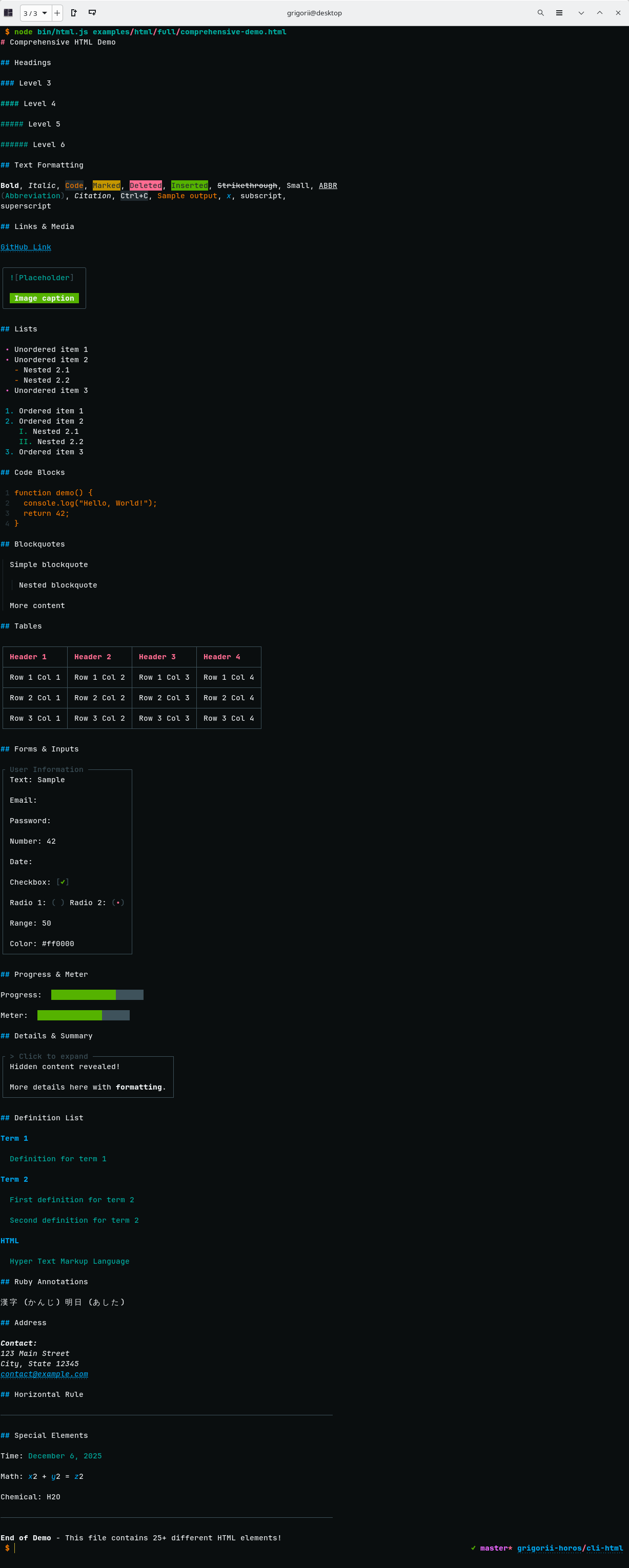
curl -s https://example.com | htmlThis will produce the following:
Render Markdown files with full GitHub Flavored Markdown support:
# Render GFM alerts
markdown examples/markdown/features/alerts.md
# Render full GFM document
md examples/markdown/full/gfm-features.md
# Pipe Markdown from stdinecho'# Title\n\n> [!NOTE]\n> Piped markdown'| md
cat CHANGELOG.md | md
Supported GFM Features:
- ✓ Alerts -
[!NOTE],[!TIP],[!IMPORTANT],[!WARNING],[!CAUTION]with colors - ✓ Task Lists -
- [x]and- [ ]with checkboxes - ✓ Tables - Full table support with borders
- ✓ Strikethrough -
~~text~~ - ✓ Autolinks - Automatic URL linking
- ✓ Footnotes -
[^1]references - ✓ Definition Lists - Term and definition pairs
- ✓ Subscript/Superscript -
H~2~Oandx^2^ - ✓ Insert/Mark -
++inserted++and==marked==text - ✓ Abbreviations -
*[HTML]: Hyper Text Markup Language
Render React/JSX files straight to the terminal. JSX is transpiled, rendered to
HTML via react-dom, then drawn by the same renderer used for HTML and Markdown:
# Render a JSX file
jsx examples/jsx/full/demo.jsx
# With a custom theme config
jsx examples/jsx/full/demo.jsx --config ./theme.yaml
The file's default export may be a React element (export default <App />) or a
component (export default App). Neighbouring modules resolve relative to the
file; react / react-dom are provided by cli-html itself.
More examples (components, data-driven tables, dashboards, boxed layouts) live in examples/jsx.
npm i cli-htmlFor practical, runnable examples of using cli-html and cli-markdown as libraries, check out the examples/library-usage directory:
- html-basic.js - Basic HTML rendering (headings, lists, tables, code blocks)
- markdown-basic.js - GitHub Flavored Markdown features (alerts, task lists, tables)
- custom-theme.js - Custom theming examples (dark, light, vibrant themes)
- dynamic-content.js - Generating content from data (reports, dashboards, changelogs)
- file-reader.js - Reading and rendering files from disk
- jsx-basic.js - Rendering React/JSX with
renderJSX
Run any example:
node examples/library-usage/<example-name>.jsSee the Library Examples README for detailed documentation.
Renders HTML content to formatted terminal output.
Parameters:
html(string) - HTML content to rendertheme(object, optional) - Custom theme configuration (see Customizing Styles)
Returns:string - Formatted terminal output
Example:
import{renderHTML}from'cli-html';consthtml=`<h1>Hello World</h1><p>This is a <strong>bold</strong> paragraph with <code>code</code>.</p><ul> <li>Item 1</li> <li>Item 2</li></ul>`;console.log(renderHTML(html));With custom theme:
import{renderHTML}from'cli-html';constcustomTheme={h1: "magenta bold",code: {inline: "bgBlack yellow"}};consthtml='<h1>Styled Title</h1>';console.log(renderHTML(html,customTheme));Renders Markdown content to formatted terminal output with full GitHub Flavored Markdown support.
Parameters:
markdown(string) - Markdown content to rendertheme(object, optional) - Custom theme configuration (see Customizing Styles)
Returns:string - Formatted terminal output
Example:
import{renderMarkdown}from'cli-html';constmarkdown=`# Hello World> [!NOTE]> This is a note with **bold** text- [x] Task 1- [ ] Task 2## Code Example\`\`\`javascriptfunction greet(name) { return \`Hello, \${name}!\`;}\`\`\``;console.log(renderMarkdown(markdown));With custom theme:
import{renderMarkdown}from'cli-html';constcustomTheme={h1: "cyan bold",h2: "blue bold",code: {color: "yellowBright",inline: "bgBlack yellow"}};constmarkdown='# Title\n\nParagraph with `code`.';console.log(renderMarkdown(markdown,customTheme));Renders a React/JSX element or component to formatted terminal output.
react and react-dom are loaded lazily, so importing cli-html for plain
HTML/Markdown rendering never pays for them.
Parameters:
jsx(React element | component) - e.g.<App />orApptheme(object, optional) - Custom theme configuration (see Customizing Styles)
Returns:Promise<string> - Formatted terminal output (async)
Example:
import{renderJSX}from'cli-html';constApp=()=>(<><h1>Hello from JSX</h1><p>Rendered with <strong>cli-html</strong></p></>);console.log(awaitrenderJSX(<App/>));Alias for renderHTML(). Use this for backward compatibility or shorter imports.
importcliHtmlfrom'cli-html';consthtml='<h1>Hello World</h1>';console.log(cliHtml(html));Reading HTML from file:
import{renderHTML}from'cli-html';import{readFileSync}from'fs';consthtml=readFileSync('document.html','utf8');console.log(renderHTML(html));Reading Markdown from file:
import{renderMarkdown}from'cli-html';import{readFileSync}from'fs';constmarkdown=readFileSync('README.md','utf8');console.log(renderMarkdown(markdown));Rendering dynamic content:
import{renderHTML}from'cli-html';constdata={title: 'User Report',items: ['Item 1','Item 2','Item 3']};consthtml=`<h1>${data.title}</h1><ul>${data.items.map(item=>`<li>${item}</li>`).join('\n')}</ul>`;console.log(renderHTML(html));Converting Markdown to HTML then to Terminal:
import{renderMarkdown}from'cli-html';// renderMarkdown handles the conversion internallyconstmarkdown='# Title\n\n**Bold** and *italic*';console.log(renderMarkdown(markdown));You can customize individual elements using data-cli-* attributes without modifying the global theme.
<!-- Custom color and styles in a single attribute --><h1data-cli-color="magenta bold">Magenta Bold Header</h1><h2data-cli-color="cyan underline italic">Cyan Underlined Italic Header</h2><!-- Custom markers for headers --><h1data-cli-marker="►">Triangle Marker</h1><h2data-cli-marker="•••">Triple Dot Marker</h2><!-- Combined attributes --><h1data-cli-color="red bold"
data-cli-marker="⚠">
Warning Header
</h1><!-- Background colors --><spandata-cli-color="bgRed white bold">White bold on red</span><!-- Lists customization --><oldata-cli-color="green" data-cli-marker-color="red bold" data-cli-decimal=")"><li>Item with green text and red bold marker with ) separator</li><li>Another item</li></ol><uldata-cli-color="yellow" data-cli-marker="★" data-cli-marker-color="cyan"><li>Item with yellow text and cyan star marker</li><li>Another item</li></ul>
Available Attributes:
data-cli-color: Full chalk-string specification (color + styles), e.g.,"red bold italic","bgBlue white"- For
ol/ul: applies to list item text
- For
data-cli-marker: Custom marker symbol- For headers/blockquotes: e.g.,
"►","▌ ","•••" - For
ul: custom bullet marker, e.g.,"★","►","•"
- For headers/blockquotes: e.g.,
data-cli-marker-color: Marker color (forol/ul), e.g.,"red bold","cyan"data-cli-decimal: Decimal separator forol, e.g.,")",":","-"data-cli-title-*(abbr/dfn):data-cli-title-color: Title colordata-cli-title-prefix-marker/data-cli-title-prefix-color: Opening marker + colordata-cli-title-suffix-marker/data-cli-title-suffix-color: Closing marker + color
Available Colors:
- Basic:
black,red,green,yellow,blue,magenta,cyan,white,gray - Bright:
redBright,greenBright,yellowBright,blueBright,magentaBright,cyanBright,whiteBright - Background:
bgRed,bgGreen,bgBlue,bgYellow,bgMagenta,bgCyan,bgWhite, etc.
Available Styles:
bold,italic,underline,dim,inverse,strikethrough
Examples:
- Color only:
data-cli-color="red" - Color + style:
data-cli-color="blue bold" - Multiple styles:
data-cli-color="green bold italic underline" - Background:
data-cli-color="bgYellow black" - Background + styles:
data-cli-color="bgMagenta white bold"
Supported Tags:
- Headers (color, marker):
h1,h2,h3,h4,h5,h6 - Block (color, marker):
blockquote - Lists (color for text, marker-color, marker, decimal):
ol,ul - Inline (color):
span,strong,b,em,i,u,del,ins,mark,code,kbd,samp,var,cite,time
See examples/html/tags-custom/ for complete examples with data-cli-* attributes.
Comprehensive documentation is available in the examples/ directory:
- Examples Overview - Main documentation hub
- HTML Examples - Complete HTML rendering guide with examples
- Markdown Examples - Markdown rendering guide
- Data Attributes - Complete reference for all
data-cli-*attributes - Theme Configuration - Guide to customizing the default theme via
config.yaml - Library Usage - Programmatic API examples and patterns
Every element's default style lives in config.yaml — the single source of truth. Override it three ways, in increasing precedence:
- Globally — a
config.yamlin the config directory, or an explicit file via--config(CLI) - Per render — a theme object passed to
renderHTML()/renderMarkdown()/renderJSX()(library) - Per element —
data-cli-*attributes on individual tags (see Inline Style Customization)
Full reference:
- Theme Configuration — every theme key with examples
- Data Attributes — every
data-cli-*attribute
Each command loads config.yaml defaults, then merges your overrides from a per-command config directory:
| Command | Linux | macOS | Windows |
|---|---|---|---|
html | ~/.config/cli-html/config.yaml | ~/Library/Preferences/cli-html/config.yaml | %LOCALAPPDATA%\cli-html\Config\config.yaml |
markdown / md | ~/.config/cli-markdown/config.yaml | ~/Library/Preferences/cli-markdown/config.yaml | %LOCALAPPDATA%\cli-markdown\Config\config.yaml |
Print the exact path for a command:
# html
node -e "import('env-paths').then(({default:e})=>console.log(e('cli-html',{suffix:''}).config))"# markdown / md
node -e "import('env-paths').then(({default:e})=>console.log(e('cli-markdown',{suffix:''}).config))"To load a specific config file instead of the one in the config directory, pass --config. Supported by every command (html, markdown, md, jsx) and works with stdin too:
html demo.html --config ./theme.yaml
md README.md --config ./theme.yaml
jsx demo.jsx --config ./theme.yaml
# with stdin
cat page.html | html --config ./theme.yaml
Values are chalk-string compatible ("red bold", "bgBlue white underline"). Example config.yaml:
theme:
h1: "magenta bold"a: "cyan underline"blockquote: "gray italic"code:
color: "yellowBright bgBlack"# inline codeblock:
numbers:
color: "blackBright dim"# line numbers in code blocksth: "red bold"# table header cellstd: ""# table data cellscaption: "blue bold"# table captionvar: "blue italic"mark: "bgYellow black"hr: "gray"progress:
filled: { color: "bgWhite cyan", marker: "█" }empty: { color: "bgBlack gray", marker: "░" }
See THEMES.md for the complete key list (headings, lists, borders, forms, and more).
Pass a theme object as the second argument to any renderer. It uses the same keys as config.yaml:
import{renderHTML,renderMarkdown}from'cli-html';consttheme={h1: "magenta bold",a: "blue underline",blockquote: "gray italic",code: {color: "yellowBright bgBlack"},th: "red bold",td: "",caption: "blue bold",ul: {indicators: {disc: {color: "green",marker: "•"},square: {color: "yellow",marker: "▪"},circle: {color: "cyan",marker: "◦"},},},progress: {filled: {color: "bgWhite cyan",marker: "█"},empty: {color: "bgBlack gray",marker: "░"},},};console.log(renderHTML('<h1>Hello</h1><p>This is <code>inline code</code></p>',theme));console.log(renderMarkdown('# Hello\n\nThis is `inline code`',theme));Omit the theme argument to use the defaults from config.yaml. For the full set of keys, see THEMES.md.
Code blocks support automatic syntax highlighting using cli-highlight. To enable syntax highlighting for a code block, add a language-* or lang-* class to the <code> element:
<pre><codeclass="language-javascript">
function hello() {
console.log("Hello, World!");
return true;
}
</code></pre>
Supported languages include: javascript, typescript, python, java, sql, bash, json, yaml, nginx, go, rust, and many more.
Example:
<!-- JavaScript --><pre><codeclass="language-javascript">
const user = await User.findById(id);
</code></pre><!-- Python --><pre><codeclass="language-python">
def hello():
print("Hello, World!")
</code></pre><!-- SQL --><pre><codeclass="language-sql">
SELECT * FROM users WHERE email = 'user@example.com';
</code></pre><!-- Bash --><pre><codeclass="language-bash">
npm install express
</code></pre>
Code blocks without a language class will still be displayed but without syntax highlighting.
See the comprehensive examples in examples/html/full/documentation.html, examples/html/full/blog.html, and examples/html/full/tutorial.html for more syntax highlighting examples.
👤Grigorii Horos
- Github: @grigorii-horos
Contributions, issues and feature requests are welcome!
Feel free to check the issues page. Run the test suite with:
npm testGive a ⭐️ if this project helped you!
Copyright © 2019–2026 Grigorii Horos.
This project is GPL-3.0-or-later licensed.