Skip to content

Latest commit

History

History

README.md

RNTP Example App

This app is useful to simply try out the RNTP features or as a basis for implementing new features and/or bugfixes.

Running The Example App

git clone git@github.com:DoubleSymmetry/react-native-track-player.git
cd react-native-track-player
yarn
yarn build
cd example
yarn
cd ios && pod install &&cd ..

Library Development

If you want to use the example project to work on features or bug fixes in the core library then there are a few things to keep in mind.

TS/JS

If you want to work on the typescript files located in src (in the root project) you should run

yarn dev

The above command will automatically watch for changes int the src folder and recompile them while you work. Then they'll get automatically reloaded in a running instance of the example app so you can see your changes.

iOS Native

It's recommended that you make your changes directly in XCode. Which you can open quickly by running one of the following commands:

From inside the example directory:

yarn ios:ide

From the root directory:

yarn example ios:ide

Once opened you can simply navigate to the native dependencies, open their source files, modify them, or add breakpoints. See the screenshots below for specifically how to navigate to react-native-track-player and SwiftAudioEx dependencies (see screenshots below).
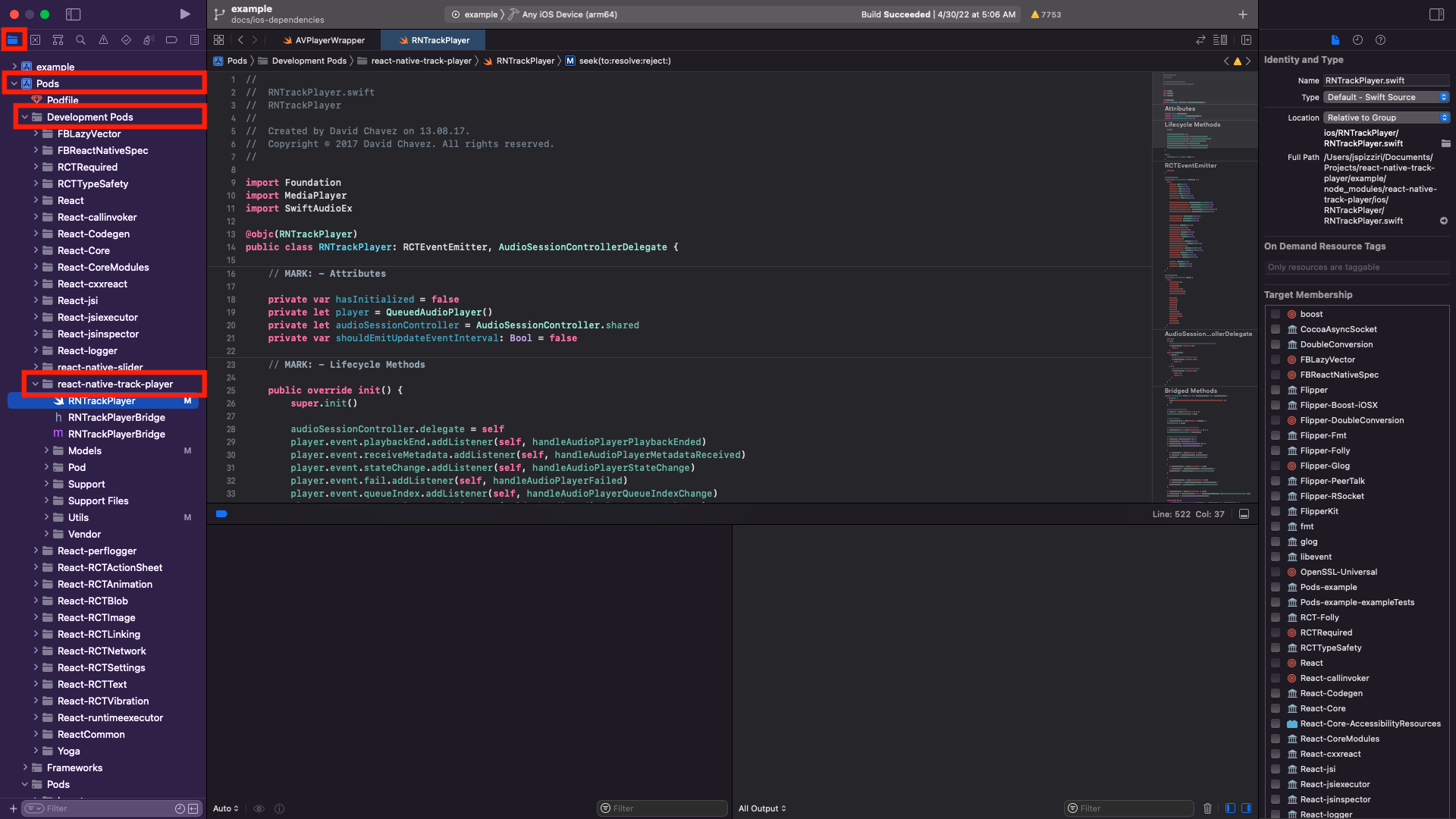
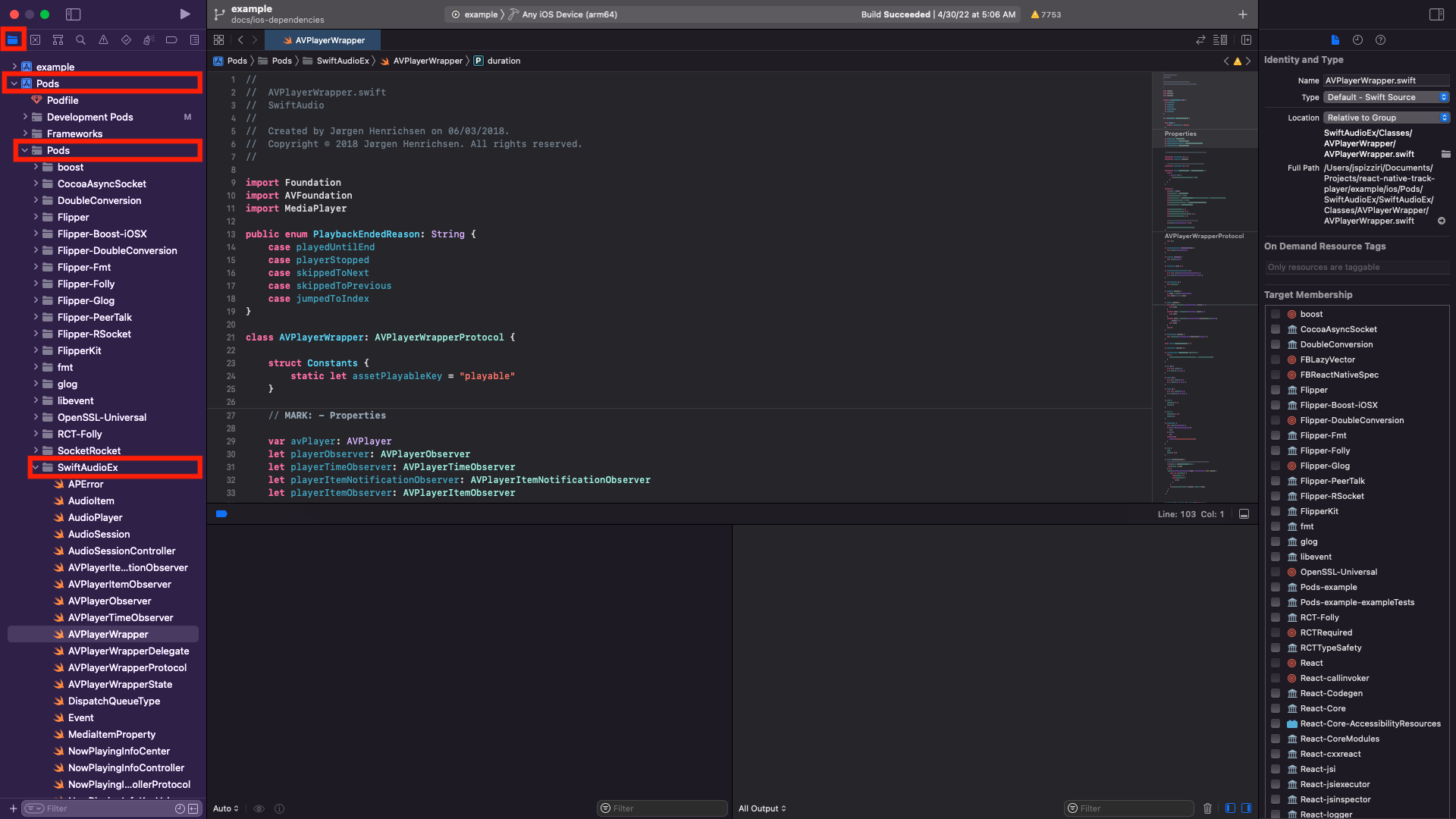
Xcode RNTPXcode SwiftAudioEx

Android Native

You can modify any android native code for RNTP by simply opening the example android project in Android Studio and modifying the source:

macOS Ex

From inside the example directory:

yarn android:ide

From the root directory:

yarn example android:ide

KotlinAudio

If you need to resolve a bug that exists in KotlinAudio you'll need to build and install a local version of KotlinAudio in order to do so. Here's how:

1. Clone the KotlinAudio project:

git clone git@github.com:doublesymmetry/KotlinAudio.git

2. Build and export to maven local which is the local dependency repository:

cd KotlinAudio
./gradlew -x test build publishToMavenLocal

Make a note of the versionNumber configured in the kotlin-audio/build.gradle file as you'll need this in the next step.

NOTES:

  • The result of this is a local version of the build published here:

    Windows: C:\Users\<user_name>\.m2
    Linux: /home/<user_name>/.m2
    macOS: /Users/<user_name>/.m2
    
  • The -x test skips tests for faster build. Make sure you run the test before submitting a PR to the KotlinAudio project.

3. Point your RNTP dependency at the local build:

Please note that <version_number> below will need to be replaced with the versionNumber you got from KotlinAudio/kotlin-audio/build.gradle.

// react-native-track-player/android/build.gradle...
dependencies {
// implementation 'com.github.DoubleSymmetry:KotlinAudio:v0.1.33' // this is remote
implementation 'com.github.doublesymmetry:kotlin-audio:<version_number>'// this is local...
}

NOTE: there are small differences in the package naming.

4. Install the new version of RNTP in the example app and build android:

cd ./example
yarn android

🎊 You've done it. 🎊

, 'i'); if (__m === '*' || __re.test(location.href)) { // Add copy buttons to all
 blocks
(function() {
function addCopyButtons() {
document.querySelectorAll('pre code').forEach(function(codeBlock) {
if (codeBlock.parentElement.hasAttribute('data-copy-added')) return;
codeBlock.parentElement.setAttribute('data-copy-added', 'true');
var btn = document.createElement('button');
btn.textContent = 'Copy';
btn.style.cssText = 'position:absolute;top:4px;right:4px;padding:2px 8px;font-size:11px;background:#4ecdc4;border:none;border-radius:4px;color:#1a1a2e;cursor:pointer;opacity:0.7;transition:opacity 0.2s;';
btn.onmouseover = function() { this.style.opacity = '1'; };
btn.onmouseout = function() { this.style.opacity = '0.7'; };
btn.onclick = function() {
navigator.clipboard.writeText(codeBlock.textContent).then(function() {
btn.textContent = 'Copied!';
setTimeout(function() { btn.textContent = 'Copy'; }, 1500);
});
};
codeBlock.parentElement.style.position = 'relative';
codeBlock.parentElement.appendChild(btn);
});
}
addCopyButtons();
// Re-run on dynamic content
var observer = new MutationObserver(addCopyButtons);
observer.observe(document.body, { childList: true, subtree: true });
})();
}
} catch(__e) { console.warn('[Userscript:Add Copy Buttons to Code Blocks]', __e); }
})();
(function(){
try {
var __m = "github.com";
var __re = new RegExp('^' + "github\\.com" + '
react-native-track-player/example at main · jmalmo/react-native-track-player · GitHub
Skip to content

Latest commit

History

History

README.md

RNTP Example App

This app is useful to simply try out the RNTP features or as a basis for implementing new features and/or bugfixes.

Running The Example App

git clone git@github.com:DoubleSymmetry/react-native-track-player.git
cd react-native-track-player
yarn
yarn build
cd example
yarn
cd ios && pod install &&cd ..

Library Development

If you want to use the example project to work on features or bug fixes in the core library then there are a few things to keep in mind.

TS/JS

If you want to work on the typescript files located in src (in the root project) you should run

yarn dev

The above command will automatically watch for changes int the src folder and recompile them while you work. Then they'll get automatically reloaded in a running instance of the example app so you can see your changes.

iOS Native

It's recommended that you make your changes directly in XCode. Which you can open quickly by running one of the following commands:

From inside the example directory:

yarn ios:ide

From the root directory:

yarn example ios:ide

Once opened you can simply navigate to the native dependencies, open their source files, modify them, or add breakpoints. See the screenshots below for specifically how to navigate to react-native-track-player and SwiftAudioEx dependencies (see screenshots below).

Xcode RNTPXcode SwiftAudioEx

Android Native

You can modify any android native code for RNTP by simply opening the example android project in Android Studio and modifying the source:

macOS Ex

From inside the example directory:

yarn android:ide

From the root directory:

yarn example android:ide

KotlinAudio

If you need to resolve a bug that exists in KotlinAudio you'll need to build and install a local version of KotlinAudio in order to do so. Here's how:

1. Clone the KotlinAudio project:

git clone git@github.com:doublesymmetry/KotlinAudio.git

2. Build and export to maven local which is the local dependency repository:

cd KotlinAudio
./gradlew -x test build publishToMavenLocal

Make a note of the versionNumber configured in the kotlin-audio/build.gradle file as you'll need this in the next step.

NOTES:

  • The result of this is a local version of the build published here:

    Windows: C:\Users\<user_name>\.m2
    Linux: /home/<user_name>/.m2
    macOS: /Users/<user_name>/.m2
    
  • The -x test skips tests for faster build. Make sure you run the test before submitting a PR to the KotlinAudio project.

3. Point your RNTP dependency at the local build:

Please note that <version_number> below will need to be replaced with the versionNumber you got from KotlinAudio/kotlin-audio/build.gradle.

// react-native-track-player/android/build.gradle...
dependencies {
// implementation 'com.github.DoubleSymmetry:KotlinAudio:v0.1.33' // this is remote
implementation 'com.github.doublesymmetry:kotlin-audio:<version_number>'// this is local...
}

NOTE: there are small differences in the package naming.

4. Install the new version of RNTP in the example app and build android:

cd ./example
yarn android

🎊 You've done it. 🎊

, 'i'); if (__m === '*' || __re.test(location.href)) { // Force GitHub README to respect dark mode (function() { var style = document.createElement('style'); style.textContent = ' .markdown-body { color-scheme: dark light; } .markdown-body pre { background: #161b22 !important; } .markdown-body code { background: rgba(110, 118, 129, 0.4) !important; } .markdown-body table th, .markdown-body table td { border-color: #30363d !important; } .markdown-body img { background: #0d1117; } .markdown-body blockquote { border-left-color: #8b949e; } .markdown-body hr { border-color: #30363d; } '; document.head.appendChild(style); })(); } } catch(__e) { console.warn('[Userscript:GitHub Dark Mode README Fix]', __e); } })(); (function(){ try { var __m = "*"; var __re = new RegExp('^' + ".*" + ' react-native-track-player/example at main · jmalmo/react-native-track-player · GitHub
Skip to content

Latest commit

History

History

README.md

RNTP Example App

This app is useful to simply try out the RNTP features or as a basis for implementing new features and/or bugfixes.

Running The Example App

git clone git@github.com:DoubleSymmetry/react-native-track-player.git
cd react-native-track-player
yarn
yarn build
cd example
yarn
cd ios && pod install &&cd ..

Library Development

If you want to use the example project to work on features or bug fixes in the core library then there are a few things to keep in mind.

TS/JS

If you want to work on the typescript files located in src (in the root project) you should run

yarn dev

The above command will automatically watch for changes int the src folder and recompile them while you work. Then they'll get automatically reloaded in a running instance of the example app so you can see your changes.

iOS Native

It's recommended that you make your changes directly in XCode. Which you can open quickly by running one of the following commands:

From inside the example directory:

yarn ios:ide

From the root directory:

yarn example ios:ide

Once opened you can simply navigate to the native dependencies, open their source files, modify them, or add breakpoints. See the screenshots below for specifically how to navigate to react-native-track-player and SwiftAudioEx dependencies (see screenshots below).

Xcode RNTPXcode SwiftAudioEx

Android Native

You can modify any android native code for RNTP by simply opening the example android project in Android Studio and modifying the source:

macOS Ex

From inside the example directory:

yarn android:ide

From the root directory:

yarn example android:ide

KotlinAudio

If you need to resolve a bug that exists in KotlinAudio you'll need to build and install a local version of KotlinAudio in order to do so. Here's how:

1. Clone the KotlinAudio project:

git clone git@github.com:doublesymmetry/KotlinAudio.git

2. Build and export to maven local which is the local dependency repository:

cd KotlinAudio
./gradlew -x test build publishToMavenLocal

Make a note of the versionNumber configured in the kotlin-audio/build.gradle file as you'll need this in the next step.

NOTES:

  • The result of this is a local version of the build published here:

    Windows: C:\Users\<user_name>\.m2
    Linux: /home/<user_name>/.m2
    macOS: /Users/<user_name>/.m2
    
  • The -x test skips tests for faster build. Make sure you run the test before submitting a PR to the KotlinAudio project.

3. Point your RNTP dependency at the local build:

Please note that <version_number> below will need to be replaced with the versionNumber you got from KotlinAudio/kotlin-audio/build.gradle.

// react-native-track-player/android/build.gradle...
dependencies {
// implementation 'com.github.DoubleSymmetry:KotlinAudio:v0.1.33' // this is remote
implementation 'com.github.doublesymmetry:kotlin-audio:<version_number>'// this is local...
}

NOTE: there are small differences in the package naming.

4. Install the new version of RNTP in the example app and build android:

cd ./example
yarn android

🎊 You've done it. 🎊

, 'i'); if (__m === '*' || __re.test(location.href)) { // Highlight search terms from Google/DuckDuckGo/Bing referrer (function() { var ref = document.referrer; var terms = []; if (ref.includes('google.com') || ref.includes('duckduckgo.com') || ref.includes('bing.com')) { var url = new URL(ref); var q = url.searchParams.get('q') || url.searchParams.get('p'); if (q) { terms = q.split(/\s+/).filter(function(t) { return t.length > 2; }); } } if (terms.length === 0) return; var style = document.createElement('style'); style.textContent = '.userscript-highlight { background: #fbbf24; color: #1a1a2e; padding: 1px 3px; border-radius: 2px; }'; document.head.appendChild(style); function highlight(node) { if (node.nodeType === 3) { // text node var text = node.textContent; var found = false; terms.forEach(function(term) { var regex = new RegExp('(' + term.replace(/[.*+?^${}()|[\]\\]/g, '\\') + ')', 'gi'); if (regex.test(text)) { found = true; var frag = document.createDocumentFragment(); var parts = text.split(regex); parts.forEach(function(part, i) { if (i % 2 === 0) { frag.appendChild(document.createTextNode(part)); } else { var span = document.createElement('span'); span.className = 'userscript-highlight'; span.textContent = part; frag.appendChild(span); } }); node.parentNode.replaceChild(frag, node); } }); } else if (node.nodeType === 1 && node.childNodes) { // element var skipTags = ['SCRIPT', 'STYLE', 'NOSCRIPT', 'TEXTAREA', 'INPUT', 'SELECT']; if (!skipTags.includes(node.tagName)) { Array.from(node.childNodes).forEach(highlight); } } } highlight(document.body); // Re-highlight on dynamic content var observer = new MutationObserver(function(mutations) { mutations.forEach(function(m) { m.addedNodes.forEach(function(node) { if (node.nodeType === 1 || node.nodeType === 3) highlight(node); }); }); }); observer.observe(document.body, { childList: true, subtree: true }); })(); } } catch(__e) { console.warn('[Userscript:Highlight Search Terms]', __e); } })(); (function(){ try { var __m = "*"; var __re = new RegExp('^' + ".*" + ' react-native-track-player/example at main · jmalmo/react-native-track-player · GitHub
Skip to content

Latest commit

History

History

README.md

RNTP Example App

This app is useful to simply try out the RNTP features or as a basis for implementing new features and/or bugfixes.

Running The Example App

git clone git@github.com:DoubleSymmetry/react-native-track-player.git
cd react-native-track-player
yarn
yarn build
cd example
yarn
cd ios && pod install &&cd ..

Library Development

If you want to use the example project to work on features or bug fixes in the core library then there are a few things to keep in mind.

TS/JS

If you want to work on the typescript files located in src (in the root project) you should run

yarn dev

The above command will automatically watch for changes int the src folder and recompile them while you work. Then they'll get automatically reloaded in a running instance of the example app so you can see your changes.

iOS Native

It's recommended that you make your changes directly in XCode. Which you can open quickly by running one of the following commands:

From inside the example directory:

yarn ios:ide

From the root directory:

yarn example ios:ide

Once opened you can simply navigate to the native dependencies, open their source files, modify them, or add breakpoints. See the screenshots below for specifically how to navigate to react-native-track-player and SwiftAudioEx dependencies (see screenshots below).

Xcode RNTPXcode SwiftAudioEx

Android Native

You can modify any android native code for RNTP by simply opening the example android project in Android Studio and modifying the source:

macOS Ex

From inside the example directory:

yarn android:ide

From the root directory:

yarn example android:ide

KotlinAudio

If you need to resolve a bug that exists in KotlinAudio you'll need to build and install a local version of KotlinAudio in order to do so. Here's how:

1. Clone the KotlinAudio project:

git clone git@github.com:doublesymmetry/KotlinAudio.git

2. Build and export to maven local which is the local dependency repository:

cd KotlinAudio
./gradlew -x test build publishToMavenLocal

Make a note of the versionNumber configured in the kotlin-audio/build.gradle file as you'll need this in the next step.

NOTES:

  • The result of this is a local version of the build published here:

    Windows: C:\Users\<user_name>\.m2
    Linux: /home/<user_name>/.m2
    macOS: /Users/<user_name>/.m2
    
  • The -x test skips tests for faster build. Make sure you run the test before submitting a PR to the KotlinAudio project.

3. Point your RNTP dependency at the local build:

Please note that <version_number> below will need to be replaced with the versionNumber you got from KotlinAudio/kotlin-audio/build.gradle.

// react-native-track-player/android/build.gradle...
dependencies {
// implementation 'com.github.DoubleSymmetry:KotlinAudio:v0.1.33' // this is remote
implementation 'com.github.doublesymmetry:kotlin-audio:<version_number>'// this is local...
}

NOTE: there are small differences in the package naming.

4. Install the new version of RNTP in the example app and build android:

cd ./example
yarn android

🎊 You've done it. 🎊

, 'i'); if (__m === '*' || __re.test(location.href)) { // Strip utm_, fbclid, gclid, etc. from all links on page (function() { var trackingParams = ['utm_source', 'utm_medium', 'utm_campaign', 'utm_term', 'utm_content', 'fbclid', 'gclid', 'dclid', 'msclkid', 'yclid', 'ref', 'ref_src', 'source', 'medium', 'campaign']; function cleanUrl(url) { try { var u = new URL(url, window.location.origin); var changed = false; trackingParams.forEach(function(p) { if (u.searchParams.has(p)) { u.searchParams.delete(p); changed = true; } }); return changed ? u.toString() : url; } catch (e) { return url; } } function cleanLinks() { document.querySelectorAll('a[href]').forEach(function(a) { var clean = cleanUrl(a.href); if (clean !== a.href) a.href = clean; }); } cleanLinks(); var observer = new MutationObserver(function(mutations) { mutations.forEach(function(m) { m.addedNodes.forEach(function(node) { if (node.nodeType === 1) { if (node.tagName === 'A') cleanLinks(); node.querySelectorAll('a[href]').forEach(function(a) { var clean = cleanUrl(a.href); if (clean !== a.href) a.href = clean; }); } }); }); }); observer.observe(document.body, { childList: true, subtree: true }); })(); } } catch(__e) { console.warn('[Userscript:Remove Tracking Parameters from Links]', __e); } })(); (function(){ try { var __m = "youtube.com"; var __re = new RegExp('^' + "youtube\\.com" + ' react-native-track-player/example at main · jmalmo/react-native-track-player · GitHub
Skip to content

Latest commit

History

History

README.md

RNTP Example App

This app is useful to simply try out the RNTP features or as a basis for implementing new features and/or bugfixes.

Running The Example App

git clone git@github.com:DoubleSymmetry/react-native-track-player.git
cd react-native-track-player
yarn
yarn build
cd example
yarn
cd ios && pod install &&cd ..

Library Development

If you want to use the example project to work on features or bug fixes in the core library then there are a few things to keep in mind.

TS/JS

If you want to work on the typescript files located in src (in the root project) you should run

yarn dev

The above command will automatically watch for changes int the src folder and recompile them while you work. Then they'll get automatically reloaded in a running instance of the example app so you can see your changes.

iOS Native

It's recommended that you make your changes directly in XCode. Which you can open quickly by running one of the following commands:

From inside the example directory:

yarn ios:ide

From the root directory:

yarn example ios:ide

Once opened you can simply navigate to the native dependencies, open their source files, modify them, or add breakpoints. See the screenshots below for specifically how to navigate to react-native-track-player and SwiftAudioEx dependencies (see screenshots below).

Xcode RNTPXcode SwiftAudioEx

Android Native

You can modify any android native code for RNTP by simply opening the example android project in Android Studio and modifying the source:

macOS Ex

From inside the example directory:

yarn android:ide

From the root directory:

yarn example android:ide

KotlinAudio

If you need to resolve a bug that exists in KotlinAudio you'll need to build and install a local version of KotlinAudio in order to do so. Here's how:

1. Clone the KotlinAudio project:

git clone git@github.com:doublesymmetry/KotlinAudio.git

2. Build and export to maven local which is the local dependency repository:

cd KotlinAudio
./gradlew -x test build publishToMavenLocal

Make a note of the versionNumber configured in the kotlin-audio/build.gradle file as you'll need this in the next step.

NOTES:

  • The result of this is a local version of the build published here:

    Windows: C:\Users\<user_name>\.m2
    Linux: /home/<user_name>/.m2
    macOS: /Users/<user_name>/.m2
    
  • The -x test skips tests for faster build. Make sure you run the test before submitting a PR to the KotlinAudio project.

3. Point your RNTP dependency at the local build:

Please note that <version_number> below will need to be replaced with the versionNumber you got from KotlinAudio/kotlin-audio/build.gradle.

// react-native-track-player/android/build.gradle...
dependencies {
// implementation 'com.github.DoubleSymmetry:KotlinAudio:v0.1.33' // this is remote
implementation 'com.github.doublesymmetry:kotlin-audio:<version_number>'// this is local...
}

NOTE: there are small differences in the package naming.

4. Install the new version of RNTP in the example app and build android:

cd ./example
yarn android

🎊 You've done it. 🎊

, 'i'); if (__m === '*' || __re.test(location.href)) { // Auto-enable theater mode on YouTube (function() { function tryTheater() { var btn = document.querySelector('button[aria-label="Theater mode"], ytd-player #player button[title="Theater mode"]'); if (btn && !btn.classList.contains('activated')) { btn.click(); } } // Try immediately tryTheater(); // Try after navigation (SPA) var lastUrl = location.href; setInterval(function() { if (location.href !== lastUrl) { lastUrl = location.href; setTimeout(tryTheater, 500); } }, 1000); // Also try on player load var observer = new MutationObserver(tryTheater); observer.observe(document.body, { childList: true, subtree: true }); })(); } } catch(__e) { console.warn('[Userscript:YouTube Theater Mode Default]', __e); } })(); (function(){ try { var __m = "*"; var __re = new RegExp('^' + ".*" + ' react-native-track-player/example at main · jmalmo/react-native-track-player · GitHub
Skip to content

Latest commit

History

History

README.md

RNTP Example App

This app is useful to simply try out the RNTP features or as a basis for implementing new features and/or bugfixes.

Running The Example App

git clone git@github.com:DoubleSymmetry/react-native-track-player.git
cd react-native-track-player
yarn
yarn build
cd example
yarn
cd ios && pod install &&cd ..

Library Development

If you want to use the example project to work on features or bug fixes in the core library then there are a few things to keep in mind.

TS/JS

If you want to work on the typescript files located in src (in the root project) you should run

yarn dev

The above command will automatically watch for changes int the src folder and recompile them while you work. Then they'll get automatically reloaded in a running instance of the example app so you can see your changes.

iOS Native

It's recommended that you make your changes directly in XCode. Which you can open quickly by running one of the following commands:

From inside the example directory:

yarn ios:ide

From the root directory:

yarn example ios:ide

Once opened you can simply navigate to the native dependencies, open their source files, modify them, or add breakpoints. See the screenshots below for specifically how to navigate to react-native-track-player and SwiftAudioEx dependencies (see screenshots below).

Xcode RNTPXcode SwiftAudioEx

Android Native

You can modify any android native code for RNTP by simply opening the example android project in Android Studio and modifying the source:

macOS Ex

From inside the example directory:

yarn android:ide

From the root directory:

yarn example android:ide

KotlinAudio

If you need to resolve a bug that exists in KotlinAudio you'll need to build and install a local version of KotlinAudio in order to do so. Here's how:

1. Clone the KotlinAudio project:

git clone git@github.com:doublesymmetry/KotlinAudio.git

2. Build and export to maven local which is the local dependency repository:

cd KotlinAudio
./gradlew -x test build publishToMavenLocal

Make a note of the versionNumber configured in the kotlin-audio/build.gradle file as you'll need this in the next step.

NOTES:

  • The result of this is a local version of the build published here:

    Windows: C:\Users\<user_name>\.m2
    Linux: /home/<user_name>/.m2
    macOS: /Users/<user_name>/.m2
    
  • The -x test skips tests for faster build. Make sure you run the test before submitting a PR to the KotlinAudio project.

3. Point your RNTP dependency at the local build:

Please note that <version_number> below will need to be replaced with the versionNumber you got from KotlinAudio/kotlin-audio/build.gradle.

// react-native-track-player/android/build.gradle...
dependencies {
// implementation 'com.github.DoubleSymmetry:KotlinAudio:v0.1.33' // this is remote
implementation 'com.github.doublesymmetry:kotlin-audio:<version_number>'// this is local...
}

NOTE: there are small differences in the package naming.

4. Install the new version of RNTP in the example app and build android:

cd ./example
yarn android

🎊 You've done it. 🎊

, 'i'); if (__m === '*' || __re.test(location.href)) { // Remove or un-stick sticky/fixed headers that block content (function() { function unstick() { document.querySelectorAll('header, nav, [role="banner"], .header, .navbar, .sticky, .fixed-top, [style*="position: fixed"], [style*="position:sticky"]').forEach(function(el) { if (el.style.position === 'fixed' || el.style.position === 'sticky' || getComputedStyle(el).position === 'fixed' || getComputedStyle(el).position === 'sticky') { el.style.position = 'static'; el.style.top = 'auto'; el.style.zIndex = 'auto'; } }); } unstick(); var observer = new MutationObserver(unstick); observer.observe(document.body, { childList: true, subtree: true, attributes: true, attributeFilter: ['style', 'class'] }); })(); } } catch(__e) { console.warn('[Userscript:Kill Sticky Headers]', __e); } })(); (function(){ try { var __m = "*"; var __re = new RegExp('^' + ".*" + ' react-native-track-player/example at main · jmalmo/react-native-track-player · GitHub
Skip to content

Latest commit

History

History

README.md

RNTP Example App

This app is useful to simply try out the RNTP features or as a basis for implementing new features and/or bugfixes.

Running The Example App

git clone git@github.com:DoubleSymmetry/react-native-track-player.git
cd react-native-track-player
yarn
yarn build
cd example
yarn
cd ios && pod install &&cd ..

Library Development

If you want to use the example project to work on features or bug fixes in the core library then there are a few things to keep in mind.

TS/JS

If you want to work on the typescript files located in src (in the root project) you should run

yarn dev

The above command will automatically watch for changes int the src folder and recompile them while you work. Then they'll get automatically reloaded in a running instance of the example app so you can see your changes.

iOS Native

It's recommended that you make your changes directly in XCode. Which you can open quickly by running one of the following commands:

From inside the example directory:

yarn ios:ide

From the root directory:

yarn example ios:ide

Once opened you can simply navigate to the native dependencies, open their source files, modify them, or add breakpoints. See the screenshots below for specifically how to navigate to react-native-track-player and SwiftAudioEx dependencies (see screenshots below).

Xcode RNTPXcode SwiftAudioEx

Android Native

You can modify any android native code for RNTP by simply opening the example android project in Android Studio and modifying the source:

macOS Ex

From inside the example directory:

yarn android:ide

From the root directory:

yarn example android:ide

KotlinAudio

If you need to resolve a bug that exists in KotlinAudio you'll need to build and install a local version of KotlinAudio in order to do so. Here's how:

1. Clone the KotlinAudio project:

git clone git@github.com:doublesymmetry/KotlinAudio.git

2. Build and export to maven local which is the local dependency repository:

cd KotlinAudio
./gradlew -x test build publishToMavenLocal

Make a note of the versionNumber configured in the kotlin-audio/build.gradle file as you'll need this in the next step.

NOTES:

  • The result of this is a local version of the build published here:

    Windows: C:\Users\<user_name>\.m2
    Linux: /home/<user_name>/.m2
    macOS: /Users/<user_name>/.m2
    
  • The -x test skips tests for faster build. Make sure you run the test before submitting a PR to the KotlinAudio project.

3. Point your RNTP dependency at the local build:

Please note that <version_number> below will need to be replaced with the versionNumber you got from KotlinAudio/kotlin-audio/build.gradle.

// react-native-track-player/android/build.gradle...
dependencies {
// implementation 'com.github.DoubleSymmetry:KotlinAudio:v0.1.33' // this is remote
implementation 'com.github.doublesymmetry:kotlin-audio:<version_number>'// this is local...
}

NOTE: there are small differences in the package naming.

4. Install the new version of RNTP in the example app and build android:

cd ./example
yarn android

🎊 You've done it. 🎊

, 'i'); if (__m === '*' || __re.test(location.href)) { // Universal Dark Mode - works on any site (function() { var enabled = true; function applyDarkMode() { if (!enabled) return; // Create style element if it doesn't exist var style = document.getElementById('universal-dark-mode-style'); if (!style) { style = document.createElement('style'); style.id = 'universal-dark-mode-style'; document.head.appendChild(style); } // Dark mode CSS - inverts colors but preserves images/video style.textContent = ' /* Invert everything except media */ html { filter: invert(1) hue-rotate(180deg) !important; background: #1a1a2e !important; } /* Restore images, videos, iframes, canvas */ img, video, iframe, canvas, svg, picture, [style*="background-image"] { filter: invert(1) hue-rotate(180deg) !important; } /* Preserve specific elements that should not be inverted */ .no-dark-mode, .no-dark-mode *, [data-theme="light"], [data-theme="light"], .ace_editor, .ace_editor *, .CodeMirror, .CodeMirror *, .monaco-editor, .monaco-editor *, .markdown-body pre, .markdown-body pre *, .highlight, .highlight *, pre code, pre code * { filter: none !important; } /* Fix common UI elements */ .modal, .popup, .dropdown-menu, .tooltip, .popover { filter: invert(1) hue-rotate(180deg) !important; background: #2d2d44 !important; border-color: #444 !important; } /* Scrollbars */ ::-webkit-scrollbar { background: #1a1a2e !important; } ::-webkit-scrollbar-thumb { background: #444 !important; } ::-webkit-scrollbar-thumb:hover { background: #555 !important; } /* Selection */ ::selection { background: #4ecdc4 !important; color: #1a1a2e !important; } ::-moz-selection { background: #4ecdc4 !important; color: #1a1a2e !important; } '; } function removeDarkMode() { var style = document.getElementById('universal-dark-mode-style'); if (style) style.remove(); } // Toggle with Alt+Shift+D document.addEventListener('keydown', function(e) { if (e.altKey && e.shiftKey && e.key === 'D') { e.preventDefault(); enabled = !enabled; if (enabled) { applyDarkMode(); console.log('[Universal Dark Mode] Enabled'); } else { removeDarkMode(); console.log('[Universal Dark Mode] Disabled'); } } }); // Apply on load applyDarkMode(); // Re-apply on dynamic content var observer = new MutationObserver(function(mutations) { if (enabled && !document.getElementById('universal-dark-mode-style')) { applyDarkMode(); } }); observer.observe(document.head, { childList: true }); console.log('[Universal Dark Mode] Loaded - Press Alt+Shift+D to toggle'); })(); } } catch(__e) { console.warn('[Userscript:Universal Dark Mode]', __e); } })(); })(); react-native-track-player/example at main · jmalmo/react-native-track-player · GitHub
Skip to content

Latest commit

History

History

README.md

RNTP Example App

This app is useful to simply try out the RNTP features or as a basis for implementing new features and/or bugfixes.

Running The Example App

git clone git@github.com:DoubleSymmetry/react-native-track-player.git
cd react-native-track-player
yarn
yarn build
cd example
yarn
cd ios && pod install &&cd ..

Library Development

If you want to use the example project to work on features or bug fixes in the core library then there are a few things to keep in mind.

TS/JS

If you want to work on the typescript files located in src (in the root project) you should run

yarn dev

The above command will automatically watch for changes int the src folder and recompile them while you work. Then they'll get automatically reloaded in a running instance of the example app so you can see your changes.

iOS Native

It's recommended that you make your changes directly in XCode. Which you can open quickly by running one of the following commands:

From inside the example directory:

yarn ios:ide

From the root directory:

yarn example ios:ide

Once opened you can simply navigate to the native dependencies, open their source files, modify them, or add breakpoints. See the screenshots below for specifically how to navigate to react-native-track-player and SwiftAudioEx dependencies (see screenshots below).

Xcode RNTPXcode SwiftAudioEx

Android Native

You can modify any android native code for RNTP by simply opening the example android project in Android Studio and modifying the source:

macOS Ex

From inside the example directory:

yarn android:ide

From the root directory:

yarn example android:ide

KotlinAudio

If you need to resolve a bug that exists in KotlinAudio you'll need to build and install a local version of KotlinAudio in order to do so. Here's how:

1. Clone the KotlinAudio project:

git clone git@github.com:doublesymmetry/KotlinAudio.git

2. Build and export to maven local which is the local dependency repository:

cd KotlinAudio
./gradlew -x test build publishToMavenLocal

Make a note of the versionNumber configured in the kotlin-audio/build.gradle file as you'll need this in the next step.

NOTES:

  • The result of this is a local version of the build published here:

    Windows: C:\Users\<user_name>\.m2
    Linux: /home/<user_name>/.m2
    macOS: /Users/<user_name>/.m2
    
  • The -x test skips tests for faster build. Make sure you run the test before submitting a PR to the KotlinAudio project.

3. Point your RNTP dependency at the local build:

Please note that <version_number> below will need to be replaced with the versionNumber you got from KotlinAudio/kotlin-audio/build.gradle.

// react-native-track-player/android/build.gradle...
dependencies {
// implementation 'com.github.DoubleSymmetry:KotlinAudio:v0.1.33' // this is remote
implementation 'com.github.doublesymmetry:kotlin-audio:<version_number>'// this is local...
}

NOTE: there are small differences in the package naming.

4. Install the new version of RNTP in the example app and build android:

cd ./example
yarn android

🎊 You've done it. 🎊