


Android-RateThisApp is an library to show "Rate this app" dialog.
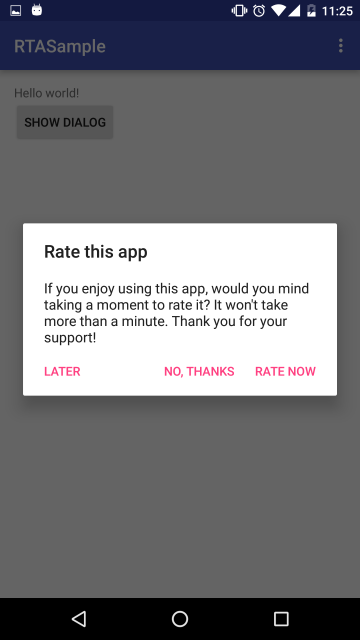

The library monitors the following status
- How many times is the app launched
- How long days does it take from the app installation
and show a dialog to engage users to rate the app in Google Play.
dependencies {
compile 'io.github.kobakei:ratethisapp:x.y.z'
}
x.y.z is
NOTICE: From 1.0.0, group ID has been changed from com.kobakei to io.github.kobakei.
Call RateThisApp.onCreate(Context) and RateThisApp.showRateDialogIfNeeded(Context) in your launcher activity's onCreate() method.
@OverrideprotectedvoidonCreate(BundlesavedInstanceState) {
super.onCreate(savedInstanceState);
setContentView(R.layout.activity_main);
// Monitor launch times and interval from installationRateThisApp.onCreate(this);
// If the condition is satisfied, "Rate this app" dialog will be shownRateThisApp.showRateDialogIfNeeded(this);
}
That's all! You can see "Rate this app" dialog at an appropriate timing.
In default, the dialog will be shown when any of the following conditions is satisfied.
- App is launched more than 10 times
- App is launched more than 7 days later than installation.
If you want to use your own condition, please call RateThisApp.init(Configuration) in your Application or launcher activity onCreate method.
// Custom condition: 3 days and 5 launchesRateThisApp.Configconfig = newRateThisApp.Config(3, 5);
RateThisApp.init(config);You can override title, message and button labels.
RateThisApp.Configconfig = newRateThisApp.Config();
config.setTitle(R.string.my_own_title);
config.setMessage(R.string.my_own_message);
config.setYesButtonText(R.string.my_own_rate);
config.setNoButtonText(R.string.my_own_thanks);
config.setCancelButtonText(R.string.my_own_cancel);
RateThisApp.init(config);In default, rate button navigates to the application page on Google Play. You can override this url as below.
RateThisApp.Configconfig = newRateThisApp.Config();
config.setUrl("http://www.example.com");
RateThisApp.init(config);If you want to stop showing the rate dialog, use this method in your code.
RateThisApp.stopRateDialog(this);You can receive yes/no/cancel button click events.
RateThisApp.setCallback(newRateThisApp.Callback() {
@OverridepublicvoidonYesClicked() {
Toast.makeText(MainActivity.this, "Yes event", Toast.LENGTH_SHORT).show();
}
@OverridepublicvoidonNoClicked() {
Toast.makeText(MainActivity.this, "No event", Toast.LENGTH_SHORT).show();
}
@OverridepublicvoidonCancelClicked() {
Toast.makeText(MainActivity.this, "Cancel event", Toast.LENGTH_SHORT).show();
}
});If you want to contribute this project, please send pull request. In present, I need contributors who can translate resources from English/Japanese into other languages.
Copyright 2013-2017 Keisuke Kobayashi
Licensed under the Apache License, Version 2.0 (the "License");
you may not use this file except in compliance with the License.
You may obtain a copy of the License at
http://www.apache.org/licenses/LICENSE-2.0
Unless required by applicable law or agreed to in writing, software
distributed under the License is distributed on an "AS IS" BASIS,
WITHOUT WARRANTIES OR CONDITIONS OF ANY KIND, either express or implied.
See the License for the specific language governing permissions and
limitations under the License.
Keisuke Kobayashi - kobakei122@gmail.com