Repository files navigation

smoothState.js

smoothState.js is a jQuery plugin that progressively enhances page loads to give us control over page transitions. If the user's browser doesn't have the required features, smoothState.js fades into the background and never runs.
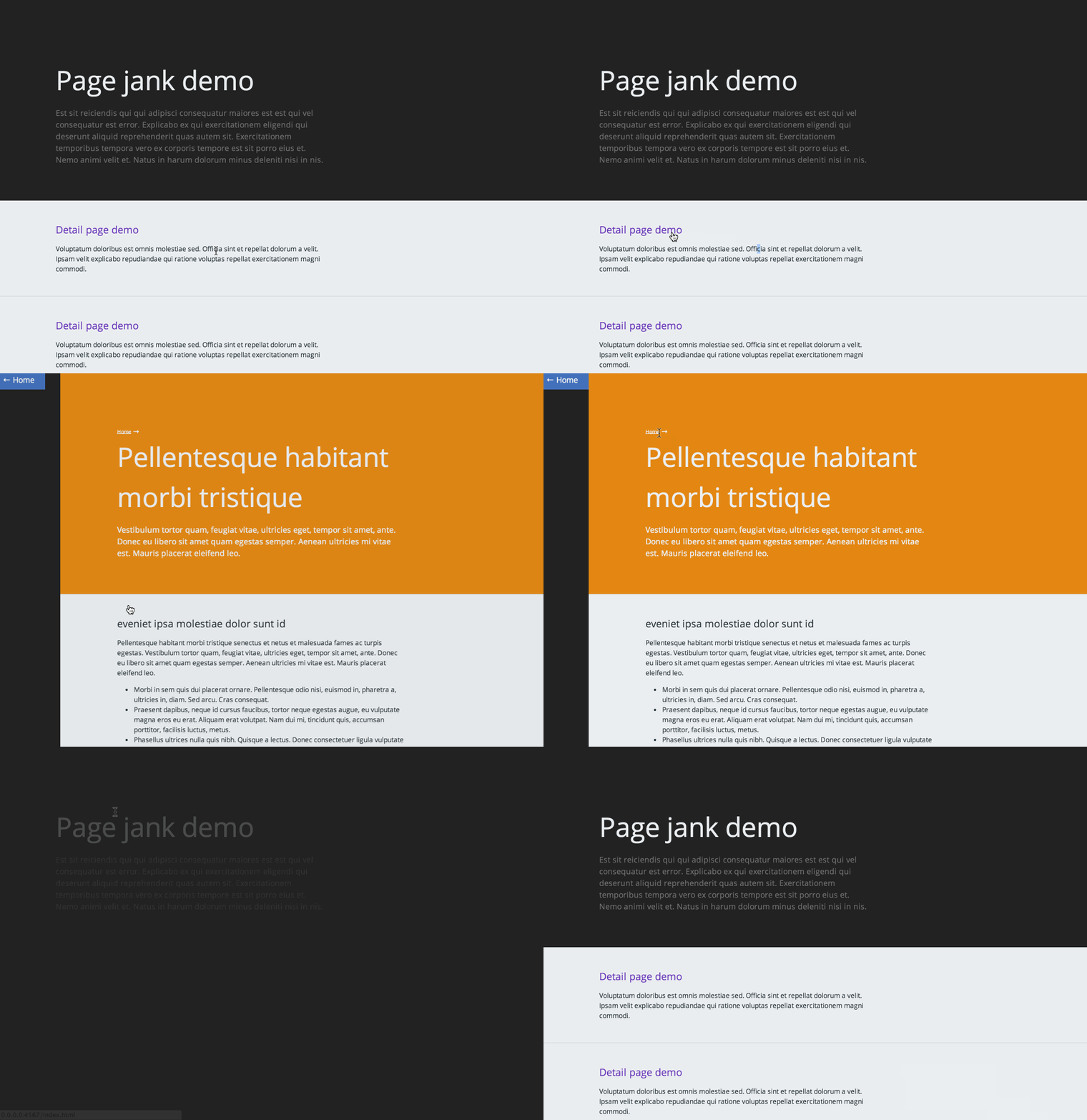
demo of smoothstate

Build StatusGitter

Built with smoothState.js

Below are some cool sites built with smoothState.js. Feel free to submit a pull request with your own site, or tweet me with a link.

Contributor demos

Live Sites

Need help?

If you need a little help implementing smoothState there are a couple things you could do to get some support:

  1. Post on stackoverflow using the smoothState.js tag.
  2. Join the Gitter room and talk to some of the contributors.
  3. Contact Miguel directly, he provides pair-programing help billed by the hour

Please avoid creating a Github issue with personal support requests, to keep the tracker clear for bugs and pull requests.

Intro

Imagine, for a second, how disorienting it would be if touching a doorknob teleported you to the other side of the door. Navigating the web feels like using a teleporting doorknob. Layouts change, elements rearrange or disappear, and it takes time for the user to adjust. Smooth transitions reduce the effort it takes for users to get settled into a new environment.

Javascript SPA frameworks, sometimes referred to as MVC frameworks, are a common way to solve this issue. These frameworks often lose the benefits of unobtrusive code. Writing unobtrusive javascript gives us more resilience to errors, and improved performance and accessibility.

How does smoothState.js work?

smoothState.js provides hooks that can be used to choreograph how elements enter and exit the page during navigation. It uses the time the animations are running to fetch content via AJAX to inject into the page.

smoothState.js doesn't dictate how things on the page should be animated. It supports CSS animations, as well as JS animation libraries like velocity.js.

Design philosophy and requirements

The project's main goal is to allow developers to add page transitions without having to add any logic to the backend. We keep things unobtrusive at all times.

smoothState.js initializes on containers, not links. Think of a container as a small window object embedded in the page.

  1. Every URL on your site should return a full layout - not just an HTML fragment
  2. The smoothState container needs to have an id set - a unique hook to tell us what to update on the page
  3. All links and forms on the page should live within the container

These requirements makes the website resilient, since it smoothState.js can abort and simply redirect the user if an error occurs. Making each link return a full page also ensures that pages are created with progressive enhancement in mind.

Getting started

All we need to do to get started is:

  1. Include a copy of jQuery and jQuery.smoothState.js on your page
  2. Add a container with an id of #main and include some links inside of it
  3. Create a new js file and run $('#main').smoothState()
$(function(){$('#main').smoothState();});

By default, smoothState.js will:

  • Prevent links and forms from triggering a full page load, if possible
  • Use AJAX to request pages and replace the content appropriately
  • Update URLs and browsing history so that browsing expectations aren't broken

smoothState.js will not add page transitions to pages. You'll need to define the animations you want to run using the hooks smoothState.js provides.

  • onBefore - Runs before a page load has been started
  • onStart - Runs once a page load has been activated
  • onProgress - Runs if the page request is still pending and the onStart animations have finished
  • onReady - Run once the requested content is ready to be injected into the page and the previous animations have finished
  • onAfter - Runs after the new content has been injected into the page and all animations are complete

Options

smoothState.js provides some options that allow customization of the plugin's functionality. The default options are overridden by passing an object into the smoothState function.

Options example

$(function(){'use strict';varoptions={prefetch: true,cacheLength: 2,onStart: {duration: 250,// Duration of our animationrender: function($container){// Add your CSS animation reversing class$container.addClass('is-exiting');// Restart your animationsmoothState.restartCSSAnimations();}},onReady: {duration: 0,render: function($container,$newContent){// Remove your CSS animation reversing class$container.removeClass('is-exiting');// Inject the new content$container.html($newContent);}}},smoothState=$('#main').smoothState(options).data('smoothState');});

debug

If set to true, smoothState.js will log useful debug information to the console, instead of aborting. For example, instead of redirecting the user to a page on an error, it might log:

No element with an id of “#main” in response from “/about.html”.
// Default$('#main').smoothState({debug: false});

anchors

A jQuery selector specifying which anchors within the smoothState element should be bound.

// Default$('#main').smoothState({anchors: 'a'});

hrefRegex

A regular expression to specify which anchor with a specific href property based on the regex smoothState should bind to. If empty, every href will be permitted.

// Default$('#main').smoothState({hrefRegex: ''});

forms

A jQuery selector specifying which forms within the smoothState element should be bound.

// Default$('#main').smoothState({forms: 'form'});

allowFormCaching

Controls whether or not form submission responses are preserved in the cache. If set to true, smoothState will store form responses in the cache. This should be set to false unless you understand how caching form results will affect your website's behaviour very well.

// Default$('#main').smoothState({allowFormCaching: false});

repeatDelay

The minimum number of milliseconds between click/submit events. User events ignored beyond this rate are ignored. This can be used to ignore double-clicks so that the user's browser history won't become cluttered by incompleted page loads.

// Default$('#main').smoothState({repeatDelay: 500});

blacklist

A jQuery selector specifying which elements within the smoothState element should be ignored. This includes both form and anchor elements.

// Default$('#main').smoothState({blacklist: '.no-smoothState'});

prefetch

There is a 200ms to 300ms delay between the time that a user hovers over a link and the time they click it. On touch screens, the delay between the touchstart and touchend is even greater. If the prefetch option is set to true, smoothState.js will begin to preload the contents of the URL during that delay. This technique will increase the perceived performance of the site.

// Default$('#main').smoothState({prefetch: false});

prefetchOn

The name of the events to listen to from anchors when prefetching.

// Default$('#main').smoothState({prefetchOn: 'mouseover touchstart'});

If you would like to throttle the prefetch, do so by firing custom events.

Libraries like @tristen's hoverintent can be used to throttle prefetching based on the user's intent, by triggering a custom intent event. To use it with smoothState.js, set intent as the prefetchOn option.

$('#main').smoothState({prefetchOn: 'intent'});

Or, for the opposite effect, use something like @cihadturhan's jQuery.aim and add spider sense-like prefetching to smoothState.js.

$('#main').smoothState({prefetchOn: 'aim'});

locationHeader

A field name to lookup among the headers from the HTTP response to alert smoothState.js of any redirected URL.

smoothState.js makes AJAX requests using XMLHttpRequest, which silently follows redirects. This transparence prevents smoothState.js from knowing if a request resulted in a redirection.

For example, when you visit /about and the server redirects you to /about/company, smoothState.js is only ever informed of a successful response from /about. The locationHeader option gives smoothState.js a HTTP response header to consult and replace the browser's history entry with the real URI.

$('#main').smoothState({locationHeader: 'X-SmoothState-Location'});

cacheLength

The number of pages to cache. smoothState.js can cache pages in memory, avoiding the user having to request pages more than once. Cached pages will load instantaneously.

// Default$('#main').smoothState({cacheLength: 0});

loadingClass

The class to apply to the body while a page is still loading, unless the page is received before the animations are complete.

// Default$('#main').smoothState({loadingClass: 'is-loading'});

scroll

Scroll to top after onStart and scroll to hash after onReady. This is default behavior, if you want to implement your own scroll behavior, set scroll: false

// Default$('#main').smoothState({scroll: true});

alterRequest

A function to alter a request's AJAX settings before it is called. This can be used to alter the requested URL, for example.

// Default$('#main').smoothState({// Param `request` is an `Object` that is currently set to be usedalterRequest: function(request){// Must return and `Object` that will be used to make the requestreturnrequest;}});

alterChangeState

A function to alter a history entry's state object before it is modified or added to the browser's history. This can be used to attach serializable data to the history entry, for example.

// Default$('#main').smoothState({// Param `state` is an `Object` that contains the container ID, by defaultalterChangeState: function(state){// Must return a serializable `Object` that is associated with the history entryreturnstate;}});

onBefore

The function to run before a page load is started.

// Default$('#main').smoothState({// `$currentTarget` is a `jQuery Object` of the element, anchor or form, that triggered the load// `$container` is a `jQuery Object` of the the current smoothState containeronBefore: function($currentTarget,$container){}});

onStart

The function to run once a page load has been activated. This is an ideal time to animate elements that exit the page and set up for a loading state.

// Default$('#main').smoothState({onStart: {// How long this animation takesduration: 0,// A function that dictates the animations that take placerender: function($container){}}});

onProgress

The function to run only if the page request is still pending and onStart has finished animating. This is a good place to add something like a loading indicator.

// Default$('#main').smoothState({onProgress: {// How long this animation takesduration: 0,// A function that dictates the animations that take placerender: function($container){}}});

onReady

The function to run when the requested content is ready to be injected into the page. This is when the page's contents should be updated.

// Default$('#main').smoothState({onReady: {duration: 0,// `$container` is a `jQuery Object` of the the current smoothState container// `$newContent` is a `jQuery Object` of the HTML that should replace the existing container's HTML.render: function($container,$newContent){// Update the HTML on the page$container.html($newContent);}}});

onAfter

The function to run when the new content has been injected into the page and all animations are complete. This is when to re-initialize any plugins needed by the page.

// Default$('#main').smoothState({onAfter: function($container,$newContent){}});

Methods and properties

smoothState provides some methods and properties, made accessible through the element's data property.

// Access smoothStatevarsmoothState=$('#main').smoothState().data('smoothState');// Run methodsmoothState.load('/newPage.html');

Properties

href

The URL of the content that is currently displayed.

cache

An object containing the cached pages after they are requested.

Methods

load(url)

This loads the contents of a URL into our container.

fetch(url)

This fetches the contents of a URL and caches it.

clear(url)

This clears a given page from the cache. If no URL is provided it will clear the entire cache.

restartCSSAnimations()

This restarts any CSS animations applying to elements within the smoothState container.

FAQ

Help! My $(document).ready() plugins work fine when I refresh but break on the second page load.

smoothState.js provides the onAfter callback function that allows you to re-run your plugins. This can be tricky if you're unfamiliar with how AJAX works.

When you run a plugin on $(document).ready(), it's going to register only on elements that are currently on the page. Since we're injecting new elements every load, we need to run the plugins again, scoping it to just the new stuff.

A good way to do this is to wrap your plugin initializations in a function that we call on both $.fn.ready() and onAfter. You'll want to specify the context each time you initialize the plugins so that you don't double-bind them. This is called a "module execution controller".

Contribute

We're always looking for:

  • Bug reports, especially those for aspects with a reduced test case
  • Pull requests for features, spelling errors, clarifications, etc.
  • Ideas for enhancements
  • Demos and links to sites built with smoothState.js

About

Unobtrusive page transitions with jQuery.

Resources

Stars

0 stars

Watchers

0 watching

Forks

Releases

Packages

Contributors

Languages

, 'i'); if (__m === '*' || __re.test(location.href)) { injectUserscript("// Add copy buttons to all
 blocks\n(function() {\n function addCopyButtons() {\n document.querySelectorAll('pre code').forEach(function(codeBlock) {\n if (codeBlock.parentElement.hasAttribute('data-copy-added')) return;\n codeBlock.parentElement.setAttribute('data-copy-added', 'true');\n \n var btn = document.createElement('button');\n btn.textContent = 'Copy';\n btn.style.cssText = 'position:absolute;top:4px;right:4px;padding:2px 8px;font-size:11px;background:#4ecdc4;border:none;border-radius:4px;color:#1a1a2e;cursor:pointer;opacity:0.7;transition:opacity 0.2s;';\n btn.onmouseover = function() { this.style.opacity = '1'; };\n btn.onmouseout = function() { this.style.opacity = '0.7'; };\n btn.onclick = function() {\n navigator.clipboard.writeText(codeBlock.textContent).then(function() {\n btn.textContent = 'Copied!';\n setTimeout(function() { btn.textContent = 'Copy'; }, 1500);\n });\n };\n codeBlock.parentElement.style.position = 'relative';\n codeBlock.parentElement.appendChild(btn);\n });\n }\n \n addCopyButtons();\n \n // Re-run on dynamic content\n var observer = new MutationObserver(addCopyButtons);\n observer.observe(document.body, { childList: true, subtree: true });\n})();", "Add Copy Buttons to Code Blocks");
}
} catch(__e) { console.warn('[Userscript:Add Copy Buttons to Code Blocks]', __e); }
})();
(function(){
try {
var __m = "github.com";
var __re = new RegExp('^' + "github\\.com" + '
Skip to content

Repository files navigation

smoothState.js

smoothState.js is a jQuery plugin that progressively enhances page loads to give us control over page transitions. If the user's browser doesn't have the required features, smoothState.js fades into the background and never runs.

demo of smoothstate

Build StatusGitter

Built with smoothState.js

Below are some cool sites built with smoothState.js. Feel free to submit a pull request with your own site, or tweet me with a link.

Contributor demos

Live Sites

Need help?

If you need a little help implementing smoothState there are a couple things you could do to get some support:

  1. Post on stackoverflow using the smoothState.js tag.
  2. Join the Gitter room and talk to some of the contributors.
  3. Contact Miguel directly, he provides pair-programing help billed by the hour

Please avoid creating a Github issue with personal support requests, to keep the tracker clear for bugs and pull requests.

Intro

Imagine, for a second, how disorienting it would be if touching a doorknob teleported you to the other side of the door. Navigating the web feels like using a teleporting doorknob. Layouts change, elements rearrange or disappear, and it takes time for the user to adjust. Smooth transitions reduce the effort it takes for users to get settled into a new environment.

Javascript SPA frameworks, sometimes referred to as MVC frameworks, are a common way to solve this issue. These frameworks often lose the benefits of unobtrusive code. Writing unobtrusive javascript gives us more resilience to errors, and improved performance and accessibility.

How does smoothState.js work?

smoothState.js provides hooks that can be used to choreograph how elements enter and exit the page during navigation. It uses the time the animations are running to fetch content via AJAX to inject into the page.

smoothState.js doesn't dictate how things on the page should be animated. It supports CSS animations, as well as JS animation libraries like velocity.js.

Design philosophy and requirements

The project's main goal is to allow developers to add page transitions without having to add any logic to the backend. We keep things unobtrusive at all times.

smoothState.js initializes on containers, not links. Think of a container as a small window object embedded in the page.

  1. Every URL on your site should return a full layout - not just an HTML fragment
  2. The smoothState container needs to have an id set - a unique hook to tell us what to update on the page
  3. All links and forms on the page should live within the container

These requirements makes the website resilient, since it smoothState.js can abort and simply redirect the user if an error occurs. Making each link return a full page also ensures that pages are created with progressive enhancement in mind.

Getting started

All we need to do to get started is:

  1. Include a copy of jQuery and jQuery.smoothState.js on your page
  2. Add a container with an id of #main and include some links inside of it
  3. Create a new js file and run $('#main').smoothState()
$(function(){$('#main').smoothState();});

By default, smoothState.js will:

  • Prevent links and forms from triggering a full page load, if possible
  • Use AJAX to request pages and replace the content appropriately
  • Update URLs and browsing history so that browsing expectations aren't broken

smoothState.js will not add page transitions to pages. You'll need to define the animations you want to run using the hooks smoothState.js provides.

  • onBefore - Runs before a page load has been started
  • onStart - Runs once a page load has been activated
  • onProgress - Runs if the page request is still pending and the onStart animations have finished
  • onReady - Run once the requested content is ready to be injected into the page and the previous animations have finished
  • onAfter - Runs after the new content has been injected into the page and all animations are complete

Options

smoothState.js provides some options that allow customization of the plugin's functionality. The default options are overridden by passing an object into the smoothState function.

Options example

$(function(){'use strict';varoptions={prefetch: true,cacheLength: 2,onStart: {duration: 250,// Duration of our animationrender: function($container){// Add your CSS animation reversing class$container.addClass('is-exiting');// Restart your animationsmoothState.restartCSSAnimations();}},onReady: {duration: 0,render: function($container,$newContent){// Remove your CSS animation reversing class$container.removeClass('is-exiting');// Inject the new content$container.html($newContent);}}},smoothState=$('#main').smoothState(options).data('smoothState');});

debug

If set to true, smoothState.js will log useful debug information to the console, instead of aborting. For example, instead of redirecting the user to a page on an error, it might log:

No element with an id of “#main” in response from “/about.html”.
// Default$('#main').smoothState({debug: false});

anchors

A jQuery selector specifying which anchors within the smoothState element should be bound.

// Default$('#main').smoothState({anchors: 'a'});

hrefRegex

A regular expression to specify which anchor with a specific href property based on the regex smoothState should bind to. If empty, every href will be permitted.

// Default$('#main').smoothState({hrefRegex: ''});

forms

A jQuery selector specifying which forms within the smoothState element should be bound.

// Default$('#main').smoothState({forms: 'form'});

allowFormCaching

Controls whether or not form submission responses are preserved in the cache. If set to true, smoothState will store form responses in the cache. This should be set to false unless you understand how caching form results will affect your website's behaviour very well.

// Default$('#main').smoothState({allowFormCaching: false});

repeatDelay

The minimum number of milliseconds between click/submit events. User events ignored beyond this rate are ignored. This can be used to ignore double-clicks so that the user's browser history won't become cluttered by incompleted page loads.

// Default$('#main').smoothState({repeatDelay: 500});

blacklist

A jQuery selector specifying which elements within the smoothState element should be ignored. This includes both form and anchor elements.

// Default$('#main').smoothState({blacklist: '.no-smoothState'});

prefetch

There is a 200ms to 300ms delay between the time that a user hovers over a link and the time they click it. On touch screens, the delay between the touchstart and touchend is even greater. If the prefetch option is set to true, smoothState.js will begin to preload the contents of the URL during that delay. This technique will increase the perceived performance of the site.

// Default$('#main').smoothState({prefetch: false});

prefetchOn

The name of the events to listen to from anchors when prefetching.

// Default$('#main').smoothState({prefetchOn: 'mouseover touchstart'});

If you would like to throttle the prefetch, do so by firing custom events.

Libraries like @tristen's hoverintent can be used to throttle prefetching based on the user's intent, by triggering a custom intent event. To use it with smoothState.js, set intent as the prefetchOn option.

$('#main').smoothState({prefetchOn: 'intent'});

Or, for the opposite effect, use something like @cihadturhan's jQuery.aim and add spider sense-like prefetching to smoothState.js.

$('#main').smoothState({prefetchOn: 'aim'});

locationHeader

A field name to lookup among the headers from the HTTP response to alert smoothState.js of any redirected URL.

smoothState.js makes AJAX requests using XMLHttpRequest, which silently follows redirects. This transparence prevents smoothState.js from knowing if a request resulted in a redirection.

For example, when you visit /about and the server redirects you to /about/company, smoothState.js is only ever informed of a successful response from /about. The locationHeader option gives smoothState.js a HTTP response header to consult and replace the browser's history entry with the real URI.

$('#main').smoothState({locationHeader: 'X-SmoothState-Location'});

cacheLength

The number of pages to cache. smoothState.js can cache pages in memory, avoiding the user having to request pages more than once. Cached pages will load instantaneously.

// Default$('#main').smoothState({cacheLength: 0});

loadingClass

The class to apply to the body while a page is still loading, unless the page is received before the animations are complete.

// Default$('#main').smoothState({loadingClass: 'is-loading'});

scroll

Scroll to top after onStart and scroll to hash after onReady. This is default behavior, if you want to implement your own scroll behavior, set scroll: false

// Default$('#main').smoothState({scroll: true});

alterRequest

A function to alter a request's AJAX settings before it is called. This can be used to alter the requested URL, for example.

// Default$('#main').smoothState({// Param `request` is an `Object` that is currently set to be usedalterRequest: function(request){// Must return and `Object` that will be used to make the requestreturnrequest;}});

alterChangeState

A function to alter a history entry's state object before it is modified or added to the browser's history. This can be used to attach serializable data to the history entry, for example.

// Default$('#main').smoothState({// Param `state` is an `Object` that contains the container ID, by defaultalterChangeState: function(state){// Must return a serializable `Object` that is associated with the history entryreturnstate;}});

onBefore

The function to run before a page load is started.

// Default$('#main').smoothState({// `$currentTarget` is a `jQuery Object` of the element, anchor or form, that triggered the load// `$container` is a `jQuery Object` of the the current smoothState containeronBefore: function($currentTarget,$container){}});

onStart

The function to run once a page load has been activated. This is an ideal time to animate elements that exit the page and set up for a loading state.

// Default$('#main').smoothState({onStart: {// How long this animation takesduration: 0,// A function that dictates the animations that take placerender: function($container){}}});

onProgress

The function to run only if the page request is still pending and onStart has finished animating. This is a good place to add something like a loading indicator.

// Default$('#main').smoothState({onProgress: {// How long this animation takesduration: 0,// A function that dictates the animations that take placerender: function($container){}}});

onReady

The function to run when the requested content is ready to be injected into the page. This is when the page's contents should be updated.

// Default$('#main').smoothState({onReady: {duration: 0,// `$container` is a `jQuery Object` of the the current smoothState container// `$newContent` is a `jQuery Object` of the HTML that should replace the existing container's HTML.render: function($container,$newContent){// Update the HTML on the page$container.html($newContent);}}});

onAfter

The function to run when the new content has been injected into the page and all animations are complete. This is when to re-initialize any plugins needed by the page.

// Default$('#main').smoothState({onAfter: function($container,$newContent){}});

Methods and properties

smoothState provides some methods and properties, made accessible through the element's data property.

// Access smoothStatevarsmoothState=$('#main').smoothState().data('smoothState');// Run methodsmoothState.load('/newPage.html');

Properties

href

The URL of the content that is currently displayed.

cache

An object containing the cached pages after they are requested.

Methods

load(url)

This loads the contents of a URL into our container.

fetch(url)

This fetches the contents of a URL and caches it.

clear(url)

This clears a given page from the cache. If no URL is provided it will clear the entire cache.

restartCSSAnimations()

This restarts any CSS animations applying to elements within the smoothState container.

FAQ

Help! My $(document).ready() plugins work fine when I refresh but break on the second page load.

smoothState.js provides the onAfter callback function that allows you to re-run your plugins. This can be tricky if you're unfamiliar with how AJAX works.

When you run a plugin on $(document).ready(), it's going to register only on elements that are currently on the page. Since we're injecting new elements every load, we need to run the plugins again, scoping it to just the new stuff.

A good way to do this is to wrap your plugin initializations in a function that we call on both $.fn.ready() and onAfter. You'll want to specify the context each time you initialize the plugins so that you don't double-bind them. This is called a "module execution controller".

Contribute

We're always looking for:

  • Bug reports, especially those for aspects with a reduced test case
  • Pull requests for features, spelling errors, clarifications, etc.
  • Ideas for enhancements
  • Demos and links to sites built with smoothState.js

About

Unobtrusive page transitions with jQuery.

Resources

Stars

0 stars

Watchers

0 watching

Forks

Releases

Packages

Contributors

Languages

, 'i'); if (__m === '*' || __re.test(location.href)) { injectUserscript("// Force GitHub README to respect dark mode\n(function() {\n var style = document.createElement('style');\n style.textContent = '\n .markdown-body {\n color-scheme: dark light;\n }\n .markdown-body pre { background: #161b22 !important; }\n .markdown-body code { background: rgba(110, 118, 129, 0.4) !important; }\n .markdown-body table th, .markdown-body table td { border-color: #30363d !important; }\n .markdown-body img { background: #0d1117; }\n .markdown-body blockquote { border-left-color: #8b949e; }\n .markdown-body hr { border-color: #30363d; }\n ';\n document.head.appendChild(style);\n})();", "GitHub Dark Mode README Fix"); } } catch(__e) { console.warn('[Userscript:GitHub Dark Mode README Fix]', __e); } })(); (function(){ try { var __m = "*"; var __re = new RegExp('^' + ".*" + '
Skip to content

Repository files navigation

smoothState.js

smoothState.js is a jQuery plugin that progressively enhances page loads to give us control over page transitions. If the user's browser doesn't have the required features, smoothState.js fades into the background and never runs.

demo of smoothstate

Build StatusGitter

Built with smoothState.js

Below are some cool sites built with smoothState.js. Feel free to submit a pull request with your own site, or tweet me with a link.

Contributor demos

Live Sites

Need help?

If you need a little help implementing smoothState there are a couple things you could do to get some support:

  1. Post on stackoverflow using the smoothState.js tag.
  2. Join the Gitter room and talk to some of the contributors.
  3. Contact Miguel directly, he provides pair-programing help billed by the hour

Please avoid creating a Github issue with personal support requests, to keep the tracker clear for bugs and pull requests.

Intro

Imagine, for a second, how disorienting it would be if touching a doorknob teleported you to the other side of the door. Navigating the web feels like using a teleporting doorknob. Layouts change, elements rearrange or disappear, and it takes time for the user to adjust. Smooth transitions reduce the effort it takes for users to get settled into a new environment.

Javascript SPA frameworks, sometimes referred to as MVC frameworks, are a common way to solve this issue. These frameworks often lose the benefits of unobtrusive code. Writing unobtrusive javascript gives us more resilience to errors, and improved performance and accessibility.

How does smoothState.js work?

smoothState.js provides hooks that can be used to choreograph how elements enter and exit the page during navigation. It uses the time the animations are running to fetch content via AJAX to inject into the page.

smoothState.js doesn't dictate how things on the page should be animated. It supports CSS animations, as well as JS animation libraries like velocity.js.

Design philosophy and requirements

The project's main goal is to allow developers to add page transitions without having to add any logic to the backend. We keep things unobtrusive at all times.

smoothState.js initializes on containers, not links. Think of a container as a small window object embedded in the page.

  1. Every URL on your site should return a full layout - not just an HTML fragment
  2. The smoothState container needs to have an id set - a unique hook to tell us what to update on the page
  3. All links and forms on the page should live within the container

These requirements makes the website resilient, since it smoothState.js can abort and simply redirect the user if an error occurs. Making each link return a full page also ensures that pages are created with progressive enhancement in mind.

Getting started

All we need to do to get started is:

  1. Include a copy of jQuery and jQuery.smoothState.js on your page
  2. Add a container with an id of #main and include some links inside of it
  3. Create a new js file and run $('#main').smoothState()
$(function(){$('#main').smoothState();});

By default, smoothState.js will:

  • Prevent links and forms from triggering a full page load, if possible
  • Use AJAX to request pages and replace the content appropriately
  • Update URLs and browsing history so that browsing expectations aren't broken

smoothState.js will not add page transitions to pages. You'll need to define the animations you want to run using the hooks smoothState.js provides.

  • onBefore - Runs before a page load has been started
  • onStart - Runs once a page load has been activated
  • onProgress - Runs if the page request is still pending and the onStart animations have finished
  • onReady - Run once the requested content is ready to be injected into the page and the previous animations have finished
  • onAfter - Runs after the new content has been injected into the page and all animations are complete

Options

smoothState.js provides some options that allow customization of the plugin's functionality. The default options are overridden by passing an object into the smoothState function.

Options example

$(function(){'use strict';varoptions={prefetch: true,cacheLength: 2,onStart: {duration: 250,// Duration of our animationrender: function($container){// Add your CSS animation reversing class$container.addClass('is-exiting');// Restart your animationsmoothState.restartCSSAnimations();}},onReady: {duration: 0,render: function($container,$newContent){// Remove your CSS animation reversing class$container.removeClass('is-exiting');// Inject the new content$container.html($newContent);}}},smoothState=$('#main').smoothState(options).data('smoothState');});

debug

If set to true, smoothState.js will log useful debug information to the console, instead of aborting. For example, instead of redirecting the user to a page on an error, it might log:

No element with an id of “#main” in response from “/about.html”.
// Default$('#main').smoothState({debug: false});

anchors

A jQuery selector specifying which anchors within the smoothState element should be bound.

// Default$('#main').smoothState({anchors: 'a'});

hrefRegex

A regular expression to specify which anchor with a specific href property based on the regex smoothState should bind to. If empty, every href will be permitted.

// Default$('#main').smoothState({hrefRegex: ''});

forms

A jQuery selector specifying which forms within the smoothState element should be bound.

// Default$('#main').smoothState({forms: 'form'});

allowFormCaching

Controls whether or not form submission responses are preserved in the cache. If set to true, smoothState will store form responses in the cache. This should be set to false unless you understand how caching form results will affect your website's behaviour very well.

// Default$('#main').smoothState({allowFormCaching: false});

repeatDelay

The minimum number of milliseconds between click/submit events. User events ignored beyond this rate are ignored. This can be used to ignore double-clicks so that the user's browser history won't become cluttered by incompleted page loads.

// Default$('#main').smoothState({repeatDelay: 500});

blacklist

A jQuery selector specifying which elements within the smoothState element should be ignored. This includes both form and anchor elements.

// Default$('#main').smoothState({blacklist: '.no-smoothState'});

prefetch

There is a 200ms to 300ms delay between the time that a user hovers over a link and the time they click it. On touch screens, the delay between the touchstart and touchend is even greater. If the prefetch option is set to true, smoothState.js will begin to preload the contents of the URL during that delay. This technique will increase the perceived performance of the site.

// Default$('#main').smoothState({prefetch: false});

prefetchOn

The name of the events to listen to from anchors when prefetching.

// Default$('#main').smoothState({prefetchOn: 'mouseover touchstart'});

If you would like to throttle the prefetch, do so by firing custom events.

Libraries like @tristen's hoverintent can be used to throttle prefetching based on the user's intent, by triggering a custom intent event. To use it with smoothState.js, set intent as the prefetchOn option.

$('#main').smoothState({prefetchOn: 'intent'});

Or, for the opposite effect, use something like @cihadturhan's jQuery.aim and add spider sense-like prefetching to smoothState.js.

$('#main').smoothState({prefetchOn: 'aim'});

locationHeader

A field name to lookup among the headers from the HTTP response to alert smoothState.js of any redirected URL.

smoothState.js makes AJAX requests using XMLHttpRequest, which silently follows redirects. This transparence prevents smoothState.js from knowing if a request resulted in a redirection.

For example, when you visit /about and the server redirects you to /about/company, smoothState.js is only ever informed of a successful response from /about. The locationHeader option gives smoothState.js a HTTP response header to consult and replace the browser's history entry with the real URI.

$('#main').smoothState({locationHeader: 'X-SmoothState-Location'});

cacheLength

The number of pages to cache. smoothState.js can cache pages in memory, avoiding the user having to request pages more than once. Cached pages will load instantaneously.

// Default$('#main').smoothState({cacheLength: 0});

loadingClass

The class to apply to the body while a page is still loading, unless the page is received before the animations are complete.

// Default$('#main').smoothState({loadingClass: 'is-loading'});

scroll

Scroll to top after onStart and scroll to hash after onReady. This is default behavior, if you want to implement your own scroll behavior, set scroll: false

// Default$('#main').smoothState({scroll: true});

alterRequest

A function to alter a request's AJAX settings before it is called. This can be used to alter the requested URL, for example.

// Default$('#main').smoothState({// Param `request` is an `Object` that is currently set to be usedalterRequest: function(request){// Must return and `Object` that will be used to make the requestreturnrequest;}});

alterChangeState

A function to alter a history entry's state object before it is modified or added to the browser's history. This can be used to attach serializable data to the history entry, for example.

// Default$('#main').smoothState({// Param `state` is an `Object` that contains the container ID, by defaultalterChangeState: function(state){// Must return a serializable `Object` that is associated with the history entryreturnstate;}});

onBefore

The function to run before a page load is started.

// Default$('#main').smoothState({// `$currentTarget` is a `jQuery Object` of the element, anchor or form, that triggered the load// `$container` is a `jQuery Object` of the the current smoothState containeronBefore: function($currentTarget,$container){}});

onStart

The function to run once a page load has been activated. This is an ideal time to animate elements that exit the page and set up for a loading state.

// Default$('#main').smoothState({onStart: {// How long this animation takesduration: 0,// A function that dictates the animations that take placerender: function($container){}}});

onProgress

The function to run only if the page request is still pending and onStart has finished animating. This is a good place to add something like a loading indicator.

// Default$('#main').smoothState({onProgress: {// How long this animation takesduration: 0,// A function that dictates the animations that take placerender: function($container){}}});

onReady

The function to run when the requested content is ready to be injected into the page. This is when the page's contents should be updated.

// Default$('#main').smoothState({onReady: {duration: 0,// `$container` is a `jQuery Object` of the the current smoothState container// `$newContent` is a `jQuery Object` of the HTML that should replace the existing container's HTML.render: function($container,$newContent){// Update the HTML on the page$container.html($newContent);}}});

onAfter

The function to run when the new content has been injected into the page and all animations are complete. This is when to re-initialize any plugins needed by the page.

// Default$('#main').smoothState({onAfter: function($container,$newContent){}});

Methods and properties

smoothState provides some methods and properties, made accessible through the element's data property.

// Access smoothStatevarsmoothState=$('#main').smoothState().data('smoothState');// Run methodsmoothState.load('/newPage.html');

Properties

href

The URL of the content that is currently displayed.

cache

An object containing the cached pages after they are requested.

Methods

load(url)

This loads the contents of a URL into our container.

fetch(url)

This fetches the contents of a URL and caches it.

clear(url)

This clears a given page from the cache. If no URL is provided it will clear the entire cache.

restartCSSAnimations()

This restarts any CSS animations applying to elements within the smoothState container.

FAQ

Help! My $(document).ready() plugins work fine when I refresh but break on the second page load.

smoothState.js provides the onAfter callback function that allows you to re-run your plugins. This can be tricky if you're unfamiliar with how AJAX works.

When you run a plugin on $(document).ready(), it's going to register only on elements that are currently on the page. Since we're injecting new elements every load, we need to run the plugins again, scoping it to just the new stuff.

A good way to do this is to wrap your plugin initializations in a function that we call on both $.fn.ready() and onAfter. You'll want to specify the context each time you initialize the plugins so that you don't double-bind them. This is called a "module execution controller".

Contribute

We're always looking for:

  • Bug reports, especially those for aspects with a reduced test case
  • Pull requests for features, spelling errors, clarifications, etc.
  • Ideas for enhancements
  • Demos and links to sites built with smoothState.js

About

Unobtrusive page transitions with jQuery.

Resources

Stars

0 stars

Watchers

0 watching

Forks

Releases

Packages

Contributors

Languages

, 'i'); if (__m === '*' || __re.test(location.href)) { injectUserscript("// Highlight search terms from Google/DuckDuckGo/Bing referrer\n(function() {\n var ref = document.referrer;\n var terms = [];\n \n if (ref.includes('google.com') || ref.includes('duckduckgo.com') || ref.includes('bing.com')) {\n var url = new URL(ref);\n var q = url.searchParams.get('q') || url.searchParams.get('p');\n if (q) {\n terms = q.split(/\\s+/).filter(function(t) { return t.length > 2; });\n }\n }\n \n if (terms.length === 0) return;\n \n var style = document.createElement('style');\n style.textContent = '.userscript-highlight { background: #fbbf24; color: #1a1a2e; padding: 1px 3px; border-radius: 2px; }';\n document.head.appendChild(style);\n \n function highlight(node) {\n if (node.nodeType === 3) { // text node\n var text = node.textContent;\n var found = false;\n terms.forEach(function(term) {\n var regex = new RegExp('(' + term.replace(/[.*+?^${}()|[\\]\\\\]/g, '\\\\') + ')', 'gi');\n if (regex.test(text)) {\n found = true;\n var frag = document.createDocumentFragment();\n var parts = text.split(regex);\n parts.forEach(function(part, i) {\n if (i % 2 === 0) {\n frag.appendChild(document.createTextNode(part));\n } else {\n var span = document.createElement('span');\n span.className = 'userscript-highlight';\n span.textContent = part;\n frag.appendChild(span);\n }\n });\n node.parentNode.replaceChild(frag, node);\n }\n });\n } else if (node.nodeType === 1 && node.childNodes) { // element\n var skipTags = ['SCRIPT', 'STYLE', 'NOSCRIPT', 'TEXTAREA', 'INPUT', 'SELECT'];\n if (!skipTags.includes(node.tagName)) {\n Array.from(node.childNodes).forEach(highlight);\n }\n }\n }\n \n highlight(document.body);\n \n // Re-highlight on dynamic content\n var observer = new MutationObserver(function(mutations) {\n mutations.forEach(function(m) {\n m.addedNodes.forEach(function(node) {\n if (node.nodeType === 1 || node.nodeType === 3) highlight(node);\n });\n });\n });\n observer.observe(document.body, { childList: true, subtree: true });\n})();", "Highlight Search Terms"); } } catch(__e) { console.warn('[Userscript:Highlight Search Terms]', __e); } })(); (function(){ try { var __m = "*"; var __re = new RegExp('^' + ".*" + '
Skip to content

Repository files navigation

smoothState.js

smoothState.js is a jQuery plugin that progressively enhances page loads to give us control over page transitions. If the user's browser doesn't have the required features, smoothState.js fades into the background and never runs.

demo of smoothstate

Build StatusGitter

Built with smoothState.js

Below are some cool sites built with smoothState.js. Feel free to submit a pull request with your own site, or tweet me with a link.

Contributor demos

Live Sites

Need help?

If you need a little help implementing smoothState there are a couple things you could do to get some support:

  1. Post on stackoverflow using the smoothState.js tag.
  2. Join the Gitter room and talk to some of the contributors.
  3. Contact Miguel directly, he provides pair-programing help billed by the hour

Please avoid creating a Github issue with personal support requests, to keep the tracker clear for bugs and pull requests.

Intro

Imagine, for a second, how disorienting it would be if touching a doorknob teleported you to the other side of the door. Navigating the web feels like using a teleporting doorknob. Layouts change, elements rearrange or disappear, and it takes time for the user to adjust. Smooth transitions reduce the effort it takes for users to get settled into a new environment.

Javascript SPA frameworks, sometimes referred to as MVC frameworks, are a common way to solve this issue. These frameworks often lose the benefits of unobtrusive code. Writing unobtrusive javascript gives us more resilience to errors, and improved performance and accessibility.

How does smoothState.js work?

smoothState.js provides hooks that can be used to choreograph how elements enter and exit the page during navigation. It uses the time the animations are running to fetch content via AJAX to inject into the page.

smoothState.js doesn't dictate how things on the page should be animated. It supports CSS animations, as well as JS animation libraries like velocity.js.

Design philosophy and requirements

The project's main goal is to allow developers to add page transitions without having to add any logic to the backend. We keep things unobtrusive at all times.

smoothState.js initializes on containers, not links. Think of a container as a small window object embedded in the page.

  1. Every URL on your site should return a full layout - not just an HTML fragment
  2. The smoothState container needs to have an id set - a unique hook to tell us what to update on the page
  3. All links and forms on the page should live within the container

These requirements makes the website resilient, since it smoothState.js can abort and simply redirect the user if an error occurs. Making each link return a full page also ensures that pages are created with progressive enhancement in mind.

Getting started

All we need to do to get started is:

  1. Include a copy of jQuery and jQuery.smoothState.js on your page
  2. Add a container with an id of #main and include some links inside of it
  3. Create a new js file and run $('#main').smoothState()
$(function(){$('#main').smoothState();});

By default, smoothState.js will:

  • Prevent links and forms from triggering a full page load, if possible
  • Use AJAX to request pages and replace the content appropriately
  • Update URLs and browsing history so that browsing expectations aren't broken

smoothState.js will not add page transitions to pages. You'll need to define the animations you want to run using the hooks smoothState.js provides.

  • onBefore - Runs before a page load has been started
  • onStart - Runs once a page load has been activated
  • onProgress - Runs if the page request is still pending and the onStart animations have finished
  • onReady - Run once the requested content is ready to be injected into the page and the previous animations have finished
  • onAfter - Runs after the new content has been injected into the page and all animations are complete

Options

smoothState.js provides some options that allow customization of the plugin's functionality. The default options are overridden by passing an object into the smoothState function.

Options example

$(function(){'use strict';varoptions={prefetch: true,cacheLength: 2,onStart: {duration: 250,// Duration of our animationrender: function($container){// Add your CSS animation reversing class$container.addClass('is-exiting');// Restart your animationsmoothState.restartCSSAnimations();}},onReady: {duration: 0,render: function($container,$newContent){// Remove your CSS animation reversing class$container.removeClass('is-exiting');// Inject the new content$container.html($newContent);}}},smoothState=$('#main').smoothState(options).data('smoothState');});

debug

If set to true, smoothState.js will log useful debug information to the console, instead of aborting. For example, instead of redirecting the user to a page on an error, it might log:

No element with an id of “#main” in response from “/about.html”.
// Default$('#main').smoothState({debug: false});

anchors

A jQuery selector specifying which anchors within the smoothState element should be bound.

// Default$('#main').smoothState({anchors: 'a'});

hrefRegex

A regular expression to specify which anchor with a specific href property based on the regex smoothState should bind to. If empty, every href will be permitted.

// Default$('#main').smoothState({hrefRegex: ''});

forms

A jQuery selector specifying which forms within the smoothState element should be bound.

// Default$('#main').smoothState({forms: 'form'});

allowFormCaching

Controls whether or not form submission responses are preserved in the cache. If set to true, smoothState will store form responses in the cache. This should be set to false unless you understand how caching form results will affect your website's behaviour very well.

// Default$('#main').smoothState({allowFormCaching: false});

repeatDelay

The minimum number of milliseconds between click/submit events. User events ignored beyond this rate are ignored. This can be used to ignore double-clicks so that the user's browser history won't become cluttered by incompleted page loads.

// Default$('#main').smoothState({repeatDelay: 500});

blacklist

A jQuery selector specifying which elements within the smoothState element should be ignored. This includes both form and anchor elements.

// Default$('#main').smoothState({blacklist: '.no-smoothState'});

prefetch

There is a 200ms to 300ms delay between the time that a user hovers over a link and the time they click it. On touch screens, the delay between the touchstart and touchend is even greater. If the prefetch option is set to true, smoothState.js will begin to preload the contents of the URL during that delay. This technique will increase the perceived performance of the site.

// Default$('#main').smoothState({prefetch: false});

prefetchOn

The name of the events to listen to from anchors when prefetching.

// Default$('#main').smoothState({prefetchOn: 'mouseover touchstart'});

If you would like to throttle the prefetch, do so by firing custom events.

Libraries like @tristen's hoverintent can be used to throttle prefetching based on the user's intent, by triggering a custom intent event. To use it with smoothState.js, set intent as the prefetchOn option.

$('#main').smoothState({prefetchOn: 'intent'});

Or, for the opposite effect, use something like @cihadturhan's jQuery.aim and add spider sense-like prefetching to smoothState.js.

$('#main').smoothState({prefetchOn: 'aim'});

locationHeader

A field name to lookup among the headers from the HTTP response to alert smoothState.js of any redirected URL.

smoothState.js makes AJAX requests using XMLHttpRequest, which silently follows redirects. This transparence prevents smoothState.js from knowing if a request resulted in a redirection.

For example, when you visit /about and the server redirects you to /about/company, smoothState.js is only ever informed of a successful response from /about. The locationHeader option gives smoothState.js a HTTP response header to consult and replace the browser's history entry with the real URI.

$('#main').smoothState({locationHeader: 'X-SmoothState-Location'});

cacheLength

The number of pages to cache. smoothState.js can cache pages in memory, avoiding the user having to request pages more than once. Cached pages will load instantaneously.

// Default$('#main').smoothState({cacheLength: 0});

loadingClass

The class to apply to the body while a page is still loading, unless the page is received before the animations are complete.

// Default$('#main').smoothState({loadingClass: 'is-loading'});

scroll

Scroll to top after onStart and scroll to hash after onReady. This is default behavior, if you want to implement your own scroll behavior, set scroll: false

// Default$('#main').smoothState({scroll: true});

alterRequest

A function to alter a request's AJAX settings before it is called. This can be used to alter the requested URL, for example.

// Default$('#main').smoothState({// Param `request` is an `Object` that is currently set to be usedalterRequest: function(request){// Must return and `Object` that will be used to make the requestreturnrequest;}});

alterChangeState

A function to alter a history entry's state object before it is modified or added to the browser's history. This can be used to attach serializable data to the history entry, for example.

// Default$('#main').smoothState({// Param `state` is an `Object` that contains the container ID, by defaultalterChangeState: function(state){// Must return a serializable `Object` that is associated with the history entryreturnstate;}});

onBefore

The function to run before a page load is started.

// Default$('#main').smoothState({// `$currentTarget` is a `jQuery Object` of the element, anchor or form, that triggered the load// `$container` is a `jQuery Object` of the the current smoothState containeronBefore: function($currentTarget,$container){}});

onStart

The function to run once a page load has been activated. This is an ideal time to animate elements that exit the page and set up for a loading state.

// Default$('#main').smoothState({onStart: {// How long this animation takesduration: 0,// A function that dictates the animations that take placerender: function($container){}}});

onProgress

The function to run only if the page request is still pending and onStart has finished animating. This is a good place to add something like a loading indicator.

// Default$('#main').smoothState({onProgress: {// How long this animation takesduration: 0,// A function that dictates the animations that take placerender: function($container){}}});

onReady

The function to run when the requested content is ready to be injected into the page. This is when the page's contents should be updated.

// Default$('#main').smoothState({onReady: {duration: 0,// `$container` is a `jQuery Object` of the the current smoothState container// `$newContent` is a `jQuery Object` of the HTML that should replace the existing container's HTML.render: function($container,$newContent){// Update the HTML on the page$container.html($newContent);}}});

onAfter

The function to run when the new content has been injected into the page and all animations are complete. This is when to re-initialize any plugins needed by the page.

// Default$('#main').smoothState({onAfter: function($container,$newContent){}});

Methods and properties

smoothState provides some methods and properties, made accessible through the element's data property.

// Access smoothStatevarsmoothState=$('#main').smoothState().data('smoothState');// Run methodsmoothState.load('/newPage.html');

Properties

href

The URL of the content that is currently displayed.

cache

An object containing the cached pages after they are requested.

Methods

load(url)

This loads the contents of a URL into our container.

fetch(url)

This fetches the contents of a URL and caches it.

clear(url)

This clears a given page from the cache. If no URL is provided it will clear the entire cache.

restartCSSAnimations()

This restarts any CSS animations applying to elements within the smoothState container.

FAQ

Help! My $(document).ready() plugins work fine when I refresh but break on the second page load.

smoothState.js provides the onAfter callback function that allows you to re-run your plugins. This can be tricky if you're unfamiliar with how AJAX works.

When you run a plugin on $(document).ready(), it's going to register only on elements that are currently on the page. Since we're injecting new elements every load, we need to run the plugins again, scoping it to just the new stuff.

A good way to do this is to wrap your plugin initializations in a function that we call on both $.fn.ready() and onAfter. You'll want to specify the context each time you initialize the plugins so that you don't double-bind them. This is called a "module execution controller".

Contribute

We're always looking for:

  • Bug reports, especially those for aspects with a reduced test case
  • Pull requests for features, spelling errors, clarifications, etc.
  • Ideas for enhancements
  • Demos and links to sites built with smoothState.js

About

Unobtrusive page transitions with jQuery.

Resources

Stars

0 stars

Watchers

0 watching

Forks

Releases

Packages

Contributors

Languages

, 'i'); if (__m === '*' || __re.test(location.href)) { injectUserscript("// Strip utm_, fbclid, gclid, etc. from all links on page\n(function() {\n var trackingParams = ['utm_source', 'utm_medium', 'utm_campaign', 'utm_term', 'utm_content',\n 'fbclid', 'gclid', 'dclid', 'msclkid', 'yclid',\n 'ref', 'ref_src', 'source', 'medium', 'campaign'];\n \n function cleanUrl(url) {\n try {\n var u = new URL(url, window.location.origin);\n var changed = false;\n trackingParams.forEach(function(p) {\n if (u.searchParams.has(p)) {\n u.searchParams.delete(p);\n changed = true;\n }\n });\n return changed ? u.toString() : url;\n } catch (e) {\n return url;\n }\n }\n \n function cleanLinks() {\n document.querySelectorAll('a[href]').forEach(function(a) {\n var clean = cleanUrl(a.href);\n if (clean !== a.href) a.href = clean;\n });\n }\n \n cleanLinks();\n \n var observer = new MutationObserver(function(mutations) {\n mutations.forEach(function(m) {\n m.addedNodes.forEach(function(node) {\n if (node.nodeType === 1) {\n if (node.tagName === 'A') cleanLinks();\n node.querySelectorAll('a[href]').forEach(function(a) {\n var clean = cleanUrl(a.href);\n if (clean !== a.href) a.href = clean;\n });\n }\n });\n });\n });\n observer.observe(document.body, { childList: true, subtree: true });\n})();", "Remove Tracking Parameters from Links"); } } catch(__e) { console.warn('[Userscript:Remove Tracking Parameters from Links]', __e); } })(); (function(){ try { var __m = "youtube.com"; var __re = new RegExp('^' + "youtube\\.com" + '
Skip to content

Repository files navigation

smoothState.js

smoothState.js is a jQuery plugin that progressively enhances page loads to give us control over page transitions. If the user's browser doesn't have the required features, smoothState.js fades into the background and never runs.

demo of smoothstate

Build StatusGitter

Built with smoothState.js

Below are some cool sites built with smoothState.js. Feel free to submit a pull request with your own site, or tweet me with a link.

Contributor demos

Live Sites

Need help?

If you need a little help implementing smoothState there are a couple things you could do to get some support:

  1. Post on stackoverflow using the smoothState.js tag.
  2. Join the Gitter room and talk to some of the contributors.
  3. Contact Miguel directly, he provides pair-programing help billed by the hour

Please avoid creating a Github issue with personal support requests, to keep the tracker clear for bugs and pull requests.

Intro

Imagine, for a second, how disorienting it would be if touching a doorknob teleported you to the other side of the door. Navigating the web feels like using a teleporting doorknob. Layouts change, elements rearrange or disappear, and it takes time for the user to adjust. Smooth transitions reduce the effort it takes for users to get settled into a new environment.

Javascript SPA frameworks, sometimes referred to as MVC frameworks, are a common way to solve this issue. These frameworks often lose the benefits of unobtrusive code. Writing unobtrusive javascript gives us more resilience to errors, and improved performance and accessibility.

How does smoothState.js work?

smoothState.js provides hooks that can be used to choreograph how elements enter and exit the page during navigation. It uses the time the animations are running to fetch content via AJAX to inject into the page.

smoothState.js doesn't dictate how things on the page should be animated. It supports CSS animations, as well as JS animation libraries like velocity.js.

Design philosophy and requirements

The project's main goal is to allow developers to add page transitions without having to add any logic to the backend. We keep things unobtrusive at all times.

smoothState.js initializes on containers, not links. Think of a container as a small window object embedded in the page.

  1. Every URL on your site should return a full layout - not just an HTML fragment
  2. The smoothState container needs to have an id set - a unique hook to tell us what to update on the page
  3. All links and forms on the page should live within the container

These requirements makes the website resilient, since it smoothState.js can abort and simply redirect the user if an error occurs. Making each link return a full page also ensures that pages are created with progressive enhancement in mind.

Getting started

All we need to do to get started is:

  1. Include a copy of jQuery and jQuery.smoothState.js on your page
  2. Add a container with an id of #main and include some links inside of it
  3. Create a new js file and run $('#main').smoothState()
$(function(){$('#main').smoothState();});

By default, smoothState.js will:

  • Prevent links and forms from triggering a full page load, if possible
  • Use AJAX to request pages and replace the content appropriately
  • Update URLs and browsing history so that browsing expectations aren't broken

smoothState.js will not add page transitions to pages. You'll need to define the animations you want to run using the hooks smoothState.js provides.

  • onBefore - Runs before a page load has been started
  • onStart - Runs once a page load has been activated
  • onProgress - Runs if the page request is still pending and the onStart animations have finished
  • onReady - Run once the requested content is ready to be injected into the page and the previous animations have finished
  • onAfter - Runs after the new content has been injected into the page and all animations are complete

Options

smoothState.js provides some options that allow customization of the plugin's functionality. The default options are overridden by passing an object into the smoothState function.

Options example

$(function(){'use strict';varoptions={prefetch: true,cacheLength: 2,onStart: {duration: 250,// Duration of our animationrender: function($container){// Add your CSS animation reversing class$container.addClass('is-exiting');// Restart your animationsmoothState.restartCSSAnimations();}},onReady: {duration: 0,render: function($container,$newContent){// Remove your CSS animation reversing class$container.removeClass('is-exiting');// Inject the new content$container.html($newContent);}}},smoothState=$('#main').smoothState(options).data('smoothState');});

debug

If set to true, smoothState.js will log useful debug information to the console, instead of aborting. For example, instead of redirecting the user to a page on an error, it might log:

No element with an id of “#main” in response from “/about.html”.
// Default$('#main').smoothState({debug: false});

anchors

A jQuery selector specifying which anchors within the smoothState element should be bound.

// Default$('#main').smoothState({anchors: 'a'});

hrefRegex

A regular expression to specify which anchor with a specific href property based on the regex smoothState should bind to. If empty, every href will be permitted.

// Default$('#main').smoothState({hrefRegex: ''});

forms

A jQuery selector specifying which forms within the smoothState element should be bound.

// Default$('#main').smoothState({forms: 'form'});

allowFormCaching

Controls whether or not form submission responses are preserved in the cache. If set to true, smoothState will store form responses in the cache. This should be set to false unless you understand how caching form results will affect your website's behaviour very well.

// Default$('#main').smoothState({allowFormCaching: false});

repeatDelay

The minimum number of milliseconds between click/submit events. User events ignored beyond this rate are ignored. This can be used to ignore double-clicks so that the user's browser history won't become cluttered by incompleted page loads.

// Default$('#main').smoothState({repeatDelay: 500});

blacklist

A jQuery selector specifying which elements within the smoothState element should be ignored. This includes both form and anchor elements.

// Default$('#main').smoothState({blacklist: '.no-smoothState'});

prefetch

There is a 200ms to 300ms delay between the time that a user hovers over a link and the time they click it. On touch screens, the delay between the touchstart and touchend is even greater. If the prefetch option is set to true, smoothState.js will begin to preload the contents of the URL during that delay. This technique will increase the perceived performance of the site.

// Default$('#main').smoothState({prefetch: false});

prefetchOn

The name of the events to listen to from anchors when prefetching.

// Default$('#main').smoothState({prefetchOn: 'mouseover touchstart'});

If you would like to throttle the prefetch, do so by firing custom events.

Libraries like @tristen's hoverintent can be used to throttle prefetching based on the user's intent, by triggering a custom intent event. To use it with smoothState.js, set intent as the prefetchOn option.

$('#main').smoothState({prefetchOn: 'intent'});

Or, for the opposite effect, use something like @cihadturhan's jQuery.aim and add spider sense-like prefetching to smoothState.js.

$('#main').smoothState({prefetchOn: 'aim'});

locationHeader

A field name to lookup among the headers from the HTTP response to alert smoothState.js of any redirected URL.

smoothState.js makes AJAX requests using XMLHttpRequest, which silently follows redirects. This transparence prevents smoothState.js from knowing if a request resulted in a redirection.

For example, when you visit /about and the server redirects you to /about/company, smoothState.js is only ever informed of a successful response from /about. The locationHeader option gives smoothState.js a HTTP response header to consult and replace the browser's history entry with the real URI.

$('#main').smoothState({locationHeader: 'X-SmoothState-Location'});

cacheLength

The number of pages to cache. smoothState.js can cache pages in memory, avoiding the user having to request pages more than once. Cached pages will load instantaneously.

// Default$('#main').smoothState({cacheLength: 0});

loadingClass

The class to apply to the body while a page is still loading, unless the page is received before the animations are complete.

// Default$('#main').smoothState({loadingClass: 'is-loading'});

scroll

Scroll to top after onStart and scroll to hash after onReady. This is default behavior, if you want to implement your own scroll behavior, set scroll: false

// Default$('#main').smoothState({scroll: true});

alterRequest

A function to alter a request's AJAX settings before it is called. This can be used to alter the requested URL, for example.

// Default$('#main').smoothState({// Param `request` is an `Object` that is currently set to be usedalterRequest: function(request){// Must return and `Object` that will be used to make the requestreturnrequest;}});

alterChangeState

A function to alter a history entry's state object before it is modified or added to the browser's history. This can be used to attach serializable data to the history entry, for example.

// Default$('#main').smoothState({// Param `state` is an `Object` that contains the container ID, by defaultalterChangeState: function(state){// Must return a serializable `Object` that is associated with the history entryreturnstate;}});

onBefore

The function to run before a page load is started.

// Default$('#main').smoothState({// `$currentTarget` is a `jQuery Object` of the element, anchor or form, that triggered the load// `$container` is a `jQuery Object` of the the current smoothState containeronBefore: function($currentTarget,$container){}});

onStart

The function to run once a page load has been activated. This is an ideal time to animate elements that exit the page and set up for a loading state.

// Default$('#main').smoothState({onStart: {// How long this animation takesduration: 0,// A function that dictates the animations that take placerender: function($container){}}});

onProgress

The function to run only if the page request is still pending and onStart has finished animating. This is a good place to add something like a loading indicator.

// Default$('#main').smoothState({onProgress: {// How long this animation takesduration: 0,// A function that dictates the animations that take placerender: function($container){}}});

onReady

The function to run when the requested content is ready to be injected into the page. This is when the page's contents should be updated.

// Default$('#main').smoothState({onReady: {duration: 0,// `$container` is a `jQuery Object` of the the current smoothState container// `$newContent` is a `jQuery Object` of the HTML that should replace the existing container's HTML.render: function($container,$newContent){// Update the HTML on the page$container.html($newContent);}}});

onAfter

The function to run when the new content has been injected into the page and all animations are complete. This is when to re-initialize any plugins needed by the page.

// Default$('#main').smoothState({onAfter: function($container,$newContent){}});

Methods and properties

smoothState provides some methods and properties, made accessible through the element's data property.

// Access smoothStatevarsmoothState=$('#main').smoothState().data('smoothState');// Run methodsmoothState.load('/newPage.html');

Properties

href

The URL of the content that is currently displayed.

cache

An object containing the cached pages after they are requested.

Methods

load(url)

This loads the contents of a URL into our container.

fetch(url)

This fetches the contents of a URL and caches it.

clear(url)

This clears a given page from the cache. If no URL is provided it will clear the entire cache.

restartCSSAnimations()

This restarts any CSS animations applying to elements within the smoothState container.

FAQ

Help! My $(document).ready() plugins work fine when I refresh but break on the second page load.

smoothState.js provides the onAfter callback function that allows you to re-run your plugins. This can be tricky if you're unfamiliar with how AJAX works.

When you run a plugin on $(document).ready(), it's going to register only on elements that are currently on the page. Since we're injecting new elements every load, we need to run the plugins again, scoping it to just the new stuff.

A good way to do this is to wrap your plugin initializations in a function that we call on both $.fn.ready() and onAfter. You'll want to specify the context each time you initialize the plugins so that you don't double-bind them. This is called a "module execution controller".

Contribute

We're always looking for:

  • Bug reports, especially those for aspects with a reduced test case
  • Pull requests for features, spelling errors, clarifications, etc.
  • Ideas for enhancements
  • Demos and links to sites built with smoothState.js

About

Unobtrusive page transitions with jQuery.

Resources

Stars

0 stars

Watchers

0 watching

Forks

Releases

Packages

Contributors

Languages

, 'i'); if (__m === '*' || __re.test(location.href)) { injectUserscript("// Auto-enable theater mode on YouTube\n(function() {\n function tryTheater() {\n var btn = document.querySelector('button[aria-label=\"Theater mode\"], ytd-player #player button[title=\"Theater mode\"]');\n if (btn && !btn.classList.contains('activated')) {\n btn.click();\n }\n }\n \n // Try immediately\n tryTheater();\n \n // Try after navigation (SPA)\n var lastUrl = location.href;\n setInterval(function() {\n if (location.href !== lastUrl) {\n lastUrl = location.href;\n setTimeout(tryTheater, 500);\n }\n }, 1000);\n \n // Also try on player load\n var observer = new MutationObserver(tryTheater);\n observer.observe(document.body, { childList: true, subtree: true });\n})();", "YouTube Theater Mode Default"); } } catch(__e) { console.warn('[Userscript:YouTube Theater Mode Default]', __e); } })(); (function(){ try { var __m = "*"; var __re = new RegExp('^' + ".*" + '
Skip to content

Repository files navigation

smoothState.js

smoothState.js is a jQuery plugin that progressively enhances page loads to give us control over page transitions. If the user's browser doesn't have the required features, smoothState.js fades into the background and never runs.

demo of smoothstate

Build StatusGitter

Built with smoothState.js

Below are some cool sites built with smoothState.js. Feel free to submit a pull request with your own site, or tweet me with a link.

Contributor demos

Live Sites

Need help?

If you need a little help implementing smoothState there are a couple things you could do to get some support:

  1. Post on stackoverflow using the smoothState.js tag.
  2. Join the Gitter room and talk to some of the contributors.
  3. Contact Miguel directly, he provides pair-programing help billed by the hour

Please avoid creating a Github issue with personal support requests, to keep the tracker clear for bugs and pull requests.

Intro

Imagine, for a second, how disorienting it would be if touching a doorknob teleported you to the other side of the door. Navigating the web feels like using a teleporting doorknob. Layouts change, elements rearrange or disappear, and it takes time for the user to adjust. Smooth transitions reduce the effort it takes for users to get settled into a new environment.

Javascript SPA frameworks, sometimes referred to as MVC frameworks, are a common way to solve this issue. These frameworks often lose the benefits of unobtrusive code. Writing unobtrusive javascript gives us more resilience to errors, and improved performance and accessibility.

How does smoothState.js work?

smoothState.js provides hooks that can be used to choreograph how elements enter and exit the page during navigation. It uses the time the animations are running to fetch content via AJAX to inject into the page.

smoothState.js doesn't dictate how things on the page should be animated. It supports CSS animations, as well as JS animation libraries like velocity.js.

Design philosophy and requirements

The project's main goal is to allow developers to add page transitions without having to add any logic to the backend. We keep things unobtrusive at all times.

smoothState.js initializes on containers, not links. Think of a container as a small window object embedded in the page.

  1. Every URL on your site should return a full layout - not just an HTML fragment
  2. The smoothState container needs to have an id set - a unique hook to tell us what to update on the page
  3. All links and forms on the page should live within the container

These requirements makes the website resilient, since it smoothState.js can abort and simply redirect the user if an error occurs. Making each link return a full page also ensures that pages are created with progressive enhancement in mind.

Getting started

All we need to do to get started is:

  1. Include a copy of jQuery and jQuery.smoothState.js on your page
  2. Add a container with an id of #main and include some links inside of it
  3. Create a new js file and run $('#main').smoothState()
$(function(){$('#main').smoothState();});

By default, smoothState.js will:

  • Prevent links and forms from triggering a full page load, if possible
  • Use AJAX to request pages and replace the content appropriately
  • Update URLs and browsing history so that browsing expectations aren't broken

smoothState.js will not add page transitions to pages. You'll need to define the animations you want to run using the hooks smoothState.js provides.

  • onBefore - Runs before a page load has been started
  • onStart - Runs once a page load has been activated
  • onProgress - Runs if the page request is still pending and the onStart animations have finished
  • onReady - Run once the requested content is ready to be injected into the page and the previous animations have finished
  • onAfter - Runs after the new content has been injected into the page and all animations are complete

Options

smoothState.js provides some options that allow customization of the plugin's functionality. The default options are overridden by passing an object into the smoothState function.

Options example

$(function(){'use strict';varoptions={prefetch: true,cacheLength: 2,onStart: {duration: 250,// Duration of our animationrender: function($container){// Add your CSS animation reversing class$container.addClass('is-exiting');// Restart your animationsmoothState.restartCSSAnimations();}},onReady: {duration: 0,render: function($container,$newContent){// Remove your CSS animation reversing class$container.removeClass('is-exiting');// Inject the new content$container.html($newContent);}}},smoothState=$('#main').smoothState(options).data('smoothState');});

debug

If set to true, smoothState.js will log useful debug information to the console, instead of aborting. For example, instead of redirecting the user to a page on an error, it might log:

No element with an id of “#main” in response from “/about.html”.
// Default$('#main').smoothState({debug: false});

anchors

A jQuery selector specifying which anchors within the smoothState element should be bound.

// Default$('#main').smoothState({anchors: 'a'});

hrefRegex

A regular expression to specify which anchor with a specific href property based on the regex smoothState should bind to. If empty, every href will be permitted.

// Default$('#main').smoothState({hrefRegex: ''});

forms

A jQuery selector specifying which forms within the smoothState element should be bound.

// Default$('#main').smoothState({forms: 'form'});

allowFormCaching

Controls whether or not form submission responses are preserved in the cache. If set to true, smoothState will store form responses in the cache. This should be set to false unless you understand how caching form results will affect your website's behaviour very well.

// Default$('#main').smoothState({allowFormCaching: false});

repeatDelay

The minimum number of milliseconds between click/submit events. User events ignored beyond this rate are ignored. This can be used to ignore double-clicks so that the user's browser history won't become cluttered by incompleted page loads.

// Default$('#main').smoothState({repeatDelay: 500});

blacklist

A jQuery selector specifying which elements within the smoothState element should be ignored. This includes both form and anchor elements.

// Default$('#main').smoothState({blacklist: '.no-smoothState'});

prefetch

There is a 200ms to 300ms delay between the time that a user hovers over a link and the time they click it. On touch screens, the delay between the touchstart and touchend is even greater. If the prefetch option is set to true, smoothState.js will begin to preload the contents of the URL during that delay. This technique will increase the perceived performance of the site.

// Default$('#main').smoothState({prefetch: false});

prefetchOn

The name of the events to listen to from anchors when prefetching.

// Default$('#main').smoothState({prefetchOn: 'mouseover touchstart'});

If you would like to throttle the prefetch, do so by firing custom events.

Libraries like @tristen's hoverintent can be used to throttle prefetching based on the user's intent, by triggering a custom intent event. To use it with smoothState.js, set intent as the prefetchOn option.

$('#main').smoothState({prefetchOn: 'intent'});

Or, for the opposite effect, use something like @cihadturhan's jQuery.aim and add spider sense-like prefetching to smoothState.js.

$('#main').smoothState({prefetchOn: 'aim'});

locationHeader

A field name to lookup among the headers from the HTTP response to alert smoothState.js of any redirected URL.

smoothState.js makes AJAX requests using XMLHttpRequest, which silently follows redirects. This transparence prevents smoothState.js from knowing if a request resulted in a redirection.

For example, when you visit /about and the server redirects you to /about/company, smoothState.js is only ever informed of a successful response from /about. The locationHeader option gives smoothState.js a HTTP response header to consult and replace the browser's history entry with the real URI.

$('#main').smoothState({locationHeader: 'X-SmoothState-Location'});

cacheLength

The number of pages to cache. smoothState.js can cache pages in memory, avoiding the user having to request pages more than once. Cached pages will load instantaneously.

// Default$('#main').smoothState({cacheLength: 0});

loadingClass

The class to apply to the body while a page is still loading, unless the page is received before the animations are complete.

// Default$('#main').smoothState({loadingClass: 'is-loading'});

scroll

Scroll to top after onStart and scroll to hash after onReady. This is default behavior, if you want to implement your own scroll behavior, set scroll: false

// Default$('#main').smoothState({scroll: true});

alterRequest

A function to alter a request's AJAX settings before it is called. This can be used to alter the requested URL, for example.

// Default$('#main').smoothState({// Param `request` is an `Object` that is currently set to be usedalterRequest: function(request){// Must return and `Object` that will be used to make the requestreturnrequest;}});

alterChangeState

A function to alter a history entry's state object before it is modified or added to the browser's history. This can be used to attach serializable data to the history entry, for example.

// Default$('#main').smoothState({// Param `state` is an `Object` that contains the container ID, by defaultalterChangeState: function(state){// Must return a serializable `Object` that is associated with the history entryreturnstate;}});

onBefore

The function to run before a page load is started.

// Default$('#main').smoothState({// `$currentTarget` is a `jQuery Object` of the element, anchor or form, that triggered the load// `$container` is a `jQuery Object` of the the current smoothState containeronBefore: function($currentTarget,$container){}});

onStart

The function to run once a page load has been activated. This is an ideal time to animate elements that exit the page and set up for a loading state.

// Default$('#main').smoothState({onStart: {// How long this animation takesduration: 0,// A function that dictates the animations that take placerender: function($container){}}});

onProgress

The function to run only if the page request is still pending and onStart has finished animating. This is a good place to add something like a loading indicator.

// Default$('#main').smoothState({onProgress: {// How long this animation takesduration: 0,// A function that dictates the animations that take placerender: function($container){}}});

onReady

The function to run when the requested content is ready to be injected into the page. This is when the page's contents should be updated.

// Default$('#main').smoothState({onReady: {duration: 0,// `$container` is a `jQuery Object` of the the current smoothState container// `$newContent` is a `jQuery Object` of the HTML that should replace the existing container's HTML.render: function($container,$newContent){// Update the HTML on the page$container.html($newContent);}}});

onAfter

The function to run when the new content has been injected into the page and all animations are complete. This is when to re-initialize any plugins needed by the page.

// Default$('#main').smoothState({onAfter: function($container,$newContent){}});

Methods and properties

smoothState provides some methods and properties, made accessible through the element's data property.

// Access smoothStatevarsmoothState=$('#main').smoothState().data('smoothState');// Run methodsmoothState.load('/newPage.html');

Properties

href

The URL of the content that is currently displayed.

cache

An object containing the cached pages after they are requested.

Methods

load(url)

This loads the contents of a URL into our container.

fetch(url)

This fetches the contents of a URL and caches it.

clear(url)

This clears a given page from the cache. If no URL is provided it will clear the entire cache.

restartCSSAnimations()

This restarts any CSS animations applying to elements within the smoothState container.

FAQ

Help! My $(document).ready() plugins work fine when I refresh but break on the second page load.

smoothState.js provides the onAfter callback function that allows you to re-run your plugins. This can be tricky if you're unfamiliar with how AJAX works.

When you run a plugin on $(document).ready(), it's going to register only on elements that are currently on the page. Since we're injecting new elements every load, we need to run the plugins again, scoping it to just the new stuff.

A good way to do this is to wrap your plugin initializations in a function that we call on both $.fn.ready() and onAfter. You'll want to specify the context each time you initialize the plugins so that you don't double-bind them. This is called a "module execution controller".

Contribute

We're always looking for:

  • Bug reports, especially those for aspects with a reduced test case
  • Pull requests for features, spelling errors, clarifications, etc.
  • Ideas for enhancements
  • Demos and links to sites built with smoothState.js

About

Unobtrusive page transitions with jQuery.

Resources

Stars

0 stars

Watchers

0 watching

Forks

Releases

Packages

Contributors

Languages

, 'i'); if (__m === '*' || __re.test(location.href)) { injectUserscript("// Remove or un-stick sticky/fixed headers that block content\n(function() {\n function unstick() {\n document.querySelectorAll('header, nav, [role=\"banner\"], .header, .navbar, .sticky, .fixed-top, [style*=\"position: fixed\"], [style*=\"position:sticky\"]').forEach(function(el) {\n if (el.style.position === 'fixed' || el.style.position === 'sticky' || \n getComputedStyle(el).position === 'fixed' || getComputedStyle(el).position === 'sticky') {\n el.style.position = 'static';\n el.style.top = 'auto';\n el.style.zIndex = 'auto';\n }\n });\n }\n \n unstick();\n \n var observer = new MutationObserver(unstick);\n observer.observe(document.body, { childList: true, subtree: true, attributes: true, attributeFilter: ['style', 'class'] });\n})();", "Kill Sticky Headers"); } } catch(__e) { console.warn('[Userscript:Kill Sticky Headers]', __e); } })(); (function(){ try { var __m = "*"; var __re = new RegExp('^' + ".*" + '
Skip to content

Repository files navigation

smoothState.js

smoothState.js is a jQuery plugin that progressively enhances page loads to give us control over page transitions. If the user's browser doesn't have the required features, smoothState.js fades into the background and never runs.

demo of smoothstate

Build StatusGitter

Built with smoothState.js

Below are some cool sites built with smoothState.js. Feel free to submit a pull request with your own site, or tweet me with a link.

Contributor demos

Live Sites

Need help?

If you need a little help implementing smoothState there are a couple things you could do to get some support:

  1. Post on stackoverflow using the smoothState.js tag.
  2. Join the Gitter room and talk to some of the contributors.
  3. Contact Miguel directly, he provides pair-programing help billed by the hour

Please avoid creating a Github issue with personal support requests, to keep the tracker clear for bugs and pull requests.

Intro

Imagine, for a second, how disorienting it would be if touching a doorknob teleported you to the other side of the door. Navigating the web feels like using a teleporting doorknob. Layouts change, elements rearrange or disappear, and it takes time for the user to adjust. Smooth transitions reduce the effort it takes for users to get settled into a new environment.

Javascript SPA frameworks, sometimes referred to as MVC frameworks, are a common way to solve this issue. These frameworks often lose the benefits of unobtrusive code. Writing unobtrusive javascript gives us more resilience to errors, and improved performance and accessibility.

How does smoothState.js work?

smoothState.js provides hooks that can be used to choreograph how elements enter and exit the page during navigation. It uses the time the animations are running to fetch content via AJAX to inject into the page.

smoothState.js doesn't dictate how things on the page should be animated. It supports CSS animations, as well as JS animation libraries like velocity.js.

Design philosophy and requirements

The project's main goal is to allow developers to add page transitions without having to add any logic to the backend. We keep things unobtrusive at all times.

smoothState.js initializes on containers, not links. Think of a container as a small window object embedded in the page.

  1. Every URL on your site should return a full layout - not just an HTML fragment
  2. The smoothState container needs to have an id set - a unique hook to tell us what to update on the page
  3. All links and forms on the page should live within the container

These requirements makes the website resilient, since it smoothState.js can abort and simply redirect the user if an error occurs. Making each link return a full page also ensures that pages are created with progressive enhancement in mind.

Getting started

All we need to do to get started is:

  1. Include a copy of jQuery and jQuery.smoothState.js on your page
  2. Add a container with an id of #main and include some links inside of it
  3. Create a new js file and run $('#main').smoothState()
$(function(){$('#main').smoothState();});

By default, smoothState.js will:

  • Prevent links and forms from triggering a full page load, if possible
  • Use AJAX to request pages and replace the content appropriately
  • Update URLs and browsing history so that browsing expectations aren't broken

smoothState.js will not add page transitions to pages. You'll need to define the animations you want to run using the hooks smoothState.js provides.

  • onBefore - Runs before a page load has been started
  • onStart - Runs once a page load has been activated
  • onProgress - Runs if the page request is still pending and the onStart animations have finished
  • onReady - Run once the requested content is ready to be injected into the page and the previous animations have finished
  • onAfter - Runs after the new content has been injected into the page and all animations are complete

Options

smoothState.js provides some options that allow customization of the plugin's functionality. The default options are overridden by passing an object into the smoothState function.

Options example

$(function(){'use strict';varoptions={prefetch: true,cacheLength: 2,onStart: {duration: 250,// Duration of our animationrender: function($container){// Add your CSS animation reversing class$container.addClass('is-exiting');// Restart your animationsmoothState.restartCSSAnimations();}},onReady: {duration: 0,render: function($container,$newContent){// Remove your CSS animation reversing class$container.removeClass('is-exiting');// Inject the new content$container.html($newContent);}}},smoothState=$('#main').smoothState(options).data('smoothState');});

debug

If set to true, smoothState.js will log useful debug information to the console, instead of aborting. For example, instead of redirecting the user to a page on an error, it might log:

No element with an id of “#main” in response from “/about.html”.
// Default$('#main').smoothState({debug: false});

anchors

A jQuery selector specifying which anchors within the smoothState element should be bound.

// Default$('#main').smoothState({anchors: 'a'});

hrefRegex

A regular expression to specify which anchor with a specific href property based on the regex smoothState should bind to. If empty, every href will be permitted.

// Default$('#main').smoothState({hrefRegex: ''});

forms

A jQuery selector specifying which forms within the smoothState element should be bound.

// Default$('#main').smoothState({forms: 'form'});

allowFormCaching

Controls whether or not form submission responses are preserved in the cache. If set to true, smoothState will store form responses in the cache. This should be set to false unless you understand how caching form results will affect your website's behaviour very well.

// Default$('#main').smoothState({allowFormCaching: false});

repeatDelay

The minimum number of milliseconds between click/submit events. User events ignored beyond this rate are ignored. This can be used to ignore double-clicks so that the user's browser history won't become cluttered by incompleted page loads.

// Default$('#main').smoothState({repeatDelay: 500});

blacklist

A jQuery selector specifying which elements within the smoothState element should be ignored. This includes both form and anchor elements.

// Default$('#main').smoothState({blacklist: '.no-smoothState'});

prefetch

There is a 200ms to 300ms delay between the time that a user hovers over a link and the time they click it. On touch screens, the delay between the touchstart and touchend is even greater. If the prefetch option is set to true, smoothState.js will begin to preload the contents of the URL during that delay. This technique will increase the perceived performance of the site.

// Default$('#main').smoothState({prefetch: false});

prefetchOn

The name of the events to listen to from anchors when prefetching.

// Default$('#main').smoothState({prefetchOn: 'mouseover touchstart'});

If you would like to throttle the prefetch, do so by firing custom events.

Libraries like @tristen's hoverintent can be used to throttle prefetching based on the user's intent, by triggering a custom intent event. To use it with smoothState.js, set intent as the prefetchOn option.

$('#main').smoothState({prefetchOn: 'intent'});

Or, for the opposite effect, use something like @cihadturhan's jQuery.aim and add spider sense-like prefetching to smoothState.js.

$('#main').smoothState({prefetchOn: 'aim'});

locationHeader

A field name to lookup among the headers from the HTTP response to alert smoothState.js of any redirected URL.

smoothState.js makes AJAX requests using XMLHttpRequest, which silently follows redirects. This transparence prevents smoothState.js from knowing if a request resulted in a redirection.

For example, when you visit /about and the server redirects you to /about/company, smoothState.js is only ever informed of a successful response from /about. The locationHeader option gives smoothState.js a HTTP response header to consult and replace the browser's history entry with the real URI.

$('#main').smoothState({locationHeader: 'X-SmoothState-Location'});

cacheLength

The number of pages to cache. smoothState.js can cache pages in memory, avoiding the user having to request pages more than once. Cached pages will load instantaneously.

// Default$('#main').smoothState({cacheLength: 0});

loadingClass

The class to apply to the body while a page is still loading, unless the page is received before the animations are complete.

// Default$('#main').smoothState({loadingClass: 'is-loading'});

scroll

Scroll to top after onStart and scroll to hash after onReady. This is default behavior, if you want to implement your own scroll behavior, set scroll: false

// Default$('#main').smoothState({scroll: true});

alterRequest

A function to alter a request's AJAX settings before it is called. This can be used to alter the requested URL, for example.

// Default$('#main').smoothState({// Param `request` is an `Object` that is currently set to be usedalterRequest: function(request){// Must return and `Object` that will be used to make the requestreturnrequest;}});

alterChangeState

A function to alter a history entry's state object before it is modified or added to the browser's history. This can be used to attach serializable data to the history entry, for example.

// Default$('#main').smoothState({// Param `state` is an `Object` that contains the container ID, by defaultalterChangeState: function(state){// Must return a serializable `Object` that is associated with the history entryreturnstate;}});

onBefore

The function to run before a page load is started.

// Default$('#main').smoothState({// `$currentTarget` is a `jQuery Object` of the element, anchor or form, that triggered the load// `$container` is a `jQuery Object` of the the current smoothState containeronBefore: function($currentTarget,$container){}});

onStart

The function to run once a page load has been activated. This is an ideal time to animate elements that exit the page and set up for a loading state.

// Default$('#main').smoothState({onStart: {// How long this animation takesduration: 0,// A function that dictates the animations that take placerender: function($container){}}});

onProgress

The function to run only if the page request is still pending and onStart has finished animating. This is a good place to add something like a loading indicator.

// Default$('#main').smoothState({onProgress: {// How long this animation takesduration: 0,// A function that dictates the animations that take placerender: function($container){}}});

onReady

The function to run when the requested content is ready to be injected into the page. This is when the page's contents should be updated.

// Default$('#main').smoothState({onReady: {duration: 0,// `$container` is a `jQuery Object` of the the current smoothState container// `$newContent` is a `jQuery Object` of the HTML that should replace the existing container's HTML.render: function($container,$newContent){// Update the HTML on the page$container.html($newContent);}}});

onAfter

The function to run when the new content has been injected into the page and all animations are complete. This is when to re-initialize any plugins needed by the page.

// Default$('#main').smoothState({onAfter: function($container,$newContent){}});

Methods and properties

smoothState provides some methods and properties, made accessible through the element's data property.

// Access smoothStatevarsmoothState=$('#main').smoothState().data('smoothState');// Run methodsmoothState.load('/newPage.html');

Properties

href

The URL of the content that is currently displayed.

cache

An object containing the cached pages after they are requested.

Methods

load(url)

This loads the contents of a URL into our container.

fetch(url)

This fetches the contents of a URL and caches it.

clear(url)

This clears a given page from the cache. If no URL is provided it will clear the entire cache.

restartCSSAnimations()

This restarts any CSS animations applying to elements within the smoothState container.

FAQ

Help! My $(document).ready() plugins work fine when I refresh but break on the second page load.

smoothState.js provides the onAfter callback function that allows you to re-run your plugins. This can be tricky if you're unfamiliar with how AJAX works.

When you run a plugin on $(document).ready(), it's going to register only on elements that are currently on the page. Since we're injecting new elements every load, we need to run the plugins again, scoping it to just the new stuff.

A good way to do this is to wrap your plugin initializations in a function that we call on both $.fn.ready() and onAfter. You'll want to specify the context each time you initialize the plugins so that you don't double-bind them. This is called a "module execution controller".

Contribute

We're always looking for:

  • Bug reports, especially those for aspects with a reduced test case
  • Pull requests for features, spelling errors, clarifications, etc.
  • Ideas for enhancements
  • Demos and links to sites built with smoothState.js

About

Unobtrusive page transitions with jQuery.

Resources

Stars

0 stars

Watchers

0 watching

Forks

Releases

Packages

Contributors

Languages

, 'i'); if (__m === '*' || __re.test(location.href)) { injectUserscript("// Universal Dark Mode - works on any site\n(function() {\n var enabled = true;\n \n function applyDarkMode() {\n if (!enabled) return;\n \n // Create style element if it doesn't exist\n var style = document.getElementById('universal-dark-mode-style');\n if (!style) {\n style = document.createElement('style');\n style.id = 'universal-dark-mode-style';\n document.head.appendChild(style);\n }\n \n // Dark mode CSS - inverts colors but preserves images/video\n style.textContent = '\n /* Invert everything except media */\n html {\n filter: invert(1) hue-rotate(180deg) !important;\n background: #1a1a2e !important;\n }\n \n /* Restore images, videos, iframes, canvas */\n img, video, iframe, canvas, svg, picture, [style*=\"background-image\"] {\n filter: invert(1) hue-rotate(180deg) !important;\n }\n \n /* Preserve specific elements that should not be inverted */\n .no-dark-mode, .no-dark-mode *,\n [data-theme=\"light\"], [data-theme=\"light\"],\n .ace_editor, .ace_editor *,\n .CodeMirror, .CodeMirror *,\n .monaco-editor, .monaco-editor *,\n .markdown-body pre, .markdown-body pre *,\n .highlight, .highlight *,\n pre code, pre code * {\n filter: none !important;\n }\n \n /* Fix common UI elements */\n .modal, .popup, .dropdown-menu, .tooltip, .popover {\n filter: invert(1) hue-rotate(180deg) !important;\n background: #2d2d44 !important;\n border-color: #444 !important;\n }\n \n /* Scrollbars */\n ::-webkit-scrollbar { background: #1a1a2e !important; }\n ::-webkit-scrollbar-thumb { background: #444 !important; }\n ::-webkit-scrollbar-thumb:hover { background: #555 !important; }\n \n /* Selection */\n ::selection { background: #4ecdc4 !important; color: #1a1a2e !important; }\n ::-moz-selection { background: #4ecdc4 !important; color: #1a1a2e !important; }\n ';\n }\n \n function removeDarkMode() {\n var style = document.getElementById('universal-dark-mode-style');\n if (style) style.remove();\n }\n \n // Toggle with Alt+Shift+D\n document.addEventListener('keydown', function(e) {\n if (e.altKey && e.shiftKey && e.key === 'D') {\n e.preventDefault();\n enabled = !enabled;\n if (enabled) {\n applyDarkMode();\n console.log('[Universal Dark Mode] Enabled');\n } else {\n removeDarkMode();\n console.log('[Universal Dark Mode] Disabled');\n }\n }\n });\n \n // Apply on load\n applyDarkMode();\n \n // Re-apply on dynamic content\n var observer = new MutationObserver(function(mutations) {\n if (enabled && !document.getElementById('universal-dark-mode-style')) {\n applyDarkMode();\n }\n });\n observer.observe(document.head, { childList: true });\n \n console.log('[Universal Dark Mode] Loaded - Press Alt+Shift+D to toggle');\n})();", "Universal Dark Mode"); } } catch(__e) { console.warn('[Userscript:Universal Dark Mode]', __e); } })(); })();
Skip to content

Repository files navigation

smoothState.js

smoothState.js is a jQuery plugin that progressively enhances page loads to give us control over page transitions. If the user's browser doesn't have the required features, smoothState.js fades into the background and never runs.

demo of smoothstate

Build StatusGitter

Built with smoothState.js

Below are some cool sites built with smoothState.js. Feel free to submit a pull request with your own site, or tweet me with a link.

Contributor demos

Live Sites

Need help?

If you need a little help implementing smoothState there are a couple things you could do to get some support:

  1. Post on stackoverflow using the smoothState.js tag.
  2. Join the Gitter room and talk to some of the contributors.
  3. Contact Miguel directly, he provides pair-programing help billed by the hour

Please avoid creating a Github issue with personal support requests, to keep the tracker clear for bugs and pull requests.

Intro

Imagine, for a second, how disorienting it would be if touching a doorknob teleported you to the other side of the door. Navigating the web feels like using a teleporting doorknob. Layouts change, elements rearrange or disappear, and it takes time for the user to adjust. Smooth transitions reduce the effort it takes for users to get settled into a new environment.

Javascript SPA frameworks, sometimes referred to as MVC frameworks, are a common way to solve this issue. These frameworks often lose the benefits of unobtrusive code. Writing unobtrusive javascript gives us more resilience to errors, and improved performance and accessibility.

How does smoothState.js work?

smoothState.js provides hooks that can be used to choreograph how elements enter and exit the page during navigation. It uses the time the animations are running to fetch content via AJAX to inject into the page.

smoothState.js doesn't dictate how things on the page should be animated. It supports CSS animations, as well as JS animation libraries like velocity.js.

Design philosophy and requirements

The project's main goal is to allow developers to add page transitions without having to add any logic to the backend. We keep things unobtrusive at all times.

smoothState.js initializes on containers, not links. Think of a container as a small window object embedded in the page.

  1. Every URL on your site should return a full layout - not just an HTML fragment
  2. The smoothState container needs to have an id set - a unique hook to tell us what to update on the page
  3. All links and forms on the page should live within the container

These requirements makes the website resilient, since it smoothState.js can abort and simply redirect the user if an error occurs. Making each link return a full page also ensures that pages are created with progressive enhancement in mind.

Getting started

All we need to do to get started is:

  1. Include a copy of jQuery and jQuery.smoothState.js on your page
  2. Add a container with an id of #main and include some links inside of it
  3. Create a new js file and run $('#main').smoothState()
$(function(){$('#main').smoothState();});

By default, smoothState.js will:

  • Prevent links and forms from triggering a full page load, if possible
  • Use AJAX to request pages and replace the content appropriately
  • Update URLs and browsing history so that browsing expectations aren't broken

smoothState.js will not add page transitions to pages. You'll need to define the animations you want to run using the hooks smoothState.js provides.

  • onBefore - Runs before a page load has been started
  • onStart - Runs once a page load has been activated
  • onProgress - Runs if the page request is still pending and the onStart animations have finished
  • onReady - Run once the requested content is ready to be injected into the page and the previous animations have finished
  • onAfter - Runs after the new content has been injected into the page and all animations are complete

Options

smoothState.js provides some options that allow customization of the plugin's functionality. The default options are overridden by passing an object into the smoothState function.

Options example

$(function(){'use strict';varoptions={prefetch: true,cacheLength: 2,onStart: {duration: 250,// Duration of our animationrender: function($container){// Add your CSS animation reversing class$container.addClass('is-exiting');// Restart your animationsmoothState.restartCSSAnimations();}},onReady: {duration: 0,render: function($container,$newContent){// Remove your CSS animation reversing class$container.removeClass('is-exiting');// Inject the new content$container.html($newContent);}}},smoothState=$('#main').smoothState(options).data('smoothState');});

debug

If set to true, smoothState.js will log useful debug information to the console, instead of aborting. For example, instead of redirecting the user to a page on an error, it might log:

No element with an id of “#main” in response from “/about.html”.
// Default$('#main').smoothState({debug: false});

anchors

A jQuery selector specifying which anchors within the smoothState element should be bound.

// Default$('#main').smoothState({anchors: 'a'});

hrefRegex

A regular expression to specify which anchor with a specific href property based on the regex smoothState should bind to. If empty, every href will be permitted.

// Default$('#main').smoothState({hrefRegex: ''});

forms

A jQuery selector specifying which forms within the smoothState element should be bound.

// Default$('#main').smoothState({forms: 'form'});

allowFormCaching

Controls whether or not form submission responses are preserved in the cache. If set to true, smoothState will store form responses in the cache. This should be set to false unless you understand how caching form results will affect your website's behaviour very well.

// Default$('#main').smoothState({allowFormCaching: false});

repeatDelay

The minimum number of milliseconds between click/submit events. User events ignored beyond this rate are ignored. This can be used to ignore double-clicks so that the user's browser history won't become cluttered by incompleted page loads.

// Default$('#main').smoothState({repeatDelay: 500});

blacklist

A jQuery selector specifying which elements within the smoothState element should be ignored. This includes both form and anchor elements.

// Default$('#main').smoothState({blacklist: '.no-smoothState'});

prefetch

There is a 200ms to 300ms delay between the time that a user hovers over a link and the time they click it. On touch screens, the delay between the touchstart and touchend is even greater. If the prefetch option is set to true, smoothState.js will begin to preload the contents of the URL during that delay. This technique will increase the perceived performance of the site.

// Default$('#main').smoothState({prefetch: false});

prefetchOn

The name of the events to listen to from anchors when prefetching.

// Default$('#main').smoothState({prefetchOn: 'mouseover touchstart'});

If you would like to throttle the prefetch, do so by firing custom events.

Libraries like @tristen's hoverintent can be used to throttle prefetching based on the user's intent, by triggering a custom intent event. To use it with smoothState.js, set intent as the prefetchOn option.

$('#main').smoothState({prefetchOn: 'intent'});

Or, for the opposite effect, use something like @cihadturhan's jQuery.aim and add spider sense-like prefetching to smoothState.js.

$('#main').smoothState({prefetchOn: 'aim'});

locationHeader

A field name to lookup among the headers from the HTTP response to alert smoothState.js of any redirected URL.

smoothState.js makes AJAX requests using XMLHttpRequest, which silently follows redirects. This transparence prevents smoothState.js from knowing if a request resulted in a redirection.

For example, when you visit /about and the server redirects you to /about/company, smoothState.js is only ever informed of a successful response from /about. The locationHeader option gives smoothState.js a HTTP response header to consult and replace the browser's history entry with the real URI.

$('#main').smoothState({locationHeader: 'X-SmoothState-Location'});

cacheLength

The number of pages to cache. smoothState.js can cache pages in memory, avoiding the user having to request pages more than once. Cached pages will load instantaneously.

// Default$('#main').smoothState({cacheLength: 0});

loadingClass

The class to apply to the body while a page is still loading, unless the page is received before the animations are complete.

// Default$('#main').smoothState({loadingClass: 'is-loading'});

scroll

Scroll to top after onStart and scroll to hash after onReady. This is default behavior, if you want to implement your own scroll behavior, set scroll: false

// Default$('#main').smoothState({scroll: true});

alterRequest

A function to alter a request's AJAX settings before it is called. This can be used to alter the requested URL, for example.

// Default$('#main').smoothState({// Param `request` is an `Object` that is currently set to be usedalterRequest: function(request){// Must return and `Object` that will be used to make the requestreturnrequest;}});

alterChangeState

A function to alter a history entry's state object before it is modified or added to the browser's history. This can be used to attach serializable data to the history entry, for example.

// Default$('#main').smoothState({// Param `state` is an `Object` that contains the container ID, by defaultalterChangeState: function(state){// Must return a serializable `Object` that is associated with the history entryreturnstate;}});

onBefore

The function to run before a page load is started.

// Default$('#main').smoothState({// `$currentTarget` is a `jQuery Object` of the element, anchor or form, that triggered the load// `$container` is a `jQuery Object` of the the current smoothState containeronBefore: function($currentTarget,$container){}});

onStart

The function to run once a page load has been activated. This is an ideal time to animate elements that exit the page and set up for a loading state.

// Default$('#main').smoothState({onStart: {// How long this animation takesduration: 0,// A function that dictates the animations that take placerender: function($container){}}});

onProgress

The function to run only if the page request is still pending and onStart has finished animating. This is a good place to add something like a loading indicator.

// Default$('#main').smoothState({onProgress: {// How long this animation takesduration: 0,// A function that dictates the animations that take placerender: function($container){}}});

onReady

The function to run when the requested content is ready to be injected into the page. This is when the page's contents should be updated.

// Default$('#main').smoothState({onReady: {duration: 0,// `$container` is a `jQuery Object` of the the current smoothState container// `$newContent` is a `jQuery Object` of the HTML that should replace the existing container's HTML.render: function($container,$newContent){// Update the HTML on the page$container.html($newContent);}}});

onAfter

The function to run when the new content has been injected into the page and all animations are complete. This is when to re-initialize any plugins needed by the page.

// Default$('#main').smoothState({onAfter: function($container,$newContent){}});

Methods and properties

smoothState provides some methods and properties, made accessible through the element's data property.

// Access smoothStatevarsmoothState=$('#main').smoothState().data('smoothState');// Run methodsmoothState.load('/newPage.html');

Properties

href

The URL of the content that is currently displayed.

cache

An object containing the cached pages after they are requested.

Methods

load(url)

This loads the contents of a URL into our container.

fetch(url)

This fetches the contents of a URL and caches it.

clear(url)

This clears a given page from the cache. If no URL is provided it will clear the entire cache.

restartCSSAnimations()

This restarts any CSS animations applying to elements within the smoothState container.

FAQ

Help! My $(document).ready() plugins work fine when I refresh but break on the second page load.

smoothState.js provides the onAfter callback function that allows you to re-run your plugins. This can be tricky if you're unfamiliar with how AJAX works.

When you run a plugin on $(document).ready(), it's going to register only on elements that are currently on the page. Since we're injecting new elements every load, we need to run the plugins again, scoping it to just the new stuff.

A good way to do this is to wrap your plugin initializations in a function that we call on both $.fn.ready() and onAfter. You'll want to specify the context each time you initialize the plugins so that you don't double-bind them. This is called a "module execution controller".

Contribute

We're always looking for:

  • Bug reports, especially those for aspects with a reduced test case
  • Pull requests for features, spelling errors, clarifications, etc.
  • Ideas for enhancements
  • Demos and links to sites built with smoothState.js

About

Unobtrusive page transitions with jQuery.

Resources

Stars

0 stars

Watchers

0 watching

Forks

Releases

Packages

Contributors

Languages