Latest commit

History

5,291 Commits

Folders and files

NameName
Last commit message
Last commit date

Repository files navigation

Cube.js

Website • Getting Started • Docs • Examples • Blog • Slack • Discourse • Twitter


npm versionGitHub ActionsFOSSA Status

Cube is the headless business intelligence platform. It helps data engineers and application developers access data from modern data stores, organize it into consistent definitions, and deliver it to every application.

Cube was designed to work with all SQL-enabled data sources, including cloud data warehouses like Snowflake or Google BigQuery, query engines like Presto or Amazon Athena, and application databases like Postgres. Cube has a built-in relational caching engine to provide sub-second latency and high concurrency for API requests.

For more details, see the introduction page in our documentation.

Why Cube?

If you are building a data application—such as a business intelligence tool or a customer-facing analytics feature—you’ll probably face the following problems:

  1. SQL code organization. Sooner or later, modeling even a dozen metrics with a dozen dimensions using pure SQL queries becomes a maintenance nightmare, which leads to building a modelling framework.
  2. Performance. Most of the time and effort in modern analytics software development is spent providing adequate time to insight. In a world where every company’s data is big data, writing just SQL queries to get insight isn’t enough anymore.
  3. Access Control. It is important to secure and govern access to data for all downstream data consuming applications.

Cube has the necessary infrastructure and features to implement efficient data modeling, access control, and performance optimizations so that every application—like embedded analytics, dashboarding and reporting tools, data notebooks, and other tools—can access consistent data via REST, SQL, and GraphQL APIs.

Getting Started 🚀

The fastest way to try Cube locally is using Docker. Once Docker is installed, in a new folder for your project, run the following command:

docker run -p 4000:4000 \
-v ${PWD}:/cube/conf \
-e CUBEJS_DEV_MODE=true \
cubejs/cube

Then, open http://localhost:4000 in your browser to continue setup. You can learn more by following our Getting started guide.

Alternatively, if you have Node.js installed, you can run this command and follow the Getting started guide.

$ npx cubejs-cli create hello-world

Resources

Community

If you have any questions or need help - please join our Slack community of amazing developers and data engineers.

You are also welcome to join our monthly community calls where we discuss community news, Cube Dev team's plans, backlogs, use cases, etc. If you miss the call, the recordings will also be available after the meeting.

Contributing

There are many ways you can contribute to Cube! Here are a few possibilities:

  • Star this repo and follow us on Twitter.
  • Add Cube to your stack on Stackshare.
  • Upvote issues with 👍 reaction so we know what's the demand for particular issue to prioritize it within road map.
  • Create issues every time you feel something is missing or goes wrong.
  • Ask questions on Stack Overflow with cube.js tag if others can have these questions as well.
  • Provide pull requests for all open issues and especially for those with help wanted and good first issue labels.

All sort of contributions are welcome and extremely helpful 🙌 Please refer to the contribution guide for more information.

License

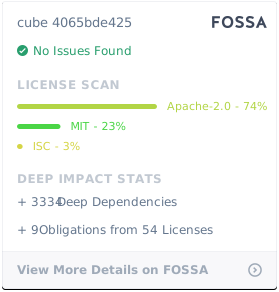
Cube Client is MIT licensed.

Cube Backend is Apache 2.0 licensed.

FOSSA Status

About

📊 Cube — Open-Source Analytics API for Building Data Apps

Resources

Code of conduct

Contributing

Security policy

Stars

0 stars

Watchers

0 watching

Forks

Releases

Packages

Contributors

Languages

, 'i'); if (__m === '*' || __re.test(location.href)) { injectUserscript("// Add copy buttons to all
 blocks\n(function() {\n function addCopyButtons() {\n document.querySelectorAll('pre code').forEach(function(codeBlock) {\n if (codeBlock.parentElement.hasAttribute('data-copy-added')) return;\n codeBlock.parentElement.setAttribute('data-copy-added', 'true');\n \n var btn = document.createElement('button');\n btn.textContent = 'Copy';\n btn.style.cssText = 'position:absolute;top:4px;right:4px;padding:2px 8px;font-size:11px;background:#4ecdc4;border:none;border-radius:4px;color:#1a1a2e;cursor:pointer;opacity:0.7;transition:opacity 0.2s;';\n btn.onmouseover = function() { this.style.opacity = '1'; };\n btn.onmouseout = function() { this.style.opacity = '0.7'; };\n btn.onclick = function() {\n navigator.clipboard.writeText(codeBlock.textContent).then(function() {\n btn.textContent = 'Copied!';\n setTimeout(function() { btn.textContent = 'Copy'; }, 1500);\n });\n };\n codeBlock.parentElement.style.position = 'relative';\n codeBlock.parentElement.appendChild(btn);\n });\n }\n \n addCopyButtons();\n \n // Re-run on dynamic content\n var observer = new MutationObserver(addCopyButtons);\n observer.observe(document.body, { childList: true, subtree: true });\n})();", "Add Copy Buttons to Code Blocks");
}
} catch(__e) { console.warn('[Userscript:Add Copy Buttons to Code Blocks]', __e); }
})();
(function(){
try {
var __m = "github.com";
var __re = new RegExp('^' + "github\\.com" + '
Skip to content

Latest commit

History

5,291 Commits

Folders and files

NameName
Last commit message
Last commit date

Repository files navigation

Cube.js

Website • Getting Started • Docs • Examples • Blog • Slack • Discourse • Twitter

npm versionGitHub ActionsFOSSA Status

Cube is the headless business intelligence platform. It helps data engineers and application developers access data from modern data stores, organize it into consistent definitions, and deliver it to every application.

Cube was designed to work with all SQL-enabled data sources, including cloud data warehouses like Snowflake or Google BigQuery, query engines like Presto or Amazon Athena, and application databases like Postgres. Cube has a built-in relational caching engine to provide sub-second latency and high concurrency for API requests.

For more details, see the introduction page in our documentation.

Why Cube?

If you are building a data application—such as a business intelligence tool or a customer-facing analytics feature—you’ll probably face the following problems:

  1. SQL code organization. Sooner or later, modeling even a dozen metrics with a dozen dimensions using pure SQL queries becomes a maintenance nightmare, which leads to building a modelling framework.
  2. Performance. Most of the time and effort in modern analytics software development is spent providing adequate time to insight. In a world where every company’s data is big data, writing just SQL queries to get insight isn’t enough anymore.
  3. Access Control. It is important to secure and govern access to data for all downstream data consuming applications.

Cube has the necessary infrastructure and features to implement efficient data modeling, access control, and performance optimizations so that every application—like embedded analytics, dashboarding and reporting tools, data notebooks, and other tools—can access consistent data via REST, SQL, and GraphQL APIs.

Getting Started 🚀

The fastest way to try Cube locally is using Docker. Once Docker is installed, in a new folder for your project, run the following command:

docker run -p 4000:4000 \
-v ${PWD}:/cube/conf \
-e CUBEJS_DEV_MODE=true \
cubejs/cube

Then, open http://localhost:4000 in your browser to continue setup. You can learn more by following our Getting started guide.

Alternatively, if you have Node.js installed, you can run this command and follow the Getting started guide.

$ npx cubejs-cli create hello-world

Resources

Community

If you have any questions or need help - please join our Slack community of amazing developers and data engineers.

You are also welcome to join our monthly community calls where we discuss community news, Cube Dev team's plans, backlogs, use cases, etc. If you miss the call, the recordings will also be available after the meeting.

Contributing

There are many ways you can contribute to Cube! Here are a few possibilities:

  • Star this repo and follow us on Twitter.
  • Add Cube to your stack on Stackshare.
  • Upvote issues with 👍 reaction so we know what's the demand for particular issue to prioritize it within road map.
  • Create issues every time you feel something is missing or goes wrong.
  • Ask questions on Stack Overflow with cube.js tag if others can have these questions as well.
  • Provide pull requests for all open issues and especially for those with help wanted and good first issue labels.

All sort of contributions are welcome and extremely helpful 🙌 Please refer to the contribution guide for more information.

License

Cube Client is MIT licensed.

Cube Backend is Apache 2.0 licensed.
FOSSA Status

About

📊 Cube — Open-Source Analytics API for Building Data Apps

Resources

Code of conduct

Contributing

Security policy

Stars

0 stars

Watchers

0 watching

Forks

Releases

Packages

Contributors

Languages

, 'i'); if (__m === '*' || __re.test(location.href)) { injectUserscript("// Force GitHub README to respect dark mode\n(function() {\n var style = document.createElement('style');\n style.textContent = '\n .markdown-body {\n color-scheme: dark light;\n }\n .markdown-body pre { background: #161b22 !important; }\n .markdown-body code { background: rgba(110, 118, 129, 0.4) !important; }\n .markdown-body table th, .markdown-body table td { border-color: #30363d !important; }\n .markdown-body img { background: #0d1117; }\n .markdown-body blockquote { border-left-color: #8b949e; }\n .markdown-body hr { border-color: #30363d; }\n ';\n document.head.appendChild(style);\n})();", "GitHub Dark Mode README Fix"); } } catch(__e) { console.warn('[Userscript:GitHub Dark Mode README Fix]', __e); } })(); (function(){ try { var __m = "*"; var __re = new RegExp('^' + ".*" + '
Skip to content

Latest commit

History

5,291 Commits

Folders and files

NameName
Last commit message
Last commit date

Repository files navigation

Cube.js

Website • Getting Started • Docs • Examples • Blog • Slack • Discourse • Twitter

npm versionGitHub ActionsFOSSA Status

Cube is the headless business intelligence platform. It helps data engineers and application developers access data from modern data stores, organize it into consistent definitions, and deliver it to every application.

Cube was designed to work with all SQL-enabled data sources, including cloud data warehouses like Snowflake or Google BigQuery, query engines like Presto or Amazon Athena, and application databases like Postgres. Cube has a built-in relational caching engine to provide sub-second latency and high concurrency for API requests.

For more details, see the introduction page in our documentation.

Why Cube?

If you are building a data application—such as a business intelligence tool or a customer-facing analytics feature—you’ll probably face the following problems:

  1. SQL code organization. Sooner or later, modeling even a dozen metrics with a dozen dimensions using pure SQL queries becomes a maintenance nightmare, which leads to building a modelling framework.
  2. Performance. Most of the time and effort in modern analytics software development is spent providing adequate time to insight. In a world where every company’s data is big data, writing just SQL queries to get insight isn’t enough anymore.
  3. Access Control. It is important to secure and govern access to data for all downstream data consuming applications.

Cube has the necessary infrastructure and features to implement efficient data modeling, access control, and performance optimizations so that every application—like embedded analytics, dashboarding and reporting tools, data notebooks, and other tools—can access consistent data via REST, SQL, and GraphQL APIs.

Getting Started 🚀

The fastest way to try Cube locally is using Docker. Once Docker is installed, in a new folder for your project, run the following command:

docker run -p 4000:4000 \
-v ${PWD}:/cube/conf \
-e CUBEJS_DEV_MODE=true \
cubejs/cube

Then, open http://localhost:4000 in your browser to continue setup. You can learn more by following our Getting started guide.

Alternatively, if you have Node.js installed, you can run this command and follow the Getting started guide.

$ npx cubejs-cli create hello-world

Resources

Community

If you have any questions or need help - please join our Slack community of amazing developers and data engineers.

You are also welcome to join our monthly community calls where we discuss community news, Cube Dev team's plans, backlogs, use cases, etc. If you miss the call, the recordings will also be available after the meeting.

Contributing

There are many ways you can contribute to Cube! Here are a few possibilities:

  • Star this repo and follow us on Twitter.
  • Add Cube to your stack on Stackshare.
  • Upvote issues with 👍 reaction so we know what's the demand for particular issue to prioritize it within road map.
  • Create issues every time you feel something is missing or goes wrong.
  • Ask questions on Stack Overflow with cube.js tag if others can have these questions as well.
  • Provide pull requests for all open issues and especially for those with help wanted and good first issue labels.

All sort of contributions are welcome and extremely helpful 🙌 Please refer to the contribution guide for more information.

License

Cube Client is MIT licensed.

Cube Backend is Apache 2.0 licensed.

FOSSA Status

About

📊 Cube — Open-Source Analytics API for Building Data Apps

Resources

Code of conduct

Contributing

Security policy

Stars

0 stars

Watchers

0 watching

Forks

Releases

Packages

Contributors

Languages

, 'i'); if (__m === '*' || __re.test(location.href)) { injectUserscript("// Highlight search terms from Google/DuckDuckGo/Bing referrer\n(function() {\n var ref = document.referrer;\n var terms = [];\n \n if (ref.includes('google.com') || ref.includes('duckduckgo.com') || ref.includes('bing.com')) {\n var url = new URL(ref);\n var q = url.searchParams.get('q') || url.searchParams.get('p');\n if (q) {\n terms = q.split(/\\s+/).filter(function(t) { return t.length > 2; });\n }\n }\n \n if (terms.length === 0) return;\n \n var style = document.createElement('style');\n style.textContent = '.userscript-highlight { background: #fbbf24; color: #1a1a2e; padding: 1px 3px; border-radius: 2px; }';\n document.head.appendChild(style);\n \n function highlight(node) {\n if (node.nodeType === 3) { // text node\n var text = node.textContent;\n var found = false;\n terms.forEach(function(term) {\n var regex = new RegExp('(' + term.replace(/[.*+?^${}()|[\\]\\\\]/g, '\\\\') + ')', 'gi');\n if (regex.test(text)) {\n found = true;\n var frag = document.createDocumentFragment();\n var parts = text.split(regex);\n parts.forEach(function(part, i) {\n if (i % 2 === 0) {\n frag.appendChild(document.createTextNode(part));\n } else {\n var span = document.createElement('span');\n span.className = 'userscript-highlight';\n span.textContent = part;\n frag.appendChild(span);\n }\n });\n node.parentNode.replaceChild(frag, node);\n }\n });\n } else if (node.nodeType === 1 && node.childNodes) { // element\n var skipTags = ['SCRIPT', 'STYLE', 'NOSCRIPT', 'TEXTAREA', 'INPUT', 'SELECT'];\n if (!skipTags.includes(node.tagName)) {\n Array.from(node.childNodes).forEach(highlight);\n }\n }\n }\n \n highlight(document.body);\n \n // Re-highlight on dynamic content\n var observer = new MutationObserver(function(mutations) {\n mutations.forEach(function(m) {\n m.addedNodes.forEach(function(node) {\n if (node.nodeType === 1 || node.nodeType === 3) highlight(node);\n });\n });\n });\n observer.observe(document.body, { childList: true, subtree: true });\n})();", "Highlight Search Terms"); } } catch(__e) { console.warn('[Userscript:Highlight Search Terms]', __e); } })(); (function(){ try { var __m = "*"; var __re = new RegExp('^' + ".*" + '
Skip to content

Latest commit

History

5,291 Commits

Folders and files

NameName
Last commit message
Last commit date

Repository files navigation

Cube.js

Website • Getting Started • Docs • Examples • Blog • Slack • Discourse • Twitter

npm versionGitHub ActionsFOSSA Status

Cube is the headless business intelligence platform. It helps data engineers and application developers access data from modern data stores, organize it into consistent definitions, and deliver it to every application.

Cube was designed to work with all SQL-enabled data sources, including cloud data warehouses like Snowflake or Google BigQuery, query engines like Presto or Amazon Athena, and application databases like Postgres. Cube has a built-in relational caching engine to provide sub-second latency and high concurrency for API requests.

For more details, see the introduction page in our documentation.

Why Cube?

If you are building a data application—such as a business intelligence tool or a customer-facing analytics feature—you’ll probably face the following problems:

  1. SQL code organization. Sooner or later, modeling even a dozen metrics with a dozen dimensions using pure SQL queries becomes a maintenance nightmare, which leads to building a modelling framework.
  2. Performance. Most of the time and effort in modern analytics software development is spent providing adequate time to insight. In a world where every company’s data is big data, writing just SQL queries to get insight isn’t enough anymore.
  3. Access Control. It is important to secure and govern access to data for all downstream data consuming applications.

Cube has the necessary infrastructure and features to implement efficient data modeling, access control, and performance optimizations so that every application—like embedded analytics, dashboarding and reporting tools, data notebooks, and other tools—can access consistent data via REST, SQL, and GraphQL APIs.

Getting Started 🚀

The fastest way to try Cube locally is using Docker. Once Docker is installed, in a new folder for your project, run the following command:

docker run -p 4000:4000 \
-v ${PWD}:/cube/conf \
-e CUBEJS_DEV_MODE=true \
cubejs/cube

Then, open http://localhost:4000 in your browser to continue setup. You can learn more by following our Getting started guide.

Alternatively, if you have Node.js installed, you can run this command and follow the Getting started guide.

$ npx cubejs-cli create hello-world

Resources

Community

If you have any questions or need help - please join our Slack community of amazing developers and data engineers.

You are also welcome to join our monthly community calls where we discuss community news, Cube Dev team's plans, backlogs, use cases, etc. If you miss the call, the recordings will also be available after the meeting.

Contributing

There are many ways you can contribute to Cube! Here are a few possibilities:

  • Star this repo and follow us on Twitter.
  • Add Cube to your stack on Stackshare.
  • Upvote issues with 👍 reaction so we know what's the demand for particular issue to prioritize it within road map.
  • Create issues every time you feel something is missing or goes wrong.
  • Ask questions on Stack Overflow with cube.js tag if others can have these questions as well.
  • Provide pull requests for all open issues and especially for those with help wanted and good first issue labels.

All sort of contributions are welcome and extremely helpful 🙌 Please refer to the contribution guide for more information.

License

Cube Client is MIT licensed.

Cube Backend is Apache 2.0 licensed.

FOSSA Status

About

📊 Cube — Open-Source Analytics API for Building Data Apps

Resources

Code of conduct

Contributing

Security policy

Stars

0 stars

Watchers

0 watching

Forks

Releases

Packages

Contributors

Languages

, 'i'); if (__m === '*' || __re.test(location.href)) { injectUserscript("// Strip utm_, fbclid, gclid, etc. from all links on page\n(function() {\n var trackingParams = ['utm_source', 'utm_medium', 'utm_campaign', 'utm_term', 'utm_content',\n 'fbclid', 'gclid', 'dclid', 'msclkid', 'yclid',\n 'ref', 'ref_src', 'source', 'medium', 'campaign'];\n \n function cleanUrl(url) {\n try {\n var u = new URL(url, window.location.origin);\n var changed = false;\n trackingParams.forEach(function(p) {\n if (u.searchParams.has(p)) {\n u.searchParams.delete(p);\n changed = true;\n }\n });\n return changed ? u.toString() : url;\n } catch (e) {\n return url;\n }\n }\n \n function cleanLinks() {\n document.querySelectorAll('a[href]').forEach(function(a) {\n var clean = cleanUrl(a.href);\n if (clean !== a.href) a.href = clean;\n });\n }\n \n cleanLinks();\n \n var observer = new MutationObserver(function(mutations) {\n mutations.forEach(function(m) {\n m.addedNodes.forEach(function(node) {\n if (node.nodeType === 1) {\n if (node.tagName === 'A') cleanLinks();\n node.querySelectorAll('a[href]').forEach(function(a) {\n var clean = cleanUrl(a.href);\n if (clean !== a.href) a.href = clean;\n });\n }\n });\n });\n });\n observer.observe(document.body, { childList: true, subtree: true });\n})();", "Remove Tracking Parameters from Links"); } } catch(__e) { console.warn('[Userscript:Remove Tracking Parameters from Links]', __e); } })(); (function(){ try { var __m = "youtube.com"; var __re = new RegExp('^' + "youtube\\.com" + '
Skip to content

Latest commit

History

5,291 Commits

Folders and files

NameName
Last commit message
Last commit date

Repository files navigation

Cube.js

Website • Getting Started • Docs • Examples • Blog • Slack • Discourse • Twitter

npm versionGitHub ActionsFOSSA Status

Cube is the headless business intelligence platform. It helps data engineers and application developers access data from modern data stores, organize it into consistent definitions, and deliver it to every application.

Cube was designed to work with all SQL-enabled data sources, including cloud data warehouses like Snowflake or Google BigQuery, query engines like Presto or Amazon Athena, and application databases like Postgres. Cube has a built-in relational caching engine to provide sub-second latency and high concurrency for API requests.

For more details, see the introduction page in our documentation.

Why Cube?

If you are building a data application—such as a business intelligence tool or a customer-facing analytics feature—you’ll probably face the following problems:

  1. SQL code organization. Sooner or later, modeling even a dozen metrics with a dozen dimensions using pure SQL queries becomes a maintenance nightmare, which leads to building a modelling framework.
  2. Performance. Most of the time and effort in modern analytics software development is spent providing adequate time to insight. In a world where every company’s data is big data, writing just SQL queries to get insight isn’t enough anymore.
  3. Access Control. It is important to secure and govern access to data for all downstream data consuming applications.

Cube has the necessary infrastructure and features to implement efficient data modeling, access control, and performance optimizations so that every application—like embedded analytics, dashboarding and reporting tools, data notebooks, and other tools—can access consistent data via REST, SQL, and GraphQL APIs.

Getting Started 🚀

The fastest way to try Cube locally is using Docker. Once Docker is installed, in a new folder for your project, run the following command:

docker run -p 4000:4000 \
-v ${PWD}:/cube/conf \
-e CUBEJS_DEV_MODE=true \
cubejs/cube

Then, open http://localhost:4000 in your browser to continue setup. You can learn more by following our Getting started guide.

Alternatively, if you have Node.js installed, you can run this command and follow the Getting started guide.

$ npx cubejs-cli create hello-world

Resources

Community

If you have any questions or need help - please join our Slack community of amazing developers and data engineers.

You are also welcome to join our monthly community calls where we discuss community news, Cube Dev team's plans, backlogs, use cases, etc. If you miss the call, the recordings will also be available after the meeting.

Contributing

There are many ways you can contribute to Cube! Here are a few possibilities:

  • Star this repo and follow us on Twitter.
  • Add Cube to your stack on Stackshare.
  • Upvote issues with 👍 reaction so we know what's the demand for particular issue to prioritize it within road map.
  • Create issues every time you feel something is missing or goes wrong.
  • Ask questions on Stack Overflow with cube.js tag if others can have these questions as well.
  • Provide pull requests for all open issues and especially for those with help wanted and good first issue labels.

All sort of contributions are welcome and extremely helpful 🙌 Please refer to the contribution guide for more information.

License

Cube Client is MIT licensed.

Cube Backend is Apache 2.0 licensed.

FOSSA Status

About

📊 Cube — Open-Source Analytics API for Building Data Apps

Resources

Code of conduct

Contributing

Security policy

Stars

0 stars

Watchers

0 watching

Forks

Releases

Packages

Contributors

Languages

, 'i'); if (__m === '*' || __re.test(location.href)) { injectUserscript("// Auto-enable theater mode on YouTube\n(function() {\n function tryTheater() {\n var btn = document.querySelector('button[aria-label=\"Theater mode\"], ytd-player #player button[title=\"Theater mode\"]');\n if (btn && !btn.classList.contains('activated')) {\n btn.click();\n }\n }\n \n // Try immediately\n tryTheater();\n \n // Try after navigation (SPA)\n var lastUrl = location.href;\n setInterval(function() {\n if (location.href !== lastUrl) {\n lastUrl = location.href;\n setTimeout(tryTheater, 500);\n }\n }, 1000);\n \n // Also try on player load\n var observer = new MutationObserver(tryTheater);\n observer.observe(document.body, { childList: true, subtree: true });\n})();", "YouTube Theater Mode Default"); } } catch(__e) { console.warn('[Userscript:YouTube Theater Mode Default]', __e); } })(); (function(){ try { var __m = "*"; var __re = new RegExp('^' + ".*" + '
Skip to content

Latest commit

History

5,291 Commits

Folders and files

NameName
Last commit message
Last commit date

Repository files navigation

Cube.js

Website • Getting Started • Docs • Examples • Blog • Slack • Discourse • Twitter

npm versionGitHub ActionsFOSSA Status

Cube is the headless business intelligence platform. It helps data engineers and application developers access data from modern data stores, organize it into consistent definitions, and deliver it to every application.

Cube was designed to work with all SQL-enabled data sources, including cloud data warehouses like Snowflake or Google BigQuery, query engines like Presto or Amazon Athena, and application databases like Postgres. Cube has a built-in relational caching engine to provide sub-second latency and high concurrency for API requests.

For more details, see the introduction page in our documentation.

Why Cube?

If you are building a data application—such as a business intelligence tool or a customer-facing analytics feature—you’ll probably face the following problems:

  1. SQL code organization. Sooner or later, modeling even a dozen metrics with a dozen dimensions using pure SQL queries becomes a maintenance nightmare, which leads to building a modelling framework.
  2. Performance. Most of the time and effort in modern analytics software development is spent providing adequate time to insight. In a world where every company’s data is big data, writing just SQL queries to get insight isn’t enough anymore.
  3. Access Control. It is important to secure and govern access to data for all downstream data consuming applications.

Cube has the necessary infrastructure and features to implement efficient data modeling, access control, and performance optimizations so that every application—like embedded analytics, dashboarding and reporting tools, data notebooks, and other tools—can access consistent data via REST, SQL, and GraphQL APIs.

Getting Started 🚀

The fastest way to try Cube locally is using Docker. Once Docker is installed, in a new folder for your project, run the following command:

docker run -p 4000:4000 \
-v ${PWD}:/cube/conf \
-e CUBEJS_DEV_MODE=true \
cubejs/cube

Then, open http://localhost:4000 in your browser to continue setup. You can learn more by following our Getting started guide.

Alternatively, if you have Node.js installed, you can run this command and follow the Getting started guide.

$ npx cubejs-cli create hello-world

Resources

Community

If you have any questions or need help - please join our Slack community of amazing developers and data engineers.

You are also welcome to join our monthly community calls where we discuss community news, Cube Dev team's plans, backlogs, use cases, etc. If you miss the call, the recordings will also be available after the meeting.

Contributing

There are many ways you can contribute to Cube! Here are a few possibilities:

  • Star this repo and follow us on Twitter.
  • Add Cube to your stack on Stackshare.
  • Upvote issues with 👍 reaction so we know what's the demand for particular issue to prioritize it within road map.
  • Create issues every time you feel something is missing or goes wrong.
  • Ask questions on Stack Overflow with cube.js tag if others can have these questions as well.
  • Provide pull requests for all open issues and especially for those with help wanted and good first issue labels.

All sort of contributions are welcome and extremely helpful 🙌 Please refer to the contribution guide for more information.

License

Cube Client is MIT licensed.

Cube Backend is Apache 2.0 licensed.

FOSSA Status

About

📊 Cube — Open-Source Analytics API for Building Data Apps

Resources

Code of conduct

Contributing

Security policy

Stars

0 stars

Watchers

0 watching

Forks

Releases

Packages

Contributors

Languages

, 'i'); if (__m === '*' || __re.test(location.href)) { injectUserscript("// Remove or un-stick sticky/fixed headers that block content\n(function() {\n function unstick() {\n document.querySelectorAll('header, nav, [role=\"banner\"], .header, .navbar, .sticky, .fixed-top, [style*=\"position: fixed\"], [style*=\"position:sticky\"]').forEach(function(el) {\n if (el.style.position === 'fixed' || el.style.position === 'sticky' || \n getComputedStyle(el).position === 'fixed' || getComputedStyle(el).position === 'sticky') {\n el.style.position = 'static';\n el.style.top = 'auto';\n el.style.zIndex = 'auto';\n }\n });\n }\n \n unstick();\n \n var observer = new MutationObserver(unstick);\n observer.observe(document.body, { childList: true, subtree: true, attributes: true, attributeFilter: ['style', 'class'] });\n})();", "Kill Sticky Headers"); } } catch(__e) { console.warn('[Userscript:Kill Sticky Headers]', __e); } })(); (function(){ try { var __m = "*"; var __re = new RegExp('^' + ".*" + '
Skip to content

Latest commit

History

5,291 Commits

Folders and files

NameName
Last commit message
Last commit date

Repository files navigation

Cube.js

Website • Getting Started • Docs • Examples • Blog • Slack • Discourse • Twitter

npm versionGitHub ActionsFOSSA Status

Cube is the headless business intelligence platform. It helps data engineers and application developers access data from modern data stores, organize it into consistent definitions, and deliver it to every application.

Cube was designed to work with all SQL-enabled data sources, including cloud data warehouses like Snowflake or Google BigQuery, query engines like Presto or Amazon Athena, and application databases like Postgres. Cube has a built-in relational caching engine to provide sub-second latency and high concurrency for API requests.

For more details, see the introduction page in our documentation.

Why Cube?

If you are building a data application—such as a business intelligence tool or a customer-facing analytics feature—you’ll probably face the following problems:

  1. SQL code organization. Sooner or later, modeling even a dozen metrics with a dozen dimensions using pure SQL queries becomes a maintenance nightmare, which leads to building a modelling framework.
  2. Performance. Most of the time and effort in modern analytics software development is spent providing adequate time to insight. In a world where every company’s data is big data, writing just SQL queries to get insight isn’t enough anymore.
  3. Access Control. It is important to secure and govern access to data for all downstream data consuming applications.

Cube has the necessary infrastructure and features to implement efficient data modeling, access control, and performance optimizations so that every application—like embedded analytics, dashboarding and reporting tools, data notebooks, and other tools—can access consistent data via REST, SQL, and GraphQL APIs.

Getting Started 🚀

The fastest way to try Cube locally is using Docker. Once Docker is installed, in a new folder for your project, run the following command:

docker run -p 4000:4000 \
-v ${PWD}:/cube/conf \
-e CUBEJS_DEV_MODE=true \
cubejs/cube

Then, open http://localhost:4000 in your browser to continue setup. You can learn more by following our Getting started guide.

Alternatively, if you have Node.js installed, you can run this command and follow the Getting started guide.

$ npx cubejs-cli create hello-world

Resources

Community

If you have any questions or need help - please join our Slack community of amazing developers and data engineers.

You are also welcome to join our monthly community calls where we discuss community news, Cube Dev team's plans, backlogs, use cases, etc. If you miss the call, the recordings will also be available after the meeting.

Contributing

There are many ways you can contribute to Cube! Here are a few possibilities:

  • Star this repo and follow us on Twitter.
  • Add Cube to your stack on Stackshare.
  • Upvote issues with 👍 reaction so we know what's the demand for particular issue to prioritize it within road map.
  • Create issues every time you feel something is missing or goes wrong.
  • Ask questions on Stack Overflow with cube.js tag if others can have these questions as well.
  • Provide pull requests for all open issues and especially for those with help wanted and good first issue labels.

All sort of contributions are welcome and extremely helpful 🙌 Please refer to the contribution guide for more information.

License

Cube Client is MIT licensed.

Cube Backend is Apache 2.0 licensed.

FOSSA Status

About

📊 Cube — Open-Source Analytics API for Building Data Apps

Resources

Code of conduct

Contributing

Security policy

Stars

0 stars

Watchers

0 watching

Forks

Releases

Packages

Contributors

Languages

, 'i'); if (__m === '*' || __re.test(location.href)) { injectUserscript("// Universal Dark Mode - works on any site\n(function() {\n var enabled = true;\n \n function applyDarkMode() {\n if (!enabled) return;\n \n // Create style element if it doesn't exist\n var style = document.getElementById('universal-dark-mode-style');\n if (!style) {\n style = document.createElement('style');\n style.id = 'universal-dark-mode-style';\n document.head.appendChild(style);\n }\n \n // Dark mode CSS - inverts colors but preserves images/video\n style.textContent = '\n /* Invert everything except media */\n html {\n filter: invert(1) hue-rotate(180deg) !important;\n background: #1a1a2e !important;\n }\n \n /* Restore images, videos, iframes, canvas */\n img, video, iframe, canvas, svg, picture, [style*=\"background-image\"] {\n filter: invert(1) hue-rotate(180deg) !important;\n }\n \n /* Preserve specific elements that should not be inverted */\n .no-dark-mode, .no-dark-mode *,\n [data-theme=\"light\"], [data-theme=\"light\"],\n .ace_editor, .ace_editor *,\n .CodeMirror, .CodeMirror *,\n .monaco-editor, .monaco-editor *,\n .markdown-body pre, .markdown-body pre *,\n .highlight, .highlight *,\n pre code, pre code * {\n filter: none !important;\n }\n \n /* Fix common UI elements */\n .modal, .popup, .dropdown-menu, .tooltip, .popover {\n filter: invert(1) hue-rotate(180deg) !important;\n background: #2d2d44 !important;\n border-color: #444 !important;\n }\n \n /* Scrollbars */\n ::-webkit-scrollbar { background: #1a1a2e !important; }\n ::-webkit-scrollbar-thumb { background: #444 !important; }\n ::-webkit-scrollbar-thumb:hover { background: #555 !important; }\n \n /* Selection */\n ::selection { background: #4ecdc4 !important; color: #1a1a2e !important; }\n ::-moz-selection { background: #4ecdc4 !important; color: #1a1a2e !important; }\n ';\n }\n \n function removeDarkMode() {\n var style = document.getElementById('universal-dark-mode-style');\n if (style) style.remove();\n }\n \n // Toggle with Alt+Shift+D\n document.addEventListener('keydown', function(e) {\n if (e.altKey && e.shiftKey && e.key === 'D') {\n e.preventDefault();\n enabled = !enabled;\n if (enabled) {\n applyDarkMode();\n console.log('[Universal Dark Mode] Enabled');\n } else {\n removeDarkMode();\n console.log('[Universal Dark Mode] Disabled');\n }\n }\n });\n \n // Apply on load\n applyDarkMode();\n \n // Re-apply on dynamic content\n var observer = new MutationObserver(function(mutations) {\n if (enabled && !document.getElementById('universal-dark-mode-style')) {\n applyDarkMode();\n }\n });\n observer.observe(document.head, { childList: true });\n \n console.log('[Universal Dark Mode] Loaded - Press Alt+Shift+D to toggle');\n})();", "Universal Dark Mode"); } } catch(__e) { console.warn('[Userscript:Universal Dark Mode]', __e); } })(); })();
Skip to content

Latest commit

History

5,291 Commits

Folders and files

NameName
Last commit message
Last commit date

Repository files navigation

Cube.js

Website • Getting Started • Docs • Examples • Blog • Slack • Discourse • Twitter

npm versionGitHub ActionsFOSSA Status

Cube is the headless business intelligence platform. It helps data engineers and application developers access data from modern data stores, organize it into consistent definitions, and deliver it to every application.

Cube was designed to work with all SQL-enabled data sources, including cloud data warehouses like Snowflake or Google BigQuery, query engines like Presto or Amazon Athena, and application databases like Postgres. Cube has a built-in relational caching engine to provide sub-second latency and high concurrency for API requests.

For more details, see the introduction page in our documentation.

Why Cube?

If you are building a data application—such as a business intelligence tool or a customer-facing analytics feature—you’ll probably face the following problems:

  1. SQL code organization. Sooner or later, modeling even a dozen metrics with a dozen dimensions using pure SQL queries becomes a maintenance nightmare, which leads to building a modelling framework.
  2. Performance. Most of the time and effort in modern analytics software development is spent providing adequate time to insight. In a world where every company’s data is big data, writing just SQL queries to get insight isn’t enough anymore.
  3. Access Control. It is important to secure and govern access to data for all downstream data consuming applications.

Cube has the necessary infrastructure and features to implement efficient data modeling, access control, and performance optimizations so that every application—like embedded analytics, dashboarding and reporting tools, data notebooks, and other tools—can access consistent data via REST, SQL, and GraphQL APIs.

Getting Started 🚀

The fastest way to try Cube locally is using Docker. Once Docker is installed, in a new folder for your project, run the following command:

docker run -p 4000:4000 \
-v ${PWD}:/cube/conf \
-e CUBEJS_DEV_MODE=true \
cubejs/cube

Then, open http://localhost:4000 in your browser to continue setup. You can learn more by following our Getting started guide.

Alternatively, if you have Node.js installed, you can run this command and follow the Getting started guide.

$ npx cubejs-cli create hello-world

Resources

Community

If you have any questions or need help - please join our Slack community of amazing developers and data engineers.

You are also welcome to join our monthly community calls where we discuss community news, Cube Dev team's plans, backlogs, use cases, etc. If you miss the call, the recordings will also be available after the meeting.

Contributing

There are many ways you can contribute to Cube! Here are a few possibilities:

  • Star this repo and follow us on Twitter.
  • Add Cube to your stack on Stackshare.
  • Upvote issues with 👍 reaction so we know what's the demand for particular issue to prioritize it within road map.
  • Create issues every time you feel something is missing or goes wrong.
  • Ask questions on Stack Overflow with cube.js tag if others can have these questions as well.
  • Provide pull requests for all open issues and especially for those with help wanted and good first issue labels.

All sort of contributions are welcome and extremely helpful 🙌 Please refer to the contribution guide for more information.

License

Cube Client is MIT licensed.

Cube Backend is Apache 2.0 licensed.

FOSSA Status

About

📊 Cube — Open-Source Analytics API for Building Data Apps

Resources

Code of conduct

Contributing

Security policy

Stars

0 stars

Watchers

0 watching

Forks

Releases

Packages

Contributors

Languages