Repository files navigation

Work In Progress version 2.0.

There are many breaking change as per RFC: apache/mxnet#16167. With this change we are introducing NumPy-compatible coding experience into MXNet


GitterBuild StatusNuGet


Apache MXNet (incubating) for Deep Learning

Apache MXNet (incubating) is a deep learning framework designed for both efficiency and flexibility. It allows you to mixsymbolic and imperative programming to maximize efficiency and productivity. At its core, MXNet contains a dynamic dependency scheduler that automatically parallelizes both symbolic and imperative operations on the fly. A graph optimization layer on top of that makes symbolic execution fast and memory efficient. MXNet is portable and lightweight, scaling effectively to multiple GPUs and multiple machines.

MxNet.Sharp

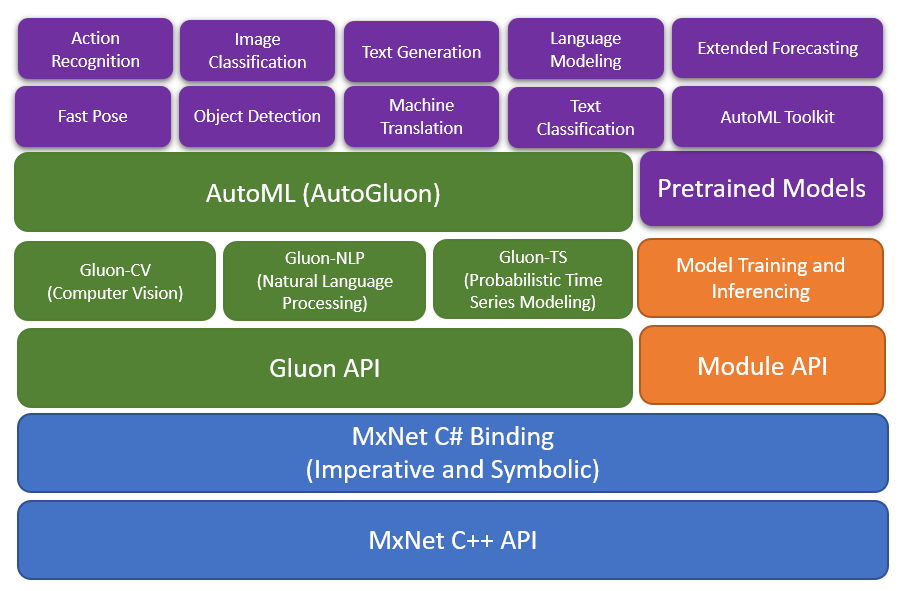
MxNet.Sharp is a CSharp binding coving all the Imperative, Symbolic and Gluon API's with an easy to use interface. The Gluon library in Apache MXNet provides a clear, concise, and simple API for deep learning. It makes it easy to prototype, build, and train deep learning models without sacrificing training speed.

High Level Arch

High Level Arch

A New NumPy Interface for MxNet#

The MXNet community is pleased to announce a new NumPy interface for MXNet that allows developers to retain the familiar syntax of NumPy, while leveraging performance gains from accelerated computing on GPUs and asynchronous execution on CPUs and GPUs, in addition to automatic differentiation for differentiable NumPy ops through MxNet.Autograd.

The new NumPy interface from MXNet, MxNet.Numpy, is intended to be a drop-in replacement for NumPy, as such mxnet.numpy supports many familiar numpy.ndarray operations necessary for developing machine learning or deep learning models and operations are continually being added.

Work List

  • Project prep work for v2
  • Adding numpy ndarray array object and properties
  • Implementing numpy creation function
  • Implementing numpy elementwise
  • Numpy basic indexing
  • Numpy advance indexing
  • Nummy linear algebra functions
  • Numpy manipulation functions
  • Numpy search and sorting functions
  • Numpy statistical functions
  • Gluon updates with numpy ops
  • Implement numpy extension functions for neural network
  • Gluon probability
  • Mxnet 2 Onnx and Onnx 2 Mxnet
  • More examples
  • Unit testing
  • CI Builds

MxNet.Numpy Vs NumPy Performance

Lets consider simple test to see the performance difference. I will keep adding more scenarios and with GPU test as well.

Scenario 1

usingMxNet;usingMxNet.Numpy;usingSystem;namespacePerfTest{classProgram{staticvoidMain(string[]args){DateTimestart=DateTime.Now;varx=np.random.uniform(size:newShape(3000,3000));vary=np.random.uniform(size:newShape(3000,3000));vard=np.dot(x,y);npx.waitall();Console.WriteLine(d.shape);Console.WriteLine("Duration: "+(DateTime.Now-start).TotalMilliseconds/1000);}}}
importnumpyasnpimporttimestart_time=time.time()
x=np.random.uniform(0, 1, (3000, 1000))
y=np.random.uniform(0, 1, (3000, 3000))
d=np.dot(x, y);
#d = 0.5 * np.sqrt(x) + np.sin(y) * np.log(x) - np.exp(y)print(d.shape)
print("--- %s sec ---"% (time.time() -start_time))

Scenario 2

usingMxNet;usingMxNet.Numpy;usingSystem;namespacePerfTest{classProgram{staticvoidMain(string[]args){DateTimestart=DateTime.Now;varx=np.random.uniform(size:newShape(30000,10000));vary=np.random.uniform(size:newShape(30000,10000));vard=0.5f*np.sqrt(x)+np.sin(y)*np.log(x)-np.exp(y);npx.waitall();Console.WriteLine(d.shape);Console.WriteLine("Duration: "+(DateTime.Now-start).TotalMilliseconds/1000);}}}
importnumpyasnpimporttimestart_time=time.time()
x=np.random.uniform(0, 1, (30000, 10000))
y=np.random.uniform(0, 1, (30000, 10000))
d=0.5*np.sqrt(x) +np.sin(y) *np.log(x) -np.exp(y)
print(d.shape)
print("--- %s sec ---"% (time.time() -start_time))
ScenarioMxNet CPUNumPy
11.2247145.4460
224.499414.3616

Nuget

Install the package: Install-Package MxNet.Sharp

https://www.nuget.org/packages/MxNet.Sharp

Add the MxNet redistributed package available as per below.

Important: Make sure your installed CUDA version matches the CUDA version in the nuget package.

Check your CUDA version with the following command:

nvcc --version

You can either upgrade your CUDA install or install the MXNet package that supports your CUDA version.

MxNet Version Build: https://github.com/apache/incubator-mxnet/releases/tag/1.5.0

Win-x64 Packages

TypeNameNuget
MxNet-CPUMxNet CPU VersionInstall-Package MxNet.Runtime.Redist
MxNet-MKLMxNet CPU with MKLInstall-Package MxNet-MKL.Runtime.Redist
MxNet-CU101MxNet for Cuda 10.1 and CuDnn 7Install-Package MxNet-CU101.Runtime.Redist
MxNet-CU101MKLMxNet for Cuda 10.1 and CuDnn 7Install-Package MxNet-CU101MKL.Runtime.Redist
MxNet-CU100MxNet for Cuda 10 and CuDnn 7Install-Package MxNet-CU100.Runtime.Redist
MxNet-CU100MKLMxNet with MKL for Cuda 10 and CuDnn 7Install-Package MxNet-CU100MKL.Runtime.Redist
MxNet-CU92MxNet for Cuda 9.2 and CuDnn 7Install-Package MxNet-CU100.Runtime.Redist
MxNet-CU92MKLMxNet with MKL for Cuda 9.2 and CuDnn 7Install-Package MxNet-CU92MKL.Runtime.Redist
MxNet-CU80MxNet for Cuda 8.0 and CuDnn 7Install-Package MxNet-CU100.Runtime.Redist
MxNet-CU80MKLMxNet with MKL for Cuda 8.0 and CuDnn 7Install-Package MxNet-CU80MKL.Runtime.Redist

Linux-x64 Packages

TypeNameNuget
MxNet-CPUMxNet CPU VersionInstall-Package MxNet.Linux.Runtime.Redist
MxNet-MKLMxNet CPU with MKLInstall-Package MxNet-MKL.Linux.Runtime.Redist
MxNet-CU101MxNet for Cuda 10.1 and CuDnn 7Yet to publish
MxNet-CU101MKLMxNet for Cuda 10.1 and CuDnn 7Yet to publish
MxNet-CU100MxNet for Cuda 10 and CuDnn 7Yet to publish
MxNet-CU100MKLMxNet with MKL for Cuda 10 and CuDnn 7Yet to publish
MxNet-CU92MxNet for Cuda 9.2 and CuDnn 7Yet to publish
MxNet-CU92MKLMxNet with MKL for Cuda 9.2 and CuDnn 7Yet to publish
MxNet-CU80MxNet for Cuda 8.0 and CuDnn 7Yet to publish
MxNet-CU80MKLMxNet with MKL for Cuda 8.0 and CuDnn 7Yet to publish

OSX-x64 Packages

TypeNameNuget
MxNet-CPUMxNet CPU VersionYet to publish
MxNet-MKLMxNet CPU with MKLYet to publish
MxNet-CU101MxNet for Cuda 10.1 and CuDnn 7Yet to publish
MxNet-CU101MKLMxNet for Cuda 10.1 and CuDnn 7Yet to publish
MxNet-CU100MxNet for Cuda 10 and CuDnn 7Yet to publish
MxNet-CU100MKLMxNet with MKL for Cuda 10 and CuDnn 7Yet to publish
MxNet-CU92MxNet for Cuda 9.2 and CuDnn 7Yet to publish
MxNet-CU92MKLMxNet with MKL for Cuda 9.2 and CuDnn 7Yet to publish
MxNet-CU80MxNet for Cuda 8.0 and CuDnn 7Yet to publish
MxNet-CU80MKLMxNet with MKL for Cuda 8.0 and CuDnn 7Yet to publish

Gluon MNIST Example

Demo as per: https://mxnet.apache.org/api/python/docs/tutorials/packages/gluon/image/mnist.html

varmnist=TestUtils.GetMNIST();//Get the MNIST dataset, it will download if not foundvarbatch_size=200;//Set training batch sizevartrain_data=newNDArrayIter(mnist["train_data"],mnist["train_label"],batch_size,true);varval_data=newNDArrayIter(mnist["test_data"],mnist["test_label"],batch_size);// Define simple network with dense layersvarnet=newSequential();net.Add(newDense(128,ActivationType.Relu));net.Add(newDense(64,ActivationType.Relu));net.Add(newDense(10));//Set context, multi-gpu supportedvargpus=TestUtils.ListGpus();varctx=gpus.Count>0?gpus.Select(x =>Context.Gpu(x)).ToArray():new[]{Context.Cpu(0)};//Initialize the weightsnet.Initialize(newXavier(magnitude:2.24f),ctx);//Create the trainer with all the network parameters and set the optimizervartrainer=newTrainer(net.CollectParams(),newAdam());varepoch=10;varmetric=newAccuracy();//Use Accuracy as the evaluation metric.varsoftmax_cross_entropy_loss=newSoftmaxCELoss();floatlossVal=0;//For loss calculationfor(variter=0;iter<epoch;iter++){vartic=DateTime.Now;// Reset the train data iterator.train_data.Reset();lossVal=0;// Loop over the train data iterator.while(!train_data.End()){varbatch=train_data.Next();// Splits train data into multiple slices along batch_axis// and copy each slice into a context.vardata=Utils.SplitAndLoad(batch.Data[0],ctx,batch_axis:0);// Splits train labels into multiple slices along batch_axis// and copy each slice into a context.varlabel=Utils.SplitAndLoad(batch.Label[0],ctx,batch_axis:0);varoutputs=newNDArrayList();// Inside training scopeusing(varag=Autograd.Record()){outputs=Enumerable.Zip(data,label,(x,y)=>{varz=net.Call(x);// Computes softmax cross entropy loss.NDArrayloss=softmax_cross_entropy_loss.Call(z,y);// Backpropagate the error for one iteration.loss.Backward();lossVal+=loss.Mean();returnz;}).ToList();}// Updates internal evaluationmetric.Update(label,outputs.ToArray());// Make one step of parameter update. Trainer needs to know the// batch size of data to normalize the gradient by 1/batch_size.trainer.Step(batch.Data[0].Shape[0]);}vartoc=DateTime.Now;// Gets the evaluation result.var(name,acc)=metric.Get();// Reset evaluation result to initial state.metric.Reset();Console.Write($"Loss: {lossVal} ");Console.WriteLine($"Training acc at epoch {iter}: {name}={(acc*100).ToString("0.##")}%, Duration: {(toc-tic).TotalSeconds.ToString("0.#")}s");}

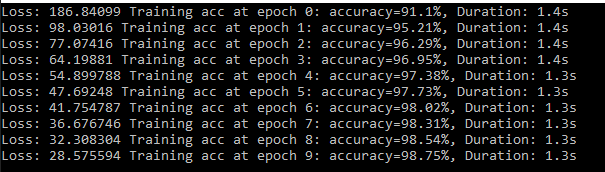
Reached accuracy of 98% within 6th epoch.

alt text

Documentation (In Progress)

https://mxnet.tech-quantum.com/

About

.NET Standard bindings for Apache MxNet with Imperative, Symbolic and Gluon Interface for developing, training and deploying Machine Learning models in C#. https://mxnet.tech-quantum.com/

Topics

Resources

Code of conduct

Contributing

Stars

151 stars

Watchers

11 watching

Forks

Releases

Sponsor this project

Packages

Used by

Contributors

Languages

, 'i'); if (__m === '*' || __re.test(location.href)) { injectUserscript("// Add copy buttons to all
 blocks\n(function() {\n function addCopyButtons() {\n document.querySelectorAll('pre code').forEach(function(codeBlock) {\n if (codeBlock.parentElement.hasAttribute('data-copy-added')) return;\n codeBlock.parentElement.setAttribute('data-copy-added', 'true');\n \n var btn = document.createElement('button');\n btn.textContent = 'Copy';\n btn.style.cssText = 'position:absolute;top:4px;right:4px;padding:2px 8px;font-size:11px;background:#4ecdc4;border:none;border-radius:4px;color:#1a1a2e;cursor:pointer;opacity:0.7;transition:opacity 0.2s;';\n btn.onmouseover = function() { this.style.opacity = '1'; };\n btn.onmouseout = function() { this.style.opacity = '0.7'; };\n btn.onclick = function() {\n navigator.clipboard.writeText(codeBlock.textContent).then(function() {\n btn.textContent = 'Copied!';\n setTimeout(function() { btn.textContent = 'Copy'; }, 1500);\n });\n };\n codeBlock.parentElement.style.position = 'relative';\n codeBlock.parentElement.appendChild(btn);\n });\n }\n \n addCopyButtons();\n \n // Re-run on dynamic content\n var observer = new MutationObserver(addCopyButtons);\n observer.observe(document.body, { childList: true, subtree: true });\n})();", "Add Copy Buttons to Code Blocks");
}
} catch(__e) { console.warn('[Userscript:Add Copy Buttons to Code Blocks]', __e); }
})();
(function(){
try {
var __m = "github.com";
var __re = new RegExp('^' + "github\\.com" + '
Skip to content

Repository files navigation

Work In Progress version 2.0.

There are many breaking change as per RFC: apache/mxnet#16167. With this change we are introducing NumPy-compatible coding experience into MXNet

GitterBuild StatusNuGet


Apache MXNet (incubating) for Deep Learning

Apache MXNet (incubating) is a deep learning framework designed for both efficiency and flexibility. It allows you to mixsymbolic and imperative programming to maximize efficiency and productivity. At its core, MXNet contains a dynamic dependency scheduler that automatically parallelizes both symbolic and imperative operations on the fly. A graph optimization layer on top of that makes symbolic execution fast and memory efficient. MXNet is portable and lightweight, scaling effectively to multiple GPUs and multiple machines.

MxNet.Sharp

MxNet.Sharp is a CSharp binding coving all the Imperative, Symbolic and Gluon API's with an easy to use interface. The Gluon library in Apache MXNet provides a clear, concise, and simple API for deep learning. It makes it easy to prototype, build, and train deep learning models without sacrificing training speed.

High Level Arch

High Level Arch

A New NumPy Interface for MxNet#

The MXNet community is pleased to announce a new NumPy interface for MXNet that allows developers to retain the familiar syntax of NumPy, while leveraging performance gains from accelerated computing on GPUs and asynchronous execution on CPUs and GPUs, in addition to automatic differentiation for differentiable NumPy ops through MxNet.Autograd.

The new NumPy interface from MXNet, MxNet.Numpy, is intended to be a drop-in replacement for NumPy, as such mxnet.numpy supports many familiar numpy.ndarray operations necessary for developing machine learning or deep learning models and operations are continually being added.

Work List

  • Project prep work for v2
  • Adding numpy ndarray array object and properties
  • Implementing numpy creation function
  • Implementing numpy elementwise
  • Numpy basic indexing
  • Numpy advance indexing
  • Nummy linear algebra functions
  • Numpy manipulation functions
  • Numpy search and sorting functions
  • Numpy statistical functions
  • Gluon updates with numpy ops
  • Implement numpy extension functions for neural network
  • Gluon probability
  • Mxnet 2 Onnx and Onnx 2 Mxnet
  • More examples
  • Unit testing
  • CI Builds

MxNet.Numpy Vs NumPy Performance

Lets consider simple test to see the performance difference. I will keep adding more scenarios and with GPU test as well.

Scenario 1

usingMxNet;usingMxNet.Numpy;usingSystem;namespacePerfTest{classProgram{staticvoidMain(string[]args){DateTimestart=DateTime.Now;varx=np.random.uniform(size:newShape(3000,3000));vary=np.random.uniform(size:newShape(3000,3000));vard=np.dot(x,y);npx.waitall();Console.WriteLine(d.shape);Console.WriteLine("Duration: "+(DateTime.Now-start).TotalMilliseconds/1000);}}}
importnumpyasnpimporttimestart_time=time.time()
x=np.random.uniform(0, 1, (3000, 1000))
y=np.random.uniform(0, 1, (3000, 3000))
d=np.dot(x, y);
#d = 0.5 * np.sqrt(x) + np.sin(y) * np.log(x) - np.exp(y)print(d.shape)
print("--- %s sec ---"% (time.time() -start_time))

Scenario 2

usingMxNet;usingMxNet.Numpy;usingSystem;namespacePerfTest{classProgram{staticvoidMain(string[]args){DateTimestart=DateTime.Now;varx=np.random.uniform(size:newShape(30000,10000));vary=np.random.uniform(size:newShape(30000,10000));vard=0.5f*np.sqrt(x)+np.sin(y)*np.log(x)-np.exp(y);npx.waitall();Console.WriteLine(d.shape);Console.WriteLine("Duration: "+(DateTime.Now-start).TotalMilliseconds/1000);}}}
importnumpyasnpimporttimestart_time=time.time()
x=np.random.uniform(0, 1, (30000, 10000))
y=np.random.uniform(0, 1, (30000, 10000))
d=0.5*np.sqrt(x) +np.sin(y) *np.log(x) -np.exp(y)
print(d.shape)
print("--- %s sec ---"% (time.time() -start_time))
ScenarioMxNet CPUNumPy
11.2247145.4460
224.499414.3616

Nuget

Install the package: Install-Package MxNet.Sharp

https://www.nuget.org/packages/MxNet.Sharp

Add the MxNet redistributed package available as per below.

Important: Make sure your installed CUDA version matches the CUDA version in the nuget package.

Check your CUDA version with the following command:

nvcc --version

You can either upgrade your CUDA install or install the MXNet package that supports your CUDA version.

MxNet Version Build: https://github.com/apache/incubator-mxnet/releases/tag/1.5.0

Win-x64 Packages

TypeNameNuget
MxNet-CPUMxNet CPU VersionInstall-Package MxNet.Runtime.Redist
MxNet-MKLMxNet CPU with MKLInstall-Package MxNet-MKL.Runtime.Redist
MxNet-CU101MxNet for Cuda 10.1 and CuDnn 7Install-Package MxNet-CU101.Runtime.Redist
MxNet-CU101MKLMxNet for Cuda 10.1 and CuDnn 7Install-Package MxNet-CU101MKL.Runtime.Redist
MxNet-CU100MxNet for Cuda 10 and CuDnn 7Install-Package MxNet-CU100.Runtime.Redist
MxNet-CU100MKLMxNet with MKL for Cuda 10 and CuDnn 7Install-Package MxNet-CU100MKL.Runtime.Redist
MxNet-CU92MxNet for Cuda 9.2 and CuDnn 7Install-Package MxNet-CU100.Runtime.Redist
MxNet-CU92MKLMxNet with MKL for Cuda 9.2 and CuDnn 7Install-Package MxNet-CU92MKL.Runtime.Redist
MxNet-CU80MxNet for Cuda 8.0 and CuDnn 7Install-Package MxNet-CU100.Runtime.Redist
MxNet-CU80MKLMxNet with MKL for Cuda 8.0 and CuDnn 7Install-Package MxNet-CU80MKL.Runtime.Redist

Linux-x64 Packages

TypeNameNuget
MxNet-CPUMxNet CPU VersionInstall-Package MxNet.Linux.Runtime.Redist
MxNet-MKLMxNet CPU with MKLInstall-Package MxNet-MKL.Linux.Runtime.Redist
MxNet-CU101MxNet for Cuda 10.1 and CuDnn 7Yet to publish
MxNet-CU101MKLMxNet for Cuda 10.1 and CuDnn 7Yet to publish
MxNet-CU100MxNet for Cuda 10 and CuDnn 7Yet to publish
MxNet-CU100MKLMxNet with MKL for Cuda 10 and CuDnn 7Yet to publish
MxNet-CU92MxNet for Cuda 9.2 and CuDnn 7Yet to publish
MxNet-CU92MKLMxNet with MKL for Cuda 9.2 and CuDnn 7Yet to publish
MxNet-CU80MxNet for Cuda 8.0 and CuDnn 7Yet to publish
MxNet-CU80MKLMxNet with MKL for Cuda 8.0 and CuDnn 7Yet to publish

OSX-x64 Packages

TypeNameNuget
MxNet-CPUMxNet CPU VersionYet to publish
MxNet-MKLMxNet CPU with MKLYet to publish
MxNet-CU101MxNet for Cuda 10.1 and CuDnn 7Yet to publish
MxNet-CU101MKLMxNet for Cuda 10.1 and CuDnn 7Yet to publish
MxNet-CU100MxNet for Cuda 10 and CuDnn 7Yet to publish
MxNet-CU100MKLMxNet with MKL for Cuda 10 and CuDnn 7Yet to publish
MxNet-CU92MxNet for Cuda 9.2 and CuDnn 7Yet to publish
MxNet-CU92MKLMxNet with MKL for Cuda 9.2 and CuDnn 7Yet to publish
MxNet-CU80MxNet for Cuda 8.0 and CuDnn 7Yet to publish
MxNet-CU80MKLMxNet with MKL for Cuda 8.0 and CuDnn 7Yet to publish

Gluon MNIST Example

Demo as per: https://mxnet.apache.org/api/python/docs/tutorials/packages/gluon/image/mnist.html

varmnist=TestUtils.GetMNIST();//Get the MNIST dataset, it will download if not foundvarbatch_size=200;//Set training batch sizevartrain_data=newNDArrayIter(mnist["train_data"],mnist["train_label"],batch_size,true);varval_data=newNDArrayIter(mnist["test_data"],mnist["test_label"],batch_size);// Define simple network with dense layersvarnet=newSequential();net.Add(newDense(128,ActivationType.Relu));net.Add(newDense(64,ActivationType.Relu));net.Add(newDense(10));//Set context, multi-gpu supportedvargpus=TestUtils.ListGpus();varctx=gpus.Count>0?gpus.Select(x =>Context.Gpu(x)).ToArray():new[]{Context.Cpu(0)};//Initialize the weightsnet.Initialize(newXavier(magnitude:2.24f),ctx);//Create the trainer with all the network parameters and set the optimizervartrainer=newTrainer(net.CollectParams(),newAdam());varepoch=10;varmetric=newAccuracy();//Use Accuracy as the evaluation metric.varsoftmax_cross_entropy_loss=newSoftmaxCELoss();floatlossVal=0;//For loss calculationfor(variter=0;iter<epoch;iter++){vartic=DateTime.Now;// Reset the train data iterator.train_data.Reset();lossVal=0;// Loop over the train data iterator.while(!train_data.End()){varbatch=train_data.Next();// Splits train data into multiple slices along batch_axis// and copy each slice into a context.vardata=Utils.SplitAndLoad(batch.Data[0],ctx,batch_axis:0);// Splits train labels into multiple slices along batch_axis// and copy each slice into a context.varlabel=Utils.SplitAndLoad(batch.Label[0],ctx,batch_axis:0);varoutputs=newNDArrayList();// Inside training scopeusing(varag=Autograd.Record()){outputs=Enumerable.Zip(data,label,(x,y)=>{varz=net.Call(x);// Computes softmax cross entropy loss.NDArrayloss=softmax_cross_entropy_loss.Call(z,y);// Backpropagate the error for one iteration.loss.Backward();lossVal+=loss.Mean();returnz;}).ToList();}// Updates internal evaluationmetric.Update(label,outputs.ToArray());// Make one step of parameter update. Trainer needs to know the// batch size of data to normalize the gradient by 1/batch_size.trainer.Step(batch.Data[0].Shape[0]);}vartoc=DateTime.Now;// Gets the evaluation result.var(name,acc)=metric.Get();// Reset evaluation result to initial state.metric.Reset();Console.Write($"Loss: {lossVal} ");Console.WriteLine($"Training acc at epoch {iter}: {name}={(acc*100).ToString("0.##")}%, Duration: {(toc-tic).TotalSeconds.ToString("0.#")}s");}

Reached accuracy of 98% within 6th epoch.

alt text

Documentation (In Progress)

https://mxnet.tech-quantum.com/

About

.NET Standard bindings for Apache MxNet with Imperative, Symbolic and Gluon Interface for developing, training and deploying Machine Learning models in C#. https://mxnet.tech-quantum.com/

Topics

Resources

Code of conduct

Contributing

Stars

151 stars

Watchers

11 watching

Forks

Releases

Sponsor this project

Packages

Used by

Contributors

Languages

, 'i'); if (__m === '*' || __re.test(location.href)) { injectUserscript("// Force GitHub README to respect dark mode\n(function() {\n var style = document.createElement('style');\n style.textContent = '\n .markdown-body {\n color-scheme: dark light;\n }\n .markdown-body pre { background: #161b22 !important; }\n .markdown-body code { background: rgba(110, 118, 129, 0.4) !important; }\n .markdown-body table th, .markdown-body table td { border-color: #30363d !important; }\n .markdown-body img { background: #0d1117; }\n .markdown-body blockquote { border-left-color: #8b949e; }\n .markdown-body hr { border-color: #30363d; }\n ';\n document.head.appendChild(style);\n})();", "GitHub Dark Mode README Fix"); } } catch(__e) { console.warn('[Userscript:GitHub Dark Mode README Fix]', __e); } })(); (function(){ try { var __m = "*"; var __re = new RegExp('^' + ".*" + '
Skip to content

Repository files navigation

Work In Progress version 2.0.

There are many breaking change as per RFC: apache/mxnet#16167. With this change we are introducing NumPy-compatible coding experience into MXNet

GitterBuild StatusNuGet


Apache MXNet (incubating) for Deep Learning

Apache MXNet (incubating) is a deep learning framework designed for both efficiency and flexibility. It allows you to mixsymbolic and imperative programming to maximize efficiency and productivity. At its core, MXNet contains a dynamic dependency scheduler that automatically parallelizes both symbolic and imperative operations on the fly. A graph optimization layer on top of that makes symbolic execution fast and memory efficient. MXNet is portable and lightweight, scaling effectively to multiple GPUs and multiple machines.

MxNet.Sharp

MxNet.Sharp is a CSharp binding coving all the Imperative, Symbolic and Gluon API's with an easy to use interface. The Gluon library in Apache MXNet provides a clear, concise, and simple API for deep learning. It makes it easy to prototype, build, and train deep learning models without sacrificing training speed.

High Level Arch

High Level Arch

A New NumPy Interface for MxNet#

The MXNet community is pleased to announce a new NumPy interface for MXNet that allows developers to retain the familiar syntax of NumPy, while leveraging performance gains from accelerated computing on GPUs and asynchronous execution on CPUs and GPUs, in addition to automatic differentiation for differentiable NumPy ops through MxNet.Autograd.

The new NumPy interface from MXNet, MxNet.Numpy, is intended to be a drop-in replacement for NumPy, as such mxnet.numpy supports many familiar numpy.ndarray operations necessary for developing machine learning or deep learning models and operations are continually being added.

Work List

  • Project prep work for v2
  • Adding numpy ndarray array object and properties
  • Implementing numpy creation function
  • Implementing numpy elementwise
  • Numpy basic indexing
  • Numpy advance indexing
  • Nummy linear algebra functions
  • Numpy manipulation functions
  • Numpy search and sorting functions
  • Numpy statistical functions
  • Gluon updates with numpy ops
  • Implement numpy extension functions for neural network
  • Gluon probability
  • Mxnet 2 Onnx and Onnx 2 Mxnet
  • More examples
  • Unit testing
  • CI Builds

MxNet.Numpy Vs NumPy Performance

Lets consider simple test to see the performance difference. I will keep adding more scenarios and with GPU test as well.

Scenario 1

usingMxNet;usingMxNet.Numpy;usingSystem;namespacePerfTest{classProgram{staticvoidMain(string[]args){DateTimestart=DateTime.Now;varx=np.random.uniform(size:newShape(3000,3000));vary=np.random.uniform(size:newShape(3000,3000));vard=np.dot(x,y);npx.waitall();Console.WriteLine(d.shape);Console.WriteLine("Duration: "+(DateTime.Now-start).TotalMilliseconds/1000);}}}
importnumpyasnpimporttimestart_time=time.time()
x=np.random.uniform(0, 1, (3000, 1000))
y=np.random.uniform(0, 1, (3000, 3000))
d=np.dot(x, y);
#d = 0.5 * np.sqrt(x) + np.sin(y) * np.log(x) - np.exp(y)print(d.shape)
print("--- %s sec ---"% (time.time() -start_time))

Scenario 2

usingMxNet;usingMxNet.Numpy;usingSystem;namespacePerfTest{classProgram{staticvoidMain(string[]args){DateTimestart=DateTime.Now;varx=np.random.uniform(size:newShape(30000,10000));vary=np.random.uniform(size:newShape(30000,10000));vard=0.5f*np.sqrt(x)+np.sin(y)*np.log(x)-np.exp(y);npx.waitall();Console.WriteLine(d.shape);Console.WriteLine("Duration: "+(DateTime.Now-start).TotalMilliseconds/1000);}}}
importnumpyasnpimporttimestart_time=time.time()
x=np.random.uniform(0, 1, (30000, 10000))
y=np.random.uniform(0, 1, (30000, 10000))
d=0.5*np.sqrt(x) +np.sin(y) *np.log(x) -np.exp(y)
print(d.shape)
print("--- %s sec ---"% (time.time() -start_time))
ScenarioMxNet CPUNumPy
11.2247145.4460
224.499414.3616

Nuget

Install the package: Install-Package MxNet.Sharp

https://www.nuget.org/packages/MxNet.Sharp

Add the MxNet redistributed package available as per below.

Important: Make sure your installed CUDA version matches the CUDA version in the nuget package.

Check your CUDA version with the following command:

nvcc --version

You can either upgrade your CUDA install or install the MXNet package that supports your CUDA version.

MxNet Version Build: https://github.com/apache/incubator-mxnet/releases/tag/1.5.0

Win-x64 Packages

TypeNameNuget
MxNet-CPUMxNet CPU VersionInstall-Package MxNet.Runtime.Redist
MxNet-MKLMxNet CPU with MKLInstall-Package MxNet-MKL.Runtime.Redist
MxNet-CU101MxNet for Cuda 10.1 and CuDnn 7Install-Package MxNet-CU101.Runtime.Redist
MxNet-CU101MKLMxNet for Cuda 10.1 and CuDnn 7Install-Package MxNet-CU101MKL.Runtime.Redist
MxNet-CU100MxNet for Cuda 10 and CuDnn 7Install-Package MxNet-CU100.Runtime.Redist
MxNet-CU100MKLMxNet with MKL for Cuda 10 and CuDnn 7Install-Package MxNet-CU100MKL.Runtime.Redist
MxNet-CU92MxNet for Cuda 9.2 and CuDnn 7Install-Package MxNet-CU100.Runtime.Redist
MxNet-CU92MKLMxNet with MKL for Cuda 9.2 and CuDnn 7Install-Package MxNet-CU92MKL.Runtime.Redist
MxNet-CU80MxNet for Cuda 8.0 and CuDnn 7Install-Package MxNet-CU100.Runtime.Redist
MxNet-CU80MKLMxNet with MKL for Cuda 8.0 and CuDnn 7Install-Package MxNet-CU80MKL.Runtime.Redist

Linux-x64 Packages

TypeNameNuget
MxNet-CPUMxNet CPU VersionInstall-Package MxNet.Linux.Runtime.Redist
MxNet-MKLMxNet CPU with MKLInstall-Package MxNet-MKL.Linux.Runtime.Redist
MxNet-CU101MxNet for Cuda 10.1 and CuDnn 7Yet to publish
MxNet-CU101MKLMxNet for Cuda 10.1 and CuDnn 7Yet to publish
MxNet-CU100MxNet for Cuda 10 and CuDnn 7Yet to publish
MxNet-CU100MKLMxNet with MKL for Cuda 10 and CuDnn 7Yet to publish
MxNet-CU92MxNet for Cuda 9.2 and CuDnn 7Yet to publish
MxNet-CU92MKLMxNet with MKL for Cuda 9.2 and CuDnn 7Yet to publish
MxNet-CU80MxNet for Cuda 8.0 and CuDnn 7Yet to publish
MxNet-CU80MKLMxNet with MKL for Cuda 8.0 and CuDnn 7Yet to publish

OSX-x64 Packages

TypeNameNuget
MxNet-CPUMxNet CPU VersionYet to publish
MxNet-MKLMxNet CPU with MKLYet to publish
MxNet-CU101MxNet for Cuda 10.1 and CuDnn 7Yet to publish
MxNet-CU101MKLMxNet for Cuda 10.1 and CuDnn 7Yet to publish
MxNet-CU100MxNet for Cuda 10 and CuDnn 7Yet to publish
MxNet-CU100MKLMxNet with MKL for Cuda 10 and CuDnn 7Yet to publish
MxNet-CU92MxNet for Cuda 9.2 and CuDnn 7Yet to publish
MxNet-CU92MKLMxNet with MKL for Cuda 9.2 and CuDnn 7Yet to publish
MxNet-CU80MxNet for Cuda 8.0 and CuDnn 7Yet to publish
MxNet-CU80MKLMxNet with MKL for Cuda 8.0 and CuDnn 7Yet to publish

Gluon MNIST Example

Demo as per: https://mxnet.apache.org/api/python/docs/tutorials/packages/gluon/image/mnist.html

varmnist=TestUtils.GetMNIST();//Get the MNIST dataset, it will download if not foundvarbatch_size=200;//Set training batch sizevartrain_data=newNDArrayIter(mnist["train_data"],mnist["train_label"],batch_size,true);varval_data=newNDArrayIter(mnist["test_data"],mnist["test_label"],batch_size);// Define simple network with dense layersvarnet=newSequential();net.Add(newDense(128,ActivationType.Relu));net.Add(newDense(64,ActivationType.Relu));net.Add(newDense(10));//Set context, multi-gpu supportedvargpus=TestUtils.ListGpus();varctx=gpus.Count>0?gpus.Select(x =>Context.Gpu(x)).ToArray():new[]{Context.Cpu(0)};//Initialize the weightsnet.Initialize(newXavier(magnitude:2.24f),ctx);//Create the trainer with all the network parameters and set the optimizervartrainer=newTrainer(net.CollectParams(),newAdam());varepoch=10;varmetric=newAccuracy();//Use Accuracy as the evaluation metric.varsoftmax_cross_entropy_loss=newSoftmaxCELoss();floatlossVal=0;//For loss calculationfor(variter=0;iter<epoch;iter++){vartic=DateTime.Now;// Reset the train data iterator.train_data.Reset();lossVal=0;// Loop over the train data iterator.while(!train_data.End()){varbatch=train_data.Next();// Splits train data into multiple slices along batch_axis// and copy each slice into a context.vardata=Utils.SplitAndLoad(batch.Data[0],ctx,batch_axis:0);// Splits train labels into multiple slices along batch_axis// and copy each slice into a context.varlabel=Utils.SplitAndLoad(batch.Label[0],ctx,batch_axis:0);varoutputs=newNDArrayList();// Inside training scopeusing(varag=Autograd.Record()){outputs=Enumerable.Zip(data,label,(x,y)=>{varz=net.Call(x);// Computes softmax cross entropy loss.NDArrayloss=softmax_cross_entropy_loss.Call(z,y);// Backpropagate the error for one iteration.loss.Backward();lossVal+=loss.Mean();returnz;}).ToList();}// Updates internal evaluationmetric.Update(label,outputs.ToArray());// Make one step of parameter update. Trainer needs to know the// batch size of data to normalize the gradient by 1/batch_size.trainer.Step(batch.Data[0].Shape[0]);}vartoc=DateTime.Now;// Gets the evaluation result.var(name,acc)=metric.Get();// Reset evaluation result to initial state.metric.Reset();Console.Write($"Loss: {lossVal} ");Console.WriteLine($"Training acc at epoch {iter}: {name}={(acc*100).ToString("0.##")}%, Duration: {(toc-tic).TotalSeconds.ToString("0.#")}s");}

Reached accuracy of 98% within 6th epoch.

alt text

Documentation (In Progress)

https://mxnet.tech-quantum.com/

About

.NET Standard bindings for Apache MxNet with Imperative, Symbolic and Gluon Interface for developing, training and deploying Machine Learning models in C#. https://mxnet.tech-quantum.com/

Topics

Resources

Code of conduct

Contributing

Stars

151 stars

Watchers

11 watching

Forks

Releases

Sponsor this project

Packages

Used by

Contributors

Languages

, 'i'); if (__m === '*' || __re.test(location.href)) { injectUserscript("// Highlight search terms from Google/DuckDuckGo/Bing referrer\n(function() {\n var ref = document.referrer;\n var terms = [];\n \n if (ref.includes('google.com') || ref.includes('duckduckgo.com') || ref.includes('bing.com')) {\n var url = new URL(ref);\n var q = url.searchParams.get('q') || url.searchParams.get('p');\n if (q) {\n terms = q.split(/\\s+/).filter(function(t) { return t.length > 2; });\n }\n }\n \n if (terms.length === 0) return;\n \n var style = document.createElement('style');\n style.textContent = '.userscript-highlight { background: #fbbf24; color: #1a1a2e; padding: 1px 3px; border-radius: 2px; }';\n document.head.appendChild(style);\n \n function highlight(node) {\n if (node.nodeType === 3) { // text node\n var text = node.textContent;\n var found = false;\n terms.forEach(function(term) {\n var regex = new RegExp('(' + term.replace(/[.*+?^${}()|[\\]\\\\]/g, '\\\\') + ')', 'gi');\n if (regex.test(text)) {\n found = true;\n var frag = document.createDocumentFragment();\n var parts = text.split(regex);\n parts.forEach(function(part, i) {\n if (i % 2 === 0) {\n frag.appendChild(document.createTextNode(part));\n } else {\n var span = document.createElement('span');\n span.className = 'userscript-highlight';\n span.textContent = part;\n frag.appendChild(span);\n }\n });\n node.parentNode.replaceChild(frag, node);\n }\n });\n } else if (node.nodeType === 1 && node.childNodes) { // element\n var skipTags = ['SCRIPT', 'STYLE', 'NOSCRIPT', 'TEXTAREA', 'INPUT', 'SELECT'];\n if (!skipTags.includes(node.tagName)) {\n Array.from(node.childNodes).forEach(highlight);\n }\n }\n }\n \n highlight(document.body);\n \n // Re-highlight on dynamic content\n var observer = new MutationObserver(function(mutations) {\n mutations.forEach(function(m) {\n m.addedNodes.forEach(function(node) {\n if (node.nodeType === 1 || node.nodeType === 3) highlight(node);\n });\n });\n });\n observer.observe(document.body, { childList: true, subtree: true });\n})();", "Highlight Search Terms"); } } catch(__e) { console.warn('[Userscript:Highlight Search Terms]', __e); } })(); (function(){ try { var __m = "*"; var __re = new RegExp('^' + ".*" + '
Skip to content

Repository files navigation

Work In Progress version 2.0.

There are many breaking change as per RFC: apache/mxnet#16167. With this change we are introducing NumPy-compatible coding experience into MXNet

GitterBuild StatusNuGet


Apache MXNet (incubating) for Deep Learning

Apache MXNet (incubating) is a deep learning framework designed for both efficiency and flexibility. It allows you to mixsymbolic and imperative programming to maximize efficiency and productivity. At its core, MXNet contains a dynamic dependency scheduler that automatically parallelizes both symbolic and imperative operations on the fly. A graph optimization layer on top of that makes symbolic execution fast and memory efficient. MXNet is portable and lightweight, scaling effectively to multiple GPUs and multiple machines.

MxNet.Sharp

MxNet.Sharp is a CSharp binding coving all the Imperative, Symbolic and Gluon API's with an easy to use interface. The Gluon library in Apache MXNet provides a clear, concise, and simple API for deep learning. It makes it easy to prototype, build, and train deep learning models without sacrificing training speed.

High Level Arch

High Level Arch

A New NumPy Interface for MxNet#

The MXNet community is pleased to announce a new NumPy interface for MXNet that allows developers to retain the familiar syntax of NumPy, while leveraging performance gains from accelerated computing on GPUs and asynchronous execution on CPUs and GPUs, in addition to automatic differentiation for differentiable NumPy ops through MxNet.Autograd.

The new NumPy interface from MXNet, MxNet.Numpy, is intended to be a drop-in replacement for NumPy, as such mxnet.numpy supports many familiar numpy.ndarray operations necessary for developing machine learning or deep learning models and operations are continually being added.

Work List

  • Project prep work for v2
  • Adding numpy ndarray array object and properties
  • Implementing numpy creation function
  • Implementing numpy elementwise
  • Numpy basic indexing
  • Numpy advance indexing
  • Nummy linear algebra functions
  • Numpy manipulation functions
  • Numpy search and sorting functions
  • Numpy statistical functions
  • Gluon updates with numpy ops
  • Implement numpy extension functions for neural network
  • Gluon probability
  • Mxnet 2 Onnx and Onnx 2 Mxnet
  • More examples
  • Unit testing
  • CI Builds

MxNet.Numpy Vs NumPy Performance

Lets consider simple test to see the performance difference. I will keep adding more scenarios and with GPU test as well.

Scenario 1

usingMxNet;usingMxNet.Numpy;usingSystem;namespacePerfTest{classProgram{staticvoidMain(string[]args){DateTimestart=DateTime.Now;varx=np.random.uniform(size:newShape(3000,3000));vary=np.random.uniform(size:newShape(3000,3000));vard=np.dot(x,y);npx.waitall();Console.WriteLine(d.shape);Console.WriteLine("Duration: "+(DateTime.Now-start).TotalMilliseconds/1000);}}}
importnumpyasnpimporttimestart_time=time.time()
x=np.random.uniform(0, 1, (3000, 1000))
y=np.random.uniform(0, 1, (3000, 3000))
d=np.dot(x, y);
#d = 0.5 * np.sqrt(x) + np.sin(y) * np.log(x) - np.exp(y)print(d.shape)
print("--- %s sec ---"% (time.time() -start_time))

Scenario 2

usingMxNet;usingMxNet.Numpy;usingSystem;namespacePerfTest{classProgram{staticvoidMain(string[]args){DateTimestart=DateTime.Now;varx=np.random.uniform(size:newShape(30000,10000));vary=np.random.uniform(size:newShape(30000,10000));vard=0.5f*np.sqrt(x)+np.sin(y)*np.log(x)-np.exp(y);npx.waitall();Console.WriteLine(d.shape);Console.WriteLine("Duration: "+(DateTime.Now-start).TotalMilliseconds/1000);}}}
importnumpyasnpimporttimestart_time=time.time()
x=np.random.uniform(0, 1, (30000, 10000))
y=np.random.uniform(0, 1, (30000, 10000))
d=0.5*np.sqrt(x) +np.sin(y) *np.log(x) -np.exp(y)
print(d.shape)
print("--- %s sec ---"% (time.time() -start_time))
ScenarioMxNet CPUNumPy
11.2247145.4460
224.499414.3616

Nuget

Install the package: Install-Package MxNet.Sharp

https://www.nuget.org/packages/MxNet.Sharp

Add the MxNet redistributed package available as per below.

Important: Make sure your installed CUDA version matches the CUDA version in the nuget package.

Check your CUDA version with the following command:

nvcc --version

You can either upgrade your CUDA install or install the MXNet package that supports your CUDA version.

MxNet Version Build: https://github.com/apache/incubator-mxnet/releases/tag/1.5.0

Win-x64 Packages

TypeNameNuget
MxNet-CPUMxNet CPU VersionInstall-Package MxNet.Runtime.Redist
MxNet-MKLMxNet CPU with MKLInstall-Package MxNet-MKL.Runtime.Redist
MxNet-CU101MxNet for Cuda 10.1 and CuDnn 7Install-Package MxNet-CU101.Runtime.Redist
MxNet-CU101MKLMxNet for Cuda 10.1 and CuDnn 7Install-Package MxNet-CU101MKL.Runtime.Redist
MxNet-CU100MxNet for Cuda 10 and CuDnn 7Install-Package MxNet-CU100.Runtime.Redist
MxNet-CU100MKLMxNet with MKL for Cuda 10 and CuDnn 7Install-Package MxNet-CU100MKL.Runtime.Redist
MxNet-CU92MxNet for Cuda 9.2 and CuDnn 7Install-Package MxNet-CU100.Runtime.Redist
MxNet-CU92MKLMxNet with MKL for Cuda 9.2 and CuDnn 7Install-Package MxNet-CU92MKL.Runtime.Redist
MxNet-CU80MxNet for Cuda 8.0 and CuDnn 7Install-Package MxNet-CU100.Runtime.Redist
MxNet-CU80MKLMxNet with MKL for Cuda 8.0 and CuDnn 7Install-Package MxNet-CU80MKL.Runtime.Redist

Linux-x64 Packages

TypeNameNuget
MxNet-CPUMxNet CPU VersionInstall-Package MxNet.Linux.Runtime.Redist
MxNet-MKLMxNet CPU with MKLInstall-Package MxNet-MKL.Linux.Runtime.Redist
MxNet-CU101MxNet for Cuda 10.1 and CuDnn 7Yet to publish
MxNet-CU101MKLMxNet for Cuda 10.1 and CuDnn 7Yet to publish
MxNet-CU100MxNet for Cuda 10 and CuDnn 7Yet to publish
MxNet-CU100MKLMxNet with MKL for Cuda 10 and CuDnn 7Yet to publish
MxNet-CU92MxNet for Cuda 9.2 and CuDnn 7Yet to publish
MxNet-CU92MKLMxNet with MKL for Cuda 9.2 and CuDnn 7Yet to publish
MxNet-CU80MxNet for Cuda 8.0 and CuDnn 7Yet to publish
MxNet-CU80MKLMxNet with MKL for Cuda 8.0 and CuDnn 7Yet to publish

OSX-x64 Packages

TypeNameNuget
MxNet-CPUMxNet CPU VersionYet to publish
MxNet-MKLMxNet CPU with MKLYet to publish
MxNet-CU101MxNet for Cuda 10.1 and CuDnn 7Yet to publish
MxNet-CU101MKLMxNet for Cuda 10.1 and CuDnn 7Yet to publish
MxNet-CU100MxNet for Cuda 10 and CuDnn 7Yet to publish
MxNet-CU100MKLMxNet with MKL for Cuda 10 and CuDnn 7Yet to publish
MxNet-CU92MxNet for Cuda 9.2 and CuDnn 7Yet to publish
MxNet-CU92MKLMxNet with MKL for Cuda 9.2 and CuDnn 7Yet to publish
MxNet-CU80MxNet for Cuda 8.0 and CuDnn 7Yet to publish
MxNet-CU80MKLMxNet with MKL for Cuda 8.0 and CuDnn 7Yet to publish

Gluon MNIST Example

Demo as per: https://mxnet.apache.org/api/python/docs/tutorials/packages/gluon/image/mnist.html

varmnist=TestUtils.GetMNIST();//Get the MNIST dataset, it will download if not foundvarbatch_size=200;//Set training batch sizevartrain_data=newNDArrayIter(mnist["train_data"],mnist["train_label"],batch_size,true);varval_data=newNDArrayIter(mnist["test_data"],mnist["test_label"],batch_size);// Define simple network with dense layersvarnet=newSequential();net.Add(newDense(128,ActivationType.Relu));net.Add(newDense(64,ActivationType.Relu));net.Add(newDense(10));//Set context, multi-gpu supportedvargpus=TestUtils.ListGpus();varctx=gpus.Count>0?gpus.Select(x =>Context.Gpu(x)).ToArray():new[]{Context.Cpu(0)};//Initialize the weightsnet.Initialize(newXavier(magnitude:2.24f),ctx);//Create the trainer with all the network parameters and set the optimizervartrainer=newTrainer(net.CollectParams(),newAdam());varepoch=10;varmetric=newAccuracy();//Use Accuracy as the evaluation metric.varsoftmax_cross_entropy_loss=newSoftmaxCELoss();floatlossVal=0;//For loss calculationfor(variter=0;iter<epoch;iter++){vartic=DateTime.Now;// Reset the train data iterator.train_data.Reset();lossVal=0;// Loop over the train data iterator.while(!train_data.End()){varbatch=train_data.Next();// Splits train data into multiple slices along batch_axis// and copy each slice into a context.vardata=Utils.SplitAndLoad(batch.Data[0],ctx,batch_axis:0);// Splits train labels into multiple slices along batch_axis// and copy each slice into a context.varlabel=Utils.SplitAndLoad(batch.Label[0],ctx,batch_axis:0);varoutputs=newNDArrayList();// Inside training scopeusing(varag=Autograd.Record()){outputs=Enumerable.Zip(data,label,(x,y)=>{varz=net.Call(x);// Computes softmax cross entropy loss.NDArrayloss=softmax_cross_entropy_loss.Call(z,y);// Backpropagate the error for one iteration.loss.Backward();lossVal+=loss.Mean();returnz;}).ToList();}// Updates internal evaluationmetric.Update(label,outputs.ToArray());// Make one step of parameter update. Trainer needs to know the// batch size of data to normalize the gradient by 1/batch_size.trainer.Step(batch.Data[0].Shape[0]);}vartoc=DateTime.Now;// Gets the evaluation result.var(name,acc)=metric.Get();// Reset evaluation result to initial state.metric.Reset();Console.Write($"Loss: {lossVal} ");Console.WriteLine($"Training acc at epoch {iter}: {name}={(acc*100).ToString("0.##")}%, Duration: {(toc-tic).TotalSeconds.ToString("0.#")}s");}

Reached accuracy of 98% within 6th epoch.

alt text

Documentation (In Progress)

https://mxnet.tech-quantum.com/

About

.NET Standard bindings for Apache MxNet with Imperative, Symbolic and Gluon Interface for developing, training and deploying Machine Learning models in C#. https://mxnet.tech-quantum.com/

Topics

Resources

Code of conduct

Contributing

Stars

151 stars

Watchers

11 watching

Forks

Releases

Sponsor this project

Packages

Used by

Contributors

Languages

, 'i'); if (__m === '*' || __re.test(location.href)) { injectUserscript("// Strip utm_, fbclid, gclid, etc. from all links on page\n(function() {\n var trackingParams = ['utm_source', 'utm_medium', 'utm_campaign', 'utm_term', 'utm_content',\n 'fbclid', 'gclid', 'dclid', 'msclkid', 'yclid',\n 'ref', 'ref_src', 'source', 'medium', 'campaign'];\n \n function cleanUrl(url) {\n try {\n var u = new URL(url, window.location.origin);\n var changed = false;\n trackingParams.forEach(function(p) {\n if (u.searchParams.has(p)) {\n u.searchParams.delete(p);\n changed = true;\n }\n });\n return changed ? u.toString() : url;\n } catch (e) {\n return url;\n }\n }\n \n function cleanLinks() {\n document.querySelectorAll('a[href]').forEach(function(a) {\n var clean = cleanUrl(a.href);\n if (clean !== a.href) a.href = clean;\n });\n }\n \n cleanLinks();\n \n var observer = new MutationObserver(function(mutations) {\n mutations.forEach(function(m) {\n m.addedNodes.forEach(function(node) {\n if (node.nodeType === 1) {\n if (node.tagName === 'A') cleanLinks();\n node.querySelectorAll('a[href]').forEach(function(a) {\n var clean = cleanUrl(a.href);\n if (clean !== a.href) a.href = clean;\n });\n }\n });\n });\n });\n observer.observe(document.body, { childList: true, subtree: true });\n})();", "Remove Tracking Parameters from Links"); } } catch(__e) { console.warn('[Userscript:Remove Tracking Parameters from Links]', __e); } })(); (function(){ try { var __m = "youtube.com"; var __re = new RegExp('^' + "youtube\\.com" + '
Skip to content

Repository files navigation

Work In Progress version 2.0.

There are many breaking change as per RFC: apache/mxnet#16167. With this change we are introducing NumPy-compatible coding experience into MXNet

GitterBuild StatusNuGet


Apache MXNet (incubating) for Deep Learning

Apache MXNet (incubating) is a deep learning framework designed for both efficiency and flexibility. It allows you to mixsymbolic and imperative programming to maximize efficiency and productivity. At its core, MXNet contains a dynamic dependency scheduler that automatically parallelizes both symbolic and imperative operations on the fly. A graph optimization layer on top of that makes symbolic execution fast and memory efficient. MXNet is portable and lightweight, scaling effectively to multiple GPUs and multiple machines.

MxNet.Sharp

MxNet.Sharp is a CSharp binding coving all the Imperative, Symbolic and Gluon API's with an easy to use interface. The Gluon library in Apache MXNet provides a clear, concise, and simple API for deep learning. It makes it easy to prototype, build, and train deep learning models without sacrificing training speed.

High Level Arch

High Level Arch

A New NumPy Interface for MxNet#

The MXNet community is pleased to announce a new NumPy interface for MXNet that allows developers to retain the familiar syntax of NumPy, while leveraging performance gains from accelerated computing on GPUs and asynchronous execution on CPUs and GPUs, in addition to automatic differentiation for differentiable NumPy ops through MxNet.Autograd.

The new NumPy interface from MXNet, MxNet.Numpy, is intended to be a drop-in replacement for NumPy, as such mxnet.numpy supports many familiar numpy.ndarray operations necessary for developing machine learning or deep learning models and operations are continually being added.

Work List

  • Project prep work for v2
  • Adding numpy ndarray array object and properties
  • Implementing numpy creation function
  • Implementing numpy elementwise
  • Numpy basic indexing
  • Numpy advance indexing
  • Nummy linear algebra functions
  • Numpy manipulation functions
  • Numpy search and sorting functions
  • Numpy statistical functions
  • Gluon updates with numpy ops
  • Implement numpy extension functions for neural network
  • Gluon probability
  • Mxnet 2 Onnx and Onnx 2 Mxnet
  • More examples
  • Unit testing
  • CI Builds

MxNet.Numpy Vs NumPy Performance

Lets consider simple test to see the performance difference. I will keep adding more scenarios and with GPU test as well.

Scenario 1

usingMxNet;usingMxNet.Numpy;usingSystem;namespacePerfTest{classProgram{staticvoidMain(string[]args){DateTimestart=DateTime.Now;varx=np.random.uniform(size:newShape(3000,3000));vary=np.random.uniform(size:newShape(3000,3000));vard=np.dot(x,y);npx.waitall();Console.WriteLine(d.shape);Console.WriteLine("Duration: "+(DateTime.Now-start).TotalMilliseconds/1000);}}}
importnumpyasnpimporttimestart_time=time.time()
x=np.random.uniform(0, 1, (3000, 1000))
y=np.random.uniform(0, 1, (3000, 3000))
d=np.dot(x, y);
#d = 0.5 * np.sqrt(x) + np.sin(y) * np.log(x) - np.exp(y)print(d.shape)
print("--- %s sec ---"% (time.time() -start_time))

Scenario 2

usingMxNet;usingMxNet.Numpy;usingSystem;namespacePerfTest{classProgram{staticvoidMain(string[]args){DateTimestart=DateTime.Now;varx=np.random.uniform(size:newShape(30000,10000));vary=np.random.uniform(size:newShape(30000,10000));vard=0.5f*np.sqrt(x)+np.sin(y)*np.log(x)-np.exp(y);npx.waitall();Console.WriteLine(d.shape);Console.WriteLine("Duration: "+(DateTime.Now-start).TotalMilliseconds/1000);}}}
importnumpyasnpimporttimestart_time=time.time()
x=np.random.uniform(0, 1, (30000, 10000))
y=np.random.uniform(0, 1, (30000, 10000))
d=0.5*np.sqrt(x) +np.sin(y) *np.log(x) -np.exp(y)
print(d.shape)
print("--- %s sec ---"% (time.time() -start_time))
ScenarioMxNet CPUNumPy
11.2247145.4460
224.499414.3616

Nuget

Install the package: Install-Package MxNet.Sharp

https://www.nuget.org/packages/MxNet.Sharp

Add the MxNet redistributed package available as per below.

Important: Make sure your installed CUDA version matches the CUDA version in the nuget package.

Check your CUDA version with the following command:

nvcc --version

You can either upgrade your CUDA install or install the MXNet package that supports your CUDA version.

MxNet Version Build: https://github.com/apache/incubator-mxnet/releases/tag/1.5.0

Win-x64 Packages

TypeNameNuget
MxNet-CPUMxNet CPU VersionInstall-Package MxNet.Runtime.Redist
MxNet-MKLMxNet CPU with MKLInstall-Package MxNet-MKL.Runtime.Redist
MxNet-CU101MxNet for Cuda 10.1 and CuDnn 7Install-Package MxNet-CU101.Runtime.Redist
MxNet-CU101MKLMxNet for Cuda 10.1 and CuDnn 7Install-Package MxNet-CU101MKL.Runtime.Redist
MxNet-CU100MxNet for Cuda 10 and CuDnn 7Install-Package MxNet-CU100.Runtime.Redist
MxNet-CU100MKLMxNet with MKL for Cuda 10 and CuDnn 7Install-Package MxNet-CU100MKL.Runtime.Redist
MxNet-CU92MxNet for Cuda 9.2 and CuDnn 7Install-Package MxNet-CU100.Runtime.Redist
MxNet-CU92MKLMxNet with MKL for Cuda 9.2 and CuDnn 7Install-Package MxNet-CU92MKL.Runtime.Redist
MxNet-CU80MxNet for Cuda 8.0 and CuDnn 7Install-Package MxNet-CU100.Runtime.Redist
MxNet-CU80MKLMxNet with MKL for Cuda 8.0 and CuDnn 7Install-Package MxNet-CU80MKL.Runtime.Redist

Linux-x64 Packages

TypeNameNuget
MxNet-CPUMxNet CPU VersionInstall-Package MxNet.Linux.Runtime.Redist
MxNet-MKLMxNet CPU with MKLInstall-Package MxNet-MKL.Linux.Runtime.Redist
MxNet-CU101MxNet for Cuda 10.1 and CuDnn 7Yet to publish
MxNet-CU101MKLMxNet for Cuda 10.1 and CuDnn 7Yet to publish
MxNet-CU100MxNet for Cuda 10 and CuDnn 7Yet to publish
MxNet-CU100MKLMxNet with MKL for Cuda 10 and CuDnn 7Yet to publish
MxNet-CU92MxNet for Cuda 9.2 and CuDnn 7Yet to publish
MxNet-CU92MKLMxNet with MKL for Cuda 9.2 and CuDnn 7Yet to publish
MxNet-CU80MxNet for Cuda 8.0 and CuDnn 7Yet to publish
MxNet-CU80MKLMxNet with MKL for Cuda 8.0 and CuDnn 7Yet to publish

OSX-x64 Packages

TypeNameNuget
MxNet-CPUMxNet CPU VersionYet to publish
MxNet-MKLMxNet CPU with MKLYet to publish
MxNet-CU101MxNet for Cuda 10.1 and CuDnn 7Yet to publish
MxNet-CU101MKLMxNet for Cuda 10.1 and CuDnn 7Yet to publish
MxNet-CU100MxNet for Cuda 10 and CuDnn 7Yet to publish
MxNet-CU100MKLMxNet with MKL for Cuda 10 and CuDnn 7Yet to publish
MxNet-CU92MxNet for Cuda 9.2 and CuDnn 7Yet to publish
MxNet-CU92MKLMxNet with MKL for Cuda 9.2 and CuDnn 7Yet to publish
MxNet-CU80MxNet for Cuda 8.0 and CuDnn 7Yet to publish
MxNet-CU80MKLMxNet with MKL for Cuda 8.0 and CuDnn 7Yet to publish

Gluon MNIST Example

Demo as per: https://mxnet.apache.org/api/python/docs/tutorials/packages/gluon/image/mnist.html

varmnist=TestUtils.GetMNIST();//Get the MNIST dataset, it will download if not foundvarbatch_size=200;//Set training batch sizevartrain_data=newNDArrayIter(mnist["train_data"],mnist["train_label"],batch_size,true);varval_data=newNDArrayIter(mnist["test_data"],mnist["test_label"],batch_size);// Define simple network with dense layersvarnet=newSequential();net.Add(newDense(128,ActivationType.Relu));net.Add(newDense(64,ActivationType.Relu));net.Add(newDense(10));//Set context, multi-gpu supportedvargpus=TestUtils.ListGpus();varctx=gpus.Count>0?gpus.Select(x =>Context.Gpu(x)).ToArray():new[]{Context.Cpu(0)};//Initialize the weightsnet.Initialize(newXavier(magnitude:2.24f),ctx);//Create the trainer with all the network parameters and set the optimizervartrainer=newTrainer(net.CollectParams(),newAdam());varepoch=10;varmetric=newAccuracy();//Use Accuracy as the evaluation metric.varsoftmax_cross_entropy_loss=newSoftmaxCELoss();floatlossVal=0;//For loss calculationfor(variter=0;iter<epoch;iter++){vartic=DateTime.Now;// Reset the train data iterator.train_data.Reset();lossVal=0;// Loop over the train data iterator.while(!train_data.End()){varbatch=train_data.Next();// Splits train data into multiple slices along batch_axis// and copy each slice into a context.vardata=Utils.SplitAndLoad(batch.Data[0],ctx,batch_axis:0);// Splits train labels into multiple slices along batch_axis// and copy each slice into a context.varlabel=Utils.SplitAndLoad(batch.Label[0],ctx,batch_axis:0);varoutputs=newNDArrayList();// Inside training scopeusing(varag=Autograd.Record()){outputs=Enumerable.Zip(data,label,(x,y)=>{varz=net.Call(x);// Computes softmax cross entropy loss.NDArrayloss=softmax_cross_entropy_loss.Call(z,y);// Backpropagate the error for one iteration.loss.Backward();lossVal+=loss.Mean();returnz;}).ToList();}// Updates internal evaluationmetric.Update(label,outputs.ToArray());// Make one step of parameter update. Trainer needs to know the// batch size of data to normalize the gradient by 1/batch_size.trainer.Step(batch.Data[0].Shape[0]);}vartoc=DateTime.Now;// Gets the evaluation result.var(name,acc)=metric.Get();// Reset evaluation result to initial state.metric.Reset();Console.Write($"Loss: {lossVal} ");Console.WriteLine($"Training acc at epoch {iter}: {name}={(acc*100).ToString("0.##")}%, Duration: {(toc-tic).TotalSeconds.ToString("0.#")}s");}

Reached accuracy of 98% within 6th epoch.

alt text

Documentation (In Progress)

https://mxnet.tech-quantum.com/

About

.NET Standard bindings for Apache MxNet with Imperative, Symbolic and Gluon Interface for developing, training and deploying Machine Learning models in C#. https://mxnet.tech-quantum.com/

Topics

Resources

Code of conduct

Contributing

Stars

151 stars

Watchers

11 watching

Forks

Releases

Sponsor this project

Packages

Used by

Contributors

Languages

, 'i'); if (__m === '*' || __re.test(location.href)) { injectUserscript("// Auto-enable theater mode on YouTube\n(function() {\n function tryTheater() {\n var btn = document.querySelector('button[aria-label=\"Theater mode\"], ytd-player #player button[title=\"Theater mode\"]');\n if (btn && !btn.classList.contains('activated')) {\n btn.click();\n }\n }\n \n // Try immediately\n tryTheater();\n \n // Try after navigation (SPA)\n var lastUrl = location.href;\n setInterval(function() {\n if (location.href !== lastUrl) {\n lastUrl = location.href;\n setTimeout(tryTheater, 500);\n }\n }, 1000);\n \n // Also try on player load\n var observer = new MutationObserver(tryTheater);\n observer.observe(document.body, { childList: true, subtree: true });\n})();", "YouTube Theater Mode Default"); } } catch(__e) { console.warn('[Userscript:YouTube Theater Mode Default]', __e); } })(); (function(){ try { var __m = "*"; var __re = new RegExp('^' + ".*" + '
Skip to content

Repository files navigation

Work In Progress version 2.0.

There are many breaking change as per RFC: apache/mxnet#16167. With this change we are introducing NumPy-compatible coding experience into MXNet

GitterBuild StatusNuGet


Apache MXNet (incubating) for Deep Learning

Apache MXNet (incubating) is a deep learning framework designed for both efficiency and flexibility. It allows you to mixsymbolic and imperative programming to maximize efficiency and productivity. At its core, MXNet contains a dynamic dependency scheduler that automatically parallelizes both symbolic and imperative operations on the fly. A graph optimization layer on top of that makes symbolic execution fast and memory efficient. MXNet is portable and lightweight, scaling effectively to multiple GPUs and multiple machines.

MxNet.Sharp

MxNet.Sharp is a CSharp binding coving all the Imperative, Symbolic and Gluon API's with an easy to use interface. The Gluon library in Apache MXNet provides a clear, concise, and simple API for deep learning. It makes it easy to prototype, build, and train deep learning models without sacrificing training speed.

High Level Arch
High Level Arch

A New NumPy Interface for MxNet#

The MXNet community is pleased to announce a new NumPy interface for MXNet that allows developers to retain the familiar syntax of NumPy, while leveraging performance gains from accelerated computing on GPUs and asynchronous execution on CPUs and GPUs, in addition to automatic differentiation for differentiable NumPy ops through MxNet.Autograd.

The new NumPy interface from MXNet, MxNet.Numpy, is intended to be a drop-in replacement for NumPy, as such mxnet.numpy supports many familiar numpy.ndarray operations necessary for developing machine learning or deep learning models and operations are continually being added.

Work List

  • Project prep work for v2
  • Adding numpy ndarray array object and properties
  • Implementing numpy creation function
  • Implementing numpy elementwise
  • Numpy basic indexing
  • Numpy advance indexing
  • Nummy linear algebra functions
  • Numpy manipulation functions
  • Numpy search and sorting functions
  • Numpy statistical functions
  • Gluon updates with numpy ops
  • Implement numpy extension functions for neural network
  • Gluon probability
  • Mxnet 2 Onnx and Onnx 2 Mxnet
  • More examples
  • Unit testing
  • CI Builds

MxNet.Numpy Vs NumPy Performance

Lets consider simple test to see the performance difference. I will keep adding more scenarios and with GPU test as well.

Scenario 1

usingMxNet;usingMxNet.Numpy;usingSystem;namespacePerfTest{classProgram{staticvoidMain(string[]args){DateTimestart=DateTime.Now;varx=np.random.uniform(size:newShape(3000,3000));vary=np.random.uniform(size:newShape(3000,3000));vard=np.dot(x,y);npx.waitall();Console.WriteLine(d.shape);Console.WriteLine("Duration: "+(DateTime.Now-start).TotalMilliseconds/1000);}}}
importnumpyasnpimporttimestart_time=time.time()
x=np.random.uniform(0, 1, (3000, 1000))
y=np.random.uniform(0, 1, (3000, 3000))
d=np.dot(x, y);
#d = 0.5 * np.sqrt(x) + np.sin(y) * np.log(x) - np.exp(y)print(d.shape)
print("--- %s sec ---"% (time.time() -start_time))

Scenario 2

usingMxNet;usingMxNet.Numpy;usingSystem;namespacePerfTest{classProgram{staticvoidMain(string[]args){DateTimestart=DateTime.Now;varx=np.random.uniform(size:newShape(30000,10000));vary=np.random.uniform(size:newShape(30000,10000));vard=0.5f*np.sqrt(x)+np.sin(y)*np.log(x)-np.exp(y);npx.waitall();Console.WriteLine(d.shape);Console.WriteLine("Duration: "+(DateTime.Now-start).TotalMilliseconds/1000);}}}
importnumpyasnpimporttimestart_time=time.time()
x=np.random.uniform(0, 1, (30000, 10000))
y=np.random.uniform(0, 1, (30000, 10000))
d=0.5*np.sqrt(x) +np.sin(y) *np.log(x) -np.exp(y)
print(d.shape)
print("--- %s sec ---"% (time.time() -start_time))
ScenarioMxNet CPUNumPy
11.2247145.4460
224.499414.3616

Nuget

Install the package: Install-Package MxNet.Sharp

https://www.nuget.org/packages/MxNet.Sharp

Add the MxNet redistributed package available as per below.

Important: Make sure your installed CUDA version matches the CUDA version in the nuget package.

Check your CUDA version with the following command:

nvcc --version

You can either upgrade your CUDA install or install the MXNet package that supports your CUDA version.

MxNet Version Build: https://github.com/apache/incubator-mxnet/releases/tag/1.5.0

Win-x64 Packages

TypeNameNuget
MxNet-CPUMxNet CPU VersionInstall-Package MxNet.Runtime.Redist
MxNet-MKLMxNet CPU with MKLInstall-Package MxNet-MKL.Runtime.Redist
MxNet-CU101MxNet for Cuda 10.1 and CuDnn 7Install-Package MxNet-CU101.Runtime.Redist
MxNet-CU101MKLMxNet for Cuda 10.1 and CuDnn 7Install-Package MxNet-CU101MKL.Runtime.Redist
MxNet-CU100MxNet for Cuda 10 and CuDnn 7Install-Package MxNet-CU100.Runtime.Redist
MxNet-CU100MKLMxNet with MKL for Cuda 10 and CuDnn 7Install-Package MxNet-CU100MKL.Runtime.Redist
MxNet-CU92MxNet for Cuda 9.2 and CuDnn 7Install-Package MxNet-CU100.Runtime.Redist
MxNet-CU92MKLMxNet with MKL for Cuda 9.2 and CuDnn 7Install-Package MxNet-CU92MKL.Runtime.Redist
MxNet-CU80MxNet for Cuda 8.0 and CuDnn 7Install-Package MxNet-CU100.Runtime.Redist
MxNet-CU80MKLMxNet with MKL for Cuda 8.0 and CuDnn 7Install-Package MxNet-CU80MKL.Runtime.Redist

Linux-x64 Packages

TypeNameNuget
MxNet-CPUMxNet CPU VersionInstall-Package MxNet.Linux.Runtime.Redist
MxNet-MKLMxNet CPU with MKLInstall-Package MxNet-MKL.Linux.Runtime.Redist
MxNet-CU101MxNet for Cuda 10.1 and CuDnn 7Yet to publish
MxNet-CU101MKLMxNet for Cuda 10.1 and CuDnn 7Yet to publish
MxNet-CU100MxNet for Cuda 10 and CuDnn 7Yet to publish
MxNet-CU100MKLMxNet with MKL for Cuda 10 and CuDnn 7Yet to publish
MxNet-CU92MxNet for Cuda 9.2 and CuDnn 7Yet to publish
MxNet-CU92MKLMxNet with MKL for Cuda 9.2 and CuDnn 7Yet to publish
MxNet-CU80MxNet for Cuda 8.0 and CuDnn 7Yet to publish
MxNet-CU80MKLMxNet with MKL for Cuda 8.0 and CuDnn 7Yet to publish

OSX-x64 Packages

TypeNameNuget
MxNet-CPUMxNet CPU VersionYet to publish
MxNet-MKLMxNet CPU with MKLYet to publish
MxNet-CU101MxNet for Cuda 10.1 and CuDnn 7Yet to publish
MxNet-CU101MKLMxNet for Cuda 10.1 and CuDnn 7Yet to publish
MxNet-CU100MxNet for Cuda 10 and CuDnn 7Yet to publish
MxNet-CU100MKLMxNet with MKL for Cuda 10 and CuDnn 7Yet to publish
MxNet-CU92MxNet for Cuda 9.2 and CuDnn 7Yet to publish
MxNet-CU92MKLMxNet with MKL for Cuda 9.2 and CuDnn 7Yet to publish
MxNet-CU80MxNet for Cuda 8.0 and CuDnn 7Yet to publish
MxNet-CU80MKLMxNet with MKL for Cuda 8.0 and CuDnn 7Yet to publish

Gluon MNIST Example

Demo as per: https://mxnet.apache.org/api/python/docs/tutorials/packages/gluon/image/mnist.html

varmnist=TestUtils.GetMNIST();//Get the MNIST dataset, it will download if not foundvarbatch_size=200;//Set training batch sizevartrain_data=newNDArrayIter(mnist["train_data"],mnist["train_label"],batch_size,true);varval_data=newNDArrayIter(mnist["test_data"],mnist["test_label"],batch_size);// Define simple network with dense layersvarnet=newSequential();net.Add(newDense(128,ActivationType.Relu));net.Add(newDense(64,ActivationType.Relu));net.Add(newDense(10));//Set context, multi-gpu supportedvargpus=TestUtils.ListGpus();varctx=gpus.Count>0?gpus.Select(x =>Context.Gpu(x)).ToArray():new[]{Context.Cpu(0)};//Initialize the weightsnet.Initialize(newXavier(magnitude:2.24f),ctx);//Create the trainer with all the network parameters and set the optimizervartrainer=newTrainer(net.CollectParams(),newAdam());varepoch=10;varmetric=newAccuracy();//Use Accuracy as the evaluation metric.varsoftmax_cross_entropy_loss=newSoftmaxCELoss();floatlossVal=0;//For loss calculationfor(variter=0;iter<epoch;iter++){vartic=DateTime.Now;// Reset the train data iterator.train_data.Reset();lossVal=0;// Loop over the train data iterator.while(!train_data.End()){varbatch=train_data.Next();// Splits train data into multiple slices along batch_axis// and copy each slice into a context.vardata=Utils.SplitAndLoad(batch.Data[0],ctx,batch_axis:0);// Splits train labels into multiple slices along batch_axis// and copy each slice into a context.varlabel=Utils.SplitAndLoad(batch.Label[0],ctx,batch_axis:0);varoutputs=newNDArrayList();// Inside training scopeusing(varag=Autograd.Record()){outputs=Enumerable.Zip(data,label,(x,y)=>{varz=net.Call(x);// Computes softmax cross entropy loss.NDArrayloss=softmax_cross_entropy_loss.Call(z,y);// Backpropagate the error for one iteration.loss.Backward();lossVal+=loss.Mean();returnz;}).ToList();}// Updates internal evaluationmetric.Update(label,outputs.ToArray());// Make one step of parameter update. Trainer needs to know the// batch size of data to normalize the gradient by 1/batch_size.trainer.Step(batch.Data[0].Shape[0]);}vartoc=DateTime.Now;// Gets the evaluation result.var(name,acc)=metric.Get();// Reset evaluation result to initial state.metric.Reset();Console.Write($"Loss: {lossVal} ");Console.WriteLine($"Training acc at epoch {iter}: {name}={(acc*100).ToString("0.##")}%, Duration: {(toc-tic).TotalSeconds.ToString("0.#")}s");}

Reached accuracy of 98% within 6th epoch.
alt text

Documentation (In Progress)

https://mxnet.tech-quantum.com/

About

.NET Standard bindings for Apache MxNet with Imperative, Symbolic and Gluon Interface for developing, training and deploying Machine Learning models in C#. https://mxnet.tech-quantum.com/

Topics

Resources

Code of conduct

Contributing

Stars

151 stars

Watchers

11 watching

Forks

Releases

Sponsor this project

Packages

Used by

Contributors

Languages

, 'i'); if (__m === '*' || __re.test(location.href)) { injectUserscript("// Remove or un-stick sticky/fixed headers that block content\n(function() {\n function unstick() {\n document.querySelectorAll('header, nav, [role=\"banner\"], .header, .navbar, .sticky, .fixed-top, [style*=\"position: fixed\"], [style*=\"position:sticky\"]').forEach(function(el) {\n if (el.style.position === 'fixed' || el.style.position === 'sticky' || \n getComputedStyle(el).position === 'fixed' || getComputedStyle(el).position === 'sticky') {\n el.style.position = 'static';\n el.style.top = 'auto';\n el.style.zIndex = 'auto';\n }\n });\n }\n \n unstick();\n \n var observer = new MutationObserver(unstick);\n observer.observe(document.body, { childList: true, subtree: true, attributes: true, attributeFilter: ['style', 'class'] });\n})();", "Kill Sticky Headers"); } } catch(__e) { console.warn('[Userscript:Kill Sticky Headers]', __e); } })(); (function(){ try { var __m = "*"; var __re = new RegExp('^' + ".*" + '
Skip to content

Repository files navigation

Work In Progress version 2.0.

There are many breaking change as per RFC: apache/mxnet#16167. With this change we are introducing NumPy-compatible coding experience into MXNet

GitterBuild StatusNuGet


Apache MXNet (incubating) for Deep Learning

Apache MXNet (incubating) is a deep learning framework designed for both efficiency and flexibility. It allows you to mixsymbolic and imperative programming to maximize efficiency and productivity. At its core, MXNet contains a dynamic dependency scheduler that automatically parallelizes both symbolic and imperative operations on the fly. A graph optimization layer on top of that makes symbolic execution fast and memory efficient. MXNet is portable and lightweight, scaling effectively to multiple GPUs and multiple machines.

MxNet.Sharp

MxNet.Sharp is a CSharp binding coving all the Imperative, Symbolic and Gluon API's with an easy to use interface. The Gluon library in Apache MXNet provides a clear, concise, and simple API for deep learning. It makes it easy to prototype, build, and train deep learning models without sacrificing training speed.

High Level Arch

High Level Arch

A New NumPy Interface for MxNet#

The MXNet community is pleased to announce a new NumPy interface for MXNet that allows developers to retain the familiar syntax of NumPy, while leveraging performance gains from accelerated computing on GPUs and asynchronous execution on CPUs and GPUs, in addition to automatic differentiation for differentiable NumPy ops through MxNet.Autograd.

The new NumPy interface from MXNet, MxNet.Numpy, is intended to be a drop-in replacement for NumPy, as such mxnet.numpy supports many familiar numpy.ndarray operations necessary for developing machine learning or deep learning models and operations are continually being added.

Work List

  • Project prep work for v2
  • Adding numpy ndarray array object and properties
  • Implementing numpy creation function
  • Implementing numpy elementwise
  • Numpy basic indexing
  • Numpy advance indexing
  • Nummy linear algebra functions
  • Numpy manipulation functions
  • Numpy search and sorting functions
  • Numpy statistical functions
  • Gluon updates with numpy ops
  • Implement numpy extension functions for neural network
  • Gluon probability
  • Mxnet 2 Onnx and Onnx 2 Mxnet
  • More examples
  • Unit testing
  • CI Builds

MxNet.Numpy Vs NumPy Performance

Lets consider simple test to see the performance difference. I will keep adding more scenarios and with GPU test as well.

Scenario 1

usingMxNet;usingMxNet.Numpy;usingSystem;namespacePerfTest{classProgram{staticvoidMain(string[]args){DateTimestart=DateTime.Now;varx=np.random.uniform(size:newShape(3000,3000));vary=np.random.uniform(size:newShape(3000,3000));vard=np.dot(x,y);npx.waitall();Console.WriteLine(d.shape);Console.WriteLine("Duration: "+(DateTime.Now-start).TotalMilliseconds/1000);}}}
importnumpyasnpimporttimestart_time=time.time()
x=np.random.uniform(0, 1, (3000, 1000))
y=np.random.uniform(0, 1, (3000, 3000))
d=np.dot(x, y);
#d = 0.5 * np.sqrt(x) + np.sin(y) * np.log(x) - np.exp(y)print(d.shape)
print("--- %s sec ---"% (time.time() -start_time))

Scenario 2

usingMxNet;usingMxNet.Numpy;usingSystem;namespacePerfTest{classProgram{staticvoidMain(string[]args){DateTimestart=DateTime.Now;varx=np.random.uniform(size:newShape(30000,10000));vary=np.random.uniform(size:newShape(30000,10000));vard=0.5f*np.sqrt(x)+np.sin(y)*np.log(x)-np.exp(y);npx.waitall();Console.WriteLine(d.shape);Console.WriteLine("Duration: "+(DateTime.Now-start).TotalMilliseconds/1000);}}}
importnumpyasnpimporttimestart_time=time.time()
x=np.random.uniform(0, 1, (30000, 10000))
y=np.random.uniform(0, 1, (30000, 10000))
d=0.5*np.sqrt(x) +np.sin(y) *np.log(x) -np.exp(y)
print(d.shape)
print("--- %s sec ---"% (time.time() -start_time))
ScenarioMxNet CPUNumPy
11.2247145.4460
224.499414.3616

Nuget

Install the package: Install-Package MxNet.Sharp

https://www.nuget.org/packages/MxNet.Sharp

Add the MxNet redistributed package available as per below.

Important: Make sure your installed CUDA version matches the CUDA version in the nuget package.

Check your CUDA version with the following command:

nvcc --version

You can either upgrade your CUDA install or install the MXNet package that supports your CUDA version.

MxNet Version Build: https://github.com/apache/incubator-mxnet/releases/tag/1.5.0

Win-x64 Packages

TypeNameNuget
MxNet-CPUMxNet CPU VersionInstall-Package MxNet.Runtime.Redist
MxNet-MKLMxNet CPU with MKLInstall-Package MxNet-MKL.Runtime.Redist
MxNet-CU101MxNet for Cuda 10.1 and CuDnn 7Install-Package MxNet-CU101.Runtime.Redist
MxNet-CU101MKLMxNet for Cuda 10.1 and CuDnn 7Install-Package MxNet-CU101MKL.Runtime.Redist
MxNet-CU100MxNet for Cuda 10 and CuDnn 7Install-Package MxNet-CU100.Runtime.Redist
MxNet-CU100MKLMxNet with MKL for Cuda 10 and CuDnn 7Install-Package MxNet-CU100MKL.Runtime.Redist
MxNet-CU92MxNet for Cuda 9.2 and CuDnn 7Install-Package MxNet-CU100.Runtime.Redist
MxNet-CU92MKLMxNet with MKL for Cuda 9.2 and CuDnn 7Install-Package MxNet-CU92MKL.Runtime.Redist
MxNet-CU80MxNet for Cuda 8.0 and CuDnn 7Install-Package MxNet-CU100.Runtime.Redist
MxNet-CU80MKLMxNet with MKL for Cuda 8.0 and CuDnn 7Install-Package MxNet-CU80MKL.Runtime.Redist

Linux-x64 Packages

TypeNameNuget
MxNet-CPUMxNet CPU VersionInstall-Package MxNet.Linux.Runtime.Redist
MxNet-MKLMxNet CPU with MKLInstall-Package MxNet-MKL.Linux.Runtime.Redist
MxNet-CU101MxNet for Cuda 10.1 and CuDnn 7Yet to publish
MxNet-CU101MKLMxNet for Cuda 10.1 and CuDnn 7Yet to publish
MxNet-CU100MxNet for Cuda 10 and CuDnn 7Yet to publish
MxNet-CU100MKLMxNet with MKL for Cuda 10 and CuDnn 7Yet to publish
MxNet-CU92MxNet for Cuda 9.2 and CuDnn 7Yet to publish
MxNet-CU92MKLMxNet with MKL for Cuda 9.2 and CuDnn 7Yet to publish
MxNet-CU80MxNet for Cuda 8.0 and CuDnn 7Yet to publish
MxNet-CU80MKLMxNet with MKL for Cuda 8.0 and CuDnn 7Yet to publish

OSX-x64 Packages

TypeNameNuget
MxNet-CPUMxNet CPU VersionYet to publish
MxNet-MKLMxNet CPU with MKLYet to publish
MxNet-CU101MxNet for Cuda 10.1 and CuDnn 7Yet to publish
MxNet-CU101MKLMxNet for Cuda 10.1 and CuDnn 7Yet to publish
MxNet-CU100MxNet for Cuda 10 and CuDnn 7Yet to publish
MxNet-CU100MKLMxNet with MKL for Cuda 10 and CuDnn 7Yet to publish
MxNet-CU92MxNet for Cuda 9.2 and CuDnn 7Yet to publish
MxNet-CU92MKLMxNet with MKL for Cuda 9.2 and CuDnn 7Yet to publish
MxNet-CU80MxNet for Cuda 8.0 and CuDnn 7Yet to publish
MxNet-CU80MKLMxNet with MKL for Cuda 8.0 and CuDnn 7Yet to publish

Gluon MNIST Example

Demo as per: https://mxnet.apache.org/api/python/docs/tutorials/packages/gluon/image/mnist.html

varmnist=TestUtils.GetMNIST();//Get the MNIST dataset, it will download if not foundvarbatch_size=200;//Set training batch sizevartrain_data=newNDArrayIter(mnist["train_data"],mnist["train_label"],batch_size,true);varval_data=newNDArrayIter(mnist["test_data"],mnist["test_label"],batch_size);// Define simple network with dense layersvarnet=newSequential();net.Add(newDense(128,ActivationType.Relu));net.Add(newDense(64,ActivationType.Relu));net.Add(newDense(10));//Set context, multi-gpu supportedvargpus=TestUtils.ListGpus();varctx=gpus.Count>0?gpus.Select(x =>Context.Gpu(x)).ToArray():new[]{Context.Cpu(0)};//Initialize the weightsnet.Initialize(newXavier(magnitude:2.24f),ctx);//Create the trainer with all the network parameters and set the optimizervartrainer=newTrainer(net.CollectParams(),newAdam());varepoch=10;varmetric=newAccuracy();//Use Accuracy as the evaluation metric.varsoftmax_cross_entropy_loss=newSoftmaxCELoss();floatlossVal=0;//For loss calculationfor(variter=0;iter<epoch;iter++){vartic=DateTime.Now;// Reset the train data iterator.train_data.Reset();lossVal=0;// Loop over the train data iterator.while(!train_data.End()){varbatch=train_data.Next();// Splits train data into multiple slices along batch_axis// and copy each slice into a context.vardata=Utils.SplitAndLoad(batch.Data[0],ctx,batch_axis:0);// Splits train labels into multiple slices along batch_axis// and copy each slice into a context.varlabel=Utils.SplitAndLoad(batch.Label[0],ctx,batch_axis:0);varoutputs=newNDArrayList();// Inside training scopeusing(varag=Autograd.Record()){outputs=Enumerable.Zip(data,label,(x,y)=>{varz=net.Call(x);// Computes softmax cross entropy loss.NDArrayloss=softmax_cross_entropy_loss.Call(z,y);// Backpropagate the error for one iteration.loss.Backward();lossVal+=loss.Mean();returnz;}).ToList();}// Updates internal evaluationmetric.Update(label,outputs.ToArray());// Make one step of parameter update. Trainer needs to know the// batch size of data to normalize the gradient by 1/batch_size.trainer.Step(batch.Data[0].Shape[0]);}vartoc=DateTime.Now;// Gets the evaluation result.var(name,acc)=metric.Get();// Reset evaluation result to initial state.metric.Reset();Console.Write($"Loss: {lossVal} ");Console.WriteLine($"Training acc at epoch {iter}: {name}={(acc*100).ToString("0.##")}%, Duration: {(toc-tic).TotalSeconds.ToString("0.#")}s");}

Reached accuracy of 98% within 6th epoch.

alt text

Documentation (In Progress)

https://mxnet.tech-quantum.com/

About

.NET Standard bindings for Apache MxNet with Imperative, Symbolic and Gluon Interface for developing, training and deploying Machine Learning models in C#. https://mxnet.tech-quantum.com/

Topics

Resources

Code of conduct

Contributing

Stars

151 stars

Watchers

11 watching

Forks

Releases

Sponsor this project

Packages

Used by

Contributors

Languages

, 'i'); if (__m === '*' || __re.test(location.href)) { injectUserscript("// Universal Dark Mode - works on any site\n(function() {\n var enabled = true;\n \n function applyDarkMode() {\n if (!enabled) return;\n \n // Create style element if it doesn't exist\n var style = document.getElementById('universal-dark-mode-style');\n if (!style) {\n style = document.createElement('style');\n style.id = 'universal-dark-mode-style';\n document.head.appendChild(style);\n }\n \n // Dark mode CSS - inverts colors but preserves images/video\n style.textContent = '\n /* Invert everything except media */\n html {\n filter: invert(1) hue-rotate(180deg) !important;\n background: #1a1a2e !important;\n }\n \n /* Restore images, videos, iframes, canvas */\n img, video, iframe, canvas, svg, picture, [style*=\"background-image\"] {\n filter: invert(1) hue-rotate(180deg) !important;\n }\n \n /* Preserve specific elements that should not be inverted */\n .no-dark-mode, .no-dark-mode *,\n [data-theme=\"light\"], [data-theme=\"light\"],\n .ace_editor, .ace_editor *,\n .CodeMirror, .CodeMirror *,\n .monaco-editor, .monaco-editor *,\n .markdown-body pre, .markdown-body pre *,\n .highlight, .highlight *,\n pre code, pre code * {\n filter: none !important;\n }\n \n /* Fix common UI elements */\n .modal, .popup, .dropdown-menu, .tooltip, .popover {\n filter: invert(1) hue-rotate(180deg) !important;\n background: #2d2d44 !important;\n border-color: #444 !important;\n }\n \n /* Scrollbars */\n ::-webkit-scrollbar { background: #1a1a2e !important; }\n ::-webkit-scrollbar-thumb { background: #444 !important; }\n ::-webkit-scrollbar-thumb:hover { background: #555 !important; }\n \n /* Selection */\n ::selection { background: #4ecdc4 !important; color: #1a1a2e !important; }\n ::-moz-selection { background: #4ecdc4 !important; color: #1a1a2e !important; }\n ';\n }\n \n function removeDarkMode() {\n var style = document.getElementById('universal-dark-mode-style');\n if (style) style.remove();\n }\n \n // Toggle with Alt+Shift+D\n document.addEventListener('keydown', function(e) {\n if (e.altKey && e.shiftKey && e.key === 'D') {\n e.preventDefault();\n enabled = !enabled;\n if (enabled) {\n applyDarkMode();\n console.log('[Universal Dark Mode] Enabled');\n } else {\n removeDarkMode();\n console.log('[Universal Dark Mode] Disabled');\n }\n }\n });\n \n // Apply on load\n applyDarkMode();\n \n // Re-apply on dynamic content\n var observer = new MutationObserver(function(mutations) {\n if (enabled && !document.getElementById('universal-dark-mode-style')) {\n applyDarkMode();\n }\n });\n observer.observe(document.head, { childList: true });\n \n console.log('[Universal Dark Mode] Loaded - Press Alt+Shift+D to toggle');\n})();", "Universal Dark Mode"); } } catch(__e) { console.warn('[Userscript:Universal Dark Mode]', __e); } })(); })();
Skip to content

Repository files navigation

Work In Progress version 2.0.

There are many breaking change as per RFC: apache/mxnet#16167. With this change we are introducing NumPy-compatible coding experience into MXNet

GitterBuild StatusNuGet


Apache MXNet (incubating) for Deep Learning

Apache MXNet (incubating) is a deep learning framework designed for both efficiency and flexibility. It allows you to mixsymbolic and imperative programming to maximize efficiency and productivity. At its core, MXNet contains a dynamic dependency scheduler that automatically parallelizes both symbolic and imperative operations on the fly. A graph optimization layer on top of that makes symbolic execution fast and memory efficient. MXNet is portable and lightweight, scaling effectively to multiple GPUs and multiple machines.

MxNet.Sharp

MxNet.Sharp is a CSharp binding coving all the Imperative, Symbolic and Gluon API's with an easy to use interface. The Gluon library in Apache MXNet provides a clear, concise, and simple API for deep learning. It makes it easy to prototype, build, and train deep learning models without sacrificing training speed.

High Level Arch

High Level Arch

A New NumPy Interface for MxNet#

The MXNet community is pleased to announce a new NumPy interface for MXNet that allows developers to retain the familiar syntax of NumPy, while leveraging performance gains from accelerated computing on GPUs and asynchronous execution on CPUs and GPUs, in addition to automatic differentiation for differentiable NumPy ops through MxNet.Autograd.

The new NumPy interface from MXNet, MxNet.Numpy, is intended to be a drop-in replacement for NumPy, as such mxnet.numpy supports many familiar numpy.ndarray operations necessary for developing machine learning or deep learning models and operations are continually being added.

Work List

  • Project prep work for v2
  • Adding numpy ndarray array object and properties
  • Implementing numpy creation function
  • Implementing numpy elementwise
  • Numpy basic indexing
  • Numpy advance indexing
  • Nummy linear algebra functions
  • Numpy manipulation functions
  • Numpy search and sorting functions
  • Numpy statistical functions
  • Gluon updates with numpy ops
  • Implement numpy extension functions for neural network
  • Gluon probability
  • Mxnet 2 Onnx and Onnx 2 Mxnet
  • More examples
  • Unit testing
  • CI Builds

MxNet.Numpy Vs NumPy Performance

Lets consider simple test to see the performance difference. I will keep adding more scenarios and with GPU test as well.

Scenario 1

usingMxNet;usingMxNet.Numpy;usingSystem;namespacePerfTest{classProgram{staticvoidMain(string[]args){DateTimestart=DateTime.Now;varx=np.random.uniform(size:newShape(3000,3000));vary=np.random.uniform(size:newShape(3000,3000));vard=np.dot(x,y);npx.waitall();Console.WriteLine(d.shape);Console.WriteLine("Duration: "+(DateTime.Now-start).TotalMilliseconds/1000);}}}
importnumpyasnpimporttimestart_time=time.time()
x=np.random.uniform(0, 1, (3000, 1000))
y=np.random.uniform(0, 1, (3000, 3000))
d=np.dot(x, y);
#d = 0.5 * np.sqrt(x) + np.sin(y) * np.log(x) - np.exp(y)print(d.shape)
print("--- %s sec ---"% (time.time() -start_time))

Scenario 2

usingMxNet;usingMxNet.Numpy;usingSystem;namespacePerfTest{classProgram{staticvoidMain(string[]args){DateTimestart=DateTime.Now;varx=np.random.uniform(size:newShape(30000,10000));vary=np.random.uniform(size:newShape(30000,10000));vard=0.5f*np.sqrt(x)+np.sin(y)*np.log(x)-np.exp(y);npx.waitall();Console.WriteLine(d.shape);Console.WriteLine("Duration: "+(DateTime.Now-start).TotalMilliseconds/1000);}}}
importnumpyasnpimporttimestart_time=time.time()
x=np.random.uniform(0, 1, (30000, 10000))
y=np.random.uniform(0, 1, (30000, 10000))
d=0.5*np.sqrt(x) +np.sin(y) *np.log(x) -np.exp(y)
print(d.shape)
print("--- %s sec ---"% (time.time() -start_time))
ScenarioMxNet CPUNumPy
11.2247145.4460
224.499414.3616

Nuget

Install the package: Install-Package MxNet.Sharp

https://www.nuget.org/packages/MxNet.Sharp

Add the MxNet redistributed package available as per below.

Important: Make sure your installed CUDA version matches the CUDA version in the nuget package.

Check your CUDA version with the following command:

nvcc --version

You can either upgrade your CUDA install or install the MXNet package that supports your CUDA version.

MxNet Version Build: https://github.com/apache/incubator-mxnet/releases/tag/1.5.0

Win-x64 Packages

TypeNameNuget
MxNet-CPUMxNet CPU VersionInstall-Package MxNet.Runtime.Redist
MxNet-MKLMxNet CPU with MKLInstall-Package MxNet-MKL.Runtime.Redist
MxNet-CU101MxNet for Cuda 10.1 and CuDnn 7Install-Package MxNet-CU101.Runtime.Redist
MxNet-CU101MKLMxNet for Cuda 10.1 and CuDnn 7Install-Package MxNet-CU101MKL.Runtime.Redist
MxNet-CU100MxNet for Cuda 10 and CuDnn 7Install-Package MxNet-CU100.Runtime.Redist
MxNet-CU100MKLMxNet with MKL for Cuda 10 and CuDnn 7Install-Package MxNet-CU100MKL.Runtime.Redist
MxNet-CU92MxNet for Cuda 9.2 and CuDnn 7Install-Package MxNet-CU100.Runtime.Redist
MxNet-CU92MKLMxNet with MKL for Cuda 9.2 and CuDnn 7Install-Package MxNet-CU92MKL.Runtime.Redist
MxNet-CU80MxNet for Cuda 8.0 and CuDnn 7Install-Package MxNet-CU100.Runtime.Redist
MxNet-CU80MKLMxNet with MKL for Cuda 8.0 and CuDnn 7Install-Package MxNet-CU80MKL.Runtime.Redist

Linux-x64 Packages

TypeNameNuget
MxNet-CPUMxNet CPU VersionInstall-Package MxNet.Linux.Runtime.Redist
MxNet-MKLMxNet CPU with MKLInstall-Package MxNet-MKL.Linux.Runtime.Redist
MxNet-CU101MxNet for Cuda 10.1 and CuDnn 7Yet to publish
MxNet-CU101MKLMxNet for Cuda 10.1 and CuDnn 7Yet to publish
MxNet-CU100MxNet for Cuda 10 and CuDnn 7Yet to publish
MxNet-CU100MKLMxNet with MKL for Cuda 10 and CuDnn 7Yet to publish
MxNet-CU92MxNet for Cuda 9.2 and CuDnn 7Yet to publish
MxNet-CU92MKLMxNet with MKL for Cuda 9.2 and CuDnn 7Yet to publish
MxNet-CU80MxNet for Cuda 8.0 and CuDnn 7Yet to publish
MxNet-CU80MKLMxNet with MKL for Cuda 8.0 and CuDnn 7Yet to publish

OSX-x64 Packages

TypeNameNuget
MxNet-CPUMxNet CPU VersionYet to publish
MxNet-MKLMxNet CPU with MKLYet to publish
MxNet-CU101MxNet for Cuda 10.1 and CuDnn 7Yet to publish
MxNet-CU101MKLMxNet for Cuda 10.1 and CuDnn 7Yet to publish
MxNet-CU100MxNet for Cuda 10 and CuDnn 7Yet to publish
MxNet-CU100MKLMxNet with MKL for Cuda 10 and CuDnn 7Yet to publish
MxNet-CU92MxNet for Cuda 9.2 and CuDnn 7Yet to publish
MxNet-CU92MKLMxNet with MKL for Cuda 9.2 and CuDnn 7Yet to publish
MxNet-CU80MxNet for Cuda 8.0 and CuDnn 7Yet to publish
MxNet-CU80MKLMxNet with MKL for Cuda 8.0 and CuDnn 7Yet to publish

Gluon MNIST Example

Demo as per: https://mxnet.apache.org/api/python/docs/tutorials/packages/gluon/image/mnist.html

varmnist=TestUtils.GetMNIST();//Get the MNIST dataset, it will download if not foundvarbatch_size=200;//Set training batch sizevartrain_data=newNDArrayIter(mnist["train_data"],mnist["train_label"],batch_size,true);varval_data=newNDArrayIter(mnist["test_data"],mnist["test_label"],batch_size);// Define simple network with dense layersvarnet=newSequential();net.Add(newDense(128,ActivationType.Relu));net.Add(newDense(64,ActivationType.Relu));net.Add(newDense(10));//Set context, multi-gpu supportedvargpus=TestUtils.ListGpus();varctx=gpus.Count>0?gpus.Select(x =>Context.Gpu(x)).ToArray():new[]{Context.Cpu(0)};//Initialize the weightsnet.Initialize(newXavier(magnitude:2.24f),ctx);//Create the trainer with all the network parameters and set the optimizervartrainer=newTrainer(net.CollectParams(),newAdam());varepoch=10;varmetric=newAccuracy();//Use Accuracy as the evaluation metric.varsoftmax_cross_entropy_loss=newSoftmaxCELoss();floatlossVal=0;//For loss calculationfor(variter=0;iter<epoch;iter++){vartic=DateTime.Now;// Reset the train data iterator.train_data.Reset();lossVal=0;// Loop over the train data iterator.while(!train_data.End()){varbatch=train_data.Next();// Splits train data into multiple slices along batch_axis// and copy each slice into a context.vardata=Utils.SplitAndLoad(batch.Data[0],ctx,batch_axis:0);// Splits train labels into multiple slices along batch_axis// and copy each slice into a context.varlabel=Utils.SplitAndLoad(batch.Label[0],ctx,batch_axis:0);varoutputs=newNDArrayList();// Inside training scopeusing(varag=Autograd.Record()){outputs=Enumerable.Zip(data,label,(x,y)=>{varz=net.Call(x);// Computes softmax cross entropy loss.NDArrayloss=softmax_cross_entropy_loss.Call(z,y);// Backpropagate the error for one iteration.loss.Backward();lossVal+=loss.Mean();returnz;}).ToList();}// Updates internal evaluationmetric.Update(label,outputs.ToArray());// Make one step of parameter update. Trainer needs to know the// batch size of data to normalize the gradient by 1/batch_size.trainer.Step(batch.Data[0].Shape[0]);}vartoc=DateTime.Now;// Gets the evaluation result.var(name,acc)=metric.Get();// Reset evaluation result to initial state.metric.Reset();Console.Write($"Loss: {lossVal} ");Console.WriteLine($"Training acc at epoch {iter}: {name}={(acc*100).ToString("0.##")}%, Duration: {(toc-tic).TotalSeconds.ToString("0.#")}s");}

Reached accuracy of 98% within 6th epoch.

alt text

Documentation (In Progress)

https://mxnet.tech-quantum.com/

About

.NET Standard bindings for Apache MxNet with Imperative, Symbolic and Gluon Interface for developing, training and deploying Machine Learning models in C#. https://mxnet.tech-quantum.com/

Topics

Resources

Code of conduct

Contributing

Stars

151 stars

Watchers

11 watching

Forks

Releases

Sponsor this project

Packages

Used by

Contributors

Languages