This page is to document some coding standard operations.
- Traverse
substring()for (inti = 0; i < str.length(); i++) { str.substring(i, i+1); }
charAt()for (inti = 0; i < str.length(); i++) { str.charAt(i); }
- Delete
- General strategies
- StringBuilder is more convenient to do deleting operation.
- Delete by char
intindex = sb.lastIndexOf("x"); // delete the last occurrence of charsb.deleteCharAt(index);
intindex = sb.indexOf("x"); // delete the first occurrence of charsb.deleteCharAt(index);
- General strategies
- Get prefix
- If you use substring to get prefix, make sure the criteria is
i <= str.length()and the initialization isint i = 1.
for (inti = 1; i <= str.length(); i++) {
Stringprefix = str.substring(0, i);
}
- If you use substring to get prefix, make sure the criteria is
- Check a character is a letter or number
Character.isDigit(string.charAt(index));
Character.isLetter(string.charAt(index));
Character.isAlphabetic(string.charAt(index));
NOTE: Letter doesn't contain '+' and '-'
Character.isLetter('+'); // return falseCharacter.isLetter('-'); // return false
- MAX value and MIN value
The int type in Java can be used to represent any whole number from -2147483648 to 2147483647 (NOT symmetric).
Integer.MAX_VALUE = 2147483647Integer.MIN_VALUE = -2147483648
- 1-D array
- Initialization
int[] array1 = newint[10];
int[] array2 = newint[] {10,20,30,40,50,60}; // Intialize 1-D array with values
- Initialization
- 2-D array
- Initialization
int[][] array1 = newint[10][9];
int[][] array2 = newint[10][]; // OKint[][] array3 = {{1, 2, 3}, {4, 5, 6}}; // Intialize 1-D array with values
- Traversal
int[][] array = newint[3][3]; for (inti = 0; i < array.length; i++) { for (intj = 0; j < array[i].length; j++) { array[i][j] = i + j; } }
- Assign by row
int[][] array = newint[3][3];
for (inti = 0; i < array.length; i++) { for (intj = 0; j < array[i].length; j++) { array[i] = newint[] {10,20,30,40,50,60};
} }
- Initialization
- Arrays
List<Integer> list = Arrays.asList(1,2,3,4); // Initialize a list from array
- Initialization
- Initialize a list from array
Integer[] array = {1, 2, 3, 4, 5};
List<Integer> list = Arrays.asList(array);
- Initialize a list of lists
List<List<Integer>> list = newArrayList<>();
- Initialize a linked list
LinkedList<String> linkedList = newLinkedList<>();
- Initialize a list from array
- Sorting
- Sort a list in ascending order
Collections.sort(list);
NOTE: This function will not return a sorted list. It will sort the
listin-place. - Sort a list in descending order
Collections.sort(list);
Collections.reverse(list);
- Sort a list in ascending order
- Copying
- Deep copy a list
List<Integer> list2 = newArrayList<>(list1);
- Deep copy a list
- Common functions for list
Function Description sublist(i,j)Get the sub-list [i,j-1]of the existing list.disjoint(list1, list2)Return true if there is no common elements in both lists.
- Initialize a map with keys and values
Map<String, String> map = newHashMap<String, String>() {
{
put("2", "abc");
put("3", "def");
put("4", "ghi");
put("5", "jkl");
}
};
- Traverse
- Solution 1:
for(Map.Entry<String, String> entry : map.entrySet()) {
System.out.println(entry.getKey() + " " + entry.getValue());
}
- Solution 2:
for(Stringkey : map.keySet()) {
System.out.println(key + " " + map.get(key));
}
- Solution 1:
- Build 1:n relationship
Map<Integer, List<Integer>> map = newHashMap<>();
for (inti = 0; i < edges.length; i++) {
/* get key and value */map.putIfAbsent(key, newArrayList<>());
map.get(key).add(value);
}
- Convert all the values into a list
Map<Integer, String> map = newHashMap<>();
List<String> list = newArrayList<>(map.values());
- Common functions for stack
Function Description getGet the value by key. getOrDefault(key, defaultValue)Get the value by key. If key is not in the map, return the default the value. putAdd or update the key-value pair into map. putIfAbsent(key, value)Only add the value if the key doesn't exist in the map. keySetGet all the keys. valuesGet all the values.
Initialize a stack
Stack<Integer> stack = newStack<>();
Common functions for stack
Function Description pushPush an element on the top of the stack. popRemove and return the top element of the stack. An EmptyStackExceptionexception is thrown if we callpop()when the invoking stack is empty.peekReturn the element on the top of the stack, but does not remove it. emptyReturn trueif nothing is on the top of the stack. Else, returnsfalse.searchIt determines whether an object exists in the stack. If the element is found, it returns the position of the element from the top of the stack. Else, it returns -1. Use
pop()with caution- Before you call
pop(), you need to check the stack is empty or not.
- Before you call
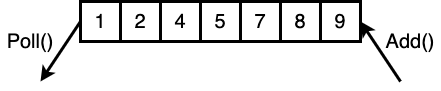
Initialize a queue
Queue<Integer> queue = newLinkedList<>();
Common functions for queue
Functions Description addAdd element at the tail of queue. isEmptyCheck the queue is empty or not. peekReturn (but NOT remove) the element at the head element of queue. Return nullif the queue is empty.removeRemove and returns the head element of the queue. An NoSuchElementExceptionexception is thrown if we callremove()when the invoking queue is empty.pollRemove and returns the head element of the queue. Return nullif the queue is empty.No
empty()function for queue- Use
peek()to check the queue is empty or not.
- Use
Concept
Sorted on ascending order automatically.

Initialize a priority queue
Queue<Integer> queue = newPriorityQueue<>();
Initialize a max priority queue
Queue<Integer> queue = newPriorityQueue<>(10, Collections.reverseOrder());
Initialize a priority queue with custom sorting
PriorityQueue<ListNode> pq = new PriorityQueue<>(lists.length, (a, b)->(a.val - b.val));Common functions for priority queue
Functions Description addAdd one element. containsReturns true if this queue contains the specified element. isEmptyCheck the queue is empty or not. peekReturn (but NOT remove) the head (smallest) element. Return nullif the queue is empty.pollRemoves and returns the head (smallest) element. Return nullif the queue is empty.No
empty()function for priority queue- Use
peek()to check the priority queue is empty or not.
- Use
- Initialize a set
Set<String> set = newHashSet<>();
- Common functions for priority queue
Functions Description addAdd one element. containsCheck the element is existing in the set or not.
Concept
- Sorted by key in ascending order automatically.
Initialize a tree map
TreeMap<Integer, Integer> sortedMap = newTreeMap<>();
Common functions for tree map
Functions Description putAdd one key-value pair. firstKeyGet the key of the first entry (smallest in key) from tree map. firstEntryGet the first entry (smallest in key) from tree map. lastKeyGet the key of the last entry (greatest in key) from tree map. lastEntryGet the last entry (greatest in key) from tree map.
| Function | Description |
|---|---|
sort(array) | Sort the elements in ascending order. |
sort(array, Collections.reverseOrder()) | Sort the elements in descending order. |
copyOfRange(array, i, j) | Get the sub-array [i, j-1]. |
fill(array, value) | Fill all the elements in the array by that value. |
Arrays.sort(String[] arr)Arrays.sort(arr, (a, b)->a.length() - b.length()); Arrays.sort(arr, (a, b)->{ returna.length() - b.length(); });
- Time complexity: O(nlogn)
| Function | Description |
|---|---|
sort() | Sort the elements in the collection (Default is ascending order). |
max() | Get the maximum element in the collection. |
min() | Get the minimum element in the collection. |
reverse() | Reverse the order of the elements (Use this function to get the descending order). |
Collections.sort(List<int[]> list)Collections.sort(list, (a, b) -> { intcmp = Integer.compare(a[0], b[0]); if (cmp != 0) { returncmp; } returnInteger.compare(a[1], b[1]); });
| Function | Description |
|---|---|
max() | Get the max value among 2 values. |
min() | Get the min value among 2 values. |
StringtochararrayStringstr = "abcdefg"; char[] chars = str.toCharArray();
chararray toStringchar[] chars = {'a', 'b', 'c', 'd'} Stringstr1 = newString(chars); // solution 1Stringstr2 = String.valueOf(chars); // solution 2Stringstr3 = String.copyValueOf(chars); // solution 3
inttochararrayinti = 1234; char[] chars = ("" + i).toCharArray();
chartointcharc = '1'; inti = Character.getNumericValue(c);
inttodoubleinti = 1234; doubled1 = Double.valueOf(i); // solution 1doubled2 = newDouble(i); // solution 2
inttoStringinti = 1234; Stringstr1 = String.valueOf(i); // solution 1Stringstr2 = newInteger(i).toString(); // solution 2
StringtointStringstr = "1234"; inti = Integer.parseInt(str);
NOTE: When converting a string to int, need to consider overflow.
inti = 0;
Stringstr = "999999999999999999999999999999999999999999";
try {
i = Integer.parseInt(str);
} catch (Exceptione) {
/* some special handling */
}
array to
Listint[] ints = newint[] {1, 2, 3, 4}; List<Integer> intList = Arrays.asList(ints);
Listto arrayInteger[] array = newInteger[list.size()]; list.toArray(array);
- The same divisor in different types causes different results.
3 / 2 = 1
3 / 2.0 = 1.5
3 / 4 = 0
- Clear the difference between division and modulo.
999 / 100 = 9
999 / 1000 = 0
999 % 1000 = 999
999 % 100 = 99
- Class
publicclassStudentimplementsComparable<Student> {
publicintscore;
publicintcompareTo(Students) {
returnthis.score.compareTo(s.score); // Order by ascending order of scorereturnthis.score - s.score; // Order by ascending order of scorereturn -this.score.compareTo(s.score); // Order by descending order of scorereturns.score - this.score; // Order by descending order of score
}
}
- Sort
List<Student> students;
Collections.sort(students);
- Get a random integer between [0, max]
Randomran = newRandom();
intrandomInt = ran.nextInt(max + 1);
- Get a random integer between [min, max]
Randomran = newRandom();
intrandomInt = min + ran.nextInt(max - min + 1);
- Get a random double between
[0,1)doublerandomDouble = Math.random();
- Get a random double between
[0,max)doublerandomDouble = max * Math.random();