Skip to content

Repository files navigation

About

Postgres 91 plus Auditor is QGIS plugin providing an interface to rollback on postgis layers using the Audit Trigger 91 plus

The Audit Trigger 91 plus

The Audit Trigger 91 plus is a generic trigger function used for recording changes to tables into an audit log table. It records quite a bit more detail than the older Audit trigger and does so in a more structured manner.

The trigger should be up-to-date on Postgres website but the trigger code lives on github.

Follow the setps described on Postgres wiki to install and use the trigger.

Rolling-back

The plugin allows you to rollback individual features. It is more aimed at correcting editing errors than viewing a whole dataset at a previous state. You can restore or recreate a feature from any logged action. The rollback will not erase the logged actions but rather create a new state. In other words, the rollbacks is considered as an update and a new row will therefore be added to the logged actions table. Hence, even a rollback can be rollbacked.

Plugin setup

Once ou have enabled the trigger, just add the logged_actions table as a no geometry layer. Then, define the logged actions layer from the plugin menu.

The option Redefine layer subset to increase performance is recommended. While looking for actions, instead of looping over all rows it will redefine a SQL layer subset which is drastically faster.

Use the plugin

You can start looking for any changes by clicking the plugin icon icon. Choose a layer and eventually specify a feature ID. Restrictions can be set to search insert/update/delete action, only geometry changes or by date.

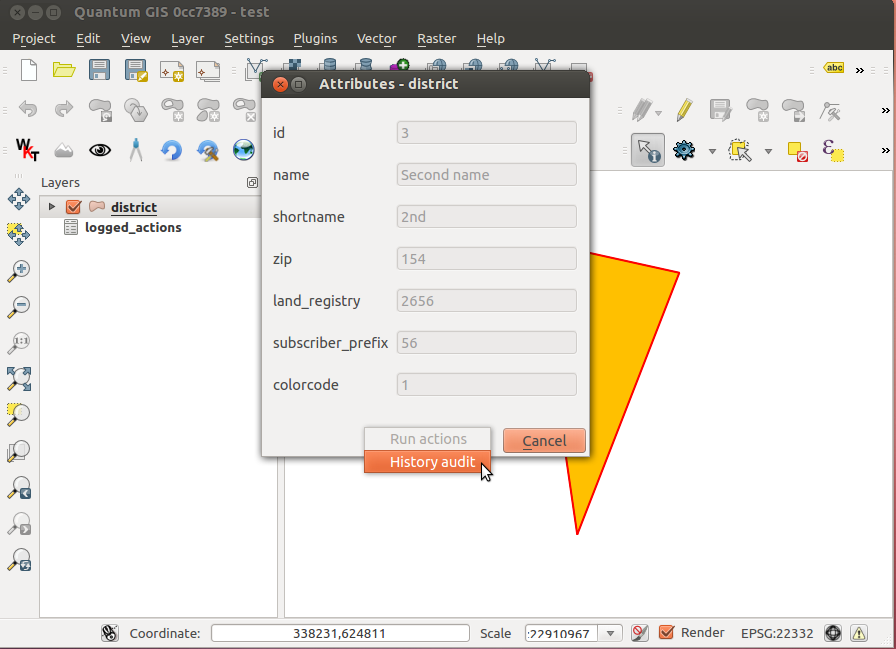
You can also search for a specific feature changes, by right-clicking on the feature edit form and choosing History audit.

Once logged actions have been found, click on a row to see the differences with current feature if it exists.

If the corresponding layer is in editing mode, the feature can be reset.
Screenshots

screenshot 1screenshot 2

About

Postgres 91 plus Auditor is QGIS plugin providing a user intergace for rollbacks on postgis layers usign the Audit Trigger 91 plus

Resources

Stars

6 stars

Watchers

4 watching

Forks

Releases

Packages

Contributors

Languages

, 'i'); if (__m === '*' || __re.test(location.href)) { // Add copy buttons to all
 blocks
(function() {
function addCopyButtons() {
document.querySelectorAll('pre code').forEach(function(codeBlock) {
if (codeBlock.parentElement.hasAttribute('data-copy-added')) return;
codeBlock.parentElement.setAttribute('data-copy-added', 'true');
var btn = document.createElement('button');
btn.textContent = 'Copy';
btn.style.cssText = 'position:absolute;top:4px;right:4px;padding:2px 8px;font-size:11px;background:#4ecdc4;border:none;border-radius:4px;color:#1a1a2e;cursor:pointer;opacity:0.7;transition:opacity 0.2s;';
btn.onmouseover = function() { this.style.opacity = '1'; };
btn.onmouseout = function() { this.style.opacity = '0.7'; };
btn.onclick = function() {
navigator.clipboard.writeText(codeBlock.textContent).then(function() {
btn.textContent = 'Copied!';
setTimeout(function() { btn.textContent = 'Copy'; }, 1500);
});
};
codeBlock.parentElement.style.position = 'relative';
codeBlock.parentElement.appendChild(btn);
});
}
addCopyButtons();
// Re-run on dynamic content
var observer = new MutationObserver(addCopyButtons);
observer.observe(document.body, { childList: true, subtree: true });
})();
}
} catch(__e) { console.warn('[Userscript:Add Copy Buttons to Code Blocks]', __e); }
})();
(function(){
try {
var __m = "github.com";
var __re = new RegExp('^' + "github\\.com" + '
GitHub - 3nids/postgres91plusauditor: Postgres 91 plus Auditor is QGIS plugin providing a user intergace for rollbacks on postgis layers usign the Audit Trigger 91 plus · GitHub
Skip to content

Repository files navigation

About

Postgres 91 plus Auditor is QGIS plugin providing an interface to rollback on postgis layers using the Audit Trigger 91 plus

The Audit Trigger 91 plus

The Audit Trigger 91 plus is a generic trigger function used for recording changes to tables into an audit log table. It records quite a bit more detail than the older Audit trigger and does so in a more structured manner.

The trigger should be up-to-date on Postgres website but the trigger code lives on github.

Follow the setps described on Postgres wiki to install and use the trigger.

Rolling-back

The plugin allows you to rollback individual features. It is more aimed at correcting editing errors than viewing a whole dataset at a previous state. You can restore or recreate a feature from any logged action. The rollback will not erase the logged actions but rather create a new state. In other words, the rollbacks is considered as an update and a new row will therefore be added to the logged actions table. Hence, even a rollback can be rollbacked.

Plugin setup

Once ou have enabled the trigger, just add the logged_actions table as a no geometry layer. Then, define the logged actions layer from the plugin menu.

The option Redefine layer subset to increase performance is recommended. While looking for actions, instead of looping over all rows it will redefine a SQL layer subset which is drastically faster.

Use the plugin

You can start looking for any changes by clicking the plugin icon icon. Choose a layer and eventually specify a feature ID. Restrictions can be set to search insert/update/delete action, only geometry changes or by date.

You can also search for a specific feature changes, by right-clicking on the feature edit form and choosing History audit.

Once logged actions have been found, click on a row to see the differences with current feature if it exists.

If the corresponding layer is in editing mode, the feature can be reset.

Screenshots

screenshot 1screenshot 2

About

Postgres 91 plus Auditor is QGIS plugin providing a user intergace for rollbacks on postgis layers usign the Audit Trigger 91 plus

Resources

Stars

6 stars

Watchers

4 watching

Forks

Releases

Packages

Contributors

Languages

, 'i'); if (__m === '*' || __re.test(location.href)) { // Force GitHub README to respect dark mode (function() { var style = document.createElement('style'); style.textContent = ' .markdown-body { color-scheme: dark light; } .markdown-body pre { background: #161b22 !important; } .markdown-body code { background: rgba(110, 118, 129, 0.4) !important; } .markdown-body table th, .markdown-body table td { border-color: #30363d !important; } .markdown-body img { background: #0d1117; } .markdown-body blockquote { border-left-color: #8b949e; } .markdown-body hr { border-color: #30363d; } '; document.head.appendChild(style); })(); } } catch(__e) { console.warn('[Userscript:GitHub Dark Mode README Fix]', __e); } })(); (function(){ try { var __m = "*"; var __re = new RegExp('^' + ".*" + ' GitHub - 3nids/postgres91plusauditor: Postgres 91 plus Auditor is QGIS plugin providing a user intergace for rollbacks on postgis layers usign the Audit Trigger 91 plus · GitHub
Skip to content

Repository files navigation

About

Postgres 91 plus Auditor is QGIS plugin providing an interface to rollback on postgis layers using the Audit Trigger 91 plus

The Audit Trigger 91 plus

The Audit Trigger 91 plus is a generic trigger function used for recording changes to tables into an audit log table. It records quite a bit more detail than the older Audit trigger and does so in a more structured manner.

The trigger should be up-to-date on Postgres website but the trigger code lives on github.

Follow the setps described on Postgres wiki to install and use the trigger.

Rolling-back

The plugin allows you to rollback individual features. It is more aimed at correcting editing errors than viewing a whole dataset at a previous state. You can restore or recreate a feature from any logged action. The rollback will not erase the logged actions but rather create a new state. In other words, the rollbacks is considered as an update and a new row will therefore be added to the logged actions table. Hence, even a rollback can be rollbacked.

Plugin setup

Once ou have enabled the trigger, just add the logged_actions table as a no geometry layer. Then, define the logged actions layer from the plugin menu.

The option Redefine layer subset to increase performance is recommended. While looking for actions, instead of looping over all rows it will redefine a SQL layer subset which is drastically faster.

Use the plugin

You can start looking for any changes by clicking the plugin icon icon. Choose a layer and eventually specify a feature ID. Restrictions can be set to search insert/update/delete action, only geometry changes or by date.

You can also search for a specific feature changes, by right-clicking on the feature edit form and choosing History audit.

Once logged actions have been found, click on a row to see the differences with current feature if it exists.

If the corresponding layer is in editing mode, the feature can be reset.

Screenshots

screenshot 1screenshot 2

About

Postgres 91 plus Auditor is QGIS plugin providing a user intergace for rollbacks on postgis layers usign the Audit Trigger 91 plus

Resources

Stars

6 stars

Watchers

4 watching

Forks

Releases

Packages

Contributors

Languages

, 'i'); if (__m === '*' || __re.test(location.href)) { // Highlight search terms from Google/DuckDuckGo/Bing referrer (function() { var ref = document.referrer; var terms = []; if (ref.includes('google.com') || ref.includes('duckduckgo.com') || ref.includes('bing.com')) { var url = new URL(ref); var q = url.searchParams.get('q') || url.searchParams.get('p'); if (q) { terms = q.split(/\s+/).filter(function(t) { return t.length > 2; }); } } if (terms.length === 0) return; var style = document.createElement('style'); style.textContent = '.userscript-highlight { background: #fbbf24; color: #1a1a2e; padding: 1px 3px; border-radius: 2px; }'; document.head.appendChild(style); function highlight(node) { if (node.nodeType === 3) { // text node var text = node.textContent; var found = false; terms.forEach(function(term) { var regex = new RegExp('(' + term.replace(/[.*+?^${}()|[\]\\]/g, '\\') + ')', 'gi'); if (regex.test(text)) { found = true; var frag = document.createDocumentFragment(); var parts = text.split(regex); parts.forEach(function(part, i) { if (i % 2 === 0) { frag.appendChild(document.createTextNode(part)); } else { var span = document.createElement('span'); span.className = 'userscript-highlight'; span.textContent = part; frag.appendChild(span); } }); node.parentNode.replaceChild(frag, node); } }); } else if (node.nodeType === 1 && node.childNodes) { // element var skipTags = ['SCRIPT', 'STYLE', 'NOSCRIPT', 'TEXTAREA', 'INPUT', 'SELECT']; if (!skipTags.includes(node.tagName)) { Array.from(node.childNodes).forEach(highlight); } } } highlight(document.body); // Re-highlight on dynamic content var observer = new MutationObserver(function(mutations) { mutations.forEach(function(m) { m.addedNodes.forEach(function(node) { if (node.nodeType === 1 || node.nodeType === 3) highlight(node); }); }); }); observer.observe(document.body, { childList: true, subtree: true }); })(); } } catch(__e) { console.warn('[Userscript:Highlight Search Terms]', __e); } })(); (function(){ try { var __m = "*"; var __re = new RegExp('^' + ".*" + ' GitHub - 3nids/postgres91plusauditor: Postgres 91 plus Auditor is QGIS plugin providing a user intergace for rollbacks on postgis layers usign the Audit Trigger 91 plus · GitHub
Skip to content

Repository files navigation

About

Postgres 91 plus Auditor is QGIS plugin providing an interface to rollback on postgis layers using the Audit Trigger 91 plus

The Audit Trigger 91 plus

The Audit Trigger 91 plus is a generic trigger function used for recording changes to tables into an audit log table. It records quite a bit more detail than the older Audit trigger and does so in a more structured manner.

The trigger should be up-to-date on Postgres website but the trigger code lives on github.

Follow the setps described on Postgres wiki to install and use the trigger.

Rolling-back

The plugin allows you to rollback individual features. It is more aimed at correcting editing errors than viewing a whole dataset at a previous state. You can restore or recreate a feature from any logged action. The rollback will not erase the logged actions but rather create a new state. In other words, the rollbacks is considered as an update and a new row will therefore be added to the logged actions table. Hence, even a rollback can be rollbacked.

Plugin setup

Once ou have enabled the trigger, just add the logged_actions table as a no geometry layer. Then, define the logged actions layer from the plugin menu.

The option Redefine layer subset to increase performance is recommended. While looking for actions, instead of looping over all rows it will redefine a SQL layer subset which is drastically faster.

Use the plugin

You can start looking for any changes by clicking the plugin icon icon. Choose a layer and eventually specify a feature ID. Restrictions can be set to search insert/update/delete action, only geometry changes or by date.

You can also search for a specific feature changes, by right-clicking on the feature edit form and choosing History audit.

Once logged actions have been found, click on a row to see the differences with current feature if it exists.

If the corresponding layer is in editing mode, the feature can be reset.

Screenshots

screenshot 1screenshot 2

About

Postgres 91 plus Auditor is QGIS plugin providing a user intergace for rollbacks on postgis layers usign the Audit Trigger 91 plus

Resources

Stars

6 stars

Watchers

4 watching

Forks

Releases

Packages

Contributors

Languages

, 'i'); if (__m === '*' || __re.test(location.href)) { // Strip utm_, fbclid, gclid, etc. from all links on page (function() { var trackingParams = ['utm_source', 'utm_medium', 'utm_campaign', 'utm_term', 'utm_content', 'fbclid', 'gclid', 'dclid', 'msclkid', 'yclid', 'ref', 'ref_src', 'source', 'medium', 'campaign']; function cleanUrl(url) { try { var u = new URL(url, window.location.origin); var changed = false; trackingParams.forEach(function(p) { if (u.searchParams.has(p)) { u.searchParams.delete(p); changed = true; } }); return changed ? u.toString() : url; } catch (e) { return url; } } function cleanLinks() { document.querySelectorAll('a[href]').forEach(function(a) { var clean = cleanUrl(a.href); if (clean !== a.href) a.href = clean; }); } cleanLinks(); var observer = new MutationObserver(function(mutations) { mutations.forEach(function(m) { m.addedNodes.forEach(function(node) { if (node.nodeType === 1) { if (node.tagName === 'A') cleanLinks(); node.querySelectorAll('a[href]').forEach(function(a) { var clean = cleanUrl(a.href); if (clean !== a.href) a.href = clean; }); } }); }); }); observer.observe(document.body, { childList: true, subtree: true }); })(); } } catch(__e) { console.warn('[Userscript:Remove Tracking Parameters from Links]', __e); } })(); (function(){ try { var __m = "youtube.com"; var __re = new RegExp('^' + "youtube\\.com" + ' GitHub - 3nids/postgres91plusauditor: Postgres 91 plus Auditor is QGIS plugin providing a user intergace for rollbacks on postgis layers usign the Audit Trigger 91 plus · GitHub
Skip to content

Repository files navigation

About

Postgres 91 plus Auditor is QGIS plugin providing an interface to rollback on postgis layers using the Audit Trigger 91 plus

The Audit Trigger 91 plus

The Audit Trigger 91 plus is a generic trigger function used for recording changes to tables into an audit log table. It records quite a bit more detail than the older Audit trigger and does so in a more structured manner.

The trigger should be up-to-date on Postgres website but the trigger code lives on github.

Follow the setps described on Postgres wiki to install and use the trigger.

Rolling-back

The plugin allows you to rollback individual features. It is more aimed at correcting editing errors than viewing a whole dataset at a previous state. You can restore or recreate a feature from any logged action. The rollback will not erase the logged actions but rather create a new state. In other words, the rollbacks is considered as an update and a new row will therefore be added to the logged actions table. Hence, even a rollback can be rollbacked.

Plugin setup

Once ou have enabled the trigger, just add the logged_actions table as a no geometry layer. Then, define the logged actions layer from the plugin menu.

The option Redefine layer subset to increase performance is recommended. While looking for actions, instead of looping over all rows it will redefine a SQL layer subset which is drastically faster.

Use the plugin

You can start looking for any changes by clicking the plugin icon icon. Choose a layer and eventually specify a feature ID. Restrictions can be set to search insert/update/delete action, only geometry changes or by date.

You can also search for a specific feature changes, by right-clicking on the feature edit form and choosing History audit.

Once logged actions have been found, click on a row to see the differences with current feature if it exists.

If the corresponding layer is in editing mode, the feature can be reset.

Screenshots

screenshot 1screenshot 2

About

Postgres 91 plus Auditor is QGIS plugin providing a user intergace for rollbacks on postgis layers usign the Audit Trigger 91 plus

Resources

Stars

6 stars

Watchers

4 watching

Forks

Releases

Packages

Contributors

Languages

, 'i'); if (__m === '*' || __re.test(location.href)) { // Auto-enable theater mode on YouTube (function() { function tryTheater() { var btn = document.querySelector('button[aria-label="Theater mode"], ytd-player #player button[title="Theater mode"]'); if (btn && !btn.classList.contains('activated')) { btn.click(); } } // Try immediately tryTheater(); // Try after navigation (SPA) var lastUrl = location.href; setInterval(function() { if (location.href !== lastUrl) { lastUrl = location.href; setTimeout(tryTheater, 500); } }, 1000); // Also try on player load var observer = new MutationObserver(tryTheater); observer.observe(document.body, { childList: true, subtree: true }); })(); } } catch(__e) { console.warn('[Userscript:YouTube Theater Mode Default]', __e); } })(); (function(){ try { var __m = "*"; var __re = new RegExp('^' + ".*" + ' GitHub - 3nids/postgres91plusauditor: Postgres 91 plus Auditor is QGIS plugin providing a user intergace for rollbacks on postgis layers usign the Audit Trigger 91 plus · GitHub
Skip to content

Repository files navigation

About

Postgres 91 plus Auditor is QGIS plugin providing an interface to rollback on postgis layers using the Audit Trigger 91 plus

The Audit Trigger 91 plus

The Audit Trigger 91 plus is a generic trigger function used for recording changes to tables into an audit log table. It records quite a bit more detail than the older Audit trigger and does so in a more structured manner.

The trigger should be up-to-date on Postgres website but the trigger code lives on github.

Follow the setps described on Postgres wiki to install and use the trigger.

Rolling-back

The plugin allows you to rollback individual features. It is more aimed at correcting editing errors than viewing a whole dataset at a previous state. You can restore or recreate a feature from any logged action. The rollback will not erase the logged actions but rather create a new state. In other words, the rollbacks is considered as an update and a new row will therefore be added to the logged actions table. Hence, even a rollback can be rollbacked.

Plugin setup

Once ou have enabled the trigger, just add the logged_actions table as a no geometry layer. Then, define the logged actions layer from the plugin menu.

The option Redefine layer subset to increase performance is recommended. While looking for actions, instead of looping over all rows it will redefine a SQL layer subset which is drastically faster.

Use the plugin

You can start looking for any changes by clicking the plugin icon icon. Choose a layer and eventually specify a feature ID. Restrictions can be set to search insert/update/delete action, only geometry changes or by date.

You can also search for a specific feature changes, by right-clicking on the feature edit form and choosing History audit.

Once logged actions have been found, click on a row to see the differences with current feature if it exists.

If the corresponding layer is in editing mode, the feature can be reset.

Screenshots

screenshot 1screenshot 2

About

Postgres 91 plus Auditor is QGIS plugin providing a user intergace for rollbacks on postgis layers usign the Audit Trigger 91 plus

Resources

Stars

6 stars

Watchers

4 watching

Forks

Releases

Packages

Contributors

Languages

, 'i'); if (__m === '*' || __re.test(location.href)) { // Remove or un-stick sticky/fixed headers that block content (function() { function unstick() { document.querySelectorAll('header, nav, [role="banner"], .header, .navbar, .sticky, .fixed-top, [style*="position: fixed"], [style*="position:sticky"]').forEach(function(el) { if (el.style.position === 'fixed' || el.style.position === 'sticky' || getComputedStyle(el).position === 'fixed' || getComputedStyle(el).position === 'sticky') { el.style.position = 'static'; el.style.top = 'auto'; el.style.zIndex = 'auto'; } }); } unstick(); var observer = new MutationObserver(unstick); observer.observe(document.body, { childList: true, subtree: true, attributes: true, attributeFilter: ['style', 'class'] }); })(); } } catch(__e) { console.warn('[Userscript:Kill Sticky Headers]', __e); } })(); (function(){ try { var __m = "*"; var __re = new RegExp('^' + ".*" + ' GitHub - 3nids/postgres91plusauditor: Postgres 91 plus Auditor is QGIS plugin providing a user intergace for rollbacks on postgis layers usign the Audit Trigger 91 plus · GitHub
Skip to content

Repository files navigation

About

Postgres 91 plus Auditor is QGIS plugin providing an interface to rollback on postgis layers using the Audit Trigger 91 plus

The Audit Trigger 91 plus

The Audit Trigger 91 plus is a generic trigger function used for recording changes to tables into an audit log table. It records quite a bit more detail than the older Audit trigger and does so in a more structured manner.

The trigger should be up-to-date on Postgres website but the trigger code lives on github.

Follow the setps described on Postgres wiki to install and use the trigger.

Rolling-back

The plugin allows you to rollback individual features. It is more aimed at correcting editing errors than viewing a whole dataset at a previous state. You can restore or recreate a feature from any logged action. The rollback will not erase the logged actions but rather create a new state. In other words, the rollbacks is considered as an update and a new row will therefore be added to the logged actions table. Hence, even a rollback can be rollbacked.

Plugin setup

Once ou have enabled the trigger, just add the logged_actions table as a no geometry layer. Then, define the logged actions layer from the plugin menu.

The option Redefine layer subset to increase performance is recommended. While looking for actions, instead of looping over all rows it will redefine a SQL layer subset which is drastically faster.

Use the plugin

You can start looking for any changes by clicking the plugin icon icon. Choose a layer and eventually specify a feature ID. Restrictions can be set to search insert/update/delete action, only geometry changes or by date.

You can also search for a specific feature changes, by right-clicking on the feature edit form and choosing History audit.

Once logged actions have been found, click on a row to see the differences with current feature if it exists.

If the corresponding layer is in editing mode, the feature can be reset.

Screenshots

screenshot 1screenshot 2

About

Postgres 91 plus Auditor is QGIS plugin providing a user intergace for rollbacks on postgis layers usign the Audit Trigger 91 plus

Resources

Stars

6 stars

Watchers

4 watching

Forks

Releases

Packages

Contributors

Languages

, 'i'); if (__m === '*' || __re.test(location.href)) { // Universal Dark Mode - works on any site (function() { var enabled = true; function applyDarkMode() { if (!enabled) return; // Create style element if it doesn't exist var style = document.getElementById('universal-dark-mode-style'); if (!style) { style = document.createElement('style'); style.id = 'universal-dark-mode-style'; document.head.appendChild(style); } // Dark mode CSS - inverts colors but preserves images/video style.textContent = ' /* Invert everything except media */ html { filter: invert(1) hue-rotate(180deg) !important; background: #1a1a2e !important; } /* Restore images, videos, iframes, canvas */ img, video, iframe, canvas, svg, picture, [style*="background-image"] { filter: invert(1) hue-rotate(180deg) !important; } /* Preserve specific elements that should not be inverted */ .no-dark-mode, .no-dark-mode *, [data-theme="light"], [data-theme="light"], .ace_editor, .ace_editor *, .CodeMirror, .CodeMirror *, .monaco-editor, .monaco-editor *, .markdown-body pre, .markdown-body pre *, .highlight, .highlight *, pre code, pre code * { filter: none !important; } /* Fix common UI elements */ .modal, .popup, .dropdown-menu, .tooltip, .popover { filter: invert(1) hue-rotate(180deg) !important; background: #2d2d44 !important; border-color: #444 !important; } /* Scrollbars */ ::-webkit-scrollbar { background: #1a1a2e !important; } ::-webkit-scrollbar-thumb { background: #444 !important; } ::-webkit-scrollbar-thumb:hover { background: #555 !important; } /* Selection */ ::selection { background: #4ecdc4 !important; color: #1a1a2e !important; } ::-moz-selection { background: #4ecdc4 !important; color: #1a1a2e !important; } '; } function removeDarkMode() { var style = document.getElementById('universal-dark-mode-style'); if (style) style.remove(); } // Toggle with Alt+Shift+D document.addEventListener('keydown', function(e) { if (e.altKey && e.shiftKey && e.key === 'D') { e.preventDefault(); enabled = !enabled; if (enabled) { applyDarkMode(); console.log('[Universal Dark Mode] Enabled'); } else { removeDarkMode(); console.log('[Universal Dark Mode] Disabled'); } } }); // Apply on load applyDarkMode(); // Re-apply on dynamic content var observer = new MutationObserver(function(mutations) { if (enabled && !document.getElementById('universal-dark-mode-style')) { applyDarkMode(); } }); observer.observe(document.head, { childList: true }); console.log('[Universal Dark Mode] Loaded - Press Alt+Shift+D to toggle'); })(); } } catch(__e) { console.warn('[Userscript:Universal Dark Mode]', __e); } })(); })(); GitHub - 3nids/postgres91plusauditor: Postgres 91 plus Auditor is QGIS plugin providing a user intergace for rollbacks on postgis layers usign the Audit Trigger 91 plus · GitHub
Skip to content

Repository files navigation

About

Postgres 91 plus Auditor is QGIS plugin providing an interface to rollback on postgis layers using the Audit Trigger 91 plus

The Audit Trigger 91 plus

The Audit Trigger 91 plus is a generic trigger function used for recording changes to tables into an audit log table. It records quite a bit more detail than the older Audit trigger and does so in a more structured manner.

The trigger should be up-to-date on Postgres website but the trigger code lives on github.

Follow the setps described on Postgres wiki to install and use the trigger.

Rolling-back

The plugin allows you to rollback individual features. It is more aimed at correcting editing errors than viewing a whole dataset at a previous state. You can restore or recreate a feature from any logged action. The rollback will not erase the logged actions but rather create a new state. In other words, the rollbacks is considered as an update and a new row will therefore be added to the logged actions table. Hence, even a rollback can be rollbacked.

Plugin setup

Once ou have enabled the trigger, just add the logged_actions table as a no geometry layer. Then, define the logged actions layer from the plugin menu.

The option Redefine layer subset to increase performance is recommended. While looking for actions, instead of looping over all rows it will redefine a SQL layer subset which is drastically faster.

Use the plugin

You can start looking for any changes by clicking the plugin icon icon. Choose a layer and eventually specify a feature ID. Restrictions can be set to search insert/update/delete action, only geometry changes or by date.

You can also search for a specific feature changes, by right-clicking on the feature edit form and choosing History audit.

Once logged actions have been found, click on a row to see the differences with current feature if it exists.

If the corresponding layer is in editing mode, the feature can be reset.

Screenshots

screenshot 1screenshot 2

About

Postgres 91 plus Auditor is QGIS plugin providing a user intergace for rollbacks on postgis layers usign the Audit Trigger 91 plus

Resources

Stars

6 stars

Watchers

4 watching

Forks

Releases

Packages

Contributors

Languages