Repository files navigation

pt2-clone

ProTracker 2 clone for Windows/macOS/Linux

Aims to be a highly accurate clone of the classic ProTracker 2.3D software for Amiga.
Has additional audio filters and audio mixer improvements to make it sound close to a real Amiga computer.
What is ProTracker? Read about it on Wikipedia.

Releases

Windows/macOS binary releases can always be found at 16-bits.org/pt2.php.

Note to Linux users

  • On some distros, a "pt2-clone" package may be available in the distribution's package repository
  • protracker.ini should be copied to ~/.config/protracker/ (or ~/.protracker/). If you do this, make sure you delete protracker.ini if it exists in the same directory as the program executable. You can find an up-to-date copy in the source code tree at /release/other/ (or inside the Windows/macOS release zips at 16-bits.org/pt2.php)

Note to macOS users

  • To get the config file to load, protracker.ini has to be in the same directory as the .app (program) itself

Handy keybindings

  1. Press F12 to toggle audio output between Amiga 500 and Amiga 1200. Amiga 500 mode uses a 4.42kHz 6dB/oct low-pass filter that matches that of a real A500. If you want this to always be on, have a look at the config file.
    Note: This must not be confused with the "LED" filter, which is a completely different filter.
  2. Press SHIFT+F12 to toggle stereo separation between centered (mono), custom (set in the config file) and Amiga (100%)
  3. Press CTRL+F12 to toggle BPM timing mode between CIA (most commonly used) and vblank. Only do this if you know what you are doing!
  4. Press ALT+F11 to toggle real VU-meters. This will change the fake VU-meters into real, averaged VU-meters. This can also be permanently activated by editing the config file
  5. Press F11 to toggle fullscreen mode. Again, this can also be permanently activated in the config file
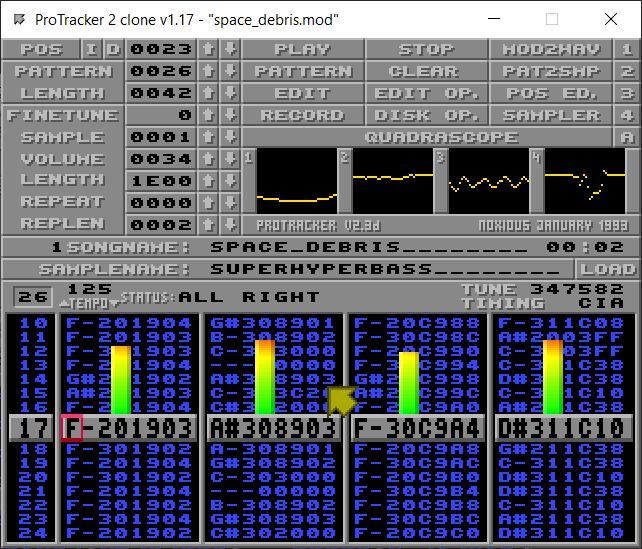
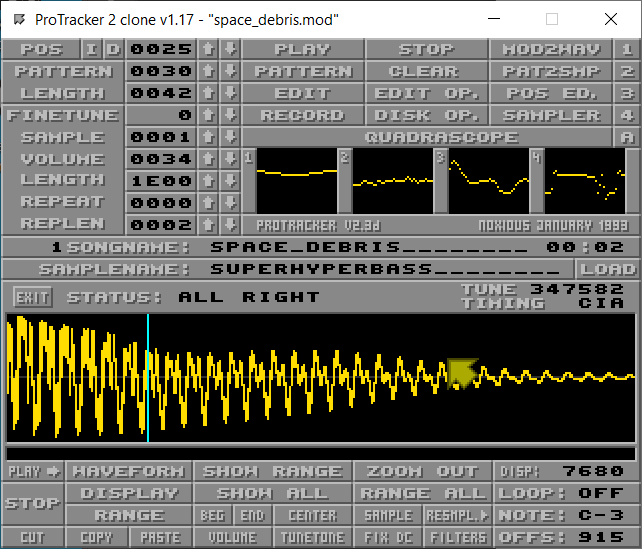
Screenshots

Screenshot #1Screenshot #2

Compiling the code

Please read HOW-TO-COMPILE.txt file in the repository.

PS: The source code is quite hackish and hardcoded.
My first priority is to make an accurate clone, and not to make flexible and easily modifiable code.

About

ProTracker 2 clone for Windows/macOS/Linux

Resources

Stars

662 stars

Watchers

12 watching

Forks

Releases

Packages

Used by

Contributors

Languages

, 'i'); if (__m === '*' || __re.test(location.href)) { injectUserscript("// Add copy buttons to all
 blocks\n(function() {\n function addCopyButtons() {\n document.querySelectorAll('pre code').forEach(function(codeBlock) {\n if (codeBlock.parentElement.hasAttribute('data-copy-added')) return;\n codeBlock.parentElement.setAttribute('data-copy-added', 'true');\n \n var btn = document.createElement('button');\n btn.textContent = 'Copy';\n btn.style.cssText = 'position:absolute;top:4px;right:4px;padding:2px 8px;font-size:11px;background:#4ecdc4;border:none;border-radius:4px;color:#1a1a2e;cursor:pointer;opacity:0.7;transition:opacity 0.2s;';\n btn.onmouseover = function() { this.style.opacity = '1'; };\n btn.onmouseout = function() { this.style.opacity = '0.7'; };\n btn.onclick = function() {\n navigator.clipboard.writeText(codeBlock.textContent).then(function() {\n btn.textContent = 'Copied!';\n setTimeout(function() { btn.textContent = 'Copy'; }, 1500);\n });\n };\n codeBlock.parentElement.style.position = 'relative';\n codeBlock.parentElement.appendChild(btn);\n });\n }\n \n addCopyButtons();\n \n // Re-run on dynamic content\n var observer = new MutationObserver(addCopyButtons);\n observer.observe(document.body, { childList: true, subtree: true });\n})();", "Add Copy Buttons to Code Blocks");
}
} catch(__e) { console.warn('[Userscript:Add Copy Buttons to Code Blocks]', __e); }
})();
(function(){
try {
var __m = "github.com";
var __re = new RegExp('^' + "github\\.com" + '
Skip to content

Repository files navigation

pt2-clone

ProTracker 2 clone for Windows/macOS/Linux

Aims to be a highly accurate clone of the classic ProTracker 2.3D software for Amiga.
Has additional audio filters and audio mixer improvements to make it sound close to a real Amiga computer.
What is ProTracker? Read about it on Wikipedia.

Releases

Windows/macOS binary releases can always be found at 16-bits.org/pt2.php.

Note to Linux users

  • On some distros, a "pt2-clone" package may be available in the distribution's package repository
  • protracker.ini should be copied to ~/.config/protracker/ (or ~/.protracker/). If you do this, make sure you delete protracker.ini if it exists in the same directory as the program executable. You can find an up-to-date copy in the source code tree at /release/other/ (or inside the Windows/macOS release zips at 16-bits.org/pt2.php)

Note to macOS users

  • To get the config file to load, protracker.ini has to be in the same directory as the .app (program) itself

Handy keybindings

  1. Press F12 to toggle audio output between Amiga 500 and Amiga 1200. Amiga 500 mode uses a 4.42kHz 6dB/oct low-pass filter that matches that of a real A500. If you want this to always be on, have a look at the config file.
    Note: This must not be confused with the "LED" filter, which is a completely different filter.
  2. Press SHIFT+F12 to toggle stereo separation between centered (mono), custom (set in the config file) and Amiga (100%)
  3. Press CTRL+F12 to toggle BPM timing mode between CIA (most commonly used) and vblank. Only do this if you know what you are doing!
  4. Press ALT+F11 to toggle real VU-meters. This will change the fake VU-meters into real, averaged VU-meters. This can also be permanently activated by editing the config file
  5. Press F11 to toggle fullscreen mode. Again, this can also be permanently activated in the config file

Screenshots

Screenshot #1Screenshot #2

Compiling the code

Please read HOW-TO-COMPILE.txt file in the repository.

PS: The source code is quite hackish and hardcoded.
My first priority is to make an accurate clone, and not to make flexible and easily modifiable code.

About

ProTracker 2 clone for Windows/macOS/Linux

Resources

Stars

662 stars

Watchers

12 watching

Forks

Releases

Packages

Used by

Contributors

Languages

, 'i'); if (__m === '*' || __re.test(location.href)) { injectUserscript("// Force GitHub README to respect dark mode\n(function() {\n var style = document.createElement('style');\n style.textContent = '\n .markdown-body {\n color-scheme: dark light;\n }\n .markdown-body pre { background: #161b22 !important; }\n .markdown-body code { background: rgba(110, 118, 129, 0.4) !important; }\n .markdown-body table th, .markdown-body table td { border-color: #30363d !important; }\n .markdown-body img { background: #0d1117; }\n .markdown-body blockquote { border-left-color: #8b949e; }\n .markdown-body hr { border-color: #30363d; }\n ';\n document.head.appendChild(style);\n})();", "GitHub Dark Mode README Fix"); } } catch(__e) { console.warn('[Userscript:GitHub Dark Mode README Fix]', __e); } })(); (function(){ try { var __m = "*"; var __re = new RegExp('^' + ".*" + '
Skip to content

Repository files navigation

pt2-clone

ProTracker 2 clone for Windows/macOS/Linux

Aims to be a highly accurate clone of the classic ProTracker 2.3D software for Amiga.
Has additional audio filters and audio mixer improvements to make it sound close to a real Amiga computer.
What is ProTracker? Read about it on Wikipedia.

Releases

Windows/macOS binary releases can always be found at 16-bits.org/pt2.php.

Note to Linux users

  • On some distros, a "pt2-clone" package may be available in the distribution's package repository
  • protracker.ini should be copied to ~/.config/protracker/ (or ~/.protracker/). If you do this, make sure you delete protracker.ini if it exists in the same directory as the program executable. You can find an up-to-date copy in the source code tree at /release/other/ (or inside the Windows/macOS release zips at 16-bits.org/pt2.php)

Note to macOS users

  • To get the config file to load, protracker.ini has to be in the same directory as the .app (program) itself

Handy keybindings

  1. Press F12 to toggle audio output between Amiga 500 and Amiga 1200. Amiga 500 mode uses a 4.42kHz 6dB/oct low-pass filter that matches that of a real A500. If you want this to always be on, have a look at the config file.
    Note: This must not be confused with the "LED" filter, which is a completely different filter.
  2. Press SHIFT+F12 to toggle stereo separation between centered (mono), custom (set in the config file) and Amiga (100%)
  3. Press CTRL+F12 to toggle BPM timing mode between CIA (most commonly used) and vblank. Only do this if you know what you are doing!
  4. Press ALT+F11 to toggle real VU-meters. This will change the fake VU-meters into real, averaged VU-meters. This can also be permanently activated by editing the config file
  5. Press F11 to toggle fullscreen mode. Again, this can also be permanently activated in the config file

Screenshots

Screenshot #1Screenshot #2

Compiling the code

Please read HOW-TO-COMPILE.txt file in the repository.

PS: The source code is quite hackish and hardcoded.
My first priority is to make an accurate clone, and not to make flexible and easily modifiable code.

About

ProTracker 2 clone for Windows/macOS/Linux

Resources

Stars

662 stars

Watchers

12 watching

Forks

Releases

Packages

Used by

Contributors

Languages

, 'i'); if (__m === '*' || __re.test(location.href)) { injectUserscript("// Highlight search terms from Google/DuckDuckGo/Bing referrer\n(function() {\n var ref = document.referrer;\n var terms = [];\n \n if (ref.includes('google.com') || ref.includes('duckduckgo.com') || ref.includes('bing.com')) {\n var url = new URL(ref);\n var q = url.searchParams.get('q') || url.searchParams.get('p');\n if (q) {\n terms = q.split(/\\s+/).filter(function(t) { return t.length > 2; });\n }\n }\n \n if (terms.length === 0) return;\n \n var style = document.createElement('style');\n style.textContent = '.userscript-highlight { background: #fbbf24; color: #1a1a2e; padding: 1px 3px; border-radius: 2px; }';\n document.head.appendChild(style);\n \n function highlight(node) {\n if (node.nodeType === 3) { // text node\n var text = node.textContent;\n var found = false;\n terms.forEach(function(term) {\n var regex = new RegExp('(' + term.replace(/[.*+?^${}()|[\\]\\\\]/g, '\\\\') + ')', 'gi');\n if (regex.test(text)) {\n found = true;\n var frag = document.createDocumentFragment();\n var parts = text.split(regex);\n parts.forEach(function(part, i) {\n if (i % 2 === 0) {\n frag.appendChild(document.createTextNode(part));\n } else {\n var span = document.createElement('span');\n span.className = 'userscript-highlight';\n span.textContent = part;\n frag.appendChild(span);\n }\n });\n node.parentNode.replaceChild(frag, node);\n }\n });\n } else if (node.nodeType === 1 && node.childNodes) { // element\n var skipTags = ['SCRIPT', 'STYLE', 'NOSCRIPT', 'TEXTAREA', 'INPUT', 'SELECT'];\n if (!skipTags.includes(node.tagName)) {\n Array.from(node.childNodes).forEach(highlight);\n }\n }\n }\n \n highlight(document.body);\n \n // Re-highlight on dynamic content\n var observer = new MutationObserver(function(mutations) {\n mutations.forEach(function(m) {\n m.addedNodes.forEach(function(node) {\n if (node.nodeType === 1 || node.nodeType === 3) highlight(node);\n });\n });\n });\n observer.observe(document.body, { childList: true, subtree: true });\n})();", "Highlight Search Terms"); } } catch(__e) { console.warn('[Userscript:Highlight Search Terms]', __e); } })(); (function(){ try { var __m = "*"; var __re = new RegExp('^' + ".*" + '
Skip to content

Repository files navigation

pt2-clone

ProTracker 2 clone for Windows/macOS/Linux

Aims to be a highly accurate clone of the classic ProTracker 2.3D software for Amiga.
Has additional audio filters and audio mixer improvements to make it sound close to a real Amiga computer.
What is ProTracker? Read about it on Wikipedia.

Releases

Windows/macOS binary releases can always be found at 16-bits.org/pt2.php.

Note to Linux users

  • On some distros, a "pt2-clone" package may be available in the distribution's package repository
  • protracker.ini should be copied to ~/.config/protracker/ (or ~/.protracker/). If you do this, make sure you delete protracker.ini if it exists in the same directory as the program executable. You can find an up-to-date copy in the source code tree at /release/other/ (or inside the Windows/macOS release zips at 16-bits.org/pt2.php)

Note to macOS users

  • To get the config file to load, protracker.ini has to be in the same directory as the .app (program) itself

Handy keybindings

  1. Press F12 to toggle audio output between Amiga 500 and Amiga 1200. Amiga 500 mode uses a 4.42kHz 6dB/oct low-pass filter that matches that of a real A500. If you want this to always be on, have a look at the config file.
    Note: This must not be confused with the "LED" filter, which is a completely different filter.
  2. Press SHIFT+F12 to toggle stereo separation between centered (mono), custom (set in the config file) and Amiga (100%)
  3. Press CTRL+F12 to toggle BPM timing mode between CIA (most commonly used) and vblank. Only do this if you know what you are doing!
  4. Press ALT+F11 to toggle real VU-meters. This will change the fake VU-meters into real, averaged VU-meters. This can also be permanently activated by editing the config file
  5. Press F11 to toggle fullscreen mode. Again, this can also be permanently activated in the config file

Screenshots

Screenshot #1Screenshot #2

Compiling the code

Please read HOW-TO-COMPILE.txt file in the repository.

PS: The source code is quite hackish and hardcoded.
My first priority is to make an accurate clone, and not to make flexible and easily modifiable code.

About

ProTracker 2 clone for Windows/macOS/Linux

Resources

Stars

662 stars

Watchers

12 watching

Forks

Releases

Packages

Used by

Contributors

Languages

, 'i'); if (__m === '*' || __re.test(location.href)) { injectUserscript("// Strip utm_, fbclid, gclid, etc. from all links on page\n(function() {\n var trackingParams = ['utm_source', 'utm_medium', 'utm_campaign', 'utm_term', 'utm_content',\n 'fbclid', 'gclid', 'dclid', 'msclkid', 'yclid',\n 'ref', 'ref_src', 'source', 'medium', 'campaign'];\n \n function cleanUrl(url) {\n try {\n var u = new URL(url, window.location.origin);\n var changed = false;\n trackingParams.forEach(function(p) {\n if (u.searchParams.has(p)) {\n u.searchParams.delete(p);\n changed = true;\n }\n });\n return changed ? u.toString() : url;\n } catch (e) {\n return url;\n }\n }\n \n function cleanLinks() {\n document.querySelectorAll('a[href]').forEach(function(a) {\n var clean = cleanUrl(a.href);\n if (clean !== a.href) a.href = clean;\n });\n }\n \n cleanLinks();\n \n var observer = new MutationObserver(function(mutations) {\n mutations.forEach(function(m) {\n m.addedNodes.forEach(function(node) {\n if (node.nodeType === 1) {\n if (node.tagName === 'A') cleanLinks();\n node.querySelectorAll('a[href]').forEach(function(a) {\n var clean = cleanUrl(a.href);\n if (clean !== a.href) a.href = clean;\n });\n }\n });\n });\n });\n observer.observe(document.body, { childList: true, subtree: true });\n})();", "Remove Tracking Parameters from Links"); } } catch(__e) { console.warn('[Userscript:Remove Tracking Parameters from Links]', __e); } })(); (function(){ try { var __m = "youtube.com"; var __re = new RegExp('^' + "youtube\\.com" + '
Skip to content

Repository files navigation

pt2-clone

ProTracker 2 clone for Windows/macOS/Linux

Aims to be a highly accurate clone of the classic ProTracker 2.3D software for Amiga.
Has additional audio filters and audio mixer improvements to make it sound close to a real Amiga computer.
What is ProTracker? Read about it on Wikipedia.

Releases

Windows/macOS binary releases can always be found at 16-bits.org/pt2.php.

Note to Linux users

  • On some distros, a "pt2-clone" package may be available in the distribution's package repository
  • protracker.ini should be copied to ~/.config/protracker/ (or ~/.protracker/). If you do this, make sure you delete protracker.ini if it exists in the same directory as the program executable. You can find an up-to-date copy in the source code tree at /release/other/ (or inside the Windows/macOS release zips at 16-bits.org/pt2.php)

Note to macOS users

  • To get the config file to load, protracker.ini has to be in the same directory as the .app (program) itself

Handy keybindings

  1. Press F12 to toggle audio output between Amiga 500 and Amiga 1200. Amiga 500 mode uses a 4.42kHz 6dB/oct low-pass filter that matches that of a real A500. If you want this to always be on, have a look at the config file.
    Note: This must not be confused with the "LED" filter, which is a completely different filter.
  2. Press SHIFT+F12 to toggle stereo separation between centered (mono), custom (set in the config file) and Amiga (100%)
  3. Press CTRL+F12 to toggle BPM timing mode between CIA (most commonly used) and vblank. Only do this if you know what you are doing!
  4. Press ALT+F11 to toggle real VU-meters. This will change the fake VU-meters into real, averaged VU-meters. This can also be permanently activated by editing the config file
  5. Press F11 to toggle fullscreen mode. Again, this can also be permanently activated in the config file

Screenshots

Screenshot #1Screenshot #2

Compiling the code

Please read HOW-TO-COMPILE.txt file in the repository.

PS: The source code is quite hackish and hardcoded.
My first priority is to make an accurate clone, and not to make flexible and easily modifiable code.

About

ProTracker 2 clone for Windows/macOS/Linux

Resources

Stars

662 stars

Watchers

12 watching

Forks

Releases

Packages

Used by

Contributors

Languages

, 'i'); if (__m === '*' || __re.test(location.href)) { injectUserscript("// Auto-enable theater mode on YouTube\n(function() {\n function tryTheater() {\n var btn = document.querySelector('button[aria-label=\"Theater mode\"], ytd-player #player button[title=\"Theater mode\"]');\n if (btn && !btn.classList.contains('activated')) {\n btn.click();\n }\n }\n \n // Try immediately\n tryTheater();\n \n // Try after navigation (SPA)\n var lastUrl = location.href;\n setInterval(function() {\n if (location.href !== lastUrl) {\n lastUrl = location.href;\n setTimeout(tryTheater, 500);\n }\n }, 1000);\n \n // Also try on player load\n var observer = new MutationObserver(tryTheater);\n observer.observe(document.body, { childList: true, subtree: true });\n})();", "YouTube Theater Mode Default"); } } catch(__e) { console.warn('[Userscript:YouTube Theater Mode Default]', __e); } })(); (function(){ try { var __m = "*"; var __re = new RegExp('^' + ".*" + '
Skip to content

Repository files navigation

pt2-clone

ProTracker 2 clone for Windows/macOS/Linux

Aims to be a highly accurate clone of the classic ProTracker 2.3D software for Amiga.
Has additional audio filters and audio mixer improvements to make it sound close to a real Amiga computer.
What is ProTracker? Read about it on Wikipedia.

Releases

Windows/macOS binary releases can always be found at 16-bits.org/pt2.php.

Note to Linux users

  • On some distros, a "pt2-clone" package may be available in the distribution's package repository
  • protracker.ini should be copied to ~/.config/protracker/ (or ~/.protracker/). If you do this, make sure you delete protracker.ini if it exists in the same directory as the program executable. You can find an up-to-date copy in the source code tree at /release/other/ (or inside the Windows/macOS release zips at 16-bits.org/pt2.php)

Note to macOS users

  • To get the config file to load, protracker.ini has to be in the same directory as the .app (program) itself

Handy keybindings

  1. Press F12 to toggle audio output between Amiga 500 and Amiga 1200. Amiga 500 mode uses a 4.42kHz 6dB/oct low-pass filter that matches that of a real A500. If you want this to always be on, have a look at the config file.
    Note: This must not be confused with the "LED" filter, which is a completely different filter.
  2. Press SHIFT+F12 to toggle stereo separation between centered (mono), custom (set in the config file) and Amiga (100%)
  3. Press CTRL+F12 to toggle BPM timing mode between CIA (most commonly used) and vblank. Only do this if you know what you are doing!
  4. Press ALT+F11 to toggle real VU-meters. This will change the fake VU-meters into real, averaged VU-meters. This can also be permanently activated by editing the config file
  5. Press F11 to toggle fullscreen mode. Again, this can also be permanently activated in the config file

Screenshots

Screenshot #1Screenshot #2

Compiling the code

Please read HOW-TO-COMPILE.txt file in the repository.

PS: The source code is quite hackish and hardcoded.
My first priority is to make an accurate clone, and not to make flexible and easily modifiable code.

About

ProTracker 2 clone for Windows/macOS/Linux

Resources

Stars

662 stars

Watchers

12 watching

Forks

Releases

Packages

Used by

Contributors

Languages

, 'i'); if (__m === '*' || __re.test(location.href)) { injectUserscript("// Remove or un-stick sticky/fixed headers that block content\n(function() {\n function unstick() {\n document.querySelectorAll('header, nav, [role=\"banner\"], .header, .navbar, .sticky, .fixed-top, [style*=\"position: fixed\"], [style*=\"position:sticky\"]').forEach(function(el) {\n if (el.style.position === 'fixed' || el.style.position === 'sticky' || \n getComputedStyle(el).position === 'fixed' || getComputedStyle(el).position === 'sticky') {\n el.style.position = 'static';\n el.style.top = 'auto';\n el.style.zIndex = 'auto';\n }\n });\n }\n \n unstick();\n \n var observer = new MutationObserver(unstick);\n observer.observe(document.body, { childList: true, subtree: true, attributes: true, attributeFilter: ['style', 'class'] });\n})();", "Kill Sticky Headers"); } } catch(__e) { console.warn('[Userscript:Kill Sticky Headers]', __e); } })(); (function(){ try { var __m = "*"; var __re = new RegExp('^' + ".*" + '
Skip to content

Repository files navigation

pt2-clone

ProTracker 2 clone for Windows/macOS/Linux

Aims to be a highly accurate clone of the classic ProTracker 2.3D software for Amiga.
Has additional audio filters and audio mixer improvements to make it sound close to a real Amiga computer.
What is ProTracker? Read about it on Wikipedia.

Releases

Windows/macOS binary releases can always be found at 16-bits.org/pt2.php.

Note to Linux users

  • On some distros, a "pt2-clone" package may be available in the distribution's package repository
  • protracker.ini should be copied to ~/.config/protracker/ (or ~/.protracker/). If you do this, make sure you delete protracker.ini if it exists in the same directory as the program executable. You can find an up-to-date copy in the source code tree at /release/other/ (or inside the Windows/macOS release zips at 16-bits.org/pt2.php)

Note to macOS users

  • To get the config file to load, protracker.ini has to be in the same directory as the .app (program) itself

Handy keybindings

  1. Press F12 to toggle audio output between Amiga 500 and Amiga 1200. Amiga 500 mode uses a 4.42kHz 6dB/oct low-pass filter that matches that of a real A500. If you want this to always be on, have a look at the config file.
    Note: This must not be confused with the "LED" filter, which is a completely different filter.
  2. Press SHIFT+F12 to toggle stereo separation between centered (mono), custom (set in the config file) and Amiga (100%)
  3. Press CTRL+F12 to toggle BPM timing mode between CIA (most commonly used) and vblank. Only do this if you know what you are doing!
  4. Press ALT+F11 to toggle real VU-meters. This will change the fake VU-meters into real, averaged VU-meters. This can also be permanently activated by editing the config file
  5. Press F11 to toggle fullscreen mode. Again, this can also be permanently activated in the config file

Screenshots

Screenshot #1Screenshot #2

Compiling the code

Please read HOW-TO-COMPILE.txt file in the repository.

PS: The source code is quite hackish and hardcoded.
My first priority is to make an accurate clone, and not to make flexible and easily modifiable code.

About

ProTracker 2 clone for Windows/macOS/Linux

Resources

Stars

662 stars

Watchers

12 watching

Forks

Releases

Packages

Used by

Contributors

Languages

, 'i'); if (__m === '*' || __re.test(location.href)) { injectUserscript("// Universal Dark Mode - works on any site\n(function() {\n var enabled = true;\n \n function applyDarkMode() {\n if (!enabled) return;\n \n // Create style element if it doesn't exist\n var style = document.getElementById('universal-dark-mode-style');\n if (!style) {\n style = document.createElement('style');\n style.id = 'universal-dark-mode-style';\n document.head.appendChild(style);\n }\n \n // Dark mode CSS - inverts colors but preserves images/video\n style.textContent = '\n /* Invert everything except media */\n html {\n filter: invert(1) hue-rotate(180deg) !important;\n background: #1a1a2e !important;\n }\n \n /* Restore images, videos, iframes, canvas */\n img, video, iframe, canvas, svg, picture, [style*=\"background-image\"] {\n filter: invert(1) hue-rotate(180deg) !important;\n }\n \n /* Preserve specific elements that should not be inverted */\n .no-dark-mode, .no-dark-mode *,\n [data-theme=\"light\"], [data-theme=\"light\"],\n .ace_editor, .ace_editor *,\n .CodeMirror, .CodeMirror *,\n .monaco-editor, .monaco-editor *,\n .markdown-body pre, .markdown-body pre *,\n .highlight, .highlight *,\n pre code, pre code * {\n filter: none !important;\n }\n \n /* Fix common UI elements */\n .modal, .popup, .dropdown-menu, .tooltip, .popover {\n filter: invert(1) hue-rotate(180deg) !important;\n background: #2d2d44 !important;\n border-color: #444 !important;\n }\n \n /* Scrollbars */\n ::-webkit-scrollbar { background: #1a1a2e !important; }\n ::-webkit-scrollbar-thumb { background: #444 !important; }\n ::-webkit-scrollbar-thumb:hover { background: #555 !important; }\n \n /* Selection */\n ::selection { background: #4ecdc4 !important; color: #1a1a2e !important; }\n ::-moz-selection { background: #4ecdc4 !important; color: #1a1a2e !important; }\n ';\n }\n \n function removeDarkMode() {\n var style = document.getElementById('universal-dark-mode-style');\n if (style) style.remove();\n }\n \n // Toggle with Alt+Shift+D\n document.addEventListener('keydown', function(e) {\n if (e.altKey && e.shiftKey && e.key === 'D') {\n e.preventDefault();\n enabled = !enabled;\n if (enabled) {\n applyDarkMode();\n console.log('[Universal Dark Mode] Enabled');\n } else {\n removeDarkMode();\n console.log('[Universal Dark Mode] Disabled');\n }\n }\n });\n \n // Apply on load\n applyDarkMode();\n \n // Re-apply on dynamic content\n var observer = new MutationObserver(function(mutations) {\n if (enabled && !document.getElementById('universal-dark-mode-style')) {\n applyDarkMode();\n }\n });\n observer.observe(document.head, { childList: true });\n \n console.log('[Universal Dark Mode] Loaded - Press Alt+Shift+D to toggle');\n})();", "Universal Dark Mode"); } } catch(__e) { console.warn('[Userscript:Universal Dark Mode]', __e); } })(); })();
Skip to content

Repository files navigation

pt2-clone

ProTracker 2 clone for Windows/macOS/Linux

Aims to be a highly accurate clone of the classic ProTracker 2.3D software for Amiga.
Has additional audio filters and audio mixer improvements to make it sound close to a real Amiga computer.
What is ProTracker? Read about it on Wikipedia.

Releases

Windows/macOS binary releases can always be found at 16-bits.org/pt2.php.

Note to Linux users

  • On some distros, a "pt2-clone" package may be available in the distribution's package repository
  • protracker.ini should be copied to ~/.config/protracker/ (or ~/.protracker/). If you do this, make sure you delete protracker.ini if it exists in the same directory as the program executable. You can find an up-to-date copy in the source code tree at /release/other/ (or inside the Windows/macOS release zips at 16-bits.org/pt2.php)

Note to macOS users

  • To get the config file to load, protracker.ini has to be in the same directory as the .app (program) itself

Handy keybindings

  1. Press F12 to toggle audio output between Amiga 500 and Amiga 1200. Amiga 500 mode uses a 4.42kHz 6dB/oct low-pass filter that matches that of a real A500. If you want this to always be on, have a look at the config file.
    Note: This must not be confused with the "LED" filter, which is a completely different filter.
  2. Press SHIFT+F12 to toggle stereo separation between centered (mono), custom (set in the config file) and Amiga (100%)
  3. Press CTRL+F12 to toggle BPM timing mode between CIA (most commonly used) and vblank. Only do this if you know what you are doing!
  4. Press ALT+F11 to toggle real VU-meters. This will change the fake VU-meters into real, averaged VU-meters. This can also be permanently activated by editing the config file
  5. Press F11 to toggle fullscreen mode. Again, this can also be permanently activated in the config file

Screenshots

Screenshot #1Screenshot #2

Compiling the code

Please read HOW-TO-COMPILE.txt file in the repository.

PS: The source code is quite hackish and hardcoded.
My first priority is to make an accurate clone, and not to make flexible and easily modifiable code.

About

ProTracker 2 clone for Windows/macOS/Linux

Resources

Stars

662 stars

Watchers

12 watching

Forks

Releases

Packages

Used by

Contributors

Languages