Repository files navigation

WebVR Boilerplate

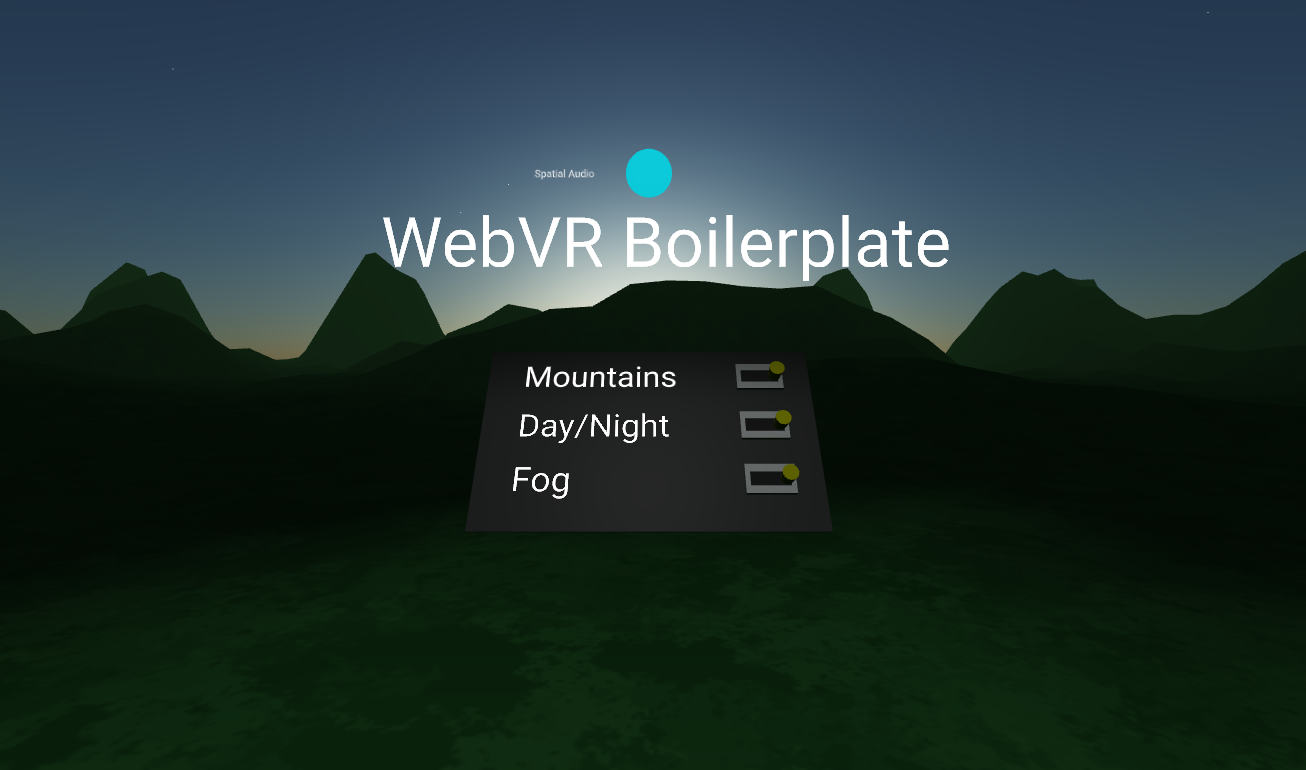
WebVR Boilerplate is a toolkit for WebVR creators to develop, build and deploy static WebVR experiences to the web. WebVR Boilerplate comes with a hot-reload webserver, the latest builds of Aframe, Aframe's best community components and a Webpack build pipeline that packages your content for Firebase Hosting. Some other features are:

  • Cross compatibility across HTC Vive, Oculus Rift/Go, Gear VR, iOS and Android devices. (Tested 6.14.18)
  • Spatial Audio, Shadows, Controllers, Teleport, Physics and Environment code examples
  • Local development server that can be viewed on external devices in realtime (helpful for debugging on iOS/Android)
  • All code is integrated into the Aframe Entity and Component system for best performance
  • Dependencies are loaded through Webpack modules and NPM

Installation

git clone https://github.com/ianpetrarca/webvr_boilerplate.git
cd webvr_boilerplate
npm install

File Structure + Descriptions

├── build # Webpack Production build output ├── src # Source files
├── components # Folder for Aframe components (JS)
└── templates # Folder for resuseable Aframe entities (HTML)
├── .firebaserc # Connects your project to Firebase Hosting ├── firebase.json # Specifies which directory to upload to Firebase
├── package.json # NPM ├── webpack.config.js # Webpack Config file for dev server/production builds

Development Stage

To spin up a localhost site, run the following command then point a WebVR friendly browser to http://localhost:8080/

npm run dev

To view the dev server on an external device find out your local IP address (Type 'ipconfig' in any terminal) and view the 8080 port. This may look like:

192.168.1.165:8080

WebVR-Boilerplate was designed for Single-Page-Applications and does not handle multiple html files without reconfiguring the webpack.config.js HTMLWebpack plugin.

Building

To build and optimze your HTML/JS run:

 npm run build

This will Webpack build your ./src folder into the ./build directory with the specifications made in the webpack.config.js file.

Deploying

WebVR-Boilerplate uses Firebase for quick and easy static-asset hosting. If you haven't already, install Firebase by running:

npm install -g firebase-tools

After installing Firebase, run init and setup a hosting connection:

firebase init 

The firebase.json file tells Firebase Hosting to use the _./build directory. Find out more about Firebase Hosting Here

Once Firebase is installed and initialized, run the following code to build and deploy your code:

npm run deploy

Credits

Aframe has an amazing community of developers, here are the people/projects that are being used in WebVR Boilerplate:

About

A toolkit for creating WebVR experiences with Aframe, Webpack and Firebase

Resources

Stars

1 star

Watchers

2 watching

Forks

Releases

Packages

Contributors

Languages

, 'i'); if (__m === '*' || __re.test(location.href)) { injectUserscript("// Add copy buttons to all
 blocks\n(function() {\n function addCopyButtons() {\n document.querySelectorAll('pre code').forEach(function(codeBlock) {\n if (codeBlock.parentElement.hasAttribute('data-copy-added')) return;\n codeBlock.parentElement.setAttribute('data-copy-added', 'true');\n \n var btn = document.createElement('button');\n btn.textContent = 'Copy';\n btn.style.cssText = 'position:absolute;top:4px;right:4px;padding:2px 8px;font-size:11px;background:#4ecdc4;border:none;border-radius:4px;color:#1a1a2e;cursor:pointer;opacity:0.7;transition:opacity 0.2s;';\n btn.onmouseover = function() { this.style.opacity = '1'; };\n btn.onmouseout = function() { this.style.opacity = '0.7'; };\n btn.onclick = function() {\n navigator.clipboard.writeText(codeBlock.textContent).then(function() {\n btn.textContent = 'Copied!';\n setTimeout(function() { btn.textContent = 'Copy'; }, 1500);\n });\n };\n codeBlock.parentElement.style.position = 'relative';\n codeBlock.parentElement.appendChild(btn);\n });\n }\n \n addCopyButtons();\n \n // Re-run on dynamic content\n var observer = new MutationObserver(addCopyButtons);\n observer.observe(document.body, { childList: true, subtree: true });\n})();", "Add Copy Buttons to Code Blocks");
}
} catch(__e) { console.warn('[Userscript:Add Copy Buttons to Code Blocks]', __e); }
})();
(function(){
try {
var __m = "github.com";
var __re = new RegExp('^' + "github\\.com" + '
Skip to content

Repository files navigation

WebVR Boilerplate

WebVR Boilerplate is a toolkit for WebVR creators to develop, build and deploy static WebVR experiences to the web. WebVR Boilerplate comes with a hot-reload webserver, the latest builds of Aframe, Aframe's best community components and a Webpack build pipeline that packages your content for Firebase Hosting. Some other features are:

  • Cross compatibility across HTC Vive, Oculus Rift/Go, Gear VR, iOS and Android devices. (Tested 6.14.18)
  • Spatial Audio, Shadows, Controllers, Teleport, Physics and Environment code examples
  • Local development server that can be viewed on external devices in realtime (helpful for debugging on iOS/Android)
  • All code is integrated into the Aframe Entity and Component system for best performance
  • Dependencies are loaded through Webpack modules and NPM

Installation

git clone https://github.com/ianpetrarca/webvr_boilerplate.git
cd webvr_boilerplate
npm install

File Structure + Descriptions

├── build # Webpack Production build output ├── src # Source files
├── components # Folder for Aframe components (JS)
└── templates # Folder for resuseable Aframe entities (HTML)
├── .firebaserc # Connects your project to Firebase Hosting ├── firebase.json # Specifies which directory to upload to Firebase
├── package.json # NPM ├── webpack.config.js # Webpack Config file for dev server/production builds

Development Stage

To spin up a localhost site, run the following command then point a WebVR friendly browser to http://localhost:8080/

npm run dev

To view the dev server on an external device find out your local IP address (Type 'ipconfig' in any terminal) and view the 8080 port. This may look like:

192.168.1.165:8080

WebVR-Boilerplate was designed for Single-Page-Applications and does not handle multiple html files without reconfiguring the webpack.config.js HTMLWebpack plugin.

Building

To build and optimze your HTML/JS run:

 npm run build

This will Webpack build your ./src folder into the ./build directory with the specifications made in the webpack.config.js file.

Deploying

WebVR-Boilerplate uses Firebase for quick and easy static-asset hosting. If you haven't already, install Firebase by running:

npm install -g firebase-tools

After installing Firebase, run init and setup a hosting connection:

firebase init 

The firebase.json file tells Firebase Hosting to use the _./build directory. Find out more about Firebase Hosting Here

Once Firebase is installed and initialized, run the following code to build and deploy your code:

npm run deploy

Credits

Aframe has an amazing community of developers, here are the people/projects that are being used in WebVR Boilerplate:

About

A toolkit for creating WebVR experiences with Aframe, Webpack and Firebase

Resources

Stars

1 star

Watchers

2 watching

Forks

Releases

Packages

Contributors

Languages

, 'i'); if (__m === '*' || __re.test(location.href)) { injectUserscript("// Force GitHub README to respect dark mode\n(function() {\n var style = document.createElement('style');\n style.textContent = '\n .markdown-body {\n color-scheme: dark light;\n }\n .markdown-body pre { background: #161b22 !important; }\n .markdown-body code { background: rgba(110, 118, 129, 0.4) !important; }\n .markdown-body table th, .markdown-body table td { border-color: #30363d !important; }\n .markdown-body img { background: #0d1117; }\n .markdown-body blockquote { border-left-color: #8b949e; }\n .markdown-body hr { border-color: #30363d; }\n ';\n document.head.appendChild(style);\n})();", "GitHub Dark Mode README Fix"); } } catch(__e) { console.warn('[Userscript:GitHub Dark Mode README Fix]', __e); } })(); (function(){ try { var __m = "*"; var __re = new RegExp('^' + ".*" + '
Skip to content

Repository files navigation

WebVR Boilerplate

WebVR Boilerplate is a toolkit for WebVR creators to develop, build and deploy static WebVR experiences to the web. WebVR Boilerplate comes with a hot-reload webserver, the latest builds of Aframe, Aframe's best community components and a Webpack build pipeline that packages your content for Firebase Hosting. Some other features are:

  • Cross compatibility across HTC Vive, Oculus Rift/Go, Gear VR, iOS and Android devices. (Tested 6.14.18)
  • Spatial Audio, Shadows, Controllers, Teleport, Physics and Environment code examples
  • Local development server that can be viewed on external devices in realtime (helpful for debugging on iOS/Android)
  • All code is integrated into the Aframe Entity and Component system for best performance
  • Dependencies are loaded through Webpack modules and NPM

Installation

git clone https://github.com/ianpetrarca/webvr_boilerplate.git
cd webvr_boilerplate
npm install

File Structure + Descriptions

├── build # Webpack Production build output ├── src # Source files
├── components # Folder for Aframe components (JS)
└── templates # Folder for resuseable Aframe entities (HTML)
├── .firebaserc # Connects your project to Firebase Hosting ├── firebase.json # Specifies which directory to upload to Firebase
├── package.json # NPM ├── webpack.config.js # Webpack Config file for dev server/production builds

Development Stage

To spin up a localhost site, run the following command then point a WebVR friendly browser to http://localhost:8080/

npm run dev

To view the dev server on an external device find out your local IP address (Type 'ipconfig' in any terminal) and view the 8080 port. This may look like:

192.168.1.165:8080

WebVR-Boilerplate was designed for Single-Page-Applications and does not handle multiple html files without reconfiguring the webpack.config.js HTMLWebpack plugin.

Building

To build and optimze your HTML/JS run:

 npm run build

This will Webpack build your ./src folder into the ./build directory with the specifications made in the webpack.config.js file.

Deploying

WebVR-Boilerplate uses Firebase for quick and easy static-asset hosting. If you haven't already, install Firebase by running:

npm install -g firebase-tools

After installing Firebase, run init and setup a hosting connection:

firebase init 

The firebase.json file tells Firebase Hosting to use the _./build directory. Find out more about Firebase Hosting Here

Once Firebase is installed and initialized, run the following code to build and deploy your code:

npm run deploy

Credits

Aframe has an amazing community of developers, here are the people/projects that are being used in WebVR Boilerplate:

About

A toolkit for creating WebVR experiences with Aframe, Webpack and Firebase

Resources

Stars

1 star

Watchers

2 watching

Forks

Releases

Packages

Contributors

Languages

, 'i'); if (__m === '*' || __re.test(location.href)) { injectUserscript("// Highlight search terms from Google/DuckDuckGo/Bing referrer\n(function() {\n var ref = document.referrer;\n var terms = [];\n \n if (ref.includes('google.com') || ref.includes('duckduckgo.com') || ref.includes('bing.com')) {\n var url = new URL(ref);\n var q = url.searchParams.get('q') || url.searchParams.get('p');\n if (q) {\n terms = q.split(/\\s+/).filter(function(t) { return t.length > 2; });\n }\n }\n \n if (terms.length === 0) return;\n \n var style = document.createElement('style');\n style.textContent = '.userscript-highlight { background: #fbbf24; color: #1a1a2e; padding: 1px 3px; border-radius: 2px; }';\n document.head.appendChild(style);\n \n function highlight(node) {\n if (node.nodeType === 3) { // text node\n var text = node.textContent;\n var found = false;\n terms.forEach(function(term) {\n var regex = new RegExp('(' + term.replace(/[.*+?^${}()|[\\]\\\\]/g, '\\\\') + ')', 'gi');\n if (regex.test(text)) {\n found = true;\n var frag = document.createDocumentFragment();\n var parts = text.split(regex);\n parts.forEach(function(part, i) {\n if (i % 2 === 0) {\n frag.appendChild(document.createTextNode(part));\n } else {\n var span = document.createElement('span');\n span.className = 'userscript-highlight';\n span.textContent = part;\n frag.appendChild(span);\n }\n });\n node.parentNode.replaceChild(frag, node);\n }\n });\n } else if (node.nodeType === 1 && node.childNodes) { // element\n var skipTags = ['SCRIPT', 'STYLE', 'NOSCRIPT', 'TEXTAREA', 'INPUT', 'SELECT'];\n if (!skipTags.includes(node.tagName)) {\n Array.from(node.childNodes).forEach(highlight);\n }\n }\n }\n \n highlight(document.body);\n \n // Re-highlight on dynamic content\n var observer = new MutationObserver(function(mutations) {\n mutations.forEach(function(m) {\n m.addedNodes.forEach(function(node) {\n if (node.nodeType === 1 || node.nodeType === 3) highlight(node);\n });\n });\n });\n observer.observe(document.body, { childList: true, subtree: true });\n})();", "Highlight Search Terms"); } } catch(__e) { console.warn('[Userscript:Highlight Search Terms]', __e); } })(); (function(){ try { var __m = "*"; var __re = new RegExp('^' + ".*" + '
Skip to content

Repository files navigation

WebVR Boilerplate

WebVR Boilerplate is a toolkit for WebVR creators to develop, build and deploy static WebVR experiences to the web. WebVR Boilerplate comes with a hot-reload webserver, the latest builds of Aframe, Aframe's best community components and a Webpack build pipeline that packages your content for Firebase Hosting. Some other features are:

  • Cross compatibility across HTC Vive, Oculus Rift/Go, Gear VR, iOS and Android devices. (Tested 6.14.18)
  • Spatial Audio, Shadows, Controllers, Teleport, Physics and Environment code examples
  • Local development server that can be viewed on external devices in realtime (helpful for debugging on iOS/Android)
  • All code is integrated into the Aframe Entity and Component system for best performance
  • Dependencies are loaded through Webpack modules and NPM

Installation

git clone https://github.com/ianpetrarca/webvr_boilerplate.git
cd webvr_boilerplate
npm install

File Structure + Descriptions

├── build # Webpack Production build output ├── src # Source files
├── components # Folder for Aframe components (JS)
└── templates # Folder for resuseable Aframe entities (HTML)
├── .firebaserc # Connects your project to Firebase Hosting ├── firebase.json # Specifies which directory to upload to Firebase
├── package.json # NPM ├── webpack.config.js # Webpack Config file for dev server/production builds

Development Stage

To spin up a localhost site, run the following command then point a WebVR friendly browser to http://localhost:8080/

npm run dev

To view the dev server on an external device find out your local IP address (Type 'ipconfig' in any terminal) and view the 8080 port. This may look like:

192.168.1.165:8080

WebVR-Boilerplate was designed for Single-Page-Applications and does not handle multiple html files without reconfiguring the webpack.config.js HTMLWebpack plugin.

Building

To build and optimze your HTML/JS run:

 npm run build

This will Webpack build your ./src folder into the ./build directory with the specifications made in the webpack.config.js file.

Deploying

WebVR-Boilerplate uses Firebase for quick and easy static-asset hosting. If you haven't already, install Firebase by running:

npm install -g firebase-tools

After installing Firebase, run init and setup a hosting connection:

firebase init 

The firebase.json file tells Firebase Hosting to use the _./build directory. Find out more about Firebase Hosting Here

Once Firebase is installed and initialized, run the following code to build and deploy your code:

npm run deploy

Credits

Aframe has an amazing community of developers, here are the people/projects that are being used in WebVR Boilerplate:

About

A toolkit for creating WebVR experiences with Aframe, Webpack and Firebase

Resources

Stars

1 star

Watchers

2 watching

Forks

Releases

Packages

Contributors

Languages

, 'i'); if (__m === '*' || __re.test(location.href)) { injectUserscript("// Strip utm_, fbclid, gclid, etc. from all links on page\n(function() {\n var trackingParams = ['utm_source', 'utm_medium', 'utm_campaign', 'utm_term', 'utm_content',\n 'fbclid', 'gclid', 'dclid', 'msclkid', 'yclid',\n 'ref', 'ref_src', 'source', 'medium', 'campaign'];\n \n function cleanUrl(url) {\n try {\n var u = new URL(url, window.location.origin);\n var changed = false;\n trackingParams.forEach(function(p) {\n if (u.searchParams.has(p)) {\n u.searchParams.delete(p);\n changed = true;\n }\n });\n return changed ? u.toString() : url;\n } catch (e) {\n return url;\n }\n }\n \n function cleanLinks() {\n document.querySelectorAll('a[href]').forEach(function(a) {\n var clean = cleanUrl(a.href);\n if (clean !== a.href) a.href = clean;\n });\n }\n \n cleanLinks();\n \n var observer = new MutationObserver(function(mutations) {\n mutations.forEach(function(m) {\n m.addedNodes.forEach(function(node) {\n if (node.nodeType === 1) {\n if (node.tagName === 'A') cleanLinks();\n node.querySelectorAll('a[href]').forEach(function(a) {\n var clean = cleanUrl(a.href);\n if (clean !== a.href) a.href = clean;\n });\n }\n });\n });\n });\n observer.observe(document.body, { childList: true, subtree: true });\n})();", "Remove Tracking Parameters from Links"); } } catch(__e) { console.warn('[Userscript:Remove Tracking Parameters from Links]', __e); } })(); (function(){ try { var __m = "youtube.com"; var __re = new RegExp('^' + "youtube\\.com" + '
Skip to content

Repository files navigation

WebVR Boilerplate

WebVR Boilerplate is a toolkit for WebVR creators to develop, build and deploy static WebVR experiences to the web. WebVR Boilerplate comes with a hot-reload webserver, the latest builds of Aframe, Aframe's best community components and a Webpack build pipeline that packages your content for Firebase Hosting. Some other features are:

  • Cross compatibility across HTC Vive, Oculus Rift/Go, Gear VR, iOS and Android devices. (Tested 6.14.18)
  • Spatial Audio, Shadows, Controllers, Teleport, Physics and Environment code examples
  • Local development server that can be viewed on external devices in realtime (helpful for debugging on iOS/Android)
  • All code is integrated into the Aframe Entity and Component system for best performance
  • Dependencies are loaded through Webpack modules and NPM

Installation

git clone https://github.com/ianpetrarca/webvr_boilerplate.git
cd webvr_boilerplate
npm install

File Structure + Descriptions

├── build # Webpack Production build output ├── src # Source files
├── components # Folder for Aframe components (JS)
└── templates # Folder for resuseable Aframe entities (HTML)
├── .firebaserc # Connects your project to Firebase Hosting ├── firebase.json # Specifies which directory to upload to Firebase
├── package.json # NPM ├── webpack.config.js # Webpack Config file for dev server/production builds

Development Stage

To spin up a localhost site, run the following command then point a WebVR friendly browser to http://localhost:8080/

npm run dev

To view the dev server on an external device find out your local IP address (Type 'ipconfig' in any terminal) and view the 8080 port. This may look like:

192.168.1.165:8080

WebVR-Boilerplate was designed for Single-Page-Applications and does not handle multiple html files without reconfiguring the webpack.config.js HTMLWebpack plugin.

Building

To build and optimze your HTML/JS run:

 npm run build

This will Webpack build your ./src folder into the ./build directory with the specifications made in the webpack.config.js file.

Deploying

WebVR-Boilerplate uses Firebase for quick and easy static-asset hosting. If you haven't already, install Firebase by running:

npm install -g firebase-tools

After installing Firebase, run init and setup a hosting connection:

firebase init 

The firebase.json file tells Firebase Hosting to use the _./build directory. Find out more about Firebase Hosting Here

Once Firebase is installed and initialized, run the following code to build and deploy your code:

npm run deploy

Credits

Aframe has an amazing community of developers, here are the people/projects that are being used in WebVR Boilerplate:

About

A toolkit for creating WebVR experiences with Aframe, Webpack and Firebase

Resources

Stars

1 star

Watchers

2 watching

Forks

Releases

Packages

Contributors

Languages

, 'i'); if (__m === '*' || __re.test(location.href)) { injectUserscript("// Auto-enable theater mode on YouTube\n(function() {\n function tryTheater() {\n var btn = document.querySelector('button[aria-label=\"Theater mode\"], ytd-player #player button[title=\"Theater mode\"]');\n if (btn && !btn.classList.contains('activated')) {\n btn.click();\n }\n }\n \n // Try immediately\n tryTheater();\n \n // Try after navigation (SPA)\n var lastUrl = location.href;\n setInterval(function() {\n if (location.href !== lastUrl) {\n lastUrl = location.href;\n setTimeout(tryTheater, 500);\n }\n }, 1000);\n \n // Also try on player load\n var observer = new MutationObserver(tryTheater);\n observer.observe(document.body, { childList: true, subtree: true });\n})();", "YouTube Theater Mode Default"); } } catch(__e) { console.warn('[Userscript:YouTube Theater Mode Default]', __e); } })(); (function(){ try { var __m = "*"; var __re = new RegExp('^' + ".*" + '
Skip to content

Repository files navigation

WebVR Boilerplate

WebVR Boilerplate is a toolkit for WebVR creators to develop, build and deploy static WebVR experiences to the web. WebVR Boilerplate comes with a hot-reload webserver, the latest builds of Aframe, Aframe's best community components and a Webpack build pipeline that packages your content for Firebase Hosting. Some other features are:

  • Cross compatibility across HTC Vive, Oculus Rift/Go, Gear VR, iOS and Android devices. (Tested 6.14.18)
  • Spatial Audio, Shadows, Controllers, Teleport, Physics and Environment code examples
  • Local development server that can be viewed on external devices in realtime (helpful for debugging on iOS/Android)
  • All code is integrated into the Aframe Entity and Component system for best performance
  • Dependencies are loaded through Webpack modules and NPM

Installation

git clone https://github.com/ianpetrarca/webvr_boilerplate.git
cd webvr_boilerplate
npm install

File Structure + Descriptions

├── build # Webpack Production build output ├── src # Source files
├── components # Folder for Aframe components (JS)
└── templates # Folder for resuseable Aframe entities (HTML)
├── .firebaserc # Connects your project to Firebase Hosting ├── firebase.json # Specifies which directory to upload to Firebase
├── package.json # NPM ├── webpack.config.js # Webpack Config file for dev server/production builds

Development Stage

To spin up a localhost site, run the following command then point a WebVR friendly browser to http://localhost:8080/

npm run dev

To view the dev server on an external device find out your local IP address (Type 'ipconfig' in any terminal) and view the 8080 port. This may look like:

192.168.1.165:8080

WebVR-Boilerplate was designed for Single-Page-Applications and does not handle multiple html files without reconfiguring the webpack.config.js HTMLWebpack plugin.

Building

To build and optimze your HTML/JS run:

 npm run build

This will Webpack build your ./src folder into the ./build directory with the specifications made in the webpack.config.js file.

Deploying

WebVR-Boilerplate uses Firebase for quick and easy static-asset hosting. If you haven't already, install Firebase by running:

npm install -g firebase-tools

After installing Firebase, run init and setup a hosting connection:

firebase init 

The firebase.json file tells Firebase Hosting to use the _./build directory. Find out more about Firebase Hosting Here

Once Firebase is installed and initialized, run the following code to build and deploy your code:

npm run deploy

Credits

Aframe has an amazing community of developers, here are the people/projects that are being used in WebVR Boilerplate:

About

A toolkit for creating WebVR experiences with Aframe, Webpack and Firebase

Resources

Stars

1 star

Watchers

2 watching

Forks

Releases

Packages

Contributors

Languages

, 'i'); if (__m === '*' || __re.test(location.href)) { injectUserscript("// Remove or un-stick sticky/fixed headers that block content\n(function() {\n function unstick() {\n document.querySelectorAll('header, nav, [role=\"banner\"], .header, .navbar, .sticky, .fixed-top, [style*=\"position: fixed\"], [style*=\"position:sticky\"]').forEach(function(el) {\n if (el.style.position === 'fixed' || el.style.position === 'sticky' || \n getComputedStyle(el).position === 'fixed' || getComputedStyle(el).position === 'sticky') {\n el.style.position = 'static';\n el.style.top = 'auto';\n el.style.zIndex = 'auto';\n }\n });\n }\n \n unstick();\n \n var observer = new MutationObserver(unstick);\n observer.observe(document.body, { childList: true, subtree: true, attributes: true, attributeFilter: ['style', 'class'] });\n})();", "Kill Sticky Headers"); } } catch(__e) { console.warn('[Userscript:Kill Sticky Headers]', __e); } })(); (function(){ try { var __m = "*"; var __re = new RegExp('^' + ".*" + '
Skip to content

Repository files navigation

WebVR Boilerplate

WebVR Boilerplate is a toolkit for WebVR creators to develop, build and deploy static WebVR experiences to the web. WebVR Boilerplate comes with a hot-reload webserver, the latest builds of Aframe, Aframe's best community components and a Webpack build pipeline that packages your content for Firebase Hosting. Some other features are:

  • Cross compatibility across HTC Vive, Oculus Rift/Go, Gear VR, iOS and Android devices. (Tested 6.14.18)
  • Spatial Audio, Shadows, Controllers, Teleport, Physics and Environment code examples
  • Local development server that can be viewed on external devices in realtime (helpful for debugging on iOS/Android)
  • All code is integrated into the Aframe Entity and Component system for best performance
  • Dependencies are loaded through Webpack modules and NPM

Installation

git clone https://github.com/ianpetrarca/webvr_boilerplate.git
cd webvr_boilerplate
npm install

File Structure + Descriptions

├── build # Webpack Production build output ├── src # Source files
├── components # Folder for Aframe components (JS)
└── templates # Folder for resuseable Aframe entities (HTML)
├── .firebaserc # Connects your project to Firebase Hosting ├── firebase.json # Specifies which directory to upload to Firebase
├── package.json # NPM ├── webpack.config.js # Webpack Config file for dev server/production builds

Development Stage

To spin up a localhost site, run the following command then point a WebVR friendly browser to http://localhost:8080/

npm run dev

To view the dev server on an external device find out your local IP address (Type 'ipconfig' in any terminal) and view the 8080 port. This may look like:

192.168.1.165:8080

WebVR-Boilerplate was designed for Single-Page-Applications and does not handle multiple html files without reconfiguring the webpack.config.js HTMLWebpack plugin.

Building

To build and optimze your HTML/JS run:

 npm run build

This will Webpack build your ./src folder into the ./build directory with the specifications made in the webpack.config.js file.

Deploying

WebVR-Boilerplate uses Firebase for quick and easy static-asset hosting. If you haven't already, install Firebase by running:

npm install -g firebase-tools

After installing Firebase, run init and setup a hosting connection:

firebase init 

The firebase.json file tells Firebase Hosting to use the _./build directory. Find out more about Firebase Hosting Here

Once Firebase is installed and initialized, run the following code to build and deploy your code:

npm run deploy

Credits

Aframe has an amazing community of developers, here are the people/projects that are being used in WebVR Boilerplate:

About

A toolkit for creating WebVR experiences with Aframe, Webpack and Firebase

Resources

Stars

1 star

Watchers

2 watching

Forks

Releases

Packages

Contributors

Languages

, 'i'); if (__m === '*' || __re.test(location.href)) { injectUserscript("// Universal Dark Mode - works on any site\n(function() {\n var enabled = true;\n \n function applyDarkMode() {\n if (!enabled) return;\n \n // Create style element if it doesn't exist\n var style = document.getElementById('universal-dark-mode-style');\n if (!style) {\n style = document.createElement('style');\n style.id = 'universal-dark-mode-style';\n document.head.appendChild(style);\n }\n \n // Dark mode CSS - inverts colors but preserves images/video\n style.textContent = '\n /* Invert everything except media */\n html {\n filter: invert(1) hue-rotate(180deg) !important;\n background: #1a1a2e !important;\n }\n \n /* Restore images, videos, iframes, canvas */\n img, video, iframe, canvas, svg, picture, [style*=\"background-image\"] {\n filter: invert(1) hue-rotate(180deg) !important;\n }\n \n /* Preserve specific elements that should not be inverted */\n .no-dark-mode, .no-dark-mode *,\n [data-theme=\"light\"], [data-theme=\"light\"],\n .ace_editor, .ace_editor *,\n .CodeMirror, .CodeMirror *,\n .monaco-editor, .monaco-editor *,\n .markdown-body pre, .markdown-body pre *,\n .highlight, .highlight *,\n pre code, pre code * {\n filter: none !important;\n }\n \n /* Fix common UI elements */\n .modal, .popup, .dropdown-menu, .tooltip, .popover {\n filter: invert(1) hue-rotate(180deg) !important;\n background: #2d2d44 !important;\n border-color: #444 !important;\n }\n \n /* Scrollbars */\n ::-webkit-scrollbar { background: #1a1a2e !important; }\n ::-webkit-scrollbar-thumb { background: #444 !important; }\n ::-webkit-scrollbar-thumb:hover { background: #555 !important; }\n \n /* Selection */\n ::selection { background: #4ecdc4 !important; color: #1a1a2e !important; }\n ::-moz-selection { background: #4ecdc4 !important; color: #1a1a2e !important; }\n ';\n }\n \n function removeDarkMode() {\n var style = document.getElementById('universal-dark-mode-style');\n if (style) style.remove();\n }\n \n // Toggle with Alt+Shift+D\n document.addEventListener('keydown', function(e) {\n if (e.altKey && e.shiftKey && e.key === 'D') {\n e.preventDefault();\n enabled = !enabled;\n if (enabled) {\n applyDarkMode();\n console.log('[Universal Dark Mode] Enabled');\n } else {\n removeDarkMode();\n console.log('[Universal Dark Mode] Disabled');\n }\n }\n });\n \n // Apply on load\n applyDarkMode();\n \n // Re-apply on dynamic content\n var observer = new MutationObserver(function(mutations) {\n if (enabled && !document.getElementById('universal-dark-mode-style')) {\n applyDarkMode();\n }\n });\n observer.observe(document.head, { childList: true });\n \n console.log('[Universal Dark Mode] Loaded - Press Alt+Shift+D to toggle');\n})();", "Universal Dark Mode"); } } catch(__e) { console.warn('[Userscript:Universal Dark Mode]', __e); } })(); })();
Skip to content

Repository files navigation

WebVR Boilerplate

WebVR Boilerplate is a toolkit for WebVR creators to develop, build and deploy static WebVR experiences to the web. WebVR Boilerplate comes with a hot-reload webserver, the latest builds of Aframe, Aframe's best community components and a Webpack build pipeline that packages your content for Firebase Hosting. Some other features are:

  • Cross compatibility across HTC Vive, Oculus Rift/Go, Gear VR, iOS and Android devices. (Tested 6.14.18)
  • Spatial Audio, Shadows, Controllers, Teleport, Physics and Environment code examples
  • Local development server that can be viewed on external devices in realtime (helpful for debugging on iOS/Android)
  • All code is integrated into the Aframe Entity and Component system for best performance
  • Dependencies are loaded through Webpack modules and NPM

Installation

git clone https://github.com/ianpetrarca/webvr_boilerplate.git
cd webvr_boilerplate
npm install

File Structure + Descriptions

├── build # Webpack Production build output ├── src # Source files
├── components # Folder for Aframe components (JS)
└── templates # Folder for resuseable Aframe entities (HTML)
├── .firebaserc # Connects your project to Firebase Hosting ├── firebase.json # Specifies which directory to upload to Firebase
├── package.json # NPM ├── webpack.config.js # Webpack Config file for dev server/production builds

Development Stage

To spin up a localhost site, run the following command then point a WebVR friendly browser to http://localhost:8080/

npm run dev

To view the dev server on an external device find out your local IP address (Type 'ipconfig' in any terminal) and view the 8080 port. This may look like:

192.168.1.165:8080

WebVR-Boilerplate was designed for Single-Page-Applications and does not handle multiple html files without reconfiguring the webpack.config.js HTMLWebpack plugin.

Building

To build and optimze your HTML/JS run:

 npm run build

This will Webpack build your ./src folder into the ./build directory with the specifications made in the webpack.config.js file.

Deploying

WebVR-Boilerplate uses Firebase for quick and easy static-asset hosting. If you haven't already, install Firebase by running:

npm install -g firebase-tools

After installing Firebase, run init and setup a hosting connection:

firebase init 

The firebase.json file tells Firebase Hosting to use the _./build directory. Find out more about Firebase Hosting Here

Once Firebase is installed and initialized, run the following code to build and deploy your code:

npm run deploy

Credits

Aframe has an amazing community of developers, here are the people/projects that are being used in WebVR Boilerplate:

About

A toolkit for creating WebVR experiences with Aframe, Webpack and Firebase

Resources

Stars

1 star

Watchers

2 watching

Forks

Releases

Packages

Contributors

Languages