KoukBot is a discord bot that was created as a joke for a private discord server. It started when due to the pandemic of COVID-19 we had online school. It was meant to announce the upcoming lesson for everyone on the server. After online school ended I decided to add more functionality into it and put in more useful features.
This features include:
- Program announcer
- Program creator
- Music player
- Chat leveling system
- To-do task manager
- Utility commands
- Movie polls (not complete)
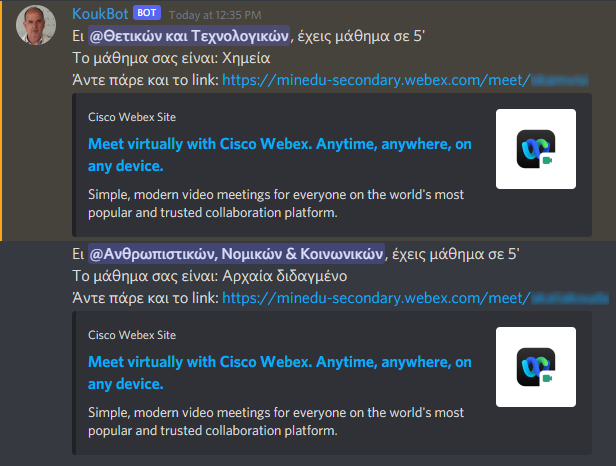
Program announcer is the part of the bot that announces the upcoming subject for everyone. It posts a message on a channel (announcement channel) 5 minutes before a class starts and 5 minutes before it ends to announce the upcoming break. It divides my class into 4 sub-classes depending on the subjects the mainly focus on. Before each class the bot announces 4 subjects one for each sub-class. Before each break there is a global announcement regardless sub-class. It gets the next subject based on the program.json file which contains the weekly program for every sub-class.
The file contains 4 class objects which represent the 4 sub-classes. The keys of class objects are the numbers from 0 to 3. Inside every class object there are 35 subject elements (7 hours a day x 5 days a week) representing a subject at a specific day of the week and time. The keys of subject objects have values from 0 to 34. Now a subject is represented by a list of 2 integers, the first being for getting the subject from the Enum and the second for getting the correct professor. A subject object usually contain just one list (= one subject).
- Some subjects are taught to everyone regardless their subclass. To handle those subjects the bot uses the first
classobject and when there is a global subject instead of itssubjectobject containing just 1 list it contains 2 for the 2 sub-classes created by alphabetical order.
The class object which contains 35 subject objects (not showing all of them):
"0": { //First sub-class
  "0": [10, 0], //The first subject of the week. Monday, first hour of the day.
  "1": [9, 0], //The first integer is the index of the subject Enum. ('9' -> 'LATIN')
  "2": [8, 0], //The second integer is the index of the professor list for the subject ('8' -> 'HISTORY', '0' -> first teacher)
  .
  .
  "33": [15, 0], //Day: Friday, Time of the day: 6th hour
  "34": [15, 0],
}
A class object which also contains global subjects:
"0": {
  "0": [10, 0],
  "1": [9, 0], //Day: Monday, Time of the day: 2nd hour
  "2": { //The lists represent a subject for each sub-class divided alphabetically
    "0": [0, 0], //First sub-class: ('0' -> 'GREEK', '0' -> first teacher)
    "1": [12, 0] //Second sub-class: ('12' -> 'PHYSICAL_EDUCATION', '0' -> first teacher)
  },
  .
  .
  "34": [15, 0],
}
An announcement for 2 sub-classes:
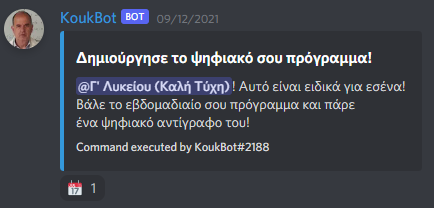
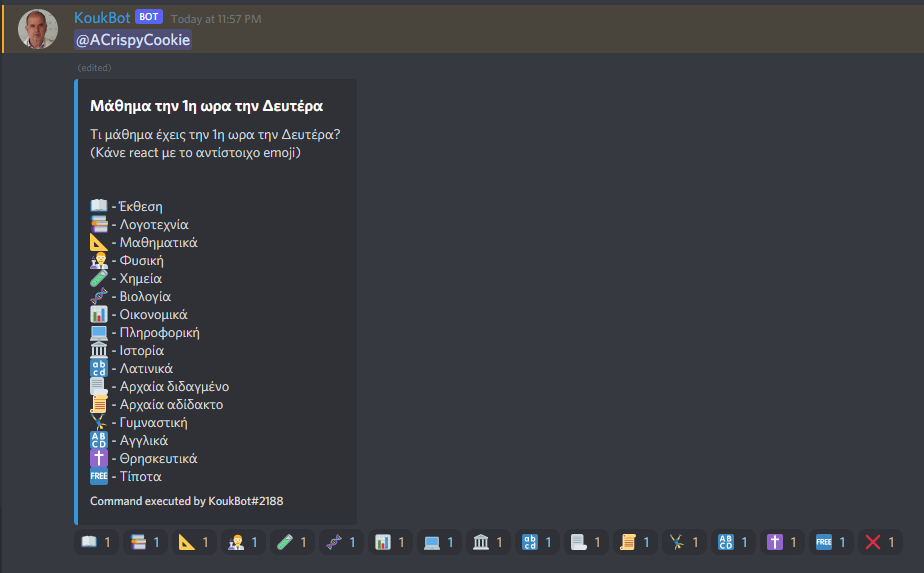
Program creator is a system created to make the process of saving a program on their phone very easy. It is an very user friendly process which uses message reactions to gather input from the users. There are 2 types of programs, morning and afternoon. The morning programs are used for school while the afternoon for after-school lessons. To start the creation of a program you first have to react on a message to start the process. After that you will be directed to your own channel in which you will have to input your program by clicking the corresponding reaction for each subject.
The program_creator.json file stores any program creation that is still in progress. It stores an object per program creation (1 program creation per user) which contains information about the channel which the process takes place and the stage of the creation. The data for each program is saved in the data object of each program object. This object contains 37 or 62 objects, based on the type of the program (morning or afternoon). The keys of the data objects are the numbers from 0 to 36 or 61. The object 0 contains the type of the program,m for morning and a for afternoon. The other objects are numbers pointing to the subject Enum used in the Program announcer. The last object is used to store the color of the border as an index to a list with pre-saved colors. The key of each program object is the user ID who started the process. Each object contains the following elements:
channel- The channel in which the creation takes place.message- The message that acts as a button and gets the input of the user.stage- The current stage the message represents.maxStageReached- The maximum stage reached in the process. This is used to calculate when to remove '◀','▶' buttons.data- Contains a series of object that store a subject index for every time of the day and every day of the week.
A program object inside program_creator.json
"123456789012345678": { //The key is the ID of the user.
  "channel": 887049797683535982, //Channel ID
  "message": 887049799617101945, //Message ID
  "maxStageReached": 36,
  "stage": 18, //Current stage is lower than the max stage because the '◀' button was used to navigate between stages.
  "data": {
    "0": "m", //Morning program
    "1": "0",
    "2": "12", //On monday 2nd hour of the day the subject is 'PHYSICAL_EDUCATION'
    .
    .
    "35": "8" //Last subject. Friday 7th hour of the day is 'HISTORY'
    "36": "0" //The border color is 'BLACK'
  }
},
Starting message which begins the process of creation:
The message you react to, to give input to the bot:
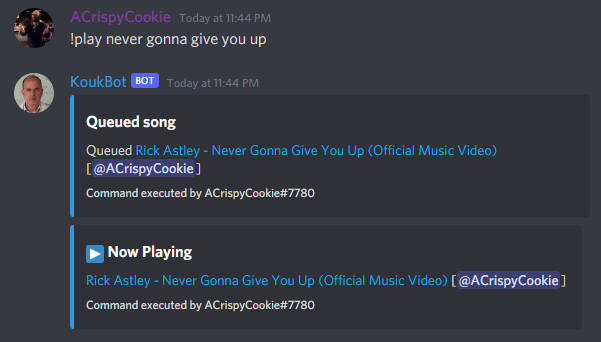
Music player is used to play music inside of voice channels using KoukBot. Users can add videos from YouTube to the queue, pause the player, stop the player or move around the queue of videos. As a joke a voiceline from a professor has been added every time the bot joins a voice channel.
- /play - Adds a video to the queue and starts the player is the queue was empty. (Aliases: q)
- /pause - Pauses the player on the current video.
- /stop - Stops the player and resets the queue to its first index.
- /previous - Moves the queue one index backwards. (Aliases: prev)
- /next - Moves the queue one index forwards. (Aliases: skip)
Adding a song to the queue and starting the player:
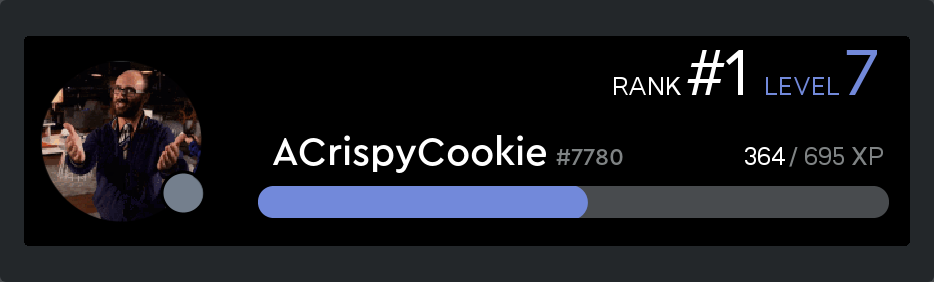
Chat levelling is a ranking system which ranks players based on chat activity. It adds a random amount of EXP (between 15 and 25) per message sent. There is a cooldown of one minute to every user so the maximum amount of exp that a user can get (assuming they have maximum luck) is 25. The maximum amount of EXP needed to level up increases as your level increases.
- /rank [user] - Renders and posts a user card which contains information about the user's level, rank and EXP.
- /setcolor - Sets the koukBot color for your user card.
data.json contains the information about the chat levelling for every user on the discord server. Every user is represented by an object with the key being their discord ID. Every user object contain the following elements:
nextMinute- A timestamp which shows when the user's cooldown for receiving EXP ends.level- The current level of the userxp- The current EXP the user has. (Not total)card-color- A hax color code for the koukBot color of the user card. The users total EXP and EXP needed to level up is calculated when a user gets loaded. There is an optional element inside auserobject which is a list of extra level-up lines for some users.
A user object inside data.json:
"123456789012345678": {
  "nextMinute": 1633420433391, //After this time the user is able to receive EXP again
  "level": 5,
  "xp": 28,
  "extra-level-up": [ //Optional: This phrase is unique to the user with the id
    "Congrats."
  ],
  "card-color": "#62D3F5" //Default color
},
A card of an offline user using the color #7289DA as the koukBot color:
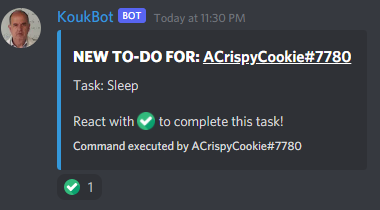
To-do task manager is a system that saves your to-dos on a discord channel and give you the option to complete them. The koukBot command of this system is /todo <task> which is used to add a new task to your task list. If you haven't created a to-do list before the bot will create a channel with your username in which it will then post the task. When you finish the task you can react to the corresponding message to complete it.
The todo.json stores the data for every user's task. It contains one object per user with the key of it being the channel ID of their to-do channel. Every channel object contains 2 elements:
userId- The user ID that owns the to-do channel.toDos- A list that contains every message ID of every to-do task. The message IDs are saved in order to track any reactions added and complete the tasks.
A channel object inside todo.json:
"885924752903000125": { //The ID of a to-do channel
  "userId": 123456789012345678, //The user ID that uses the to-do channel
  "toDos": [ //All the message IDs inside a to-do channel
    895045208247513098,
    895194860997476352
  ]
}
A to-do task on a user's channel:
KoukBot also has some commands which are very basic and are used very frequently by a lot of users. These commands are:
- /clear - Clears the amount of messages specified in the channel the command was sent to. (2 <= amount <= 99)
- /notify - Notifies a defeaned user by moving them in a random voice channel and moving them back.
- /message - Makes KoukBot post a message in the chat. (Alias: msg)