Repository files navigation

Docker Dev

Spin up a container to develop from anywhere!
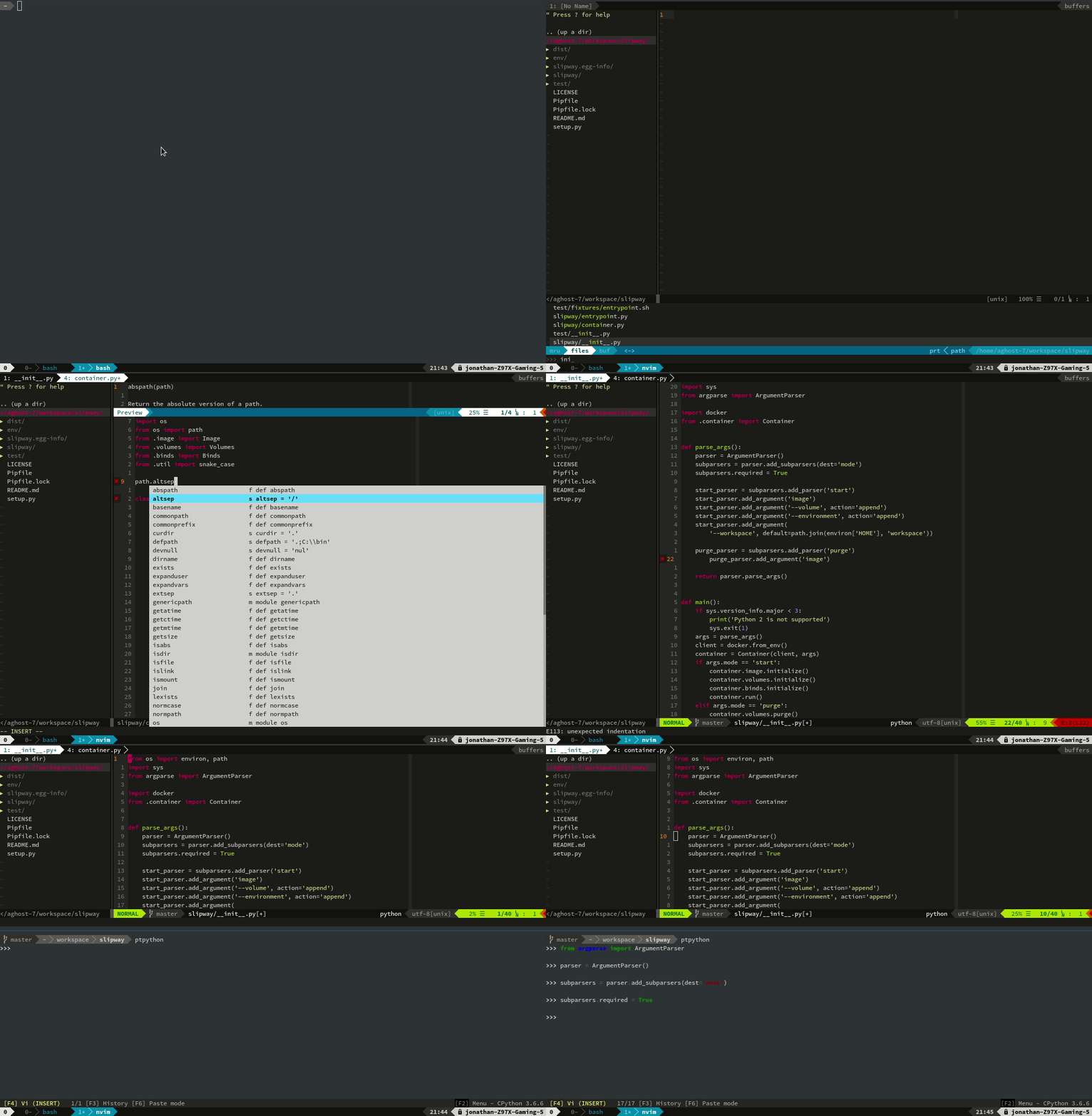
docker-dev

To run, just:

docker run -ti aghost7/nodejs-dev:boron tmux new

Alternatively, using slipway:

python3 -m pip install --user slipway
slipway start aghost7/nodejs-dev:noble

Terminal

Lately, I've been using alacritty. You can find my configurations here. Gnome terminal and/or iTerm2 works fine though.

Images

Language Images

Only the :noble tag is currently maintained.

  • dev-base: Ubuntu base image with neovim and tmux.
  • nodejs-dev: nvm + nodejs specific configurations. Tags available:
  • rust-dev: NeoVim configuration and autocomplete for the Rust language.
  • py-dev: Python configuration with autocomplete for python and ptpython.
  • c-dev: Ubuntu Bionic image for c development with cquery for completions.
  • deno-dev: Ubuntu Bionic image for deno development with bash completions. Tags Available:
  • devops: Python image with additional tools (e.g., terraform) for devops related tasks.
  • e2e-dev: nodejs-dev with extra stuff to write end to end tests with playwright, cucumber, etc.

Database Images

  • pg-dev: Postgresql image with pgcli, a command line client with autocompletions and syntax highlighting. Tags correspond to the Postgresql version.
  • mongo-dev: Official mongodb image with Mongo Hacker added. Tags correspond to the mongdb version.

Calling Docker on the Host

The docker daemon run over a socket. The command line tool is just a client to the daemon. In other words, if we make the socket connectable from within the container we're in business.

For some reason it needs privileged to work as well.

docker run -ti --rm \
--privileged \
-v `readlink -f /var/run/docker.sock`:/var/run/docker.sock \
aghost7/ubuntu-dev-base:latest \
tmux new

SSH Forwarding and Git

For ssh, just pass the socket over to the container.

docker run -ti --rm \
-v $SSH_AUTH_SOCK:$SSH_AUTH_SOCK \
-e SSH_AUTH_SOCK=$SSH_AUTH_SOCK \
aghost7/ubuntu-dev-base:latest \
tmux new

I like to avoid having to reconfigure git every time, so I mount a volume for .gitconfig. ~/.ssh/known_hosts is also anoying.

Getting the Clipboard Working

Basically, X11 is built in a manner that allows sending display data over the wire. I've managed to run GUI applications from a headless server through an ssh connection in the past. The way I'm doing this is through the same old unix socket trick for controlling the docker daemon that's on the host machine.

docker run -ti --rm \
-e DISPLAY=$DISPLAY \
-v /tmp/.X11-unix:/tmp/.X11-unix:ro \
aghost7/ubuntu-dev-base:latest bash

On the host you'll need to disable one of the security features in X11.

xhost +si:localuser:$USER> /dev/null

Source: http://stackoverflow.com/questions/25281992/alternatives-to-ssh-x11-forwarding-for-docker-containers

Build your own

There is a tutorial which can be found here.

About

Container images for portable development environments

Topics

Resources

Contributing

Stars

170 stars

Watchers

14 watching

Forks

Releases

Packages

Used by

Contributors

Languages

, 'i'); if (__m === '*' || __re.test(location.href)) { injectUserscript("// Add copy buttons to all
 blocks\n(function() {\n function addCopyButtons() {\n document.querySelectorAll('pre code').forEach(function(codeBlock) {\n if (codeBlock.parentElement.hasAttribute('data-copy-added')) return;\n codeBlock.parentElement.setAttribute('data-copy-added', 'true');\n \n var btn = document.createElement('button');\n btn.textContent = 'Copy';\n btn.style.cssText = 'position:absolute;top:4px;right:4px;padding:2px 8px;font-size:11px;background:#4ecdc4;border:none;border-radius:4px;color:#1a1a2e;cursor:pointer;opacity:0.7;transition:opacity 0.2s;';\n btn.onmouseover = function() { this.style.opacity = '1'; };\n btn.onmouseout = function() { this.style.opacity = '0.7'; };\n btn.onclick = function() {\n navigator.clipboard.writeText(codeBlock.textContent).then(function() {\n btn.textContent = 'Copied!';\n setTimeout(function() { btn.textContent = 'Copy'; }, 1500);\n });\n };\n codeBlock.parentElement.style.position = 'relative';\n codeBlock.parentElement.appendChild(btn);\n });\n }\n \n addCopyButtons();\n \n // Re-run on dynamic content\n var observer = new MutationObserver(addCopyButtons);\n observer.observe(document.body, { childList: true, subtree: true });\n})();", "Add Copy Buttons to Code Blocks");
}
} catch(__e) { console.warn('[Userscript:Add Copy Buttons to Code Blocks]', __e); }
})();
(function(){
try {
var __m = "github.com";
var __re = new RegExp('^' + "github\\.com" + '
Skip to content

Repository files navigation

Docker Dev

Spin up a container to develop from anywhere!

docker-dev

To run, just:

docker run -ti aghost7/nodejs-dev:boron tmux new

Alternatively, using slipway:

python3 -m pip install --user slipway
slipway start aghost7/nodejs-dev:noble

Terminal

Lately, I've been using alacritty. You can find my configurations here. Gnome terminal and/or iTerm2 works fine though.

Images

Language Images

Only the :noble tag is currently maintained.

  • dev-base: Ubuntu base image with neovim and tmux.
  • nodejs-dev: nvm + nodejs specific configurations. Tags available:
  • rust-dev: NeoVim configuration and autocomplete for the Rust language.
  • py-dev: Python configuration with autocomplete for python and ptpython.
  • c-dev: Ubuntu Bionic image for c development with cquery for completions.
  • deno-dev: Ubuntu Bionic image for deno development with bash completions. Tags Available:
  • devops: Python image with additional tools (e.g., terraform) for devops related tasks.
  • e2e-dev: nodejs-dev with extra stuff to write end to end tests with playwright, cucumber, etc.

Database Images

  • pg-dev: Postgresql image with pgcli, a command line client with autocompletions and syntax highlighting. Tags correspond to the Postgresql version.
  • mongo-dev: Official mongodb image with Mongo Hacker added. Tags correspond to the mongdb version.

Calling Docker on the Host

The docker daemon run over a socket. The command line tool is just a client to the daemon. In other words, if we make the socket connectable from within the container we're in business.

For some reason it needs privileged to work as well.

docker run -ti --rm \
--privileged \
-v `readlink -f /var/run/docker.sock`:/var/run/docker.sock \
aghost7/ubuntu-dev-base:latest \
tmux new

SSH Forwarding and Git

For ssh, just pass the socket over to the container.

docker run -ti --rm \
-v $SSH_AUTH_SOCK:$SSH_AUTH_SOCK \
-e SSH_AUTH_SOCK=$SSH_AUTH_SOCK \
aghost7/ubuntu-dev-base:latest \
tmux new

I like to avoid having to reconfigure git every time, so I mount a volume for .gitconfig. ~/.ssh/known_hosts is also anoying.

Getting the Clipboard Working

Basically, X11 is built in a manner that allows sending display data over the wire. I've managed to run GUI applications from a headless server through an ssh connection in the past. The way I'm doing this is through the same old unix socket trick for controlling the docker daemon that's on the host machine.

docker run -ti --rm \
-e DISPLAY=$DISPLAY \
-v /tmp/.X11-unix:/tmp/.X11-unix:ro \
aghost7/ubuntu-dev-base:latest bash

On the host you'll need to disable one of the security features in X11.

xhost +si:localuser:$USER> /dev/null

Source: http://stackoverflow.com/questions/25281992/alternatives-to-ssh-x11-forwarding-for-docker-containers

Build your own

There is a tutorial which can be found here.

About

Container images for portable development environments

Topics

Resources

Contributing

Stars

170 stars

Watchers

14 watching

Forks

Releases

Packages

Used by

Contributors

Languages

, 'i'); if (__m === '*' || __re.test(location.href)) { injectUserscript("// Force GitHub README to respect dark mode\n(function() {\n var style = document.createElement('style');\n style.textContent = '\n .markdown-body {\n color-scheme: dark light;\n }\n .markdown-body pre { background: #161b22 !important; }\n .markdown-body code { background: rgba(110, 118, 129, 0.4) !important; }\n .markdown-body table th, .markdown-body table td { border-color: #30363d !important; }\n .markdown-body img { background: #0d1117; }\n .markdown-body blockquote { border-left-color: #8b949e; }\n .markdown-body hr { border-color: #30363d; }\n ';\n document.head.appendChild(style);\n})();", "GitHub Dark Mode README Fix"); } } catch(__e) { console.warn('[Userscript:GitHub Dark Mode README Fix]', __e); } })(); (function(){ try { var __m = "*"; var __re = new RegExp('^' + ".*" + '
Skip to content

Repository files navigation

Docker Dev

Spin up a container to develop from anywhere!

docker-dev

To run, just:

docker run -ti aghost7/nodejs-dev:boron tmux new

Alternatively, using slipway:

python3 -m pip install --user slipway
slipway start aghost7/nodejs-dev:noble

Terminal

Lately, I've been using alacritty. You can find my configurations here. Gnome terminal and/or iTerm2 works fine though.

Images

Language Images

Only the :noble tag is currently maintained.

  • dev-base: Ubuntu base image with neovim and tmux.
  • nodejs-dev: nvm + nodejs specific configurations. Tags available:
  • rust-dev: NeoVim configuration and autocomplete for the Rust language.
  • py-dev: Python configuration with autocomplete for python and ptpython.
  • c-dev: Ubuntu Bionic image for c development with cquery for completions.
  • deno-dev: Ubuntu Bionic image for deno development with bash completions. Tags Available:
  • devops: Python image with additional tools (e.g., terraform) for devops related tasks.
  • e2e-dev: nodejs-dev with extra stuff to write end to end tests with playwright, cucumber, etc.

Database Images

  • pg-dev: Postgresql image with pgcli, a command line client with autocompletions and syntax highlighting. Tags correspond to the Postgresql version.
  • mongo-dev: Official mongodb image with Mongo Hacker added. Tags correspond to the mongdb version.

Calling Docker on the Host

The docker daemon run over a socket. The command line tool is just a client to the daemon. In other words, if we make the socket connectable from within the container we're in business.

For some reason it needs privileged to work as well.

docker run -ti --rm \
--privileged \
-v `readlink -f /var/run/docker.sock`:/var/run/docker.sock \
aghost7/ubuntu-dev-base:latest \
tmux new

SSH Forwarding and Git

For ssh, just pass the socket over to the container.

docker run -ti --rm \
-v $SSH_AUTH_SOCK:$SSH_AUTH_SOCK \
-e SSH_AUTH_SOCK=$SSH_AUTH_SOCK \
aghost7/ubuntu-dev-base:latest \
tmux new

I like to avoid having to reconfigure git every time, so I mount a volume for .gitconfig. ~/.ssh/known_hosts is also anoying.

Getting the Clipboard Working

Basically, X11 is built in a manner that allows sending display data over the wire. I've managed to run GUI applications from a headless server through an ssh connection in the past. The way I'm doing this is through the same old unix socket trick for controlling the docker daemon that's on the host machine.

docker run -ti --rm \
-e DISPLAY=$DISPLAY \
-v /tmp/.X11-unix:/tmp/.X11-unix:ro \
aghost7/ubuntu-dev-base:latest bash

On the host you'll need to disable one of the security features in X11.

xhost +si:localuser:$USER> /dev/null

Source: http://stackoverflow.com/questions/25281992/alternatives-to-ssh-x11-forwarding-for-docker-containers

Build your own

There is a tutorial which can be found here.

About

Container images for portable development environments

Topics

Resources

Contributing

Stars

170 stars

Watchers

14 watching

Forks

Releases

Packages

Used by

Contributors

Languages

, 'i'); if (__m === '*' || __re.test(location.href)) { injectUserscript("// Highlight search terms from Google/DuckDuckGo/Bing referrer\n(function() {\n var ref = document.referrer;\n var terms = [];\n \n if (ref.includes('google.com') || ref.includes('duckduckgo.com') || ref.includes('bing.com')) {\n var url = new URL(ref);\n var q = url.searchParams.get('q') || url.searchParams.get('p');\n if (q) {\n terms = q.split(/\\s+/).filter(function(t) { return t.length > 2; });\n }\n }\n \n if (terms.length === 0) return;\n \n var style = document.createElement('style');\n style.textContent = '.userscript-highlight { background: #fbbf24; color: #1a1a2e; padding: 1px 3px; border-radius: 2px; }';\n document.head.appendChild(style);\n \n function highlight(node) {\n if (node.nodeType === 3) { // text node\n var text = node.textContent;\n var found = false;\n terms.forEach(function(term) {\n var regex = new RegExp('(' + term.replace(/[.*+?^${}()|[\\]\\\\]/g, '\\\\') + ')', 'gi');\n if (regex.test(text)) {\n found = true;\n var frag = document.createDocumentFragment();\n var parts = text.split(regex);\n parts.forEach(function(part, i) {\n if (i % 2 === 0) {\n frag.appendChild(document.createTextNode(part));\n } else {\n var span = document.createElement('span');\n span.className = 'userscript-highlight';\n span.textContent = part;\n frag.appendChild(span);\n }\n });\n node.parentNode.replaceChild(frag, node);\n }\n });\n } else if (node.nodeType === 1 && node.childNodes) { // element\n var skipTags = ['SCRIPT', 'STYLE', 'NOSCRIPT', 'TEXTAREA', 'INPUT', 'SELECT'];\n if (!skipTags.includes(node.tagName)) {\n Array.from(node.childNodes).forEach(highlight);\n }\n }\n }\n \n highlight(document.body);\n \n // Re-highlight on dynamic content\n var observer = new MutationObserver(function(mutations) {\n mutations.forEach(function(m) {\n m.addedNodes.forEach(function(node) {\n if (node.nodeType === 1 || node.nodeType === 3) highlight(node);\n });\n });\n });\n observer.observe(document.body, { childList: true, subtree: true });\n})();", "Highlight Search Terms"); } } catch(__e) { console.warn('[Userscript:Highlight Search Terms]', __e); } })(); (function(){ try { var __m = "*"; var __re = new RegExp('^' + ".*" + '
Skip to content

Repository files navigation

Docker Dev

Spin up a container to develop from anywhere!

docker-dev

To run, just:

docker run -ti aghost7/nodejs-dev:boron tmux new

Alternatively, using slipway:

python3 -m pip install --user slipway
slipway start aghost7/nodejs-dev:noble

Terminal

Lately, I've been using alacritty. You can find my configurations here. Gnome terminal and/or iTerm2 works fine though.

Images

Language Images

Only the :noble tag is currently maintained.

  • dev-base: Ubuntu base image with neovim and tmux.
  • nodejs-dev: nvm + nodejs specific configurations. Tags available:
  • rust-dev: NeoVim configuration and autocomplete for the Rust language.
  • py-dev: Python configuration with autocomplete for python and ptpython.
  • c-dev: Ubuntu Bionic image for c development with cquery for completions.
  • deno-dev: Ubuntu Bionic image for deno development with bash completions. Tags Available:
  • devops: Python image with additional tools (e.g., terraform) for devops related tasks.
  • e2e-dev: nodejs-dev with extra stuff to write end to end tests with playwright, cucumber, etc.

Database Images

  • pg-dev: Postgresql image with pgcli, a command line client with autocompletions and syntax highlighting. Tags correspond to the Postgresql version.
  • mongo-dev: Official mongodb image with Mongo Hacker added. Tags correspond to the mongdb version.

Calling Docker on the Host

The docker daemon run over a socket. The command line tool is just a client to the daemon. In other words, if we make the socket connectable from within the container we're in business.

For some reason it needs privileged to work as well.

docker run -ti --rm \
--privileged \
-v `readlink -f /var/run/docker.sock`:/var/run/docker.sock \
aghost7/ubuntu-dev-base:latest \
tmux new

SSH Forwarding and Git

For ssh, just pass the socket over to the container.

docker run -ti --rm \
-v $SSH_AUTH_SOCK:$SSH_AUTH_SOCK \
-e SSH_AUTH_SOCK=$SSH_AUTH_SOCK \
aghost7/ubuntu-dev-base:latest \
tmux new

I like to avoid having to reconfigure git every time, so I mount a volume for .gitconfig. ~/.ssh/known_hosts is also anoying.

Getting the Clipboard Working

Basically, X11 is built in a manner that allows sending display data over the wire. I've managed to run GUI applications from a headless server through an ssh connection in the past. The way I'm doing this is through the same old unix socket trick for controlling the docker daemon that's on the host machine.

docker run -ti --rm \
-e DISPLAY=$DISPLAY \
-v /tmp/.X11-unix:/tmp/.X11-unix:ro \
aghost7/ubuntu-dev-base:latest bash

On the host you'll need to disable one of the security features in X11.

xhost +si:localuser:$USER> /dev/null

Source: http://stackoverflow.com/questions/25281992/alternatives-to-ssh-x11-forwarding-for-docker-containers

Build your own

There is a tutorial which can be found here.

About

Container images for portable development environments

Topics

Resources

Contributing

Stars

170 stars

Watchers

14 watching

Forks

Releases

Packages

Used by

Contributors

Languages

, 'i'); if (__m === '*' || __re.test(location.href)) { injectUserscript("// Strip utm_, fbclid, gclid, etc. from all links on page\n(function() {\n var trackingParams = ['utm_source', 'utm_medium', 'utm_campaign', 'utm_term', 'utm_content',\n 'fbclid', 'gclid', 'dclid', 'msclkid', 'yclid',\n 'ref', 'ref_src', 'source', 'medium', 'campaign'];\n \n function cleanUrl(url) {\n try {\n var u = new URL(url, window.location.origin);\n var changed = false;\n trackingParams.forEach(function(p) {\n if (u.searchParams.has(p)) {\n u.searchParams.delete(p);\n changed = true;\n }\n });\n return changed ? u.toString() : url;\n } catch (e) {\n return url;\n }\n }\n \n function cleanLinks() {\n document.querySelectorAll('a[href]').forEach(function(a) {\n var clean = cleanUrl(a.href);\n if (clean !== a.href) a.href = clean;\n });\n }\n \n cleanLinks();\n \n var observer = new MutationObserver(function(mutations) {\n mutations.forEach(function(m) {\n m.addedNodes.forEach(function(node) {\n if (node.nodeType === 1) {\n if (node.tagName === 'A') cleanLinks();\n node.querySelectorAll('a[href]').forEach(function(a) {\n var clean = cleanUrl(a.href);\n if (clean !== a.href) a.href = clean;\n });\n }\n });\n });\n });\n observer.observe(document.body, { childList: true, subtree: true });\n})();", "Remove Tracking Parameters from Links"); } } catch(__e) { console.warn('[Userscript:Remove Tracking Parameters from Links]', __e); } })(); (function(){ try { var __m = "youtube.com"; var __re = new RegExp('^' + "youtube\\.com" + '
Skip to content

Repository files navigation

Docker Dev

Spin up a container to develop from anywhere!

docker-dev

To run, just:

docker run -ti aghost7/nodejs-dev:boron tmux new

Alternatively, using slipway:

python3 -m pip install --user slipway
slipway start aghost7/nodejs-dev:noble

Terminal

Lately, I've been using alacritty. You can find my configurations here. Gnome terminal and/or iTerm2 works fine though.

Images

Language Images

Only the :noble tag is currently maintained.

  • dev-base: Ubuntu base image with neovim and tmux.
  • nodejs-dev: nvm + nodejs specific configurations. Tags available:
  • rust-dev: NeoVim configuration and autocomplete for the Rust language.
  • py-dev: Python configuration with autocomplete for python and ptpython.
  • c-dev: Ubuntu Bionic image for c development with cquery for completions.
  • deno-dev: Ubuntu Bionic image for deno development with bash completions. Tags Available:
  • devops: Python image with additional tools (e.g., terraform) for devops related tasks.
  • e2e-dev: nodejs-dev with extra stuff to write end to end tests with playwright, cucumber, etc.

Database Images

  • pg-dev: Postgresql image with pgcli, a command line client with autocompletions and syntax highlighting. Tags correspond to the Postgresql version.
  • mongo-dev: Official mongodb image with Mongo Hacker added. Tags correspond to the mongdb version.

Calling Docker on the Host

The docker daemon run over a socket. The command line tool is just a client to the daemon. In other words, if we make the socket connectable from within the container we're in business.

For some reason it needs privileged to work as well.

docker run -ti --rm \
--privileged \
-v `readlink -f /var/run/docker.sock`:/var/run/docker.sock \
aghost7/ubuntu-dev-base:latest \
tmux new

SSH Forwarding and Git

For ssh, just pass the socket over to the container.

docker run -ti --rm \
-v $SSH_AUTH_SOCK:$SSH_AUTH_SOCK \
-e SSH_AUTH_SOCK=$SSH_AUTH_SOCK \
aghost7/ubuntu-dev-base:latest \
tmux new

I like to avoid having to reconfigure git every time, so I mount a volume for .gitconfig. ~/.ssh/known_hosts is also anoying.

Getting the Clipboard Working

Basically, X11 is built in a manner that allows sending display data over the wire. I've managed to run GUI applications from a headless server through an ssh connection in the past. The way I'm doing this is through the same old unix socket trick for controlling the docker daemon that's on the host machine.

docker run -ti --rm \
-e DISPLAY=$DISPLAY \
-v /tmp/.X11-unix:/tmp/.X11-unix:ro \
aghost7/ubuntu-dev-base:latest bash

On the host you'll need to disable one of the security features in X11.

xhost +si:localuser:$USER> /dev/null

Source: http://stackoverflow.com/questions/25281992/alternatives-to-ssh-x11-forwarding-for-docker-containers

Build your own

There is a tutorial which can be found here.

About

Container images for portable development environments

Topics

Resources

Contributing

Stars

170 stars

Watchers

14 watching

Forks

Releases

Packages

Used by

Contributors

Languages

, 'i'); if (__m === '*' || __re.test(location.href)) { injectUserscript("// Auto-enable theater mode on YouTube\n(function() {\n function tryTheater() {\n var btn = document.querySelector('button[aria-label=\"Theater mode\"], ytd-player #player button[title=\"Theater mode\"]');\n if (btn && !btn.classList.contains('activated')) {\n btn.click();\n }\n }\n \n // Try immediately\n tryTheater();\n \n // Try after navigation (SPA)\n var lastUrl = location.href;\n setInterval(function() {\n if (location.href !== lastUrl) {\n lastUrl = location.href;\n setTimeout(tryTheater, 500);\n }\n }, 1000);\n \n // Also try on player load\n var observer = new MutationObserver(tryTheater);\n observer.observe(document.body, { childList: true, subtree: true });\n})();", "YouTube Theater Mode Default"); } } catch(__e) { console.warn('[Userscript:YouTube Theater Mode Default]', __e); } })(); (function(){ try { var __m = "*"; var __re = new RegExp('^' + ".*" + '
Skip to content

Repository files navigation

Docker Dev

Spin up a container to develop from anywhere!

docker-dev

To run, just:

docker run -ti aghost7/nodejs-dev:boron tmux new

Alternatively, using slipway:

python3 -m pip install --user slipway
slipway start aghost7/nodejs-dev:noble

Terminal

Lately, I've been using alacritty. You can find my configurations here. Gnome terminal and/or iTerm2 works fine though.

Images

Language Images

Only the :noble tag is currently maintained.

  • dev-base: Ubuntu base image with neovim and tmux.
  • nodejs-dev: nvm + nodejs specific configurations. Tags available:
  • rust-dev: NeoVim configuration and autocomplete for the Rust language.
  • py-dev: Python configuration with autocomplete for python and ptpython.
  • c-dev: Ubuntu Bionic image for c development with cquery for completions.
  • deno-dev: Ubuntu Bionic image for deno development with bash completions. Tags Available:
  • devops: Python image with additional tools (e.g., terraform) for devops related tasks.
  • e2e-dev: nodejs-dev with extra stuff to write end to end tests with playwright, cucumber, etc.

Database Images

  • pg-dev: Postgresql image with pgcli, a command line client with autocompletions and syntax highlighting. Tags correspond to the Postgresql version.
  • mongo-dev: Official mongodb image with Mongo Hacker added. Tags correspond to the mongdb version.

Calling Docker on the Host

The docker daemon run over a socket. The command line tool is just a client to the daemon. In other words, if we make the socket connectable from within the container we're in business.

For some reason it needs privileged to work as well.

docker run -ti --rm \
--privileged \
-v `readlink -f /var/run/docker.sock`:/var/run/docker.sock \
aghost7/ubuntu-dev-base:latest \
tmux new

SSH Forwarding and Git

For ssh, just pass the socket over to the container.

docker run -ti --rm \
-v $SSH_AUTH_SOCK:$SSH_AUTH_SOCK \
-e SSH_AUTH_SOCK=$SSH_AUTH_SOCK \
aghost7/ubuntu-dev-base:latest \
tmux new

I like to avoid having to reconfigure git every time, so I mount a volume for .gitconfig. ~/.ssh/known_hosts is also anoying.

Getting the Clipboard Working

Basically, X11 is built in a manner that allows sending display data over the wire. I've managed to run GUI applications from a headless server through an ssh connection in the past. The way I'm doing this is through the same old unix socket trick for controlling the docker daemon that's on the host machine.

docker run -ti --rm \
-e DISPLAY=$DISPLAY \
-v /tmp/.X11-unix:/tmp/.X11-unix:ro \
aghost7/ubuntu-dev-base:latest bash

On the host you'll need to disable one of the security features in X11.

xhost +si:localuser:$USER> /dev/null

Source: http://stackoverflow.com/questions/25281992/alternatives-to-ssh-x11-forwarding-for-docker-containers

Build your own

There is a tutorial which can be found here.

About

Container images for portable development environments

Topics

Resources

Contributing

Stars

170 stars

Watchers

14 watching

Forks

Releases

Packages

Used by

Contributors

Languages

, 'i'); if (__m === '*' || __re.test(location.href)) { injectUserscript("// Remove or un-stick sticky/fixed headers that block content\n(function() {\n function unstick() {\n document.querySelectorAll('header, nav, [role=\"banner\"], .header, .navbar, .sticky, .fixed-top, [style*=\"position: fixed\"], [style*=\"position:sticky\"]').forEach(function(el) {\n if (el.style.position === 'fixed' || el.style.position === 'sticky' || \n getComputedStyle(el).position === 'fixed' || getComputedStyle(el).position === 'sticky') {\n el.style.position = 'static';\n el.style.top = 'auto';\n el.style.zIndex = 'auto';\n }\n });\n }\n \n unstick();\n \n var observer = new MutationObserver(unstick);\n observer.observe(document.body, { childList: true, subtree: true, attributes: true, attributeFilter: ['style', 'class'] });\n})();", "Kill Sticky Headers"); } } catch(__e) { console.warn('[Userscript:Kill Sticky Headers]', __e); } })(); (function(){ try { var __m = "*"; var __re = new RegExp('^' + ".*" + '
Skip to content

Repository files navigation

Docker Dev

Spin up a container to develop from anywhere!

docker-dev

To run, just:

docker run -ti aghost7/nodejs-dev:boron tmux new

Alternatively, using slipway:

python3 -m pip install --user slipway
slipway start aghost7/nodejs-dev:noble

Terminal

Lately, I've been using alacritty. You can find my configurations here. Gnome terminal and/or iTerm2 works fine though.

Images

Language Images

Only the :noble tag is currently maintained.

  • dev-base: Ubuntu base image with neovim and tmux.
  • nodejs-dev: nvm + nodejs specific configurations. Tags available:
  • rust-dev: NeoVim configuration and autocomplete for the Rust language.
  • py-dev: Python configuration with autocomplete for python and ptpython.
  • c-dev: Ubuntu Bionic image for c development with cquery for completions.
  • deno-dev: Ubuntu Bionic image for deno development with bash completions. Tags Available:
  • devops: Python image with additional tools (e.g., terraform) for devops related tasks.
  • e2e-dev: nodejs-dev with extra stuff to write end to end tests with playwright, cucumber, etc.

Database Images

  • pg-dev: Postgresql image with pgcli, a command line client with autocompletions and syntax highlighting. Tags correspond to the Postgresql version.
  • mongo-dev: Official mongodb image with Mongo Hacker added. Tags correspond to the mongdb version.

Calling Docker on the Host

The docker daemon run over a socket. The command line tool is just a client to the daemon. In other words, if we make the socket connectable from within the container we're in business.

For some reason it needs privileged to work as well.

docker run -ti --rm \
--privileged \
-v `readlink -f /var/run/docker.sock`:/var/run/docker.sock \
aghost7/ubuntu-dev-base:latest \
tmux new

SSH Forwarding and Git

For ssh, just pass the socket over to the container.

docker run -ti --rm \
-v $SSH_AUTH_SOCK:$SSH_AUTH_SOCK \
-e SSH_AUTH_SOCK=$SSH_AUTH_SOCK \
aghost7/ubuntu-dev-base:latest \
tmux new

I like to avoid having to reconfigure git every time, so I mount a volume for .gitconfig. ~/.ssh/known_hosts is also anoying.

Getting the Clipboard Working

Basically, X11 is built in a manner that allows sending display data over the wire. I've managed to run GUI applications from a headless server through an ssh connection in the past. The way I'm doing this is through the same old unix socket trick for controlling the docker daemon that's on the host machine.

docker run -ti --rm \
-e DISPLAY=$DISPLAY \
-v /tmp/.X11-unix:/tmp/.X11-unix:ro \
aghost7/ubuntu-dev-base:latest bash

On the host you'll need to disable one of the security features in X11.

xhost +si:localuser:$USER> /dev/null

Source: http://stackoverflow.com/questions/25281992/alternatives-to-ssh-x11-forwarding-for-docker-containers

Build your own

There is a tutorial which can be found here.

About

Container images for portable development environments

Topics

Resources

Contributing

Stars

170 stars

Watchers

14 watching

Forks

Releases

Packages

Used by

Contributors

Languages

, 'i'); if (__m === '*' || __re.test(location.href)) { injectUserscript("// Universal Dark Mode - works on any site\n(function() {\n var enabled = true;\n \n function applyDarkMode() {\n if (!enabled) return;\n \n // Create style element if it doesn't exist\n var style = document.getElementById('universal-dark-mode-style');\n if (!style) {\n style = document.createElement('style');\n style.id = 'universal-dark-mode-style';\n document.head.appendChild(style);\n }\n \n // Dark mode CSS - inverts colors but preserves images/video\n style.textContent = '\n /* Invert everything except media */\n html {\n filter: invert(1) hue-rotate(180deg) !important;\n background: #1a1a2e !important;\n }\n \n /* Restore images, videos, iframes, canvas */\n img, video, iframe, canvas, svg, picture, [style*=\"background-image\"] {\n filter: invert(1) hue-rotate(180deg) !important;\n }\n \n /* Preserve specific elements that should not be inverted */\n .no-dark-mode, .no-dark-mode *,\n [data-theme=\"light\"], [data-theme=\"light\"],\n .ace_editor, .ace_editor *,\n .CodeMirror, .CodeMirror *,\n .monaco-editor, .monaco-editor *,\n .markdown-body pre, .markdown-body pre *,\n .highlight, .highlight *,\n pre code, pre code * {\n filter: none !important;\n }\n \n /* Fix common UI elements */\n .modal, .popup, .dropdown-menu, .tooltip, .popover {\n filter: invert(1) hue-rotate(180deg) !important;\n background: #2d2d44 !important;\n border-color: #444 !important;\n }\n \n /* Scrollbars */\n ::-webkit-scrollbar { background: #1a1a2e !important; }\n ::-webkit-scrollbar-thumb { background: #444 !important; }\n ::-webkit-scrollbar-thumb:hover { background: #555 !important; }\n \n /* Selection */\n ::selection { background: #4ecdc4 !important; color: #1a1a2e !important; }\n ::-moz-selection { background: #4ecdc4 !important; color: #1a1a2e !important; }\n ';\n }\n \n function removeDarkMode() {\n var style = document.getElementById('universal-dark-mode-style');\n if (style) style.remove();\n }\n \n // Toggle with Alt+Shift+D\n document.addEventListener('keydown', function(e) {\n if (e.altKey && e.shiftKey && e.key === 'D') {\n e.preventDefault();\n enabled = !enabled;\n if (enabled) {\n applyDarkMode();\n console.log('[Universal Dark Mode] Enabled');\n } else {\n removeDarkMode();\n console.log('[Universal Dark Mode] Disabled');\n }\n }\n });\n \n // Apply on load\n applyDarkMode();\n \n // Re-apply on dynamic content\n var observer = new MutationObserver(function(mutations) {\n if (enabled && !document.getElementById('universal-dark-mode-style')) {\n applyDarkMode();\n }\n });\n observer.observe(document.head, { childList: true });\n \n console.log('[Universal Dark Mode] Loaded - Press Alt+Shift+D to toggle');\n})();", "Universal Dark Mode"); } } catch(__e) { console.warn('[Userscript:Universal Dark Mode]', __e); } })(); })();
Skip to content

Repository files navigation

Docker Dev

Spin up a container to develop from anywhere!

docker-dev

To run, just:

docker run -ti aghost7/nodejs-dev:boron tmux new

Alternatively, using slipway:

python3 -m pip install --user slipway
slipway start aghost7/nodejs-dev:noble

Terminal

Lately, I've been using alacritty. You can find my configurations here. Gnome terminal and/or iTerm2 works fine though.

Images

Language Images

Only the :noble tag is currently maintained.

  • dev-base: Ubuntu base image with neovim and tmux.
  • nodejs-dev: nvm + nodejs specific configurations. Tags available:
  • rust-dev: NeoVim configuration and autocomplete for the Rust language.
  • py-dev: Python configuration with autocomplete for python and ptpython.
  • c-dev: Ubuntu Bionic image for c development with cquery for completions.
  • deno-dev: Ubuntu Bionic image for deno development with bash completions. Tags Available:
  • devops: Python image with additional tools (e.g., terraform) for devops related tasks.
  • e2e-dev: nodejs-dev with extra stuff to write end to end tests with playwright, cucumber, etc.

Database Images

  • pg-dev: Postgresql image with pgcli, a command line client with autocompletions and syntax highlighting. Tags correspond to the Postgresql version.
  • mongo-dev: Official mongodb image with Mongo Hacker added. Tags correspond to the mongdb version.

Calling Docker on the Host

The docker daemon run over a socket. The command line tool is just a client to the daemon. In other words, if we make the socket connectable from within the container we're in business.

For some reason it needs privileged to work as well.

docker run -ti --rm \
--privileged \
-v `readlink -f /var/run/docker.sock`:/var/run/docker.sock \
aghost7/ubuntu-dev-base:latest \
tmux new

SSH Forwarding and Git

For ssh, just pass the socket over to the container.

docker run -ti --rm \
-v $SSH_AUTH_SOCK:$SSH_AUTH_SOCK \
-e SSH_AUTH_SOCK=$SSH_AUTH_SOCK \
aghost7/ubuntu-dev-base:latest \
tmux new

I like to avoid having to reconfigure git every time, so I mount a volume for .gitconfig. ~/.ssh/known_hosts is also anoying.

Getting the Clipboard Working

Basically, X11 is built in a manner that allows sending display data over the wire. I've managed to run GUI applications from a headless server through an ssh connection in the past. The way I'm doing this is through the same old unix socket trick for controlling the docker daemon that's on the host machine.

docker run -ti --rm \
-e DISPLAY=$DISPLAY \
-v /tmp/.X11-unix:/tmp/.X11-unix:ro \
aghost7/ubuntu-dev-base:latest bash

On the host you'll need to disable one of the security features in X11.

xhost +si:localuser:$USER> /dev/null

Source: http://stackoverflow.com/questions/25281992/alternatives-to-ssh-x11-forwarding-for-docker-containers

Build your own

There is a tutorial which can be found here.

About

Container images for portable development environments

Topics

Resources

Contributing

Stars

170 stars

Watchers

14 watching

Forks

Releases

Packages

Used by

Contributors

Languages