I have made some changes to imgui-knobs, which is a port/adaptation of imgui-rs-knobs, for C++.
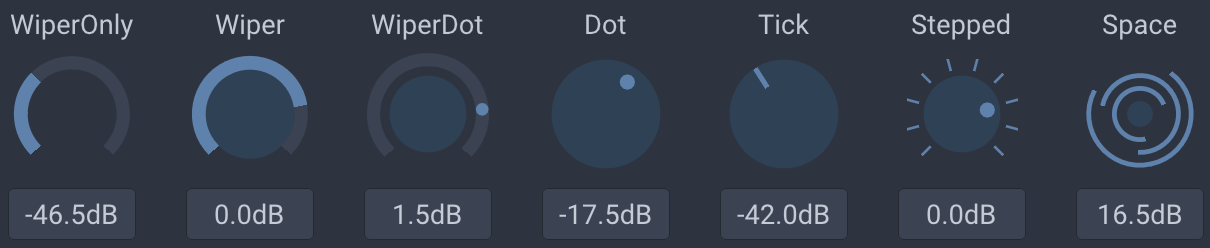
Add imgui-knobs.cpp and imgui-knobs.h to your project and include imgui-knobs.h in some source file.
staticfloat value = 0;
if (ImGuiKnobs::Knob("Volume", &value, -6.0f, 6.0f, 0.1f, "%.1fdB", ImGuiKnobVariant_Tick)) {
// value was changed
}
Draw knobs using either Knob or KnobInt. The API is:
bool ImGuiKnobs::Knob(label, *value, min, max, [speed, format, variant, size, flags, steps, angle_min, angle_max])
bool ImGuiKnobs::KnobInt(label, *value, min, max, [speed, format, variant, size, flags, steps])
variant determines the visual look of the knob. Available variants are: ImGuiKnobVariant_Tick, ImGuiKnobVariant_Dot, ImGuiKnobVariant_Wiper, ImGuiKnobVariant_WiperOnly, ImGuiKnobVariant_WiperDot, ImGuiKnobVariant_Stepped, ImGuiKnobVariant_Space.
ImGuiKnobFlags_NoTitle: Hide the top title.ImGuiKnobFlags_NoInput: Hide the bottom drag input.ImGuiKnobFlags_ValueTooltip: Show a tooltip with the current value on hover.ImGuiKnobFlags_DragHorizontal: Use horizontal dragging (default is vertical).ImGuiKnobFlags_RotateRelative: Use rotate relative dragging.ImGuiKnobFlags_RotateAbsolute: Use rotate absolute dragging.ImGuiKnobFlags_WrapAround: Values wraparound when using the "rotate" flags.
You can specify a size given as the width of the knob (will be scaled according to ImGui's FontGlobalScale). Default (0) will use 4x line height.
Steps determines the number of steps draw, it is only used for the ImGuiKnobVariant_Stepped variant.