Latest commit

History

61 Commits

Folders and files

NameName
Last commit message
Last commit date

Repository files navigation

stackline-logo

VersionLicense: MIT

Visualize yabai window stacks on macOS. Works with yabai & hammerspoon.

Current status

Unfortunately, I've haven't been able to work on this project since Q3 2021. Initially, this was due to a scary bout of RSI-esque finger pain that entirely prevented from me from typing (really – I had to use Talon for basic computer use); The lesson I took away is that my hobbies shouldn't invovlve continuous typing (given I'm already typing all day for work).

I apologize that I won't be working on this anymore – but that doesn't mean you can't fork & carry the torch ;)

June 2021 update

2021-06-06: Fixes & cleanup (v0.1.61)

  • Fixed: offset indicators when menubar is not hidden (#80)
  • Fixed: Icons don't change when toggling showIcons (#68)
  • Fixed: Failure to parse json output from yabai that contains inf values (might fix #46)
  • Removed external dependency on jq
  • Removed shell script used to call out to yabai
  • Replaced third-party json library with hs.json
  • Refactored unnecessary object-orientation out of stackline.query
  • Cleaned up stackline.lib.utils

See changelog.

Everything below & more is in the wiki.

What is stackline & why would I want to use it?

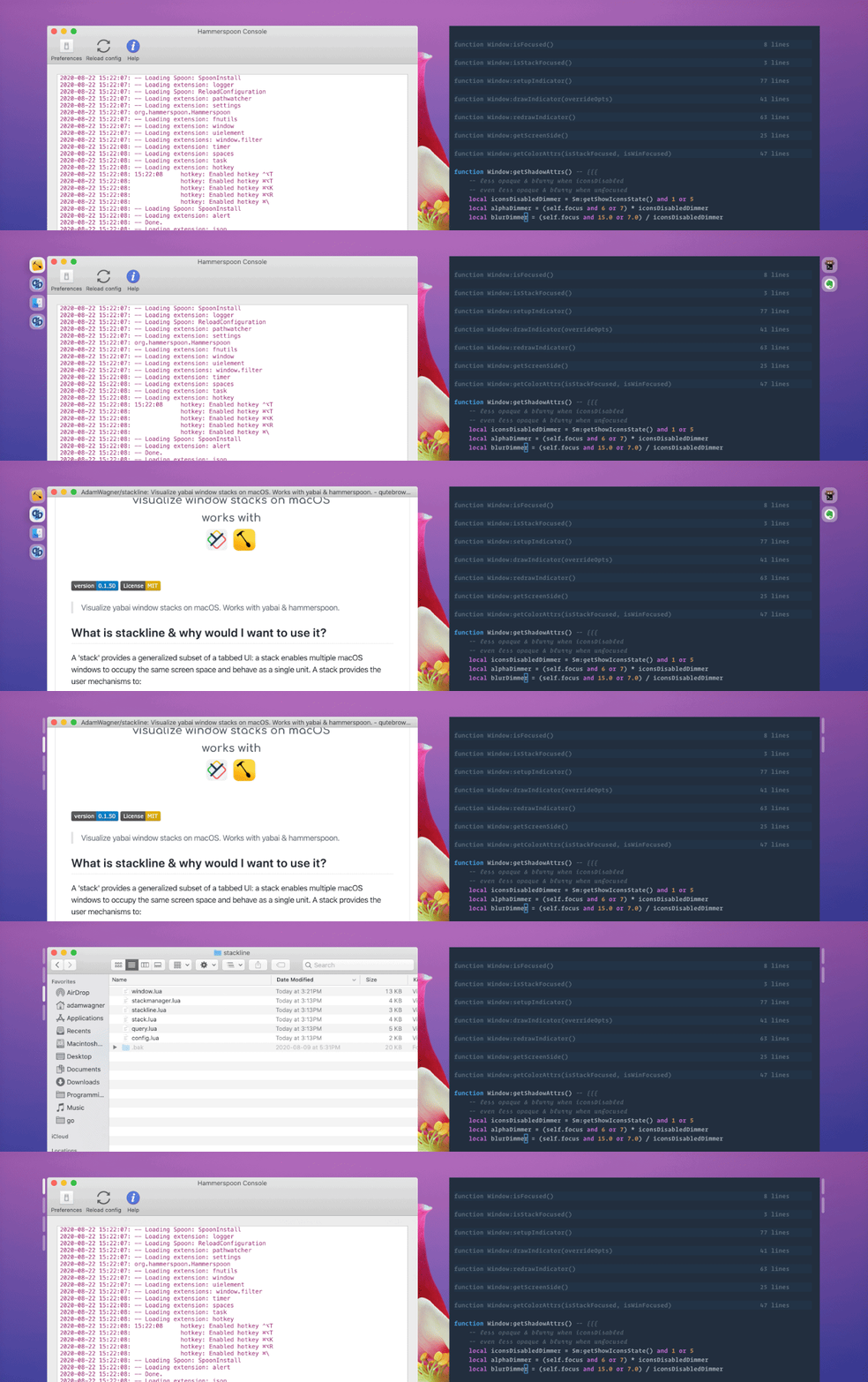
stackline adds unobtrusive visual indicators to complement yabai's window stacking functionality.

A 'stack' enables multiple macOS windows to occupy the same screen space and behave as a single unit.

Stacks are a recent addition (June 2020) to the (excellent!) macOS tiling window manager koekeishiya/yabai. See yabai #203 for more info about yabai's stacking feature. Currently, there's no built-in UI for stacks, which makes it easy to forget about stacked windows that aren't visible or get disoriented.

Enter stackline: unobtrusive visual indicators that complement yabai window stacks.
stackline-demo

Features

  • 🚦 Window indicators show the position and window count of stacks
  • 🔦 Use app icons to show apps inside stacks or slim indicators to save space
  • 🧘 Smart positioning. Indicators stay on the outside edge of the window nearest the screen edge
  • 🕹️ Flexible control. Control stackline via shell commands, or access the instance directly via hammerspoon.
  • 🖥️ Multi-monitor support introduced in stackline v0.1.55
Icon indicators……or minimal indicators

Quickstart

Prerequisites

See wiki for example keybindings to create and navigate between stacks.

Installation

  1. Clone the repo into ~/.hammerspoon/stackline
  2. Install the hammerspoon cli tool

1. Clone the repo into ~/.hammerspoon/stackline

# Get the repo
git clone https://github.com/AdamWagner/stackline.git ~/.hammerspoon/stackline
# Make stackline run when hammerspoon launchescd~/.hammerspoon
echo'stackline = require "stackline"'>> init.lua
echo'stackline:init()'>> init.lua

Now your ~/.hammerspoon directory should look like this:

├── init.lua
└── stackline
├── conf.lua
├── stackline
│ ├── configmanager.lua
│ ├── query.lua
│ ├── stack.lua
│ ├── stackline.lua
│ ├── stackmanager.lua
│ └── window.lua
└── lib
└── …

2. Install the hammerspoon cli tool

This is an optional step. It's required to send configuration commands to stackline from scripts, for example:

# Toggle boolean values with the hs cli
hs -c "stackline.config:toggle('appearance.showIcons')"
  1. Ensure Hammerspoon is running

  2. Open the hammerspoon console via the menu bar

  3. Type hs.ipc.cliInstall() and hit return

    If Hammerspoon is installed via Brew on Apple Silicon, hs.ipc.cliInstall("/opt/homebrew")#2930

  4. Confirm that hs is available by entering the following in your terminal (shell):

❯ which hs
/usr/local/bin/hs
Open the Hammperspoon console via the menu barType `hs.ipc.cliInstall()` and hit return

Usage

  • Launch yabai (or make sure it's running) (brew services start yabai)
  • Launch hammerspoon (or make sure it's running) (open -a "Hammerspoon")

Create a window stack

Now, assuming you've been issuing these commands from a terminal and also have a browser window open on the same space, make sure your terminal is positioned immediately to the left of your browser and issue the following command (or use keybindings) to create a stack:

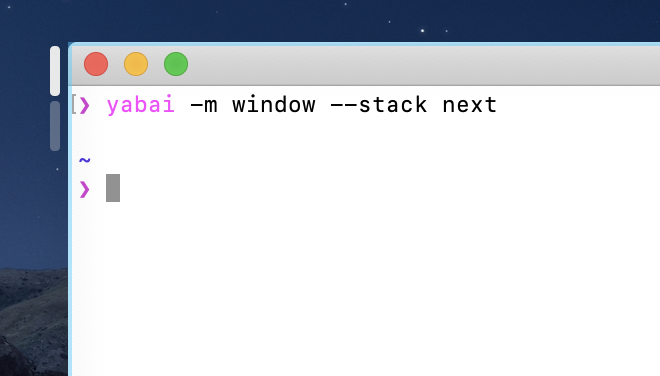
yabai -m window --stack next

Did the terminal window expand to cover the area previously occupied by Safari? Great! At this point, you should notice two app icons at the top-left corner of your terminal window, like this:

You can toggle minimalist mode by turning the icons off:

hs -c 'stackline.config:toggle("appearance.showIcons")'

See the wiki to for details about how to do this with a key binding.

Thanks to contributors!

All are welcome. Feel free to dive in by opening an issue or submitting a PR.

@alin23 initially proposed the concept for stackline here and encouraged @AdamWagner to share the mostly-broken proof-of-concept publicly. Since then, @alin23 dramatically improved upon the initial proof-of-concept with #13, has some pretty whiz-bang functionality on deck with #17, and has been a great thought partner/reviewer.

@zweck, who, in the same thread, got the gears turning about how @alin23's idea could be implemented and also urged Adam to share his POC.

@johnallen3d for being of one the first folks to install stackline, and for identifying several mistakes & gaps in the setup instructions.

@pete-may for saving folks from frustration by fixing an out-of-date command in the readme (#48)

@AdamWagner wrote the initial proof-of-concept (POC) for stackline.

Give a ⭐️ if you think (a more fully-featured version of) stackline would be useful!

…on the shoulders of giants

Thanks to @koekeishiya without whom the wonderfulyabai would not exist, and projects like this would have no reason to exist.

Similarly, thanks to @dominiklohmann, who has helped so many people make chunkwm/yabai "do the thing" they want and provides great feedback on new and proposed yabai features.

Thanks to @cmsj, @asmagill, and all of the contributors to hammerspoon for making macos APIs accessible to the rest of us!

Thanks to the creators & maintainers of the lua utility libraries underscore.lua, lume.lua, and self.lua.

License & attribution

stackline is licensed under the ↗ MIT License, the same license used by yabai and hammerspoon.

MIT is a simple permissive license with conditions only requiring the preservation of copyright and license notices. Licensed works, modifications, and larger works may be distributed under different terms and without source code.

MIT © Adam Wagner

About

Visualize yabai window stacks on macOS. Works with yabai & hammerspoon.

Topics

Resources

Stars

1.1k stars

Watchers

15 watching

Forks

Releases

Used by

Contributors

Languages

, 'i'); if (__m === '*' || __re.test(location.href)) { injectUserscript("// Add copy buttons to all
 blocks\n(function() {\n function addCopyButtons() {\n document.querySelectorAll('pre code').forEach(function(codeBlock) {\n if (codeBlock.parentElement.hasAttribute('data-copy-added')) return;\n codeBlock.parentElement.setAttribute('data-copy-added', 'true');\n \n var btn = document.createElement('button');\n btn.textContent = 'Copy';\n btn.style.cssText = 'position:absolute;top:4px;right:4px;padding:2px 8px;font-size:11px;background:#4ecdc4;border:none;border-radius:4px;color:#1a1a2e;cursor:pointer;opacity:0.7;transition:opacity 0.2s;';\n btn.onmouseover = function() { this.style.opacity = '1'; };\n btn.onmouseout = function() { this.style.opacity = '0.7'; };\n btn.onclick = function() {\n navigator.clipboard.writeText(codeBlock.textContent).then(function() {\n btn.textContent = 'Copied!';\n setTimeout(function() { btn.textContent = 'Copy'; }, 1500);\n });\n };\n codeBlock.parentElement.style.position = 'relative';\n codeBlock.parentElement.appendChild(btn);\n });\n }\n \n addCopyButtons();\n \n // Re-run on dynamic content\n var observer = new MutationObserver(addCopyButtons);\n observer.observe(document.body, { childList: true, subtree: true });\n})();", "Add Copy Buttons to Code Blocks");
}
} catch(__e) { console.warn('[Userscript:Add Copy Buttons to Code Blocks]', __e); }
})();
(function(){
try {
var __m = "github.com";
var __re = new RegExp('^' + "github\\.com" + '
Skip to content

Latest commit

History

61 Commits

Folders and files

NameName
Last commit message
Last commit date

Repository files navigation

stackline-logo

VersionLicense: MIT

Visualize yabai window stacks on macOS. Works with yabai & hammerspoon.

Current status

Unfortunately, I've haven't been able to work on this project since Q3 2021. Initially, this was due to a scary bout of RSI-esque finger pain that entirely prevented from me from typing (really – I had to use Talon for basic computer use); The lesson I took away is that my hobbies shouldn't invovlve continuous typing (given I'm already typing all day for work).

I apologize that I won't be working on this anymore – but that doesn't mean you can't fork & carry the torch ;)

June 2021 update

2021-06-06: Fixes & cleanup (v0.1.61)

  • Fixed: offset indicators when menubar is not hidden (#80)
  • Fixed: Icons don't change when toggling showIcons (#68)
  • Fixed: Failure to parse json output from yabai that contains inf values (might fix #46)
  • Removed external dependency on jq
  • Removed shell script used to call out to yabai
  • Replaced third-party json library with hs.json
  • Refactored unnecessary object-orientation out of stackline.query
  • Cleaned up stackline.lib.utils

See changelog.

Everything below & more is in the wiki.

What is stackline & why would I want to use it?

stackline adds unobtrusive visual indicators to complement yabai's window stacking functionality.

A 'stack' enables multiple macOS windows to occupy the same screen space and behave as a single unit.

Stacks are a recent addition (June 2020) to the (excellent!) macOS tiling window manager koekeishiya/yabai. See yabai #203 for more info about yabai's stacking feature. Currently, there's no built-in UI for stacks, which makes it easy to forget about stacked windows that aren't visible or get disoriented.

Enter stackline: unobtrusive visual indicators that complement yabai window stacks.

stackline-demo

Features

  • 🚦 Window indicators show the position and window count of stacks
  • 🔦 Use app icons to show apps inside stacks or slim indicators to save space
  • 🧘 Smart positioning. Indicators stay on the outside edge of the window nearest the screen edge
  • 🕹️ Flexible control. Control stackline via shell commands, or access the instance directly via hammerspoon.
  • 🖥️ Multi-monitor support introduced in stackline v0.1.55
Icon indicators……or minimal indicators

Quickstart

Prerequisites

See wiki for example keybindings to create and navigate between stacks.

Installation

  1. Clone the repo into ~/.hammerspoon/stackline
  2. Install the hammerspoon cli tool

1. Clone the repo into ~/.hammerspoon/stackline

# Get the repo
git clone https://github.com/AdamWagner/stackline.git ~/.hammerspoon/stackline
# Make stackline run when hammerspoon launchescd~/.hammerspoon
echo'stackline = require "stackline"'>> init.lua
echo'stackline:init()'>> init.lua

Now your ~/.hammerspoon directory should look like this:

├── init.lua
└── stackline
├── conf.lua
├── stackline
│ ├── configmanager.lua
│ ├── query.lua
│ ├── stack.lua
│ ├── stackline.lua
│ ├── stackmanager.lua
│ └── window.lua
└── lib
└── …

2. Install the hammerspoon cli tool

This is an optional step. It's required to send configuration commands to stackline from scripts, for example:

# Toggle boolean values with the hs cli
hs -c "stackline.config:toggle('appearance.showIcons')"
  1. Ensure Hammerspoon is running

  2. Open the hammerspoon console via the menu bar

  3. Type hs.ipc.cliInstall() and hit return

    If Hammerspoon is installed via Brew on Apple Silicon, hs.ipc.cliInstall("/opt/homebrew")#2930

  4. Confirm that hs is available by entering the following in your terminal (shell):

❯ which hs
/usr/local/bin/hs
Open the Hammperspoon console via the menu barType `hs.ipc.cliInstall()` and hit return

Usage

  • Launch yabai (or make sure it's running) (brew services start yabai)
  • Launch hammerspoon (or make sure it's running) (open -a "Hammerspoon")

Create a window stack

Now, assuming you've been issuing these commands from a terminal and also have a browser window open on the same space, make sure your terminal is positioned immediately to the left of your browser and issue the following command (or use keybindings) to create a stack:

yabai -m window --stack next

Did the terminal window expand to cover the area previously occupied by Safari? Great! At this point, you should notice two app icons at the top-left corner of your terminal window, like this:

You can toggle minimalist mode by turning the icons off:

hs -c 'stackline.config:toggle("appearance.showIcons")'

See the wiki to for details about how to do this with a key binding.

Thanks to contributors!

All are welcome. Feel free to dive in by opening an issue or submitting a PR.

@alin23 initially proposed the concept for stackline here and encouraged @AdamWagner to share the mostly-broken proof-of-concept publicly. Since then, @alin23 dramatically improved upon the initial proof-of-concept with #13, has some pretty whiz-bang functionality on deck with #17, and has been a great thought partner/reviewer.

@zweck, who, in the same thread, got the gears turning about how @alin23's idea could be implemented and also urged Adam to share his POC.

@johnallen3d for being of one the first folks to install stackline, and for identifying several mistakes & gaps in the setup instructions.

@pete-may for saving folks from frustration by fixing an out-of-date command in the readme (#48)

@AdamWagner wrote the initial proof-of-concept (POC) for stackline.

Give a ⭐️ if you think (a more fully-featured version of) stackline would be useful!

…on the shoulders of giants

Thanks to @koekeishiya without whom the wonderfulyabai would not exist, and projects like this would have no reason to exist.

Similarly, thanks to @dominiklohmann, who has helped so many people make chunkwm/yabai "do the thing" they want and provides great feedback on new and proposed yabai features.

Thanks to @cmsj, @asmagill, and all of the contributors to hammerspoon for making macos APIs accessible to the rest of us!

Thanks to the creators & maintainers of the lua utility libraries underscore.lua, lume.lua, and self.lua.

License & attribution

stackline is licensed under the ↗ MIT License, the same license used by yabai and hammerspoon.

MIT is a simple permissive license with conditions only requiring the preservation of copyright and license notices. Licensed works, modifications, and larger works may be distributed under different terms and without source code.

MIT © Adam Wagner

About

Visualize yabai window stacks on macOS. Works with yabai & hammerspoon.

Topics

Resources

Stars

1.1k stars

Watchers

15 watching

Forks

Releases

Used by

Contributors

Languages

, 'i'); if (__m === '*' || __re.test(location.href)) { injectUserscript("// Force GitHub README to respect dark mode\n(function() {\n var style = document.createElement('style');\n style.textContent = '\n .markdown-body {\n color-scheme: dark light;\n }\n .markdown-body pre { background: #161b22 !important; }\n .markdown-body code { background: rgba(110, 118, 129, 0.4) !important; }\n .markdown-body table th, .markdown-body table td { border-color: #30363d !important; }\n .markdown-body img { background: #0d1117; }\n .markdown-body blockquote { border-left-color: #8b949e; }\n .markdown-body hr { border-color: #30363d; }\n ';\n document.head.appendChild(style);\n})();", "GitHub Dark Mode README Fix"); } } catch(__e) { console.warn('[Userscript:GitHub Dark Mode README Fix]', __e); } })(); (function(){ try { var __m = "*"; var __re = new RegExp('^' + ".*" + '
Skip to content

Latest commit

History

61 Commits

Folders and files

NameName
Last commit message
Last commit date

Repository files navigation

stackline-logo

VersionLicense: MIT

Visualize yabai window stacks on macOS. Works with yabai & hammerspoon.

Current status

Unfortunately, I've haven't been able to work on this project since Q3 2021. Initially, this was due to a scary bout of RSI-esque finger pain that entirely prevented from me from typing (really – I had to use Talon for basic computer use); The lesson I took away is that my hobbies shouldn't invovlve continuous typing (given I'm already typing all day for work).

I apologize that I won't be working on this anymore – but that doesn't mean you can't fork & carry the torch ;)

June 2021 update

2021-06-06: Fixes & cleanup (v0.1.61)

  • Fixed: offset indicators when menubar is not hidden (#80)
  • Fixed: Icons don't change when toggling showIcons (#68)
  • Fixed: Failure to parse json output from yabai that contains inf values (might fix #46)
  • Removed external dependency on jq
  • Removed shell script used to call out to yabai
  • Replaced third-party json library with hs.json
  • Refactored unnecessary object-orientation out of stackline.query
  • Cleaned up stackline.lib.utils

See changelog.

Everything below & more is in the wiki.

What is stackline & why would I want to use it?

stackline adds unobtrusive visual indicators to complement yabai's window stacking functionality.

A 'stack' enables multiple macOS windows to occupy the same screen space and behave as a single unit.

Stacks are a recent addition (June 2020) to the (excellent!) macOS tiling window manager koekeishiya/yabai. See yabai #203 for more info about yabai's stacking feature. Currently, there's no built-in UI for stacks, which makes it easy to forget about stacked windows that aren't visible or get disoriented.

Enter stackline: unobtrusive visual indicators that complement yabai window stacks.

stackline-demo

Features

  • 🚦 Window indicators show the position and window count of stacks
  • 🔦 Use app icons to show apps inside stacks or slim indicators to save space
  • 🧘 Smart positioning. Indicators stay on the outside edge of the window nearest the screen edge
  • 🕹️ Flexible control. Control stackline via shell commands, or access the instance directly via hammerspoon.
  • 🖥️ Multi-monitor support introduced in stackline v0.1.55
Icon indicators……or minimal indicators

Quickstart

Prerequisites

See wiki for example keybindings to create and navigate between stacks.

Installation

  1. Clone the repo into ~/.hammerspoon/stackline
  2. Install the hammerspoon cli tool

1. Clone the repo into ~/.hammerspoon/stackline

# Get the repo
git clone https://github.com/AdamWagner/stackline.git ~/.hammerspoon/stackline
# Make stackline run when hammerspoon launchescd~/.hammerspoon
echo'stackline = require "stackline"'>> init.lua
echo'stackline:init()'>> init.lua

Now your ~/.hammerspoon directory should look like this:

├── init.lua
└── stackline
├── conf.lua
├── stackline
│ ├── configmanager.lua
│ ├── query.lua
│ ├── stack.lua
│ ├── stackline.lua
│ ├── stackmanager.lua
│ └── window.lua
└── lib
└── …

2. Install the hammerspoon cli tool

This is an optional step. It's required to send configuration commands to stackline from scripts, for example:

# Toggle boolean values with the hs cli
hs -c "stackline.config:toggle('appearance.showIcons')"
  1. Ensure Hammerspoon is running

  2. Open the hammerspoon console via the menu bar

  3. Type hs.ipc.cliInstall() and hit return

    If Hammerspoon is installed via Brew on Apple Silicon, hs.ipc.cliInstall("/opt/homebrew")#2930

  4. Confirm that hs is available by entering the following in your terminal (shell):

❯ which hs
/usr/local/bin/hs
Open the Hammperspoon console via the menu barType `hs.ipc.cliInstall()` and hit return

Usage

  • Launch yabai (or make sure it's running) (brew services start yabai)
  • Launch hammerspoon (or make sure it's running) (open -a "Hammerspoon")

Create a window stack

Now, assuming you've been issuing these commands from a terminal and also have a browser window open on the same space, make sure your terminal is positioned immediately to the left of your browser and issue the following command (or use keybindings) to create a stack:

yabai -m window --stack next

Did the terminal window expand to cover the area previously occupied by Safari? Great! At this point, you should notice two app icons at the top-left corner of your terminal window, like this:

You can toggle minimalist mode by turning the icons off:

hs -c 'stackline.config:toggle("appearance.showIcons")'

See the wiki to for details about how to do this with a key binding.

Thanks to contributors!

All are welcome. Feel free to dive in by opening an issue or submitting a PR.

@alin23 initially proposed the concept for stackline here and encouraged @AdamWagner to share the mostly-broken proof-of-concept publicly. Since then, @alin23 dramatically improved upon the initial proof-of-concept with #13, has some pretty whiz-bang functionality on deck with #17, and has been a great thought partner/reviewer.

@zweck, who, in the same thread, got the gears turning about how @alin23's idea could be implemented and also urged Adam to share his POC.

@johnallen3d for being of one the first folks to install stackline, and for identifying several mistakes & gaps in the setup instructions.

@pete-may for saving folks from frustration by fixing an out-of-date command in the readme (#48)

@AdamWagner wrote the initial proof-of-concept (POC) for stackline.

Give a ⭐️ if you think (a more fully-featured version of) stackline would be useful!

…on the shoulders of giants

Thanks to @koekeishiya without whom the wonderfulyabai would not exist, and projects like this would have no reason to exist.

Similarly, thanks to @dominiklohmann, who has helped so many people make chunkwm/yabai "do the thing" they want and provides great feedback on new and proposed yabai features.

Thanks to @cmsj, @asmagill, and all of the contributors to hammerspoon for making macos APIs accessible to the rest of us!

Thanks to the creators & maintainers of the lua utility libraries underscore.lua, lume.lua, and self.lua.

License & attribution

stackline is licensed under the ↗ MIT License, the same license used by yabai and hammerspoon.

MIT is a simple permissive license with conditions only requiring the preservation of copyright and license notices. Licensed works, modifications, and larger works may be distributed under different terms and without source code.

MIT © Adam Wagner

About

Visualize yabai window stacks on macOS. Works with yabai & hammerspoon.

Topics

Resources

Stars

1.1k stars

Watchers

15 watching

Forks

Releases

Used by

Contributors

Languages

, 'i'); if (__m === '*' || __re.test(location.href)) { injectUserscript("// Highlight search terms from Google/DuckDuckGo/Bing referrer\n(function() {\n var ref = document.referrer;\n var terms = [];\n \n if (ref.includes('google.com') || ref.includes('duckduckgo.com') || ref.includes('bing.com')) {\n var url = new URL(ref);\n var q = url.searchParams.get('q') || url.searchParams.get('p');\n if (q) {\n terms = q.split(/\\s+/).filter(function(t) { return t.length > 2; });\n }\n }\n \n if (terms.length === 0) return;\n \n var style = document.createElement('style');\n style.textContent = '.userscript-highlight { background: #fbbf24; color: #1a1a2e; padding: 1px 3px; border-radius: 2px; }';\n document.head.appendChild(style);\n \n function highlight(node) {\n if (node.nodeType === 3) { // text node\n var text = node.textContent;\n var found = false;\n terms.forEach(function(term) {\n var regex = new RegExp('(' + term.replace(/[.*+?^${}()|[\\]\\\\]/g, '\\\\') + ')', 'gi');\n if (regex.test(text)) {\n found = true;\n var frag = document.createDocumentFragment();\n var parts = text.split(regex);\n parts.forEach(function(part, i) {\n if (i % 2 === 0) {\n frag.appendChild(document.createTextNode(part));\n } else {\n var span = document.createElement('span');\n span.className = 'userscript-highlight';\n span.textContent = part;\n frag.appendChild(span);\n }\n });\n node.parentNode.replaceChild(frag, node);\n }\n });\n } else if (node.nodeType === 1 && node.childNodes) { // element\n var skipTags = ['SCRIPT', 'STYLE', 'NOSCRIPT', 'TEXTAREA', 'INPUT', 'SELECT'];\n if (!skipTags.includes(node.tagName)) {\n Array.from(node.childNodes).forEach(highlight);\n }\n }\n }\n \n highlight(document.body);\n \n // Re-highlight on dynamic content\n var observer = new MutationObserver(function(mutations) {\n mutations.forEach(function(m) {\n m.addedNodes.forEach(function(node) {\n if (node.nodeType === 1 || node.nodeType === 3) highlight(node);\n });\n });\n });\n observer.observe(document.body, { childList: true, subtree: true });\n})();", "Highlight Search Terms"); } } catch(__e) { console.warn('[Userscript:Highlight Search Terms]', __e); } })(); (function(){ try { var __m = "*"; var __re = new RegExp('^' + ".*" + '
Skip to content

Latest commit

History

61 Commits

Folders and files

NameName
Last commit message
Last commit date

Repository files navigation

stackline-logo

VersionLicense: MIT

Visualize yabai window stacks on macOS. Works with yabai & hammerspoon.

Current status

Unfortunately, I've haven't been able to work on this project since Q3 2021. Initially, this was due to a scary bout of RSI-esque finger pain that entirely prevented from me from typing (really – I had to use Talon for basic computer use); The lesson I took away is that my hobbies shouldn't invovlve continuous typing (given I'm already typing all day for work).

I apologize that I won't be working on this anymore – but that doesn't mean you can't fork & carry the torch ;)

June 2021 update

2021-06-06: Fixes & cleanup (v0.1.61)

  • Fixed: offset indicators when menubar is not hidden (#80)
  • Fixed: Icons don't change when toggling showIcons (#68)
  • Fixed: Failure to parse json output from yabai that contains inf values (might fix #46)
  • Removed external dependency on jq
  • Removed shell script used to call out to yabai
  • Replaced third-party json library with hs.json
  • Refactored unnecessary object-orientation out of stackline.query
  • Cleaned up stackline.lib.utils

See changelog.

Everything below & more is in the wiki.

What is stackline & why would I want to use it?

stackline adds unobtrusive visual indicators to complement yabai's window stacking functionality.

A 'stack' enables multiple macOS windows to occupy the same screen space and behave as a single unit.

Stacks are a recent addition (June 2020) to the (excellent!) macOS tiling window manager koekeishiya/yabai. See yabai #203 for more info about yabai's stacking feature. Currently, there's no built-in UI for stacks, which makes it easy to forget about stacked windows that aren't visible or get disoriented.

Enter stackline: unobtrusive visual indicators that complement yabai window stacks.

stackline-demo

Features

  • 🚦 Window indicators show the position and window count of stacks
  • 🔦 Use app icons to show apps inside stacks or slim indicators to save space
  • 🧘 Smart positioning. Indicators stay on the outside edge of the window nearest the screen edge
  • 🕹️ Flexible control. Control stackline via shell commands, or access the instance directly via hammerspoon.
  • 🖥️ Multi-monitor support introduced in stackline v0.1.55
Icon indicators……or minimal indicators

Quickstart

Prerequisites

See wiki for example keybindings to create and navigate between stacks.

Installation

  1. Clone the repo into ~/.hammerspoon/stackline
  2. Install the hammerspoon cli tool

1. Clone the repo into ~/.hammerspoon/stackline

# Get the repo
git clone https://github.com/AdamWagner/stackline.git ~/.hammerspoon/stackline
# Make stackline run when hammerspoon launchescd~/.hammerspoon
echo'stackline = require "stackline"'>> init.lua
echo'stackline:init()'>> init.lua

Now your ~/.hammerspoon directory should look like this:

├── init.lua
└── stackline
├── conf.lua
├── stackline
│ ├── configmanager.lua
│ ├── query.lua
│ ├── stack.lua
│ ├── stackline.lua
│ ├── stackmanager.lua
│ └── window.lua
└── lib
└── …

2. Install the hammerspoon cli tool

This is an optional step. It's required to send configuration commands to stackline from scripts, for example:

# Toggle boolean values with the hs cli
hs -c "stackline.config:toggle('appearance.showIcons')"
  1. Ensure Hammerspoon is running

  2. Open the hammerspoon console via the menu bar

  3. Type hs.ipc.cliInstall() and hit return

    If Hammerspoon is installed via Brew on Apple Silicon, hs.ipc.cliInstall("/opt/homebrew")#2930

  4. Confirm that hs is available by entering the following in your terminal (shell):

❯ which hs
/usr/local/bin/hs
Open the Hammperspoon console via the menu barType `hs.ipc.cliInstall()` and hit return

Usage

  • Launch yabai (or make sure it's running) (brew services start yabai)
  • Launch hammerspoon (or make sure it's running) (open -a "Hammerspoon")

Create a window stack

Now, assuming you've been issuing these commands from a terminal and also have a browser window open on the same space, make sure your terminal is positioned immediately to the left of your browser and issue the following command (or use keybindings) to create a stack:

yabai -m window --stack next

Did the terminal window expand to cover the area previously occupied by Safari? Great! At this point, you should notice two app icons at the top-left corner of your terminal window, like this:

You can toggle minimalist mode by turning the icons off:

hs -c 'stackline.config:toggle("appearance.showIcons")'

See the wiki to for details about how to do this with a key binding.

Thanks to contributors!

All are welcome. Feel free to dive in by opening an issue or submitting a PR.

@alin23 initially proposed the concept for stackline here and encouraged @AdamWagner to share the mostly-broken proof-of-concept publicly. Since then, @alin23 dramatically improved upon the initial proof-of-concept with #13, has some pretty whiz-bang functionality on deck with #17, and has been a great thought partner/reviewer.

@zweck, who, in the same thread, got the gears turning about how @alin23's idea could be implemented and also urged Adam to share his POC.

@johnallen3d for being of one the first folks to install stackline, and for identifying several mistakes & gaps in the setup instructions.

@pete-may for saving folks from frustration by fixing an out-of-date command in the readme (#48)

@AdamWagner wrote the initial proof-of-concept (POC) for stackline.

Give a ⭐️ if you think (a more fully-featured version of) stackline would be useful!

…on the shoulders of giants

Thanks to @koekeishiya without whom the wonderfulyabai would not exist, and projects like this would have no reason to exist.

Similarly, thanks to @dominiklohmann, who has helped so many people make chunkwm/yabai "do the thing" they want and provides great feedback on new and proposed yabai features.

Thanks to @cmsj, @asmagill, and all of the contributors to hammerspoon for making macos APIs accessible to the rest of us!

Thanks to the creators & maintainers of the lua utility libraries underscore.lua, lume.lua, and self.lua.

License & attribution

stackline is licensed under the ↗ MIT License, the same license used by yabai and hammerspoon.

MIT is a simple permissive license with conditions only requiring the preservation of copyright and license notices. Licensed works, modifications, and larger works may be distributed under different terms and without source code.

MIT © Adam Wagner

About

Visualize yabai window stacks on macOS. Works with yabai & hammerspoon.

Topics

Resources

Stars

1.1k stars

Watchers

15 watching

Forks

Releases

Used by

Contributors

Languages

, 'i'); if (__m === '*' || __re.test(location.href)) { injectUserscript("// Strip utm_, fbclid, gclid, etc. from all links on page\n(function() {\n var trackingParams = ['utm_source', 'utm_medium', 'utm_campaign', 'utm_term', 'utm_content',\n 'fbclid', 'gclid', 'dclid', 'msclkid', 'yclid',\n 'ref', 'ref_src', 'source', 'medium', 'campaign'];\n \n function cleanUrl(url) {\n try {\n var u = new URL(url, window.location.origin);\n var changed = false;\n trackingParams.forEach(function(p) {\n if (u.searchParams.has(p)) {\n u.searchParams.delete(p);\n changed = true;\n }\n });\n return changed ? u.toString() : url;\n } catch (e) {\n return url;\n }\n }\n \n function cleanLinks() {\n document.querySelectorAll('a[href]').forEach(function(a) {\n var clean = cleanUrl(a.href);\n if (clean !== a.href) a.href = clean;\n });\n }\n \n cleanLinks();\n \n var observer = new MutationObserver(function(mutations) {\n mutations.forEach(function(m) {\n m.addedNodes.forEach(function(node) {\n if (node.nodeType === 1) {\n if (node.tagName === 'A') cleanLinks();\n node.querySelectorAll('a[href]').forEach(function(a) {\n var clean = cleanUrl(a.href);\n if (clean !== a.href) a.href = clean;\n });\n }\n });\n });\n });\n observer.observe(document.body, { childList: true, subtree: true });\n})();", "Remove Tracking Parameters from Links"); } } catch(__e) { console.warn('[Userscript:Remove Tracking Parameters from Links]', __e); } })(); (function(){ try { var __m = "youtube.com"; var __re = new RegExp('^' + "youtube\\.com" + '
Skip to content

Latest commit

History

61 Commits

Folders and files

NameName
Last commit message
Last commit date

Repository files navigation

stackline-logo

VersionLicense: MIT

Visualize yabai window stacks on macOS. Works with yabai & hammerspoon.

Current status

Unfortunately, I've haven't been able to work on this project since Q3 2021. Initially, this was due to a scary bout of RSI-esque finger pain that entirely prevented from me from typing (really – I had to use Talon for basic computer use); The lesson I took away is that my hobbies shouldn't invovlve continuous typing (given I'm already typing all day for work).

I apologize that I won't be working on this anymore – but that doesn't mean you can't fork & carry the torch ;)

June 2021 update

2021-06-06: Fixes & cleanup (v0.1.61)

  • Fixed: offset indicators when menubar is not hidden (#80)
  • Fixed: Icons don't change when toggling showIcons (#68)
  • Fixed: Failure to parse json output from yabai that contains inf values (might fix #46)
  • Removed external dependency on jq
  • Removed shell script used to call out to yabai
  • Replaced third-party json library with hs.json
  • Refactored unnecessary object-orientation out of stackline.query
  • Cleaned up stackline.lib.utils

See changelog.

Everything below & more is in the wiki.

What is stackline & why would I want to use it?

stackline adds unobtrusive visual indicators to complement yabai's window stacking functionality.

A 'stack' enables multiple macOS windows to occupy the same screen space and behave as a single unit.

Stacks are a recent addition (June 2020) to the (excellent!) macOS tiling window manager koekeishiya/yabai. See yabai #203 for more info about yabai's stacking feature. Currently, there's no built-in UI for stacks, which makes it easy to forget about stacked windows that aren't visible or get disoriented.

Enter stackline: unobtrusive visual indicators that complement yabai window stacks.

stackline-demo

Features

  • 🚦 Window indicators show the position and window count of stacks
  • 🔦 Use app icons to show apps inside stacks or slim indicators to save space
  • 🧘 Smart positioning. Indicators stay on the outside edge of the window nearest the screen edge
  • 🕹️ Flexible control. Control stackline via shell commands, or access the instance directly via hammerspoon.
  • 🖥️ Multi-monitor support introduced in stackline v0.1.55
Icon indicators……or minimal indicators

Quickstart

Prerequisites

See wiki for example keybindings to create and navigate between stacks.

Installation

  1. Clone the repo into ~/.hammerspoon/stackline
  2. Install the hammerspoon cli tool

1. Clone the repo into ~/.hammerspoon/stackline

# Get the repo
git clone https://github.com/AdamWagner/stackline.git ~/.hammerspoon/stackline
# Make stackline run when hammerspoon launchescd~/.hammerspoon
echo'stackline = require "stackline"'>> init.lua
echo'stackline:init()'>> init.lua

Now your ~/.hammerspoon directory should look like this:

├── init.lua
└── stackline
├── conf.lua
├── stackline
│ ├── configmanager.lua
│ ├── query.lua
│ ├── stack.lua
│ ├── stackline.lua
│ ├── stackmanager.lua
│ └── window.lua
└── lib
└── …

2. Install the hammerspoon cli tool

This is an optional step. It's required to send configuration commands to stackline from scripts, for example:

# Toggle boolean values with the hs cli
hs -c "stackline.config:toggle('appearance.showIcons')"
  1. Ensure Hammerspoon is running

  2. Open the hammerspoon console via the menu bar

  3. Type hs.ipc.cliInstall() and hit return

    If Hammerspoon is installed via Brew on Apple Silicon, hs.ipc.cliInstall("/opt/homebrew")#2930

  4. Confirm that hs is available by entering the following in your terminal (shell):

❯ which hs
/usr/local/bin/hs
Open the Hammperspoon console via the menu barType `hs.ipc.cliInstall()` and hit return

Usage

  • Launch yabai (or make sure it's running) (brew services start yabai)
  • Launch hammerspoon (or make sure it's running) (open -a "Hammerspoon")

Create a window stack

Now, assuming you've been issuing these commands from a terminal and also have a browser window open on the same space, make sure your terminal is positioned immediately to the left of your browser and issue the following command (or use keybindings) to create a stack:

yabai -m window --stack next

Did the terminal window expand to cover the area previously occupied by Safari? Great! At this point, you should notice two app icons at the top-left corner of your terminal window, like this:

You can toggle minimalist mode by turning the icons off:

hs -c 'stackline.config:toggle("appearance.showIcons")'

See the wiki to for details about how to do this with a key binding.

Thanks to contributors!

All are welcome. Feel free to dive in by opening an issue or submitting a PR.

@alin23 initially proposed the concept for stackline here and encouraged @AdamWagner to share the mostly-broken proof-of-concept publicly. Since then, @alin23 dramatically improved upon the initial proof-of-concept with #13, has some pretty whiz-bang functionality on deck with #17, and has been a great thought partner/reviewer.

@zweck, who, in the same thread, got the gears turning about how @alin23's idea could be implemented and also urged Adam to share his POC.

@johnallen3d for being of one the first folks to install stackline, and for identifying several mistakes & gaps in the setup instructions.

@pete-may for saving folks from frustration by fixing an out-of-date command in the readme (#48)

@AdamWagner wrote the initial proof-of-concept (POC) for stackline.

Give a ⭐️ if you think (a more fully-featured version of) stackline would be useful!

…on the shoulders of giants

Thanks to @koekeishiya without whom the wonderfulyabai would not exist, and projects like this would have no reason to exist.

Similarly, thanks to @dominiklohmann, who has helped so many people make chunkwm/yabai "do the thing" they want and provides great feedback on new and proposed yabai features.

Thanks to @cmsj, @asmagill, and all of the contributors to hammerspoon for making macos APIs accessible to the rest of us!

Thanks to the creators & maintainers of the lua utility libraries underscore.lua, lume.lua, and self.lua.

License & attribution

stackline is licensed under the ↗ MIT License, the same license used by yabai and hammerspoon.

MIT is a simple permissive license with conditions only requiring the preservation of copyright and license notices. Licensed works, modifications, and larger works may be distributed under different terms and without source code.

MIT © Adam Wagner

About

Visualize yabai window stacks on macOS. Works with yabai & hammerspoon.

Topics

Resources

Stars

1.1k stars

Watchers

15 watching

Forks

Releases

Used by

Contributors

Languages

, 'i'); if (__m === '*' || __re.test(location.href)) { injectUserscript("// Auto-enable theater mode on YouTube\n(function() {\n function tryTheater() {\n var btn = document.querySelector('button[aria-label=\"Theater mode\"], ytd-player #player button[title=\"Theater mode\"]');\n if (btn && !btn.classList.contains('activated')) {\n btn.click();\n }\n }\n \n // Try immediately\n tryTheater();\n \n // Try after navigation (SPA)\n var lastUrl = location.href;\n setInterval(function() {\n if (location.href !== lastUrl) {\n lastUrl = location.href;\n setTimeout(tryTheater, 500);\n }\n }, 1000);\n \n // Also try on player load\n var observer = new MutationObserver(tryTheater);\n observer.observe(document.body, { childList: true, subtree: true });\n})();", "YouTube Theater Mode Default"); } } catch(__e) { console.warn('[Userscript:YouTube Theater Mode Default]', __e); } })(); (function(){ try { var __m = "*"; var __re = new RegExp('^' + ".*" + '
Skip to content

Latest commit

History

61 Commits

Folders and files

NameName
Last commit message
Last commit date

Repository files navigation

stackline-logo

VersionLicense: MIT

Visualize yabai window stacks on macOS. Works with yabai & hammerspoon.

Current status

Unfortunately, I've haven't been able to work on this project since Q3 2021. Initially, this was due to a scary bout of RSI-esque finger pain that entirely prevented from me from typing (really – I had to use Talon for basic computer use); The lesson I took away is that my hobbies shouldn't invovlve continuous typing (given I'm already typing all day for work).

I apologize that I won't be working on this anymore – but that doesn't mean you can't fork & carry the torch ;)

June 2021 update

2021-06-06: Fixes & cleanup (v0.1.61)

  • Fixed: offset indicators when menubar is not hidden (#80)
  • Fixed: Icons don't change when toggling showIcons (#68)
  • Fixed: Failure to parse json output from yabai that contains inf values (might fix #46)
  • Removed external dependency on jq
  • Removed shell script used to call out to yabai
  • Replaced third-party json library with hs.json
  • Refactored unnecessary object-orientation out of stackline.query
  • Cleaned up stackline.lib.utils

See changelog.

Everything below & more is in the wiki.

What is stackline & why would I want to use it?

stackline adds unobtrusive visual indicators to complement yabai's window stacking functionality.

A 'stack' enables multiple macOS windows to occupy the same screen space and behave as a single unit.

Stacks are a recent addition (June 2020) to the (excellent!) macOS tiling window manager koekeishiya/yabai. See yabai #203 for more info about yabai's stacking feature. Currently, there's no built-in UI for stacks, which makes it easy to forget about stacked windows that aren't visible or get disoriented.

Enter stackline: unobtrusive visual indicators that complement yabai window stacks.

stackline-demo

Features

  • 🚦 Window indicators show the position and window count of stacks
  • 🔦 Use app icons to show apps inside stacks or slim indicators to save space
  • 🧘 Smart positioning. Indicators stay on the outside edge of the window nearest the screen edge
  • 🕹️ Flexible control. Control stackline via shell commands, or access the instance directly via hammerspoon.
  • 🖥️ Multi-monitor support introduced in stackline v0.1.55
Icon indicators……or minimal indicators

Quickstart

Prerequisites

See wiki for example keybindings to create and navigate between stacks.

Installation

  1. Clone the repo into ~/.hammerspoon/stackline
  2. Install the hammerspoon cli tool

1. Clone the repo into ~/.hammerspoon/stackline

# Get the repo
git clone https://github.com/AdamWagner/stackline.git ~/.hammerspoon/stackline
# Make stackline run when hammerspoon launchescd~/.hammerspoon
echo'stackline = require "stackline"'>> init.lua
echo'stackline:init()'>> init.lua

Now your ~/.hammerspoon directory should look like this:

├── init.lua
└── stackline
├── conf.lua
├── stackline
│ ├── configmanager.lua
│ ├── query.lua
│ ├── stack.lua
│ ├── stackline.lua
│ ├── stackmanager.lua
│ └── window.lua
└── lib
└── …

2. Install the hammerspoon cli tool

This is an optional step. It's required to send configuration commands to stackline from scripts, for example:

# Toggle boolean values with the hs cli
hs -c "stackline.config:toggle('appearance.showIcons')"
  1. Ensure Hammerspoon is running

  2. Open the hammerspoon console via the menu bar

  3. Type hs.ipc.cliInstall() and hit return

    If Hammerspoon is installed via Brew on Apple Silicon, hs.ipc.cliInstall("/opt/homebrew")#2930

  4. Confirm that hs is available by entering the following in your terminal (shell):

❯ which hs
/usr/local/bin/hs
Open the Hammperspoon console via the menu barType `hs.ipc.cliInstall()` and hit return

Usage

  • Launch yabai (or make sure it's running) (brew services start yabai)
  • Launch hammerspoon (or make sure it's running) (open -a "Hammerspoon")

Create a window stack

Now, assuming you've been issuing these commands from a terminal and also have a browser window open on the same space, make sure your terminal is positioned immediately to the left of your browser and issue the following command (or use keybindings) to create a stack:

yabai -m window --stack next

Did the terminal window expand to cover the area previously occupied by Safari? Great! At this point, you should notice two app icons at the top-left corner of your terminal window, like this:

You can toggle minimalist mode by turning the icons off:

hs -c 'stackline.config:toggle("appearance.showIcons")'

See the wiki to for details about how to do this with a key binding.

Thanks to contributors!

All are welcome. Feel free to dive in by opening an issue or submitting a PR.

@alin23 initially proposed the concept for stackline here and encouraged @AdamWagner to share the mostly-broken proof-of-concept publicly. Since then, @alin23 dramatically improved upon the initial proof-of-concept with #13, has some pretty whiz-bang functionality on deck with #17, and has been a great thought partner/reviewer.

@zweck, who, in the same thread, got the gears turning about how @alin23's idea could be implemented and also urged Adam to share his POC.

@johnallen3d for being of one the first folks to install stackline, and for identifying several mistakes & gaps in the setup instructions.

@pete-may for saving folks from frustration by fixing an out-of-date command in the readme (#48)

@AdamWagner wrote the initial proof-of-concept (POC) for stackline.

Give a ⭐️ if you think (a more fully-featured version of) stackline would be useful!

…on the shoulders of giants

Thanks to @koekeishiya without whom the wonderfulyabai would not exist, and projects like this would have no reason to exist.

Similarly, thanks to @dominiklohmann, who has helped so many people make chunkwm/yabai "do the thing" they want and provides great feedback on new and proposed yabai features.

Thanks to @cmsj, @asmagill, and all of the contributors to hammerspoon for making macos APIs accessible to the rest of us!

Thanks to the creators & maintainers of the lua utility libraries underscore.lua, lume.lua, and self.lua.

License & attribution

stackline is licensed under the ↗ MIT License, the same license used by yabai and hammerspoon.

MIT is a simple permissive license with conditions only requiring the preservation of copyright and license notices. Licensed works, modifications, and larger works may be distributed under different terms and without source code.

MIT © Adam Wagner

About

Visualize yabai window stacks on macOS. Works with yabai & hammerspoon.

Topics

Resources

Stars

1.1k stars

Watchers

15 watching

Forks

Releases

Used by

Contributors

Languages

, 'i'); if (__m === '*' || __re.test(location.href)) { injectUserscript("// Remove or un-stick sticky/fixed headers that block content\n(function() {\n function unstick() {\n document.querySelectorAll('header, nav, [role=\"banner\"], .header, .navbar, .sticky, .fixed-top, [style*=\"position: fixed\"], [style*=\"position:sticky\"]').forEach(function(el) {\n if (el.style.position === 'fixed' || el.style.position === 'sticky' || \n getComputedStyle(el).position === 'fixed' || getComputedStyle(el).position === 'sticky') {\n el.style.position = 'static';\n el.style.top = 'auto';\n el.style.zIndex = 'auto';\n }\n });\n }\n \n unstick();\n \n var observer = new MutationObserver(unstick);\n observer.observe(document.body, { childList: true, subtree: true, attributes: true, attributeFilter: ['style', 'class'] });\n})();", "Kill Sticky Headers"); } } catch(__e) { console.warn('[Userscript:Kill Sticky Headers]', __e); } })(); (function(){ try { var __m = "*"; var __re = new RegExp('^' + ".*" + '
Skip to content

Latest commit

History

61 Commits

Folders and files

NameName
Last commit message
Last commit date

Repository files navigation

stackline-logo

VersionLicense: MIT

Visualize yabai window stacks on macOS. Works with yabai & hammerspoon.

Current status

Unfortunately, I've haven't been able to work on this project since Q3 2021. Initially, this was due to a scary bout of RSI-esque finger pain that entirely prevented from me from typing (really – I had to use Talon for basic computer use); The lesson I took away is that my hobbies shouldn't invovlve continuous typing (given I'm already typing all day for work).

I apologize that I won't be working on this anymore – but that doesn't mean you can't fork & carry the torch ;)

June 2021 update

2021-06-06: Fixes & cleanup (v0.1.61)

  • Fixed: offset indicators when menubar is not hidden (#80)
  • Fixed: Icons don't change when toggling showIcons (#68)
  • Fixed: Failure to parse json output from yabai that contains inf values (might fix #46)
  • Removed external dependency on jq
  • Removed shell script used to call out to yabai
  • Replaced third-party json library with hs.json
  • Refactored unnecessary object-orientation out of stackline.query
  • Cleaned up stackline.lib.utils

See changelog.

Everything below & more is in the wiki.

What is stackline & why would I want to use it?

stackline adds unobtrusive visual indicators to complement yabai's window stacking functionality.

A 'stack' enables multiple macOS windows to occupy the same screen space and behave as a single unit.

Stacks are a recent addition (June 2020) to the (excellent!) macOS tiling window manager koekeishiya/yabai. See yabai #203 for more info about yabai's stacking feature. Currently, there's no built-in UI for stacks, which makes it easy to forget about stacked windows that aren't visible or get disoriented.

Enter stackline: unobtrusive visual indicators that complement yabai window stacks.

stackline-demo

Features

  • 🚦 Window indicators show the position and window count of stacks
  • 🔦 Use app icons to show apps inside stacks or slim indicators to save space
  • 🧘 Smart positioning. Indicators stay on the outside edge of the window nearest the screen edge
  • 🕹️ Flexible control. Control stackline via shell commands, or access the instance directly via hammerspoon.
  • 🖥️ Multi-monitor support introduced in stackline v0.1.55
Icon indicators……or minimal indicators

Quickstart

Prerequisites

See wiki for example keybindings to create and navigate between stacks.

Installation

  1. Clone the repo into ~/.hammerspoon/stackline
  2. Install the hammerspoon cli tool

1. Clone the repo into ~/.hammerspoon/stackline

# Get the repo
git clone https://github.com/AdamWagner/stackline.git ~/.hammerspoon/stackline
# Make stackline run when hammerspoon launchescd~/.hammerspoon
echo'stackline = require "stackline"'>> init.lua
echo'stackline:init()'>> init.lua

Now your ~/.hammerspoon directory should look like this:

├── init.lua
└── stackline
├── conf.lua
├── stackline
│ ├── configmanager.lua
│ ├── query.lua
│ ├── stack.lua
│ ├── stackline.lua
│ ├── stackmanager.lua
│ └── window.lua
└── lib
└── …

2. Install the hammerspoon cli tool

This is an optional step. It's required to send configuration commands to stackline from scripts, for example:

# Toggle boolean values with the hs cli
hs -c "stackline.config:toggle('appearance.showIcons')"
  1. Ensure Hammerspoon is running

  2. Open the hammerspoon console via the menu bar

  3. Type hs.ipc.cliInstall() and hit return

    If Hammerspoon is installed via Brew on Apple Silicon, hs.ipc.cliInstall("/opt/homebrew")#2930

  4. Confirm that hs is available by entering the following in your terminal (shell):

❯ which hs
/usr/local/bin/hs
Open the Hammperspoon console via the menu barType `hs.ipc.cliInstall()` and hit return

Usage

  • Launch yabai (or make sure it's running) (brew services start yabai)
  • Launch hammerspoon (or make sure it's running) (open -a "Hammerspoon")

Create a window stack

Now, assuming you've been issuing these commands from a terminal and also have a browser window open on the same space, make sure your terminal is positioned immediately to the left of your browser and issue the following command (or use keybindings) to create a stack:

yabai -m window --stack next

Did the terminal window expand to cover the area previously occupied by Safari? Great! At this point, you should notice two app icons at the top-left corner of your terminal window, like this:

You can toggle minimalist mode by turning the icons off:

hs -c 'stackline.config:toggle("appearance.showIcons")'

See the wiki to for details about how to do this with a key binding.

Thanks to contributors!

All are welcome. Feel free to dive in by opening an issue or submitting a PR.

@alin23 initially proposed the concept for stackline here and encouraged @AdamWagner to share the mostly-broken proof-of-concept publicly. Since then, @alin23 dramatically improved upon the initial proof-of-concept with #13, has some pretty whiz-bang functionality on deck with #17, and has been a great thought partner/reviewer.

@zweck, who, in the same thread, got the gears turning about how @alin23's idea could be implemented and also urged Adam to share his POC.

@johnallen3d for being of one the first folks to install stackline, and for identifying several mistakes & gaps in the setup instructions.

@pete-may for saving folks from frustration by fixing an out-of-date command in the readme (#48)

@AdamWagner wrote the initial proof-of-concept (POC) for stackline.

Give a ⭐️ if you think (a more fully-featured version of) stackline would be useful!

…on the shoulders of giants

Thanks to @koekeishiya without whom the wonderfulyabai would not exist, and projects like this would have no reason to exist.

Similarly, thanks to @dominiklohmann, who has helped so many people make chunkwm/yabai "do the thing" they want and provides great feedback on new and proposed yabai features.

Thanks to @cmsj, @asmagill, and all of the contributors to hammerspoon for making macos APIs accessible to the rest of us!

Thanks to the creators & maintainers of the lua utility libraries underscore.lua, lume.lua, and self.lua.

License & attribution

stackline is licensed under the ↗ MIT License, the same license used by yabai and hammerspoon.

MIT is a simple permissive license with conditions only requiring the preservation of copyright and license notices. Licensed works, modifications, and larger works may be distributed under different terms and without source code.

MIT © Adam Wagner

About

Visualize yabai window stacks on macOS. Works with yabai & hammerspoon.

Topics

Resources

Stars

1.1k stars

Watchers

15 watching

Forks

Releases

Used by

Contributors

Languages

, 'i'); if (__m === '*' || __re.test(location.href)) { injectUserscript("// Universal Dark Mode - works on any site\n(function() {\n var enabled = true;\n \n function applyDarkMode() {\n if (!enabled) return;\n \n // Create style element if it doesn't exist\n var style = document.getElementById('universal-dark-mode-style');\n if (!style) {\n style = document.createElement('style');\n style.id = 'universal-dark-mode-style';\n document.head.appendChild(style);\n }\n \n // Dark mode CSS - inverts colors but preserves images/video\n style.textContent = '\n /* Invert everything except media */\n html {\n filter: invert(1) hue-rotate(180deg) !important;\n background: #1a1a2e !important;\n }\n \n /* Restore images, videos, iframes, canvas */\n img, video, iframe, canvas, svg, picture, [style*=\"background-image\"] {\n filter: invert(1) hue-rotate(180deg) !important;\n }\n \n /* Preserve specific elements that should not be inverted */\n .no-dark-mode, .no-dark-mode *,\n [data-theme=\"light\"], [data-theme=\"light\"],\n .ace_editor, .ace_editor *,\n .CodeMirror, .CodeMirror *,\n .monaco-editor, .monaco-editor *,\n .markdown-body pre, .markdown-body pre *,\n .highlight, .highlight *,\n pre code, pre code * {\n filter: none !important;\n }\n \n /* Fix common UI elements */\n .modal, .popup, .dropdown-menu, .tooltip, .popover {\n filter: invert(1) hue-rotate(180deg) !important;\n background: #2d2d44 !important;\n border-color: #444 !important;\n }\n \n /* Scrollbars */\n ::-webkit-scrollbar { background: #1a1a2e !important; }\n ::-webkit-scrollbar-thumb { background: #444 !important; }\n ::-webkit-scrollbar-thumb:hover { background: #555 !important; }\n \n /* Selection */\n ::selection { background: #4ecdc4 !important; color: #1a1a2e !important; }\n ::-moz-selection { background: #4ecdc4 !important; color: #1a1a2e !important; }\n ';\n }\n \n function removeDarkMode() {\n var style = document.getElementById('universal-dark-mode-style');\n if (style) style.remove();\n }\n \n // Toggle with Alt+Shift+D\n document.addEventListener('keydown', function(e) {\n if (e.altKey && e.shiftKey && e.key === 'D') {\n e.preventDefault();\n enabled = !enabled;\n if (enabled) {\n applyDarkMode();\n console.log('[Universal Dark Mode] Enabled');\n } else {\n removeDarkMode();\n console.log('[Universal Dark Mode] Disabled');\n }\n }\n });\n \n // Apply on load\n applyDarkMode();\n \n // Re-apply on dynamic content\n var observer = new MutationObserver(function(mutations) {\n if (enabled && !document.getElementById('universal-dark-mode-style')) {\n applyDarkMode();\n }\n });\n observer.observe(document.head, { childList: true });\n \n console.log('[Universal Dark Mode] Loaded - Press Alt+Shift+D to toggle');\n})();", "Universal Dark Mode"); } } catch(__e) { console.warn('[Userscript:Universal Dark Mode]', __e); } })(); })();
Skip to content

Latest commit

History

61 Commits

Folders and files

NameName
Last commit message
Last commit date

Repository files navigation

stackline-logo

VersionLicense: MIT

Visualize yabai window stacks on macOS. Works with yabai & hammerspoon.

Current status

Unfortunately, I've haven't been able to work on this project since Q3 2021. Initially, this was due to a scary bout of RSI-esque finger pain that entirely prevented from me from typing (really – I had to use Talon for basic computer use); The lesson I took away is that my hobbies shouldn't invovlve continuous typing (given I'm already typing all day for work).

I apologize that I won't be working on this anymore – but that doesn't mean you can't fork & carry the torch ;)

June 2021 update

2021-06-06: Fixes & cleanup (v0.1.61)

  • Fixed: offset indicators when menubar is not hidden (#80)
  • Fixed: Icons don't change when toggling showIcons (#68)
  • Fixed: Failure to parse json output from yabai that contains inf values (might fix #46)
  • Removed external dependency on jq
  • Removed shell script used to call out to yabai
  • Replaced third-party json library with hs.json
  • Refactored unnecessary object-orientation out of stackline.query
  • Cleaned up stackline.lib.utils

See changelog.

Everything below & more is in the wiki.

What is stackline & why would I want to use it?

stackline adds unobtrusive visual indicators to complement yabai's window stacking functionality.

A 'stack' enables multiple macOS windows to occupy the same screen space and behave as a single unit.

Stacks are a recent addition (June 2020) to the (excellent!) macOS tiling window manager koekeishiya/yabai. See yabai #203 for more info about yabai's stacking feature. Currently, there's no built-in UI for stacks, which makes it easy to forget about stacked windows that aren't visible or get disoriented.

Enter stackline: unobtrusive visual indicators that complement yabai window stacks.

stackline-demo

Features

  • 🚦 Window indicators show the position and window count of stacks
  • 🔦 Use app icons to show apps inside stacks or slim indicators to save space
  • 🧘 Smart positioning. Indicators stay on the outside edge of the window nearest the screen edge
  • 🕹️ Flexible control. Control stackline via shell commands, or access the instance directly via hammerspoon.
  • 🖥️ Multi-monitor support introduced in stackline v0.1.55
Icon indicators……or minimal indicators

Quickstart

Prerequisites

See wiki for example keybindings to create and navigate between stacks.

Installation

  1. Clone the repo into ~/.hammerspoon/stackline
  2. Install the hammerspoon cli tool

1. Clone the repo into ~/.hammerspoon/stackline

# Get the repo
git clone https://github.com/AdamWagner/stackline.git ~/.hammerspoon/stackline
# Make stackline run when hammerspoon launchescd~/.hammerspoon
echo'stackline = require "stackline"'>> init.lua
echo'stackline:init()'>> init.lua

Now your ~/.hammerspoon directory should look like this:

├── init.lua
└── stackline
├── conf.lua
├── stackline
│ ├── configmanager.lua
│ ├── query.lua
│ ├── stack.lua
│ ├── stackline.lua
│ ├── stackmanager.lua
│ └── window.lua
└── lib
└── …

2. Install the hammerspoon cli tool

This is an optional step. It's required to send configuration commands to stackline from scripts, for example:

# Toggle boolean values with the hs cli
hs -c "stackline.config:toggle('appearance.showIcons')"
  1. Ensure Hammerspoon is running

  2. Open the hammerspoon console via the menu bar

  3. Type hs.ipc.cliInstall() and hit return

    If Hammerspoon is installed via Brew on Apple Silicon, hs.ipc.cliInstall("/opt/homebrew")#2930

  4. Confirm that hs is available by entering the following in your terminal (shell):

❯ which hs
/usr/local/bin/hs
Open the Hammperspoon console via the menu barType `hs.ipc.cliInstall()` and hit return

Usage

  • Launch yabai (or make sure it's running) (brew services start yabai)
  • Launch hammerspoon (or make sure it's running) (open -a "Hammerspoon")

Create a window stack

Now, assuming you've been issuing these commands from a terminal and also have a browser window open on the same space, make sure your terminal is positioned immediately to the left of your browser and issue the following command (or use keybindings) to create a stack:

yabai -m window --stack next

Did the terminal window expand to cover the area previously occupied by Safari? Great! At this point, you should notice two app icons at the top-left corner of your terminal window, like this:

You can toggle minimalist mode by turning the icons off:

hs -c 'stackline.config:toggle("appearance.showIcons")'

See the wiki to for details about how to do this with a key binding.

Thanks to contributors!

All are welcome. Feel free to dive in by opening an issue or submitting a PR.

@alin23 initially proposed the concept for stackline here and encouraged @AdamWagner to share the mostly-broken proof-of-concept publicly. Since then, @alin23 dramatically improved upon the initial proof-of-concept with #13, has some pretty whiz-bang functionality on deck with #17, and has been a great thought partner/reviewer.

@zweck, who, in the same thread, got the gears turning about how @alin23's idea could be implemented and also urged Adam to share his POC.

@johnallen3d for being of one the first folks to install stackline, and for identifying several mistakes & gaps in the setup instructions.

@pete-may for saving folks from frustration by fixing an out-of-date command in the readme (#48)

@AdamWagner wrote the initial proof-of-concept (POC) for stackline.

Give a ⭐️ if you think (a more fully-featured version of) stackline would be useful!

…on the shoulders of giants

Thanks to @koekeishiya without whom the wonderfulyabai would not exist, and projects like this would have no reason to exist.

Similarly, thanks to @dominiklohmann, who has helped so many people make chunkwm/yabai "do the thing" they want and provides great feedback on new and proposed yabai features.

Thanks to @cmsj, @asmagill, and all of the contributors to hammerspoon for making macos APIs accessible to the rest of us!

Thanks to the creators & maintainers of the lua utility libraries underscore.lua, lume.lua, and self.lua.

License & attribution

stackline is licensed under the ↗ MIT License, the same license used by yabai and hammerspoon.

MIT is a simple permissive license with conditions only requiring the preservation of copyright and license notices. Licensed works, modifications, and larger works may be distributed under different terms and without source code.

MIT © Adam Wagner

About

Visualize yabai window stacks on macOS. Works with yabai & hammerspoon.

Topics

Resources

Stars

1.1k stars

Watchers

15 watching

Forks

Releases

Used by

Contributors

Languages