


High-performance inference of OpenAI's Whisper automatic speech recognition (ASR) model:
- Plain C/C++ implementation without dependencies
- Apple silicon first-class citizen - optimized via Arm Neon and Accelerate framework
- AVX intrinsics support for x86 architectures
- Mixed F16 / F32 precision
- Low memory usage (Flash Attention + Flash Forward)
- Zero memory allocations at runtime
- Runs on the CPU
- C-style API
Supported platforms:
- Mac OS (Intel and Arm)
- iOS
- Android
- Linux / FreeBSD
- WebAssembly
- Windows (MSVC and MinGW]
- Raspberry Pi
The entire implementation of the model is contained in 2 source files:
- Tensor operations: ggml.h / ggml.c
- Transformer inference: whisper.h / whisper.cpp
Having such a lightweight implementation of the model allows to easily integrate it in different platforms and applications. As an example, here is a video of running the model on an iPhone 13 device - fully offline, on-device: whisper.objc
whisper-iphone-13-mini-2.mp4
You can also easily make your own offline voice assistant application: command
command-0.mp4
Or you can even run it straight in the browser: talk.wasm
- The core tensor operations are implemented in C (ggml.h / ggml.c)
- The transformer model and the high-level C-style API are implemented in C++ (whisper.h / whisper.cpp)
- Sample usage is demonstrated in main.cpp
- Sample real-time audio transcription from the microphone is demonstrated in stream.cpp
- Various other examples are available in the examples folder
The tensor operators are optimized heavily for Apple silicon CPUs. Depending on the computation size, Arm Neon SIMD instrisics or CBLAS Accelerate framework routines are used. The latter are especially effective for bigger sizes since the Accelerate framework utilizes the special-purpose AMX coprocessor available in modern Apple products.
First, download one of the Whisper models converted in ggml format. For example:
bash ./models/download-ggml-model.sh base.enNow build the main example and transcribe an audio file like this:
# build the main example
make
# transcribe an audio file
./main -f input.wav
For a quick demo, simply run make base.en:
$makebase.encc -I. -O3 -std=c11 -pthread -DGGML_USE_ACCELERATE -cggml.c -oggml.oc++ -I. -I./examples -O3 -std=c++11 -pthread -cwhisper.cpp -owhisper.oc++ -I. -I./examples -O3 -std=c++11 -pthreadexamples/main/main.cppwhisper.oggml.o -omain -frameworkAccelerate
./main -husage: ./main [options] file0.wavfile1.wav ...
options:
-h, --help [default] showthishelpmessageandexit
-tN, --threadsN [4 ] numberofthreadstouseduringcomputation
-pN, --processorsN [1 ] numberofprocessorstouseduringcomputation
-otN, --offset-tN [0 ] timeoffsetinmilliseconds
-onN, --offset-nN [0 ] segmentindexoffset
-dN, --durationN [0 ] durationofaudiotoprocessinmilliseconds
-mcN, --max-contextN [-1 ] maximumnumberoftextcontexttokenstostore
-mlN, --max-lenN [0 ] maximumsegmentlengthincharacters
-wtN, --word-tholdN [0.01 ] wordtimestampprobabilitythreshold
-su, --speed-up [false ] speedupaudiobyx2 (reducedaccuracy)
-tr, --translate [false ] translatefromsourcelanguagetoenglish
-otxt, --output-txt [false ] outputresultinatextfile
-ovtt, --output-vtt [false ] outputresultinavttfile
-osrt, --output-srt [false ] outputresultinasrtfile
-owts, --output-words [false ] outputscriptforgeneratingkaraokevideo
-ps, --print-special [false ] printspecialtokens
-pc, --print-colors [false ] printcolors
-nt, --no-timestamps [true ] donotprinttimestamps
-lLANG, --languageLANG [en ] spokenlanguage
-mFNAME, --modelFNAME [models/ggml-base.en.bin] modelpath
-fFNAME, --fileFNAME [ ] inputWAVfilepathbash ./models/download-ggml-model.shbase.enDownloadingggmlmodelbase.en ...
ggml-base.en.bin100%[========================>] 141.11M6.34MB/sin24sDone! Model'base.en'savedin'models/ggml-base.en.bin'Youcannowuseitlikethis:
$ ./main -mmodels/ggml-base.en.bin -fsamples/jfk.wav
===============================================
Runningbase.enonallsamplesin ./samples ...
===============================================
----------------------------------------------
[+] Runningbase.enonsamples/jfk.wav ... (run'ffplay samples/jfk.wav'tolisten)
----------------------------------------------
whisper_model_load: loadingmodelfrom'models/ggml-base.en.bin'whisper_model_load: n_vocab = 51864whisper_model_load: n_audio_ctx = 1500whisper_model_load: n_audio_state = 512whisper_model_load: n_audio_head = 8whisper_model_load: n_audio_layer = 6whisper_model_load: n_text_ctx = 448whisper_model_load: n_text_state = 512whisper_model_load: n_text_head = 8whisper_model_load: n_text_layer = 6whisper_model_load: n_mels = 80whisper_model_load: f16 = 1whisper_model_load: type = 2whisper_model_load: adding1607extratokenswhisper_model_load: mem_required = 506.00MBwhisper_model_load: ggmlctxsize = 140.60MBwhisper_model_load: memorysize = 22.83MBwhisper_model_load: modelsize = 140.54MBsystem_info: n_threads = 4 / 10 | AVX = 0 | AVX2 = 0 | AVX512 = 0 | NEON = 1 | FP16_VA = 1 | WASM_SIMD = 0 | BLAS = 1 |
main: processing'samples/jfk.wav' (176000samples, 11.0sec), 4threads, 1processors, lang = en, task = transcribe, timestamps = 1 ...
[00:00:00.000 --> 00:00:11.000] AndsomyfellowAmericans, asknotwhatyourcountrycandoforyou, askwhatyoucandoforyourcountry.
whisper_print_timings: loadtime = 105.91mswhisper_print_timings: meltime = 24.62mswhisper_print_timings: sampletime = 3.63mswhisper_print_timings: encodetime = 324.71ms / 54.12msperlayerwhisper_print_timings: decodetime = 83.58ms / 13.93msperlayerwhisper_print_timings: totaltime = 542.81ms
The command downloads the base.en model converted to custom ggml format and runs the inference on all .wav samples in the folder samples.
For detailed usage instructions, run: ./main -h
Note that the main example currently runs only with 16-bit WAV files, so make sure to convert your input before running the tool.
For example, you can use ffmpeg like this:
ffmpeg -iinput.mp3 -ar16000 -ac1 -c:apcm_s16leoutput.wavIf you want some extra audio samples to play with, simply run:
make samples
This will download a few more audio files from Wikipedia and convert them to 16-bit WAV format via ffmpeg.
You can download and run the other models as follows:
make tiny.en
make tiny
make base.en
make base
make small.en
make small
make medium.en
make medium
make large-v1
make large
| Model | Disk | Mem | SHA |
|---|---|---|---|
| tiny | 75 MB | ~390 MB | bd577a113a864445d4c299885e0cb97d4ba92b5f |
| base | 142 MB | ~500 MB | 465707469ff3a37a2b9b8d8f89f2f99de7299dac |
| small | 466 MB | ~1.0 GB | 55356645c2b361a969dfd0ef2c5a50d530afd8d5 |
| medium | 1.5 GB | ~2.6 GB | fd9727b6e1217c2f614f9b698455c4ffd82463b4 |
| large | 2.9 GB | ~4.7 GB | 0f4c8e34f21cf1a914c59d8b3ce882345ad349d6 |
Inference only
No GPU support
Very basic greedy sampling scheme - always pick up the token with highest probability. This should be similar to the GreedyDecoder from the original python implementation, so in order to make a fair comparison between the 2 implementations, make sure to run the python code with the following parameters:
whisper --best_of None --beam_size None ...In the future,
whisper.cppwill support more sampling strategies.
Here is another example of transcribing a 3:24 min speech
in about half a minute on a MacBook M1 Pro, using medium.en model:
Expand to see the result
$ ./main -mmodels/ggml-medium.en.bin -fsamples/gb1.wav -t8whisper_model_load: loadingmodelfrom'models/ggml-medium.en.bin'whisper_model_load: n_vocab = 51864whisper_model_load: n_audio_ctx = 1500whisper_model_load: n_audio_state = 1024whisper_model_load: n_audio_head = 16whisper_model_load: n_audio_layer = 24whisper_model_load: n_text_ctx = 448whisper_model_load: n_text_state = 1024whisper_model_load: n_text_head = 16whisper_model_load: n_text_layer = 24whisper_model_load: n_mels = 80whisper_model_load: f16 = 1whisper_model_load: type = 4whisper_model_load: mem_required = 2610.00MBwhisper_model_load: adding1607extratokenswhisper_model_load: ggmlctxsize = 1644.97MBwhisper_model_load: memorysize = 182.62MBwhisper_model_load: modelsize = 1462.12MBmain: processing'samples/gb1.wav' (3179750samples, 198.7sec), 8threads, lang = en, task = transcribe, timestamps = 1 ...
[00:00.000 --> 00:08.000] MyfellowAmericans, thisdayhasbroughtterriblenewsandgreatsadnesstoourcountry.
[00:08.000 --> 00:17.000] Atnineo'clock this morning, Mission Control in Houston lost contact with our Space Shuttle Columbia.
[00:17.000 --> 00:23.000] Ashorttimelater, debriswasseenfallingfromtheskiesaboveTexas.
[00:23.000 --> 00:29.000] TheColumbia's lost. There are no survivors.
[00:29.000 --> 00:32.000] Onboardwasacrewofseven.
[00:32.000 --> 00:39.000] ColonelRickHusband, LieutenantColonelMichaelAnderson, CommanderLaurelClark,
[00:39.000 --> 00:48.000] CaptainDavidBrown, CommanderWilliamMcCool, Dr. KultnaShavla, andIlanRamon,
[00:48.000 --> 00:52.000] acolonelintheIsraeliAirForce.
[00:52.000 --> 00:58.000] Thesemenandwomenassumedgreatriskintheservicetoallhumanity.
[00:58.000 --> 01:03.000] Inanagewhenspaceflighthascometoseemalmostroutine,
[01:03.000 --> 01:07.000] itiseasytooverlookthedangersoftravelbyrocket
[01:07.000 --> 01:12.000] andthedifficultiesofnavigatingthefierceouteratmosphereoftheEarth.
[01:12.000 --> 01:18.000] Theseastronautsknewthedangers, andtheyfacedthemwillingly,
[01:18.000 --> 01:23.000] knowingtheyhadahighandnoblepurposeinlife.
[01:23.000 --> 01:31.000] Becauseoftheircourageanddaringandidealism, wewillmissthemallthemore.
[01:31.000 --> 01:36.000] AllAmericanstodayarethinkingaswellofthefamiliesofthesemenandwomen
[01:36.000 --> 01:40.000] whohavebeengiventhissuddenshockandgrief.
[01:40.000 --> 01:45.000] You're not alone. Our entire nation grieves with you,
[01:45.000 --> 01:52.000] andthoseyoulovewillalwayshavetherespectandgratitudeofthiscountry.
[01:52.000 --> 01:56.000] Thecauseinwhichtheydiedwillcontinue.
[01:56.000 --> 02:04.000] Mankindisledintothedarknessbeyondourworldbytheinspirationofdiscovery
[02:04.000 --> 02:11.000] andthelongingtounderstand. Ourjourneyintospacewillgoon.
[02:11.000 --> 02:16.000] Intheskiestoday, wesawdestructionandtragedy.
[02:16.000 --> 02:22.000] Yetfartherthanwecansee, thereiscomfortandhope.
[02:22.000 --> 02:29.000] InthewordsoftheprophetIsaiah, "Lift your eyes and look to the heavens[02:29.000 --> 02:35.000] who created all these. He who brings out the starry hosts one by one[02:35.000 --> 02:39.000] and calls them each by name."
[02:39.000 --> 02:46.000] BecauseofHisgreatpowerandmightystrength, notoneofthemismissing.
[02:46.000 --> 02:55.000] ThesameCreatorwhonamesthestarsalsoknowsthenamesofthesevensoulswemourntoday.
[02:55.000 --> 03:01.000] ThecrewoftheshuttleColumbiadidnotreturnsafelytoearth,
[03:01.000 --> 03:05.000] yetwecanpraythatallaresafelyhome.
[03:05.000 --> 03:13.000] MayGodblessthegrievingfamilies, andmayGodcontinuetoblessAmerica.
[03:13.000 --> 03:41.000] Audiowhisper_print_timings: loadtime = 575.92mswhisper_print_timings: meltime = 230.60mswhisper_print_timings: sampletime = 73.19mswhisper_print_timings: encodetime = 19552.61ms / 814.69msperlayerwhisper_print_timings: decodetime = 13249.96ms / 552.08msperlayerwhisper_print_timings: totaltime = 33686.27msThis is a naive example of performing real-time inference on audio from your microphone. The stream tool samples the audio every half a second and runs the transcription continously. More info is available in issue #10.
./stream -m ./models/ggml-base.en.bin -t8 --step500 --length5000rt_esl_csgo_2.mp4
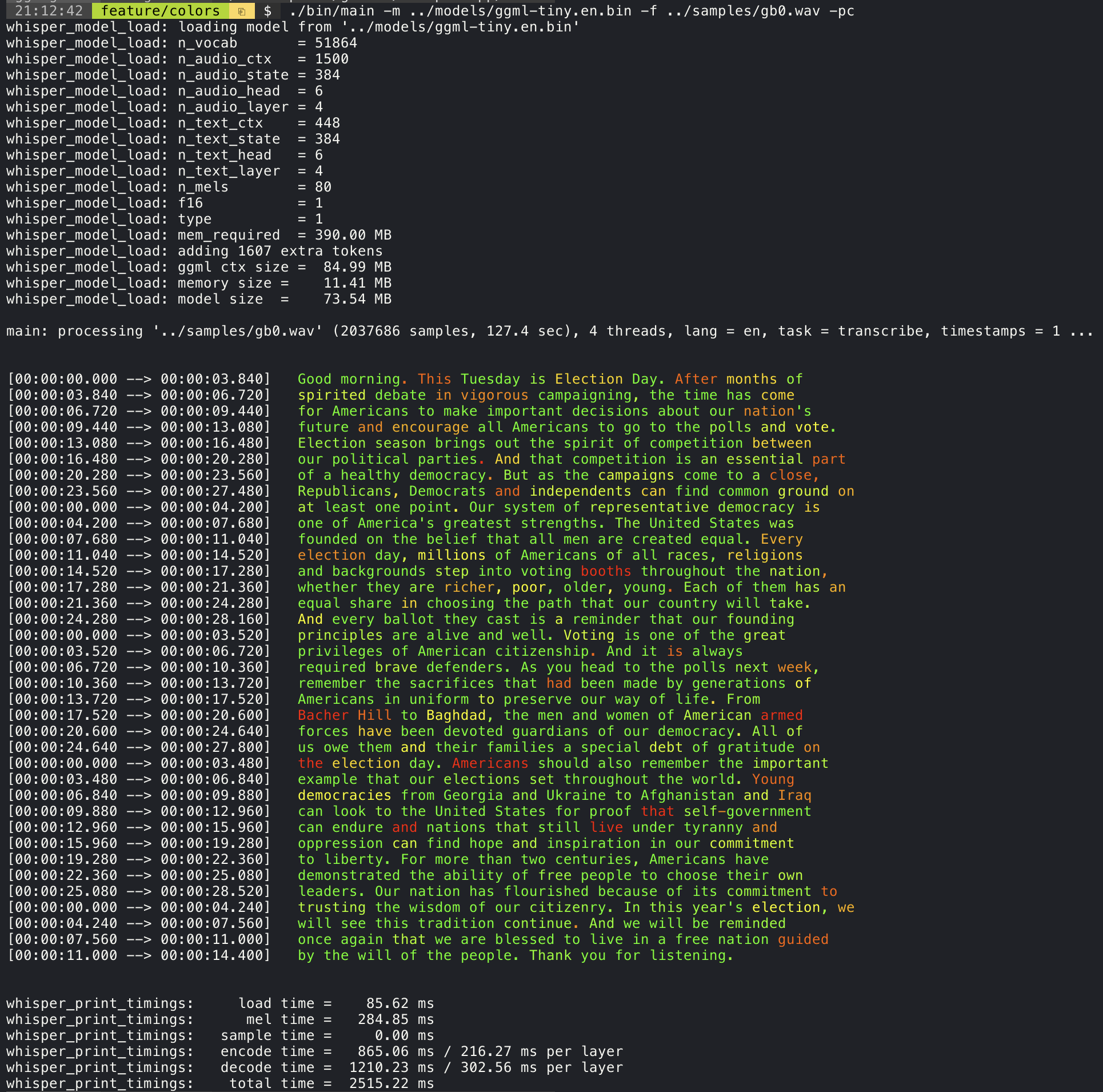
Adding the --print-colors argument will print the transcribed text using an experimental color coding strategy
to highlight words with high or low confidence:
For example, to limit the line length to a maximum of 16 characters, simply add -ml 16:
./main -m ./models/ggml-base.en.bin -f ./samples/jfk.wav -ml16whisper_model_load: loadingmodelfrom'./models/ggml-base.en.bin'
...
system_info: n_threads = 4 / 10 | AVX2 = 0 | AVX512 = 0 | NEON = 1 | FP16_VA = 1 | WASM_SIMD = 0 | BLAS = 1 | main: processing'./samples/jfk.wav' (176000samples, 11.0sec), 4threads, 1processors, lang = en, task = transcribe, timestamps = 1 ...
[00:00:00.000 --> 00:00:00.850] Andsomy
[00:00:00.850 --> 00:00:01.590] fellow
[00:00:01.590 --> 00:00:04.140] Americans, ask
[00:00:04.140 --> 00:00:05.660] notwhatyour
[00:00:05.660 --> 00:00:06.840] countrycando
[00:00:06.840 --> 00:00:08.430] foryou, ask
[00:00:08.430 --> 00:00:09.440] whatyoucando
[00:00:09.440 --> 00:00:10.020] foryour
[00:00:10.020 --> 00:00:11.000] country.The --max-len argument can be used to obtain word-level timestamps. Simply use -ml 1:
./main -m ./models/ggml-base.en.bin -f ./samples/jfk.wav -ml1whisper_model_load: loadingmodelfrom'./models/ggml-base.en.bin'
...
system_info: n_threads = 4 / 10 | AVX2 = 0 | AVX512 = 0 | NEON = 1 | FP16_VA = 1 | WASM_SIMD = 0 | BLAS = 1 | main: processing'./samples/jfk.wav' (176000samples, 11.0sec), 4threads, 1processors, lang = en, task = transcribe, timestamps = 1 ...
[00:00:00.000 --> 00:00:00.320] [00:00:00.320 --> 00:00:00.370] And
[00:00:00.370 --> 00:00:00.690] so
[00:00:00.690 --> 00:00:00.850] my
[00:00:00.850 --> 00:00:01.590] fellow
[00:00:01.590 --> 00:00:02.850] Americans
[00:00:02.850 --> 00:00:03.300] ,
[00:00:03.300 --> 00:00:04.140] ask
[00:00:04.140 --> 00:00:04.990] not
[00:00:04.990 --> 00:00:05.410] what
[00:00:05.410 --> 00:00:05.660] your
[00:00:05.660 --> 00:00:06.260] country
[00:00:06.260 --> 00:00:06.600] can
[00:00:06.600 --> 00:00:06.840] do
[00:00:06.840 --> 00:00:07.010] for
[00:00:07.010 --> 00:00:08.170] you
[00:00:08.170 --> 00:00:08.190] ,
[00:00:08.190 --> 00:00:08.430] ask
[00:00:08.430 --> 00:00:08.910] what
[00:00:08.910 --> 00:00:09.040] you
[00:00:09.040 --> 00:00:09.320] can
[00:00:09.320 --> 00:00:09.440] do
[00:00:09.440 --> 00:00:09.760] for
[00:00:09.760 --> 00:00:10.020] your
[00:00:10.020 --> 00:00:10.510] country
[00:00:10.510 --> 00:00:11.000] .The main example provides support for output of karaoke-style movies, where the
currently pronounced word is highlighted. Use the -wts argument and run the generated bash script.
This requires to have ffmpeg installed.
Here are a few "typical" examples:
./main -m ./models/ggml-base.en.bin -f ./samples/jfk.wav -owtssource ./samples/jfk.wav.wtsffplay ./samples/jfk.wav.mp4jfk.wav.mp4
./main -m ./models/ggml-base.en.bin -f ./samples/mm0.wav -owtssource ./samples/mm0.wav.wtsffplay ./samples/mm0.wav.mp4mm0.wav.mp4
./main -m ./models/ggml-base.en.bin -f ./samples/gb0.wav -owtssource ./samples/gb0.wav.wtsffplay ./samples/gb0.wav.mp4gb0.wav.mp4
In order to have an objective comparison of the performance of the inference across different system configurations, use the bench tool. The tool simply runs the Encoder part of the model and prints how much time it took to execute it. The results are summarized in the following Github issue:
The original models are converted to a custom binary format. This allows to pack everything needed into a single file:
- model parameters
- mel filters
- vocabulary
- weights
You can download the converted models using the models/download-ggml-model.sh script or manually from here:
For more details, see the conversion script models/convert-pt-to-ggml.py or the README in models.
- Rust: tazz4843/whisper-rs | #310
- Javascript: bindings/javascript | #309
- Go: bindings/go | #312
- Objective-C / Swift: ggerganov/whisper.spm | #313
- Python: soon | WIP
There are various examples of using the library for different projects in the examples folder. Some of the examples are even ported to run in the browser using WebAssembly. Check them out!
| Example | Web | Description |
|---|---|---|
| main | whisper.wasm | Tool for translating and transcribing audio using Whisper |
| bench | bench.wasm | Benchmark the performance of Whisper on your machine |
| stream | stream.wasm | Real-time transcription of raw microphone capture |
| command | command.wasm | Basic voice assistant example for receiving voice commands from the mic |
| talk | talk.wasm | Talk with a GPT-2 bot |
| whisper.objc | iOS mobile application using whisper.cpp | |
| whisper.swiftui | SwiftUI iOS / macOS application using whisper.cpp | |
| whisper.android | Android mobile application using whisper.cpp | |
| whisper.nvim | Speech-to-text plugin for Neovim | |
| generate-karaoke.sh | Helper script to easily generate a karaoke video of raw audio capture | |
| livestream.sh | Livestream audio transcription | |
| yt-wsp.sh | Download + transcribe and/or translate any VOD (original) |
If you have any kind of feedback about this project feel free to use the Discussions section and open a new topic.
You can use the Show and tell category
to share your own projects that use whisper.cpp. If you have a question, make sure to check the
Frequently asked questions (#126) discussion.