
[Project under "active" development, some features may be unstable or change in the future. A first release version is planned to be packed soon].
Algohive is a self-hosted coding game platform.
that allows developers to create puzzles for developers to solve.


Each puzzle contains two parts to solve, allowing developers to test their skills in a variety of ways. The puzzles are created using a proprietary file format that is compiled into a single file for distribution.
Sweeten your skills, but the competition stings

Algohive is a coding game plateform for developers by developers. It is a self-hosted solution that allows developers, schools, and companies to create puzzles for other developers to solve. The platform is designed to be lightweight and easy to use, with a focus on creating and solving puzzles.
Most of the coding game platforms are usable one time only, and are not self-hosted. This means that the puzzles are not reusable, and the platform is not customizable.
AlgoHive is built with a core philosophy of avoiding hardcoded limitations. Everything in the platform is configurable and customizable to suit your needs. The system is designed to be deployed across various scales:
- For a small group of developer friends collaborating on coding challenges
- For companies with multiple teams wanting to enhance their technical skills
- For educational institutions with hundreds of campuses, classes, and student groups
The hierarchical structure is highly parameterizable, allowing you to adapt the platform to your specific organizational needs. Whether you need simple flat organization or complex nested groups with different permission levels, AlgoHive can be configured accordingly.
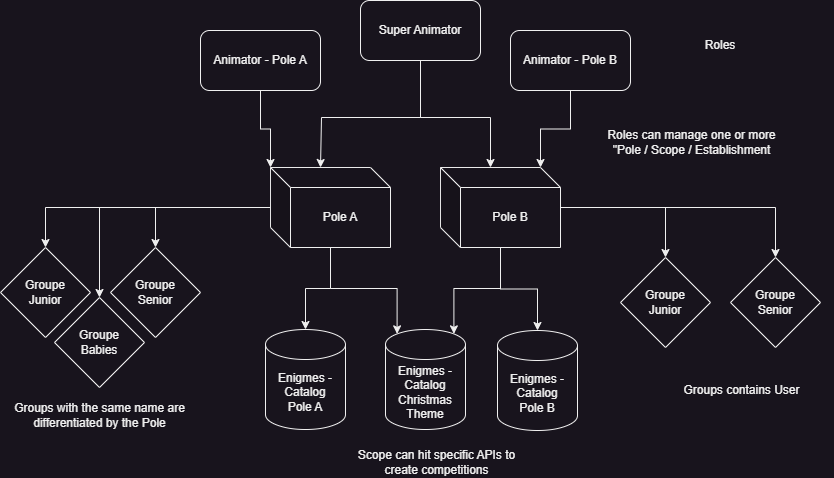
All this flexibility comes without sacrificing performance - the platform remains lightweight and resource-efficient, making it suitable for deployment in various environments.



- 🗃️ A file format created for defining puzzles .alghive
- 🧪 A Pypi Python library for implementing in your own solutions : HiveCraft
- ⌨️ A CLI forge for creating, testing, and managing puzzles : BeeLine
- 🐝 A GitHub Action workflow for automatically test and compile your puzzles BeeToFlow
- 🖨️ A self-hostable API for loading and serving puzzles : BeeAPI
- 📦 A self-hostable Web interface for managing the puzzles inside the BeeAPIs : BeeHub
- 🧩 A self-hostable web platform for managing users, competitions, and puzzles : AlgoHive Client/API
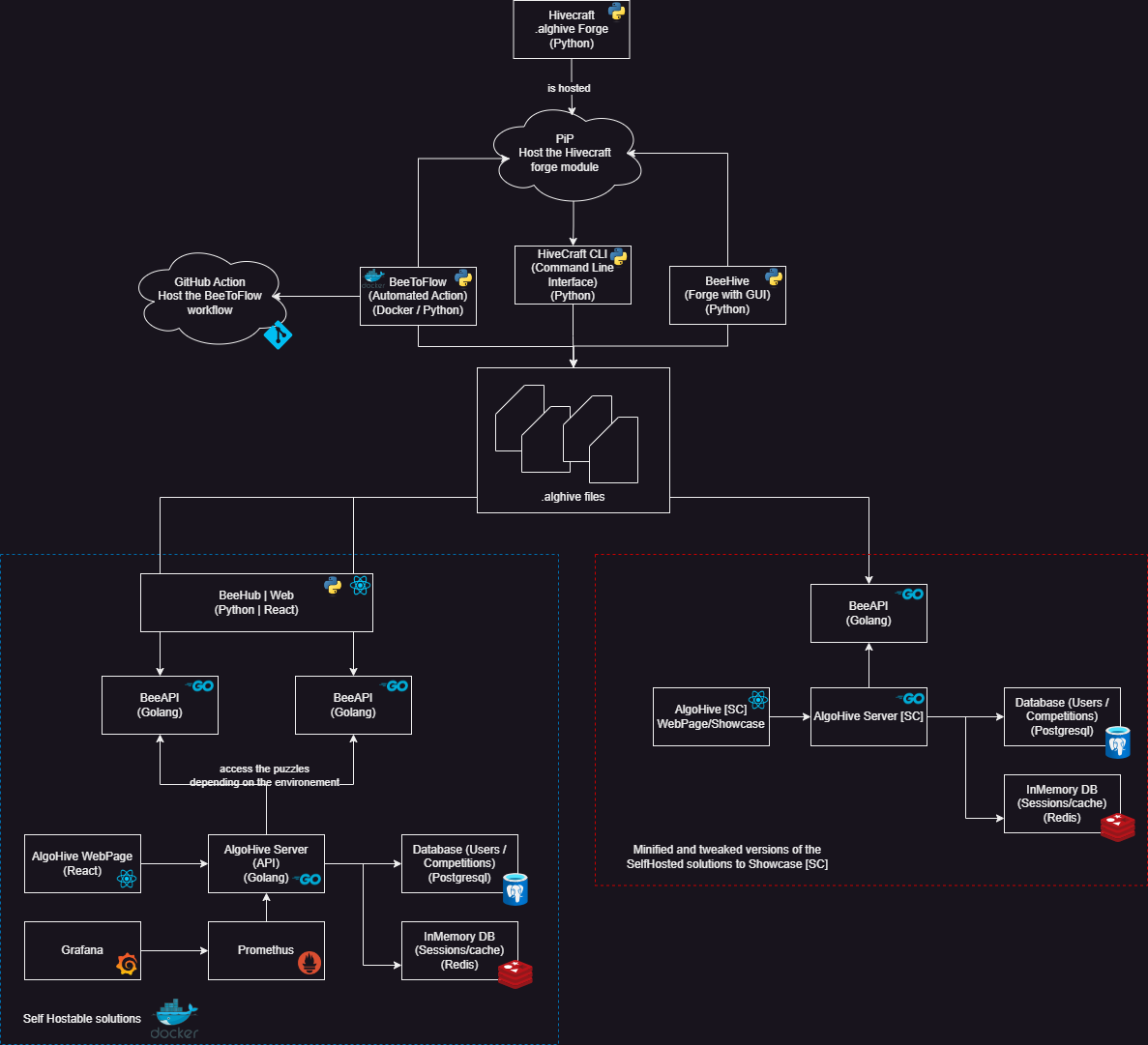
Installing Alghive is pretty straight forward, in order to do so follow these steps:
- Create a folder where you want to place all the Algohive related files.
- Inside that folder, create a file named docker-compose.yml with this content:
name: algohiveservices:
algohive-server:
container_name: algohive-serverimage: ghcr.io/algohive-coding-puzzles/api:latestenv_file: server.envdepends_on:
- algohive-db
- algohive-cacherestart: unless-stoppedports:
- "8001:8080"networks:
- algohive-networkenvironment:
- TZ=Europe/Parisvolumes:
- /etc/localtime:/etc/localtime:roalgohive-client:
container_name: algohive-clientimage: ghcr.io/algohive-coding-puzzles/client:latestrestart: unless-stoppedports:
- "7002:80"networks:
- algohive-networkenvironment:
- TZ=Europe/Parisvolumes:
- /etc/localtime:/etc/localtime:robeehub:
container_name: beehubimage: ghcr.io/algohive-coding-puzzles/beehub:latestports:
- "8002:8081"networks:
- algohive-networkenv_file: server.envenvironment:
- TZ=Europe/Parisvolumes:
- /etc/localtime:/etc/localtime:ro
- beehub-db:/app/backend/dbdepends_on:
- beeapi-server-first
- beeapi-server-secondbeeapi-server-first:
container_name: beeapi-server-firstimage: ghcr.io/algohive-coding-puzzles/beeapi-go:latestrestart: unless-stoppedvolumes:
- puzzles-first:/app/puzzlesports:
- "5000:5000"networks:
- algohive-networkenvironment:
- TZ=Europe/Paris
- SERVER_NAME=BeeAPI-First
- SERVER_DESCRIPTION=This is the server containing puzzles for the first scopelabels:
- "algohive.service.type=beeapi"beeapi-server-second:
container_name: beeapi-server-secondimage: ghcr.io/algohive-coding-puzzles/beeapi-go:latestrestart: unless-stoppedvolumes:
- puzzles-second:/app/puzzlesports:
- "5001:5000"networks:
- algohive-networkenvironment:
- TZ=Europe/Paris
- SERVER_NAME=BeeAPI-Second
- SERVER_DESCRIPTION=This is the server containing puzzles for the second scopelabels:
- "algohive.service.type=beeapi"algohive-db:
container_name: algohive-dbimage: postgres:17-alpinerestart: unless-stoppedenv_file: server.envenvironment:
- TZ=Europe/Parisvolumes:
- /etc/localtime:/etc/localtime:ro
- db-data:/var/lib/postgresql/dataports:
- "5434:5432"networks:
- algohive-networkalgohive-cache:
container_name: algohive-cacheimage: redis:alpinerestart: alwaysports:
- "6379:6379"networks:
- algohive-networkenvironment:
- TZ=Europe/Parisvolumes:
- /etc/localtime:/etc/localtime:roprometheus:
image: prom/prometheus:latestcontainer_name: prometheusvolumes:
- /etc/localtime:/etc/localtime:ro
- ./prometheus.yml:/etc/prometheus/prometheus.yml
- prometheus_data:/prometheuscommand:
- "--config.file=/etc/prometheus/prometheus.yml"
- "--storage.tsdb.path=/prometheus"
- "--storage.tsdb.retention.time=5d"
- "--web.console.libraries=/etc/prometheus/console_libraries"
- "--web.console.templates=/etc/prometheus/consoles"
- "--web.enable-lifecycle"ports:
- "9090:9090"networks:
- algohive-networkrestart: unless-stoppedenvironment:
- TZ=Europe/Parisgrafana:
image: grafana/grafana:latestcontainer_name: grafanavolumes:
- /etc/localtime:/etc/localtime:ro
- grafana_data:/var/lib/grafana
- ./grafana/provisioning:/etc/grafana/provisioningenvironment:
- TZ=Europe/Paris
- GF_SECURITY_ADMIN_USER=admin
- GF_SECURITY_ADMIN_PASSWORD=admin
- GF_USERS_ALLOW_SIGN_UP=falseports:
- "3000:3000"networks:
- algohive-networkdepends_on:
- prometheusrestart: unless-stoppedvolumes:
db-data:
puzzles-first:
puzzles-second:
beehub-db:
grafana_data:
prometheus_data:
networks:
algohive-network:- Create a file named server.env with this content:
## DB#POSTGRES_HOST=algohive-dbPOSTGRES_PORT=5432POSTGRES_DB=algohivePOSTGRES_USER=algohivePOSTGRES_PASSWORD=algohive## JWT#JWT_SECRET=algohiveJWT_EXPIRATION=86400## Server#API_PORT=8080ENV=productionALLOWED_ORIGINS=*DEFAULT_PASSWORD=algohiveBEE_APIS=http://beeapi-server-first:5000,http://beeapi-server-second:5000CLIENT_URL=http://localhostMAIL_USERNAME=admin.admin@admin.comMAIL_PASSWORD=MAIL_PORT=587MAIL_HOST=smtp.admin.com## Cache#CACHE_TTL=86400CACHE_HOST=algohive-cacheCACHE_PASSWORD=CACHE_DB=0CACHE_PORT=6379CACHE_EXPI_MIN=30## BeeHub#DATABASE_URL=sqlite:///./db/beehub.dbSECRET_KEY=superSecretPasswordACCESS_TOKEN_EXPIRE_MINUTES=1440# 24 hoursADMIN_USERNAME=adminADMIN_PASSWORD=adminAPP_PORT=8081DISCOVERY_ENABLED=trueDISCOVERY_PORT_RANGE_START=5000DISCOVERY_PORT_RANGE_END=5099DISCOVERY_SERVICE_TYPE=beeapiDISCOVERY_REFRESH_INTERVAL=60DISCOVERY_URLS=http://beeapi-server-first:5000,http://beeapi-server-second:5000- Start the services by running the following command:
docker-compose up -d --buildUseful if you don't want to use the
BeeHubweb interface to manage the puzzles.
- Authorize access to the BeeAPI folder(s) for every instance of the BeeAPI server:
This will allow you to put puzzles in the folder and have them available in the API.
sudo chown -R $USER:$USER ./data/beeapi-server-first/puzzles
```