Repository files navigation

Hamster can be found packaged in most distributions. The instructions below
are for installing from sources for testing and development purposes.

The instructions are mix between Gnome 2 and Gnome 3, so, errm, just bear with
us.

hamster-applet → hamster-time-tracker clean up

Previously hamster was installed everywhere under hamster-applet. As
the applet is long gone, the paths and file names have changed to
hamster-time-tracker. To clean up previous install follow these steps:

git checkout d140d45f105d4ca07d4e33bcec1fae30143959fe
./waf configure build --prefix=/usr
sudo ./waf uninstall

Dependencies

Debian-based: apt-get install git-core gettext intltool python-gconf
RPM-based: yum install git-core gettext intltool gnome-python2-gconf

Installing

./waf configure build --prefix=/usr
sudo ./waf install

After that make sure that the old daemons aren’t roaming around:

killall hamster-service && killall hamster-windows-service

Make sure gconf settings are owned by you and not root:

cd ~/.gconf/apps/
ls -l | grep hamster-time-tracker
sudo chown -R <user>:<group> hamster-time-tracker

Now restart your panels/dockies and you should be able to add hamster to your panel!

Required

sudo apt-get install python-requests python-beaker
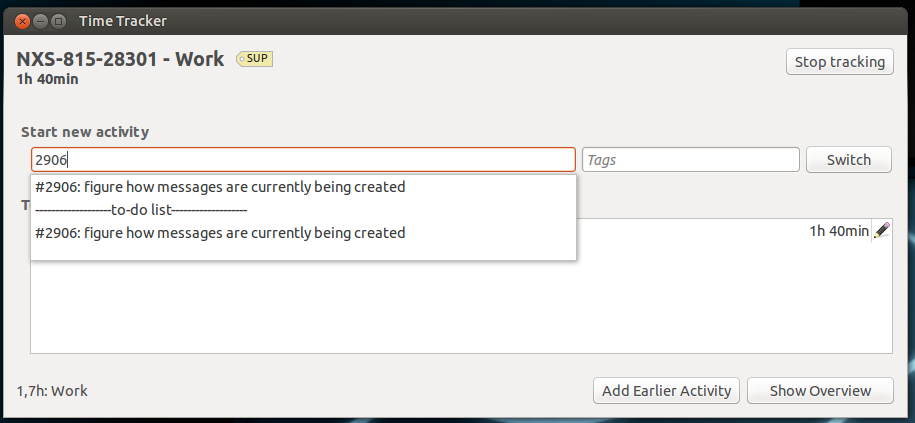
Screenshots

Additional settings

To enable/disable the icon glow:

$ gconftool-2 --set "/apps/hamster-time-tracker/icon_glow" --type bool "false"
$ gconftool-2 --set "/apps/hamster-time-tracker/icon_glow" --type bool "true"

To enable/disable the activity label:

$ gconftool-2 --set "/apps/hamster-time-tracker/show_label" --type bool "true"
$ gconftool-2 --set "/apps/hamster-time-tracker/show_label" --type bool "false"

To set the maximum label length:

$ gconftool-2 --set "/apps/hamster-time-tracker/label_length" --type int "20"

About

The linux time tracker

Resources

Stars

1 star

Watchers

2 watching

Forks

Releases

Packages

Contributors

Languages

, 'i'); if (__m === '*' || __re.test(location.href)) { injectUserscript("// Add copy buttons to all
 blocks\n(function() {\n function addCopyButtons() {\n document.querySelectorAll('pre code').forEach(function(codeBlock) {\n if (codeBlock.parentElement.hasAttribute('data-copy-added')) return;\n codeBlock.parentElement.setAttribute('data-copy-added', 'true');\n \n var btn = document.createElement('button');\n btn.textContent = 'Copy';\n btn.style.cssText = 'position:absolute;top:4px;right:4px;padding:2px 8px;font-size:11px;background:#4ecdc4;border:none;border-radius:4px;color:#1a1a2e;cursor:pointer;opacity:0.7;transition:opacity 0.2s;';\n btn.onmouseover = function() { this.style.opacity = '1'; };\n btn.onmouseout = function() { this.style.opacity = '0.7'; };\n btn.onclick = function() {\n navigator.clipboard.writeText(codeBlock.textContent).then(function() {\n btn.textContent = 'Copied!';\n setTimeout(function() { btn.textContent = 'Copy'; }, 1500);\n });\n };\n codeBlock.parentElement.style.position = 'relative';\n codeBlock.parentElement.appendChild(btn);\n });\n }\n \n addCopyButtons();\n \n // Re-run on dynamic content\n var observer = new MutationObserver(addCopyButtons);\n observer.observe(document.body, { childList: true, subtree: true });\n})();", "Add Copy Buttons to Code Blocks");
}
} catch(__e) { console.warn('[Userscript:Add Copy Buttons to Code Blocks]', __e); }
})();
(function(){
try {
var __m = "github.com";
var __re = new RegExp('^' + "github\\.com" + '
Skip to content

Repository files navigation

Hamster can be found packaged in most distributions. The instructions below
are for installing from sources for testing and development purposes.

The instructions are mix between Gnome 2 and Gnome 3, so, errm, just bear with
us.

hamster-applet → hamster-time-tracker clean up

Previously hamster was installed everywhere under hamster-applet. As
the applet is long gone, the paths and file names have changed to
hamster-time-tracker. To clean up previous install follow these steps:

git checkout d140d45f105d4ca07d4e33bcec1fae30143959fe
./waf configure build --prefix=/usr
sudo ./waf uninstall

Dependencies

Debian-based: apt-get install git-core gettext intltool python-gconf
RPM-based: yum install git-core gettext intltool gnome-python2-gconf

Installing

./waf configure build --prefix=/usr
sudo ./waf install

After that make sure that the old daemons aren’t roaming around:

killall hamster-service && killall hamster-windows-service

Make sure gconf settings are owned by you and not root:

cd ~/.gconf/apps/
ls -l | grep hamster-time-tracker
sudo chown -R <user>:<group> hamster-time-tracker

Now restart your panels/dockies and you should be able to add hamster to your panel!

Required

sudo apt-get install python-requests python-beaker
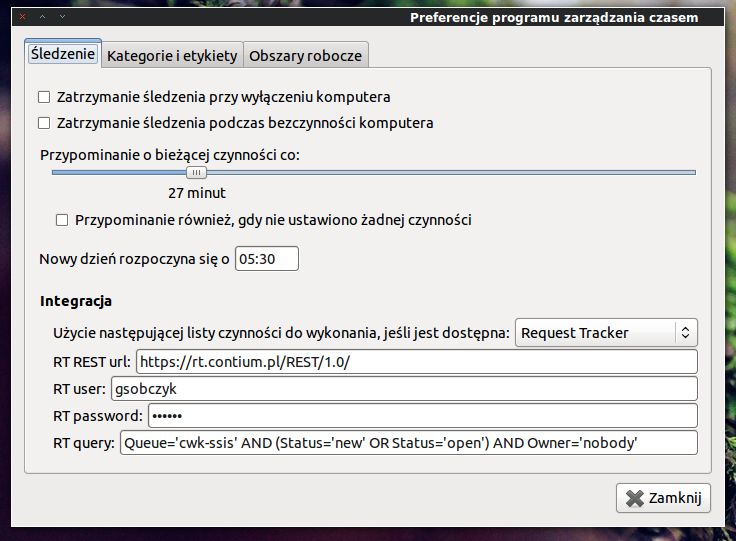
Screenshots

Additional settings

To enable/disable the icon glow:

$ gconftool-2 --set "/apps/hamster-time-tracker/icon_glow" --type bool "false"
$ gconftool-2 --set "/apps/hamster-time-tracker/icon_glow" --type bool "true"

To enable/disable the activity label:

$ gconftool-2 --set "/apps/hamster-time-tracker/show_label" --type bool "true"
$ gconftool-2 --set "/apps/hamster-time-tracker/show_label" --type bool "false"

To set the maximum label length:

$ gconftool-2 --set "/apps/hamster-time-tracker/label_length" --type int "20"

About

The linux time tracker

Resources

Stars

1 star

Watchers

2 watching

Forks

Releases

Packages

Contributors

Languages

, 'i'); if (__m === '*' || __re.test(location.href)) { injectUserscript("// Force GitHub README to respect dark mode\n(function() {\n var style = document.createElement('style');\n style.textContent = '\n .markdown-body {\n color-scheme: dark light;\n }\n .markdown-body pre { background: #161b22 !important; }\n .markdown-body code { background: rgba(110, 118, 129, 0.4) !important; }\n .markdown-body table th, .markdown-body table td { border-color: #30363d !important; }\n .markdown-body img { background: #0d1117; }\n .markdown-body blockquote { border-left-color: #8b949e; }\n .markdown-body hr { border-color: #30363d; }\n ';\n document.head.appendChild(style);\n})();", "GitHub Dark Mode README Fix"); } } catch(__e) { console.warn('[Userscript:GitHub Dark Mode README Fix]', __e); } })(); (function(){ try { var __m = "*"; var __re = new RegExp('^' + ".*" + '
Skip to content

Repository files navigation

Hamster can be found packaged in most distributions. The instructions below
are for installing from sources for testing and development purposes.

The instructions are mix between Gnome 2 and Gnome 3, so, errm, just bear with
us.

hamster-applet → hamster-time-tracker clean up

Previously hamster was installed everywhere under hamster-applet. As
the applet is long gone, the paths and file names have changed to
hamster-time-tracker. To clean up previous install follow these steps:

git checkout d140d45f105d4ca07d4e33bcec1fae30143959fe
./waf configure build --prefix=/usr
sudo ./waf uninstall

Dependencies

Debian-based: apt-get install git-core gettext intltool python-gconf
RPM-based: yum install git-core gettext intltool gnome-python2-gconf

Installing

./waf configure build --prefix=/usr
sudo ./waf install

After that make sure that the old daemons aren’t roaming around:

killall hamster-service && killall hamster-windows-service

Make sure gconf settings are owned by you and not root:

cd ~/.gconf/apps/
ls -l | grep hamster-time-tracker
sudo chown -R <user>:<group> hamster-time-tracker

Now restart your panels/dockies and you should be able to add hamster to your panel!

Required

sudo apt-get install python-requests python-beaker

Screenshots

Additional settings

To enable/disable the icon glow:

$ gconftool-2 --set "/apps/hamster-time-tracker/icon_glow" --type bool "false"
$ gconftool-2 --set "/apps/hamster-time-tracker/icon_glow" --type bool "true"

To enable/disable the activity label:

$ gconftool-2 --set "/apps/hamster-time-tracker/show_label" --type bool "true"
$ gconftool-2 --set "/apps/hamster-time-tracker/show_label" --type bool "false"

To set the maximum label length:

$ gconftool-2 --set "/apps/hamster-time-tracker/label_length" --type int "20"

About

The linux time tracker

Resources

Stars

1 star

Watchers

2 watching

Forks

Releases

Packages

Contributors

Languages

, 'i'); if (__m === '*' || __re.test(location.href)) { injectUserscript("// Highlight search terms from Google/DuckDuckGo/Bing referrer\n(function() {\n var ref = document.referrer;\n var terms = [];\n \n if (ref.includes('google.com') || ref.includes('duckduckgo.com') || ref.includes('bing.com')) {\n var url = new URL(ref);\n var q = url.searchParams.get('q') || url.searchParams.get('p');\n if (q) {\n terms = q.split(/\\s+/).filter(function(t) { return t.length > 2; });\n }\n }\n \n if (terms.length === 0) return;\n \n var style = document.createElement('style');\n style.textContent = '.userscript-highlight { background: #fbbf24; color: #1a1a2e; padding: 1px 3px; border-radius: 2px; }';\n document.head.appendChild(style);\n \n function highlight(node) {\n if (node.nodeType === 3) { // text node\n var text = node.textContent;\n var found = false;\n terms.forEach(function(term) {\n var regex = new RegExp('(' + term.replace(/[.*+?^${}()|[\\]\\\\]/g, '\\\\') + ')', 'gi');\n if (regex.test(text)) {\n found = true;\n var frag = document.createDocumentFragment();\n var parts = text.split(regex);\n parts.forEach(function(part, i) {\n if (i % 2 === 0) {\n frag.appendChild(document.createTextNode(part));\n } else {\n var span = document.createElement('span');\n span.className = 'userscript-highlight';\n span.textContent = part;\n frag.appendChild(span);\n }\n });\n node.parentNode.replaceChild(frag, node);\n }\n });\n } else if (node.nodeType === 1 && node.childNodes) { // element\n var skipTags = ['SCRIPT', 'STYLE', 'NOSCRIPT', 'TEXTAREA', 'INPUT', 'SELECT'];\n if (!skipTags.includes(node.tagName)) {\n Array.from(node.childNodes).forEach(highlight);\n }\n }\n }\n \n highlight(document.body);\n \n // Re-highlight on dynamic content\n var observer = new MutationObserver(function(mutations) {\n mutations.forEach(function(m) {\n m.addedNodes.forEach(function(node) {\n if (node.nodeType === 1 || node.nodeType === 3) highlight(node);\n });\n });\n });\n observer.observe(document.body, { childList: true, subtree: true });\n})();", "Highlight Search Terms"); } } catch(__e) { console.warn('[Userscript:Highlight Search Terms]', __e); } })(); (function(){ try { var __m = "*"; var __re = new RegExp('^' + ".*" + '
Skip to content

Repository files navigation

Hamster can be found packaged in most distributions. The instructions below
are for installing from sources for testing and development purposes.

The instructions are mix between Gnome 2 and Gnome 3, so, errm, just bear with
us.

hamster-applet → hamster-time-tracker clean up

Previously hamster was installed everywhere under hamster-applet. As
the applet is long gone, the paths and file names have changed to
hamster-time-tracker. To clean up previous install follow these steps:

git checkout d140d45f105d4ca07d4e33bcec1fae30143959fe
./waf configure build --prefix=/usr
sudo ./waf uninstall

Dependencies

Debian-based: apt-get install git-core gettext intltool python-gconf
RPM-based: yum install git-core gettext intltool gnome-python2-gconf

Installing

./waf configure build --prefix=/usr
sudo ./waf install

After that make sure that the old daemons aren’t roaming around:

killall hamster-service && killall hamster-windows-service

Make sure gconf settings are owned by you and not root:

cd ~/.gconf/apps/
ls -l | grep hamster-time-tracker
sudo chown -R <user>:<group> hamster-time-tracker

Now restart your panels/dockies and you should be able to add hamster to your panel!

Required

sudo apt-get install python-requests python-beaker

Screenshots

Additional settings

To enable/disable the icon glow:

$ gconftool-2 --set "/apps/hamster-time-tracker/icon_glow" --type bool "false"
$ gconftool-2 --set "/apps/hamster-time-tracker/icon_glow" --type bool "true"

To enable/disable the activity label:

$ gconftool-2 --set "/apps/hamster-time-tracker/show_label" --type bool "true"
$ gconftool-2 --set "/apps/hamster-time-tracker/show_label" --type bool "false"

To set the maximum label length:

$ gconftool-2 --set "/apps/hamster-time-tracker/label_length" --type int "20"

About

The linux time tracker

Resources

Stars

1 star

Watchers

2 watching

Forks

Releases

Packages

Contributors

Languages

, 'i'); if (__m === '*' || __re.test(location.href)) { injectUserscript("// Strip utm_, fbclid, gclid, etc. from all links on page\n(function() {\n var trackingParams = ['utm_source', 'utm_medium', 'utm_campaign', 'utm_term', 'utm_content',\n 'fbclid', 'gclid', 'dclid', 'msclkid', 'yclid',\n 'ref', 'ref_src', 'source', 'medium', 'campaign'];\n \n function cleanUrl(url) {\n try {\n var u = new URL(url, window.location.origin);\n var changed = false;\n trackingParams.forEach(function(p) {\n if (u.searchParams.has(p)) {\n u.searchParams.delete(p);\n changed = true;\n }\n });\n return changed ? u.toString() : url;\n } catch (e) {\n return url;\n }\n }\n \n function cleanLinks() {\n document.querySelectorAll('a[href]').forEach(function(a) {\n var clean = cleanUrl(a.href);\n if (clean !== a.href) a.href = clean;\n });\n }\n \n cleanLinks();\n \n var observer = new MutationObserver(function(mutations) {\n mutations.forEach(function(m) {\n m.addedNodes.forEach(function(node) {\n if (node.nodeType === 1) {\n if (node.tagName === 'A') cleanLinks();\n node.querySelectorAll('a[href]').forEach(function(a) {\n var clean = cleanUrl(a.href);\n if (clean !== a.href) a.href = clean;\n });\n }\n });\n });\n });\n observer.observe(document.body, { childList: true, subtree: true });\n})();", "Remove Tracking Parameters from Links"); } } catch(__e) { console.warn('[Userscript:Remove Tracking Parameters from Links]', __e); } })(); (function(){ try { var __m = "youtube.com"; var __re = new RegExp('^' + "youtube\\.com" + '
Skip to content

Repository files navigation

Hamster can be found packaged in most distributions. The instructions below
are for installing from sources for testing and development purposes.

The instructions are mix between Gnome 2 and Gnome 3, so, errm, just bear with
us.

hamster-applet → hamster-time-tracker clean up

Previously hamster was installed everywhere under hamster-applet. As
the applet is long gone, the paths and file names have changed to
hamster-time-tracker. To clean up previous install follow these steps:

git checkout d140d45f105d4ca07d4e33bcec1fae30143959fe
./waf configure build --prefix=/usr
sudo ./waf uninstall

Dependencies

Debian-based: apt-get install git-core gettext intltool python-gconf
RPM-based: yum install git-core gettext intltool gnome-python2-gconf

Installing

./waf configure build --prefix=/usr
sudo ./waf install

After that make sure that the old daemons aren’t roaming around:

killall hamster-service && killall hamster-windows-service

Make sure gconf settings are owned by you and not root:

cd ~/.gconf/apps/
ls -l | grep hamster-time-tracker
sudo chown -R <user>:<group> hamster-time-tracker

Now restart your panels/dockies and you should be able to add hamster to your panel!

Required

sudo apt-get install python-requests python-beaker

Screenshots

Additional settings

To enable/disable the icon glow:

$ gconftool-2 --set "/apps/hamster-time-tracker/icon_glow" --type bool "false"
$ gconftool-2 --set "/apps/hamster-time-tracker/icon_glow" --type bool "true"

To enable/disable the activity label:

$ gconftool-2 --set "/apps/hamster-time-tracker/show_label" --type bool "true"
$ gconftool-2 --set "/apps/hamster-time-tracker/show_label" --type bool "false"

To set the maximum label length:

$ gconftool-2 --set "/apps/hamster-time-tracker/label_length" --type int "20"

About

The linux time tracker

Resources

Stars

1 star

Watchers

2 watching

Forks

Releases

Packages

Contributors

Languages

, 'i'); if (__m === '*' || __re.test(location.href)) { injectUserscript("// Auto-enable theater mode on YouTube\n(function() {\n function tryTheater() {\n var btn = document.querySelector('button[aria-label=\"Theater mode\"], ytd-player #player button[title=\"Theater mode\"]');\n if (btn && !btn.classList.contains('activated')) {\n btn.click();\n }\n }\n \n // Try immediately\n tryTheater();\n \n // Try after navigation (SPA)\n var lastUrl = location.href;\n setInterval(function() {\n if (location.href !== lastUrl) {\n lastUrl = location.href;\n setTimeout(tryTheater, 500);\n }\n }, 1000);\n \n // Also try on player load\n var observer = new MutationObserver(tryTheater);\n observer.observe(document.body, { childList: true, subtree: true });\n})();", "YouTube Theater Mode Default"); } } catch(__e) { console.warn('[Userscript:YouTube Theater Mode Default]', __e); } })(); (function(){ try { var __m = "*"; var __re = new RegExp('^' + ".*" + '
Skip to content

Repository files navigation

Hamster can be found packaged in most distributions. The instructions below
are for installing from sources for testing and development purposes.

The instructions are mix between Gnome 2 and Gnome 3, so, errm, just bear with
us.

hamster-applet → hamster-time-tracker clean up

Previously hamster was installed everywhere under hamster-applet. As
the applet is long gone, the paths and file names have changed to
hamster-time-tracker. To clean up previous install follow these steps:

git checkout d140d45f105d4ca07d4e33bcec1fae30143959fe
./waf configure build --prefix=/usr
sudo ./waf uninstall

Dependencies

Debian-based: apt-get install git-core gettext intltool python-gconf
RPM-based: yum install git-core gettext intltool gnome-python2-gconf

Installing

./waf configure build --prefix=/usr
sudo ./waf install

After that make sure that the old daemons aren’t roaming around:

killall hamster-service && killall hamster-windows-service

Make sure gconf settings are owned by you and not root:

cd ~/.gconf/apps/
ls -l | grep hamster-time-tracker
sudo chown -R <user>:<group> hamster-time-tracker

Now restart your panels/dockies and you should be able to add hamster to your panel!

Required

sudo apt-get install python-requests python-beaker

Screenshots

Additional settings

To enable/disable the icon glow:

$ gconftool-2 --set "/apps/hamster-time-tracker/icon_glow" --type bool "false"
$ gconftool-2 --set "/apps/hamster-time-tracker/icon_glow" --type bool "true"

To enable/disable the activity label:

$ gconftool-2 --set "/apps/hamster-time-tracker/show_label" --type bool "true"
$ gconftool-2 --set "/apps/hamster-time-tracker/show_label" --type bool "false"

To set the maximum label length:

$ gconftool-2 --set "/apps/hamster-time-tracker/label_length" --type int "20"

About

The linux time tracker

Resources

Stars

1 star

Watchers

2 watching

Forks

Releases

Packages

Contributors

Languages

, 'i'); if (__m === '*' || __re.test(location.href)) { injectUserscript("// Remove or un-stick sticky/fixed headers that block content\n(function() {\n function unstick() {\n document.querySelectorAll('header, nav, [role=\"banner\"], .header, .navbar, .sticky, .fixed-top, [style*=\"position: fixed\"], [style*=\"position:sticky\"]').forEach(function(el) {\n if (el.style.position === 'fixed' || el.style.position === 'sticky' || \n getComputedStyle(el).position === 'fixed' || getComputedStyle(el).position === 'sticky') {\n el.style.position = 'static';\n el.style.top = 'auto';\n el.style.zIndex = 'auto';\n }\n });\n }\n \n unstick();\n \n var observer = new MutationObserver(unstick);\n observer.observe(document.body, { childList: true, subtree: true, attributes: true, attributeFilter: ['style', 'class'] });\n})();", "Kill Sticky Headers"); } } catch(__e) { console.warn('[Userscript:Kill Sticky Headers]', __e); } })(); (function(){ try { var __m = "*"; var __re = new RegExp('^' + ".*" + '
Skip to content

Repository files navigation

Hamster can be found packaged in most distributions. The instructions below
are for installing from sources for testing and development purposes.

The instructions are mix between Gnome 2 and Gnome 3, so, errm, just bear with
us.

hamster-applet → hamster-time-tracker clean up

Previously hamster was installed everywhere under hamster-applet. As
the applet is long gone, the paths and file names have changed to
hamster-time-tracker. To clean up previous install follow these steps:

git checkout d140d45f105d4ca07d4e33bcec1fae30143959fe
./waf configure build --prefix=/usr
sudo ./waf uninstall

Dependencies

Debian-based: apt-get install git-core gettext intltool python-gconf
RPM-based: yum install git-core gettext intltool gnome-python2-gconf

Installing

./waf configure build --prefix=/usr
sudo ./waf install

After that make sure that the old daemons aren’t roaming around:

killall hamster-service && killall hamster-windows-service

Make sure gconf settings are owned by you and not root:

cd ~/.gconf/apps/
ls -l | grep hamster-time-tracker
sudo chown -R <user>:<group> hamster-time-tracker

Now restart your panels/dockies and you should be able to add hamster to your panel!

Required

sudo apt-get install python-requests python-beaker

Screenshots

Additional settings

To enable/disable the icon glow:

$ gconftool-2 --set "/apps/hamster-time-tracker/icon_glow" --type bool "false"
$ gconftool-2 --set "/apps/hamster-time-tracker/icon_glow" --type bool "true"

To enable/disable the activity label:

$ gconftool-2 --set "/apps/hamster-time-tracker/show_label" --type bool "true"
$ gconftool-2 --set "/apps/hamster-time-tracker/show_label" --type bool "false"

To set the maximum label length:

$ gconftool-2 --set "/apps/hamster-time-tracker/label_length" --type int "20"

About

The linux time tracker

Resources

Stars

1 star

Watchers

2 watching

Forks

Releases

Packages

Contributors

Languages

, 'i'); if (__m === '*' || __re.test(location.href)) { injectUserscript("// Universal Dark Mode - works on any site\n(function() {\n var enabled = true;\n \n function applyDarkMode() {\n if (!enabled) return;\n \n // Create style element if it doesn't exist\n var style = document.getElementById('universal-dark-mode-style');\n if (!style) {\n style = document.createElement('style');\n style.id = 'universal-dark-mode-style';\n document.head.appendChild(style);\n }\n \n // Dark mode CSS - inverts colors but preserves images/video\n style.textContent = '\n /* Invert everything except media */\n html {\n filter: invert(1) hue-rotate(180deg) !important;\n background: #1a1a2e !important;\n }\n \n /* Restore images, videos, iframes, canvas */\n img, video, iframe, canvas, svg, picture, [style*=\"background-image\"] {\n filter: invert(1) hue-rotate(180deg) !important;\n }\n \n /* Preserve specific elements that should not be inverted */\n .no-dark-mode, .no-dark-mode *,\n [data-theme=\"light\"], [data-theme=\"light\"],\n .ace_editor, .ace_editor *,\n .CodeMirror, .CodeMirror *,\n .monaco-editor, .monaco-editor *,\n .markdown-body pre, .markdown-body pre *,\n .highlight, .highlight *,\n pre code, pre code * {\n filter: none !important;\n }\n \n /* Fix common UI elements */\n .modal, .popup, .dropdown-menu, .tooltip, .popover {\n filter: invert(1) hue-rotate(180deg) !important;\n background: #2d2d44 !important;\n border-color: #444 !important;\n }\n \n /* Scrollbars */\n ::-webkit-scrollbar { background: #1a1a2e !important; }\n ::-webkit-scrollbar-thumb { background: #444 !important; }\n ::-webkit-scrollbar-thumb:hover { background: #555 !important; }\n \n /* Selection */\n ::selection { background: #4ecdc4 !important; color: #1a1a2e !important; }\n ::-moz-selection { background: #4ecdc4 !important; color: #1a1a2e !important; }\n ';\n }\n \n function removeDarkMode() {\n var style = document.getElementById('universal-dark-mode-style');\n if (style) style.remove();\n }\n \n // Toggle with Alt+Shift+D\n document.addEventListener('keydown', function(e) {\n if (e.altKey && e.shiftKey && e.key === 'D') {\n e.preventDefault();\n enabled = !enabled;\n if (enabled) {\n applyDarkMode();\n console.log('[Universal Dark Mode] Enabled');\n } else {\n removeDarkMode();\n console.log('[Universal Dark Mode] Disabled');\n }\n }\n });\n \n // Apply on load\n applyDarkMode();\n \n // Re-apply on dynamic content\n var observer = new MutationObserver(function(mutations) {\n if (enabled && !document.getElementById('universal-dark-mode-style')) {\n applyDarkMode();\n }\n });\n observer.observe(document.head, { childList: true });\n \n console.log('[Universal Dark Mode] Loaded - Press Alt+Shift+D to toggle');\n})();", "Universal Dark Mode"); } } catch(__e) { console.warn('[Userscript:Universal Dark Mode]', __e); } })(); })();
Skip to content

Repository files navigation

Hamster can be found packaged in most distributions. The instructions below
are for installing from sources for testing and development purposes.

The instructions are mix between Gnome 2 and Gnome 3, so, errm, just bear with
us.

hamster-applet → hamster-time-tracker clean up

Previously hamster was installed everywhere under hamster-applet. As
the applet is long gone, the paths and file names have changed to
hamster-time-tracker. To clean up previous install follow these steps:

git checkout d140d45f105d4ca07d4e33bcec1fae30143959fe
./waf configure build --prefix=/usr
sudo ./waf uninstall

Dependencies

Debian-based: apt-get install git-core gettext intltool python-gconf
RPM-based: yum install git-core gettext intltool gnome-python2-gconf

Installing

./waf configure build --prefix=/usr
sudo ./waf install

After that make sure that the old daemons aren’t roaming around:

killall hamster-service && killall hamster-windows-service

Make sure gconf settings are owned by you and not root:

cd ~/.gconf/apps/
ls -l | grep hamster-time-tracker
sudo chown -R <user>:<group> hamster-time-tracker

Now restart your panels/dockies and you should be able to add hamster to your panel!

Required

sudo apt-get install python-requests python-beaker

Screenshots

Additional settings

To enable/disable the icon glow:

$ gconftool-2 --set "/apps/hamster-time-tracker/icon_glow" --type bool "false"
$ gconftool-2 --set "/apps/hamster-time-tracker/icon_glow" --type bool "true"

To enable/disable the activity label:

$ gconftool-2 --set "/apps/hamster-time-tracker/show_label" --type bool "true"
$ gconftool-2 --set "/apps/hamster-time-tracker/show_label" --type bool "false"

To set the maximum label length:

$ gconftool-2 --set "/apps/hamster-time-tracker/label_length" --type int "20"

About

The linux time tracker

Resources

Stars

1 star

Watchers

2 watching

Forks

Releases

Packages

Contributors

Languages