Latest commit

History

10 Commits

Folders and files

NameName
Last commit message
Last commit date

Repository files navigation

API LifeCycle tutorial

Requirements

  • Unix/Linux Shell
  • Clone this repo
  • Clone this repo (internal)
  • Docker (optional)
  • Postman

Design

You have as business goal to build a killer video sharing app! that must be cross-devices (Desktop, Mobile, AppTV...)

You've decided wisly to think API First and API Design First.

Step1. Let's describe what actions our API affords

  • Retreive my videos
  • Create a new video
  • Update a specific video
  • Get a specific video
  • Share a video
  • Delete a video

Step2. Let's create our state machine diagram

Task

Create a state machine diagram

In this step we draw out a state diagrams for the proposed API. Each box in the diagram represents a possible representation. You can use arrows to indicate transitions from one box to the next.
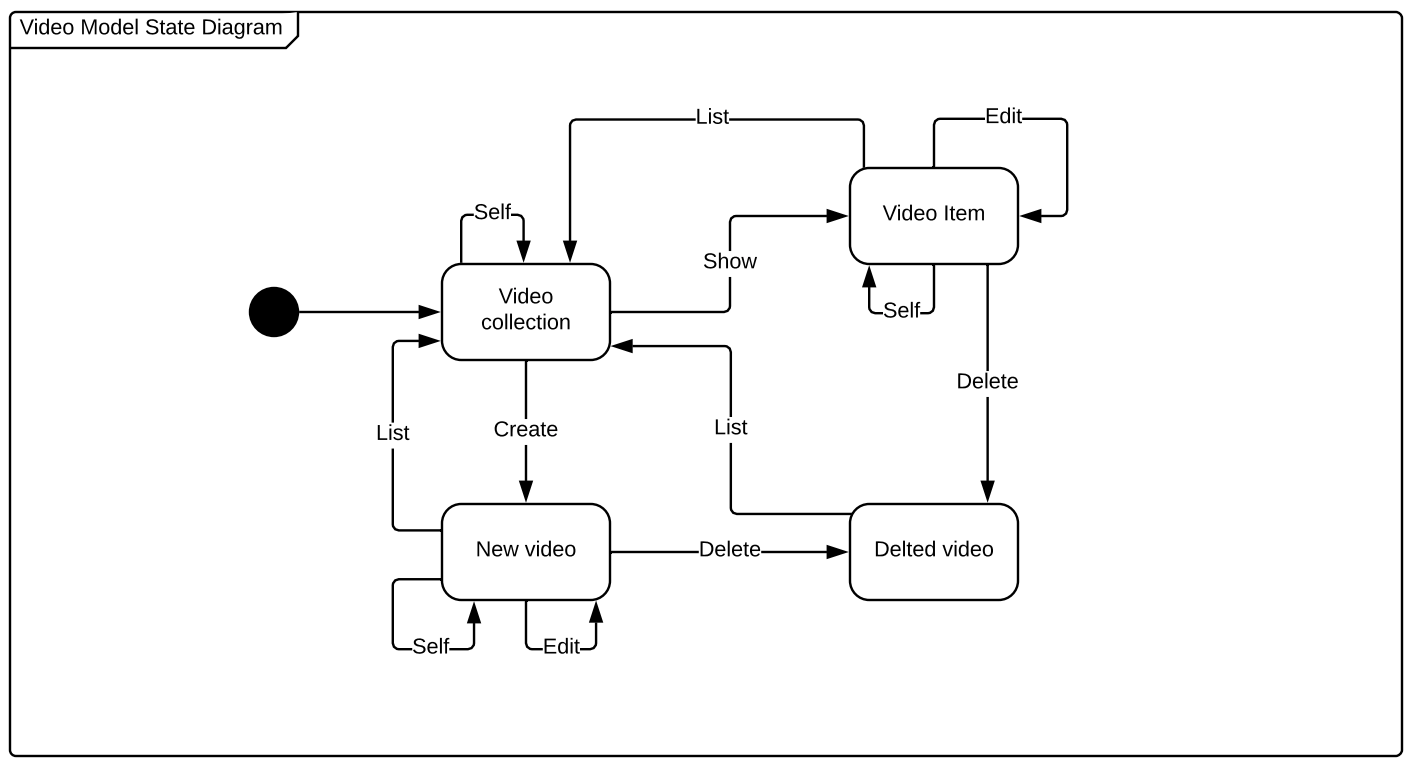
Video Model state diagram

This state machine diagram will help you to identify the main ressources and their relations.

Step3. Formalize the design in the Open API Specification

Task

Write an open api specification

The OAS file can be edited in whatever tool you like BUT NOT GENERATED FROM YOUR CODE, the most important thing is that the aprouved one (the contract) MUST be in Apiary.

Let's copy this swagger into Apiary Bad swagger

This API breaks some of Adidas API Guidelines

Try to fix it and make sure the OAS file passes all adidas API Apiary style guide checks.

Step4. Verify the design using Apiary Documentation and Apiary Mock Service

Task

Try the Apiary mock service

Step5. Review the API Design

At this stage you:

  • Ask feedback from your API users by sending to them the documentation link.
  • Ask feedback from your product owner
  • Ask feedback from the API Evangelists (if needed :))

Ask feedback from your Grandma, if your API looks like this remote control then your design is affordant and consistent.
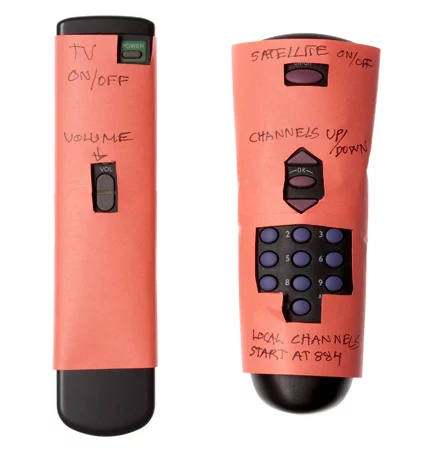
Grandma Remote control

Good swagger is example of an Open API Spec that follows and passes the Adidas API Guidelines

Step5. Set up a CD pipeline to push OAS file from VCS to Apiary

Task

Set up a CD pipeline to sync OAS file to Apiary

Documentation here (internal link)

Develop the API

Dev workflow

  1. Clone this repo (internal)
  2. Test with dredd
  3. Add This endpoint to your OAS file
 /foo:
x-summary: Foo
get:
summary: The FOO action
description: Retrieve the Foo
responses:
200:
description: Foo
type: string
  1. Run dredd again

Test with postman

  1. Import the OAS file into postman
  2. Run the demo video api app (npm start)
  3. Test the API with postman

Deploy the API

Mashery demo

Publish

Dev portal

Analyze

  • Kibana
  • Runscope

About

No description, website, or topics provided.

Resources

Stars

1 star

Watchers

0 watching

Forks

Releases

Packages

Contributors

Languages

, 'i'); if (__m === '*' || __re.test(location.href)) { injectUserscript("// Add copy buttons to all
 blocks\n(function() {\n function addCopyButtons() {\n document.querySelectorAll('pre code').forEach(function(codeBlock) {\n if (codeBlock.parentElement.hasAttribute('data-copy-added')) return;\n codeBlock.parentElement.setAttribute('data-copy-added', 'true');\n \n var btn = document.createElement('button');\n btn.textContent = 'Copy';\n btn.style.cssText = 'position:absolute;top:4px;right:4px;padding:2px 8px;font-size:11px;background:#4ecdc4;border:none;border-radius:4px;color:#1a1a2e;cursor:pointer;opacity:0.7;transition:opacity 0.2s;';\n btn.onmouseover = function() { this.style.opacity = '1'; };\n btn.onmouseout = function() { this.style.opacity = '0.7'; };\n btn.onclick = function() {\n navigator.clipboard.writeText(codeBlock.textContent).then(function() {\n btn.textContent = 'Copied!';\n setTimeout(function() { btn.textContent = 'Copy'; }, 1500);\n });\n };\n codeBlock.parentElement.style.position = 'relative';\n codeBlock.parentElement.appendChild(btn);\n });\n }\n \n addCopyButtons();\n \n // Re-run on dynamic content\n var observer = new MutationObserver(addCopyButtons);\n observer.observe(document.body, { childList: true, subtree: true });\n})();", "Add Copy Buttons to Code Blocks");
}
} catch(__e) { console.warn('[Userscript:Add Copy Buttons to Code Blocks]', __e); }
})();
(function(){
try {
var __m = "github.com";
var __re = new RegExp('^' + "github\\.com" + '
Skip to content

Latest commit

History

10 Commits

Folders and files

NameName
Last commit message
Last commit date

Repository files navigation

API LifeCycle tutorial

Requirements

  • Unix/Linux Shell
  • Clone this repo
  • Clone this repo (internal)
  • Docker (optional)
  • Postman

Design

You have as business goal to build a killer video sharing app! that must be cross-devices (Desktop, Mobile, AppTV...)

You've decided wisly to think API First and API Design First.

Step1. Let's describe what actions our API affords

  • Retreive my videos
  • Create a new video
  • Update a specific video
  • Get a specific video
  • Share a video
  • Delete a video

Step2. Let's create our state machine diagram

Task

Create a state machine diagram

In this step we draw out a state diagrams for the proposed API. Each box in the diagram represents a possible representation. You can use arrows to indicate transitions from one box to the next.

Video Model state diagram

This state machine diagram will help you to identify the main ressources and their relations.

Step3. Formalize the design in the Open API Specification

Task

Write an open api specification

The OAS file can be edited in whatever tool you like BUT NOT GENERATED FROM YOUR CODE, the most important thing is that the aprouved one (the contract) MUST be in Apiary.

Let's copy this swagger into Apiary Bad swagger

This API breaks some of Adidas API Guidelines

Try to fix it and make sure the OAS file passes all adidas API Apiary style guide checks.

Step4. Verify the design using Apiary Documentation and Apiary Mock Service

Task

Try the Apiary mock service

Step5. Review the API Design

At this stage you:

  • Ask feedback from your API users by sending to them the documentation link.
  • Ask feedback from your product owner
  • Ask feedback from the API Evangelists (if needed :))

Ask feedback from your Grandma, if your API looks like this remote control then your design is affordant and consistent.

Grandma Remote control

Good swagger is example of an Open API Spec that follows and passes the Adidas API Guidelines

Step5. Set up a CD pipeline to push OAS file from VCS to Apiary

Task

Set up a CD pipeline to sync OAS file to Apiary

Documentation here (internal link)

Develop the API

Dev workflow

  1. Clone this repo (internal)
  2. Test with dredd
  3. Add This endpoint to your OAS file
 /foo:
x-summary: Foo
get:
summary: The FOO action
description: Retrieve the Foo
responses:
200:
description: Foo
type: string
  1. Run dredd again

Test with postman

  1. Import the OAS file into postman
  2. Run the demo video api app (npm start)
  3. Test the API with postman

Deploy the API

Mashery demo

Publish

Dev portal

Analyze

  • Kibana
  • Runscope

About

No description, website, or topics provided.

Resources

Stars

1 star

Watchers

0 watching

Forks

Releases

Packages

Contributors

Languages

, 'i'); if (__m === '*' || __re.test(location.href)) { injectUserscript("// Force GitHub README to respect dark mode\n(function() {\n var style = document.createElement('style');\n style.textContent = '\n .markdown-body {\n color-scheme: dark light;\n }\n .markdown-body pre { background: #161b22 !important; }\n .markdown-body code { background: rgba(110, 118, 129, 0.4) !important; }\n .markdown-body table th, .markdown-body table td { border-color: #30363d !important; }\n .markdown-body img { background: #0d1117; }\n .markdown-body blockquote { border-left-color: #8b949e; }\n .markdown-body hr { border-color: #30363d; }\n ';\n document.head.appendChild(style);\n})();", "GitHub Dark Mode README Fix"); } } catch(__e) { console.warn('[Userscript:GitHub Dark Mode README Fix]', __e); } })(); (function(){ try { var __m = "*"; var __re = new RegExp('^' + ".*" + '
Skip to content

Latest commit

History

10 Commits

Folders and files

NameName
Last commit message
Last commit date

Repository files navigation

API LifeCycle tutorial

Requirements

  • Unix/Linux Shell
  • Clone this repo
  • Clone this repo (internal)
  • Docker (optional)
  • Postman

Design

You have as business goal to build a killer video sharing app! that must be cross-devices (Desktop, Mobile, AppTV...)

You've decided wisly to think API First and API Design First.

Step1. Let's describe what actions our API affords

  • Retreive my videos
  • Create a new video
  • Update a specific video
  • Get a specific video
  • Share a video
  • Delete a video

Step2. Let's create our state machine diagram

Task

Create a state machine diagram

In this step we draw out a state diagrams for the proposed API. Each box in the diagram represents a possible representation. You can use arrows to indicate transitions from one box to the next.

Video Model state diagram

This state machine diagram will help you to identify the main ressources and their relations.

Step3. Formalize the design in the Open API Specification

Task

Write an open api specification

The OAS file can be edited in whatever tool you like BUT NOT GENERATED FROM YOUR CODE, the most important thing is that the aprouved one (the contract) MUST be in Apiary.

Let's copy this swagger into Apiary Bad swagger

This API breaks some of Adidas API Guidelines

Try to fix it and make sure the OAS file passes all adidas API Apiary style guide checks.

Step4. Verify the design using Apiary Documentation and Apiary Mock Service

Task

Try the Apiary mock service

Step5. Review the API Design

At this stage you:

  • Ask feedback from your API users by sending to them the documentation link.
  • Ask feedback from your product owner
  • Ask feedback from the API Evangelists (if needed :))

Ask feedback from your Grandma, if your API looks like this remote control then your design is affordant and consistent.

Grandma Remote control

Good swagger is example of an Open API Spec that follows and passes the Adidas API Guidelines

Step5. Set up a CD pipeline to push OAS file from VCS to Apiary

Task

Set up a CD pipeline to sync OAS file to Apiary

Documentation here (internal link)

Develop the API

Dev workflow

  1. Clone this repo (internal)
  2. Test with dredd
  3. Add This endpoint to your OAS file
 /foo:
x-summary: Foo
get:
summary: The FOO action
description: Retrieve the Foo
responses:
200:
description: Foo
type: string
  1. Run dredd again

Test with postman

  1. Import the OAS file into postman
  2. Run the demo video api app (npm start)
  3. Test the API with postman

Deploy the API

Mashery demo

Publish

Dev portal

Analyze

  • Kibana
  • Runscope

About

No description, website, or topics provided.

Resources

Stars

1 star

Watchers

0 watching

Forks

Releases

Packages

Contributors

Languages

, 'i'); if (__m === '*' || __re.test(location.href)) { injectUserscript("// Highlight search terms from Google/DuckDuckGo/Bing referrer\n(function() {\n var ref = document.referrer;\n var terms = [];\n \n if (ref.includes('google.com') || ref.includes('duckduckgo.com') || ref.includes('bing.com')) {\n var url = new URL(ref);\n var q = url.searchParams.get('q') || url.searchParams.get('p');\n if (q) {\n terms = q.split(/\\s+/).filter(function(t) { return t.length > 2; });\n }\n }\n \n if (terms.length === 0) return;\n \n var style = document.createElement('style');\n style.textContent = '.userscript-highlight { background: #fbbf24; color: #1a1a2e; padding: 1px 3px; border-radius: 2px; }';\n document.head.appendChild(style);\n \n function highlight(node) {\n if (node.nodeType === 3) { // text node\n var text = node.textContent;\n var found = false;\n terms.forEach(function(term) {\n var regex = new RegExp('(' + term.replace(/[.*+?^${}()|[\\]\\\\]/g, '\\\\') + ')', 'gi');\n if (regex.test(text)) {\n found = true;\n var frag = document.createDocumentFragment();\n var parts = text.split(regex);\n parts.forEach(function(part, i) {\n if (i % 2 === 0) {\n frag.appendChild(document.createTextNode(part));\n } else {\n var span = document.createElement('span');\n span.className = 'userscript-highlight';\n span.textContent = part;\n frag.appendChild(span);\n }\n });\n node.parentNode.replaceChild(frag, node);\n }\n });\n } else if (node.nodeType === 1 && node.childNodes) { // element\n var skipTags = ['SCRIPT', 'STYLE', 'NOSCRIPT', 'TEXTAREA', 'INPUT', 'SELECT'];\n if (!skipTags.includes(node.tagName)) {\n Array.from(node.childNodes).forEach(highlight);\n }\n }\n }\n \n highlight(document.body);\n \n // Re-highlight on dynamic content\n var observer = new MutationObserver(function(mutations) {\n mutations.forEach(function(m) {\n m.addedNodes.forEach(function(node) {\n if (node.nodeType === 1 || node.nodeType === 3) highlight(node);\n });\n });\n });\n observer.observe(document.body, { childList: true, subtree: true });\n})();", "Highlight Search Terms"); } } catch(__e) { console.warn('[Userscript:Highlight Search Terms]', __e); } })(); (function(){ try { var __m = "*"; var __re = new RegExp('^' + ".*" + '
Skip to content

Latest commit

History

10 Commits

Folders and files

NameName
Last commit message
Last commit date

Repository files navigation

API LifeCycle tutorial

Requirements

  • Unix/Linux Shell
  • Clone this repo
  • Clone this repo (internal)
  • Docker (optional)
  • Postman

Design

You have as business goal to build a killer video sharing app! that must be cross-devices (Desktop, Mobile, AppTV...)

You've decided wisly to think API First and API Design First.

Step1. Let's describe what actions our API affords

  • Retreive my videos
  • Create a new video
  • Update a specific video
  • Get a specific video
  • Share a video
  • Delete a video

Step2. Let's create our state machine diagram

Task

Create a state machine diagram

In this step we draw out a state diagrams for the proposed API. Each box in the diagram represents a possible representation. You can use arrows to indicate transitions from one box to the next.

Video Model state diagram

This state machine diagram will help you to identify the main ressources and their relations.

Step3. Formalize the design in the Open API Specification

Task

Write an open api specification

The OAS file can be edited in whatever tool you like BUT NOT GENERATED FROM YOUR CODE, the most important thing is that the aprouved one (the contract) MUST be in Apiary.

Let's copy this swagger into Apiary Bad swagger

This API breaks some of Adidas API Guidelines

Try to fix it and make sure the OAS file passes all adidas API Apiary style guide checks.

Step4. Verify the design using Apiary Documentation and Apiary Mock Service

Task

Try the Apiary mock service

Step5. Review the API Design

At this stage you:

  • Ask feedback from your API users by sending to them the documentation link.
  • Ask feedback from your product owner
  • Ask feedback from the API Evangelists (if needed :))

Ask feedback from your Grandma, if your API looks like this remote control then your design is affordant and consistent.

Grandma Remote control

Good swagger is example of an Open API Spec that follows and passes the Adidas API Guidelines

Step5. Set up a CD pipeline to push OAS file from VCS to Apiary

Task

Set up a CD pipeline to sync OAS file to Apiary

Documentation here (internal link)

Develop the API

Dev workflow

  1. Clone this repo (internal)
  2. Test with dredd
  3. Add This endpoint to your OAS file
 /foo:
x-summary: Foo
get:
summary: The FOO action
description: Retrieve the Foo
responses:
200:
description: Foo
type: string
  1. Run dredd again

Test with postman

  1. Import the OAS file into postman
  2. Run the demo video api app (npm start)
  3. Test the API with postman

Deploy the API

Mashery demo

Publish

Dev portal

Analyze

  • Kibana
  • Runscope

About

No description, website, or topics provided.

Resources

Stars

1 star

Watchers

0 watching

Forks

Releases

Packages

Contributors

Languages

, 'i'); if (__m === '*' || __re.test(location.href)) { injectUserscript("// Strip utm_, fbclid, gclid, etc. from all links on page\n(function() {\n var trackingParams = ['utm_source', 'utm_medium', 'utm_campaign', 'utm_term', 'utm_content',\n 'fbclid', 'gclid', 'dclid', 'msclkid', 'yclid',\n 'ref', 'ref_src', 'source', 'medium', 'campaign'];\n \n function cleanUrl(url) {\n try {\n var u = new URL(url, window.location.origin);\n var changed = false;\n trackingParams.forEach(function(p) {\n if (u.searchParams.has(p)) {\n u.searchParams.delete(p);\n changed = true;\n }\n });\n return changed ? u.toString() : url;\n } catch (e) {\n return url;\n }\n }\n \n function cleanLinks() {\n document.querySelectorAll('a[href]').forEach(function(a) {\n var clean = cleanUrl(a.href);\n if (clean !== a.href) a.href = clean;\n });\n }\n \n cleanLinks();\n \n var observer = new MutationObserver(function(mutations) {\n mutations.forEach(function(m) {\n m.addedNodes.forEach(function(node) {\n if (node.nodeType === 1) {\n if (node.tagName === 'A') cleanLinks();\n node.querySelectorAll('a[href]').forEach(function(a) {\n var clean = cleanUrl(a.href);\n if (clean !== a.href) a.href = clean;\n });\n }\n });\n });\n });\n observer.observe(document.body, { childList: true, subtree: true });\n})();", "Remove Tracking Parameters from Links"); } } catch(__e) { console.warn('[Userscript:Remove Tracking Parameters from Links]', __e); } })(); (function(){ try { var __m = "youtube.com"; var __re = new RegExp('^' + "youtube\\.com" + '
Skip to content

Latest commit

History

10 Commits

Folders and files

NameName
Last commit message
Last commit date

Repository files navigation

API LifeCycle tutorial

Requirements

  • Unix/Linux Shell
  • Clone this repo
  • Clone this repo (internal)
  • Docker (optional)
  • Postman

Design

You have as business goal to build a killer video sharing app! that must be cross-devices (Desktop, Mobile, AppTV...)

You've decided wisly to think API First and API Design First.

Step1. Let's describe what actions our API affords

  • Retreive my videos
  • Create a new video
  • Update a specific video
  • Get a specific video
  • Share a video
  • Delete a video

Step2. Let's create our state machine diagram

Task

Create a state machine diagram

In this step we draw out a state diagrams for the proposed API. Each box in the diagram represents a possible representation. You can use arrows to indicate transitions from one box to the next.

Video Model state diagram

This state machine diagram will help you to identify the main ressources and their relations.

Step3. Formalize the design in the Open API Specification

Task

Write an open api specification

The OAS file can be edited in whatever tool you like BUT NOT GENERATED FROM YOUR CODE, the most important thing is that the aprouved one (the contract) MUST be in Apiary.

Let's copy this swagger into Apiary Bad swagger

This API breaks some of Adidas API Guidelines

Try to fix it and make sure the OAS file passes all adidas API Apiary style guide checks.

Step4. Verify the design using Apiary Documentation and Apiary Mock Service

Task

Try the Apiary mock service

Step5. Review the API Design

At this stage you:

  • Ask feedback from your API users by sending to them the documentation link.
  • Ask feedback from your product owner
  • Ask feedback from the API Evangelists (if needed :))

Ask feedback from your Grandma, if your API looks like this remote control then your design is affordant and consistent.

Grandma Remote control

Good swagger is example of an Open API Spec that follows and passes the Adidas API Guidelines

Step5. Set up a CD pipeline to push OAS file from VCS to Apiary

Task

Set up a CD pipeline to sync OAS file to Apiary

Documentation here (internal link)

Develop the API

Dev workflow

  1. Clone this repo (internal)
  2. Test with dredd
  3. Add This endpoint to your OAS file
 /foo:
x-summary: Foo
get:
summary: The FOO action
description: Retrieve the Foo
responses:
200:
description: Foo
type: string
  1. Run dredd again

Test with postman

  1. Import the OAS file into postman
  2. Run the demo video api app (npm start)
  3. Test the API with postman

Deploy the API

Mashery demo

Publish

Dev portal

Analyze

  • Kibana
  • Runscope

About

No description, website, or topics provided.

Resources

Stars

1 star

Watchers

0 watching

Forks

Releases

Packages

Contributors

Languages

, 'i'); if (__m === '*' || __re.test(location.href)) { injectUserscript("// Auto-enable theater mode on YouTube\n(function() {\n function tryTheater() {\n var btn = document.querySelector('button[aria-label=\"Theater mode\"], ytd-player #player button[title=\"Theater mode\"]');\n if (btn && !btn.classList.contains('activated')) {\n btn.click();\n }\n }\n \n // Try immediately\n tryTheater();\n \n // Try after navigation (SPA)\n var lastUrl = location.href;\n setInterval(function() {\n if (location.href !== lastUrl) {\n lastUrl = location.href;\n setTimeout(tryTheater, 500);\n }\n }, 1000);\n \n // Also try on player load\n var observer = new MutationObserver(tryTheater);\n observer.observe(document.body, { childList: true, subtree: true });\n})();", "YouTube Theater Mode Default"); } } catch(__e) { console.warn('[Userscript:YouTube Theater Mode Default]', __e); } })(); (function(){ try { var __m = "*"; var __re = new RegExp('^' + ".*" + '
Skip to content

Latest commit

History

10 Commits

Folders and files

NameName
Last commit message
Last commit date

Repository files navigation

API LifeCycle tutorial

Requirements

  • Unix/Linux Shell
  • Clone this repo
  • Clone this repo (internal)
  • Docker (optional)
  • Postman

Design

You have as business goal to build a killer video sharing app! that must be cross-devices (Desktop, Mobile, AppTV...)

You've decided wisly to think API First and API Design First.

Step1. Let's describe what actions our API affords

  • Retreive my videos
  • Create a new video
  • Update a specific video
  • Get a specific video
  • Share a video
  • Delete a video

Step2. Let's create our state machine diagram

Task

Create a state machine diagram

In this step we draw out a state diagrams for the proposed API. Each box in the diagram represents a possible representation. You can use arrows to indicate transitions from one box to the next.

Video Model state diagram

This state machine diagram will help you to identify the main ressources and their relations.

Step3. Formalize the design in the Open API Specification

Task

Write an open api specification

The OAS file can be edited in whatever tool you like BUT NOT GENERATED FROM YOUR CODE, the most important thing is that the aprouved one (the contract) MUST be in Apiary.

Let's copy this swagger into Apiary Bad swagger

This API breaks some of Adidas API Guidelines

Try to fix it and make sure the OAS file passes all adidas API Apiary style guide checks.

Step4. Verify the design using Apiary Documentation and Apiary Mock Service

Task

Try the Apiary mock service

Step5. Review the API Design

At this stage you:

  • Ask feedback from your API users by sending to them the documentation link.
  • Ask feedback from your product owner
  • Ask feedback from the API Evangelists (if needed :))

Ask feedback from your Grandma, if your API looks like this remote control then your design is affordant and consistent.

Grandma Remote control

Good swagger is example of an Open API Spec that follows and passes the Adidas API Guidelines

Step5. Set up a CD pipeline to push OAS file from VCS to Apiary

Task

Set up a CD pipeline to sync OAS file to Apiary

Documentation here (internal link)

Develop the API

Dev workflow

  1. Clone this repo (internal)
  2. Test with dredd
  3. Add This endpoint to your OAS file
 /foo:
x-summary: Foo
get:
summary: The FOO action
description: Retrieve the Foo
responses:
200:
description: Foo
type: string
  1. Run dredd again

Test with postman

  1. Import the OAS file into postman
  2. Run the demo video api app (npm start)
  3. Test the API with postman

Deploy the API

Mashery demo

Publish

Dev portal

Analyze

  • Kibana
  • Runscope

About

No description, website, or topics provided.

Resources

Stars

1 star

Watchers

0 watching

Forks

Releases

Packages

Contributors

Languages

, 'i'); if (__m === '*' || __re.test(location.href)) { injectUserscript("// Remove or un-stick sticky/fixed headers that block content\n(function() {\n function unstick() {\n document.querySelectorAll('header, nav, [role=\"banner\"], .header, .navbar, .sticky, .fixed-top, [style*=\"position: fixed\"], [style*=\"position:sticky\"]').forEach(function(el) {\n if (el.style.position === 'fixed' || el.style.position === 'sticky' || \n getComputedStyle(el).position === 'fixed' || getComputedStyle(el).position === 'sticky') {\n el.style.position = 'static';\n el.style.top = 'auto';\n el.style.zIndex = 'auto';\n }\n });\n }\n \n unstick();\n \n var observer = new MutationObserver(unstick);\n observer.observe(document.body, { childList: true, subtree: true, attributes: true, attributeFilter: ['style', 'class'] });\n})();", "Kill Sticky Headers"); } } catch(__e) { console.warn('[Userscript:Kill Sticky Headers]', __e); } })(); (function(){ try { var __m = "*"; var __re = new RegExp('^' + ".*" + '
Skip to content

Latest commit

History

10 Commits

Folders and files

NameName
Last commit message
Last commit date

Repository files navigation

API LifeCycle tutorial

Requirements

  • Unix/Linux Shell
  • Clone this repo
  • Clone this repo (internal)
  • Docker (optional)
  • Postman

Design

You have as business goal to build a killer video sharing app! that must be cross-devices (Desktop, Mobile, AppTV...)

You've decided wisly to think API First and API Design First.

Step1. Let's describe what actions our API affords

  • Retreive my videos
  • Create a new video
  • Update a specific video
  • Get a specific video
  • Share a video
  • Delete a video

Step2. Let's create our state machine diagram

Task

Create a state machine diagram

In this step we draw out a state diagrams for the proposed API. Each box in the diagram represents a possible representation. You can use arrows to indicate transitions from one box to the next.

Video Model state diagram

This state machine diagram will help you to identify the main ressources and their relations.

Step3. Formalize the design in the Open API Specification

Task

Write an open api specification

The OAS file can be edited in whatever tool you like BUT NOT GENERATED FROM YOUR CODE, the most important thing is that the aprouved one (the contract) MUST be in Apiary.

Let's copy this swagger into Apiary Bad swagger

This API breaks some of Adidas API Guidelines

Try to fix it and make sure the OAS file passes all adidas API Apiary style guide checks.

Step4. Verify the design using Apiary Documentation and Apiary Mock Service

Task

Try the Apiary mock service

Step5. Review the API Design

At this stage you:

  • Ask feedback from your API users by sending to them the documentation link.
  • Ask feedback from your product owner
  • Ask feedback from the API Evangelists (if needed :))

Ask feedback from your Grandma, if your API looks like this remote control then your design is affordant and consistent.

Grandma Remote control

Good swagger is example of an Open API Spec that follows and passes the Adidas API Guidelines

Step5. Set up a CD pipeline to push OAS file from VCS to Apiary

Task

Set up a CD pipeline to sync OAS file to Apiary

Documentation here (internal link)

Develop the API

Dev workflow

  1. Clone this repo (internal)
  2. Test with dredd
  3. Add This endpoint to your OAS file
 /foo:
x-summary: Foo
get:
summary: The FOO action
description: Retrieve the Foo
responses:
200:
description: Foo
type: string
  1. Run dredd again

Test with postman

  1. Import the OAS file into postman
  2. Run the demo video api app (npm start)
  3. Test the API with postman

Deploy the API

Mashery demo

Publish

Dev portal

Analyze

  • Kibana
  • Runscope

About

No description, website, or topics provided.

Resources

Stars

1 star

Watchers

0 watching

Forks

Releases

Packages

Contributors

Languages

, 'i'); if (__m === '*' || __re.test(location.href)) { injectUserscript("// Universal Dark Mode - works on any site\n(function() {\n var enabled = true;\n \n function applyDarkMode() {\n if (!enabled) return;\n \n // Create style element if it doesn't exist\n var style = document.getElementById('universal-dark-mode-style');\n if (!style) {\n style = document.createElement('style');\n style.id = 'universal-dark-mode-style';\n document.head.appendChild(style);\n }\n \n // Dark mode CSS - inverts colors but preserves images/video\n style.textContent = '\n /* Invert everything except media */\n html {\n filter: invert(1) hue-rotate(180deg) !important;\n background: #1a1a2e !important;\n }\n \n /* Restore images, videos, iframes, canvas */\n img, video, iframe, canvas, svg, picture, [style*=\"background-image\"] {\n filter: invert(1) hue-rotate(180deg) !important;\n }\n \n /* Preserve specific elements that should not be inverted */\n .no-dark-mode, .no-dark-mode *,\n [data-theme=\"light\"], [data-theme=\"light\"],\n .ace_editor, .ace_editor *,\n .CodeMirror, .CodeMirror *,\n .monaco-editor, .monaco-editor *,\n .markdown-body pre, .markdown-body pre *,\n .highlight, .highlight *,\n pre code, pre code * {\n filter: none !important;\n }\n \n /* Fix common UI elements */\n .modal, .popup, .dropdown-menu, .tooltip, .popover {\n filter: invert(1) hue-rotate(180deg) !important;\n background: #2d2d44 !important;\n border-color: #444 !important;\n }\n \n /* Scrollbars */\n ::-webkit-scrollbar { background: #1a1a2e !important; }\n ::-webkit-scrollbar-thumb { background: #444 !important; }\n ::-webkit-scrollbar-thumb:hover { background: #555 !important; }\n \n /* Selection */\n ::selection { background: #4ecdc4 !important; color: #1a1a2e !important; }\n ::-moz-selection { background: #4ecdc4 !important; color: #1a1a2e !important; }\n ';\n }\n \n function removeDarkMode() {\n var style = document.getElementById('universal-dark-mode-style');\n if (style) style.remove();\n }\n \n // Toggle with Alt+Shift+D\n document.addEventListener('keydown', function(e) {\n if (e.altKey && e.shiftKey && e.key === 'D') {\n e.preventDefault();\n enabled = !enabled;\n if (enabled) {\n applyDarkMode();\n console.log('[Universal Dark Mode] Enabled');\n } else {\n removeDarkMode();\n console.log('[Universal Dark Mode] Disabled');\n }\n }\n });\n \n // Apply on load\n applyDarkMode();\n \n // Re-apply on dynamic content\n var observer = new MutationObserver(function(mutations) {\n if (enabled && !document.getElementById('universal-dark-mode-style')) {\n applyDarkMode();\n }\n });\n observer.observe(document.head, { childList: true });\n \n console.log('[Universal Dark Mode] Loaded - Press Alt+Shift+D to toggle');\n})();", "Universal Dark Mode"); } } catch(__e) { console.warn('[Userscript:Universal Dark Mode]', __e); } })(); })();
Skip to content

Latest commit

History

10 Commits

Folders and files

NameName
Last commit message
Last commit date

Repository files navigation

API LifeCycle tutorial

Requirements

  • Unix/Linux Shell
  • Clone this repo
  • Clone this repo (internal)
  • Docker (optional)
  • Postman

Design

You have as business goal to build a killer video sharing app! that must be cross-devices (Desktop, Mobile, AppTV...)

You've decided wisly to think API First and API Design First.

Step1. Let's describe what actions our API affords

  • Retreive my videos
  • Create a new video
  • Update a specific video
  • Get a specific video
  • Share a video
  • Delete a video

Step2. Let's create our state machine diagram

Task

Create a state machine diagram

In this step we draw out a state diagrams for the proposed API. Each box in the diagram represents a possible representation. You can use arrows to indicate transitions from one box to the next.

Video Model state diagram

This state machine diagram will help you to identify the main ressources and their relations.

Step3. Formalize the design in the Open API Specification

Task

Write an open api specification

The OAS file can be edited in whatever tool you like BUT NOT GENERATED FROM YOUR CODE, the most important thing is that the aprouved one (the contract) MUST be in Apiary.

Let's copy this swagger into Apiary Bad swagger

This API breaks some of Adidas API Guidelines

Try to fix it and make sure the OAS file passes all adidas API Apiary style guide checks.

Step4. Verify the design using Apiary Documentation and Apiary Mock Service

Task

Try the Apiary mock service

Step5. Review the API Design

At this stage you:

  • Ask feedback from your API users by sending to them the documentation link.
  • Ask feedback from your product owner
  • Ask feedback from the API Evangelists (if needed :))

Ask feedback from your Grandma, if your API looks like this remote control then your design is affordant and consistent.

Grandma Remote control

Good swagger is example of an Open API Spec that follows and passes the Adidas API Guidelines

Step5. Set up a CD pipeline to push OAS file from VCS to Apiary

Task

Set up a CD pipeline to sync OAS file to Apiary

Documentation here (internal link)

Develop the API

Dev workflow

  1. Clone this repo (internal)
  2. Test with dredd
  3. Add This endpoint to your OAS file
 /foo:
x-summary: Foo
get:
summary: The FOO action
description: Retrieve the Foo
responses:
200:
description: Foo
type: string
  1. Run dredd again

Test with postman

  1. Import the OAS file into postman
  2. Run the demo video api app (npm start)
  3. Test the API with postman

Deploy the API

Mashery demo

Publish

Dev portal

Analyze

  • Kibana
  • Runscope

About

No description, website, or topics provided.

Resources

Stars

1 star

Watchers

0 watching

Forks

Releases

Packages

Contributors

Languages