The C++ Bitmap Library consists of simple, robust, optimized and portable processing routines for the 24-bit per pixel bitmap image format.
- Read/Write 24-bit Bitmap Images
- Pixel, row or column level batch editing
- Colour conversions (RGB,YCbCr) in byte and floating values
- Highly optimized subsample and upsample (resizing)
- Various colour maps (1000 levels - autumn, copper, gray, hot, hsv, jet, prism, vga, yarg)
- Texture generation (checkered pattern, plasma)
- Graphics drawing interface (line, line-segment, rectangle, triangle, quadix, horizontal and vertical line-segments, ellipse, circle, plot pixel, pen width, pen color)
- Cartesian canvas and associated drawing interface
- PSNR and Image comparisons
- Simple nearest colour match from set of colours
- Wavelength to RGB approximations
- Single header implementation, no building required. No external dependencies
http://www.partow.net/programming/bitmap/index.html
The C++ Bitmap Library implementation is compatible with the following C++ compilers:
- GNU Compiler Collection (4.1+)
- Intel® C++ Compiler (9.x+)
- Clang/LLVM (1.1+)
- PGI C++ (10.x+)
- Microsoft Visual Studio C++ Compiler (8.1+)
- IBM XL C/C++ (10.x+)
The following example will open a bitmap image called 'input.bmp' and count the number of pixels that have a red channel value of 111 and larger, then proceed to print the count to stdout.
#include<cstdio>
#include"bitmap_image.hpp"intmain()
{
bitmap_image image("input.bmp");
if (!image)
{
printf("Error - Failed to open: input.bmp\n");
return1;
}
unsignedint total_number_of_pixels = 0;
constunsignedint height = image.height();
constunsignedint width = image.width();
for (std::size_t y = 0; y < height; ++y)
{
for (std::size_t x = 0; x < width; ++x)
{
rgb_t colour;
image.get_pixel(x, y, colour);
if (colour.red >= 111)
total_number_of_pixels++;
}
}
printf("Number of pixels with red >= 111: %d\n",total_number_of_pixels);
return0;
}The following example will create a bitmap of dimensions 200x200 pixels, set the background colour to orange, then proceed to draw a circle centered in the middle of the bitmap of radius 50 pixels and of colour red then a rectangle centered in the middle of the bitmap with a width and height of 100 pixels and of colour blue. The newly constructed image will be saved to disk with the name: 'output.bmp'.
#include"bitmap_image.hpp"intmain()
{
bitmap_image image(200,200);
// set background to orange
image.set_all_channels(255, 150, 50);
image_drawer draw(image);
draw.pen_width(3);
draw.pen_color(255, 0, 0);
draw.circle(image.width() / 2, image.height() / 2, 50);
draw.pen_width(1);
draw.pen_color(0, 0, 255);
draw.rectangle(50, 50, 150, 150);
image.save_image("output.bmp");
return0;
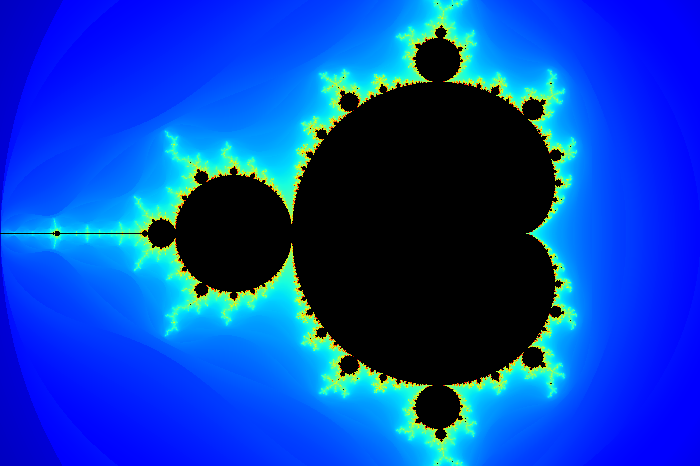
}The following example will render the Mandelbrot set fractal and save the generated bitmap as 'mandelbrot_set.bmp'.
#include<cmath>
#include"bitmap_image.hpp"intmain()
{
bitmap_image fractal(600,400);
fractal.clear();
double cr, ci;
double nextr, nexti;
double prevr, previ;
constunsignedint max_iterations = 1000;
for (unsignedint y = 0; y < fractal.height(); ++y)
{
for (unsignedint x = 0; x < fractal.width(); ++x)
{
cr = 1.5 * (2.0 * x / fractal.width () - 1.0) - 0.5;
ci = (2.0 * y / fractal.height() - 1.0);
nextr = nexti = 0;
prevr = previ = 0;
for (unsignedint i = 0; i < max_iterations; ++i)
{
prevr = nextr;
previ = nexti;
nextr = prevr * prevr - previ * previ + cr;
nexti = 2 * prevr * previ + ci;
if (((nextr * nextr) + (nexti * nexti)) > 4)
{
usingnamespacestd;constdouble z = sqrt(nextr * nextr + nexti * nexti);
//https://en.wikipedia.org/wiki/Mandelbrot_set#Continuous_.28smooth.29_coloringconstunsignedint index = static_cast<unsignedint>
(1000.0 * log2(1.75 + i - log2(log2(z))) / log2(max_iterations));
fractal.set_pixel(x, y, jet_colormap[index]);
break;
}
}
}
}
fractal.save_image("mandelbrot_set.bmp");
return0;
}
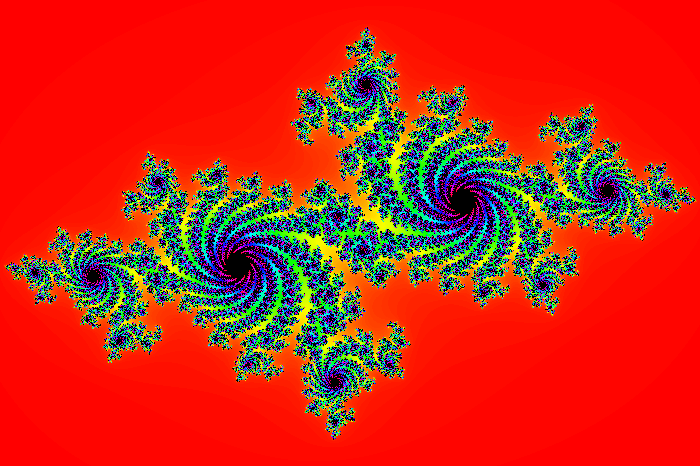
The following example will render the Julia set fractal and save the generated bitmap as 'julia_set.bmp'.
#include<cmath>
#include"bitmap_image.hpp"intmain()
{
bitmap_image fractal(600,400);
fractal.clear();
constunsignedint max_iterations = 300;
constdouble cr = -0.70000;
constdouble ci = 0.27015;
double prevr, previ;
for (unsignedint y = 0; y < fractal.height(); ++y)
{
for (unsignedint x = 0; x < fractal.width(); ++x)
{
double nextr = 1.5 * (2.0 * x / fractal.width () - 1.0);
double nexti = (2.0 * y / fractal.height() - 1.0);
for (unsignedint i = 0; i < max_iterations; ++i)
{
prevr = nextr;
previ = nexti;
nextr = prevr * prevr - previ * previ + cr;
nexti = 2 * prevr * previ + ci;
if (((nextr * nextr) + (nexti * nexti)) > 4)
{
rgb_t c = hsv_colormap[static_cast<int>((1000.0 * i) / max_iterations)];
fractal.set_pixel(x, y, c);
break;
}
}
}
}
fractal.save_image("julia_set.bmp");
return0;
}
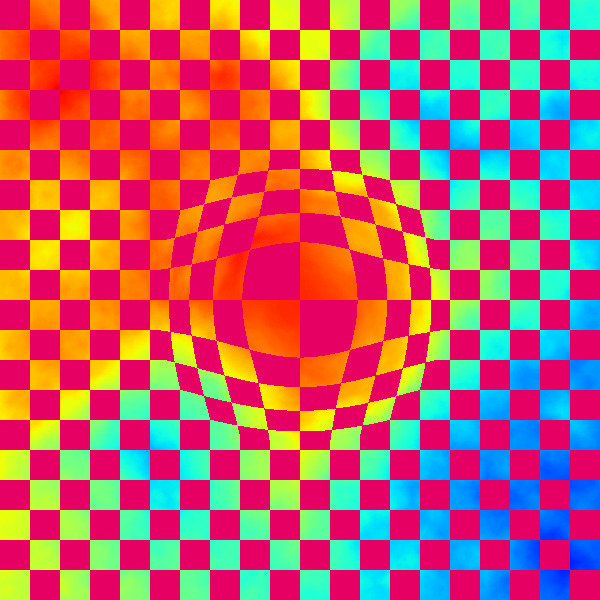
The following example will render a baseline image using a combination of plasma and checkered pattern effects. Then proceed to apply a lens distortion upon the base image. Finally both the base and the lens distorted versions of the images will be saved to file as 'base.bmp' and 'lens_effect.bmp' respectively.
#include<algorithm>
#include<cmath>
#include"bitmap_image.hpp"intmain()
{
bitmap_image base(600,600);
base.clear();
{
constdouble c1 = 0.8;
constdouble c2 = 0.4;
constdouble c3 = 0.2;
constdouble c4 = 0.6;
::srand(0xA5AA5AA5);
plasma(base, 0, 0, base.width(), base.height(), c1, c2, c3, c4, 3.0, jet_colormap);
checkered_pattern(30, 30, 230, bitmap_image:: red_plane, base);
checkered_pattern(30, 30, 0, bitmap_image::green_plane, base);
checkered_pattern(30, 30, 100, bitmap_image:: blue_plane, base);
}
bitmap_image lens_image(base.width(),base.height());
lens_image = base;
constdouble lens_center_x = base.width () / 2.0;
constdouble lens_center_y = base.height() / 2.0;
constdouble lens_radius = std::min(base.width(), base.height()) / 4.0;
constdouble lens_factor = 0.7;
for (unsignedint x = 0; x < base.width(); ++x)
{
for (unsignedint y = 0; y < base.height(); ++y)
{
constdouble dx = x - lens_center_x;
constdouble dy = y - lens_center_y;
constdouble distance = std::sqrt((dx * dx) + (dy * dy));
if (distance <= lens_radius)
{
constdouble radius = distance / lens_radius;
constdouble angle = std::atan2(dy, dx);
constdouble distortion = std::pow(radius, lens_factor) * distance;
int sx = static_cast<int>(distortion * std::cos(angle) + lens_center_x);
int sy = static_cast<int>(distortion * std::sin(angle) + lens_center_y);
if (
(sx >= 0) &&
(sy >= 0) &&
(sx < (int)base.width ()) &&
(sy < (int)base.height())
)
{
unsignedchar red;
unsignedchar green;
unsignedchar blue;
base .get_pixel(sx, sy, red, green, blue);
lens_image.set_pixel( x, y, red, green, blue);
}
}
}
}
base .save_image("base.bmp" );
lens_image.save_image("lens_effect.bmp");
return0;
}
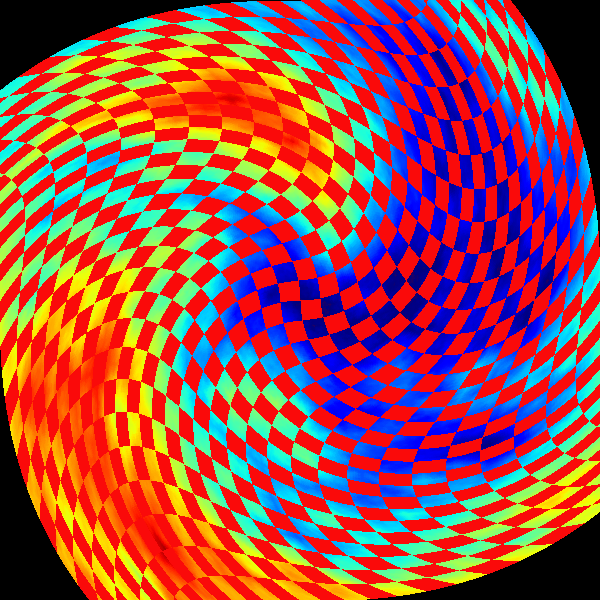
The following example will render a baseline image using a combination of plasma and checkered pattern effects. Then proceed to apply a swirl distortion upon the base image. Finally both the base and the swirl distorted versions of the images will be saved to file as 'base.bmp' and 'swirl_effect.bmp' respectively.
#include<cmath>
#include"bitmap_image.hpp"intmain()
{
bitmap_image base(600,600);
base.clear();
{
constdouble c1 = 0.8;
constdouble c2 = 0.4;
constdouble c3 = 0.2;
constdouble c4 = 0.6;
::srand(0x5A5A5A5A);
plasma(base, 0, 0, base.width(), base.height(), c1, c2, c3, c4, 7.0, jet_colormap);
checkered_pattern(20, 20, 250, bitmap_image:: red_plane, base);
checkered_pattern(20, 20, 10, bitmap_image::green_plane, base);
checkered_pattern(20, 20, 10, bitmap_image:: blue_plane, base);
}
bitmap_image swirl_image(base.width(),base.height());
swirl_image.clear();
constdouble swirl_center_x = base.width () / 2.0;
constdouble swirl_center_y = base.height() / 2.0;
constdouble swirl_radius = std::min(base.width(), base.height()) / 3.0;
constdouble pi_ = 3.1415926535897932384626433832795028841971;
constdouble swirl_angle = pi_ / 3.0;
for (unsignedint x = 0; x < base.width(); ++x)
{
for (unsignedint y = 0; y < base.height(); ++y)
{
constdouble dx = x - swirl_center_x;
constdouble dy = y - swirl_center_y;
constdouble distance = std::sqrt((dx * dx) + (dy * dy));
constdouble angle = swirl_angle * (distance / swirl_radius);
constdouble cosa = std::cos(angle);
constdouble sina = std::sin(angle);
int sx = static_cast<int>(dx * cosa - dy * sina + swirl_center_x);
int sy = static_cast<int>(dx * sina + dy * cosa + swirl_center_y);
if (
(sx >= 0) &&
(sy >= 0) &&
(sx < (int)base.width ()) &&
(sy < (int)base.height())
)
{
unsignedchar red;
unsignedchar green;
unsignedchar blue;
base .get_pixel(sx, sy, red, green, blue);
swirl_image.set_pixel( x, y, red, green, blue);
}
}
}
base .save_image("base.bmp" );
swirl_image.save_image("swirl_effect.bmp");
return0;
}
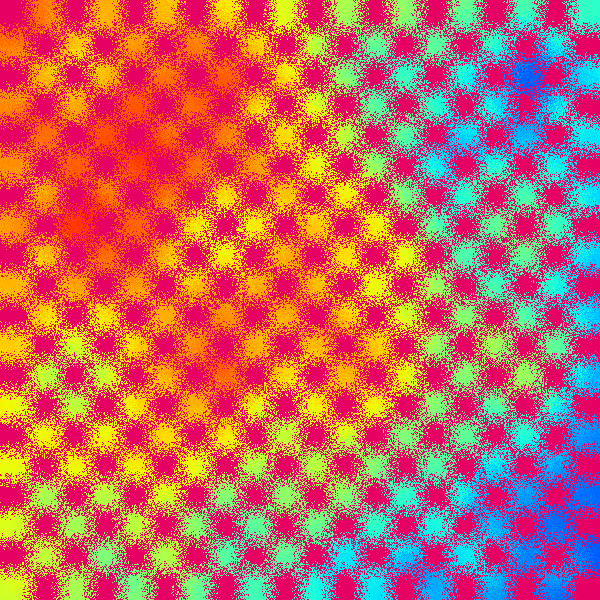
The following example will render a baseline image using a combination of plasma and checkered pattern effects. Then proceed to apply a frosted glass diffusion effect upon the base image. Finally the frosted glass version of the image will be saved to 'glass_effect.bmp'.
#include<algorithm>
#include<cstdlib>
#include"bitmap_image.hpp"intmain()
{
constint width = 600;
constint height = 600;
constint kernel_size = 10;
bitmap_image base(width,height);
base.clear();
{
constdouble c1 = 0.8;
constdouble c2 = 0.4;
constdouble c3 = 0.2;
constdouble c4 = 0.6;
::srand(0xA5AA57A5);
plasma(base, 0, 0, base.width(), base.height(), c1, c2, c3, c4, 3.0, jet_colormap);
checkered_pattern(30, 30, 230, bitmap_image:: red_plane, base);
checkered_pattern(30, 30, 0, bitmap_image::green_plane, base);
checkered_pattern(30, 30, 100, bitmap_image:: blue_plane, base);
}
bitmap_image glass_image(base.width(),base.height());
glass_image = base;
for (int y = 0; y < height; ++y)
{
for (int x = 0; x < width; ++x)
{
constunsignedint min_x = std::max(0, x - kernel_size);
constunsignedint min_y = std::max(0, y - kernel_size);
constunsignedint max_x = std::min(x + kernel_size, width - 1);
constunsignedint max_y = std::min(y + kernel_size, height - 1);
constunsignedint dx = (max_x - min_x);
constunsignedint dy = (max_y - min_y);
constunsignedint N = rand() % (dx * dy);
constunsignedint cx = (N % dx) + min_x;
constunsignedint cy = (N / dx) + min_y;
glass_image.set_pixel(x, y, base.get_pixel(cx, cy));
}
}
glass_image.save_image("glass_effect.bmp");
return0;
}
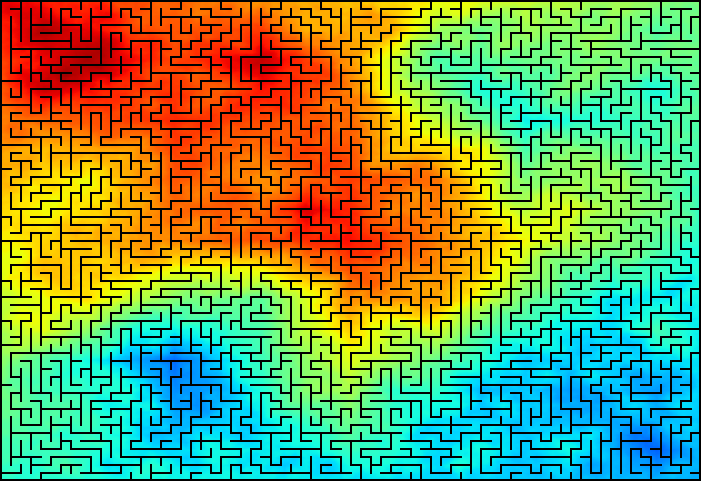
The following example will render a maze generated using a simple recursive backtracking algorithm. The example demonstrates the use of the drawing and colouring functionalities. Once the maze has been completed, it will be saved to file as 'maze.bmp'.
#include<cstdlib>
#include"bitmap_image.hpp"enum compass { N = 1, E = 2, S = 4, W = 8 };
constint untouched = (N | E | S | W);
structmove_t { int x, y, inverse; };
constmove_t move[5] =
{
{ 0, 0, 0 },
// North East South West
{ 0, -1, S }, { 1, 0, W }, { 0, 1, N }, { -1, 0, E }
};
constint movemap[] = {0, 1, 2, 0, 3, 0, 0, 0, 4};
const compass permutations[] =
{
N,S,E,W, S,N,E,W, E,N,S,W, N,E,S,W, S,E,N,W, E,S,N,W, E,S,W,N, S,E,W,N,
W,E,S,N, E,W,S,N, S,W,E,N, W,S,E,N, W,N,E,S, N,W,E,S, E,W,N,S, W,E,N,S,
N,E,W,S, E,N,W,S, S,N,W,E, N,S,W,E, W,S,N,E, S,W,N,E, N,W,S,E, W,N,S,E
};
voidgenerate_maze(int cx, int cy, response_image<int>& maze)
{
constunsignedint perm_index = 4 * ((rand() % 24));
std::vector<compass>
directions(&permutations[perm_index], &permutations[perm_index + 4]);
for (std::size_t i = 0; i < directions.size(); ++i)
{
constmove_t m = move[movemap[directions[i]]];
constint x = cx + m.x;
constint y = cy + m.y;
if (
(x < 0) || (y < 0) ||
(x >= (int)maze.width ()) ||
(y >= (int)maze.height()) ||
(untouched != maze(x,y))
)
continue;
// Eliminate the wall corresponding to the selected direction.maze(cx,cy) = maze(cx,cy) & ~directions[i];
maze( x, y) = maze( x, y) & ~m.inverse;
generate_maze(x,y, maze);
}
}
intmain()
{
const std::size_t maze_width = 80;
const std::size_t maze_height = 70;
response_image<int> maze(maze_width, maze_height);
maze.set_all(untouched);
generate_maze(rand() % maze_width, rand() % maze_height, maze);
const std::size_t wall_size_x = 10; // 10 pixelsconst std::size_t wall_size_y = 8; // 8 pixelsconst std::size_t pen_size = 2; // 2 pixels
bitmap_image image(
(maze_width ) * wall_size_x + (pen_size - 1),
(maze_height) * wall_size_y + (pen_size - 1)
);
image.clear();
{
// Render background using Plasma effectconstdouble c1 = 0.9;
constdouble c2 = 0.5;
constdouble c3 = 0.3;
constdouble c4 = 0.7;
::srand(0xA5AA5AA5);
plasma(image, 0, 0, image.width(), image.height(), c1, c2, c3, c4, 3.0, jet_colormap);
}
image_drawer draw(image);
draw.pen_width(2);
draw.pen_color(0, 0, 0);
draw.rectangle(0, 0, image.width() - pen_size, image.height() - pen_size);
// Draw the mazefor (std::size_t y = 0; y < maze.height(); ++y)
{
for (std::size_t x = 0; x < maze.width(); ++x)
{
// Cell(x,y) coordinatesconstint x0 = x * wall_size_x;
constint y0 = y * wall_size_y;
constint x1 = x * wall_size_x + wall_size_x;
constint y1 = y * wall_size_y + wall_size_y;
constint cell = maze(x,y);
// Is north wall present?if ((cell & N))
draw.line_segment(x0, y0, x1, y0);
// Is south wall present?if ((cell & S))
draw.line_segment(x0, y1, x1, y1);
// Is east wall present?if ((cell & E))
draw.line_segment(x1, y0, x1, y1);
// Is west wall present?if ((cell & W))
draw.line_segment(x0, y0, x0, y1);
}
}
image.save_image("maze.bmp");
return0;
}
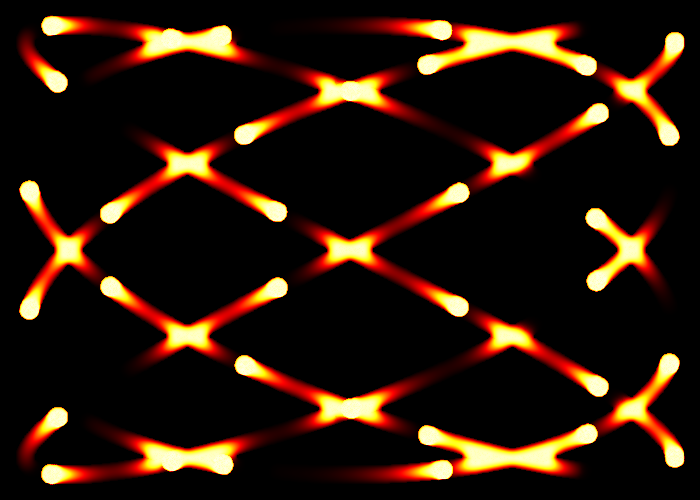
The following example is an old-school graphical effect of rendering fireballs that have been placed equidistant to their immediate neighbours following a Lissajous curve. The fireballs will then proceed to move within the plane using the curve as their path. The example demonstrates the construction of a piecewise colour palette and the response_image functionality. After having 'simulated' N- frames, the final frame will be converted to a bitmap and then saved to file as 'fireballs.bmp'.
#include<cmath>
#include<iterator>
#include<vector>
#include"bitmap_image.hpp"structlissajous_curve
{
lissajous_curve(constdouble xs, constdouble ys)
: scale_x(xs),
scale_y(ys)
{}
inlinedoublex(constdouble t) const { return scale_x * std::sin(4 * t); }
inlinedoubley(constdouble t) const { return scale_y * std::cos(3 * t); }
double scale_x;
double scale_y;
};
intmain()
{
bitmap_image image(700,500);
image.clear();
lissajous_curve curve(image.width () / 2.0 - 25, image.height() / 2.0 - 25);
constdouble pi_ = 3.1415926535897932384626433832795028841971;
constdouble delta = (2.0 * pi_) / 100000.0;
const std::size_t max_fire_balls = 30;
const std::size_t number_of_frames = 3000;
constdouble cooling_factor = 0.940; // [0,1]// Arc-length of curve: x(t) = a0 * sin(4t), y(t) = a1 * cos(3t)constdouble curve_length = 6151.0;
double segment_length = curve_length / max_fire_balls;
double curr_seg_length = 0;
double prev_x = curve.x(0);
double prev_y = curve.y(0);
std::vector<double> fire_ball;
// Set the initial location for each fireballfor (double t = delta; fire_ball.size() < max_fire_balls; t += delta)
{
constdouble center_x = curve.x(t);
constdouble center_y = curve.y(t);
constdouble dx = (prev_x - center_x);
constdouble dy = (prev_y - center_y);
curr_seg_length += std::sqrt((dx * dx) + (dy * dy));
prev_x = center_x;
prev_y = center_y;
if (curr_seg_length >= segment_length)
{
curr_seg_length = 0.0;
fire_ball.push_back(t);
}
}
response_image<double> resp_image(image.width(),image.height(), -1.0);
response_image<double> fb_misses (image.width(),image.height(), -1.0);
resp_image.set_all(-999.0);
fb_misses .set_all( 0.0);
std::vector<rgb_t> fire_palette;
// Baseline colours used in fire palettergb_t black = make_colour( 0, 0, 0);
rgb_t red = make_colour(255, 0, 0);
rgb_t yellow = make_colour(255, 255, 0);
rgb_t white = make_colour(255, 255, 255);
// Setup the fire palette:// Black (Coolest - 0) --> Red --> Yellow --> White (Hottest - 999)generate_colours(334, black, red, std::back_inserter(fire_palette));
generate_colours(333, red, yellow, std::back_inserter(fire_palette));
generate_colours(333, yellow, white, std::back_inserter(fire_palette));
for (std::size_t k = 0; k < number_of_frames; ++k)
{
fb_misses.inc_all(1);
// Render fireballs on response imagefor (std::size_t i = 0; i < fire_ball.size(); ++i)
{
constdouble fb_x = curve.x(fire_ball[i]) + image.width () / 2.0;
constdouble fb_y = curve.y(fire_ball[i]) + image.height() / 2.0;
// Draw circles with radii in the range [1,10]for (double t = 0; t < (2 * pi_); t += (((2.0 * pi_) / 360)))
{
for (double r = 1; r <= 10; ++r)
{
std::size_t rx = static_cast<std::size_t>(r * std::sin(t) + fb_x);
std::size_t ry = static_cast<std::size_t>(r * std::cos(t) + fb_y);
// Per-frame in the range [0,100]double heat_distortion = 50.0 * std::cos(delta * i) + 50;
resp_image(rx,ry) = fire_palette.size() * 0.8 +
heat_distortion +
(::rand() % 100);
fb_misses (rx,ry) = 0;
}
}
// Move fireball to its next location
fire_ball[i] += delta;
}
// Apply cooling process to the entire planefor (std::size_t y = 1; y < resp_image.height() - 1; ++y)
{
for (std::size_t x = 1; x < resp_image.width() - 1; ++x)
{
double avg = (
resp_image(x - 1, y - 1) + resp_image(x , y - 1) +
resp_image(x + 1, y - 1) + resp_image(x - 1, y ) +
resp_image(x + 1, y ) + resp_image(x , y + 1) +
resp_image(x - 1, y + 1) + resp_image(x + 1, y + 1)
) / (7.0 + cooling_factor);
// Only allow cooler averages to be appliedif (avg > resp_image(x, y))
continue;
// More rapidly cool points that haven't seen fireballs in the last N-framesif (fb_misses(x,y) > 2000)
avg *= 0.90 + ((::rand() % 10) / 100.0);
// Clamp average in the range [0,999]resp_image(x,y) = ((avg < 0.0) ? 0.0 : ((avg > 999.0) ? 999.0 : avg));
}
}
}
convert_rsp_to_image(resp_image, fire_palette, image);
image.save_image("fireballs.bmp");
return0;
}
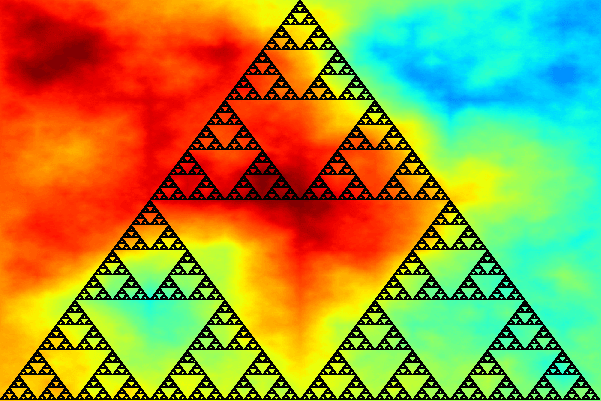
The following example will render the Sierpinski triangle fractal using a linear difference equation based monte-carlo process, and then proceed to save the generated bitmap as 'sierpinski_triangle.bmp'.
#include<cmath>
#include<cstdlib>
#include"bitmap_image.hpp"structpoint_t { double x,y; };
intmain()
{
constint canvas_width = 600;
constint canvas_height = 400;
cartesian_canvas canvas(canvas_width,canvas_height);
{
// Render background using Plasma effectconstdouble c1 = 0.9;
constdouble c2 = 0.3;
constdouble c3 = 0.5;
constdouble c4 = 0.7;
::srand(0xA5AA5AA5);
plasma(canvas.image(), c1, c2, c3, c4, 3.5, jet_colormap);
}
point_t triangle[3];
triangle[0].x = 0;
triangle[0].y = +canvas_height / 2.0;
triangle[1].x = -canvas_width / 2.0;
triangle[1].y = -canvas_height / 2.0;
triangle[2].x = +canvas_width / 2.0;
triangle[2].y = -canvas_height / 2.0;
point_t pnt = triangle[0];
const std::size_t max_iterations = 1000000;
for (std::size_t i = 0; i < max_iterations; ++i)
{
constpoint_t target_point = triangle[rand() % 3];
pnt.x += (target_point.x - pnt.x) / 2.0;
pnt.y += (target_point.y - pnt.y) / 2.0;
canvas.plot_pen_pixel(pnt.x,pnt.y);
}
canvas.image().save_image("sierpinski_triangle.bmp");
return0;
}
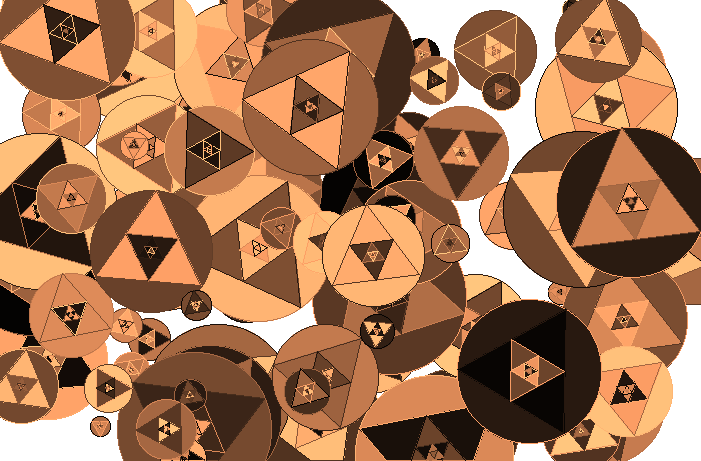
The following example randomly generate circles and proceed to inscribe multiple levels of inner equilateral triangles. The example demonstrates the use of the cartesian canvas, pen functions, various shape fill routines and colour maps. Once complete the rendering will be saved to disk with the name: 'circles_and_triangles.bmp'.
#include<cmath>
#include<cstdlib>
#include"bitmap_image.hpp"structpoint_t { double x,y; };
intmain()
{
constint canvas_width = 700;
constint canvas_height = 460;
cartesian_canvas canvas(canvas_width,canvas_height);
canvas.image().clear(255);
canvas.pen_width(1);
::srand(0xA5A5A5A5);
for (std::size_t i = 0; i < 100; ++i)
{
double cx = ((rand() % canvas_width ) - canvas_width / 2.0);
double cy = ((rand() % canvas_height) - canvas_height / 2.0);
double r = (rand() % 70) + 10;
constdouble pi_ = 3.1415926535897932384626433832795028841971;
constdouble _120d = (2.0 * pi_/ 3.0);
double rndang = ((2.0 * pi_) / 360.0) * ((rand() % 360) + 1.0);
point_t p0, p1, p2;
point_t p3, p4, p5;
p0.x = r * std::sin(1.0 * _120d + rndang) + cx;
p0.y = r * std::cos(1.0 * _120d + rndang) + cy;
p1.x = r * std::sin(2.0 * _120d + rndang) + cx;
p1.y = r * std::cos(2.0 * _120d + rndang) + cy;
p2.x = r * std::sin(3.0 * _120d + rndang) + cx;
p2.y = r * std::cos(3.0 * _120d + rndang) + cy;
#definernd_colour (copper_colormap[rand() % 1000])
// Draw and fill the circle
canvas.pen_color(rnd_colour);
canvas.fill_circle(cx, cy, r);
canvas.pen_color(rnd_colour);
canvas.circle(cx, cy, r);
// Draw and fill the main equilateral triangles
canvas.pen_color(rnd_colour);
canvas.fill_triangle(p0.x, p0.y, p1.x, p1.y, p2.x, p2.y);
canvas.pen_color(rnd_colour);
canvas.triangle(p0.x, p0.y, p1.x, p1.y, p2.x, p2.y);
// Draw the inner-equilateral trianglesfor (unsignedint j = 0; j < 4; ++j)
{
p3.x = (p0.x + p1.x) / 2.0;
p3.y = (p0.y + p1.y) / 2.0;
p4.x = (p1.x + p2.x) / 2.0;
p4.y = (p1.y + p2.y) / 2.0;
p5.x = (p2.x + p0.x) / 2.0;
p5.y = (p2.y + p0.y) / 2.0;
p0 = p3; p1 = p4; p2 = p5;
canvas.pen_color(rnd_colour);
canvas.fill_triangle(p3.x, p3.y, p4.x, p4.y, p5.x, p5.y);
canvas.pen_color(rnd_colour);
canvas.triangle(p3.x, p3.y, p4.x, p4.y, p5.x, p5.y);
}
}
canvas.image().save_image("circles_and_triangles.bmp");
return0;
}
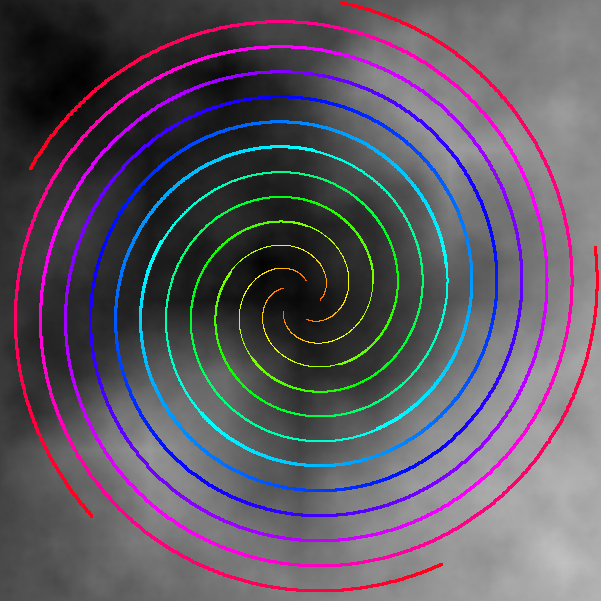
The following example renders Archimedean spirals upon a gray-scale plasma background. The example demonstrates the use of the cartesian canvas, pen functions, and colour maps. Once complete the rendering will be saved to disk with the name: 'spirals.bmp'.
#include<cmath>
#include<cstdlib>
#include"bitmap_image.hpp"structpoint_t
{
point_t(double _x = 0.0, double _y = 0.0) : x(_x), y(_y) {}
double x,y;
};
intmain()
{
constdouble pi_ = 3.1415926535897932384626433832795028841971;
constdouble a = 20.0;
constdouble b = 20.0;
constdouble dr = (2.0 * pi_) / 1000.0;
const std::size_t N = 5;
constdouble delta_angle = (2.0 * pi_) / N;
std::vector<point_t> spiral;
for (std::size_t i = 0; i < N; ++i)
{
spiral.push_back(
point_t(a * std::cos((delta_angle * i)),
a * std::sin((delta_angle * i))));
}
constint canvas_width = 600;
constint canvas_height = 600;
cartesian_canvas canvas(canvas_width,canvas_height);
canvas.image().clear(0);
{
// Render background using Plasma effectconstdouble c1 = 0.9;
constdouble c2 = 0.5;
constdouble c3 = 0.3;
constdouble c4 = 0.7;
bitmap_image& image = canvas.image();
::srand(0xA5AA5AA5);
plasma(image, 0, 0, image.width(), image.height(), c1, c2, c3, c4, 3.0, gray_colormap);
}
for (double angle = dr; (a + b * angle) < canvas.image().width() / 2.0; angle += dr)
{
for (std::size_t i = 0; i < spiral.size(); ++i)
{
point_t curr;
curr.x = (a + b * angle) * std::cos(angle + delta_angle * i);
curr.y = (a + b * angle) * std::sin(angle + delta_angle * i);
constdouble centre_ratio =
(sqrt(curr.x * curr.x + curr.y * curr.y) / (canvas.image().width() / 2.0));
if (centre_ratio <= 0.25) canvas.pen_width(1);
elseif (centre_ratio <= 0.50) canvas.pen_width(2);
elseif (centre_ratio <= 0.75) canvas.pen_width(3);
elseif (centre_ratio <= 1.00) canvas.pen_width(4);
unsignedint index = (unsignedint)(1000.0 * centre_ratio);
canvas.pen_color(hsv_colormap[index]);
canvas.line_segment(spiral[i].x, spiral[i].y, curr.x, curr.y);
spiral[i] = curr;
}
}
canvas.image().save_image("spirals.bmp");
return0;
}
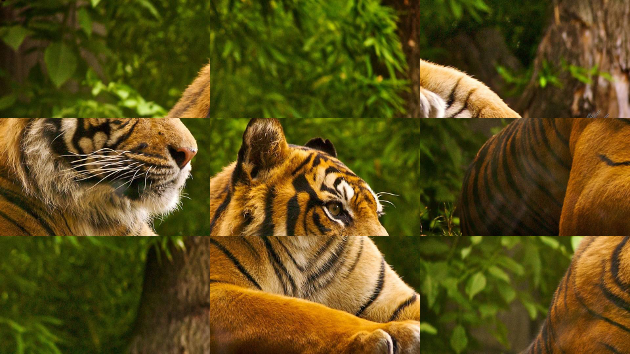
The following example will take as input 'tiger.bmp'. Then proceed to dissect the image into 9 cells of 3x3, then proceed to randomly shuffle cells. The example demonstrates the copying to-and-from 'Regions Of Interest' ROI within and between images. Once the shuffling as been complete the shuffled image will be saved to disk with the name: 'shuffled.bmp'.
#include<cmath>
#include<cstdlib>
#include<vector>
#include"bitmap_image.hpp"voidshuffle(unsignedint n, std::vector<unsignedint>& v)
{
::srand(0x13A1515A);
for (unsignedint i = 0; i < n; ++i) v.push_back(i);
for (unsignedint i = v.size() - 1; i > 0; --i)
{ std::swap(v[i], v[rand() % (i + 1)]); }
}
intmain()
{
bitmap_image image("tiger.bmp");
constunsignedint divisions = 3;
constunsignedint block_width = image.width () / divisions;
constunsignedint block_height = image.height() / divisions;
std::vector<unsignedint> cell;
shuffle(divisions * divisions, cell);
bitmap_image shuffled(image.width(), image.height());
bitmap_image region;
shuffled.clear();
for (std::size_t i = 0; i < cell.size(); ++i)
{
unsignedint x_offset = block_width * (i % divisions);
unsignedint y_offset = block_height * (i / divisions);
// Copy region from original image
image.region(x_offset, y_offset,
block_width, block_height, region);
x_offset = block_width * (cell[i] % divisions);
y_offset = block_height * (cell[i] / divisions);
// Paste region to new location in shuffled image
shuffled.copy_from(region, x_offset, y_offset);
}
shuffled.save_image("shuffled.bmp");
return0;
}
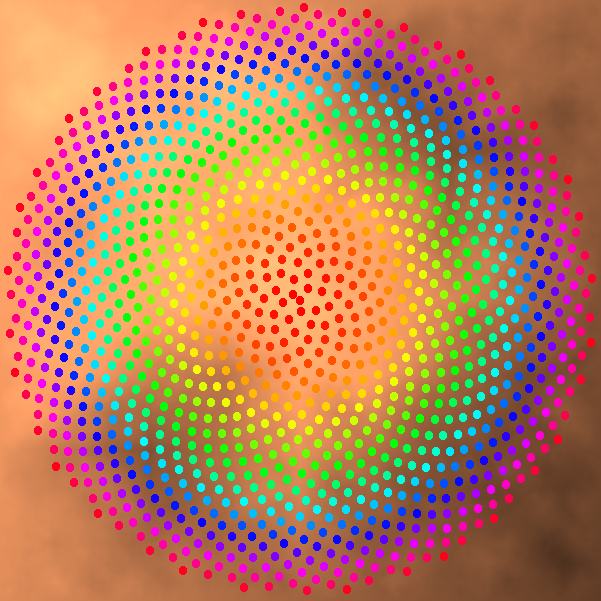
The following example renders a Phyllotaxis spiral upon a copper plasma background. The example demonstrates the use of the cartesian canvas, circle fill function, and colour maps. Once complete the rendering will be saved to disk with the name: 'phyllotaxis.bmp'.
#include<cmath>
#include<cstdlib>
#include"bitmap_image.hpp"intmain()
{
constint canvas_width = 600;
constint canvas_height = 600;
constdouble pi = 3.1415926535897932384626433832795028841971;
constdouble phi = pi * (3.0 - std::sqrt(5.0));
constdouble radius = (std::min(canvas_width, canvas_height) / 2.0) - 5.0;
constdouble N = 1200.0;
constdouble spread = radius / std::sqrt(N);
constdouble p_radius = std::floor(spread / 2.0);
cartesian_canvas canvas(canvas_width,canvas_height);
{
// Render background using Plasma effectconstdouble c1 = 0.9;
constdouble c2 = 0.5;
constdouble c3 = 0.3;
constdouble c4 = 0.7;
bitmap_image& image = canvas.image();
::srand(0xA5AA5AA5);
plasma(image, 0, 0, image.width(), image.height(), c1, c2, c3, c4, 3.0, copper_colormap);
}
for (double i = 0.0; i < N; ++i)
{
constdouble theta = phi * i;
constdouble d = spread * std::sqrt(i);
constdouble x = d * std::cos(theta);
constdouble y = d * std::sin(theta);
canvas.pen_color(hsv_colormap[static_cast<std::size_t>(1000.0 * (i / N))]);
canvas.fill_circle(x, y, p_radius);
}
canvas.image().save_image("phyllotaxis.bmp");
return0;
}
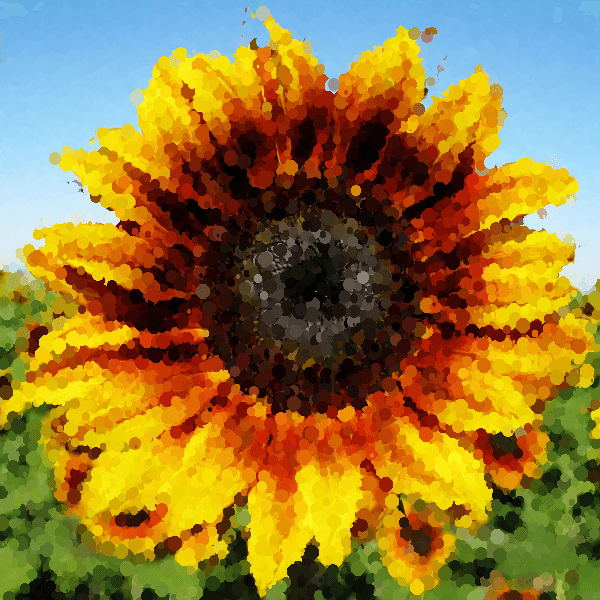
The following example will render an input image of a Sunflower using an approximation of the Pointillism painting technique. Once the rendering is complete the image will be saved to disk with the name: 'pointillist.bmp'.
#include<cstdlib>
#include"bitmap_image.hpp"intmain()
{
bitmap_image base("sunflower.bmp");
cartesian_canvas canvas(base.width(),base.height());
canvas.image() = base;
constint pixel_count = base.width() * base.height();
constint N = static_cast<int>(pixel_count * 0.03); // 3% of pixelsconstdouble rnd_ratio = pixel_count / (1.0 + RAND_MAX);
::srand(0xA57A57A5);
for (int i = 0; i < N; ++i)
{
constint r = static_cast<int>(rand() * rnd_ratio);
constint x = (r % base.width());
constint y = (r / base.width());
constdouble cx = x - (base.width() / 2.0);
constdouble cy = (base.height() / 2.0) - y;
constdouble radius = 1.0 + (r % 7);
canvas.pen_color(base.get_pixel(x, y));
canvas.fill_circle(cx, cy, radius);
}
canvas.image().save_image("pointillist.bmp");
return0;
}
The above examples are for exposition purposes, primarily intended to demonstrate the functionality of the bitmap_image library using short, concise and simple to understand pieces of code. As such certain 'coding' simplifications were made which would not necessarily be acceptable in production implementations. As an example the use of the quick-n-dirty libc 'rand' function should be replaced with the C++ standard library's more modern and robust std::random facilities. Hence when evaluating the above examples such 'issues' should perhaps be taken into consideration.