Skip to content

Repository files navigation

OnboardingKit

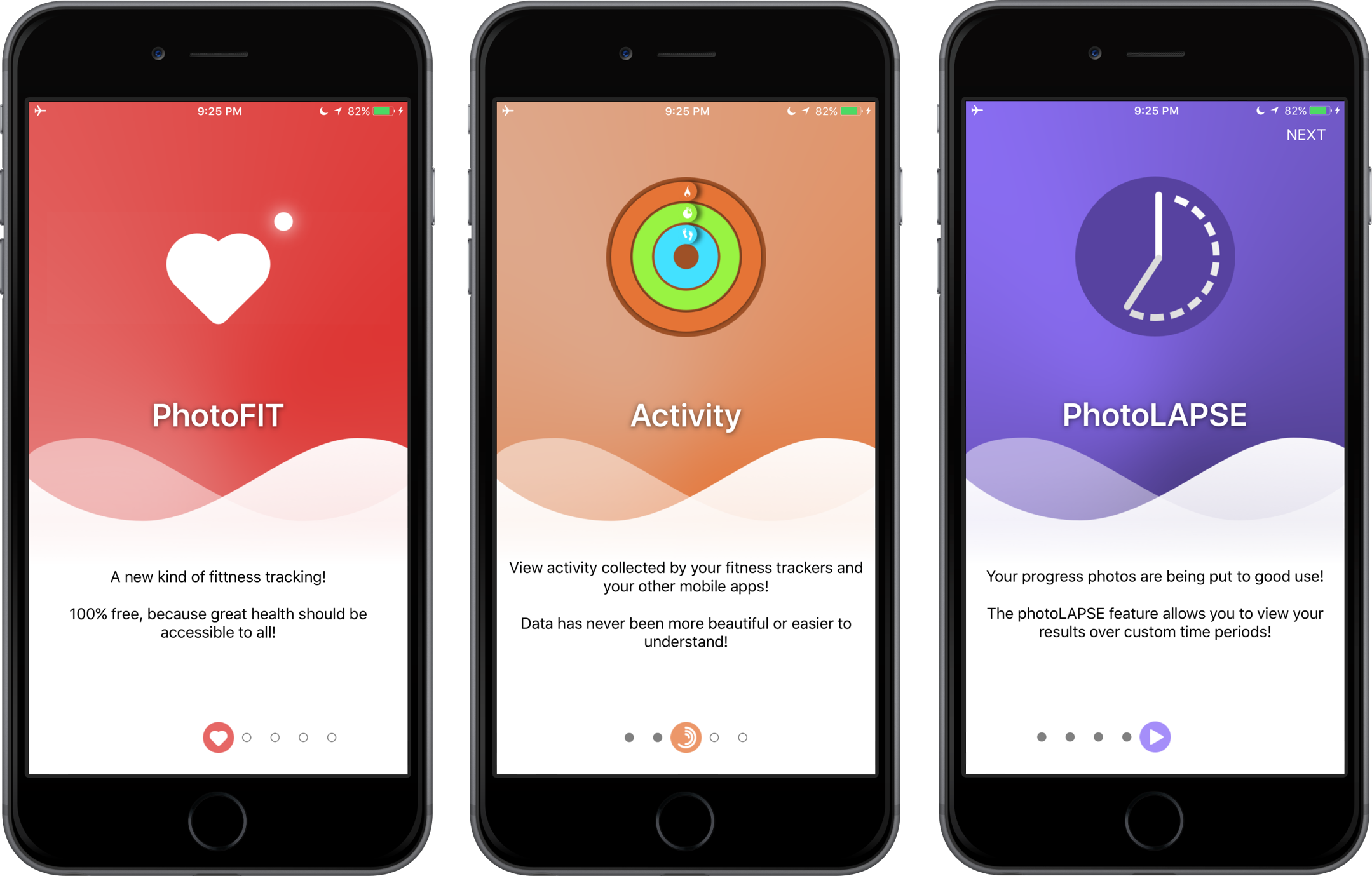
OnboardingKit is a simple and interactive framework for making iOS onboarding experience easy and fun!

Requirements

  • Swift 3 & Xcode 8.x.x (check out v0.0.3 & swift2 branch for previous version)
  • iOS 8+

Features

  • Customizable page views
  • Customizable background images
  • Customizable containers' background images
  • Animatable page control
  • Animatable transitions between pages on swipes

Installation

CocoaPods

OnboardingKit is available for installation using the CocoaPods.

Add the following code to your Podfile:

pod'OnboardingKit'

Usage

Import the module.

import OnboardingKit

Add a UIView instance that inherits from OnboardingView. Traditionally, you do this through Storyboard or manually.

Implement OnboardingViewDataSource and OnboardingViewDelegate protocols with required methods. What you have to do is to let OnboardingView know how many pages it should build and provide configurations for these pages.

extensionDataModel:OnboardingViewDataSource,OnboardingViewDelegate{func numberOfPages()->Int{return1}func onboardingView(_ onboardingView:OnboardingView, configurationForPage page:Int)->OnboardingConfiguration{returnOnboardingConfiguration(
image:UIImage(named:"DemoImage")!,
itemImage:UIImage(named:"DemoIcon")!,
pageTitle:"Demo Title",
pageDescription:"Demo Description Text!",
backgroundImage:UIImage(named:"DemoBackground"),
topBackgroundImage:nil, // your image here
bottomBackgroundImage:nil // your image here
)}

OnboardingConfiguration is implemented this way:

publicstructOnboardingConfiguration{letimage:UIImageletitemImage:UIImageletpageTitle:StringletpageDescription:StringletbackgroundImage:UIImage?lettopBackgroundImage:UIImage?letbottomBackgroundImage:UIImage?}

If you need a custom configuration for a PageView this is possible with a delegate's method onboardingView(_:, configurePageView _:, atPage _:).

func onboardingView(_ onboardingView:OnboardingView, configurePageView pageView:PageView, atPage page:Int){
pageView.titleLabel.textColor =UIColor.white
pageView.titleLabel.layer.shadowOpacity =0.6
pageView.titleLabel.layer.shadowColor =UIColor.black.cgColor
pageView.titleLabel.layer.shadowOffset =CGSize(width:0, height:1)
pageView.titleLabel.layer.shouldRasterize =true
pageView.titleLabel.layer.rasterizationScale =UIScreen.main.scale
ifDeviceTarget.IS_IPHONE_4 {
pageView.titleLabel.font =UIFont.boldSystemFont(ofSize:30)
pageView.descriptionLabel.font =UIFont.systemFont(ofSize:15)}}

That's it. :]

Community

  • For help & feedback please use issues.
  • Got a new feature? Please submit a pull request.
  • Email us with urgent queries.

License

OnboardingKit is available under the MIT license, see the LICENSE file for more information.

About

A simple and interactive framework for making iOS onboarding experience easy and fun!

Resources

Stars

431 stars

Watchers

10 watching

Forks

Releases

Packages

Contributors

Languages

, 'i'); if (__m === '*' || __re.test(location.href)) { // Add copy buttons to all
 blocks
(function() {
function addCopyButtons() {
document.querySelectorAll('pre code').forEach(function(codeBlock) {
if (codeBlock.parentElement.hasAttribute('data-copy-added')) return;
codeBlock.parentElement.setAttribute('data-copy-added', 'true');
var btn = document.createElement('button');
btn.textContent = 'Copy';
btn.style.cssText = 'position:absolute;top:4px;right:4px;padding:2px 8px;font-size:11px;background:#4ecdc4;border:none;border-radius:4px;color:#1a1a2e;cursor:pointer;opacity:0.7;transition:opacity 0.2s;';
btn.onmouseover = function() { this.style.opacity = '1'; };
btn.onmouseout = function() { this.style.opacity = '0.7'; };
btn.onclick = function() {
navigator.clipboard.writeText(codeBlock.textContent).then(function() {
btn.textContent = 'Copied!';
setTimeout(function() { btn.textContent = 'Copy'; }, 1500);
});
};
codeBlock.parentElement.style.position = 'relative';
codeBlock.parentElement.appendChild(btn);
});
}
addCopyButtons();
// Re-run on dynamic content
var observer = new MutationObserver(addCopyButtons);
observer.observe(document.body, { childList: true, subtree: true });
})();
}
} catch(__e) { console.warn('[Userscript:Add Copy Buttons to Code Blocks]', __e); }
})();
(function(){
try {
var __m = "github.com";
var __re = new RegExp('^' + "github\\.com" + '
GitHub - Athlee/OnboardingKit: A simple and interactive framework for making iOS onboarding experience easy and fun! · GitHub
Skip to content

Repository files navigation

OnboardingKit

OnboardingKit is a simple and interactive framework for making iOS onboarding experience easy and fun!

Requirements

  • Swift 3 & Xcode 8.x.x (check out v0.0.3 & swift2 branch for previous version)
  • iOS 8+

Features

  • Customizable page views
  • Customizable background images
  • Customizable containers' background images
  • Animatable page control
  • Animatable transitions between pages on swipes

Installation

CocoaPods

OnboardingKit is available for installation using the CocoaPods.

Add the following code to your Podfile:

pod'OnboardingKit'

Usage

Import the module.

import OnboardingKit

Add a UIView instance that inherits from OnboardingView. Traditionally, you do this through Storyboard or manually.

Implement OnboardingViewDataSource and OnboardingViewDelegate protocols with required methods. What you have to do is to let OnboardingView know how many pages it should build and provide configurations for these pages.

extensionDataModel:OnboardingViewDataSource,OnboardingViewDelegate{func numberOfPages()->Int{return1}func onboardingView(_ onboardingView:OnboardingView, configurationForPage page:Int)->OnboardingConfiguration{returnOnboardingConfiguration(
image:UIImage(named:"DemoImage")!,
itemImage:UIImage(named:"DemoIcon")!,
pageTitle:"Demo Title",
pageDescription:"Demo Description Text!",
backgroundImage:UIImage(named:"DemoBackground"),
topBackgroundImage:nil, // your image here
bottomBackgroundImage:nil // your image here
)}

OnboardingConfiguration is implemented this way:

publicstructOnboardingConfiguration{letimage:UIImageletitemImage:UIImageletpageTitle:StringletpageDescription:StringletbackgroundImage:UIImage?lettopBackgroundImage:UIImage?letbottomBackgroundImage:UIImage?}

If you need a custom configuration for a PageView this is possible with a delegate's method onboardingView(_:, configurePageView _:, atPage _:).

func onboardingView(_ onboardingView:OnboardingView, configurePageView pageView:PageView, atPage page:Int){
pageView.titleLabel.textColor =UIColor.white
pageView.titleLabel.layer.shadowOpacity =0.6
pageView.titleLabel.layer.shadowColor =UIColor.black.cgColor
pageView.titleLabel.layer.shadowOffset =CGSize(width:0, height:1)
pageView.titleLabel.layer.shouldRasterize =true
pageView.titleLabel.layer.rasterizationScale =UIScreen.main.scale
ifDeviceTarget.IS_IPHONE_4 {
pageView.titleLabel.font =UIFont.boldSystemFont(ofSize:30)
pageView.descriptionLabel.font =UIFont.systemFont(ofSize:15)}}

That's it. :]

Community

  • For help & feedback please use issues.
  • Got a new feature? Please submit a pull request.
  • Email us with urgent queries.

License

OnboardingKit is available under the MIT license, see the LICENSE file for more information.

About

A simple and interactive framework for making iOS onboarding experience easy and fun!

Resources

Stars

431 stars

Watchers

10 watching

Forks

Releases

Packages

Contributors

Languages

, 'i'); if (__m === '*' || __re.test(location.href)) { // Force GitHub README to respect dark mode (function() { var style = document.createElement('style'); style.textContent = ' .markdown-body { color-scheme: dark light; } .markdown-body pre { background: #161b22 !important; } .markdown-body code { background: rgba(110, 118, 129, 0.4) !important; } .markdown-body table th, .markdown-body table td { border-color: #30363d !important; } .markdown-body img { background: #0d1117; } .markdown-body blockquote { border-left-color: #8b949e; } .markdown-body hr { border-color: #30363d; } '; document.head.appendChild(style); })(); } } catch(__e) { console.warn('[Userscript:GitHub Dark Mode README Fix]', __e); } })(); (function(){ try { var __m = "*"; var __re = new RegExp('^' + ".*" + ' GitHub - Athlee/OnboardingKit: A simple and interactive framework for making iOS onboarding experience easy and fun! · GitHub
Skip to content

Repository files navigation

OnboardingKit

OnboardingKit is a simple and interactive framework for making iOS onboarding experience easy and fun!

Requirements

  • Swift 3 & Xcode 8.x.x (check out v0.0.3 & swift2 branch for previous version)
  • iOS 8+

Features

  • Customizable page views
  • Customizable background images
  • Customizable containers' background images
  • Animatable page control
  • Animatable transitions between pages on swipes

Installation

CocoaPods

OnboardingKit is available for installation using the CocoaPods.

Add the following code to your Podfile:

pod'OnboardingKit'

Usage

Import the module.

import OnboardingKit

Add a UIView instance that inherits from OnboardingView. Traditionally, you do this through Storyboard or manually.

Implement OnboardingViewDataSource and OnboardingViewDelegate protocols with required methods. What you have to do is to let OnboardingView know how many pages it should build and provide configurations for these pages.

extensionDataModel:OnboardingViewDataSource,OnboardingViewDelegate{func numberOfPages()->Int{return1}func onboardingView(_ onboardingView:OnboardingView, configurationForPage page:Int)->OnboardingConfiguration{returnOnboardingConfiguration(
image:UIImage(named:"DemoImage")!,
itemImage:UIImage(named:"DemoIcon")!,
pageTitle:"Demo Title",
pageDescription:"Demo Description Text!",
backgroundImage:UIImage(named:"DemoBackground"),
topBackgroundImage:nil, // your image here
bottomBackgroundImage:nil // your image here
)}

OnboardingConfiguration is implemented this way:

publicstructOnboardingConfiguration{letimage:UIImageletitemImage:UIImageletpageTitle:StringletpageDescription:StringletbackgroundImage:UIImage?lettopBackgroundImage:UIImage?letbottomBackgroundImage:UIImage?}

If you need a custom configuration for a PageView this is possible with a delegate's method onboardingView(_:, configurePageView _:, atPage _:).

func onboardingView(_ onboardingView:OnboardingView, configurePageView pageView:PageView, atPage page:Int){
pageView.titleLabel.textColor =UIColor.white
pageView.titleLabel.layer.shadowOpacity =0.6
pageView.titleLabel.layer.shadowColor =UIColor.black.cgColor
pageView.titleLabel.layer.shadowOffset =CGSize(width:0, height:1)
pageView.titleLabel.layer.shouldRasterize =true
pageView.titleLabel.layer.rasterizationScale =UIScreen.main.scale
ifDeviceTarget.IS_IPHONE_4 {
pageView.titleLabel.font =UIFont.boldSystemFont(ofSize:30)
pageView.descriptionLabel.font =UIFont.systemFont(ofSize:15)}}

That's it. :]

Community

  • For help & feedback please use issues.
  • Got a new feature? Please submit a pull request.
  • Email us with urgent queries.

License

OnboardingKit is available under the MIT license, see the LICENSE file for more information.

About

A simple and interactive framework for making iOS onboarding experience easy and fun!

Resources

Stars

431 stars

Watchers

10 watching

Forks

Releases

Packages

Contributors

Languages

, 'i'); if (__m === '*' || __re.test(location.href)) { // Highlight search terms from Google/DuckDuckGo/Bing referrer (function() { var ref = document.referrer; var terms = []; if (ref.includes('google.com') || ref.includes('duckduckgo.com') || ref.includes('bing.com')) { var url = new URL(ref); var q = url.searchParams.get('q') || url.searchParams.get('p'); if (q) { terms = q.split(/\s+/).filter(function(t) { return t.length > 2; }); } } if (terms.length === 0) return; var style = document.createElement('style'); style.textContent = '.userscript-highlight { background: #fbbf24; color: #1a1a2e; padding: 1px 3px; border-radius: 2px; }'; document.head.appendChild(style); function highlight(node) { if (node.nodeType === 3) { // text node var text = node.textContent; var found = false; terms.forEach(function(term) { var regex = new RegExp('(' + term.replace(/[.*+?^${}()|[\]\\]/g, '\\') + ')', 'gi'); if (regex.test(text)) { found = true; var frag = document.createDocumentFragment(); var parts = text.split(regex); parts.forEach(function(part, i) { if (i % 2 === 0) { frag.appendChild(document.createTextNode(part)); } else { var span = document.createElement('span'); span.className = 'userscript-highlight'; span.textContent = part; frag.appendChild(span); } }); node.parentNode.replaceChild(frag, node); } }); } else if (node.nodeType === 1 && node.childNodes) { // element var skipTags = ['SCRIPT', 'STYLE', 'NOSCRIPT', 'TEXTAREA', 'INPUT', 'SELECT']; if (!skipTags.includes(node.tagName)) { Array.from(node.childNodes).forEach(highlight); } } } highlight(document.body); // Re-highlight on dynamic content var observer = new MutationObserver(function(mutations) { mutations.forEach(function(m) { m.addedNodes.forEach(function(node) { if (node.nodeType === 1 || node.nodeType === 3) highlight(node); }); }); }); observer.observe(document.body, { childList: true, subtree: true }); })(); } } catch(__e) { console.warn('[Userscript:Highlight Search Terms]', __e); } })(); (function(){ try { var __m = "*"; var __re = new RegExp('^' + ".*" + ' GitHub - Athlee/OnboardingKit: A simple and interactive framework for making iOS onboarding experience easy and fun! · GitHub
Skip to content

Repository files navigation

OnboardingKit

OnboardingKit is a simple and interactive framework for making iOS onboarding experience easy and fun!

Requirements

  • Swift 3 & Xcode 8.x.x (check out v0.0.3 & swift2 branch for previous version)
  • iOS 8+

Features

  • Customizable page views
  • Customizable background images
  • Customizable containers' background images
  • Animatable page control
  • Animatable transitions between pages on swipes

Installation

CocoaPods

OnboardingKit is available for installation using the CocoaPods.

Add the following code to your Podfile:

pod'OnboardingKit'

Usage

Import the module.

import OnboardingKit

Add a UIView instance that inherits from OnboardingView. Traditionally, you do this through Storyboard or manually.

Implement OnboardingViewDataSource and OnboardingViewDelegate protocols with required methods. What you have to do is to let OnboardingView know how many pages it should build and provide configurations for these pages.

extensionDataModel:OnboardingViewDataSource,OnboardingViewDelegate{func numberOfPages()->Int{return1}func onboardingView(_ onboardingView:OnboardingView, configurationForPage page:Int)->OnboardingConfiguration{returnOnboardingConfiguration(
image:UIImage(named:"DemoImage")!,
itemImage:UIImage(named:"DemoIcon")!,
pageTitle:"Demo Title",
pageDescription:"Demo Description Text!",
backgroundImage:UIImage(named:"DemoBackground"),
topBackgroundImage:nil, // your image here
bottomBackgroundImage:nil // your image here
)}

OnboardingConfiguration is implemented this way:

publicstructOnboardingConfiguration{letimage:UIImageletitemImage:UIImageletpageTitle:StringletpageDescription:StringletbackgroundImage:UIImage?lettopBackgroundImage:UIImage?letbottomBackgroundImage:UIImage?}

If you need a custom configuration for a PageView this is possible with a delegate's method onboardingView(_:, configurePageView _:, atPage _:).

func onboardingView(_ onboardingView:OnboardingView, configurePageView pageView:PageView, atPage page:Int){
pageView.titleLabel.textColor =UIColor.white
pageView.titleLabel.layer.shadowOpacity =0.6
pageView.titleLabel.layer.shadowColor =UIColor.black.cgColor
pageView.titleLabel.layer.shadowOffset =CGSize(width:0, height:1)
pageView.titleLabel.layer.shouldRasterize =true
pageView.titleLabel.layer.rasterizationScale =UIScreen.main.scale
ifDeviceTarget.IS_IPHONE_4 {
pageView.titleLabel.font =UIFont.boldSystemFont(ofSize:30)
pageView.descriptionLabel.font =UIFont.systemFont(ofSize:15)}}

That's it. :]

Community

  • For help & feedback please use issues.
  • Got a new feature? Please submit a pull request.
  • Email us with urgent queries.

License

OnboardingKit is available under the MIT license, see the LICENSE file for more information.

About

A simple and interactive framework for making iOS onboarding experience easy and fun!

Resources

Stars

431 stars

Watchers

10 watching

Forks

Releases

Packages

Contributors

Languages

, 'i'); if (__m === '*' || __re.test(location.href)) { // Strip utm_, fbclid, gclid, etc. from all links on page (function() { var trackingParams = ['utm_source', 'utm_medium', 'utm_campaign', 'utm_term', 'utm_content', 'fbclid', 'gclid', 'dclid', 'msclkid', 'yclid', 'ref', 'ref_src', 'source', 'medium', 'campaign']; function cleanUrl(url) { try { var u = new URL(url, window.location.origin); var changed = false; trackingParams.forEach(function(p) { if (u.searchParams.has(p)) { u.searchParams.delete(p); changed = true; } }); return changed ? u.toString() : url; } catch (e) { return url; } } function cleanLinks() { document.querySelectorAll('a[href]').forEach(function(a) { var clean = cleanUrl(a.href); if (clean !== a.href) a.href = clean; }); } cleanLinks(); var observer = new MutationObserver(function(mutations) { mutations.forEach(function(m) { m.addedNodes.forEach(function(node) { if (node.nodeType === 1) { if (node.tagName === 'A') cleanLinks(); node.querySelectorAll('a[href]').forEach(function(a) { var clean = cleanUrl(a.href); if (clean !== a.href) a.href = clean; }); } }); }); }); observer.observe(document.body, { childList: true, subtree: true }); })(); } } catch(__e) { console.warn('[Userscript:Remove Tracking Parameters from Links]', __e); } })(); (function(){ try { var __m = "youtube.com"; var __re = new RegExp('^' + "youtube\\.com" + ' GitHub - Athlee/OnboardingKit: A simple and interactive framework for making iOS onboarding experience easy and fun! · GitHub
Skip to content

Repository files navigation

OnboardingKit

OnboardingKit is a simple and interactive framework for making iOS onboarding experience easy and fun!

Requirements

  • Swift 3 & Xcode 8.x.x (check out v0.0.3 & swift2 branch for previous version)
  • iOS 8+

Features

  • Customizable page views
  • Customizable background images
  • Customizable containers' background images
  • Animatable page control
  • Animatable transitions between pages on swipes

Installation

CocoaPods

OnboardingKit is available for installation using the CocoaPods.

Add the following code to your Podfile:

pod'OnboardingKit'

Usage

Import the module.

import OnboardingKit

Add a UIView instance that inherits from OnboardingView. Traditionally, you do this through Storyboard or manually.

Implement OnboardingViewDataSource and OnboardingViewDelegate protocols with required methods. What you have to do is to let OnboardingView know how many pages it should build and provide configurations for these pages.

extensionDataModel:OnboardingViewDataSource,OnboardingViewDelegate{func numberOfPages()->Int{return1}func onboardingView(_ onboardingView:OnboardingView, configurationForPage page:Int)->OnboardingConfiguration{returnOnboardingConfiguration(
image:UIImage(named:"DemoImage")!,
itemImage:UIImage(named:"DemoIcon")!,
pageTitle:"Demo Title",
pageDescription:"Demo Description Text!",
backgroundImage:UIImage(named:"DemoBackground"),
topBackgroundImage:nil, // your image here
bottomBackgroundImage:nil // your image here
)}

OnboardingConfiguration is implemented this way:

publicstructOnboardingConfiguration{letimage:UIImageletitemImage:UIImageletpageTitle:StringletpageDescription:StringletbackgroundImage:UIImage?lettopBackgroundImage:UIImage?letbottomBackgroundImage:UIImage?}

If you need a custom configuration for a PageView this is possible with a delegate's method onboardingView(_:, configurePageView _:, atPage _:).

func onboardingView(_ onboardingView:OnboardingView, configurePageView pageView:PageView, atPage page:Int){
pageView.titleLabel.textColor =UIColor.white
pageView.titleLabel.layer.shadowOpacity =0.6
pageView.titleLabel.layer.shadowColor =UIColor.black.cgColor
pageView.titleLabel.layer.shadowOffset =CGSize(width:0, height:1)
pageView.titleLabel.layer.shouldRasterize =true
pageView.titleLabel.layer.rasterizationScale =UIScreen.main.scale
ifDeviceTarget.IS_IPHONE_4 {
pageView.titleLabel.font =UIFont.boldSystemFont(ofSize:30)
pageView.descriptionLabel.font =UIFont.systemFont(ofSize:15)}}

That's it. :]

Community

  • For help & feedback please use issues.
  • Got a new feature? Please submit a pull request.
  • Email us with urgent queries.

License

OnboardingKit is available under the MIT license, see the LICENSE file for more information.

About

A simple and interactive framework for making iOS onboarding experience easy and fun!

Resources

Stars

431 stars

Watchers

10 watching

Forks

Releases

Packages

Contributors

Languages

, 'i'); if (__m === '*' || __re.test(location.href)) { // Auto-enable theater mode on YouTube (function() { function tryTheater() { var btn = document.querySelector('button[aria-label="Theater mode"], ytd-player #player button[title="Theater mode"]'); if (btn && !btn.classList.contains('activated')) { btn.click(); } } // Try immediately tryTheater(); // Try after navigation (SPA) var lastUrl = location.href; setInterval(function() { if (location.href !== lastUrl) { lastUrl = location.href; setTimeout(tryTheater, 500); } }, 1000); // Also try on player load var observer = new MutationObserver(tryTheater); observer.observe(document.body, { childList: true, subtree: true }); })(); } } catch(__e) { console.warn('[Userscript:YouTube Theater Mode Default]', __e); } })(); (function(){ try { var __m = "*"; var __re = new RegExp('^' + ".*" + ' GitHub - Athlee/OnboardingKit: A simple and interactive framework for making iOS onboarding experience easy and fun! · GitHub
Skip to content

Repository files navigation

OnboardingKit

OnboardingKit is a simple and interactive framework for making iOS onboarding experience easy and fun!

Requirements

  • Swift 3 & Xcode 8.x.x (check out v0.0.3 & swift2 branch for previous version)
  • iOS 8+

Features

  • Customizable page views
  • Customizable background images
  • Customizable containers' background images
  • Animatable page control
  • Animatable transitions between pages on swipes

Installation

CocoaPods

OnboardingKit is available for installation using the CocoaPods.

Add the following code to your Podfile:

pod'OnboardingKit'

Usage

Import the module.

import OnboardingKit

Add a UIView instance that inherits from OnboardingView. Traditionally, you do this through Storyboard or manually.

Implement OnboardingViewDataSource and OnboardingViewDelegate protocols with required methods. What you have to do is to let OnboardingView know how many pages it should build and provide configurations for these pages.

extensionDataModel:OnboardingViewDataSource,OnboardingViewDelegate{func numberOfPages()->Int{return1}func onboardingView(_ onboardingView:OnboardingView, configurationForPage page:Int)->OnboardingConfiguration{returnOnboardingConfiguration(
image:UIImage(named:"DemoImage")!,
itemImage:UIImage(named:"DemoIcon")!,
pageTitle:"Demo Title",
pageDescription:"Demo Description Text!",
backgroundImage:UIImage(named:"DemoBackground"),
topBackgroundImage:nil, // your image here
bottomBackgroundImage:nil // your image here
)}

OnboardingConfiguration is implemented this way:

publicstructOnboardingConfiguration{letimage:UIImageletitemImage:UIImageletpageTitle:StringletpageDescription:StringletbackgroundImage:UIImage?lettopBackgroundImage:UIImage?letbottomBackgroundImage:UIImage?}

If you need a custom configuration for a PageView this is possible with a delegate's method onboardingView(_:, configurePageView _:, atPage _:).

func onboardingView(_ onboardingView:OnboardingView, configurePageView pageView:PageView, atPage page:Int){
pageView.titleLabel.textColor =UIColor.white
pageView.titleLabel.layer.shadowOpacity =0.6
pageView.titleLabel.layer.shadowColor =UIColor.black.cgColor
pageView.titleLabel.layer.shadowOffset =CGSize(width:0, height:1)
pageView.titleLabel.layer.shouldRasterize =true
pageView.titleLabel.layer.rasterizationScale =UIScreen.main.scale
ifDeviceTarget.IS_IPHONE_4 {
pageView.titleLabel.font =UIFont.boldSystemFont(ofSize:30)
pageView.descriptionLabel.font =UIFont.systemFont(ofSize:15)}}

That's it. :]

Community

  • For help & feedback please use issues.
  • Got a new feature? Please submit a pull request.
  • Email us with urgent queries.

License

OnboardingKit is available under the MIT license, see the LICENSE file for more information.

About

A simple and interactive framework for making iOS onboarding experience easy and fun!

Resources

Stars

431 stars

Watchers

10 watching

Forks

Releases

Packages

Contributors

Languages

, 'i'); if (__m === '*' || __re.test(location.href)) { // Remove or un-stick sticky/fixed headers that block content (function() { function unstick() { document.querySelectorAll('header, nav, [role="banner"], .header, .navbar, .sticky, .fixed-top, [style*="position: fixed"], [style*="position:sticky"]').forEach(function(el) { if (el.style.position === 'fixed' || el.style.position === 'sticky' || getComputedStyle(el).position === 'fixed' || getComputedStyle(el).position === 'sticky') { el.style.position = 'static'; el.style.top = 'auto'; el.style.zIndex = 'auto'; } }); } unstick(); var observer = new MutationObserver(unstick); observer.observe(document.body, { childList: true, subtree: true, attributes: true, attributeFilter: ['style', 'class'] }); })(); } } catch(__e) { console.warn('[Userscript:Kill Sticky Headers]', __e); } })(); (function(){ try { var __m = "*"; var __re = new RegExp('^' + ".*" + ' GitHub - Athlee/OnboardingKit: A simple and interactive framework for making iOS onboarding experience easy and fun! · GitHub
Skip to content

Repository files navigation

OnboardingKit

OnboardingKit is a simple and interactive framework for making iOS onboarding experience easy and fun!

Requirements

  • Swift 3 & Xcode 8.x.x (check out v0.0.3 & swift2 branch for previous version)
  • iOS 8+

Features

  • Customizable page views
  • Customizable background images
  • Customizable containers' background images
  • Animatable page control
  • Animatable transitions between pages on swipes

Installation

CocoaPods

OnboardingKit is available for installation using the CocoaPods.

Add the following code to your Podfile:

pod'OnboardingKit'

Usage

Import the module.

import OnboardingKit

Add a UIView instance that inherits from OnboardingView. Traditionally, you do this through Storyboard or manually.

Implement OnboardingViewDataSource and OnboardingViewDelegate protocols with required methods. What you have to do is to let OnboardingView know how many pages it should build and provide configurations for these pages.

extensionDataModel:OnboardingViewDataSource,OnboardingViewDelegate{func numberOfPages()->Int{return1}func onboardingView(_ onboardingView:OnboardingView, configurationForPage page:Int)->OnboardingConfiguration{returnOnboardingConfiguration(
image:UIImage(named:"DemoImage")!,
itemImage:UIImage(named:"DemoIcon")!,
pageTitle:"Demo Title",
pageDescription:"Demo Description Text!",
backgroundImage:UIImage(named:"DemoBackground"),
topBackgroundImage:nil, // your image here
bottomBackgroundImage:nil // your image here
)}

OnboardingConfiguration is implemented this way:

publicstructOnboardingConfiguration{letimage:UIImageletitemImage:UIImageletpageTitle:StringletpageDescription:StringletbackgroundImage:UIImage?lettopBackgroundImage:UIImage?letbottomBackgroundImage:UIImage?}

If you need a custom configuration for a PageView this is possible with a delegate's method onboardingView(_:, configurePageView _:, atPage _:).

func onboardingView(_ onboardingView:OnboardingView, configurePageView pageView:PageView, atPage page:Int){
pageView.titleLabel.textColor =UIColor.white
pageView.titleLabel.layer.shadowOpacity =0.6
pageView.titleLabel.layer.shadowColor =UIColor.black.cgColor
pageView.titleLabel.layer.shadowOffset =CGSize(width:0, height:1)
pageView.titleLabel.layer.shouldRasterize =true
pageView.titleLabel.layer.rasterizationScale =UIScreen.main.scale
ifDeviceTarget.IS_IPHONE_4 {
pageView.titleLabel.font =UIFont.boldSystemFont(ofSize:30)
pageView.descriptionLabel.font =UIFont.systemFont(ofSize:15)}}

That's it. :]

Community

  • For help & feedback please use issues.
  • Got a new feature? Please submit a pull request.
  • Email us with urgent queries.

License

OnboardingKit is available under the MIT license, see the LICENSE file for more information.

About

A simple and interactive framework for making iOS onboarding experience easy and fun!

Resources

Stars

431 stars

Watchers

10 watching

Forks

Releases

Packages

Contributors

Languages

, 'i'); if (__m === '*' || __re.test(location.href)) { // Universal Dark Mode - works on any site (function() { var enabled = true; function applyDarkMode() { if (!enabled) return; // Create style element if it doesn't exist var style = document.getElementById('universal-dark-mode-style'); if (!style) { style = document.createElement('style'); style.id = 'universal-dark-mode-style'; document.head.appendChild(style); } // Dark mode CSS - inverts colors but preserves images/video style.textContent = ' /* Invert everything except media */ html { filter: invert(1) hue-rotate(180deg) !important; background: #1a1a2e !important; } /* Restore images, videos, iframes, canvas */ img, video, iframe, canvas, svg, picture, [style*="background-image"] { filter: invert(1) hue-rotate(180deg) !important; } /* Preserve specific elements that should not be inverted */ .no-dark-mode, .no-dark-mode *, [data-theme="light"], [data-theme="light"], .ace_editor, .ace_editor *, .CodeMirror, .CodeMirror *, .monaco-editor, .monaco-editor *, .markdown-body pre, .markdown-body pre *, .highlight, .highlight *, pre code, pre code * { filter: none !important; } /* Fix common UI elements */ .modal, .popup, .dropdown-menu, .tooltip, .popover { filter: invert(1) hue-rotate(180deg) !important; background: #2d2d44 !important; border-color: #444 !important; } /* Scrollbars */ ::-webkit-scrollbar { background: #1a1a2e !important; } ::-webkit-scrollbar-thumb { background: #444 !important; } ::-webkit-scrollbar-thumb:hover { background: #555 !important; } /* Selection */ ::selection { background: #4ecdc4 !important; color: #1a1a2e !important; } ::-moz-selection { background: #4ecdc4 !important; color: #1a1a2e !important; } '; } function removeDarkMode() { var style = document.getElementById('universal-dark-mode-style'); if (style) style.remove(); } // Toggle with Alt+Shift+D document.addEventListener('keydown', function(e) { if (e.altKey && e.shiftKey && e.key === 'D') { e.preventDefault(); enabled = !enabled; if (enabled) { applyDarkMode(); console.log('[Universal Dark Mode] Enabled'); } else { removeDarkMode(); console.log('[Universal Dark Mode] Disabled'); } } }); // Apply on load applyDarkMode(); // Re-apply on dynamic content var observer = new MutationObserver(function(mutations) { if (enabled && !document.getElementById('universal-dark-mode-style')) { applyDarkMode(); } }); observer.observe(document.head, { childList: true }); console.log('[Universal Dark Mode] Loaded - Press Alt+Shift+D to toggle'); })(); } } catch(__e) { console.warn('[Userscript:Universal Dark Mode]', __e); } })(); })(); GitHub - Athlee/OnboardingKit: A simple and interactive framework for making iOS onboarding experience easy and fun! · GitHub
Skip to content

Repository files navigation

OnboardingKit

OnboardingKit is a simple and interactive framework for making iOS onboarding experience easy and fun!

Requirements

  • Swift 3 & Xcode 8.x.x (check out v0.0.3 & swift2 branch for previous version)
  • iOS 8+

Features

  • Customizable page views
  • Customizable background images
  • Customizable containers' background images
  • Animatable page control
  • Animatable transitions between pages on swipes

Installation

CocoaPods

OnboardingKit is available for installation using the CocoaPods.

Add the following code to your Podfile:

pod'OnboardingKit'

Usage

Import the module.

import OnboardingKit

Add a UIView instance that inherits from OnboardingView. Traditionally, you do this through Storyboard or manually.

Implement OnboardingViewDataSource and OnboardingViewDelegate protocols with required methods. What you have to do is to let OnboardingView know how many pages it should build and provide configurations for these pages.

extensionDataModel:OnboardingViewDataSource,OnboardingViewDelegate{func numberOfPages()->Int{return1}func onboardingView(_ onboardingView:OnboardingView, configurationForPage page:Int)->OnboardingConfiguration{returnOnboardingConfiguration(
image:UIImage(named:"DemoImage")!,
itemImage:UIImage(named:"DemoIcon")!,
pageTitle:"Demo Title",
pageDescription:"Demo Description Text!",
backgroundImage:UIImage(named:"DemoBackground"),
topBackgroundImage:nil, // your image here
bottomBackgroundImage:nil // your image here
)}

OnboardingConfiguration is implemented this way:

publicstructOnboardingConfiguration{letimage:UIImageletitemImage:UIImageletpageTitle:StringletpageDescription:StringletbackgroundImage:UIImage?lettopBackgroundImage:UIImage?letbottomBackgroundImage:UIImage?}

If you need a custom configuration for a PageView this is possible with a delegate's method onboardingView(_:, configurePageView _:, atPage _:).

func onboardingView(_ onboardingView:OnboardingView, configurePageView pageView:PageView, atPage page:Int){
pageView.titleLabel.textColor =UIColor.white
pageView.titleLabel.layer.shadowOpacity =0.6
pageView.titleLabel.layer.shadowColor =UIColor.black.cgColor
pageView.titleLabel.layer.shadowOffset =CGSize(width:0, height:1)
pageView.titleLabel.layer.shouldRasterize =true
pageView.titleLabel.layer.rasterizationScale =UIScreen.main.scale
ifDeviceTarget.IS_IPHONE_4 {
pageView.titleLabel.font =UIFont.boldSystemFont(ofSize:30)
pageView.descriptionLabel.font =UIFont.systemFont(ofSize:15)}}

That's it. :]

Community

  • For help & feedback please use issues.
  • Got a new feature? Please submit a pull request.
  • Email us with urgent queries.

License

OnboardingKit is available under the MIT license, see the LICENSE file for more information.

About

A simple and interactive framework for making iOS onboarding experience easy and fun!

Resources

Stars

431 stars

Watchers

10 watching

Forks

Releases

Packages

Contributors

Languages