Disclaimer: If you are under NDA with ZenSYS, although I wish I could, I cannot use your input. I want this to be an open definition of ZWave clear of NDA.
If you are not under NDA and you see any errors or have anything to add I welcome your input. I will be glad to incorporate any pull requests you may offer or review any issues you choose to create.
These are my notes About ZWave mostly compiled with RaZberry, Open ZWave, and a lot of Google-ing. See the bottom of this file for a list of the most helpful resources that are not inline linked.
Updates
2014 Aug 18 - HackRF has arrived and now I have raw RF 908.42 MHz samples of ZWave devices. Next step is to work on GFSK decoder.
2013 Aug 13 - I am now backing the HackRF on KickStarter. The goal is to apply my learnings to decoding the RF part of ZWave.
I have been asked why am I doing this. My answer is two fold:
- I want to make sure that my new favorite technology is secure. I don't want someone able to unlock my door because I am using ZWave. I feel I can accomplish this more throughly if I am open about my knowledge and others are open about theirs.
- I Want to be able to do things that currently are not available in any of the ZWave services. First I want to fully understand ZWave then I want to create cool apps and hardware that leverage that knowledge.
Now I feel I have a good grasp on the Application Layer Serial protocol and just need to finish documenting it. Here are some of my next big questions:
- How can I get the ZWave ZM3102 into "promiscuous" mode so I can see all OTA traffic?
- How hard would it be to make my own OTA sniffer?
- Can I take apart a zwave device and repurpose it as a sniffer?
- I have found some views from ZNiffer on Youtube. How can I get more examples of decoded ZWave to verify my decodes are accurate?
- There are a lot of really cruddy databases of ZWave devices. Should I create one that is maintainable by the community?
A RaZberry hardware solution is a combination of the [Raspberry Pi] 2 motherboard and the [RaZberry] 2 Z-Wave transceiver daughter board. The daughter board is connected to the mother-board using the General IO Pin header connector of Raspberry PI. This GPIO interface offers Serial TX and RX signals, ground and 3.3 V VCC to power the Z-Wave transceiver board.
The RaZberry uses the ZM3102 Z-Wave transceiver from [SIGMA DESIGNS] 4. This module combines a "System on Chip" (SOC) with a 8051 micro controller, the Z-Wave transceiver and some IO interfaces the systems crystal and the SAW antenna filter.
The micro controller of the SOC contains control code that operates the wireless transceiver and handles certain network level operations of Z-Wave. The communication with this code runs over the serial interface. There is a protocol specification for this interface that is issued by the Manufacturer of the Z-Wave chip Sigma Designs that most of the [Z-Wave transceivers] 5 on the market (e.g., USB Sticks) use. This interface specification — called Sigma Designs Serial API - is not a public document but available under Non Disclosure Agreement only as part of the Sigma Designs Systems Development Kit (SDK). The firmware of RaZberry is based on the SDK Version 4.54 but has enhanced the Sigma Designs Serial API in several ways.
I am a backer at the life-time service level of the KickStarter project [Almond+] 6. I can't wait to get my hands on this product. I have very high hopes for this project.
Thanks to the folks over at the OpenZwave project I found out that the basis of ZWave is an ITU standard. A little Googling and it appears the standard of interest is ITU-T G.9959 (http://www.itu.int/rec/T-REC-G.9959/en).
Have I mentioned that I love the project Open-ZWave?
I have written my fair share of Wireshark dissectors but I have always had Wireshark to do the display of those captures.
Creating a ZWave sniffer will require the dissector but it will also require some user interface. This may be best split into to project. Similar to TShark (or tcpdump) that does the capture and the user interface application. Initially the UI will just dump to the console or to a file.
or
Maybe I can sort out someway to save the capture in PCAP format and still use Wireshark to decode it?
I would like to make a ZWave decoder that will monitor the serial line and output human readable information about what is being sent.
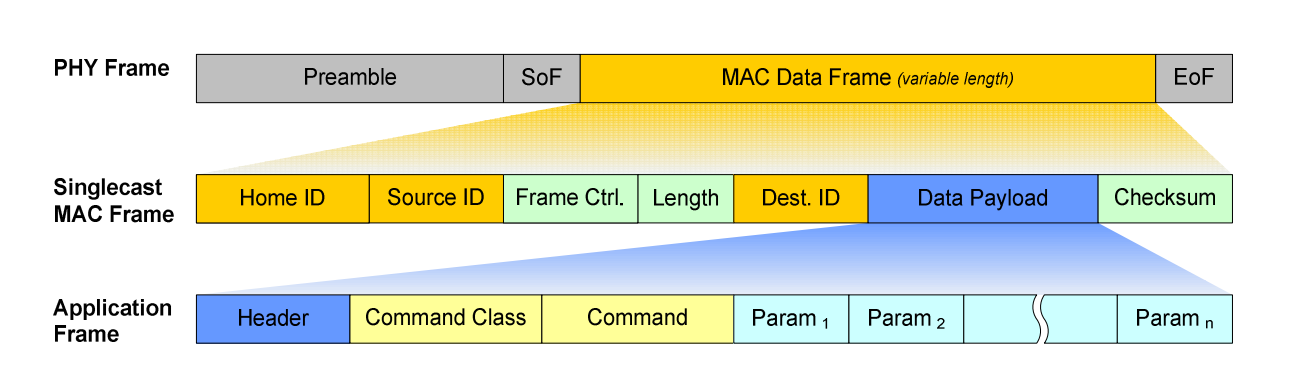
Basic ZWave Frame
|Byte Position: |0|1|3|4|…| N| |---|---|---|---|---|---|---|---|---|---|---|---| | Field: |Header|Length|Type (Request 0x00 or Response 0x01)|Command - ZWave Function (see ZWave Functions below)| Data … | Checksum|
See Also:
- binarySwitchSamples.md
- BinaryMotionSensorSamples.md
- OtherSample.md
Generating a checksum
privatestaticbytegenerateChecksum(byte[] dataFrame) {
intoffset = 0; // Initialize this to 0xFF and no need to NOT result belowbyteret = data[offset];
for (inti = offset; i < data.length; i++) {
// Xor bytesret ^= data[i];
}
ret = (byte) (~ret);
returnret;
}
Usage:
byte[] zwaveFrame = newbyte[] {0x01, 0x03, 0x20, /* (byte) 0xdc, */};
System.out.println("==============> Checksum: 0x" + Integer.toHexString(EIMApplication.generateChecksum(zwaveFrame)));
To allow inter-operability between different Z-Wave devices from different manufacturers, each device must include certain well-defined functions above and beyond the ‘Basic’ command class.
These requirements are called ‘Device Classes’. A device class refers to a typical device and defines which command classes that are mandatory for it to support.
Device classes are organized into a three-layer hierarchy:
Every device must belong to a basic device class Devices can be further specified by assigning them to a generic device class Further functionality can be defined by assigning the device to a specific device class Basic Device Class The ‘Basic’ device class simply defines a device as a Controller, Slave or Routing Slave. Therefore every device belongs to one basic device class.
Generic Device Class The ‘Generic’ device class defines the basic functionality that the devices will support as a controller or slave. Current ‘Generic’ device classes are:
| Hex Value | Value | Description | Key |
|---|---|---|---|
| 0x01 | 1 | General controller | BASIC TYPE CONTROLLER |
| 0x02 | 2 | Static cont roller | STATIC CONTROLLER |
| 0x03 | 3 | BASIC TYPE SLAVE | |
| 0x04 | 4 | BASIC TYPE ROUTING SLAVE | |
| 0x08 | 8 | Thermostat | GENERIC TYPE THERMOSTAT |
| 0x10 | 16 | Binary switch | BINARY SWITCH |
| 0x11 | 17 | Multi level switch | MULTI LEVEL SWITCH |
| 0x12 | 18 | GENERIC TYPE SWITCH REMOTE | |
| 0x13 | 19 | GENERIC TYPE SWITCH TOGGLE | |
| 0x17 | 23 | GENERIC TYPE SECURITY PANEL | |
| 0x20 | 32 | Binary sensor | BINARY SENSOR |
| 0x21 | 33 | Multilevel-Sensor | MULTILEVEL SENSOR |
| 0x31 | 49 | Meter | METER |
| 64 | GENERIC TYPE ENTRY CONTROL |
Specific Device Class
Assigning a ‘Specific’ device class to a Z-Wave device allows it to further specify its functionality. Each ‘Generic’ device class refers to a number of specific device classes. You can decide to assign a specific device class, however, it only makes sense if the device really supports all functions of a ‘Specific’ device class.
Table: 0x01 – 0x1F ZWave Protocol Commands
| Name | Hex | Dec |
|---|---|---|
| NO OPERATION | 0x00 | 0 |
| NODE INFO | 0x01 | 1 |
| REQUEST NODE INFO | 0x02 | 2 |
| ASSIGN IDS | 0x03 | 3 |
| FIND NODES IN RANGE | 0x04 | 4 |
| GET NODES IN RANGE | 0x05 | 5 |
| RANGE INFO | 0x06 | 6 |
| CMD COMPLETE | 0x07 | 7 |
| TRANSFER PRESENTATION | 0x08 | 8 |
| TRANSFER NODE INFO | 0x09 | 9 |
| TRANSFER RANGE INFO | 0x0A | 10 |
| TRANSFER END | 0x0B | 11 |
| ASSIGN RETURN ROUTE | 0x0C | 12 |
| NEW NODE REGISTERED | 0x0D | 13 |
| NEW RANGE REGISTERED | 0x0E | 14 |
| TRANSFER NEW PRIMARY COMPLETE | 0x0F | 15 |
| AUTOMATIC CONTROLLER UPDATE START | 0x10 | 16 |
| SUC NODE ID | 0x11 | 17 |
| SET SUC | 0x12 | 18 |
| SET SUC ACK | 0x13 | 19 |
| ASSIGN SUC RETURN ROUTE | 0x14 | 20 |
| STATIC ROUTE REQUEST | 0x15 | 21 |
| LOST | 0x16 | 22 |
| ACCEPT LOST | 0x17 | 23 |
| NOP POWER | 0x18 | 24 |
| RESERVE NODE IDS | 0x19 | 25 |
| RESERVED IDS | 0x1A | 26 |
| UNKNOWN | 0x1B-0x1F | 27-31 |
Table: ZWave Command Classes
A Command Class can contain up to 255 different Commands.
NOTE:If the Command Class field is set to 0xF1 - 0xFF then there is another Command Class byte added. This allows for future extensions of the Command Classes. The strategy of having an Extended Command Class followed by the actual command identifier provides the possibility of having more than 4000 Command Classes.
| Name | Hex | Dec |
|---|---|---|
| BASIC | 0x20 | 32 |
| CONTROLLER REPLICATION | 0x21 | 33 |
| APPLICATION STATUS | 0x22 | 34 |
| ZIP SERVICES | 0x23 | 35 |
| ZIP SERVER | 0x24 | 36 |
| SWITCH BINARY | 0x25 | 37 |
| SWITCH MULTILEVEL | 0x26 | 38 |
| SWITCH MULTILEVEL V2 | 0x26 | 38 |
| SWITCH ALL | 0x27 | 39 |
| SWITCH TOGGLE BINARY | 0x28 | 40 |
| SWITCH TOGGLE MULTILEVEL | 0x29 | 41 |
| CHIMNEY FAN | 0x2A | 42 |
| SCENE ACTIVATION | 0x2B | 43 |
| SCENE ACTUATOR CONF | 0x2C | 44 |
| SCENE CONTROLLER CONF | 0x2D | 45 |
| ZIP CLIENT | 0x2E | 46 |
| ZIP ADV SERVICES | 0x2F | 47 |
| SENSOR BINARY | 0x30 | 48 |
| SENSOR MULTILEVEL | 0x31 | 49 |
| SENSOR MULTILEVEL V2 | 0x31 | 49 |
| METER | 0x32 | 50 |
| ZIP ADV SERVER | 0x33 | 51 |
| ZIP ADV CLIENT | 0x34 | 52 |
| METER PULSE | 0x35 | 53 |
| METER TBL CONFIG | 0x3C | 60 |
| METER TBL MONITOR | 0x3D | 61 |
| METER TBL PUSH | 0x3E | 62 |
| THERMOSTAT HEATING | 0x38 | 56 |
| THERMOSTAT MODE | 0x40 | 64 |
| THERMOSTAT OPERATING STATE | 0x42 | 66 |
| THERMOSTAT SETPOINT | 0x43 | 67 |
| THERMOSTAT FAN MODE | 0x44 | 68 |
| THERMOSTAT FAN STATE | 0x45 | 69 |
| CLIMATE CONTROL SCHEDULE | 0x46 | 70 |
| THERMOSTAT SETBACK | 0x47 | 71 |
| TARIF CONFIG | 0x4A | 74 |
| TARIF TABLE MONITOR | 0x4B | 75 |
| COMMAND CLASS DOOR LOCK LOGGING | 0x4C | 76 |
| SCHEDULE ENTRY LOCK | 0x4E | 78 |
| ZIP 6LOWPAN | 0x4F | 79 |
| BASIC WINDOW COVERING | 0x50 | 80 |
| MTP WINDOW COVERING | 0x51 | 81 |
| MULTI CHANNEL V2 | 0x60 | 96 |
| MULTI INSTANCE | 0x60 | 96 |
| DOOR LOCK | 0x62 | 98 |
| USER CODE | 0x63 | 99 |
| CONFIGURATION | 0x70 | 112 |
| CONFIGURATION V2 | 0x70 | 112 |
| ALARM | 0x71 | 113 |
| MANUFACTURER SPECIFIC | 0x72 | 114 |
| POWER LEVEL | 0x73 | 115 |
| PROTECTION | 0x75 | 117 |
| PROTECTION V2 | 0x75 | 117 |
| LOCK | 0x76 | 118 |
| NODE NAMING | 0x77 | 119 |
| FIRMWARE UPDATE MD | 0x7A | 122 |
| GROUPING NAME | 0x7B | 123 |
| REMOTE ASSOCIATION ACTIVATE | 0x7C | 124 |
| REMOTE ASSOCIATION | 0x7D | 125 |
| BATTERY | 0x80 | 128 |
| CLOCK | 0x81 | 129 |
| HAIL | 0x82 | 130 |
| WAKE UP | 0x84 | 132 |
| WAKE UP V2 | 0x84 | 132 |
| ASSOCIATION | 0x85 | 133 |
| ASSOCIATION V2 | 0x85 | 133 |
| VERSION | 0x86 | 134 |
| INDICATOR | 0x87 | 135 |
| PROPRIETARY | 0x88 | 136 |
| LANGUAGE | 0x89 | 137 |
| TIME | 0x8A | 138 |
| TIME PARAMETERS | 0x8B | 139 |
| GEOGRAPHIC LOCATION | 0x8C | 140 |
| COMPOSITE | 0x8D | 141 |
| MULTI CHANNEL ASSOCIATION V2 | 0x8E | 142 |
| MULTI INSTANCE ASSOCIATION | 0x8E | 142 |
| MULTI CMD | 0x8F | 143 |
| ENERGY PRODUCTION | 0x90 | 144 |
| MANUFACTURER PROPRIETARY | 0x91 | 145 |
| SCREEN MD | 0x92 | 146 |
| SCREEN MD V2 | 0x92 | 146 |
| SCREEN ATTRIBUTES | 0x93 | 147 |
| SCREEN ATTRIBUTES V2 | 0x93 | 147 |
| SIMPLE AV CONTROL | 0x94 | 148 |
| AV CONTENT DIRECTORY MD | 0x95 | 149 |
| AV RENDERER STATUS | 0x96 | 150 |
| AV CONTENT SEARCH MD | 0x97 | 151 |
| SECURITY | 0x98 | 152 |
| AV TAGGING MD | 0x99 | 153 |
| IP CONFIGURATION | 0x9A | 154 |
| ASSOCIATION COMMAND CONFIGURATION | 0x9B | 155 |
| SENSOR ALARM | 0x9C | 156 |
| SILENCE ALARM | 0x9D | 157 |
| SENSOR CONFIGURATION | 0x9E | 158 |
| MARK | 0xEF | 239 |
| NON INTEROPERABLE | 0xF0 | 240 |
| EXTENDED APPLICATION COMMANDS | 0xF1 – 0xFF | 241 - 255 |
Table: ZWave Basic
| Name | Hex | Dec |
|---|---|---|
| VERSION | 0x01 | 1 |
| SET | 0x01 | 1 |
| GET | 0x02 | 2 |
| REPORT | 0x03 | 3 |
Table: ZWave Thermostat Setpoint
| Name | Hex | Dec |
|---|---|---|
| VERSION | 0x01 | 1 |
| SET | 0x01 | 1 |
| GET | 0x02 | 2 |
| REPORT | 0x03 | 3 |
| SUPPORTED GET | 0x04 | 4 |
| SUPPORTED REPORT | 0x05 | 5 |
Table: ZWave Wake Up
| Name | Hex | Dec |
|---|---|---|
| VERSION | 0x01 | 1 |
| INTERVAL SET | 0x04 | 4 |
| INTERVAL GET | 0x05 | 5 |
| INTERVAL REPORT | 0x06 | 6 |
| NOTIFICATION | 0x07 | 7 |
Table: ZWave Multi
| Name | Hex | Dec |
|---|---|---|
| VERSION | 0x01 | 1 |
| ENCAP | 0x01 | 1 |
Table: ZWave Battery
| Name | Hex | Dec |
|---|---|---|
| VERSION | 0x01 | 1 |
| GET | 0x02 | 2 |
| REPORT | 0x03 | 3 |
Table: ZWave Transmit Options
| Name | Hex | Dec |
|---|---|---|
| ACK | 0x01 | 1 |
| LOW POWER | 0x02 | 2 |
| AUTO ROUTE | 0x04 | 4 |
| EXPLORE | 0x20 | 32 |
Table: ZWave Parameter Types
| Name | Hex | Dec |
|---|---|---|
| BYTE | 0x01 | 1 |
| WORD | 0x02 | 2 |
| DWORD | 0x03 | 3 |
| BIT_24 | 0x04 | 4 |
| ARRAY | 0x05 | 5 |
| BITMASK | 0x06 | 6 |
| STRUCT_BYTE | 0x07 | 7 |
| ENUM | 0x08 | 8 |
| ENUM_ARRAY | 0x09 | 9 |
| MULTI_ARRAY | 0x0A | 10 |
| CONST | 0x0B | 11 |
| VARIANT | 0x0C | 12 |
| VARIANT_GROUP | 0x0D | 13 |
<?xml version="1.0" encoding="utf-8"?>
<DeviceClasses>
<Basickey="0x01"label="Controller" />
<Basickey="0x02"label="Static Controller" />
<Basickey="0x03"label="Slave" />
<Basickey="0x04"label="Routing Slave" />
<Generickey="0x01"label="Remote Controller"command_classes="0xef,0x20">
<Specifickey="0x01"label="Portable Remote Controller" />
<Specifickey="0x02"label="Portable Scene Controller"command_classes="0x2d,0x72,0x85,0xef,0x2b" />
<Specifickey="0x03"label="Portable Installer Tool"command_classes="0x21,0x72,0x86,0x8f,0xef,0x21,0x60,0x70,0x72,0x84,0x85,0x86,0x8e" />
</Generic>
<Generickey="0x02"label="Static Controller"command_classes="0xef,0x20">
<Specifickey="0x01"label="Static PC Controller" />
<Specifickey="0x02"label="Static Scene Controller"command_classes="0x2d,0x72,0x85,0xef,0x2b" />
<Specifickey="0x03"label="Static Installer Tool"command_classes="0x21,0x72,0x86,0x8f,0xef,0x21,0x60,0x70,0x72,0x84,0x85,0x86,0x8e" />
</Generic>
<Generickey="0x03"label="AV Control Point"command_classes="0x20">
<Specifickey="0x04"label="Satellite Receiver"command_classes="0x72,0x86,0x94" />
<Specifickey="0x11"label="Satellite Receiver V2"command_classes="0x72,0x86,0x94"basic="0x94" />
<Specifickey="0x12"label="Doorbell"command_classes="0x30,0x72,0x85,0x86"basic="0x30"/>
</Generic>
<Generickey="0x04"label="Display"command_classes="0x20">
<Specifickey="0x01"label="Simple Display"command_classes="0x72,0x86,0x92,0x93" />
</Generic>
<Generickey="0x08"label="Thermostat"command_classes="0x20">
<Specifickey="0x01"label="Heating Thermostat" />
<Specifickey="0x02"label="General Thermostat"command_classes="0x40,0x43,0x72"basic="0x40" />
<Specifickey="0x03"label="Setback Schedule Thermostat"command_classes="0x46,0x72,0x86,0x8f,0xef,0x46,0x81,0x8f"basic="0x46" />
<Specifickey="0x04"label="Setpoint Thermostat"command_classes="0x43,0x72,0x86,0x8f,0xef,0x43,0x8f"basic="0x43" />
<Specifickey="0x05"label="Setback Thermostat"command_classes="0x40,0x43,0x47,0x72,0x86"basic="0x40" />
<Specifickey="0x06"label="General Thermostat V2"command_classes="0x40,0x43,0x72,0x86"basic="0x40" />
</Generic>
<Generickey="0x09"label="Window Covering"command_classes="0x20">
<Specifickey="0x01"label="Simple Window Covering"command_classes="0x50"basic="0x50" />
</Generic>
<Generickey="0x0f"label="Repeater Slave"command_classes="0x20">
<Specifickey="0x01"label="Basic Repeater Slave" />
</Generic>
<Generickey="0x10"label="Binary Switch"command_classes="0x20,0x25"basic="0x25">
<Specifickey="0x01"label="Binary Power Switch"command_classes="0x27" />
<Specifickey="0x03"label="Binary Scene Switch"command_classes="0x27,0x2b,0x2c,0x72" />
</Generic>
<Generickey="0x11"label="Multilevel Switch"command_classes="0x20,0x26"basic="0x26">
<Specifickey="0x01"label="Multilevel Power Switch"command_classes="0x27" />
<Specifickey="0x03"label="Multiposition Motor"command_classes="0x72,0x86" />
<Specifickey="0x04"label="Multilevel Scene Switch"command_classes="0x27,0x2b,0x2c,0x72" />
<Specifickey="0x05"label="Motor Control Class A"command_classes="0x25,0x72,0x86" />
<Specifickey="0x06"label="Motor Control Class B"command_classes="0x25,0x72,0x86" />
<Specifickey="0x07"label="Motor Control Class C"command_classes="0x25,0x72,0x86" />
</Generic>
<Generickey="0x12"label="Remote Switch"command_classes="0xef,0x20">
<Specifickey="0x01"label="Binary Remote Switch"command_classes="0xef,0x25"basic="0x25"/>
<Specifickey="0x02"label="Multilevel Remote Switch"command_classes="0xef,0x26"basic="0x26"/>
<Specifickey="0x03"label="Binary Toggle Remote Switch"command_classes="0xef,0x28"basic="0x28"/>
<Specifickey="0x04"label="Multilevel Toggle Remote Switch"command_classes="0xef,0x29"basic="0x29"/>
</Generic>
<Generickey="0x13"label="Toggle Switch"command_classes="0x20" >
<Specifickey="0x01"label="Binary Toggle Switch"command_classes="0x25,0x28"basic="0x28" />
<Specifickey="0x02"label="Multilevel Toggle Switch"command_classes="0x26,0x29"basic="0x29" />
</Generic>
<Generickey="0x14"label="Z/IP Gateway"command_classes="0x20">
<Specifickey="0x01"label="Z/IP Tunneling Gateway"command_classes="0x23,0x24,0x72,0x86"/>
<Specifickey="0x02"label="Z/IP Advanced Gateway"command_classes="0x23,0x24,0x2f,0x33,0x72,0x86"/>
</Generic>
<Generickey="0x15"label="Z/IP Node">
<Specifickey="0x01"label="Z/IP Tunneling Node"command_classes="0x23,0x2e,0x72,0x86" />
<Specifickey="0x02"label="Z/IP Advanced Node"command_classes="0x23,0x2e,0x2f,0x34,0x72,0x86" />
</Generic>
<Generickey="0x16"label="Ventilation"command_classes="0x20">
<Specifickey="0x01"label="Residential Heat Recovery Ventilation"command_classes="0x37,0x39,0x72,0x86"basic="0x39"/>
</Generic>
<Generickey="0x20"label="Binary Sensor"command_classes="0x30,0xef,0x20"basic="0x30">
<Specifickey="0x01"label="Routing Binary Sensor" />
</Generic>
<Generickey="0x21"label="Multilevel Sensor"command_classes="0x31,0xef,0x20"basic="0x31">
<Specifickey="0x01"label="Routing Multilevel Sensor" />
</Generic>
<Generickey="0x30"label="Pulse Meter"command_classes="0x35,0xef,0x20"basic="0x35"/>
<Generickey="0x31"label="Meter"command_classes="0xef,0x20">
<Specifickey="0x01"label="Simple Meter"command_classes="0x32,0x72,0x86"basic="0x32" />
</Generic>
<Generickey="0x40"label="Entry Control"command_classes="0x20">
<Specifickey="0x01"label="Door Lock"command_classes="0x62"basic="0x62"/>
<Specifickey="0x02"label="Advanced Door Lock"command_classes="0x62,0x72,0x86"basic="0x62"/>
<Specifickey="0x03"label="Secure Keypad Door Lock"command_classes="0x62,0x63,0x72,0x86,0x98"basic="0x62"/>
</Generic>
<Generickey="0x50"label="Semi Interoperable"command_classes="0x20,0x72,0x86,0x88">
<Specifickey="0x01"label="Energy Production"command_classes="0x90" />
</Generic>
<Generickey="0xa1"label="Alarm Sensor"command_classes="0xef,0x20"basic="0x71">
<Specifickey="0x01"label="Basic Routing Alarm Sensor"command_classes="0x71,0x72,0x85,0x86,0xef,0x71" />
<Specifickey="0x02"label="Routing Alarm Sensor"command_classes="0x71,0x72,0x80,0x85,0x86,0xef,0x71" />
<Specifickey="0x03"label="Basic Zensor Alarm Sensor"command_classes="0x71,0x72,0x86,0xef,0x71" />
<Specifickey="0x04"label="Zensor Alarm Sensor"command_classes="0x71,0x72,0x80,0x86,0xef,0x71" />
<Specifickey="0x05"label="Advanced Zensor Alarm Sensor"command_classes="0x71,0x72,0x80,0x85,0x86,0xef,0x71" />
<Specifickey="0x06"label="Basic Routing Smoke Sensor"command_classes="0x71,0x72,0x85,0x86,0xef,0x71" />
<Specifickey="0x07"label="Routing Smoke Sensor"command_classes="0x71,0x72,0x80,0x85,0x86,0xef,0x71" />
<Specifickey="0x08"label="Basic Zensor Smoke Sensor"command_classes="0x71,0x72,0x86,0xef,0x71" />
<Specifickey="0x09"label="Zensor Smoke Sensor"command_classes="0x71,0x72,0x80,0x86,0xef,0x71" />
<Specifickey="0x0a"label="Advanced Zensor Smoke Sensor"command_classes="0x71,0x72,0x80,0x85,0x86,0xef,0x71" />
</Generic>
<Generickey="0xff"label="Non Interoperable" />
</DeviceClasses>
Device Class
| Name | Value |
|---|---|
| None | 0x00 |
| DiscoveryNodes | 0x02 |
| SerialApiApplNodeInformation | 0x03 |
| ApplicationCommandHandler | 0x04 |
| GetControllerCapabilities | 0x05 |
| SerialApiSetTimeouts | 0x06 |
| SerialGetCapabilities | 0x07 |
| SerialApiSoftReset | 0x08 |
| SetRFReceiveMode | 0x10 |
| SetSleepMode | 0x11 |
| SendNodeInformation | 0x12 |
| SendData | 0x13 |
| SendDataMulti | 0x14 |
| GetVersion | 0x15 |
| SendDataAbort | 0x16 |
| RFPowerLevelSet | 0x17 |
| SendDataMeta | 0x18 |
| MemoryGetId | 0x20 |
| MemoryGetByte | 0x21 |
| MemoryPutByte | 0x22 |
| MemoryGetBuffer | 0x23 |
| MemoryPutBuffer | 0x24 |
| ReadMemory | 0x23 |
| ClockSet | 0x30 |
| ClockGet | 0x31 |
| ClockCompare | 0x32 |
| RtcTimerCreate | 0x33 |
| RtcTimerRead | 0x34 |
| RtcTimerDelete | 0x35 |
| RtcTimerCall | 0x36 |
| GetNodeProtocolInfo | 0x41 |
| SetDefault | 0x42 |
| ReplicationCommandComplete | 0x44 |
| ReplicationSendData | 0x45 |
| AssignReturnRoute | 0x46 |
| DeleteReturnRoute | 0x47 |
| RequestNodeNeighborUpdate | 0x48 |
| ApplicationUpdate | 0x49 |
| AddNodeToNetwork | 0x4a |
| RemoveNodeFromNetwork | 0x4b |
| CreateNewPrimary | 0x4c |
| ControllerChange | 0x4d |
| SetLearnMode | 0x50 |
| AssignSucReturnRoute | 0x51 |
| EnableSuc | 0x52 |
| RequestNetworkUpdate | 0x53 |
| SetSucNodeId | 0x54 |
| DeleteSucReturnRoute | 0x55 |
| GetSucNodeId | 0x56 |
| SendSucId | 0x57 |
| RediscoveryNeeded | 0x59 |
| RequestNodeInfo | 0x60 |
| RemoveFailedNodeId | 0x61 |
| IsFailedNode | 0x62 |
| ReplaceFailedNode | 0x63 |
| TimerStart | 0x70 |
| TimerRestart | 0x71 |
| TimerCancel | 0x72 |
| TimerCall | 0x73 |
| GetRoutingTableLine | 0x80 |
| GetTXCounter | 0x81 |
| ResetTXCounter | 0x82 |
| StoreNodeInfo | 0x83 |
| StoreHomeId | 0x84 |
| LockRouteResponse | 0x90 |
| SendDataRouteDemo | 0x91 |
| SerialApiTest | 0x95 |
| SerialApiSlaveNodeInfo | 0xa0 |
| ApplicationSlaveCommandHandler | 0xa1 |
| SendSlaveNodeInfo | 0xa2 |
| SendSlaveData | 0xa3 |
| SetSlaveLearnMode | 0xa4 |
| GetVirtualNodes | 0xa5 |
| IsVirtualNode | 0xa6 |
| SetPromiscuousMode | 0xd0 |
Table: Preambles used see "man ascii"
| Name | Hex | Dec | Description |
|---|---|---|---|
| SOF | 0x01 | 1 | Start Of Frame |
| ACK | 0x06 | 6 | Message Ack |
| NAK | 0x15 | 21 | Message NAK |
| CAN | 0x18 | 24 | Cancel - Resend request |
Install "interceptty".
- http://www.suspectclass.com/sgifford/interceptty/
- unpack
- build it and install the tool
# Usage:# Stop Z-Way process "sudo /etc/init.d/Z-Way stop"# > sudo vi /opt/z-way-server/config.xml# change "/dev/ttyAMA0" to "/tmp/ttyAMA0"# Run this script# Start Z-Way "sudo /etc/init.d/Z-Way start"
interceptty -s 'ispeed 115200 ospeed 115200' /dev/ttyAMA0 /tmp/ttyAMA0
Once you are done sniffing the serial port you will need to stop the Z-Way server and change "config.xml" back to it's original form.
Z-Way makes a server for Raspberry PI and RaZberry.
| Term | Description |
|---|---|
| FLIRS | Frequently Listening Devices |
| NIF | Node Information Frame |
| SIS | Static ID-Server |
| SOF | Start Of Frame |
| SUC | Static Update Controller |
- ZWave Overview - http://dkc1.digikey.com/us/en/tod/SigmaDesigns/Z-Wave/Z-Wave.html
- linuxmce ZWave API - http://wiki.linuxmce.org/index.php/ZWave_API
- Catching the Z-Wave - http://www.drdobbs.com/embedded-systems/catching-the-z-wave/193104353
- Open ZWave - https://code.google.com/p/open-zwave/
- An introduction to Z-Wave programming in C# - http://www.digiwave.dk/en/programming/an-introduction-to-z-wave-programming-in-c/
- http://www.vesternet.com/resources/technology-indepth/how-z-wave-controllers-work
- http://www.codecoretechnologies.com/community/index.php?topic=946.20
- ViziaRF - https://code.google.com/p/zwave-driver-for-premise/source/browse/trunk/ViziaRF/ViziaRF.xdo
- "razberry.pdf" - http://razberry.z-wave.me/docs/razberry.pdf
- http://wiki.micasaverde.com/index.php/ZWave_Command_Classes
- ZWave protocol version - http://wiki.micasaverde.com/index.php/ZWave_Protocol_Version
- Aeonz Stick Driver - https://bitbucket.org/bradsjm/aeonzstickdriver/src/befa5117e290?at=default
- ZWave device DB (far from complete) - http://www.pepper1.net/zwavedb/
- In German does does seem like a nice introduction - http://www.digiwave.dk/
- Python ZWave - http://z-wave.alsenet.com/index.php/Main_Page
- ZWave insiders wiki - http://wiki.zwaveeurope.com/
- ZWave Dimmer Test - https://code.google.com/p/i7afp/source/browse/#svn%2Ftrunk%2FSourcecode%2FZWave
- ZWave Prezi Introduction - http://prezi.com/839cbmtlz-3n/z-wave/
- Getting Firmware from chips http://blog.cassidiancybersecurity.com/post/2014/02/Dumping-firmware-from-ASIC
- BlackHat talk on ZWave - https://www.youtube.com/watch?v=KYaEQhvodc8
- Z-Force ZWave attack tool - https://code.google.com/p/z-force/