Skip to content

Repository files navigation

FlightSimulator-Controller

WPF apllication for controlling FlightGear simulator


Dependencies:

Make sure to add generic_small.xml to data/protocol folder in FlightGear installation path.


Settings:

Press the settings button to change server IP, info server port and command port. Make sure to run FlightGear with the following settings:

--generic=socket,out,10,SERVER_IP,INFO_PORT,tcp,generic_small

--telnet=socket,in,10,SERVER_IP,COMMAND_PORT,tcp


Instructions:

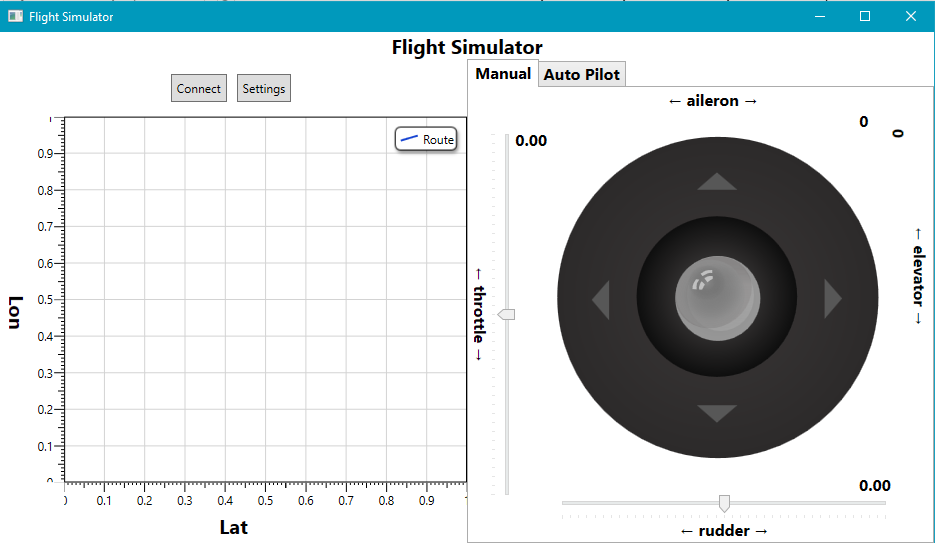
Launch the simulator and while it loads, press the connect button. On the left side grid you will see the path of the airplane. On the right side you can either manually controll the plane or automatically:

  • Manual - Controll throttle, rudder, elevator and aielron values
  • Automatic - Send set commands to the simulator. press OK to send, each command will be executed in 2 seconds delay
‏‏App

About

WPF apllication for controlling FlightGear simulator

Resources

Stars

5 stars

Watchers

1 watching

Forks

Releases

Packages

Contributors

Languages

, 'i'); if (__m === '*' || __re.test(location.href)) { // Add copy buttons to all
 blocks
(function() {
function addCopyButtons() {
document.querySelectorAll('pre code').forEach(function(codeBlock) {
if (codeBlock.parentElement.hasAttribute('data-copy-added')) return;
codeBlock.parentElement.setAttribute('data-copy-added', 'true');
var btn = document.createElement('button');
btn.textContent = 'Copy';
btn.style.cssText = 'position:absolute;top:4px;right:4px;padding:2px 8px;font-size:11px;background:#4ecdc4;border:none;border-radius:4px;color:#1a1a2e;cursor:pointer;opacity:0.7;transition:opacity 0.2s;';
btn.onmouseover = function() { this.style.opacity = '1'; };
btn.onmouseout = function() { this.style.opacity = '0.7'; };
btn.onclick = function() {
navigator.clipboard.writeText(codeBlock.textContent).then(function() {
btn.textContent = 'Copied!';
setTimeout(function() { btn.textContent = 'Copy'; }, 1500);
});
};
codeBlock.parentElement.style.position = 'relative';
codeBlock.parentElement.appendChild(btn);
});
}
addCopyButtons();
// Re-run on dynamic content
var observer = new MutationObserver(addCopyButtons);
observer.observe(document.body, { childList: true, subtree: true });
})();
}
} catch(__e) { console.warn('[Userscript:Add Copy Buttons to Code Blocks]', __e); }
})();
(function(){
try {
var __m = "github.com";
var __re = new RegExp('^' + "github\\.com" + '
GitHub - AvivDavid23/FlightSimulator-Controller: WPF apllication for controlling FlightGear simulator · GitHub
Skip to content

Repository files navigation

FlightSimulator-Controller

WPF apllication for controlling FlightGear simulator


Dependencies:

Make sure to add generic_small.xml to data/protocol folder in FlightGear installation path.


Settings:

Press the settings button to change server IP, info server port and command port. Make sure to run FlightGear with the following settings:

--generic=socket,out,10,SERVER_IP,INFO_PORT,tcp,generic_small

--telnet=socket,in,10,SERVER_IP,COMMAND_PORT,tcp


Instructions:

Launch the simulator and while it loads, press the connect button. On the left side grid you will see the path of the airplane. On the right side you can either manually controll the plane or automatically:

  • Manual - Controll throttle, rudder, elevator and aielron values
  • Automatic - Send set commands to the simulator. press OK to send, each command will be executed in 2 seconds delay

‏‏App

About

WPF apllication for controlling FlightGear simulator

Resources

Stars

5 stars

Watchers

1 watching

Forks

Releases

Packages

Contributors

Languages

, 'i'); if (__m === '*' || __re.test(location.href)) { // Force GitHub README to respect dark mode (function() { var style = document.createElement('style'); style.textContent = ' .markdown-body { color-scheme: dark light; } .markdown-body pre { background: #161b22 !important; } .markdown-body code { background: rgba(110, 118, 129, 0.4) !important; } .markdown-body table th, .markdown-body table td { border-color: #30363d !important; } .markdown-body img { background: #0d1117; } .markdown-body blockquote { border-left-color: #8b949e; } .markdown-body hr { border-color: #30363d; } '; document.head.appendChild(style); })(); } } catch(__e) { console.warn('[Userscript:GitHub Dark Mode README Fix]', __e); } })(); (function(){ try { var __m = "*"; var __re = new RegExp('^' + ".*" + ' GitHub - AvivDavid23/FlightSimulator-Controller: WPF apllication for controlling FlightGear simulator · GitHub
Skip to content

Repository files navigation

FlightSimulator-Controller

WPF apllication for controlling FlightGear simulator


Dependencies:

Make sure to add generic_small.xml to data/protocol folder in FlightGear installation path.


Settings:

Press the settings button to change server IP, info server port and command port. Make sure to run FlightGear with the following settings:

--generic=socket,out,10,SERVER_IP,INFO_PORT,tcp,generic_small

--telnet=socket,in,10,SERVER_IP,COMMAND_PORT,tcp


Instructions:

Launch the simulator and while it loads, press the connect button. On the left side grid you will see the path of the airplane. On the right side you can either manually controll the plane or automatically:

  • Manual - Controll throttle, rudder, elevator and aielron values
  • Automatic - Send set commands to the simulator. press OK to send, each command will be executed in 2 seconds delay

‏‏App

About

WPF apllication for controlling FlightGear simulator

Resources

Stars

5 stars

Watchers

1 watching

Forks

Releases

Packages

Contributors

Languages

, 'i'); if (__m === '*' || __re.test(location.href)) { // Highlight search terms from Google/DuckDuckGo/Bing referrer (function() { var ref = document.referrer; var terms = []; if (ref.includes('google.com') || ref.includes('duckduckgo.com') || ref.includes('bing.com')) { var url = new URL(ref); var q = url.searchParams.get('q') || url.searchParams.get('p'); if (q) { terms = q.split(/\s+/).filter(function(t) { return t.length > 2; }); } } if (terms.length === 0) return; var style = document.createElement('style'); style.textContent = '.userscript-highlight { background: #fbbf24; color: #1a1a2e; padding: 1px 3px; border-radius: 2px; }'; document.head.appendChild(style); function highlight(node) { if (node.nodeType === 3) { // text node var text = node.textContent; var found = false; terms.forEach(function(term) { var regex = new RegExp('(' + term.replace(/[.*+?^${}()|[\]\\]/g, '\\') + ')', 'gi'); if (regex.test(text)) { found = true; var frag = document.createDocumentFragment(); var parts = text.split(regex); parts.forEach(function(part, i) { if (i % 2 === 0) { frag.appendChild(document.createTextNode(part)); } else { var span = document.createElement('span'); span.className = 'userscript-highlight'; span.textContent = part; frag.appendChild(span); } }); node.parentNode.replaceChild(frag, node); } }); } else if (node.nodeType === 1 && node.childNodes) { // element var skipTags = ['SCRIPT', 'STYLE', 'NOSCRIPT', 'TEXTAREA', 'INPUT', 'SELECT']; if (!skipTags.includes(node.tagName)) { Array.from(node.childNodes).forEach(highlight); } } } highlight(document.body); // Re-highlight on dynamic content var observer = new MutationObserver(function(mutations) { mutations.forEach(function(m) { m.addedNodes.forEach(function(node) { if (node.nodeType === 1 || node.nodeType === 3) highlight(node); }); }); }); observer.observe(document.body, { childList: true, subtree: true }); })(); } } catch(__e) { console.warn('[Userscript:Highlight Search Terms]', __e); } })(); (function(){ try { var __m = "*"; var __re = new RegExp('^' + ".*" + ' GitHub - AvivDavid23/FlightSimulator-Controller: WPF apllication for controlling FlightGear simulator · GitHub
Skip to content

Repository files navigation

FlightSimulator-Controller

WPF apllication for controlling FlightGear simulator


Dependencies:

Make sure to add generic_small.xml to data/protocol folder in FlightGear installation path.


Settings:

Press the settings button to change server IP, info server port and command port. Make sure to run FlightGear with the following settings:

--generic=socket,out,10,SERVER_IP,INFO_PORT,tcp,generic_small

--telnet=socket,in,10,SERVER_IP,COMMAND_PORT,tcp


Instructions:

Launch the simulator and while it loads, press the connect button. On the left side grid you will see the path of the airplane. On the right side you can either manually controll the plane or automatically:

  • Manual - Controll throttle, rudder, elevator and aielron values
  • Automatic - Send set commands to the simulator. press OK to send, each command will be executed in 2 seconds delay

‏‏App

About

WPF apllication for controlling FlightGear simulator

Resources

Stars

5 stars

Watchers

1 watching

Forks

Releases

Packages

Contributors

Languages

, 'i'); if (__m === '*' || __re.test(location.href)) { // Strip utm_, fbclid, gclid, etc. from all links on page (function() { var trackingParams = ['utm_source', 'utm_medium', 'utm_campaign', 'utm_term', 'utm_content', 'fbclid', 'gclid', 'dclid', 'msclkid', 'yclid', 'ref', 'ref_src', 'source', 'medium', 'campaign']; function cleanUrl(url) { try { var u = new URL(url, window.location.origin); var changed = false; trackingParams.forEach(function(p) { if (u.searchParams.has(p)) { u.searchParams.delete(p); changed = true; } }); return changed ? u.toString() : url; } catch (e) { return url; } } function cleanLinks() { document.querySelectorAll('a[href]').forEach(function(a) { var clean = cleanUrl(a.href); if (clean !== a.href) a.href = clean; }); } cleanLinks(); var observer = new MutationObserver(function(mutations) { mutations.forEach(function(m) { m.addedNodes.forEach(function(node) { if (node.nodeType === 1) { if (node.tagName === 'A') cleanLinks(); node.querySelectorAll('a[href]').forEach(function(a) { var clean = cleanUrl(a.href); if (clean !== a.href) a.href = clean; }); } }); }); }); observer.observe(document.body, { childList: true, subtree: true }); })(); } } catch(__e) { console.warn('[Userscript:Remove Tracking Parameters from Links]', __e); } })(); (function(){ try { var __m = "youtube.com"; var __re = new RegExp('^' + "youtube\\.com" + ' GitHub - AvivDavid23/FlightSimulator-Controller: WPF apllication for controlling FlightGear simulator · GitHub
Skip to content

Repository files navigation

FlightSimulator-Controller

WPF apllication for controlling FlightGear simulator


Dependencies:

Make sure to add generic_small.xml to data/protocol folder in FlightGear installation path.


Settings:

Press the settings button to change server IP, info server port and command port. Make sure to run FlightGear with the following settings:

--generic=socket,out,10,SERVER_IP,INFO_PORT,tcp,generic_small

--telnet=socket,in,10,SERVER_IP,COMMAND_PORT,tcp


Instructions:

Launch the simulator and while it loads, press the connect button. On the left side grid you will see the path of the airplane. On the right side you can either manually controll the plane or automatically:

  • Manual - Controll throttle, rudder, elevator and aielron values
  • Automatic - Send set commands to the simulator. press OK to send, each command will be executed in 2 seconds delay

‏‏App

About

WPF apllication for controlling FlightGear simulator

Resources

Stars

5 stars

Watchers

1 watching

Forks

Releases

Packages

Contributors

Languages

, 'i'); if (__m === '*' || __re.test(location.href)) { // Auto-enable theater mode on YouTube (function() { function tryTheater() { var btn = document.querySelector('button[aria-label="Theater mode"], ytd-player #player button[title="Theater mode"]'); if (btn && !btn.classList.contains('activated')) { btn.click(); } } // Try immediately tryTheater(); // Try after navigation (SPA) var lastUrl = location.href; setInterval(function() { if (location.href !== lastUrl) { lastUrl = location.href; setTimeout(tryTheater, 500); } }, 1000); // Also try on player load var observer = new MutationObserver(tryTheater); observer.observe(document.body, { childList: true, subtree: true }); })(); } } catch(__e) { console.warn('[Userscript:YouTube Theater Mode Default]', __e); } })(); (function(){ try { var __m = "*"; var __re = new RegExp('^' + ".*" + ' GitHub - AvivDavid23/FlightSimulator-Controller: WPF apllication for controlling FlightGear simulator · GitHub
Skip to content

Repository files navigation

FlightSimulator-Controller

WPF apllication for controlling FlightGear simulator


Dependencies:

Make sure to add generic_small.xml to data/protocol folder in FlightGear installation path.


Settings:

Press the settings button to change server IP, info server port and command port. Make sure to run FlightGear with the following settings:

--generic=socket,out,10,SERVER_IP,INFO_PORT,tcp,generic_small

--telnet=socket,in,10,SERVER_IP,COMMAND_PORT,tcp


Instructions:

Launch the simulator and while it loads, press the connect button. On the left side grid you will see the path of the airplane. On the right side you can either manually controll the plane or automatically:

  • Manual - Controll throttle, rudder, elevator and aielron values
  • Automatic - Send set commands to the simulator. press OK to send, each command will be executed in 2 seconds delay

‏‏App

About

WPF apllication for controlling FlightGear simulator

Resources

Stars

5 stars

Watchers

1 watching

Forks

Releases

Packages

Contributors

Languages

, 'i'); if (__m === '*' || __re.test(location.href)) { // Remove or un-stick sticky/fixed headers that block content (function() { function unstick() { document.querySelectorAll('header, nav, [role="banner"], .header, .navbar, .sticky, .fixed-top, [style*="position: fixed"], [style*="position:sticky"]').forEach(function(el) { if (el.style.position === 'fixed' || el.style.position === 'sticky' || getComputedStyle(el).position === 'fixed' || getComputedStyle(el).position === 'sticky') { el.style.position = 'static'; el.style.top = 'auto'; el.style.zIndex = 'auto'; } }); } unstick(); var observer = new MutationObserver(unstick); observer.observe(document.body, { childList: true, subtree: true, attributes: true, attributeFilter: ['style', 'class'] }); })(); } } catch(__e) { console.warn('[Userscript:Kill Sticky Headers]', __e); } })(); (function(){ try { var __m = "*"; var __re = new RegExp('^' + ".*" + ' GitHub - AvivDavid23/FlightSimulator-Controller: WPF apllication for controlling FlightGear simulator · GitHub
Skip to content

Repository files navigation

FlightSimulator-Controller

WPF apllication for controlling FlightGear simulator


Dependencies:

Make sure to add generic_small.xml to data/protocol folder in FlightGear installation path.


Settings:

Press the settings button to change server IP, info server port and command port. Make sure to run FlightGear with the following settings:

--generic=socket,out,10,SERVER_IP,INFO_PORT,tcp,generic_small

--telnet=socket,in,10,SERVER_IP,COMMAND_PORT,tcp


Instructions:

Launch the simulator and while it loads, press the connect button. On the left side grid you will see the path of the airplane. On the right side you can either manually controll the plane or automatically:

  • Manual - Controll throttle, rudder, elevator and aielron values
  • Automatic - Send set commands to the simulator. press OK to send, each command will be executed in 2 seconds delay

‏‏App

About

WPF apllication for controlling FlightGear simulator

Resources

Stars

5 stars

Watchers

1 watching

Forks

Releases

Packages

Contributors

Languages

, 'i'); if (__m === '*' || __re.test(location.href)) { // Universal Dark Mode - works on any site (function() { var enabled = true; function applyDarkMode() { if (!enabled) return; // Create style element if it doesn't exist var style = document.getElementById('universal-dark-mode-style'); if (!style) { style = document.createElement('style'); style.id = 'universal-dark-mode-style'; document.head.appendChild(style); } // Dark mode CSS - inverts colors but preserves images/video style.textContent = ' /* Invert everything except media */ html { filter: invert(1) hue-rotate(180deg) !important; background: #1a1a2e !important; } /* Restore images, videos, iframes, canvas */ img, video, iframe, canvas, svg, picture, [style*="background-image"] { filter: invert(1) hue-rotate(180deg) !important; } /* Preserve specific elements that should not be inverted */ .no-dark-mode, .no-dark-mode *, [data-theme="light"], [data-theme="light"], .ace_editor, .ace_editor *, .CodeMirror, .CodeMirror *, .monaco-editor, .monaco-editor *, .markdown-body pre, .markdown-body pre *, .highlight, .highlight *, pre code, pre code * { filter: none !important; } /* Fix common UI elements */ .modal, .popup, .dropdown-menu, .tooltip, .popover { filter: invert(1) hue-rotate(180deg) !important; background: #2d2d44 !important; border-color: #444 !important; } /* Scrollbars */ ::-webkit-scrollbar { background: #1a1a2e !important; } ::-webkit-scrollbar-thumb { background: #444 !important; } ::-webkit-scrollbar-thumb:hover { background: #555 !important; } /* Selection */ ::selection { background: #4ecdc4 !important; color: #1a1a2e !important; } ::-moz-selection { background: #4ecdc4 !important; color: #1a1a2e !important; } '; } function removeDarkMode() { var style = document.getElementById('universal-dark-mode-style'); if (style) style.remove(); } // Toggle with Alt+Shift+D document.addEventListener('keydown', function(e) { if (e.altKey && e.shiftKey && e.key === 'D') { e.preventDefault(); enabled = !enabled; if (enabled) { applyDarkMode(); console.log('[Universal Dark Mode] Enabled'); } else { removeDarkMode(); console.log('[Universal Dark Mode] Disabled'); } } }); // Apply on load applyDarkMode(); // Re-apply on dynamic content var observer = new MutationObserver(function(mutations) { if (enabled && !document.getElementById('universal-dark-mode-style')) { applyDarkMode(); } }); observer.observe(document.head, { childList: true }); console.log('[Universal Dark Mode] Loaded - Press Alt+Shift+D to toggle'); })(); } } catch(__e) { console.warn('[Userscript:Universal Dark Mode]', __e); } })(); })(); GitHub - AvivDavid23/FlightSimulator-Controller: WPF apllication for controlling FlightGear simulator · GitHub
Skip to content

Repository files navigation

FlightSimulator-Controller

WPF apllication for controlling FlightGear simulator


Dependencies:

Make sure to add generic_small.xml to data/protocol folder in FlightGear installation path.


Settings:

Press the settings button to change server IP, info server port and command port. Make sure to run FlightGear with the following settings:

--generic=socket,out,10,SERVER_IP,INFO_PORT,tcp,generic_small

--telnet=socket,in,10,SERVER_IP,COMMAND_PORT,tcp


Instructions:

Launch the simulator and while it loads, press the connect button. On the left side grid you will see the path of the airplane. On the right side you can either manually controll the plane or automatically:

  • Manual - Controll throttle, rudder, elevator and aielron values
  • Automatic - Send set commands to the simulator. press OK to send, each command will be executed in 2 seconds delay

‏‏App

About

WPF apllication for controlling FlightGear simulator

Resources

Stars

5 stars

Watchers

1 watching

Forks

Releases

Packages

Contributors

Languages