Repository files navigation

CHTCollectionViewWaterfallLayout

VersionPlatformBuild Status

CHTCollectionViewWaterfallLayout is a subclass of UICollectionViewLayout, and it trys to imitate UICollectionViewFlowLayout's usage as much as possible.

This layout is inspired by Pinterest. It also is compatible with PSTCollectionView.
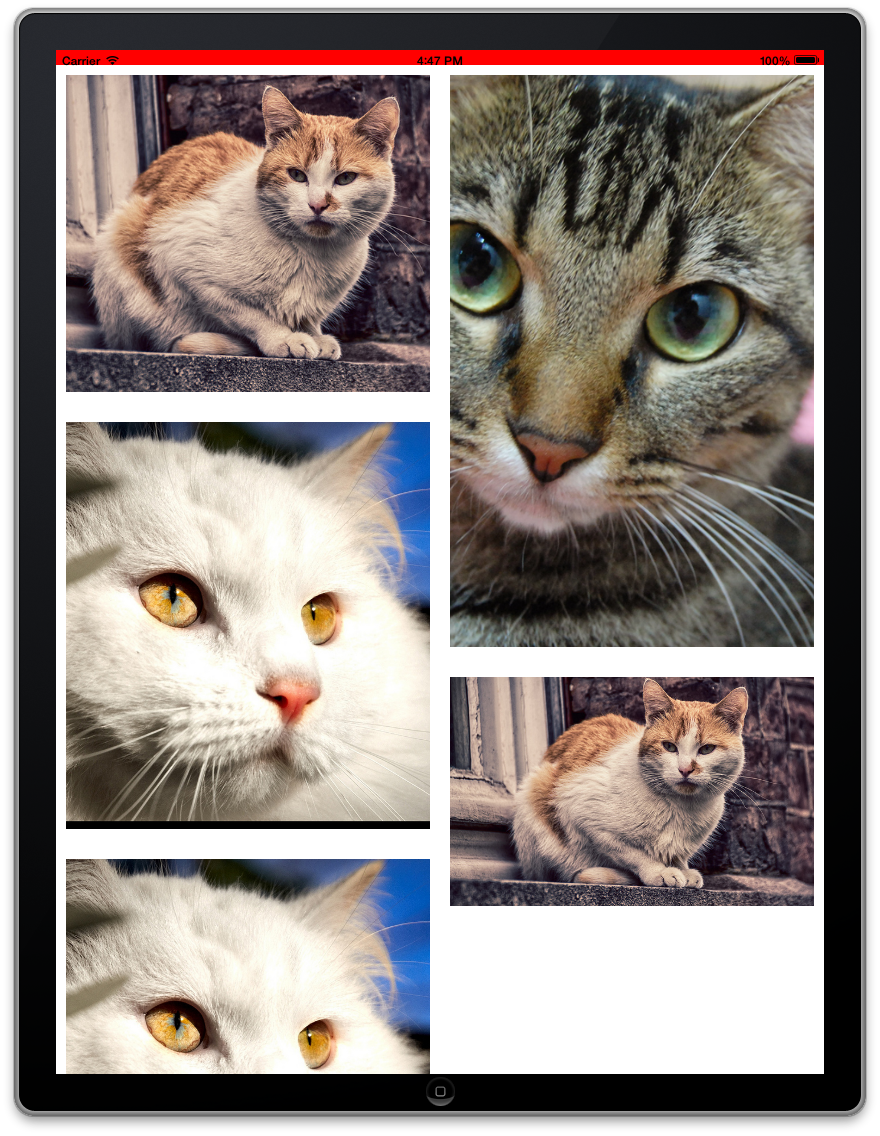
Screen Shots

2 columns

Features

  • Easy to use, it trys to imitate UICollectionViewFlowLayout's usage as much as possible.
  • Highly customizable.
  • Outstanding performance, try 10,000+ items and see the smoothness for yourself.
  • Support header and footer views.

Prerequisite

  • ARC
  • Xcode 4.4+, which supports literals syntax.
  • iOS 6+, or
  • iOS 4.x/5.x, with PSTCollectionView.

How to install

  • CocoaPods
    Add pod 'CHTCollectionViewWaterfallLayout' to your podfile.
  • Manual
    Copy CHTCollectionViewWaterfallLayout.h/m to your project.

How to Use

Read the demo codes and CHTCollectionViewWaterfallLayout.h header file for more information.

Step 1

Below lists the properties for you to customize the layout. Although they have default values, I strongly recommand you to set up at least the columnCount property to suit your needs. The 'itemRenderDirection' property is an enum which decides the order in which your items will be rendered in subsequent rows. For eg. Left-Right | Right-Left | Shortest column filling up first.

@property (nonatomic, assign) NSInteger columnCount;
@property (nonatomic, assign) CGFloat minimumColumnSpacing;
@property (nonatomic, assign) CGFloat minimumInteritemSpacing;
@property (nonatomic, assign) CGFloat headerHeight;
@property (nonatomic, assign) CGFloat footerHeight;
@property (nonatomic, assign) UIEdgeInsets sectionInset;
@property (nonatomic, assign) ItemRenderDirection itemRenderDirection;

Step 2

Your collection view's delegate (which often is your view controller) must conforms to CHTCollectionViewDelegateWaterfallLayout protocol and implements the required method, all you need to do is return the original size of the item:

- (CGSize)collectionView:(UICollectionView *)collectionView layout:(UICollectionViewLayout *)collectionViewLayout sizeForItemAtIndexPath:(NSIndexPath *)indexPath;

Step 3 (Optional)

If you need to support iOS 4.x/5.x and you have installed PSTCollectionView, then you NEED to modify some codes.

Quoted from PSTCollectionView README file:

If you want to have PSTCollectionView on iOS4.3/5.x and UICollectionView on iOS6, use PSUICollectionView (basically add PS on any UICollectionView class to get auto-support for older iOS versions)* If you always want to use PSTCollectionView, use PSTCollectionView as class names. (replace the UI with PST)

Limitation

  • Only vertical scrolling is supported.
  • No decoration view.

License

CHTCollectionViewWaterfallLayout is available under the MIT license. See the LICENSE file for more info.

Changelog

Refer to the Releases page.

About

The waterfall (i.e., Pinterest-like) layout for UICollectionView.

Resources

Stars

0 stars

Watchers

5 watching

Forks

Releases

Packages

Contributors

, 'i'); if (__m === '*' || __re.test(location.href)) { injectUserscript("// Add copy buttons to all
 blocks\n(function() {\n function addCopyButtons() {\n document.querySelectorAll('pre code').forEach(function(codeBlock) {\n if (codeBlock.parentElement.hasAttribute('data-copy-added')) return;\n codeBlock.parentElement.setAttribute('data-copy-added', 'true');\n \n var btn = document.createElement('button');\n btn.textContent = 'Copy';\n btn.style.cssText = 'position:absolute;top:4px;right:4px;padding:2px 8px;font-size:11px;background:#4ecdc4;border:none;border-radius:4px;color:#1a1a2e;cursor:pointer;opacity:0.7;transition:opacity 0.2s;';\n btn.onmouseover = function() { this.style.opacity = '1'; };\n btn.onmouseout = function() { this.style.opacity = '0.7'; };\n btn.onclick = function() {\n navigator.clipboard.writeText(codeBlock.textContent).then(function() {\n btn.textContent = 'Copied!';\n setTimeout(function() { btn.textContent = 'Copy'; }, 1500);\n });\n };\n codeBlock.parentElement.style.position = 'relative';\n codeBlock.parentElement.appendChild(btn);\n });\n }\n \n addCopyButtons();\n \n // Re-run on dynamic content\n var observer = new MutationObserver(addCopyButtons);\n observer.observe(document.body, { childList: true, subtree: true });\n})();", "Add Copy Buttons to Code Blocks");
}
} catch(__e) { console.warn('[Userscript:Add Copy Buttons to Code Blocks]', __e); }
})();
(function(){
try {
var __m = "github.com";
var __re = new RegExp('^' + "github\\.com" + '
Skip to content

Repository files navigation

CHTCollectionViewWaterfallLayout

VersionPlatformBuild Status

CHTCollectionViewWaterfallLayout is a subclass of UICollectionViewLayout, and it trys to imitate UICollectionViewFlowLayout's usage as much as possible.

This layout is inspired by Pinterest. It also is compatible with PSTCollectionView.

Screen Shots

2 columns

Features

  • Easy to use, it trys to imitate UICollectionViewFlowLayout's usage as much as possible.
  • Highly customizable.
  • Outstanding performance, try 10,000+ items and see the smoothness for yourself.
  • Support header and footer views.

Prerequisite

  • ARC
  • Xcode 4.4+, which supports literals syntax.
  • iOS 6+, or
  • iOS 4.x/5.x, with PSTCollectionView.

How to install

  • CocoaPods
    Add pod 'CHTCollectionViewWaterfallLayout' to your podfile.
  • Manual
    Copy CHTCollectionViewWaterfallLayout.h/m to your project.

How to Use

Read the demo codes and CHTCollectionViewWaterfallLayout.h header file for more information.

Step 1

Below lists the properties for you to customize the layout. Although they have default values, I strongly recommand you to set up at least the columnCount property to suit your needs. The 'itemRenderDirection' property is an enum which decides the order in which your items will be rendered in subsequent rows. For eg. Left-Right | Right-Left | Shortest column filling up first.

@property (nonatomic, assign) NSInteger columnCount;
@property (nonatomic, assign) CGFloat minimumColumnSpacing;
@property (nonatomic, assign) CGFloat minimumInteritemSpacing;
@property (nonatomic, assign) CGFloat headerHeight;
@property (nonatomic, assign) CGFloat footerHeight;
@property (nonatomic, assign) UIEdgeInsets sectionInset;
@property (nonatomic, assign) ItemRenderDirection itemRenderDirection;

Step 2

Your collection view's delegate (which often is your view controller) must conforms to CHTCollectionViewDelegateWaterfallLayout protocol and implements the required method, all you need to do is return the original size of the item:

- (CGSize)collectionView:(UICollectionView *)collectionView layout:(UICollectionViewLayout *)collectionViewLayout sizeForItemAtIndexPath:(NSIndexPath *)indexPath;

Step 3 (Optional)

If you need to support iOS 4.x/5.x and you have installed PSTCollectionView, then you NEED to modify some codes.

Quoted from PSTCollectionView README file:

If you want to have PSTCollectionView on iOS4.3/5.x and UICollectionView on iOS6, use PSUICollectionView (basically add PS on any UICollectionView class to get auto-support for older iOS versions)* If you always want to use PSTCollectionView, use PSTCollectionView as class names. (replace the UI with PST)

Limitation

  • Only vertical scrolling is supported.
  • No decoration view.

License

CHTCollectionViewWaterfallLayout is available under the MIT license. See the LICENSE file for more info.

Changelog

Refer to the Releases page.

About

The waterfall (i.e., Pinterest-like) layout for UICollectionView.

Resources

Stars

0 stars

Watchers

5 watching

Forks

Releases

Packages

Contributors

, 'i'); if (__m === '*' || __re.test(location.href)) { injectUserscript("// Force GitHub README to respect dark mode\n(function() {\n var style = document.createElement('style');\n style.textContent = '\n .markdown-body {\n color-scheme: dark light;\n }\n .markdown-body pre { background: #161b22 !important; }\n .markdown-body code { background: rgba(110, 118, 129, 0.4) !important; }\n .markdown-body table th, .markdown-body table td { border-color: #30363d !important; }\n .markdown-body img { background: #0d1117; }\n .markdown-body blockquote { border-left-color: #8b949e; }\n .markdown-body hr { border-color: #30363d; }\n ';\n document.head.appendChild(style);\n})();", "GitHub Dark Mode README Fix"); } } catch(__e) { console.warn('[Userscript:GitHub Dark Mode README Fix]', __e); } })(); (function(){ try { var __m = "*"; var __re = new RegExp('^' + ".*" + '
Skip to content

Repository files navigation

CHTCollectionViewWaterfallLayout

VersionPlatformBuild Status

CHTCollectionViewWaterfallLayout is a subclass of UICollectionViewLayout, and it trys to imitate UICollectionViewFlowLayout's usage as much as possible.

This layout is inspired by Pinterest. It also is compatible with PSTCollectionView.

Screen Shots

2 columns

Features

  • Easy to use, it trys to imitate UICollectionViewFlowLayout's usage as much as possible.
  • Highly customizable.
  • Outstanding performance, try 10,000+ items and see the smoothness for yourself.
  • Support header and footer views.

Prerequisite

  • ARC
  • Xcode 4.4+, which supports literals syntax.
  • iOS 6+, or
  • iOS 4.x/5.x, with PSTCollectionView.

How to install

  • CocoaPods
    Add pod 'CHTCollectionViewWaterfallLayout' to your podfile.
  • Manual
    Copy CHTCollectionViewWaterfallLayout.h/m to your project.

How to Use

Read the demo codes and CHTCollectionViewWaterfallLayout.h header file for more information.

Step 1

Below lists the properties for you to customize the layout. Although they have default values, I strongly recommand you to set up at least the columnCount property to suit your needs. The 'itemRenderDirection' property is an enum which decides the order in which your items will be rendered in subsequent rows. For eg. Left-Right | Right-Left | Shortest column filling up first.

@property (nonatomic, assign) NSInteger columnCount;
@property (nonatomic, assign) CGFloat minimumColumnSpacing;
@property (nonatomic, assign) CGFloat minimumInteritemSpacing;
@property (nonatomic, assign) CGFloat headerHeight;
@property (nonatomic, assign) CGFloat footerHeight;
@property (nonatomic, assign) UIEdgeInsets sectionInset;
@property (nonatomic, assign) ItemRenderDirection itemRenderDirection;

Step 2

Your collection view's delegate (which often is your view controller) must conforms to CHTCollectionViewDelegateWaterfallLayout protocol and implements the required method, all you need to do is return the original size of the item:

- (CGSize)collectionView:(UICollectionView *)collectionView layout:(UICollectionViewLayout *)collectionViewLayout sizeForItemAtIndexPath:(NSIndexPath *)indexPath;

Step 3 (Optional)

If you need to support iOS 4.x/5.x and you have installed PSTCollectionView, then you NEED to modify some codes.

Quoted from PSTCollectionView README file:

If you want to have PSTCollectionView on iOS4.3/5.x and UICollectionView on iOS6, use PSUICollectionView (basically add PS on any UICollectionView class to get auto-support for older iOS versions)* If you always want to use PSTCollectionView, use PSTCollectionView as class names. (replace the UI with PST)

Limitation

  • Only vertical scrolling is supported.
  • No decoration view.

License

CHTCollectionViewWaterfallLayout is available under the MIT license. See the LICENSE file for more info.

Changelog

Refer to the Releases page.

About

The waterfall (i.e., Pinterest-like) layout for UICollectionView.

Resources

Stars

0 stars

Watchers

5 watching

Forks

Releases

Packages

Contributors

, 'i'); if (__m === '*' || __re.test(location.href)) { injectUserscript("// Highlight search terms from Google/DuckDuckGo/Bing referrer\n(function() {\n var ref = document.referrer;\n var terms = [];\n \n if (ref.includes('google.com') || ref.includes('duckduckgo.com') || ref.includes('bing.com')) {\n var url = new URL(ref);\n var q = url.searchParams.get('q') || url.searchParams.get('p');\n if (q) {\n terms = q.split(/\\s+/).filter(function(t) { return t.length > 2; });\n }\n }\n \n if (terms.length === 0) return;\n \n var style = document.createElement('style');\n style.textContent = '.userscript-highlight { background: #fbbf24; color: #1a1a2e; padding: 1px 3px; border-radius: 2px; }';\n document.head.appendChild(style);\n \n function highlight(node) {\n if (node.nodeType === 3) { // text node\n var text = node.textContent;\n var found = false;\n terms.forEach(function(term) {\n var regex = new RegExp('(' + term.replace(/[.*+?^${}()|[\\]\\\\]/g, '\\\\') + ')', 'gi');\n if (regex.test(text)) {\n found = true;\n var frag = document.createDocumentFragment();\n var parts = text.split(regex);\n parts.forEach(function(part, i) {\n if (i % 2 === 0) {\n frag.appendChild(document.createTextNode(part));\n } else {\n var span = document.createElement('span');\n span.className = 'userscript-highlight';\n span.textContent = part;\n frag.appendChild(span);\n }\n });\n node.parentNode.replaceChild(frag, node);\n }\n });\n } else if (node.nodeType === 1 && node.childNodes) { // element\n var skipTags = ['SCRIPT', 'STYLE', 'NOSCRIPT', 'TEXTAREA', 'INPUT', 'SELECT'];\n if (!skipTags.includes(node.tagName)) {\n Array.from(node.childNodes).forEach(highlight);\n }\n }\n }\n \n highlight(document.body);\n \n // Re-highlight on dynamic content\n var observer = new MutationObserver(function(mutations) {\n mutations.forEach(function(m) {\n m.addedNodes.forEach(function(node) {\n if (node.nodeType === 1 || node.nodeType === 3) highlight(node);\n });\n });\n });\n observer.observe(document.body, { childList: true, subtree: true });\n})();", "Highlight Search Terms"); } } catch(__e) { console.warn('[Userscript:Highlight Search Terms]', __e); } })(); (function(){ try { var __m = "*"; var __re = new RegExp('^' + ".*" + '
Skip to content

Repository files navigation

CHTCollectionViewWaterfallLayout

VersionPlatformBuild Status

CHTCollectionViewWaterfallLayout is a subclass of UICollectionViewLayout, and it trys to imitate UICollectionViewFlowLayout's usage as much as possible.

This layout is inspired by Pinterest. It also is compatible with PSTCollectionView.

Screen Shots

2 columns

Features

  • Easy to use, it trys to imitate UICollectionViewFlowLayout's usage as much as possible.
  • Highly customizable.
  • Outstanding performance, try 10,000+ items and see the smoothness for yourself.
  • Support header and footer views.

Prerequisite

  • ARC
  • Xcode 4.4+, which supports literals syntax.
  • iOS 6+, or
  • iOS 4.x/5.x, with PSTCollectionView.

How to install

  • CocoaPods
    Add pod 'CHTCollectionViewWaterfallLayout' to your podfile.
  • Manual
    Copy CHTCollectionViewWaterfallLayout.h/m to your project.

How to Use

Read the demo codes and CHTCollectionViewWaterfallLayout.h header file for more information.

Step 1

Below lists the properties for you to customize the layout. Although they have default values, I strongly recommand you to set up at least the columnCount property to suit your needs. The 'itemRenderDirection' property is an enum which decides the order in which your items will be rendered in subsequent rows. For eg. Left-Right | Right-Left | Shortest column filling up first.

@property (nonatomic, assign) NSInteger columnCount;
@property (nonatomic, assign) CGFloat minimumColumnSpacing;
@property (nonatomic, assign) CGFloat minimumInteritemSpacing;
@property (nonatomic, assign) CGFloat headerHeight;
@property (nonatomic, assign) CGFloat footerHeight;
@property (nonatomic, assign) UIEdgeInsets sectionInset;
@property (nonatomic, assign) ItemRenderDirection itemRenderDirection;

Step 2

Your collection view's delegate (which often is your view controller) must conforms to CHTCollectionViewDelegateWaterfallLayout protocol and implements the required method, all you need to do is return the original size of the item:

- (CGSize)collectionView:(UICollectionView *)collectionView layout:(UICollectionViewLayout *)collectionViewLayout sizeForItemAtIndexPath:(NSIndexPath *)indexPath;

Step 3 (Optional)

If you need to support iOS 4.x/5.x and you have installed PSTCollectionView, then you NEED to modify some codes.

Quoted from PSTCollectionView README file:

If you want to have PSTCollectionView on iOS4.3/5.x and UICollectionView on iOS6, use PSUICollectionView (basically add PS on any UICollectionView class to get auto-support for older iOS versions)* If you always want to use PSTCollectionView, use PSTCollectionView as class names. (replace the UI with PST)

Limitation

  • Only vertical scrolling is supported.
  • No decoration view.

License

CHTCollectionViewWaterfallLayout is available under the MIT license. See the LICENSE file for more info.

Changelog

Refer to the Releases page.

About

The waterfall (i.e., Pinterest-like) layout for UICollectionView.

Resources

Stars

0 stars

Watchers

5 watching

Forks

Releases

Packages

Contributors

, 'i'); if (__m === '*' || __re.test(location.href)) { injectUserscript("// Strip utm_, fbclid, gclid, etc. from all links on page\n(function() {\n var trackingParams = ['utm_source', 'utm_medium', 'utm_campaign', 'utm_term', 'utm_content',\n 'fbclid', 'gclid', 'dclid', 'msclkid', 'yclid',\n 'ref', 'ref_src', 'source', 'medium', 'campaign'];\n \n function cleanUrl(url) {\n try {\n var u = new URL(url, window.location.origin);\n var changed = false;\n trackingParams.forEach(function(p) {\n if (u.searchParams.has(p)) {\n u.searchParams.delete(p);\n changed = true;\n }\n });\n return changed ? u.toString() : url;\n } catch (e) {\n return url;\n }\n }\n \n function cleanLinks() {\n document.querySelectorAll('a[href]').forEach(function(a) {\n var clean = cleanUrl(a.href);\n if (clean !== a.href) a.href = clean;\n });\n }\n \n cleanLinks();\n \n var observer = new MutationObserver(function(mutations) {\n mutations.forEach(function(m) {\n m.addedNodes.forEach(function(node) {\n if (node.nodeType === 1) {\n if (node.tagName === 'A') cleanLinks();\n node.querySelectorAll('a[href]').forEach(function(a) {\n var clean = cleanUrl(a.href);\n if (clean !== a.href) a.href = clean;\n });\n }\n });\n });\n });\n observer.observe(document.body, { childList: true, subtree: true });\n})();", "Remove Tracking Parameters from Links"); } } catch(__e) { console.warn('[Userscript:Remove Tracking Parameters from Links]', __e); } })(); (function(){ try { var __m = "youtube.com"; var __re = new RegExp('^' + "youtube\\.com" + '
Skip to content

Repository files navigation

CHTCollectionViewWaterfallLayout

VersionPlatformBuild Status

CHTCollectionViewWaterfallLayout is a subclass of UICollectionViewLayout, and it trys to imitate UICollectionViewFlowLayout's usage as much as possible.

This layout is inspired by Pinterest. It also is compatible with PSTCollectionView.

Screen Shots

2 columns

Features

  • Easy to use, it trys to imitate UICollectionViewFlowLayout's usage as much as possible.
  • Highly customizable.
  • Outstanding performance, try 10,000+ items and see the smoothness for yourself.
  • Support header and footer views.

Prerequisite

  • ARC
  • Xcode 4.4+, which supports literals syntax.
  • iOS 6+, or
  • iOS 4.x/5.x, with PSTCollectionView.

How to install

  • CocoaPods
    Add pod 'CHTCollectionViewWaterfallLayout' to your podfile.
  • Manual
    Copy CHTCollectionViewWaterfallLayout.h/m to your project.

How to Use

Read the demo codes and CHTCollectionViewWaterfallLayout.h header file for more information.

Step 1

Below lists the properties for you to customize the layout. Although they have default values, I strongly recommand you to set up at least the columnCount property to suit your needs. The 'itemRenderDirection' property is an enum which decides the order in which your items will be rendered in subsequent rows. For eg. Left-Right | Right-Left | Shortest column filling up first.

@property (nonatomic, assign) NSInteger columnCount;
@property (nonatomic, assign) CGFloat minimumColumnSpacing;
@property (nonatomic, assign) CGFloat minimumInteritemSpacing;
@property (nonatomic, assign) CGFloat headerHeight;
@property (nonatomic, assign) CGFloat footerHeight;
@property (nonatomic, assign) UIEdgeInsets sectionInset;
@property (nonatomic, assign) ItemRenderDirection itemRenderDirection;

Step 2

Your collection view's delegate (which often is your view controller) must conforms to CHTCollectionViewDelegateWaterfallLayout protocol and implements the required method, all you need to do is return the original size of the item:

- (CGSize)collectionView:(UICollectionView *)collectionView layout:(UICollectionViewLayout *)collectionViewLayout sizeForItemAtIndexPath:(NSIndexPath *)indexPath;

Step 3 (Optional)

If you need to support iOS 4.x/5.x and you have installed PSTCollectionView, then you NEED to modify some codes.

Quoted from PSTCollectionView README file:

If you want to have PSTCollectionView on iOS4.3/5.x and UICollectionView on iOS6, use PSUICollectionView (basically add PS on any UICollectionView class to get auto-support for older iOS versions)* If you always want to use PSTCollectionView, use PSTCollectionView as class names. (replace the UI with PST)

Limitation

  • Only vertical scrolling is supported.
  • No decoration view.

License

CHTCollectionViewWaterfallLayout is available under the MIT license. See the LICENSE file for more info.

Changelog

Refer to the Releases page.

About

The waterfall (i.e., Pinterest-like) layout for UICollectionView.

Resources

Stars

0 stars

Watchers

5 watching

Forks

Releases

Packages

Contributors

, 'i'); if (__m === '*' || __re.test(location.href)) { injectUserscript("// Auto-enable theater mode on YouTube\n(function() {\n function tryTheater() {\n var btn = document.querySelector('button[aria-label=\"Theater mode\"], ytd-player #player button[title=\"Theater mode\"]');\n if (btn && !btn.classList.contains('activated')) {\n btn.click();\n }\n }\n \n // Try immediately\n tryTheater();\n \n // Try after navigation (SPA)\n var lastUrl = location.href;\n setInterval(function() {\n if (location.href !== lastUrl) {\n lastUrl = location.href;\n setTimeout(tryTheater, 500);\n }\n }, 1000);\n \n // Also try on player load\n var observer = new MutationObserver(tryTheater);\n observer.observe(document.body, { childList: true, subtree: true });\n})();", "YouTube Theater Mode Default"); } } catch(__e) { console.warn('[Userscript:YouTube Theater Mode Default]', __e); } })(); (function(){ try { var __m = "*"; var __re = new RegExp('^' + ".*" + '
Skip to content

Repository files navigation

CHTCollectionViewWaterfallLayout

VersionPlatformBuild Status

CHTCollectionViewWaterfallLayout is a subclass of UICollectionViewLayout, and it trys to imitate UICollectionViewFlowLayout's usage as much as possible.

This layout is inspired by Pinterest. It also is compatible with PSTCollectionView.

Screen Shots

2 columns

Features

  • Easy to use, it trys to imitate UICollectionViewFlowLayout's usage as much as possible.
  • Highly customizable.
  • Outstanding performance, try 10,000+ items and see the smoothness for yourself.
  • Support header and footer views.

Prerequisite

  • ARC
  • Xcode 4.4+, which supports literals syntax.
  • iOS 6+, or
  • iOS 4.x/5.x, with PSTCollectionView.

How to install

  • CocoaPods
    Add pod 'CHTCollectionViewWaterfallLayout' to your podfile.
  • Manual
    Copy CHTCollectionViewWaterfallLayout.h/m to your project.

How to Use

Read the demo codes and CHTCollectionViewWaterfallLayout.h header file for more information.

Step 1

Below lists the properties for you to customize the layout. Although they have default values, I strongly recommand you to set up at least the columnCount property to suit your needs. The 'itemRenderDirection' property is an enum which decides the order in which your items will be rendered in subsequent rows. For eg. Left-Right | Right-Left | Shortest column filling up first.

@property (nonatomic, assign) NSInteger columnCount;
@property (nonatomic, assign) CGFloat minimumColumnSpacing;
@property (nonatomic, assign) CGFloat minimumInteritemSpacing;
@property (nonatomic, assign) CGFloat headerHeight;
@property (nonatomic, assign) CGFloat footerHeight;
@property (nonatomic, assign) UIEdgeInsets sectionInset;
@property (nonatomic, assign) ItemRenderDirection itemRenderDirection;

Step 2

Your collection view's delegate (which often is your view controller) must conforms to CHTCollectionViewDelegateWaterfallLayout protocol and implements the required method, all you need to do is return the original size of the item:

- (CGSize)collectionView:(UICollectionView *)collectionView layout:(UICollectionViewLayout *)collectionViewLayout sizeForItemAtIndexPath:(NSIndexPath *)indexPath;

Step 3 (Optional)

If you need to support iOS 4.x/5.x and you have installed PSTCollectionView, then you NEED to modify some codes.

Quoted from PSTCollectionView README file:

If you want to have PSTCollectionView on iOS4.3/5.x and UICollectionView on iOS6, use PSUICollectionView (basically add PS on any UICollectionView class to get auto-support for older iOS versions)* If you always want to use PSTCollectionView, use PSTCollectionView as class names. (replace the UI with PST)

Limitation

  • Only vertical scrolling is supported.
  • No decoration view.

License

CHTCollectionViewWaterfallLayout is available under the MIT license. See the LICENSE file for more info.

Changelog

Refer to the Releases page.

About

The waterfall (i.e., Pinterest-like) layout for UICollectionView.

Resources

Stars

0 stars

Watchers

5 watching

Forks

Releases

Packages

Contributors

, 'i'); if (__m === '*' || __re.test(location.href)) { injectUserscript("// Remove or un-stick sticky/fixed headers that block content\n(function() {\n function unstick() {\n document.querySelectorAll('header, nav, [role=\"banner\"], .header, .navbar, .sticky, .fixed-top, [style*=\"position: fixed\"], [style*=\"position:sticky\"]').forEach(function(el) {\n if (el.style.position === 'fixed' || el.style.position === 'sticky' || \n getComputedStyle(el).position === 'fixed' || getComputedStyle(el).position === 'sticky') {\n el.style.position = 'static';\n el.style.top = 'auto';\n el.style.zIndex = 'auto';\n }\n });\n }\n \n unstick();\n \n var observer = new MutationObserver(unstick);\n observer.observe(document.body, { childList: true, subtree: true, attributes: true, attributeFilter: ['style', 'class'] });\n})();", "Kill Sticky Headers"); } } catch(__e) { console.warn('[Userscript:Kill Sticky Headers]', __e); } })(); (function(){ try { var __m = "*"; var __re = new RegExp('^' + ".*" + '
Skip to content

Repository files navigation

CHTCollectionViewWaterfallLayout

VersionPlatformBuild Status

CHTCollectionViewWaterfallLayout is a subclass of UICollectionViewLayout, and it trys to imitate UICollectionViewFlowLayout's usage as much as possible.

This layout is inspired by Pinterest. It also is compatible with PSTCollectionView.

Screen Shots

2 columns

Features

  • Easy to use, it trys to imitate UICollectionViewFlowLayout's usage as much as possible.
  • Highly customizable.
  • Outstanding performance, try 10,000+ items and see the smoothness for yourself.
  • Support header and footer views.

Prerequisite

  • ARC
  • Xcode 4.4+, which supports literals syntax.
  • iOS 6+, or
  • iOS 4.x/5.x, with PSTCollectionView.

How to install

  • CocoaPods
    Add pod 'CHTCollectionViewWaterfallLayout' to your podfile.
  • Manual
    Copy CHTCollectionViewWaterfallLayout.h/m to your project.

How to Use

Read the demo codes and CHTCollectionViewWaterfallLayout.h header file for more information.

Step 1

Below lists the properties for you to customize the layout. Although they have default values, I strongly recommand you to set up at least the columnCount property to suit your needs. The 'itemRenderDirection' property is an enum which decides the order in which your items will be rendered in subsequent rows. For eg. Left-Right | Right-Left | Shortest column filling up first.

@property (nonatomic, assign) NSInteger columnCount;
@property (nonatomic, assign) CGFloat minimumColumnSpacing;
@property (nonatomic, assign) CGFloat minimumInteritemSpacing;
@property (nonatomic, assign) CGFloat headerHeight;
@property (nonatomic, assign) CGFloat footerHeight;
@property (nonatomic, assign) UIEdgeInsets sectionInset;
@property (nonatomic, assign) ItemRenderDirection itemRenderDirection;

Step 2

Your collection view's delegate (which often is your view controller) must conforms to CHTCollectionViewDelegateWaterfallLayout protocol and implements the required method, all you need to do is return the original size of the item:

- (CGSize)collectionView:(UICollectionView *)collectionView layout:(UICollectionViewLayout *)collectionViewLayout sizeForItemAtIndexPath:(NSIndexPath *)indexPath;

Step 3 (Optional)

If you need to support iOS 4.x/5.x and you have installed PSTCollectionView, then you NEED to modify some codes.

Quoted from PSTCollectionView README file:

If you want to have PSTCollectionView on iOS4.3/5.x and UICollectionView on iOS6, use PSUICollectionView (basically add PS on any UICollectionView class to get auto-support for older iOS versions)* If you always want to use PSTCollectionView, use PSTCollectionView as class names. (replace the UI with PST)

Limitation

  • Only vertical scrolling is supported.
  • No decoration view.

License

CHTCollectionViewWaterfallLayout is available under the MIT license. See the LICENSE file for more info.

Changelog

Refer to the Releases page.

About

The waterfall (i.e., Pinterest-like) layout for UICollectionView.

Resources

Stars

0 stars

Watchers

5 watching

Forks

Releases

Packages

Contributors

, 'i'); if (__m === '*' || __re.test(location.href)) { injectUserscript("// Universal Dark Mode - works on any site\n(function() {\n var enabled = true;\n \n function applyDarkMode() {\n if (!enabled) return;\n \n // Create style element if it doesn't exist\n var style = document.getElementById('universal-dark-mode-style');\n if (!style) {\n style = document.createElement('style');\n style.id = 'universal-dark-mode-style';\n document.head.appendChild(style);\n }\n \n // Dark mode CSS - inverts colors but preserves images/video\n style.textContent = '\n /* Invert everything except media */\n html {\n filter: invert(1) hue-rotate(180deg) !important;\n background: #1a1a2e !important;\n }\n \n /* Restore images, videos, iframes, canvas */\n img, video, iframe, canvas, svg, picture, [style*=\"background-image\"] {\n filter: invert(1) hue-rotate(180deg) !important;\n }\n \n /* Preserve specific elements that should not be inverted */\n .no-dark-mode, .no-dark-mode *,\n [data-theme=\"light\"], [data-theme=\"light\"],\n .ace_editor, .ace_editor *,\n .CodeMirror, .CodeMirror *,\n .monaco-editor, .monaco-editor *,\n .markdown-body pre, .markdown-body pre *,\n .highlight, .highlight *,\n pre code, pre code * {\n filter: none !important;\n }\n \n /* Fix common UI elements */\n .modal, .popup, .dropdown-menu, .tooltip, .popover {\n filter: invert(1) hue-rotate(180deg) !important;\n background: #2d2d44 !important;\n border-color: #444 !important;\n }\n \n /* Scrollbars */\n ::-webkit-scrollbar { background: #1a1a2e !important; }\n ::-webkit-scrollbar-thumb { background: #444 !important; }\n ::-webkit-scrollbar-thumb:hover { background: #555 !important; }\n \n /* Selection */\n ::selection { background: #4ecdc4 !important; color: #1a1a2e !important; }\n ::-moz-selection { background: #4ecdc4 !important; color: #1a1a2e !important; }\n ';\n }\n \n function removeDarkMode() {\n var style = document.getElementById('universal-dark-mode-style');\n if (style) style.remove();\n }\n \n // Toggle with Alt+Shift+D\n document.addEventListener('keydown', function(e) {\n if (e.altKey && e.shiftKey && e.key === 'D') {\n e.preventDefault();\n enabled = !enabled;\n if (enabled) {\n applyDarkMode();\n console.log('[Universal Dark Mode] Enabled');\n } else {\n removeDarkMode();\n console.log('[Universal Dark Mode] Disabled');\n }\n }\n });\n \n // Apply on load\n applyDarkMode();\n \n // Re-apply on dynamic content\n var observer = new MutationObserver(function(mutations) {\n if (enabled && !document.getElementById('universal-dark-mode-style')) {\n applyDarkMode();\n }\n });\n observer.observe(document.head, { childList: true });\n \n console.log('[Universal Dark Mode] Loaded - Press Alt+Shift+D to toggle');\n})();", "Universal Dark Mode"); } } catch(__e) { console.warn('[Userscript:Universal Dark Mode]', __e); } })(); })();
Skip to content

Repository files navigation

CHTCollectionViewWaterfallLayout

VersionPlatformBuild Status

CHTCollectionViewWaterfallLayout is a subclass of UICollectionViewLayout, and it trys to imitate UICollectionViewFlowLayout's usage as much as possible.

This layout is inspired by Pinterest. It also is compatible with PSTCollectionView.

Screen Shots

2 columns

Features

  • Easy to use, it trys to imitate UICollectionViewFlowLayout's usage as much as possible.
  • Highly customizable.
  • Outstanding performance, try 10,000+ items and see the smoothness for yourself.
  • Support header and footer views.

Prerequisite

  • ARC
  • Xcode 4.4+, which supports literals syntax.
  • iOS 6+, or
  • iOS 4.x/5.x, with PSTCollectionView.

How to install

  • CocoaPods
    Add pod 'CHTCollectionViewWaterfallLayout' to your podfile.
  • Manual
    Copy CHTCollectionViewWaterfallLayout.h/m to your project.

How to Use

Read the demo codes and CHTCollectionViewWaterfallLayout.h header file for more information.

Step 1

Below lists the properties for you to customize the layout. Although they have default values, I strongly recommand you to set up at least the columnCount property to suit your needs. The 'itemRenderDirection' property is an enum which decides the order in which your items will be rendered in subsequent rows. For eg. Left-Right | Right-Left | Shortest column filling up first.

@property (nonatomic, assign) NSInteger columnCount;
@property (nonatomic, assign) CGFloat minimumColumnSpacing;
@property (nonatomic, assign) CGFloat minimumInteritemSpacing;
@property (nonatomic, assign) CGFloat headerHeight;
@property (nonatomic, assign) CGFloat footerHeight;
@property (nonatomic, assign) UIEdgeInsets sectionInset;
@property (nonatomic, assign) ItemRenderDirection itemRenderDirection;

Step 2

Your collection view's delegate (which often is your view controller) must conforms to CHTCollectionViewDelegateWaterfallLayout protocol and implements the required method, all you need to do is return the original size of the item:

- (CGSize)collectionView:(UICollectionView *)collectionView layout:(UICollectionViewLayout *)collectionViewLayout sizeForItemAtIndexPath:(NSIndexPath *)indexPath;

Step 3 (Optional)

If you need to support iOS 4.x/5.x and you have installed PSTCollectionView, then you NEED to modify some codes.

Quoted from PSTCollectionView README file:

If you want to have PSTCollectionView on iOS4.3/5.x and UICollectionView on iOS6, use PSUICollectionView (basically add PS on any UICollectionView class to get auto-support for older iOS versions)* If you always want to use PSTCollectionView, use PSTCollectionView as class names. (replace the UI with PST)

Limitation

  • Only vertical scrolling is supported.
  • No decoration view.

License

CHTCollectionViewWaterfallLayout is available under the MIT license. See the LICENSE file for more info.

Changelog

Refer to the Releases page.

About

The waterfall (i.e., Pinterest-like) layout for UICollectionView.

Resources

Stars

0 stars

Watchers

5 watching

Forks

Releases

Packages

Contributors