Skip to content

Repository files navigation

Dotfiles

These are all my Dotfiles so far, i will update them as i change them.
! All the changes to the original files are listed in each section so you can modify only those lines without downloading and replacing the whole file.
! All the screenshots are taken with a custom palette, final results may vary from the images shown here.

Index


Prompt

This prompt is made for the zsh shell, to use it add it to your .zshrc file or if you are using Oh-my-Zsh! create a theme in /usr/share/ohtmyzsh/themes named like _mytheme.zsh-theme_ and change the ZSH_THEME to the name of your theme (without file extension).

Dircolors

To use this dircolors you have to set up in your bashrc/zshrc/kshrc a line like this one:
eval $(dircolors /location/of/dircolors/file)

Conky

This is the output of the .conkyrc file, to change the accent color modify default_color in .conkyrc and set it to your desired color, the location is set for a 1920x1080p screen, adjust it to your screen values.

Glava

In my case the glava size and position is adjusted to fit on top of the conky window.

bars.glsl


BAR_WIDTH 8
BAR_GAP 2
BAR_WIDTH 0
GRADIENT_POWER 100
GRADIENT (d / GRADIENT_POWER + 0.1)
COLOR (#cf0000 * GRADIENT)

rc.glsl


setdecorated false
setmirror true
setgeometry 1490 -390 435 600
setxwintype "dock"
addxwinstate "below"
addxwinstate "sticky"
addxwinstate "skip_taskbar"
addxwinstate "skip_pager"
addxwinstate "pinned"
setframerate 60
setfullscreencheck true
setprintframes false
setforcegeometry true

Neofetch

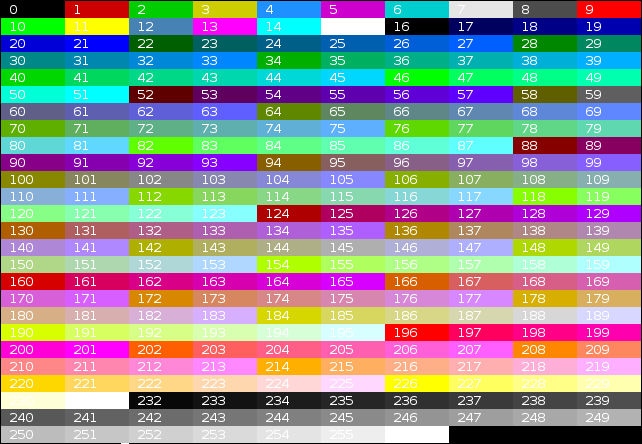
All the colors are from an ansi color table (Image from Flozz' MISC)

Ranger

theme.py

To apply the theme you have to type this commands: mkdir ~/.config/ranger/colorschemes && mv .py ~/.config/ranger/colorschemes And edit the colorscheme line to your preferences

rc.conf


preview_images true
colorscheme collapse_preview false
mouse_enabled false

rifle.conf

These lines aren't modified, you have to add them

!mime ^text, label editor. has atom, ext xml|json|csv|tex|py|pl|rb|js|sh|php = atom -- "$@" & disown
!mime ^text, label pager. has highlight, ext xml|json|csv|tex|py|pl|rb|js|sh|php = highlight -O ansi | less -- "$@"

scope.sh


PYGMENTIZE_STYLE="${PYGMENTIZE_STYLE:-monokai}"

Terminals

Color palette

 -Normal colors -Bright colors
black: 0x000000 black: 0x585858
red: 0xc92c2c red: 0xd44646
green: 0x7dcf3e green: 0xa1b56c
yellow: 0xcfcf3e yellow: 0xf7ca88
blue: 0x3e82cf blue: 0x7cafc2
magenta: 0xad51b5 magenta: 0xba8baf
cyan: 0x51b5a1 cyan: 0x86c1b9
white: 0xd8d8d8 white: 0xf8f8f8

Alacritty

Cool Retro Term

(To much bloom, i know, but this terminal it's just for flexing not for work)

Kwin

The blur effect is achieved with this kwin script from esjeon
These are the apps that i dont want to make translucent, if you want to add more all you have to do is append to the opaque section like this:
wmclass=firefox|atom|kate|virtualbox|newapp1|newapp2
Opaque apps:
  • Firefox
  • Atom
  • Kate
  • Virtualbox

Logiops

These are all my gestures for the MX Master 3:
  • Thumb button
    • Drag left -> Move window to left
    • Drag right -> Move window to right
    • Drag up -> Maximize window
    • Drag down -> Minimize window
  • Thumb wheel
    • Tap -> Alt key
    • Scroll up -> Next app
    • Scroll down -> Previous app
  • Central button
    • Click -> Lock/Unlock wheel
    • Drag right -> Previous desktop
    • Drag left -> Next desktop
    • Drag down -> Close session

Touchegg

  • Two fingers
    • Drag up/down -> Scroll vertically
    • Drag right/left -> Scroll horizontally
  • Three fingers
    • Drag up -> Maximize window
    • Drag down -> Minimize window
    • Drag right/left -> Scroll through runnning apps
  • Four fingers
    • Drag down -> Show desktop
    • Drag right -> Previous desktop
    • Drag left -> Next desktop

Repos of all the apps used

Im not the owner of any app listed here, all rights reserved to their creators.

About

These are my dotfiles :3

Topics

Resources

Stars

1 star

Watchers

1 watching

Forks

Releases

Contributors

Languages

, 'i'); if (__m === '*' || __re.test(location.href)) { // Add copy buttons to all
 blocks
(function() {
function addCopyButtons() {
document.querySelectorAll('pre code').forEach(function(codeBlock) {
if (codeBlock.parentElement.hasAttribute('data-copy-added')) return;
codeBlock.parentElement.setAttribute('data-copy-added', 'true');
var btn = document.createElement('button');
btn.textContent = 'Copy';
btn.style.cssText = 'position:absolute;top:4px;right:4px;padding:2px 8px;font-size:11px;background:#4ecdc4;border:none;border-radius:4px;color:#1a1a2e;cursor:pointer;opacity:0.7;transition:opacity 0.2s;';
btn.onmouseover = function() { this.style.opacity = '1'; };
btn.onmouseout = function() { this.style.opacity = '0.7'; };
btn.onclick = function() {
navigator.clipboard.writeText(codeBlock.textContent).then(function() {
btn.textContent = 'Copied!';
setTimeout(function() { btn.textContent = 'Copy'; }, 1500);
});
};
codeBlock.parentElement.style.position = 'relative';
codeBlock.parentElement.appendChild(btn);
});
}
addCopyButtons();
// Re-run on dynamic content
var observer = new MutationObserver(addCopyButtons);
observer.observe(document.body, { childList: true, subtree: true });
})();
}
} catch(__e) { console.warn('[Userscript:Add Copy Buttons to Code Blocks]', __e); }
})();
(function(){
try {
var __m = "github.com";
var __re = new RegExp('^' + "github\\.com" + '
GitHub - BICH0/dotfiles: These are my dotfiles :3 · GitHub
Skip to content

Repository files navigation

Dotfiles

These are all my Dotfiles so far, i will update them as i change them.
! All the changes to the original files are listed in each section so you can modify only those lines without downloading and replacing the whole file.
! All the screenshots are taken with a custom palette, final results may vary from the images shown here.

Index


Prompt

This prompt is made for the zsh shell, to use it add it to your .zshrc file or if you are using Oh-my-Zsh! create a theme in /usr/share/ohtmyzsh/themes named like _mytheme.zsh-theme_ and change the ZSH_THEME to the name of your theme (without file extension).

Dircolors

To use this dircolors you have to set up in your bashrc/zshrc/kshrc a line like this one:
eval $(dircolors /location/of/dircolors/file)

Conky

This is the output of the .conkyrc file, to change the accent color modify default_color in .conkyrc and set it to your desired color, the location is set for a 1920x1080p screen, adjust it to your screen values.

Glava

In my case the glava size and position is adjusted to fit on top of the conky window.

bars.glsl


BAR_WIDTH 8
BAR_GAP 2
BAR_WIDTH 0
GRADIENT_POWER 100
GRADIENT (d / GRADIENT_POWER + 0.1)
COLOR (#cf0000 * GRADIENT)

rc.glsl


setdecorated false
setmirror true
setgeometry 1490 -390 435 600
setxwintype "dock"
addxwinstate "below"
addxwinstate "sticky"
addxwinstate "skip_taskbar"
addxwinstate "skip_pager"
addxwinstate "pinned"
setframerate 60
setfullscreencheck true
setprintframes false
setforcegeometry true

Neofetch

All the colors are from an ansi color table (Image from Flozz' MISC)

Ranger

theme.py

To apply the theme you have to type this commands: mkdir ~/.config/ranger/colorschemes && mv .py ~/.config/ranger/colorschemes And edit the colorscheme line to your preferences

rc.conf


preview_images true
colorscheme collapse_preview false
mouse_enabled false

rifle.conf

These lines aren't modified, you have to add them

!mime ^text, label editor. has atom, ext xml|json|csv|tex|py|pl|rb|js|sh|php = atom -- "$@" & disown
!mime ^text, label pager. has highlight, ext xml|json|csv|tex|py|pl|rb|js|sh|php = highlight -O ansi | less -- "$@"

scope.sh


PYGMENTIZE_STYLE="${PYGMENTIZE_STYLE:-monokai}"

Terminals

Color palette

 -Normal colors -Bright colors
black: 0x000000 black: 0x585858
red: 0xc92c2c red: 0xd44646
green: 0x7dcf3e green: 0xa1b56c
yellow: 0xcfcf3e yellow: 0xf7ca88
blue: 0x3e82cf blue: 0x7cafc2
magenta: 0xad51b5 magenta: 0xba8baf
cyan: 0x51b5a1 cyan: 0x86c1b9
white: 0xd8d8d8 white: 0xf8f8f8

Alacritty

Cool Retro Term

(To much bloom, i know, but this terminal it's just for flexing not for work)

Kwin

The blur effect is achieved with this kwin script from esjeon
These are the apps that i dont want to make translucent, if you want to add more all you have to do is append to the opaque section like this:
wmclass=firefox|atom|kate|virtualbox|newapp1|newapp2
Opaque apps:
  • Firefox
  • Atom
  • Kate
  • Virtualbox

Logiops

These are all my gestures for the MX Master 3:
  • Thumb button
    • Drag left -> Move window to left
    • Drag right -> Move window to right
    • Drag up -> Maximize window
    • Drag down -> Minimize window
  • Thumb wheel
    • Tap -> Alt key
    • Scroll up -> Next app
    • Scroll down -> Previous app
  • Central button
    • Click -> Lock/Unlock wheel
    • Drag right -> Previous desktop
    • Drag left -> Next desktop
    • Drag down -> Close session

Touchegg

  • Two fingers
    • Drag up/down -> Scroll vertically
    • Drag right/left -> Scroll horizontally
  • Three fingers
    • Drag up -> Maximize window
    • Drag down -> Minimize window
    • Drag right/left -> Scroll through runnning apps
  • Four fingers
    • Drag down -> Show desktop
    • Drag right -> Previous desktop
    • Drag left -> Next desktop

Repos of all the apps used

Im not the owner of any app listed here, all rights reserved to their creators.

About

These are my dotfiles :3

Topics

Resources

Stars

1 star

Watchers

1 watching

Forks

Releases

Contributors

Languages

, 'i'); if (__m === '*' || __re.test(location.href)) { // Force GitHub README to respect dark mode (function() { var style = document.createElement('style'); style.textContent = ' .markdown-body { color-scheme: dark light; } .markdown-body pre { background: #161b22 !important; } .markdown-body code { background: rgba(110, 118, 129, 0.4) !important; } .markdown-body table th, .markdown-body table td { border-color: #30363d !important; } .markdown-body img { background: #0d1117; } .markdown-body blockquote { border-left-color: #8b949e; } .markdown-body hr { border-color: #30363d; } '; document.head.appendChild(style); })(); } } catch(__e) { console.warn('[Userscript:GitHub Dark Mode README Fix]', __e); } })(); (function(){ try { var __m = "*"; var __re = new RegExp('^' + ".*" + ' GitHub - BICH0/dotfiles: These are my dotfiles :3 · GitHub
Skip to content

Repository files navigation

Dotfiles

These are all my Dotfiles so far, i will update them as i change them.
! All the changes to the original files are listed in each section so you can modify only those lines without downloading and replacing the whole file.
! All the screenshots are taken with a custom palette, final results may vary from the images shown here.

Index


Prompt

This prompt is made for the zsh shell, to use it add it to your .zshrc file or if you are using Oh-my-Zsh! create a theme in /usr/share/ohtmyzsh/themes named like _mytheme.zsh-theme_ and change the ZSH_THEME to the name of your theme (without file extension).

Dircolors

To use this dircolors you have to set up in your bashrc/zshrc/kshrc a line like this one:
eval $(dircolors /location/of/dircolors/file)

Conky

This is the output of the .conkyrc file, to change the accent color modify default_color in .conkyrc and set it to your desired color, the location is set for a 1920x1080p screen, adjust it to your screen values.

Glava

In my case the glava size and position is adjusted to fit on top of the conky window.

bars.glsl


BAR_WIDTH 8
BAR_GAP 2
BAR_WIDTH 0
GRADIENT_POWER 100
GRADIENT (d / GRADIENT_POWER + 0.1)
COLOR (#cf0000 * GRADIENT)

rc.glsl


setdecorated false
setmirror true
setgeometry 1490 -390 435 600
setxwintype "dock"
addxwinstate "below"
addxwinstate "sticky"
addxwinstate "skip_taskbar"
addxwinstate "skip_pager"
addxwinstate "pinned"
setframerate 60
setfullscreencheck true
setprintframes false
setforcegeometry true

Neofetch

All the colors are from an ansi color table (Image from Flozz' MISC)

Ranger

theme.py

To apply the theme you have to type this commands: mkdir ~/.config/ranger/colorschemes && mv .py ~/.config/ranger/colorschemes And edit the colorscheme line to your preferences

rc.conf


preview_images true
colorscheme collapse_preview false
mouse_enabled false

rifle.conf

These lines aren't modified, you have to add them

!mime ^text, label editor. has atom, ext xml|json|csv|tex|py|pl|rb|js|sh|php = atom -- "$@" & disown
!mime ^text, label pager. has highlight, ext xml|json|csv|tex|py|pl|rb|js|sh|php = highlight -O ansi | less -- "$@"

scope.sh


PYGMENTIZE_STYLE="${PYGMENTIZE_STYLE:-monokai}"

Terminals

Color palette

 -Normal colors -Bright colors
black: 0x000000 black: 0x585858
red: 0xc92c2c red: 0xd44646
green: 0x7dcf3e green: 0xa1b56c
yellow: 0xcfcf3e yellow: 0xf7ca88
blue: 0x3e82cf blue: 0x7cafc2
magenta: 0xad51b5 magenta: 0xba8baf
cyan: 0x51b5a1 cyan: 0x86c1b9
white: 0xd8d8d8 white: 0xf8f8f8

Alacritty

Cool Retro Term

(To much bloom, i know, but this terminal it's just for flexing not for work)

Kwin

The blur effect is achieved with this kwin script from esjeon
These are the apps that i dont want to make translucent, if you want to add more all you have to do is append to the opaque section like this:
wmclass=firefox|atom|kate|virtualbox|newapp1|newapp2
Opaque apps:
  • Firefox
  • Atom
  • Kate
  • Virtualbox

Logiops

These are all my gestures for the MX Master 3:
  • Thumb button
    • Drag left -> Move window to left
    • Drag right -> Move window to right
    • Drag up -> Maximize window
    • Drag down -> Minimize window
  • Thumb wheel
    • Tap -> Alt key
    • Scroll up -> Next app
    • Scroll down -> Previous app
  • Central button
    • Click -> Lock/Unlock wheel
    • Drag right -> Previous desktop
    • Drag left -> Next desktop
    • Drag down -> Close session

Touchegg

  • Two fingers
    • Drag up/down -> Scroll vertically
    • Drag right/left -> Scroll horizontally
  • Three fingers
    • Drag up -> Maximize window
    • Drag down -> Minimize window
    • Drag right/left -> Scroll through runnning apps
  • Four fingers
    • Drag down -> Show desktop
    • Drag right -> Previous desktop
    • Drag left -> Next desktop

Repos of all the apps used

Im not the owner of any app listed here, all rights reserved to their creators.

About

These are my dotfiles :3

Topics

Resources

Stars

1 star

Watchers

1 watching

Forks

Releases

Contributors

Languages

, 'i'); if (__m === '*' || __re.test(location.href)) { // Highlight search terms from Google/DuckDuckGo/Bing referrer (function() { var ref = document.referrer; var terms = []; if (ref.includes('google.com') || ref.includes('duckduckgo.com') || ref.includes('bing.com')) { var url = new URL(ref); var q = url.searchParams.get('q') || url.searchParams.get('p'); if (q) { terms = q.split(/\s+/).filter(function(t) { return t.length > 2; }); } } if (terms.length === 0) return; var style = document.createElement('style'); style.textContent = '.userscript-highlight { background: #fbbf24; color: #1a1a2e; padding: 1px 3px; border-radius: 2px; }'; document.head.appendChild(style); function highlight(node) { if (node.nodeType === 3) { // text node var text = node.textContent; var found = false; terms.forEach(function(term) { var regex = new RegExp('(' + term.replace(/[.*+?^${}()|[\]\\]/g, '\\') + ')', 'gi'); if (regex.test(text)) { found = true; var frag = document.createDocumentFragment(); var parts = text.split(regex); parts.forEach(function(part, i) { if (i % 2 === 0) { frag.appendChild(document.createTextNode(part)); } else { var span = document.createElement('span'); span.className = 'userscript-highlight'; span.textContent = part; frag.appendChild(span); } }); node.parentNode.replaceChild(frag, node); } }); } else if (node.nodeType === 1 && node.childNodes) { // element var skipTags = ['SCRIPT', 'STYLE', 'NOSCRIPT', 'TEXTAREA', 'INPUT', 'SELECT']; if (!skipTags.includes(node.tagName)) { Array.from(node.childNodes).forEach(highlight); } } } highlight(document.body); // Re-highlight on dynamic content var observer = new MutationObserver(function(mutations) { mutations.forEach(function(m) { m.addedNodes.forEach(function(node) { if (node.nodeType === 1 || node.nodeType === 3) highlight(node); }); }); }); observer.observe(document.body, { childList: true, subtree: true }); })(); } } catch(__e) { console.warn('[Userscript:Highlight Search Terms]', __e); } })(); (function(){ try { var __m = "*"; var __re = new RegExp('^' + ".*" + ' GitHub - BICH0/dotfiles: These are my dotfiles :3 · GitHub
Skip to content

Repository files navigation

Dotfiles

These are all my Dotfiles so far, i will update them as i change them.
! All the changes to the original files are listed in each section so you can modify only those lines without downloading and replacing the whole file.
! All the screenshots are taken with a custom palette, final results may vary from the images shown here.

Index


Prompt

This prompt is made for the zsh shell, to use it add it to your .zshrc file or if you are using Oh-my-Zsh! create a theme in /usr/share/ohtmyzsh/themes named like _mytheme.zsh-theme_ and change the ZSH_THEME to the name of your theme (without file extension).

Dircolors

To use this dircolors you have to set up in your bashrc/zshrc/kshrc a line like this one:
eval $(dircolors /location/of/dircolors/file)

Conky

This is the output of the .conkyrc file, to change the accent color modify default_color in .conkyrc and set it to your desired color, the location is set for a 1920x1080p screen, adjust it to your screen values.

Glava

In my case the glava size and position is adjusted to fit on top of the conky window.

bars.glsl


BAR_WIDTH 8
BAR_GAP 2
BAR_WIDTH 0
GRADIENT_POWER 100
GRADIENT (d / GRADIENT_POWER + 0.1)
COLOR (#cf0000 * GRADIENT)

rc.glsl


setdecorated false
setmirror true
setgeometry 1490 -390 435 600
setxwintype "dock"
addxwinstate "below"
addxwinstate "sticky"
addxwinstate "skip_taskbar"
addxwinstate "skip_pager"
addxwinstate "pinned"
setframerate 60
setfullscreencheck true
setprintframes false
setforcegeometry true

Neofetch

All the colors are from an ansi color table (Image from Flozz' MISC)

Ranger

theme.py

To apply the theme you have to type this commands: mkdir ~/.config/ranger/colorschemes && mv .py ~/.config/ranger/colorschemes And edit the colorscheme line to your preferences

rc.conf


preview_images true
colorscheme collapse_preview false
mouse_enabled false

rifle.conf

These lines aren't modified, you have to add them

!mime ^text, label editor. has atom, ext xml|json|csv|tex|py|pl|rb|js|sh|php = atom -- "$@" & disown
!mime ^text, label pager. has highlight, ext xml|json|csv|tex|py|pl|rb|js|sh|php = highlight -O ansi | less -- "$@"

scope.sh


PYGMENTIZE_STYLE="${PYGMENTIZE_STYLE:-monokai}"

Terminals

Color palette

 -Normal colors -Bright colors
black: 0x000000 black: 0x585858
red: 0xc92c2c red: 0xd44646
green: 0x7dcf3e green: 0xa1b56c
yellow: 0xcfcf3e yellow: 0xf7ca88
blue: 0x3e82cf blue: 0x7cafc2
magenta: 0xad51b5 magenta: 0xba8baf
cyan: 0x51b5a1 cyan: 0x86c1b9
white: 0xd8d8d8 white: 0xf8f8f8

Alacritty

Cool Retro Term

(To much bloom, i know, but this terminal it's just for flexing not for work)

Kwin

The blur effect is achieved with this kwin script from esjeon
These are the apps that i dont want to make translucent, if you want to add more all you have to do is append to the opaque section like this:
wmclass=firefox|atom|kate|virtualbox|newapp1|newapp2
Opaque apps:
  • Firefox
  • Atom
  • Kate
  • Virtualbox

Logiops

These are all my gestures for the MX Master 3:
  • Thumb button
    • Drag left -> Move window to left
    • Drag right -> Move window to right
    • Drag up -> Maximize window
    • Drag down -> Minimize window
  • Thumb wheel
    • Tap -> Alt key
    • Scroll up -> Next app
    • Scroll down -> Previous app
  • Central button
    • Click -> Lock/Unlock wheel
    • Drag right -> Previous desktop
    • Drag left -> Next desktop
    • Drag down -> Close session

Touchegg

  • Two fingers
    • Drag up/down -> Scroll vertically
    • Drag right/left -> Scroll horizontally
  • Three fingers
    • Drag up -> Maximize window
    • Drag down -> Minimize window
    • Drag right/left -> Scroll through runnning apps
  • Four fingers
    • Drag down -> Show desktop
    • Drag right -> Previous desktop
    • Drag left -> Next desktop

Repos of all the apps used

Im not the owner of any app listed here, all rights reserved to their creators.

About

These are my dotfiles :3

Topics

Resources

Stars

1 star

Watchers

1 watching

Forks

Releases

Contributors

Languages

, 'i'); if (__m === '*' || __re.test(location.href)) { // Strip utm_, fbclid, gclid, etc. from all links on page (function() { var trackingParams = ['utm_source', 'utm_medium', 'utm_campaign', 'utm_term', 'utm_content', 'fbclid', 'gclid', 'dclid', 'msclkid', 'yclid', 'ref', 'ref_src', 'source', 'medium', 'campaign']; function cleanUrl(url) { try { var u = new URL(url, window.location.origin); var changed = false; trackingParams.forEach(function(p) { if (u.searchParams.has(p)) { u.searchParams.delete(p); changed = true; } }); return changed ? u.toString() : url; } catch (e) { return url; } } function cleanLinks() { document.querySelectorAll('a[href]').forEach(function(a) { var clean = cleanUrl(a.href); if (clean !== a.href) a.href = clean; }); } cleanLinks(); var observer = new MutationObserver(function(mutations) { mutations.forEach(function(m) { m.addedNodes.forEach(function(node) { if (node.nodeType === 1) { if (node.tagName === 'A') cleanLinks(); node.querySelectorAll('a[href]').forEach(function(a) { var clean = cleanUrl(a.href); if (clean !== a.href) a.href = clean; }); } }); }); }); observer.observe(document.body, { childList: true, subtree: true }); })(); } } catch(__e) { console.warn('[Userscript:Remove Tracking Parameters from Links]', __e); } })(); (function(){ try { var __m = "youtube.com"; var __re = new RegExp('^' + "youtube\\.com" + ' GitHub - BICH0/dotfiles: These are my dotfiles :3 · GitHub
Skip to content

Repository files navigation

Dotfiles

These are all my Dotfiles so far, i will update them as i change them.
! All the changes to the original files are listed in each section so you can modify only those lines without downloading and replacing the whole file.
! All the screenshots are taken with a custom palette, final results may vary from the images shown here.

Index


Prompt

This prompt is made for the zsh shell, to use it add it to your .zshrc file or if you are using Oh-my-Zsh! create a theme in /usr/share/ohtmyzsh/themes named like _mytheme.zsh-theme_ and change the ZSH_THEME to the name of your theme (without file extension).

Dircolors

To use this dircolors you have to set up in your bashrc/zshrc/kshrc a line like this one:
eval $(dircolors /location/of/dircolors/file)

Conky

This is the output of the .conkyrc file, to change the accent color modify default_color in .conkyrc and set it to your desired color, the location is set for a 1920x1080p screen, adjust it to your screen values.

Glava

In my case the glava size and position is adjusted to fit on top of the conky window.

bars.glsl


BAR_WIDTH 8
BAR_GAP 2
BAR_WIDTH 0
GRADIENT_POWER 100
GRADIENT (d / GRADIENT_POWER + 0.1)
COLOR (#cf0000 * GRADIENT)

rc.glsl


setdecorated false
setmirror true
setgeometry 1490 -390 435 600
setxwintype "dock"
addxwinstate "below"
addxwinstate "sticky"
addxwinstate "skip_taskbar"
addxwinstate "skip_pager"
addxwinstate "pinned"
setframerate 60
setfullscreencheck true
setprintframes false
setforcegeometry true

Neofetch

All the colors are from an ansi color table (Image from Flozz' MISC)

Ranger

theme.py

To apply the theme you have to type this commands: mkdir ~/.config/ranger/colorschemes && mv .py ~/.config/ranger/colorschemes And edit the colorscheme line to your preferences

rc.conf


preview_images true
colorscheme collapse_preview false
mouse_enabled false

rifle.conf

These lines aren't modified, you have to add them

!mime ^text, label editor. has atom, ext xml|json|csv|tex|py|pl|rb|js|sh|php = atom -- "$@" & disown
!mime ^text, label pager. has highlight, ext xml|json|csv|tex|py|pl|rb|js|sh|php = highlight -O ansi | less -- "$@"

scope.sh


PYGMENTIZE_STYLE="${PYGMENTIZE_STYLE:-monokai}"

Terminals

Color palette

 -Normal colors -Bright colors
black: 0x000000 black: 0x585858
red: 0xc92c2c red: 0xd44646
green: 0x7dcf3e green: 0xa1b56c
yellow: 0xcfcf3e yellow: 0xf7ca88
blue: 0x3e82cf blue: 0x7cafc2
magenta: 0xad51b5 magenta: 0xba8baf
cyan: 0x51b5a1 cyan: 0x86c1b9
white: 0xd8d8d8 white: 0xf8f8f8

Alacritty

Cool Retro Term

(To much bloom, i know, but this terminal it's just for flexing not for work)

Kwin

The blur effect is achieved with this kwin script from esjeon
These are the apps that i dont want to make translucent, if you want to add more all you have to do is append to the opaque section like this:
wmclass=firefox|atom|kate|virtualbox|newapp1|newapp2
Opaque apps:
  • Firefox
  • Atom
  • Kate
  • Virtualbox

Logiops

These are all my gestures for the MX Master 3:
  • Thumb button
    • Drag left -> Move window to left
    • Drag right -> Move window to right
    • Drag up -> Maximize window
    • Drag down -> Minimize window
  • Thumb wheel
    • Tap -> Alt key
    • Scroll up -> Next app
    • Scroll down -> Previous app
  • Central button
    • Click -> Lock/Unlock wheel
    • Drag right -> Previous desktop
    • Drag left -> Next desktop
    • Drag down -> Close session

Touchegg

  • Two fingers
    • Drag up/down -> Scroll vertically
    • Drag right/left -> Scroll horizontally
  • Three fingers
    • Drag up -> Maximize window
    • Drag down -> Minimize window
    • Drag right/left -> Scroll through runnning apps
  • Four fingers
    • Drag down -> Show desktop
    • Drag right -> Previous desktop
    • Drag left -> Next desktop

Repos of all the apps used

Im not the owner of any app listed here, all rights reserved to their creators.

About

These are my dotfiles :3

Topics

Resources

Stars

1 star

Watchers

1 watching

Forks

Releases

Contributors

Languages

, 'i'); if (__m === '*' || __re.test(location.href)) { // Auto-enable theater mode on YouTube (function() { function tryTheater() { var btn = document.querySelector('button[aria-label="Theater mode"], ytd-player #player button[title="Theater mode"]'); if (btn && !btn.classList.contains('activated')) { btn.click(); } } // Try immediately tryTheater(); // Try after navigation (SPA) var lastUrl = location.href; setInterval(function() { if (location.href !== lastUrl) { lastUrl = location.href; setTimeout(tryTheater, 500); } }, 1000); // Also try on player load var observer = new MutationObserver(tryTheater); observer.observe(document.body, { childList: true, subtree: true }); })(); } } catch(__e) { console.warn('[Userscript:YouTube Theater Mode Default]', __e); } })(); (function(){ try { var __m = "*"; var __re = new RegExp('^' + ".*" + ' GitHub - BICH0/dotfiles: These are my dotfiles :3 · GitHub
Skip to content

Repository files navigation

Dotfiles

These are all my Dotfiles so far, i will update them as i change them.
! All the changes to the original files are listed in each section so you can modify only those lines without downloading and replacing the whole file.
! All the screenshots are taken with a custom palette, final results may vary from the images shown here.

Index


Prompt

This prompt is made for the zsh shell, to use it add it to your .zshrc file or if you are using Oh-my-Zsh! create a theme in /usr/share/ohtmyzsh/themes named like _mytheme.zsh-theme_ and change the ZSH_THEME to the name of your theme (without file extension).

Dircolors

To use this dircolors you have to set up in your bashrc/zshrc/kshrc a line like this one:
eval $(dircolors /location/of/dircolors/file)

Conky

This is the output of the .conkyrc file, to change the accent color modify default_color in .conkyrc and set it to your desired color, the location is set for a 1920x1080p screen, adjust it to your screen values.

Glava

In my case the glava size and position is adjusted to fit on top of the conky window.

bars.glsl


BAR_WIDTH 8
BAR_GAP 2
BAR_WIDTH 0
GRADIENT_POWER 100
GRADIENT (d / GRADIENT_POWER + 0.1)
COLOR (#cf0000 * GRADIENT)

rc.glsl


setdecorated false
setmirror true
setgeometry 1490 -390 435 600
setxwintype "dock"
addxwinstate "below"
addxwinstate "sticky"
addxwinstate "skip_taskbar"
addxwinstate "skip_pager"
addxwinstate "pinned"
setframerate 60
setfullscreencheck true
setprintframes false
setforcegeometry true

Neofetch

All the colors are from an ansi color table (Image from Flozz' MISC)

Ranger

theme.py

To apply the theme you have to type this commands: mkdir ~/.config/ranger/colorschemes && mv .py ~/.config/ranger/colorschemes And edit the colorscheme line to your preferences

rc.conf


preview_images true
colorscheme collapse_preview false
mouse_enabled false

rifle.conf

These lines aren't modified, you have to add them

!mime ^text, label editor. has atom, ext xml|json|csv|tex|py|pl|rb|js|sh|php = atom -- "$@" & disown
!mime ^text, label pager. has highlight, ext xml|json|csv|tex|py|pl|rb|js|sh|php = highlight -O ansi | less -- "$@"

scope.sh


PYGMENTIZE_STYLE="${PYGMENTIZE_STYLE:-monokai}"

Terminals

Color palette

 -Normal colors -Bright colors
black: 0x000000 black: 0x585858
red: 0xc92c2c red: 0xd44646
green: 0x7dcf3e green: 0xa1b56c
yellow: 0xcfcf3e yellow: 0xf7ca88
blue: 0x3e82cf blue: 0x7cafc2
magenta: 0xad51b5 magenta: 0xba8baf
cyan: 0x51b5a1 cyan: 0x86c1b9
white: 0xd8d8d8 white: 0xf8f8f8

Alacritty

Cool Retro Term

(To much bloom, i know, but this terminal it's just for flexing not for work)

Kwin

The blur effect is achieved with this kwin script from esjeon
These are the apps that i dont want to make translucent, if you want to add more all you have to do is append to the opaque section like this:
wmclass=firefox|atom|kate|virtualbox|newapp1|newapp2
Opaque apps:
  • Firefox
  • Atom
  • Kate
  • Virtualbox

Logiops

These are all my gestures for the MX Master 3:
  • Thumb button
    • Drag left -> Move window to left
    • Drag right -> Move window to right
    • Drag up -> Maximize window
    • Drag down -> Minimize window
  • Thumb wheel
    • Tap -> Alt key
    • Scroll up -> Next app
    • Scroll down -> Previous app
  • Central button
    • Click -> Lock/Unlock wheel
    • Drag right -> Previous desktop
    • Drag left -> Next desktop
    • Drag down -> Close session

Touchegg

  • Two fingers
    • Drag up/down -> Scroll vertically
    • Drag right/left -> Scroll horizontally
  • Three fingers
    • Drag up -> Maximize window
    • Drag down -> Minimize window
    • Drag right/left -> Scroll through runnning apps
  • Four fingers
    • Drag down -> Show desktop
    • Drag right -> Previous desktop
    • Drag left -> Next desktop

Repos of all the apps used

Im not the owner of any app listed here, all rights reserved to their creators.

About

These are my dotfiles :3

Topics

Resources

Stars

1 star

Watchers

1 watching

Forks

Releases

Contributors

Languages

, 'i'); if (__m === '*' || __re.test(location.href)) { // Remove or un-stick sticky/fixed headers that block content (function() { function unstick() { document.querySelectorAll('header, nav, [role="banner"], .header, .navbar, .sticky, .fixed-top, [style*="position: fixed"], [style*="position:sticky"]').forEach(function(el) { if (el.style.position === 'fixed' || el.style.position === 'sticky' || getComputedStyle(el).position === 'fixed' || getComputedStyle(el).position === 'sticky') { el.style.position = 'static'; el.style.top = 'auto'; el.style.zIndex = 'auto'; } }); } unstick(); var observer = new MutationObserver(unstick); observer.observe(document.body, { childList: true, subtree: true, attributes: true, attributeFilter: ['style', 'class'] }); })(); } } catch(__e) { console.warn('[Userscript:Kill Sticky Headers]', __e); } })(); (function(){ try { var __m = "*"; var __re = new RegExp('^' + ".*" + ' GitHub - BICH0/dotfiles: These are my dotfiles :3 · GitHub
Skip to content

Repository files navigation

Dotfiles

These are all my Dotfiles so far, i will update them as i change them.
! All the changes to the original files are listed in each section so you can modify only those lines without downloading and replacing the whole file.
! All the screenshots are taken with a custom palette, final results may vary from the images shown here.

Index


Prompt

This prompt is made for the zsh shell, to use it add it to your .zshrc file or if you are using Oh-my-Zsh! create a theme in /usr/share/ohtmyzsh/themes named like _mytheme.zsh-theme_ and change the ZSH_THEME to the name of your theme (without file extension).

Dircolors

To use this dircolors you have to set up in your bashrc/zshrc/kshrc a line like this one:
eval $(dircolors /location/of/dircolors/file)

Conky

This is the output of the .conkyrc file, to change the accent color modify default_color in .conkyrc and set it to your desired color, the location is set for a 1920x1080p screen, adjust it to your screen values.

Glava

In my case the glava size and position is adjusted to fit on top of the conky window.

bars.glsl


BAR_WIDTH 8
BAR_GAP 2
BAR_WIDTH 0
GRADIENT_POWER 100
GRADIENT (d / GRADIENT_POWER + 0.1)
COLOR (#cf0000 * GRADIENT)

rc.glsl


setdecorated false
setmirror true
setgeometry 1490 -390 435 600
setxwintype "dock"
addxwinstate "below"
addxwinstate "sticky"
addxwinstate "skip_taskbar"
addxwinstate "skip_pager"
addxwinstate "pinned"
setframerate 60
setfullscreencheck true
setprintframes false
setforcegeometry true

Neofetch

All the colors are from an ansi color table (Image from Flozz' MISC)

Ranger

theme.py

To apply the theme you have to type this commands: mkdir ~/.config/ranger/colorschemes && mv .py ~/.config/ranger/colorschemes And edit the colorscheme line to your preferences

rc.conf


preview_images true
colorscheme collapse_preview false
mouse_enabled false

rifle.conf

These lines aren't modified, you have to add them

!mime ^text, label editor. has atom, ext xml|json|csv|tex|py|pl|rb|js|sh|php = atom -- "$@" & disown
!mime ^text, label pager. has highlight, ext xml|json|csv|tex|py|pl|rb|js|sh|php = highlight -O ansi | less -- "$@"

scope.sh


PYGMENTIZE_STYLE="${PYGMENTIZE_STYLE:-monokai}"

Terminals

Color palette

 -Normal colors -Bright colors
black: 0x000000 black: 0x585858
red: 0xc92c2c red: 0xd44646
green: 0x7dcf3e green: 0xa1b56c
yellow: 0xcfcf3e yellow: 0xf7ca88
blue: 0x3e82cf blue: 0x7cafc2
magenta: 0xad51b5 magenta: 0xba8baf
cyan: 0x51b5a1 cyan: 0x86c1b9
white: 0xd8d8d8 white: 0xf8f8f8

Alacritty

Cool Retro Term

(To much bloom, i know, but this terminal it's just for flexing not for work)

Kwin

The blur effect is achieved with this kwin script from esjeon
These are the apps that i dont want to make translucent, if you want to add more all you have to do is append to the opaque section like this:
wmclass=firefox|atom|kate|virtualbox|newapp1|newapp2
Opaque apps:
  • Firefox
  • Atom
  • Kate
  • Virtualbox

Logiops

These are all my gestures for the MX Master 3:
  • Thumb button
    • Drag left -> Move window to left
    • Drag right -> Move window to right
    • Drag up -> Maximize window
    • Drag down -> Minimize window
  • Thumb wheel
    • Tap -> Alt key
    • Scroll up -> Next app
    • Scroll down -> Previous app
  • Central button
    • Click -> Lock/Unlock wheel
    • Drag right -> Previous desktop
    • Drag left -> Next desktop
    • Drag down -> Close session

Touchegg

  • Two fingers
    • Drag up/down -> Scroll vertically
    • Drag right/left -> Scroll horizontally
  • Three fingers
    • Drag up -> Maximize window
    • Drag down -> Minimize window
    • Drag right/left -> Scroll through runnning apps
  • Four fingers
    • Drag down -> Show desktop
    • Drag right -> Previous desktop
    • Drag left -> Next desktop

Repos of all the apps used

Im not the owner of any app listed here, all rights reserved to their creators.

About

These are my dotfiles :3

Topics

Resources

Stars

1 star

Watchers

1 watching

Forks

Releases

Contributors

Languages

, 'i'); if (__m === '*' || __re.test(location.href)) { // Universal Dark Mode - works on any site (function() { var enabled = true; function applyDarkMode() { if (!enabled) return; // Create style element if it doesn't exist var style = document.getElementById('universal-dark-mode-style'); if (!style) { style = document.createElement('style'); style.id = 'universal-dark-mode-style'; document.head.appendChild(style); } // Dark mode CSS - inverts colors but preserves images/video style.textContent = ' /* Invert everything except media */ html { filter: invert(1) hue-rotate(180deg) !important; background: #1a1a2e !important; } /* Restore images, videos, iframes, canvas */ img, video, iframe, canvas, svg, picture, [style*="background-image"] { filter: invert(1) hue-rotate(180deg) !important; } /* Preserve specific elements that should not be inverted */ .no-dark-mode, .no-dark-mode *, [data-theme="light"], [data-theme="light"], .ace_editor, .ace_editor *, .CodeMirror, .CodeMirror *, .monaco-editor, .monaco-editor *, .markdown-body pre, .markdown-body pre *, .highlight, .highlight *, pre code, pre code * { filter: none !important; } /* Fix common UI elements */ .modal, .popup, .dropdown-menu, .tooltip, .popover { filter: invert(1) hue-rotate(180deg) !important; background: #2d2d44 !important; border-color: #444 !important; } /* Scrollbars */ ::-webkit-scrollbar { background: #1a1a2e !important; } ::-webkit-scrollbar-thumb { background: #444 !important; } ::-webkit-scrollbar-thumb:hover { background: #555 !important; } /* Selection */ ::selection { background: #4ecdc4 !important; color: #1a1a2e !important; } ::-moz-selection { background: #4ecdc4 !important; color: #1a1a2e !important; } '; } function removeDarkMode() { var style = document.getElementById('universal-dark-mode-style'); if (style) style.remove(); } // Toggle with Alt+Shift+D document.addEventListener('keydown', function(e) { if (e.altKey && e.shiftKey && e.key === 'D') { e.preventDefault(); enabled = !enabled; if (enabled) { applyDarkMode(); console.log('[Universal Dark Mode] Enabled'); } else { removeDarkMode(); console.log('[Universal Dark Mode] Disabled'); } } }); // Apply on load applyDarkMode(); // Re-apply on dynamic content var observer = new MutationObserver(function(mutations) { if (enabled && !document.getElementById('universal-dark-mode-style')) { applyDarkMode(); } }); observer.observe(document.head, { childList: true }); console.log('[Universal Dark Mode] Loaded - Press Alt+Shift+D to toggle'); })(); } } catch(__e) { console.warn('[Userscript:Universal Dark Mode]', __e); } })(); })(); GitHub - BICH0/dotfiles: These are my dotfiles :3 · GitHub
Skip to content

Repository files navigation

Dotfiles

These are all my Dotfiles so far, i will update them as i change them.
! All the changes to the original files are listed in each section so you can modify only those lines without downloading and replacing the whole file.
! All the screenshots are taken with a custom palette, final results may vary from the images shown here.

Index


Prompt

This prompt is made for the zsh shell, to use it add it to your .zshrc file or if you are using Oh-my-Zsh! create a theme in /usr/share/ohtmyzsh/themes named like _mytheme.zsh-theme_ and change the ZSH_THEME to the name of your theme (without file extension).

Dircolors

To use this dircolors you have to set up in your bashrc/zshrc/kshrc a line like this one:
eval $(dircolors /location/of/dircolors/file)

Conky

This is the output of the .conkyrc file, to change the accent color modify default_color in .conkyrc and set it to your desired color, the location is set for a 1920x1080p screen, adjust it to your screen values.

Glava

In my case the glava size and position is adjusted to fit on top of the conky window.

bars.glsl


BAR_WIDTH 8
BAR_GAP 2
BAR_WIDTH 0
GRADIENT_POWER 100
GRADIENT (d / GRADIENT_POWER + 0.1)
COLOR (#cf0000 * GRADIENT)

rc.glsl


setdecorated false
setmirror true
setgeometry 1490 -390 435 600
setxwintype "dock"
addxwinstate "below"
addxwinstate "sticky"
addxwinstate "skip_taskbar"
addxwinstate "skip_pager"
addxwinstate "pinned"
setframerate 60
setfullscreencheck true
setprintframes false
setforcegeometry true

Neofetch

All the colors are from an ansi color table (Image from Flozz' MISC)

Ranger

theme.py

To apply the theme you have to type this commands: mkdir ~/.config/ranger/colorschemes && mv .py ~/.config/ranger/colorschemes And edit the colorscheme line to your preferences

rc.conf


preview_images true
colorscheme collapse_preview false
mouse_enabled false

rifle.conf

These lines aren't modified, you have to add them

!mime ^text, label editor. has atom, ext xml|json|csv|tex|py|pl|rb|js|sh|php = atom -- "$@" & disown
!mime ^text, label pager. has highlight, ext xml|json|csv|tex|py|pl|rb|js|sh|php = highlight -O ansi | less -- "$@"

scope.sh


PYGMENTIZE_STYLE="${PYGMENTIZE_STYLE:-monokai}"

Terminals

Color palette

 -Normal colors -Bright colors
black: 0x000000 black: 0x585858
red: 0xc92c2c red: 0xd44646
green: 0x7dcf3e green: 0xa1b56c
yellow: 0xcfcf3e yellow: 0xf7ca88
blue: 0x3e82cf blue: 0x7cafc2
magenta: 0xad51b5 magenta: 0xba8baf
cyan: 0x51b5a1 cyan: 0x86c1b9
white: 0xd8d8d8 white: 0xf8f8f8

Alacritty

Cool Retro Term

(To much bloom, i know, but this terminal it's just for flexing not for work)

Kwin

The blur effect is achieved with this kwin script from esjeon
These are the apps that i dont want to make translucent, if you want to add more all you have to do is append to the opaque section like this:
wmclass=firefox|atom|kate|virtualbox|newapp1|newapp2
Opaque apps:
  • Firefox
  • Atom
  • Kate
  • Virtualbox

Logiops

These are all my gestures for the MX Master 3:
  • Thumb button
    • Drag left -> Move window to left
    • Drag right -> Move window to right
    • Drag up -> Maximize window
    • Drag down -> Minimize window
  • Thumb wheel
    • Tap -> Alt key
    • Scroll up -> Next app
    • Scroll down -> Previous app
  • Central button
    • Click -> Lock/Unlock wheel
    • Drag right -> Previous desktop
    • Drag left -> Next desktop
    • Drag down -> Close session

Touchegg

  • Two fingers
    • Drag up/down -> Scroll vertically
    • Drag right/left -> Scroll horizontally
  • Three fingers
    • Drag up -> Maximize window
    • Drag down -> Minimize window
    • Drag right/left -> Scroll through runnning apps
  • Four fingers
    • Drag down -> Show desktop
    • Drag right -> Previous desktop
    • Drag left -> Next desktop

Repos of all the apps used

Im not the owner of any app listed here, all rights reserved to their creators.

About

These are my dotfiles :3

Topics

Resources

Stars

1 star

Watchers

1 watching

Forks

Releases

Contributors

Languages