A slideout navigation control for Xamarin iOS applications.





Get the package on Nuget!
If you're using Sidebar Navigation send me a link to your app and I'll happily post it here.
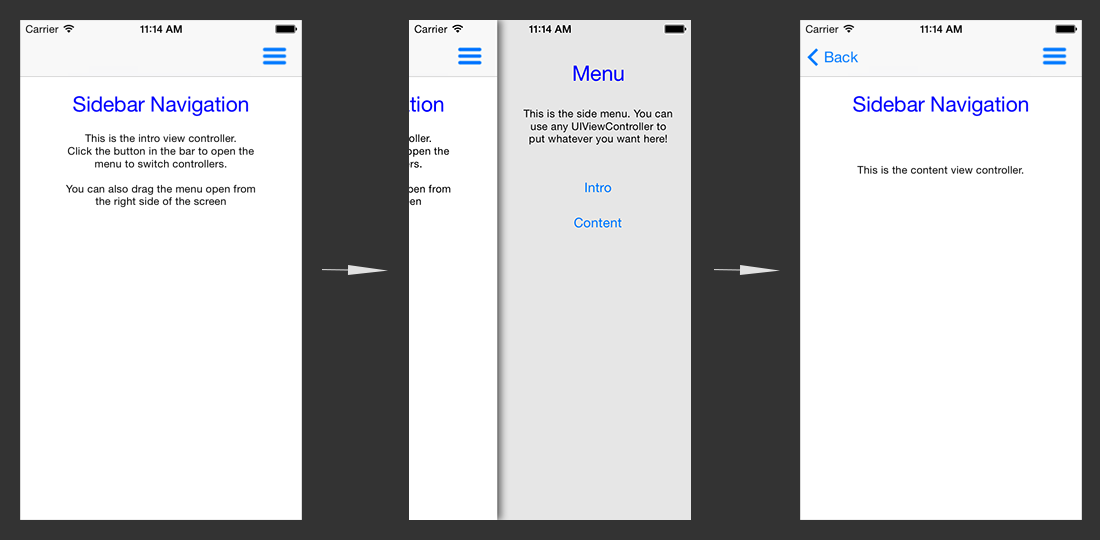
This is partly based on two other good slideout menu implementation that each didn't provide quite what I was looking for. Those two are FlyoutNavigation and SlideoutNavigation.
Xamarin-Sidebar allows you to provide one UIViewController to be used as a content view
and another to be used as a menu. When you open the menu the content view will slide over
to reveal the provided menu UIViewController.
To set it up just create a root UIViewController and a SidebarController, passing in your content and menu controllers.
RootViewController.cs
usingSidebarNavigation;
...public partial classRootViewController:UIViewController{// the sidebar controller for the apppublicSidebarControllerSidebarController{get;privateset;}publicoverridevoidViewDidLoad(){base.ViewDidLoad();// create a slideout navigation controller with the top navigation controller and the menu view controllerSidebarController=newSidebarController(this,newContentController(),newSideMenuController());}}
...
AppDelegate.cs
...public override boolFinishedLaunching(UIApplicationapp,NSDictionaryoptions){window=newUIWindow(UIScreen.MainScreen.Bounds);// set our root view controller with the sidebar menu as the apps root view controllerwindow.RootViewController=newRootViewController();window.MakeKeyAndVisible();returntrue;}
...
In the content controller you can add a button to open the slideout menu.
menuButton.TouchUpInside+=(sender,e)=>{SidebarController.ToggleMenu();};In the side menu controller you can add buttons to change the content view.
otherContentButton.TouchUpInside+=(sender,e)=>{SidebarController.ChangeContentView(newOtherContentController());};Additional options include hiding the shadow, setting the menu width, and placing the menu on the left.
SidebarController.HasShadowing=false;SidebarController.MenuWidth=220;SidebarController.MenuLocation=SidebarController.MenuLocations.Left;See the sample projects included in the source for more details.