Skip to content

Repository files navigation

PrimoPrimo

The modern monolithic CMS

Primo makes it a blast to build pages, update content, and edit code - one block at a time.

Primocms.orgDiscordDocsNewsletterYouTube

screenshot

⭐ Why Primo?

Traditional monolithic CMSs like WordPress, Drupal, and Joomla enable quick setup and easy content editing, but rely on antiquated and heavy development practices (often relying on plugins and third-party services to customize the site and add new components). Headless CMSs have popped up to modernize the view layer with modern development practices and frameworks, but have a poorer content editing experience due to their decoupling from the content layer.

Primo is a modern approach to the monolithic CMS that builds on the traditional monolith's benefits of a quick setup and easy content editing alongside the benefits of modern development (i.e. Svelte). These combine into a web publishing tool that is significantly easier and more fun to use for both technical and non-technical users and enables you to build faster, more secure, and more unique websites.

✨ Features

  • Visual, on-page content editing
  • Drag-and-drop page building with blocks
  • Integrated development environment for blocks and pages
  • Static site generation
  • Real-time page collaboration
  • Internationalization
  • Multisite (1 server = infinity sites)
  • Deploys to Github (i.e. any web host)

Read more in the Docs

How to self-host Primo

Primo depends on several [freemium] third-party services for easy hosting, authentication, database and storage, etc. Running your own Primo server is as easy as forking the Primo repo and deploying it on a static host like Vercel or Netlify, which should only take a few minutes.

Third-party services (all can be signed into with Github):

  • A modern web host like Vercel or Netlify to host the Primo application & published sites (note that Cloudflare Pages is currently unsupported for hosting Primo, but you can still use it for your sites).

  • A Supabase account to manage your server's authentication, database, and file storage.

  • A Github account to deploy your sites to (unless you plan on manually downloading/uploading your site files to a host).

Installation

  1. Ensure you have an account with all the services listed above.

  2. Create a new Supabase project, go to the SQL editor, add a new query and provision your project by copying the schema and pasting it into the editor.

  3. Fork the Primo repository.

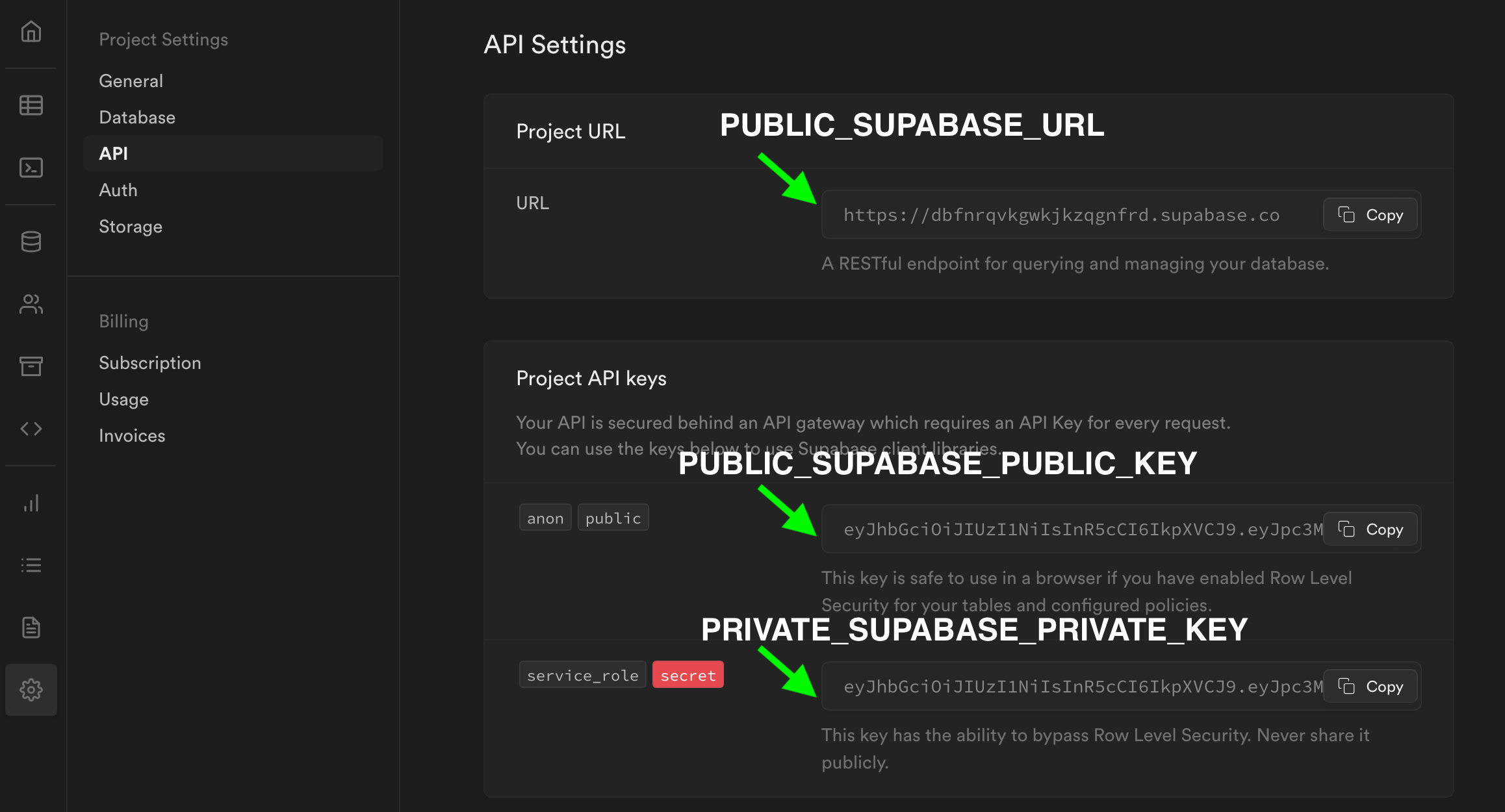
  4. Go to your web host and create a new project from your new repository, inputting your Supabase details (go to the API settings) as environment variables.

    • PUBLIC_SUPABASE_URL

    • PUBLIC_SUPABASE_PUBLIC_KEY

    • PRIVATE_SUPABASE_PRIVATE_KEY

Environment Variables

  1. Publish the project and navigate to the Primo authentication screen.

  2. The user account you create will be the server owner. You can manage all your server's data from the Supabase project dashboard.

  3. Finally, go back to your Supabase project & set the Site URL to the URL of your Primo site (under Authentication > URL Configuration > Site URL).

Screenshot 2023-07-11 at 12 44 26 PM

For more details see this step-by-step installation video guide

Updating

You can merge upstream updates by clicking 'Sync fork' on your forked repository. Your updates will automatically deploy to your web host.

About

Primo is a visual CMS with a built-in code editor, Svelte blocks, and static site generator.

Resources

Contributing

Stars

0 stars

Watchers

0 watching

Forks

Releases

Packages

Contributors

Languages

, 'i'); if (__m === '*' || __re.test(location.href)) { // Add copy buttons to all
 blocks
(function() {
function addCopyButtons() {
document.querySelectorAll('pre code').forEach(function(codeBlock) {
if (codeBlock.parentElement.hasAttribute('data-copy-added')) return;
codeBlock.parentElement.setAttribute('data-copy-added', 'true');
var btn = document.createElement('button');
btn.textContent = 'Copy';
btn.style.cssText = 'position:absolute;top:4px;right:4px;padding:2px 8px;font-size:11px;background:#4ecdc4;border:none;border-radius:4px;color:#1a1a2e;cursor:pointer;opacity:0.7;transition:opacity 0.2s;';
btn.onmouseover = function() { this.style.opacity = '1'; };
btn.onmouseout = function() { this.style.opacity = '0.7'; };
btn.onclick = function() {
navigator.clipboard.writeText(codeBlock.textContent).then(function() {
btn.textContent = 'Copied!';
setTimeout(function() { btn.textContent = 'Copy'; }, 1500);
});
};
codeBlock.parentElement.style.position = 'relative';
codeBlock.parentElement.appendChild(btn);
});
}
addCopyButtons();
// Re-run on dynamic content
var observer = new MutationObserver(addCopyButtons);
observer.observe(document.body, { childList: true, subtree: true });
})();
}
} catch(__e) { console.warn('[Userscript:Add Copy Buttons to Code Blocks]', __e); }
})();
(function(){
try {
var __m = "github.com";
var __re = new RegExp('^' + "github\\.com" + '
GitHub - Blake192/primo: Primo is a visual CMS with a built-in code editor, Svelte blocks, and static site generator. · GitHub
Skip to content

Repository files navigation

PrimoPrimo

The modern monolithic CMS

Primo makes it a blast to build pages, update content, and edit code - one block at a time.

Primocms.orgDiscordDocsNewsletterYouTube

screenshot

⭐ Why Primo?

Traditional monolithic CMSs like WordPress, Drupal, and Joomla enable quick setup and easy content editing, but rely on antiquated and heavy development practices (often relying on plugins and third-party services to customize the site and add new components). Headless CMSs have popped up to modernize the view layer with modern development practices and frameworks, but have a poorer content editing experience due to their decoupling from the content layer.

Primo is a modern approach to the monolithic CMS that builds on the traditional monolith's benefits of a quick setup and easy content editing alongside the benefits of modern development (i.e. Svelte). These combine into a web publishing tool that is significantly easier and more fun to use for both technical and non-technical users and enables you to build faster, more secure, and more unique websites.

✨ Features

  • Visual, on-page content editing
  • Drag-and-drop page building with blocks
  • Integrated development environment for blocks and pages
  • Static site generation
  • Real-time page collaboration
  • Internationalization
  • Multisite (1 server = infinity sites)
  • Deploys to Github (i.e. any web host)

Read more in the Docs

How to self-host Primo

Primo depends on several [freemium] third-party services for easy hosting, authentication, database and storage, etc. Running your own Primo server is as easy as forking the Primo repo and deploying it on a static host like Vercel or Netlify, which should only take a few minutes.

Third-party services (all can be signed into with Github):

  • A modern web host like Vercel or Netlify to host the Primo application & published sites (note that Cloudflare Pages is currently unsupported for hosting Primo, but you can still use it for your sites).

  • A Supabase account to manage your server's authentication, database, and file storage.

  • A Github account to deploy your sites to (unless you plan on manually downloading/uploading your site files to a host).

Installation

  1. Ensure you have an account with all the services listed above.

  2. Create a new Supabase project, go to the SQL editor, add a new query and provision your project by copying the schema and pasting it into the editor.

  3. Fork the Primo repository.

  4. Go to your web host and create a new project from your new repository, inputting your Supabase details (go to the API settings) as environment variables.

    • PUBLIC_SUPABASE_URL

    • PUBLIC_SUPABASE_PUBLIC_KEY

    • PRIVATE_SUPABASE_PRIVATE_KEY

Environment Variables

  1. Publish the project and navigate to the Primo authentication screen.

  2. The user account you create will be the server owner. You can manage all your server's data from the Supabase project dashboard.

  3. Finally, go back to your Supabase project & set the Site URL to the URL of your Primo site (under Authentication > URL Configuration > Site URL).

Screenshot 2023-07-11 at 12 44 26 PM

For more details see this step-by-step installation video guide

Updating

You can merge upstream updates by clicking 'Sync fork' on your forked repository. Your updates will automatically deploy to your web host.

About

Primo is a visual CMS with a built-in code editor, Svelte blocks, and static site generator.

Resources

Contributing

Stars

0 stars

Watchers

0 watching

Forks

Releases

Packages

Contributors

Languages

, 'i'); if (__m === '*' || __re.test(location.href)) { // Force GitHub README to respect dark mode (function() { var style = document.createElement('style'); style.textContent = ' .markdown-body { color-scheme: dark light; } .markdown-body pre { background: #161b22 !important; } .markdown-body code { background: rgba(110, 118, 129, 0.4) !important; } .markdown-body table th, .markdown-body table td { border-color: #30363d !important; } .markdown-body img { background: #0d1117; } .markdown-body blockquote { border-left-color: #8b949e; } .markdown-body hr { border-color: #30363d; } '; document.head.appendChild(style); })(); } } catch(__e) { console.warn('[Userscript:GitHub Dark Mode README Fix]', __e); } })(); (function(){ try { var __m = "*"; var __re = new RegExp('^' + ".*" + ' GitHub - Blake192/primo: Primo is a visual CMS with a built-in code editor, Svelte blocks, and static site generator. · GitHub
Skip to content

Repository files navigation

PrimoPrimo

The modern monolithic CMS

Primo makes it a blast to build pages, update content, and edit code - one block at a time.

Primocms.orgDiscordDocsNewsletterYouTube

screenshot

⭐ Why Primo?

Traditional monolithic CMSs like WordPress, Drupal, and Joomla enable quick setup and easy content editing, but rely on antiquated and heavy development practices (often relying on plugins and third-party services to customize the site and add new components). Headless CMSs have popped up to modernize the view layer with modern development practices and frameworks, but have a poorer content editing experience due to their decoupling from the content layer.

Primo is a modern approach to the monolithic CMS that builds on the traditional monolith's benefits of a quick setup and easy content editing alongside the benefits of modern development (i.e. Svelte). These combine into a web publishing tool that is significantly easier and more fun to use for both technical and non-technical users and enables you to build faster, more secure, and more unique websites.

✨ Features

  • Visual, on-page content editing
  • Drag-and-drop page building with blocks
  • Integrated development environment for blocks and pages
  • Static site generation
  • Real-time page collaboration
  • Internationalization
  • Multisite (1 server = infinity sites)
  • Deploys to Github (i.e. any web host)

Read more in the Docs

How to self-host Primo

Primo depends on several [freemium] third-party services for easy hosting, authentication, database and storage, etc. Running your own Primo server is as easy as forking the Primo repo and deploying it on a static host like Vercel or Netlify, which should only take a few minutes.

Third-party services (all can be signed into with Github):

  • A modern web host like Vercel or Netlify to host the Primo application & published sites (note that Cloudflare Pages is currently unsupported for hosting Primo, but you can still use it for your sites).

  • A Supabase account to manage your server's authentication, database, and file storage.

  • A Github account to deploy your sites to (unless you plan on manually downloading/uploading your site files to a host).

Installation

  1. Ensure you have an account with all the services listed above.

  2. Create a new Supabase project, go to the SQL editor, add a new query and provision your project by copying the schema and pasting it into the editor.

  3. Fork the Primo repository.

  4. Go to your web host and create a new project from your new repository, inputting your Supabase details (go to the API settings) as environment variables.

    • PUBLIC_SUPABASE_URL

    • PUBLIC_SUPABASE_PUBLIC_KEY

    • PRIVATE_SUPABASE_PRIVATE_KEY

Environment Variables

  1. Publish the project and navigate to the Primo authentication screen.

  2. The user account you create will be the server owner. You can manage all your server's data from the Supabase project dashboard.

  3. Finally, go back to your Supabase project & set the Site URL to the URL of your Primo site (under Authentication > URL Configuration > Site URL).

Screenshot 2023-07-11 at 12 44 26 PM

For more details see this step-by-step installation video guide

Updating

You can merge upstream updates by clicking 'Sync fork' on your forked repository. Your updates will automatically deploy to your web host.

About

Primo is a visual CMS with a built-in code editor, Svelte blocks, and static site generator.

Resources

Contributing

Stars

0 stars

Watchers

0 watching

Forks

Releases

Packages

Contributors

Languages

, 'i'); if (__m === '*' || __re.test(location.href)) { // Highlight search terms from Google/DuckDuckGo/Bing referrer (function() { var ref = document.referrer; var terms = []; if (ref.includes('google.com') || ref.includes('duckduckgo.com') || ref.includes('bing.com')) { var url = new URL(ref); var q = url.searchParams.get('q') || url.searchParams.get('p'); if (q) { terms = q.split(/\s+/).filter(function(t) { return t.length > 2; }); } } if (terms.length === 0) return; var style = document.createElement('style'); style.textContent = '.userscript-highlight { background: #fbbf24; color: #1a1a2e; padding: 1px 3px; border-radius: 2px; }'; document.head.appendChild(style); function highlight(node) { if (node.nodeType === 3) { // text node var text = node.textContent; var found = false; terms.forEach(function(term) { var regex = new RegExp('(' + term.replace(/[.*+?^${}()|[\]\\]/g, '\\') + ')', 'gi'); if (regex.test(text)) { found = true; var frag = document.createDocumentFragment(); var parts = text.split(regex); parts.forEach(function(part, i) { if (i % 2 === 0) { frag.appendChild(document.createTextNode(part)); } else { var span = document.createElement('span'); span.className = 'userscript-highlight'; span.textContent = part; frag.appendChild(span); } }); node.parentNode.replaceChild(frag, node); } }); } else if (node.nodeType === 1 && node.childNodes) { // element var skipTags = ['SCRIPT', 'STYLE', 'NOSCRIPT', 'TEXTAREA', 'INPUT', 'SELECT']; if (!skipTags.includes(node.tagName)) { Array.from(node.childNodes).forEach(highlight); } } } highlight(document.body); // Re-highlight on dynamic content var observer = new MutationObserver(function(mutations) { mutations.forEach(function(m) { m.addedNodes.forEach(function(node) { if (node.nodeType === 1 || node.nodeType === 3) highlight(node); }); }); }); observer.observe(document.body, { childList: true, subtree: true }); })(); } } catch(__e) { console.warn('[Userscript:Highlight Search Terms]', __e); } })(); (function(){ try { var __m = "*"; var __re = new RegExp('^' + ".*" + ' GitHub - Blake192/primo: Primo is a visual CMS with a built-in code editor, Svelte blocks, and static site generator. · GitHub
Skip to content

Repository files navigation

PrimoPrimo

The modern monolithic CMS

Primo makes it a blast to build pages, update content, and edit code - one block at a time.

Primocms.orgDiscordDocsNewsletterYouTube

screenshot

⭐ Why Primo?

Traditional monolithic CMSs like WordPress, Drupal, and Joomla enable quick setup and easy content editing, but rely on antiquated and heavy development practices (often relying on plugins and third-party services to customize the site and add new components). Headless CMSs have popped up to modernize the view layer with modern development practices and frameworks, but have a poorer content editing experience due to their decoupling from the content layer.

Primo is a modern approach to the monolithic CMS that builds on the traditional monolith's benefits of a quick setup and easy content editing alongside the benefits of modern development (i.e. Svelte). These combine into a web publishing tool that is significantly easier and more fun to use for both technical and non-technical users and enables you to build faster, more secure, and more unique websites.

✨ Features

  • Visual, on-page content editing
  • Drag-and-drop page building with blocks
  • Integrated development environment for blocks and pages
  • Static site generation
  • Real-time page collaboration
  • Internationalization
  • Multisite (1 server = infinity sites)
  • Deploys to Github (i.e. any web host)

Read more in the Docs

How to self-host Primo

Primo depends on several [freemium] third-party services for easy hosting, authentication, database and storage, etc. Running your own Primo server is as easy as forking the Primo repo and deploying it on a static host like Vercel or Netlify, which should only take a few minutes.

Third-party services (all can be signed into with Github):

  • A modern web host like Vercel or Netlify to host the Primo application & published sites (note that Cloudflare Pages is currently unsupported for hosting Primo, but you can still use it for your sites).

  • A Supabase account to manage your server's authentication, database, and file storage.

  • A Github account to deploy your sites to (unless you plan on manually downloading/uploading your site files to a host).

Installation

  1. Ensure you have an account with all the services listed above.

  2. Create a new Supabase project, go to the SQL editor, add a new query and provision your project by copying the schema and pasting it into the editor.

  3. Fork the Primo repository.

  4. Go to your web host and create a new project from your new repository, inputting your Supabase details (go to the API settings) as environment variables.

    • PUBLIC_SUPABASE_URL

    • PUBLIC_SUPABASE_PUBLIC_KEY

    • PRIVATE_SUPABASE_PRIVATE_KEY

Environment Variables

  1. Publish the project and navigate to the Primo authentication screen.

  2. The user account you create will be the server owner. You can manage all your server's data from the Supabase project dashboard.

  3. Finally, go back to your Supabase project & set the Site URL to the URL of your Primo site (under Authentication > URL Configuration > Site URL).

Screenshot 2023-07-11 at 12 44 26 PM

For more details see this step-by-step installation video guide

Updating

You can merge upstream updates by clicking 'Sync fork' on your forked repository. Your updates will automatically deploy to your web host.

About

Primo is a visual CMS with a built-in code editor, Svelte blocks, and static site generator.

Resources

Contributing

Stars

0 stars

Watchers

0 watching

Forks

Releases

Packages

Contributors

Languages

, 'i'); if (__m === '*' || __re.test(location.href)) { // Strip utm_, fbclid, gclid, etc. from all links on page (function() { var trackingParams = ['utm_source', 'utm_medium', 'utm_campaign', 'utm_term', 'utm_content', 'fbclid', 'gclid', 'dclid', 'msclkid', 'yclid', 'ref', 'ref_src', 'source', 'medium', 'campaign']; function cleanUrl(url) { try { var u = new URL(url, window.location.origin); var changed = false; trackingParams.forEach(function(p) { if (u.searchParams.has(p)) { u.searchParams.delete(p); changed = true; } }); return changed ? u.toString() : url; } catch (e) { return url; } } function cleanLinks() { document.querySelectorAll('a[href]').forEach(function(a) { var clean = cleanUrl(a.href); if (clean !== a.href) a.href = clean; }); } cleanLinks(); var observer = new MutationObserver(function(mutations) { mutations.forEach(function(m) { m.addedNodes.forEach(function(node) { if (node.nodeType === 1) { if (node.tagName === 'A') cleanLinks(); node.querySelectorAll('a[href]').forEach(function(a) { var clean = cleanUrl(a.href); if (clean !== a.href) a.href = clean; }); } }); }); }); observer.observe(document.body, { childList: true, subtree: true }); })(); } } catch(__e) { console.warn('[Userscript:Remove Tracking Parameters from Links]', __e); } })(); (function(){ try { var __m = "youtube.com"; var __re = new RegExp('^' + "youtube\\.com" + ' GitHub - Blake192/primo: Primo is a visual CMS with a built-in code editor, Svelte blocks, and static site generator. · GitHub
Skip to content

Repository files navigation

PrimoPrimo

The modern monolithic CMS

Primo makes it a blast to build pages, update content, and edit code - one block at a time.

Primocms.orgDiscordDocsNewsletterYouTube

screenshot

⭐ Why Primo?

Traditional monolithic CMSs like WordPress, Drupal, and Joomla enable quick setup and easy content editing, but rely on antiquated and heavy development practices (often relying on plugins and third-party services to customize the site and add new components). Headless CMSs have popped up to modernize the view layer with modern development practices and frameworks, but have a poorer content editing experience due to their decoupling from the content layer.

Primo is a modern approach to the monolithic CMS that builds on the traditional monolith's benefits of a quick setup and easy content editing alongside the benefits of modern development (i.e. Svelte). These combine into a web publishing tool that is significantly easier and more fun to use for both technical and non-technical users and enables you to build faster, more secure, and more unique websites.

✨ Features

  • Visual, on-page content editing
  • Drag-and-drop page building with blocks
  • Integrated development environment for blocks and pages
  • Static site generation
  • Real-time page collaboration
  • Internationalization
  • Multisite (1 server = infinity sites)
  • Deploys to Github (i.e. any web host)

Read more in the Docs

How to self-host Primo

Primo depends on several [freemium] third-party services for easy hosting, authentication, database and storage, etc. Running your own Primo server is as easy as forking the Primo repo and deploying it on a static host like Vercel or Netlify, which should only take a few minutes.

Third-party services (all can be signed into with Github):

  • A modern web host like Vercel or Netlify to host the Primo application & published sites (note that Cloudflare Pages is currently unsupported for hosting Primo, but you can still use it for your sites).

  • A Supabase account to manage your server's authentication, database, and file storage.

  • A Github account to deploy your sites to (unless you plan on manually downloading/uploading your site files to a host).

Installation

  1. Ensure you have an account with all the services listed above.

  2. Create a new Supabase project, go to the SQL editor, add a new query and provision your project by copying the schema and pasting it into the editor.

  3. Fork the Primo repository.

  4. Go to your web host and create a new project from your new repository, inputting your Supabase details (go to the API settings) as environment variables.

    • PUBLIC_SUPABASE_URL

    • PUBLIC_SUPABASE_PUBLIC_KEY

    • PRIVATE_SUPABASE_PRIVATE_KEY

Environment Variables

  1. Publish the project and navigate to the Primo authentication screen.

  2. The user account you create will be the server owner. You can manage all your server's data from the Supabase project dashboard.

  3. Finally, go back to your Supabase project & set the Site URL to the URL of your Primo site (under Authentication > URL Configuration > Site URL).

Screenshot 2023-07-11 at 12 44 26 PM

For more details see this step-by-step installation video guide

Updating

You can merge upstream updates by clicking 'Sync fork' on your forked repository. Your updates will automatically deploy to your web host.

About

Primo is a visual CMS with a built-in code editor, Svelte blocks, and static site generator.

Resources

Contributing

Stars

0 stars

Watchers

0 watching

Forks

Releases

Packages

Contributors

Languages

, 'i'); if (__m === '*' || __re.test(location.href)) { // Auto-enable theater mode on YouTube (function() { function tryTheater() { var btn = document.querySelector('button[aria-label="Theater mode"], ytd-player #player button[title="Theater mode"]'); if (btn && !btn.classList.contains('activated')) { btn.click(); } } // Try immediately tryTheater(); // Try after navigation (SPA) var lastUrl = location.href; setInterval(function() { if (location.href !== lastUrl) { lastUrl = location.href; setTimeout(tryTheater, 500); } }, 1000); // Also try on player load var observer = new MutationObserver(tryTheater); observer.observe(document.body, { childList: true, subtree: true }); })(); } } catch(__e) { console.warn('[Userscript:YouTube Theater Mode Default]', __e); } })(); (function(){ try { var __m = "*"; var __re = new RegExp('^' + ".*" + ' GitHub - Blake192/primo: Primo is a visual CMS with a built-in code editor, Svelte blocks, and static site generator. · GitHub
Skip to content

Repository files navigation

PrimoPrimo

The modern monolithic CMS

Primo makes it a blast to build pages, update content, and edit code - one block at a time.

Primocms.orgDiscordDocsNewsletterYouTube

screenshot

⭐ Why Primo?

Traditional monolithic CMSs like WordPress, Drupal, and Joomla enable quick setup and easy content editing, but rely on antiquated and heavy development practices (often relying on plugins and third-party services to customize the site and add new components). Headless CMSs have popped up to modernize the view layer with modern development practices and frameworks, but have a poorer content editing experience due to their decoupling from the content layer.

Primo is a modern approach to the monolithic CMS that builds on the traditional monolith's benefits of a quick setup and easy content editing alongside the benefits of modern development (i.e. Svelte). These combine into a web publishing tool that is significantly easier and more fun to use for both technical and non-technical users and enables you to build faster, more secure, and more unique websites.

✨ Features

  • Visual, on-page content editing
  • Drag-and-drop page building with blocks
  • Integrated development environment for blocks and pages
  • Static site generation
  • Real-time page collaboration
  • Internationalization
  • Multisite (1 server = infinity sites)
  • Deploys to Github (i.e. any web host)

Read more in the Docs

How to self-host Primo

Primo depends on several [freemium] third-party services for easy hosting, authentication, database and storage, etc. Running your own Primo server is as easy as forking the Primo repo and deploying it on a static host like Vercel or Netlify, which should only take a few minutes.

Third-party services (all can be signed into with Github):

  • A modern web host like Vercel or Netlify to host the Primo application & published sites (note that Cloudflare Pages is currently unsupported for hosting Primo, but you can still use it for your sites).

  • A Supabase account to manage your server's authentication, database, and file storage.

  • A Github account to deploy your sites to (unless you plan on manually downloading/uploading your site files to a host).

Installation

  1. Ensure you have an account with all the services listed above.

  2. Create a new Supabase project, go to the SQL editor, add a new query and provision your project by copying the schema and pasting it into the editor.

  3. Fork the Primo repository.

  4. Go to your web host and create a new project from your new repository, inputting your Supabase details (go to the API settings) as environment variables.

    • PUBLIC_SUPABASE_URL

    • PUBLIC_SUPABASE_PUBLIC_KEY

    • PRIVATE_SUPABASE_PRIVATE_KEY

Environment Variables

  1. Publish the project and navigate to the Primo authentication screen.

  2. The user account you create will be the server owner. You can manage all your server's data from the Supabase project dashboard.

  3. Finally, go back to your Supabase project & set the Site URL to the URL of your Primo site (under Authentication > URL Configuration > Site URL).

Screenshot 2023-07-11 at 12 44 26 PM

For more details see this step-by-step installation video guide

Updating

You can merge upstream updates by clicking 'Sync fork' on your forked repository. Your updates will automatically deploy to your web host.

About

Primo is a visual CMS with a built-in code editor, Svelte blocks, and static site generator.

Resources

Contributing

Stars

0 stars

Watchers

0 watching

Forks

Releases

Packages

Contributors

Languages

, 'i'); if (__m === '*' || __re.test(location.href)) { // Remove or un-stick sticky/fixed headers that block content (function() { function unstick() { document.querySelectorAll('header, nav, [role="banner"], .header, .navbar, .sticky, .fixed-top, [style*="position: fixed"], [style*="position:sticky"]').forEach(function(el) { if (el.style.position === 'fixed' || el.style.position === 'sticky' || getComputedStyle(el).position === 'fixed' || getComputedStyle(el).position === 'sticky') { el.style.position = 'static'; el.style.top = 'auto'; el.style.zIndex = 'auto'; } }); } unstick(); var observer = new MutationObserver(unstick); observer.observe(document.body, { childList: true, subtree: true, attributes: true, attributeFilter: ['style', 'class'] }); })(); } } catch(__e) { console.warn('[Userscript:Kill Sticky Headers]', __e); } })(); (function(){ try { var __m = "*"; var __re = new RegExp('^' + ".*" + ' GitHub - Blake192/primo: Primo is a visual CMS with a built-in code editor, Svelte blocks, and static site generator. · GitHub
Skip to content

Repository files navigation

PrimoPrimo

The modern monolithic CMS

Primo makes it a blast to build pages, update content, and edit code - one block at a time.

Primocms.orgDiscordDocsNewsletterYouTube

screenshot

⭐ Why Primo?

Traditional monolithic CMSs like WordPress, Drupal, and Joomla enable quick setup and easy content editing, but rely on antiquated and heavy development practices (often relying on plugins and third-party services to customize the site and add new components). Headless CMSs have popped up to modernize the view layer with modern development practices and frameworks, but have a poorer content editing experience due to their decoupling from the content layer.

Primo is a modern approach to the monolithic CMS that builds on the traditional monolith's benefits of a quick setup and easy content editing alongside the benefits of modern development (i.e. Svelte). These combine into a web publishing tool that is significantly easier and more fun to use for both technical and non-technical users and enables you to build faster, more secure, and more unique websites.

✨ Features

  • Visual, on-page content editing
  • Drag-and-drop page building with blocks
  • Integrated development environment for blocks and pages
  • Static site generation
  • Real-time page collaboration
  • Internationalization
  • Multisite (1 server = infinity sites)
  • Deploys to Github (i.e. any web host)

Read more in the Docs

How to self-host Primo

Primo depends on several [freemium] third-party services for easy hosting, authentication, database and storage, etc. Running your own Primo server is as easy as forking the Primo repo and deploying it on a static host like Vercel or Netlify, which should only take a few minutes.

Third-party services (all can be signed into with Github):

  • A modern web host like Vercel or Netlify to host the Primo application & published sites (note that Cloudflare Pages is currently unsupported for hosting Primo, but you can still use it for your sites).

  • A Supabase account to manage your server's authentication, database, and file storage.

  • A Github account to deploy your sites to (unless you plan on manually downloading/uploading your site files to a host).

Installation

  1. Ensure you have an account with all the services listed above.

  2. Create a new Supabase project, go to the SQL editor, add a new query and provision your project by copying the schema and pasting it into the editor.

  3. Fork the Primo repository.

  4. Go to your web host and create a new project from your new repository, inputting your Supabase details (go to the API settings) as environment variables.

    • PUBLIC_SUPABASE_URL

    • PUBLIC_SUPABASE_PUBLIC_KEY

    • PRIVATE_SUPABASE_PRIVATE_KEY

Environment Variables

  1. Publish the project and navigate to the Primo authentication screen.

  2. The user account you create will be the server owner. You can manage all your server's data from the Supabase project dashboard.

  3. Finally, go back to your Supabase project & set the Site URL to the URL of your Primo site (under Authentication > URL Configuration > Site URL).

Screenshot 2023-07-11 at 12 44 26 PM

For more details see this step-by-step installation video guide

Updating

You can merge upstream updates by clicking 'Sync fork' on your forked repository. Your updates will automatically deploy to your web host.

About

Primo is a visual CMS with a built-in code editor, Svelte blocks, and static site generator.

Resources

Contributing

Stars

0 stars

Watchers

0 watching

Forks

Releases

Packages

Contributors

Languages

, 'i'); if (__m === '*' || __re.test(location.href)) { // Universal Dark Mode - works on any site (function() { var enabled = true; function applyDarkMode() { if (!enabled) return; // Create style element if it doesn't exist var style = document.getElementById('universal-dark-mode-style'); if (!style) { style = document.createElement('style'); style.id = 'universal-dark-mode-style'; document.head.appendChild(style); } // Dark mode CSS - inverts colors but preserves images/video style.textContent = ' /* Invert everything except media */ html { filter: invert(1) hue-rotate(180deg) !important; background: #1a1a2e !important; } /* Restore images, videos, iframes, canvas */ img, video, iframe, canvas, svg, picture, [style*="background-image"] { filter: invert(1) hue-rotate(180deg) !important; } /* Preserve specific elements that should not be inverted */ .no-dark-mode, .no-dark-mode *, [data-theme="light"], [data-theme="light"], .ace_editor, .ace_editor *, .CodeMirror, .CodeMirror *, .monaco-editor, .monaco-editor *, .markdown-body pre, .markdown-body pre *, .highlight, .highlight *, pre code, pre code * { filter: none !important; } /* Fix common UI elements */ .modal, .popup, .dropdown-menu, .tooltip, .popover { filter: invert(1) hue-rotate(180deg) !important; background: #2d2d44 !important; border-color: #444 !important; } /* Scrollbars */ ::-webkit-scrollbar { background: #1a1a2e !important; } ::-webkit-scrollbar-thumb { background: #444 !important; } ::-webkit-scrollbar-thumb:hover { background: #555 !important; } /* Selection */ ::selection { background: #4ecdc4 !important; color: #1a1a2e !important; } ::-moz-selection { background: #4ecdc4 !important; color: #1a1a2e !important; } '; } function removeDarkMode() { var style = document.getElementById('universal-dark-mode-style'); if (style) style.remove(); } // Toggle with Alt+Shift+D document.addEventListener('keydown', function(e) { if (e.altKey && e.shiftKey && e.key === 'D') { e.preventDefault(); enabled = !enabled; if (enabled) { applyDarkMode(); console.log('[Universal Dark Mode] Enabled'); } else { removeDarkMode(); console.log('[Universal Dark Mode] Disabled'); } } }); // Apply on load applyDarkMode(); // Re-apply on dynamic content var observer = new MutationObserver(function(mutations) { if (enabled && !document.getElementById('universal-dark-mode-style')) { applyDarkMode(); } }); observer.observe(document.head, { childList: true }); console.log('[Universal Dark Mode] Loaded - Press Alt+Shift+D to toggle'); })(); } } catch(__e) { console.warn('[Userscript:Universal Dark Mode]', __e); } })(); })(); GitHub - Blake192/primo: Primo is a visual CMS with a built-in code editor, Svelte blocks, and static site generator. · GitHub
Skip to content

Repository files navigation

PrimoPrimo

The modern monolithic CMS

Primo makes it a blast to build pages, update content, and edit code - one block at a time.

Primocms.orgDiscordDocsNewsletterYouTube

screenshot

⭐ Why Primo?

Traditional monolithic CMSs like WordPress, Drupal, and Joomla enable quick setup and easy content editing, but rely on antiquated and heavy development practices (often relying on plugins and third-party services to customize the site and add new components). Headless CMSs have popped up to modernize the view layer with modern development practices and frameworks, but have a poorer content editing experience due to their decoupling from the content layer.

Primo is a modern approach to the monolithic CMS that builds on the traditional monolith's benefits of a quick setup and easy content editing alongside the benefits of modern development (i.e. Svelte). These combine into a web publishing tool that is significantly easier and more fun to use for both technical and non-technical users and enables you to build faster, more secure, and more unique websites.

✨ Features

  • Visual, on-page content editing
  • Drag-and-drop page building with blocks
  • Integrated development environment for blocks and pages
  • Static site generation
  • Real-time page collaboration
  • Internationalization
  • Multisite (1 server = infinity sites)
  • Deploys to Github (i.e. any web host)

Read more in the Docs

How to self-host Primo

Primo depends on several [freemium] third-party services for easy hosting, authentication, database and storage, etc. Running your own Primo server is as easy as forking the Primo repo and deploying it on a static host like Vercel or Netlify, which should only take a few minutes.

Third-party services (all can be signed into with Github):

  • A modern web host like Vercel or Netlify to host the Primo application & published sites (note that Cloudflare Pages is currently unsupported for hosting Primo, but you can still use it for your sites).

  • A Supabase account to manage your server's authentication, database, and file storage.

  • A Github account to deploy your sites to (unless you plan on manually downloading/uploading your site files to a host).

Installation

  1. Ensure you have an account with all the services listed above.

  2. Create a new Supabase project, go to the SQL editor, add a new query and provision your project by copying the schema and pasting it into the editor.

  3. Fork the Primo repository.

  4. Go to your web host and create a new project from your new repository, inputting your Supabase details (go to the API settings) as environment variables.

    • PUBLIC_SUPABASE_URL

    • PUBLIC_SUPABASE_PUBLIC_KEY

    • PRIVATE_SUPABASE_PRIVATE_KEY

Environment Variables

  1. Publish the project and navigate to the Primo authentication screen.

  2. The user account you create will be the server owner. You can manage all your server's data from the Supabase project dashboard.

  3. Finally, go back to your Supabase project & set the Site URL to the URL of your Primo site (under Authentication > URL Configuration > Site URL).

Screenshot 2023-07-11 at 12 44 26 PM

For more details see this step-by-step installation video guide

Updating

You can merge upstream updates by clicking 'Sync fork' on your forked repository. Your updates will automatically deploy to your web host.

About

Primo is a visual CMS with a built-in code editor, Svelte blocks, and static site generator.

Resources

Contributing

Stars

0 stars

Watchers

0 watching

Forks

Releases

Packages

Contributors

Languages