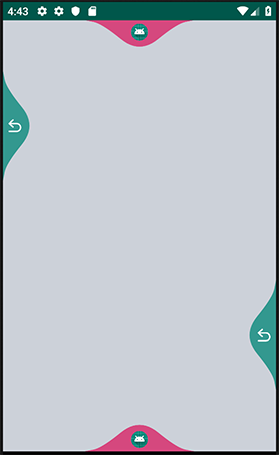
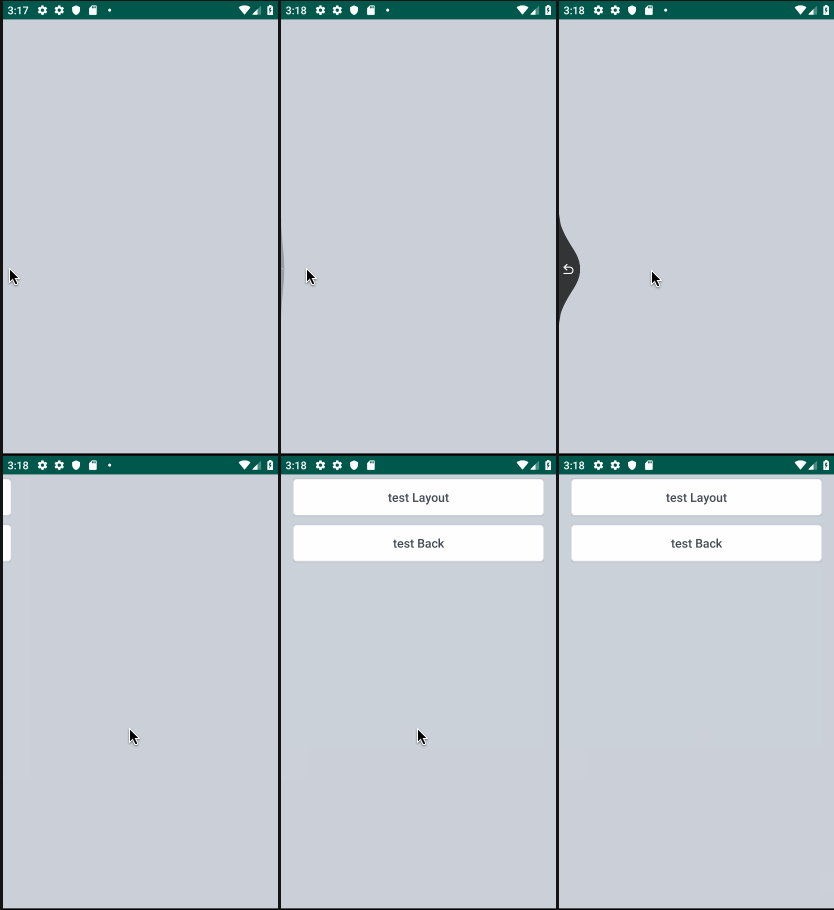
对市面上实现的侧划返回不是很满意(仿微信,QQ 通过修改窗口透明坑太多),最终决定还是亲手写一个高实用性的吧,效果如下所示,换个图标,更多划动功能可以由你自己解锁,总共一个 600 多行代码的类,推荐通过阅读源码,你肯定会收获很多哈。
Gradle:
implementation 'com.blankj:swipe-panel:1.2'finalSwipePanelswipePanel = newSwipePanel(this);
swipePanel.setLeftEdgeSize(SizeUtils.dp2px(100));// 设置左侧触发阈值 100dpswipePanel.setLeftDrawable(R.drawable.base_back);// 设置左侧 iconswipePanel.wrapView(findViewById(R.id.rootLayout));// 设置嵌套在 rootLayout 外层swipePanel.setOnFullSwipeListener(newSwipePanel.OnFullSwipeListener() {// 设置完全划开松手后的监听@OverridepublicvoidonFullSwipe(intdirection) {
finish();
swipePanel.close(direction);// 关闭
}
});<com.blankj.swipepanel.SwipePanel
xmlns:android="http://schemas.android.com/apk/res/android"xmlns:tools="http://schemas.android.com/tools"xmlns:app="http://schemas.android.com/apk/res-auto"android:id="@+id/swipePanel"android:background="@color/mediumGray"android:layout_width="match_parent"android:layout_height="match_parent"tools:context=".LayoutSwipePanelActivity"app:isLeftCenter="false"app:leftEdgeSize="100dp"app:leftSwipeColor="@color/colorPrimary"app:leftDrawable="@drawable/base_back">
...
</com.blankj.swipepanel.SwipePanel>| 方法名 | 属性名 | 说明 |
|---|---|---|
| setLeft(Top, Right, Bottom)SwipeColor | app:left(top, right, bottom)SwipeColor | 设置左(上、右、下)侧颜色 |
| setLeft(Top, Right, Bottom)EdgeSize | app:left(top, right, bottom)EdgeSize | 设置左(上、右、下)侧触发阈值 |
| setLeft(Top, Right, Bottom)Drawable | app:left(top, right, bottom)Drawable | 设置左(上、右、下)侧 icon |
| setLeft(Top, Right, Bottom)Center | app:isLeft(Top, Right, Bottom)Center | 设置左(上、右、下)侧是否居中 |
| setLeft(Top, Right, Bottom)Enabled | app:isLeft(Top, Right, Bottom)Enabled | 设置左(上、右、下)侧是否可用 |
| wrapView | --- | 设置嵌套在该 view 的外层 |
| setOnFullSwipeListener | --- | 设置完全划开松手后的监听 |
| setOnProgressChangedListener | --- | 设置进度变化的监听 |
| isOpen | --- | 判断是否被划开 |
| close | --- | 关闭 |
欢迎加入我的小专栏「基你太美」一起学习。