PC-style production control directly from your phone
Stream • Record • Create • Control • Produce


| 🎮 | 📱 | ⚡ | 🌐 |
|---|---|---|---|
| Multi-Scene | Mobile Native | GPU-Accelerated | Multi-Platform |
| Unlimited scenes | Android optimized | OpenGL ES | Twitch, YouTube, etc. |
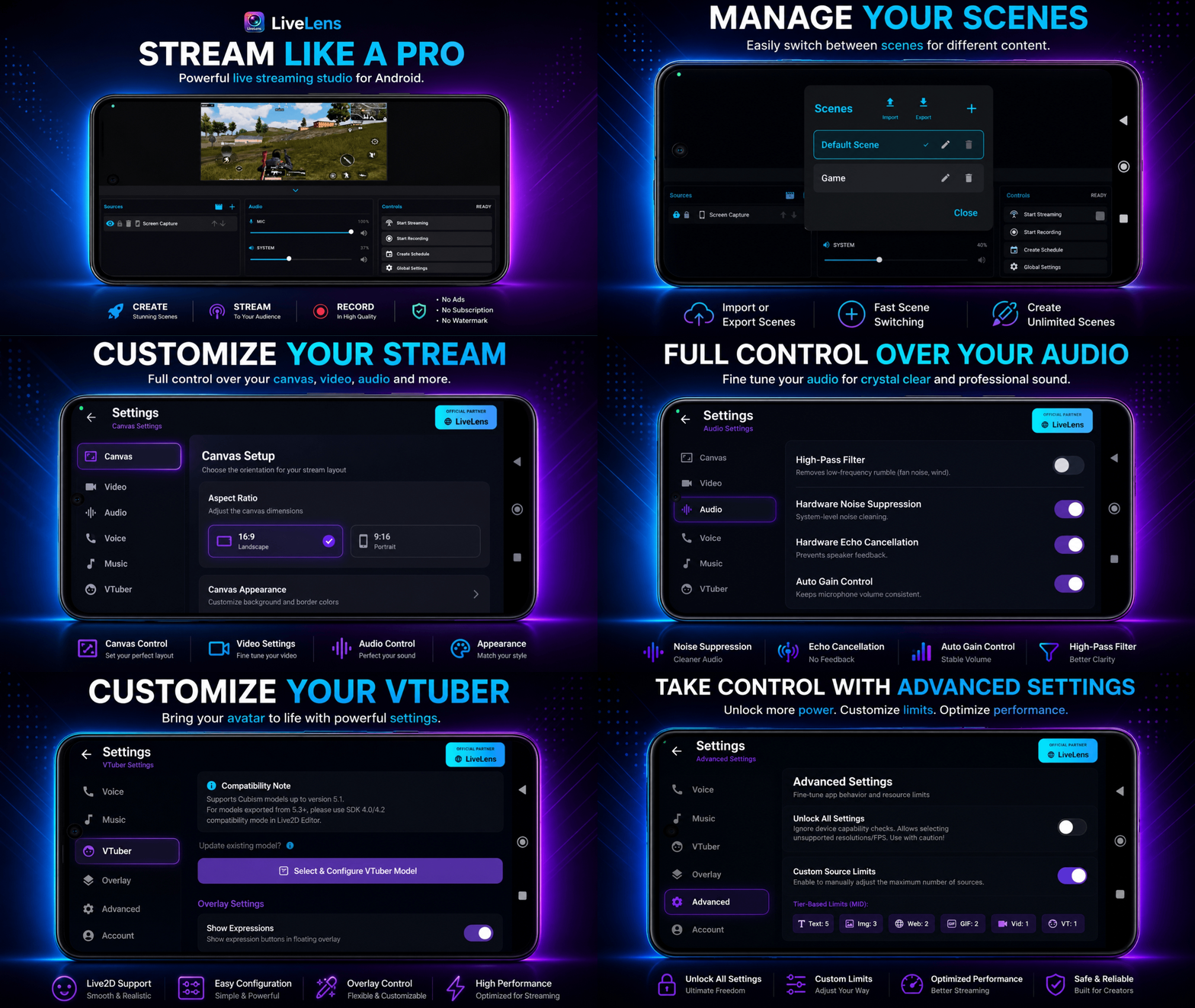
Desktop-Class Production on Mobile → Scroll to explore all features
LiveLens brings OBS-style production workflow to Android creators. It's everything you need for professional streaming, recording, and content creation—all from your mobile device.
Whether you're a gamer, streamer, content creator, VTuber, or influencer, LiveLens gives you enterprise-grade tools without the enterprise price tag.
- 🎮 PC-Quality Control - OBS-like interface on Android
- 🔒 Privacy First - No mandatory accounts, no forced watermarks, no ads
- 🚀 Multi-Stream Ready - Stream to multiple platforms simultaneously
- 🎬 Professional Recording - High-bitrate local recording while streaming
- 🎨 Scene Management - Complex scene setups with ease
- 🎤 Studio-Grade Audio - Advanced audio processing & controls
- 💰 One-Time Purchase - No subscriptions, no recurring fees
- ⚡ GPU-accelerated via OpenGL ES
- 🎯 Optimized FBO-based pipeline for mobile
- 🔄 Real-time transformations (scale, rotate, crop, layer)
- 🖼️ Single scene composition for preview, streaming & recording
- 🎨 Hardware acceleration for smooth 60 FPS
- 🌐 Custom RTMP URLs with multi-stream support
- 📺 Direct streaming to Twitch, YouTube, Facebook & major platforms
- 📹 4K recording with 30/60 FPS support
- ⚙️ H.264/H.265 encoder selection
- 🎚️ Fine-tune bitrate & keyframe intervals
- 🎯 Adaptive quality based on device performance
- 🔄 Network failover & reconnection handling
- 📋 Unlimited scene creation & organization
- 🖼️ 9 Source Types: Screen • Text • Image • Camera • Video • Web • GIF • VTuber • UVC Beta
- ✏️ Edit live while streaming/recording
- 🔒 Lock, hide, reorder sources instantly
- 📐 16:9 & 9:16 canvas with smart alignment guides
- 🎨 Drag-drop interface with precision tools
- 🔗 Scene linking & template system
- 🎚️ Capture microphone + system audio simultaneously
- 🔊 Mono/Stereo input support (auto-fallback)
- 🛡️ Noise suppression & echo cancellation
- 📈 Automatic gain control & noise gate
- 🔊 Real-time audio monitoring with meters
- 🎵 Floating audio level adjusters
- 🔊 Multi-channel audio mixing
- 🔔 Custom BRB & Starting Soon screens
- ⏱️ Customizable countdown timers with animations
- 🎵 Background music integration
- 🌈 Full styling control for text & timers
- 💬 Notification & floating controls
- 📤 Import/Export JSON theme customization
- 🎭 Custom stinger/transition effects
- 📦 Live2D Cubism support (up to v5.1)
- 🎤 Real-time microphone lip-sync
- 🎭 Physics simulation & expressions
- 👆 Touch tracking for interactions
- ⚙️ Real-time parameter editor
- 🎬 Breathing & idle motion controls
- 🎨 Character animation blending
- 🚀 Account-free voice rooms
- 🔗 Deep-link sharing for instant joins
- 💻 Cross-app communication (LiveLens ↔ Lite)
- 🤝 Team coordination with low-latency audio
- 👥 Multi-user support
| Feature | LiveLens | Many Mobile Streaming Apps |
|---|---|---|
| 🎬 Multi-Scene Support | ✅ | |
| 📱 Mobile Native | ✅ | ✅ |
| 🎭 Live2D / VTuber Support | ✅ | ❌ / Limited |
| 🌐 Web Source Support | ✅ | |
| 🖼️ Image & GIF Sources | ✅ | ✅ |
| 🎥 Video Sources | ✅ | |
| 📝 Advanced Text Editor | ✅ | |
| 🎙️ Voice Chat Integration | ✅ | ❌ |
| 🎵 Background Music | ✅ | |
| 📺 Internal Audio Capture | ✅ | |
| 🧩 Scene Import / Export | ✅ | ❌ / Limited |
| 🎮 Adaptive Performance | ✅ | |
| 🚫 Watermark | ❌ None | |
| 🔐 Account Required | ❌ No | |
| ⚡ GPU Rendering | ✅ | ✅ |
| 💻 Desktop Sync | ✅ | ❌ |
| 🎓 Learning Resources | ✅ |
- Android Version: Android 10 or higher (Required)
- RAM: 4GB minimum (6GB+ recommended)
- Storage: 100MB free space
- Camera: Any camera with recording capability
- Microphone: Built-in or external
- Android Version: Android 12+
- RAM: 8GB or higher
- Processor: Snapdragon 888 or equivalent
- Storage: 256GB+ for high-bitrate recording
- Network: 10+ Mbps upload speed for streaming
- ✅ Twitch
- ✅ YouTube Live
- ✅ Facebook Live
- ✅ Instagram Live (via RTMP)
- ✅ Custom RTMP servers
- ✅ OBS-compatible services
- 📱 Android Only - Full support for Android 10+
- 🚫 iOS - Not available
- 🚫 Windows/Mac - Not available
- 🚫 Web - Not available
| Device Type | Max FPS | Max Resolution | Recommended Bitrate |
|---|---|---|---|
| Mid-Range (4-6GB RAM) | 30 FPS | 720p | 2-3 Mbps |
| High-End (8GB RAM) | 60 FPS | 1080p | 4-5 Mbps |
| Flagship (12GB+ RAM) | 60 FPS | 4K | 8-12 Mbps |

Visit LiveLens.live to download the latest APK
- Visit https://www.livelens.live/
- Download the APK file
- Go to Settings → Security → Enable "Unknown Sources"
- Install the APK file
- Launch LiveLens and grant required permissions
Visit livelens.live → Download APK → Install on Android device
- Grant necessary permissions (Camera, Microphone, Storage)
- Select your default canvas size (16:9 or 9:16)
- Configure audio input sources
- Tap "+" → Create new scene
- Add a camera source
- Add text overlay (e.g., "Channel Name")
- Arrange sources using drag-and-drop
- Go to Settings → Streaming
- Enter RTMP URL from your platform
- Set bitrate, FPS, resolution
- Tap "Go Live"
- Preview your scene on screen
- Adjust sources in real-time
- Monitor audio levels
- Watch your chat
- 🔄 Scene switching unavailable during active stream/record
- 📊 Max quality & source count depend on device performance
- 🎬 Some Android system capture limitations apply
- 🌐 Web sources may load slower on slower devices
LiveLens is completely free to use with no ads, subscriptions, or watermarks!
We believe creators should focus on creating content, not removing artificial restrictions. Our project is supported through sponsorships, allowing us to keep the experience clean and accessible for everyone.
📖 Learn more about our monetization philosophy →
- Language: Kotlin/Java
- Rendering: OpenGL ES 3.0+
- Video Encoding: MediaCodec API
- Audio Processing: OpenSL ES
- RTMP Protocol: Custom optimized implementation
- Live2D: Cubism Native SDK
- UI Framework: Android Jetpack Compose
- Event-Driven Pipeline - Real-time source management
- Dual-Context Rendering - Separate preview & encode contexts
- Memory-Efficient Buffer Pool - Reduced GC pressure
- Adaptive Bitrate Control - Automatic quality adjustment
- Network Resilience - Automatic reconnection with backoff
| Resource | Link |
|---|---|
| 📖 Full Documentation | Read Docs |
| ❓ FAQ & Troubleshooting | FAQ |
| 💰 Monetization Model | Business Model |
| 🎬 Video Tutorials | YouTube Playlist |
| 🎨 Theme Customization | Overlays |
| 🔧 Advanced Settings | Config Guide |
| 🚀 API Reference | API Docs |
| 📖 Resources | |
|---|---|
| 💬 Community Chat | GitHub Discussions |
| ❓ FAQ & Help | Frequently Asked Questions |
| 🌐 Official Website | livelens.live |
| ✨ All Features | Feature Showcase |
| 🎨 Themes | Floating Control Themes |
| 🎤 Voice | Voice Chat Demo |
| 💬 Discord | Join Server |
| 📧 Contact | Support & Feedback |
| ❤️ Sponsor |  |
"LiveLens completely changed how I stream from my phone. It's like having OBS in my pocket!"
— Gaming Streamer, Twitch Affiliate
"The Live2D support is incredible. Finally, a mobile app that treats VTubers seriously!"
— VTuber Content Creator
"Best investment I made for mobile streaming. The quality is professional-grade!"
— YouTube Content Creator
Found an issue or have an idea? We'd love to hear from you! Choose your issue type:
Check FAQ & existing issues first, then report here
- Include: Device info, version, steps to reproduce, error logs
Browse existing requests to avoid duplicates, then request here
- Describe: Feature, problem it solves, proposed solution
- Include: Bitrate, resolution, FPS, internet speed
- Include: Bitrate, resolution, FPS, device specs
- Describe: Audio issue, settings used
- Include: Model format, Cubism version, specific issue
Created & Maintained by:ByconStudio
- OpenGL ES community for rendering guidance
- Live2D for Cubism SDK
- Android Media Framework team
- All contributors and testers
All rights reserved © LiveLens
This project is not open-source. Unauthorized copying, distribution, or derivative works are strictly prohibited.
For licensing inquiries, contact: support@livelens.live
Thank you to all our creators, testers, and community members who make LiveLens better every day!


