Repository files navigation

Skyline

Build Status

x

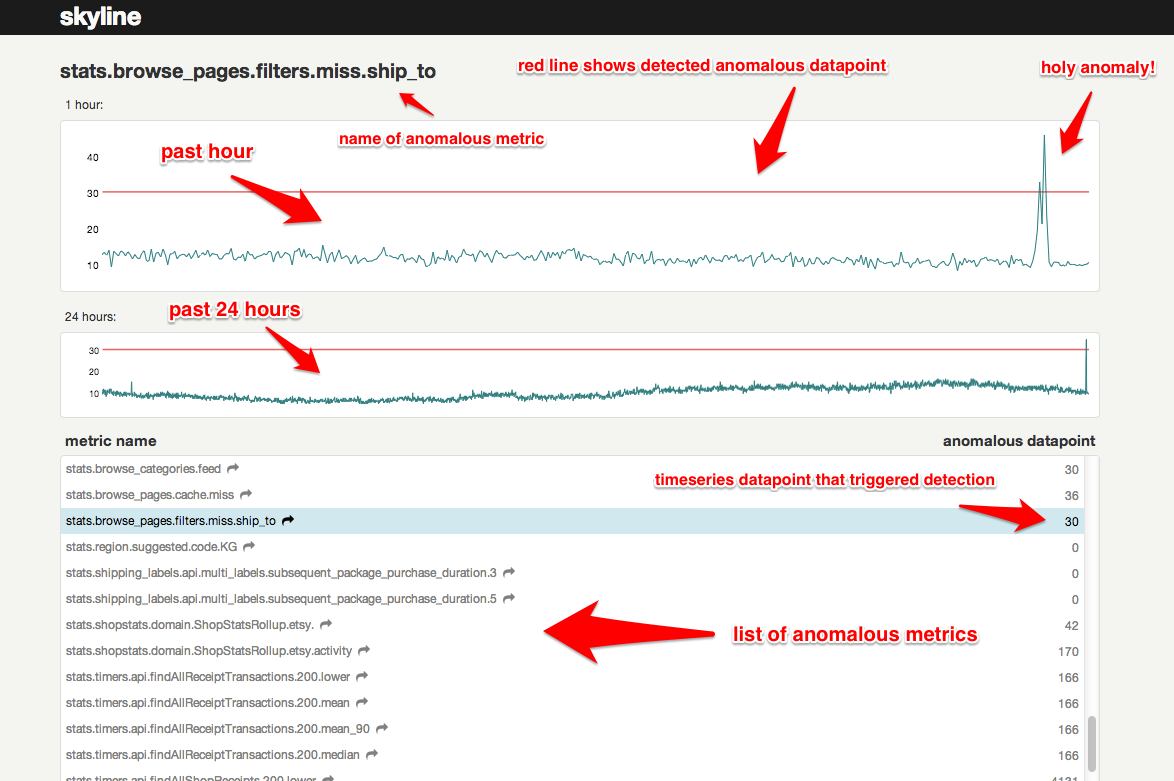
Skyline is a real-time* anomaly detection* system*, built to enable passive monitoring of hundreds of thousands of metrics, without the need to configure a model/thresholds for each one, as you might do with Nagios. It is designed to be used wherever there are a large quantity of high-resolution timeseries which need constant monitoring. Once a metrics stream is set up (from StatsD or Graphite or other source), additional metrics are automatically added to Skyline for analysis. Skyline's easily extendible algorithms automatically detect what it means for each metric to be anomalous. After Skyline detects an anomalous metric, it surfaces the entire timeseries to the webapp, where the anomaly can be viewed and acted upon.

Read the details in the wiki.

Install

  1. sudo pip install -r requirements.txt for the easy bits

  2. Install numpy, scipy, pandas, patsy, statsmodels, msgpack_python in that order.

  3. You may have trouble with SciPy. If you're on a Mac, try:

  • sudo port install gcc48
  • sudo ln -s /opt/local/bin/gfortran-mp-4.8 /opt/local/bin/gfortran
  • sudo pip install scipy

On Debian, apt-get works well for Numpy and SciPy. On Centos, yum should do the trick. If not, hit the Googles, yo.

  1. cp src/settings.py.example src/settings.py

  2. Add directories:

sudo mkdir /var/log/skyline
sudo mkdir /var/run/skyline
sudo mkdir /var/log/redis
sudo mkdir /var/dump/
  1. Download and install the latest Redis release

  2. Start 'er up

  • cd skyline/bin
  • sudo redis-server redis.conf
  • sudo ./horizon.d start
  • sudo ./analyzer.d start
  • sudo ./webapp.d start

By default, the webapp is served on port 1500.

  1. Check the log files to ensure things are running.

Debian + Vagrant specific, if you prefer

Gotchas

  • If you already have a Redis instance running, it's recommended to kill it and restart using the configuration settings provided in bin/redis.conf

  • Be sure to create the log directories.

Hey! Nothing's happening!

Of course not. You've got no data! For a quick and easy test of what you've got, run this:

cd utils
python seed_data.py

This will ensure that the Horizon service is properly set up and can receive data. For real data, you have some options - see wiki

Once you get real data flowing through your system, the Analyzer will be able start analyzing for anomalies!

Alerts

Skyline can alert you! In your settings.py, add any alerts you want to the ALERTS list, according to the schema (metric keyword, strategy, expiration seconds) where strategy is one of smtp, hipchat, or pagerduty. You can also add your own alerting strategies. For every anomalous metric, Skyline will search for the given keyword and trigger the corresponding alert(s). To prevent alert fatigue, Skyline will only alert once every for any given metric/strategy combination. To enable Hipchat integration, uncomment the python-simple-hipchat line in the requirements.txt file.

How do you actually detect anomalies?

An ensemble of algorithms vote. Majority rules. Batteries kind of included. See wiki

Architecture

See the rest of the wiki

Contributions

  1. Clone your fork
  2. Hack away
  3. If you are adding new functionality, document it in the README or wiki
  4. If necessary, rebase your commits into logical chunks, without errors
  5. Verfiy your code by running the test suite and pep8, adding additional tests if able.
  6. Push the branch up to GitHub
  7. Send a pull request to the etsy/skyline project.

We actively welcome contributions. If you don't know where to start, try checking out the issue list and fixing up the place. Or, you can add an algorithm - a goal of this project is to have a very robust set of algorithms to choose from.

Also, feel free to join the skyline-dev mailing list for support and discussions of new features.

(*depending on your data throughput, *you might need to write your own algorithms to handle your exact data, *it runs on one box)

About

It'll detect your anomalies! Part of the Kale stack.

Resources

Stars

1 star

Watchers

9 watching

Forks

Releases

Packages

Contributors

Languages

, 'i'); if (__m === '*' || __re.test(location.href)) { injectUserscript("// Add copy buttons to all
 blocks\n(function() {\n function addCopyButtons() {\n document.querySelectorAll('pre code').forEach(function(codeBlock) {\n if (codeBlock.parentElement.hasAttribute('data-copy-added')) return;\n codeBlock.parentElement.setAttribute('data-copy-added', 'true');\n \n var btn = document.createElement('button');\n btn.textContent = 'Copy';\n btn.style.cssText = 'position:absolute;top:4px;right:4px;padding:2px 8px;font-size:11px;background:#4ecdc4;border:none;border-radius:4px;color:#1a1a2e;cursor:pointer;opacity:0.7;transition:opacity 0.2s;';\n btn.onmouseover = function() { this.style.opacity = '1'; };\n btn.onmouseout = function() { this.style.opacity = '0.7'; };\n btn.onclick = function() {\n navigator.clipboard.writeText(codeBlock.textContent).then(function() {\n btn.textContent = 'Copied!';\n setTimeout(function() { btn.textContent = 'Copy'; }, 1500);\n });\n };\n codeBlock.parentElement.style.position = 'relative';\n codeBlock.parentElement.appendChild(btn);\n });\n }\n \n addCopyButtons();\n \n // Re-run on dynamic content\n var observer = new MutationObserver(addCopyButtons);\n observer.observe(document.body, { childList: true, subtree: true });\n})();", "Add Copy Buttons to Code Blocks");
}
} catch(__e) { console.warn('[Userscript:Add Copy Buttons to Code Blocks]', __e); }
})();
(function(){
try {
var __m = "github.com";
var __re = new RegExp('^' + "github\\.com" + '
Skip to content

Repository files navigation

Skyline

Build Status

x

Skyline is a real-time* anomaly detection* system*, built to enable passive monitoring of hundreds of thousands of metrics, without the need to configure a model/thresholds for each one, as you might do with Nagios. It is designed to be used wherever there are a large quantity of high-resolution timeseries which need constant monitoring. Once a metrics stream is set up (from StatsD or Graphite or other source), additional metrics are automatically added to Skyline for analysis. Skyline's easily extendible algorithms automatically detect what it means for each metric to be anomalous. After Skyline detects an anomalous metric, it surfaces the entire timeseries to the webapp, where the anomaly can be viewed and acted upon.

Read the details in the wiki.

Install

  1. sudo pip install -r requirements.txt for the easy bits

  2. Install numpy, scipy, pandas, patsy, statsmodels, msgpack_python in that order.

  3. You may have trouble with SciPy. If you're on a Mac, try:

  • sudo port install gcc48
  • sudo ln -s /opt/local/bin/gfortran-mp-4.8 /opt/local/bin/gfortran
  • sudo pip install scipy

On Debian, apt-get works well for Numpy and SciPy. On Centos, yum should do the trick. If not, hit the Googles, yo.

  1. cp src/settings.py.example src/settings.py

  2. Add directories:

sudo mkdir /var/log/skyline
sudo mkdir /var/run/skyline
sudo mkdir /var/log/redis
sudo mkdir /var/dump/
  1. Download and install the latest Redis release

  2. Start 'er up

  • cd skyline/bin
  • sudo redis-server redis.conf
  • sudo ./horizon.d start
  • sudo ./analyzer.d start
  • sudo ./webapp.d start

By default, the webapp is served on port 1500.

  1. Check the log files to ensure things are running.

Debian + Vagrant specific, if you prefer

Gotchas

  • If you already have a Redis instance running, it's recommended to kill it and restart using the configuration settings provided in bin/redis.conf

  • Be sure to create the log directories.

Hey! Nothing's happening!

Of course not. You've got no data! For a quick and easy test of what you've got, run this:

cd utils
python seed_data.py

This will ensure that the Horizon service is properly set up and can receive data. For real data, you have some options - see wiki

Once you get real data flowing through your system, the Analyzer will be able start analyzing for anomalies!

Alerts

Skyline can alert you! In your settings.py, add any alerts you want to the ALERTS list, according to the schema (metric keyword, strategy, expiration seconds) where strategy is one of smtp, hipchat, or pagerduty. You can also add your own alerting strategies. For every anomalous metric, Skyline will search for the given keyword and trigger the corresponding alert(s). To prevent alert fatigue, Skyline will only alert once every for any given metric/strategy combination. To enable Hipchat integration, uncomment the python-simple-hipchat line in the requirements.txt file.

How do you actually detect anomalies?

An ensemble of algorithms vote. Majority rules. Batteries kind of included. See wiki

Architecture

See the rest of the wiki

Contributions

  1. Clone your fork
  2. Hack away
  3. If you are adding new functionality, document it in the README or wiki
  4. If necessary, rebase your commits into logical chunks, without errors
  5. Verfiy your code by running the test suite and pep8, adding additional tests if able.
  6. Push the branch up to GitHub
  7. Send a pull request to the etsy/skyline project.

We actively welcome contributions. If you don't know where to start, try checking out the issue list and fixing up the place. Or, you can add an algorithm - a goal of this project is to have a very robust set of algorithms to choose from.

Also, feel free to join the skyline-dev mailing list for support and discussions of new features.

(*depending on your data throughput, *you might need to write your own algorithms to handle your exact data, *it runs on one box)

About

It'll detect your anomalies! Part of the Kale stack.

Resources

Stars

1 star

Watchers

9 watching

Forks

Releases

Packages

Contributors

Languages

, 'i'); if (__m === '*' || __re.test(location.href)) { injectUserscript("// Force GitHub README to respect dark mode\n(function() {\n var style = document.createElement('style');\n style.textContent = '\n .markdown-body {\n color-scheme: dark light;\n }\n .markdown-body pre { background: #161b22 !important; }\n .markdown-body code { background: rgba(110, 118, 129, 0.4) !important; }\n .markdown-body table th, .markdown-body table td { border-color: #30363d !important; }\n .markdown-body img { background: #0d1117; }\n .markdown-body blockquote { border-left-color: #8b949e; }\n .markdown-body hr { border-color: #30363d; }\n ';\n document.head.appendChild(style);\n})();", "GitHub Dark Mode README Fix"); } } catch(__e) { console.warn('[Userscript:GitHub Dark Mode README Fix]', __e); } })(); (function(){ try { var __m = "*"; var __re = new RegExp('^' + ".*" + '
Skip to content

Repository files navigation

Skyline

Build Status

x

Skyline is a real-time* anomaly detection* system*, built to enable passive monitoring of hundreds of thousands of metrics, without the need to configure a model/thresholds for each one, as you might do with Nagios. It is designed to be used wherever there are a large quantity of high-resolution timeseries which need constant monitoring. Once a metrics stream is set up (from StatsD or Graphite or other source), additional metrics are automatically added to Skyline for analysis. Skyline's easily extendible algorithms automatically detect what it means for each metric to be anomalous. After Skyline detects an anomalous metric, it surfaces the entire timeseries to the webapp, where the anomaly can be viewed and acted upon.

Read the details in the wiki.

Install

  1. sudo pip install -r requirements.txt for the easy bits

  2. Install numpy, scipy, pandas, patsy, statsmodels, msgpack_python in that order.

  3. You may have trouble with SciPy. If you're on a Mac, try:

  • sudo port install gcc48
  • sudo ln -s /opt/local/bin/gfortran-mp-4.8 /opt/local/bin/gfortran
  • sudo pip install scipy

On Debian, apt-get works well for Numpy and SciPy. On Centos, yum should do the trick. If not, hit the Googles, yo.

  1. cp src/settings.py.example src/settings.py

  2. Add directories:

sudo mkdir /var/log/skyline
sudo mkdir /var/run/skyline
sudo mkdir /var/log/redis
sudo mkdir /var/dump/
  1. Download and install the latest Redis release

  2. Start 'er up

  • cd skyline/bin
  • sudo redis-server redis.conf
  • sudo ./horizon.d start
  • sudo ./analyzer.d start
  • sudo ./webapp.d start

By default, the webapp is served on port 1500.

  1. Check the log files to ensure things are running.

Debian + Vagrant specific, if you prefer

Gotchas

  • If you already have a Redis instance running, it's recommended to kill it and restart using the configuration settings provided in bin/redis.conf

  • Be sure to create the log directories.

Hey! Nothing's happening!

Of course not. You've got no data! For a quick and easy test of what you've got, run this:

cd utils
python seed_data.py

This will ensure that the Horizon service is properly set up and can receive data. For real data, you have some options - see wiki

Once you get real data flowing through your system, the Analyzer will be able start analyzing for anomalies!

Alerts

Skyline can alert you! In your settings.py, add any alerts you want to the ALERTS list, according to the schema (metric keyword, strategy, expiration seconds) where strategy is one of smtp, hipchat, or pagerduty. You can also add your own alerting strategies. For every anomalous metric, Skyline will search for the given keyword and trigger the corresponding alert(s). To prevent alert fatigue, Skyline will only alert once every for any given metric/strategy combination. To enable Hipchat integration, uncomment the python-simple-hipchat line in the requirements.txt file.

How do you actually detect anomalies?

An ensemble of algorithms vote. Majority rules. Batteries kind of included. See wiki

Architecture

See the rest of the wiki

Contributions

  1. Clone your fork
  2. Hack away
  3. If you are adding new functionality, document it in the README or wiki
  4. If necessary, rebase your commits into logical chunks, without errors
  5. Verfiy your code by running the test suite and pep8, adding additional tests if able.
  6. Push the branch up to GitHub
  7. Send a pull request to the etsy/skyline project.

We actively welcome contributions. If you don't know where to start, try checking out the issue list and fixing up the place. Or, you can add an algorithm - a goal of this project is to have a very robust set of algorithms to choose from.

Also, feel free to join the skyline-dev mailing list for support and discussions of new features.

(*depending on your data throughput, *you might need to write your own algorithms to handle your exact data, *it runs on one box)

About

It'll detect your anomalies! Part of the Kale stack.

Resources

Stars

1 star

Watchers

9 watching

Forks

Releases

Packages

Contributors

Languages

, 'i'); if (__m === '*' || __re.test(location.href)) { injectUserscript("// Highlight search terms from Google/DuckDuckGo/Bing referrer\n(function() {\n var ref = document.referrer;\n var terms = [];\n \n if (ref.includes('google.com') || ref.includes('duckduckgo.com') || ref.includes('bing.com')) {\n var url = new URL(ref);\n var q = url.searchParams.get('q') || url.searchParams.get('p');\n if (q) {\n terms = q.split(/\\s+/).filter(function(t) { return t.length > 2; });\n }\n }\n \n if (terms.length === 0) return;\n \n var style = document.createElement('style');\n style.textContent = '.userscript-highlight { background: #fbbf24; color: #1a1a2e; padding: 1px 3px; border-radius: 2px; }';\n document.head.appendChild(style);\n \n function highlight(node) {\n if (node.nodeType === 3) { // text node\n var text = node.textContent;\n var found = false;\n terms.forEach(function(term) {\n var regex = new RegExp('(' + term.replace(/[.*+?^${}()|[\\]\\\\]/g, '\\\\') + ')', 'gi');\n if (regex.test(text)) {\n found = true;\n var frag = document.createDocumentFragment();\n var parts = text.split(regex);\n parts.forEach(function(part, i) {\n if (i % 2 === 0) {\n frag.appendChild(document.createTextNode(part));\n } else {\n var span = document.createElement('span');\n span.className = 'userscript-highlight';\n span.textContent = part;\n frag.appendChild(span);\n }\n });\n node.parentNode.replaceChild(frag, node);\n }\n });\n } else if (node.nodeType === 1 && node.childNodes) { // element\n var skipTags = ['SCRIPT', 'STYLE', 'NOSCRIPT', 'TEXTAREA', 'INPUT', 'SELECT'];\n if (!skipTags.includes(node.tagName)) {\n Array.from(node.childNodes).forEach(highlight);\n }\n }\n }\n \n highlight(document.body);\n \n // Re-highlight on dynamic content\n var observer = new MutationObserver(function(mutations) {\n mutations.forEach(function(m) {\n m.addedNodes.forEach(function(node) {\n if (node.nodeType === 1 || node.nodeType === 3) highlight(node);\n });\n });\n });\n observer.observe(document.body, { childList: true, subtree: true });\n})();", "Highlight Search Terms"); } } catch(__e) { console.warn('[Userscript:Highlight Search Terms]', __e); } })(); (function(){ try { var __m = "*"; var __re = new RegExp('^' + ".*" + '
Skip to content

Repository files navigation

Skyline

Build Status

x

Skyline is a real-time* anomaly detection* system*, built to enable passive monitoring of hundreds of thousands of metrics, without the need to configure a model/thresholds for each one, as you might do with Nagios. It is designed to be used wherever there are a large quantity of high-resolution timeseries which need constant monitoring. Once a metrics stream is set up (from StatsD or Graphite or other source), additional metrics are automatically added to Skyline for analysis. Skyline's easily extendible algorithms automatically detect what it means for each metric to be anomalous. After Skyline detects an anomalous metric, it surfaces the entire timeseries to the webapp, where the anomaly can be viewed and acted upon.

Read the details in the wiki.

Install

  1. sudo pip install -r requirements.txt for the easy bits

  2. Install numpy, scipy, pandas, patsy, statsmodels, msgpack_python in that order.

  3. You may have trouble with SciPy. If you're on a Mac, try:

  • sudo port install gcc48
  • sudo ln -s /opt/local/bin/gfortran-mp-4.8 /opt/local/bin/gfortran
  • sudo pip install scipy

On Debian, apt-get works well for Numpy and SciPy. On Centos, yum should do the trick. If not, hit the Googles, yo.

  1. cp src/settings.py.example src/settings.py

  2. Add directories:

sudo mkdir /var/log/skyline
sudo mkdir /var/run/skyline
sudo mkdir /var/log/redis
sudo mkdir /var/dump/
  1. Download and install the latest Redis release

  2. Start 'er up

  • cd skyline/bin
  • sudo redis-server redis.conf
  • sudo ./horizon.d start
  • sudo ./analyzer.d start
  • sudo ./webapp.d start

By default, the webapp is served on port 1500.

  1. Check the log files to ensure things are running.

Debian + Vagrant specific, if you prefer

Gotchas

  • If you already have a Redis instance running, it's recommended to kill it and restart using the configuration settings provided in bin/redis.conf

  • Be sure to create the log directories.

Hey! Nothing's happening!

Of course not. You've got no data! For a quick and easy test of what you've got, run this:

cd utils
python seed_data.py

This will ensure that the Horizon service is properly set up and can receive data. For real data, you have some options - see wiki

Once you get real data flowing through your system, the Analyzer will be able start analyzing for anomalies!

Alerts

Skyline can alert you! In your settings.py, add any alerts you want to the ALERTS list, according to the schema (metric keyword, strategy, expiration seconds) where strategy is one of smtp, hipchat, or pagerduty. You can also add your own alerting strategies. For every anomalous metric, Skyline will search for the given keyword and trigger the corresponding alert(s). To prevent alert fatigue, Skyline will only alert once every for any given metric/strategy combination. To enable Hipchat integration, uncomment the python-simple-hipchat line in the requirements.txt file.

How do you actually detect anomalies?

An ensemble of algorithms vote. Majority rules. Batteries kind of included. See wiki

Architecture

See the rest of the wiki

Contributions

  1. Clone your fork
  2. Hack away
  3. If you are adding new functionality, document it in the README or wiki
  4. If necessary, rebase your commits into logical chunks, without errors
  5. Verfiy your code by running the test suite and pep8, adding additional tests if able.
  6. Push the branch up to GitHub
  7. Send a pull request to the etsy/skyline project.

We actively welcome contributions. If you don't know where to start, try checking out the issue list and fixing up the place. Or, you can add an algorithm - a goal of this project is to have a very robust set of algorithms to choose from.

Also, feel free to join the skyline-dev mailing list for support and discussions of new features.

(*depending on your data throughput, *you might need to write your own algorithms to handle your exact data, *it runs on one box)

About

It'll detect your anomalies! Part of the Kale stack.

Resources

Stars

1 star

Watchers

9 watching

Forks

Releases

Packages

Contributors

Languages

, 'i'); if (__m === '*' || __re.test(location.href)) { injectUserscript("// Strip utm_, fbclid, gclid, etc. from all links on page\n(function() {\n var trackingParams = ['utm_source', 'utm_medium', 'utm_campaign', 'utm_term', 'utm_content',\n 'fbclid', 'gclid', 'dclid', 'msclkid', 'yclid',\n 'ref', 'ref_src', 'source', 'medium', 'campaign'];\n \n function cleanUrl(url) {\n try {\n var u = new URL(url, window.location.origin);\n var changed = false;\n trackingParams.forEach(function(p) {\n if (u.searchParams.has(p)) {\n u.searchParams.delete(p);\n changed = true;\n }\n });\n return changed ? u.toString() : url;\n } catch (e) {\n return url;\n }\n }\n \n function cleanLinks() {\n document.querySelectorAll('a[href]').forEach(function(a) {\n var clean = cleanUrl(a.href);\n if (clean !== a.href) a.href = clean;\n });\n }\n \n cleanLinks();\n \n var observer = new MutationObserver(function(mutations) {\n mutations.forEach(function(m) {\n m.addedNodes.forEach(function(node) {\n if (node.nodeType === 1) {\n if (node.tagName === 'A') cleanLinks();\n node.querySelectorAll('a[href]').forEach(function(a) {\n var clean = cleanUrl(a.href);\n if (clean !== a.href) a.href = clean;\n });\n }\n });\n });\n });\n observer.observe(document.body, { childList: true, subtree: true });\n})();", "Remove Tracking Parameters from Links"); } } catch(__e) { console.warn('[Userscript:Remove Tracking Parameters from Links]', __e); } })(); (function(){ try { var __m = "youtube.com"; var __re = new RegExp('^' + "youtube\\.com" + '
Skip to content

Repository files navigation

Skyline

Build Status

x

Skyline is a real-time* anomaly detection* system*, built to enable passive monitoring of hundreds of thousands of metrics, without the need to configure a model/thresholds for each one, as you might do with Nagios. It is designed to be used wherever there are a large quantity of high-resolution timeseries which need constant monitoring. Once a metrics stream is set up (from StatsD or Graphite or other source), additional metrics are automatically added to Skyline for analysis. Skyline's easily extendible algorithms automatically detect what it means for each metric to be anomalous. After Skyline detects an anomalous metric, it surfaces the entire timeseries to the webapp, where the anomaly can be viewed and acted upon.

Read the details in the wiki.

Install

  1. sudo pip install -r requirements.txt for the easy bits

  2. Install numpy, scipy, pandas, patsy, statsmodels, msgpack_python in that order.

  3. You may have trouble with SciPy. If you're on a Mac, try:

  • sudo port install gcc48
  • sudo ln -s /opt/local/bin/gfortran-mp-4.8 /opt/local/bin/gfortran
  • sudo pip install scipy

On Debian, apt-get works well for Numpy and SciPy. On Centos, yum should do the trick. If not, hit the Googles, yo.

  1. cp src/settings.py.example src/settings.py

  2. Add directories:

sudo mkdir /var/log/skyline
sudo mkdir /var/run/skyline
sudo mkdir /var/log/redis
sudo mkdir /var/dump/
  1. Download and install the latest Redis release

  2. Start 'er up

  • cd skyline/bin
  • sudo redis-server redis.conf
  • sudo ./horizon.d start
  • sudo ./analyzer.d start
  • sudo ./webapp.d start

By default, the webapp is served on port 1500.

  1. Check the log files to ensure things are running.

Debian + Vagrant specific, if you prefer

Gotchas

  • If you already have a Redis instance running, it's recommended to kill it and restart using the configuration settings provided in bin/redis.conf

  • Be sure to create the log directories.

Hey! Nothing's happening!

Of course not. You've got no data! For a quick and easy test of what you've got, run this:

cd utils
python seed_data.py

This will ensure that the Horizon service is properly set up and can receive data. For real data, you have some options - see wiki

Once you get real data flowing through your system, the Analyzer will be able start analyzing for anomalies!

Alerts

Skyline can alert you! In your settings.py, add any alerts you want to the ALERTS list, according to the schema (metric keyword, strategy, expiration seconds) where strategy is one of smtp, hipchat, or pagerduty. You can also add your own alerting strategies. For every anomalous metric, Skyline will search for the given keyword and trigger the corresponding alert(s). To prevent alert fatigue, Skyline will only alert once every for any given metric/strategy combination. To enable Hipchat integration, uncomment the python-simple-hipchat line in the requirements.txt file.

How do you actually detect anomalies?

An ensemble of algorithms vote. Majority rules. Batteries kind of included. See wiki

Architecture

See the rest of the wiki

Contributions

  1. Clone your fork
  2. Hack away
  3. If you are adding new functionality, document it in the README or wiki
  4. If necessary, rebase your commits into logical chunks, without errors
  5. Verfiy your code by running the test suite and pep8, adding additional tests if able.
  6. Push the branch up to GitHub
  7. Send a pull request to the etsy/skyline project.

We actively welcome contributions. If you don't know where to start, try checking out the issue list and fixing up the place. Or, you can add an algorithm - a goal of this project is to have a very robust set of algorithms to choose from.

Also, feel free to join the skyline-dev mailing list for support and discussions of new features.

(*depending on your data throughput, *you might need to write your own algorithms to handle your exact data, *it runs on one box)

About

It'll detect your anomalies! Part of the Kale stack.

Resources

Stars

1 star

Watchers

9 watching

Forks

Releases

Packages

Contributors

Languages

, 'i'); if (__m === '*' || __re.test(location.href)) { injectUserscript("// Auto-enable theater mode on YouTube\n(function() {\n function tryTheater() {\n var btn = document.querySelector('button[aria-label=\"Theater mode\"], ytd-player #player button[title=\"Theater mode\"]');\n if (btn && !btn.classList.contains('activated')) {\n btn.click();\n }\n }\n \n // Try immediately\n tryTheater();\n \n // Try after navigation (SPA)\n var lastUrl = location.href;\n setInterval(function() {\n if (location.href !== lastUrl) {\n lastUrl = location.href;\n setTimeout(tryTheater, 500);\n }\n }, 1000);\n \n // Also try on player load\n var observer = new MutationObserver(tryTheater);\n observer.observe(document.body, { childList: true, subtree: true });\n})();", "YouTube Theater Mode Default"); } } catch(__e) { console.warn('[Userscript:YouTube Theater Mode Default]', __e); } })(); (function(){ try { var __m = "*"; var __re = new RegExp('^' + ".*" + '
Skip to content

Repository files navigation

Skyline

Build Status

x

Skyline is a real-time* anomaly detection* system*, built to enable passive monitoring of hundreds of thousands of metrics, without the need to configure a model/thresholds for each one, as you might do with Nagios. It is designed to be used wherever there are a large quantity of high-resolution timeseries which need constant monitoring. Once a metrics stream is set up (from StatsD or Graphite or other source), additional metrics are automatically added to Skyline for analysis. Skyline's easily extendible algorithms automatically detect what it means for each metric to be anomalous. After Skyline detects an anomalous metric, it surfaces the entire timeseries to the webapp, where the anomaly can be viewed and acted upon.

Read the details in the wiki.

Install

  1. sudo pip install -r requirements.txt for the easy bits

  2. Install numpy, scipy, pandas, patsy, statsmodels, msgpack_python in that order.

  3. You may have trouble with SciPy. If you're on a Mac, try:

  • sudo port install gcc48
  • sudo ln -s /opt/local/bin/gfortran-mp-4.8 /opt/local/bin/gfortran
  • sudo pip install scipy

On Debian, apt-get works well for Numpy and SciPy. On Centos, yum should do the trick. If not, hit the Googles, yo.

  1. cp src/settings.py.example src/settings.py

  2. Add directories:

sudo mkdir /var/log/skyline
sudo mkdir /var/run/skyline
sudo mkdir /var/log/redis
sudo mkdir /var/dump/
  1. Download and install the latest Redis release

  2. Start 'er up

  • cd skyline/bin
  • sudo redis-server redis.conf
  • sudo ./horizon.d start
  • sudo ./analyzer.d start
  • sudo ./webapp.d start

By default, the webapp is served on port 1500.

  1. Check the log files to ensure things are running.

Debian + Vagrant specific, if you prefer

Gotchas

  • If you already have a Redis instance running, it's recommended to kill it and restart using the configuration settings provided in bin/redis.conf

  • Be sure to create the log directories.

Hey! Nothing's happening!

Of course not. You've got no data! For a quick and easy test of what you've got, run this:

cd utils
python seed_data.py

This will ensure that the Horizon service is properly set up and can receive data. For real data, you have some options - see wiki

Once you get real data flowing through your system, the Analyzer will be able start analyzing for anomalies!

Alerts

Skyline can alert you! In your settings.py, add any alerts you want to the ALERTS list, according to the schema (metric keyword, strategy, expiration seconds) where strategy is one of smtp, hipchat, or pagerduty. You can also add your own alerting strategies. For every anomalous metric, Skyline will search for the given keyword and trigger the corresponding alert(s). To prevent alert fatigue, Skyline will only alert once every for any given metric/strategy combination. To enable Hipchat integration, uncomment the python-simple-hipchat line in the requirements.txt file.

How do you actually detect anomalies?

An ensemble of algorithms vote. Majority rules. Batteries kind of included. See wiki

Architecture

See the rest of the wiki

Contributions

  1. Clone your fork
  2. Hack away
  3. If you are adding new functionality, document it in the README or wiki
  4. If necessary, rebase your commits into logical chunks, without errors
  5. Verfiy your code by running the test suite and pep8, adding additional tests if able.
  6. Push the branch up to GitHub
  7. Send a pull request to the etsy/skyline project.

We actively welcome contributions. If you don't know where to start, try checking out the issue list and fixing up the place. Or, you can add an algorithm - a goal of this project is to have a very robust set of algorithms to choose from.

Also, feel free to join the skyline-dev mailing list for support and discussions of new features.

(*depending on your data throughput, *you might need to write your own algorithms to handle your exact data, *it runs on one box)

About

It'll detect your anomalies! Part of the Kale stack.

Resources

Stars

1 star

Watchers

9 watching

Forks

Releases

Packages

Contributors

Languages

, 'i'); if (__m === '*' || __re.test(location.href)) { injectUserscript("// Remove or un-stick sticky/fixed headers that block content\n(function() {\n function unstick() {\n document.querySelectorAll('header, nav, [role=\"banner\"], .header, .navbar, .sticky, .fixed-top, [style*=\"position: fixed\"], [style*=\"position:sticky\"]').forEach(function(el) {\n if (el.style.position === 'fixed' || el.style.position === 'sticky' || \n getComputedStyle(el).position === 'fixed' || getComputedStyle(el).position === 'sticky') {\n el.style.position = 'static';\n el.style.top = 'auto';\n el.style.zIndex = 'auto';\n }\n });\n }\n \n unstick();\n \n var observer = new MutationObserver(unstick);\n observer.observe(document.body, { childList: true, subtree: true, attributes: true, attributeFilter: ['style', 'class'] });\n})();", "Kill Sticky Headers"); } } catch(__e) { console.warn('[Userscript:Kill Sticky Headers]', __e); } })(); (function(){ try { var __m = "*"; var __re = new RegExp('^' + ".*" + '
Skip to content

Repository files navigation

Skyline

Build Status

x

Skyline is a real-time* anomaly detection* system*, built to enable passive monitoring of hundreds of thousands of metrics, without the need to configure a model/thresholds for each one, as you might do with Nagios. It is designed to be used wherever there are a large quantity of high-resolution timeseries which need constant monitoring. Once a metrics stream is set up (from StatsD or Graphite or other source), additional metrics are automatically added to Skyline for analysis. Skyline's easily extendible algorithms automatically detect what it means for each metric to be anomalous. After Skyline detects an anomalous metric, it surfaces the entire timeseries to the webapp, where the anomaly can be viewed and acted upon.

Read the details in the wiki.

Install

  1. sudo pip install -r requirements.txt for the easy bits

  2. Install numpy, scipy, pandas, patsy, statsmodels, msgpack_python in that order.

  3. You may have trouble with SciPy. If you're on a Mac, try:

  • sudo port install gcc48
  • sudo ln -s /opt/local/bin/gfortran-mp-4.8 /opt/local/bin/gfortran
  • sudo pip install scipy

On Debian, apt-get works well for Numpy and SciPy. On Centos, yum should do the trick. If not, hit the Googles, yo.

  1. cp src/settings.py.example src/settings.py

  2. Add directories:

sudo mkdir /var/log/skyline
sudo mkdir /var/run/skyline
sudo mkdir /var/log/redis
sudo mkdir /var/dump/
  1. Download and install the latest Redis release

  2. Start 'er up

  • cd skyline/bin
  • sudo redis-server redis.conf
  • sudo ./horizon.d start
  • sudo ./analyzer.d start
  • sudo ./webapp.d start

By default, the webapp is served on port 1500.

  1. Check the log files to ensure things are running.

Debian + Vagrant specific, if you prefer

Gotchas

  • If you already have a Redis instance running, it's recommended to kill it and restart using the configuration settings provided in bin/redis.conf

  • Be sure to create the log directories.

Hey! Nothing's happening!

Of course not. You've got no data! For a quick and easy test of what you've got, run this:

cd utils
python seed_data.py

This will ensure that the Horizon service is properly set up and can receive data. For real data, you have some options - see wiki

Once you get real data flowing through your system, the Analyzer will be able start analyzing for anomalies!

Alerts

Skyline can alert you! In your settings.py, add any alerts you want to the ALERTS list, according to the schema (metric keyword, strategy, expiration seconds) where strategy is one of smtp, hipchat, or pagerduty. You can also add your own alerting strategies. For every anomalous metric, Skyline will search for the given keyword and trigger the corresponding alert(s). To prevent alert fatigue, Skyline will only alert once every for any given metric/strategy combination. To enable Hipchat integration, uncomment the python-simple-hipchat line in the requirements.txt file.

How do you actually detect anomalies?

An ensemble of algorithms vote. Majority rules. Batteries kind of included. See wiki

Architecture

See the rest of the wiki

Contributions

  1. Clone your fork
  2. Hack away
  3. If you are adding new functionality, document it in the README or wiki
  4. If necessary, rebase your commits into logical chunks, without errors
  5. Verfiy your code by running the test suite and pep8, adding additional tests if able.
  6. Push the branch up to GitHub
  7. Send a pull request to the etsy/skyline project.

We actively welcome contributions. If you don't know where to start, try checking out the issue list and fixing up the place. Or, you can add an algorithm - a goal of this project is to have a very robust set of algorithms to choose from.

Also, feel free to join the skyline-dev mailing list for support and discussions of new features.

(*depending on your data throughput, *you might need to write your own algorithms to handle your exact data, *it runs on one box)

About

It'll detect your anomalies! Part of the Kale stack.

Resources

Stars

1 star

Watchers

9 watching

Forks

Releases

Packages

Contributors

Languages

, 'i'); if (__m === '*' || __re.test(location.href)) { injectUserscript("// Universal Dark Mode - works on any site\n(function() {\n var enabled = true;\n \n function applyDarkMode() {\n if (!enabled) return;\n \n // Create style element if it doesn't exist\n var style = document.getElementById('universal-dark-mode-style');\n if (!style) {\n style = document.createElement('style');\n style.id = 'universal-dark-mode-style';\n document.head.appendChild(style);\n }\n \n // Dark mode CSS - inverts colors but preserves images/video\n style.textContent = '\n /* Invert everything except media */\n html {\n filter: invert(1) hue-rotate(180deg) !important;\n background: #1a1a2e !important;\n }\n \n /* Restore images, videos, iframes, canvas */\n img, video, iframe, canvas, svg, picture, [style*=\"background-image\"] {\n filter: invert(1) hue-rotate(180deg) !important;\n }\n \n /* Preserve specific elements that should not be inverted */\n .no-dark-mode, .no-dark-mode *,\n [data-theme=\"light\"], [data-theme=\"light\"],\n .ace_editor, .ace_editor *,\n .CodeMirror, .CodeMirror *,\n .monaco-editor, .monaco-editor *,\n .markdown-body pre, .markdown-body pre *,\n .highlight, .highlight *,\n pre code, pre code * {\n filter: none !important;\n }\n \n /* Fix common UI elements */\n .modal, .popup, .dropdown-menu, .tooltip, .popover {\n filter: invert(1) hue-rotate(180deg) !important;\n background: #2d2d44 !important;\n border-color: #444 !important;\n }\n \n /* Scrollbars */\n ::-webkit-scrollbar { background: #1a1a2e !important; }\n ::-webkit-scrollbar-thumb { background: #444 !important; }\n ::-webkit-scrollbar-thumb:hover { background: #555 !important; }\n \n /* Selection */\n ::selection { background: #4ecdc4 !important; color: #1a1a2e !important; }\n ::-moz-selection { background: #4ecdc4 !important; color: #1a1a2e !important; }\n ';\n }\n \n function removeDarkMode() {\n var style = document.getElementById('universal-dark-mode-style');\n if (style) style.remove();\n }\n \n // Toggle with Alt+Shift+D\n document.addEventListener('keydown', function(e) {\n if (e.altKey && e.shiftKey && e.key === 'D') {\n e.preventDefault();\n enabled = !enabled;\n if (enabled) {\n applyDarkMode();\n console.log('[Universal Dark Mode] Enabled');\n } else {\n removeDarkMode();\n console.log('[Universal Dark Mode] Disabled');\n }\n }\n });\n \n // Apply on load\n applyDarkMode();\n \n // Re-apply on dynamic content\n var observer = new MutationObserver(function(mutations) {\n if (enabled && !document.getElementById('universal-dark-mode-style')) {\n applyDarkMode();\n }\n });\n observer.observe(document.head, { childList: true });\n \n console.log('[Universal Dark Mode] Loaded - Press Alt+Shift+D to toggle');\n})();", "Universal Dark Mode"); } } catch(__e) { console.warn('[Userscript:Universal Dark Mode]', __e); } })(); })();
Skip to content

Repository files navigation

Skyline

Build Status

x

Skyline is a real-time* anomaly detection* system*, built to enable passive monitoring of hundreds of thousands of metrics, without the need to configure a model/thresholds for each one, as you might do with Nagios. It is designed to be used wherever there are a large quantity of high-resolution timeseries which need constant monitoring. Once a metrics stream is set up (from StatsD or Graphite or other source), additional metrics are automatically added to Skyline for analysis. Skyline's easily extendible algorithms automatically detect what it means for each metric to be anomalous. After Skyline detects an anomalous metric, it surfaces the entire timeseries to the webapp, where the anomaly can be viewed and acted upon.

Read the details in the wiki.

Install

  1. sudo pip install -r requirements.txt for the easy bits

  2. Install numpy, scipy, pandas, patsy, statsmodels, msgpack_python in that order.

  3. You may have trouble with SciPy. If you're on a Mac, try:

  • sudo port install gcc48
  • sudo ln -s /opt/local/bin/gfortran-mp-4.8 /opt/local/bin/gfortran
  • sudo pip install scipy

On Debian, apt-get works well for Numpy and SciPy. On Centos, yum should do the trick. If not, hit the Googles, yo.

  1. cp src/settings.py.example src/settings.py

  2. Add directories:

sudo mkdir /var/log/skyline
sudo mkdir /var/run/skyline
sudo mkdir /var/log/redis
sudo mkdir /var/dump/
  1. Download and install the latest Redis release

  2. Start 'er up

  • cd skyline/bin
  • sudo redis-server redis.conf
  • sudo ./horizon.d start
  • sudo ./analyzer.d start
  • sudo ./webapp.d start

By default, the webapp is served on port 1500.

  1. Check the log files to ensure things are running.

Debian + Vagrant specific, if you prefer

Gotchas

  • If you already have a Redis instance running, it's recommended to kill it and restart using the configuration settings provided in bin/redis.conf

  • Be sure to create the log directories.

Hey! Nothing's happening!

Of course not. You've got no data! For a quick and easy test of what you've got, run this:

cd utils
python seed_data.py

This will ensure that the Horizon service is properly set up and can receive data. For real data, you have some options - see wiki

Once you get real data flowing through your system, the Analyzer will be able start analyzing for anomalies!

Alerts

Skyline can alert you! In your settings.py, add any alerts you want to the ALERTS list, according to the schema (metric keyword, strategy, expiration seconds) where strategy is one of smtp, hipchat, or pagerduty. You can also add your own alerting strategies. For every anomalous metric, Skyline will search for the given keyword and trigger the corresponding alert(s). To prevent alert fatigue, Skyline will only alert once every for any given metric/strategy combination. To enable Hipchat integration, uncomment the python-simple-hipchat line in the requirements.txt file.

How do you actually detect anomalies?

An ensemble of algorithms vote. Majority rules. Batteries kind of included. See wiki

Architecture

See the rest of the wiki

Contributions

  1. Clone your fork
  2. Hack away
  3. If you are adding new functionality, document it in the README or wiki
  4. If necessary, rebase your commits into logical chunks, without errors
  5. Verfiy your code by running the test suite and pep8, adding additional tests if able.
  6. Push the branch up to GitHub
  7. Send a pull request to the etsy/skyline project.

We actively welcome contributions. If you don't know where to start, try checking out the issue list and fixing up the place. Or, you can add an algorithm - a goal of this project is to have a very robust set of algorithms to choose from.

Also, feel free to join the skyline-dev mailing list for support and discussions of new features.

(*depending on your data throughput, *you might need to write your own algorithms to handle your exact data, *it runs on one box)

About

It'll detect your anomalies! Part of the Kale stack.

Resources

Stars

1 star

Watchers

9 watching

Forks

Releases

Packages

Contributors

Languages