Repository files navigation

hma logo

HwMonitorAlignment is a tool to align your multi-monitor setup perfectly in Windows.

hma window

Developed for Microsoft Windows 10. The APIs used should be backwards compatible, but have not yet been officially tested.

Usage

  1. Download and run the program. Sometimes it may take a while to start.
  2. Make sure all monitors connected to your computer are visible.
  3. Click the Adjust button. Lines will appear on the screens
    • Move the cursor to the screen where the lines do not match those of the primary.
    • Click once on the screen to select it.
  4. Now move the lines up and down with (Up Arrow) or (Down Arrow)
    • Use Page Up and Page Down to move faster
  5. Align the lines on the screen with those on the primary and click Apply.
  6. The tool now applies the new configuration.
    • A dialog with a timer appears. If something goes wrong, the old settings will be applied again after 15 seconds.
  7. Have fun with no more hight-changing windows!

Installation

This tool was written in Python 3.7 and compiled into an binary with PyInstaller, so you have two options:

  1. Download the hwmonitoralignment binary from Releases tab.
  2. Clone this repository and start it up with Python 3.7
    • C:\> git clone http://gitlab.chrisware.de/chris/hwmonitoralignment.git
    • C:\> pip install -r requirements.txt
    • C:\> python main.py

Description

The tool uses the concept of the virtual screen. The virtual screen is the bounding rectange of all connected monitors to the computer. The primary screen contains the coordinate system origin (0,0) in the upper left corner.
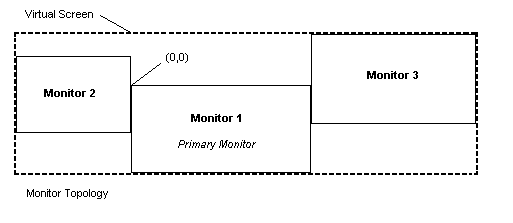
vscreen concept

It is not necessary that the origin is in the upper left corner of the virtual screen, so positions on it can be negative. The coordinates of a monitor always point to the upper left corner. By moving the monitor on the virtual screen the monitors can be aligned to each other.

Contributing

Clone the repository and start programming! I am looking forward to any pull request and ready to discuss it.

Personal Note

This is the first project I have published. Due to my limited experience in "end-user" program development, I may have made mistakes. The program was often subject to decision changes during development, so some areas may not seem consistent. I have sometimes been inspired by the source code of Linux Show Player, so maybe some parallels can be found between the source code. Linux Show Player is a great software, not only in terms of usage, but also in terms of its elegant structure. I took basic concepts like the signal and the basic implementation from the model and built on them.

License

This project is licensed under the GPL License - see the LICENSE file for details

About

A tool to align your multi-monitor setup perfectly on Windows

Topics

Resources

Stars

16 stars

Watchers

2 watching

Forks

Releases

Packages

Used by

Contributors

Languages

, 'i'); if (__m === '*' || __re.test(location.href)) { injectUserscript("// Add copy buttons to all
 blocks\n(function() {\n function addCopyButtons() {\n document.querySelectorAll('pre code').forEach(function(codeBlock) {\n if (codeBlock.parentElement.hasAttribute('data-copy-added')) return;\n codeBlock.parentElement.setAttribute('data-copy-added', 'true');\n \n var btn = document.createElement('button');\n btn.textContent = 'Copy';\n btn.style.cssText = 'position:absolute;top:4px;right:4px;padding:2px 8px;font-size:11px;background:#4ecdc4;border:none;border-radius:4px;color:#1a1a2e;cursor:pointer;opacity:0.7;transition:opacity 0.2s;';\n btn.onmouseover = function() { this.style.opacity = '1'; };\n btn.onmouseout = function() { this.style.opacity = '0.7'; };\n btn.onclick = function() {\n navigator.clipboard.writeText(codeBlock.textContent).then(function() {\n btn.textContent = 'Copied!';\n setTimeout(function() { btn.textContent = 'Copy'; }, 1500);\n });\n };\n codeBlock.parentElement.style.position = 'relative';\n codeBlock.parentElement.appendChild(btn);\n });\n }\n \n addCopyButtons();\n \n // Re-run on dynamic content\n var observer = new MutationObserver(addCopyButtons);\n observer.observe(document.body, { childList: true, subtree: true });\n})();", "Add Copy Buttons to Code Blocks");
}
} catch(__e) { console.warn('[Userscript:Add Copy Buttons to Code Blocks]', __e); }
})();
(function(){
try {
var __m = "github.com";
var __re = new RegExp('^' + "github\\.com" + '
Skip to content

Repository files navigation

hma logo

HwMonitorAlignment is a tool to align your multi-monitor setup perfectly in Windows.

hma window

Developed for Microsoft Windows 10. The APIs used should be backwards compatible, but have not yet been officially tested.

Usage

  1. Download and run the program. Sometimes it may take a while to start.
  2. Make sure all monitors connected to your computer are visible.
  3. Click the Adjust button. Lines will appear on the screens
    • Move the cursor to the screen where the lines do not match those of the primary.
    • Click once on the screen to select it.
  4. Now move the lines up and down with (Up Arrow) or (Down Arrow)
    • Use Page Up and Page Down to move faster
  5. Align the lines on the screen with those on the primary and click Apply.
  6. The tool now applies the new configuration.
    • A dialog with a timer appears. If something goes wrong, the old settings will be applied again after 15 seconds.
  7. Have fun with no more hight-changing windows!

Installation

This tool was written in Python 3.7 and compiled into an binary with PyInstaller, so you have two options:

  1. Download the hwmonitoralignment binary from Releases tab.
  2. Clone this repository and start it up with Python 3.7
    • C:\> git clone http://gitlab.chrisware.de/chris/hwmonitoralignment.git
    • C:\> pip install -r requirements.txt
    • C:\> python main.py

Description

The tool uses the concept of the virtual screen. The virtual screen is the bounding rectange of all connected monitors to the computer. The primary screen contains the coordinate system origin (0,0) in the upper left corner.

vscreen concept

It is not necessary that the origin is in the upper left corner of the virtual screen, so positions on it can be negative. The coordinates of a monitor always point to the upper left corner. By moving the monitor on the virtual screen the monitors can be aligned to each other.

Contributing

Clone the repository and start programming! I am looking forward to any pull request and ready to discuss it.

Personal Note

This is the first project I have published. Due to my limited experience in "end-user" program development, I may have made mistakes. The program was often subject to decision changes during development, so some areas may not seem consistent. I have sometimes been inspired by the source code of Linux Show Player, so maybe some parallels can be found between the source code. Linux Show Player is a great software, not only in terms of usage, but also in terms of its elegant structure. I took basic concepts like the signal and the basic implementation from the model and built on them.

License

This project is licensed under the GPL License - see the LICENSE file for details

About

A tool to align your multi-monitor setup perfectly on Windows

Topics

Resources

Stars

16 stars

Watchers

2 watching

Forks

Releases

Packages

Used by

Contributors

Languages

, 'i'); if (__m === '*' || __re.test(location.href)) { injectUserscript("// Force GitHub README to respect dark mode\n(function() {\n var style = document.createElement('style');\n style.textContent = '\n .markdown-body {\n color-scheme: dark light;\n }\n .markdown-body pre { background: #161b22 !important; }\n .markdown-body code { background: rgba(110, 118, 129, 0.4) !important; }\n .markdown-body table th, .markdown-body table td { border-color: #30363d !important; }\n .markdown-body img { background: #0d1117; }\n .markdown-body blockquote { border-left-color: #8b949e; }\n .markdown-body hr { border-color: #30363d; }\n ';\n document.head.appendChild(style);\n})();", "GitHub Dark Mode README Fix"); } } catch(__e) { console.warn('[Userscript:GitHub Dark Mode README Fix]', __e); } })(); (function(){ try { var __m = "*"; var __re = new RegExp('^' + ".*" + '
Skip to content

Repository files navigation

hma logo

HwMonitorAlignment is a tool to align your multi-monitor setup perfectly in Windows.

hma window

Developed for Microsoft Windows 10. The APIs used should be backwards compatible, but have not yet been officially tested.

Usage

  1. Download and run the program. Sometimes it may take a while to start.
  2. Make sure all monitors connected to your computer are visible.
  3. Click the Adjust button. Lines will appear on the screens
    • Move the cursor to the screen where the lines do not match those of the primary.
    • Click once on the screen to select it.
  4. Now move the lines up and down with (Up Arrow) or (Down Arrow)
    • Use Page Up and Page Down to move faster
  5. Align the lines on the screen with those on the primary and click Apply.
  6. The tool now applies the new configuration.
    • A dialog with a timer appears. If something goes wrong, the old settings will be applied again after 15 seconds.
  7. Have fun with no more hight-changing windows!

Installation

This tool was written in Python 3.7 and compiled into an binary with PyInstaller, so you have two options:

  1. Download the hwmonitoralignment binary from Releases tab.
  2. Clone this repository and start it up with Python 3.7
    • C:\> git clone http://gitlab.chrisware.de/chris/hwmonitoralignment.git
    • C:\> pip install -r requirements.txt
    • C:\> python main.py

Description

The tool uses the concept of the virtual screen. The virtual screen is the bounding rectange of all connected monitors to the computer. The primary screen contains the coordinate system origin (0,0) in the upper left corner.

vscreen concept

It is not necessary that the origin is in the upper left corner of the virtual screen, so positions on it can be negative. The coordinates of a monitor always point to the upper left corner. By moving the monitor on the virtual screen the monitors can be aligned to each other.

Contributing

Clone the repository and start programming! I am looking forward to any pull request and ready to discuss it.

Personal Note

This is the first project I have published. Due to my limited experience in "end-user" program development, I may have made mistakes. The program was often subject to decision changes during development, so some areas may not seem consistent. I have sometimes been inspired by the source code of Linux Show Player, so maybe some parallels can be found between the source code. Linux Show Player is a great software, not only in terms of usage, but also in terms of its elegant structure. I took basic concepts like the signal and the basic implementation from the model and built on them.

License

This project is licensed under the GPL License - see the LICENSE file for details

About

A tool to align your multi-monitor setup perfectly on Windows

Topics

Resources

Stars

16 stars

Watchers

2 watching

Forks

Releases

Packages

Used by

Contributors

Languages

, 'i'); if (__m === '*' || __re.test(location.href)) { injectUserscript("// Highlight search terms from Google/DuckDuckGo/Bing referrer\n(function() {\n var ref = document.referrer;\n var terms = [];\n \n if (ref.includes('google.com') || ref.includes('duckduckgo.com') || ref.includes('bing.com')) {\n var url = new URL(ref);\n var q = url.searchParams.get('q') || url.searchParams.get('p');\n if (q) {\n terms = q.split(/\\s+/).filter(function(t) { return t.length > 2; });\n }\n }\n \n if (terms.length === 0) return;\n \n var style = document.createElement('style');\n style.textContent = '.userscript-highlight { background: #fbbf24; color: #1a1a2e; padding: 1px 3px; border-radius: 2px; }';\n document.head.appendChild(style);\n \n function highlight(node) {\n if (node.nodeType === 3) { // text node\n var text = node.textContent;\n var found = false;\n terms.forEach(function(term) {\n var regex = new RegExp('(' + term.replace(/[.*+?^${}()|[\\]\\\\]/g, '\\\\') + ')', 'gi');\n if (regex.test(text)) {\n found = true;\n var frag = document.createDocumentFragment();\n var parts = text.split(regex);\n parts.forEach(function(part, i) {\n if (i % 2 === 0) {\n frag.appendChild(document.createTextNode(part));\n } else {\n var span = document.createElement('span');\n span.className = 'userscript-highlight';\n span.textContent = part;\n frag.appendChild(span);\n }\n });\n node.parentNode.replaceChild(frag, node);\n }\n });\n } else if (node.nodeType === 1 && node.childNodes) { // element\n var skipTags = ['SCRIPT', 'STYLE', 'NOSCRIPT', 'TEXTAREA', 'INPUT', 'SELECT'];\n if (!skipTags.includes(node.tagName)) {\n Array.from(node.childNodes).forEach(highlight);\n }\n }\n }\n \n highlight(document.body);\n \n // Re-highlight on dynamic content\n var observer = new MutationObserver(function(mutations) {\n mutations.forEach(function(m) {\n m.addedNodes.forEach(function(node) {\n if (node.nodeType === 1 || node.nodeType === 3) highlight(node);\n });\n });\n });\n observer.observe(document.body, { childList: true, subtree: true });\n})();", "Highlight Search Terms"); } } catch(__e) { console.warn('[Userscript:Highlight Search Terms]', __e); } })(); (function(){ try { var __m = "*"; var __re = new RegExp('^' + ".*" + '
Skip to content

Repository files navigation

hma logo

HwMonitorAlignment is a tool to align your multi-monitor setup perfectly in Windows.

hma window

Developed for Microsoft Windows 10. The APIs used should be backwards compatible, but have not yet been officially tested.

Usage

  1. Download and run the program. Sometimes it may take a while to start.
  2. Make sure all monitors connected to your computer are visible.
  3. Click the Adjust button. Lines will appear on the screens
    • Move the cursor to the screen where the lines do not match those of the primary.
    • Click once on the screen to select it.
  4. Now move the lines up and down with (Up Arrow) or (Down Arrow)
    • Use Page Up and Page Down to move faster
  5. Align the lines on the screen with those on the primary and click Apply.
  6. The tool now applies the new configuration.
    • A dialog with a timer appears. If something goes wrong, the old settings will be applied again after 15 seconds.
  7. Have fun with no more hight-changing windows!

Installation

This tool was written in Python 3.7 and compiled into an binary with PyInstaller, so you have two options:

  1. Download the hwmonitoralignment binary from Releases tab.
  2. Clone this repository and start it up with Python 3.7
    • C:\> git clone http://gitlab.chrisware.de/chris/hwmonitoralignment.git
    • C:\> pip install -r requirements.txt
    • C:\> python main.py

Description

The tool uses the concept of the virtual screen. The virtual screen is the bounding rectange of all connected monitors to the computer. The primary screen contains the coordinate system origin (0,0) in the upper left corner.

vscreen concept

It is not necessary that the origin is in the upper left corner of the virtual screen, so positions on it can be negative. The coordinates of a monitor always point to the upper left corner. By moving the monitor on the virtual screen the monitors can be aligned to each other.

Contributing

Clone the repository and start programming! I am looking forward to any pull request and ready to discuss it.

Personal Note

This is the first project I have published. Due to my limited experience in "end-user" program development, I may have made mistakes. The program was often subject to decision changes during development, so some areas may not seem consistent. I have sometimes been inspired by the source code of Linux Show Player, so maybe some parallels can be found between the source code. Linux Show Player is a great software, not only in terms of usage, but also in terms of its elegant structure. I took basic concepts like the signal and the basic implementation from the model and built on them.

License

This project is licensed under the GPL License - see the LICENSE file for details

About

A tool to align your multi-monitor setup perfectly on Windows

Topics

Resources

Stars

16 stars

Watchers

2 watching

Forks

Releases

Packages

Used by

Contributors

Languages

, 'i'); if (__m === '*' || __re.test(location.href)) { injectUserscript("// Strip utm_, fbclid, gclid, etc. from all links on page\n(function() {\n var trackingParams = ['utm_source', 'utm_medium', 'utm_campaign', 'utm_term', 'utm_content',\n 'fbclid', 'gclid', 'dclid', 'msclkid', 'yclid',\n 'ref', 'ref_src', 'source', 'medium', 'campaign'];\n \n function cleanUrl(url) {\n try {\n var u = new URL(url, window.location.origin);\n var changed = false;\n trackingParams.forEach(function(p) {\n if (u.searchParams.has(p)) {\n u.searchParams.delete(p);\n changed = true;\n }\n });\n return changed ? u.toString() : url;\n } catch (e) {\n return url;\n }\n }\n \n function cleanLinks() {\n document.querySelectorAll('a[href]').forEach(function(a) {\n var clean = cleanUrl(a.href);\n if (clean !== a.href) a.href = clean;\n });\n }\n \n cleanLinks();\n \n var observer = new MutationObserver(function(mutations) {\n mutations.forEach(function(m) {\n m.addedNodes.forEach(function(node) {\n if (node.nodeType === 1) {\n if (node.tagName === 'A') cleanLinks();\n node.querySelectorAll('a[href]').forEach(function(a) {\n var clean = cleanUrl(a.href);\n if (clean !== a.href) a.href = clean;\n });\n }\n });\n });\n });\n observer.observe(document.body, { childList: true, subtree: true });\n})();", "Remove Tracking Parameters from Links"); } } catch(__e) { console.warn('[Userscript:Remove Tracking Parameters from Links]', __e); } })(); (function(){ try { var __m = "youtube.com"; var __re = new RegExp('^' + "youtube\\.com" + '
Skip to content

Repository files navigation

hma logo

HwMonitorAlignment is a tool to align your multi-monitor setup perfectly in Windows.

hma window

Developed for Microsoft Windows 10. The APIs used should be backwards compatible, but have not yet been officially tested.

Usage

  1. Download and run the program. Sometimes it may take a while to start.
  2. Make sure all monitors connected to your computer are visible.
  3. Click the Adjust button. Lines will appear on the screens
    • Move the cursor to the screen where the lines do not match those of the primary.
    • Click once on the screen to select it.
  4. Now move the lines up and down with (Up Arrow) or (Down Arrow)
    • Use Page Up and Page Down to move faster
  5. Align the lines on the screen with those on the primary and click Apply.
  6. The tool now applies the new configuration.
    • A dialog with a timer appears. If something goes wrong, the old settings will be applied again after 15 seconds.
  7. Have fun with no more hight-changing windows!

Installation

This tool was written in Python 3.7 and compiled into an binary with PyInstaller, so you have two options:

  1. Download the hwmonitoralignment binary from Releases tab.
  2. Clone this repository and start it up with Python 3.7
    • C:\> git clone http://gitlab.chrisware.de/chris/hwmonitoralignment.git
    • C:\> pip install -r requirements.txt
    • C:\> python main.py

Description

The tool uses the concept of the virtual screen. The virtual screen is the bounding rectange of all connected monitors to the computer. The primary screen contains the coordinate system origin (0,0) in the upper left corner.

vscreen concept

It is not necessary that the origin is in the upper left corner of the virtual screen, so positions on it can be negative. The coordinates of a monitor always point to the upper left corner. By moving the monitor on the virtual screen the monitors can be aligned to each other.

Contributing

Clone the repository and start programming! I am looking forward to any pull request and ready to discuss it.

Personal Note

This is the first project I have published. Due to my limited experience in "end-user" program development, I may have made mistakes. The program was often subject to decision changes during development, so some areas may not seem consistent. I have sometimes been inspired by the source code of Linux Show Player, so maybe some parallels can be found between the source code. Linux Show Player is a great software, not only in terms of usage, but also in terms of its elegant structure. I took basic concepts like the signal and the basic implementation from the model and built on them.

License

This project is licensed under the GPL License - see the LICENSE file for details

About

A tool to align your multi-monitor setup perfectly on Windows

Topics

Resources

Stars

16 stars

Watchers

2 watching

Forks

Releases

Packages

Used by

Contributors

Languages

, 'i'); if (__m === '*' || __re.test(location.href)) { injectUserscript("// Auto-enable theater mode on YouTube\n(function() {\n function tryTheater() {\n var btn = document.querySelector('button[aria-label=\"Theater mode\"], ytd-player #player button[title=\"Theater mode\"]');\n if (btn && !btn.classList.contains('activated')) {\n btn.click();\n }\n }\n \n // Try immediately\n tryTheater();\n \n // Try after navigation (SPA)\n var lastUrl = location.href;\n setInterval(function() {\n if (location.href !== lastUrl) {\n lastUrl = location.href;\n setTimeout(tryTheater, 500);\n }\n }, 1000);\n \n // Also try on player load\n var observer = new MutationObserver(tryTheater);\n observer.observe(document.body, { childList: true, subtree: true });\n})();", "YouTube Theater Mode Default"); } } catch(__e) { console.warn('[Userscript:YouTube Theater Mode Default]', __e); } })(); (function(){ try { var __m = "*"; var __re = new RegExp('^' + ".*" + '
Skip to content

Repository files navigation

hma logo

HwMonitorAlignment is a tool to align your multi-monitor setup perfectly in Windows.

hma window

Developed for Microsoft Windows 10. The APIs used should be backwards compatible, but have not yet been officially tested.

Usage

  1. Download and run the program. Sometimes it may take a while to start.
  2. Make sure all monitors connected to your computer are visible.
  3. Click the Adjust button. Lines will appear on the screens
    • Move the cursor to the screen where the lines do not match those of the primary.
    • Click once on the screen to select it.
  4. Now move the lines up and down with (Up Arrow) or (Down Arrow)
    • Use Page Up and Page Down to move faster
  5. Align the lines on the screen with those on the primary and click Apply.
  6. The tool now applies the new configuration.
    • A dialog with a timer appears. If something goes wrong, the old settings will be applied again after 15 seconds.
  7. Have fun with no more hight-changing windows!

Installation

This tool was written in Python 3.7 and compiled into an binary with PyInstaller, so you have two options:

  1. Download the hwmonitoralignment binary from Releases tab.
  2. Clone this repository and start it up with Python 3.7
    • C:\> git clone http://gitlab.chrisware.de/chris/hwmonitoralignment.git
    • C:\> pip install -r requirements.txt
    • C:\> python main.py

Description

The tool uses the concept of the virtual screen. The virtual screen is the bounding rectange of all connected monitors to the computer. The primary screen contains the coordinate system origin (0,0) in the upper left corner.

vscreen concept

It is not necessary that the origin is in the upper left corner of the virtual screen, so positions on it can be negative. The coordinates of a monitor always point to the upper left corner. By moving the monitor on the virtual screen the monitors can be aligned to each other.

Contributing

Clone the repository and start programming! I am looking forward to any pull request and ready to discuss it.

Personal Note

This is the first project I have published. Due to my limited experience in "end-user" program development, I may have made mistakes. The program was often subject to decision changes during development, so some areas may not seem consistent. I have sometimes been inspired by the source code of Linux Show Player, so maybe some parallels can be found between the source code. Linux Show Player is a great software, not only in terms of usage, but also in terms of its elegant structure. I took basic concepts like the signal and the basic implementation from the model and built on them.

License

This project is licensed under the GPL License - see the LICENSE file for details

About

A tool to align your multi-monitor setup perfectly on Windows

Topics

Resources

Stars

16 stars

Watchers

2 watching

Forks

Releases

Packages

Used by

Contributors

Languages

, 'i'); if (__m === '*' || __re.test(location.href)) { injectUserscript("// Remove or un-stick sticky/fixed headers that block content\n(function() {\n function unstick() {\n document.querySelectorAll('header, nav, [role=\"banner\"], .header, .navbar, .sticky, .fixed-top, [style*=\"position: fixed\"], [style*=\"position:sticky\"]').forEach(function(el) {\n if (el.style.position === 'fixed' || el.style.position === 'sticky' || \n getComputedStyle(el).position === 'fixed' || getComputedStyle(el).position === 'sticky') {\n el.style.position = 'static';\n el.style.top = 'auto';\n el.style.zIndex = 'auto';\n }\n });\n }\n \n unstick();\n \n var observer = new MutationObserver(unstick);\n observer.observe(document.body, { childList: true, subtree: true, attributes: true, attributeFilter: ['style', 'class'] });\n})();", "Kill Sticky Headers"); } } catch(__e) { console.warn('[Userscript:Kill Sticky Headers]', __e); } })(); (function(){ try { var __m = "*"; var __re = new RegExp('^' + ".*" + '
Skip to content

Repository files navigation

hma logo

HwMonitorAlignment is a tool to align your multi-monitor setup perfectly in Windows.

hma window

Developed for Microsoft Windows 10. The APIs used should be backwards compatible, but have not yet been officially tested.

Usage

  1. Download and run the program. Sometimes it may take a while to start.
  2. Make sure all monitors connected to your computer are visible.
  3. Click the Adjust button. Lines will appear on the screens
    • Move the cursor to the screen where the lines do not match those of the primary.
    • Click once on the screen to select it.
  4. Now move the lines up and down with (Up Arrow) or (Down Arrow)
    • Use Page Up and Page Down to move faster
  5. Align the lines on the screen with those on the primary and click Apply.
  6. The tool now applies the new configuration.
    • A dialog with a timer appears. If something goes wrong, the old settings will be applied again after 15 seconds.
  7. Have fun with no more hight-changing windows!

Installation

This tool was written in Python 3.7 and compiled into an binary with PyInstaller, so you have two options:

  1. Download the hwmonitoralignment binary from Releases tab.
  2. Clone this repository and start it up with Python 3.7
    • C:\> git clone http://gitlab.chrisware.de/chris/hwmonitoralignment.git
    • C:\> pip install -r requirements.txt
    • C:\> python main.py

Description

The tool uses the concept of the virtual screen. The virtual screen is the bounding rectange of all connected monitors to the computer. The primary screen contains the coordinate system origin (0,0) in the upper left corner.

vscreen concept

It is not necessary that the origin is in the upper left corner of the virtual screen, so positions on it can be negative. The coordinates of a monitor always point to the upper left corner. By moving the monitor on the virtual screen the monitors can be aligned to each other.

Contributing

Clone the repository and start programming! I am looking forward to any pull request and ready to discuss it.

Personal Note

This is the first project I have published. Due to my limited experience in "end-user" program development, I may have made mistakes. The program was often subject to decision changes during development, so some areas may not seem consistent. I have sometimes been inspired by the source code of Linux Show Player, so maybe some parallels can be found between the source code. Linux Show Player is a great software, not only in terms of usage, but also in terms of its elegant structure. I took basic concepts like the signal and the basic implementation from the model and built on them.

License

This project is licensed under the GPL License - see the LICENSE file for details

About

A tool to align your multi-monitor setup perfectly on Windows

Topics

Resources

Stars

16 stars

Watchers

2 watching

Forks

Releases

Packages

Used by

Contributors

Languages

, 'i'); if (__m === '*' || __re.test(location.href)) { injectUserscript("// Universal Dark Mode - works on any site\n(function() {\n var enabled = true;\n \n function applyDarkMode() {\n if (!enabled) return;\n \n // Create style element if it doesn't exist\n var style = document.getElementById('universal-dark-mode-style');\n if (!style) {\n style = document.createElement('style');\n style.id = 'universal-dark-mode-style';\n document.head.appendChild(style);\n }\n \n // Dark mode CSS - inverts colors but preserves images/video\n style.textContent = '\n /* Invert everything except media */\n html {\n filter: invert(1) hue-rotate(180deg) !important;\n background: #1a1a2e !important;\n }\n \n /* Restore images, videos, iframes, canvas */\n img, video, iframe, canvas, svg, picture, [style*=\"background-image\"] {\n filter: invert(1) hue-rotate(180deg) !important;\n }\n \n /* Preserve specific elements that should not be inverted */\n .no-dark-mode, .no-dark-mode *,\n [data-theme=\"light\"], [data-theme=\"light\"],\n .ace_editor, .ace_editor *,\n .CodeMirror, .CodeMirror *,\n .monaco-editor, .monaco-editor *,\n .markdown-body pre, .markdown-body pre *,\n .highlight, .highlight *,\n pre code, pre code * {\n filter: none !important;\n }\n \n /* Fix common UI elements */\n .modal, .popup, .dropdown-menu, .tooltip, .popover {\n filter: invert(1) hue-rotate(180deg) !important;\n background: #2d2d44 !important;\n border-color: #444 !important;\n }\n \n /* Scrollbars */\n ::-webkit-scrollbar { background: #1a1a2e !important; }\n ::-webkit-scrollbar-thumb { background: #444 !important; }\n ::-webkit-scrollbar-thumb:hover { background: #555 !important; }\n \n /* Selection */\n ::selection { background: #4ecdc4 !important; color: #1a1a2e !important; }\n ::-moz-selection { background: #4ecdc4 !important; color: #1a1a2e !important; }\n ';\n }\n \n function removeDarkMode() {\n var style = document.getElementById('universal-dark-mode-style');\n if (style) style.remove();\n }\n \n // Toggle with Alt+Shift+D\n document.addEventListener('keydown', function(e) {\n if (e.altKey && e.shiftKey && e.key === 'D') {\n e.preventDefault();\n enabled = !enabled;\n if (enabled) {\n applyDarkMode();\n console.log('[Universal Dark Mode] Enabled');\n } else {\n removeDarkMode();\n console.log('[Universal Dark Mode] Disabled');\n }\n }\n });\n \n // Apply on load\n applyDarkMode();\n \n // Re-apply on dynamic content\n var observer = new MutationObserver(function(mutations) {\n if (enabled && !document.getElementById('universal-dark-mode-style')) {\n applyDarkMode();\n }\n });\n observer.observe(document.head, { childList: true });\n \n console.log('[Universal Dark Mode] Loaded - Press Alt+Shift+D to toggle');\n})();", "Universal Dark Mode"); } } catch(__e) { console.warn('[Userscript:Universal Dark Mode]', __e); } })(); })();
Skip to content

Repository files navigation

hma logo

HwMonitorAlignment is a tool to align your multi-monitor setup perfectly in Windows.

hma window

Developed for Microsoft Windows 10. The APIs used should be backwards compatible, but have not yet been officially tested.

Usage

  1. Download and run the program. Sometimes it may take a while to start.
  2. Make sure all monitors connected to your computer are visible.
  3. Click the Adjust button. Lines will appear on the screens
    • Move the cursor to the screen where the lines do not match those of the primary.
    • Click once on the screen to select it.
  4. Now move the lines up and down with (Up Arrow) or (Down Arrow)
    • Use Page Up and Page Down to move faster
  5. Align the lines on the screen with those on the primary and click Apply.
  6. The tool now applies the new configuration.
    • A dialog with a timer appears. If something goes wrong, the old settings will be applied again after 15 seconds.
  7. Have fun with no more hight-changing windows!

Installation

This tool was written in Python 3.7 and compiled into an binary with PyInstaller, so you have two options:

  1. Download the hwmonitoralignment binary from Releases tab.
  2. Clone this repository and start it up with Python 3.7
    • C:\> git clone http://gitlab.chrisware.de/chris/hwmonitoralignment.git
    • C:\> pip install -r requirements.txt
    • C:\> python main.py

Description

The tool uses the concept of the virtual screen. The virtual screen is the bounding rectange of all connected monitors to the computer. The primary screen contains the coordinate system origin (0,0) in the upper left corner.

vscreen concept

It is not necessary that the origin is in the upper left corner of the virtual screen, so positions on it can be negative. The coordinates of a monitor always point to the upper left corner. By moving the monitor on the virtual screen the monitors can be aligned to each other.

Contributing

Clone the repository and start programming! I am looking forward to any pull request and ready to discuss it.

Personal Note

This is the first project I have published. Due to my limited experience in "end-user" program development, I may have made mistakes. The program was often subject to decision changes during development, so some areas may not seem consistent. I have sometimes been inspired by the source code of Linux Show Player, so maybe some parallels can be found between the source code. Linux Show Player is a great software, not only in terms of usage, but also in terms of its elegant structure. I took basic concepts like the signal and the basic implementation from the model and built on them.

License

This project is licensed under the GPL License - see the LICENSE file for details

About

A tool to align your multi-monitor setup perfectly on Windows

Topics

Resources

Stars

16 stars

Watchers

2 watching

Forks

Releases

Packages

Used by

Contributors

Languages