
We are using Jupyter Notebooks to make this tutorial. For those who don't know about Jupyter Notebooks, go here. Below is a sample, about how notebooks work.
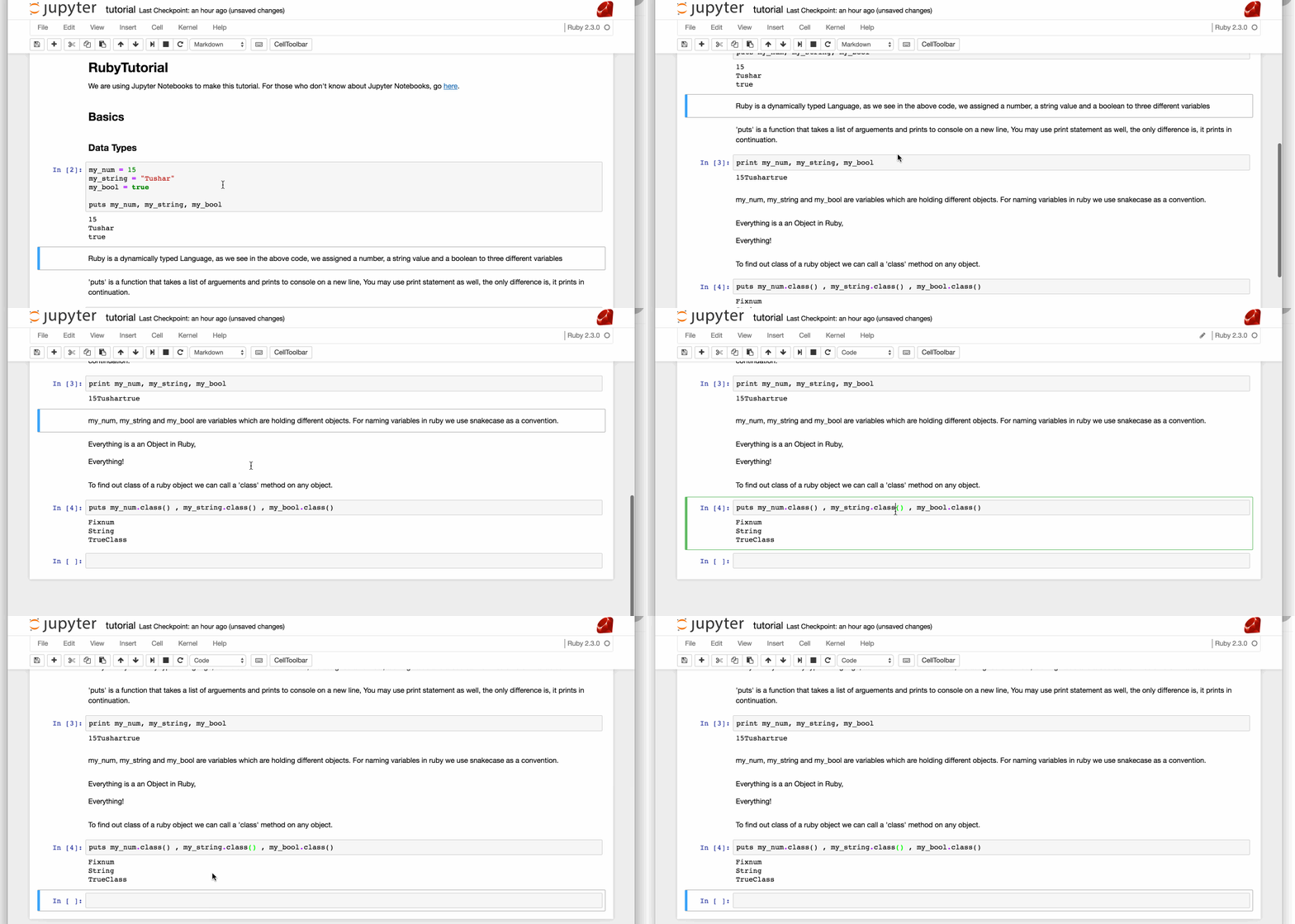
my_num=15my_string="Tushar"my_bool=truemy_own_string="tuteja"putsmy_num,my_string,my_boolputsmy_own_string15
Tushar
true
tuteja
Ruby is a dynamically typed Language, as we see in the above code, we assigned a number, a string value and a boolean to three different variables
'puts' is a function that takes a list of arguements and prints to console on a new line, You may use print statement as well, the only difference is, it prints in continuation.
printmy_num,my_string,my_bool15Tushartrue
my_num, my_string and my_bool are variables which are holding different objects. For naming variables in ruby we use snakecase as a convention.
Everything is a an Object in Ruby,
Everything!
To find out class of a ruby object we can call a 'class' method on any object.
putsmy_num.class(),my_string.class(),my_bool.class()Fixnum
String
TrueClass
Basic Arithmetic operators are '+','-','*','/' and '%'.
five=5two=2seven=5 + 27
ten=five * two10
one=five % two1
two=five / two2
three=five - two3
my_string="Programming in Ruby Is Fun.""Programming in Ruby Is Fun."
my_string.length()27
my_string.reverse()".nuF sI ybuR ni gnimmargorP"
putsmy_stringProgramming in Ruby Is Fun.
my_string.reverse!()".nuF sI ybuR ni gnimmargorP"
putsmy_string.nuF sI ybuR ni gnimmargorP
my_string="Programming in Ruby Is Fun."my_string.split(" ")["Programming", "in", "Ruby", "Is", "Fun."]
words=my_string.split(" ")putswords#Gives an array, we'll come to it["Programming", "in", "Ruby", "Is", "Fun."]
word="Programming""Programming"
word.downcase()#Get a word with lower case letters"programming"
word.upcase()# get a word with upper case letters"PROGRAMMING"
#This is a single line commentputs"comment"#this can come at the end of any expression=beginThis is a multiline comment.=begin should start at the first character of the line to be it a comment, other wise it wont work=endcomment
For methods and variables we follow snake case like example_variable, example_function. For Classes we follow upper case letters, MyOwnClass. For functions which are risky to use, like reverse!, we add exclamation mark at the end.
my_string="tushar tuteja""tushar tuteja"
my_string.reverse().upcase()# You can chain function calls one after the other"AJETUT RAHSUT"
my_name="Tushar Tuteja"my_city="Delhi"puts"Hi, I am #{my_name}, I belong to #{my_city}."#way to format complex strings.Hi, I am Tushar Tuteja, I belong to Delhi.
iftrueputs"true"elseputs"false"endtrue
false == "false"# this is falsefalse
false == nil# this is falsefalse
my_object=nilmy_object == niltrue
my_object.nil?# this is the way to check niltrue
Ruby has infinite true expressions, only two false expressions, one is false and the other is nil. So 0 would evaluate to true, this is different form C and C++ language.
ifmy_objectputs"true"elseputs"nil or false"endnil or false
my_object=0ifmy_objectputs"this evaluates to true"elseputs"should have been false if we were coding in C."endthis evaluates to true
first_condition=falsesecond_condition=trueiffirst_conditionputs"first condition is true"elsifsecond_conditionputs"second condition is true"elsif0 > 3puts"won't happen"endsecond condition is true
hungry=truetrue
if not hungryputs"keep working"elseputs"eat"endeat
Ruby gives us more than if else, it gives us unless else, which is more verbose than if not. Example
unlesshungryputs"keep working"elseputs"Eat"endEat
5 == '5'false
5*4 == 4*5true
4 < 7true
8 > 9false
"tushar" > "tuteja"false
5 >= 5true
4 != 5true
!truefalse
work_done=trueifwork_done || hungryputs"eat"elseputs"work"endeat
putsfalse || trueputstrue || falseputstrue && trueputstrue && falseputsfalse || falsetrue
true
true
false
false
if not falseputs"it is true"elseputs"it is false"endit is true
i=0whilei < 5puts"ruby is fun"i=i + 1endruby is fun
ruby is fun
ruby is fun
ruby is fun
ruby is fun
i=5whilei != 0puts"ruby is more verbose"i=i - 1endruby is more verbose
ruby is more verbose
ruby is more verbose
ruby is more verbose
ruby is more verbose
i=5untili == 0puts"ruby is more verbose"i=i - 1endruby is more verbose
ruby is more verbose
ruby is more verbose
ruby is more verbose
ruby is more verbose
foriin1..5puts"ruby has many ways to do the same thing."endruby has many ways to do the same thing.
ruby has many ways to do the same thing.
ruby has many ways to do the same thing.
ruby has many ways to do the same thing.
ruby has many ways to do the same thing.
1..5
foriin1...5puts"..(two dots) inclues 1 and 5 both, where as ...(three dots) doesn't include 5"end..(two dots) inclues 1 and 5 both, where as ...(three dots) doesn't include 5
..(two dots) inclues 1 and 5 both, where as ...(three dots) doesn't include 5
..(two dots) inclues 1 and 5 both, where as ...(three dots) doesn't include 5
..(two dots) inclues 1 and 5 both, where as ...(three dots) doesn't include 5
1...5
5.timesdoputs"this needs to be done 5 times"endthis needs to be done 5 times
this needs to be done 5 times
this needs to be done 5 times
this needs to be done 5 times
this needs to be done 5 times
5
my_string="Ruby is made for productivity."words=my_string.split(" ")words.eachdo |word| #would discuss more of this in arrays and hashesputsword.capitalize# This would capitalize every wordendRuby
Is
Made
For
Productivity.
["Ruby", "is", "made", "for", "productivity."]
a=[]# this creates an empty array[]
Arrays are lists in ruby, means they doesn't need to be homegenous.
a=["tushar",5,[4,5,6]]["tushar", 5, [4, 5, 6]]
Arrays are continuous data structures
a=[]a[45]=5putsa[nil, nil, nil, nil, nil, nil, nil, nil, nil, nil, nil, nil, nil, nil, nil, nil, nil, nil, nil, nil, nil, nil, nil, nil, nil, nil, nil, nil, nil, nil, nil, nil, nil, nil, nil, nil, nil, nil, nil, nil, nil, nil, nil, nil, nil, 5]
a[45] = 0, created 45 empty spaces and then added 5 at 45th index. Indexing starts from zero.
putsa[45]5
putsa[0]# Would print nothingputsa.length46
Sets are used to keep unique elements, no duplicates are allowed.
my_set=Set.new()# New Empty Setmy_set.add(1)# Add one Elementmy_set.eachdo |v|
putsvendmy_set.add([1,2,3,4,5])# adding [1,2,3,4,5] as a single elementmy_set.eachdo |v|
putsvend
1
1
[1, 2, 3, 4, 5]
#<Set: {1, [1, 2, 3, 4, 5]}>
a=[1,2,3,4,5,1,2,3,4,5]my_set=a.to_set# Easy way to create a set from arrayputsmy_set.size5
my_set=Set.new([1,2,3,1,2,3])# Easy way to create a set while initializing#<Set: {1, 2, 3}>
Hashes are smilar to javascript dictionaries, the only difference is that they are ordered.
my_hash={}# creates a new Hash{}
my_hash=Hash.new# creates a new Hash{}
my_hash={:name=>"Tushar",:city=>"Delhi"}# Creates a hash {:name=>"Tushar", :city=>"Delhi"}
my_hash[:name]# to access :name from my_hash"Tushar"
:name and :city are actually symbols. they are used for faster accessing, we may use strings as well.
my_hash={"name"=>"tushar"}{"name"=>"tushar"}
putsmy_hash["name"]putsmy_hash[:name]# This won't work, you need to remember that strings and symbols are differenttushar
my_hash={:name=>"Tushar",:city=>"Delhi",:age=>25}{:name=>"Tushar", :city=>"Delhi", :age=>25}
my_hash.eachdo |key| # iterating over the keysputskeyend[:name, "Tushar"]
[:city, "Delhi"]
[:age, 25]
{:name=>"Tushar", :city=>"Delhi", :age=>25}
If you look at the above code, the keys are ordered.
my_hash.eachdo |key,value|
puts"#{key} : #{value}"end
name : Tushar
city : Delhi
age : 25
{:name=>"Tushar", :city=>"Delhi", :age=>25}
defmy_methodputs"hello method"end:my_method
my_method()hello method
my_method# parenthesis are optional in ruby, it makes the code more verbose hello method
defis_oddnumber# parenthesis are optionalreturnnumber % 2 == 1endis_odd1# parenthesis are optionaltrue
defis_evennumbernumber % 2 == 0#last expression in every function is a return statement by default.end:is_even
is_even2true
defjoin_wordswords_arrayresult=""words_array.eachdo |word|
result=result + word + " "# String concatenationendresultendputsjoin_words["Ruby","is","flexible"]
Ruby is flexible What is you want to pass a variable number of arguments and you don't want to pass an array.
Voila, we have *args arguement.
defjoin_words *argsresult=""args.eachdo |word|
result=result + word + " "# String concatenationendresultendputsjoin_words"Ruby","is","flexible"# This code is more verboseputsjoin_words"Ruby","is","flexible",",","This","code","is","more","verbose"
Ruby is flexible Ruby is flexible , This code is more verbose classMyClass# Defines a new Classendmy_class=MyClass.new# Creates a new instance of MyClass Object#<MyClass:0x007fde14956ec0>
By default every class Inherits from Object class. When We Called MyClass.new , we called a constructor of Object class.
classMyClassdefinitialize#Constructor methodputs"Constructor of MyClass is called"endend:initialize
my_class=MyClass.newConstructor of MyClass is called
#<MyClass:0x007fde13b31778>
Classes contain methods and variables. By Default Methods are of two types
- Instance Methods, that belongs to one instance of a class
- class methods, that belongs to one class. Visibility of Methods is of three types
- private
- protected
- public, by default every method is public.
Variables could be of three types
- Local Variable in a function
- Instance variables
- Class variables
We'll discuss all of above in the following section
classPersondefinitialize(name,age)@name=name# this is how we declare instance variable, by having @ at the start@age=age# same with ageendend:initialize
person=Person.new("Tushar",25)#<Person:0x007fde140fa1f0 @name="Tushar", @age=25>
person.public_methods[:name, :name=, :details, :is_adult, :instance_of?, :public_send, :instance_variable_get, :instance_variable_set, :instance_variable_defined?, :remove_instance_variable, :private_methods, :kind_of?, :instance_variables, :tap, :is_a?, :extend, :define_singleton_method, :to_enum, :enum_for, :<=>, :===, :=~, :!~, :eql?, :respond_to?, :freeze, :inspect, :display, :send, :object_id, :to_s, :method, :public_method, :singleton_method, :nil?, :hash, :class, :singleton_class, :clone, :dup, :itself, :taint, :tainted?, :untaint, :untrust, :trust, :untrusted?, :methods, :protected_methods, :frozen?, :public_methods, :singleton_methods, :!, :==, :!=, :__send__, :equal?, :instance_eval, :instance_exec, :__id__]
We didn't define public_methods function, but it was called and it gave us some results. This is method that every object inherits from Object class.
public_method functions gives us all the functions that could be called on that Object. In total Object class gives us 56 methods, which is a good thing and a bad thing. Bad thing as in now we have 56 names where our own name can collide. example, if we were to make SMS class, we would have send method, that would override the send method from Object class.
Lets add some more functionality to our Person class
classPersondefinitialize(name,age)@name=name# this is how we declare instance variable, by having @ at the start@age=age# same with ageenddefdetails# By default this method would be public"Name: #{@name}"endend:details
person=Person.new("Tushar",25)#<Person:0x007fde132cba20 @name="Tushar", @age=25>
person.details"Name: Tushar"
Every Instance variable in any object is a private variable. You need to write getter methods for them. I can not access name and age directly from the person Object. So lets add those methods. This is a good news, as we don't want to reveal the age of the person, but we should have a way to check if the person is adult or not.
classPersondefinitialize(name,age)@name=name# this is how we declare instance variable, by having @ at the start@age=age# same with ageenddefdetails# By default this method would be public"Name: #{@name}"enddefname@nameenddefis_adult@age > 18endend:is_adult
person=Person.new("Tushar",25)putsperson.name,person.is_adultTushar
true
We cannot change name or age once set, what if we want to change them, we need to add a setter method. Which is done in ruby as follows.
classPersondefinitialize(name,age)@name=name# this is how we declare instance variable, by having @ at the start@age=age# same with ageenddefdetails# By default this method would be public"Name: #{@name}"enddefname@nameenddefname=name# we are defining a special method, with '=' in the signature@name=nameenddefis_adult@age > 18endend:is_adult
person=Person.new("Tushar",25)putsperson.nameperson.name="Tuteja"putsperson.nameTushar
Tuteja
classPersondefinitialize(name,age)@name=name# this is how we declare instance variable, by having @ at the start@age=age# same with ageenddefdetails# By default this method would be public"Name: #{@name}"enddefname@nameenddefname=name# we are defining a special method, with '=' in the signature@name=nameenddefis_adult@age > 18endprivate# special keyword in ruby, after this everything we write would be privatedeffull_details# A private functionreturn@name,@age# Yes you can return more than one value, that would be returned as an arrayendend:full_details
person=Person.new("Tushar",25)person.full_details# Would throw an errorNoMethodError: private method `full_details' called for #<Person:0x007fde131fbcf8 @name="Tushar", @age=25>
<main>:1:in `<main>'
/Users/tushartuteja/.rvm/gems/ruby-2.3.0/gems/iruby-0.2.9/lib/iruby/backend.rb:44:in `eval'
/Users/tushartuteja/.rvm/gems/ruby-2.3.0/gems/iruby-0.2.9/lib/iruby/backend.rb:44:in `eval'
/Users/tushartuteja/.rvm/gems/ruby-2.3.0/gems/iruby-0.2.9/lib/iruby/backend.rb:12:in `eval'
/Users/tushartuteja/.rvm/gems/ruby-2.3.0/gems/iruby-0.2.9/lib/iruby/kernel.rb:87:in `execute_request'
/Users/tushartuteja/.rvm/gems/ruby-2.3.0/gems/iruby-0.2.9/lib/iruby/kernel.rb:47:in `dispatch'
/Users/tushartuteja/.rvm/gems/ruby-2.3.0/gems/iruby-0.2.9/lib/iruby/kernel.rb:37:in `run'
/Users/tushartuteja/.rvm/gems/ruby-2.3.0/gems/iruby-0.2.9/lib/iruby/command.rb:70:in `run_kernel'
/Users/tushartuteja/.rvm/gems/ruby-2.3.0/gems/iruby-0.2.9/lib/iruby/command.rb:34:in `run'
/Users/tushartuteja/.rvm/gems/ruby-2.3.0/gems/iruby-0.2.9/bin/iruby:5:in `<top (required)>'
/Users/tushartuteja/.rvm/gems/ruby-2.3.0/bin/iruby:22:in `load'
/Users/tushartuteja/.rvm/gems/ruby-2.3.0/bin/iruby:22:in `<main>'
/Users/tushartuteja/.rvm/gems/ruby-2.3.0/bin/ruby_executable_hooks:15:in `eval'
/Users/tushartuteja/.rvm/gems/ruby-2.3.0/bin/ruby_executable_hooks:15:in `<main>'
classRichPerson < Person# RichPerson Inherits from Persondefprint_detailsputsfull_details# RichPerson Objects are able to call private functions of their parent classes,endend:print_details
rich_person=RichPerson.new("Tushar",25)ArgumentError: wrong number of arguments (given 2, expected 4)
<main>:5:in `initialize'
<main>:in `new'
<main>:in `<main>'
/Users/tushartuteja/.rvm/gems/ruby-2.3.0/gems/iruby-0.2.9/lib/iruby/backend.rb:44:in `eval'
/Users/tushartuteja/.rvm/gems/ruby-2.3.0/gems/iruby-0.2.9/lib/iruby/backend.rb:44:in `eval'
/Users/tushartuteja/.rvm/gems/ruby-2.3.0/gems/iruby-0.2.9/lib/iruby/backend.rb:12:in `eval'
/Users/tushartuteja/.rvm/gems/ruby-2.3.0/gems/iruby-0.2.9/lib/iruby/kernel.rb:87:in `execute_request'
/Users/tushartuteja/.rvm/gems/ruby-2.3.0/gems/iruby-0.2.9/lib/iruby/kernel.rb:47:in `dispatch'
/Users/tushartuteja/.rvm/gems/ruby-2.3.0/gems/iruby-0.2.9/lib/iruby/kernel.rb:37:in `run'
/Users/tushartuteja/.rvm/gems/ruby-2.3.0/gems/iruby-0.2.9/lib/iruby/command.rb:70:in `run_kernel'
/Users/tushartuteja/.rvm/gems/ruby-2.3.0/gems/iruby-0.2.9/lib/iruby/command.rb:34:in `run'
/Users/tushartuteja/.rvm/gems/ruby-2.3.0/gems/iruby-0.2.9/bin/iruby:5:in `<top (required)>'
/Users/tushartuteja/.rvm/gems/ruby-2.3.0/bin/iruby:22:in `load'
/Users/tushartuteja/.rvm/gems/ruby-2.3.0/bin/iruby:22:in `<main>'
/Users/tushartuteja/.rvm/gems/ruby-2.3.0/bin/ruby_executable_hooks:15:in `eval'
/Users/tushartuteja/.rvm/gems/ruby-2.3.0/bin/ruby_executable_hooks:15:in `<main>'
rich_person.print_details["Tuteja", 25]
Child Class Objects can Call any private function of parent class.
lets add some more functionality, lets suppose we want to add money in RichPerson class
classRichPerson < Person# RichPerson Inherits from Persondefinitializename,age,moneysupername,age# special keyword in ruby to call constructor of parent class@money=moneyenddefmoney@moneyenddefprint_detailsputsfull_details# RichPerson Objects are able to call private functions of their parent classes,endend:print_details
rich_person=RichPerson.new("Bill Gates",25,1)#<RichPerson:0x007fde14070270 @name="Bill Gates", @age=25, @money=1>
rich_person.money1
It is a hassle to write getter method, like we wrote above for money and setter method like we wrote for name. For this ruby gives us short cuts.
classRichPersonattr_accessor:name,:money# Gives us getter and setter methods for name and moneyattr_reader:age# gives us only getterattr_writer:phone# gives us only setterdefinitialize(name,money,age,phone)@name=name@money=money@age=age@phone=phoneendendrich_person=RichPerson.new("Tushar",1,25,9999999999)#<RichPerson:0x007fde13a6b410 @name="Tushar", @age=25, @money=1, @phone=9999999999>
rich_person.age# attr_reader, created a method by the name age that returns @age25
putsrich_person.name# attr_accesor, created a method by the name that returns @namerich_person.name="Tuteja"# attr_accesor, created a method by the name= that sets @name for usputsrich_person.nameTushar
Tuteja
Similarly we can only change phone number but cannot see it