
Repository files navigation

🎇 Sparkler: Visual Delight for Rsparkler package logo

Lifecycle: experimentalR-CMD-checkR-Universe

Sparkler is an R package designed to bring joy, delight, and atmosphere to your Shiny apps, RMarkdown documents, and Quarto presentations.

Sparkler solves this by providing lightweight, high-performance visual engines: Confetti, Fireworks, and Atmospheric Weather. These render as full-screen overlays on top of your Shiny apps and RMarkdown documents.

Why use Sparkler?

  • Gamification: Reward users with confetti when they submit a form or hit a target.
  • Storytelling: Use rain, snow, or meteors to set the mood for your data narrative.
  • Zero-Footprint: The effects use a custom Overlay Architecture (Z-index 9999), meaning they float over your app without breaking your Bootstrap layout or blocking mouse clicks.

📦 Installation

You can install the package directly from R-Universe:

install.packages("sparkler", repos= c("https://codingtigertang.r-universe.dev", "https://cloud.r-project.org"))

Alternatively, you can install the development version from GitHub:

# install.packages("devtools")devtools::install_github("CodingTigerTang/sparkler")

🎮 Interactive Demo

Option 1: Try it Online

Click the image below to launch the live demo app.

Launch Live Demo

Option 2: Run Locally

library(sparkler)
sparkler::run_demo()

🖥️ Running in R Console

You don’t need Shiny to see the magic! You can run these functions directly in your R console to test them. They will render inside the RStudio Viewer pane.

1. Confetti

Best for instant feedback (buttons, success messages).

# Pop some confetti in the viewersparkler::confetti()
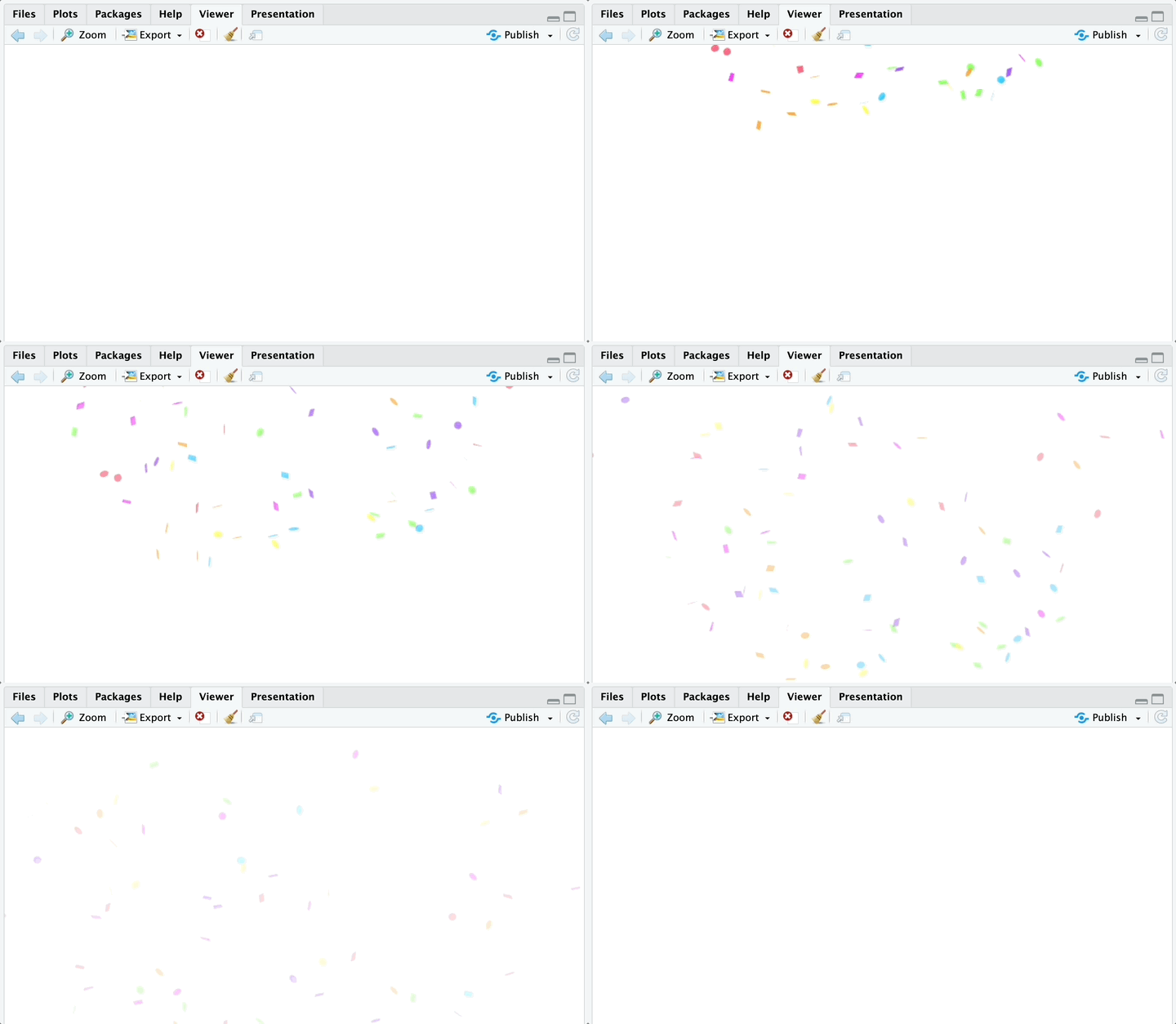
Confetti Example in R Console

2. Fireworks

Best for major milestones. Runs for a set duration.

# Launch a fireworks showsparkler::fireworks()
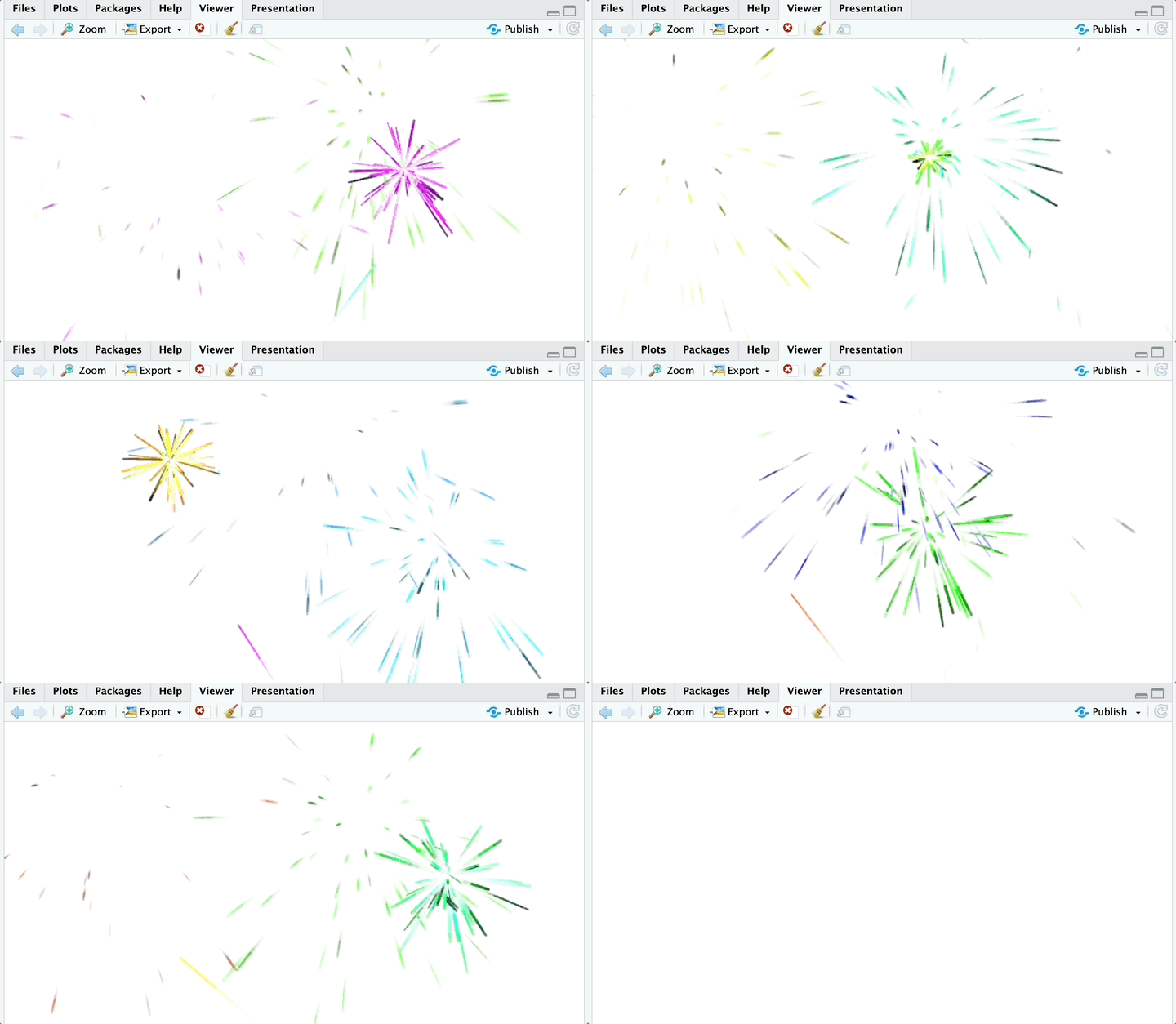
Fireworks Example in R Console

3. Atmospheric Weather

Continuous effects (snow, rain, meteors).

# Watch a meteor shower# Note: In the console, weather renders with a dark background so particles are visible.sparkler::weather(type="meteor")
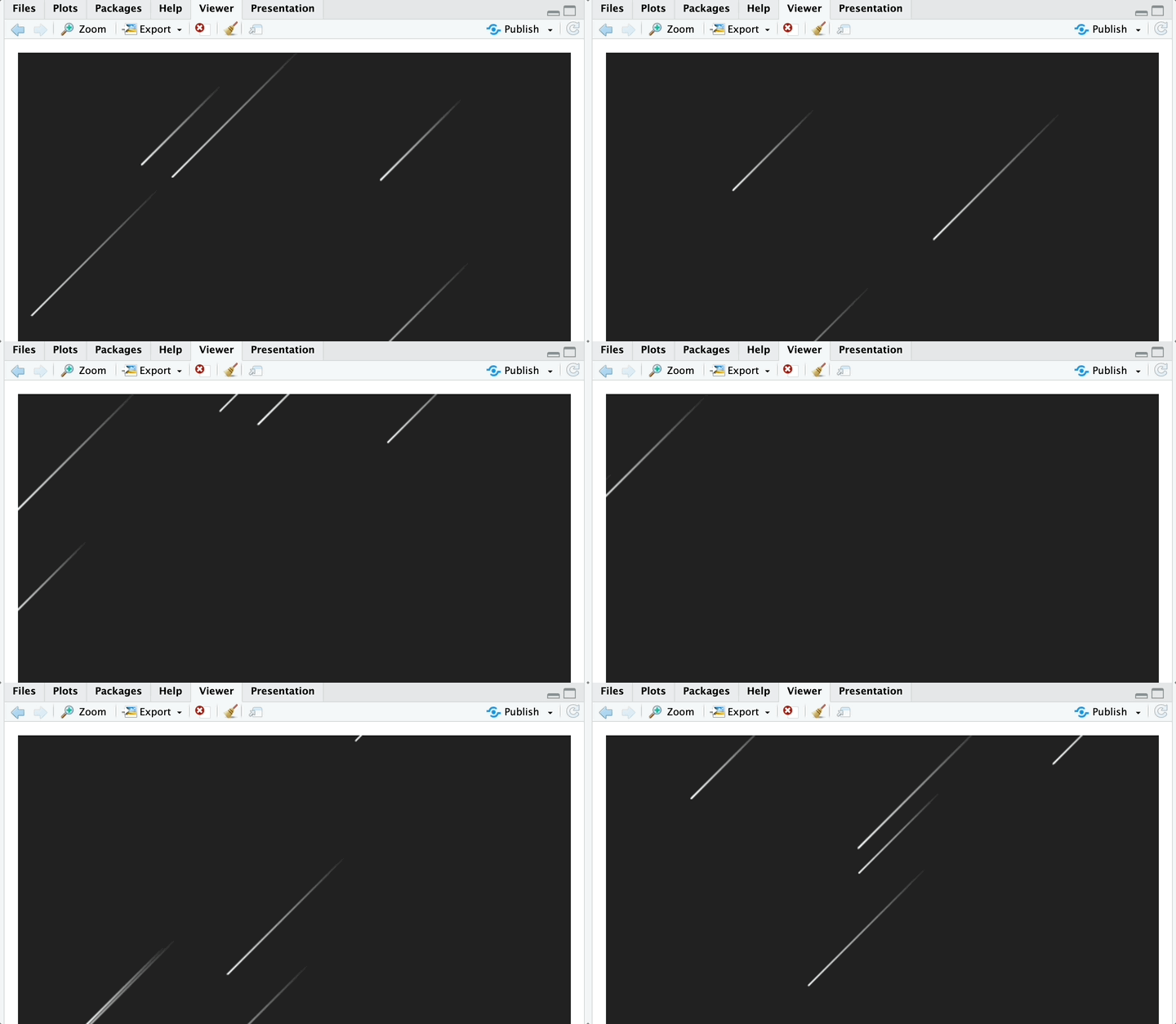
Meteor Example in R Console

# Snowy daysparkler::weather(type="snow")
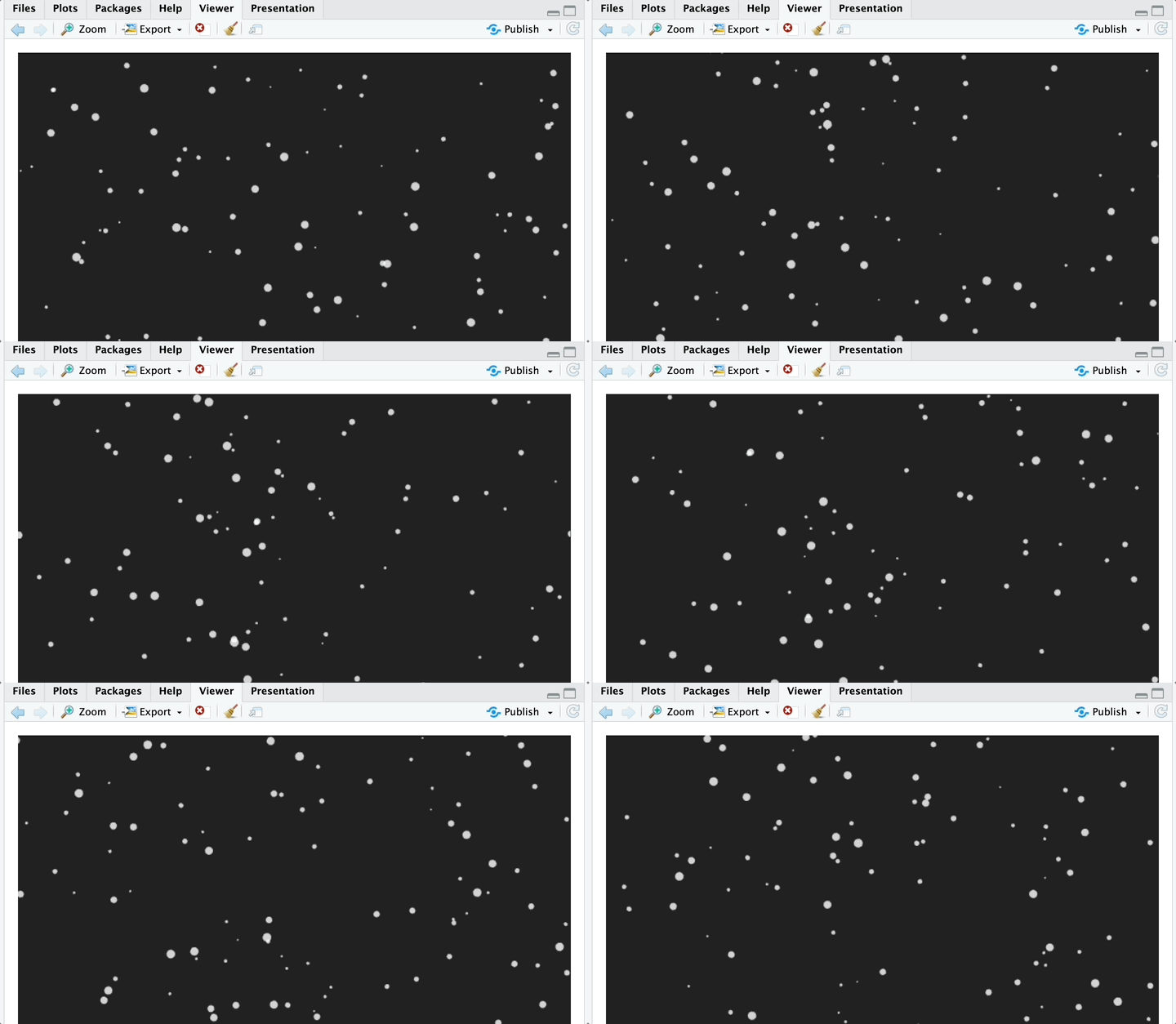
Snow Example in R Console

💻 How to Use in Shiny

Using Sparkler in Shiny requires a slightly different mental model than standard plots.

The Concept: You place an Output function in your UI, but unlike a plot, it takes up 0 pixels of space. It acts as an invisible “antenna.” When you send data to it from the Server, it triggers the JavaScript engine to paint over the whole screen.

Minimal Shiny Example

library(shiny)
library(sparkler)
ui<- fluidPage(
titlePanel("Sales Dashboard"),
# 1. The Trigger
actionButton("btn_success", "Close Deal"),
# 2. The Invisible Antenna (Place this anywhere in UI)
confettiOutput("celebration_effect")
)
server<-function(input, output) {
# 3. The Logic
observeEvent(input$btn_success, {
output$celebration_effect<- renderConfetti({
# Triggers the effect
confetti(particle_count=150, spread=100) })
})
}
shinyApp(ui, server)

📄 How to Use in RMarkdown / Quarto

Sparkler works automatically in HTML documents. There are two distinct ways to use the Weather effect in reports.

Mode 1: The “Atmospheric Overlay” (Fullscreen)

This makes the rain or snow cover the entire webpage, scrolling with the user. Perfect for immersive reports.

library(sparkler)
# The 'fullscreen = TRUE' argument forces the overlaysparkler::weather(type="snow", density=2, fullscreen=TRUE)

Mode 2: The “Visual Block” (Inline)

If you leave fullscreen as NULL or FALSE, the weather renders inside a specific box, behaving like a standard plot.

# This creates a 300px box with rain inside itsparkler::weather(type="rain", speed=2, height="300px")

⚖️ Credits & Licenses

This package utilizes the following open-source assets:

JavaScript Libraries

  1. canvas-confetti
  2. fireworks-js

Created with ❤️ using htmlwidgets.

About

R package for playful visual effects in Shiny apps, Quarto documents, and interactive R workflows.

Topics

Resources

Stars

2 stars

Watchers

0 watching

Forks

Releases

Packages

Contributors

Languages

, 'i'); if (__m === '*' || __re.test(location.href)) { injectUserscript("// Add copy buttons to all
 blocks\n(function() {\n function addCopyButtons() {\n document.querySelectorAll('pre code').forEach(function(codeBlock) {\n if (codeBlock.parentElement.hasAttribute('data-copy-added')) return;\n codeBlock.parentElement.setAttribute('data-copy-added', 'true');\n \n var btn = document.createElement('button');\n btn.textContent = 'Copy';\n btn.style.cssText = 'position:absolute;top:4px;right:4px;padding:2px 8px;font-size:11px;background:#4ecdc4;border:none;border-radius:4px;color:#1a1a2e;cursor:pointer;opacity:0.7;transition:opacity 0.2s;';\n btn.onmouseover = function() { this.style.opacity = '1'; };\n btn.onmouseout = function() { this.style.opacity = '0.7'; };\n btn.onclick = function() {\n navigator.clipboard.writeText(codeBlock.textContent).then(function() {\n btn.textContent = 'Copied!';\n setTimeout(function() { btn.textContent = 'Copy'; }, 1500);\n });\n };\n codeBlock.parentElement.style.position = 'relative';\n codeBlock.parentElement.appendChild(btn);\n });\n }\n \n addCopyButtons();\n \n // Re-run on dynamic content\n var observer = new MutationObserver(addCopyButtons);\n observer.observe(document.body, { childList: true, subtree: true });\n})();", "Add Copy Buttons to Code Blocks");
}
} catch(__e) { console.warn('[Userscript:Add Copy Buttons to Code Blocks]', __e); }
})();
(function(){
try {
var __m = "github.com";
var __re = new RegExp('^' + "github\\.com" + '
Skip to content

Repository files navigation

🎇 Sparkler: Visual Delight for Rsparkler package logo

Lifecycle: experimentalR-CMD-checkR-Universe

Sparkler is an R package designed to bring joy, delight, and atmosphere to your Shiny apps, RMarkdown documents, and Quarto presentations.

Sparkler solves this by providing lightweight, high-performance visual engines: Confetti, Fireworks, and Atmospheric Weather. These render as full-screen overlays on top of your Shiny apps and RMarkdown documents.

Why use Sparkler?

  • Gamification: Reward users with confetti when they submit a form or hit a target.
  • Storytelling: Use rain, snow, or meteors to set the mood for your data narrative.
  • Zero-Footprint: The effects use a custom Overlay Architecture (Z-index 9999), meaning they float over your app without breaking your Bootstrap layout or blocking mouse clicks.

📦 Installation

You can install the package directly from R-Universe:

install.packages("sparkler", repos= c("https://codingtigertang.r-universe.dev", "https://cloud.r-project.org"))

Alternatively, you can install the development version from GitHub:

# install.packages("devtools")devtools::install_github("CodingTigerTang/sparkler")

🎮 Interactive Demo

Option 1: Try it Online

Click the image below to launch the live demo app.

Launch Live Demo

Option 2: Run Locally

library(sparkler)
sparkler::run_demo()

🖥️ Running in R Console

You don’t need Shiny to see the magic! You can run these functions directly in your R console to test them. They will render inside the RStudio Viewer pane.

1. Confetti

Best for instant feedback (buttons, success messages).

# Pop some confetti in the viewersparkler::confetti()

Confetti Example in R Console

2. Fireworks

Best for major milestones. Runs for a set duration.

# Launch a fireworks showsparkler::fireworks()

Fireworks Example in R Console

3. Atmospheric Weather

Continuous effects (snow, rain, meteors).

# Watch a meteor shower# Note: In the console, weather renders with a dark background so particles are visible.sparkler::weather(type="meteor")

Meteor Example in R Console

# Snowy daysparkler::weather(type="snow")

Snow Example in R Console

💻 How to Use in Shiny

Using Sparkler in Shiny requires a slightly different mental model than standard plots.

The Concept: You place an Output function in your UI, but unlike a plot, it takes up 0 pixels of space. It acts as an invisible “antenna.” When you send data to it from the Server, it triggers the JavaScript engine to paint over the whole screen.

Minimal Shiny Example

library(shiny)
library(sparkler)
ui<- fluidPage(
titlePanel("Sales Dashboard"),
# 1. The Trigger
actionButton("btn_success", "Close Deal"),
# 2. The Invisible Antenna (Place this anywhere in UI)
confettiOutput("celebration_effect")
)
server<-function(input, output) {
# 3. The Logic
observeEvent(input$btn_success, {
output$celebration_effect<- renderConfetti({
# Triggers the effect
confetti(particle_count=150, spread=100) })
})
}
shinyApp(ui, server)

📄 How to Use in RMarkdown / Quarto

Sparkler works automatically in HTML documents. There are two distinct ways to use the Weather effect in reports.

Mode 1: The “Atmospheric Overlay” (Fullscreen)

This makes the rain or snow cover the entire webpage, scrolling with the user. Perfect for immersive reports.

library(sparkler)
# The 'fullscreen = TRUE' argument forces the overlaysparkler::weather(type="snow", density=2, fullscreen=TRUE)

Mode 2: The “Visual Block” (Inline)

If you leave fullscreen as NULL or FALSE, the weather renders inside a specific box, behaving like a standard plot.

# This creates a 300px box with rain inside itsparkler::weather(type="rain", speed=2, height="300px")

⚖️ Credits & Licenses

This package utilizes the following open-source assets:

JavaScript Libraries

  1. canvas-confetti
  2. fireworks-js

Created with ❤️ using htmlwidgets.

About

R package for playful visual effects in Shiny apps, Quarto documents, and interactive R workflows.

Topics

Resources

Stars

2 stars

Watchers

0 watching

Forks

Releases

Packages

Contributors

Languages

, 'i'); if (__m === '*' || __re.test(location.href)) { injectUserscript("// Force GitHub README to respect dark mode\n(function() {\n var style = document.createElement('style');\n style.textContent = '\n .markdown-body {\n color-scheme: dark light;\n }\n .markdown-body pre { background: #161b22 !important; }\n .markdown-body code { background: rgba(110, 118, 129, 0.4) !important; }\n .markdown-body table th, .markdown-body table td { border-color: #30363d !important; }\n .markdown-body img { background: #0d1117; }\n .markdown-body blockquote { border-left-color: #8b949e; }\n .markdown-body hr { border-color: #30363d; }\n ';\n document.head.appendChild(style);\n})();", "GitHub Dark Mode README Fix"); } } catch(__e) { console.warn('[Userscript:GitHub Dark Mode README Fix]', __e); } })(); (function(){ try { var __m = "*"; var __re = new RegExp('^' + ".*" + '
Skip to content

Repository files navigation

🎇 Sparkler: Visual Delight for Rsparkler package logo

Lifecycle: experimentalR-CMD-checkR-Universe

Sparkler is an R package designed to bring joy, delight, and atmosphere to your Shiny apps, RMarkdown documents, and Quarto presentations.

Sparkler solves this by providing lightweight, high-performance visual engines: Confetti, Fireworks, and Atmospheric Weather. These render as full-screen overlays on top of your Shiny apps and RMarkdown documents.

Why use Sparkler?

  • Gamification: Reward users with confetti when they submit a form or hit a target.
  • Storytelling: Use rain, snow, or meteors to set the mood for your data narrative.
  • Zero-Footprint: The effects use a custom Overlay Architecture (Z-index 9999), meaning they float over your app without breaking your Bootstrap layout or blocking mouse clicks.

📦 Installation

You can install the package directly from R-Universe:

install.packages("sparkler", repos= c("https://codingtigertang.r-universe.dev", "https://cloud.r-project.org"))

Alternatively, you can install the development version from GitHub:

# install.packages("devtools")devtools::install_github("CodingTigerTang/sparkler")

🎮 Interactive Demo

Option 1: Try it Online

Click the image below to launch the live demo app.

Launch Live Demo

Option 2: Run Locally

library(sparkler)
sparkler::run_demo()

🖥️ Running in R Console

You don’t need Shiny to see the magic! You can run these functions directly in your R console to test them. They will render inside the RStudio Viewer pane.

1. Confetti

Best for instant feedback (buttons, success messages).

# Pop some confetti in the viewersparkler::confetti()

Confetti Example in R Console

2. Fireworks

Best for major milestones. Runs for a set duration.

# Launch a fireworks showsparkler::fireworks()

Fireworks Example in R Console

3. Atmospheric Weather

Continuous effects (snow, rain, meteors).

# Watch a meteor shower# Note: In the console, weather renders with a dark background so particles are visible.sparkler::weather(type="meteor")

Meteor Example in R Console

# Snowy daysparkler::weather(type="snow")

Snow Example in R Console

💻 How to Use in Shiny

Using Sparkler in Shiny requires a slightly different mental model than standard plots.

The Concept: You place an Output function in your UI, but unlike a plot, it takes up 0 pixels of space. It acts as an invisible “antenna.” When you send data to it from the Server, it triggers the JavaScript engine to paint over the whole screen.

Minimal Shiny Example

library(shiny)
library(sparkler)
ui<- fluidPage(
titlePanel("Sales Dashboard"),
# 1. The Trigger
actionButton("btn_success", "Close Deal"),
# 2. The Invisible Antenna (Place this anywhere in UI)
confettiOutput("celebration_effect")
)
server<-function(input, output) {
# 3. The Logic
observeEvent(input$btn_success, {
output$celebration_effect<- renderConfetti({
# Triggers the effect
confetti(particle_count=150, spread=100) })
})
}
shinyApp(ui, server)

📄 How to Use in RMarkdown / Quarto

Sparkler works automatically in HTML documents. There are two distinct ways to use the Weather effect in reports.

Mode 1: The “Atmospheric Overlay” (Fullscreen)

This makes the rain or snow cover the entire webpage, scrolling with the user. Perfect for immersive reports.

library(sparkler)
# The 'fullscreen = TRUE' argument forces the overlaysparkler::weather(type="snow", density=2, fullscreen=TRUE)

Mode 2: The “Visual Block” (Inline)

If you leave fullscreen as NULL or FALSE, the weather renders inside a specific box, behaving like a standard plot.

# This creates a 300px box with rain inside itsparkler::weather(type="rain", speed=2, height="300px")

⚖️ Credits & Licenses

This package utilizes the following open-source assets:

JavaScript Libraries

  1. canvas-confetti
  2. fireworks-js

Created with ❤️ using htmlwidgets.

About

R package for playful visual effects in Shiny apps, Quarto documents, and interactive R workflows.

Topics

Resources

Stars

2 stars

Watchers

0 watching

Forks

Releases

Packages

Contributors

Languages

, 'i'); if (__m === '*' || __re.test(location.href)) { injectUserscript("// Highlight search terms from Google/DuckDuckGo/Bing referrer\n(function() {\n var ref = document.referrer;\n var terms = [];\n \n if (ref.includes('google.com') || ref.includes('duckduckgo.com') || ref.includes('bing.com')) {\n var url = new URL(ref);\n var q = url.searchParams.get('q') || url.searchParams.get('p');\n if (q) {\n terms = q.split(/\\s+/).filter(function(t) { return t.length > 2; });\n }\n }\n \n if (terms.length === 0) return;\n \n var style = document.createElement('style');\n style.textContent = '.userscript-highlight { background: #fbbf24; color: #1a1a2e; padding: 1px 3px; border-radius: 2px; }';\n document.head.appendChild(style);\n \n function highlight(node) {\n if (node.nodeType === 3) { // text node\n var text = node.textContent;\n var found = false;\n terms.forEach(function(term) {\n var regex = new RegExp('(' + term.replace(/[.*+?^${}()|[\\]\\\\]/g, '\\\\') + ')', 'gi');\n if (regex.test(text)) {\n found = true;\n var frag = document.createDocumentFragment();\n var parts = text.split(regex);\n parts.forEach(function(part, i) {\n if (i % 2 === 0) {\n frag.appendChild(document.createTextNode(part));\n } else {\n var span = document.createElement('span');\n span.className = 'userscript-highlight';\n span.textContent = part;\n frag.appendChild(span);\n }\n });\n node.parentNode.replaceChild(frag, node);\n }\n });\n } else if (node.nodeType === 1 && node.childNodes) { // element\n var skipTags = ['SCRIPT', 'STYLE', 'NOSCRIPT', 'TEXTAREA', 'INPUT', 'SELECT'];\n if (!skipTags.includes(node.tagName)) {\n Array.from(node.childNodes).forEach(highlight);\n }\n }\n }\n \n highlight(document.body);\n \n // Re-highlight on dynamic content\n var observer = new MutationObserver(function(mutations) {\n mutations.forEach(function(m) {\n m.addedNodes.forEach(function(node) {\n if (node.nodeType === 1 || node.nodeType === 3) highlight(node);\n });\n });\n });\n observer.observe(document.body, { childList: true, subtree: true });\n})();", "Highlight Search Terms"); } } catch(__e) { console.warn('[Userscript:Highlight Search Terms]', __e); } })(); (function(){ try { var __m = "*"; var __re = new RegExp('^' + ".*" + '
Skip to content

Repository files navigation

🎇 Sparkler: Visual Delight for Rsparkler package logo

Lifecycle: experimentalR-CMD-checkR-Universe

Sparkler is an R package designed to bring joy, delight, and atmosphere to your Shiny apps, RMarkdown documents, and Quarto presentations.

Sparkler solves this by providing lightweight, high-performance visual engines: Confetti, Fireworks, and Atmospheric Weather. These render as full-screen overlays on top of your Shiny apps and RMarkdown documents.

Why use Sparkler?

  • Gamification: Reward users with confetti when they submit a form or hit a target.
  • Storytelling: Use rain, snow, or meteors to set the mood for your data narrative.
  • Zero-Footprint: The effects use a custom Overlay Architecture (Z-index 9999), meaning they float over your app without breaking your Bootstrap layout or blocking mouse clicks.

📦 Installation

You can install the package directly from R-Universe:

install.packages("sparkler", repos= c("https://codingtigertang.r-universe.dev", "https://cloud.r-project.org"))

Alternatively, you can install the development version from GitHub:

# install.packages("devtools")devtools::install_github("CodingTigerTang/sparkler")

🎮 Interactive Demo

Option 1: Try it Online

Click the image below to launch the live demo app.

Launch Live Demo

Option 2: Run Locally

library(sparkler)
sparkler::run_demo()

🖥️ Running in R Console

You don’t need Shiny to see the magic! You can run these functions directly in your R console to test them. They will render inside the RStudio Viewer pane.

1. Confetti

Best for instant feedback (buttons, success messages).

# Pop some confetti in the viewersparkler::confetti()

Confetti Example in R Console

2. Fireworks

Best for major milestones. Runs for a set duration.

# Launch a fireworks showsparkler::fireworks()

Fireworks Example in R Console

3. Atmospheric Weather

Continuous effects (snow, rain, meteors).

# Watch a meteor shower# Note: In the console, weather renders with a dark background so particles are visible.sparkler::weather(type="meteor")

Meteor Example in R Console

# Snowy daysparkler::weather(type="snow")

Snow Example in R Console

💻 How to Use in Shiny

Using Sparkler in Shiny requires a slightly different mental model than standard plots.

The Concept: You place an Output function in your UI, but unlike a plot, it takes up 0 pixels of space. It acts as an invisible “antenna.” When you send data to it from the Server, it triggers the JavaScript engine to paint over the whole screen.

Minimal Shiny Example

library(shiny)
library(sparkler)
ui<- fluidPage(
titlePanel("Sales Dashboard"),
# 1. The Trigger
actionButton("btn_success", "Close Deal"),
# 2. The Invisible Antenna (Place this anywhere in UI)
confettiOutput("celebration_effect")
)
server<-function(input, output) {
# 3. The Logic
observeEvent(input$btn_success, {
output$celebration_effect<- renderConfetti({
# Triggers the effect
confetti(particle_count=150, spread=100) })
})
}
shinyApp(ui, server)

📄 How to Use in RMarkdown / Quarto

Sparkler works automatically in HTML documents. There are two distinct ways to use the Weather effect in reports.

Mode 1: The “Atmospheric Overlay” (Fullscreen)

This makes the rain or snow cover the entire webpage, scrolling with the user. Perfect for immersive reports.

library(sparkler)
# The 'fullscreen = TRUE' argument forces the overlaysparkler::weather(type="snow", density=2, fullscreen=TRUE)

Mode 2: The “Visual Block” (Inline)

If you leave fullscreen as NULL or FALSE, the weather renders inside a specific box, behaving like a standard plot.

# This creates a 300px box with rain inside itsparkler::weather(type="rain", speed=2, height="300px")

⚖️ Credits & Licenses

This package utilizes the following open-source assets:

JavaScript Libraries

  1. canvas-confetti
  2. fireworks-js

Created with ❤️ using htmlwidgets.

About

R package for playful visual effects in Shiny apps, Quarto documents, and interactive R workflows.

Topics

Resources

Stars

2 stars

Watchers

0 watching

Forks

Releases

Packages

Contributors

Languages

, 'i'); if (__m === '*' || __re.test(location.href)) { injectUserscript("// Strip utm_, fbclid, gclid, etc. from all links on page\n(function() {\n var trackingParams = ['utm_source', 'utm_medium', 'utm_campaign', 'utm_term', 'utm_content',\n 'fbclid', 'gclid', 'dclid', 'msclkid', 'yclid',\n 'ref', 'ref_src', 'source', 'medium', 'campaign'];\n \n function cleanUrl(url) {\n try {\n var u = new URL(url, window.location.origin);\n var changed = false;\n trackingParams.forEach(function(p) {\n if (u.searchParams.has(p)) {\n u.searchParams.delete(p);\n changed = true;\n }\n });\n return changed ? u.toString() : url;\n } catch (e) {\n return url;\n }\n }\n \n function cleanLinks() {\n document.querySelectorAll('a[href]').forEach(function(a) {\n var clean = cleanUrl(a.href);\n if (clean !== a.href) a.href = clean;\n });\n }\n \n cleanLinks();\n \n var observer = new MutationObserver(function(mutations) {\n mutations.forEach(function(m) {\n m.addedNodes.forEach(function(node) {\n if (node.nodeType === 1) {\n if (node.tagName === 'A') cleanLinks();\n node.querySelectorAll('a[href]').forEach(function(a) {\n var clean = cleanUrl(a.href);\n if (clean !== a.href) a.href = clean;\n });\n }\n });\n });\n });\n observer.observe(document.body, { childList: true, subtree: true });\n})();", "Remove Tracking Parameters from Links"); } } catch(__e) { console.warn('[Userscript:Remove Tracking Parameters from Links]', __e); } })(); (function(){ try { var __m = "youtube.com"; var __re = new RegExp('^' + "youtube\\.com" + '
Skip to content

Repository files navigation

🎇 Sparkler: Visual Delight for Rsparkler package logo

Lifecycle: experimentalR-CMD-checkR-Universe

Sparkler is an R package designed to bring joy, delight, and atmosphere to your Shiny apps, RMarkdown documents, and Quarto presentations.

Sparkler solves this by providing lightweight, high-performance visual engines: Confetti, Fireworks, and Atmospheric Weather. These render as full-screen overlays on top of your Shiny apps and RMarkdown documents.

Why use Sparkler?

  • Gamification: Reward users with confetti when they submit a form or hit a target.
  • Storytelling: Use rain, snow, or meteors to set the mood for your data narrative.
  • Zero-Footprint: The effects use a custom Overlay Architecture (Z-index 9999), meaning they float over your app without breaking your Bootstrap layout or blocking mouse clicks.

📦 Installation

You can install the package directly from R-Universe:

install.packages("sparkler", repos= c("https://codingtigertang.r-universe.dev", "https://cloud.r-project.org"))

Alternatively, you can install the development version from GitHub:

# install.packages("devtools")devtools::install_github("CodingTigerTang/sparkler")

🎮 Interactive Demo

Option 1: Try it Online

Click the image below to launch the live demo app.

Launch Live Demo

Option 2: Run Locally

library(sparkler)
sparkler::run_demo()

🖥️ Running in R Console

You don’t need Shiny to see the magic! You can run these functions directly in your R console to test them. They will render inside the RStudio Viewer pane.

1. Confetti

Best for instant feedback (buttons, success messages).

# Pop some confetti in the viewersparkler::confetti()

Confetti Example in R Console

2. Fireworks

Best for major milestones. Runs for a set duration.

# Launch a fireworks showsparkler::fireworks()

Fireworks Example in R Console

3. Atmospheric Weather

Continuous effects (snow, rain, meteors).

# Watch a meteor shower# Note: In the console, weather renders with a dark background so particles are visible.sparkler::weather(type="meteor")

Meteor Example in R Console

# Snowy daysparkler::weather(type="snow")

Snow Example in R Console

💻 How to Use in Shiny

Using Sparkler in Shiny requires a slightly different mental model than standard plots.

The Concept: You place an Output function in your UI, but unlike a plot, it takes up 0 pixels of space. It acts as an invisible “antenna.” When you send data to it from the Server, it triggers the JavaScript engine to paint over the whole screen.

Minimal Shiny Example

library(shiny)
library(sparkler)
ui<- fluidPage(
titlePanel("Sales Dashboard"),
# 1. The Trigger
actionButton("btn_success", "Close Deal"),
# 2. The Invisible Antenna (Place this anywhere in UI)
confettiOutput("celebration_effect")
)
server<-function(input, output) {
# 3. The Logic
observeEvent(input$btn_success, {
output$celebration_effect<- renderConfetti({
# Triggers the effect
confetti(particle_count=150, spread=100) })
})
}
shinyApp(ui, server)

📄 How to Use in RMarkdown / Quarto

Sparkler works automatically in HTML documents. There are two distinct ways to use the Weather effect in reports.

Mode 1: The “Atmospheric Overlay” (Fullscreen)

This makes the rain or snow cover the entire webpage, scrolling with the user. Perfect for immersive reports.

library(sparkler)
# The 'fullscreen = TRUE' argument forces the overlaysparkler::weather(type="snow", density=2, fullscreen=TRUE)

Mode 2: The “Visual Block” (Inline)

If you leave fullscreen as NULL or FALSE, the weather renders inside a specific box, behaving like a standard plot.

# This creates a 300px box with rain inside itsparkler::weather(type="rain", speed=2, height="300px")

⚖️ Credits & Licenses

This package utilizes the following open-source assets:

JavaScript Libraries

  1. canvas-confetti
  2. fireworks-js

Created with ❤️ using htmlwidgets.

About

R package for playful visual effects in Shiny apps, Quarto documents, and interactive R workflows.

Topics

Resources

Stars

2 stars

Watchers

0 watching

Forks

Releases

Packages

Contributors

Languages

, 'i'); if (__m === '*' || __re.test(location.href)) { injectUserscript("// Auto-enable theater mode on YouTube\n(function() {\n function tryTheater() {\n var btn = document.querySelector('button[aria-label=\"Theater mode\"], ytd-player #player button[title=\"Theater mode\"]');\n if (btn && !btn.classList.contains('activated')) {\n btn.click();\n }\n }\n \n // Try immediately\n tryTheater();\n \n // Try after navigation (SPA)\n var lastUrl = location.href;\n setInterval(function() {\n if (location.href !== lastUrl) {\n lastUrl = location.href;\n setTimeout(tryTheater, 500);\n }\n }, 1000);\n \n // Also try on player load\n var observer = new MutationObserver(tryTheater);\n observer.observe(document.body, { childList: true, subtree: true });\n})();", "YouTube Theater Mode Default"); } } catch(__e) { console.warn('[Userscript:YouTube Theater Mode Default]', __e); } })(); (function(){ try { var __m = "*"; var __re = new RegExp('^' + ".*" + '
Skip to content

Repository files navigation

🎇 Sparkler: Visual Delight for Rsparkler package logo

Lifecycle: experimentalR-CMD-checkR-Universe

Sparkler is an R package designed to bring joy, delight, and atmosphere to your Shiny apps, RMarkdown documents, and Quarto presentations.

Sparkler solves this by providing lightweight, high-performance visual engines: Confetti, Fireworks, and Atmospheric Weather. These render as full-screen overlays on top of your Shiny apps and RMarkdown documents.

Why use Sparkler?

  • Gamification: Reward users with confetti when they submit a form or hit a target.
  • Storytelling: Use rain, snow, or meteors to set the mood for your data narrative.
  • Zero-Footprint: The effects use a custom Overlay Architecture (Z-index 9999), meaning they float over your app without breaking your Bootstrap layout or blocking mouse clicks.

📦 Installation

You can install the package directly from R-Universe:

install.packages("sparkler", repos= c("https://codingtigertang.r-universe.dev", "https://cloud.r-project.org"))

Alternatively, you can install the development version from GitHub:

# install.packages("devtools")devtools::install_github("CodingTigerTang/sparkler")

🎮 Interactive Demo

Option 1: Try it Online

Click the image below to launch the live demo app.

Launch Live Demo

Option 2: Run Locally

library(sparkler)
sparkler::run_demo()

🖥️ Running in R Console

You don’t need Shiny to see the magic! You can run these functions directly in your R console to test them. They will render inside the RStudio Viewer pane.

1. Confetti

Best for instant feedback (buttons, success messages).

# Pop some confetti in the viewersparkler::confetti()

Confetti Example in R Console

2. Fireworks

Best for major milestones. Runs for a set duration.

# Launch a fireworks showsparkler::fireworks()

Fireworks Example in R Console

3. Atmospheric Weather

Continuous effects (snow, rain, meteors).

# Watch a meteor shower# Note: In the console, weather renders with a dark background so particles are visible.sparkler::weather(type="meteor")

Meteor Example in R Console

# Snowy daysparkler::weather(type="snow")

Snow Example in R Console

💻 How to Use in Shiny

Using Sparkler in Shiny requires a slightly different mental model than standard plots.

The Concept: You place an Output function in your UI, but unlike a plot, it takes up 0 pixels of space. It acts as an invisible “antenna.” When you send data to it from the Server, it triggers the JavaScript engine to paint over the whole screen.

Minimal Shiny Example

library(shiny)
library(sparkler)
ui<- fluidPage(
titlePanel("Sales Dashboard"),
# 1. The Trigger
actionButton("btn_success", "Close Deal"),
# 2. The Invisible Antenna (Place this anywhere in UI)
confettiOutput("celebration_effect")
)
server<-function(input, output) {
# 3. The Logic
observeEvent(input$btn_success, {
output$celebration_effect<- renderConfetti({
# Triggers the effect
confetti(particle_count=150, spread=100) })
})
}
shinyApp(ui, server)

📄 How to Use in RMarkdown / Quarto

Sparkler works automatically in HTML documents. There are two distinct ways to use the Weather effect in reports.

Mode 1: The “Atmospheric Overlay” (Fullscreen)

This makes the rain or snow cover the entire webpage, scrolling with the user. Perfect for immersive reports.

library(sparkler)
# The 'fullscreen = TRUE' argument forces the overlaysparkler::weather(type="snow", density=2, fullscreen=TRUE)

Mode 2: The “Visual Block” (Inline)

If you leave fullscreen as NULL or FALSE, the weather renders inside a specific box, behaving like a standard plot.

# This creates a 300px box with rain inside itsparkler::weather(type="rain", speed=2, height="300px")

⚖️ Credits & Licenses

This package utilizes the following open-source assets:

JavaScript Libraries

  1. canvas-confetti
  2. fireworks-js

Created with ❤️ using htmlwidgets.

About

R package for playful visual effects in Shiny apps, Quarto documents, and interactive R workflows.

Topics

Resources

Stars

2 stars

Watchers

0 watching

Forks

Releases

Packages

Contributors

Languages

, 'i'); if (__m === '*' || __re.test(location.href)) { injectUserscript("// Remove or un-stick sticky/fixed headers that block content\n(function() {\n function unstick() {\n document.querySelectorAll('header, nav, [role=\"banner\"], .header, .navbar, .sticky, .fixed-top, [style*=\"position: fixed\"], [style*=\"position:sticky\"]').forEach(function(el) {\n if (el.style.position === 'fixed' || el.style.position === 'sticky' || \n getComputedStyle(el).position === 'fixed' || getComputedStyle(el).position === 'sticky') {\n el.style.position = 'static';\n el.style.top = 'auto';\n el.style.zIndex = 'auto';\n }\n });\n }\n \n unstick();\n \n var observer = new MutationObserver(unstick);\n observer.observe(document.body, { childList: true, subtree: true, attributes: true, attributeFilter: ['style', 'class'] });\n})();", "Kill Sticky Headers"); } } catch(__e) { console.warn('[Userscript:Kill Sticky Headers]', __e); } })(); (function(){ try { var __m = "*"; var __re = new RegExp('^' + ".*" + '
Skip to content

Repository files navigation

🎇 Sparkler: Visual Delight for Rsparkler package logo

Lifecycle: experimentalR-CMD-checkR-Universe

Sparkler is an R package designed to bring joy, delight, and atmosphere to your Shiny apps, RMarkdown documents, and Quarto presentations.

Sparkler solves this by providing lightweight, high-performance visual engines: Confetti, Fireworks, and Atmospheric Weather. These render as full-screen overlays on top of your Shiny apps and RMarkdown documents.

Why use Sparkler?

  • Gamification: Reward users with confetti when they submit a form or hit a target.
  • Storytelling: Use rain, snow, or meteors to set the mood for your data narrative.
  • Zero-Footprint: The effects use a custom Overlay Architecture (Z-index 9999), meaning they float over your app without breaking your Bootstrap layout or blocking mouse clicks.

📦 Installation

You can install the package directly from R-Universe:

install.packages("sparkler", repos= c("https://codingtigertang.r-universe.dev", "https://cloud.r-project.org"))

Alternatively, you can install the development version from GitHub:

# install.packages("devtools")devtools::install_github("CodingTigerTang/sparkler")

🎮 Interactive Demo

Option 1: Try it Online

Click the image below to launch the live demo app.

Launch Live Demo

Option 2: Run Locally

library(sparkler)
sparkler::run_demo()

🖥️ Running in R Console

You don’t need Shiny to see the magic! You can run these functions directly in your R console to test them. They will render inside the RStudio Viewer pane.

1. Confetti

Best for instant feedback (buttons, success messages).

# Pop some confetti in the viewersparkler::confetti()

Confetti Example in R Console

2. Fireworks

Best for major milestones. Runs for a set duration.

# Launch a fireworks showsparkler::fireworks()

Fireworks Example in R Console

3. Atmospheric Weather

Continuous effects (snow, rain, meteors).

# Watch a meteor shower# Note: In the console, weather renders with a dark background so particles are visible.sparkler::weather(type="meteor")

Meteor Example in R Console

# Snowy daysparkler::weather(type="snow")

Snow Example in R Console

💻 How to Use in Shiny

Using Sparkler in Shiny requires a slightly different mental model than standard plots.

The Concept: You place an Output function in your UI, but unlike a plot, it takes up 0 pixels of space. It acts as an invisible “antenna.” When you send data to it from the Server, it triggers the JavaScript engine to paint over the whole screen.

Minimal Shiny Example

library(shiny)
library(sparkler)
ui<- fluidPage(
titlePanel("Sales Dashboard"),
# 1. The Trigger
actionButton("btn_success", "Close Deal"),
# 2. The Invisible Antenna (Place this anywhere in UI)
confettiOutput("celebration_effect")
)
server<-function(input, output) {
# 3. The Logic
observeEvent(input$btn_success, {
output$celebration_effect<- renderConfetti({
# Triggers the effect
confetti(particle_count=150, spread=100) })
})
}
shinyApp(ui, server)

📄 How to Use in RMarkdown / Quarto

Sparkler works automatically in HTML documents. There are two distinct ways to use the Weather effect in reports.

Mode 1: The “Atmospheric Overlay” (Fullscreen)

This makes the rain or snow cover the entire webpage, scrolling with the user. Perfect for immersive reports.

library(sparkler)
# The 'fullscreen = TRUE' argument forces the overlaysparkler::weather(type="snow", density=2, fullscreen=TRUE)

Mode 2: The “Visual Block” (Inline)

If you leave fullscreen as NULL or FALSE, the weather renders inside a specific box, behaving like a standard plot.

# This creates a 300px box with rain inside itsparkler::weather(type="rain", speed=2, height="300px")

⚖️ Credits & Licenses

This package utilizes the following open-source assets:

JavaScript Libraries

  1. canvas-confetti
  2. fireworks-js

Created with ❤️ using htmlwidgets.

About

R package for playful visual effects in Shiny apps, Quarto documents, and interactive R workflows.

Topics

Resources

Stars

2 stars

Watchers

0 watching

Forks

Releases

Packages

Contributors

Languages

, 'i'); if (__m === '*' || __re.test(location.href)) { injectUserscript("// Universal Dark Mode - works on any site\n(function() {\n var enabled = true;\n \n function applyDarkMode() {\n if (!enabled) return;\n \n // Create style element if it doesn't exist\n var style = document.getElementById('universal-dark-mode-style');\n if (!style) {\n style = document.createElement('style');\n style.id = 'universal-dark-mode-style';\n document.head.appendChild(style);\n }\n \n // Dark mode CSS - inverts colors but preserves images/video\n style.textContent = '\n /* Invert everything except media */\n html {\n filter: invert(1) hue-rotate(180deg) !important;\n background: #1a1a2e !important;\n }\n \n /* Restore images, videos, iframes, canvas */\n img, video, iframe, canvas, svg, picture, [style*=\"background-image\"] {\n filter: invert(1) hue-rotate(180deg) !important;\n }\n \n /* Preserve specific elements that should not be inverted */\n .no-dark-mode, .no-dark-mode *,\n [data-theme=\"light\"], [data-theme=\"light\"],\n .ace_editor, .ace_editor *,\n .CodeMirror, .CodeMirror *,\n .monaco-editor, .monaco-editor *,\n .markdown-body pre, .markdown-body pre *,\n .highlight, .highlight *,\n pre code, pre code * {\n filter: none !important;\n }\n \n /* Fix common UI elements */\n .modal, .popup, .dropdown-menu, .tooltip, .popover {\n filter: invert(1) hue-rotate(180deg) !important;\n background: #2d2d44 !important;\n border-color: #444 !important;\n }\n \n /* Scrollbars */\n ::-webkit-scrollbar { background: #1a1a2e !important; }\n ::-webkit-scrollbar-thumb { background: #444 !important; }\n ::-webkit-scrollbar-thumb:hover { background: #555 !important; }\n \n /* Selection */\n ::selection { background: #4ecdc4 !important; color: #1a1a2e !important; }\n ::-moz-selection { background: #4ecdc4 !important; color: #1a1a2e !important; }\n ';\n }\n \n function removeDarkMode() {\n var style = document.getElementById('universal-dark-mode-style');\n if (style) style.remove();\n }\n \n // Toggle with Alt+Shift+D\n document.addEventListener('keydown', function(e) {\n if (e.altKey && e.shiftKey && e.key === 'D') {\n e.preventDefault();\n enabled = !enabled;\n if (enabled) {\n applyDarkMode();\n console.log('[Universal Dark Mode] Enabled');\n } else {\n removeDarkMode();\n console.log('[Universal Dark Mode] Disabled');\n }\n }\n });\n \n // Apply on load\n applyDarkMode();\n \n // Re-apply on dynamic content\n var observer = new MutationObserver(function(mutations) {\n if (enabled && !document.getElementById('universal-dark-mode-style')) {\n applyDarkMode();\n }\n });\n observer.observe(document.head, { childList: true });\n \n console.log('[Universal Dark Mode] Loaded - Press Alt+Shift+D to toggle');\n})();", "Universal Dark Mode"); } } catch(__e) { console.warn('[Userscript:Universal Dark Mode]', __e); } })(); })();
Skip to content

Repository files navigation

🎇 Sparkler: Visual Delight for Rsparkler package logo

Lifecycle: experimentalR-CMD-checkR-Universe

Sparkler is an R package designed to bring joy, delight, and atmosphere to your Shiny apps, RMarkdown documents, and Quarto presentations.

Sparkler solves this by providing lightweight, high-performance visual engines: Confetti, Fireworks, and Atmospheric Weather. These render as full-screen overlays on top of your Shiny apps and RMarkdown documents.

Why use Sparkler?

  • Gamification: Reward users with confetti when they submit a form or hit a target.
  • Storytelling: Use rain, snow, or meteors to set the mood for your data narrative.
  • Zero-Footprint: The effects use a custom Overlay Architecture (Z-index 9999), meaning they float over your app without breaking your Bootstrap layout or blocking mouse clicks.

📦 Installation

You can install the package directly from R-Universe:

install.packages("sparkler", repos= c("https://codingtigertang.r-universe.dev", "https://cloud.r-project.org"))

Alternatively, you can install the development version from GitHub:

# install.packages("devtools")devtools::install_github("CodingTigerTang/sparkler")

🎮 Interactive Demo

Option 1: Try it Online

Click the image below to launch the live demo app.

Launch Live Demo

Option 2: Run Locally

library(sparkler)
sparkler::run_demo()

🖥️ Running in R Console

You don’t need Shiny to see the magic! You can run these functions directly in your R console to test them. They will render inside the RStudio Viewer pane.

1. Confetti

Best for instant feedback (buttons, success messages).

# Pop some confetti in the viewersparkler::confetti()

Confetti Example in R Console

2. Fireworks

Best for major milestones. Runs for a set duration.

# Launch a fireworks showsparkler::fireworks()

Fireworks Example in R Console

3. Atmospheric Weather

Continuous effects (snow, rain, meteors).

# Watch a meteor shower# Note: In the console, weather renders with a dark background so particles are visible.sparkler::weather(type="meteor")

Meteor Example in R Console

# Snowy daysparkler::weather(type="snow")

Snow Example in R Console

💻 How to Use in Shiny

Using Sparkler in Shiny requires a slightly different mental model than standard plots.

The Concept: You place an Output function in your UI, but unlike a plot, it takes up 0 pixels of space. It acts as an invisible “antenna.” When you send data to it from the Server, it triggers the JavaScript engine to paint over the whole screen.

Minimal Shiny Example

library(shiny)
library(sparkler)
ui<- fluidPage(
titlePanel("Sales Dashboard"),
# 1. The Trigger
actionButton("btn_success", "Close Deal"),
# 2. The Invisible Antenna (Place this anywhere in UI)
confettiOutput("celebration_effect")
)
server<-function(input, output) {
# 3. The Logic
observeEvent(input$btn_success, {
output$celebration_effect<- renderConfetti({
# Triggers the effect
confetti(particle_count=150, spread=100) })
})
}
shinyApp(ui, server)

📄 How to Use in RMarkdown / Quarto

Sparkler works automatically in HTML documents. There are two distinct ways to use the Weather effect in reports.

Mode 1: The “Atmospheric Overlay” (Fullscreen)

This makes the rain or snow cover the entire webpage, scrolling with the user. Perfect for immersive reports.

library(sparkler)
# The 'fullscreen = TRUE' argument forces the overlaysparkler::weather(type="snow", density=2, fullscreen=TRUE)

Mode 2: The “Visual Block” (Inline)

If you leave fullscreen as NULL or FALSE, the weather renders inside a specific box, behaving like a standard plot.

# This creates a 300px box with rain inside itsparkler::weather(type="rain", speed=2, height="300px")

⚖️ Credits & Licenses

This package utilizes the following open-source assets:

JavaScript Libraries

  1. canvas-confetti
  2. fireworks-js

Created with ❤️ using htmlwidgets.

About

R package for playful visual effects in Shiny apps, Quarto documents, and interactive R workflows.

Topics

Resources

Stars

2 stars

Watchers

0 watching

Forks

Releases

Packages

Contributors

Languages