


Skip to content

Latest commit

History

987 Commits

Folders and files

NameName
Last commit message
Last commit date

Repository files navigation

KeyStore Explorer

Build StatusReleaseDownloadsLicensePackaging status

KeyStore Explorer is a free GUI replacement for the Java command-line utilities keytool and jarsigner.

Official website: https://keystore-explorer.org/
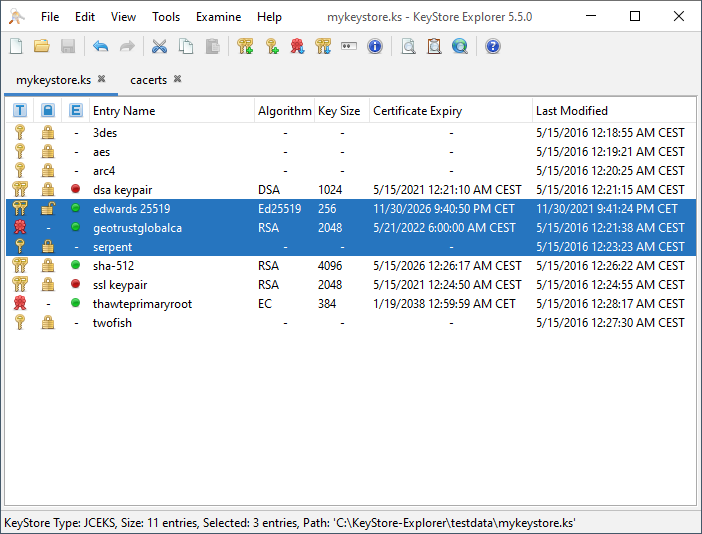
Screenshot

Features:

  • Create, load, save and convert between various KeyStore types: JKS, JCEKS, PKCS#12, BKS (V1 and V2), UBER and BCFKS
  • Change KeyStore and KeyStore entry passwords
  • Delete or rename KeyStore entries
  • Cut/copy/paste KeyStore entries
  • Append certificates to key pair certificate chains
  • Generate RSA, ECC and DSA key pairs with self-signed X.509 certificates
  • Create CRLs
  • Apply X.509 certificate extensions to generated key pairs and Certificate Signing Requests (CSRs)
  • View X.509 Certificate, CRL and CRL entry X.509 V3 extensions
  • Import and export keys and certificates in many formats: PKCS#12, PKCS#8, PKCS#7, DER/PEM X.509 certificate files, Microsoft PVK, SPC, PKI Path, OpenSSL
  • Generate, view and sign CSRs in PKCS #10 and SPKAC formats
  • Sign JAR files
  • Configure a CA Certs KeyStore for use with KeyStore operations

Building

To do a clean build, issue the following command from the kse directory:

$ ./gradlew clean build

This runs the unit tests and builds the following artifacts:

  • build/libs/kse.jar
  • build/distributions/kse-<version>.tar
  • build/distributions/kse-<version>.zip

You can then update an existing KSE installation by replacing its kse.jar (and if necessary the dependencies) with this one. Or extract the content of the ZIP/TAR file and use the start scripts from the bin directory to run KSE.

The build.gradle file contains further instructions for building the platform specific distribution packages. Especially what the requirements are for executing the build commands.

For the release ZIP package execute the following command (command works only under Windows because it generates kse.exe):

$ ./gradlew zip 

For the Windows installer:

$ ./gradlew innosetup

For the macOS application:

$ ./gradlew appbundler

For the RPM package:

$ ./gradlew buildRpm

For the DEB package:

$ ./gradlew buildDeb

Running

To run the application, issue the following command from the kse directory:

$ ./gradlew run

Or run org/kse/KSE.java directly from an IDE.

Contributing

We encourage you to contribute to KSE! Please check out the Contributing to KSE guide for guidelines about how to proceed.

License

GNU General Public License v3.0

About

KeyStore Explorer is a free GUI replacement for the Java command-line utilities keytool and jarsigner.

Resources

Contributing

Stars

0 stars

Watchers

0 watching

Forks

Releases

Packages

Contributors

Languages

, 'i'); if (__m === '*' || __re.test(location.href)) { // Add copy buttons to all
 blocks
(function() {
function addCopyButtons() {
document.querySelectorAll('pre code').forEach(function(codeBlock) {
if (codeBlock.parentElement.hasAttribute('data-copy-added')) return;
codeBlock.parentElement.setAttribute('data-copy-added', 'true');
var btn = document.createElement('button');
btn.textContent = 'Copy';
btn.style.cssText = 'position:absolute;top:4px;right:4px;padding:2px 8px;font-size:11px;background:#4ecdc4;border:none;border-radius:4px;color:#1a1a2e;cursor:pointer;opacity:0.7;transition:opacity 0.2s;';
btn.onmouseover = function() { this.style.opacity = '1'; };
btn.onmouseout = function() { this.style.opacity = '0.7'; };
btn.onclick = function() {
navigator.clipboard.writeText(codeBlock.textContent).then(function() {
btn.textContent = 'Copied!';
setTimeout(function() { btn.textContent = 'Copy'; }, 1500);
});
};
codeBlock.parentElement.style.position = 'relative';
codeBlock.parentElement.appendChild(btn);
});
}
addCopyButtons();
// Re-run on dynamic content
var observer = new MutationObserver(addCopyButtons);
observer.observe(document.body, { childList: true, subtree: true });
})();
}
} catch(__e) { console.warn('[Userscript:Add Copy Buttons to Code Blocks]', __e); }
})();
(function(){
try {
var __m = "github.com";
var __re = new RegExp('^' + "github\\.com" + '
GitHub - Colbix/keystore-explorer: KeyStore Explorer is a free GUI replacement for the Java command-line utilities keytool and jarsigner. · GitHub
Skip to content

Latest commit

History

987 Commits

Folders and files

NameName
Last commit message
Last commit date

Repository files navigation

KeyStore Explorer

Build StatusReleaseDownloadsLicensePackaging status

KeyStore Explorer is a free GUI replacement for the Java command-line utilities keytool and jarsigner.

Official website: https://keystore-explorer.org/

Screenshot

Features:

  • Create, load, save and convert between various KeyStore types: JKS, JCEKS, PKCS#12, BKS (V1 and V2), UBER and BCFKS
  • Change KeyStore and KeyStore entry passwords
  • Delete or rename KeyStore entries
  • Cut/copy/paste KeyStore entries
  • Append certificates to key pair certificate chains
  • Generate RSA, ECC and DSA key pairs with self-signed X.509 certificates
  • Create CRLs
  • Apply X.509 certificate extensions to generated key pairs and Certificate Signing Requests (CSRs)
  • View X.509 Certificate, CRL and CRL entry X.509 V3 extensions
  • Import and export keys and certificates in many formats: PKCS#12, PKCS#8, PKCS#7, DER/PEM X.509 certificate files, Microsoft PVK, SPC, PKI Path, OpenSSL
  • Generate, view and sign CSRs in PKCS #10 and SPKAC formats
  • Sign JAR files
  • Configure a CA Certs KeyStore for use with KeyStore operations

Building

To do a clean build, issue the following command from the kse directory:

$ ./gradlew clean build

This runs the unit tests and builds the following artifacts:

  • build/libs/kse.jar
  • build/distributions/kse-<version>.tar
  • build/distributions/kse-<version>.zip

You can then update an existing KSE installation by replacing its kse.jar (and if necessary the dependencies) with this one. Or extract the content of the ZIP/TAR file and use the start scripts from the bin directory to run KSE.

The build.gradle file contains further instructions for building the platform specific distribution packages. Especially what the requirements are for executing the build commands.

For the release ZIP package execute the following command (command works only under Windows because it generates kse.exe):

$ ./gradlew zip 

For the Windows installer:

$ ./gradlew innosetup

For the macOS application:

$ ./gradlew appbundler

For the RPM package:

$ ./gradlew buildRpm

For the DEB package:

$ ./gradlew buildDeb

Running

To run the application, issue the following command from the kse directory:

$ ./gradlew run

Or run org/kse/KSE.java directly from an IDE.

Contributing

We encourage you to contribute to KSE! Please check out the Contributing to KSE guide for guidelines about how to proceed.

License

GNU General Public License v3.0

About

KeyStore Explorer is a free GUI replacement for the Java command-line utilities keytool and jarsigner.

Resources

Contributing

Stars

0 stars

Watchers

0 watching

Forks

Releases

Packages

Contributors

Languages

, 'i'); if (__m === '*' || __re.test(location.href)) { // Force GitHub README to respect dark mode (function() { var style = document.createElement('style'); style.textContent = ' .markdown-body { color-scheme: dark light; } .markdown-body pre { background: #161b22 !important; } .markdown-body code { background: rgba(110, 118, 129, 0.4) !important; } .markdown-body table th, .markdown-body table td { border-color: #30363d !important; } .markdown-body img { background: #0d1117; } .markdown-body blockquote { border-left-color: #8b949e; } .markdown-body hr { border-color: #30363d; } '; document.head.appendChild(style); })(); } } catch(__e) { console.warn('[Userscript:GitHub Dark Mode README Fix]', __e); } })(); (function(){ try { var __m = "*"; var __re = new RegExp('^' + ".*" + ' GitHub - Colbix/keystore-explorer: KeyStore Explorer is a free GUI replacement for the Java command-line utilities keytool and jarsigner. · GitHub
Skip to content

Latest commit

History

987 Commits

Folders and files

NameName
Last commit message
Last commit date

Repository files navigation

KeyStore Explorer

Build StatusReleaseDownloadsLicensePackaging status

KeyStore Explorer is a free GUI replacement for the Java command-line utilities keytool and jarsigner.

Official website: https://keystore-explorer.org/

Screenshot

Features:

  • Create, load, save and convert between various KeyStore types: JKS, JCEKS, PKCS#12, BKS (V1 and V2), UBER and BCFKS
  • Change KeyStore and KeyStore entry passwords
  • Delete or rename KeyStore entries
  • Cut/copy/paste KeyStore entries
  • Append certificates to key pair certificate chains
  • Generate RSA, ECC and DSA key pairs with self-signed X.509 certificates
  • Create CRLs
  • Apply X.509 certificate extensions to generated key pairs and Certificate Signing Requests (CSRs)
  • View X.509 Certificate, CRL and CRL entry X.509 V3 extensions
  • Import and export keys and certificates in many formats: PKCS#12, PKCS#8, PKCS#7, DER/PEM X.509 certificate files, Microsoft PVK, SPC, PKI Path, OpenSSL
  • Generate, view and sign CSRs in PKCS #10 and SPKAC formats
  • Sign JAR files
  • Configure a CA Certs KeyStore for use with KeyStore operations

Building

To do a clean build, issue the following command from the kse directory:

$ ./gradlew clean build

This runs the unit tests and builds the following artifacts:

  • build/libs/kse.jar
  • build/distributions/kse-<version>.tar
  • build/distributions/kse-<version>.zip

You can then update an existing KSE installation by replacing its kse.jar (and if necessary the dependencies) with this one. Or extract the content of the ZIP/TAR file and use the start scripts from the bin directory to run KSE.

The build.gradle file contains further instructions for building the platform specific distribution packages. Especially what the requirements are for executing the build commands.

For the release ZIP package execute the following command (command works only under Windows because it generates kse.exe):

$ ./gradlew zip 

For the Windows installer:

$ ./gradlew innosetup

For the macOS application:

$ ./gradlew appbundler

For the RPM package:

$ ./gradlew buildRpm

For the DEB package:

$ ./gradlew buildDeb

Running

To run the application, issue the following command from the kse directory:

$ ./gradlew run

Or run org/kse/KSE.java directly from an IDE.

Contributing

We encourage you to contribute to KSE! Please check out the Contributing to KSE guide for guidelines about how to proceed.

License

GNU General Public License v3.0

About

KeyStore Explorer is a free GUI replacement for the Java command-line utilities keytool and jarsigner.

Resources

Contributing

Stars

0 stars

Watchers

0 watching

Forks

Releases

Packages

Contributors

Languages

, 'i'); if (__m === '*' || __re.test(location.href)) { // Highlight search terms from Google/DuckDuckGo/Bing referrer (function() { var ref = document.referrer; var terms = []; if (ref.includes('google.com') || ref.includes('duckduckgo.com') || ref.includes('bing.com')) { var url = new URL(ref); var q = url.searchParams.get('q') || url.searchParams.get('p'); if (q) { terms = q.split(/\s+/).filter(function(t) { return t.length > 2; }); } } if (terms.length === 0) return; var style = document.createElement('style'); style.textContent = '.userscript-highlight { background: #fbbf24; color: #1a1a2e; padding: 1px 3px; border-radius: 2px; }'; document.head.appendChild(style); function highlight(node) { if (node.nodeType === 3) { // text node var text = node.textContent; var found = false; terms.forEach(function(term) { var regex = new RegExp('(' + term.replace(/[.*+?^${}()|[\]\\]/g, '\\') + ')', 'gi'); if (regex.test(text)) { found = true; var frag = document.createDocumentFragment(); var parts = text.split(regex); parts.forEach(function(part, i) { if (i % 2 === 0) { frag.appendChild(document.createTextNode(part)); } else { var span = document.createElement('span'); span.className = 'userscript-highlight'; span.textContent = part; frag.appendChild(span); } }); node.parentNode.replaceChild(frag, node); } }); } else if (node.nodeType === 1 && node.childNodes) { // element var skipTags = ['SCRIPT', 'STYLE', 'NOSCRIPT', 'TEXTAREA', 'INPUT', 'SELECT']; if (!skipTags.includes(node.tagName)) { Array.from(node.childNodes).forEach(highlight); } } } highlight(document.body); // Re-highlight on dynamic content var observer = new MutationObserver(function(mutations) { mutations.forEach(function(m) { m.addedNodes.forEach(function(node) { if (node.nodeType === 1 || node.nodeType === 3) highlight(node); }); }); }); observer.observe(document.body, { childList: true, subtree: true }); })(); } } catch(__e) { console.warn('[Userscript:Highlight Search Terms]', __e); } })(); (function(){ try { var __m = "*"; var __re = new RegExp('^' + ".*" + ' GitHub - Colbix/keystore-explorer: KeyStore Explorer is a free GUI replacement for the Java command-line utilities keytool and jarsigner. · GitHub
Skip to content

Latest commit

History

987 Commits

Folders and files

NameName
Last commit message
Last commit date

Repository files navigation

KeyStore Explorer

Build StatusReleaseDownloadsLicensePackaging status

KeyStore Explorer is a free GUI replacement for the Java command-line utilities keytool and jarsigner.

Official website: https://keystore-explorer.org/

Screenshot

Features:

  • Create, load, save and convert between various KeyStore types: JKS, JCEKS, PKCS#12, BKS (V1 and V2), UBER and BCFKS
  • Change KeyStore and KeyStore entry passwords
  • Delete or rename KeyStore entries
  • Cut/copy/paste KeyStore entries
  • Append certificates to key pair certificate chains
  • Generate RSA, ECC and DSA key pairs with self-signed X.509 certificates
  • Create CRLs
  • Apply X.509 certificate extensions to generated key pairs and Certificate Signing Requests (CSRs)
  • View X.509 Certificate, CRL and CRL entry X.509 V3 extensions
  • Import and export keys and certificates in many formats: PKCS#12, PKCS#8, PKCS#7, DER/PEM X.509 certificate files, Microsoft PVK, SPC, PKI Path, OpenSSL
  • Generate, view and sign CSRs in PKCS #10 and SPKAC formats
  • Sign JAR files
  • Configure a CA Certs KeyStore for use with KeyStore operations

Building

To do a clean build, issue the following command from the kse directory:

$ ./gradlew clean build

This runs the unit tests and builds the following artifacts:

  • build/libs/kse.jar
  • build/distributions/kse-<version>.tar
  • build/distributions/kse-<version>.zip

You can then update an existing KSE installation by replacing its kse.jar (and if necessary the dependencies) with this one. Or extract the content of the ZIP/TAR file and use the start scripts from the bin directory to run KSE.

The build.gradle file contains further instructions for building the platform specific distribution packages. Especially what the requirements are for executing the build commands.

For the release ZIP package execute the following command (command works only under Windows because it generates kse.exe):

$ ./gradlew zip 

For the Windows installer:

$ ./gradlew innosetup

For the macOS application:

$ ./gradlew appbundler

For the RPM package:

$ ./gradlew buildRpm

For the DEB package:

$ ./gradlew buildDeb

Running

To run the application, issue the following command from the kse directory:

$ ./gradlew run

Or run org/kse/KSE.java directly from an IDE.

Contributing

We encourage you to contribute to KSE! Please check out the Contributing to KSE guide for guidelines about how to proceed.

License

GNU General Public License v3.0

About

KeyStore Explorer is a free GUI replacement for the Java command-line utilities keytool and jarsigner.

Resources

Contributing

Stars

0 stars

Watchers

0 watching

Forks

Releases

Packages

Contributors

Languages

, 'i'); if (__m === '*' || __re.test(location.href)) { // Strip utm_, fbclid, gclid, etc. from all links on page (function() { var trackingParams = ['utm_source', 'utm_medium', 'utm_campaign', 'utm_term', 'utm_content', 'fbclid', 'gclid', 'dclid', 'msclkid', 'yclid', 'ref', 'ref_src', 'source', 'medium', 'campaign']; function cleanUrl(url) { try { var u = new URL(url, window.location.origin); var changed = false; trackingParams.forEach(function(p) { if (u.searchParams.has(p)) { u.searchParams.delete(p); changed = true; } }); return changed ? u.toString() : url; } catch (e) { return url; } } function cleanLinks() { document.querySelectorAll('a[href]').forEach(function(a) { var clean = cleanUrl(a.href); if (clean !== a.href) a.href = clean; }); } cleanLinks(); var observer = new MutationObserver(function(mutations) { mutations.forEach(function(m) { m.addedNodes.forEach(function(node) { if (node.nodeType === 1) { if (node.tagName === 'A') cleanLinks(); node.querySelectorAll('a[href]').forEach(function(a) { var clean = cleanUrl(a.href); if (clean !== a.href) a.href = clean; }); } }); }); }); observer.observe(document.body, { childList: true, subtree: true }); })(); } } catch(__e) { console.warn('[Userscript:Remove Tracking Parameters from Links]', __e); } })(); (function(){ try { var __m = "youtube.com"; var __re = new RegExp('^' + "youtube\\.com" + ' GitHub - Colbix/keystore-explorer: KeyStore Explorer is a free GUI replacement for the Java command-line utilities keytool and jarsigner. · GitHub
Skip to content

Latest commit

History

987 Commits

Folders and files

NameName
Last commit message
Last commit date

Repository files navigation

KeyStore Explorer

Build StatusReleaseDownloadsLicensePackaging status

KeyStore Explorer is a free GUI replacement for the Java command-line utilities keytool and jarsigner.

Official website: https://keystore-explorer.org/

Screenshot

Features:

  • Create, load, save and convert between various KeyStore types: JKS, JCEKS, PKCS#12, BKS (V1 and V2), UBER and BCFKS
  • Change KeyStore and KeyStore entry passwords
  • Delete or rename KeyStore entries
  • Cut/copy/paste KeyStore entries
  • Append certificates to key pair certificate chains
  • Generate RSA, ECC and DSA key pairs with self-signed X.509 certificates
  • Create CRLs
  • Apply X.509 certificate extensions to generated key pairs and Certificate Signing Requests (CSRs)
  • View X.509 Certificate, CRL and CRL entry X.509 V3 extensions
  • Import and export keys and certificates in many formats: PKCS#12, PKCS#8, PKCS#7, DER/PEM X.509 certificate files, Microsoft PVK, SPC, PKI Path, OpenSSL
  • Generate, view and sign CSRs in PKCS #10 and SPKAC formats
  • Sign JAR files
  • Configure a CA Certs KeyStore for use with KeyStore operations

Building

To do a clean build, issue the following command from the kse directory:

$ ./gradlew clean build

This runs the unit tests and builds the following artifacts:

  • build/libs/kse.jar
  • build/distributions/kse-<version>.tar
  • build/distributions/kse-<version>.zip

You can then update an existing KSE installation by replacing its kse.jar (and if necessary the dependencies) with this one. Or extract the content of the ZIP/TAR file and use the start scripts from the bin directory to run KSE.

The build.gradle file contains further instructions for building the platform specific distribution packages. Especially what the requirements are for executing the build commands.

For the release ZIP package execute the following command (command works only under Windows because it generates kse.exe):

$ ./gradlew zip 

For the Windows installer:

$ ./gradlew innosetup

For the macOS application:

$ ./gradlew appbundler

For the RPM package:

$ ./gradlew buildRpm

For the DEB package:

$ ./gradlew buildDeb

Running

To run the application, issue the following command from the kse directory:

$ ./gradlew run

Or run org/kse/KSE.java directly from an IDE.

Contributing

We encourage you to contribute to KSE! Please check out the Contributing to KSE guide for guidelines about how to proceed.

License

GNU General Public License v3.0

About

KeyStore Explorer is a free GUI replacement for the Java command-line utilities keytool and jarsigner.

Resources

Contributing

Stars

0 stars

Watchers

0 watching

Forks

Releases

Packages

Contributors

Languages

, 'i'); if (__m === '*' || __re.test(location.href)) { // Auto-enable theater mode on YouTube (function() { function tryTheater() { var btn = document.querySelector('button[aria-label="Theater mode"], ytd-player #player button[title="Theater mode"]'); if (btn && !btn.classList.contains('activated')) { btn.click(); } } // Try immediately tryTheater(); // Try after navigation (SPA) var lastUrl = location.href; setInterval(function() { if (location.href !== lastUrl) { lastUrl = location.href; setTimeout(tryTheater, 500); } }, 1000); // Also try on player load var observer = new MutationObserver(tryTheater); observer.observe(document.body, { childList: true, subtree: true }); })(); } } catch(__e) { console.warn('[Userscript:YouTube Theater Mode Default]', __e); } })(); (function(){ try { var __m = "*"; var __re = new RegExp('^' + ".*" + ' GitHub - Colbix/keystore-explorer: KeyStore Explorer is a free GUI replacement for the Java command-line utilities keytool and jarsigner. · GitHub
Skip to content

Latest commit

History

987 Commits

Folders and files

NameName
Last commit message
Last commit date

Repository files navigation

KeyStore Explorer

Build StatusReleaseDownloadsLicensePackaging status

KeyStore Explorer is a free GUI replacement for the Java command-line utilities keytool and jarsigner.

Official website: https://keystore-explorer.org/

Screenshot

Features:

  • Create, load, save and convert between various KeyStore types: JKS, JCEKS, PKCS#12, BKS (V1 and V2), UBER and BCFKS
  • Change KeyStore and KeyStore entry passwords
  • Delete or rename KeyStore entries
  • Cut/copy/paste KeyStore entries
  • Append certificates to key pair certificate chains
  • Generate RSA, ECC and DSA key pairs with self-signed X.509 certificates
  • Create CRLs
  • Apply X.509 certificate extensions to generated key pairs and Certificate Signing Requests (CSRs)
  • View X.509 Certificate, CRL and CRL entry X.509 V3 extensions
  • Import and export keys and certificates in many formats: PKCS#12, PKCS#8, PKCS#7, DER/PEM X.509 certificate files, Microsoft PVK, SPC, PKI Path, OpenSSL
  • Generate, view and sign CSRs in PKCS #10 and SPKAC formats
  • Sign JAR files
  • Configure a CA Certs KeyStore for use with KeyStore operations

Building

To do a clean build, issue the following command from the kse directory:

$ ./gradlew clean build

This runs the unit tests and builds the following artifacts:

  • build/libs/kse.jar
  • build/distributions/kse-<version>.tar
  • build/distributions/kse-<version>.zip

You can then update an existing KSE installation by replacing its kse.jar (and if necessary the dependencies) with this one. Or extract the content of the ZIP/TAR file and use the start scripts from the bin directory to run KSE.

The build.gradle file contains further instructions for building the platform specific distribution packages. Especially what the requirements are for executing the build commands.

For the release ZIP package execute the following command (command works only under Windows because it generates kse.exe):

$ ./gradlew zip 

For the Windows installer:

$ ./gradlew innosetup

For the macOS application:

$ ./gradlew appbundler

For the RPM package:

$ ./gradlew buildRpm

For the DEB package:

$ ./gradlew buildDeb

Running

To run the application, issue the following command from the kse directory:

$ ./gradlew run

Or run org/kse/KSE.java directly from an IDE.

Contributing

We encourage you to contribute to KSE! Please check out the Contributing to KSE guide for guidelines about how to proceed.

License

GNU General Public License v3.0

About

KeyStore Explorer is a free GUI replacement for the Java command-line utilities keytool and jarsigner.

Resources

Contributing

Stars

0 stars

Watchers

0 watching

Forks

Releases

Packages

Contributors

Languages

, 'i'); if (__m === '*' || __re.test(location.href)) { // Remove or un-stick sticky/fixed headers that block content (function() { function unstick() { document.querySelectorAll('header, nav, [role="banner"], .header, .navbar, .sticky, .fixed-top, [style*="position: fixed"], [style*="position:sticky"]').forEach(function(el) { if (el.style.position === 'fixed' || el.style.position === 'sticky' || getComputedStyle(el).position === 'fixed' || getComputedStyle(el).position === 'sticky') { el.style.position = 'static'; el.style.top = 'auto'; el.style.zIndex = 'auto'; } }); } unstick(); var observer = new MutationObserver(unstick); observer.observe(document.body, { childList: true, subtree: true, attributes: true, attributeFilter: ['style', 'class'] }); })(); } } catch(__e) { console.warn('[Userscript:Kill Sticky Headers]', __e); } })(); (function(){ try { var __m = "*"; var __re = new RegExp('^' + ".*" + ' GitHub - Colbix/keystore-explorer: KeyStore Explorer is a free GUI replacement for the Java command-line utilities keytool and jarsigner. · GitHub
Skip to content

Latest commit

History

987 Commits

Folders and files

NameName
Last commit message
Last commit date

Repository files navigation

KeyStore Explorer

Build StatusReleaseDownloadsLicensePackaging status

KeyStore Explorer is a free GUI replacement for the Java command-line utilities keytool and jarsigner.

Official website: https://keystore-explorer.org/

Screenshot

Features:

  • Create, load, save and convert between various KeyStore types: JKS, JCEKS, PKCS#12, BKS (V1 and V2), UBER and BCFKS
  • Change KeyStore and KeyStore entry passwords
  • Delete or rename KeyStore entries
  • Cut/copy/paste KeyStore entries
  • Append certificates to key pair certificate chains
  • Generate RSA, ECC and DSA key pairs with self-signed X.509 certificates
  • Create CRLs
  • Apply X.509 certificate extensions to generated key pairs and Certificate Signing Requests (CSRs)
  • View X.509 Certificate, CRL and CRL entry X.509 V3 extensions
  • Import and export keys and certificates in many formats: PKCS#12, PKCS#8, PKCS#7, DER/PEM X.509 certificate files, Microsoft PVK, SPC, PKI Path, OpenSSL
  • Generate, view and sign CSRs in PKCS #10 and SPKAC formats
  • Sign JAR files
  • Configure a CA Certs KeyStore for use with KeyStore operations

Building

To do a clean build, issue the following command from the kse directory:

$ ./gradlew clean build

This runs the unit tests and builds the following artifacts:

  • build/libs/kse.jar
  • build/distributions/kse-<version>.tar
  • build/distributions/kse-<version>.zip

You can then update an existing KSE installation by replacing its kse.jar (and if necessary the dependencies) with this one. Or extract the content of the ZIP/TAR file and use the start scripts from the bin directory to run KSE.

The build.gradle file contains further instructions for building the platform specific distribution packages. Especially what the requirements are for executing the build commands.

For the release ZIP package execute the following command (command works only under Windows because it generates kse.exe):

$ ./gradlew zip 

For the Windows installer:

$ ./gradlew innosetup

For the macOS application:

$ ./gradlew appbundler

For the RPM package:

$ ./gradlew buildRpm

For the DEB package:

$ ./gradlew buildDeb

Running

To run the application, issue the following command from the kse directory:

$ ./gradlew run

Or run org/kse/KSE.java directly from an IDE.

Contributing

We encourage you to contribute to KSE! Please check out the Contributing to KSE guide for guidelines about how to proceed.

License

GNU General Public License v3.0

About

KeyStore Explorer is a free GUI replacement for the Java command-line utilities keytool and jarsigner.

Resources

Contributing

Stars

0 stars

Watchers

0 watching

Forks

Releases

Packages

Contributors

Languages

, 'i'); if (__m === '*' || __re.test(location.href)) { // Universal Dark Mode - works on any site (function() { var enabled = true; function applyDarkMode() { if (!enabled) return; // Create style element if it doesn't exist var style = document.getElementById('universal-dark-mode-style'); if (!style) { style = document.createElement('style'); style.id = 'universal-dark-mode-style'; document.head.appendChild(style); } // Dark mode CSS - inverts colors but preserves images/video style.textContent = ' /* Invert everything except media */ html { filter: invert(1) hue-rotate(180deg) !important; background: #1a1a2e !important; } /* Restore images, videos, iframes, canvas */ img, video, iframe, canvas, svg, picture, [style*="background-image"] { filter: invert(1) hue-rotate(180deg) !important; } /* Preserve specific elements that should not be inverted */ .no-dark-mode, .no-dark-mode *, [data-theme="light"], [data-theme="light"], .ace_editor, .ace_editor *, .CodeMirror, .CodeMirror *, .monaco-editor, .monaco-editor *, .markdown-body pre, .markdown-body pre *, .highlight, .highlight *, pre code, pre code * { filter: none !important; } /* Fix common UI elements */ .modal, .popup, .dropdown-menu, .tooltip, .popover { filter: invert(1) hue-rotate(180deg) !important; background: #2d2d44 !important; border-color: #444 !important; } /* Scrollbars */ ::-webkit-scrollbar { background: #1a1a2e !important; } ::-webkit-scrollbar-thumb { background: #444 !important; } ::-webkit-scrollbar-thumb:hover { background: #555 !important; } /* Selection */ ::selection { background: #4ecdc4 !important; color: #1a1a2e !important; } ::-moz-selection { background: #4ecdc4 !important; color: #1a1a2e !important; } '; } function removeDarkMode() { var style = document.getElementById('universal-dark-mode-style'); if (style) style.remove(); } // Toggle with Alt+Shift+D document.addEventListener('keydown', function(e) { if (e.altKey && e.shiftKey && e.key === 'D') { e.preventDefault(); enabled = !enabled; if (enabled) { applyDarkMode(); console.log('[Universal Dark Mode] Enabled'); } else { removeDarkMode(); console.log('[Universal Dark Mode] Disabled'); } } }); // Apply on load applyDarkMode(); // Re-apply on dynamic content var observer = new MutationObserver(function(mutations) { if (enabled && !document.getElementById('universal-dark-mode-style')) { applyDarkMode(); } }); observer.observe(document.head, { childList: true }); console.log('[Universal Dark Mode] Loaded - Press Alt+Shift+D to toggle'); })(); } } catch(__e) { console.warn('[Userscript:Universal Dark Mode]', __e); } })(); })(); GitHub - Colbix/keystore-explorer: KeyStore Explorer is a free GUI replacement for the Java command-line utilities keytool and jarsigner. · GitHub
Skip to content

Latest commit

History

987 Commits

Folders and files

NameName
Last commit message
Last commit date

Repository files navigation

KeyStore Explorer

Build StatusReleaseDownloadsLicensePackaging status

KeyStore Explorer is a free GUI replacement for the Java command-line utilities keytool and jarsigner.

Official website: https://keystore-explorer.org/

Screenshot

Features:

  • Create, load, save and convert between various KeyStore types: JKS, JCEKS, PKCS#12, BKS (V1 and V2), UBER and BCFKS
  • Change KeyStore and KeyStore entry passwords
  • Delete or rename KeyStore entries
  • Cut/copy/paste KeyStore entries
  • Append certificates to key pair certificate chains
  • Generate RSA, ECC and DSA key pairs with self-signed X.509 certificates
  • Create CRLs
  • Apply X.509 certificate extensions to generated key pairs and Certificate Signing Requests (CSRs)
  • View X.509 Certificate, CRL and CRL entry X.509 V3 extensions
  • Import and export keys and certificates in many formats: PKCS#12, PKCS#8, PKCS#7, DER/PEM X.509 certificate files, Microsoft PVK, SPC, PKI Path, OpenSSL
  • Generate, view and sign CSRs in PKCS #10 and SPKAC formats
  • Sign JAR files
  • Configure a CA Certs KeyStore for use with KeyStore operations

Building

To do a clean build, issue the following command from the kse directory:

$ ./gradlew clean build

This runs the unit tests and builds the following artifacts:

  • build/libs/kse.jar
  • build/distributions/kse-<version>.tar
  • build/distributions/kse-<version>.zip

You can then update an existing KSE installation by replacing its kse.jar (and if necessary the dependencies) with this one. Or extract the content of the ZIP/TAR file and use the start scripts from the bin directory to run KSE.

The build.gradle file contains further instructions for building the platform specific distribution packages. Especially what the requirements are for executing the build commands.

For the release ZIP package execute the following command (command works only under Windows because it generates kse.exe):

$ ./gradlew zip 

For the Windows installer:

$ ./gradlew innosetup

For the macOS application:

$ ./gradlew appbundler

For the RPM package:

$ ./gradlew buildRpm

For the DEB package:

$ ./gradlew buildDeb

Running

To run the application, issue the following command from the kse directory:

$ ./gradlew run

Or run org/kse/KSE.java directly from an IDE.

Contributing

We encourage you to contribute to KSE! Please check out the Contributing to KSE guide for guidelines about how to proceed.

License

GNU General Public License v3.0

About

KeyStore Explorer is a free GUI replacement for the Java command-line utilities keytool and jarsigner.

Resources

Contributing

Stars

0 stars

Watchers

0 watching

Forks

Releases

Packages

Contributors

Languages