




This repository contains a Java library to generate graphical Domain-driven Design (DDD) Context Maps inspired by Brandolini and Vernon. The generation of the Context Maps is based on Graphviz, graphviz-java, and used within the Context Mapper tool.
The library is published to Maven central and as an Eclipse feature to a P2 repository.
Therefore, you can easily include the library to your Maven or Gradle build:
Maven:
<dependency>
<groupId>org.contextmapper</groupId>
<artifactId>context-map-generator</artifactId>
<version>1.2.1</version>
</dependency>
Gradle:
implementation 'org.contextmapper:context-map-generator:1.2.1'Important note: The generator requires Graphviz to be installed on the machine on which you run it. Ensure that the Graphviz binaries are part of your PATH environment variable (especially on Windows since the installer does not add it automatically; the path to be added to the PATH variable is typically C:\Program Files (x86)\GraphvizX.XX\bin).
The following Java programs illustrates how you can create a Context Map (png file in these cases). They generate Context Maps for our insurance example and the DDD "Cargo" sample application (CML examples can be found in our examples repository).
BoundedContextcustomerManagement = newBoundedContext("Customer Management Context");
BoundedContextcustomerSelfService = newBoundedContext("Customer Self-Service Context");
BoundedContextprinting = newBoundedContext("Printing Context");
BoundedContextdebtCollection = newBoundedContext("Debt Collection Context");
BoundedContextpolicyManagement = newBoundedContext("Policy Management Context");
BoundedContextriskManagement = newBoundedContext("Risk Management Context");
ContextMapcontextMap = newContextMap()
.addBoundedContext(customerManagement)
.addBoundedContext(customerSelfService)
.addBoundedContext(printing)
.addBoundedContext(debtCollection)
.addBoundedContext(policyManagement)
.addBoundedContext(riskManagement)
// Customer/Supplier relationship example
.addRelationship(newUpstreamDownstreamRelationship(customerManagement, customerSelfService)
.setCustomerSupplier(true))
// Upstream/Downstream relationship with OHS, PL, ACL, and CF examples
.addRelationship(newUpstreamDownstreamRelationship(printing, customerManagement)
.setUpstreamPatterns(OPEN_HOST_SERVICE, PUBLISHED_LANGUAGE)
.setDownstreamPatterns(ANTICORRUPTION_LAYER))
.addRelationship(newUpstreamDownstreamRelationship(printing, policyManagement)
.setUpstreamPatterns(OPEN_HOST_SERVICE, PUBLISHED_LANGUAGE)
.setDownstreamPatterns(ANTICORRUPTION_LAYER))
.addRelationship(newUpstreamDownstreamRelationship(printing, debtCollection)
.setUpstreamPatterns(OPEN_HOST_SERVICE, PUBLISHED_LANGUAGE)
.setDownstreamPatterns(ANTICORRUPTION_LAYER))
.addRelationship(newUpstreamDownstreamRelationship(customerManagement, policyManagement)
.setUpstreamPatterns(OPEN_HOST_SERVICE, PUBLISHED_LANGUAGE)
.setDownstreamPatterns(CONFORMIST))
// Shared Kernel relationship example
.addRelationship(newSharedKernel(debtCollection, policyManagement))
// Partnership relationship example
.addRelationship(newPartnership(riskManagement, policyManagement));
// generate the Context MapnewContextMapGenerator().setLabelSpacingFactor(10)
.setWidth(3600)
.generateContextMapGraphic(contextMap, Format.PNG, "/home/user/myContextMap.png");
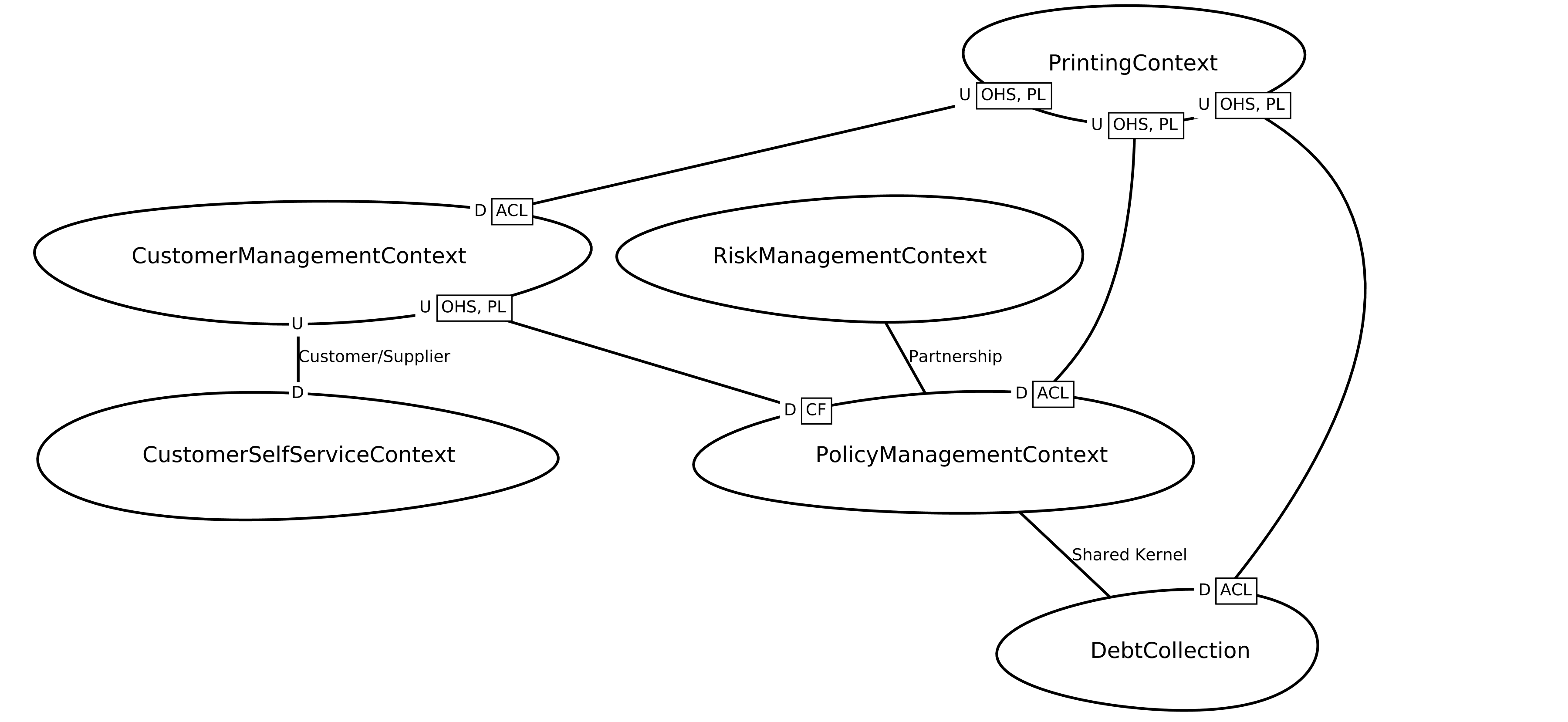
The program above generates the following Context Map:
Optionally it is possible to define a name or implementation technology for each relationship by using the corresponding setters. The following example calls show how we set them on relationships from the example above:
.addRelationship(newUpstreamDownstreamRelationship(printing, debtCollection)
.setUpstreamPatterns(OPEN_HOST_SERVICE, PUBLISHED_LANGUAGE)
.setDownstreamPatterns(ANTICORRUPTION_LAYER)
.setName("PrintingDebts"))
.addRelationship(newSharedKernel(debtCollection, policyManagement)
.setImplementationTechnology("Java Library"))
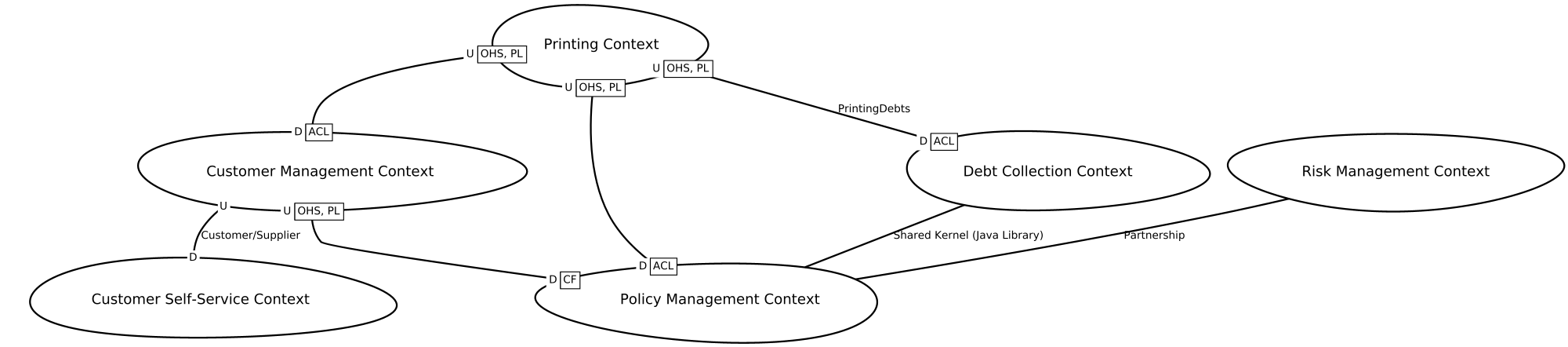
The generator adds those information as additional labels to the generated relationships, as this example shows:
The Context Map generator also allows users to illustrate which development teams work on which subsystems, components, or Bounded Contexts. By default, a Bounded Context is of the type "generic", but there is another constructor that allows you to create Bounded Contexts of the type "team". If a Bounded Context is of the type "team", it can "realize" a Bounded Context of the type "generic". The following example illustrates how you can use this concept to visualize which teams work on which Bounded Contexts:
BoundedContextcustomerManagement = newBoundedContext("Customer Management Context");
BoundedContextcustomerSelfService = newBoundedContext("Customer Self-Service Context");
BoundedContextpolicyManagementContext = newBoundedContext("Policy Management Context");
BoundedContextriskManagementContext = newBoundedContext("Risk Management Context");
BoundedContextcustomersBackendTeam = newBoundedContext("Customers Backend Team", BoundedContextType.TEAM)
.realizing(customerManagement);
BoundedContextcustomersFrontendTeam = newBoundedContext("Customers Frontend Team", BoundedContextType.TEAM)
.realizing(customerSelfService);
BoundedContextcontractsTeam = newBoundedContext("Contracts", BoundedContextType.TEAM)
.realizing(policyManagementContext)
.realizing(riskManagementContext);
ContextMapcontextMap = newContextMap()
.addBoundedContext(customerManagement)
.addBoundedContext(customerSelfService)
.addBoundedContext(policyManagementContext)
.addBoundedContext(riskManagementContext)
.addBoundedContext(customersBackendTeam)
.addBoundedContext(customersFrontendTeam)
.addBoundedContext(contractsTeam)
.addRelationship(newUpstreamDownstreamRelationship(customerManagement, customerSelfService)
.setCustomerSupplier(true))
.addRelationship(newUpstreamDownstreamRelationship(customerManagement, policyManagementContext)
.setUpstreamPatterns(OPEN_HOST_SERVICE, PUBLISHED_LANGUAGE)
.setDownstreamPatterns(CONFORMIST))
.addRelationship(newPartnership(policyManagementContext, riskManagementContext))
.addRelationship(newUpstreamDownstreamRelationship(customersBackendTeam, customersFrontendTeam)
.setCustomerSupplier(true))
.addRelationship(newUpstreamDownstreamRelationship(customersBackendTeam, contractsTeam));
newContextMapGenerator()
.generateContextMapGraphic(contextMap, Format.PNG, "/home/user/myContextMap.png");
By default, the generator produces the following team map:
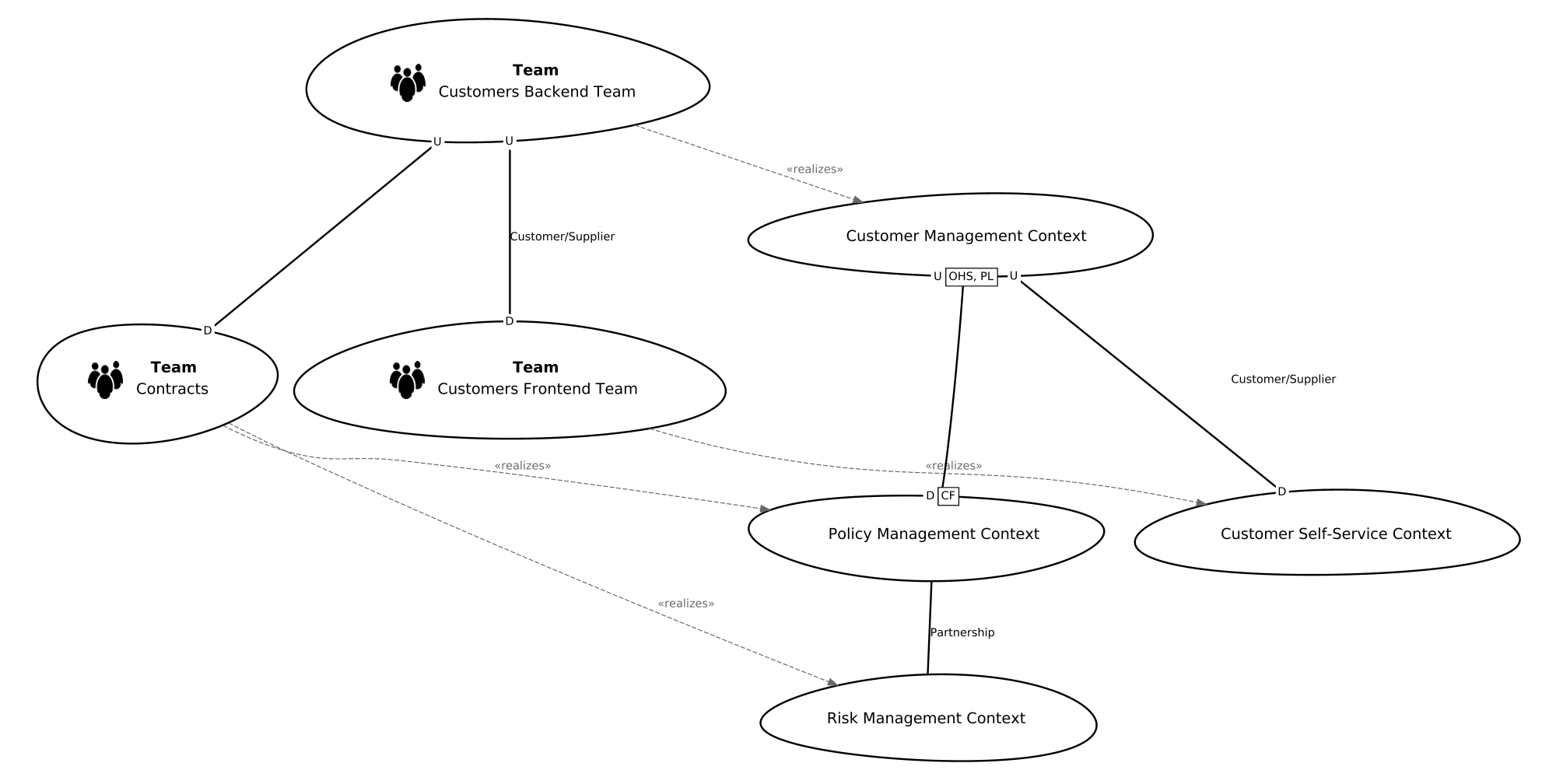
As you can see, the generator clusters the Bounded Contexts of the two types (teams and generic BCs) together. Alternatively, you can disable the clustering as follows:
newContextMapGenerator()
.clusterTeams(false) // disable clustering
.generateContextMapGraphic(contextMap, Format.PNG, "/home/user/myContextMap.png");
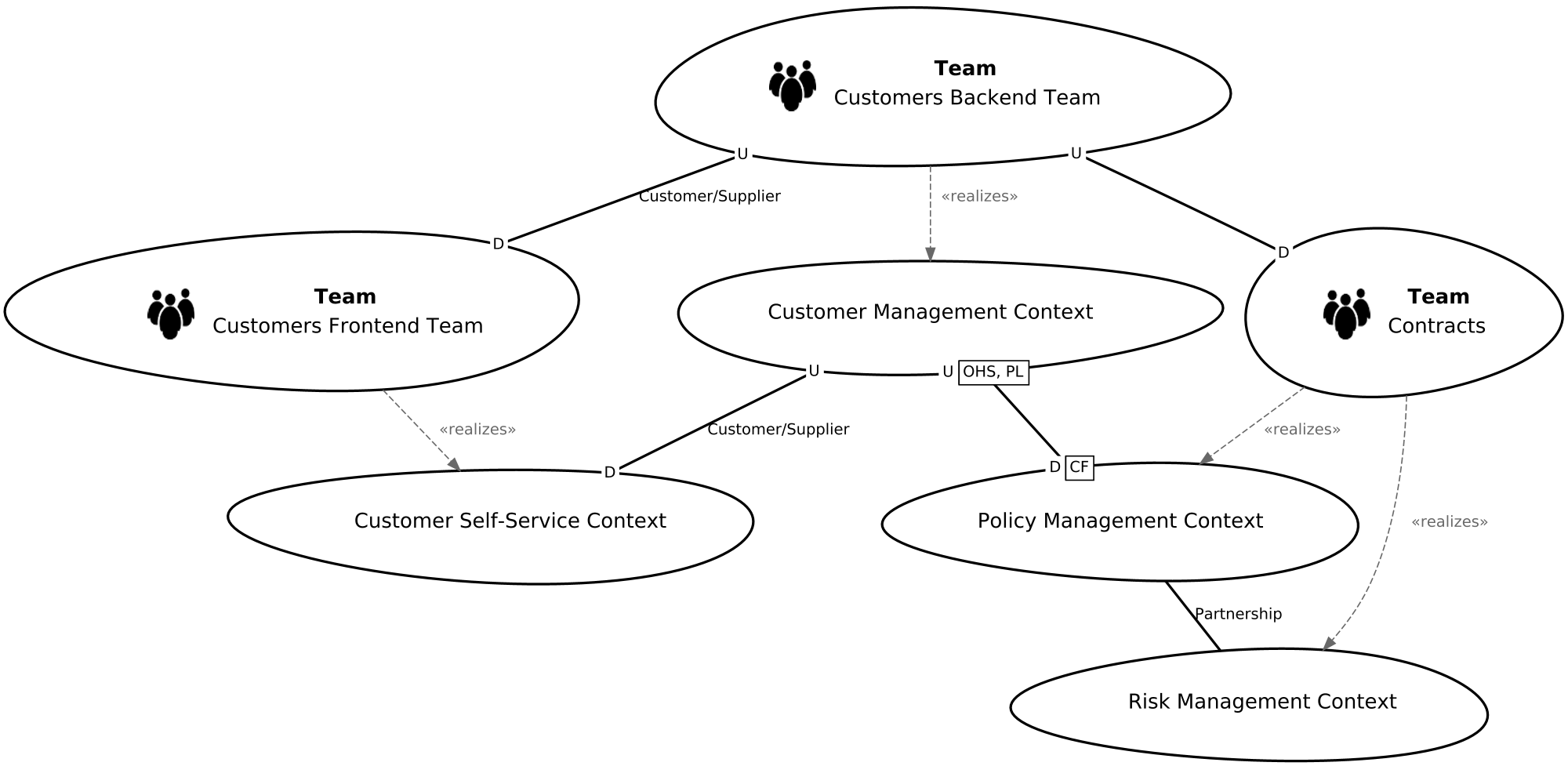
In this case the produced graphic looks as follows:
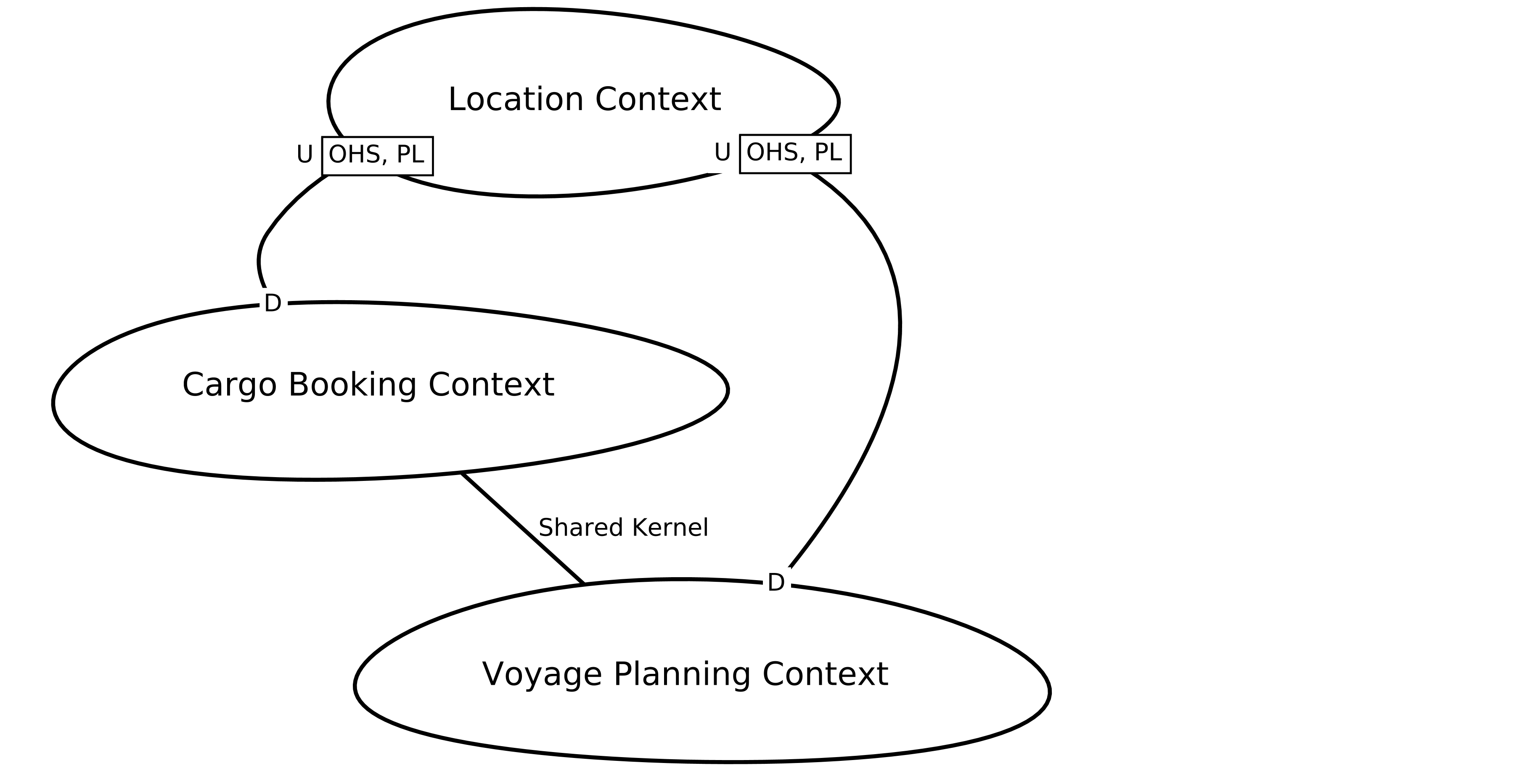
BoundedContextcargoBookingContext = newBoundedContext("Cargo Booking Context");
BoundedContextvoyagePlanningContext = newBoundedContext("Voyage Planning Context");
BoundedContextlocationContext = newBoundedContext("Location Context");
ContextMapcontextMap = newContextMap()
.addBoundedContext(cargoBookingContext)
.addBoundedContext(voyagePlanningContext)
.addBoundedContext(locationContext)
.addRelationship(newSharedKernel(cargoBookingContext, voyagePlanningContext))
.addRelationship(newUpstreamDownstreamRelationship(locationContext, cargoBookingContext)
.setUpstreamPatterns(OPEN_HOST_SERVICE, PUBLISHED_LANGUAGE))
.addRelationship(newUpstreamDownstreamRelationship(locationContext, voyagePlanningContext)
.setUpstreamPatterns(OPEN_HOST_SERVICE, PUBLISHED_LANGUAGE));
// generate the Context MapnewContextMapGenerator().setLabelSpacingFactor(10)
.generateContextMapGraphic(contextMap, Format.PNG, "/home/user/myContextMap.png");
The result:
With the following methods you can parameterize the ContextMapGenerator:
| Method / Parameter | Description | Default value |
|---|---|---|
| setHeight(int height) | By using this parameter you can fix the height of the produced image. Note that if you use fix the height, the width will be adjusted dynamically. | 1000 |
| setWidth(int width) | By using this parameter you can fix the width of the produced image. Note that if you use fix the width, the height will be adjusted dynamically. | 2000 |
| setLabelSpacingFactor(int spacingFactor) | The Graphviz layouting algorithm doesn't ensure that the labels of the edges do not overlap. Especially the boxes with the relationship patterns (OHS, PL, ACL, CF) may often overlap in our case. By introducing spacing between the edges we can often bypass this issue. This parameter (a factor between 1 and 20) controls how much spacing we add. | 1 |
| clusterTeams(boolean clusterTeams) | This parameter allows you to control whether Bounded Contexts of the different types (teams vs. generic) are clustered together or not. It is relevant for team maps only (see example team maps above). | true |
As illustrated in the example code above, the generateContextMapGraphic method takes a parameter to define the output format. The following formats are supported:
- PNG
- SVG
- DOT (Graphviz dot format; *.gv file)
If you want to contribute to this project you can create a fork and a pull request. The project is built with Gradle, so you can import it as Gradle project within Eclipse or IntelliJ IDEA (or any other IDE supporting Gradle).
Contribution is always welcome! Here are some ways how you can contribute:
- Create Github issues if you find bugs or just want to give suggestions for improvements.
- This is an open source project: if you want to code, create pull requests from forks of this repository. Please refer to a Github issue if you contribute this way.
- If you want to contribute to our documentation and user guides on our website https://contextmapper.org/, create pull requests from forks of the corresponding page repo https://github.com/ContextMapper/contextmapper.github.io or create issues there.
ContextMapper is released under the Apache License, Version 2.0.