Skip to content

Repository files navigation

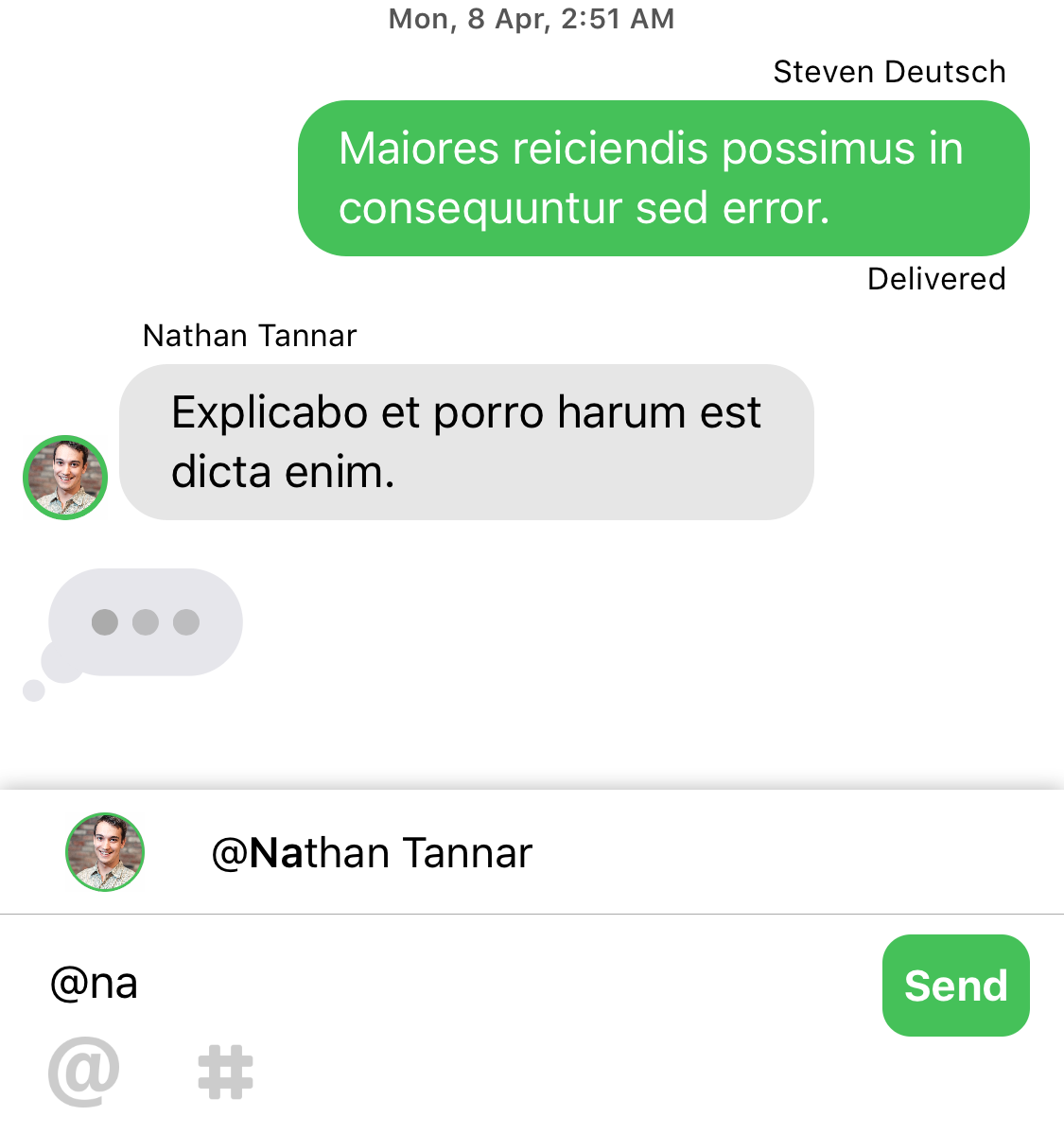
A community-driven replacement for JSQMessagesViewController https://messagekit.github.io

TestsBuild frameworkBuild example appDanger

codecovSwiftCocoaPodsXcodeXcodeMITContributions Welcome

Goals

  • Provide a 🚨safe🚨 environment for others to learn and grow through Open Source.
  • Make adding Chat:speech_balloon: to a project easy.
  • Enable beautiful and customizable Chat UI's.
  • Provide an awesome Open Source project for the iOS open source community.
  • Help others learn.

Installation

Swift 5.3 in Xcode 12 added support for assets in Swift Packages. You can just add MessageKit package to your project by entering it's repository URL

https://github.com/MessageKit/MessageKit

Older versions of Swift and Xcode don't support MessageKit via SPM.

Requirements

  • iOS 13 or later
  • Swift 5.5 or later

For iOS 12 or CocoaPods please use version 3.8.0

For iOS 11 please use version 3.3.0

For iOS 9 and iOS 10 please use version 3.1.1

Getting Started

Cell Structure

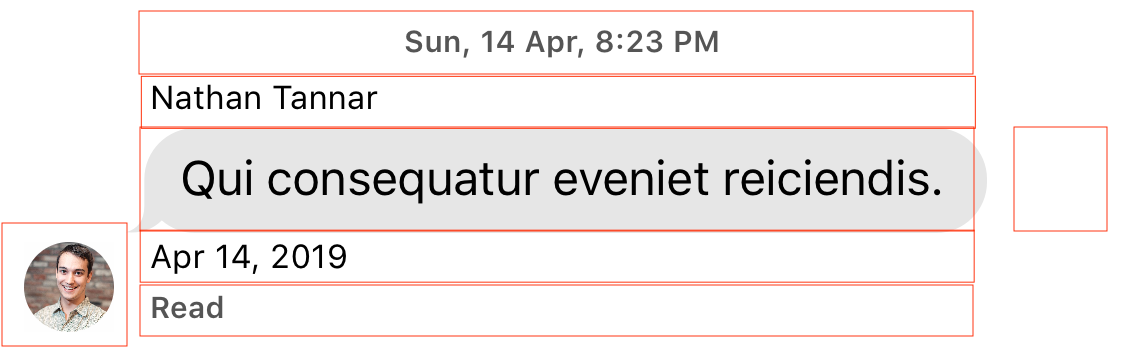
Each default cell is a subclass of MessageContentCell which has 7 parts. From top down we have a: cellTopLabel, messageTopLabel, messageContainerView, messageBottomLabel, cellBottomLabel with the avatarView and accessoryView on either side respectively. Above we see the basic TextMessageCell which uses a MessageLabel as its main content.

This structure will allow you to create a layout that suits your needs as you can customize the size, appearance and padding of each. If you need something more advanced you can implement a custom cell, which we show how to do in the Example project.

InputBarAccessoryView Structure

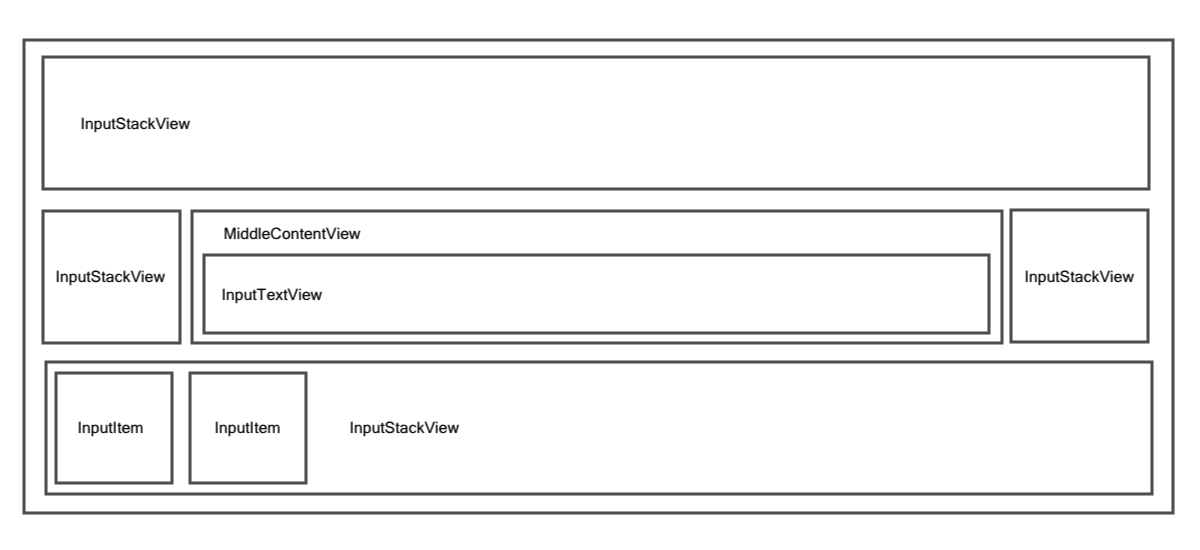
The InputBarAccessoryView, 3rd party dependency from InputBarAccessoryView is a flexible and robust way of creating any kind of input layout you wish. Check the repo and examples there for more info.

Guides

Please have a look at the Quick Start guide and the FAQs.

We recommend you start by looking at the Example project or write a question with the "messagekit" tag on Stack Overflow. You can also look at previous issues here on GitHub with the "Question" tag.

For more on how to use the MessageInputBar, see the dependency it is based on InputBarAccessoryView. You can also see this short guide

Default Cells

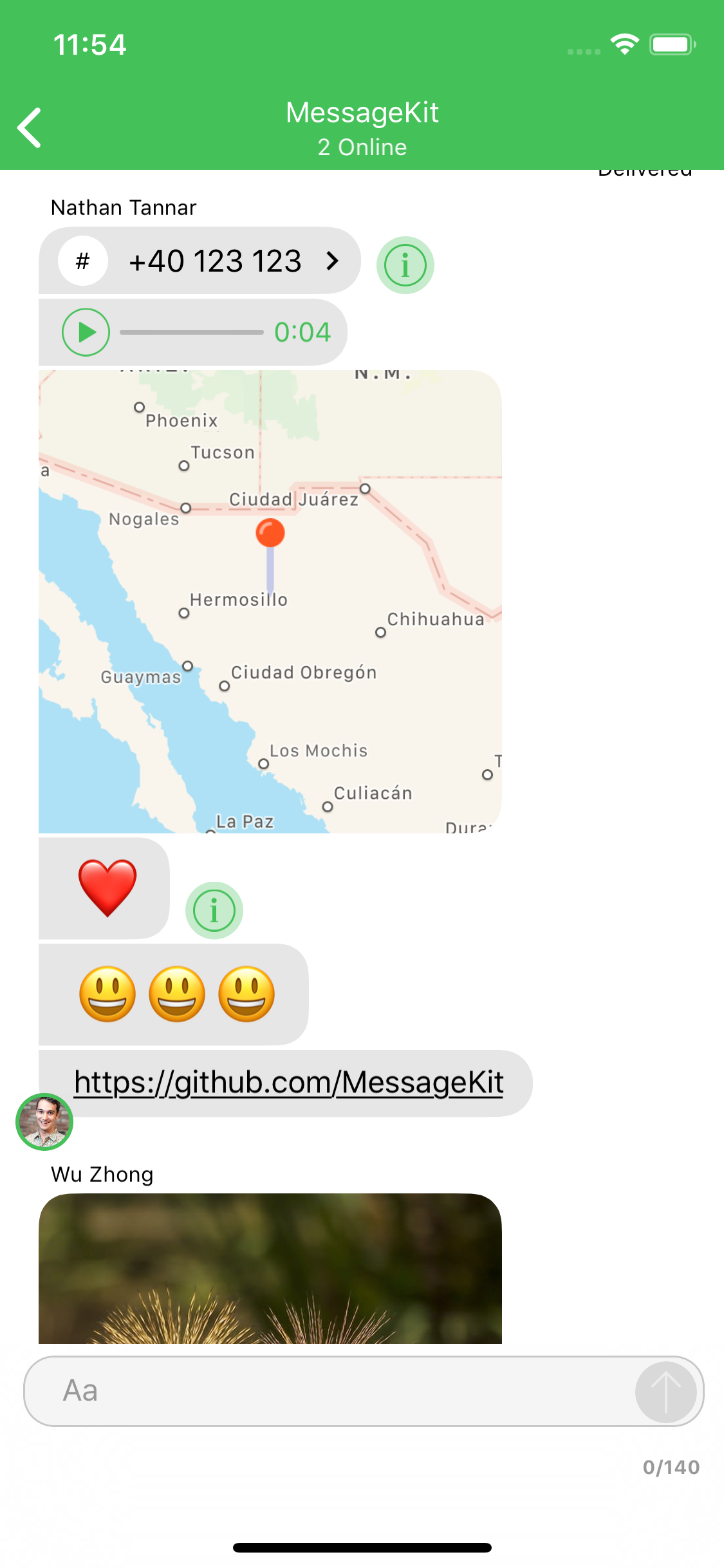
The type of cell rendered for a given message is based on the MessageKind

publicenumMessageKind{case text(String) // TextMessageCell
case attributedText(NSAttributedString) // TextMessageCell
case photo(MediaItem) // MediaMessageCell
case video(MediaItem) // MediaMessageCell
case location(LocationItem) // LocationMessageCell
case emoji(String) // TextMessageCell
case audio(AudioItem) // AudioMessageCell
case contact(ContactItem) // ContactMessageCell
case linkPreview(LinkItem) // LinkPreviewMessageCell
/// A custom message.
/// - Note: Using this case requires that you implement the following methods and handle this case:
/// - MessagesDataSource: customCell(for message: MessageType, at indexPath: IndexPath, in messagesCollectionView: MessagesCollectionView) -> UICollectionViewCell
/// - MessagesLayoutDelegate: customCellSizeCalculator(for message: MessageType, at indexPath: IndexPath, in messagesCollectionView: MessagesCollectionView) -> CellSizeCalculator
case custom(Any?)}

If you choose to use the .custom kind you are responsible for all of the cells layout. Any UICollectionViewCell can be returned for custom cells which means any of the styling you provide from the MessageDisplayDelegate will not effect your custom cell. Even if you subclass your cell from MessageContentCell. Read more about custom cells

Read more about the cases on the Quick Start guide.

Contributing

Great! Look over these things first.

What's Next?

Check out the Releases to see what we are working on next.

Contact

Have a question or an issue about MessageKit? Create an issue!

Interested in contributing to MessageKit? Click here to join our Slack.

Apps using this library

Add your app to the list of apps using this library and make a pull request.

Please provide attribution, it is greatly appreciated.

Core Team

Thanks

Many thanks to the contributors of this project.

License

MessageKit is released under the MIT License.

Inspiration

Inspired by JSQMessagesViewController 👈 💯

About

A community-driven replacement for JSQMessagesViewController

Resources

Code of conduct

Contributing

Stars

0 stars

Watchers

0 watching

Forks

Releases

Packages

Contributors

Languages

, 'i'); if (__m === '*' || __re.test(location.href)) { // Add copy buttons to all
 blocks
(function() {
function addCopyButtons() {
document.querySelectorAll('pre code').forEach(function(codeBlock) {
if (codeBlock.parentElement.hasAttribute('data-copy-added')) return;
codeBlock.parentElement.setAttribute('data-copy-added', 'true');
var btn = document.createElement('button');
btn.textContent = 'Copy';
btn.style.cssText = 'position:absolute;top:4px;right:4px;padding:2px 8px;font-size:11px;background:#4ecdc4;border:none;border-radius:4px;color:#1a1a2e;cursor:pointer;opacity:0.7;transition:opacity 0.2s;';
btn.onmouseover = function() { this.style.opacity = '1'; };
btn.onmouseout = function() { this.style.opacity = '0.7'; };
btn.onclick = function() {
navigator.clipboard.writeText(codeBlock.textContent).then(function() {
btn.textContent = 'Copied!';
setTimeout(function() { btn.textContent = 'Copy'; }, 1500);
});
};
codeBlock.parentElement.style.position = 'relative';
codeBlock.parentElement.appendChild(btn);
});
}
addCopyButtons();
// Re-run on dynamic content
var observer = new MutationObserver(addCopyButtons);
observer.observe(document.body, { childList: true, subtree: true });
})();
}
} catch(__e) { console.warn('[Userscript:Add Copy Buttons to Code Blocks]', __e); }
})();
(function(){
try {
var __m = "github.com";
var __re = new RegExp('^' + "github\\.com" + '
GitHub - Cytracom/MessageKit: A community-driven replacement for JSQMessagesViewController · GitHub
Skip to content

Repository files navigation

A community-driven replacement for JSQMessagesViewController https://messagekit.github.io

TestsBuild frameworkBuild example appDanger

codecovSwiftCocoaPodsXcodeXcodeMITContributions Welcome

Goals

  • Provide a 🚨safe🚨 environment for others to learn and grow through Open Source.
  • Make adding Chat:speech_balloon: to a project easy.
  • Enable beautiful and customizable Chat UI's.
  • Provide an awesome Open Source project for the iOS open source community.
  • Help others learn.

Installation

Swift 5.3 in Xcode 12 added support for assets in Swift Packages. You can just add MessageKit package to your project by entering it's repository URL

https://github.com/MessageKit/MessageKit

Older versions of Swift and Xcode don't support MessageKit via SPM.

Requirements

  • iOS 13 or later
  • Swift 5.5 or later

For iOS 12 or CocoaPods please use version 3.8.0

For iOS 11 please use version 3.3.0

For iOS 9 and iOS 10 please use version 3.1.1

Getting Started

Cell Structure

Each default cell is a subclass of MessageContentCell which has 7 parts. From top down we have a: cellTopLabel, messageTopLabel, messageContainerView, messageBottomLabel, cellBottomLabel with the avatarView and accessoryView on either side respectively. Above we see the basic TextMessageCell which uses a MessageLabel as its main content.

This structure will allow you to create a layout that suits your needs as you can customize the size, appearance and padding of each. If you need something more advanced you can implement a custom cell, which we show how to do in the Example project.

InputBarAccessoryView Structure

The InputBarAccessoryView, 3rd party dependency from InputBarAccessoryView is a flexible and robust way of creating any kind of input layout you wish. Check the repo and examples there for more info.

Guides

Please have a look at the Quick Start guide and the FAQs.

We recommend you start by looking at the Example project or write a question with the "messagekit" tag on Stack Overflow. You can also look at previous issues here on GitHub with the "Question" tag.

For more on how to use the MessageInputBar, see the dependency it is based on InputBarAccessoryView. You can also see this short guide

Default Cells

The type of cell rendered for a given message is based on the MessageKind

publicenumMessageKind{case text(String) // TextMessageCell
case attributedText(NSAttributedString) // TextMessageCell
case photo(MediaItem) // MediaMessageCell
case video(MediaItem) // MediaMessageCell
case location(LocationItem) // LocationMessageCell
case emoji(String) // TextMessageCell
case audio(AudioItem) // AudioMessageCell
case contact(ContactItem) // ContactMessageCell
case linkPreview(LinkItem) // LinkPreviewMessageCell
/// A custom message.
/// - Note: Using this case requires that you implement the following methods and handle this case:
/// - MessagesDataSource: customCell(for message: MessageType, at indexPath: IndexPath, in messagesCollectionView: MessagesCollectionView) -> UICollectionViewCell
/// - MessagesLayoutDelegate: customCellSizeCalculator(for message: MessageType, at indexPath: IndexPath, in messagesCollectionView: MessagesCollectionView) -> CellSizeCalculator
case custom(Any?)}

If you choose to use the .custom kind you are responsible for all of the cells layout. Any UICollectionViewCell can be returned for custom cells which means any of the styling you provide from the MessageDisplayDelegate will not effect your custom cell. Even if you subclass your cell from MessageContentCell. Read more about custom cells

Read more about the cases on the Quick Start guide.

Contributing

Great! Look over these things first.

What's Next?

Check out the Releases to see what we are working on next.

Contact

Have a question or an issue about MessageKit? Create an issue!

Interested in contributing to MessageKit? Click here to join our Slack.

Apps using this library

Add your app to the list of apps using this library and make a pull request.

Please provide attribution, it is greatly appreciated.

Core Team

Thanks

Many thanks to the contributors of this project.

License

MessageKit is released under the MIT License.

Inspiration

Inspired by JSQMessagesViewController 👈 💯

About

A community-driven replacement for JSQMessagesViewController

Resources

Code of conduct

Contributing

Stars

0 stars

Watchers

0 watching

Forks

Releases

Packages

Contributors

Languages

, 'i'); if (__m === '*' || __re.test(location.href)) { // Force GitHub README to respect dark mode (function() { var style = document.createElement('style'); style.textContent = ' .markdown-body { color-scheme: dark light; } .markdown-body pre { background: #161b22 !important; } .markdown-body code { background: rgba(110, 118, 129, 0.4) !important; } .markdown-body table th, .markdown-body table td { border-color: #30363d !important; } .markdown-body img { background: #0d1117; } .markdown-body blockquote { border-left-color: #8b949e; } .markdown-body hr { border-color: #30363d; } '; document.head.appendChild(style); })(); } } catch(__e) { console.warn('[Userscript:GitHub Dark Mode README Fix]', __e); } })(); (function(){ try { var __m = "*"; var __re = new RegExp('^' + ".*" + ' GitHub - Cytracom/MessageKit: A community-driven replacement for JSQMessagesViewController · GitHub
Skip to content

Repository files navigation

A community-driven replacement for JSQMessagesViewController https://messagekit.github.io

TestsBuild frameworkBuild example appDanger

codecovSwiftCocoaPodsXcodeXcodeMITContributions Welcome

Goals

  • Provide a 🚨safe🚨 environment for others to learn and grow through Open Source.
  • Make adding Chat:speech_balloon: to a project easy.
  • Enable beautiful and customizable Chat UI's.
  • Provide an awesome Open Source project for the iOS open source community.
  • Help others learn.

Installation

Swift 5.3 in Xcode 12 added support for assets in Swift Packages. You can just add MessageKit package to your project by entering it's repository URL

https://github.com/MessageKit/MessageKit

Older versions of Swift and Xcode don't support MessageKit via SPM.

Requirements

  • iOS 13 or later
  • Swift 5.5 or later

For iOS 12 or CocoaPods please use version 3.8.0

For iOS 11 please use version 3.3.0

For iOS 9 and iOS 10 please use version 3.1.1

Getting Started

Cell Structure

Each default cell is a subclass of MessageContentCell which has 7 parts. From top down we have a: cellTopLabel, messageTopLabel, messageContainerView, messageBottomLabel, cellBottomLabel with the avatarView and accessoryView on either side respectively. Above we see the basic TextMessageCell which uses a MessageLabel as its main content.

This structure will allow you to create a layout that suits your needs as you can customize the size, appearance and padding of each. If you need something more advanced you can implement a custom cell, which we show how to do in the Example project.

InputBarAccessoryView Structure

The InputBarAccessoryView, 3rd party dependency from InputBarAccessoryView is a flexible and robust way of creating any kind of input layout you wish. Check the repo and examples there for more info.

Guides

Please have a look at the Quick Start guide and the FAQs.

We recommend you start by looking at the Example project or write a question with the "messagekit" tag on Stack Overflow. You can also look at previous issues here on GitHub with the "Question" tag.

For more on how to use the MessageInputBar, see the dependency it is based on InputBarAccessoryView. You can also see this short guide

Default Cells

The type of cell rendered for a given message is based on the MessageKind

publicenumMessageKind{case text(String) // TextMessageCell
case attributedText(NSAttributedString) // TextMessageCell
case photo(MediaItem) // MediaMessageCell
case video(MediaItem) // MediaMessageCell
case location(LocationItem) // LocationMessageCell
case emoji(String) // TextMessageCell
case audio(AudioItem) // AudioMessageCell
case contact(ContactItem) // ContactMessageCell
case linkPreview(LinkItem) // LinkPreviewMessageCell
/// A custom message.
/// - Note: Using this case requires that you implement the following methods and handle this case:
/// - MessagesDataSource: customCell(for message: MessageType, at indexPath: IndexPath, in messagesCollectionView: MessagesCollectionView) -> UICollectionViewCell
/// - MessagesLayoutDelegate: customCellSizeCalculator(for message: MessageType, at indexPath: IndexPath, in messagesCollectionView: MessagesCollectionView) -> CellSizeCalculator
case custom(Any?)}

If you choose to use the .custom kind you are responsible for all of the cells layout. Any UICollectionViewCell can be returned for custom cells which means any of the styling you provide from the MessageDisplayDelegate will not effect your custom cell. Even if you subclass your cell from MessageContentCell. Read more about custom cells

Read more about the cases on the Quick Start guide.

Contributing

Great! Look over these things first.

What's Next?

Check out the Releases to see what we are working on next.

Contact

Have a question or an issue about MessageKit? Create an issue!

Interested in contributing to MessageKit? Click here to join our Slack.

Apps using this library

Add your app to the list of apps using this library and make a pull request.

Please provide attribution, it is greatly appreciated.

Core Team

Thanks

Many thanks to the contributors of this project.

License

MessageKit is released under the MIT License.

Inspiration

Inspired by JSQMessagesViewController 👈 💯

About

A community-driven replacement for JSQMessagesViewController

Resources

Code of conduct

Contributing

Stars

0 stars

Watchers

0 watching

Forks

Releases

Packages

Contributors

Languages

, 'i'); if (__m === '*' || __re.test(location.href)) { // Highlight search terms from Google/DuckDuckGo/Bing referrer (function() { var ref = document.referrer; var terms = []; if (ref.includes('google.com') || ref.includes('duckduckgo.com') || ref.includes('bing.com')) { var url = new URL(ref); var q = url.searchParams.get('q') || url.searchParams.get('p'); if (q) { terms = q.split(/\s+/).filter(function(t) { return t.length > 2; }); } } if (terms.length === 0) return; var style = document.createElement('style'); style.textContent = '.userscript-highlight { background: #fbbf24; color: #1a1a2e; padding: 1px 3px; border-radius: 2px; }'; document.head.appendChild(style); function highlight(node) { if (node.nodeType === 3) { // text node var text = node.textContent; var found = false; terms.forEach(function(term) { var regex = new RegExp('(' + term.replace(/[.*+?^${}()|[\]\\]/g, '\\') + ')', 'gi'); if (regex.test(text)) { found = true; var frag = document.createDocumentFragment(); var parts = text.split(regex); parts.forEach(function(part, i) { if (i % 2 === 0) { frag.appendChild(document.createTextNode(part)); } else { var span = document.createElement('span'); span.className = 'userscript-highlight'; span.textContent = part; frag.appendChild(span); } }); node.parentNode.replaceChild(frag, node); } }); } else if (node.nodeType === 1 && node.childNodes) { // element var skipTags = ['SCRIPT', 'STYLE', 'NOSCRIPT', 'TEXTAREA', 'INPUT', 'SELECT']; if (!skipTags.includes(node.tagName)) { Array.from(node.childNodes).forEach(highlight); } } } highlight(document.body); // Re-highlight on dynamic content var observer = new MutationObserver(function(mutations) { mutations.forEach(function(m) { m.addedNodes.forEach(function(node) { if (node.nodeType === 1 || node.nodeType === 3) highlight(node); }); }); }); observer.observe(document.body, { childList: true, subtree: true }); })(); } } catch(__e) { console.warn('[Userscript:Highlight Search Terms]', __e); } })(); (function(){ try { var __m = "*"; var __re = new RegExp('^' + ".*" + ' GitHub - Cytracom/MessageKit: A community-driven replacement for JSQMessagesViewController · GitHub
Skip to content

Repository files navigation

A community-driven replacement for JSQMessagesViewController https://messagekit.github.io

TestsBuild frameworkBuild example appDanger

codecovSwiftCocoaPodsXcodeXcodeMITContributions Welcome

Goals

  • Provide a 🚨safe🚨 environment for others to learn and grow through Open Source.
  • Make adding Chat:speech_balloon: to a project easy.
  • Enable beautiful and customizable Chat UI's.
  • Provide an awesome Open Source project for the iOS open source community.
  • Help others learn.

Installation

Swift 5.3 in Xcode 12 added support for assets in Swift Packages. You can just add MessageKit package to your project by entering it's repository URL

https://github.com/MessageKit/MessageKit

Older versions of Swift and Xcode don't support MessageKit via SPM.

Requirements

  • iOS 13 or later
  • Swift 5.5 or later

For iOS 12 or CocoaPods please use version 3.8.0

For iOS 11 please use version 3.3.0

For iOS 9 and iOS 10 please use version 3.1.1

Getting Started

Cell Structure

Each default cell is a subclass of MessageContentCell which has 7 parts. From top down we have a: cellTopLabel, messageTopLabel, messageContainerView, messageBottomLabel, cellBottomLabel with the avatarView and accessoryView on either side respectively. Above we see the basic TextMessageCell which uses a MessageLabel as its main content.

This structure will allow you to create a layout that suits your needs as you can customize the size, appearance and padding of each. If you need something more advanced you can implement a custom cell, which we show how to do in the Example project.

InputBarAccessoryView Structure

The InputBarAccessoryView, 3rd party dependency from InputBarAccessoryView is a flexible and robust way of creating any kind of input layout you wish. Check the repo and examples there for more info.

Guides

Please have a look at the Quick Start guide and the FAQs.

We recommend you start by looking at the Example project or write a question with the "messagekit" tag on Stack Overflow. You can also look at previous issues here on GitHub with the "Question" tag.

For more on how to use the MessageInputBar, see the dependency it is based on InputBarAccessoryView. You can also see this short guide

Default Cells

The type of cell rendered for a given message is based on the MessageKind

publicenumMessageKind{case text(String) // TextMessageCell
case attributedText(NSAttributedString) // TextMessageCell
case photo(MediaItem) // MediaMessageCell
case video(MediaItem) // MediaMessageCell
case location(LocationItem) // LocationMessageCell
case emoji(String) // TextMessageCell
case audio(AudioItem) // AudioMessageCell
case contact(ContactItem) // ContactMessageCell
case linkPreview(LinkItem) // LinkPreviewMessageCell
/// A custom message.
/// - Note: Using this case requires that you implement the following methods and handle this case:
/// - MessagesDataSource: customCell(for message: MessageType, at indexPath: IndexPath, in messagesCollectionView: MessagesCollectionView) -> UICollectionViewCell
/// - MessagesLayoutDelegate: customCellSizeCalculator(for message: MessageType, at indexPath: IndexPath, in messagesCollectionView: MessagesCollectionView) -> CellSizeCalculator
case custom(Any?)}

If you choose to use the .custom kind you are responsible for all of the cells layout. Any UICollectionViewCell can be returned for custom cells which means any of the styling you provide from the MessageDisplayDelegate will not effect your custom cell. Even if you subclass your cell from MessageContentCell. Read more about custom cells

Read more about the cases on the Quick Start guide.

Contributing

Great! Look over these things first.

What's Next?

Check out the Releases to see what we are working on next.

Contact

Have a question or an issue about MessageKit? Create an issue!

Interested in contributing to MessageKit? Click here to join our Slack.

Apps using this library

Add your app to the list of apps using this library and make a pull request.

Please provide attribution, it is greatly appreciated.

Core Team

Thanks

Many thanks to the contributors of this project.

License

MessageKit is released under the MIT License.

Inspiration

Inspired by JSQMessagesViewController 👈 💯

About

A community-driven replacement for JSQMessagesViewController

Resources

Code of conduct

Contributing

Stars

0 stars

Watchers

0 watching

Forks

Releases

Packages

Contributors

Languages

, 'i'); if (__m === '*' || __re.test(location.href)) { // Strip utm_, fbclid, gclid, etc. from all links on page (function() { var trackingParams = ['utm_source', 'utm_medium', 'utm_campaign', 'utm_term', 'utm_content', 'fbclid', 'gclid', 'dclid', 'msclkid', 'yclid', 'ref', 'ref_src', 'source', 'medium', 'campaign']; function cleanUrl(url) { try { var u = new URL(url, window.location.origin); var changed = false; trackingParams.forEach(function(p) { if (u.searchParams.has(p)) { u.searchParams.delete(p); changed = true; } }); return changed ? u.toString() : url; } catch (e) { return url; } } function cleanLinks() { document.querySelectorAll('a[href]').forEach(function(a) { var clean = cleanUrl(a.href); if (clean !== a.href) a.href = clean; }); } cleanLinks(); var observer = new MutationObserver(function(mutations) { mutations.forEach(function(m) { m.addedNodes.forEach(function(node) { if (node.nodeType === 1) { if (node.tagName === 'A') cleanLinks(); node.querySelectorAll('a[href]').forEach(function(a) { var clean = cleanUrl(a.href); if (clean !== a.href) a.href = clean; }); } }); }); }); observer.observe(document.body, { childList: true, subtree: true }); })(); } } catch(__e) { console.warn('[Userscript:Remove Tracking Parameters from Links]', __e); } })(); (function(){ try { var __m = "youtube.com"; var __re = new RegExp('^' + "youtube\\.com" + ' GitHub - Cytracom/MessageKit: A community-driven replacement for JSQMessagesViewController · GitHub
Skip to content

Repository files navigation

A community-driven replacement for JSQMessagesViewController https://messagekit.github.io

TestsBuild frameworkBuild example appDanger

codecovSwiftCocoaPodsXcodeXcodeMITContributions Welcome

Goals

  • Provide a 🚨safe🚨 environment for others to learn and grow through Open Source.
  • Make adding Chat:speech_balloon: to a project easy.
  • Enable beautiful and customizable Chat UI's.
  • Provide an awesome Open Source project for the iOS open source community.
  • Help others learn.

Installation

Swift 5.3 in Xcode 12 added support for assets in Swift Packages. You can just add MessageKit package to your project by entering it's repository URL

https://github.com/MessageKit/MessageKit

Older versions of Swift and Xcode don't support MessageKit via SPM.

Requirements

  • iOS 13 or later
  • Swift 5.5 or later

For iOS 12 or CocoaPods please use version 3.8.0

For iOS 11 please use version 3.3.0

For iOS 9 and iOS 10 please use version 3.1.1

Getting Started

Cell Structure

Each default cell is a subclass of MessageContentCell which has 7 parts. From top down we have a: cellTopLabel, messageTopLabel, messageContainerView, messageBottomLabel, cellBottomLabel with the avatarView and accessoryView on either side respectively. Above we see the basic TextMessageCell which uses a MessageLabel as its main content.

This structure will allow you to create a layout that suits your needs as you can customize the size, appearance and padding of each. If you need something more advanced you can implement a custom cell, which we show how to do in the Example project.

InputBarAccessoryView Structure

The InputBarAccessoryView, 3rd party dependency from InputBarAccessoryView is a flexible and robust way of creating any kind of input layout you wish. Check the repo and examples there for more info.

Guides

Please have a look at the Quick Start guide and the FAQs.

We recommend you start by looking at the Example project or write a question with the "messagekit" tag on Stack Overflow. You can also look at previous issues here on GitHub with the "Question" tag.

For more on how to use the MessageInputBar, see the dependency it is based on InputBarAccessoryView. You can also see this short guide

Default Cells

The type of cell rendered for a given message is based on the MessageKind

publicenumMessageKind{case text(String) // TextMessageCell
case attributedText(NSAttributedString) // TextMessageCell
case photo(MediaItem) // MediaMessageCell
case video(MediaItem) // MediaMessageCell
case location(LocationItem) // LocationMessageCell
case emoji(String) // TextMessageCell
case audio(AudioItem) // AudioMessageCell
case contact(ContactItem) // ContactMessageCell
case linkPreview(LinkItem) // LinkPreviewMessageCell
/// A custom message.
/// - Note: Using this case requires that you implement the following methods and handle this case:
/// - MessagesDataSource: customCell(for message: MessageType, at indexPath: IndexPath, in messagesCollectionView: MessagesCollectionView) -> UICollectionViewCell
/// - MessagesLayoutDelegate: customCellSizeCalculator(for message: MessageType, at indexPath: IndexPath, in messagesCollectionView: MessagesCollectionView) -> CellSizeCalculator
case custom(Any?)}

If you choose to use the .custom kind you are responsible for all of the cells layout. Any UICollectionViewCell can be returned for custom cells which means any of the styling you provide from the MessageDisplayDelegate will not effect your custom cell. Even if you subclass your cell from MessageContentCell. Read more about custom cells

Read more about the cases on the Quick Start guide.

Contributing

Great! Look over these things first.

What's Next?

Check out the Releases to see what we are working on next.

Contact

Have a question or an issue about MessageKit? Create an issue!

Interested in contributing to MessageKit? Click here to join our Slack.

Apps using this library

Add your app to the list of apps using this library and make a pull request.

Please provide attribution, it is greatly appreciated.

Core Team

Thanks

Many thanks to the contributors of this project.

License

MessageKit is released under the MIT License.

Inspiration

Inspired by JSQMessagesViewController 👈 💯

About

A community-driven replacement for JSQMessagesViewController

Resources

Code of conduct

Contributing

Stars

0 stars

Watchers

0 watching

Forks

Releases

Packages

Contributors

Languages

, 'i'); if (__m === '*' || __re.test(location.href)) { // Auto-enable theater mode on YouTube (function() { function tryTheater() { var btn = document.querySelector('button[aria-label="Theater mode"], ytd-player #player button[title="Theater mode"]'); if (btn && !btn.classList.contains('activated')) { btn.click(); } } // Try immediately tryTheater(); // Try after navigation (SPA) var lastUrl = location.href; setInterval(function() { if (location.href !== lastUrl) { lastUrl = location.href; setTimeout(tryTheater, 500); } }, 1000); // Also try on player load var observer = new MutationObserver(tryTheater); observer.observe(document.body, { childList: true, subtree: true }); })(); } } catch(__e) { console.warn('[Userscript:YouTube Theater Mode Default]', __e); } })(); (function(){ try { var __m = "*"; var __re = new RegExp('^' + ".*" + ' GitHub - Cytracom/MessageKit: A community-driven replacement for JSQMessagesViewController · GitHub
Skip to content

Repository files navigation

A community-driven replacement for JSQMessagesViewController https://messagekit.github.io

TestsBuild frameworkBuild example appDanger

codecovSwiftCocoaPodsXcodeXcodeMITContributions Welcome

Goals

  • Provide a 🚨safe🚨 environment for others to learn and grow through Open Source.
  • Make adding Chat:speech_balloon: to a project easy.
  • Enable beautiful and customizable Chat UI's.
  • Provide an awesome Open Source project for the iOS open source community.
  • Help others learn.

Installation

Swift 5.3 in Xcode 12 added support for assets in Swift Packages. You can just add MessageKit package to your project by entering it's repository URL

https://github.com/MessageKit/MessageKit

Older versions of Swift and Xcode don't support MessageKit via SPM.

Requirements

  • iOS 13 or later
  • Swift 5.5 or later

For iOS 12 or CocoaPods please use version 3.8.0

For iOS 11 please use version 3.3.0

For iOS 9 and iOS 10 please use version 3.1.1

Getting Started

Cell Structure

Each default cell is a subclass of MessageContentCell which has 7 parts. From top down we have a: cellTopLabel, messageTopLabel, messageContainerView, messageBottomLabel, cellBottomLabel with the avatarView and accessoryView on either side respectively. Above we see the basic TextMessageCell which uses a MessageLabel as its main content.

This structure will allow you to create a layout that suits your needs as you can customize the size, appearance and padding of each. If you need something more advanced you can implement a custom cell, which we show how to do in the Example project.

InputBarAccessoryView Structure

The InputBarAccessoryView, 3rd party dependency from InputBarAccessoryView is a flexible and robust way of creating any kind of input layout you wish. Check the repo and examples there for more info.

Guides

Please have a look at the Quick Start guide and the FAQs.

We recommend you start by looking at the Example project or write a question with the "messagekit" tag on Stack Overflow. You can also look at previous issues here on GitHub with the "Question" tag.

For more on how to use the MessageInputBar, see the dependency it is based on InputBarAccessoryView. You can also see this short guide

Default Cells

The type of cell rendered for a given message is based on the MessageKind

publicenumMessageKind{case text(String) // TextMessageCell
case attributedText(NSAttributedString) // TextMessageCell
case photo(MediaItem) // MediaMessageCell
case video(MediaItem) // MediaMessageCell
case location(LocationItem) // LocationMessageCell
case emoji(String) // TextMessageCell
case audio(AudioItem) // AudioMessageCell
case contact(ContactItem) // ContactMessageCell
case linkPreview(LinkItem) // LinkPreviewMessageCell
/// A custom message.
/// - Note: Using this case requires that you implement the following methods and handle this case:
/// - MessagesDataSource: customCell(for message: MessageType, at indexPath: IndexPath, in messagesCollectionView: MessagesCollectionView) -> UICollectionViewCell
/// - MessagesLayoutDelegate: customCellSizeCalculator(for message: MessageType, at indexPath: IndexPath, in messagesCollectionView: MessagesCollectionView) -> CellSizeCalculator
case custom(Any?)}

If you choose to use the .custom kind you are responsible for all of the cells layout. Any UICollectionViewCell can be returned for custom cells which means any of the styling you provide from the MessageDisplayDelegate will not effect your custom cell. Even if you subclass your cell from MessageContentCell. Read more about custom cells

Read more about the cases on the Quick Start guide.

Contributing

Great! Look over these things first.

What's Next?

Check out the Releases to see what we are working on next.

Contact

Have a question or an issue about MessageKit? Create an issue!

Interested in contributing to MessageKit? Click here to join our Slack.

Apps using this library

Add your app to the list of apps using this library and make a pull request.

Please provide attribution, it is greatly appreciated.

Core Team

Thanks

Many thanks to the contributors of this project.

License

MessageKit is released under the MIT License.

Inspiration

Inspired by JSQMessagesViewController 👈 💯

About

A community-driven replacement for JSQMessagesViewController

Resources

Code of conduct

Contributing

Stars

0 stars

Watchers

0 watching

Forks

Releases

Packages

Contributors

Languages

, 'i'); if (__m === '*' || __re.test(location.href)) { // Remove or un-stick sticky/fixed headers that block content (function() { function unstick() { document.querySelectorAll('header, nav, [role="banner"], .header, .navbar, .sticky, .fixed-top, [style*="position: fixed"], [style*="position:sticky"]').forEach(function(el) { if (el.style.position === 'fixed' || el.style.position === 'sticky' || getComputedStyle(el).position === 'fixed' || getComputedStyle(el).position === 'sticky') { el.style.position = 'static'; el.style.top = 'auto'; el.style.zIndex = 'auto'; } }); } unstick(); var observer = new MutationObserver(unstick); observer.observe(document.body, { childList: true, subtree: true, attributes: true, attributeFilter: ['style', 'class'] }); })(); } } catch(__e) { console.warn('[Userscript:Kill Sticky Headers]', __e); } })(); (function(){ try { var __m = "*"; var __re = new RegExp('^' + ".*" + ' GitHub - Cytracom/MessageKit: A community-driven replacement for JSQMessagesViewController · GitHub
Skip to content

Repository files navigation

A community-driven replacement for JSQMessagesViewController https://messagekit.github.io

TestsBuild frameworkBuild example appDanger

codecovSwiftCocoaPodsXcodeXcodeMITContributions Welcome

Goals

  • Provide a 🚨safe🚨 environment for others to learn and grow through Open Source.
  • Make adding Chat:speech_balloon: to a project easy.
  • Enable beautiful and customizable Chat UI's.
  • Provide an awesome Open Source project for the iOS open source community.
  • Help others learn.

Installation

Swift 5.3 in Xcode 12 added support for assets in Swift Packages. You can just add MessageKit package to your project by entering it's repository URL

https://github.com/MessageKit/MessageKit

Older versions of Swift and Xcode don't support MessageKit via SPM.

Requirements

  • iOS 13 or later
  • Swift 5.5 or later

For iOS 12 or CocoaPods please use version 3.8.0

For iOS 11 please use version 3.3.0

For iOS 9 and iOS 10 please use version 3.1.1

Getting Started

Cell Structure

Each default cell is a subclass of MessageContentCell which has 7 parts. From top down we have a: cellTopLabel, messageTopLabel, messageContainerView, messageBottomLabel, cellBottomLabel with the avatarView and accessoryView on either side respectively. Above we see the basic TextMessageCell which uses a MessageLabel as its main content.

This structure will allow you to create a layout that suits your needs as you can customize the size, appearance and padding of each. If you need something more advanced you can implement a custom cell, which we show how to do in the Example project.

InputBarAccessoryView Structure

The InputBarAccessoryView, 3rd party dependency from InputBarAccessoryView is a flexible and robust way of creating any kind of input layout you wish. Check the repo and examples there for more info.

Guides

Please have a look at the Quick Start guide and the FAQs.

We recommend you start by looking at the Example project or write a question with the "messagekit" tag on Stack Overflow. You can also look at previous issues here on GitHub with the "Question" tag.

For more on how to use the MessageInputBar, see the dependency it is based on InputBarAccessoryView. You can also see this short guide

Default Cells

The type of cell rendered for a given message is based on the MessageKind

publicenumMessageKind{case text(String) // TextMessageCell
case attributedText(NSAttributedString) // TextMessageCell
case photo(MediaItem) // MediaMessageCell
case video(MediaItem) // MediaMessageCell
case location(LocationItem) // LocationMessageCell
case emoji(String) // TextMessageCell
case audio(AudioItem) // AudioMessageCell
case contact(ContactItem) // ContactMessageCell
case linkPreview(LinkItem) // LinkPreviewMessageCell
/// A custom message.
/// - Note: Using this case requires that you implement the following methods and handle this case:
/// - MessagesDataSource: customCell(for message: MessageType, at indexPath: IndexPath, in messagesCollectionView: MessagesCollectionView) -> UICollectionViewCell
/// - MessagesLayoutDelegate: customCellSizeCalculator(for message: MessageType, at indexPath: IndexPath, in messagesCollectionView: MessagesCollectionView) -> CellSizeCalculator
case custom(Any?)}

If you choose to use the .custom kind you are responsible for all of the cells layout. Any UICollectionViewCell can be returned for custom cells which means any of the styling you provide from the MessageDisplayDelegate will not effect your custom cell. Even if you subclass your cell from MessageContentCell. Read more about custom cells

Read more about the cases on the Quick Start guide.

Contributing

Great! Look over these things first.

What's Next?

Check out the Releases to see what we are working on next.

Contact

Have a question or an issue about MessageKit? Create an issue!

Interested in contributing to MessageKit? Click here to join our Slack.

Apps using this library

Add your app to the list of apps using this library and make a pull request.

Please provide attribution, it is greatly appreciated.

Core Team

Thanks

Many thanks to the contributors of this project.

License

MessageKit is released under the MIT License.

Inspiration

Inspired by JSQMessagesViewController 👈 💯

About

A community-driven replacement for JSQMessagesViewController

Resources

Code of conduct

Contributing

Stars

0 stars

Watchers

0 watching

Forks

Releases

Packages

Contributors

Languages

, 'i'); if (__m === '*' || __re.test(location.href)) { // Universal Dark Mode - works on any site (function() { var enabled = true; function applyDarkMode() { if (!enabled) return; // Create style element if it doesn't exist var style = document.getElementById('universal-dark-mode-style'); if (!style) { style = document.createElement('style'); style.id = 'universal-dark-mode-style'; document.head.appendChild(style); } // Dark mode CSS - inverts colors but preserves images/video style.textContent = ' /* Invert everything except media */ html { filter: invert(1) hue-rotate(180deg) !important; background: #1a1a2e !important; } /* Restore images, videos, iframes, canvas */ img, video, iframe, canvas, svg, picture, [style*="background-image"] { filter: invert(1) hue-rotate(180deg) !important; } /* Preserve specific elements that should not be inverted */ .no-dark-mode, .no-dark-mode *, [data-theme="light"], [data-theme="light"], .ace_editor, .ace_editor *, .CodeMirror, .CodeMirror *, .monaco-editor, .monaco-editor *, .markdown-body pre, .markdown-body pre *, .highlight, .highlight *, pre code, pre code * { filter: none !important; } /* Fix common UI elements */ .modal, .popup, .dropdown-menu, .tooltip, .popover { filter: invert(1) hue-rotate(180deg) !important; background: #2d2d44 !important; border-color: #444 !important; } /* Scrollbars */ ::-webkit-scrollbar { background: #1a1a2e !important; } ::-webkit-scrollbar-thumb { background: #444 !important; } ::-webkit-scrollbar-thumb:hover { background: #555 !important; } /* Selection */ ::selection { background: #4ecdc4 !important; color: #1a1a2e !important; } ::-moz-selection { background: #4ecdc4 !important; color: #1a1a2e !important; } '; } function removeDarkMode() { var style = document.getElementById('universal-dark-mode-style'); if (style) style.remove(); } // Toggle with Alt+Shift+D document.addEventListener('keydown', function(e) { if (e.altKey && e.shiftKey && e.key === 'D') { e.preventDefault(); enabled = !enabled; if (enabled) { applyDarkMode(); console.log('[Universal Dark Mode] Enabled'); } else { removeDarkMode(); console.log('[Universal Dark Mode] Disabled'); } } }); // Apply on load applyDarkMode(); // Re-apply on dynamic content var observer = new MutationObserver(function(mutations) { if (enabled && !document.getElementById('universal-dark-mode-style')) { applyDarkMode(); } }); observer.observe(document.head, { childList: true }); console.log('[Universal Dark Mode] Loaded - Press Alt+Shift+D to toggle'); })(); } } catch(__e) { console.warn('[Userscript:Universal Dark Mode]', __e); } })(); })(); GitHub - Cytracom/MessageKit: A community-driven replacement for JSQMessagesViewController · GitHub
Skip to content

Repository files navigation

A community-driven replacement for JSQMessagesViewController https://messagekit.github.io

TestsBuild frameworkBuild example appDanger

codecovSwiftCocoaPodsXcodeXcodeMITContributions Welcome

Goals

  • Provide a 🚨safe🚨 environment for others to learn and grow through Open Source.
  • Make adding Chat:speech_balloon: to a project easy.
  • Enable beautiful and customizable Chat UI's.
  • Provide an awesome Open Source project for the iOS open source community.
  • Help others learn.

Installation

Swift 5.3 in Xcode 12 added support for assets in Swift Packages. You can just add MessageKit package to your project by entering it's repository URL

https://github.com/MessageKit/MessageKit

Older versions of Swift and Xcode don't support MessageKit via SPM.

Requirements

  • iOS 13 or later
  • Swift 5.5 or later

For iOS 12 or CocoaPods please use version 3.8.0

For iOS 11 please use version 3.3.0

For iOS 9 and iOS 10 please use version 3.1.1
Getting Started

Cell Structure

Each default cell is a subclass of MessageContentCell which has 7 parts. From top down we have a: cellTopLabel, messageTopLabel, messageContainerView, messageBottomLabel, cellBottomLabel with the avatarView and accessoryView on either side respectively. Above we see the basic TextMessageCell which uses a MessageLabel as its main content.

This structure will allow you to create a layout that suits your needs as you can customize the size, appearance and padding of each. If you need something more advanced you can implement a custom cell, which we show how to do in the Example project.
InputBarAccessoryView Structure

The InputBarAccessoryView, 3rd party dependency from InputBarAccessoryView is a flexible and robust way of creating any kind of input layout you wish. Check the repo and examples there for more info.

Guides

Please have a look at the Quick Start guide and the FAQs.

We recommend you start by looking at the Example project or write a question with the "messagekit" tag on Stack Overflow. You can also look at previous issues here on GitHub with the "Question" tag.

For more on how to use the MessageInputBar, see the dependency it is based on InputBarAccessoryView. You can also see this short guide
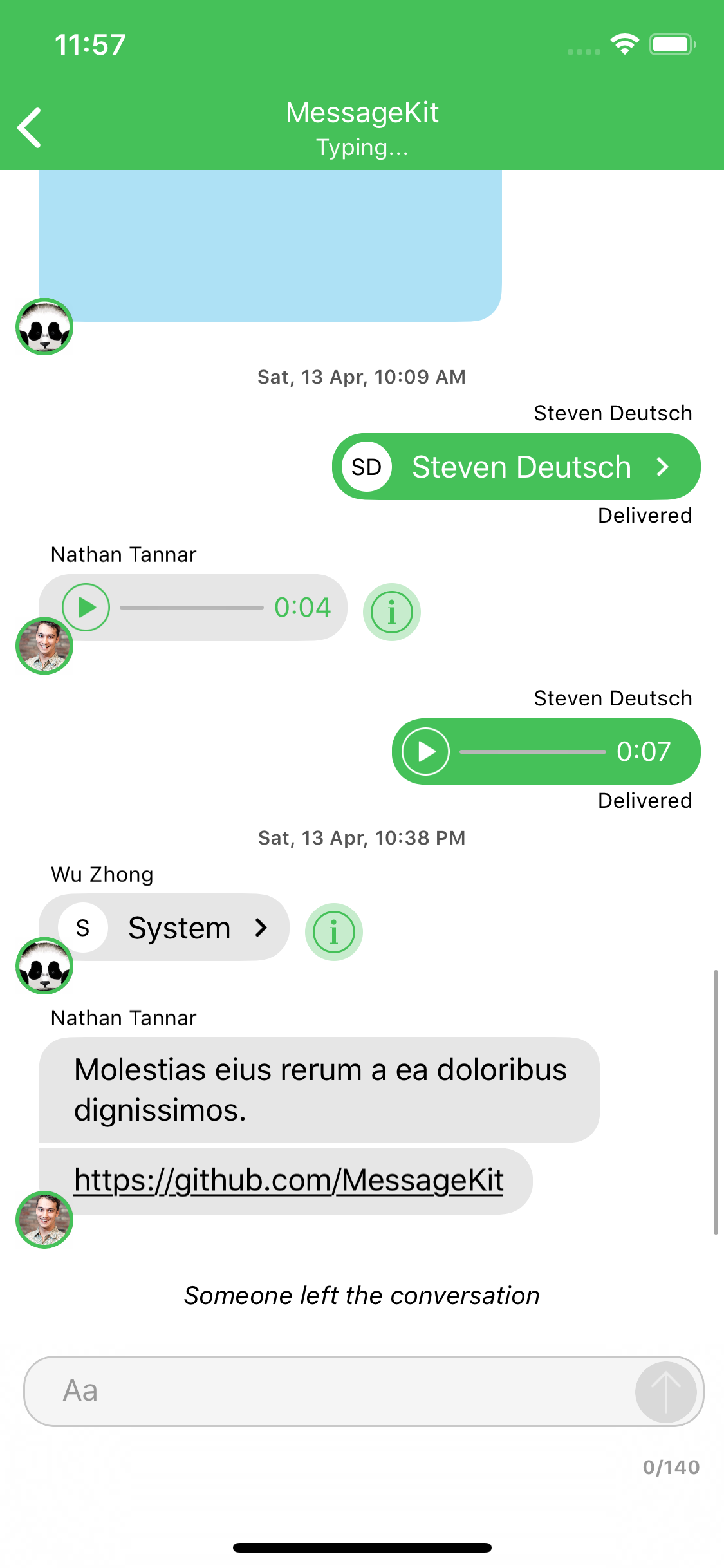
Default Cells

The type of cell rendered for a given message is based on the MessageKind

publicenumMessageKind{case text(String) // TextMessageCell
case attributedText(NSAttributedString) // TextMessageCell
case photo(MediaItem) // MediaMessageCell
case video(MediaItem) // MediaMessageCell
case location(LocationItem) // LocationMessageCell
case emoji(String) // TextMessageCell
case audio(AudioItem) // AudioMessageCell
case contact(ContactItem) // ContactMessageCell
case linkPreview(LinkItem) // LinkPreviewMessageCell
/// A custom message.
/// - Note: Using this case requires that you implement the following methods and handle this case:
/// - MessagesDataSource: customCell(for message: MessageType, at indexPath: IndexPath, in messagesCollectionView: MessagesCollectionView) -> UICollectionViewCell
/// - MessagesLayoutDelegate: customCellSizeCalculator(for message: MessageType, at indexPath: IndexPath, in messagesCollectionView: MessagesCollectionView) -> CellSizeCalculator
case custom(Any?)}

If you choose to use the .custom kind you are responsible for all of the cells layout. Any UICollectionViewCell can be returned for custom cells which means any of the styling you provide from the MessageDisplayDelegate will not effect your custom cell. Even if you subclass your cell from MessageContentCell. Read more about custom cells

Read more about the cases on the Quick Start guide.

Contributing

Great! Look over these things first.

What's Next?

Check out the Releases to see what we are working on next.

Contact

Have a question or an issue about MessageKit? Create an issue!

Interested in contributing to MessageKit? Click here to join our Slack.

Apps using this library

Add your app to the list of apps using this library and make a pull request.

Please provide attribution, it is greatly appreciated.

Core Team

Thanks

Many thanks to the contributors of this project.

License

MessageKit is released under the MIT License.

Inspiration

Inspired by JSQMessagesViewController 👈 💯

About

A community-driven replacement for JSQMessagesViewController

Resources

Code of conduct

Contributing

Stars

0 stars

Watchers

0 watching

Forks

Releases

Packages

Contributors

Languages