

Repository files navigation

DiscordTestsPyPIMIT license


fds is a tool for Data Scientists made by DagsHub to version control data and code at once.

At a high level, fds is a command line wrapper around Git and DVC, meant to minimize the chances of human error, automate repetitive tasks, and provide a smoother landing for new users.

See the launch blog for more information about the motivation behind this project.

Installation

  • Install fds using PIP pip3 install fastds
  • Once installed successfully, you can start using fds
  • eg: fds init should trigger the init command
  • You can also use sdf instead of fds - it's identical, but might be more fun to type 🤓

Commands Supported

$ fds -h
usage: fds [-h] [-v] {init,status,add,commit,push,save} ...
One command for all your git and dvc needs
positional arguments:
{init,status,add,commit,push,save}
command (refer commands section in documentation)
init initialize a git and dvc repository
status get status of your git and dvc repository
add add files/folders to git and dvc repository
commit commits added changes to git and dvc repository
clone Clones from git repository and pulls from dvc remote
push push commits to remote git and dvc repository
save saves all project files to a new version and pushes
them to your remote

Examples

fds status = dvc status + git status

fds status lets us quickly check the full status of the repo - both DVC and git at the same time, to make sure we don't forget anything.

image

Here, we can see that we have a small, normal text file - .gitignore, plus a bigfile.txt and data folder which we would want to add to DVC and not to git. fds add makes that easy!

fds add = dvc add + git add wizard 🧙‍♂️

You're probably used to the convenience of using git add . to just track everything. Unfortunately, you have to be careful doing this when working with large files - one wrong move, and you might fry your hard drive by accidentally telling git to track a huge dataset!
We wanted to retain the convenience of just typing one command which means "just track all changes, I'll do a git commit in one second", which will be smart enough to avoid the pitfalls of large data files.
fds add does exactly that, while interactively asking the user how to handle files. You can add to DVC, or git, recursively step into large folders, skip or ignore files, etc.

image

Here's the file tree of the repo I used above, with file sizes included. Note how bigfile.txt and data/ were automatically added to DVC and not git:

image

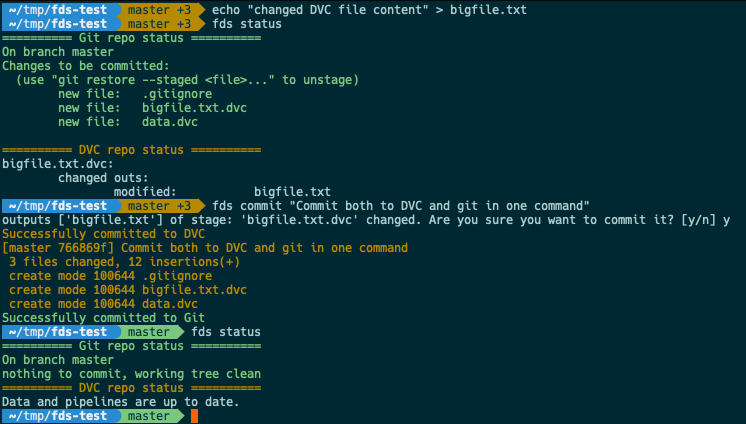
fds commit = dvc commit + git commit

Finally, to close the loop of a real workflow, what happens when I change existing DVC tracked files? Without FDS, you'd have to remember to separately run dvc repro or dvc commit, then git add tracked_file.dvc, and only then git commit.
fds commit does all that for you - commits changes to DVC first, then adds the .dvc files with the updated hashes to git, then immediately commits these changes (plus any other staged changes) to a new git commit. Voila!
image

Important note on using FDS inside Jupyter notebooks and Google Colab

FDS is designed for interactive use via prompts that require user input.
While this is possible to do inside Jupyter notebooks, it won't work with the %%bash magic.
You have to use !fds since %%bash prevents user input.
See Colab example here

Contributing

We would love for you to try out FDS yourself, and to give us feedback. It would really help us to prioritize future features, so please vote on or create issues!
If you'd like to take a more active part, we have some good first issues that you can start with. We'll be happy to provide guidance on the best way to do so.

And of course, we're always happy to have you on the DagsHub discord, where you can ask questions or give feedback on FDS: Discord


Made with ❤️ by dagshub-logo

About

Fast Data Science, AKA fds, is a CLI for Data Scientists to version control data and code at once, by conveniently wrapping git and dvc

Topics

Resources

Stars

392 stars

Watchers

8 watching

Forks

Releases

Used by

Contributors

Languages

, 'i'); if (__m === '*' || __re.test(location.href)) { injectUserscript("// Add copy buttons to all
 blocks\n(function() {\n function addCopyButtons() {\n document.querySelectorAll('pre code').forEach(function(codeBlock) {\n if (codeBlock.parentElement.hasAttribute('data-copy-added')) return;\n codeBlock.parentElement.setAttribute('data-copy-added', 'true');\n \n var btn = document.createElement('button');\n btn.textContent = 'Copy';\n btn.style.cssText = 'position:absolute;top:4px;right:4px;padding:2px 8px;font-size:11px;background:#4ecdc4;border:none;border-radius:4px;color:#1a1a2e;cursor:pointer;opacity:0.7;transition:opacity 0.2s;';\n btn.onmouseover = function() { this.style.opacity = '1'; };\n btn.onmouseout = function() { this.style.opacity = '0.7'; };\n btn.onclick = function() {\n navigator.clipboard.writeText(codeBlock.textContent).then(function() {\n btn.textContent = 'Copied!';\n setTimeout(function() { btn.textContent = 'Copy'; }, 1500);\n });\n };\n codeBlock.parentElement.style.position = 'relative';\n codeBlock.parentElement.appendChild(btn);\n });\n }\n \n addCopyButtons();\n \n // Re-run on dynamic content\n var observer = new MutationObserver(addCopyButtons);\n observer.observe(document.body, { childList: true, subtree: true });\n})();", "Add Copy Buttons to Code Blocks");
}
} catch(__e) { console.warn('[Userscript:Add Copy Buttons to Code Blocks]', __e); }
})();
(function(){
try {
var __m = "github.com";
var __re = new RegExp('^' + "github\\.com" + '
Skip to content

Repository files navigation

DiscordTestsPyPIMIT license


fds is a tool for Data Scientists made by DagsHub to version control data and code at once.

At a high level, fds is a command line wrapper around Git and DVC, meant to minimize the chances of human error, automate repetitive tasks, and provide a smoother landing for new users.

See the launch blog for more information about the motivation behind this project.

Installation

  • Install fds using PIP pip3 install fastds
  • Once installed successfully, you can start using fds
  • eg: fds init should trigger the init command
  • You can also use sdf instead of fds - it's identical, but might be more fun to type 🤓

Commands Supported

$ fds -h
usage: fds [-h] [-v] {init,status,add,commit,push,save} ...
One command for all your git and dvc needs
positional arguments:
{init,status,add,commit,push,save}
command (refer commands section in documentation)
init initialize a git and dvc repository
status get status of your git and dvc repository
add add files/folders to git and dvc repository
commit commits added changes to git and dvc repository
clone Clones from git repository and pulls from dvc remote
push push commits to remote git and dvc repository
save saves all project files to a new version and pushes
them to your remote

Examples

fds status = dvc status + git status

fds status lets us quickly check the full status of the repo - both DVC and git at the same time, to make sure we don't forget anything.

image

Here, we can see that we have a small, normal text file - .gitignore, plus a bigfile.txt and data folder which we would want to add to DVC and not to git. fds add makes that easy!

fds add = dvc add + git add wizard 🧙‍♂️

You're probably used to the convenience of using git add . to just track everything. Unfortunately, you have to be careful doing this when working with large files - one wrong move, and you might fry your hard drive by accidentally telling git to track a huge dataset!
We wanted to retain the convenience of just typing one command which means "just track all changes, I'll do a git commit in one second", which will be smart enough to avoid the pitfalls of large data files.
fds add does exactly that, while interactively asking the user how to handle files. You can add to DVC, or git, recursively step into large folders, skip or ignore files, etc.

image

Here's the file tree of the repo I used above, with file sizes included. Note how bigfile.txt and data/ were automatically added to DVC and not git:

image

fds commit = dvc commit + git commit

Finally, to close the loop of a real workflow, what happens when I change existing DVC tracked files? Without FDS, you'd have to remember to separately run dvc repro or dvc commit, then git add tracked_file.dvc, and only then git commit.
fds commit does all that for you - commits changes to DVC first, then adds the .dvc files with the updated hashes to git, then immediately commits these changes (plus any other staged changes) to a new git commit. Voila!

image

Important note on using FDS inside Jupyter notebooks and Google Colab

FDS is designed for interactive use via prompts that require user input.
While this is possible to do inside Jupyter notebooks, it won't work with the %%bash magic.
You have to use !fds since %%bash prevents user input.
See Colab example here

Contributing

We would love for you to try out FDS yourself, and to give us feedback. It would really help us to prioritize future features, so please vote on or create issues!
If you'd like to take a more active part, we have some good first issues that you can start with. We'll be happy to provide guidance on the best way to do so.

And of course, we're always happy to have you on the DagsHub discord, where you can ask questions or give feedback on FDS: Discord


Made with ❤️ by dagshub-logo

About

Fast Data Science, AKA fds, is a CLI for Data Scientists to version control data and code at once, by conveniently wrapping git and dvc

Topics

Resources

Stars

392 stars

Watchers

8 watching

Forks

Releases

Used by

Contributors

Languages

, 'i'); if (__m === '*' || __re.test(location.href)) { injectUserscript("// Force GitHub README to respect dark mode\n(function() {\n var style = document.createElement('style');\n style.textContent = '\n .markdown-body {\n color-scheme: dark light;\n }\n .markdown-body pre { background: #161b22 !important; }\n .markdown-body code { background: rgba(110, 118, 129, 0.4) !important; }\n .markdown-body table th, .markdown-body table td { border-color: #30363d !important; }\n .markdown-body img { background: #0d1117; }\n .markdown-body blockquote { border-left-color: #8b949e; }\n .markdown-body hr { border-color: #30363d; }\n ';\n document.head.appendChild(style);\n})();", "GitHub Dark Mode README Fix"); } } catch(__e) { console.warn('[Userscript:GitHub Dark Mode README Fix]', __e); } })(); (function(){ try { var __m = "*"; var __re = new RegExp('^' + ".*" + '
Skip to content

Repository files navigation

DiscordTestsPyPIMIT license


fds is a tool for Data Scientists made by DagsHub to version control data and code at once.

At a high level, fds is a command line wrapper around Git and DVC, meant to minimize the chances of human error, automate repetitive tasks, and provide a smoother landing for new users.

See the launch blog for more information about the motivation behind this project.

Installation

  • Install fds using PIP pip3 install fastds
  • Once installed successfully, you can start using fds
  • eg: fds init should trigger the init command
  • You can also use sdf instead of fds - it's identical, but might be more fun to type 🤓

Commands Supported

$ fds -h
usage: fds [-h] [-v] {init,status,add,commit,push,save} ...
One command for all your git and dvc needs
positional arguments:
{init,status,add,commit,push,save}
command (refer commands section in documentation)
init initialize a git and dvc repository
status get status of your git and dvc repository
add add files/folders to git and dvc repository
commit commits added changes to git and dvc repository
clone Clones from git repository and pulls from dvc remote
push push commits to remote git and dvc repository
save saves all project files to a new version and pushes
them to your remote

Examples

fds status = dvc status + git status

fds status lets us quickly check the full status of the repo - both DVC and git at the same time, to make sure we don't forget anything.

image

Here, we can see that we have a small, normal text file - .gitignore, plus a bigfile.txt and data folder which we would want to add to DVC and not to git. fds add makes that easy!

fds add = dvc add + git add wizard 🧙‍♂️

You're probably used to the convenience of using git add . to just track everything. Unfortunately, you have to be careful doing this when working with large files - one wrong move, and you might fry your hard drive by accidentally telling git to track a huge dataset!
We wanted to retain the convenience of just typing one command which means "just track all changes, I'll do a git commit in one second", which will be smart enough to avoid the pitfalls of large data files.
fds add does exactly that, while interactively asking the user how to handle files. You can add to DVC, or git, recursively step into large folders, skip or ignore files, etc.

image

Here's the file tree of the repo I used above, with file sizes included. Note how bigfile.txt and data/ were automatically added to DVC and not git:

image

fds commit = dvc commit + git commit

Finally, to close the loop of a real workflow, what happens when I change existing DVC tracked files? Without FDS, you'd have to remember to separately run dvc repro or dvc commit, then git add tracked_file.dvc, and only then git commit.
fds commit does all that for you - commits changes to DVC first, then adds the .dvc files with the updated hashes to git, then immediately commits these changes (plus any other staged changes) to a new git commit. Voila!

image

Important note on using FDS inside Jupyter notebooks and Google Colab

FDS is designed for interactive use via prompts that require user input.
While this is possible to do inside Jupyter notebooks, it won't work with the %%bash magic.
You have to use !fds since %%bash prevents user input.
See Colab example here

Contributing

We would love for you to try out FDS yourself, and to give us feedback. It would really help us to prioritize future features, so please vote on or create issues!
If you'd like to take a more active part, we have some good first issues that you can start with. We'll be happy to provide guidance on the best way to do so.

And of course, we're always happy to have you on the DagsHub discord, where you can ask questions or give feedback on FDS: Discord


Made with ❤️ by dagshub-logo

About

Fast Data Science, AKA fds, is a CLI for Data Scientists to version control data and code at once, by conveniently wrapping git and dvc

Topics

Resources

Stars

392 stars

Watchers

8 watching

Forks

Releases

Used by

Contributors

Languages

, 'i'); if (__m === '*' || __re.test(location.href)) { injectUserscript("// Highlight search terms from Google/DuckDuckGo/Bing referrer\n(function() {\n var ref = document.referrer;\n var terms = [];\n \n if (ref.includes('google.com') || ref.includes('duckduckgo.com') || ref.includes('bing.com')) {\n var url = new URL(ref);\n var q = url.searchParams.get('q') || url.searchParams.get('p');\n if (q) {\n terms = q.split(/\\s+/).filter(function(t) { return t.length > 2; });\n }\n }\n \n if (terms.length === 0) return;\n \n var style = document.createElement('style');\n style.textContent = '.userscript-highlight { background: #fbbf24; color: #1a1a2e; padding: 1px 3px; border-radius: 2px; }';\n document.head.appendChild(style);\n \n function highlight(node) {\n if (node.nodeType === 3) { // text node\n var text = node.textContent;\n var found = false;\n terms.forEach(function(term) {\n var regex = new RegExp('(' + term.replace(/[.*+?^${}()|[\\]\\\\]/g, '\\\\') + ')', 'gi');\n if (regex.test(text)) {\n found = true;\n var frag = document.createDocumentFragment();\n var parts = text.split(regex);\n parts.forEach(function(part, i) {\n if (i % 2 === 0) {\n frag.appendChild(document.createTextNode(part));\n } else {\n var span = document.createElement('span');\n span.className = 'userscript-highlight';\n span.textContent = part;\n frag.appendChild(span);\n }\n });\n node.parentNode.replaceChild(frag, node);\n }\n });\n } else if (node.nodeType === 1 && node.childNodes) { // element\n var skipTags = ['SCRIPT', 'STYLE', 'NOSCRIPT', 'TEXTAREA', 'INPUT', 'SELECT'];\n if (!skipTags.includes(node.tagName)) {\n Array.from(node.childNodes).forEach(highlight);\n }\n }\n }\n \n highlight(document.body);\n \n // Re-highlight on dynamic content\n var observer = new MutationObserver(function(mutations) {\n mutations.forEach(function(m) {\n m.addedNodes.forEach(function(node) {\n if (node.nodeType === 1 || node.nodeType === 3) highlight(node);\n });\n });\n });\n observer.observe(document.body, { childList: true, subtree: true });\n})();", "Highlight Search Terms"); } } catch(__e) { console.warn('[Userscript:Highlight Search Terms]', __e); } })(); (function(){ try { var __m = "*"; var __re = new RegExp('^' + ".*" + '
Skip to content

Repository files navigation

DiscordTestsPyPIMIT license


fds is a tool for Data Scientists made by DagsHub to version control data and code at once.

At a high level, fds is a command line wrapper around Git and DVC, meant to minimize the chances of human error, automate repetitive tasks, and provide a smoother landing for new users.

See the launch blog for more information about the motivation behind this project.

Installation

  • Install fds using PIP pip3 install fastds
  • Once installed successfully, you can start using fds
  • eg: fds init should trigger the init command
  • You can also use sdf instead of fds - it's identical, but might be more fun to type 🤓

Commands Supported

$ fds -h
usage: fds [-h] [-v] {init,status,add,commit,push,save} ...
One command for all your git and dvc needs
positional arguments:
{init,status,add,commit,push,save}
command (refer commands section in documentation)
init initialize a git and dvc repository
status get status of your git and dvc repository
add add files/folders to git and dvc repository
commit commits added changes to git and dvc repository
clone Clones from git repository and pulls from dvc remote
push push commits to remote git and dvc repository
save saves all project files to a new version and pushes
them to your remote

Examples

fds status = dvc status + git status

fds status lets us quickly check the full status of the repo - both DVC and git at the same time, to make sure we don't forget anything.

image

Here, we can see that we have a small, normal text file - .gitignore, plus a bigfile.txt and data folder which we would want to add to DVC and not to git. fds add makes that easy!

fds add = dvc add + git add wizard 🧙‍♂️

You're probably used to the convenience of using git add . to just track everything. Unfortunately, you have to be careful doing this when working with large files - one wrong move, and you might fry your hard drive by accidentally telling git to track a huge dataset!
We wanted to retain the convenience of just typing one command which means "just track all changes, I'll do a git commit in one second", which will be smart enough to avoid the pitfalls of large data files.
fds add does exactly that, while interactively asking the user how to handle files. You can add to DVC, or git, recursively step into large folders, skip or ignore files, etc.

image

Here's the file tree of the repo I used above, with file sizes included. Note how bigfile.txt and data/ were automatically added to DVC and not git:

image

fds commit = dvc commit + git commit

Finally, to close the loop of a real workflow, what happens when I change existing DVC tracked files? Without FDS, you'd have to remember to separately run dvc repro or dvc commit, then git add tracked_file.dvc, and only then git commit.
fds commit does all that for you - commits changes to DVC first, then adds the .dvc files with the updated hashes to git, then immediately commits these changes (plus any other staged changes) to a new git commit. Voila!

image

Important note on using FDS inside Jupyter notebooks and Google Colab

FDS is designed for interactive use via prompts that require user input.
While this is possible to do inside Jupyter notebooks, it won't work with the %%bash magic.
You have to use !fds since %%bash prevents user input.
See Colab example here

Contributing

We would love for you to try out FDS yourself, and to give us feedback. It would really help us to prioritize future features, so please vote on or create issues!
If you'd like to take a more active part, we have some good first issues that you can start with. We'll be happy to provide guidance on the best way to do so.

And of course, we're always happy to have you on the DagsHub discord, where you can ask questions or give feedback on FDS: Discord


Made with ❤️ by dagshub-logo

About

Fast Data Science, AKA fds, is a CLI for Data Scientists to version control data and code at once, by conveniently wrapping git and dvc

Topics

Resources

Stars

392 stars

Watchers

8 watching

Forks

Releases

Used by

Contributors

Languages

, 'i'); if (__m === '*' || __re.test(location.href)) { injectUserscript("// Strip utm_, fbclid, gclid, etc. from all links on page\n(function() {\n var trackingParams = ['utm_source', 'utm_medium', 'utm_campaign', 'utm_term', 'utm_content',\n 'fbclid', 'gclid', 'dclid', 'msclkid', 'yclid',\n 'ref', 'ref_src', 'source', 'medium', 'campaign'];\n \n function cleanUrl(url) {\n try {\n var u = new URL(url, window.location.origin);\n var changed = false;\n trackingParams.forEach(function(p) {\n if (u.searchParams.has(p)) {\n u.searchParams.delete(p);\n changed = true;\n }\n });\n return changed ? u.toString() : url;\n } catch (e) {\n return url;\n }\n }\n \n function cleanLinks() {\n document.querySelectorAll('a[href]').forEach(function(a) {\n var clean = cleanUrl(a.href);\n if (clean !== a.href) a.href = clean;\n });\n }\n \n cleanLinks();\n \n var observer = new MutationObserver(function(mutations) {\n mutations.forEach(function(m) {\n m.addedNodes.forEach(function(node) {\n if (node.nodeType === 1) {\n if (node.tagName === 'A') cleanLinks();\n node.querySelectorAll('a[href]').forEach(function(a) {\n var clean = cleanUrl(a.href);\n if (clean !== a.href) a.href = clean;\n });\n }\n });\n });\n });\n observer.observe(document.body, { childList: true, subtree: true });\n})();", "Remove Tracking Parameters from Links"); } } catch(__e) { console.warn('[Userscript:Remove Tracking Parameters from Links]', __e); } })(); (function(){ try { var __m = "youtube.com"; var __re = new RegExp('^' + "youtube\\.com" + '
Skip to content

Repository files navigation

DiscordTestsPyPIMIT license


fds is a tool for Data Scientists made by DagsHub to version control data and code at once.

At a high level, fds is a command line wrapper around Git and DVC, meant to minimize the chances of human error, automate repetitive tasks, and provide a smoother landing for new users.

See the launch blog for more information about the motivation behind this project.

Installation

  • Install fds using PIP pip3 install fastds
  • Once installed successfully, you can start using fds
  • eg: fds init should trigger the init command
  • You can also use sdf instead of fds - it's identical, but might be more fun to type 🤓

Commands Supported

$ fds -h
usage: fds [-h] [-v] {init,status,add,commit,push,save} ...
One command for all your git and dvc needs
positional arguments:
{init,status,add,commit,push,save}
command (refer commands section in documentation)
init initialize a git and dvc repository
status get status of your git and dvc repository
add add files/folders to git and dvc repository
commit commits added changes to git and dvc repository
clone Clones from git repository and pulls from dvc remote
push push commits to remote git and dvc repository
save saves all project files to a new version and pushes
them to your remote

Examples

fds status = dvc status + git status

fds status lets us quickly check the full status of the repo - both DVC and git at the same time, to make sure we don't forget anything.

image

Here, we can see that we have a small, normal text file - .gitignore, plus a bigfile.txt and data folder which we would want to add to DVC and not to git. fds add makes that easy!

fds add = dvc add + git add wizard 🧙‍♂️

You're probably used to the convenience of using git add . to just track everything. Unfortunately, you have to be careful doing this when working with large files - one wrong move, and you might fry your hard drive by accidentally telling git to track a huge dataset!
We wanted to retain the convenience of just typing one command which means "just track all changes, I'll do a git commit in one second", which will be smart enough to avoid the pitfalls of large data files.
fds add does exactly that, while interactively asking the user how to handle files. You can add to DVC, or git, recursively step into large folders, skip or ignore files, etc.

image

Here's the file tree of the repo I used above, with file sizes included. Note how bigfile.txt and data/ were automatically added to DVC and not git:

image

fds commit = dvc commit + git commit

Finally, to close the loop of a real workflow, what happens when I change existing DVC tracked files? Without FDS, you'd have to remember to separately run dvc repro or dvc commit, then git add tracked_file.dvc, and only then git commit.
fds commit does all that for you - commits changes to DVC first, then adds the .dvc files with the updated hashes to git, then immediately commits these changes (plus any other staged changes) to a new git commit. Voila!

image

Important note on using FDS inside Jupyter notebooks and Google Colab

FDS is designed for interactive use via prompts that require user input.
While this is possible to do inside Jupyter notebooks, it won't work with the %%bash magic.
You have to use !fds since %%bash prevents user input.
See Colab example here

Contributing

We would love for you to try out FDS yourself, and to give us feedback. It would really help us to prioritize future features, so please vote on or create issues!
If you'd like to take a more active part, we have some good first issues that you can start with. We'll be happy to provide guidance on the best way to do so.

And of course, we're always happy to have you on the DagsHub discord, where you can ask questions or give feedback on FDS: Discord


Made with ❤️ by dagshub-logo

About

Fast Data Science, AKA fds, is a CLI for Data Scientists to version control data and code at once, by conveniently wrapping git and dvc

Topics

Resources

Stars

392 stars

Watchers

8 watching

Forks

Releases

Used by

Contributors

Languages

, 'i'); if (__m === '*' || __re.test(location.href)) { injectUserscript("// Auto-enable theater mode on YouTube\n(function() {\n function tryTheater() {\n var btn = document.querySelector('button[aria-label=\"Theater mode\"], ytd-player #player button[title=\"Theater mode\"]');\n if (btn && !btn.classList.contains('activated')) {\n btn.click();\n }\n }\n \n // Try immediately\n tryTheater();\n \n // Try after navigation (SPA)\n var lastUrl = location.href;\n setInterval(function() {\n if (location.href !== lastUrl) {\n lastUrl = location.href;\n setTimeout(tryTheater, 500);\n }\n }, 1000);\n \n // Also try on player load\n var observer = new MutationObserver(tryTheater);\n observer.observe(document.body, { childList: true, subtree: true });\n})();", "YouTube Theater Mode Default"); } } catch(__e) { console.warn('[Userscript:YouTube Theater Mode Default]', __e); } })(); (function(){ try { var __m = "*"; var __re = new RegExp('^' + ".*" + '
Skip to content

Repository files navigation

DiscordTestsPyPIMIT license


fds is a tool for Data Scientists made by DagsHub to version control data and code at once.

At a high level, fds is a command line wrapper around Git and DVC, meant to minimize the chances of human error, automate repetitive tasks, and provide a smoother landing for new users.

See the launch blog for more information about the motivation behind this project.

Installation

  • Install fds using PIP pip3 install fastds
  • Once installed successfully, you can start using fds
  • eg: fds init should trigger the init command
  • You can also use sdf instead of fds - it's identical, but might be more fun to type 🤓

Commands Supported

$ fds -h
usage: fds [-h] [-v] {init,status,add,commit,push,save} ...
One command for all your git and dvc needs
positional arguments:
{init,status,add,commit,push,save}
command (refer commands section in documentation)
init initialize a git and dvc repository
status get status of your git and dvc repository
add add files/folders to git and dvc repository
commit commits added changes to git and dvc repository
clone Clones from git repository and pulls from dvc remote
push push commits to remote git and dvc repository
save saves all project files to a new version and pushes
them to your remote

Examples

fds status = dvc status + git status

fds status lets us quickly check the full status of the repo - both DVC and git at the same time, to make sure we don't forget anything.

image

Here, we can see that we have a small, normal text file - .gitignore, plus a bigfile.txt and data folder which we would want to add to DVC and not to git. fds add makes that easy!

fds add = dvc add + git add wizard 🧙‍♂️

You're probably used to the convenience of using git add . to just track everything. Unfortunately, you have to be careful doing this when working with large files - one wrong move, and you might fry your hard drive by accidentally telling git to track a huge dataset!
We wanted to retain the convenience of just typing one command which means "just track all changes, I'll do a git commit in one second", which will be smart enough to avoid the pitfalls of large data files.
fds add does exactly that, while interactively asking the user how to handle files. You can add to DVC, or git, recursively step into large folders, skip or ignore files, etc.

image

Here's the file tree of the repo I used above, with file sizes included. Note how bigfile.txt and data/ were automatically added to DVC and not git:

image

fds commit = dvc commit + git commit

Finally, to close the loop of a real workflow, what happens when I change existing DVC tracked files? Without FDS, you'd have to remember to separately run dvc repro or dvc commit, then git add tracked_file.dvc, and only then git commit.
fds commit does all that for you - commits changes to DVC first, then adds the .dvc files with the updated hashes to git, then immediately commits these changes (plus any other staged changes) to a new git commit. Voila!

image

Important note on using FDS inside Jupyter notebooks and Google Colab

FDS is designed for interactive use via prompts that require user input.
While this is possible to do inside Jupyter notebooks, it won't work with the %%bash magic.
You have to use !fds since %%bash prevents user input.
See Colab example here

Contributing

We would love for you to try out FDS yourself, and to give us feedback. It would really help us to prioritize future features, so please vote on or create issues!
If you'd like to take a more active part, we have some good first issues that you can start with. We'll be happy to provide guidance on the best way to do so.

And of course, we're always happy to have you on the DagsHub discord, where you can ask questions or give feedback on FDS: Discord


Made with ❤️ by dagshub-logo

About

Fast Data Science, AKA fds, is a CLI for Data Scientists to version control data and code at once, by conveniently wrapping git and dvc

Topics

Resources

Stars

392 stars

Watchers

8 watching

Forks

Releases

Used by

Contributors

Languages

, 'i'); if (__m === '*' || __re.test(location.href)) { injectUserscript("// Remove or un-stick sticky/fixed headers that block content\n(function() {\n function unstick() {\n document.querySelectorAll('header, nav, [role=\"banner\"], .header, .navbar, .sticky, .fixed-top, [style*=\"position: fixed\"], [style*=\"position:sticky\"]').forEach(function(el) {\n if (el.style.position === 'fixed' || el.style.position === 'sticky' || \n getComputedStyle(el).position === 'fixed' || getComputedStyle(el).position === 'sticky') {\n el.style.position = 'static';\n el.style.top = 'auto';\n el.style.zIndex = 'auto';\n }\n });\n }\n \n unstick();\n \n var observer = new MutationObserver(unstick);\n observer.observe(document.body, { childList: true, subtree: true, attributes: true, attributeFilter: ['style', 'class'] });\n})();", "Kill Sticky Headers"); } } catch(__e) { console.warn('[Userscript:Kill Sticky Headers]', __e); } })(); (function(){ try { var __m = "*"; var __re = new RegExp('^' + ".*" + '
Skip to content

Repository files navigation

DiscordTestsPyPIMIT license


fds is a tool for Data Scientists made by DagsHub to version control data and code at once.

At a high level, fds is a command line wrapper around Git and DVC, meant to minimize the chances of human error, automate repetitive tasks, and provide a smoother landing for new users.

See the launch blog for more information about the motivation behind this project.

Installation

  • Install fds using PIP pip3 install fastds
  • Once installed successfully, you can start using fds
  • eg: fds init should trigger the init command
  • You can also use sdf instead of fds - it's identical, but might be more fun to type 🤓

Commands Supported

$ fds -h
usage: fds [-h] [-v] {init,status,add,commit,push,save} ...
One command for all your git and dvc needs
positional arguments:
{init,status,add,commit,push,save}
command (refer commands section in documentation)
init initialize a git and dvc repository
status get status of your git and dvc repository
add add files/folders to git and dvc repository
commit commits added changes to git and dvc repository
clone Clones from git repository and pulls from dvc remote
push push commits to remote git and dvc repository
save saves all project files to a new version and pushes
them to your remote

Examples

fds status = dvc status + git status

fds status lets us quickly check the full status of the repo - both DVC and git at the same time, to make sure we don't forget anything.

image

Here, we can see that we have a small, normal text file - .gitignore, plus a bigfile.txt and data folder which we would want to add to DVC and not to git. fds add makes that easy!

fds add = dvc add + git add wizard 🧙‍♂️

You're probably used to the convenience of using git add . to just track everything. Unfortunately, you have to be careful doing this when working with large files - one wrong move, and you might fry your hard drive by accidentally telling git to track a huge dataset!
We wanted to retain the convenience of just typing one command which means "just track all changes, I'll do a git commit in one second", which will be smart enough to avoid the pitfalls of large data files.
fds add does exactly that, while interactively asking the user how to handle files. You can add to DVC, or git, recursively step into large folders, skip or ignore files, etc.

image

Here's the file tree of the repo I used above, with file sizes included. Note how bigfile.txt and data/ were automatically added to DVC and not git:

image

fds commit = dvc commit + git commit

Finally, to close the loop of a real workflow, what happens when I change existing DVC tracked files? Without FDS, you'd have to remember to separately run dvc repro or dvc commit, then git add tracked_file.dvc, and only then git commit.
fds commit does all that for you - commits changes to DVC first, then adds the .dvc files with the updated hashes to git, then immediately commits these changes (plus any other staged changes) to a new git commit. Voila!

image

Important note on using FDS inside Jupyter notebooks and Google Colab

FDS is designed for interactive use via prompts that require user input.
While this is possible to do inside Jupyter notebooks, it won't work with the %%bash magic.
You have to use !fds since %%bash prevents user input.
See Colab example here

Contributing

We would love for you to try out FDS yourself, and to give us feedback. It would really help us to prioritize future features, so please vote on or create issues!
If you'd like to take a more active part, we have some good first issues that you can start with. We'll be happy to provide guidance on the best way to do so.

And of course, we're always happy to have you on the DagsHub discord, where you can ask questions or give feedback on FDS: Discord


Made with ❤️ by dagshub-logo

About

Fast Data Science, AKA fds, is a CLI for Data Scientists to version control data and code at once, by conveniently wrapping git and dvc

Topics

Resources

Stars

392 stars

Watchers

8 watching

Forks

Releases

Used by

Contributors

Languages

, 'i'); if (__m === '*' || __re.test(location.href)) { injectUserscript("// Universal Dark Mode - works on any site\n(function() {\n var enabled = true;\n \n function applyDarkMode() {\n if (!enabled) return;\n \n // Create style element if it doesn't exist\n var style = document.getElementById('universal-dark-mode-style');\n if (!style) {\n style = document.createElement('style');\n style.id = 'universal-dark-mode-style';\n document.head.appendChild(style);\n }\n \n // Dark mode CSS - inverts colors but preserves images/video\n style.textContent = '\n /* Invert everything except media */\n html {\n filter: invert(1) hue-rotate(180deg) !important;\n background: #1a1a2e !important;\n }\n \n /* Restore images, videos, iframes, canvas */\n img, video, iframe, canvas, svg, picture, [style*=\"background-image\"] {\n filter: invert(1) hue-rotate(180deg) !important;\n }\n \n /* Preserve specific elements that should not be inverted */\n .no-dark-mode, .no-dark-mode *,\n [data-theme=\"light\"], [data-theme=\"light\"],\n .ace_editor, .ace_editor *,\n .CodeMirror, .CodeMirror *,\n .monaco-editor, .monaco-editor *,\n .markdown-body pre, .markdown-body pre *,\n .highlight, .highlight *,\n pre code, pre code * {\n filter: none !important;\n }\n \n /* Fix common UI elements */\n .modal, .popup, .dropdown-menu, .tooltip, .popover {\n filter: invert(1) hue-rotate(180deg) !important;\n background: #2d2d44 !important;\n border-color: #444 !important;\n }\n \n /* Scrollbars */\n ::-webkit-scrollbar { background: #1a1a2e !important; }\n ::-webkit-scrollbar-thumb { background: #444 !important; }\n ::-webkit-scrollbar-thumb:hover { background: #555 !important; }\n \n /* Selection */\n ::selection { background: #4ecdc4 !important; color: #1a1a2e !important; }\n ::-moz-selection { background: #4ecdc4 !important; color: #1a1a2e !important; }\n ';\n }\n \n function removeDarkMode() {\n var style = document.getElementById('universal-dark-mode-style');\n if (style) style.remove();\n }\n \n // Toggle with Alt+Shift+D\n document.addEventListener('keydown', function(e) {\n if (e.altKey && e.shiftKey && e.key === 'D') {\n e.preventDefault();\n enabled = !enabled;\n if (enabled) {\n applyDarkMode();\n console.log('[Universal Dark Mode] Enabled');\n } else {\n removeDarkMode();\n console.log('[Universal Dark Mode] Disabled');\n }\n }\n });\n \n // Apply on load\n applyDarkMode();\n \n // Re-apply on dynamic content\n var observer = new MutationObserver(function(mutations) {\n if (enabled && !document.getElementById('universal-dark-mode-style')) {\n applyDarkMode();\n }\n });\n observer.observe(document.head, { childList: true });\n \n console.log('[Universal Dark Mode] Loaded - Press Alt+Shift+D to toggle');\n})();", "Universal Dark Mode"); } } catch(__e) { console.warn('[Userscript:Universal Dark Mode]', __e); } })(); })();
Skip to content

Repository files navigation

DiscordTestsPyPIMIT license


fds is a tool for Data Scientists made by DagsHub to version control data and code at once.

At a high level, fds is a command line wrapper around Git and DVC, meant to minimize the chances of human error, automate repetitive tasks, and provide a smoother landing for new users.

See the launch blog for more information about the motivation behind this project.

Installation

  • Install fds using PIP pip3 install fastds
  • Once installed successfully, you can start using fds
  • eg: fds init should trigger the init command
  • You can also use sdf instead of fds - it's identical, but might be more fun to type 🤓

Commands Supported

$ fds -h
usage: fds [-h] [-v] {init,status,add,commit,push,save} ...
One command for all your git and dvc needs
positional arguments:
{init,status,add,commit,push,save}
command (refer commands section in documentation)
init initialize a git and dvc repository
status get status of your git and dvc repository
add add files/folders to git and dvc repository
commit commits added changes to git and dvc repository
clone Clones from git repository and pulls from dvc remote
push push commits to remote git and dvc repository
save saves all project files to a new version and pushes
them to your remote

Examples

fds status = dvc status + git status

fds status lets us quickly check the full status of the repo - both DVC and git at the same time, to make sure we don't forget anything.

image

Here, we can see that we have a small, normal text file - .gitignore, plus a bigfile.txt and data folder which we would want to add to DVC and not to git. fds add makes that easy!

fds add = dvc add + git add wizard 🧙‍♂️

You're probably used to the convenience of using git add . to just track everything. Unfortunately, you have to be careful doing this when working with large files - one wrong move, and you might fry your hard drive by accidentally telling git to track a huge dataset!
We wanted to retain the convenience of just typing one command which means "just track all changes, I'll do a git commit in one second", which will be smart enough to avoid the pitfalls of large data files.
fds add does exactly that, while interactively asking the user how to handle files. You can add to DVC, or git, recursively step into large folders, skip or ignore files, etc.

image

Here's the file tree of the repo I used above, with file sizes included. Note how bigfile.txt and data/ were automatically added to DVC and not git:

image

fds commit = dvc commit + git commit

Finally, to close the loop of a real workflow, what happens when I change existing DVC tracked files? Without FDS, you'd have to remember to separately run dvc repro or dvc commit, then git add tracked_file.dvc, and only then git commit.
fds commit does all that for you - commits changes to DVC first, then adds the .dvc files with the updated hashes to git, then immediately commits these changes (plus any other staged changes) to a new git commit. Voila!

image

Important note on using FDS inside Jupyter notebooks and Google Colab

FDS is designed for interactive use via prompts that require user input.
While this is possible to do inside Jupyter notebooks, it won't work with the %%bash magic.
You have to use !fds since %%bash prevents user input.
See Colab example here

Contributing

We would love for you to try out FDS yourself, and to give us feedback. It would really help us to prioritize future features, so please vote on or create issues!
If you'd like to take a more active part, we have some good first issues that you can start with. We'll be happy to provide guidance on the best way to do so.

And of course, we're always happy to have you on the DagsHub discord, where you can ask questions or give feedback on FDS: Discord


Made with ❤️ by dagshub-logo

About

Fast Data Science, AKA fds, is a CLI for Data Scientists to version control data and code at once, by conveniently wrapping git and dvc

Topics

Resources

Stars

392 stars

Watchers

8 watching

Forks

Releases

Used by

Contributors

Languages