





A Flutter-first implementation of the vercel-labs/json-render concept.
flutter_json_render renders flat JSON specs into Flutter widgets through an explicit registry and catalog.
Quick links:
- Package: pub.dev/flutter_json_render
- Source: github.com/Dev-Beom/flutter-json-render
- Example app:
/example
- Guardrailed component/action model
- Flat and model-friendly spec shape (
root + elements) - Dynamic prop resolution (
$state,$item,$index,$cond) - Visibility and repeat support
- Style presets and style-aware prompt generation
- Custom style creation from JSON tokens
- JSONL streaming patch compiler for progressive UI updates
flutter pub add flutter_json_render- Core Concepts
- Quick Start
- Custom Styles
- Stream JSONL Patches
- Validate Specs
- Built-In Components
- Example App
- Security Scanning
JsonCatalog: declares what components/actions are allowedJsonRegistry: maps component type -> Flutter widget builder, action -> handlerJsonRenderer: rendersJsonRenderSpecsafelyJsonSpecStreamCompiler: compiles streamed JSONL specs/patchesJsonStyleDefinition: defines selectable style presets for generation/runtime
import'package:flutter/material.dart';
import'package:flutter_json_render/flutter_json_render.dart';
final catalog =JsonCatalog(
components: {
...standardComponentDefinitions,
'Panel':constJsonComponentDefinition(
description:'Simple card container',
props: {
'title':JsonPropDefinition(type:'string', required:true),
},
),
},
actions: {
...standardActionDefinitions,
'increment':constJsonActionDefinition(description:'Increase count'),
},
styles: {
'clean':constJsonStyleDefinition(
displayName:'Clean',
description:'Neutral and productivity-focused',
guidance:'Use subtle borders and restrained color.',
),
'midnight':constJsonStyleDefinition(
displayName:'Midnight',
description:'Dark, high-contrast dashboard style',
guidance:'Use compact spacing and bright accents.',
),
},
);
final registry =defineRegistry(
components: {
...standardComponentBuilders(),
'Panel': (ctx) =>Card(
child:Padding(
padding:constEdgeInsets.all(12),
child:Column(
crossAxisAlignment:CrossAxisAlignment.start,
children: [
Text(ctx.props['title']?.toString() ??'Panel'),
constSizedBox(height:8),
...ctx.children,
],
),
),
),
},
actions: {
'increment': (ctx) {
ctx.setStateModel((prev) {
final next =<String, dynamic>{...prev};
next['count'] = ((prev['count'] asnum?) ??0) +1;
return next;
});
},
},
);
final spec =JsonRenderSpec.fromJson({
'root':'panel',
'state': {'count':1},
'elements': {
'panel': {
'type':'Panel',
'props': {'title':'Counter'},
'children': ['value', 'button'],
},
'value': {
'type':'Text',
'props': {'text': {'$state':'/count'}},
},
'button': {
'type':'Button',
'props': {'label':'Increment'},
'on': {
'press': {'action':'increment'}
}
}
}
});
Widgetapp() {
returnMaterialApp(
home:Scaffold(
body:Center(
child:JsonRenderer(
spec: spec,
registry: registry,
styleId:'clean', // runtime-selected style
),
),
),
);
}
Generate style-aware LLM prompts:
final prompt = catalog.prompt(
options:constJsonPromptOptions(
selectedStyleId:'clean',
includeStyles:true,
),
);JsonStyleDefinition now supports JSON round-tripping and token maps:
final customStyle =JsonStyleDefinition.fromJson({
'displayName':'Aurora',
'description':'Cool dark surface with cyan accents',
'guidance':'Prefer high contrast and compact spacing.',
'tokens': {
'accent':'#22D3EE',
'panelBackground':'#0B1220',
'textPrimary':'#E0F2FE',
},
});
final catalog = baseCatalog.withStyle('aurora', customStyle);
Bulk import style maps from API/LLM output:
final catalog = baseCatalog.withStylesFromJson({
'aurora': {
'displayName':'Aurora',
'description':'Cool dark surface with cyan accents',
'guidance':'Prefer high contrast and compact spacing.',
'tokens': {
'accent':'#22D3EE',
'panelBackground':'#0B1220',
'textPrimary':'#E0F2FE',
},
},
});
See full style authoring guide:
final compiler =JsonSpecStreamCompiler();
compiler.push('{"root":"root","elements":{"root":{"type":"Text","props":{"text":"loading"}}}}\n');
compiler.push('{"op":"replace","path":"/elements/root/props/text","value":"ready"}\n');
final spec = compiler.getResult();
Supported stream line shapes:
- full spec object
- single patch op object
- patch op array
- wrapped patch object:
{ "patch": [ ... ] }
final result =validateSpec(spec, catalog: catalog, strictCatalog:false);
if (!result.isValid) {
for (final issue in result.issues) {
debugPrint('[${issue.severity}] ${issue.message}');
}
}TextColumnRowContainerCenterSizedBoxButtonImage
Row overflow strategy:
overflow: "row"(default): normalRowoverflow: "wrap": usesWrapto avoid horizontal overflowoverflow: "scroll": horizontal scroll container
Example:
{
"type": "Row",
"props": {
"spacing": 8,
"runSpacing": 8,
"overflow": "wrap"
},
"children": ["a", "b", "c"]
}A full multi-scenario showcase app is included in /example:
cd example
flutter run
Included scenarios:
- Counter + visibility conditions
- Repeat +
$item/$indexactions - Dynamic props via
$cond - Async action flow
- Streamed JSONL patch simulation
- Chat-like stream build-up
- Streamed multi-component build-up (
Text,Row,Column,Container,Center,SizedBox,Button, custom components)
The example includes a Style Preset dropdown and supports startup style selection:
cd example
flutter run --dart-define=STYLE_PRESET=midnight
You can also add a custom style at runtime:
- Click
Add Custom Styleand paste a style JSON object. - Or boot with
CUSTOM_STYLE_JSON:
cd example
flutter run \
--dart-define=STYLE_PRESET=sunset \
--dart-define=CUSTOM_STYLE_JSON='{"id":"aurora","base":"midnight","displayName":"Aurora","description":"Deep blue surface with bright cyan accents.","guidance":"Use high contrast and cool accent colors.","tokens":{"accent":"#22D3EE","panelBackground":"#0B1220","textPrimary":"#E0F2FE"}}'| clean | midnight | sunset |
|---|---|---|
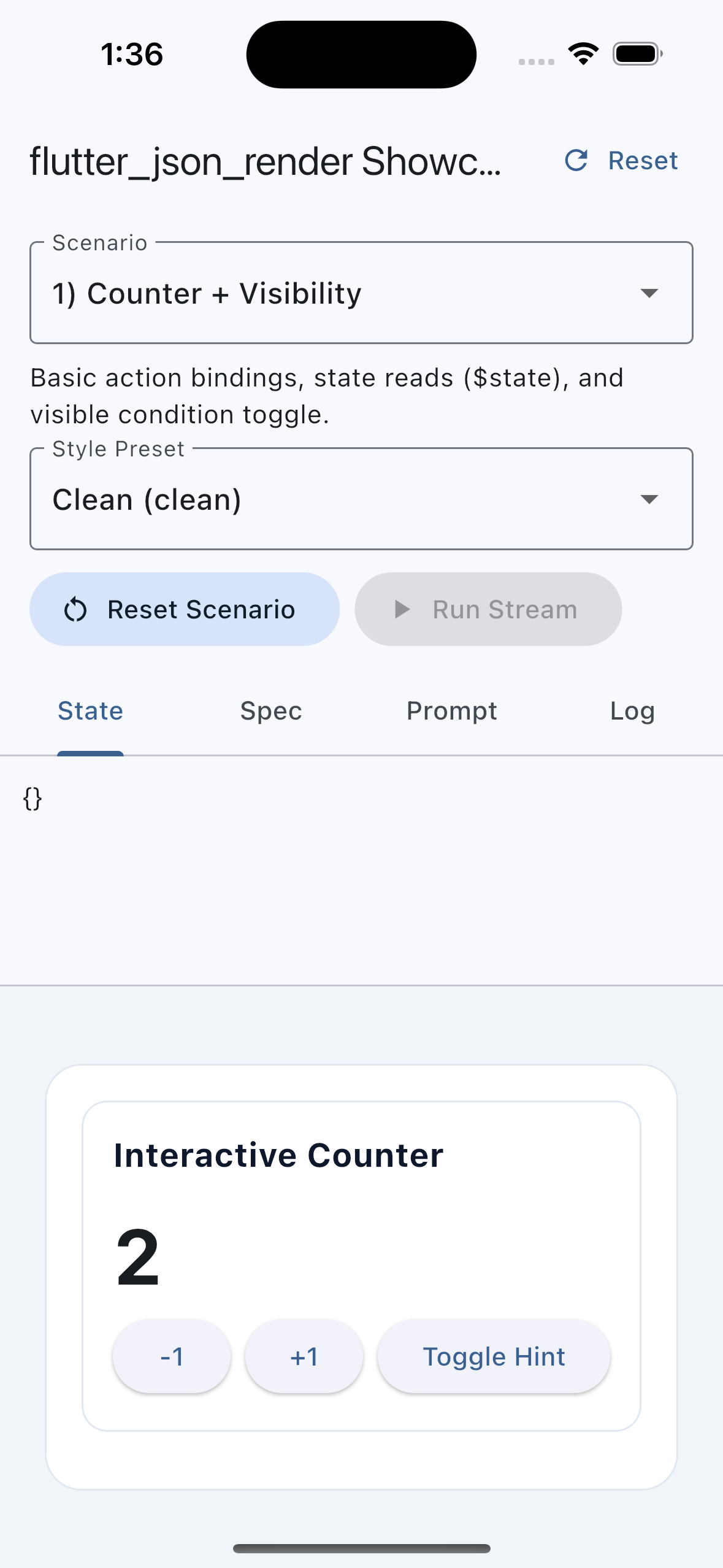 | 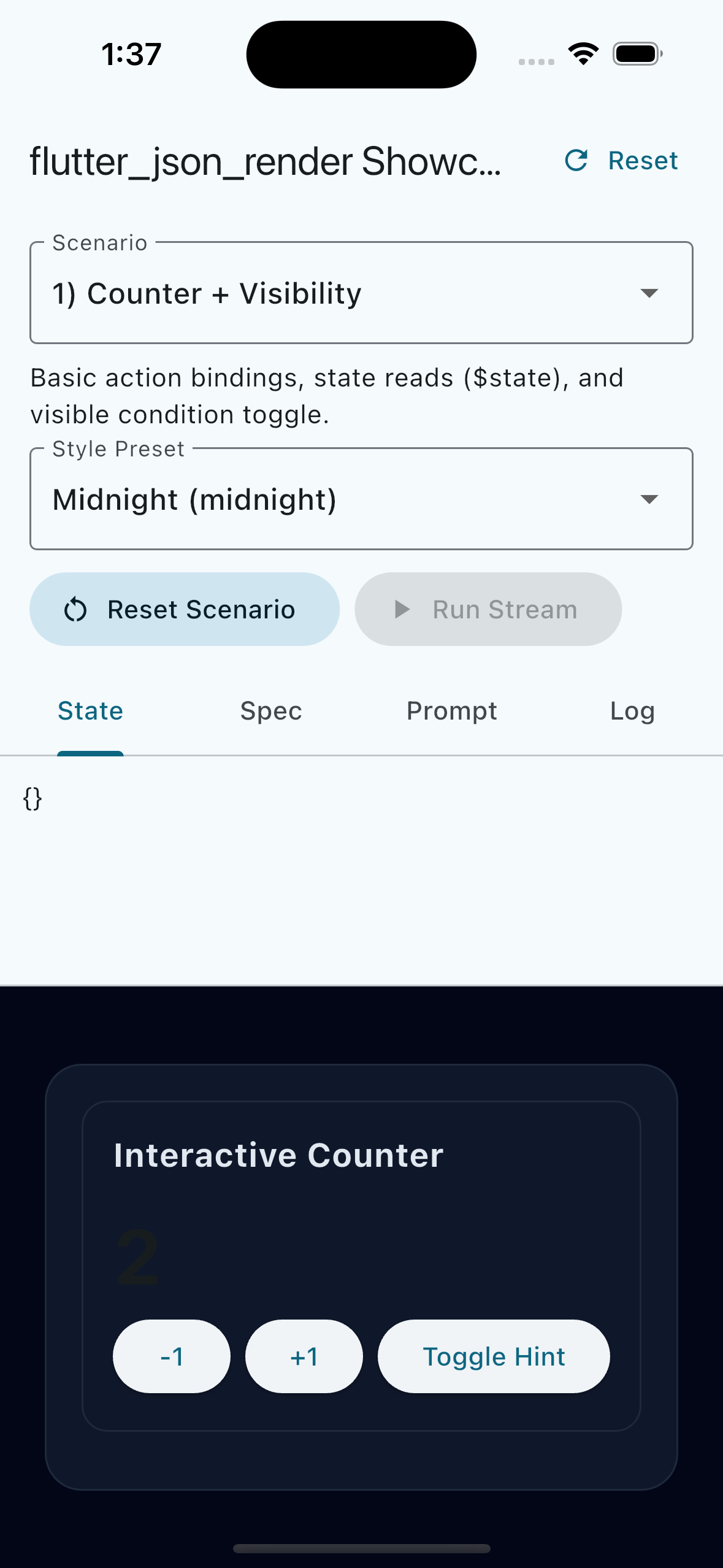 | 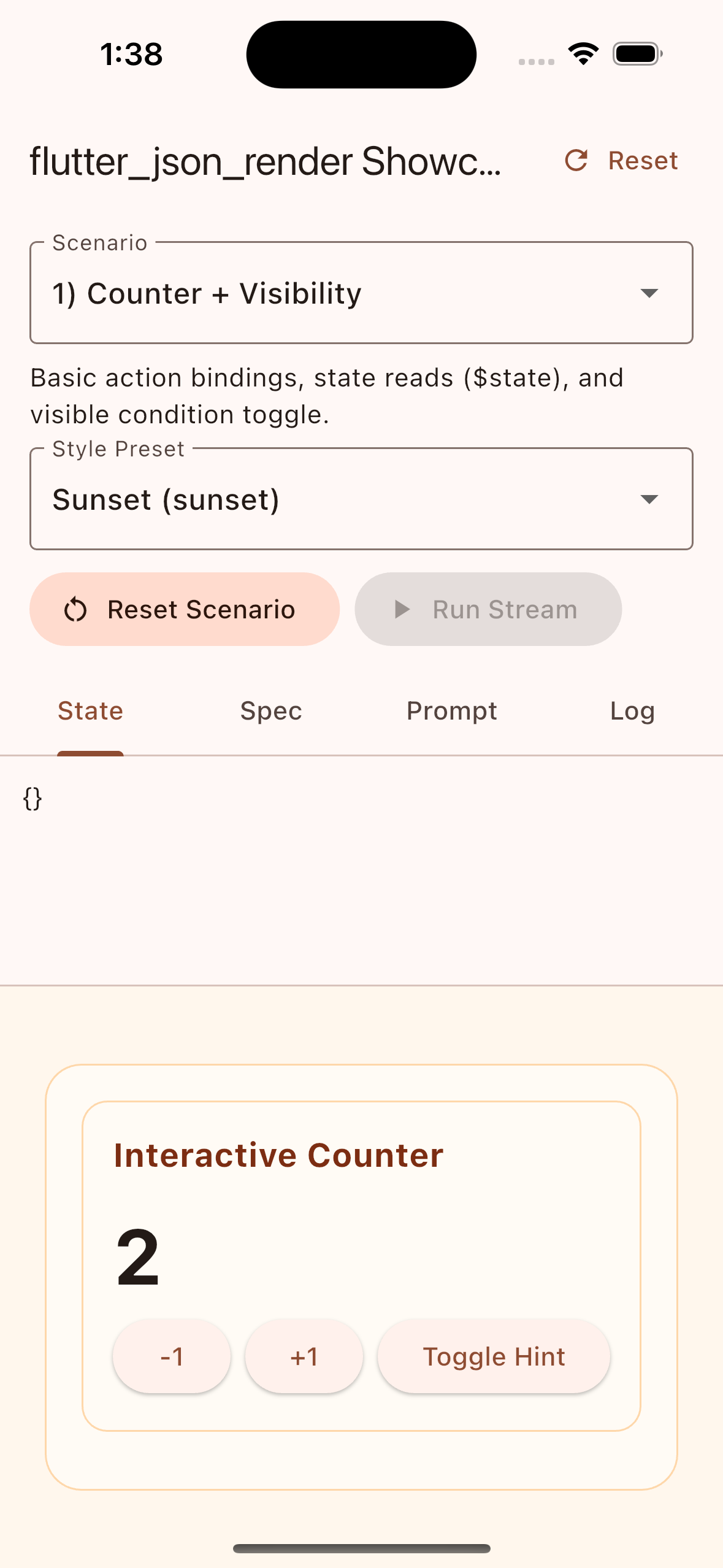 |
JSONL patch stream progressively builds a component-rich interface:
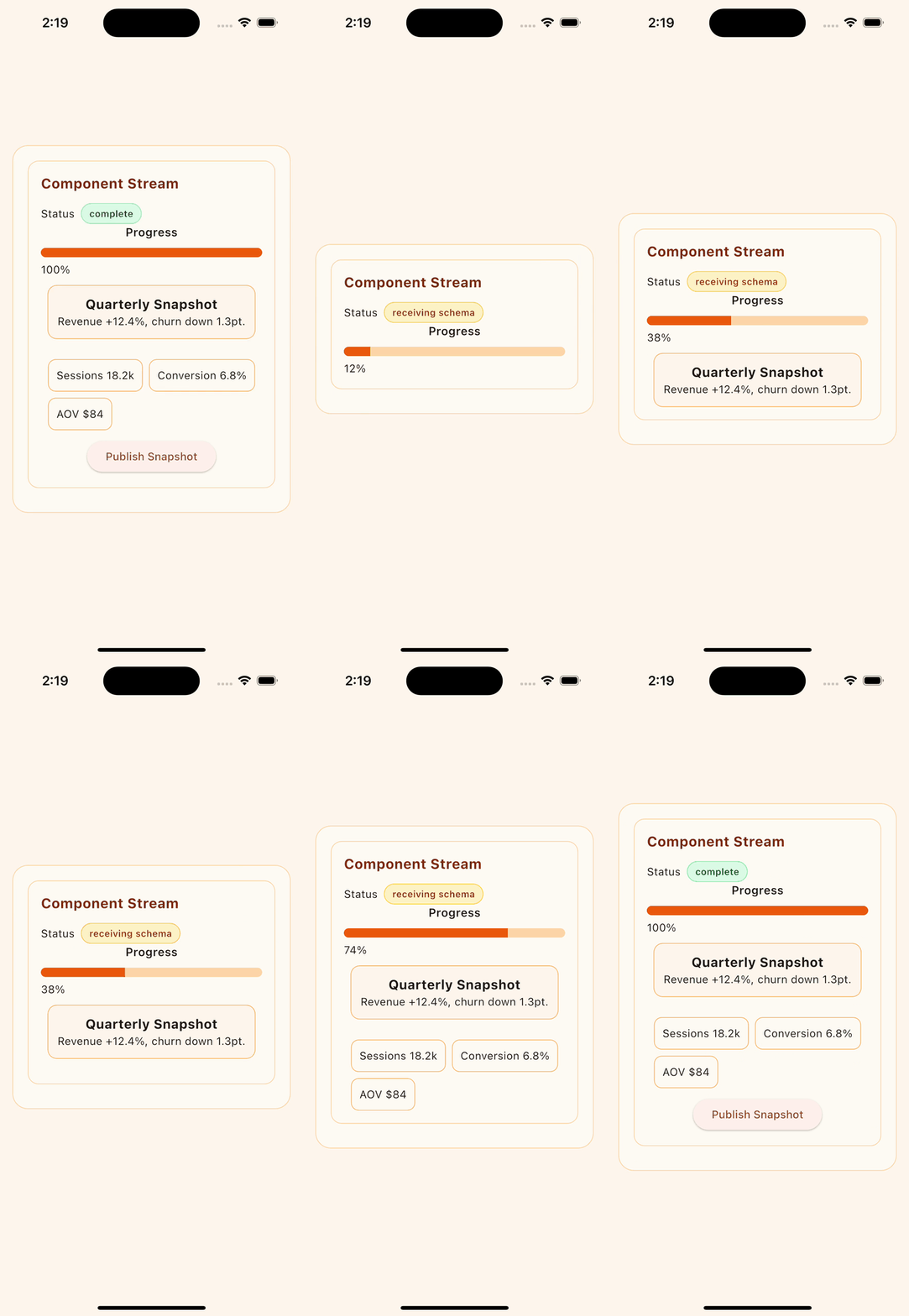
Replay the same capture scenario locally:
cd example
flutter run \
--dart-define=STYLE_PRESET=sunset \
--dart-define=SCENARIO=component_stream \
--dart-define=AUTO_RUN_STREAM=true \
--dart-define=AUTO_RUN_DELAY_MS=2200 \
--dart-define=STREAM_STEP_DELAY_MS=620 \
--dart-define=CAPTURE_MODE=trueflutter analyze
flutter test
dart pub publish --dry-runGitHub Actions secret scanning is enabled with both gitleaks and trufflehog.
- Workflow:
.github/workflows/secret-scan.yml - Runs on pull requests, pushes to
main, weekly schedule, and manual dispatch
MIT