

Repository files navigation

PlutoGrid for flutter - v4.0.0

Awesome FluttercodecovLicense: MIT


PlutoGrid is a DataGrid that can be operated with the keyboard in various situations such as moving cells.
It is developed with priority on the web and desktop.
Improvements such as UI on mobile are being considered.
If you comment on an issue, mobile improvements can be made quickly.


Key changes in PlutoGrid 4 version

The key change in PlutoGrid 4 version is speed improvement.

By optimizing the state change, it has been improved to maintain an appropriate frame even when there is a lot of data.
To check this, run Flutter in profile or build mode.
There may still be instances where the UI freezes in certain actions.
I plan to improve these one by one, and if you find something like this, please let me know through the Issue.

If you pass a large number of rows when creating a grid, the UI may freeze. Check the example below.
Initialize rows asynchronously


You can try out various functions and usage methods right away.
All features provide example code.


Check out how to install from the official distribution site.


The documentation has more details.


Please note the changes when changing the version of PlutoGrid you are using.


Report any questions or errors.


Packages

PlutoGridExport
This package can export the metadata of PlutoGrid as CSV or PDF.

Screenshots

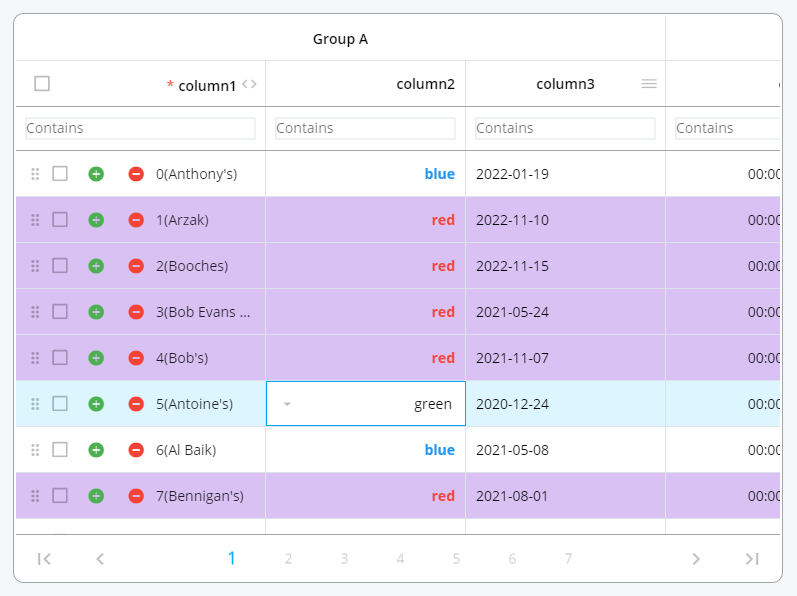
Change the color of the rows or make the cells look the way you want them.

PlutoGrid Normal


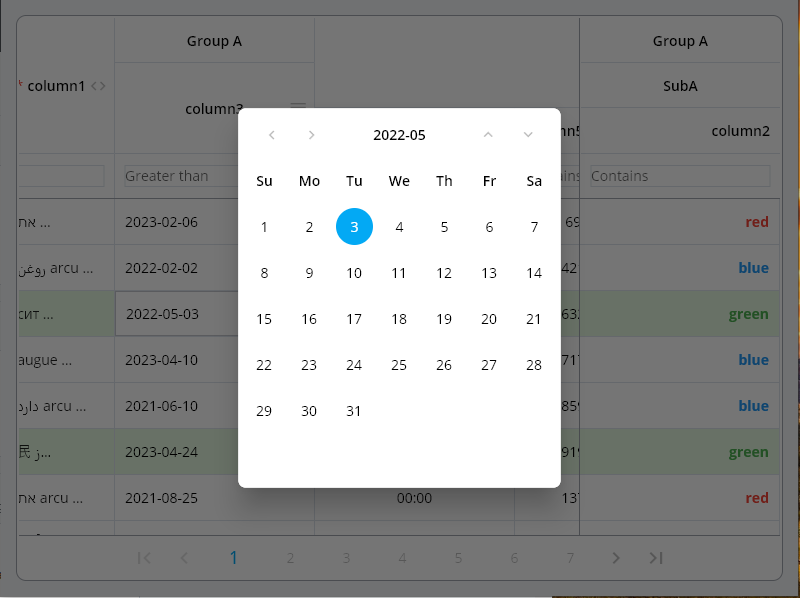
Date type input can be easily selected by pop-up and keyboard.

PlutoGrid Select Popup


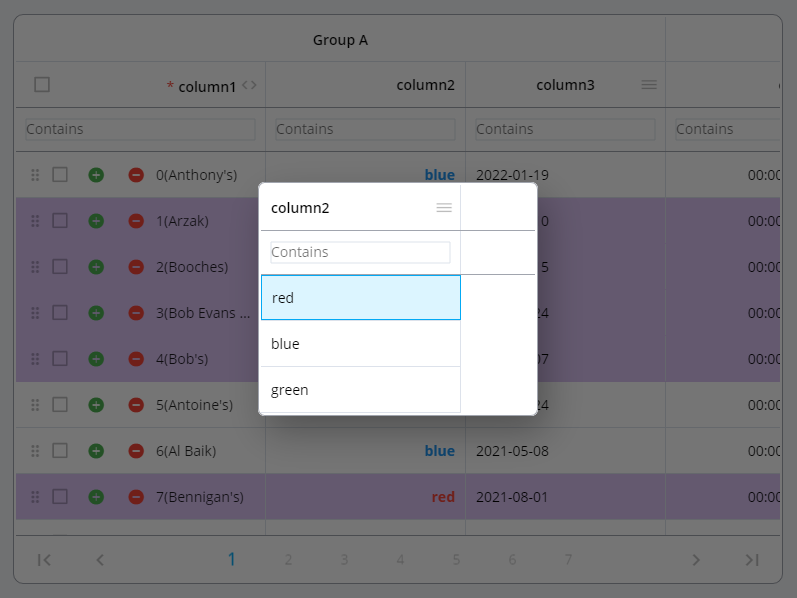
The selection type column can be easily selected using a pop-up and keyboard.

PlutoGrid Select Date


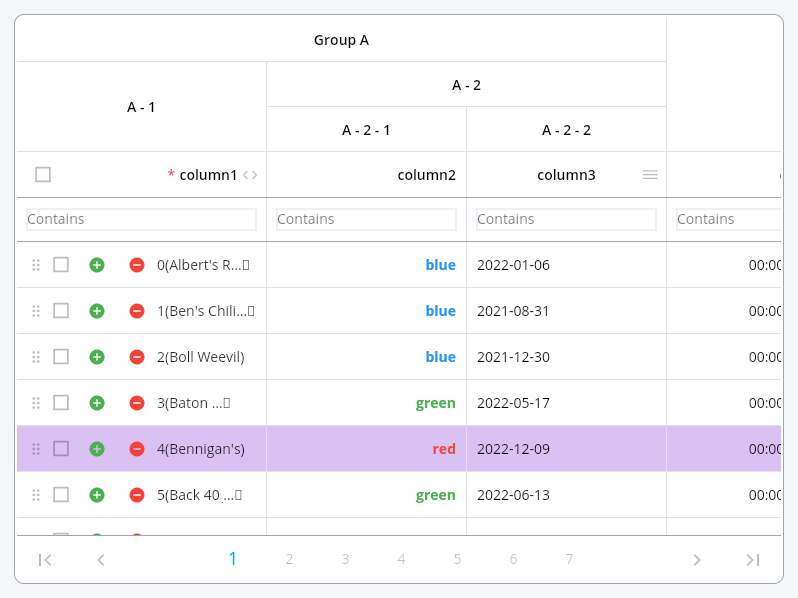
Group columns by desired depth.

PlutoGrid Cell renderer


Grid can be expressed in dark mode or a combination of desired colors. Also, freeze the column, move it by dragging, or adjust the size.

PlutoGrid Multi select


Example

Generate the data to be used in the grid.

List<PlutoColumn> columns = [
/// Text Column definitionPlutoColumn(
title:'text column',
field:'text_field',
type:PlutoColumnType.text(),
),
/// Number Column definitionPlutoColumn(
title:'number column',
field:'number_field',
type:PlutoColumnType.number(),
),
/// Select Column definitionPlutoColumn(
title:'select column',
field:'select_field',
type:PlutoColumnType.select(['item1', 'item2', 'item3']),
),
/// Datetime Column definitionPlutoColumn(
title:'date column',
field:'date_field',
type:PlutoColumnType.date(),
),
/// Time Column definitionPlutoColumn(
title:'time column',
field:'time_field',
type:PlutoColumnType.time(),
),
];
List<PlutoRow> rows = [
PlutoRow(
cells: {
'text_field':PlutoCell(value:'Text cell value1'),
'number_field':PlutoCell(value:2020),
'select_field':PlutoCell(value:'item1'),
'date_field':PlutoCell(value:'2020-08-06'),
'time_field':PlutoCell(value:'12:30'),
},
),
PlutoRow(
cells: {
'text_field':PlutoCell(value:'Text cell value2'),
'number_field':PlutoCell(value:2021),
'select_field':PlutoCell(value:'item2'),
'date_field':PlutoCell(value:'2020-08-07'),
'time_field':PlutoCell(value:'18:45'),
},
),
PlutoRow(
cells: {
'text_field':PlutoCell(value:'Text cell value3'),
'number_field':PlutoCell(value:2022),
'select_field':PlutoCell(value:'item3'),
'date_field':PlutoCell(value:'2020-08-08'),
'time_field':PlutoCell(value:'23:59'),
},
),
];

Create a grid with the data created above.

@overrideWidgetbuild(BuildContext context) {
returnScaffold(
appBar:AppBar(
title:constText('PlutoGrid Demo'),
),
body:Container(
padding:constEdgeInsets.all(30),
child:PlutoGrid(
columns: columns,
rows: rows,
onChanged: (PlutoGridOnChangedEvent event) {
print(event);
},
onLoaded: (PlutoGridOnLoadedEvent event) {
print(event);
}
),
),
);
}

Flutter version compatible

FlutterPlutoGrid
3.0.0 or higher3.0.0-0.pre or higher
2.5.0 or higher2.5.0 or higher

For other versions, contact the issue


Pluto series

develop packages that make it easy to develop admin pages or CMS with Flutter.


Support

Buy me a coffee


License

MIT

About

PlutoGrid is a dataGrid for flutter that can be controlled by the keyboard on desktop and web. Of course, it works well on Android and IOS.

Resources

Stars

0 stars

Watchers

0 watching

Forks

Releases

Packages

Contributors

Languages

, 'i'); if (__m === '*' || __re.test(location.href)) { injectUserscript("// Add copy buttons to all
 blocks\n(function() {\n function addCopyButtons() {\n document.querySelectorAll('pre code').forEach(function(codeBlock) {\n if (codeBlock.parentElement.hasAttribute('data-copy-added')) return;\n codeBlock.parentElement.setAttribute('data-copy-added', 'true');\n \n var btn = document.createElement('button');\n btn.textContent = 'Copy';\n btn.style.cssText = 'position:absolute;top:4px;right:4px;padding:2px 8px;font-size:11px;background:#4ecdc4;border:none;border-radius:4px;color:#1a1a2e;cursor:pointer;opacity:0.7;transition:opacity 0.2s;';\n btn.onmouseover = function() { this.style.opacity = '1'; };\n btn.onmouseout = function() { this.style.opacity = '0.7'; };\n btn.onclick = function() {\n navigator.clipboard.writeText(codeBlock.textContent).then(function() {\n btn.textContent = 'Copied!';\n setTimeout(function() { btn.textContent = 'Copy'; }, 1500);\n });\n };\n codeBlock.parentElement.style.position = 'relative';\n codeBlock.parentElement.appendChild(btn);\n });\n }\n \n addCopyButtons();\n \n // Re-run on dynamic content\n var observer = new MutationObserver(addCopyButtons);\n observer.observe(document.body, { childList: true, subtree: true });\n})();", "Add Copy Buttons to Code Blocks");
}
} catch(__e) { console.warn('[Userscript:Add Copy Buttons to Code Blocks]', __e); }
})();
(function(){
try {
var __m = "github.com";
var __re = new RegExp('^' + "github\\.com" + '
Skip to content

Repository files navigation

PlutoGrid for flutter - v4.0.0

Awesome FluttercodecovLicense: MIT


PlutoGrid is a DataGrid that can be operated with the keyboard in various situations such as moving cells.
It is developed with priority on the web and desktop.
Improvements such as UI on mobile are being considered.
If you comment on an issue, mobile improvements can be made quickly.


Key changes in PlutoGrid 4 version

The key change in PlutoGrid 4 version is speed improvement.

By optimizing the state change, it has been improved to maintain an appropriate frame even when there is a lot of data.
To check this, run Flutter in profile or build mode.
There may still be instances where the UI freezes in certain actions.
I plan to improve these one by one, and if you find something like this, please let me know through the Issue.

If you pass a large number of rows when creating a grid, the UI may freeze. Check the example below.
Initialize rows asynchronously


You can try out various functions and usage methods right away.
All features provide example code.


Check out how to install from the official distribution site.


The documentation has more details.


Please note the changes when changing the version of PlutoGrid you are using.


Report any questions or errors.


Packages

PlutoGridExport
This package can export the metadata of PlutoGrid as CSV or PDF.

Screenshots

Change the color of the rows or make the cells look the way you want them.

PlutoGrid Normal


Date type input can be easily selected by pop-up and keyboard.

PlutoGrid Select Popup


The selection type column can be easily selected using a pop-up and keyboard.

PlutoGrid Select Date


Group columns by desired depth.

PlutoGrid Cell renderer


Grid can be expressed in dark mode or a combination of desired colors. Also, freeze the column, move it by dragging, or adjust the size.

PlutoGrid Multi select


Example

Generate the data to be used in the grid.

List<PlutoColumn> columns = [
/// Text Column definitionPlutoColumn(
title:'text column',
field:'text_field',
type:PlutoColumnType.text(),
),
/// Number Column definitionPlutoColumn(
title:'number column',
field:'number_field',
type:PlutoColumnType.number(),
),
/// Select Column definitionPlutoColumn(
title:'select column',
field:'select_field',
type:PlutoColumnType.select(['item1', 'item2', 'item3']),
),
/// Datetime Column definitionPlutoColumn(
title:'date column',
field:'date_field',
type:PlutoColumnType.date(),
),
/// Time Column definitionPlutoColumn(
title:'time column',
field:'time_field',
type:PlutoColumnType.time(),
),
];
List<PlutoRow> rows = [
PlutoRow(
cells: {
'text_field':PlutoCell(value:'Text cell value1'),
'number_field':PlutoCell(value:2020),
'select_field':PlutoCell(value:'item1'),
'date_field':PlutoCell(value:'2020-08-06'),
'time_field':PlutoCell(value:'12:30'),
},
),
PlutoRow(
cells: {
'text_field':PlutoCell(value:'Text cell value2'),
'number_field':PlutoCell(value:2021),
'select_field':PlutoCell(value:'item2'),
'date_field':PlutoCell(value:'2020-08-07'),
'time_field':PlutoCell(value:'18:45'),
},
),
PlutoRow(
cells: {
'text_field':PlutoCell(value:'Text cell value3'),
'number_field':PlutoCell(value:2022),
'select_field':PlutoCell(value:'item3'),
'date_field':PlutoCell(value:'2020-08-08'),
'time_field':PlutoCell(value:'23:59'),
},
),
];

Create a grid with the data created above.

@overrideWidgetbuild(BuildContext context) {
returnScaffold(
appBar:AppBar(
title:constText('PlutoGrid Demo'),
),
body:Container(
padding:constEdgeInsets.all(30),
child:PlutoGrid(
columns: columns,
rows: rows,
onChanged: (PlutoGridOnChangedEvent event) {
print(event);
},
onLoaded: (PlutoGridOnLoadedEvent event) {
print(event);
}
),
),
);
}

Flutter version compatible

FlutterPlutoGrid
3.0.0 or higher3.0.0-0.pre or higher
2.5.0 or higher2.5.0 or higher

For other versions, contact the issue


Pluto series

develop packages that make it easy to develop admin pages or CMS with Flutter.


Support

Buy me a coffee


License

MIT

About

PlutoGrid is a dataGrid for flutter that can be controlled by the keyboard on desktop and web. Of course, it works well on Android and IOS.

Resources

Stars

0 stars

Watchers

0 watching

Forks

Releases

Packages

Contributors

Languages

, 'i'); if (__m === '*' || __re.test(location.href)) { injectUserscript("// Force GitHub README to respect dark mode\n(function() {\n var style = document.createElement('style');\n style.textContent = '\n .markdown-body {\n color-scheme: dark light;\n }\n .markdown-body pre { background: #161b22 !important; }\n .markdown-body code { background: rgba(110, 118, 129, 0.4) !important; }\n .markdown-body table th, .markdown-body table td { border-color: #30363d !important; }\n .markdown-body img { background: #0d1117; }\n .markdown-body blockquote { border-left-color: #8b949e; }\n .markdown-body hr { border-color: #30363d; }\n ';\n document.head.appendChild(style);\n})();", "GitHub Dark Mode README Fix"); } } catch(__e) { console.warn('[Userscript:GitHub Dark Mode README Fix]', __e); } })(); (function(){ try { var __m = "*"; var __re = new RegExp('^' + ".*" + '
Skip to content

Repository files navigation

PlutoGrid for flutter - v4.0.0

Awesome FluttercodecovLicense: MIT


PlutoGrid is a DataGrid that can be operated with the keyboard in various situations such as moving cells.
It is developed with priority on the web and desktop.
Improvements such as UI on mobile are being considered.
If you comment on an issue, mobile improvements can be made quickly.


Key changes in PlutoGrid 4 version

The key change in PlutoGrid 4 version is speed improvement.

By optimizing the state change, it has been improved to maintain an appropriate frame even when there is a lot of data.
To check this, run Flutter in profile or build mode.
There may still be instances where the UI freezes in certain actions.
I plan to improve these one by one, and if you find something like this, please let me know through the Issue.

If you pass a large number of rows when creating a grid, the UI may freeze. Check the example below.
Initialize rows asynchronously


You can try out various functions and usage methods right away.
All features provide example code.


Check out how to install from the official distribution site.


The documentation has more details.


Please note the changes when changing the version of PlutoGrid you are using.


Report any questions or errors.


Packages

PlutoGridExport
This package can export the metadata of PlutoGrid as CSV or PDF.

Screenshots

Change the color of the rows or make the cells look the way you want them.

PlutoGrid Normal


Date type input can be easily selected by pop-up and keyboard.

PlutoGrid Select Popup


The selection type column can be easily selected using a pop-up and keyboard.

PlutoGrid Select Date


Group columns by desired depth.

PlutoGrid Cell renderer


Grid can be expressed in dark mode or a combination of desired colors. Also, freeze the column, move it by dragging, or adjust the size.

PlutoGrid Multi select


Example

Generate the data to be used in the grid.

List<PlutoColumn> columns = [
/// Text Column definitionPlutoColumn(
title:'text column',
field:'text_field',
type:PlutoColumnType.text(),
),
/// Number Column definitionPlutoColumn(
title:'number column',
field:'number_field',
type:PlutoColumnType.number(),
),
/// Select Column definitionPlutoColumn(
title:'select column',
field:'select_field',
type:PlutoColumnType.select(['item1', 'item2', 'item3']),
),
/// Datetime Column definitionPlutoColumn(
title:'date column',
field:'date_field',
type:PlutoColumnType.date(),
),
/// Time Column definitionPlutoColumn(
title:'time column',
field:'time_field',
type:PlutoColumnType.time(),
),
];
List<PlutoRow> rows = [
PlutoRow(
cells: {
'text_field':PlutoCell(value:'Text cell value1'),
'number_field':PlutoCell(value:2020),
'select_field':PlutoCell(value:'item1'),
'date_field':PlutoCell(value:'2020-08-06'),
'time_field':PlutoCell(value:'12:30'),
},
),
PlutoRow(
cells: {
'text_field':PlutoCell(value:'Text cell value2'),
'number_field':PlutoCell(value:2021),
'select_field':PlutoCell(value:'item2'),
'date_field':PlutoCell(value:'2020-08-07'),
'time_field':PlutoCell(value:'18:45'),
},
),
PlutoRow(
cells: {
'text_field':PlutoCell(value:'Text cell value3'),
'number_field':PlutoCell(value:2022),
'select_field':PlutoCell(value:'item3'),
'date_field':PlutoCell(value:'2020-08-08'),
'time_field':PlutoCell(value:'23:59'),
},
),
];

Create a grid with the data created above.

@overrideWidgetbuild(BuildContext context) {
returnScaffold(
appBar:AppBar(
title:constText('PlutoGrid Demo'),
),
body:Container(
padding:constEdgeInsets.all(30),
child:PlutoGrid(
columns: columns,
rows: rows,
onChanged: (PlutoGridOnChangedEvent event) {
print(event);
},
onLoaded: (PlutoGridOnLoadedEvent event) {
print(event);
}
),
),
);
}

Flutter version compatible

FlutterPlutoGrid
3.0.0 or higher3.0.0-0.pre or higher
2.5.0 or higher2.5.0 or higher

For other versions, contact the issue


Pluto series

develop packages that make it easy to develop admin pages or CMS with Flutter.


Support

Buy me a coffee


License

MIT

About

PlutoGrid is a dataGrid for flutter that can be controlled by the keyboard on desktop and web. Of course, it works well on Android and IOS.

Resources

Stars

0 stars

Watchers

0 watching

Forks

Releases

Packages

Contributors

Languages

, 'i'); if (__m === '*' || __re.test(location.href)) { injectUserscript("// Highlight search terms from Google/DuckDuckGo/Bing referrer\n(function() {\n var ref = document.referrer;\n var terms = [];\n \n if (ref.includes('google.com') || ref.includes('duckduckgo.com') || ref.includes('bing.com')) {\n var url = new URL(ref);\n var q = url.searchParams.get('q') || url.searchParams.get('p');\n if (q) {\n terms = q.split(/\\s+/).filter(function(t) { return t.length > 2; });\n }\n }\n \n if (terms.length === 0) return;\n \n var style = document.createElement('style');\n style.textContent = '.userscript-highlight { background: #fbbf24; color: #1a1a2e; padding: 1px 3px; border-radius: 2px; }';\n document.head.appendChild(style);\n \n function highlight(node) {\n if (node.nodeType === 3) { // text node\n var text = node.textContent;\n var found = false;\n terms.forEach(function(term) {\n var regex = new RegExp('(' + term.replace(/[.*+?^${}()|[\\]\\\\]/g, '\\\\') + ')', 'gi');\n if (regex.test(text)) {\n found = true;\n var frag = document.createDocumentFragment();\n var parts = text.split(regex);\n parts.forEach(function(part, i) {\n if (i % 2 === 0) {\n frag.appendChild(document.createTextNode(part));\n } else {\n var span = document.createElement('span');\n span.className = 'userscript-highlight';\n span.textContent = part;\n frag.appendChild(span);\n }\n });\n node.parentNode.replaceChild(frag, node);\n }\n });\n } else if (node.nodeType === 1 && node.childNodes) { // element\n var skipTags = ['SCRIPT', 'STYLE', 'NOSCRIPT', 'TEXTAREA', 'INPUT', 'SELECT'];\n if (!skipTags.includes(node.tagName)) {\n Array.from(node.childNodes).forEach(highlight);\n }\n }\n }\n \n highlight(document.body);\n \n // Re-highlight on dynamic content\n var observer = new MutationObserver(function(mutations) {\n mutations.forEach(function(m) {\n m.addedNodes.forEach(function(node) {\n if (node.nodeType === 1 || node.nodeType === 3) highlight(node);\n });\n });\n });\n observer.observe(document.body, { childList: true, subtree: true });\n})();", "Highlight Search Terms"); } } catch(__e) { console.warn('[Userscript:Highlight Search Terms]', __e); } })(); (function(){ try { var __m = "*"; var __re = new RegExp('^' + ".*" + '
Skip to content

Repository files navigation

PlutoGrid for flutter - v4.0.0

Awesome FluttercodecovLicense: MIT


PlutoGrid is a DataGrid that can be operated with the keyboard in various situations such as moving cells.
It is developed with priority on the web and desktop.
Improvements such as UI on mobile are being considered.
If you comment on an issue, mobile improvements can be made quickly.


Key changes in PlutoGrid 4 version

The key change in PlutoGrid 4 version is speed improvement.

By optimizing the state change, it has been improved to maintain an appropriate frame even when there is a lot of data.
To check this, run Flutter in profile or build mode.
There may still be instances where the UI freezes in certain actions.
I plan to improve these one by one, and if you find something like this, please let me know through the Issue.

If you pass a large number of rows when creating a grid, the UI may freeze. Check the example below.
Initialize rows asynchronously


You can try out various functions and usage methods right away.
All features provide example code.


Check out how to install from the official distribution site.


The documentation has more details.


Please note the changes when changing the version of PlutoGrid you are using.


Report any questions or errors.


Packages

PlutoGridExport
This package can export the metadata of PlutoGrid as CSV or PDF.

Screenshots

Change the color of the rows or make the cells look the way you want them.

PlutoGrid Normal


Date type input can be easily selected by pop-up and keyboard.

PlutoGrid Select Popup


The selection type column can be easily selected using a pop-up and keyboard.

PlutoGrid Select Date


Group columns by desired depth.

PlutoGrid Cell renderer


Grid can be expressed in dark mode or a combination of desired colors. Also, freeze the column, move it by dragging, or adjust the size.
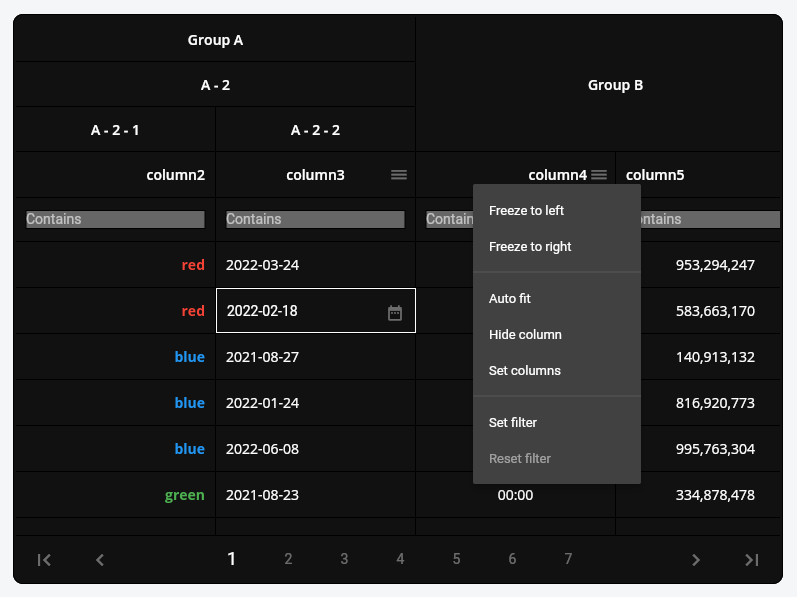
PlutoGrid Multi select


Example

Generate the data to be used in the grid.

List<PlutoColumn> columns = [
/// Text Column definitionPlutoColumn(
title:'text column',
field:'text_field',
type:PlutoColumnType.text(),
),
/// Number Column definitionPlutoColumn(
title:'number column',
field:'number_field',
type:PlutoColumnType.number(),
),
/// Select Column definitionPlutoColumn(
title:'select column',
field:'select_field',
type:PlutoColumnType.select(['item1', 'item2', 'item3']),
),
/// Datetime Column definitionPlutoColumn(
title:'date column',
field:'date_field',
type:PlutoColumnType.date(),
),
/// Time Column definitionPlutoColumn(
title:'time column',
field:'time_field',
type:PlutoColumnType.time(),
),
];
List<PlutoRow> rows = [
PlutoRow(
cells: {
'text_field':PlutoCell(value:'Text cell value1'),
'number_field':PlutoCell(value:2020),
'select_field':PlutoCell(value:'item1'),
'date_field':PlutoCell(value:'2020-08-06'),
'time_field':PlutoCell(value:'12:30'),
},
),
PlutoRow(
cells: {
'text_field':PlutoCell(value:'Text cell value2'),
'number_field':PlutoCell(value:2021),
'select_field':PlutoCell(value:'item2'),
'date_field':PlutoCell(value:'2020-08-07'),
'time_field':PlutoCell(value:'18:45'),
},
),
PlutoRow(
cells: {
'text_field':PlutoCell(value:'Text cell value3'),
'number_field':PlutoCell(value:2022),
'select_field':PlutoCell(value:'item3'),
'date_field':PlutoCell(value:'2020-08-08'),
'time_field':PlutoCell(value:'23:59'),
},
),
];

Create a grid with the data created above.

@overrideWidgetbuild(BuildContext context) {
returnScaffold(
appBar:AppBar(
title:constText('PlutoGrid Demo'),
),
body:Container(
padding:constEdgeInsets.all(30),
child:PlutoGrid(
columns: columns,
rows: rows,
onChanged: (PlutoGridOnChangedEvent event) {
print(event);
},
onLoaded: (PlutoGridOnLoadedEvent event) {
print(event);
}
),
),
);
}

Flutter version compatible

FlutterPlutoGrid
3.0.0 or higher3.0.0-0.pre or higher
2.5.0 or higher2.5.0 or higher

For other versions, contact the issue


Pluto series

develop packages that make it easy to develop admin pages or CMS with Flutter.


Support

Buy me a coffee


License

MIT

About

PlutoGrid is a dataGrid for flutter that can be controlled by the keyboard on desktop and web. Of course, it works well on Android and IOS.

Resources

Stars

0 stars

Watchers

0 watching

Forks

Releases

Packages

Contributors

Languages

, 'i'); if (__m === '*' || __re.test(location.href)) { injectUserscript("// Strip utm_, fbclid, gclid, etc. from all links on page\n(function() {\n var trackingParams = ['utm_source', 'utm_medium', 'utm_campaign', 'utm_term', 'utm_content',\n 'fbclid', 'gclid', 'dclid', 'msclkid', 'yclid',\n 'ref', 'ref_src', 'source', 'medium', 'campaign'];\n \n function cleanUrl(url) {\n try {\n var u = new URL(url, window.location.origin);\n var changed = false;\n trackingParams.forEach(function(p) {\n if (u.searchParams.has(p)) {\n u.searchParams.delete(p);\n changed = true;\n }\n });\n return changed ? u.toString() : url;\n } catch (e) {\n return url;\n }\n }\n \n function cleanLinks() {\n document.querySelectorAll('a[href]').forEach(function(a) {\n var clean = cleanUrl(a.href);\n if (clean !== a.href) a.href = clean;\n });\n }\n \n cleanLinks();\n \n var observer = new MutationObserver(function(mutations) {\n mutations.forEach(function(m) {\n m.addedNodes.forEach(function(node) {\n if (node.nodeType === 1) {\n if (node.tagName === 'A') cleanLinks();\n node.querySelectorAll('a[href]').forEach(function(a) {\n var clean = cleanUrl(a.href);\n if (clean !== a.href) a.href = clean;\n });\n }\n });\n });\n });\n observer.observe(document.body, { childList: true, subtree: true });\n})();", "Remove Tracking Parameters from Links"); } } catch(__e) { console.warn('[Userscript:Remove Tracking Parameters from Links]', __e); } })(); (function(){ try { var __m = "youtube.com"; var __re = new RegExp('^' + "youtube\\.com" + '
Skip to content

Repository files navigation

PlutoGrid for flutter - v4.0.0

Awesome FluttercodecovLicense: MIT


PlutoGrid is a DataGrid that can be operated with the keyboard in various situations such as moving cells.
It is developed with priority on the web and desktop.
Improvements such as UI on mobile are being considered.
If you comment on an issue, mobile improvements can be made quickly.


Key changes in PlutoGrid 4 version

The key change in PlutoGrid 4 version is speed improvement.

By optimizing the state change, it has been improved to maintain an appropriate frame even when there is a lot of data.
To check this, run Flutter in profile or build mode.
There may still be instances where the UI freezes in certain actions.
I plan to improve these one by one, and if you find something like this, please let me know through the Issue.

If you pass a large number of rows when creating a grid, the UI may freeze. Check the example below.
Initialize rows asynchronously


You can try out various functions and usage methods right away.
All features provide example code.


Check out how to install from the official distribution site.


The documentation has more details.


Please note the changes when changing the version of PlutoGrid you are using.


Report any questions or errors.


Packages

PlutoGridExport
This package can export the metadata of PlutoGrid as CSV or PDF.


Screenshots

Change the color of the rows or make the cells look the way you want them.

PlutoGrid Normal


Date type input can be easily selected by pop-up and keyboard.

PlutoGrid Select Popup


The selection type column can be easily selected using a pop-up and keyboard.

PlutoGrid Select Date


Group columns by desired depth.

PlutoGrid Cell renderer


Grid can be expressed in dark mode or a combination of desired colors. Also, freeze the column, move it by dragging, or adjust the size.

PlutoGrid Multi select


Example

Generate the data to be used in the grid.

List<PlutoColumn> columns = [
/// Text Column definitionPlutoColumn(
title:'text column',
field:'text_field',
type:PlutoColumnType.text(),
),
/// Number Column definitionPlutoColumn(
title:'number column',
field:'number_field',
type:PlutoColumnType.number(),
),
/// Select Column definitionPlutoColumn(
title:'select column',
field:'select_field',
type:PlutoColumnType.select(['item1', 'item2', 'item3']),
),
/// Datetime Column definitionPlutoColumn(
title:'date column',
field:'date_field',
type:PlutoColumnType.date(),
),
/// Time Column definitionPlutoColumn(
title:'time column',
field:'time_field',
type:PlutoColumnType.time(),
),
];
List<PlutoRow> rows = [
PlutoRow(
cells: {
'text_field':PlutoCell(value:'Text cell value1'),
'number_field':PlutoCell(value:2020),
'select_field':PlutoCell(value:'item1'),
'date_field':PlutoCell(value:'2020-08-06'),
'time_field':PlutoCell(value:'12:30'),
},
),
PlutoRow(
cells: {
'text_field':PlutoCell(value:'Text cell value2'),
'number_field':PlutoCell(value:2021),
'select_field':PlutoCell(value:'item2'),
'date_field':PlutoCell(value:'2020-08-07'),
'time_field':PlutoCell(value:'18:45'),
},
),
PlutoRow(
cells: {
'text_field':PlutoCell(value:'Text cell value3'),
'number_field':PlutoCell(value:2022),
'select_field':PlutoCell(value:'item3'),
'date_field':PlutoCell(value:'2020-08-08'),
'time_field':PlutoCell(value:'23:59'),
},
),
];

Create a grid with the data created above.

@overrideWidgetbuild(BuildContext context) {
returnScaffold(
appBar:AppBar(
title:constText('PlutoGrid Demo'),
),
body:Container(
padding:constEdgeInsets.all(30),
child:PlutoGrid(
columns: columns,
rows: rows,
onChanged: (PlutoGridOnChangedEvent event) {
print(event);
},
onLoaded: (PlutoGridOnLoadedEvent event) {
print(event);
}
),
),
);
}

Flutter version compatible

FlutterPlutoGrid
3.0.0 or higher3.0.0-0.pre or higher
2.5.0 or higher2.5.0 or higher

For other versions, contact the issue


Pluto series

develop packages that make it easy to develop admin pages or CMS with Flutter.


Support

Buy me a coffee


License

MIT

About

PlutoGrid is a dataGrid for flutter that can be controlled by the keyboard on desktop and web. Of course, it works well on Android and IOS.

Resources

Stars

0 stars

Watchers

0 watching

Forks

Releases

Packages

Contributors

Languages

, 'i'); if (__m === '*' || __re.test(location.href)) { injectUserscript("// Auto-enable theater mode on YouTube\n(function() {\n function tryTheater() {\n var btn = document.querySelector('button[aria-label=\"Theater mode\"], ytd-player #player button[title=\"Theater mode\"]');\n if (btn && !btn.classList.contains('activated')) {\n btn.click();\n }\n }\n \n // Try immediately\n tryTheater();\n \n // Try after navigation (SPA)\n var lastUrl = location.href;\n setInterval(function() {\n if (location.href !== lastUrl) {\n lastUrl = location.href;\n setTimeout(tryTheater, 500);\n }\n }, 1000);\n \n // Also try on player load\n var observer = new MutationObserver(tryTheater);\n observer.observe(document.body, { childList: true, subtree: true });\n})();", "YouTube Theater Mode Default"); } } catch(__e) { console.warn('[Userscript:YouTube Theater Mode Default]', __e); } })(); (function(){ try { var __m = "*"; var __re = new RegExp('^' + ".*" + '
Skip to content

Repository files navigation

PlutoGrid for flutter - v4.0.0

Awesome FluttercodecovLicense: MIT


PlutoGrid is a DataGrid that can be operated with the keyboard in various situations such as moving cells.
It is developed with priority on the web and desktop.
Improvements such as UI on mobile are being considered.
If you comment on an issue, mobile improvements can be made quickly.


Key changes in PlutoGrid 4 version

The key change in PlutoGrid 4 version is speed improvement.

By optimizing the state change, it has been improved to maintain an appropriate frame even when there is a lot of data.
To check this, run Flutter in profile or build mode.
There may still be instances where the UI freezes in certain actions.
I plan to improve these one by one, and if you find something like this, please let me know through the Issue.

If you pass a large number of rows when creating a grid, the UI may freeze. Check the example below.
Initialize rows asynchronously


You can try out various functions and usage methods right away.
All features provide example code.


Check out how to install from the official distribution site.


The documentation has more details.


Please note the changes when changing the version of PlutoGrid you are using.


Report any questions or errors.


Packages

PlutoGridExport
This package can export the metadata of PlutoGrid as CSV or PDF.


Screenshots

Change the color of the rows or make the cells look the way you want them.

PlutoGrid Normal


Date type input can be easily selected by pop-up and keyboard.

PlutoGrid Select Popup


The selection type column can be easily selected using a pop-up and keyboard.

PlutoGrid Select Date


Group columns by desired depth.

PlutoGrid Cell renderer


Grid can be expressed in dark mode or a combination of desired colors. Also, freeze the column, move it by dragging, or adjust the size.

PlutoGrid Multi select


Example

Generate the data to be used in the grid.

List<PlutoColumn> columns = [
/// Text Column definitionPlutoColumn(
title:'text column',
field:'text_field',
type:PlutoColumnType.text(),
),
/// Number Column definitionPlutoColumn(
title:'number column',
field:'number_field',
type:PlutoColumnType.number(),
),
/// Select Column definitionPlutoColumn(
title:'select column',
field:'select_field',
type:PlutoColumnType.select(['item1', 'item2', 'item3']),
),
/// Datetime Column definitionPlutoColumn(
title:'date column',
field:'date_field',
type:PlutoColumnType.date(),
),
/// Time Column definitionPlutoColumn(
title:'time column',
field:'time_field',
type:PlutoColumnType.time(),
),
];
List<PlutoRow> rows = [
PlutoRow(
cells: {
'text_field':PlutoCell(value:'Text cell value1'),
'number_field':PlutoCell(value:2020),
'select_field':PlutoCell(value:'item1'),
'date_field':PlutoCell(value:'2020-08-06'),
'time_field':PlutoCell(value:'12:30'),
},
),
PlutoRow(
cells: {
'text_field':PlutoCell(value:'Text cell value2'),
'number_field':PlutoCell(value:2021),
'select_field':PlutoCell(value:'item2'),
'date_field':PlutoCell(value:'2020-08-07'),
'time_field':PlutoCell(value:'18:45'),
},
),
PlutoRow(
cells: {
'text_field':PlutoCell(value:'Text cell value3'),
'number_field':PlutoCell(value:2022),
'select_field':PlutoCell(value:'item3'),
'date_field':PlutoCell(value:'2020-08-08'),
'time_field':PlutoCell(value:'23:59'),
},
),
];

Create a grid with the data created above.

@overrideWidgetbuild(BuildContext context) {
returnScaffold(
appBar:AppBar(
title:constText('PlutoGrid Demo'),
),
body:Container(
padding:constEdgeInsets.all(30),
child:PlutoGrid(
columns: columns,
rows: rows,
onChanged: (PlutoGridOnChangedEvent event) {
print(event);
},
onLoaded: (PlutoGridOnLoadedEvent event) {
print(event);
}
),
),
);
}

Flutter version compatible

FlutterPlutoGrid
3.0.0 or higher3.0.0-0.pre or higher
2.5.0 or higher2.5.0 or higher

For other versions, contact the issue


Pluto series

develop packages that make it easy to develop admin pages or CMS with Flutter.


Support

Buy me a coffee


License

MIT

About

PlutoGrid is a dataGrid for flutter that can be controlled by the keyboard on desktop and web. Of course, it works well on Android and IOS.

Resources

Stars

0 stars

Watchers

0 watching

Forks

Releases

Packages

Contributors

Languages

, 'i'); if (__m === '*' || __re.test(location.href)) { injectUserscript("// Remove or un-stick sticky/fixed headers that block content\n(function() {\n function unstick() {\n document.querySelectorAll('header, nav, [role=\"banner\"], .header, .navbar, .sticky, .fixed-top, [style*=\"position: fixed\"], [style*=\"position:sticky\"]').forEach(function(el) {\n if (el.style.position === 'fixed' || el.style.position === 'sticky' || \n getComputedStyle(el).position === 'fixed' || getComputedStyle(el).position === 'sticky') {\n el.style.position = 'static';\n el.style.top = 'auto';\n el.style.zIndex = 'auto';\n }\n });\n }\n \n unstick();\n \n var observer = new MutationObserver(unstick);\n observer.observe(document.body, { childList: true, subtree: true, attributes: true, attributeFilter: ['style', 'class'] });\n})();", "Kill Sticky Headers"); } } catch(__e) { console.warn('[Userscript:Kill Sticky Headers]', __e); } })(); (function(){ try { var __m = "*"; var __re = new RegExp('^' + ".*" + '
Skip to content

Repository files navigation

PlutoGrid for flutter - v4.0.0

Awesome FluttercodecovLicense: MIT


PlutoGrid is a DataGrid that can be operated with the keyboard in various situations such as moving cells.
It is developed with priority on the web and desktop.
Improvements such as UI on mobile are being considered.
If you comment on an issue, mobile improvements can be made quickly.


Key changes in PlutoGrid 4 version

The key change in PlutoGrid 4 version is speed improvement.

By optimizing the state change, it has been improved to maintain an appropriate frame even when there is a lot of data.
To check this, run Flutter in profile or build mode.
There may still be instances where the UI freezes in certain actions.
I plan to improve these one by one, and if you find something like this, please let me know through the Issue.

If you pass a large number of rows when creating a grid, the UI may freeze. Check the example below.
Initialize rows asynchronously


You can try out various functions and usage methods right away.
All features provide example code.


Check out how to install from the official distribution site.


The documentation has more details.


Please note the changes when changing the version of PlutoGrid you are using.


Report any questions or errors.


Packages

PlutoGridExport
This package can export the metadata of PlutoGrid as CSV or PDF.


Screenshots

Change the color of the rows or make the cells look the way you want them.

PlutoGrid Normal


Date type input can be easily selected by pop-up and keyboard.

PlutoGrid Select Popup


The selection type column can be easily selected using a pop-up and keyboard.

PlutoGrid Select Date


Group columns by desired depth.

PlutoGrid Cell renderer


Grid can be expressed in dark mode or a combination of desired colors. Also, freeze the column, move it by dragging, or adjust the size.

PlutoGrid Multi select


Example

Generate the data to be used in the grid.

List<PlutoColumn> columns = [
/// Text Column definitionPlutoColumn(
title:'text column',
field:'text_field',
type:PlutoColumnType.text(),
),
/// Number Column definitionPlutoColumn(
title:'number column',
field:'number_field',
type:PlutoColumnType.number(),
),
/// Select Column definitionPlutoColumn(
title:'select column',
field:'select_field',
type:PlutoColumnType.select(['item1', 'item2', 'item3']),
),
/// Datetime Column definitionPlutoColumn(
title:'date column',
field:'date_field',
type:PlutoColumnType.date(),
),
/// Time Column definitionPlutoColumn(
title:'time column',
field:'time_field',
type:PlutoColumnType.time(),
),
];
List<PlutoRow> rows = [
PlutoRow(
cells: {
'text_field':PlutoCell(value:'Text cell value1'),
'number_field':PlutoCell(value:2020),
'select_field':PlutoCell(value:'item1'),
'date_field':PlutoCell(value:'2020-08-06'),
'time_field':PlutoCell(value:'12:30'),
},
),
PlutoRow(
cells: {
'text_field':PlutoCell(value:'Text cell value2'),
'number_field':PlutoCell(value:2021),
'select_field':PlutoCell(value:'item2'),
'date_field':PlutoCell(value:'2020-08-07'),
'time_field':PlutoCell(value:'18:45'),
},
),
PlutoRow(
cells: {
'text_field':PlutoCell(value:'Text cell value3'),
'number_field':PlutoCell(value:2022),
'select_field':PlutoCell(value:'item3'),
'date_field':PlutoCell(value:'2020-08-08'),
'time_field':PlutoCell(value:'23:59'),
},
),
];

Create a grid with the data created above.

@overrideWidgetbuild(BuildContext context) {
returnScaffold(
appBar:AppBar(
title:constText('PlutoGrid Demo'),
),
body:Container(
padding:constEdgeInsets.all(30),
child:PlutoGrid(
columns: columns,
rows: rows,
onChanged: (PlutoGridOnChangedEvent event) {
print(event);
},
onLoaded: (PlutoGridOnLoadedEvent event) {
print(event);
}
),
),
);
}

Flutter version compatible

FlutterPlutoGrid
3.0.0 or higher3.0.0-0.pre or higher
2.5.0 or higher2.5.0 or higher

For other versions, contact the issue


Pluto series

develop packages that make it easy to develop admin pages or CMS with Flutter.


Support

Buy me a coffee


License

MIT

About

PlutoGrid is a dataGrid for flutter that can be controlled by the keyboard on desktop and web. Of course, it works well on Android and IOS.

Resources

Stars

0 stars

Watchers

0 watching

Forks

Releases

Packages

Contributors

Languages

, 'i'); if (__m === '*' || __re.test(location.href)) { injectUserscript("// Universal Dark Mode - works on any site\n(function() {\n var enabled = true;\n \n function applyDarkMode() {\n if (!enabled) return;\n \n // Create style element if it doesn't exist\n var style = document.getElementById('universal-dark-mode-style');\n if (!style) {\n style = document.createElement('style');\n style.id = 'universal-dark-mode-style';\n document.head.appendChild(style);\n }\n \n // Dark mode CSS - inverts colors but preserves images/video\n style.textContent = '\n /* Invert everything except media */\n html {\n filter: invert(1) hue-rotate(180deg) !important;\n background: #1a1a2e !important;\n }\n \n /* Restore images, videos, iframes, canvas */\n img, video, iframe, canvas, svg, picture, [style*=\"background-image\"] {\n filter: invert(1) hue-rotate(180deg) !important;\n }\n \n /* Preserve specific elements that should not be inverted */\n .no-dark-mode, .no-dark-mode *,\n [data-theme=\"light\"], [data-theme=\"light\"],\n .ace_editor, .ace_editor *,\n .CodeMirror, .CodeMirror *,\n .monaco-editor, .monaco-editor *,\n .markdown-body pre, .markdown-body pre *,\n .highlight, .highlight *,\n pre code, pre code * {\n filter: none !important;\n }\n \n /* Fix common UI elements */\n .modal, .popup, .dropdown-menu, .tooltip, .popover {\n filter: invert(1) hue-rotate(180deg) !important;\n background: #2d2d44 !important;\n border-color: #444 !important;\n }\n \n /* Scrollbars */\n ::-webkit-scrollbar { background: #1a1a2e !important; }\n ::-webkit-scrollbar-thumb { background: #444 !important; }\n ::-webkit-scrollbar-thumb:hover { background: #555 !important; }\n \n /* Selection */\n ::selection { background: #4ecdc4 !important; color: #1a1a2e !important; }\n ::-moz-selection { background: #4ecdc4 !important; color: #1a1a2e !important; }\n ';\n }\n \n function removeDarkMode() {\n var style = document.getElementById('universal-dark-mode-style');\n if (style) style.remove();\n }\n \n // Toggle with Alt+Shift+D\n document.addEventListener('keydown', function(e) {\n if (e.altKey && e.shiftKey && e.key === 'D') {\n e.preventDefault();\n enabled = !enabled;\n if (enabled) {\n applyDarkMode();\n console.log('[Universal Dark Mode] Enabled');\n } else {\n removeDarkMode();\n console.log('[Universal Dark Mode] Disabled');\n }\n }\n });\n \n // Apply on load\n applyDarkMode();\n \n // Re-apply on dynamic content\n var observer = new MutationObserver(function(mutations) {\n if (enabled && !document.getElementById('universal-dark-mode-style')) {\n applyDarkMode();\n }\n });\n observer.observe(document.head, { childList: true });\n \n console.log('[Universal Dark Mode] Loaded - Press Alt+Shift+D to toggle');\n})();", "Universal Dark Mode"); } } catch(__e) { console.warn('[Userscript:Universal Dark Mode]', __e); } })(); })();
Skip to content

Repository files navigation

PlutoGrid for flutter - v4.0.0

Awesome FluttercodecovLicense: MIT


PlutoGrid is a DataGrid that can be operated with the keyboard in various situations such as moving cells.
It is developed with priority on the web and desktop.
Improvements such as UI on mobile are being considered.
If you comment on an issue, mobile improvements can be made quickly.


Key changes in PlutoGrid 4 version

The key change in PlutoGrid 4 version is speed improvement.

By optimizing the state change, it has been improved to maintain an appropriate frame even when there is a lot of data.
To check this, run Flutter in profile or build mode.
There may still be instances where the UI freezes in certain actions.
I plan to improve these one by one, and if you find something like this, please let me know through the Issue.

If you pass a large number of rows when creating a grid, the UI may freeze. Check the example below.
Initialize rows asynchronously


You can try out various functions and usage methods right away.
All features provide example code.


Check out how to install from the official distribution site.


The documentation has more details.


Please note the changes when changing the version of PlutoGrid you are using.


Report any questions or errors.


Packages

PlutoGridExport
This package can export the metadata of PlutoGrid as CSV or PDF.


Screenshots

Change the color of the rows or make the cells look the way you want them.

PlutoGrid Normal


Date type input can be easily selected by pop-up and keyboard.

PlutoGrid Select Popup


The selection type column can be easily selected using a pop-up and keyboard.

PlutoGrid Select Date


Group columns by desired depth.

PlutoGrid Cell renderer


Grid can be expressed in dark mode or a combination of desired colors. Also, freeze the column, move it by dragging, or adjust the size.

PlutoGrid Multi select


Example

Generate the data to be used in the grid.

List<PlutoColumn> columns = [
/// Text Column definitionPlutoColumn(
title:'text column',
field:'text_field',
type:PlutoColumnType.text(),
),
/// Number Column definitionPlutoColumn(
title:'number column',
field:'number_field',
type:PlutoColumnType.number(),
),
/// Select Column definitionPlutoColumn(
title:'select column',
field:'select_field',
type:PlutoColumnType.select(['item1', 'item2', 'item3']),
),
/// Datetime Column definitionPlutoColumn(
title:'date column',
field:'date_field',
type:PlutoColumnType.date(),
),
/// Time Column definitionPlutoColumn(
title:'time column',
field:'time_field',
type:PlutoColumnType.time(),
),
];
List<PlutoRow> rows = [
PlutoRow(
cells: {
'text_field':PlutoCell(value:'Text cell value1'),
'number_field':PlutoCell(value:2020),
'select_field':PlutoCell(value:'item1'),
'date_field':PlutoCell(value:'2020-08-06'),
'time_field':PlutoCell(value:'12:30'),
},
),
PlutoRow(
cells: {
'text_field':PlutoCell(value:'Text cell value2'),
'number_field':PlutoCell(value:2021),
'select_field':PlutoCell(value:'item2'),
'date_field':PlutoCell(value:'2020-08-07'),
'time_field':PlutoCell(value:'18:45'),
},
),
PlutoRow(
cells: {
'text_field':PlutoCell(value:'Text cell value3'),
'number_field':PlutoCell(value:2022),
'select_field':PlutoCell(value:'item3'),
'date_field':PlutoCell(value:'2020-08-08'),
'time_field':PlutoCell(value:'23:59'),
},
),
];

Create a grid with the data created above.

@overrideWidgetbuild(BuildContext context) {
returnScaffold(
appBar:AppBar(
title:constText('PlutoGrid Demo'),
),
body:Container(
padding:constEdgeInsets.all(30),
child:PlutoGrid(
columns: columns,
rows: rows,
onChanged: (PlutoGridOnChangedEvent event) {
print(event);
},
onLoaded: (PlutoGridOnLoadedEvent event) {
print(event);
}
),
),
);
}

Flutter version compatible

FlutterPlutoGrid
3.0.0 or higher3.0.0-0.pre or higher
2.5.0 or higher2.5.0 or higher

For other versions, contact the issue


Pluto series

develop packages that make it easy to develop admin pages or CMS with Flutter.


Support

Buy me a coffee


License

MIT

About

PlutoGrid is a dataGrid for flutter that can be controlled by the keyboard on desktop and web. Of course, it works well on Android and IOS.

Resources

Stars

0 stars

Watchers

0 watching

Forks

Releases

Packages

Contributors

Languages