Syntax highlighting for React without the bulk.


All languages and styles from highlight.js.
npm install syntux// Require a style. (Returns a React style element).
var Theme = require('syntux/style/solarized_dark');
// Require the highlighters.
var XML = require('syntux/xml');
var CSS = require('syntux/css');
var JS = require('syntux/javascript');
// To access the underlying hljs simply require("syntux").
// Use them in a component.
var MyComponent = function () {
return (
<div>
{ Theme }
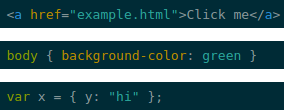
<XML>
{'<a href="example.html"> Click me </a>'}
</XML>
<CSS>
{'body { background-color: green }'}
</CSS>
<JS>
{'var x = { y: "hi" };'}
</JS>
</div>
);
});
var React = require("react");
var marked = require("marked");
var syntux = require("syntux");

// Ensure needed languages are available.
require("syntusk/javascript");
require("syntusk/css");
require("syntusk/xml");

// Set code renderer.
var renderer = new marked.Renderer();

renderer.code = function(code, lang) {
    lang = lang.toLowerCase();
    code = syntux.highlight(lang, code, true).value;
    return '<pre><code class="hljs ' + lang + '">' + code + '</code></pre>';
};

marked.setOptions({ renderer: renderer });

// Use it!
marked("```javascript var x = 1;```")