Skip to content

Repository files navigation

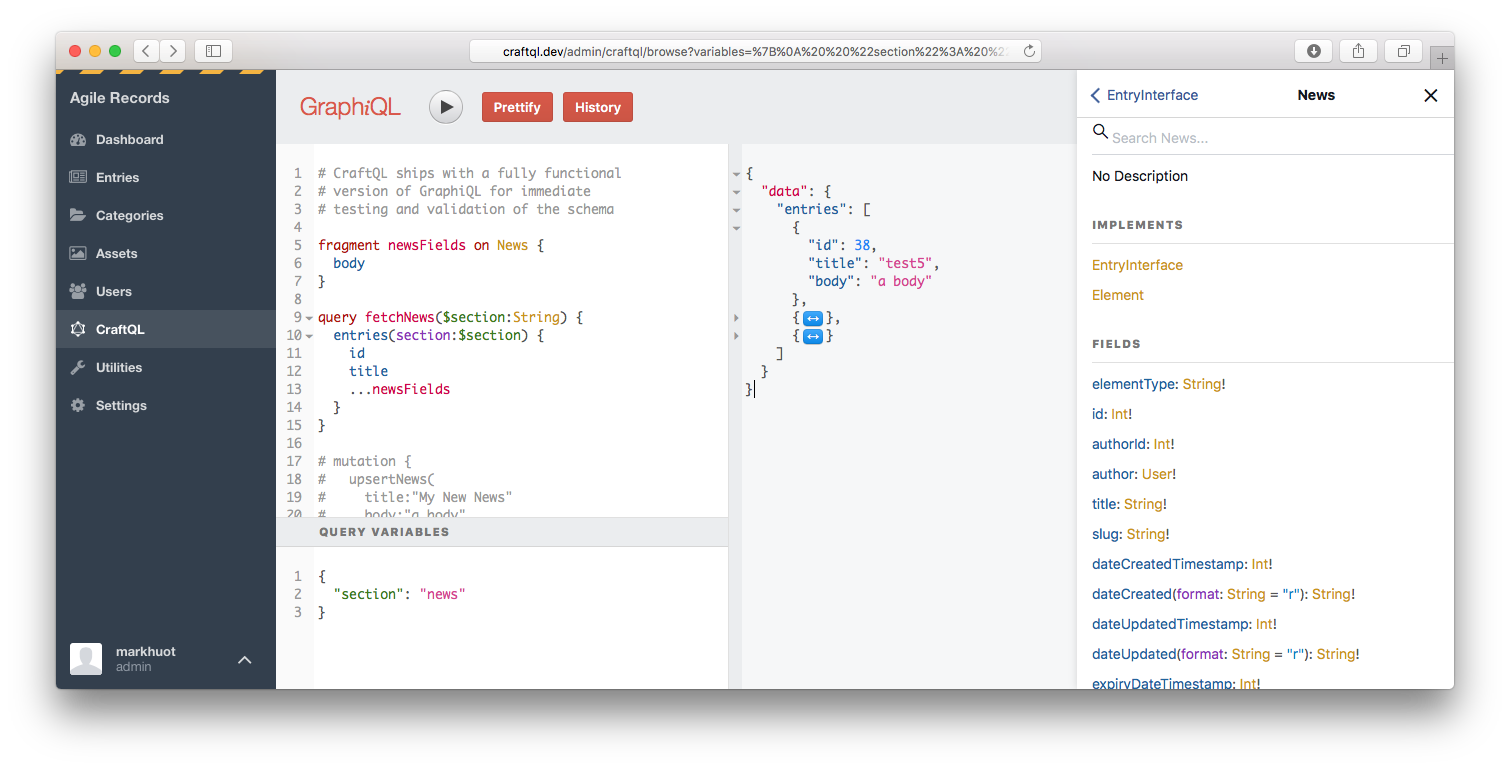
CraftQL seen through the GraphiQL UI

Build Status

A drop-in GraphQL server for your Craft CMS implementation. With zero configuration, CraftQL allows you to access all of Craft's features through a familiar GraphQL interface.


Examples

Once installed, you can test your installation with a simple Hello World,

{
helloWorld
}

If that worked, you can now query Craft CMS using almost the exact same syntax as your Twig templates.

{
entries(section:[news], limit:5, search:"body:salty") {
...onNews {
titleurlbody
}
}
}

CraftQL provides a top level entries field that takes the same arguments as craft.entries does in your template. This is the most commonly used field/access point. E.g.,

queryfetchNews { # The query, `query fetchNews` is completely optionalentries(section:[news]) { # Arguments match `craft.entries`...onNews { # GraphQL is strongly typed, so you must specify each Entry Type you want data fromid # A field to returntitle # A field to returnbody # A field to return
}
}
}

Types are automatically created for every Entry Type in your install. If you have a section named news and an entry type named news the GraphQL type will be named News. If you have a section named news and an entry type named pressRelease the GraphQL type will be named NewsPressRelease. The convention is to mash the section handle and the entry type handle together, unless they are the same, in which case the section handle will be used.

queryfetchNews {
entries(section:[news]) {
...onNews { # Any fields on the News entry typeidtitlebody
}
...onNewsPressRelease { # Any fields on the Press Release entry typeidtitlebodysourcecontactInfodownloads {
titleurl
}
}
}
}

To modify content make sure your token has write access and then use the top level upsert{EntryType}Mutation. upsert{EntryType} takes arguments for each field defined in Craft.

mutationcreateNewEntry($title:String, $body:String) {
upsertNews(
title:$title,
body:$body,
) {
idurl
}
}

The above would be passed with variables such as,

{
"title": "My first mutation!",
"body": "<p>Here's the body of my first mutation</p>",
}

Matrix Fields

Working with Matrix Fields are similar to working with Entry Types: if you have a Matrix Field with a handle of body, the containing Block Types are named Body + the block handle. For instance BodyText or BodyImage. You can use the key __typename from the resulting response to map over the blocks and display the appropriate component.

{
entries(section: [news]) {
...onNews {
idtitlebody { # Your Matrix Field...onBodyText { # Block Type__typename # Ensures the response has a field describing the type of blockblockHeading # Fields on Block Type, uses field handleblockContent # Fields on Block Type, uses field handle
}
...onBodyImage { # Block Type__typename # Ensures the response has a field describing the type of blockblockDescription # Fields on Block Type, uses field handleimage { # Fields on Block Type, uses field handleid # Fields on image field on Block Type, uses field handles
}
}
}
}
}
}

Dates

All Dates in CraftQL are output as Timestamp scalars, which represent a unix timestamp. E.g.,

{
entries {
dateCreated # outputs 1503368510
}
}

Dates can be converted to a human friendly format with the @date directive,

{
entries {
dateCreated@date(as:"F j, Y") # outputs August 21, 2017
}
}

Relationships

Related entries can be fetched in several ways, depending on your needs.

Similar to craft.entries.relatedTo(entry) you can use the relatedTo argument on the entries top level query field. For example, if you have a Post with an ID of 63 that is related to comments you could use the following.

{
entries(relatedTo:[{element:63}], section:comments) {
...onComments {
idauthor {
name
}
commentText
}
}
}

Note, the relatedTo: argument accepts an array of relations. By default relatedTo: looks for elements matching all relations. If you would like to switch to elements relating to any relation you can use orRelatedTo:.

The above approach, typically, requires separate requests for the source content and the related content. That equates to extra HTTP requests and added latency. If you're using the "connection" approach to CraftQL you can fetch relationships in a single request using the relatedEntries field of the EntryEdge type. The same request could be rewritten as follows to grab both the post and the comments in a single request.

{
entriesConnection(id:63) {
edges {
node {
...onPost {
titlebody
}
}
relatedEntries(section:comments) {
edges {
node {
...onComment {
author {
name
}
commentText
}
}
}
}
}
}
}

Transforms

You can ask CraftQL for image transforms by specifying an argument to any asset field. Note: for this to work the volume storing the image must have "public URLs" enabled in the volume settings otherwise CraftQL will return null values.

If you have defined named transforms within the Craft UI you can reference the transform by its handle,

{
entries {
...onPost {
imageFieldHandle {
thumbnail: url(transform: thumb)
}
}
}
}

You can also specify the exact crop by using the crop, fit, or stretch arguments as specified in the Craft docs.

{
entries {
...onPost {
imageFieldHandle {
poster: url(crop: {width: 1280, height: 720, position: topLeft, quality: 50, format: jpg})
}
}
}
}

Drafts

Drafts are best fetched through an edge node on the entriesConnection query. You can get all drafts for an entry with the following query,

{
entriesConnection(id:63) {
edges {
node { # the published node, as `craft.entries` would returnidtitle
}
drafts { # an array of draftsedges {
node { # the draft contentidtitle...onPost { # draft fields are still referenced by entry type, as usualbody
}
}
draftInfo { # the `draftInfo` field returns the meta data about the draftdraftIdnamenotes
}
}
}
}
}
}

Categories and Tags

Taxonomy can be queried through the top level categories or tags field. Both work identically to their craft.entries and craft.tags counterparts.

{
categories { # lists all categories, or use `tags` to get all tagsidtitle
}
}

For added functionality query categories and tags through their related Connection fields. This provides a spot in the return to get related entries too,

{
categoriesConnection {
totalCountedges {
node {
title # the category title
}
relatedEntries {
entries {
title # an entry title, that's related to this category
}
}
}
}
}

Users

Users can be queried via a top-level users field,

{
users {
idnameemail
}
}

You can also mutate users via the upsertUser field. When passed an id: it will update the user. If the id: attribute is missing it will create a new user,

mutation {
upsertUser(id:1, firstName:"Mark", lastName:"Huot") {
idname # returns `Mark Huot` after the mutation
}
}

Permissions can be set as well, but you must always pass the full list of permissions for the user. E.g.,

mutation {
upsertUser(id:1, permissions:["accessCp","editEntries:17","createEntries:17","deleteEntries:17"]) {
idname # returns `Mark Huot` after the mutation
}
}

Security

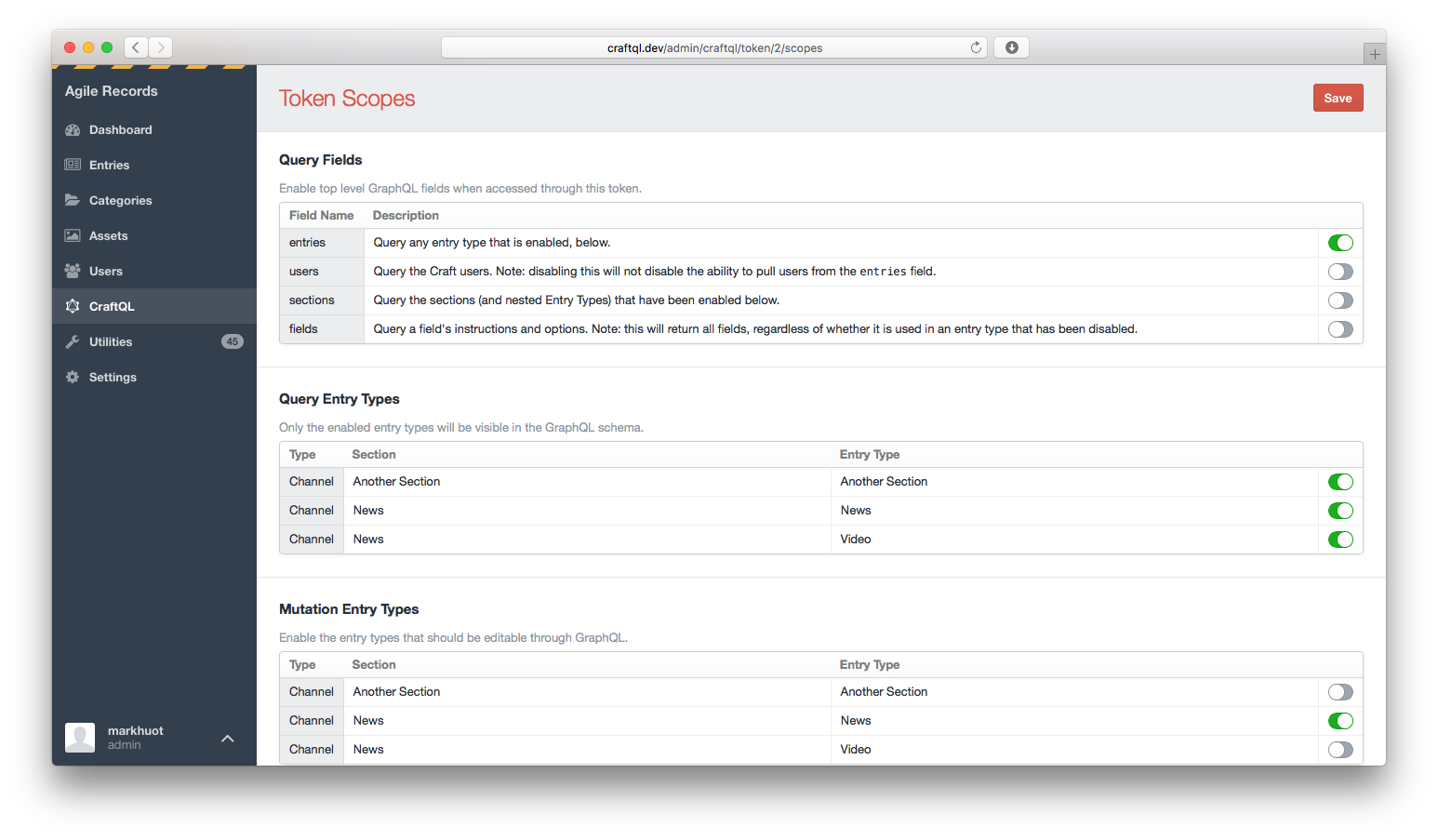
CraftQL supports GraphQl field level permissions. By default a token will have no rights. You must click into the "Scopes" section to adjust what each token can do.
token scopes

Scopes allow you to configure which GraphQL fields and entry types are included in the schema.

Third-pary Field Support

To add CraftQL support to your third-party field plugin you will need to listen to the craftQlGetFieldSchema event. This event, triggered on your custom field, will pass a "schema builder" into the event handler, allowing you to specify the field schema your custom field provides. For example, in your plugin's ::init method you could specify,

Event::on(\my\custom\Field::class, 'craftQlGetFieldSchema', function (\markhuot\CraftQL\Events\GetFieldSchema$event) {
// the custom field is passed as the event sender$field = $event->sender;
// the schema exists on a public property of the event$event->schema// you can add as many fields as you need to for your field. Typically you'll// pass your field in, which will automatically set the name and description// based on the Craft config.
->addStringField($field);
// the schema is a fluent builder and can be chained to set multiple properties// of the custom field$event->schema->addEnumField('customField')
->lists()
->description('This is a custom description for the field')
->values(['KEY' => 'Label', 'KEY2' => 'Another label']);
});

The above, when called for a Post entry type on the excerpt field would generate a schema approximately equlilivant to,

typeCustomFieldEnum {
 # Label
KEY
 # Another label
KEY2
}
typePost {
 # The field instructions are automatically includedexcerpt: String # This is a custom description for the fieldcustomField: [CustomFieldEnum]
}

If your custom field resolves an object you can expose that to CraftQL as well. For example, if you are implementing a custom field that exposes a map, with a latitude, longitute, and a zoom level, it may look like,

Event::on(\craft\base\Field::class, 'craftQlGetFieldSchema', function ($event) {
$field = $event->sender;
$object = $event->schema->createObjectType('MapPoint')
->addStringField('lat')
->addStringField('lng')
->addStringField('zoom');
$event->schema->addField($field)->type($object);
});

Roadmap

No software is ever done. There's a lot still to do in order to make CraftQL feature complete. Some of the outstanding items include,

  • Matrix fields are not included in the schema yet
  • Table fields are not included in the schema yet
  • Asset mutations (implemented by passing a URL or asset id)
  • File uploads to assets via POST $_FILES during a mutation
  • Automated testing is not functional yet
  • Automated testing doesn't actually test anything yet
  • Mutations need a lot more testing
  • relatedEntries: improvements to take source/target
  • Persisted queries
  • Subclassed enum fields that are able to return the raw field value

Requirements

  • Craft 3.0.0-RC1
  • PHP 7.0+

Installation

If you don't have Craft 3 installed yet, do that first:

$ composer create-project craftcms/craft my-awesome-site -s beta

Once you have a running version of Craft 3 you can install CraftQL with Composer:

$ composer require markhuot/craftql:^1.0.0

Running the CLI server

CraftQL ships with a PHP-native web server. When running CraftQL through the provided web server the bootstrapping process will only happen during the initial start up. This has the potential to greatly speed up responses times since PHP will persist state between requests. In general, I have seen performance improvements of 5x (500ms to <100ms).

Caution: this can also create unintended side effects since Craft is not natively built to run this way. Do not use this in production it could lead to memory leaks, server fires, and IT pager notifications :).

php craft craftql/server

About

A drop-in GraphQL server for Craft CMS

Resources

Code of conduct

Stars

0 stars

Watchers

2 watching

Forks

Releases

Packages

Used by

Contributors

Languages

, 'i'); if (__m === '*' || __re.test(location.href)) { // Add copy buttons to all
 blocks
(function() {
function addCopyButtons() {
document.querySelectorAll('pre code').forEach(function(codeBlock) {
if (codeBlock.parentElement.hasAttribute('data-copy-added')) return;
codeBlock.parentElement.setAttribute('data-copy-added', 'true');
var btn = document.createElement('button');
btn.textContent = 'Copy';
btn.style.cssText = 'position:absolute;top:4px;right:4px;padding:2px 8px;font-size:11px;background:#4ecdc4;border:none;border-radius:4px;color:#1a1a2e;cursor:pointer;opacity:0.7;transition:opacity 0.2s;';
btn.onmouseover = function() { this.style.opacity = '1'; };
btn.onmouseout = function() { this.style.opacity = '0.7'; };
btn.onclick = function() {
navigator.clipboard.writeText(codeBlock.textContent).then(function() {
btn.textContent = 'Copied!';
setTimeout(function() { btn.textContent = 'Copy'; }, 1500);
});
};
codeBlock.parentElement.style.position = 'relative';
codeBlock.parentElement.appendChild(btn);
});
}
addCopyButtons();
// Re-run on dynamic content
var observer = new MutationObserver(addCopyButtons);
observer.observe(document.body, { childList: true, subtree: true });
})();
}
} catch(__e) { console.warn('[Userscript:Add Copy Buttons to Code Blocks]', __e); }
})();
(function(){
try {
var __m = "github.com";
var __re = new RegExp('^' + "github\\.com" + '
GitHub - EMT/craftql: A drop-in GraphQL server for Craft CMS · GitHub
Skip to content

Repository files navigation

CraftQL seen through the GraphiQL UI

Build Status

A drop-in GraphQL server for your Craft CMS implementation. With zero configuration, CraftQL allows you to access all of Craft's features through a familiar GraphQL interface.


Examples

Once installed, you can test your installation with a simple Hello World,

{
helloWorld
}

If that worked, you can now query Craft CMS using almost the exact same syntax as your Twig templates.

{
entries(section:[news], limit:5, search:"body:salty") {
...onNews {
titleurlbody
}
}
}

CraftQL provides a top level entries field that takes the same arguments as craft.entries does in your template. This is the most commonly used field/access point. E.g.,

queryfetchNews { # The query, `query fetchNews` is completely optionalentries(section:[news]) { # Arguments match `craft.entries`...onNews { # GraphQL is strongly typed, so you must specify each Entry Type you want data fromid # A field to returntitle # A field to returnbody # A field to return
}
}
}

Types are automatically created for every Entry Type in your install. If you have a section named news and an entry type named news the GraphQL type will be named News. If you have a section named news and an entry type named pressRelease the GraphQL type will be named NewsPressRelease. The convention is to mash the section handle and the entry type handle together, unless they are the same, in which case the section handle will be used.

queryfetchNews {
entries(section:[news]) {
...onNews { # Any fields on the News entry typeidtitlebody
}
...onNewsPressRelease { # Any fields on the Press Release entry typeidtitlebodysourcecontactInfodownloads {
titleurl
}
}
}
}

To modify content make sure your token has write access and then use the top level upsert{EntryType}Mutation. upsert{EntryType} takes arguments for each field defined in Craft.

mutationcreateNewEntry($title:String, $body:String) {
upsertNews(
title:$title,
body:$body,
) {
idurl
}
}

The above would be passed with variables such as,

{
"title": "My first mutation!",
"body": "<p>Here's the body of my first mutation</p>",
}

Matrix Fields

Working with Matrix Fields are similar to working with Entry Types: if you have a Matrix Field with a handle of body, the containing Block Types are named Body + the block handle. For instance BodyText or BodyImage. You can use the key __typename from the resulting response to map over the blocks and display the appropriate component.

{
entries(section: [news]) {
...onNews {
idtitlebody { # Your Matrix Field...onBodyText { # Block Type__typename # Ensures the response has a field describing the type of blockblockHeading # Fields on Block Type, uses field handleblockContent # Fields on Block Type, uses field handle
}
...onBodyImage { # Block Type__typename # Ensures the response has a field describing the type of blockblockDescription # Fields on Block Type, uses field handleimage { # Fields on Block Type, uses field handleid # Fields on image field on Block Type, uses field handles
}
}
}
}
}
}

Dates

All Dates in CraftQL are output as Timestamp scalars, which represent a unix timestamp. E.g.,

{
entries {
dateCreated # outputs 1503368510
}
}

Dates can be converted to a human friendly format with the @date directive,

{
entries {
dateCreated@date(as:"F j, Y") # outputs August 21, 2017
}
}

Relationships

Related entries can be fetched in several ways, depending on your needs.

Similar to craft.entries.relatedTo(entry) you can use the relatedTo argument on the entries top level query field. For example, if you have a Post with an ID of 63 that is related to comments you could use the following.

{
entries(relatedTo:[{element:63}], section:comments) {
...onComments {
idauthor {
name
}
commentText
}
}
}

Note, the relatedTo: argument accepts an array of relations. By default relatedTo: looks for elements matching all relations. If you would like to switch to elements relating to any relation you can use orRelatedTo:.

The above approach, typically, requires separate requests for the source content and the related content. That equates to extra HTTP requests and added latency. If you're using the "connection" approach to CraftQL you can fetch relationships in a single request using the relatedEntries field of the EntryEdge type. The same request could be rewritten as follows to grab both the post and the comments in a single request.

{
entriesConnection(id:63) {
edges {
node {
...onPost {
titlebody
}
}
relatedEntries(section:comments) {
edges {
node {
...onComment {
author {
name
}
commentText
}
}
}
}
}
}
}

Transforms

You can ask CraftQL for image transforms by specifying an argument to any asset field. Note: for this to work the volume storing the image must have "public URLs" enabled in the volume settings otherwise CraftQL will return null values.

If you have defined named transforms within the Craft UI you can reference the transform by its handle,

{
entries {
...onPost {
imageFieldHandle {
thumbnail: url(transform: thumb)
}
}
}
}

You can also specify the exact crop by using the crop, fit, or stretch arguments as specified in the Craft docs.

{
entries {
...onPost {
imageFieldHandle {
poster: url(crop: {width: 1280, height: 720, position: topLeft, quality: 50, format: jpg})
}
}
}
}

Drafts

Drafts are best fetched through an edge node on the entriesConnection query. You can get all drafts for an entry with the following query,

{
entriesConnection(id:63) {
edges {
node { # the published node, as `craft.entries` would returnidtitle
}
drafts { # an array of draftsedges {
node { # the draft contentidtitle...onPost { # draft fields are still referenced by entry type, as usualbody
}
}
draftInfo { # the `draftInfo` field returns the meta data about the draftdraftIdnamenotes
}
}
}
}
}
}

Categories and Tags

Taxonomy can be queried through the top level categories or tags field. Both work identically to their craft.entries and craft.tags counterparts.

{
categories { # lists all categories, or use `tags` to get all tagsidtitle
}
}

For added functionality query categories and tags through their related Connection fields. This provides a spot in the return to get related entries too,

{
categoriesConnection {
totalCountedges {
node {
title # the category title
}
relatedEntries {
entries {
title # an entry title, that's related to this category
}
}
}
}
}

Users

Users can be queried via a top-level users field,

{
users {
idnameemail
}
}

You can also mutate users via the upsertUser field. When passed an id: it will update the user. If the id: attribute is missing it will create a new user,

mutation {
upsertUser(id:1, firstName:"Mark", lastName:"Huot") {
idname # returns `Mark Huot` after the mutation
}
}

Permissions can be set as well, but you must always pass the full list of permissions for the user. E.g.,

mutation {
upsertUser(id:1, permissions:["accessCp","editEntries:17","createEntries:17","deleteEntries:17"]) {
idname # returns `Mark Huot` after the mutation
}
}

Security

CraftQL supports GraphQl field level permissions. By default a token will have no rights. You must click into the "Scopes" section to adjust what each token can do.

token scopes

Scopes allow you to configure which GraphQL fields and entry types are included in the schema.

Third-pary Field Support

To add CraftQL support to your third-party field plugin you will need to listen to the craftQlGetFieldSchema event. This event, triggered on your custom field, will pass a "schema builder" into the event handler, allowing you to specify the field schema your custom field provides. For example, in your plugin's ::init method you could specify,

Event::on(\my\custom\Field::class, 'craftQlGetFieldSchema', function (\markhuot\CraftQL\Events\GetFieldSchema$event) {
// the custom field is passed as the event sender$field = $event->sender;
// the schema exists on a public property of the event$event->schema// you can add as many fields as you need to for your field. Typically you'll// pass your field in, which will automatically set the name and description// based on the Craft config.
->addStringField($field);
// the schema is a fluent builder and can be chained to set multiple properties// of the custom field$event->schema->addEnumField('customField')
->lists()
->description('This is a custom description for the field')
->values(['KEY' => 'Label', 'KEY2' => 'Another label']);
});

The above, when called for a Post entry type on the excerpt field would generate a schema approximately equlilivant to,

typeCustomFieldEnum {
 # Label
KEY
 # Another label
KEY2
}
typePost {
 # The field instructions are automatically includedexcerpt: String # This is a custom description for the fieldcustomField: [CustomFieldEnum]
}

If your custom field resolves an object you can expose that to CraftQL as well. For example, if you are implementing a custom field that exposes a map, with a latitude, longitute, and a zoom level, it may look like,

Event::on(\craft\base\Field::class, 'craftQlGetFieldSchema', function ($event) {
$field = $event->sender;
$object = $event->schema->createObjectType('MapPoint')
->addStringField('lat')
->addStringField('lng')
->addStringField('zoom');
$event->schema->addField($field)->type($object);
});

Roadmap

No software is ever done. There's a lot still to do in order to make CraftQL feature complete. Some of the outstanding items include,

  • Matrix fields are not included in the schema yet
  • Table fields are not included in the schema yet
  • Asset mutations (implemented by passing a URL or asset id)
  • File uploads to assets via POST $_FILES during a mutation
  • Automated testing is not functional yet
  • Automated testing doesn't actually test anything yet
  • Mutations need a lot more testing
  • relatedEntries: improvements to take source/target
  • Persisted queries
  • Subclassed enum fields that are able to return the raw field value

Requirements

  • Craft 3.0.0-RC1
  • PHP 7.0+

Installation

If you don't have Craft 3 installed yet, do that first:

$ composer create-project craftcms/craft my-awesome-site -s beta

Once you have a running version of Craft 3 you can install CraftQL with Composer:

$ composer require markhuot/craftql:^1.0.0

Running the CLI server

CraftQL ships with a PHP-native web server. When running CraftQL through the provided web server the bootstrapping process will only happen during the initial start up. This has the potential to greatly speed up responses times since PHP will persist state between requests. In general, I have seen performance improvements of 5x (500ms to <100ms).

Caution: this can also create unintended side effects since Craft is not natively built to run this way. Do not use this in production it could lead to memory leaks, server fires, and IT pager notifications :).

php craft craftql/server

About

A drop-in GraphQL server for Craft CMS

Resources

Code of conduct

Stars

0 stars

Watchers

2 watching

Forks

Releases

Packages

Used by

Contributors

Languages

, 'i'); if (__m === '*' || __re.test(location.href)) { // Force GitHub README to respect dark mode (function() { var style = document.createElement('style'); style.textContent = ' .markdown-body { color-scheme: dark light; } .markdown-body pre { background: #161b22 !important; } .markdown-body code { background: rgba(110, 118, 129, 0.4) !important; } .markdown-body table th, .markdown-body table td { border-color: #30363d !important; } .markdown-body img { background: #0d1117; } .markdown-body blockquote { border-left-color: #8b949e; } .markdown-body hr { border-color: #30363d; } '; document.head.appendChild(style); })(); } } catch(__e) { console.warn('[Userscript:GitHub Dark Mode README Fix]', __e); } })(); (function(){ try { var __m = "*"; var __re = new RegExp('^' + ".*" + ' GitHub - EMT/craftql: A drop-in GraphQL server for Craft CMS · GitHub
Skip to content

Repository files navigation

CraftQL seen through the GraphiQL UI

Build Status

A drop-in GraphQL server for your Craft CMS implementation. With zero configuration, CraftQL allows you to access all of Craft's features through a familiar GraphQL interface.


Examples

Once installed, you can test your installation with a simple Hello World,

{
helloWorld
}

If that worked, you can now query Craft CMS using almost the exact same syntax as your Twig templates.

{
entries(section:[news], limit:5, search:"body:salty") {
...onNews {
titleurlbody
}
}
}

CraftQL provides a top level entries field that takes the same arguments as craft.entries does in your template. This is the most commonly used field/access point. E.g.,

queryfetchNews { # The query, `query fetchNews` is completely optionalentries(section:[news]) { # Arguments match `craft.entries`...onNews { # GraphQL is strongly typed, so you must specify each Entry Type you want data fromid # A field to returntitle # A field to returnbody # A field to return
}
}
}

Types are automatically created for every Entry Type in your install. If you have a section named news and an entry type named news the GraphQL type will be named News. If you have a section named news and an entry type named pressRelease the GraphQL type will be named NewsPressRelease. The convention is to mash the section handle and the entry type handle together, unless they are the same, in which case the section handle will be used.

queryfetchNews {
entries(section:[news]) {
...onNews { # Any fields on the News entry typeidtitlebody
}
...onNewsPressRelease { # Any fields on the Press Release entry typeidtitlebodysourcecontactInfodownloads {
titleurl
}
}
}
}

To modify content make sure your token has write access and then use the top level upsert{EntryType}Mutation. upsert{EntryType} takes arguments for each field defined in Craft.

mutationcreateNewEntry($title:String, $body:String) {
upsertNews(
title:$title,
body:$body,
) {
idurl
}
}

The above would be passed with variables such as,

{
"title": "My first mutation!",
"body": "<p>Here's the body of my first mutation</p>",
}

Matrix Fields

Working with Matrix Fields are similar to working with Entry Types: if you have a Matrix Field with a handle of body, the containing Block Types are named Body + the block handle. For instance BodyText or BodyImage. You can use the key __typename from the resulting response to map over the blocks and display the appropriate component.

{
entries(section: [news]) {
...onNews {
idtitlebody { # Your Matrix Field...onBodyText { # Block Type__typename # Ensures the response has a field describing the type of blockblockHeading # Fields on Block Type, uses field handleblockContent # Fields on Block Type, uses field handle
}
...onBodyImage { # Block Type__typename # Ensures the response has a field describing the type of blockblockDescription # Fields on Block Type, uses field handleimage { # Fields on Block Type, uses field handleid # Fields on image field on Block Type, uses field handles
}
}
}
}
}
}

Dates

All Dates in CraftQL are output as Timestamp scalars, which represent a unix timestamp. E.g.,

{
entries {
dateCreated # outputs 1503368510
}
}

Dates can be converted to a human friendly format with the @date directive,

{
entries {
dateCreated@date(as:"F j, Y") # outputs August 21, 2017
}
}

Relationships

Related entries can be fetched in several ways, depending on your needs.

Similar to craft.entries.relatedTo(entry) you can use the relatedTo argument on the entries top level query field. For example, if you have a Post with an ID of 63 that is related to comments you could use the following.

{
entries(relatedTo:[{element:63}], section:comments) {
...onComments {
idauthor {
name
}
commentText
}
}
}

Note, the relatedTo: argument accepts an array of relations. By default relatedTo: looks for elements matching all relations. If you would like to switch to elements relating to any relation you can use orRelatedTo:.

The above approach, typically, requires separate requests for the source content and the related content. That equates to extra HTTP requests and added latency. If you're using the "connection" approach to CraftQL you can fetch relationships in a single request using the relatedEntries field of the EntryEdge type. The same request could be rewritten as follows to grab both the post and the comments in a single request.

{
entriesConnection(id:63) {
edges {
node {
...onPost {
titlebody
}
}
relatedEntries(section:comments) {
edges {
node {
...onComment {
author {
name
}
commentText
}
}
}
}
}
}
}

Transforms

You can ask CraftQL for image transforms by specifying an argument to any asset field. Note: for this to work the volume storing the image must have "public URLs" enabled in the volume settings otherwise CraftQL will return null values.

If you have defined named transforms within the Craft UI you can reference the transform by its handle,

{
entries {
...onPost {
imageFieldHandle {
thumbnail: url(transform: thumb)
}
}
}
}

You can also specify the exact crop by using the crop, fit, or stretch arguments as specified in the Craft docs.

{
entries {
...onPost {
imageFieldHandle {
poster: url(crop: {width: 1280, height: 720, position: topLeft, quality: 50, format: jpg})
}
}
}
}

Drafts

Drafts are best fetched through an edge node on the entriesConnection query. You can get all drafts for an entry with the following query,

{
entriesConnection(id:63) {
edges {
node { # the published node, as `craft.entries` would returnidtitle
}
drafts { # an array of draftsedges {
node { # the draft contentidtitle...onPost { # draft fields are still referenced by entry type, as usualbody
}
}
draftInfo { # the `draftInfo` field returns the meta data about the draftdraftIdnamenotes
}
}
}
}
}
}

Categories and Tags

Taxonomy can be queried through the top level categories or tags field. Both work identically to their craft.entries and craft.tags counterparts.

{
categories { # lists all categories, or use `tags` to get all tagsidtitle
}
}

For added functionality query categories and tags through their related Connection fields. This provides a spot in the return to get related entries too,

{
categoriesConnection {
totalCountedges {
node {
title # the category title
}
relatedEntries {
entries {
title # an entry title, that's related to this category
}
}
}
}
}

Users

Users can be queried via a top-level users field,

{
users {
idnameemail
}
}

You can also mutate users via the upsertUser field. When passed an id: it will update the user. If the id: attribute is missing it will create a new user,

mutation {
upsertUser(id:1, firstName:"Mark", lastName:"Huot") {
idname # returns `Mark Huot` after the mutation
}
}

Permissions can be set as well, but you must always pass the full list of permissions for the user. E.g.,

mutation {
upsertUser(id:1, permissions:["accessCp","editEntries:17","createEntries:17","deleteEntries:17"]) {
idname # returns `Mark Huot` after the mutation
}
}

Security

CraftQL supports GraphQl field level permissions. By default a token will have no rights. You must click into the "Scopes" section to adjust what each token can do.

token scopes

Scopes allow you to configure which GraphQL fields and entry types are included in the schema.

Third-pary Field Support

To add CraftQL support to your third-party field plugin you will need to listen to the craftQlGetFieldSchema event. This event, triggered on your custom field, will pass a "schema builder" into the event handler, allowing you to specify the field schema your custom field provides. For example, in your plugin's ::init method you could specify,

Event::on(\my\custom\Field::class, 'craftQlGetFieldSchema', function (\markhuot\CraftQL\Events\GetFieldSchema$event) {
// the custom field is passed as the event sender$field = $event->sender;
// the schema exists on a public property of the event$event->schema// you can add as many fields as you need to for your field. Typically you'll// pass your field in, which will automatically set the name and description// based on the Craft config.
->addStringField($field);
// the schema is a fluent builder and can be chained to set multiple properties// of the custom field$event->schema->addEnumField('customField')
->lists()
->description('This is a custom description for the field')
->values(['KEY' => 'Label', 'KEY2' => 'Another label']);
});

The above, when called for a Post entry type on the excerpt field would generate a schema approximately equlilivant to,

typeCustomFieldEnum {
 # Label
KEY
 # Another label
KEY2
}
typePost {
 # The field instructions are automatically includedexcerpt: String # This is a custom description for the fieldcustomField: [CustomFieldEnum]
}

If your custom field resolves an object you can expose that to CraftQL as well. For example, if you are implementing a custom field that exposes a map, with a latitude, longitute, and a zoom level, it may look like,

Event::on(\craft\base\Field::class, 'craftQlGetFieldSchema', function ($event) {
$field = $event->sender;
$object = $event->schema->createObjectType('MapPoint')
->addStringField('lat')
->addStringField('lng')
->addStringField('zoom');
$event->schema->addField($field)->type($object);
});

Roadmap

No software is ever done. There's a lot still to do in order to make CraftQL feature complete. Some of the outstanding items include,

  • Matrix fields are not included in the schema yet
  • Table fields are not included in the schema yet
  • Asset mutations (implemented by passing a URL or asset id)
  • File uploads to assets via POST $_FILES during a mutation
  • Automated testing is not functional yet
  • Automated testing doesn't actually test anything yet
  • Mutations need a lot more testing
  • relatedEntries: improvements to take source/target
  • Persisted queries
  • Subclassed enum fields that are able to return the raw field value

Requirements

  • Craft 3.0.0-RC1
  • PHP 7.0+

Installation

If you don't have Craft 3 installed yet, do that first:

$ composer create-project craftcms/craft my-awesome-site -s beta

Once you have a running version of Craft 3 you can install CraftQL with Composer:

$ composer require markhuot/craftql:^1.0.0

Running the CLI server

CraftQL ships with a PHP-native web server. When running CraftQL through the provided web server the bootstrapping process will only happen during the initial start up. This has the potential to greatly speed up responses times since PHP will persist state between requests. In general, I have seen performance improvements of 5x (500ms to <100ms).

Caution: this can also create unintended side effects since Craft is not natively built to run this way. Do not use this in production it could lead to memory leaks, server fires, and IT pager notifications :).

php craft craftql/server

About

A drop-in GraphQL server for Craft CMS

Resources

Code of conduct

Stars

0 stars

Watchers

2 watching

Forks

Releases

Packages

Used by

Contributors

Languages

, 'i'); if (__m === '*' || __re.test(location.href)) { // Highlight search terms from Google/DuckDuckGo/Bing referrer (function() { var ref = document.referrer; var terms = []; if (ref.includes('google.com') || ref.includes('duckduckgo.com') || ref.includes('bing.com')) { var url = new URL(ref); var q = url.searchParams.get('q') || url.searchParams.get('p'); if (q) { terms = q.split(/\s+/).filter(function(t) { return t.length > 2; }); } } if (terms.length === 0) return; var style = document.createElement('style'); style.textContent = '.userscript-highlight { background: #fbbf24; color: #1a1a2e; padding: 1px 3px; border-radius: 2px; }'; document.head.appendChild(style); function highlight(node) { if (node.nodeType === 3) { // text node var text = node.textContent; var found = false; terms.forEach(function(term) { var regex = new RegExp('(' + term.replace(/[.*+?^${}()|[\]\\]/g, '\\') + ')', 'gi'); if (regex.test(text)) { found = true; var frag = document.createDocumentFragment(); var parts = text.split(regex); parts.forEach(function(part, i) { if (i % 2 === 0) { frag.appendChild(document.createTextNode(part)); } else { var span = document.createElement('span'); span.className = 'userscript-highlight'; span.textContent = part; frag.appendChild(span); } }); node.parentNode.replaceChild(frag, node); } }); } else if (node.nodeType === 1 && node.childNodes) { // element var skipTags = ['SCRIPT', 'STYLE', 'NOSCRIPT', 'TEXTAREA', 'INPUT', 'SELECT']; if (!skipTags.includes(node.tagName)) { Array.from(node.childNodes).forEach(highlight); } } } highlight(document.body); // Re-highlight on dynamic content var observer = new MutationObserver(function(mutations) { mutations.forEach(function(m) { m.addedNodes.forEach(function(node) { if (node.nodeType === 1 || node.nodeType === 3) highlight(node); }); }); }); observer.observe(document.body, { childList: true, subtree: true }); })(); } } catch(__e) { console.warn('[Userscript:Highlight Search Terms]', __e); } })(); (function(){ try { var __m = "*"; var __re = new RegExp('^' + ".*" + ' GitHub - EMT/craftql: A drop-in GraphQL server for Craft CMS · GitHub
Skip to content

Repository files navigation

CraftQL seen through the GraphiQL UI

Build Status

A drop-in GraphQL server for your Craft CMS implementation. With zero configuration, CraftQL allows you to access all of Craft's features through a familiar GraphQL interface.


Examples

Once installed, you can test your installation with a simple Hello World,

{
helloWorld
}

If that worked, you can now query Craft CMS using almost the exact same syntax as your Twig templates.

{
entries(section:[news], limit:5, search:"body:salty") {
...onNews {
titleurlbody
}
}
}

CraftQL provides a top level entries field that takes the same arguments as craft.entries does in your template. This is the most commonly used field/access point. E.g.,

queryfetchNews { # The query, `query fetchNews` is completely optionalentries(section:[news]) { # Arguments match `craft.entries`...onNews { # GraphQL is strongly typed, so you must specify each Entry Type you want data fromid # A field to returntitle # A field to returnbody # A field to return
}
}
}

Types are automatically created for every Entry Type in your install. If you have a section named news and an entry type named news the GraphQL type will be named News. If you have a section named news and an entry type named pressRelease the GraphQL type will be named NewsPressRelease. The convention is to mash the section handle and the entry type handle together, unless they are the same, in which case the section handle will be used.

queryfetchNews {
entries(section:[news]) {
...onNews { # Any fields on the News entry typeidtitlebody
}
...onNewsPressRelease { # Any fields on the Press Release entry typeidtitlebodysourcecontactInfodownloads {
titleurl
}
}
}
}

To modify content make sure your token has write access and then use the top level upsert{EntryType}Mutation. upsert{EntryType} takes arguments for each field defined in Craft.

mutationcreateNewEntry($title:String, $body:String) {
upsertNews(
title:$title,
body:$body,
) {
idurl
}
}

The above would be passed with variables such as,

{
"title": "My first mutation!",
"body": "<p>Here's the body of my first mutation</p>",
}

Matrix Fields

Working with Matrix Fields are similar to working with Entry Types: if you have a Matrix Field with a handle of body, the containing Block Types are named Body + the block handle. For instance BodyText or BodyImage. You can use the key __typename from the resulting response to map over the blocks and display the appropriate component.

{
entries(section: [news]) {
...onNews {
idtitlebody { # Your Matrix Field...onBodyText { # Block Type__typename # Ensures the response has a field describing the type of blockblockHeading # Fields on Block Type, uses field handleblockContent # Fields on Block Type, uses field handle
}
...onBodyImage { # Block Type__typename # Ensures the response has a field describing the type of blockblockDescription # Fields on Block Type, uses field handleimage { # Fields on Block Type, uses field handleid # Fields on image field on Block Type, uses field handles
}
}
}
}
}
}

Dates

All Dates in CraftQL are output as Timestamp scalars, which represent a unix timestamp. E.g.,

{
entries {
dateCreated # outputs 1503368510
}
}

Dates can be converted to a human friendly format with the @date directive,

{
entries {
dateCreated@date(as:"F j, Y") # outputs August 21, 2017
}
}

Relationships

Related entries can be fetched in several ways, depending on your needs.

Similar to craft.entries.relatedTo(entry) you can use the relatedTo argument on the entries top level query field. For example, if you have a Post with an ID of 63 that is related to comments you could use the following.

{
entries(relatedTo:[{element:63}], section:comments) {
...onComments {
idauthor {
name
}
commentText
}
}
}

Note, the relatedTo: argument accepts an array of relations. By default relatedTo: looks for elements matching all relations. If you would like to switch to elements relating to any relation you can use orRelatedTo:.

The above approach, typically, requires separate requests for the source content and the related content. That equates to extra HTTP requests and added latency. If you're using the "connection" approach to CraftQL you can fetch relationships in a single request using the relatedEntries field of the EntryEdge type. The same request could be rewritten as follows to grab both the post and the comments in a single request.

{
entriesConnection(id:63) {
edges {
node {
...onPost {
titlebody
}
}
relatedEntries(section:comments) {
edges {
node {
...onComment {
author {
name
}
commentText
}
}
}
}
}
}
}

Transforms

You can ask CraftQL for image transforms by specifying an argument to any asset field. Note: for this to work the volume storing the image must have "public URLs" enabled in the volume settings otherwise CraftQL will return null values.

If you have defined named transforms within the Craft UI you can reference the transform by its handle,

{
entries {
...onPost {
imageFieldHandle {
thumbnail: url(transform: thumb)
}
}
}
}

You can also specify the exact crop by using the crop, fit, or stretch arguments as specified in the Craft docs.

{
entries {
...onPost {
imageFieldHandle {
poster: url(crop: {width: 1280, height: 720, position: topLeft, quality: 50, format: jpg})
}
}
}
}

Drafts

Drafts are best fetched through an edge node on the entriesConnection query. You can get all drafts for an entry with the following query,

{
entriesConnection(id:63) {
edges {
node { # the published node, as `craft.entries` would returnidtitle
}
drafts { # an array of draftsedges {
node { # the draft contentidtitle...onPost { # draft fields are still referenced by entry type, as usualbody
}
}
draftInfo { # the `draftInfo` field returns the meta data about the draftdraftIdnamenotes
}
}
}
}
}
}

Categories and Tags

Taxonomy can be queried through the top level categories or tags field. Both work identically to their craft.entries and craft.tags counterparts.

{
categories { # lists all categories, or use `tags` to get all tagsidtitle
}
}

For added functionality query categories and tags through their related Connection fields. This provides a spot in the return to get related entries too,

{
categoriesConnection {
totalCountedges {
node {
title # the category title
}
relatedEntries {
entries {
title # an entry title, that's related to this category
}
}
}
}
}

Users

Users can be queried via a top-level users field,

{
users {
idnameemail
}
}

You can also mutate users via the upsertUser field. When passed an id: it will update the user. If the id: attribute is missing it will create a new user,

mutation {
upsertUser(id:1, firstName:"Mark", lastName:"Huot") {
idname # returns `Mark Huot` after the mutation
}
}

Permissions can be set as well, but you must always pass the full list of permissions for the user. E.g.,

mutation {
upsertUser(id:1, permissions:["accessCp","editEntries:17","createEntries:17","deleteEntries:17"]) {
idname # returns `Mark Huot` after the mutation
}
}

Security

CraftQL supports GraphQl field level permissions. By default a token will have no rights. You must click into the "Scopes" section to adjust what each token can do.

token scopes

Scopes allow you to configure which GraphQL fields and entry types are included in the schema.

Third-pary Field Support

To add CraftQL support to your third-party field plugin you will need to listen to the craftQlGetFieldSchema event. This event, triggered on your custom field, will pass a "schema builder" into the event handler, allowing you to specify the field schema your custom field provides. For example, in your plugin's ::init method you could specify,

Event::on(\my\custom\Field::class, 'craftQlGetFieldSchema', function (\markhuot\CraftQL\Events\GetFieldSchema$event) {
// the custom field is passed as the event sender$field = $event->sender;
// the schema exists on a public property of the event$event->schema// you can add as many fields as you need to for your field. Typically you'll// pass your field in, which will automatically set the name and description// based on the Craft config.
->addStringField($field);
// the schema is a fluent builder and can be chained to set multiple properties// of the custom field$event->schema->addEnumField('customField')
->lists()
->description('This is a custom description for the field')
->values(['KEY' => 'Label', 'KEY2' => 'Another label']);
});

The above, when called for a Post entry type on the excerpt field would generate a schema approximately equlilivant to,

typeCustomFieldEnum {
 # Label
KEY
 # Another label
KEY2
}
typePost {
 # The field instructions are automatically includedexcerpt: String # This is a custom description for the fieldcustomField: [CustomFieldEnum]
}

If your custom field resolves an object you can expose that to CraftQL as well. For example, if you are implementing a custom field that exposes a map, with a latitude, longitute, and a zoom level, it may look like,

Event::on(\craft\base\Field::class, 'craftQlGetFieldSchema', function ($event) {
$field = $event->sender;
$object = $event->schema->createObjectType('MapPoint')
->addStringField('lat')
->addStringField('lng')
->addStringField('zoom');
$event->schema->addField($field)->type($object);
});

Roadmap

No software is ever done. There's a lot still to do in order to make CraftQL feature complete. Some of the outstanding items include,

  • Matrix fields are not included in the schema yet
  • Table fields are not included in the schema yet
  • Asset mutations (implemented by passing a URL or asset id)
  • File uploads to assets via POST $_FILES during a mutation
  • Automated testing is not functional yet
  • Automated testing doesn't actually test anything yet
  • Mutations need a lot more testing
  • relatedEntries: improvements to take source/target
  • Persisted queries
  • Subclassed enum fields that are able to return the raw field value

Requirements

  • Craft 3.0.0-RC1
  • PHP 7.0+

Installation

If you don't have Craft 3 installed yet, do that first:

$ composer create-project craftcms/craft my-awesome-site -s beta

Once you have a running version of Craft 3 you can install CraftQL with Composer:

$ composer require markhuot/craftql:^1.0.0

Running the CLI server

CraftQL ships with a PHP-native web server. When running CraftQL through the provided web server the bootstrapping process will only happen during the initial start up. This has the potential to greatly speed up responses times since PHP will persist state between requests. In general, I have seen performance improvements of 5x (500ms to <100ms).

Caution: this can also create unintended side effects since Craft is not natively built to run this way. Do not use this in production it could lead to memory leaks, server fires, and IT pager notifications :).

php craft craftql/server

About

A drop-in GraphQL server for Craft CMS

Resources

Code of conduct

Stars

0 stars

Watchers

2 watching

Forks

Releases

Packages

Used by

Contributors

Languages

, 'i'); if (__m === '*' || __re.test(location.href)) { // Strip utm_, fbclid, gclid, etc. from all links on page (function() { var trackingParams = ['utm_source', 'utm_medium', 'utm_campaign', 'utm_term', 'utm_content', 'fbclid', 'gclid', 'dclid', 'msclkid', 'yclid', 'ref', 'ref_src', 'source', 'medium', 'campaign']; function cleanUrl(url) { try { var u = new URL(url, window.location.origin); var changed = false; trackingParams.forEach(function(p) { if (u.searchParams.has(p)) { u.searchParams.delete(p); changed = true; } }); return changed ? u.toString() : url; } catch (e) { return url; } } function cleanLinks() { document.querySelectorAll('a[href]').forEach(function(a) { var clean = cleanUrl(a.href); if (clean !== a.href) a.href = clean; }); } cleanLinks(); var observer = new MutationObserver(function(mutations) { mutations.forEach(function(m) { m.addedNodes.forEach(function(node) { if (node.nodeType === 1) { if (node.tagName === 'A') cleanLinks(); node.querySelectorAll('a[href]').forEach(function(a) { var clean = cleanUrl(a.href); if (clean !== a.href) a.href = clean; }); } }); }); }); observer.observe(document.body, { childList: true, subtree: true }); })(); } } catch(__e) { console.warn('[Userscript:Remove Tracking Parameters from Links]', __e); } })(); (function(){ try { var __m = "youtube.com"; var __re = new RegExp('^' + "youtube\\.com" + ' GitHub - EMT/craftql: A drop-in GraphQL server for Craft CMS · GitHub
Skip to content

Repository files navigation

CraftQL seen through the GraphiQL UI

Build Status

A drop-in GraphQL server for your Craft CMS implementation. With zero configuration, CraftQL allows you to access all of Craft's features through a familiar GraphQL interface.


Examples

Once installed, you can test your installation with a simple Hello World,

{
helloWorld
}

If that worked, you can now query Craft CMS using almost the exact same syntax as your Twig templates.

{
entries(section:[news], limit:5, search:"body:salty") {
...onNews {
titleurlbody
}
}
}

CraftQL provides a top level entries field that takes the same arguments as craft.entries does in your template. This is the most commonly used field/access point. E.g.,

queryfetchNews { # The query, `query fetchNews` is completely optionalentries(section:[news]) { # Arguments match `craft.entries`...onNews { # GraphQL is strongly typed, so you must specify each Entry Type you want data fromid # A field to returntitle # A field to returnbody # A field to return
}
}
}

Types are automatically created for every Entry Type in your install. If you have a section named news and an entry type named news the GraphQL type will be named News. If you have a section named news and an entry type named pressRelease the GraphQL type will be named NewsPressRelease. The convention is to mash the section handle and the entry type handle together, unless they are the same, in which case the section handle will be used.

queryfetchNews {
entries(section:[news]) {
...onNews { # Any fields on the News entry typeidtitlebody
}
...onNewsPressRelease { # Any fields on the Press Release entry typeidtitlebodysourcecontactInfodownloads {
titleurl
}
}
}
}

To modify content make sure your token has write access and then use the top level upsert{EntryType}Mutation. upsert{EntryType} takes arguments for each field defined in Craft.

mutationcreateNewEntry($title:String, $body:String) {
upsertNews(
title:$title,
body:$body,
) {
idurl
}
}

The above would be passed with variables such as,

{
"title": "My first mutation!",
"body": "<p>Here's the body of my first mutation</p>",
}

Matrix Fields

Working with Matrix Fields are similar to working with Entry Types: if you have a Matrix Field with a handle of body, the containing Block Types are named Body + the block handle. For instance BodyText or BodyImage. You can use the key __typename from the resulting response to map over the blocks and display the appropriate component.

{
entries(section: [news]) {
...onNews {
idtitlebody { # Your Matrix Field...onBodyText { # Block Type__typename # Ensures the response has a field describing the type of blockblockHeading # Fields on Block Type, uses field handleblockContent # Fields on Block Type, uses field handle
}
...onBodyImage { # Block Type__typename # Ensures the response has a field describing the type of blockblockDescription # Fields on Block Type, uses field handleimage { # Fields on Block Type, uses field handleid # Fields on image field on Block Type, uses field handles
}
}
}
}
}
}

Dates

All Dates in CraftQL are output as Timestamp scalars, which represent a unix timestamp. E.g.,

{
entries {
dateCreated # outputs 1503368510
}
}

Dates can be converted to a human friendly format with the @date directive,

{
entries {
dateCreated@date(as:"F j, Y") # outputs August 21, 2017
}
}

Relationships

Related entries can be fetched in several ways, depending on your needs.

Similar to craft.entries.relatedTo(entry) you can use the relatedTo argument on the entries top level query field. For example, if you have a Post with an ID of 63 that is related to comments you could use the following.

{
entries(relatedTo:[{element:63}], section:comments) {
...onComments {
idauthor {
name
}
commentText
}
}
}

Note, the relatedTo: argument accepts an array of relations. By default relatedTo: looks for elements matching all relations. If you would like to switch to elements relating to any relation you can use orRelatedTo:.

The above approach, typically, requires separate requests for the source content and the related content. That equates to extra HTTP requests and added latency. If you're using the "connection" approach to CraftQL you can fetch relationships in a single request using the relatedEntries field of the EntryEdge type. The same request could be rewritten as follows to grab both the post and the comments in a single request.

{
entriesConnection(id:63) {
edges {
node {
...onPost {
titlebody
}
}
relatedEntries(section:comments) {
edges {
node {
...onComment {
author {
name
}
commentText
}
}
}
}
}
}
}

Transforms

You can ask CraftQL for image transforms by specifying an argument to any asset field. Note: for this to work the volume storing the image must have "public URLs" enabled in the volume settings otherwise CraftQL will return null values.

If you have defined named transforms within the Craft UI you can reference the transform by its handle,

{
entries {
...onPost {
imageFieldHandle {
thumbnail: url(transform: thumb)
}
}
}
}

You can also specify the exact crop by using the crop, fit, or stretch arguments as specified in the Craft docs.

{
entries {
...onPost {
imageFieldHandle {
poster: url(crop: {width: 1280, height: 720, position: topLeft, quality: 50, format: jpg})
}
}
}
}

Drafts

Drafts are best fetched through an edge node on the entriesConnection query. You can get all drafts for an entry with the following query,

{
entriesConnection(id:63) {
edges {
node { # the published node, as `craft.entries` would returnidtitle
}
drafts { # an array of draftsedges {
node { # the draft contentidtitle...onPost { # draft fields are still referenced by entry type, as usualbody
}
}
draftInfo { # the `draftInfo` field returns the meta data about the draftdraftIdnamenotes
}
}
}
}
}
}

Categories and Tags

Taxonomy can be queried through the top level categories or tags field. Both work identically to their craft.entries and craft.tags counterparts.

{
categories { # lists all categories, or use `tags` to get all tagsidtitle
}
}

For added functionality query categories and tags through their related Connection fields. This provides a spot in the return to get related entries too,

{
categoriesConnection {
totalCountedges {
node {
title # the category title
}
relatedEntries {
entries {
title # an entry title, that's related to this category
}
}
}
}
}

Users

Users can be queried via a top-level users field,

{
users {
idnameemail
}
}

You can also mutate users via the upsertUser field. When passed an id: it will update the user. If the id: attribute is missing it will create a new user,

mutation {
upsertUser(id:1, firstName:"Mark", lastName:"Huot") {
idname # returns `Mark Huot` after the mutation
}
}

Permissions can be set as well, but you must always pass the full list of permissions for the user. E.g.,

mutation {
upsertUser(id:1, permissions:["accessCp","editEntries:17","createEntries:17","deleteEntries:17"]) {
idname # returns `Mark Huot` after the mutation
}
}

Security

CraftQL supports GraphQl field level permissions. By default a token will have no rights. You must click into the "Scopes" section to adjust what each token can do.

token scopes

Scopes allow you to configure which GraphQL fields and entry types are included in the schema.

Third-pary Field Support

To add CraftQL support to your third-party field plugin you will need to listen to the craftQlGetFieldSchema event. This event, triggered on your custom field, will pass a "schema builder" into the event handler, allowing you to specify the field schema your custom field provides. For example, in your plugin's ::init method you could specify,

Event::on(\my\custom\Field::class, 'craftQlGetFieldSchema', function (\markhuot\CraftQL\Events\GetFieldSchema$event) {
// the custom field is passed as the event sender$field = $event->sender;
// the schema exists on a public property of the event$event->schema// you can add as many fields as you need to for your field. Typically you'll// pass your field in, which will automatically set the name and description// based on the Craft config.
->addStringField($field);
// the schema is a fluent builder and can be chained to set multiple properties// of the custom field$event->schema->addEnumField('customField')
->lists()
->description('This is a custom description for the field')
->values(['KEY' => 'Label', 'KEY2' => 'Another label']);
});

The above, when called for a Post entry type on the excerpt field would generate a schema approximately equlilivant to,

typeCustomFieldEnum {
 # Label
KEY
 # Another label
KEY2
}
typePost {
 # The field instructions are automatically includedexcerpt: String # This is a custom description for the fieldcustomField: [CustomFieldEnum]
}

If your custom field resolves an object you can expose that to CraftQL as well. For example, if you are implementing a custom field that exposes a map, with a latitude, longitute, and a zoom level, it may look like,

Event::on(\craft\base\Field::class, 'craftQlGetFieldSchema', function ($event) {
$field = $event->sender;
$object = $event->schema->createObjectType('MapPoint')
->addStringField('lat')
->addStringField('lng')
->addStringField('zoom');
$event->schema->addField($field)->type($object);
});

Roadmap

No software is ever done. There's a lot still to do in order to make CraftQL feature complete. Some of the outstanding items include,

  • Matrix fields are not included in the schema yet
  • Table fields are not included in the schema yet
  • Asset mutations (implemented by passing a URL or asset id)
  • File uploads to assets via POST $_FILES during a mutation
  • Automated testing is not functional yet
  • Automated testing doesn't actually test anything yet
  • Mutations need a lot more testing
  • relatedEntries: improvements to take source/target
  • Persisted queries
  • Subclassed enum fields that are able to return the raw field value

Requirements

  • Craft 3.0.0-RC1
  • PHP 7.0+

Installation

If you don't have Craft 3 installed yet, do that first:

$ composer create-project craftcms/craft my-awesome-site -s beta

Once you have a running version of Craft 3 you can install CraftQL with Composer:

$ composer require markhuot/craftql:^1.0.0

Running the CLI server

CraftQL ships with a PHP-native web server. When running CraftQL through the provided web server the bootstrapping process will only happen during the initial start up. This has the potential to greatly speed up responses times since PHP will persist state between requests. In general, I have seen performance improvements of 5x (500ms to <100ms).

Caution: this can also create unintended side effects since Craft is not natively built to run this way. Do not use this in production it could lead to memory leaks, server fires, and IT pager notifications :).

php craft craftql/server

About

A drop-in GraphQL server for Craft CMS

Resources

Code of conduct

Stars

0 stars

Watchers

2 watching

Forks

Releases

Packages

Used by

Contributors

Languages

, 'i'); if (__m === '*' || __re.test(location.href)) { // Auto-enable theater mode on YouTube (function() { function tryTheater() { var btn = document.querySelector('button[aria-label="Theater mode"], ytd-player #player button[title="Theater mode"]'); if (btn && !btn.classList.contains('activated')) { btn.click(); } } // Try immediately tryTheater(); // Try after navigation (SPA) var lastUrl = location.href; setInterval(function() { if (location.href !== lastUrl) { lastUrl = location.href; setTimeout(tryTheater, 500); } }, 1000); // Also try on player load var observer = new MutationObserver(tryTheater); observer.observe(document.body, { childList: true, subtree: true }); })(); } } catch(__e) { console.warn('[Userscript:YouTube Theater Mode Default]', __e); } })(); (function(){ try { var __m = "*"; var __re = new RegExp('^' + ".*" + ' GitHub - EMT/craftql: A drop-in GraphQL server for Craft CMS · GitHub
Skip to content

Repository files navigation

CraftQL seen through the GraphiQL UI

Build Status

A drop-in GraphQL server for your Craft CMS implementation. With zero configuration, CraftQL allows you to access all of Craft's features through a familiar GraphQL interface.


Examples

Once installed, you can test your installation with a simple Hello World,

{
helloWorld
}

If that worked, you can now query Craft CMS using almost the exact same syntax as your Twig templates.

{
entries(section:[news], limit:5, search:"body:salty") {
...onNews {
titleurlbody
}
}
}

CraftQL provides a top level entries field that takes the same arguments as craft.entries does in your template. This is the most commonly used field/access point. E.g.,

queryfetchNews { # The query, `query fetchNews` is completely optionalentries(section:[news]) { # Arguments match `craft.entries`...onNews { # GraphQL is strongly typed, so you must specify each Entry Type you want data fromid # A field to returntitle # A field to returnbody # A field to return
}
}
}

Types are automatically created for every Entry Type in your install. If you have a section named news and an entry type named news the GraphQL type will be named News. If you have a section named news and an entry type named pressRelease the GraphQL type will be named NewsPressRelease. The convention is to mash the section handle and the entry type handle together, unless they are the same, in which case the section handle will be used.

queryfetchNews {
entries(section:[news]) {
...onNews { # Any fields on the News entry typeidtitlebody
}
...onNewsPressRelease { # Any fields on the Press Release entry typeidtitlebodysourcecontactInfodownloads {
titleurl
}
}
}
}

To modify content make sure your token has write access and then use the top level upsert{EntryType}Mutation. upsert{EntryType} takes arguments for each field defined in Craft.

mutationcreateNewEntry($title:String, $body:String) {
upsertNews(
title:$title,
body:$body,
) {
idurl
}
}

The above would be passed with variables such as,

{
"title": "My first mutation!",
"body": "<p>Here's the body of my first mutation</p>",
}

Matrix Fields

Working with Matrix Fields are similar to working with Entry Types: if you have a Matrix Field with a handle of body, the containing Block Types are named Body + the block handle. For instance BodyText or BodyImage. You can use the key __typename from the resulting response to map over the blocks and display the appropriate component.

{
entries(section: [news]) {
...onNews {
idtitlebody { # Your Matrix Field...onBodyText { # Block Type__typename # Ensures the response has a field describing the type of blockblockHeading # Fields on Block Type, uses field handleblockContent # Fields on Block Type, uses field handle
}
...onBodyImage { # Block Type__typename # Ensures the response has a field describing the type of blockblockDescription # Fields on Block Type, uses field handleimage { # Fields on Block Type, uses field handleid # Fields on image field on Block Type, uses field handles
}
}
}
}
}
}

Dates

All Dates in CraftQL are output as Timestamp scalars, which represent a unix timestamp. E.g.,

{
entries {
dateCreated # outputs 1503368510
}
}

Dates can be converted to a human friendly format with the @date directive,

{
entries {
dateCreated@date(as:"F j, Y") # outputs August 21, 2017
}
}

Relationships

Related entries can be fetched in several ways, depending on your needs.

Similar to craft.entries.relatedTo(entry) you can use the relatedTo argument on the entries top level query field. For example, if you have a Post with an ID of 63 that is related to comments you could use the following.

{
entries(relatedTo:[{element:63}], section:comments) {
...onComments {
idauthor {
name
}
commentText
}
}
}

Note, the relatedTo: argument accepts an array of relations. By default relatedTo: looks for elements matching all relations. If you would like to switch to elements relating to any relation you can use orRelatedTo:.

The above approach, typically, requires separate requests for the source content and the related content. That equates to extra HTTP requests and added latency. If you're using the "connection" approach to CraftQL you can fetch relationships in a single request using the relatedEntries field of the EntryEdge type. The same request could be rewritten as follows to grab both the post and the comments in a single request.

{
entriesConnection(id:63) {
edges {
node {
...onPost {
titlebody
}
}
relatedEntries(section:comments) {
edges {
node {
...onComment {
author {
name
}
commentText
}
}
}
}
}
}
}

Transforms

You can ask CraftQL for image transforms by specifying an argument to any asset field. Note: for this to work the volume storing the image must have "public URLs" enabled in the volume settings otherwise CraftQL will return null values.

If you have defined named transforms within the Craft UI you can reference the transform by its handle,

{
entries {
...onPost {
imageFieldHandle {
thumbnail: url(transform: thumb)
}
}
}
}

You can also specify the exact crop by using the crop, fit, or stretch arguments as specified in the Craft docs.

{
entries {
...onPost {
imageFieldHandle {
poster: url(crop: {width: 1280, height: 720, position: topLeft, quality: 50, format: jpg})
}
}
}
}

Drafts

Drafts are best fetched through an edge node on the entriesConnection query. You can get all drafts for an entry with the following query,

{
entriesConnection(id:63) {
edges {
node { # the published node, as `craft.entries` would returnidtitle
}
drafts { # an array of draftsedges {
node { # the draft contentidtitle...onPost { # draft fields are still referenced by entry type, as usualbody
}
}
draftInfo { # the `draftInfo` field returns the meta data about the draftdraftIdnamenotes
}
}
}
}
}
}

Categories and Tags

Taxonomy can be queried through the top level categories or tags field. Both work identically to their craft.entries and craft.tags counterparts.

{
categories { # lists all categories, or use `tags` to get all tagsidtitle
}
}

For added functionality query categories and tags through their related Connection fields. This provides a spot in the return to get related entries too,

{
categoriesConnection {
totalCountedges {
node {
title # the category title
}
relatedEntries {
entries {
title # an entry title, that's related to this category
}
}
}
}
}

Users

Users can be queried via a top-level users field,

{
users {
idnameemail
}
}

You can also mutate users via the upsertUser field. When passed an id: it will update the user. If the id: attribute is missing it will create a new user,

mutation {
upsertUser(id:1, firstName:"Mark", lastName:"Huot") {
idname # returns `Mark Huot` after the mutation
}
}

Permissions can be set as well, but you must always pass the full list of permissions for the user. E.g.,

mutation {
upsertUser(id:1, permissions:["accessCp","editEntries:17","createEntries:17","deleteEntries:17"]) {
idname # returns `Mark Huot` after the mutation
}
}

Security

CraftQL supports GraphQl field level permissions. By default a token will have no rights. You must click into the "Scopes" section to adjust what each token can do.

token scopes

Scopes allow you to configure which GraphQL fields and entry types are included in the schema.

Third-pary Field Support

To add CraftQL support to your third-party field plugin you will need to listen to the craftQlGetFieldSchema event. This event, triggered on your custom field, will pass a "schema builder" into the event handler, allowing you to specify the field schema your custom field provides. For example, in your plugin's ::init method you could specify,

Event::on(\my\custom\Field::class, 'craftQlGetFieldSchema', function (\markhuot\CraftQL\Events\GetFieldSchema$event) {
// the custom field is passed as the event sender$field = $event->sender;
// the schema exists on a public property of the event$event->schema// you can add as many fields as you need to for your field. Typically you'll// pass your field in, which will automatically set the name and description// based on the Craft config.
->addStringField($field);
// the schema is a fluent builder and can be chained to set multiple properties// of the custom field$event->schema->addEnumField('customField')
->lists()
->description('This is a custom description for the field')
->values(['KEY' => 'Label', 'KEY2' => 'Another label']);
});

The above, when called for a Post entry type on the excerpt field would generate a schema approximately equlilivant to,

typeCustomFieldEnum {
 # Label
KEY
 # Another label
KEY2
}
typePost {
 # The field instructions are automatically includedexcerpt: String # This is a custom description for the fieldcustomField: [CustomFieldEnum]
}

If your custom field resolves an object you can expose that to CraftQL as well. For example, if you are implementing a custom field that exposes a map, with a latitude, longitute, and a zoom level, it may look like,

Event::on(\craft\base\Field::class, 'craftQlGetFieldSchema', function ($event) {
$field = $event->sender;
$object = $event->schema->createObjectType('MapPoint')
->addStringField('lat')
->addStringField('lng')
->addStringField('zoom');
$event->schema->addField($field)->type($object);
});

Roadmap

No software is ever done. There's a lot still to do in order to make CraftQL feature complete. Some of the outstanding items include,

  • Matrix fields are not included in the schema yet
  • Table fields are not included in the schema yet
  • Asset mutations (implemented by passing a URL or asset id)
  • File uploads to assets via POST $_FILES during a mutation
  • Automated testing is not functional yet
  • Automated testing doesn't actually test anything yet
  • Mutations need a lot more testing
  • relatedEntries: improvements to take source/target
  • Persisted queries
  • Subclassed enum fields that are able to return the raw field value

Requirements

  • Craft 3.0.0-RC1
  • PHP 7.0+

Installation

If you don't have Craft 3 installed yet, do that first:

$ composer create-project craftcms/craft my-awesome-site -s beta

Once you have a running version of Craft 3 you can install CraftQL with Composer:

$ composer require markhuot/craftql:^1.0.0

Running the CLI server

CraftQL ships with a PHP-native web server. When running CraftQL through the provided web server the bootstrapping process will only happen during the initial start up. This has the potential to greatly speed up responses times since PHP will persist state between requests. In general, I have seen performance improvements of 5x (500ms to <100ms).

Caution: this can also create unintended side effects since Craft is not natively built to run this way. Do not use this in production it could lead to memory leaks, server fires, and IT pager notifications :).

php craft craftql/server

About

A drop-in GraphQL server for Craft CMS

Resources

Code of conduct

Stars

0 stars

Watchers

2 watching

Forks

Releases

Packages

Used by

Contributors

Languages

, 'i'); if (__m === '*' || __re.test(location.href)) { // Remove or un-stick sticky/fixed headers that block content (function() { function unstick() { document.querySelectorAll('header, nav, [role="banner"], .header, .navbar, .sticky, .fixed-top, [style*="position: fixed"], [style*="position:sticky"]').forEach(function(el) { if (el.style.position === 'fixed' || el.style.position === 'sticky' || getComputedStyle(el).position === 'fixed' || getComputedStyle(el).position === 'sticky') { el.style.position = 'static'; el.style.top = 'auto'; el.style.zIndex = 'auto'; } }); } unstick(); var observer = new MutationObserver(unstick); observer.observe(document.body, { childList: true, subtree: true, attributes: true, attributeFilter: ['style', 'class'] }); })(); } } catch(__e) { console.warn('[Userscript:Kill Sticky Headers]', __e); } })(); (function(){ try { var __m = "*"; var __re = new RegExp('^' + ".*" + ' GitHub - EMT/craftql: A drop-in GraphQL server for Craft CMS · GitHub
Skip to content

Repository files navigation

CraftQL seen through the GraphiQL UI

Build Status

A drop-in GraphQL server for your Craft CMS implementation. With zero configuration, CraftQL allows you to access all of Craft's features through a familiar GraphQL interface.


Examples

Once installed, you can test your installation with a simple Hello World,

{
helloWorld
}

If that worked, you can now query Craft CMS using almost the exact same syntax as your Twig templates.

{
entries(section:[news], limit:5, search:"body:salty") {
...onNews {
titleurlbody
}
}
}

CraftQL provides a top level entries field that takes the same arguments as craft.entries does in your template. This is the most commonly used field/access point. E.g.,

queryfetchNews { # The query, `query fetchNews` is completely optionalentries(section:[news]) { # Arguments match `craft.entries`...onNews { # GraphQL is strongly typed, so you must specify each Entry Type you want data fromid # A field to returntitle # A field to returnbody # A field to return
}
}
}

Types are automatically created for every Entry Type in your install. If you have a section named news and an entry type named news the GraphQL type will be named News. If you have a section named news and an entry type named pressRelease the GraphQL type will be named NewsPressRelease. The convention is to mash the section handle and the entry type handle together, unless they are the same, in which case the section handle will be used.

queryfetchNews {
entries(section:[news]) {
...onNews { # Any fields on the News entry typeidtitlebody
}
...onNewsPressRelease { # Any fields on the Press Release entry typeidtitlebodysourcecontactInfodownloads {
titleurl
}
}
}
}

To modify content make sure your token has write access and then use the top level upsert{EntryType}Mutation. upsert{EntryType} takes arguments for each field defined in Craft.

mutationcreateNewEntry($title:String, $body:String) {
upsertNews(
title:$title,
body:$body,
) {
idurl
}
}

The above would be passed with variables such as,

{
"title": "My first mutation!",
"body": "<p>Here's the body of my first mutation</p>",
}

Matrix Fields

Working with Matrix Fields are similar to working with Entry Types: if you have a Matrix Field with a handle of body, the containing Block Types are named Body + the block handle. For instance BodyText or BodyImage. You can use the key __typename from the resulting response to map over the blocks and display the appropriate component.

{
entries(section: [news]) {
...onNews {
idtitlebody { # Your Matrix Field...onBodyText { # Block Type__typename # Ensures the response has a field describing the type of blockblockHeading # Fields on Block Type, uses field handleblockContent # Fields on Block Type, uses field handle
}
...onBodyImage { # Block Type__typename # Ensures the response has a field describing the type of blockblockDescription # Fields on Block Type, uses field handleimage { # Fields on Block Type, uses field handleid # Fields on image field on Block Type, uses field handles
}
}
}
}
}
}

Dates

All Dates in CraftQL are output as Timestamp scalars, which represent a unix timestamp. E.g.,

{
entries {
dateCreated # outputs 1503368510
}
}

Dates can be converted to a human friendly format with the @date directive,

{
entries {
dateCreated@date(as:"F j, Y") # outputs August 21, 2017
}
}

Relationships

Related entries can be fetched in several ways, depending on your needs.

Similar to craft.entries.relatedTo(entry) you can use the relatedTo argument on the entries top level query field. For example, if you have a Post with an ID of 63 that is related to comments you could use the following.

{
entries(relatedTo:[{element:63}], section:comments) {
...onComments {
idauthor {
name
}
commentText
}
}
}

Note, the relatedTo: argument accepts an array of relations. By default relatedTo: looks for elements matching all relations. If you would like to switch to elements relating to any relation you can use orRelatedTo:.

The above approach, typically, requires separate requests for the source content and the related content. That equates to extra HTTP requests and added latency. If you're using the "connection" approach to CraftQL you can fetch relationships in a single request using the relatedEntries field of the EntryEdge type. The same request could be rewritten as follows to grab both the post and the comments in a single request.

{
entriesConnection(id:63) {
edges {
node {
...onPost {
titlebody
}
}
relatedEntries(section:comments) {
edges {
node {
...onComment {
author {
name
}
commentText
}
}
}
}
}
}
}

Transforms

You can ask CraftQL for image transforms by specifying an argument to any asset field. Note: for this to work the volume storing the image must have "public URLs" enabled in the volume settings otherwise CraftQL will return null values.

If you have defined named transforms within the Craft UI you can reference the transform by its handle,

{
entries {
...onPost {
imageFieldHandle {
thumbnail: url(transform: thumb)
}
}
}
}

You can also specify the exact crop by using the crop, fit, or stretch arguments as specified in the Craft docs.

{
entries {
...onPost {
imageFieldHandle {
poster: url(crop: {width: 1280, height: 720, position: topLeft, quality: 50, format: jpg})
}
}
}
}

Drafts

Drafts are best fetched through an edge node on the entriesConnection query. You can get all drafts for an entry with the following query,

{
entriesConnection(id:63) {
edges {
node { # the published node, as `craft.entries` would returnidtitle
}
drafts { # an array of draftsedges {
node { # the draft contentidtitle...onPost { # draft fields are still referenced by entry type, as usualbody
}
}
draftInfo { # the `draftInfo` field returns the meta data about the draftdraftIdnamenotes
}
}
}
}
}
}

Categories and Tags

Taxonomy can be queried through the top level categories or tags field. Both work identically to their craft.entries and craft.tags counterparts.

{
categories { # lists all categories, or use `tags` to get all tagsidtitle
}
}

For added functionality query categories and tags through their related Connection fields. This provides a spot in the return to get related entries too,

{
categoriesConnection {
totalCountedges {
node {
title # the category title
}
relatedEntries {
entries {
title # an entry title, that's related to this category
}
}
}
}
}

Users

Users can be queried via a top-level users field,

{
users {
idnameemail
}
}

You can also mutate users via the upsertUser field. When passed an id: it will update the user. If the id: attribute is missing it will create a new user,

mutation {
upsertUser(id:1, firstName:"Mark", lastName:"Huot") {
idname # returns `Mark Huot` after the mutation
}
}

Permissions can be set as well, but you must always pass the full list of permissions for the user. E.g.,

mutation {
upsertUser(id:1, permissions:["accessCp","editEntries:17","createEntries:17","deleteEntries:17"]) {
idname # returns `Mark Huot` after the mutation
}
}

Security

CraftQL supports GraphQl field level permissions. By default a token will have no rights. You must click into the "Scopes" section to adjust what each token can do.

token scopes

Scopes allow you to configure which GraphQL fields and entry types are included in the schema.

Third-pary Field Support

To add CraftQL support to your third-party field plugin you will need to listen to the craftQlGetFieldSchema event. This event, triggered on your custom field, will pass a "schema builder" into the event handler, allowing you to specify the field schema your custom field provides. For example, in your plugin's ::init method you could specify,

Event::on(\my\custom\Field::class, 'craftQlGetFieldSchema', function (\markhuot\CraftQL\Events\GetFieldSchema$event) {
// the custom field is passed as the event sender$field = $event->sender;
// the schema exists on a public property of the event$event->schema// you can add as many fields as you need to for your field. Typically you'll// pass your field in, which will automatically set the name and description// based on the Craft config.
->addStringField($field);
// the schema is a fluent builder and can be chained to set multiple properties// of the custom field$event->schema->addEnumField('customField')
->lists()
->description('This is a custom description for the field')
->values(['KEY' => 'Label', 'KEY2' => 'Another label']);
});

The above, when called for a Post entry type on the excerpt field would generate a schema approximately equlilivant to,

typeCustomFieldEnum {
 # Label
KEY
 # Another label
KEY2
}
typePost {
 # The field instructions are automatically includedexcerpt: String # This is a custom description for the fieldcustomField: [CustomFieldEnum]
}

If your custom field resolves an object you can expose that to CraftQL as well. For example, if you are implementing a custom field that exposes a map, with a latitude, longitute, and a zoom level, it may look like,

Event::on(\craft\base\Field::class, 'craftQlGetFieldSchema', function ($event) {
$field = $event->sender;
$object = $event->schema->createObjectType('MapPoint')
->addStringField('lat')
->addStringField('lng')
->addStringField('zoom');
$event->schema->addField($field)->type($object);
});

Roadmap

No software is ever done. There's a lot still to do in order to make CraftQL feature complete. Some of the outstanding items include,

  • Matrix fields are not included in the schema yet
  • Table fields are not included in the schema yet
  • Asset mutations (implemented by passing a URL or asset id)
  • File uploads to assets via POST $_FILES during a mutation
  • Automated testing is not functional yet
  • Automated testing doesn't actually test anything yet
  • Mutations need a lot more testing
  • relatedEntries: improvements to take source/target
  • Persisted queries
  • Subclassed enum fields that are able to return the raw field value

Requirements

  • Craft 3.0.0-RC1
  • PHP 7.0+

Installation

If you don't have Craft 3 installed yet, do that first:

$ composer create-project craftcms/craft my-awesome-site -s beta

Once you have a running version of Craft 3 you can install CraftQL with Composer:

$ composer require markhuot/craftql:^1.0.0

Running the CLI server

CraftQL ships with a PHP-native web server. When running CraftQL through the provided web server the bootstrapping process will only happen during the initial start up. This has the potential to greatly speed up responses times since PHP will persist state between requests. In general, I have seen performance improvements of 5x (500ms to <100ms).

Caution: this can also create unintended side effects since Craft is not natively built to run this way. Do not use this in production it could lead to memory leaks, server fires, and IT pager notifications :).

php craft craftql/server

About

A drop-in GraphQL server for Craft CMS

Resources

Code of conduct

Stars

0 stars

Watchers

2 watching

Forks

Releases

Packages

Used by

Contributors

Languages

, 'i'); if (__m === '*' || __re.test(location.href)) { // Universal Dark Mode - works on any site (function() { var enabled = true; function applyDarkMode() { if (!enabled) return; // Create style element if it doesn't exist var style = document.getElementById('universal-dark-mode-style'); if (!style) { style = document.createElement('style'); style.id = 'universal-dark-mode-style'; document.head.appendChild(style); } // Dark mode CSS - inverts colors but preserves images/video style.textContent = ' /* Invert everything except media */ html { filter: invert(1) hue-rotate(180deg) !important; background: #1a1a2e !important; } /* Restore images, videos, iframes, canvas */ img, video, iframe, canvas, svg, picture, [style*="background-image"] { filter: invert(1) hue-rotate(180deg) !important; } /* Preserve specific elements that should not be inverted */ .no-dark-mode, .no-dark-mode *, [data-theme="light"], [data-theme="light"], .ace_editor, .ace_editor *, .CodeMirror, .CodeMirror *, .monaco-editor, .monaco-editor *, .markdown-body pre, .markdown-body pre *, .highlight, .highlight *, pre code, pre code * { filter: none !important; } /* Fix common UI elements */ .modal, .popup, .dropdown-menu, .tooltip, .popover { filter: invert(1) hue-rotate(180deg) !important; background: #2d2d44 !important; border-color: #444 !important; } /* Scrollbars */ ::-webkit-scrollbar { background: #1a1a2e !important; } ::-webkit-scrollbar-thumb { background: #444 !important; } ::-webkit-scrollbar-thumb:hover { background: #555 !important; } /* Selection */ ::selection { background: #4ecdc4 !important; color: #1a1a2e !important; } ::-moz-selection { background: #4ecdc4 !important; color: #1a1a2e !important; } '; } function removeDarkMode() { var style = document.getElementById('universal-dark-mode-style'); if (style) style.remove(); } // Toggle with Alt+Shift+D document.addEventListener('keydown', function(e) { if (e.altKey && e.shiftKey && e.key === 'D') { e.preventDefault(); enabled = !enabled; if (enabled) { applyDarkMode(); console.log('[Universal Dark Mode] Enabled'); } else { removeDarkMode(); console.log('[Universal Dark Mode] Disabled'); } } }); // Apply on load applyDarkMode(); // Re-apply on dynamic content var observer = new MutationObserver(function(mutations) { if (enabled && !document.getElementById('universal-dark-mode-style')) { applyDarkMode(); } }); observer.observe(document.head, { childList: true }); console.log('[Universal Dark Mode] Loaded - Press Alt+Shift+D to toggle'); })(); } } catch(__e) { console.warn('[Userscript:Universal Dark Mode]', __e); } })(); })(); GitHub - EMT/craftql: A drop-in GraphQL server for Craft CMS · GitHub
Skip to content

Repository files navigation

CraftQL seen through the GraphiQL UI

Build Status

A drop-in GraphQL server for your Craft CMS implementation. With zero configuration, CraftQL allows you to access all of Craft's features through a familiar GraphQL interface.


Examples

Once installed, you can test your installation with a simple Hello World,

{
helloWorld
}

If that worked, you can now query Craft CMS using almost the exact same syntax as your Twig templates.

{
entries(section:[news], limit:5, search:"body:salty") {
...onNews {
titleurlbody
}
}
}

CraftQL provides a top level entries field that takes the same arguments as craft.entries does in your template. This is the most commonly used field/access point. E.g.,

queryfetchNews { # The query, `query fetchNews` is completely optionalentries(section:[news]) { # Arguments match `craft.entries`...onNews { # GraphQL is strongly typed, so you must specify each Entry Type you want data fromid # A field to returntitle # A field to returnbody # A field to return
}
}
}

Types are automatically created for every Entry Type in your install. If you have a section named news and an entry type named news the GraphQL type will be named News. If you have a section named news and an entry type named pressRelease the GraphQL type will be named NewsPressRelease. The convention is to mash the section handle and the entry type handle together, unless they are the same, in which case the section handle will be used.

queryfetchNews {
entries(section:[news]) {
...onNews { # Any fields on the News entry typeidtitlebody
}
...onNewsPressRelease { # Any fields on the Press Release entry typeidtitlebodysourcecontactInfodownloads {
titleurl
}
}
}
}

To modify content make sure your token has write access and then use the top level upsert{EntryType}Mutation. upsert{EntryType} takes arguments for each field defined in Craft.

mutationcreateNewEntry($title:String, $body:String) {
upsertNews(
title:$title,
body:$body,
) {
idurl
}
}

The above would be passed with variables such as,

{
"title": "My first mutation!",
"body": "<p>Here's the body of my first mutation</p>",
}

Matrix Fields

Working with Matrix Fields are similar to working with Entry Types: if you have a Matrix Field with a handle of body, the containing Block Types are named Body + the block handle. For instance BodyText or BodyImage. You can use the key __typename from the resulting response to map over the blocks and display the appropriate component.

{
entries(section: [news]) {
...onNews {
idtitlebody { # Your Matrix Field...onBodyText { # Block Type__typename # Ensures the response has a field describing the type of blockblockHeading # Fields on Block Type, uses field handleblockContent # Fields on Block Type, uses field handle
}
...onBodyImage { # Block Type__typename # Ensures the response has a field describing the type of blockblockDescription # Fields on Block Type, uses field handleimage { # Fields on Block Type, uses field handleid # Fields on image field on Block Type, uses field handles
}
}
}
}
}
}

Dates

All Dates in CraftQL are output as Timestamp scalars, which represent a unix timestamp. E.g.,

{
entries {
dateCreated # outputs 1503368510
}
}

Dates can be converted to a human friendly format with the @date directive,

{
entries {
dateCreated@date(as:"F j, Y") # outputs August 21, 2017
}
}

Relationships

Related entries can be fetched in several ways, depending on your needs.

Similar to craft.entries.relatedTo(entry) you can use the relatedTo argument on the entries top level query field. For example, if you have a Post with an ID of 63 that is related to comments you could use the following.

{
entries(relatedTo:[{element:63}], section:comments) {
...onComments {
idauthor {
name
}
commentText
}
}
}

Note, the relatedTo: argument accepts an array of relations. By default relatedTo: looks for elements matching all relations. If you would like to switch to elements relating to any relation you can use orRelatedTo:.

The above approach, typically, requires separate requests for the source content and the related content. That equates to extra HTTP requests and added latency. If you're using the "connection" approach to CraftQL you can fetch relationships in a single request using the relatedEntries field of the EntryEdge type. The same request could be rewritten as follows to grab both the post and the comments in a single request.

{
entriesConnection(id:63) {
edges {
node {
...onPost {
titlebody
}
}
relatedEntries(section:comments) {
edges {
node {
...onComment {
author {
name
}
commentText
}
}
}
}
}
}
}

Transforms

You can ask CraftQL for image transforms by specifying an argument to any asset field. Note: for this to work the volume storing the image must have "public URLs" enabled in the volume settings otherwise CraftQL will return null values.

If you have defined named transforms within the Craft UI you can reference the transform by its handle,

{
entries {
...onPost {
imageFieldHandle {
thumbnail: url(transform: thumb)
}
}
}
}

You can also specify the exact crop by using the crop, fit, or stretch arguments as specified in the Craft docs.

{
entries {
...onPost {
imageFieldHandle {
poster: url(crop: {width: 1280, height: 720, position: topLeft, quality: 50, format: jpg})
}
}
}
}

Drafts

Drafts are best fetched through an edge node on the entriesConnection query. You can get all drafts for an entry with the following query,

{
entriesConnection(id:63) {
edges {
node { # the published node, as `craft.entries` would returnidtitle
}
drafts { # an array of draftsedges {
node { # the draft contentidtitle...onPost { # draft fields are still referenced by entry type, as usualbody
}
}
draftInfo { # the `draftInfo` field returns the meta data about the draftdraftIdnamenotes
}
}
}
}
}
}

Categories and Tags

Taxonomy can be queried through the top level categories or tags field. Both work identically to their craft.entries and craft.tags counterparts.

{
categories { # lists all categories, or use `tags` to get all tagsidtitle
}
}

For added functionality query categories and tags through their related Connection fields. This provides a spot in the return to get related entries too,

{
categoriesConnection {
totalCountedges {
node {
title # the category title
}
relatedEntries {
entries {
title # an entry title, that's related to this category
}
}
}
}
}

Users

Users can be queried via a top-level users field,

{
users {
idnameemail
}
}

You can also mutate users via the upsertUser field. When passed an id: it will update the user. If the id: attribute is missing it will create a new user,

mutation {
upsertUser(id:1, firstName:"Mark", lastName:"Huot") {
idname # returns `Mark Huot` after the mutation
}
}

Permissions can be set as well, but you must always pass the full list of permissions for the user. E.g.,

mutation {
upsertUser(id:1, permissions:["accessCp","editEntries:17","createEntries:17","deleteEntries:17"]) {
idname # returns `Mark Huot` after the mutation
}
}

Security

CraftQL supports GraphQl field level permissions. By default a token will have no rights. You must click into the "Scopes" section to adjust what each token can do.

token scopes

Scopes allow you to configure which GraphQL fields and entry types are included in the schema.

Third-pary Field Support

To add CraftQL support to your third-party field plugin you will need to listen to the craftQlGetFieldSchema event. This event, triggered on your custom field, will pass a "schema builder" into the event handler, allowing you to specify the field schema your custom field provides. For example, in your plugin's ::init method you could specify,

Event::on(\my\custom\Field::class, 'craftQlGetFieldSchema', function (\markhuot\CraftQL\Events\GetFieldSchema$event) {
// the custom field is passed as the event sender$field = $event->sender;
// the schema exists on a public property of the event$event->schema// you can add as many fields as you need to for your field. Typically you'll// pass your field in, which will automatically set the name and description// based on the Craft config.
->addStringField($field);
// the schema is a fluent builder and can be chained to set multiple properties// of the custom field$event->schema->addEnumField('customField')
->lists()
->description('This is a custom description for the field')
->values(['KEY' => 'Label', 'KEY2' => 'Another label']);
});

The above, when called for a Post entry type on the excerpt field would generate a schema approximately equlilivant to,

typeCustomFieldEnum {
 # Label
KEY
 # Another label
KEY2
}
typePost {
 # The field instructions are automatically includedexcerpt: String # This is a custom description for the fieldcustomField: [CustomFieldEnum]
}

If your custom field resolves an object you can expose that to CraftQL as well. For example, if you are implementing a custom field that exposes a map, with a latitude, longitute, and a zoom level, it may look like,

Event::on(\craft\base\Field::class, 'craftQlGetFieldSchema', function ($event) {
$field = $event->sender;
$object = $event->schema->createObjectType('MapPoint')
->addStringField('lat')
->addStringField('lng')
->addStringField('zoom');
$event->schema->addField($field)->type($object);
});

Roadmap

No software is ever done. There's a lot still to do in order to make CraftQL feature complete. Some of the outstanding items include,

  • Matrix fields are not included in the schema yet
  • Table fields are not included in the schema yet
  • Asset mutations (implemented by passing a URL or asset id)
  • File uploads to assets via POST $_FILES during a mutation
  • Automated testing is not functional yet
  • Automated testing doesn't actually test anything yet
  • Mutations need a lot more testing
  • relatedEntries: improvements to take source/target
  • Persisted queries
  • Subclassed enum fields that are able to return the raw field value

Requirements

  • Craft 3.0.0-RC1
  • PHP 7.0+

Installation

If you don't have Craft 3 installed yet, do that first:

$ composer create-project craftcms/craft my-awesome-site -s beta

Once you have a running version of Craft 3 you can install CraftQL with Composer:

$ composer require markhuot/craftql:^1.0.0

Running the CLI server

CraftQL ships with a PHP-native web server. When running CraftQL through the provided web server the bootstrapping process will only happen during the initial start up. This has the potential to greatly speed up responses times since PHP will persist state between requests. In general, I have seen performance improvements of 5x (500ms to <100ms).

Caution: this can also create unintended side effects since Craft is not natively built to run this way. Do not use this in production it could lead to memory leaks, server fires, and IT pager notifications :).

php craft craftql/server

About

A drop-in GraphQL server for Craft CMS

Resources

Code of conduct

Stars

0 stars

Watchers

2 watching

Forks

Releases

Packages

Used by

Contributors

Languages