Repository files navigation

Chirpy Jekyll Theme

A minimal, responsive, and powerful Jekyll theme for presenting professional writing.

Gem VersionBuild StatusCodacy BadgeGitHub license996.icu

Live Demo →

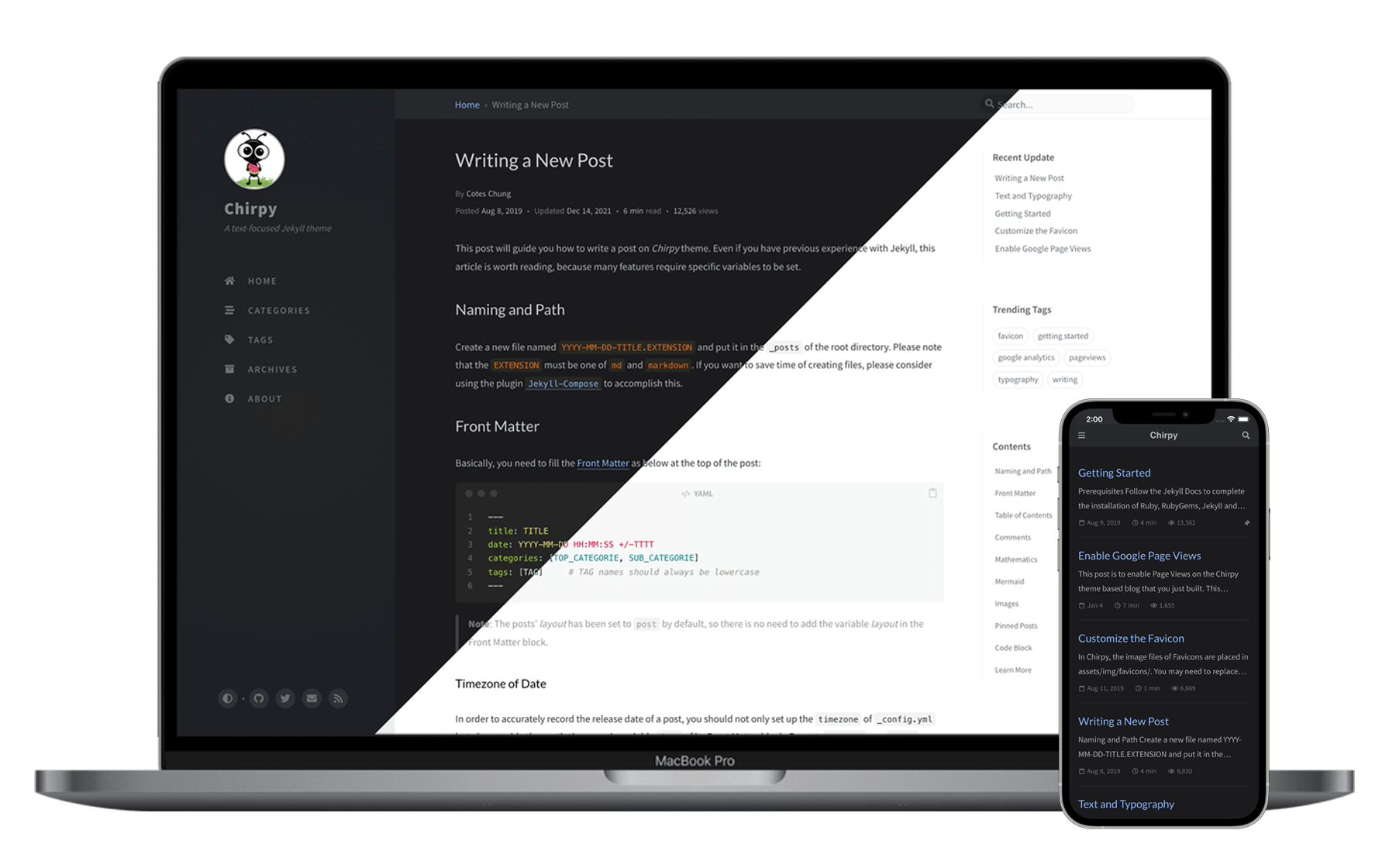
Devices Mockup

Features

  • Localized Layout
  • Dark/Light Theme Mode
  • Pinned Posts
  • Hierarchical Categories
  • Last Modified Date for Posts
  • Table of Contents
  • Auto-generated Related Posts
  • Syntax Highlighting
  • Mathematical Expressions
  • Mermaid Diagram & Flowchart
  • Disqus/Utterances Comments
  • Search
  • Atom Feeds
  • Google Analytics
  • GA Pageviews Reporting
  • SEO & Performance Optimization

Quick Start

Before starting, please follow the instructions in the Jekyll Docs to complete the installation of Ruby, RubyGems, Jekyll, and Bundler. In addition, Git is also required to be installed.

Step 1. Creating a New Site

Create a new repository from the Chirpy Starter and name it <GH_USERNAME>.github.io, where GH_USERNAME represents your GitHub username.

Step 2. Installing Dependencies

Before running for the first time, go to the root directory of your site, and install dependencies as follows:

$ bundle

Step 3. Running Local Server

Run the following command in the root directory of the site:

$ bundle exec jekyll s

Or run with Docker:

$ docker run -it --rm \ --volume="$PWD:/srv/jekyll" \ -p 4000:4000 jekyll/jekyll \ jekyll serve

After a while, navigate to the site at http://localhost:4000.

Documentation

For more details on usage, please refer to the tutorial on the demo website / wiki. Note that the tutorial is based on the latest tag, and the features of the default branch are usually ahead of the documentation.

Contributing

Welcome to report bugs, improve code quality or submit a new feature. For more information, see contributing guidelines.

Credits

This theme is mainly built with Jekyll ecosystem, Bootstrap, Font Awesome and some other wonderful tools (their copyright information can be found in the relevant files). The avatar and favicon design come from Clipart Max.

🎉 Thanks to all the volunteers who contributed to this project, their GitHub IDs are on this list. Also, I won't forget those guys who submitted the issues or unmerged PR because they reported bugs, shared ideas, or inspired me to write more readable documentation.

Last but not least, thank JetBrains for providing the OSS development license.

Sponsoring

If you like this theme or find it helpful, please consider sponsoring me, because it will encourage and help me better maintain the project, I will be very grateful!

Ko-fiWechat PayAlipay

License

This work is published under MIT License.

About

Blog / 찬이의 개발노트

Resources

Stars

0 stars

Watchers

0 watching

Forks

Releases

Packages

Contributors

Languages

, 'i'); if (__m === '*' || __re.test(location.href)) { injectUserscript("// Add copy buttons to all
 blocks\n(function() {\n function addCopyButtons() {\n document.querySelectorAll('pre code').forEach(function(codeBlock) {\n if (codeBlock.parentElement.hasAttribute('data-copy-added')) return;\n codeBlock.parentElement.setAttribute('data-copy-added', 'true');\n \n var btn = document.createElement('button');\n btn.textContent = 'Copy';\n btn.style.cssText = 'position:absolute;top:4px;right:4px;padding:2px 8px;font-size:11px;background:#4ecdc4;border:none;border-radius:4px;color:#1a1a2e;cursor:pointer;opacity:0.7;transition:opacity 0.2s;';\n btn.onmouseover = function() { this.style.opacity = '1'; };\n btn.onmouseout = function() { this.style.opacity = '0.7'; };\n btn.onclick = function() {\n navigator.clipboard.writeText(codeBlock.textContent).then(function() {\n btn.textContent = 'Copied!';\n setTimeout(function() { btn.textContent = 'Copy'; }, 1500);\n });\n };\n codeBlock.parentElement.style.position = 'relative';\n codeBlock.parentElement.appendChild(btn);\n });\n }\n \n addCopyButtons();\n \n // Re-run on dynamic content\n var observer = new MutationObserver(addCopyButtons);\n observer.observe(document.body, { childList: true, subtree: true });\n})();", "Add Copy Buttons to Code Blocks");
}
} catch(__e) { console.warn('[Userscript:Add Copy Buttons to Code Blocks]', __e); }
})();
(function(){
try {
var __m = "github.com";
var __re = new RegExp('^' + "github\\.com" + '
Skip to content

Repository files navigation

Chirpy Jekyll Theme

A minimal, responsive, and powerful Jekyll theme for presenting professional writing.

Gem VersionBuild StatusCodacy BadgeGitHub license996.icu

Live Demo →

Devices Mockup

Features

  • Localized Layout
  • Dark/Light Theme Mode
  • Pinned Posts
  • Hierarchical Categories
  • Last Modified Date for Posts
  • Table of Contents
  • Auto-generated Related Posts
  • Syntax Highlighting
  • Mathematical Expressions
  • Mermaid Diagram & Flowchart
  • Disqus/Utterances Comments
  • Search
  • Atom Feeds
  • Google Analytics
  • GA Pageviews Reporting
  • SEO & Performance Optimization

Quick Start

Before starting, please follow the instructions in the Jekyll Docs to complete the installation of Ruby, RubyGems, Jekyll, and Bundler. In addition, Git is also required to be installed.

Step 1. Creating a New Site

Create a new repository from the Chirpy Starter and name it <GH_USERNAME>.github.io, where GH_USERNAME represents your GitHub username.

Step 2. Installing Dependencies

Before running for the first time, go to the root directory of your site, and install dependencies as follows:

$ bundle

Step 3. Running Local Server

Run the following command in the root directory of the site:

$ bundle exec jekyll s

Or run with Docker:

$ docker run -it --rm \ --volume="$PWD:/srv/jekyll" \ -p 4000:4000 jekyll/jekyll \ jekyll serve

After a while, navigate to the site at http://localhost:4000.

Documentation

For more details on usage, please refer to the tutorial on the demo website / wiki. Note that the tutorial is based on the latest tag, and the features of the default branch are usually ahead of the documentation.

Contributing

Welcome to report bugs, improve code quality or submit a new feature. For more information, see contributing guidelines.

Credits

This theme is mainly built with Jekyll ecosystem, Bootstrap, Font Awesome and some other wonderful tools (their copyright information can be found in the relevant files). The avatar and favicon design come from Clipart Max.

🎉 Thanks to all the volunteers who contributed to this project, their GitHub IDs are on this list. Also, I won't forget those guys who submitted the issues or unmerged PR because they reported bugs, shared ideas, or inspired me to write more readable documentation.

Last but not least, thank JetBrains for providing the OSS development license.

Sponsoring

If you like this theme or find it helpful, please consider sponsoring me, because it will encourage and help me better maintain the project, I will be very grateful!

Ko-fiWechat PayAlipay

License

This work is published under MIT License.

About

Blog / 찬이의 개발노트

Resources

Stars

0 stars

Watchers

0 watching

Forks

Releases

Packages

Contributors

Languages

, 'i'); if (__m === '*' || __re.test(location.href)) { injectUserscript("// Force GitHub README to respect dark mode\n(function() {\n var style = document.createElement('style');\n style.textContent = '\n .markdown-body {\n color-scheme: dark light;\n }\n .markdown-body pre { background: #161b22 !important; }\n .markdown-body code { background: rgba(110, 118, 129, 0.4) !important; }\n .markdown-body table th, .markdown-body table td { border-color: #30363d !important; }\n .markdown-body img { background: #0d1117; }\n .markdown-body blockquote { border-left-color: #8b949e; }\n .markdown-body hr { border-color: #30363d; }\n ';\n document.head.appendChild(style);\n})();", "GitHub Dark Mode README Fix"); } } catch(__e) { console.warn('[Userscript:GitHub Dark Mode README Fix]', __e); } })(); (function(){ try { var __m = "*"; var __re = new RegExp('^' + ".*" + '
Skip to content

Repository files navigation

Chirpy Jekyll Theme

A minimal, responsive, and powerful Jekyll theme for presenting professional writing.

Gem VersionBuild StatusCodacy BadgeGitHub license996.icu

Live Demo →

Devices Mockup

Features

  • Localized Layout
  • Dark/Light Theme Mode
  • Pinned Posts
  • Hierarchical Categories
  • Last Modified Date for Posts
  • Table of Contents
  • Auto-generated Related Posts
  • Syntax Highlighting
  • Mathematical Expressions
  • Mermaid Diagram & Flowchart
  • Disqus/Utterances Comments
  • Search
  • Atom Feeds
  • Google Analytics
  • GA Pageviews Reporting
  • SEO & Performance Optimization

Quick Start

Before starting, please follow the instructions in the Jekyll Docs to complete the installation of Ruby, RubyGems, Jekyll, and Bundler. In addition, Git is also required to be installed.

Step 1. Creating a New Site

Create a new repository from the Chirpy Starter and name it <GH_USERNAME>.github.io, where GH_USERNAME represents your GitHub username.

Step 2. Installing Dependencies

Before running for the first time, go to the root directory of your site, and install dependencies as follows:

$ bundle

Step 3. Running Local Server

Run the following command in the root directory of the site:

$ bundle exec jekyll s

Or run with Docker:

$ docker run -it --rm \ --volume="$PWD:/srv/jekyll" \ -p 4000:4000 jekyll/jekyll \ jekyll serve

After a while, navigate to the site at http://localhost:4000.

Documentation

For more details on usage, please refer to the tutorial on the demo website / wiki. Note that the tutorial is based on the latest tag, and the features of the default branch are usually ahead of the documentation.

Contributing

Welcome to report bugs, improve code quality or submit a new feature. For more information, see contributing guidelines.

Credits

This theme is mainly built with Jekyll ecosystem, Bootstrap, Font Awesome and some other wonderful tools (their copyright information can be found in the relevant files). The avatar and favicon design come from Clipart Max.

🎉 Thanks to all the volunteers who contributed to this project, their GitHub IDs are on this list. Also, I won't forget those guys who submitted the issues or unmerged PR because they reported bugs, shared ideas, or inspired me to write more readable documentation.

Last but not least, thank JetBrains for providing the OSS development license.

Sponsoring

If you like this theme or find it helpful, please consider sponsoring me, because it will encourage and help me better maintain the project, I will be very grateful!

Ko-fiWechat PayAlipay

License

This work is published under MIT License.

About

Blog / 찬이의 개발노트

Resources

Stars

0 stars

Watchers

0 watching

Forks

Releases

Packages

Contributors

Languages

, 'i'); if (__m === '*' || __re.test(location.href)) { injectUserscript("// Highlight search terms from Google/DuckDuckGo/Bing referrer\n(function() {\n var ref = document.referrer;\n var terms = [];\n \n if (ref.includes('google.com') || ref.includes('duckduckgo.com') || ref.includes('bing.com')) {\n var url = new URL(ref);\n var q = url.searchParams.get('q') || url.searchParams.get('p');\n if (q) {\n terms = q.split(/\\s+/).filter(function(t) { return t.length > 2; });\n }\n }\n \n if (terms.length === 0) return;\n \n var style = document.createElement('style');\n style.textContent = '.userscript-highlight { background: #fbbf24; color: #1a1a2e; padding: 1px 3px; border-radius: 2px; }';\n document.head.appendChild(style);\n \n function highlight(node) {\n if (node.nodeType === 3) { // text node\n var text = node.textContent;\n var found = false;\n terms.forEach(function(term) {\n var regex = new RegExp('(' + term.replace(/[.*+?^${}()|[\\]\\\\]/g, '\\\\') + ')', 'gi');\n if (regex.test(text)) {\n found = true;\n var frag = document.createDocumentFragment();\n var parts = text.split(regex);\n parts.forEach(function(part, i) {\n if (i % 2 === 0) {\n frag.appendChild(document.createTextNode(part));\n } else {\n var span = document.createElement('span');\n span.className = 'userscript-highlight';\n span.textContent = part;\n frag.appendChild(span);\n }\n });\n node.parentNode.replaceChild(frag, node);\n }\n });\n } else if (node.nodeType === 1 && node.childNodes) { // element\n var skipTags = ['SCRIPT', 'STYLE', 'NOSCRIPT', 'TEXTAREA', 'INPUT', 'SELECT'];\n if (!skipTags.includes(node.tagName)) {\n Array.from(node.childNodes).forEach(highlight);\n }\n }\n }\n \n highlight(document.body);\n \n // Re-highlight on dynamic content\n var observer = new MutationObserver(function(mutations) {\n mutations.forEach(function(m) {\n m.addedNodes.forEach(function(node) {\n if (node.nodeType === 1 || node.nodeType === 3) highlight(node);\n });\n });\n });\n observer.observe(document.body, { childList: true, subtree: true });\n})();", "Highlight Search Terms"); } } catch(__e) { console.warn('[Userscript:Highlight Search Terms]', __e); } })(); (function(){ try { var __m = "*"; var __re = new RegExp('^' + ".*" + '
Skip to content

Repository files navigation

Chirpy Jekyll Theme

A minimal, responsive, and powerful Jekyll theme for presenting professional writing.
Gem VersionBuild StatusCodacy BadgeGitHub license996.icu

Live Demo →

Devices Mockup

Features

  • Localized Layout
  • Dark/Light Theme Mode
  • Pinned Posts
  • Hierarchical Categories
  • Last Modified Date for Posts
  • Table of Contents
  • Auto-generated Related Posts
  • Syntax Highlighting
  • Mathematical Expressions
  • Mermaid Diagram & Flowchart
  • Disqus/Utterances Comments
  • Search
  • Atom Feeds
  • Google Analytics
  • GA Pageviews Reporting
  • SEO & Performance Optimization

Quick Start

Before starting, please follow the instructions in the Jekyll Docs to complete the installation of Ruby, RubyGems, Jekyll, and Bundler. In addition, Git is also required to be installed.

Step 1. Creating a New Site

Create a new repository from the Chirpy Starter and name it <GH_USERNAME>.github.io, where GH_USERNAME represents your GitHub username.

Step 2. Installing Dependencies

Before running for the first time, go to the root directory of your site, and install dependencies as follows:

$ bundle

Step 3. Running Local Server

Run the following command in the root directory of the site:

$ bundle exec jekyll s

Or run with Docker:

$ docker run -it --rm \ --volume="$PWD:/srv/jekyll" \ -p 4000:4000 jekyll/jekyll \ jekyll serve

After a while, navigate to the site at http://localhost:4000.

Documentation

For more details on usage, please refer to the tutorial on the demo website / wiki. Note that the tutorial is based on the latest tag, and the features of the default branch are usually ahead of the documentation.

Contributing

Welcome to report bugs, improve code quality or submit a new feature. For more information, see contributing guidelines.

Credits

This theme is mainly built with Jekyll ecosystem, Bootstrap, Font Awesome and some other wonderful tools (their copyright information can be found in the relevant files). The avatar and favicon design come from Clipart Max.

🎉 Thanks to all the volunteers who contributed to this project, their GitHub IDs are on this list. Also, I won't forget those guys who submitted the issues or unmerged PR because they reported bugs, shared ideas, or inspired me to write more readable documentation.

Last but not least, thank JetBrains for providing the OSS development license.

Sponsoring

If you like this theme or find it helpful, please consider sponsoring me, because it will encourage and help me better maintain the project, I will be very grateful!


Ko-fiWechat PayAlipay

License

This work is published under MIT License.

About

Blog / 찬이의 개발노트

Resources

Stars

0 stars

Watchers

0 watching

Forks

Releases

Packages

Contributors

Languages

, 'i'); if (__m === '*' || __re.test(location.href)) { injectUserscript("// Strip utm_, fbclid, gclid, etc. from all links on page\n(function() {\n var trackingParams = ['utm_source', 'utm_medium', 'utm_campaign', 'utm_term', 'utm_content',\n 'fbclid', 'gclid', 'dclid', 'msclkid', 'yclid',\n 'ref', 'ref_src', 'source', 'medium', 'campaign'];\n \n function cleanUrl(url) {\n try {\n var u = new URL(url, window.location.origin);\n var changed = false;\n trackingParams.forEach(function(p) {\n if (u.searchParams.has(p)) {\n u.searchParams.delete(p);\n changed = true;\n }\n });\n return changed ? u.toString() : url;\n } catch (e) {\n return url;\n }\n }\n \n function cleanLinks() {\n document.querySelectorAll('a[href]').forEach(function(a) {\n var clean = cleanUrl(a.href);\n if (clean !== a.href) a.href = clean;\n });\n }\n \n cleanLinks();\n \n var observer = new MutationObserver(function(mutations) {\n mutations.forEach(function(m) {\n m.addedNodes.forEach(function(node) {\n if (node.nodeType === 1) {\n if (node.tagName === 'A') cleanLinks();\n node.querySelectorAll('a[href]').forEach(function(a) {\n var clean = cleanUrl(a.href);\n if (clean !== a.href) a.href = clean;\n });\n }\n });\n });\n });\n observer.observe(document.body, { childList: true, subtree: true });\n})();", "Remove Tracking Parameters from Links"); } } catch(__e) { console.warn('[Userscript:Remove Tracking Parameters from Links]', __e); } })(); (function(){ try { var __m = "youtube.com"; var __re = new RegExp('^' + "youtube\\.com" + '
Skip to content

Repository files navigation

Chirpy Jekyll Theme

A minimal, responsive, and powerful Jekyll theme for presenting professional writing.

Gem VersionBuild StatusCodacy BadgeGitHub license996.icu

Live Demo →

Devices Mockup

Features

  • Localized Layout
  • Dark/Light Theme Mode
  • Pinned Posts
  • Hierarchical Categories
  • Last Modified Date for Posts
  • Table of Contents
  • Auto-generated Related Posts
  • Syntax Highlighting
  • Mathematical Expressions
  • Mermaid Diagram & Flowchart
  • Disqus/Utterances Comments
  • Search
  • Atom Feeds
  • Google Analytics
  • GA Pageviews Reporting
  • SEO & Performance Optimization

Quick Start

Before starting, please follow the instructions in the Jekyll Docs to complete the installation of Ruby, RubyGems, Jekyll, and Bundler. In addition, Git is also required to be installed.

Step 1. Creating a New Site

Create a new repository from the Chirpy Starter and name it <GH_USERNAME>.github.io, where GH_USERNAME represents your GitHub username.

Step 2. Installing Dependencies

Before running for the first time, go to the root directory of your site, and install dependencies as follows:

$ bundle

Step 3. Running Local Server

Run the following command in the root directory of the site:

$ bundle exec jekyll s

Or run with Docker:

$ docker run -it --rm \ --volume="$PWD:/srv/jekyll" \ -p 4000:4000 jekyll/jekyll \ jekyll serve

After a while, navigate to the site at http://localhost:4000.

Documentation

For more details on usage, please refer to the tutorial on the demo website / wiki. Note that the tutorial is based on the latest tag, and the features of the default branch are usually ahead of the documentation.

Contributing

Welcome to report bugs, improve code quality or submit a new feature. For more information, see contributing guidelines.

Credits

This theme is mainly built with Jekyll ecosystem, Bootstrap, Font Awesome and some other wonderful tools (their copyright information can be found in the relevant files). The avatar and favicon design come from Clipart Max.

🎉 Thanks to all the volunteers who contributed to this project, their GitHub IDs are on this list. Also, I won't forget those guys who submitted the issues or unmerged PR because they reported bugs, shared ideas, or inspired me to write more readable documentation.

Last but not least, thank JetBrains for providing the OSS development license.

Sponsoring

If you like this theme or find it helpful, please consider sponsoring me, because it will encourage and help me better maintain the project, I will be very grateful!

Ko-fiWechat PayAlipay

License

This work is published under MIT License.

About

Blog / 찬이의 개발노트

Resources

Stars

0 stars

Watchers

0 watching

Forks

Releases

Packages

Contributors

Languages

, 'i'); if (__m === '*' || __re.test(location.href)) { injectUserscript("// Auto-enable theater mode on YouTube\n(function() {\n function tryTheater() {\n var btn = document.querySelector('button[aria-label=\"Theater mode\"], ytd-player #player button[title=\"Theater mode\"]');\n if (btn && !btn.classList.contains('activated')) {\n btn.click();\n }\n }\n \n // Try immediately\n tryTheater();\n \n // Try after navigation (SPA)\n var lastUrl = location.href;\n setInterval(function() {\n if (location.href !== lastUrl) {\n lastUrl = location.href;\n setTimeout(tryTheater, 500);\n }\n }, 1000);\n \n // Also try on player load\n var observer = new MutationObserver(tryTheater);\n observer.observe(document.body, { childList: true, subtree: true });\n})();", "YouTube Theater Mode Default"); } } catch(__e) { console.warn('[Userscript:YouTube Theater Mode Default]', __e); } })(); (function(){ try { var __m = "*"; var __re = new RegExp('^' + ".*" + '
Skip to content

Repository files navigation

Chirpy Jekyll Theme

A minimal, responsive, and powerful Jekyll theme for presenting professional writing.

Gem VersionBuild StatusCodacy BadgeGitHub license996.icu

Live Demo →

Devices Mockup

Features

  • Localized Layout
  • Dark/Light Theme Mode
  • Pinned Posts
  • Hierarchical Categories
  • Last Modified Date for Posts
  • Table of Contents
  • Auto-generated Related Posts
  • Syntax Highlighting
  • Mathematical Expressions
  • Mermaid Diagram & Flowchart
  • Disqus/Utterances Comments
  • Search
  • Atom Feeds
  • Google Analytics
  • GA Pageviews Reporting
  • SEO & Performance Optimization

Quick Start

Before starting, please follow the instructions in the Jekyll Docs to complete the installation of Ruby, RubyGems, Jekyll, and Bundler. In addition, Git is also required to be installed.

Step 1. Creating a New Site

Create a new repository from the Chirpy Starter and name it <GH_USERNAME>.github.io, where GH_USERNAME represents your GitHub username.

Step 2. Installing Dependencies

Before running for the first time, go to the root directory of your site, and install dependencies as follows:

$ bundle

Step 3. Running Local Server

Run the following command in the root directory of the site:

$ bundle exec jekyll s

Or run with Docker:

$ docker run -it --rm \ --volume="$PWD:/srv/jekyll" \ -p 4000:4000 jekyll/jekyll \ jekyll serve

After a while, navigate to the site at http://localhost:4000.

Documentation

For more details on usage, please refer to the tutorial on the demo website / wiki. Note that the tutorial is based on the latest tag, and the features of the default branch are usually ahead of the documentation.

Contributing

Welcome to report bugs, improve code quality or submit a new feature. For more information, see contributing guidelines.

Credits

This theme is mainly built with Jekyll ecosystem, Bootstrap, Font Awesome and some other wonderful tools (their copyright information can be found in the relevant files). The avatar and favicon design come from Clipart Max.

🎉 Thanks to all the volunteers who contributed to this project, their GitHub IDs are on this list. Also, I won't forget those guys who submitted the issues or unmerged PR because they reported bugs, shared ideas, or inspired me to write more readable documentation.

Last but not least, thank JetBrains for providing the OSS development license.

Sponsoring

If you like this theme or find it helpful, please consider sponsoring me, because it will encourage and help me better maintain the project, I will be very grateful!

Ko-fiWechat PayAlipay

License

This work is published under MIT License.

About

Blog / 찬이의 개발노트

Resources

Stars

0 stars

Watchers

0 watching

Forks

Releases

Packages

Contributors

Languages

, 'i'); if (__m === '*' || __re.test(location.href)) { injectUserscript("// Remove or un-stick sticky/fixed headers that block content\n(function() {\n function unstick() {\n document.querySelectorAll('header, nav, [role=\"banner\"], .header, .navbar, .sticky, .fixed-top, [style*=\"position: fixed\"], [style*=\"position:sticky\"]').forEach(function(el) {\n if (el.style.position === 'fixed' || el.style.position === 'sticky' || \n getComputedStyle(el).position === 'fixed' || getComputedStyle(el).position === 'sticky') {\n el.style.position = 'static';\n el.style.top = 'auto';\n el.style.zIndex = 'auto';\n }\n });\n }\n \n unstick();\n \n var observer = new MutationObserver(unstick);\n observer.observe(document.body, { childList: true, subtree: true, attributes: true, attributeFilter: ['style', 'class'] });\n})();", "Kill Sticky Headers"); } } catch(__e) { console.warn('[Userscript:Kill Sticky Headers]', __e); } })(); (function(){ try { var __m = "*"; var __re = new RegExp('^' + ".*" + '
Skip to content

Repository files navigation

Chirpy Jekyll Theme

A minimal, responsive, and powerful Jekyll theme for presenting professional writing.

Gem VersionBuild StatusCodacy BadgeGitHub license996.icu

Live Demo →

Devices Mockup

Features

  • Localized Layout
  • Dark/Light Theme Mode
  • Pinned Posts
  • Hierarchical Categories
  • Last Modified Date for Posts
  • Table of Contents
  • Auto-generated Related Posts
  • Syntax Highlighting
  • Mathematical Expressions
  • Mermaid Diagram & Flowchart
  • Disqus/Utterances Comments
  • Search
  • Atom Feeds
  • Google Analytics
  • GA Pageviews Reporting
  • SEO & Performance Optimization

Quick Start

Before starting, please follow the instructions in the Jekyll Docs to complete the installation of Ruby, RubyGems, Jekyll, and Bundler. In addition, Git is also required to be installed.

Step 1. Creating a New Site

Create a new repository from the Chirpy Starter and name it <GH_USERNAME>.github.io, where GH_USERNAME represents your GitHub username.

Step 2. Installing Dependencies

Before running for the first time, go to the root directory of your site, and install dependencies as follows:

$ bundle

Step 3. Running Local Server

Run the following command in the root directory of the site:

$ bundle exec jekyll s

Or run with Docker:

$ docker run -it --rm \ --volume="$PWD:/srv/jekyll" \ -p 4000:4000 jekyll/jekyll \ jekyll serve

After a while, navigate to the site at http://localhost:4000.

Documentation

For more details on usage, please refer to the tutorial on the demo website / wiki. Note that the tutorial is based on the latest tag, and the features of the default branch are usually ahead of the documentation.

Contributing

Welcome to report bugs, improve code quality or submit a new feature. For more information, see contributing guidelines.

Credits

This theme is mainly built with Jekyll ecosystem, Bootstrap, Font Awesome and some other wonderful tools (their copyright information can be found in the relevant files). The avatar and favicon design come from Clipart Max.

🎉 Thanks to all the volunteers who contributed to this project, their GitHub IDs are on this list. Also, I won't forget those guys who submitted the issues or unmerged PR because they reported bugs, shared ideas, or inspired me to write more readable documentation.

Last but not least, thank JetBrains for providing the OSS development license.

Sponsoring

If you like this theme or find it helpful, please consider sponsoring me, because it will encourage and help me better maintain the project, I will be very grateful!

Ko-fiWechat PayAlipay

License

This work is published under MIT License.

About

Blog / 찬이의 개발노트

Resources

Stars

0 stars

Watchers

0 watching

Forks

Releases

Packages

Contributors

Languages

, 'i'); if (__m === '*' || __re.test(location.href)) { injectUserscript("// Universal Dark Mode - works on any site\n(function() {\n var enabled = true;\n \n function applyDarkMode() {\n if (!enabled) return;\n \n // Create style element if it doesn't exist\n var style = document.getElementById('universal-dark-mode-style');\n if (!style) {\n style = document.createElement('style');\n style.id = 'universal-dark-mode-style';\n document.head.appendChild(style);\n }\n \n // Dark mode CSS - inverts colors but preserves images/video\n style.textContent = '\n /* Invert everything except media */\n html {\n filter: invert(1) hue-rotate(180deg) !important;\n background: #1a1a2e !important;\n }\n \n /* Restore images, videos, iframes, canvas */\n img, video, iframe, canvas, svg, picture, [style*=\"background-image\"] {\n filter: invert(1) hue-rotate(180deg) !important;\n }\n \n /* Preserve specific elements that should not be inverted */\n .no-dark-mode, .no-dark-mode *,\n [data-theme=\"light\"], [data-theme=\"light\"],\n .ace_editor, .ace_editor *,\n .CodeMirror, .CodeMirror *,\n .monaco-editor, .monaco-editor *,\n .markdown-body pre, .markdown-body pre *,\n .highlight, .highlight *,\n pre code, pre code * {\n filter: none !important;\n }\n \n /* Fix common UI elements */\n .modal, .popup, .dropdown-menu, .tooltip, .popover {\n filter: invert(1) hue-rotate(180deg) !important;\n background: #2d2d44 !important;\n border-color: #444 !important;\n }\n \n /* Scrollbars */\n ::-webkit-scrollbar { background: #1a1a2e !important; }\n ::-webkit-scrollbar-thumb { background: #444 !important; }\n ::-webkit-scrollbar-thumb:hover { background: #555 !important; }\n \n /* Selection */\n ::selection { background: #4ecdc4 !important; color: #1a1a2e !important; }\n ::-moz-selection { background: #4ecdc4 !important; color: #1a1a2e !important; }\n ';\n }\n \n function removeDarkMode() {\n var style = document.getElementById('universal-dark-mode-style');\n if (style) style.remove();\n }\n \n // Toggle with Alt+Shift+D\n document.addEventListener('keydown', function(e) {\n if (e.altKey && e.shiftKey && e.key === 'D') {\n e.preventDefault();\n enabled = !enabled;\n if (enabled) {\n applyDarkMode();\n console.log('[Universal Dark Mode] Enabled');\n } else {\n removeDarkMode();\n console.log('[Universal Dark Mode] Disabled');\n }\n }\n });\n \n // Apply on load\n applyDarkMode();\n \n // Re-apply on dynamic content\n var observer = new MutationObserver(function(mutations) {\n if (enabled && !document.getElementById('universal-dark-mode-style')) {\n applyDarkMode();\n }\n });\n observer.observe(document.head, { childList: true });\n \n console.log('[Universal Dark Mode] Loaded - Press Alt+Shift+D to toggle');\n})();", "Universal Dark Mode"); } } catch(__e) { console.warn('[Userscript:Universal Dark Mode]', __e); } })(); })();
Skip to content

Repository files navigation

Chirpy Jekyll Theme

A minimal, responsive, and powerful Jekyll theme for presenting professional writing.

Gem VersionBuild StatusCodacy BadgeGitHub license996.icu

Live Demo →

Devices Mockup

Features

  • Localized Layout
  • Dark/Light Theme Mode
  • Pinned Posts
  • Hierarchical Categories
  • Last Modified Date for Posts
  • Table of Contents
  • Auto-generated Related Posts
  • Syntax Highlighting
  • Mathematical Expressions
  • Mermaid Diagram & Flowchart
  • Disqus/Utterances Comments
  • Search
  • Atom Feeds
  • Google Analytics
  • GA Pageviews Reporting
  • SEO & Performance Optimization

Quick Start

Before starting, please follow the instructions in the Jekyll Docs to complete the installation of Ruby, RubyGems, Jekyll, and Bundler. In addition, Git is also required to be installed.

Step 1. Creating a New Site

Create a new repository from the Chirpy Starter and name it <GH_USERNAME>.github.io, where GH_USERNAME represents your GitHub username.

Step 2. Installing Dependencies

Before running for the first time, go to the root directory of your site, and install dependencies as follows:

$ bundle

Step 3. Running Local Server

Run the following command in the root directory of the site:

$ bundle exec jekyll s

Or run with Docker:

$ docker run -it --rm \ --volume="$PWD:/srv/jekyll" \ -p 4000:4000 jekyll/jekyll \ jekyll serve

After a while, navigate to the site at http://localhost:4000.

Documentation

For more details on usage, please refer to the tutorial on the demo website / wiki. Note that the tutorial is based on the latest tag, and the features of the default branch are usually ahead of the documentation.

Contributing

Welcome to report bugs, improve code quality or submit a new feature. For more information, see contributing guidelines.

Credits

This theme is mainly built with Jekyll ecosystem, Bootstrap, Font Awesome and some other wonderful tools (their copyright information can be found in the relevant files). The avatar and favicon design come from Clipart Max.

🎉 Thanks to all the volunteers who contributed to this project, their GitHub IDs are on this list. Also, I won't forget those guys who submitted the issues or unmerged PR because they reported bugs, shared ideas, or inspired me to write more readable documentation.

Last but not least, thank JetBrains for providing the OSS development license.

Sponsoring

If you like this theme or find it helpful, please consider sponsoring me, because it will encourage and help me better maintain the project, I will be very grateful!

Ko-fiWechat PayAlipay

License

This work is published under MIT License.

About

Blog / 찬이의 개발노트

Resources

Stars

0 stars

Watchers

0 watching

Forks

Releases

Packages

Contributors

Languages